

Submitted:
11 January 2025
Posted:
13 January 2025
You are already at the latest version
Abstract
Since 1997, the Organization for Human Brain Mapping (OHBM) Annual Meeting has provided a critical platform for sharing the latest developments in brain mapping. For over a decade OHBM has recorded presentations and made them accessible to its members through the OnDemand platform. As of 2024, this content is now openly and freely accessible to brain mapping enthusiasts worldwide - without the need to be a society member. Limited access to cutting-edge scientific content solely to paying members contradicts the longstanding ethos of OHBM, which has championed open science principles and practices for many years. In this paper, we introduce the OHBM Time Machine, a collaborative initiative undertaken by the Program, Education and Communications Committees of OHBM. The project seeks to create a free and permanent archive of all recorded Annual Meeting content, accessible to members and non-members alike. We outline the ongoing efforts to migrate all content dating back to 2013 to the OHBM YouTube channel and provide guidelines to support hosting future Annual Meeting recordings. Additionally, we discuss the benefits and challenges associated with this initiative, explaining why making this content publicly available will not diminish the value of attending the Annual Meetings. Instead, it is expected to enhance interest and awareness of OHBM as a world-leading organization of brain mapping experts. The OHBM Time Machine will provide an unparalleled educational resource, establishing a lasting record of scientific progress and the evolution of critical topics within the field of brain mapping.
Keywords:
OpenScience
; equity
; accessibility
; liberation of science
; brain mapping
; YouTube
Introduction
The Organization for Human Brain Mapping (OHBM) is a global society of scientists united to advance understanding of the human brain. OHBM has held an annual meeting since 1997 in Paris, where members have presented the latest research, shared fresh findings with colleagues and conducted high-quality educational courses. The scientific impact of such meetings has been immense, however, they are naturally limited in the number of people to whom information can be shared. Those who cannot or do not wish to travel to a given annual meeting, which rotates annually across the continents, would miss out on annual meeting content. Here we present the ‘OHBM Time Machine’ project, a collaboration between Program, Education and Communications Committees of OHBM to publicly release all recorded annual meeting content on the OHBM YouTube channel.
The Previous Status Quo: Paywalled Access to Conference Content
Since the early annual meetings, technological advancements have made recording and sharing meeting content possible and affordable. Starting in 2013, OHBM members have had access to recorded oral sessions, symposia, keynote lectures, and educational courses through an online platform called OnDemand. Video recordings provide additional information to scientific papers - with more content being critically contextualized by its presenters. Sharing such information is in line with the rise of the online landscape observed in education and science through social media, podcasts, and videos [1]. The OnDemand platform has proven valuable, with approximately 17,000 user visits across over 2,000 video recordings. With an annual membership of ~4k subscribers, the annual average of ~1,500 views, however, points toward some limitations of the system for the members and the obstacles to access from non-members.
The primary limitation is that content is only available to those with active membership to OHBM. As such, researchers who skip their membership in years they cannot commit to traveling temporarily lose access to previous meetings’ content. Furthermore, researchers outside the field and the general public never gain access. The limitation of sharing state-of-the-art scientific content only with paying members of the community is therefore at odds with the open, accessible ethos of OHBM and its community, which has been a strong voice for supporting open science, with an annual Open Science Award and a dedicated member-led Open Science Special Interest Group (SIG). Where possible, these videos should be available for free to as wide an audience as possible.
Secondly, maintaining a dedicated video server to store and share the growing number of video files imposes significant and escalating costs on OHBM, ultimately affecting its members. Raising membership fees to cover these costs would exacerbate inequalities in access to OHBM content. Due to the high cost of digital storage, content older than five or six years is already archived, making it inaccessible even to paying members.
To maintain OHBM’s missions of inclusivity, accessibility and equitability, content would ideally be available to all, regardless of financial or personal ability to travel to a physical conference or pay for membership, and including those who are simply curious to learn about our field [2,3]. The new system would allow for the expansion of shared content with no cost to the membership while maintaining the availability of older content rather than requiring the archiving of past years due to space restrictions.
The Future of Sharing Annual Meeting Content
Moving forward, all recorded content from past annual meetings will be posted to the OHBM YouTube channel (https://www.youtube.com/@ohbm). Furthermore, we will transfer all paywalled content on the OnDemand system (dating back to the 2013 annual meeting) onto the YouTube channel. With the ability to openly host unlimited content, this project will allow anyone (members and non-members) to travel back in time through the years of OHBM discoveries. This will generate an unprecedented resource of content to evaluate evolving concepts and the appearance, disappearance and advancement of ideas over time. We are calling this project the OHBM Time Machine. In this paper, we detail the processes and pipelines established for this project, viewership results from the initial batch of content covering the 2021–2024 OHBM Annual Meetings, and the expected benefits to and impacts on the OHBM and the broader scientific community.
Methods
Collecting Existing Data and Video URLs
To facilitate streamlined YouTube uploads for annual meeting content, a data spreadsheet was required containing all relevant information about each year, including columns that contain the desired YouTube title and description as well as a URL to the desired video in its present storage location (OnDemand, Dropbox, etc.). This spreadsheet was created where possible using automated processes, with different procedures required for different past annual meeting content due to varying formats of storage and availability.
OHBM annual meeting content between 2013 and 2021 has been stored and shared via the OnDemand system. We developed a script using Selenium, a web automation tool, to systematically extract video URLs and speaker and session information from the OnDemand platform. This automated process efficiently extracted multiple video URLs and associated metadata from the OnDemand system, reducing the need for manual navigation and data collection. The script was implemented in Python and utilized the Chrome WebDriver for browser automation. The main processes of this script are detailed below:
WebDriver Setup: A headless (no graphical interface) Chrome browser was initialized using Selenium to simulate user interactions without a visible browser interface. The WebDriver was configured with specific options to handle secure connections, prevent sandboxing issues (which can restrict browser functionality in isolated environments), and optimize performance in a headless environment.
Login Automation: The script navigated to the OnDemand platform’s login page, where login credentials were automatically submitted.
Course and Session Navigation: After login, the script iterated through a predefined list of URLs relating to each ‘Course’ (one ‘Course’ typically contained all content for a given year’s annual meeting). For each course, it navigated through the available sections (sessions and individual presentations). Elements on the page were located using CSS selectors and XPath queries to identify relevant video links and download buttons.
Video URL Extraction: Within each session or presentation page, the script located and extracted video URLs, contributor names, and other relevant metadata.
Toggle Download Permissions: When required, the script interacted with page controls (such as download switches) using JavaScript execution to enable download options where applicable.
Data Storage: Extracted data, including course titles, session titles, video titles, contributor names, and video URLs, was compiled into a structured format using Python’s pandas library and saved into a spreadsheet.
Additional columns were added to the spreadsheet output file using Microsoft Excel with formulae to concatenate and combine relevant information from each field and create columns containing the finalized YouTube title and description.
In 2022 and 2023, a virtual component of the conference was hosted on the FourWaves platform, which handled all video submissions. FourWaves functionality allowed for a straightforward exporting of all video files in the form of a spreadsheet containing all associated information, including speaker names, talk titles, abstracts, keywords, and, critically, URLs to each respective video file. Additional columns were added to these files using Microsoft Excel with formulae to concatenate and combine relevant information from each field and create columns containing the finalized YouTube title and description. Session names for the educational courses were not provided automatically by Fourwaves, so were collated and matched to talk titles manually from the annual meeting programs.
Finally, for 2024 videos, video files were stored in a Dropbox folder for each annual meeting session. A similar Python script using Selenium and Chrome WebDriver matched video titles to known presentation titles within each respective Dropbox folder and created the desired data spreadsheet as before.
Some manual review of the automatically created data spreadsheets was required to maintain consistency in naming conventions across years and to adhere to YouTube naming restrictions. For example, YouTube video titles and descriptions are limited to 100 and 5000 characters. This was never an issue for descriptions, but talk titles would regularly push this limit. For some talks—e.g., educational courses and keynote lectures—manually abridged titles were created. However, this was infeasible for most talks, so titles were automatically concatenated at the character limit and appended with an ellipsis.
Also, YouTube titles and descriptions do not accept ‘less than (<)’ or ‘greater than (>)’ symbols. These symbols appeared fairly frequently in talk abstracts, which formed part of the descriptions. To easily convert this text into a YouTube-compatible format, similar-looking but differently coded ‘full-width’ symbols (‘<’, ‘>’) are accepted and used instead using Excel’s ‘Find & Replace’ functionality.
Uploading Content to YouTube
Automated upload methods were implemented, given the large volume of videos that were uploaded to YouTube. After creating the data sheets, videos were uploaded using a custom Python script (v3.9.18) that interfaced with the YouTube Application Programming Interface (API). Google provides a template script and detailed instructions for uploading videos via the YouTube API [4].
For this project, we utilized an updated script compatible with Python 3+ (see ref [5] for the script, and ref [6] for a comprehensive video tutorial on using the YouTube API with Python). This script allows the calling of a function ‘upload_video.py’, which provides the ability to upload a video to a given (pre-authorised) YouTube channel with the following command:
python upload_video.py
- --file <video.mp4/URL>
- --title <title>
- --description <text>
- --keywords <comma separated keywords>
- --privacyStatus <unlisted/private/public>
- --category <value>
- --selfDeclaredMadeForKids <true/false>
- --notifySubscribers <true/false>
This function was placed within a wrapper script to read each row of the corresponding data spreadsheet, extracting appropriate fields for ‘file’, ‘title’ and ‘description’ flags. Some talks derived from Fourwaves content (2022-2023 annual meetings) were also included under the ‘keywords’ field. For all videos, ‘privacyStatus’ was set to ‘public’, and the YouTube ‘category’ was set to “28” (‘Science & Technology’). In compliance with YouTube’s requirements, the ‘selfDeclaredMadeForKids’ flag was consistently set to ‘false’, indicating that the videos were not specifically made for children. Additionally, the ‘notifySubscribers’ option was set to ‘false’ to prevent email and mobile notifications to subscribers, given the large volume of uploads.
By default, all new APIs are limited in two key ways. First, videos can only be uploaded in ‘private’ viewing mode. Second, API’s are limited in how much data they can access per day, represented by ‘tokens’. By default, new APIs are limited to 10,000 tokens per day. Uploading a video requires 1,600 tokens. To upload more than 6 videos per day and to upload in ‘public’ status, the API had to be audited (https://support.google.com/youtube/contact/yt_api_form). Following this approval, the quota limit was increased to a total of 260,000, providing a daily upload limit of 162 videos.
To improve the sustainability of this initiative, all codes are made available for this endeveour to be carried forward by the next generation of OHBMers. We aim to make the uploading of videos of the previous meeting a central goal of the program, educational, and communication committees.
Results
OHBM Time Machine Snapshot (as of 11/2024)
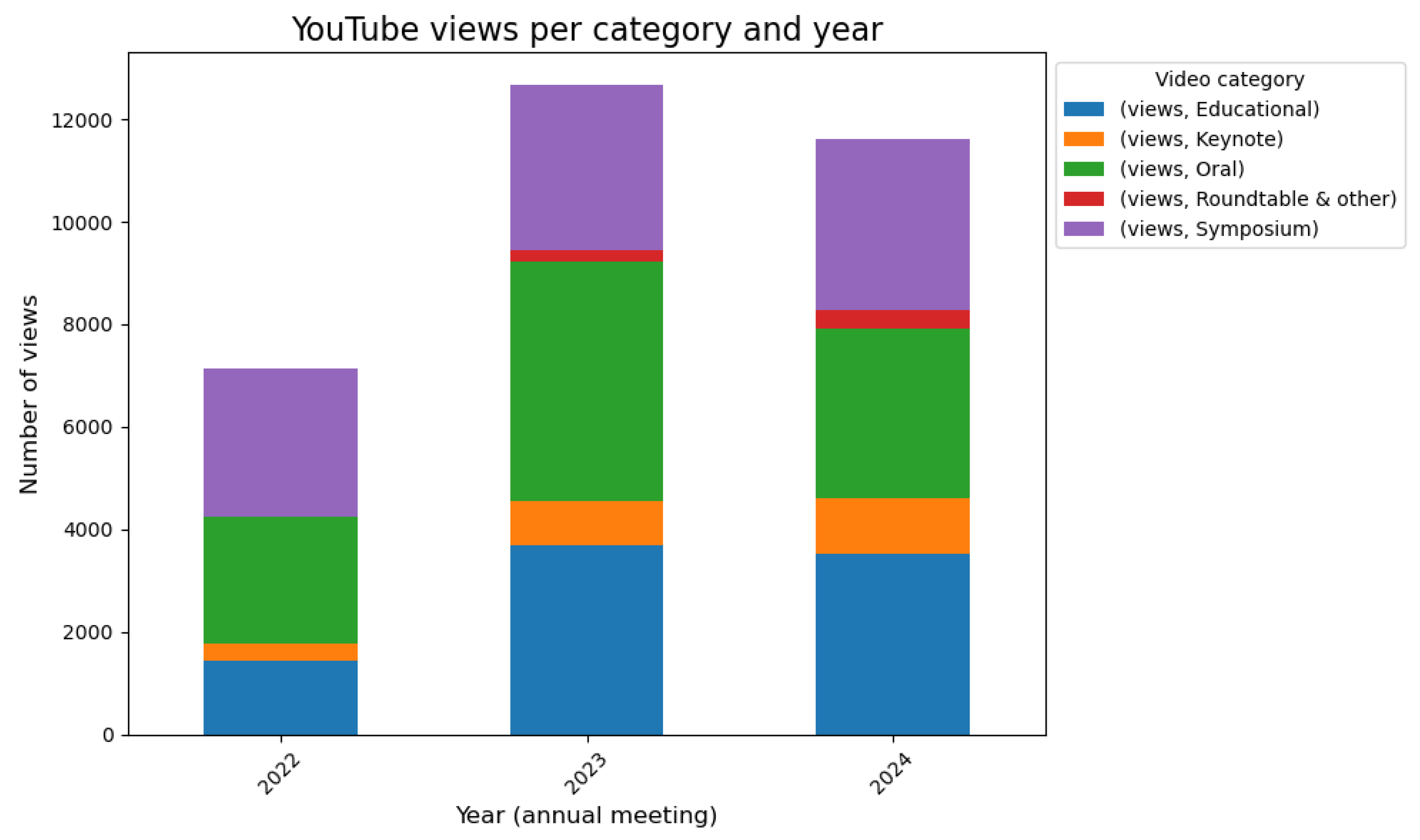
As of November 2024, the OHBM YouTube channel has around 2350 subscribers and has amassed over 100,000 views across over 1136 videos. Of these 1100 videos, 912 are from the Time Machine project from the 2022, 2023 and 2024 annual meetings, with older annual meeting content to be uploaded in 2025. The other 224 videos include the Neurosalience Podcast, interviews with selected leadership and promotional videos from previous years. From 2022 annual meeting content, 298 videos have been watched an average of 24 times each. For 2023 content, 276 videos have averaged 46 views per video. Finally, the latest upload of 2024 content, comprising 338 videos, has received 34 views per video despite being available to watch for only three months at the time of writing. Numbers of videos and views per year are displayed in Figure 1 and Figure 2, respectively.
Of these years, only 2022’s content was uploaded to OnDemand and can serve as a direct comparison point between the two platforms. 2022’s annual meeting content on the OnDemand platform reached 8.1 user visits per uploaded video, three times less than the YouTube content, despite content only being available on YouTube for a few months versus the 2 years on OnDemand. The 2021, 2020 and 2019 content received 16, 30 and 5 user visits per video, respectively, on the OnDemand platform. These metrics already demonstrate the effectiveness of the broader audience base on the YouTube platform compared to OnDemand.
Table 1 contains mean views per talk category for all Time Machine content uploaded so far (2022-2024). This shows that Keynotes are the most viewed, followed by educational course videos. Symposia, Oral Sessions and Roundtables all gather similar levels of viewership.

Table 1.
Statistics for YouTube videos by talk type. * Note: No Roundtable content was uploaded for 2022.
Table 1.
Statistics for YouTube videos by talk type. * Note: No Roundtable content was uploaded for 2022.
| Talk Type | Number of Videos | Mean Views Per Video (YouTube) |
|---|---|---|
| Keynote Lectures | 22 | 104 |
| Educational Courses | 209 | 41 |
| Symposia | 321 | 29 |
| Oral Sessions | 341 | 31 |
| Roundtable * | 19 | 30 |
Figure 1.
Number of YouTube videos per video category per OHBM Annual Meeting Year. Number of videos updated as of November 30, 2024.
Figure 1.
Number of YouTube videos per video category per OHBM Annual Meeting Year. Number of videos updated as of November 30, 2024.
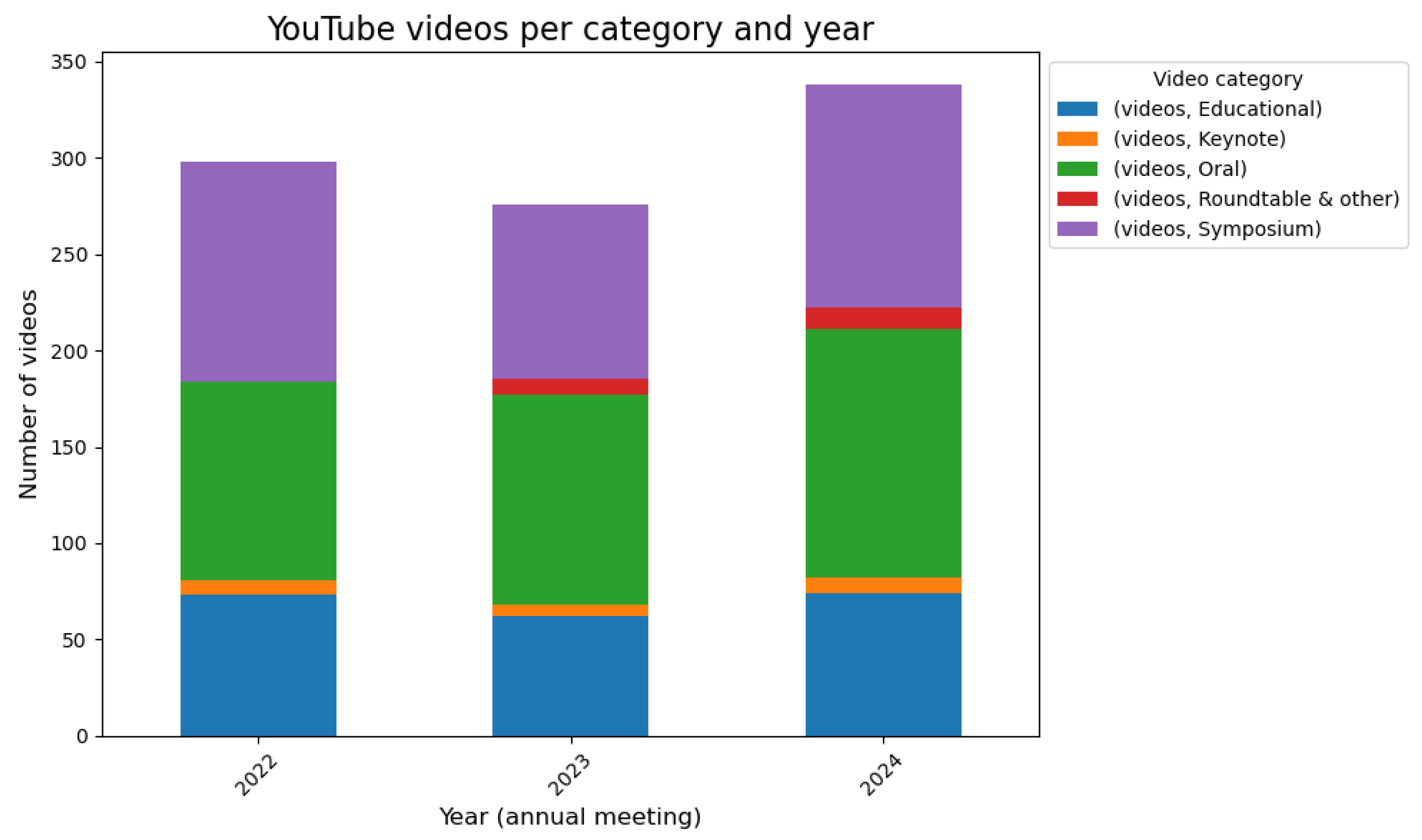
Figure 2.
Number of YouTube views per video category per OHBM Annual Meeting Year. Number of views updated as of November 30, 2024.
Figure 2.
Number of YouTube views per video category per OHBM Annual Meeting Year. Number of views updated as of November 30, 2024.
Demographics of YouTube Viewership over the Past Year
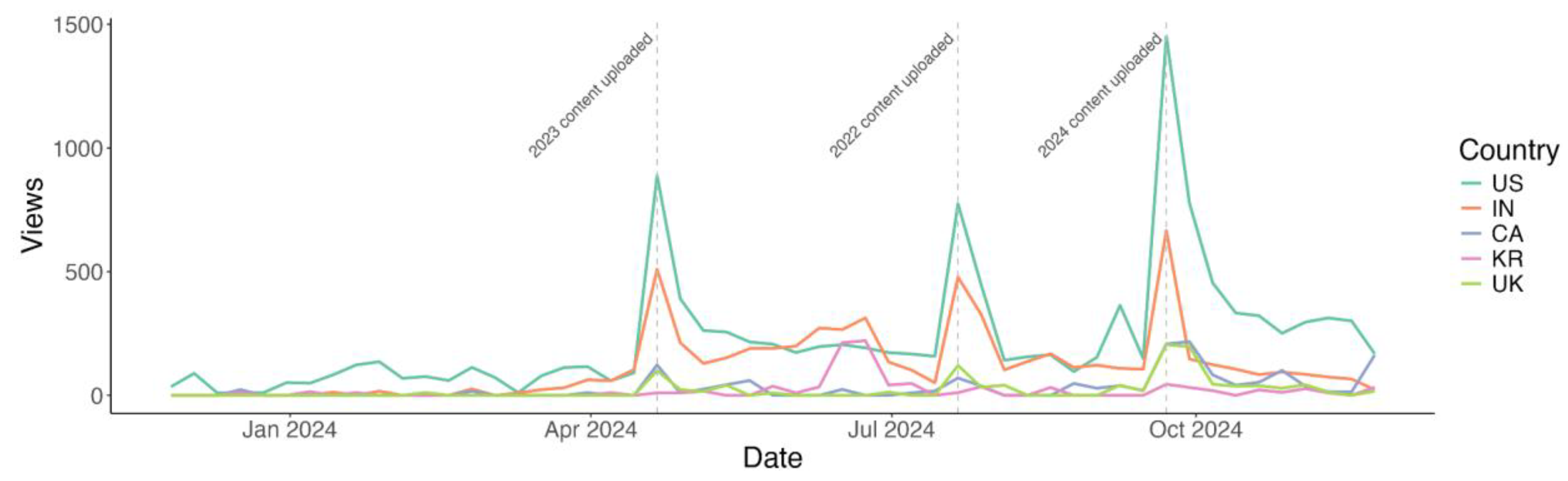
Between December 1st 2023, and November 29th 2024, the channel received 58,983 views. 20.4% of these were from the US, 10.5% from India, 2.6% from Canada, 1.9% from the United Kingdom and 1.7% from South Korea. The views from these countries are shown over time in Figure 3. A clear peak and increased baseline of views is visible following the upload of Time Machine content.
Figure 3.
| Weekly YouTube views over the past year in the top five countries by viewership. US = United States, IN = India, CA = Canada, KR = South Korea, UK = United Kingdom.
Figure 3.
| Weekly YouTube views over the past year in the top five countries by viewership. US = United States, IN = India, CA = Canada, KR = South Korea, UK = United Kingdom.
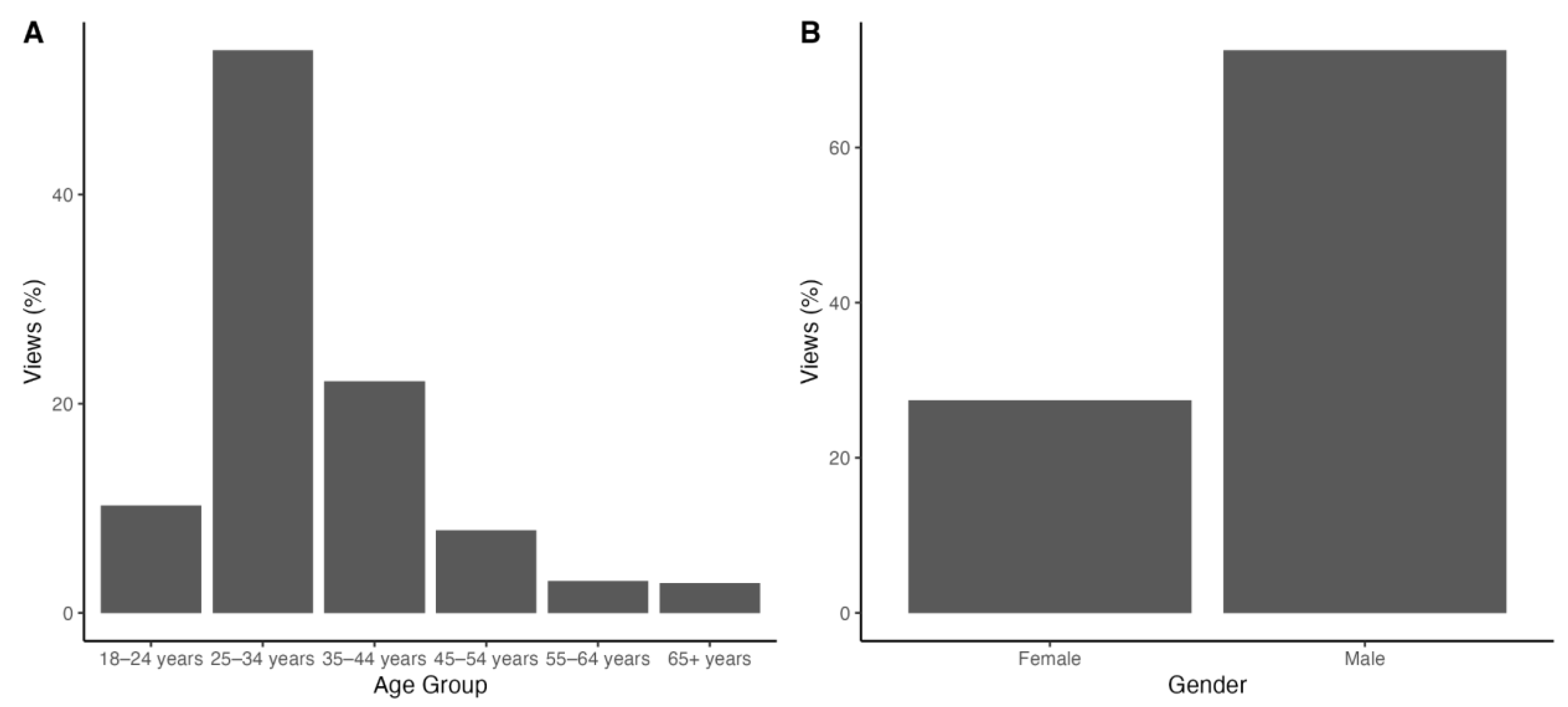
Most viewers in the same timeframe (51.0%) are within the 25–34 years age group. 23.1% of viewers are aged 35–44 and 11.3% are aged 18–24. A distribution of viewer ages can be seen in Figure 4A.
73.9% of our viewership on YouTube are male, with only 26.0% of views from female viewers (Figure 4B). User-specified genders accounted for less than 0.5% of views.
Figure 4.
Age and gender distributions for the YouTube channel viewership between December 1st 2023, and November 29th 2024.
Figure 4.
Age and gender distributions for the YouTube channel viewership between December 1st 2023, and November 29th 2024.
Discussion
Benefits
The OHBM Time Machine project is an ongoing project that has already demonstrated its value in providing impactful, accessible content to a broad and expanding audience base. Publicly available OHBM content expands the accessibility of OHBM expertise to individuals who could not attend the OHBM Annual Meeting due to geography, expense, family obligation, sustainability concerns [7] and other reasons [8,9]. Additionally, the impact beyond OHBM membership has even more tremendous potential. The advertisement of content expertise to people outside the active OHBM membership or in adjacent scientific fields further increases the standing of OHBM as a publicly known and respected organization of experts. Thinking further, journalists and others curious about brain mapping can access and cite our publicly available content. This may open new opportunities for Annual Meeting presenters to be contacted by science media, facilitating additional science outreach for the Organization’s many experts. YouTube has a robust recommendation engine, and as more content is uploaded and watched, the platform will share our channel’s content increasingly widely2.
YouTube also provides additional free benefits, including automated closed-caption subtitling, and highly detailed analytical information to assess viewership demographics. Advertising opportunities would also be considerably more accessible, as the public video platform serves as a ‘one-stop shop’ for all OHBM video content rather than having content split across different platforms. Of course, great care needs to be taken regarding if, how, and with whom OHBM introduces advertisements in our online content.
Because newly presented content will be uploaded after each Annual Meeting, the content will remain timely, addressing current topics, controversies, and breakthroughs in human brain mapping. However, open access to historical OHBM content also opens the door for a longitudinal review of concepts and methods in the field, allowing us to observe the evolution of particular topics and methods over time. The OHBM Communications Committee has several blog posts—spearheaded by Ilona Lipp—that synthesized related OHBM content into coherent conceptual reviews and how-to guides. However, while the Communications Committee blog posts were publicly available, links to video content were only accessible to active OHBM members. Open access to past Annual Meeting content removes a significant barrier to educational materials and makes possible any interested party’s possible syntheses of OHBM content.
Challenges
While OHBM Annual Meeting content on YouTube vastly improves its accessibility, there are challenges that remain. Perhaps most notably, YouTube as a service is unavailable globally due to geopolitical issues and firewalling OHBM content from particular countries. However, access to YouTube may still be possible in specific contexts in those countries. Further, similar video-sharing services may also be restricted in certain countries, so there does not appear to be a universally accessible service. Indeed, even OnDemand, designed to serve the OHBM community, was unavailable globally, with content restrictions in Brazil due to funding limitations. Given its popularity and general accessibility, YouTube is (at this point) the clear best platform for publicly disseminating OHBM Annual Meeting content.
It is worth keeping an eye on the evolution of video-sharing platforms and tech policy globally. In the future, it may be valuable to duplicate content sharing across multiple services to ensure the broadest possible access—similar to how Neurosalience, the OHBM Podcast, is primarily shared via YouTube, Spotify, and Apple Music but is also shared with the Chinese market on Ximalaya (https://www.ximalaya.com/album/71621547). Additionally, while YouTube is currently the largest video-sharing platform and facilitates open sharing of content, platforms change over time, adding or removing services and changing access policies (as seen with X, formerly Twitter, over the past few years). While YouTube offers far more opportunities than were previously available, it is worth exploring persistent government-supported video repositories so that access to OHBM Annual Meeting content is not solely at the whim of a single corporation.
Within the Annual Meeting itself, content generation relies on event contracts for presentation recordings or presenter uploads. OHBM negotiates event recordings in its contract for each Annual Meeting, so we expect to continue having access to official audio and video recordings, but it cannot be guaranteed. Another option is for presenters to upload recordings of their presentations to an OHBM database (or YouTube directly). This has been offered and encouraged for presenters since the 2020 Annual Meeting, but not all presenters can make and upload their recordings. OHBM may consider additional ways to facilitate the recording and uploading of presentations.
Sharing OHBM content beyond the annual meeting can increase presenters’ reach beyond meeting attendees and OHBM members. Still, there are some situations where extra care must be taken in crafting presentations for a public audience. In particular, presenters who include sensitive content—including data from children, human tissue, or animal models—must ensure that their presentations do not include ethically ambiguous images or videos. Particularly challenging is the fact that policies regarding the depiction of human tissue and animals vary across jurisdictions. Presenters should assume that their content will be viewable worldwide and only include images that can be displayed ethically regardless of geographic location. However, data-sharing policies constantly change globally, even when best practices are followed. OHBM has instituted a liability declaration on the OHBM YouTube channel to minimize legal liability for uploaded content. Presenters should consider whether such a declaration benefits them as individuals as well.
Lastly, since conference presentations frequently include unpublished material, conference organizers may want to consider an embargo period during which presentations will not be publicly uploaded. As an inspiration, the OpenNeuro public database allows for embargoes of up to 36 months, at which point uploaded data become publicly accessible. A similar option could be made available to presenters who would like to present novel findings but would like to limit public availability until they submit a publication or intellectual property claim. Such a claim would be most conveniently collected digitally alongside submissions or registrations for the annual meeting, as large numbers of personalized embargo requests would require more effort to manage efficiently.
Collecting Future OHBM Material for Ease of Public Sharing
While we have already received vital positive feedback in the public dissemination of OHBM content, collecting, curating, uploading, and moderating public research content requires time, energy, and resources (coordinating the efforts to this point have taken around one year). Conference organizations need to commit staff and resources to this dissemination process. One thing that can help is to ensure that content is collected in a flexible format to be uploaded through a minimally effortful, maximally automated pipeline. In this report, we make the following recommendations for collecting and maintaining usable metadata to facilitate the public sharing of scientific conference content.
To smoothly facilitate the future transfer of annual meeting recordings to YouTube, we suggest that content be curated such that the following information for every video is available and complete: Speaker name, Session Type (e.g., Educational Course or Symposium), Session Title, Order within session, Talk Title, Abstract, Keywords, and Video link. Session title and order are particularly relevant for educational courses, as this allows titles to be formatted with the primary topic at the front and center. Oral Sessions, Symposia and Keynotes can be titled on YouTube with the speaker’s name and talk title. An optional field for ‘keywords’ could be provided at the time of submission to enhance the searchability of a given talk.
Finally, even though consent is already routinely gathered at the time of submission for this content to be presented on social media, presenters should be reminded that content will be shown in this open forum and to be aware of how data are presented, with particular care to images or videos containing human or animal tissue or live specimens. An explicit ‘opt-out of YouTube’ option that is automatically collated with speaker info could be provided so that it can be easily excluded from any automated upload processes.
Why Offering Content Online Is Likely to Improve the Annual Meeting
One concern with publicly sharing OHBM Annual Meeting content is the worry that by making the content freely available it will discourage attendance at the Annual Meeting itself. However, there are multiple principled reasons why this fear is overblown, supported by early statistics.
As a first data point, registration for in-person educational courses has grown steadily, from under 600 educational course registrants in 2022 to over 1100 educational course registrants in 2024. Educational courses were previously available as recordings through OHBM’s OnDemand system, and many sessions had already been uploaded to YouTube before our recent OHBM Time Machine endeavor. Despite the availability of educational content online, in-person courses are growing in popularity, suggesting that the online availability of previous educational courses has had minimal (if any) impact on educational course registration.
Similarly, overall annual meeting attendance has continued to increase over the past three years. With a highlight this year in Seoul with over 3100 registrants for the first time since 2019 (Rome)—and the first time an OHBM annual meeting hosted in Asia has surpassed 3000 registrants. While online availability of annual meeting content was minimal until recently, the overall meeting registration trends point to a strong desire for in-person meetings.
Additionally, in-person conferences provide much more than just transmitting research findings through talks. On-site events enable active participation through asking questions, networking and collaboration-building, job- and candidate-seeking, and discovery of new research topics. These are all key attributes of in-person conferences that have been challenging to replicate through online and asynchronous events. Therefore, while posting meeting content online is likely to expand the reach of OHBM’s scientific contributions beyond current in-person meeting attendees, it is unlikely to be detrimental to in-person annual meeting participation, given the additional benefits of attending the in-person meeting.
Widely sharing previous annual meeting content can also improve presentations at future annual meetings. It can reduce the repetition of similar ideas and topics by widely disseminating already-completed work. This makes it easier for a researcher to find related content that may have been presented already. Still, it also assists researchers in conducting better science by disseminating research findings more widely and allowing them to incorporate more up-to-date research into their projects and presentations.
With the size of the brain mapping community continuing to grow, abstract submissions to the annual meeting are increasing. However, the annual meeting already occupies a week in people’s annual conference schedules, and is unlikely to be expanded much further to accommodate the growing number of submissions. By branching out online, OHBM has an opportunity to present extra annual meeting content online. This content need not even be limited to the week of the annual meeting, rather it could be provided year-round. Already, OHBM offers asynchronous online symposia and roundtables that were ranked highly by the reviewers but could not be accommodated in the annual meeting schedule. Having OHBM content provided year-round, with the annual meeting as a focus point rather than a sole event, will likely lead to more consistent engagement with the community.
With the broad exposure, the OHBM community will grow and broaden as the society and its conference become popular. Such a trend would be desirable given the increasing need for team science and interdisciplinarity.
Conclusions: Taking OHBM Time Machine into the Future
Our vision is for the OHBM YouTube channel to become a singular location for year-round OHBM-relevant content that is as informative, accessible, and comprehensive as possible. The hosting of an archive of annual meeting content will be useful not only to all OHBM members but also to broader members of the scientific community and the general public. It will provide an unprecedented curated educational resource and a permanent track record of scientific development and the evolution of talking points in brain mapping. We hope that by setting up these pipelines and providing an archive of past content – while acknowledging that the organization must remain flexible in the face of changing technologies and social media landscapes – the precedent and workflows have been established to facilitate the continuation of this project effectively ad infinitum.
Acknowledgments
The authors would like to thank the OHBM Executive Office—in particular, Beth Slater and Christine Keightley—for their support and assistance in compiling data, content, and resources for dissemination. We thank Eva Guzman Chacon and Edoardo Gornetti for their help with data curation. We would also like to thank past and present members of the OHBM Communications Committee, Education Committee, Program Committee, and Council for supporting open science and education, laying the groundwork for our public dissemination of OHBM Annual Meeting content through the OHBM Time Machine project.
Code Availability Statement
Scripts referred to in the manuscript are available on github in the following repository: https://github.com/Alfiew/ohbm_time_machine.
References
- Brossard, D. New media landscapes and the science information consumer. Proceedings of the National Academy of Sciences. 2013, 110 (Suppl. 3), 14096–14101. [Google Scholar] [CrossRef] [PubMed]
- Lee, K.; Borghesani, V.; de Moraes, F.; et al. Brain Mappers of Tomorrow: An international multilingual initiative for neuroscience dissemination. Aperture Neuro. 2024, 4. [Google Scholar] [CrossRef]
- Yang, S.; Brossard, D.; Scheufele, D.A.; Xenos, M.A. The science of YouTube: What factors influence user engagement with online science videos? PLoS ONE 2022, 17, e0267697. [Google Scholar] [CrossRef]
- Google for Developers. Upload a Video. YouTube Data API. Available online: https://developers.google.com/youtube/v3/guides/uploading_a_video (accessed on 27 October 2024).
- Razmadze, D. YouTube Python3 Upload Video. Available online: https://github.com/davidrazmadzeExtra/YouTube_Python3_Upload_Video/blob/main/upload_video.py (accessed on 27 October 2024).
- Python3 Tutorial—Upload Videos Using the YouTube Data API. 2023. Available online: https://www.youtube.com/watch?v=eq-mjehACe4 (accessed on 27 October 2024).
- Epp, S.; Jung, H.; Borghesani, V.; et al. How can we reduce the climate costs of OHBM? A vision for a more sustainable meeting. Aperture Neuro. 2023, 3, 1–16. [Google Scholar] [CrossRef]
- Levitis, E.; van Praag, C.D.G.; Gau, R.; et al. Centering inclusivity in the design of online conferences—An OHBM–Open Science perspective. GigaScience 2021, 10, giab051. [Google Scholar] [CrossRef]
- Ortega, R.P.; Science’s English Dominance Hinders Diversity—But The Community Can Work Toward Change. 28 October 2020. Available online: https://www.science.org/content/article/science-s-english-dominance-hinders-diversity-community-can-work-toward-change (accessed on 27 October 2024).
Disclaimer/Publisher’s Note: The statements, opinions and data contained in all publications are solely those of the individual author(s) and contributor(s) and not of MDPI and/or the editor(s). MDPI and/or the editor(s) disclaim responsibility for any injury to people or property resulting from any ideas, methods, instructions or products referred to in the content. |
© 2025 by the authors. Licensee MDPI, Basel, Switzerland. This article is an open access article distributed under the terms and conditions of the Creative Commons Attribution (CC BY) license (https://creativecommons.org/licenses/by/4.0/).
Copyright: This open access article is published under a Creative Commons CC BY 4.0 license, which permit the free download, distribution, and reuse, provided that the author and preprint are cited in any reuse.


