
Submitted:
27 June 2024
Posted:
29 June 2024
You are already at the latest version
Abstract
This research discusses the challenges faced by university students in group work assignments and the importance of effective project management. This article introduces Tasknest, a project management platform that helps teams organize tasks, track progress, and improve communication. This article also reviews related studies on project management applications and discusses the Agile methodology used in the development of Tasknest. The implementation of the task management system was done using Agile methods and Typescript programming language. This web-based system includes a landing page, dashboard page, board page, and settings page. Black box testing was conducted to ensure the system functions as expected, with tests on login, board creation, adding columns and cards, and others. Overall, the system was successfully implemented and tested. Tasknest application development includes user stories, acceptance criteria, sprint backlogs, sprint planning, reviews, and retrospectives. System design analysis includes usecase diagram, activity diagram, sequence diagram, and entity relationship diagram. Application features include task list management, team member management, real-time collaboration, notification system integration, task enhancement, in-task checklists, user authentication, UI optimization, performance improvement, collaboration feature enhancement, database design, front-end implementation, and UI design. The Agile Alliance outlines 12 principles for implementing Agile methodologies, which prioritize customer satisfaction, collaboration, and continuous improvement. Agile methodologies offer high flexibility, rapid iteration, responsiveness to change, improved product quality, stakeholder involvement, transparency, and clear responsibilities. Scrum is a framework that supports Agile principles, with a focus on transparency, inspection, and adaptation. Scrum improves team collaboration, rapid adaptation to change, transparency, visibility, product quality, and team motivation. In the development of the Tasknest application, the Scrum methodology is used, with roles such as Product Owner, Scrum Master, and Development Team. Data collection techniques include interviews, observations, and literature studies, while data testing techniques involve black box testing. Planning using Scrum involves creating a Product Backlog with prioritized features and fixes. Prioritization determines the duration of each sprint.
Keywords:
Tasknest
; Project management
; Agile methodology
; Scrum
1. Introduction
Learning approaches that emphasize group work and collaboration have become a major focus in providing extensive learning experiences for students as the education system evolves. This concept not only teaches teamwork skills and social skills, but also encourages the exchange of ideas and problem solving. Despite the advantages, college students often face problems with group work assignments. Challenges such as schedule differences and interpersonal conflicts affect group work productivity and expected learning outcomes.
Synchronizing schedules is one of the main problems students face when working on group work assignments. Each group member has their own duties and commitments. These can include attending lectures, working part-time, or taking up extracurricular activities. Even for short discussions, this often leads to difficulties finding the right time for group meetings. Group members can struggle to communicate and work well together due to these schedule mismatches, which in turn impacts the overall quality of the group’s work.
Group work assignments often face communication issues in addition to schedule differences. Effective communication requires clear understanding, quick responses, and the ability to convey ideas well. However, in group work, a number of factors such as differences in communication styles, preferences for using what medium, and lack of clarity about how roles are divided in discussions often impede the smooth flow of information. This can lead to misunderstandings, frustration and delays. Group work often suffers from the problem of unequal division of tasks. Some group members may be under more pressure to take on most of the responsibility, while others may contribute less. This can be caused by many things, such as unequal skill sets, lack of responsibility, or ignorance of the functions played by each group member. An unfair division of tasks leads to conflict and injustice among group members [1].
The problems that students face during group work assignments can have a huge impact. First of all, the inability to synchronize schedules and communicate effectively can lead to delays in task completion. In addition, differences of opinion and interpersonal conflicts can disrupt group cooperation and cohesion, causing the quality of work and expected results to diminish. Furthermore, an unfair division of tasks can lead to dissatisfaction and injustice among group members, which can affect their desire to perform tasks and their level of engagement.
The success of a project depends on effective and efficient project management. Organizations must implement appropriate and integrated management information systems to best achieve their project goals. Web-based management information systems offer a competitive advantage in managing projects more efficiently, increasing productivity, and improving data-driven decision making. Therefore, the development of a web-based management information system for project management should be a top priority[1].
Web-based management information systems successfully address various problems in the management of students’ projects or assignments. Web-based management information systems allow project managers to integrate and manage all aspects of a project, including planning, scheduling, resource allocation, project progress monitoring, and accurate, real-time reporting. By using this system, organizations can increase efficiency and effectiveness in managing projects.
Research is increasingly focusing on developing an internet-accessible management information system for project management. Previous studies have discussed the use of the Codeigniter framework and the prototype method in the creation of project management information systems. The creation of an information system with capabilities to support overall project management and accessibility for various user levels is the aim of this research. For project managers to be more productive and efficient, a web-based management information system must be developed.
Technology has evolved into one of the most important components in all aspects of life, and these advancements in technology have greatly impacted the management of assignments and projects, which are always present on campus in lectures. [2] In this digital age, project management faces a variety of complex challenges. Modern projects increasingly involve multiple parties and require effective coordination to keep all aspects under control. Key challenges include the complexity of the project itself, the increasing volume of work with tight deadline demands, lack of collaboration between team members, and difficulties in managing and storing important project information.
The process of managing a project is known as project management, which includes planning, organizing, and setting tasks of resources to achieve the desired goals considering time and cost. The process of managing a project is known as project management, which includes planning, organizing, and setting tasks of resources to achieve the desired goals considering time and cost. All steps in the project management process can be properly recorded and tracked, project reports can be obtained directly and accurately, and resource allocation and time use can be done more efficiently and effectively[3].
Platform-based solutions like Tasknest can help solve project management problems. Tasknest’s features help teams and organizations better manage projects. Tasknest easily creates and organizes tasks and projects, sets deadlines, and tracks project progress through an easy-to-use dashboard. It also allows assigning tasks to specific team members, providing automatic reminders for deadlines, and setting milestones for large projects.
With such diverse features, Tasknest not only helps teams organize and track projects, but also enables better cooperation and better communication, which makes project management more organized, effective, and clear. In addition, Tasknest saves time and energy by automating manual tasks. Tasknest also helps users make better decisions with data analysis and reports.
Tasknest allows users to automate various repetitive tasks, such as checking project tasks, status updates, and setting reminders. This not only reduces the amount of manual work done but also lowers the chances of errors. Automation ensures that important work is not overlooked and helps teams focus on the strategic aspects of the project.
As an effective project management platform, Tasknest offers great benefits to users. With Tasknest, users can organize their tasks and projects more efficiently, work collaboratively with teams, and achieve project goals more effectively. Tasknest allows users to easily create and organize tasks and projects, set deadlines, and track project progress through an intuitive dashboard. The platform facilitates task assignment to specific team members, ensuring everyone knows their responsibilities, and provides automatic reminders for deadlines, so tasks can be completed on time.
2. Related Work
Research (Alawi Z. et al 2022) examines the implementation of Trello management tools in building a Learning Management System (LMS). As a result, using the Trello tool makes it easier to plan and record activities to be used as a basis for developing a Learning Management System (LMS) and to monitor the progress of the work of the parties involved during the software development process[3].
Research conducted at STMIK Amika Soppeng on the Absence Monitoring Application for Field Work Plus Lectures was conducted by Andi Irfan and Riska 2022. The results of the Plus The Field Work Lecture Monitoring Application facilitates officers’ recording of student data,make it easier for supervisors to monitor student attendance, and facilitate the online attendance taking process for students by storing attendance data in real time. The manual attendance recording methodology is replaced with this web-based computerized system, which also uses less paper.[4]
For ICT BP Batam, Alzaidi Endi, Afrina, and Pratiwi Hendro Wahyudiono created and implemented a project management application. The purpose of the application is to improve employee performance by helping them better manage and control projects. The app uses the waterfall model and aims to ensure timely completion of projects, addressing one of the main problems in project management. In addition, the app improves the efficiency of task management and collaboration, allowing people to work together to achieve a common goal. The app also utilizes project management information systems to determine time, resources, and problem solutions, which are important benefits of project management. In addition, this research discusses the benefits and drawbacks of the waterfall model in designing project management applications. [5]
PT eBdesk Indonesia’s software development project involved the design and development of a task management application by Rauf Fauzan and Irpan Bangga Nugraha. To assist team leaders and members in managing ongoing projects, this application was created. The application is web-based and uses a single server to store the application and database. This makes it easy for leaders to keep track of projects, especially when they are not on-site or in the office. In addition, this app helps in the creation of daily schedules as it makes it easier to see what has to be done each day and helps manage risks that may occur during the project.
This task management app makes it easy for team members to report work results through the information system. This ensures that all reports are recorded and accessible to relevant parties. Team leaders and management have the ability to track the progress of the project, assess how far the work has been completed, and find obstacles immediately. The information provided for analysis and evaluation is presented in the form of visualizations, which aids better decision-making. Team leaders can divide tasks and notify members to ensure all know and start working. The system can be accessed from anywhere, which makes project monitoring easy, especially for leaders who are not on-site or in the office. The PT eBdesk Indonesia app has features that improve coordination and coordination. [6]
In the paper[7], the author discusses developing interactive web applications using websocket with Typescript to develop the application. Where the use of Typescript is applied in several parts, including to encrypt communication protocols, manage the API used, manage application state, namely by separating communication logic and program logic, and finally to manage communication channels. The reason for using Typescript in developing interactive websites is because Typescript has a gradual type system so developers can add data types to existing JavaScript code, is quite popular and easy to use, and can be combined with React.js so it is easy to integrate with existing frameworks.
Inefficient project data management, delays in data input and lack of data accuracy are problems for an institution or company. So that a management system is needed to organize and manage the project data to be more effective and efficient[8]. In the research conducted by Suhada et al., it will design project management for PT Karya Nusantara Propertindo. In implementing the system, The agile methodology is used in this study with the assistance of the scrum framework, which includes the product backlog, sprint backlog, sprint planning, sprint and review, and retrosective. For evaluation using black box testing in testing the functionality of the system built. The results show that the system built makes it easier to plan and report required in project management[8].
A company called PT Santai Berkualitas Syberindo uses technology to create mobile and web applications. But there are problems with project management during the process of developing these technologies, so a management system is needed for the project. In the process of developing this management system, the agile method is used because it can make adjustments to user needs and can do iterative development. In addition, this management system uses the Laravel framework and React Native[9].
The results of this research[9] show that the management system built can facilitate the management of projects owned by PT Santai Berkualitas Syberindo. And the use of agile methods makes it easier to develop this management system, because if new features are needed, you only need to create a new sprint and then incorporate it into the running system.
in the paper [10] Diskopindag Malang City is experiencing problems in project management due to a less systematic internal structure, resulting in poor scheduling, monitoring, and evaluation. Delays in completing projects can have an impact on all work in the project and delays in completing projects can have an impact on all work in the project, so it is necessary to plan with several control tools to manage activity management such as project scheduling, management of human resources directly involved in a project.
The solution offered is the implementation of a project management system. This system can assist in managing activities such as project scheduling and managing employees directly involved in the project. The system can also help in determining the relationship between activities that should be prioritized. Use of Project Management Website: The Malang City Diskopindag project management website helps manage activities, documentation, and reports. Users can add activities, change activity status, and upload activity documentation. Monthly reports, calendars, and activity searches can also help in managing activities.
This research found that efficiency in project management can be reduced by managing project activities more efficiently by using an effective project management system and project management website. Assurance of Desired Outcomes: Assurance of desired project outcomes can be improved with an effective project management system and project management website.[10]
3. Methodology
3.1. Introduction
The development process for the Tasknest app will be covered in this chapter. We’ll look at how features that efficiently and responsively satisfy user needs are designed, managed, and put into use. We will first discuss the initial steps in project preparation, including an in-depth literature study and data analysis that led to the planning of the software build. Next, we will introduce the Agile methodology, specifically Scrum, as the main framework used to manage the development cycle in a structured and collaborative manner. By understanding the principles of Agile and its application through Scrum, we can see how Tasknest aims to deliver maximum value to users through rapid iteration, adaptation to change, and continuous improvement of product quality. Let’s explore more about how this methodology provides a strong foundation for Tasknest’s project success.
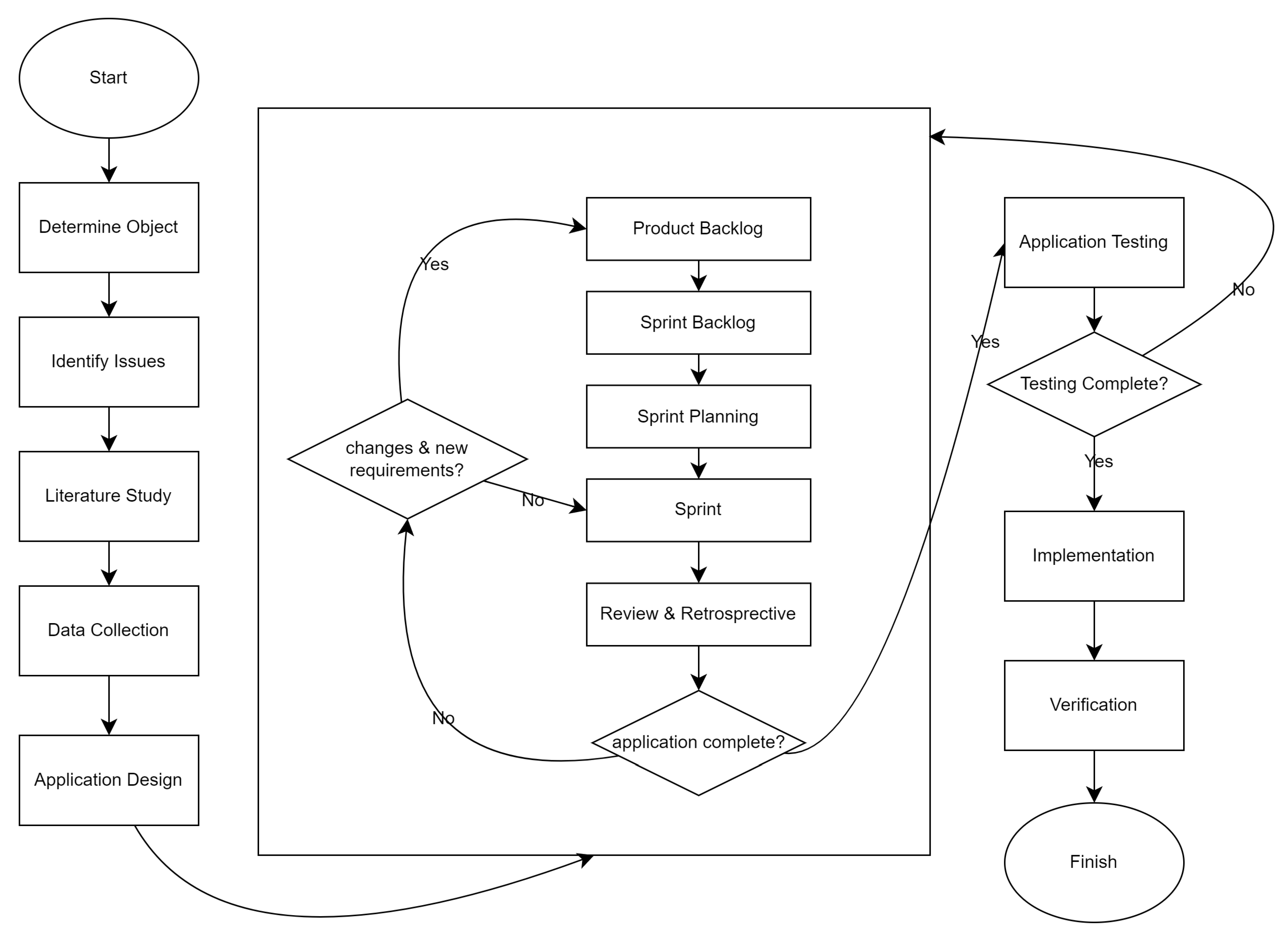
The literature study was the first stage of the research. Then, data is collected and analyzed related to various problems that often occur in project management. The results of this literature study and data analysis are used to determine the planning for software development. The planning results are used in a web-based application in the final stage.
The purpose of literature research is to obtain in-depth and relevant information and theories that will serve as the basis and guidelines for the research to be conducted. Articles and books related to the research topic were selected to be studied before being used as references for the research process.
After collecting the data, an analysis was conducted that focused on the subject of the research: project management. The project management analysis starts with determining the stages of software project management and collecting the documents required for software creation. In addition, it is important to understand the features and use of project management tools, which serve as tools for coordination and documentation between stakeholders.[3]
3.2. Agile Method
The research method used is agile scrum is one of the SDLC (System Development Life Cycle) methodologies base on the increment model and iterative This makes the agile method quite flexibel with changes in the middle of the development process. In the application process, agile requires a framework that is in accordance with the concept, one of which is scrum. Scrum is one of the frameworks that can be implemented to support the concept of agile methods.[10]
Figure 1.
Agile Method.
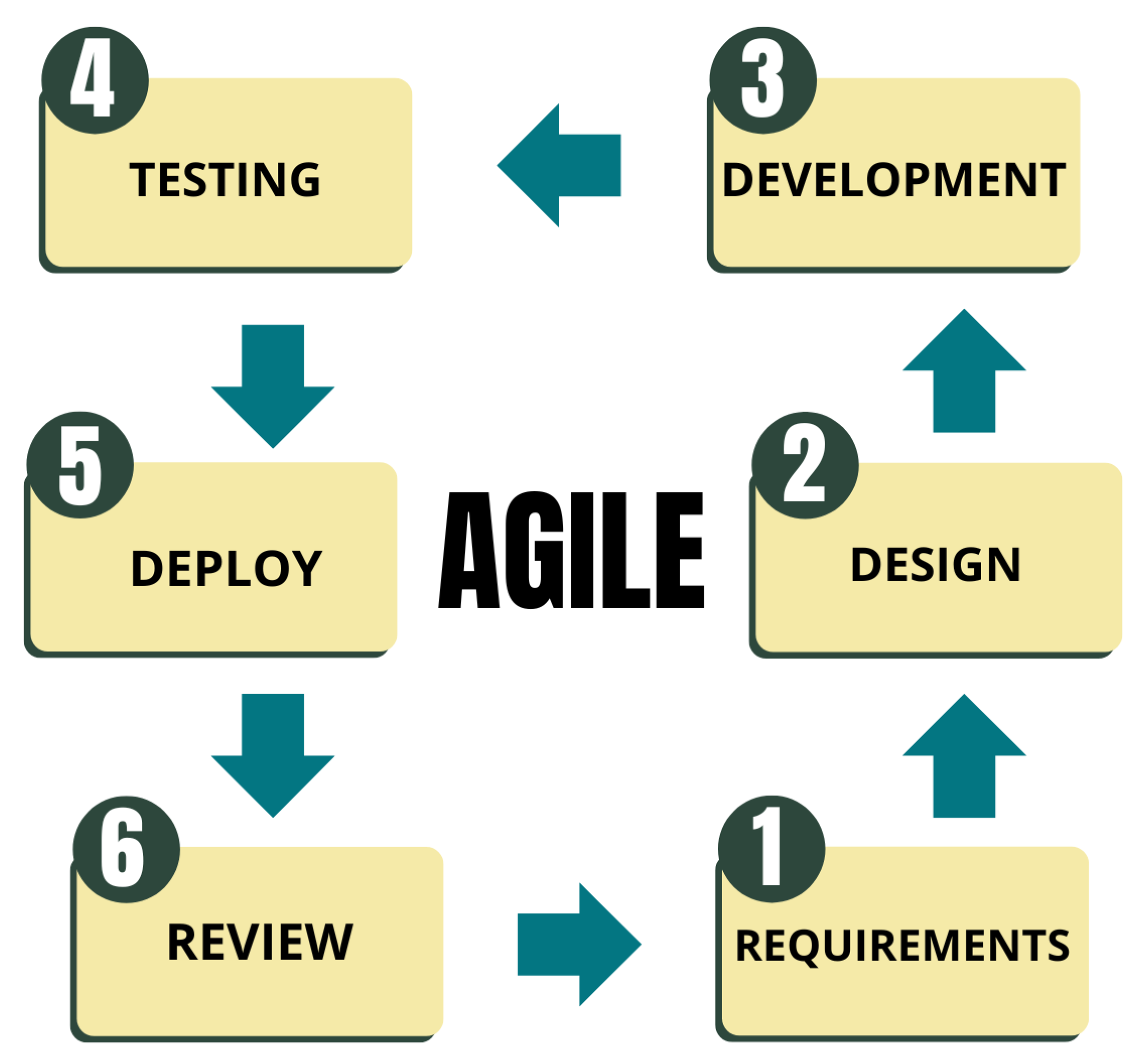
Agile methodology is one of the methodologies used for software development. The word Agile means fast, light, free, and alert. Agile Methodology is a software development that has the same principles or a methodolody for developing a system with a short time and requires rapid adaption from developers to change in any form[11]
The following is an explanation of the stages in the agile method:
-
RequirementsIn agile software development, making customers accessible is the main point. This is the basis for quick feedback and communication that leads to a better understanding of the requirements and development process.All agile approaches emphasize that talking to users is the best way to get the information needed for development and to avoid misunderstandings. If something is unclear or unclear, the user or or developer should try to communicate with the person in charge to avoid indirect knowledge transfer in particular.This stage is the stage where the first step done by the development team and also the client discuss what designs are needed and desired in a software needed and wanted in a software that will be created.
-
DesignAgile Modelling is one of the agile techniques that heavily uses modelling. Even though modeling is employed in Agile, it serves a different function. Models are utilized in Agile, for instance, to convey comprehension of a limited portion of the system that is being developed. Because they are primarily disposable models that are drawn on paper or a whiteboard and then erased after serving their purpose, the majority of the models do not make it into the final version of the system.With this practice, agile method is suitable for small to middle size projects. For large and complex projects, plan-driven method is more suitable because it incorporates a comprehensive model of software in the design phaseThis stage is the stage where the development team designs an application that will be made based on the previous requirement stage.
-
Developmentin this section is the development of a system to the coding stage to implement based on the requirements and design that have been done in the previous stages to produce a software.
-
TestingThe stage is testing the system that has been made to find bugs in the system that has been made and to validate input and output whether it is in accordance with what is expected from the system that has been made.
-
DeployThis stage hands over the system that has been made for use to end-users by launching by giving a domain to the system that has been made.
-
ReviewThe last stage is the stage to ensure that it is running properly and to ensure that the system is safe from bugs atau error.
According to the Agile Alliance, there are 12 principles in implementing Agile, namely:
- Customer satisfaction is the top priority by producing products earlier than targeted.
- recognizing that needs can change even as growth draws to a close.
- results within a two-week to two-month timeframe.
- Throughout the project, business representatives and developers collaborate every day.
- Assemble a team of people who are driven to finish the job.
- In-person communication is productive and successful.
- The primary indicator of project progress is functional and workable software.
- To keep a positive working relationship going, sponsors, developers, and users must all provide consistent support.
- The program becomes more elegant or agile when technical details and smart design are taken into consideration.
- Simplicity.
- Self-organizing teams produce beautiful, functional architecture and design.
- The team periodically self-evaluates and looks for ways to be more effective and does so promptly.
These twelve principles form the basis for a process model that has the properties of an agile methodology.[12]
The advantages of using Agile methodology in software development:
-
High FlexibilityAgile allows the development team to change project priorities or needs quickly and efficiently. Changes are considered natural, and the team is ready to adapt better solutions and strategies as the project evolves.
-
Rapid IterationAn iterative approach enables shorter and focused software development cycles. Testable and assessable increments are directly generated from each iteration or sprint. This allows the team to refine and improve the product incrementally.
-
Responsive to ChangeAgile allows team members, stakeholders, and users to work together and communicate well, which enables the team to respond to input, feedback, and changes that may occur during the development process. Therefore, the products created are more in line with customer needs and expectations.
-
Improved Product QualityAgile helps improve product quality with a focus on continuous testing and evaluation. As the project progresses, developers can fix bugs, enhance features, and optimize application performance.
-
Stakeholder EngagementDuring the development cycle, Agile methodologies encourage stakeholders to actively participate. This helps ensure that the development team has a good understanding of the stakeholders’ needs and expectations, so that the product created can better suit the needs of the business and end users.
-
Transparency and Clear ResponsibilitiesAgile supports transparency in all aspects of the project, including planning, development, and testing. To avoid confusion or redundancy, each team member has clear responsibilities for achieving the goals of the sprint or iteration.
3.3. Framework Scrum
Along with the increasing needs of applications in various sectors, companies, organizations and others, various methodological needs have also developed. One methodology that is widely used today is the Scrum framework which is a group of Agile. Scrum is one of the frameworks that agile demands to be implemented in a way that fits its philosophy. One of the frameworks that can be used to support the idea of agile processes is Scrum. Scrum was developed by Jeff Sutherland around 1993 with the aim of being a development and management methodology that follows the principles of the Agile methodology.[12] Scrum helps translate agile concepts into concrete actions. In scrum, sprints are the most important component. A sprint is a series of activities that lasts no more than 30 days and includes sprint planning, daily scrums, sprint reviews, and sprint retrospectives.
In implementation process, agile reuiress a framework Scrum is one of the frameworks that can be implemented to support the concept of agile methods. Scrum serves to make agile principles tangible into steps. The important a maximum duration of 30 days which consists of several activities, namely, sprint planning, daily scrum, sprint review and sprint retrospective. [10]
The three main pillars that make up the Scrum structure ensure effective work processes and results:
-
TransparencyIn Scrum, transparency means that every team member and stakeholder should see every important aspect of the process. Having clear and easily accessible information allows everyone to understand the state of the project in the same way.
-
InspectionInspections are procedures that routinely check Scrum components and progress toward Sprint goals to find problems or discrepancies with expected goals.
-
AdaptationAdaptation is the act of making adjustments to processes and products if inspections reveal that certain aspects deviate from acceptable limits.
There are many advantages to using Scrum in software development, such as:
-
Improving Team CollaborationThrough role assignments and regular events such as Daily Scrum, Sprint Planning, and Sprint Retrospective, Scrum encourages intensive and collaborative teamwork. As a result, teams that are more coordinated and communicate with each other tend to work more efficiently and effectively.
-
Rapid Adaptation to ChangeScrum works in short iterations, or sprints, so teams can easily shift priorities and change development direction based on the feedback they receive. This allows projects to adapt quickly to changing user or market needs, which increases the relevance and value of the resulting product.
-
Transparency and VisibilityWith well-organized artifacts and events, every team member and stakeholder has a full view of the project’s progress and the work being done. This reduces the chances of misunderstandings and enables early detection of issues for resolution.
-
Improved Product QualityDuring a sprint, Scrum requires teams to continuously check and test their deliverables, which promotes continuous quality improvement. As a result, the products created become more reliable and fulfill user needs.
-
Increased Team MotivationTeam members feel more valued and motivated when they have the freedom to manage their own work. High motivation increases productivity and job satisfaction and creates a more productive and positive work environment.
3.4. Roles in Scrum
In the Scrum methodology, there are three main roles that are critical to ensuring the successful development of Tasknest web applications. In using the Scrum framework for app development [12], the app development team members are divided into three roles as follows:
- 1.
-
Product OwnerA product owner is not managing the program or a project manager; they ensure that the development team delivers the most value to the business. They also need to be an individual. The role of the product owner is crucial for the success of scrum because it serves as a mediator between the team and other stakeholders. [13]No development team wants mixed guidance from multiple product owners. Moreover having multiple product owners may create confusion for both the team and the stakeholders and can lead to delays in the sprint cycle. It can be said that in companies that use scrum, the tasks and responsibilities of the particular Product Owner are never the same. The role of the Product Owner is the most complex one regarding the procedure being followed.The Product Owner is the person responsible for the vision and goals of the Tasknest project. They bear accountability for:
- (a)
- Developing and overseeing the Product Backlog, which includes a prioritized list of fixes, changes, and features required for the application.
- (b)
- Communication with stakeholders such as management, users, and the development team to ensure that business and user needs are covered in the Product Backlog.
- (c)
- Using market analysis and stakeholder comments to make strategic decisions on features and direction of application development.
- 2.
-
Scrum MasterThe Scrum Master is sometimes referred to as the project manager who leads by coaching, teaching, and supporting the team rather than directing and controlling. They are also responsible for ensuring that Scrum values, practices, and rules are implemented and enforced, and they look for ways to fine-tune their practice of the process.A Scrum Master is not a project manager. Project managers don’t really have a place in the scrum methodology. The project manager role within Scrum ceases to exist as its responsibilities are moved to the other Scrum roles. A scrum team controls its own destiny and self-organizes their work. Some Scrum projects may have both a Scrum Master and a project manager and in some cases where the project is too large using a Scrum of Scrums approach might have a program manager working with multiple Scrum Masters. [13]In Tasknest projects, the Scrum Master serves as the team leader and is responsible for the proper implementation of Scrum practices. The Scrum Master also assists the application development team members in implementing the Scrum framework in the application development process. By using the Scrum framework every sprint journey can be monitored properly, whether there are obstacles during the sprint or the sprint can run well. If there are obstacles, a review of the sprints that did not run as it should.[12]The Scrum Master’s responsibilities include:
- (a)
- Assisting with daily scrum, sprint retrospective, review, and planning.
- (b)
- Addressing issues that impede the development team’s progress, such as organizational, technical, or communication issues.
- (c)
- By applying Scrum best practices, you can help the team stay focused on Sprint goals and improve overall performance.
- 3.
-
DevelopmentScrum teams are sustainable development practice teams. The most effective scrum teams are close-knit, co-located, and usually consist of seven people, plus or minus two. The team is cross-functional, has all the skills needed to create improvement, i.e. team members have different skill sets, and coach each other so that no one person becomes a bottleneck in the completion of the work. Strong scrum teams approach their projects with a clear attitude. a clear "we" attitude. All team members help each other to ensure a successful sprint completion. [13]The technical group in charge of creating the Tasknest application is called the development team. The members of this team are:
- (a)
- The task of designing a user interface that is aesthetically pleasing, intuitive, and responsive falls on front-end developers.
- (b)
- The business logic, database, and server functions that underpin the application’s general functionality are created by back-end developers.
- (c)
- Quality Assurance (QA) Engineers: Responsible for thoroughly testing the application to ensure that there are no errors or bugs, and that the application operates according to specifications.
3.5. Artifacts in Scrum
3.5.1. Product Backlog
A list of all the features, fixes, modifications, and other tasks needed to produce the entire product is called the product backlog. In a project on Tasknest, this could include:
- 1.
- Key features such as creating, deleting, or updating task lists.
- 2.
- Ability to add and manage team members.
- 3.
- Functionality to add labels, attachments, and comments to each task.
- 4.
- Ability to create checklists within each task.
Product Backlog is created based on inputs from the development team, stakeholders, and users. Business value, user needs, and technical characteristics determine the priority of each item. Items with the highest business value or most important user needs are usually given higher priority.
3.5.2. Sprint Backlog
A list of tasks chosen from the Product Backlog to be completed in a single Sprint is called the Sprint Backlog. The Sprint Backlog for a Tasknest project may include:
- 1.
- Implementation of functions to create, delete, and edit task lists within a Sprint.
- 2.
- Addition of collaboration features, such as a notification system or integration with other applications.
- 3.
- User interface optimization to improve user experience.
The Sprint Backlog is arranged according to the Product Backlog’s item prioritization system. Based on the team’s capability and the Sprint goals, the Product Owner and the development team collaborate to choose the things that go into the Sprint Backlog. Every item in the Sprint Backlog must also be able to be finished in a single Sprint.
3.5.3. Increment
An increment, on a Tasknest project, can be: Increments are the result of work completed during a Sprint:
- New functionality that has been implemented, such as a feature to add team members to a task or a notification system for users.
- Enhancements to existing functionality, such as performance improvements or user interface improvements.
- Bugs fixed and features updated according to user feedback.
Each item in an Increment must be fulfilled before it is considered complete according to the "Done" criteria. For example, for the feature of adding team members, the "Done" criteria may include:
- The feature has been implemented and thoroughly tested.
- User documentation and code documentation have been updated.
- There are no significant bugs or issues affecting the user experience.
3.6. Research Framework
To ensure that the research conducted results in a cohesive, informative, and methodologically sound piece of writing, a conceptual structure known as a research outline helps writers conduct research in a systematic and organized way. The following is a research framework created to help writers conduct research so that their work remains intact and informative.
Figure 2.
Research Framework
3.7. Research Methods
In the process of creating the Tasknest application, we will use the Scrum method. Here are the steps in making the application and its explanation:
-
Product BacklogCollected data by observing in person and asking users about their needs and preferences for the Tasknest app. The result was a list of backlog items that included key features such as creating, editing and deleting tasks, the ability to add team members, notification system integration and more.
-
Sprint BacklogCreation of a prioritized and sorted list of backlog items to be worked on in the first sprint stage of Tasknest application development. Backlog items are selected based on priority and estimated processing time to produce products that meet user needs.
-
Sprint PlanningDesign the manual process flow, system architecture, system workflow, and database design required for the Tasknest application. Plan the number of sprints required based on the sprint backlog and estimate the processing time for each sprint.
-
SprintCreated a list of backlog items based on the established sprints, focusing on developing key Tasknest features using technologies such as Next.js for the front-end, TypeScript for the programming language, Tailwind CSS for user interface design, and MongoDB for the database. Integration with Liveblocks to enhance real-time collaboration capabilities.
-
Review and RetrospectiveEvaluate and test the features developed for Tasknest after each sprint. Conduct retrospective sessions to evaluate the development process, identify lessons learned, and plan improvements for the next sprint.
All of these steps are performed iteratively in a sprint cycle, which allows for flexible changes and results that meet user needs. The Scrum method ensures that the development team works well together, while the advanced technology used to develop the Tasknest app helps ensure that users have an optimal and satisfying experience.
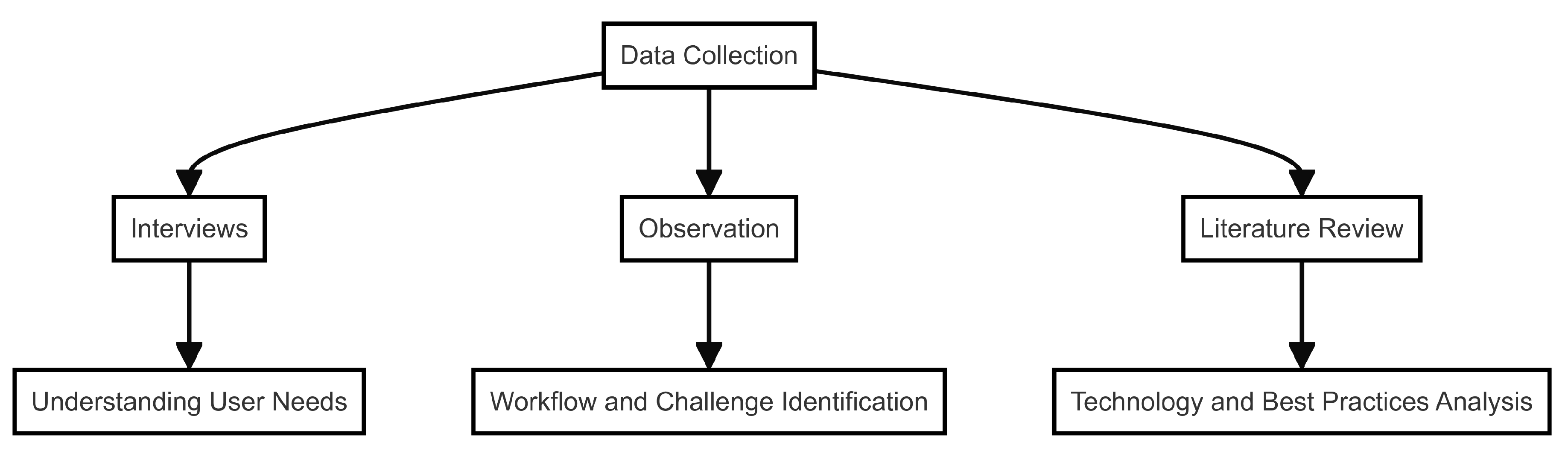
Figure 3.
Data Collection Technique
3.8. Data Collection Technique
-
InterviewInterviews with potential users of the Tasknest application, including project managers, team members, and other stakeholders, were conducted both face-to-face and through communication media such as video calls or emails. The purpose of these interviews was to gather information on user needs and preferences related to task management and team collaboration.
-
ObservationWhen conducting field research with a potential user group, the author makes direct observations. The purpose of these observations was to determine how users currently manage tasks and work together, as well as to discover workflows and needs that may not be revealed through interviews. Analysis was conducted to ensure that the Tasknest app meets the needs of users and solves their day-to-day problems.
-
Literature StudyThe author conducted a reference search from various sources, including books and articles found on the internet. This study aims to provide a solid foundation and information on best practices in the creation of web-based task management applications, as well as relevant technologies such as Next.js, TypeScript, Tailwind CSS, MongoDB, and Liveblocks. The study also includes an analysis of similar applications, such as Trello, to find important features and opportunities for innovation.
3.9. Data Testing Technique
We’ll employ the black box testing approach in this study. Black box testing is a type of software testing that examines an application’s functionality according to predetermined standards without examining its internal workings or source code. This test checks the input and output of the system and ensures that the application operates as expected.
Black Box Testing Steps for Tasknest Application:
-
Feature Identification and User SpecificationsIdentified all features of the Tasknest app, including task creation, editing, and deletion, team member addition, notification integration, and other features. As a result of observations and interviews, each feature was outlined with user-desired specifications.
-
Test Plan PreparationCreate a list of test scenarios that includes scenarios for each feature. This plan includes the input data used for testing, the procedures performed, and the expected results.
-
Test Data GenerationThe test data comes from relevant user data for the application. It includes various cases such as valid data, invalid data, and boundary data to ensure that the application handles all possible inputs correctly.
-
Testing ImplementationPerformed testing by entering experimental data into the Tasknest application and examining the results. Each feature is thoroughly tested to ensure that it functions according to user specifications.
-
Evaluation of Test ResultsChecking the test results by comparing the resulting output with the expected one. If there is a discrepancy, the author notes the problem or bug and notifies the development team for improvement.
-
RetestingAfter making the fixes, retesting is done to ensure the issues have been fixed and the features are working correctly.
In a software development model, of course, a management information system is needed to organize all these processes, including the scrum method, so a project management information system or Project Management System emerged. Project Management System is a management information system that focuses on controlling or managing a software project that will be developed. The project management system is a way of managing a software project by planning, organizing, and managing all the necessary aspects. In the project management system there are several aspects, namely: Estimation of activities, scheduling, budget management for software development, allocation of human resources, quality management or quality of software developed, risk management, management in making decisions for the future.
4. Result and Discussion
4.1. Planning Using Scrum
4.1.1. Product Backlog
It is very important to have a clear picture of all the features, improvements and changes that will be made during the product development of the Tasknest app. Therefore, the basis of our development is based on the Product Backlog. This backlog includes important features such as task management, team collaboration, notification integration, and infrastructure and technical improvements. By doing so, we can ensure that the Tasknest app meets users’ needs well.
Table 1 that is The Product Backlog is a list of all the features, fixes, changes, and other tasks required to develop a complete product. For the Tasknest project, this may include the following items:
Prioritization will determine the duration of each sprint. The scale of priorities includes (1) High Priority: sprint duration 12-14 days; (2) Medium Priority: sprint duration 10-12 days; (3) Low Priority: sprint duration 7-9 days.
User Story and Acceptance Criteria
User Story 1: Task List Management
As a user, I want to create, delete, and edit task lists So that I can manage my tasks efficiently.
Acceptance Criteria
- User can create a new task list with a unique name.
- User can delete an existing task list.
- User can edit the name of an existing task list.
User Story 2: Team Member Management
As a user,I want to add and manage team members So that I can collaborate with my team effectively.
Acceptance Criteria
- User can invite new team members via email.
- User can remove team members from the team.
- User can assign roles and permissions to team members.
User Story 3: Real-time Collaboration
As a user, I want to have real-time collaboration sync using Liveblocks So that my team and I can work simultaneously without conflicts.
Acceptance Criteria
- Changes made by one user are instantly visible to all other users.
- Users are notified of any conflicts in real-time.
- Collaboration data is saved and retrievable.
User Story 4: Notification System Integration
As a user,I want to integrate with a notification system So that I can receive updates and alerts about task changes.
Acceptance Criteria
- Users receive notifications for task assignments.
- Users receive notifications for task status changes.
- Users can customize their notification preferences.
User Story 5: Task Enhancements
As a user,I want to add labels, attachments, and comments to each task So that I can provide more context and details.
Acceptance Criteria
- User can add and edit labels for each task.
- User can upload and attach files to a task.
- User can add, edit, and delete comments on a task.
User Story 6: Checklists in Tasks
As a user,I want to create checklists in each taskSo that I can break down tasks into smaller steps.
Acceptance Criteria
- User can create a checklist within a task.
- User can mark checklist items as complete or incomplete.
- User can reorder checklist items.
User Story 7: User Authentication
As a user,I want to have secure login and authentication management So that my account and data are protected.
Acceptance Criteria
- User can register with an email and password.
- User can log in using their credentials.
- User sessions are managed securely.
User Story 8: UI Optimization
As a user,I want to have an optimized user interface So that I can have an enhanced user experience.
Acceptance Criteria
- UI components are responsive and adapt to different screen sizes.
- UI design follows best practices for usability.
- UI performance is optimized for fast loading times.
User Story 9: Performance Enhancement
As a user, I want to have an application with improved performance and responsiveness So that I can use the application without delays.
Acceptance Criteria
- Application load times are minimized.
- Actions within the application are processed without noticeable lag.
- System resource usage is optimized.
User Story 10: Collaboration Features Refinement
As a user, I want to have refined collaboration features So that my team can work together more effectively.
Acceptance Criteria
- Collaboration tools are intuitive and easy to use.
- Feedback from users is incorporated into collaboration feature improvements.
- Collaboration features are thoroughly tested for usability.
User Story 11: Database Design
As a developer,I want to design the database using MongoDB So that data is stored efficiently and can be accessed quickly.
Acceptance Criteria
- Database schema is designed according to application needs.
- Data operations are optimized for performance.
- Database design supports scalability.
User Story 12: Front-end Implementation
As a developer,I want to implement the front-end using Next.js and TypeScript So that the application is robust and maintainable.
Acceptance Criteria
- Front-end components are built using Next.js.
- TypeScript is used to ensure type safety.
- Front-end implementation follows best practices and coding standards.
User Story 13: UI Design
As a designer,I want to design the user interface using Tailwind CSS and Figma So that the UI is visually appealing and consistent.
Acceptance Criteria
- UI designs are created in Figma.
- Tailwind CSS is used for styling the components.
- UI design is consistent across the application.
4.1.2. Sprint Backlog
Here is the pre-designed Sprint Backlog for the Tasknest application development. It outlines the tasks to be performed in each sprint, as well as the estimated time and the person in charge of each task. This Sprint Backlog is organized by considering the prioritization of all items in the Product Backlog, so that the specific goals of each sprint can be achieved.
Sprint Backlog 1

Table 2.
Sprint Backlog 1
| No | Backlog Item | Estimation Time (days) | Responsible |
|---|---|---|---|
| 1 | User login and authentication management | 5 | Front-End Developer |
| 2 | Create, delete, and edit task lists | 7 | Full-stack Developer |
| 3 | Add and manage team members | 5 | Full-stack Developer |
| 4 | Database design using MongoDB | 3 | Back-end Developer |
Sprint Backlog 2
Table 3.
Sprint Backlog 2
| ID | Backlog Item | Estimation Time (days) | Responsible |
|---|---|---|---|
| 1 | Real-time collaboration sync using Liveblocks | 8 | Full-stack Developer |
| 2 | Optimize user interface for improved user experience | 6 | UI/UX Designer |
| 3 | Integration with notification system | 4 | Back-end Developer |
Sprint Backlog 3
Table 4.
Sprint Backlog 3
| ID | Backlog Item | Estimation Time (days) | Responsible |
|---|---|---|---|
| 1 | Add labels, attachments, and comments to each task | 6 | Full-stack Developer |
| 2 | Create checklists within each task | 4 | Full-stack Developer |
| 3 | Improve application performance and responsiveness | 5 | Full-stack Developer |
Sprint Backlog 4
Table 5.
Sprint Backlog 4
| ID | Backlog Item | Estimation Time (days) | Responsible |
|---|---|---|---|
| 1 | Enhance collaboration features | 7 | Full-stack Developer |
| 2 | Implement front-end using Next.js and TypeScript | 8 | Front-end Developer |
| 3 | Design user interface using Tailwind CSS and Figma | 5 | UI/UX Designer |
4.1.3. Sprint Planning
In Sprint Planning, each backlog item from the Product Backlog that enters the Sprint Backlog is given an estimated time to complete and assigned a responsible person. The status "Not Started" indicates that the backlog item has not been started and will be worked on during the sprint. After completion, the status will be updated according to the progress of the work.
Sprint Planning 1
Table 6.
Sprint Planning 1
| No | Backlog Item | Estimation Time (days) | Status |
|---|---|---|---|
| 1 | Login feature and user authentication management | 5 | Completed |
| 2 | Creating, deleting, and editing task lists | 7 | Completed |
| 3 | Adding and managing team members | 5 | Completed |
| 4 | Designing database using MongoDB | 3 | Completed |
Sprint Planning 2
Table 7.
Sprint Planning 2
| No | Backlog Item | Estimation Time (days) | Status |
|---|---|---|---|
| 1 | Real-time collaboration synchronization using Liveblocks | 8 | Completed |
| 2 | User interface optimization to enhance user experience | 6 | Completed |
| 3 | Integration with notification system | 4 | Completed |
Sprint Planning 3
Table 8.
Sprint Planning 3
| No | Backlog Item | Estimation Time (days) | Status |
|---|---|---|---|
| 1 | Adding labels, attachments, and comments to each task | 6 | Completed |
| 2 | Creating checklists within each task | 4 | Completed |
| 3 | Performance enhancement and application responsiveness | 5 | Completed |
Sprint Planning 4
Table 9.
Sprint Planning 4
| No | Backlog Item | Estimation Time (days) | Status |
|---|---|---|---|
| 1 | Refining collaboration features | 7 | Completed |
| 2 | Implementing front-end using Next.js and TypeScript | 8 | Completed |
| 3 | User interface design using Tailwind CSS and Figma | 5 | Completed |
Sprint Planning 5
Table 10.
Sprint Planning 5
| No | Backlog Item | Estimation Time (days) | Status |
|---|---|---|---|
| 1 | Testing and debugging the entire application | 5 | Completed |
| 2 | Preparation of comprehensive Tasknest application documentation | 7 | Completed |
| 3 | Preparation for Tasknest application launch | 5 | Completed |
4.1.4. Review and Retrospective
Sprint 1 Review : We successfully completed all backlog items planned during this Sprint. The Front-end Developer successfully implemented the user login and authentication management features. We also successfully completed backlog items related to creating, deleting, and editing task lists, as well as adding and managing team members. Every deployed feature was thoroughly tested and found no issues. So far, Sprint 1 is going well and in line with expectations.
Sprint 1 Retrospective: During the evaluation session, we found some areas for improvement. Although the backlog items have been resolved, we realized that the estimated timeline should be improved to be more reasonable. We also found some ways to improve communication between the development team to enhance collaboration. We have plans to improve these things in the next Sprint.
Sprint 2 Review: In this Sprint, we successfully completed the backlog item related to real-time collaboration synchronization using Liveblocks, which has been well implemented and tested to ensure that the feature works properly. However, due to some technical constraints that needed to be resolved first, we have not yet started the backlog items related to user interface optimization.
Sprint 2 Retrospective: In the retrospective session, we found that the technical obstacles encountered affected the progress of certain backlog items. We talked about more efficient ways to overcome those obstacles in the next Sprint. Also, we emphasized how important it is for team members to communicate more freely and proactively to avoid similar issues in the future.
Sprint 3 Review: In this Sprint, we successfully completed the backlog items related to the creation of labels, attachments, and comments for each task; however, the backlog items related to the creation of checklists for each task were still not started as some priorities needed to be reviewed.
Sprint 3 Retrospective: In the retrospective session, we revisited the priorities of the backlog items and found that some items needed a change in priority to optimize progress for the next Sprint. We also discussed ways to ensure that pending backlog items can be efficiently completed soon.
Sprint 4 Review: We successfully completed the backlog items for this Sprint, which included enhancements to collaboration features and front-end implementation with Next.js and TypeScript. These features were tested and improved based on user comments.
Sprint 4 Retrospective: In the retrospective session, we evaluated the progress we had made in this Sprint and also found some things that needed improvement. We also discussed ways to improve the quality of testing and speed up the development process in the next Sprint.
Sprint 5 Review: We successfully completed the backlog items related to testing and debugging the Tasknest app in its entirety during the last Sprint. We also managed to create full documentation of the app in preparation for launch.
Sprint 5 Retrospective: In the final evaluation session, we congratulated the team for their efforts to complete this project. In addition, we assessed any lessons learned during the development process and planned a strategy for future maintenance and improvement of the application.
4.2. System Design Analysis
4.2.1. Usecase Diagram
Figure 4 is a use case diagram which is one of the various types of UML (Unified Modeling Language) diagrams that describe the interaction relationship between the system and actors. Use cases can describe the type of interaction between the system user and the system.
In this TaskNest application system design, there will be two actors whose roles are admin and members. The first step is that both admins and members will log in first. The user who creates this workspace will act as an admin actor. The admin actor has the authority to add team members, create tasks, manage task lists (list of details that must be done in one task), and delete workspaces. Members added by the admin actor will act as member actors, which only have the
4.2.2. Activity Diagram
Activity diagram is a diagram that can model the processes that occur in a system. The process sequence of a system is described vertically. Activity diagram is a development of Use Case that has a flow of activities.
Figure 5 shows the overall activity for users as admins and users as team members. The first step that users must do is to log in or register first using a google account.
Figure 6 is an activity diagram for users as admins. Admins can create new boards or select existing boards. Furthermore, the admin can manage the board such as creating new columns and selecting new columns, where one column will have one or many cards that can be added, edited and deleted. In addition, the admin also accesses the board settings, which includes a section for adding members and deleting boards.
Figure 7 is an activity diagram for users as team members. Team members select an existing board and manage the board such as creating new columns and selecting new columns, where one column will have one or many cards that can be added, edited and deleted.
The board is a task workplace that is used to accommodate all groupings of tasks that must be completed, in which there are one or more columns. Then for the column itself is a task that must be completed, in which there are one or more cards. Meanwhile, cards are more detailed details of the column (task) that must be managed.
4.2.3. Sequence Diagram
Sequence diagram is a description of the interactions that occur in the system. By analyzing these diagrams, we can understand the overall workflow of the system and discover the interactions needed to efficiently execute the system’s functionality. It also shows how messages are sent and received between objects in the system, as well as the order of execution of those messages. Therefore, this diagram not only serves as a tool that helps in understanding the concepts, but also serves as a guide for building and implementing efficient and effective systems.
Figure 8 is a user login sequence diagram. Broadly speaking, this diagram is a process of interaction flow between the user, web tasknest, google authentication service, and also the database. In the process, users use their google account to login or register.
Figure 9 is a sequence diagram of creating a new board for users as admins. This diagram shows the interaction flow between the dashboard, board, and database. The user will access the dashboard page which will present the "create new board" option. Then the new board data will be stored in the database and the new board will appear on the dashboard page.
Figure 10 is a sequence diagram of adding members for users as admins. Broadly speaking, this diagram shows the flow of interaction between the settings page and the email service. Admin can add team members to join the project being worked on, which in this case is the board. Admin adds team members by inviting them using the email of each team member, when the member accepts the invitation then the team member can join and manage the board together. Note that adding team members can only be done by admins.
Figure 11 is a sequence diagram of deleting the board for users as admin. Broadly speaking, this diagram shows the flow of interaction between the settings page and the database. The board deletion process can only be done by the admin, where this process starts from the admin selecting the delete button then in the database section all data related to the board will be deleted.
Figure 12 is a sequence diagram of selecting a board for users, either users as admins or users as team members. This diagram shows the interaction flow between the dashboard, board, and database. Users will access the dashboard page which will present existing boards that can be selected. Then the board data will be retrieved from the database and later the display and contents of the board selected by the user will appear.
Figure 13 is a sequence diagram of managing the board for users, either users as admins or as team members. Broadly speaking, this diagram shows the flow of interaction between the board and the database. When one of the boards is successfully selected, it will trigger the board management process. This management process can include creating columns and adding cards. Changes made by the user will be stored in the database, which will then be displayed directly to the user. This interaction allows users to directly manage the board according to the team’s needs.
4.2.4. Entity Relationship Diagram
Entity Relationship Diagram (ERD) is a structural diagram used to design a database. ERD will describe the data stored in a system as well as its boundaries. ERD has three main concepts: Entities, attributes and relationships. [14]
The Entity Relationship Diagram shown in Figure 14 is a diagram to illustrate the database design. The primary entities included in the system’s scope and their relationships are depicted in the ERD diagram using a number of connectors and symbols. These are two major pieces of information. In this TaskNest design, there are six entities, including users, accounts, sessions, boards, columns, and cards.
4.3. Implementation
At this stage, the system implementation is carried out using the agile method and combined with the design of the website interface with logic and algorithms using the Typescript programming language. The following are the results of the implementation of a web-based system for task management.
4.3.1. Landing Page
Figure 15 is a landing page, which is a web page marked with a Call-to-Action (CTA) button for a specific purpose. On the landing page of the TaskNest website, there is a CTA button that will direct users to log in or register on the application using a google account before accessing the system.
4.3.2. Dashboard Page
Figure 16 is the dashboard page, which is the initial display when successfully logged in which functions as a central control where users can easily access the boards. This page will display one or more task boards and can add new boards.
4.3.3. Board Page
This board page is the task page, which will be divided into several sections including
-
ColumnThis column section shown in Figure 17 is a display of the categories of tasks to be completed. The columns are unlimited in number, so they can be customized according to the team’s needs. One column will consist of one or more cards later.
-
CardFigure 18 shows that for each card in each column, edits can be made which in this case can change the card title or delete the card.
-
Pop-up CardFigure 19 is the pop-up view when clicking on one of the cards. What can be done in this section is to add a detailed description of the card, and also add comments if needed.
4.3.4. Setting Page
Figure 20 is a settings page that can only be accessed by teams that act as admins (users who create boards). On this page there are two actions that can be performed, namely adding team members and deleting boards that have been created.
4.4. Testing
In this research we will use the black box testing method. Black box testing is a software testing method that checks application functions based on predefined specifications without looking at the internal structure or source code of the application. This test checks the input and output of the system and ensures that the application operates as expected.
-
Testing the Login FeatureThis test involves clicking the login button and entering the user’s email and password. The expected result is that users can enter the main page (Home Workspace). The test shows that after login, the user is directed to the Home Workspace, as expected.
-
Selecting an Email Address for an AccountTesting is done by selecting an email to be used as an account. The expected result is that users can log in to the Home Workspace. The test shows that after entering the email, the user successfully enters the main page, as expected.
-
Home Workspace DisplayThis test verifies whether after logging in, users can see the Home Workspace with features such as Boards, Logout, and username display. The results show that all these elements appear as expected.
-
Create New BoardTesting involves clicking the "Create Board" button and entering a new board name. The expected result is the appearance of the new board. The test results show that the new board was successfully created and displayed, as expected.
-
Input Name BoardIn this test, the user enters a name for the new board and clicks the "Create Board" button. The expected result is that the new board appears. The test shows that the new board is successfully created and displayed, as expected.
-
Input Column Name on BoardThe test involves adding a column to the board by filling in the column name and clicking the "Create Column" button. The expected result is that a new column appears on the board. The test shows that the column was successfully added as expected.
-
Input Card Name on BoardThe user enters the name for the new card in the column and clicks enter. The expected result is that the new card appears in the column. The test shows that the card is successfully added as expected.
-
Delete Column TestingTesting is done by clicking three dots on the column and selecting "Delete Column". The expected result is that the column and the cards in it disappear. The test shows that the column was successfully deleted as expected
-
Board Setting TestingThis test involves clicking on "Board Setting" and ensuring features such as "Access", "Add Email", and "Delete Board" appear. The expected result is that these features appear accordingly. The test shows that all features appear as expected.
-
Testing the Addition of Access Holder EmailThis test involves adding an email to grant access to other users. The expected result is that the added email appears in the board access list. The test shows that the email is successfully added and appears in the access list as expected.
-
Delete Board TestingThis test is done by clicking the "Delete Board" button. The expected result is that the board is deleted from the Home Workspace. The test shows that the board was successfully deleted as expected.
-
Logout Feature TestingThis test involves clicking the logout button. The expected result is that the user returns to the login page. However, testing shows that there is still access denied when logging out on the board page, so the results are not clear.
-
Card Description InputThis test involves adding a description to the selected card. The expected result is that the description appears on the card. The test shows that the description is successfully added and appears on the card as expected.
4.5. Discussion
In an increasingly digital age, collaboration in group work is one of the main challenges for students. This article explores the various obstacles faced in group tasks, as well as innovative solutions that can help improve the effectiveness and efficiency of teamwork. Here are some of the main points discussed in the article.
-
Challenges in Group Work TasksThis article highlights the various challenges faced by students when working on group assignments. These challenges include differences in schedules between team members, which often makes coordination and meetings difficult to organize. In addition, interpersonal conflicts often arise, whether due to differences in views, working styles, or inequalities in each member’s contribution. All these factors can disrupt team productivity and hinder the achievement of optimal learning outcomes. This article explores the impact of these challenges and how they affect group dynamics and project outcomes.
-
The Importance of Effective Project ManagementThis discussion covers the importance of implementing effective project management as a solution to overcome challenges in group tasks. Good project management helps organize tasks, set deadlines, and ensure that each team member knows his or her responsibilities. With a structured project management strategy, teams can improve collaboration, reduce conflict, and ensure that the project goes according to plan. This article emphasizes the importance of project management in creating a more productive and harmonious work environment.
-
Tasknest ImplementationThis article introduces Tasknest as an innovative project management solution specifically designed to address the challenges faced by students in group work. Tasknest offers a range of features to help teams organize tasks, track project progress, and improve communication between team members. With an intuitive interface and tools designed to improve work efficiency, Tasknest helps teams stay organized and focused on their goals.
-
Agile and Scrum MethodologiesThe discussion also covered the use of Agile methodology and Scrum framework in the development of Tasknest. The Agile methodology offers great flexibility, allowing teams to adapt to changing and dynamic project needs. The Scrum framework, as part of Agile, supports rapid iteration and continuous improvement through structured sprints. This article explains how the application of Agile and Scrum in Tasknest helps teams to work more responsively, with a focus on collaboration and quick results.
-
Testing and Implementation ResultsThis section discusses the results of the black box testing conducted to ensure that Tasknest functions as expected. These tests show that the Tasknest system is stable and effective in supporting project management. In addition, this article also outlines the key features of Tasknest, such as task list management that allows teams to easily create, organize, and prioritize tasks. The real-time collaboration feature enables immediate communication and cooperation between team members. User authentication ensures data security and privacy, while UI optimization provides a seamless and intuitive user experience. The results of this implementation show that Tasknest is an effective tool in helping teams achieve their goals more efficiently and organized.
5. Conclusions
The challenges faced by students in group work tasks and emphasized the importance of effective project management. Tasknest was introduced as a project management platform that helps teams organize tasks, track progress, and improve communication. The development of Tasknest uses the Agile methodology and Scrum framework, which offers high flexibility, rapid iteration, and responsiveness to change. The system implementation was done with Typescript programming language and tested using black box testing, which showed that the system functions as expected. The main features of Tasknest include task list management, real-time collaboration, user authentication, and UI optimization. Overall, Tasknest was successfully implemented and tested, showing great potential in improving the effectiveness of student group work.
Acknowledgments
The author’s wishes to acknowledge the Informatics Department UIN Sunan Gunung Djati Bandung, which partially supports this research work. Let us not forget to thank our mentor Dr. Wisnu Uriawan S.T., M.Kom, for his invaluable guidance, valuable input, and continuous encouragement. Without his skill and patience, this work would not have been possible. Thank you to family and friends for their tireless support and understanding during this journey. Faith is the source of strength and motivation. I would also like to extend my thanks to all the team members who have worked together with dedication and enthusiasm to complete this research. Our unity and co-operation have enriched this experience enormously.
References
- Widjajanti, D.B. Strategi pembelajaran kolaboratif berbasis masalah. Semnas Matematika dan Pendidikan Matematika. https://eprints. uny. ac. id/6910/1/P-8% 20Pendidikan 2008, 20. [Google Scholar]
- Seimahuira, S.; Alfarabi, S.; Arba, S.N.; Pratama, G.A. PEMBUATAN APLIKASI NOTES KULIAH BERBASIS ANDROID (STUDI KASUS: UNIVERSITAS BINA SARANA INFORMATIKA). JSI (Jurnal sistem Informasi) Universitas Suryadarma 2023, 10, 261–266. [Google Scholar]
- Alawi, Z.; Zayn, A.R. Perencanaan Manajemen Proyek dalam Pengembangan Learning Management System Menggunakan Trello. Teknologi: Jurnal Ilmiah Sistem Informasi 2022, 12, 1–7. [Google Scholar]
- Irfan, A.; Riska, R. Aplikasi Monitoring Absensi Kuliah Kerja Lapangan Plus (KKLP) Pada STMIK Amika Soppeng. Jurnal Ilmiah Sistem Informasi dan Teknik Informatika (JISTI) 2022, 5, 77–86. [Google Scholar] [CrossRef]
- Endi, A.; Afrina.; Wahyudiono, P.H. Perancangan Aplikasi Manajemen Proyek, Tugas dan Kolaborasi dalam Meningkatkan Kinerja Pegawai. Journal of Engineering, Technology, and Applied Science 2022, 4, 22–32. [Google Scholar] [CrossRef]
- Fauzan, R.; Nugraha, I.B. PEMBANGUNAN APLIKASI TASK MANAGEMENT DALAM MENDUKUNG PROYEK PENGEMBANGAN PERANGKAT LUNAK (STUDI KASUS: PT. eBDESK INDONESIA). Jurnal Terapan Teknologi Informasi 2017, 1, 131–141. [Google Scholar] [CrossRef]
- Miu, A.; Ferreira, F.; Yoshida, N.; Zhou, F. Generating interactive websocket applications in typescript. arXiv preprint, arXiv:2004.01321 2020.
- Suhada, M.M. Desain dan Implementasi Sistem Manajemen Proyek Berbasis Website Menggunakan Metode Agile. Jurnal Mahasiswa Aplikasi Teknologi Komputer dan Informasi (JMApTeKsi) 2024, 6, 52–60. [Google Scholar]
- Shidqi, M.; Ricky, M.A. Pengembangan aplikasi dan website manajemen proyek pt santai berkualitas syberindo menggunakan metode agile. PROSIDING SEMINASTIKA 2021, 3, 8–15. [Google Scholar] [CrossRef]
- Etrariadi, N.; A’inunisya, E.S.P. Pengembangan Website Manajemen Proyek Menggunakan Metode Agile Scrum (Studi Kasus Diskopindag Kota Malang). Jurnal Nasional Teknologi dan Sistem Informasi 2023, 9, 55–66. [Google Scholar] [CrossRef]
- Suharno, H.R.; Gunantara, N.; Sudarma, M. Analisis penerapan metode scrum pada sistem informasi manajemen proyek dalam industri & organisasi digital. Majalah Ilmiah Teknologi Elektro 2020, 19, 203. [Google Scholar]
- I Gusti Ngurah, I.G.N.S.; Fernandes Andry, J.; Siska.; Sentosa, K. Penggunaan Framework SCRUM dalam Mencapai Optimasi Software Development. KALBISCIENTIA Jurnal Sains dan Teknologi 2023, 10, 68–80. [Google Scholar] [CrossRef]
- Sachdeva, S. Scrum Methodology. International Journal Of Engineering And Computer Science 2016. [Google Scholar] [CrossRef]
- Togatorop, P.R.; Simanjuntak, R.P.; Manurung, S.B.; Silalahi, M.C. PEMBANGKIT ENTITY RELATIONSHIP DIAGRAM DARI SPESIFIKASI KEBUTUHAN MENGGUNAKAN NATURAL LANGUAGE PROCESSING UNTUK BAHASA INDONESIA. Jurnal Komputer dan Informatika 2021, 9, 196–206. [Google Scholar] [CrossRef]
Figure 4.
Usecase Diagram
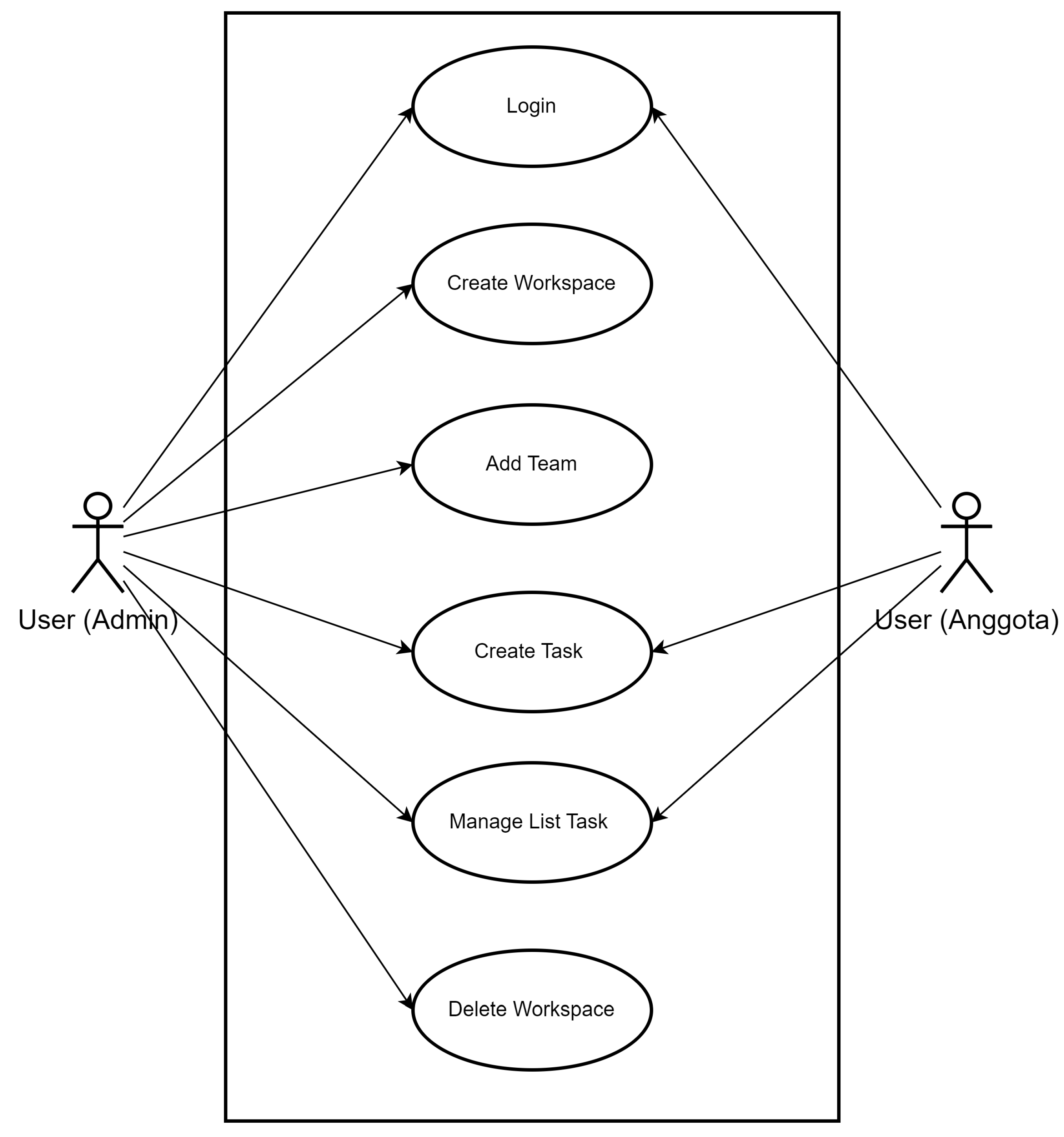
Figure 5.
Activity Diagram Login
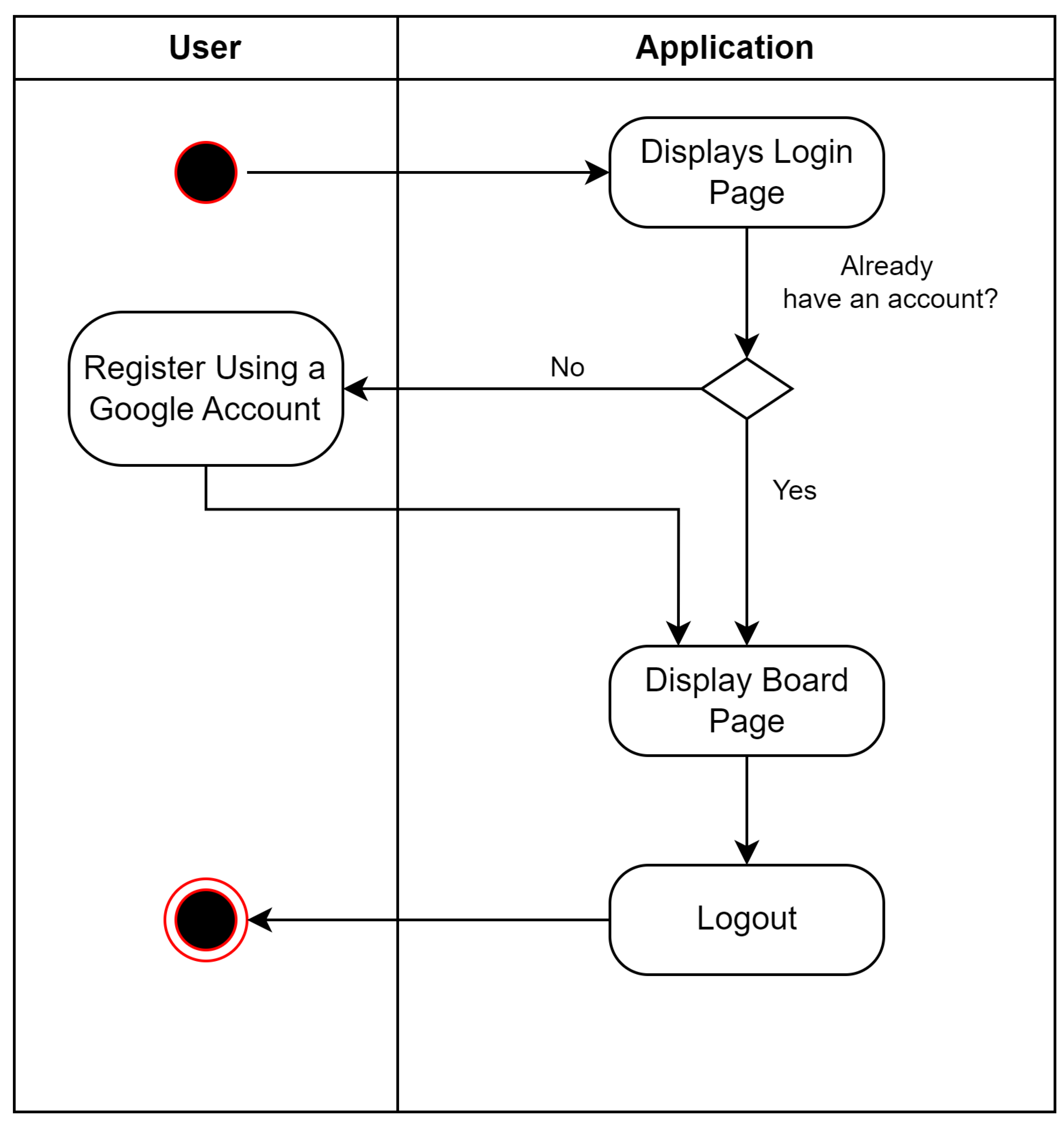
Figure 6.
Activity Diagram User as Admin
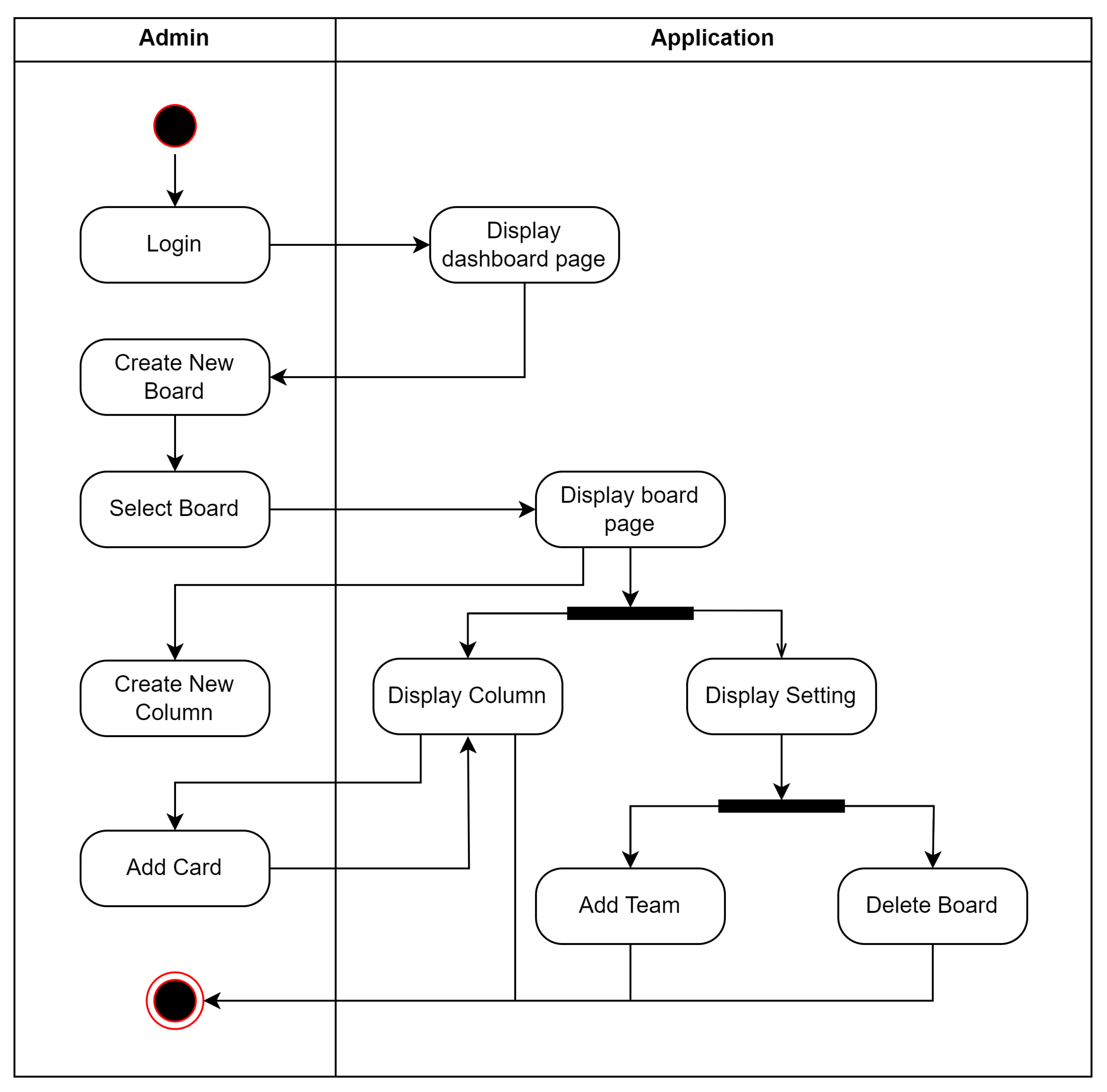
Figure 7.
Activity Diagram User as Team
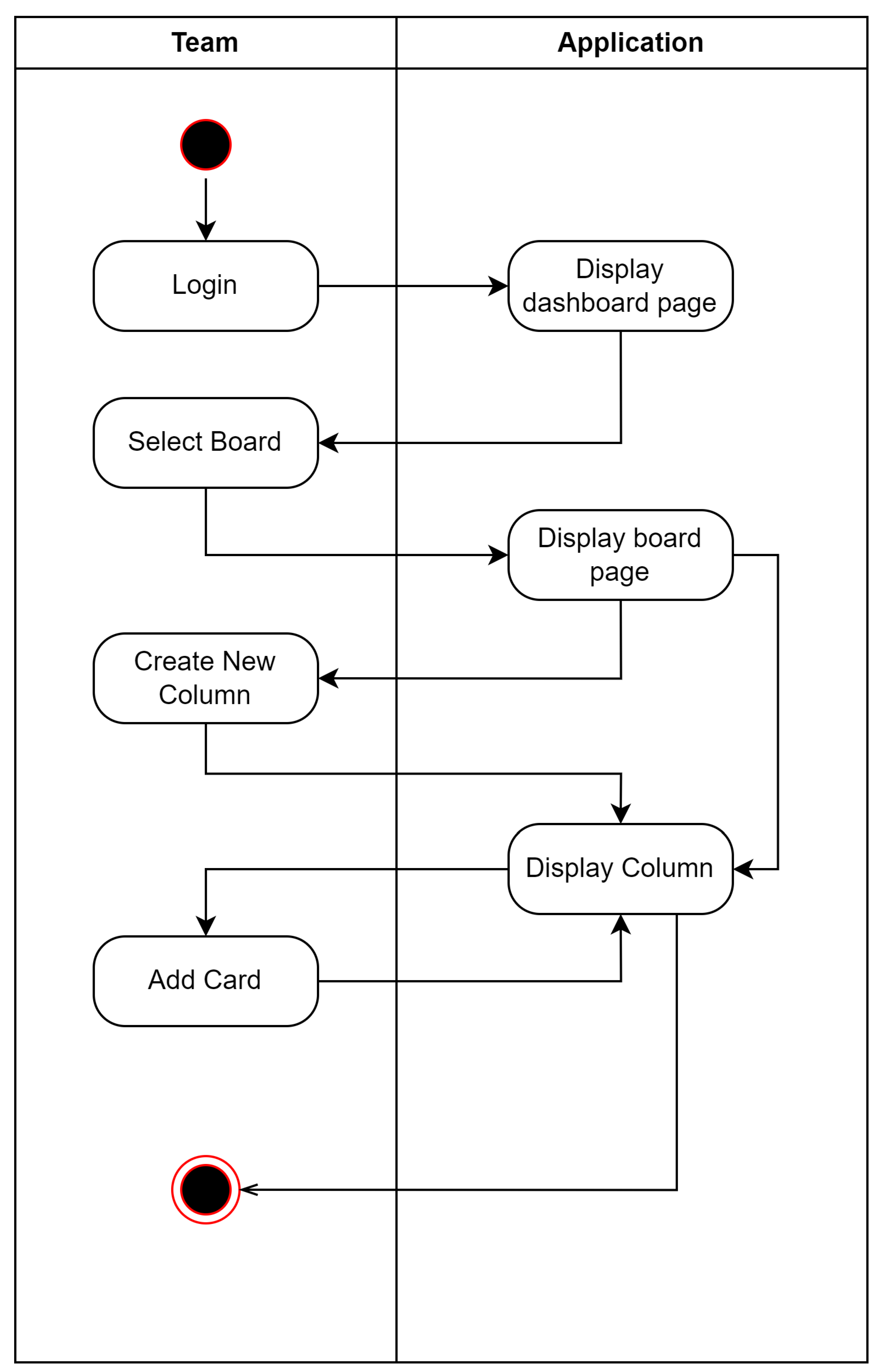
Figure 8.
Sequence Diagram Login
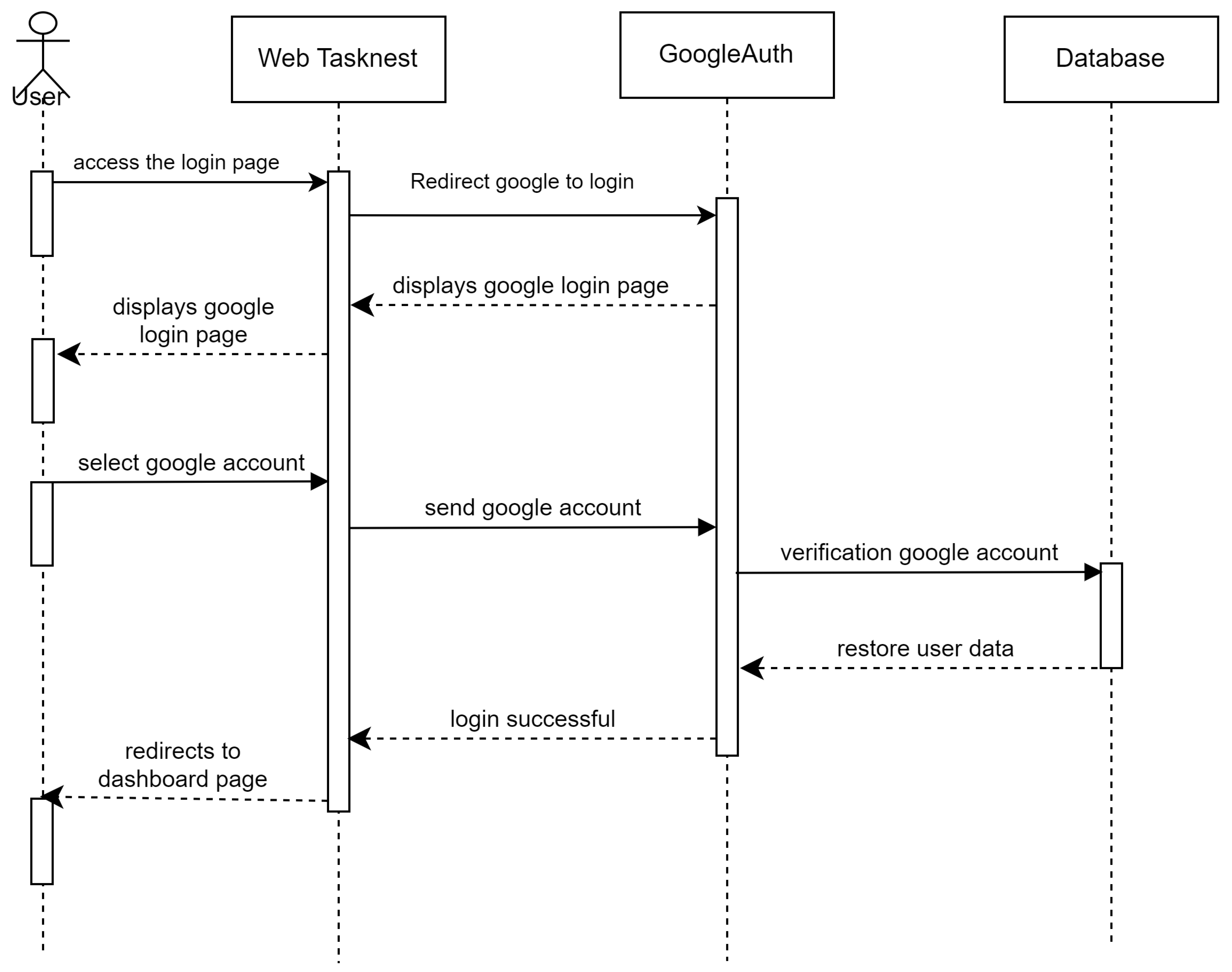
Figure 9.
Sequence Diagram Create New Board
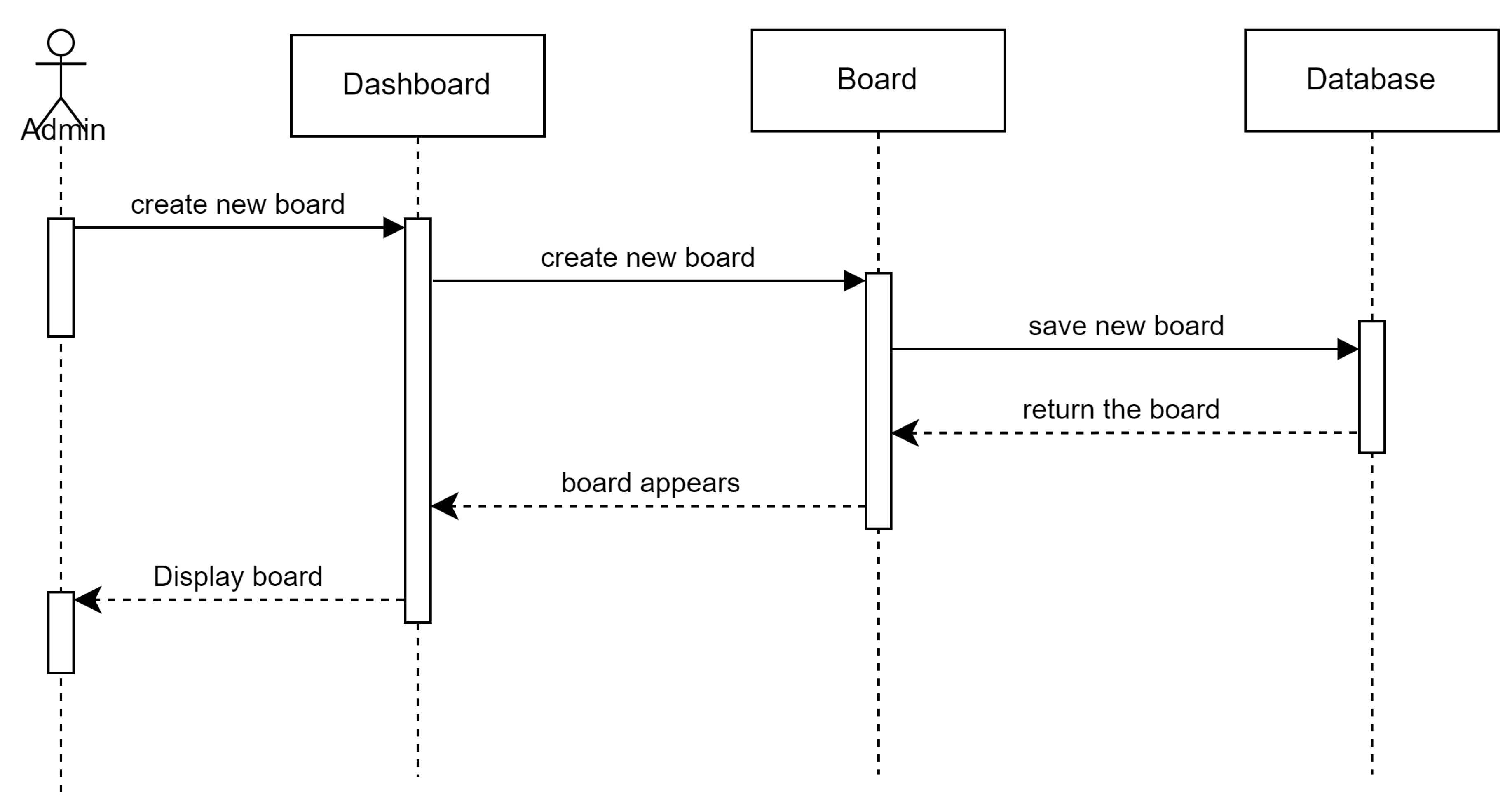
Figure 10.
Sequence Diagram Add Team Members
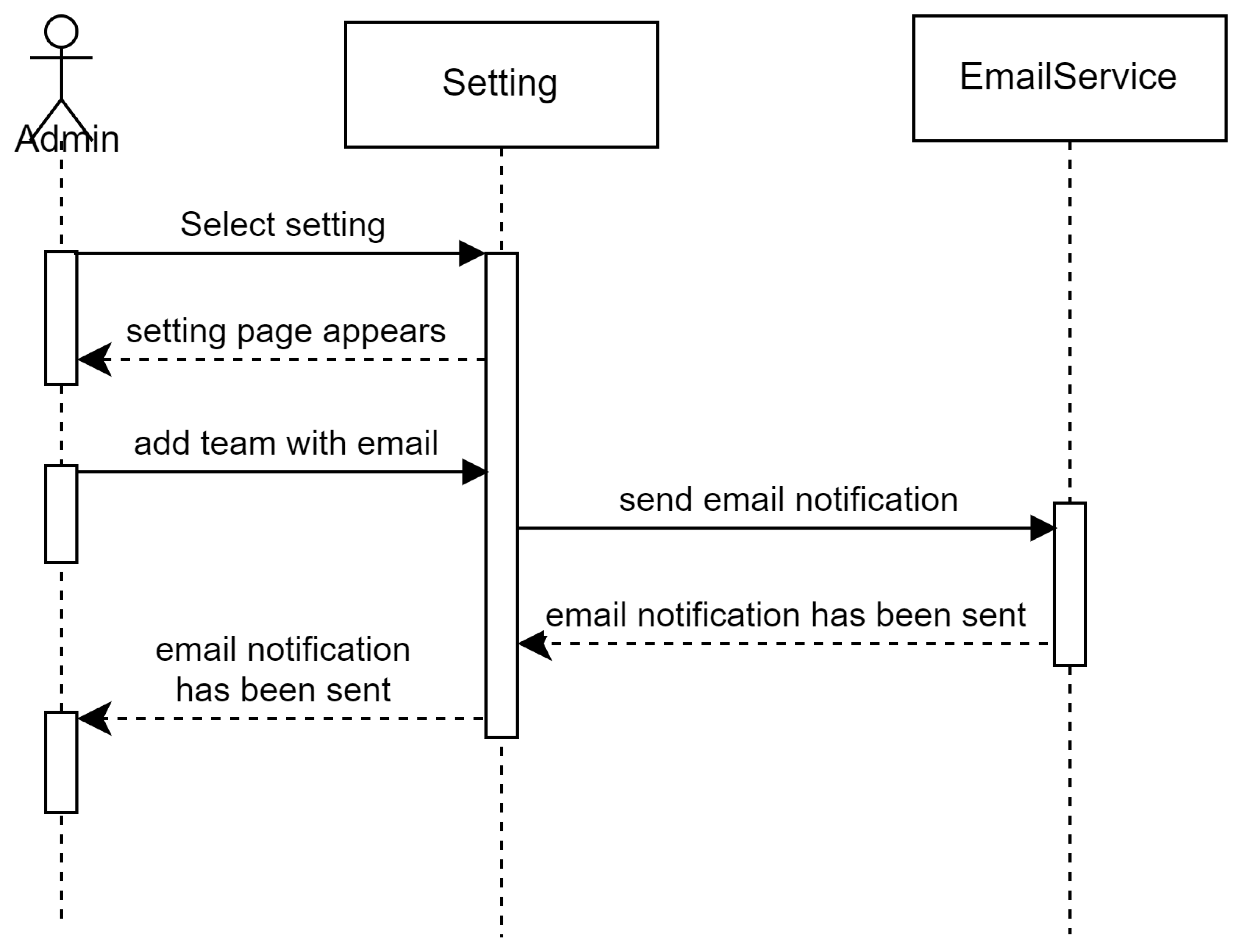
Figure 11.
Sequence Diagram Delete Board
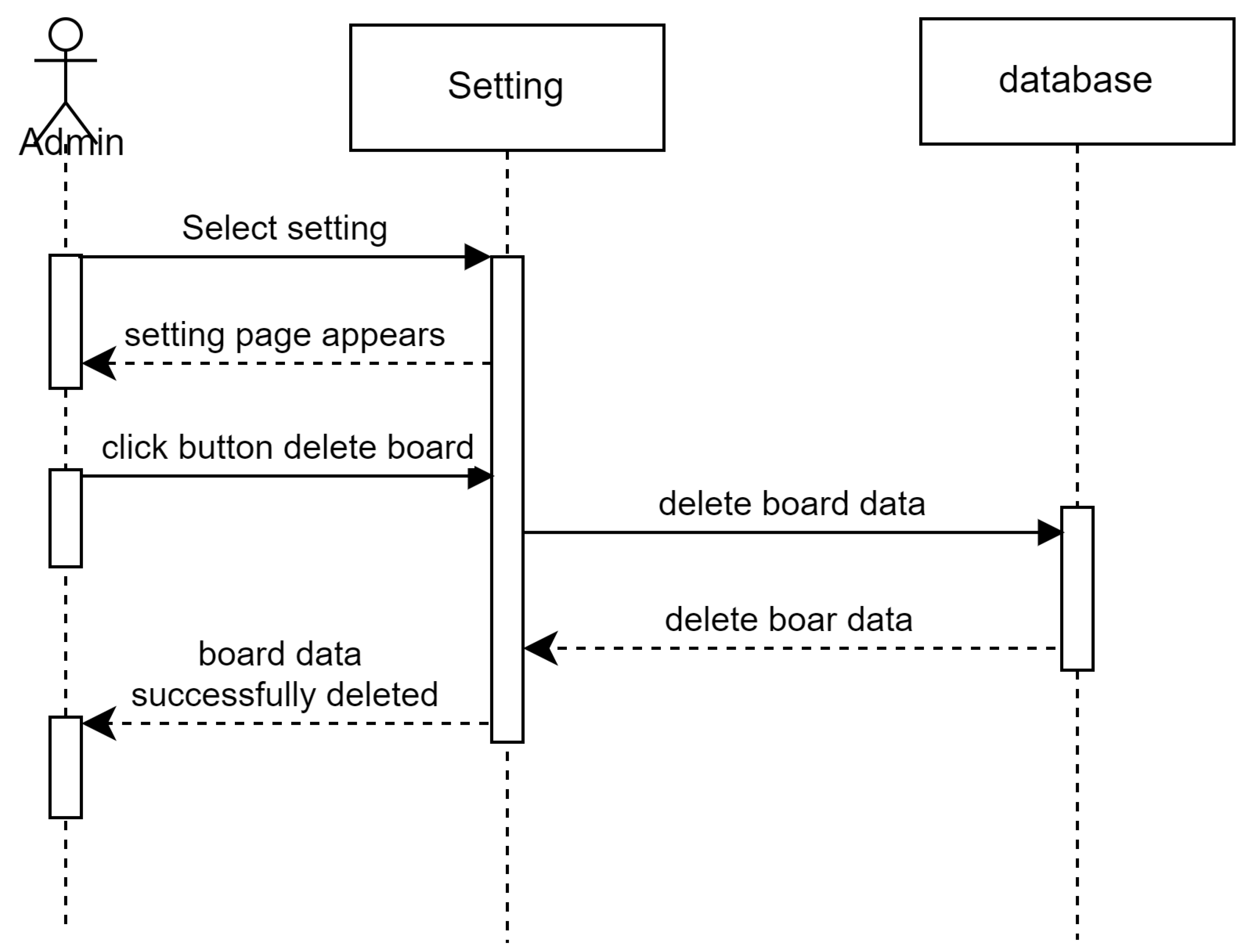
Figure 12.
Sequence Diagram Select Board
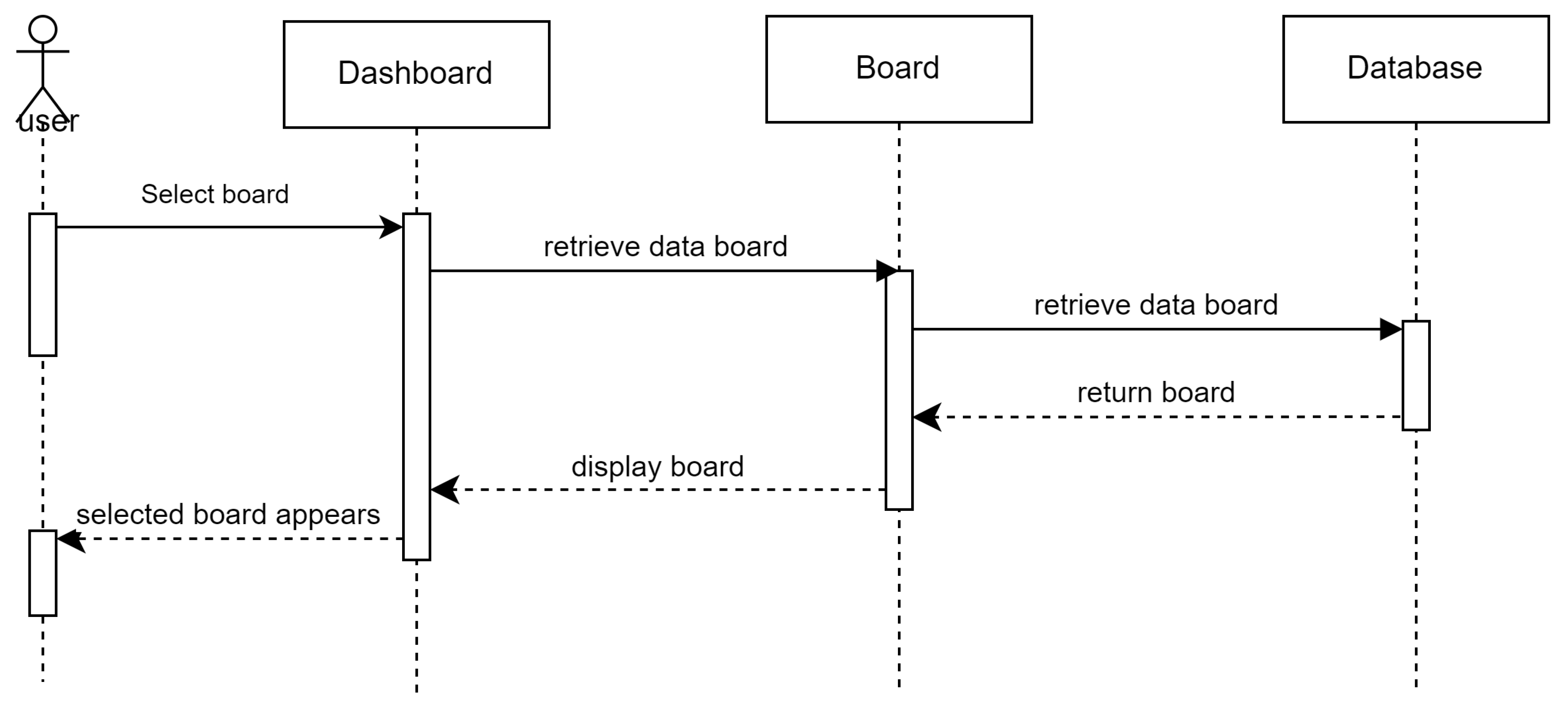
Figure 13.
Sequence Diagram Manage Board
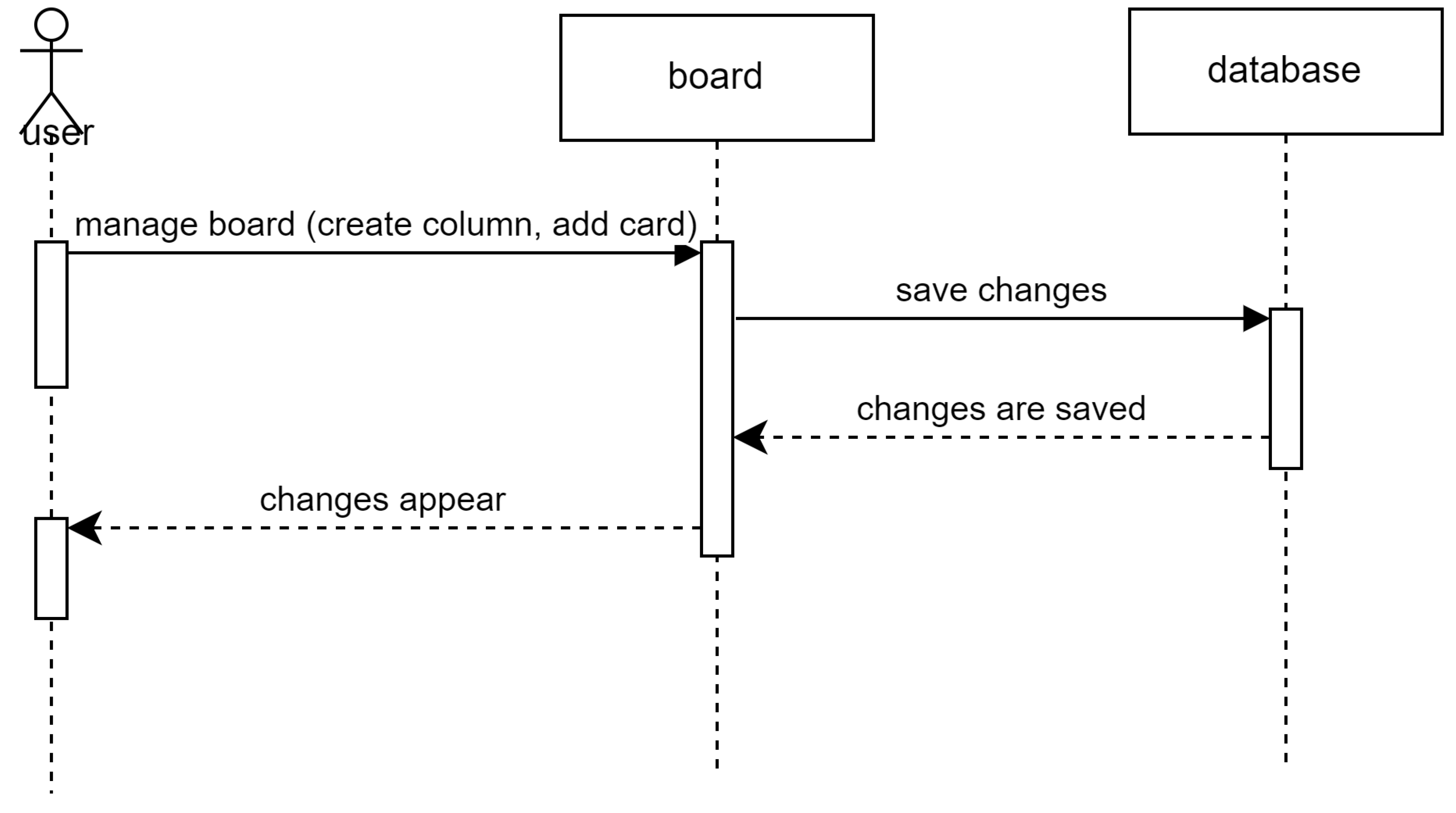
Figure 14.
Entity Relationship Diagram
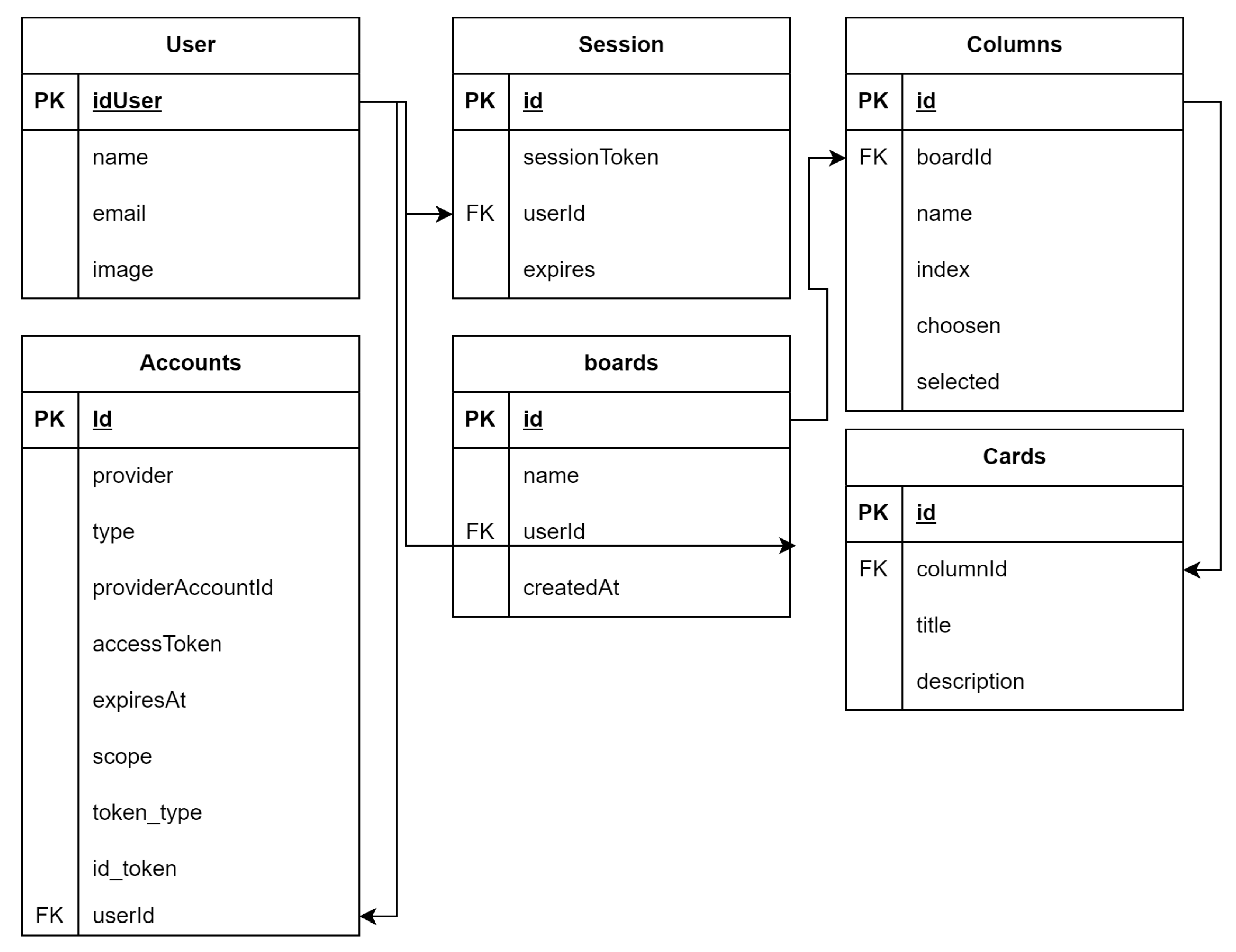
Figure 15.
Landing Page
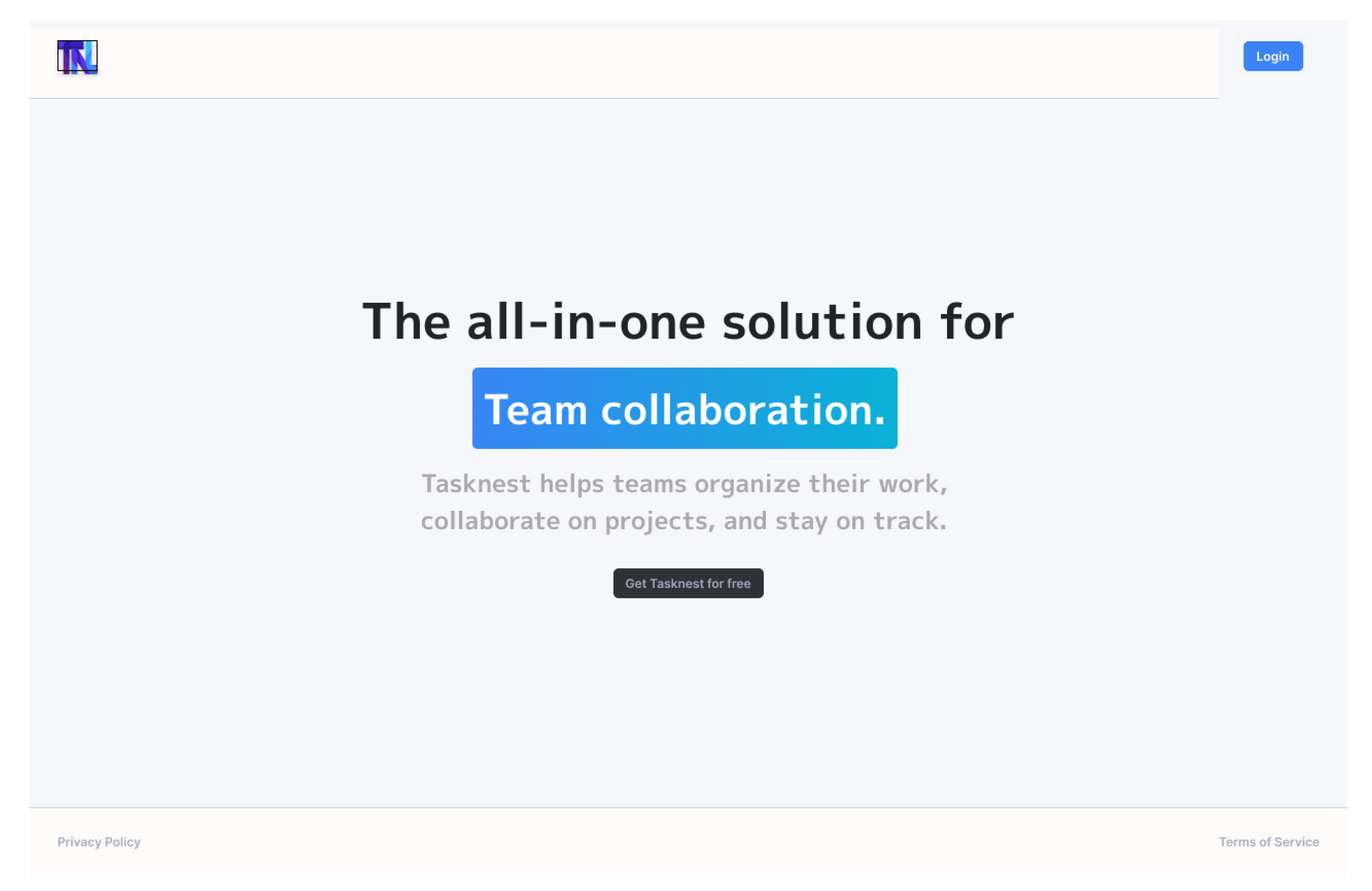
Figure 16.
Dashboard
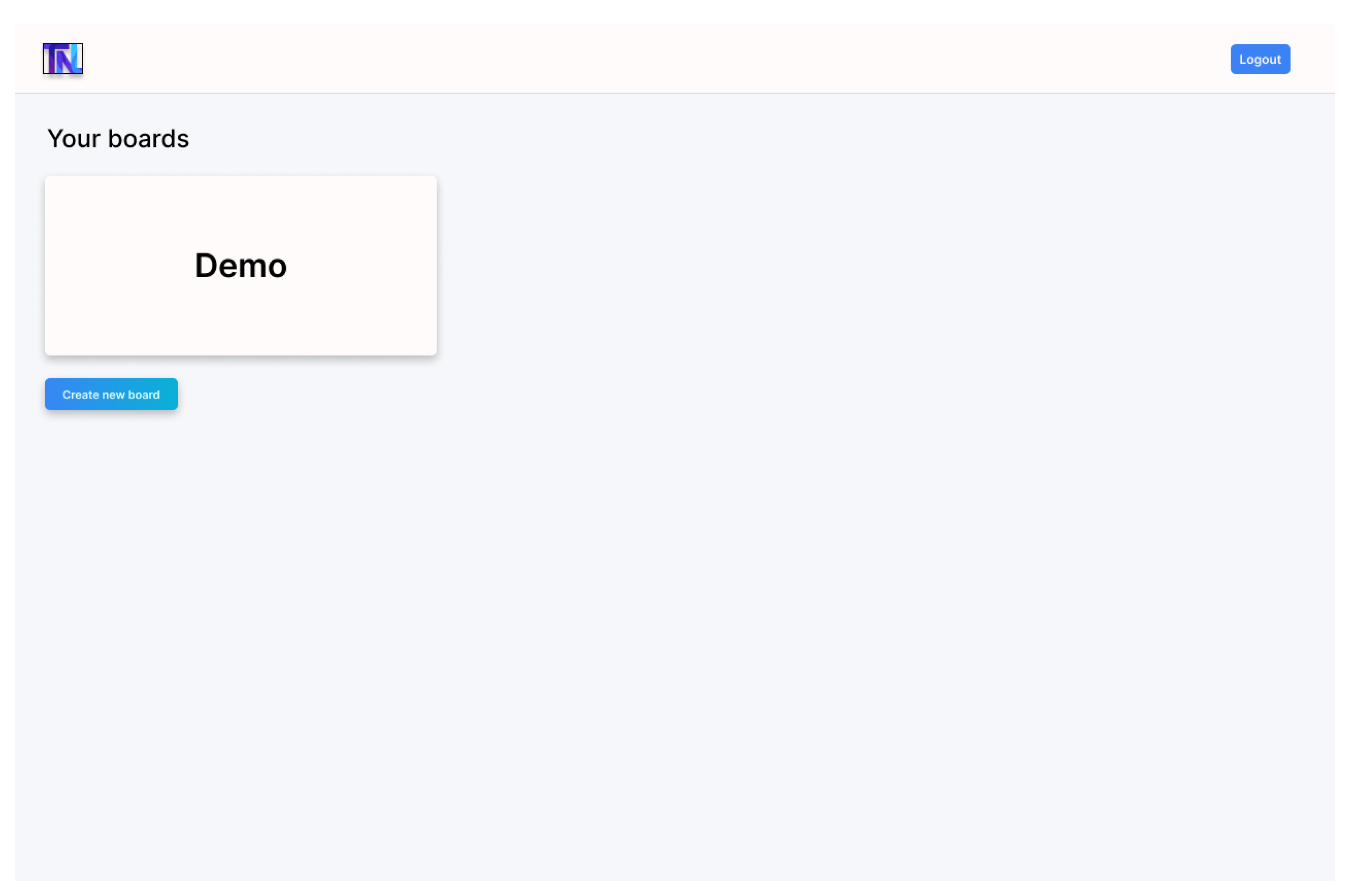
Figure 17.
Column
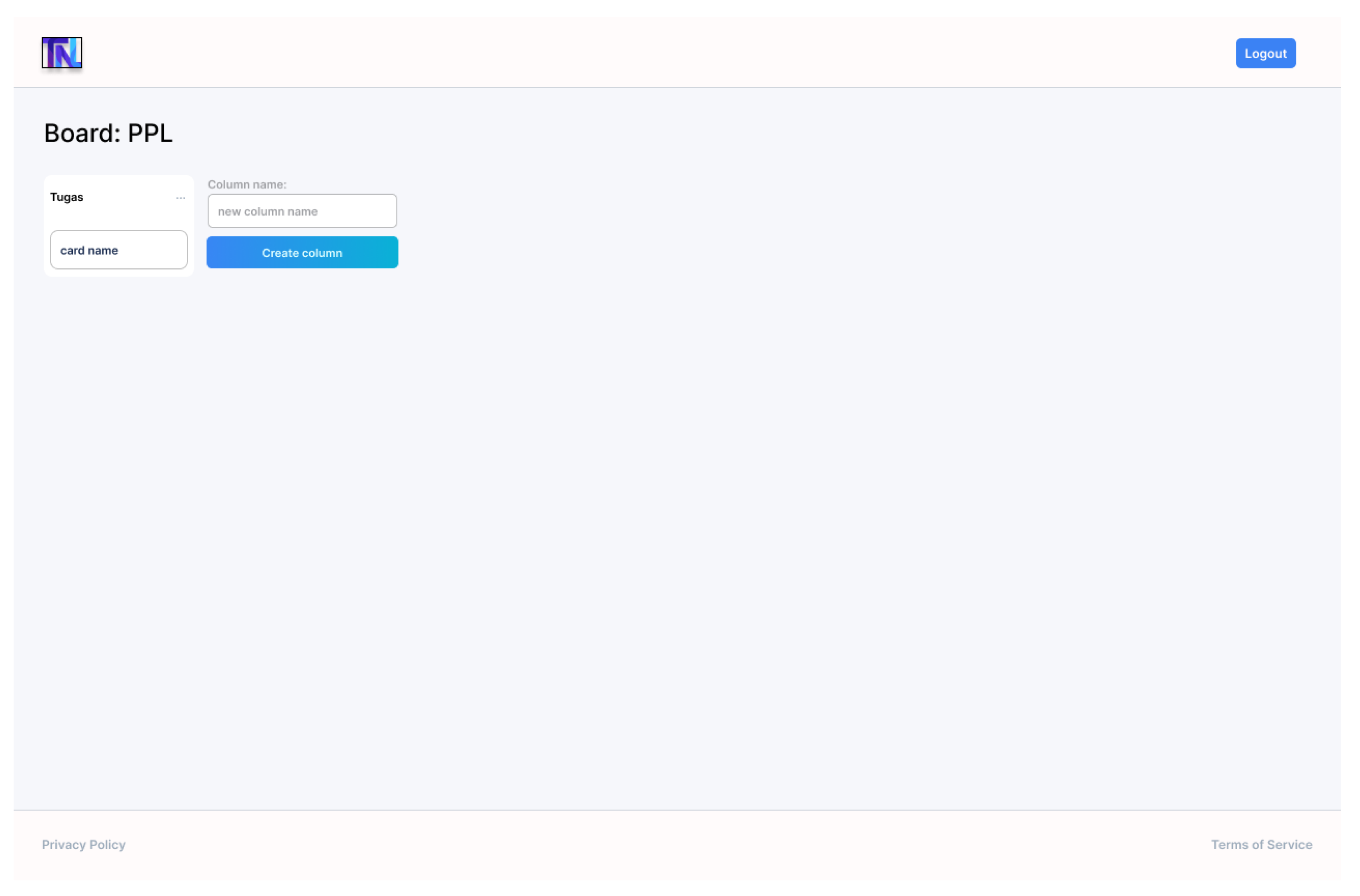
Figure 18.
Card
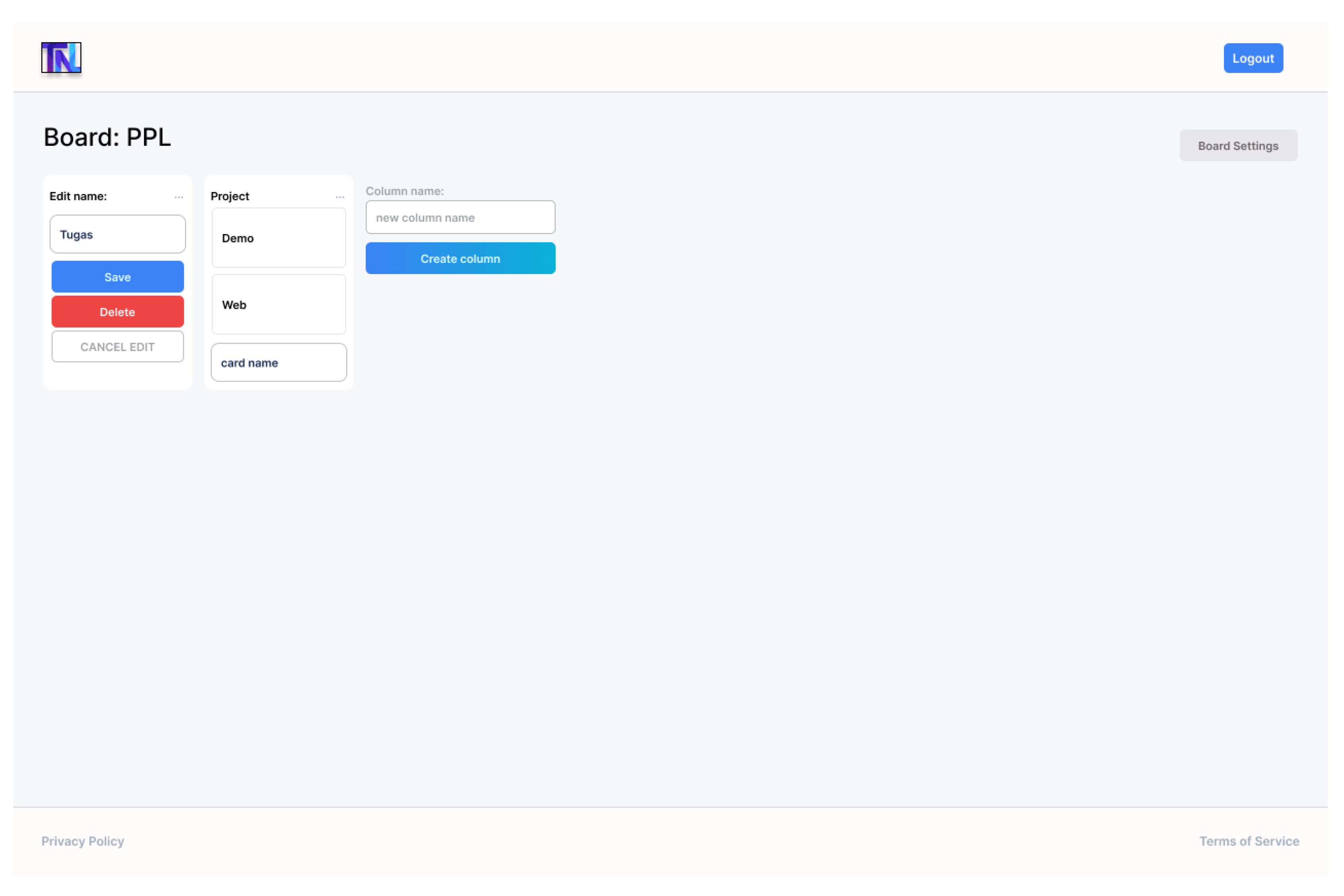
Figure 19.
Pop-up Card
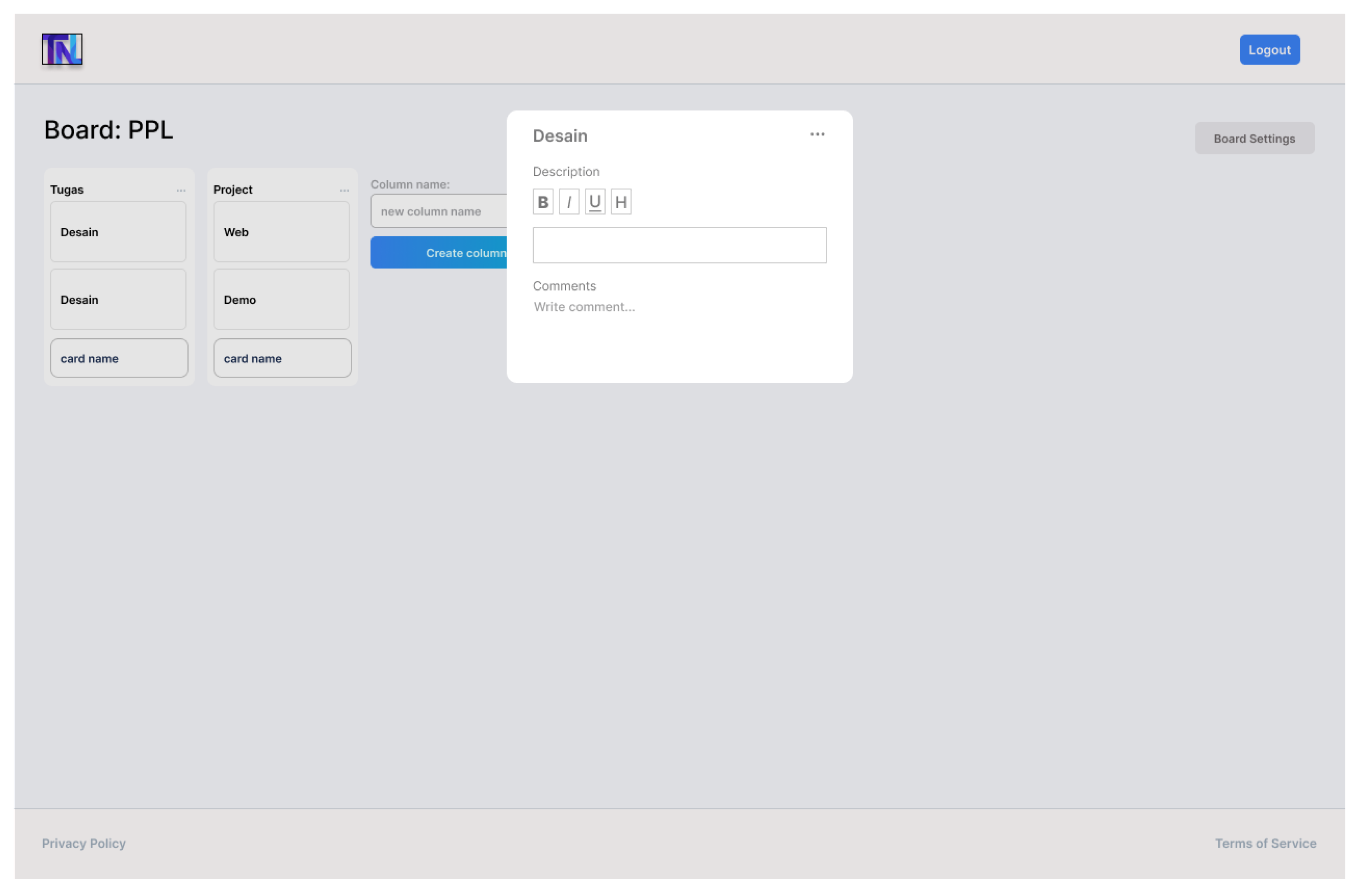
Figure 20.
Setting
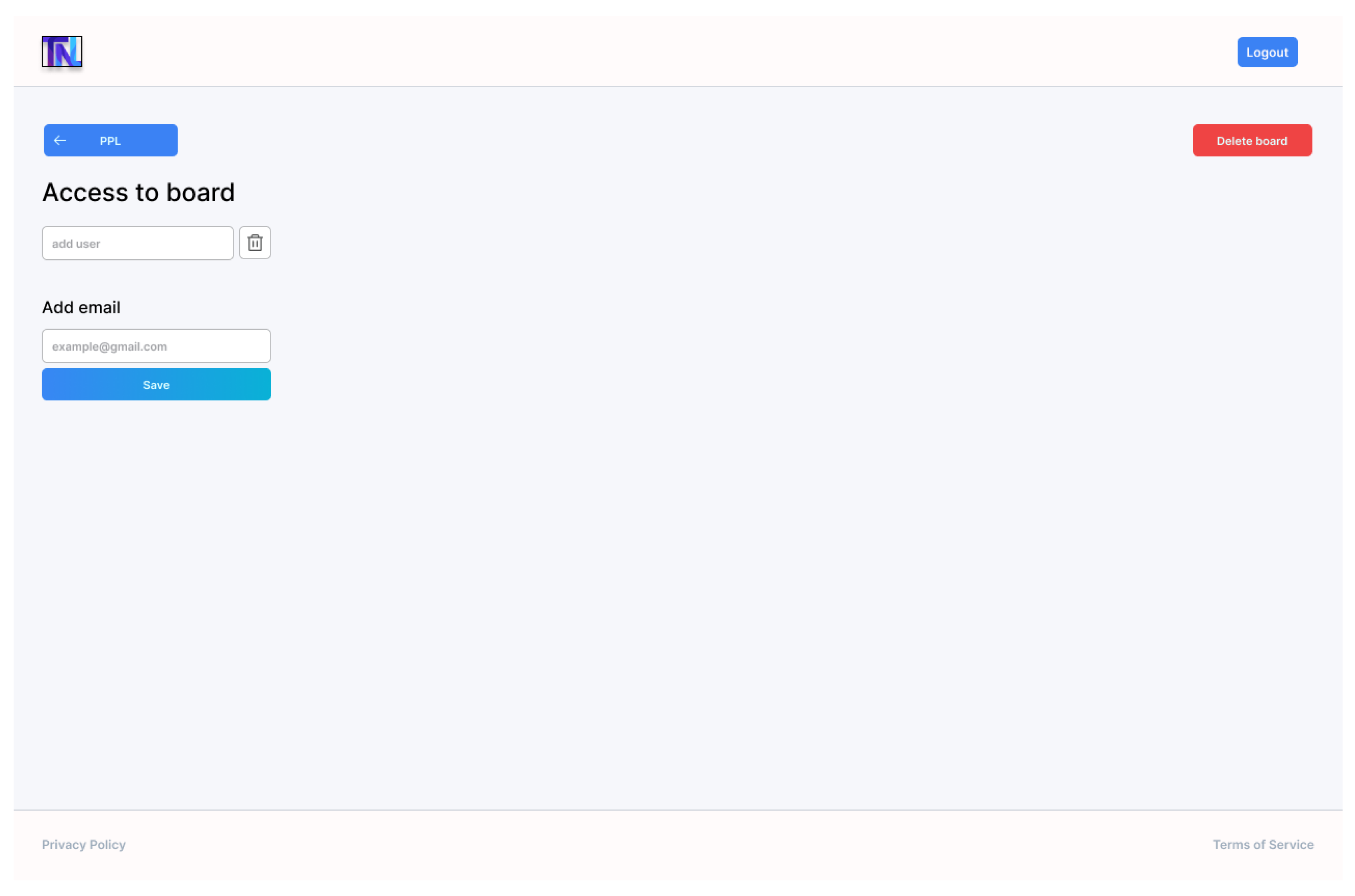
Table 1.
Product Backlog
| No | Backlog Item | Category | Priority |
|---|---|---|---|
| 1 | Create, delete, and edit task lists | Main Feature | High |
| 2 | Add and manage team members | Main Feature | High |
| 3 | Real-time collaboration sync using Liveblocks | Main Feature | High |
| 4 | Integration with notification system | Main Feature | High |
| 5 | Add labels, attachments, and comments to each task | Main Feature | Medium |
| 6 | Create checklists in each task | Main Feature | Medium |
| 7 | User login and authentication management | Main Feature | High |
| 8 | UI optimization for enhanced user experience | Improvement | Medium |
| 9 | Performance and responsiveness enhancement | Improvement | Medium |
| 10 | Refinement of collaboration features | Improvement | Medium |
| 11 | Database design using MongoDB | Technical and Infrastructure | High |
| 12 | Front-end implementation using Next.js and TypeScript | Technical and Infrastructure | High |
| 13 | User interface design using Tailwind CSS and Figma | Technical and Infrastructure | Medium |
Disclaimer/Publisher’s Note: The statements, opinions and data contained in all publications are solely those of the individual author(s) and contributor(s) and not of MDPI and/or the editor(s). MDPI and/or the editor(s) disclaim responsibility for any injury to people or property resulting from any ideas, methods, instructions or products referred to in the content. |
© 2024 by the authors. Licensee MDPI, Basel, Switzerland. This article is an open access article distributed under the terms and conditions of the Creative Commons Attribution (CC BY) license (http://creativecommons.org/licenses/by/4.0/).
Copyright: This open access article is published under a Creative Commons CC BY 4.0 license, which permit the free download, distribution, and reuse, provided that the author and preprint are cited in any reuse.


