

Submitted:
30 January 2026
Posted:
02 February 2026
You are already at the latest version
Abstract
NetworkGuard is a distributed and modular edge-based virtual network sensing architecture intended to enhance smart home environments' usability, security, and performance. As a virtual network sensing platform, the system continuously gathers and examines firewall logs, packet-level traffic statistics, DNS queries, and edge latency measurements. NetworkGuard incorporates DNS-level ad blocking, adaptive firewall enforcement, encrypted VPN tunnels, and AI-powered biometric authentication. It is based on a cheap Raspberry Pi and is controlled via an Android interface. The suggested integration of architecture delivers secure-by-design security through scalable cryptographic algorithms and AI-based solutions, striking a compromise be-tween usability and technological robustness. NetworkGuard offers multilayered protection that goes beyond static router firewalls or browser-level ad blocks by combining open-source solutions like Pi-hole, UFW, and Open-VPN under a single control interface. Improved ad-blocking effectiveness (from 81% to 97%) and decreased VPN latency are demonstrated by experimental evaluation under typical residential traffic situations, all while preserving steady system performance. Effective threat filtering is confirmed by controlled simulations of DNS spoofing, port scanning, and VPN disconnection. According to these findings, NetworkGuard is a scalable and adaptable edge-based network sensing system that allows for real-time security monitoring with low latency and little resource overhead. As such, it is appropriate for residential and Internet of Things settings that demand edge-based cybersecurity sensing and real-time network awareness.
Keywords:
virtual network sensing
; edge-based sensing
; cybersecurity sensing
; smart home security
; network traffic monitoring
; IoT edge computing
; AI-assisted network analysis
1. Introduction
Smart thermostats, security cameras, voice assistants, and other IoT devices have turned home networks into complicated digital areas. Cybersecurity risks to these systems are getting stronger all the time. People are becoming less trusting because of things like limiting material, intercepting data, and getting into accounts without permission [1]. A lot of these issues originate from the reality that there isn’t enough protection that is easy to use, safe, and friendly. More gadgets at home make networks more vulnerable to hacking, data leaks, and irritating adverts [2].
Modern smart home security includes more and more software-defined and virtual sensors that watch how the network operates instead of things that happen in the actual world. DNS query patterns, packet inter-arrival time, latency, and connection difficulties are some metrics that can be thought of as sensor signals that reveal how the network is performing and how safe it is. Most consumer routers still employ static access control lists (ACLs) and basic firewall settings, even though these issues exist. These constraints make it tougher to deal with new threats and often mean you have to put things up by hand. Biometric AI-based authentication approaches are increasingly safer than traditional password systems [3]. But people don’t use these kinds of technology at home very often since they are too hard to utilize.
This article talks about NetworkGuard, a modular, distributed, and scalable network architecture made for smart homes that comes with built-in security features.[1] says that NetworkGuard was made using a Raspberry Pi utilizing open-source tools and adaptable frameworks in SDN-aware environments. OpenVPN’s split tunneling and kill switch [4], real-time AI-based recommendations through OpenAI APIs [3], and an Android interface [4]. The system design is modular, which means that each portion, such the firewall, VPN, DNS filter, or AI engine, may run on its own. You can also update, add, or remove parts without affecting the rest of the system. This modularity makes it easier to detect and fix problems, enables you upgrade in tiny increments, and makes it easier to use multiple types of hardware and networks.
NetworkGuard is part of a current push to make business technologies function at home. Some of them are AI-based biometric controls, encrypted channels, and traffic segmentation [3,5]. Studies have demonstrated that utilizing end-to-end encryption with local processing makes it less likely that data will be intercepted at the edge [6]. Also, layered systems that combine access control, intrusion detection, and biometric validation constitute a single line of protection [3]. This technique doesn’t have a separate security feature. It’s a natural byproduct of a network design that is efficient and flexible, with built-in flexibility, interoperability, and resilience.
In domestic environments, network traffic classification is an important part of discovering and blocking cyberattacks, along with access control and encryption. Recent research shows that classifiers based on machine learning are good at finding patterns of bad traffic, especially when it comes to distributed denial-of-service (DDoS) assaults on networks that don’t have a lot of resources. These models assist recognize the difference between regular and odd actions, which makes home systems with limited bandwidth even safer [7,8].
Using the factory-default settings is still a huge concern, though. These defaults usually include weak passwords and protocols that aren’t safe, which makes them easier to attack from a distance [9]. As IoT ecosystems evolve, lightweight edge-based designs become more crucial for stopping threats [10]. Blockchain and AI are becoming significant features of adaptive security frameworks that can discover and stop threats right away [11,12,13].
Two further interesting ideas are firmware verification based on blockchain and automated vulnerability tracking [14]. Power usage profiling is another technique to discover intrusions that doesn’t require you to do anything, especially on devices that are always on [15].
Usability is still highly important. People who aren’t experts are more inclined to employ security products that are easy to use [16]. This is highly essential because 5G connectivity makes networks more difficult and devices more crowded [17,18]. Scalable AI-based threat detection is necessary to maintain safety across many scenarios [19].
The fundamental purpose of NetworkGuard is to process packets fast and make good use of resources from a performance point of view. It works well on small machines like the Raspberry Pi, which indicates that full-stack protection may operate well on small devices. The system maintains sending and receiving data even while VPN, firewall, and AI monitoring jobs are all going on at the same time. DNS filtering doesn’t slow things down very much. You can utilize the architecture with a lot of different devices, and you can add to it without it slowing down.
This study examines the protection of smart home networks via a modular, open-source, and user-friendly design that guarantees both security and usability.
This paper introduces NetworkGuard, an edge-based virtual network sensing architecture that utilizes network telemetry as sensor signals for real-time cybersecurity monitoring in smart home settings. The framework is an excellent fit for networks with limited resources, including edge and IoT networks, because it performs well with low latency and leverages resources well. NetworkGuard satisfies the requirement for digital networks in homes that are spread out, easy to use, and reliable. It does this by being easy to set up on low-power devices like the Raspberry Pi, scalable, and cheap.
This work makes the following contributions: (i) designing a modular, edge-based virtual network sensing architecture that includes DNS-level filtering, firewall enforcement, encrypted VPN communication, and AI-assisted security analysis; (ii) creating an easy-to-use Android app that lets non-technical users manage enterprise-grade security features with little configuration; (iii) testing system performance on limited hardware in real residential network conditions, looking at latency, ad-blocking effectiveness, and firewall effectiveness; and (iv) a low-cost, re-producible implementation that can be used for smart-home and edge-network deployments.
2. Materials and Methods
NetworkGuard was created using a disciplined and iterative approach to provide a cybersecurity framework for home networks that is modular, scalable, and user-centered. The system was built step by step, starting with the first architectural plans and ending with the final deployment. It was put together by combining specially designed hardware, selected open-source software, an easy-to-use mobile interface, and AI-driven features into a single platform. Figure 1 gives a graphic overview of this process, showing the procedures for integrating the parts and putting them into action.
2.1. System Architecture and Implementation
The Raspberry Pi 4 Model B was chosen as the hardware platform because it has a good balance of processing power, energy efficiency, and compatibility with current cybersecurity applications. The device ran on the Raspbian OS and was set up to do basic duties including packet filtering, SSH-secured remote access, and tailored DHCP leasing. This made it easy to manage devices on the home network.
NetworkGuard’s software includes a carefully chosen to set of open-source tools. Pi-hole was used to prevent advertisements and threats at the DNS level using dynamic tracking and personalized blacklists. The basic firewall program is the simple firewall (UFW). It includes an easy-to-use interface for beginners and allows you manage rules in depth. It also includes strong tools for screening traffic. During development, different VPN technologies (such OpenVPN and WireGuard-based solutions) were tested. The performance results are based on the configuration that was used. We used OpenVPN to protect and encrypt connections from afar. To keep the session safe and stop data from leaking if the connection fails, advanced capabilities like split tunneling and automatic kill switch activation were added.
The AI part of the system acts as an advanced layer that interprets data from network sensors, turning raw metrics like traffic problems, repetitive access attempts, and latency changes into useful security information. This feature lets you analyze traffic in real time and gives you advice based on the context, which makes it easier for the user to find and fix strange behavior.
We did a lot of testing to see how well the system would hold up, how quickly it would respond, and how reliable it would be in both normal and bad scenarios. The test includes getting over firewalls, pretending to change DNS settings, and purposefully breaking connections. User feedback from non-technical people helped make the user interface better by applying human-centered design principles [16]. This made it easier to operate the VPN, firewall, and AI components with clearly labeled switches and notifications [4].
The domestic field testing provided definitive proof of the system’s capacity to handle variable network loads and many devices. The results showed that NetworkGuard always improved performance, security, and usability in a wide range of changing conditions.
In short, the development of NetworkGuard demonstrates that the integration of suitable hardware, open-source tools, and AI-based support can provide an effective and coherent security solution for home networks.
After carefully looking at all the options, we chose each technological part based on how simple it was, how well it worked, and how well it worked with Raspberry Pi and Android platforms to make sure it would work well with everything else. Pi-hole was chosen over AdGuard Home because it has better command-line interface support, a more active user community, and works better with Linux systems, allowing for real-time DNS traffic management with little setup. UFW was chosen because its syntax is easy to understand, it’s easy to read, and it’s easy to keep up with. This makes it easier for home users who don’t know much about networking to use than iptables directly. We chose OpenVPN over WireGuard because it has been around longer, has better encryption features, and has a lot of documentation. We first thought using WireGuard, however OpenVPN worked better with Pi-hole for DNS routing and offered more flexible configuration options for different network scenarios.
After evaluating alternative technologies, each component was selected based on ease of integration, performance, and compatibility with the Raspberry Pi and Android ecosystems. Pi-hole was preferred over AdGuard Home due to its stronger command-line support, broader community adoption, and tighter integration with Linux-based systems, enabling efficient DNS-level traffic management with minimal configuration. OpenVPN was selected over WireGuard because of its greater maturity, extensive documentation, and more flexible configuration options, particularly for advanced features such as DNS routing, split tunneling, and fail-safe mechanisms in heterogeneous home network scenarios.
2.2. Experimental Setup and Test Parameters
All tests were done at home over a period of six weeks. There were 12 devices connected to the test network at the same time. These included smartphones, laptops, a smart TV, and a number of IoT devices, such as smart plugs and IP cameras. NetworkGuard was set up on a Raspberry Pi 4 Model B (4 GB RAM) running Raspbian OS. It acted as a security node at the gateway level.
There were a lot of different types of traffic, such as web browsing, video streaming, background IoT activity, DNS requests, and occasional VPN connections. Measurements were taken in both normal operating conditions and controlled stress tests, such as simulated port scanning, DNS spoofing, and planned VPN disconnections. During the assessment period, performance metrics like latency, ad-blocking effectiveness, firewall response time, and VPN connection time were recorded at regular intervals.
These choices strike a good balance between technological strength and ease of use, making sure that NetworkGuard can still be copied, maintained, and useful for a wide range of users (Table 1).
2.3. Network Sensing Model and Data Acquisition
When it comes to sensor systems, NetworkGuard uses a virtual sensing paradigm in which software-defined network metrics serve as sensing signals for keeping an eye on system condition, performance, and security. NetworkGuard uses a virtual sensing method, and the Raspberry Pi is the edge sensing node. There are no physical sensors in the system. Instead, it uses software-defined sensors that always gather network-related data such as the frequency of DNS queries, blocked-domain events, firewall rule triggers, VPN round-trip time (RTT), and connection establishing delay.
These parameters are recorded on the computer at regular intervals so that they can be looked at later. You can witness DNS-level activity in Pi-hole query logs, firewall activity in UFW intrusion logs, and latency in ICMP-based RTT metrics. These virtual sensors work together to provide you a multi-dimensional view of how the network is functioning, which enables you spot unexpected or harmful behavior right away.
3. System Evaluation
The evaluation is mostly about making sure that the suggested virtual network sensing method works well in real-life smart home situations. The evaluation focuses on assessing how the proposed system performs under realistic smart home conditions, considering security effectiveness, responsiveness, and usability [3,16]. NetworkGuard is a complete and useful answer that matches the growing security needs of households today.
NetworkGuard is a lightweight and modular network design that works with performance-aware parts and the latest security features. Pi-hole, Open-VPN, and UFW were all significant cybersecurity tools that the project put together into one system that could be accessed over encrypted SSH connections. Pi-hole blocked domains that showed adverts and monitored users, Open-VPN made sure that connections from far away were safe and confidential, and UFW made it easier to manage difficult firewalls. All of these features made it easy for the user to follow specific rules about who could access the network and make it safer overall.
The OpenAI API’s intelligence element got a lot better when AI-based features were added. This gave it additional information about how networks work. [3] looked at AI-driven biometrics and IoT security to highlight how this development fits together with other advancements in the sector. This feature made it easier for those who weren’t tech-savvy to understand and deal with security alarms in NetworkGuard. The aide proved good at helping people deal with new or unexpected risks in early tests.
It was much easier to use the Android app because it followed the rules for material design. Test users liked its simple and obvious design, which made it easy for them to alter their VPN and firewall settings without having to deal with confusing interfaces. The software also performed well even when there was a lot of traffic on the network. This indicated that the system could manage additional users and respond promptly.
The NetworkGuard aim is to improve automation so that threats may be discovered and dealt with with little involvement from users as we move forward. The new features that are coming out include a cloud-based management panel, the ability to manage different user roles, offline modes, and a full analytics dashboard that provides you real-time in-formation. The goal of these modifications is to improve the technological side of things and provide administrators greater freedom in homes that are becoming more difficult.
NetworkGuard has long talked about how important it is to obey social, legal, and moral principles. The platform follows all the requirements for cybersecurity, only collects the personal data it requires, and makes sure that it is managed in a clear way. Its commitment to open-source licensing and a model that doesn’t allow for commercial distribution help it reach its objective of fostering digital fairness by giving families an affordable and effective option to make their computers safer.
3.1. Static IP Configuration
The Raspberry Pi has been given a static IP address so that it is always recognized on the network. This design took away the ability to dynamically reassign, which could make it tougher to manage the system from a distance using SSH or cause problems with how the system functions with other smart home devices. Editing the dhcpcd.conf file set up the settings, and the Android interface was tested many times to make sure it was always connected and worked well.
NetworkGuard does not directly integrate blockchain into IP management; however, this initiative aligns with broader efforts in the field to improve resource efficiency in constrained IoT environments, illustrated by lightweight architectural modifications that preserve security while reducing computational demands, as evidenced in SDN-compatible lightweight designs [10].
3.2. DNS level Ad Blocking Performance
We looked at roughly 300,000 DNS query events that were collected over six weeks to see how well ad-blocking performed. NetworkGuard blocks advertisements at the DNS level using Pi-hole, a well-known open-source tool. This protects all devices on the network. This setup prevents DNS queries before they reach their destination. This keeps advertisements and known harmful domains from spreading through the system. With the An-droid app’s built-in dashboard, users can see active requests and block information in real time.
The first tests showed that the default settings prevented more than 80% of ad requests. Adding bespoke blocklists that target phishing and malware distribution made the blocking much better.
Trend analysis demonstrates that blocking has been becoming better and better over time. Over the course of six weeks, the ad blocking rate climbed from 81% to 97%. This is shown in Figure 2. The trend is mostly straight, with an average rise of 4% every two weeks. This change happened because Pi-hole may use threat databases that are kept up to date by the community and because adaptive filters were changed.
Pi-hole not only blocks advertisements, but it also helps discover dangers on the network level by disabling tracking scripts, malicious URLs, and odd DNS spikes that are often tied to phishing and propagating malware. The system can passively protect itself by looking at traffic patterns and finding ones that are out of the ordinary. Keeping the blocklist up to date makes the defensive perimeter strong and adaptable, which is in line with current best practices for preventing cybercrime.
3.3. VPN Performance and Connectivity Analysis
We evaluated the VPN’s speed by trying to connect 50 times while normal home traffic was going on and measuring latency with ICMP round-trip time and connection establishment delay. As part of the NetworkGuard security stack, Tailscale VPN was put on the Raspberry Pi to make sure that remote access is safe and encrypted. This method includes device-level authentication, automatic key rotation, and peer-to-peer tunneling. These are all common ways to make VPNs that are safe and can grow. The first performance tests showed that it took roughly 3000 ms on average to make a connection. This worked, but it indicated that there were better ways to do the handshake process in the future.
The successful activation of the kill switch feature was a big validation result. This feature makes sure that the VPN session ends straight away if the network goes down, which keeps the user’s privacy protected. Also, split tunneling was set up so that only sensitive traffic went via the VPN. This made the system safer without making it slower.
Figure 3a shows the results of a connectivity test using the Google.com ping command, which transmitted back four ICMP packets. The average round trip time (RTT) was 114.8 ms, with values going from 98.2 ms to 133.5 ms. This shows that the connection worked well and was reliable in usual scenarios.
The VPN subsystem also helps uncover threats that aren’t active, like port scanning, brute-force access attempts, and DDoS activities. NetworkGuard’s security against unwanted access vectors is greater since it is easier to do log-based analysis of repeated connection attempts and real-time firewall monitoring.
Over time, system improvements helped the VPN respond faster in ways that could be measured. Figure 3b indicates that the average connection time dropped by around 100 ms every two weeks, following a straight line. Estimates say that this advantage might be as high as 200 ms each interval if the network conditions alter or the routing or encryption settings change in the future.
This trend shows that connection efficiency is improving, but the prediction model may need to be recalibrated on a regular basis to account for any non-linear changes that happen when the system is updated or the environment changes.
These results suggest that the latency is fine for home use, but more research is needed with mesh-based or higher-throughput topologies, where the extra effort that encryption and routing entail may be more evident.
3.4. Firewall Enforcement and Intrusion Blocking
Every week, we used automated tools to run external scans and unauthorized connection probes to check how well the firewall was working. We kept track of and tallied up all the blocked attempts over time. The NetworkGuard framework uses the Uncomplicated Firewall (UFW) as its core firewall to control and protect both incoming and outgoing traffic. The arrangement only let key communication ports through, such SSH (22/TCP) and VPN traffic (51820/UDP for WireGuard). By default, all other connections were banned. There were custom rules in place to make sure that access control was strict and to actively stop connections from IP addresses that were known to be harmful.
The initial test demonstrated that UFW consistently blocked unwanted access attempts. Each event was also recorded in the system logs so that it could be examined. Figure 4a shows how to use the sudo ufw status command to see the status of active firewall rules.
The firewall always enforced rules on both IPv4 and IPv6 traffic, therefore remote access was safe for the system. It was secure to connect to the Raspberry Pi via VPN and SSH because the rules were always followed, and the network perimeter was strong.
Over the course of several weeks, the number of stopped attempts to break in was recorded to assess how the firewall was doing. Figure 4b indicates that the data grew in a quadratic way, which was based on the equation.
where y is the number of attempts blocked, and x represents the number of weeks.
The model’s mean squared error (MSE) of 2.81 suggests that it matches the data well. This pattern doesn’t fit with a linear trend, where growth stays the same. Instead, it shows that the firewall is growing better at responding faster over time.
A positive quadratic coefficient shows that the system gets better at finding threat patterns as it learns more about them. These results support the idea that NetworkGuard’s firewall features get better at stopping unwanted access attempts over time and with regular updates.
3.5. User Interface Usability Assessment
We ran some early usability testing with people who didn’t know much about technology to find out how straightforward and accessible the Android interface is. Everyone who took part remarked that it was straightforward to set up the mobile app and connect it to the Raspberry Pi device. They didn’t have many technical problems.
People continued remarking that the interface was simple to use and comprehend. This made it easy for users to control essential cybersecurity features like VPN connectivity, firewall application, and DNS-level ad blocking without needing to know how to use the command line or have any special knowledge.
Tests of performance showed that the ad-blocking tool made browsing substantially faster. The participants really loved the simple toggle switches that let them easily turn security features on and off.
The app shows the current status of all the important modules, and there are unique switches for the VPN, firewall, and ad blocker. This is shown in Figure 5. It can also restart the system and has a machine-learning-based assistant called Security Advisor that delivers real-time guidance and information that is specific to the situation to help users make decisions.
3.6. Comparative Analysis with Home Network Security Solutions
Home network security is still a huge concern, even in the age of smart homes. Some common countermeasures, like basic router firewalls and ad-blocking browser add-ons, don’t always keep you completely safe. This puts users at risk of phishing, malware, and other types of unwanted access. NetworkGuard, on the other hand, brings together a number of security features into one simple platform.
NetworkGuard is not like other products since it finds a middle ground between being easy to use and safe. Most of the time, standard programs just offer local antivirus protection or router-level installations that don’t let you see what’s going on. It is built on a small Raspberry Pi and uses Pi-hole to block ads, trackers, and suspicious domains, UFW as a customizable firewall, and OpenVPN to let you access your computer securely from anywhere. A mobile interface makes it easy to do all of this, and AI-powered suggestions make it even better. This arrangement enables continuous protection while maintaining acceptable performance for residential environments. This makes it a fantastic option for people who use it a lot.
Researchers have recently looked into leveraging blockchain to make attribute-based access control models that increase data integrity and make sure that devices in IoT networks can authenticate each other [10]. These concepts could work, but they usually require a lot of infrastructure and specialized skills, which makes them less beneficial for those who use them at home. Machine learning models also work on being able to change in real time and discovering behavioral dangers [20]. However, many of them are still being evaluated or don’t function well with user-friendly interfaces. NetworkGuard is a single, multi-layered cyber-security platform that can aid with these issues. It has an interface that works with Android and features including encrypted VPN connections, an intelligent firewall, DNS-level ad blocking, and AI-driven real-time support, as demonstrated in Table 2. This method fits with the current trends in modular security systems. For instance, AI-assisted enforcement of security regulations, as seen in SDN-aware IoT designs, makes it possible to use rules on multiple types of networks in a way that is both scalable and efficient [1].
To get rid of device-level dependencies, NetworkGuard uses DNS filtering all over the network [2]. Also, it has a user-friendly interface that makes setting it up easier [16]. These functionalities are based on technologies that were only available in business settings before, such as AI-driven biometric identity verification [3]. Now, anyone can use them at home.
We didn’t directly compare commercial or open-source frameworks like pfSense, Cisco ASA, or AdGuard, but we made a conceptual analysis based on public documentation and technical tests that demonstrated some of the primary benefits:
• Open-source software is cost-effective because it doesn’t require subscriptions.
• You can tweak it because it is built on Linux and lets you set your own firewall rules.
• AI-based help that gives you suggestions based on the scenario, which is not something you generally see in security software for home use.
There are a few ways that NetworkGuard is distinct from conventional home security systems, both in how it looks and how it works. The system uses UFW to replace the static rule sets that most consumer routers use with traffic rules that users can change. It also offers biometric AI controls that help users manage their identities better [3]. NetworkGuard uses OpenVPN along with other tools like split tunneling and a kill switch to keep connections safe. This lets you transfer encrypted data without needing to employ a VPN service from a third party. By adding an AI-powered security advisor using the OpenAI API, individuals are more aware of what’s going on since they get real-time advice depending on the situation. Similar frameworks have been analyzed for AI-driven security applications in IoT settings [3].
You may control your Raspberry Pi from a distance with a special Android app that uses encrypted SSH to make a secure connection. This makes it easier to use than the interfaces that come with most routers, which can be tricky to figure out at times. The platform includes a lot of options for customizing it, so people may set up extensive rules for how to handle traffic. This is perfect for smart homes that have a number of different IoT gadgets.
You can adapt NetworkGuard from its current star architecture to mesh network configurations or edge-based deployments by copying its modules to other nodes. This modular replication makes the system more reliable and makes it easier to enforce rules in different sections of the network.
It also works with a lot of different devices, so the network is always protected [2]. Even when the firewall, VPN, and AI sections are all working at the same time, the Raspberry Pi keeps the data flow steady with no lag. This signifies that the system is still working well. FastCredit and other congestion management methods that focus on data centers strive to improve responsiveness with high throughput [21]. NetworkGuard, on the other hand, doesn’t need expensive flow management algorithms to maintain performance consistent and safe at home. It uses lightweight parts.
NetworkGuard regularly outperforms standard home security systems in key areas, as seen in Table 2. It’s an excellent choice for folks who want improved home security because it’s affordable, adaptable, and works on a lot of various platforms. Net-workGuard brings together critical features into one platform, giving smart home consumers a means to defend their networks that is scalable, proactive, and easy to use.
3.7. Threat Simulation and Countermeasure Evaluation
We ran a number of controlled experiments to assess how well NetworkGuard could deal with common cyber-attacks. The study did not include full penetration tests; instead, these targeted experiments were aimed to see how the system would respond straight quickly to certain types of attacks. We wanted to evaluate how well NetworkGuard could locate, halt, and recover from these simulated attacks. This would help us understand how well it works in real life.
An examination includes trying to spoof DNS and phishing, as well as pushing traffic via the Pi-hole with new blocklists. The system was able to stop most of the bad DNS requests, which shows that its filtering algorithms are strong enough to keep out both new and old threats. In another case, hackers used tools like nmap to scan ports from workstations outside the network. UFW ran the network guard firewall, which did a great job of blocking unwanted connection attempts and keeping track of all the times access was denied. This showed that it may keep people who shouldn’t be there out.
The last simulation looked at what occurs when a VPN goes down. To preserve data during service outages, the link was intentionally cut off while the network was still operating. As expected, the OpenVPN death switch worked as it should have. It ended the session straight away and stopped the fallback to insecure routes.
Although complete forensic traceability (including full log exports) was not maintained, screenshots, terminal outputs, and system logs were documented during the tests. These results provide a methodological basis for future comprehensive penetration assessments and certification-oriented threat modeling.
When it adds capabilities for continuous monitoring, automatic intrusion detection, and warning systems that are aware of anomalies, the NetworkGuard threat response architecture is likely to get even stronger and cover more ground in real-world circumstances.
NetworkGuard is a good example of how lightweight and decentralized pieces can make networks more secure without the added work that comes with enterprise-level solutions. It has a layered protection model, low entry barriers, and high modularity, which makes it a good framework for making sure that IoT devices connected to the edge will work in the future.
4. Discussion and Results
From a sensing point of view, the results show that virtual sensors based on network telemetry may give reliable situational awareness that is just as good as traditional sensing systems, without adding extra hardware [22]. This shows that software-defined sensing is a good fit for smart homes and IoT contexts with limited resources.
NetworkGuard has been successfully tested and evaluated in its initial phases, demonstrating its capability as an effective solution for protecting home communication networks while maintaining low-latency communication and optimal resource utilization, even on constrained hardware. But how effectively it works may depend on the kind of network, how many devices are connected, and how fast the internet connection is outside. You can get DNS-level ad filtering, bespoke firewall administration, secure VPN links, and AI-powered help through an Android app. The AI part helps with understanding but doesn’t make decisions or enforce security on its own. This design makes it easy for users to watch over and protect their networks without having to deal with a lot of technology.
Combining several types of data streams, like DNS activity, latency measurements, and firewall events, makes detection more reliable and cuts down on false positives compared to monitoring approaches that just look at one parameter.
The results indicate that the proposed architecture achieves a balanced trade-off between security, performance, and usability in small-scale residential networks [23]. This balance is achieved through a modular edge-based design integrating DNS-level filtering, firewall enforcement, encrypted VPN connectivity, and AI-assisted guidance. As with any lightweight edge deployment, these advantages are accompanied by design trade-offs and contextual limitations that must be carefully considered.
4.1. Security Performance and Usability-Control Trade-Offs
Security and network latency are two of the most important trade-offs in NetworkGuard’s design. Setting up a connection and dealing with a lot of traffic at once is more effort when you use encrypted VPN tunnels and firewall inspection. The latency that was measured was still good enough for residential use, but it highlights how much encryption and packet inspection cost on constrained hardware. Split tunneling and selective traffic routing made this trade-off less of a problem by reducing down on unnecessary encryption without putting critical discussions at risk.
There is a second trade-off between usability and configuration granularity. NetworkGuard improves accessibility by abstracting complex firewall and VPN settings through a mobile interface with basic controls and status indicators. While this limits some advanced configurations typically available in command-line or enterprise-grade systems, the modular architecture allows experienced users to extend or modify individual components without affecting overall system stability.
4.2. Limitations of the Evaluation
NetworkGuard was tested in a controlled home environment with only a few devices connected and set traffic patterns. These conditions are realistic for how people use their houses, but they don’t demonstrate all the numerous ways networks work in bigger or more varied places, including buildings with more than one level, mesh networks, or IoT environments with a lot of devices. The sample size and duration of testing restrict the statistical generalizability of the observed tendencies, particularly with long-term threat evolution and enduring hostile behavior.
The threat simulations also looked at common techniques to attack, like DNS spoofing, port scanning, and disconnecting from a VPN. These tests show that the system can defend itself in certain fundamental ways, but they don’t replace complete penetration testing or adequate security certification. So, the results should be seen as a first step in checking if something is possible, not as a full test of how well it can protect against advanced persistent threats.
Table 3 illustrates the primary performance indicators that were seen during the first deployment of NetworkGuard. It also shows the predicted benefits that will come from making the system better and updating the architecture.
Future versions will focus on having NetworkGuard work in more complex environments, such as smart building systems or home networks that use mesh technology. Because each function is modular—DNS filtering, VPN tunneling, and firewall enforcement—they may be deployed independently at different network layers. This makes it possible to adaptively distribute load and add redundancy in edge-based designs.
These first outcomes are encouraging; nonetheless, they were obtained solely in limited testing environments. NetworkGuard needs to be tested more widely, in different geographic areas, on different sorts of devices, and with varied volumes of traffic, to make sure it works properly and can be utilized in a variety of situations. We will pay close attention to how long-lasting and latency-sensitive ad blocking is in different smart home configurations. As NetworkGuard grows, the next steps in its development will be to use AI to improve threat detection. This will let the system respond automatically to unwanted behavior, which will reduce the need for people to be involved.
The addition of multi-user, role-based access control is meant to make it easier to manage permissions for different family members while still keeping the system safe. The research intends to utilize quantum-inspired optimization techniques, such as the Quantum Approximate Optimization Algorithm (QAOA) and Quantum Annealing, to expedite the detection of abnormalities [24]. These techniques could improve real-time decision-making systems by making them faster at processing information and able to handle more data.
At the same time, work will carry on hybrid models that combine the Salp Swarm Algorithm (SSA) with artificial neural networks (ANN). These models have been found to operate well when dangers are always changing. Also, we will look into using Raspberry Pi-based nodes for honeypot monitoring and packet inspection as a cheap way to expand NetworkGuard’s monitoring capabilities without making the hardware more complicated [25].
NetworkGuard not only accomplishes its job, but it also makes it easier to check networks by keeping full logs of security incidents, DNS requests, and intercepted connections. These logs make it easier to find people and hold them accountable by following best practices for IT compliance and data governance. The logging mechanism of the system is designed to work with outside reporting tools, so you can link to household or institutional audit systems. This is especially helpful in schools and small offices where rules and monitoring are quite vital. In short, the results reveal that Net-workGuard is a modular architecture that may change to meet the needs of secure and efficient home networks. This fits with what researchers are currently looking at about how well distributed networks work and how to protect IoT devices with little weight.
Also, concentrating on gathering only the most essential data and ensuring that regulations are strictly adhered to significantly improves responsible data practices, increasing their reliability when privacy is a concern. These results show that NetworkGuard is a good model to use when developing lightweight and strong network topologies. The solution demonstrates that edge-oriented infrastructures can maintain optimal performance while managing complex threat scenarios by including decentralized security layers into a modular architecture. It has a scalable and layered structure that aligns with current research on how to build distributed systems and make protocols that are aware of performance better. NetworkGuard not only provides a practical implementation, but it also makes a conceptual contribution to the development of safe and flexible home network designs in the context of IoT and edge computing environments.
4.3. Positioning Relative to Enterprise Network Security Solutions
NetworkGuard takes a lot of ideas that are generally used for enterprise network security, such as layered protection, encrypted communication, and policy-based traffic control, and uses them for home and edge computing. Enterprise platforms, on the other hand, need a lot of infrastructure, centralized controllers, and expensive hardware. NetworkGuard doesn’t need any of these things. This design method puts cost-effectiveness, ease of deployment, and compatibility with consumer-grade networks at the top of the list. But it does involve giving up advanced features like large-scale deep packet inspection, centralized policy orchestration, or formal compliance tools.
NetworkGuard doesn’t compete directly with enterprise security equipment. Instead, it’s midway between simple consumer router protections and full-scale enterprise solutions. It’s worth it to adapt enterprise security ideas into a lightweight, modular architecture that performs well in smart homes and small edge locations. This point of view makes it evident that it could be a good reference architecture for future home and IoT security systems, especially where cost, flexibility, and user-centered design are the most important things.
5. Conclusions
This study introduced NetworkGuard as a virtual network sensing architecture that utilizes network traffic measurements as sensor signals for real-time cybersecurity monitoring in smart home settings. The technology lets low-power hardware keep an eye on security all the time, discover strange activities, and respond to users by interpreting network traffic patterns as virtual sensor signals. Early studies suggested that key performance metrics were becoming better. For example, the VPN’s latency dropped from 3000 ms to 2400 ms, while its ability to filter ads went from 81% to 97% in just six weeks. These results illustrate that you can make the network safer without making it slower.
The system’s distinctive feature is that it can use AI-based support using the OpenAI API. This lets you find problems in real time, sort threats, and choose how to respond based on what the user wants. This feature makes it easier for individuals who aren’t tech-savvy to utilize, which is in line with a human-centered security approach that makes network administration easier.
The modular design of NetworkGuard is available for upgrades in the future and may include sophisticated features like automated threat response systems, cloud control interfaces, and enhanced IoT capabilities. In the future, we will look into adding quantum-inspired optimization algorithms and hybrid neural swarm frameworks. In the meantime, large-scale field trials will give us the real-world data we need to keep becoming better and growing.
To sum up, NetworkGuard shows how simple it is to set up a smart, user-friendly, and scalable cybersecurity system at home. It is a fantastic alternative compared to traditional home security systems because it is both strong and easy to use. This is especially true as smart home networks get more intricate and integrated. Also, its architecture is forward-thinking since it uses biometric data and real-time inference engines that let people make their own decisions while still keeping their privacy in mind. This means that network security tactics can alter in the future.
The architectural idea behind this framework highlights how modern systems are built to be safe by employing modularity, efficient cryptographic protocols, and authentication that is strengthened by biometrics. Its construction highlights the importance of user-centered protection strategies that are adaptable, scalable, and based on real-world deployment situations.
Author Contributions
All authors made significant contributions to this work. Dalia ELKhaled led the conceptualisation and methodology of the project, performed formal data analysis, supervised and validated the findings, and was responsible for the draughting and draughting of the manuscript. Raghad AlOtaibi developed the NetworkGuard platform, contributed to data analysis, and coauthored the original draught. Nuria Novas and Jose Antonio Gazquez participated in the validation of the results and provided critical review and editing of the manuscript.
Funding
This research received no external funding.
Institutional Review Board Statement
Not applicable.
Informed Consent Statement
Not applicable.
Data Availability Statement
The data presented in this study are available from the corresponding author upon reasonable request due to privacy and security considerations.
Acknowledgments
The first author expresses sincere gratitude to Arab Open University for its moral and financial support of this research project. The authors also wish to thank the TIC019 Research Group and the University of Almera for their valuable support in advancing this research.
Conflicts of Interest
The authors declare no conflicts of interest.
Abbreviations
The following abbreviations are used in this manuscript:
| MDPI | Multidisciplinary Digital Publishing Institute |
| DOAJ | Directory of open access journals |
| TLA | Three letter acronym |
| LD | Linear dichroism |
References
- Bringhenti, D.; Yusupov, J.; Zarca, A.M.; Valenza, F.; Sisto, R.; Bernabe, J.B.; Skarmeta, A. Automatic, verifiable, and optimized policy-based security enforcement for SDN-aware IoT networks. Comput. Netw. 2022, 213, 109123. [Google Scholar] [CrossRef]
- Baek, J.; Kanampiu, M.W.; Kim, C. A secure Internet of Things smart home network: Design and configuration. Appl. Sci. 2021, 11, 6280. [Google Scholar] [CrossRef]
- Awad, A.I.; Babu, A.; Barka, E.; Shuaib, K. AI-powered biometrics for Internet of Things security: A review and future vision. J. Inf. Secur. Appl. 2024, 82, 103748. [Google Scholar] [CrossRef]
- Hariawan, F.R.; Sunaringtyas, S.U. Design of an intrusion detection system, multiple honeypot, and packet analyzer using Raspberry Pi 4 for home network. In Proceedings of the International Conference on Quality in Research (QIR), Padang, Indonesia, 13–15 October 2021; pp. 43–48. [Google Scholar] [CrossRef]
- Xu, K.; Wang, F.; Jia, X. Secure the Internet, one home at a time. Secur. Commun. Netw. 2016, 9, 3821–3832. [Google Scholar] [CrossRef]
- Jan, M.A.; Zhang, W.; Usman, M.; Tan, Z.; Khan, F.; Luo, E. SmartEdge: An end-to-end encryption framework for an edge-enabled smart city application. J. Netw. Comput. Appl. 2019, 137, 1–10. [Google Scholar] [CrossRef]
- Al-Shaboti, M.; Welch, I.; Chen, A.; Mahmood, M.A. Toward secure smart home IoT: Manufacturer and user network control framework. In Proceedings of the IEEE International Conference on Advanced Information Networking and Applications (AINA), Krakow, Poland, 16–18 May 2018; pp. 892–899. [Google Scholar] [CrossRef]
- Al Mtawa, Y.; Singh, H.; Haque, A.; Refaey, A. Smart home networks: Security perspective and ML-based DDoS detection. In Proceedings of the IEEE Canadian Conference on Electrical and Computer Engineering (CCECE), London, ON, Canada, 26–29 April 2020; pp. 1–4. [Google Scholar] [CrossRef]
- Ye, J.; de Carné de Carnavalet, X.; Zhao, L.; Zhang, M.; Wu, L.; Zhang, W. Exposed by default: A security analysis of home router default settings. In Proceedings of the ACM Asia Conference on Computer and Communications Security (AsiaCCS), Singapore, 1–5 July 2024; pp. 63–79. [Google Scholar] [CrossRef]
- Ullah, S.S.; Oleshchuk, V.; Pussewalage, H.S.G. A survey on blockchain-envisioned attribute-based access control for Internet of Things: Overview, comparative analysis, and open research challenges. Comput. Netw. 2023, 235, 109994. [Google Scholar] [CrossRef]
- Khan, M.A.; Abbas, S.; Rehman, A.; Saeed, Y.; Zeb, A.; Uddin, M.I. A machine learning approach for blockchain-based smart home networks security. IEEE Netw. 2021, 35, 223–229. [Google Scholar] [CrossRef]
- Farooq, M.S.; Khan, S.; Rehman, A.; Abbas, S.; Khan, M.A.; Hwang, S.O. Blockchain-based smart home networks security empowered with fused machine learning. Sensors 2022, 22, 4522. [Google Scholar] [CrossRef] [PubMed]
- Hejazi, N.; Lashkari, A.H. A comprehensive survey of smart contracts vulnerability detection tools: Techniques and methodologies. J. Netw. Comput. Appl. 2025, 230, 104142. [Google Scholar] [CrossRef]
- Johari, A.; Alsaqour, R. Blockchain-based model for smart home network security. Int. J. Comput. Netw. Appl. 2022, 9, 497–509. [Google Scholar] [CrossRef]
- Silverajan, B.; Vajaranta, M.; Kolehmainen, A. Home network security: Modelling power consumption to detect and prevent attacks on home network routers. In Proceedings of the Asia Joint Conference on Information Security (AsiaJCIS), Fukuoka, Japan, 4–5 August 2016; pp. 9–16. [Google Scholar] [CrossRef]
- McAuley, D.; Chen, J.; Lodge, T.; Mortier, R.; Piasecki, S.; Popescu, D.A.; et al. Human-centred home network security. In Privacy by Design for the Internet of Things: Building Accountability and Security; Wiley: Hoboken, NJ, USA, 2021; pp. 211–228. [Google Scholar] [CrossRef]
- Wasicek, A. The future of 5G smart home network security is microsegmentation. Netw. Secur. 2020, 2020, 11–13. [Google Scholar] [CrossRef]
- Ahmed, R.Z.; Rizwan, M.; Yousuf, M.J.; Khan, M.B.; Almadhor, A.; Gadekallu, T.R.; et al. Device-to-device communication in a 5G heterogeneous network based on game-theoretic approaches: A comprehensive survey. J. Netw. Comput. Appl. 2025, 231, 104152. [Google Scholar] [CrossRef]
- Ismail, Y.M.; Hussein, D.H.; Askar, S. Deep learning techniques for network security. Indones. J. Comput. Sci. 2025, 14, 1–15. [Google Scholar] [CrossRef]
- Qureshi, K.N.; Alhudhaif, A.; Hussain, A.; Iqbal, S.; Jeon, G. Trust-aware energy management system for smart home appliances. Comput. Electr. Eng. 2022, 97, 107641. [Google Scholar] [CrossRef]
- Huang, S.; Dong, D.; Zhou, Z.; Shi, H.; Yang, W.; Liao, X. FastCredit: Expediting credit-based congestion control in datacenters. Comput. Netw. 2022, 214, 109126. [Google Scholar] [CrossRef]
- Alberternst, S.; Anisimov, A.; Antakli, A.; Duppe, B.; Hoffmann, H.; Meiser, M.; Muaz, M.; Spieldenner, D.; Zinnikus, I. Orchestrating heterogeneous devices and AI services as virtual sensors for secure cloud-based IoT applications. Sensors 2021, 21, 7509. [Google Scholar] [CrossRef] [PubMed]
- Ejaz, M.; Kumar, T.; Kovacevic, I.; Ylianttila, M.; Harjula, E. Health-BlockEdge: Blockchain-edge framework for reliable low-latency digital healthcare applications. Sensors 2021, 21, 2502. [Google Scholar] [CrossRef]
- Veeramachaneni, V. Optimizing renewable energy integration in AI-driven data centers using quantum algorithms. J. Netw. Secur. Data Min. 2025, 8, 36–48. [Google Scholar] [CrossRef]
- Alzubi, O.A.; Alzubi, J.A.; Qiqieh, I.; Al-Zoubi, A.M. An IoT intrusion detection approach based on the salp swarm algorithm and an artificial neural network. Int. J. Netw. Manag. 2025, 35, e2296. [Google Scholar] [CrossRef]
Figure 1.
Step-by-Step NetworkGuard Development.
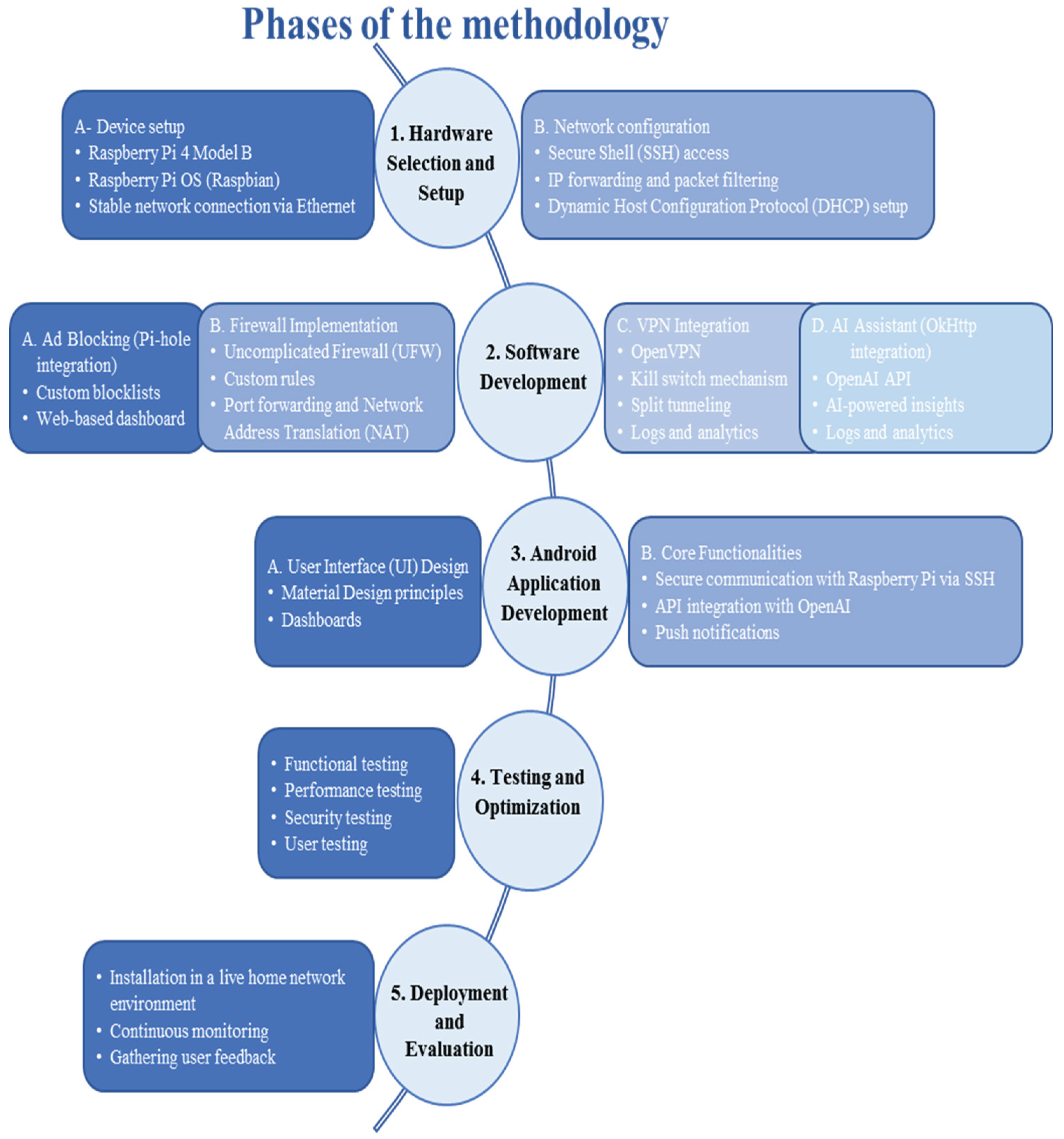
Figure 2.
Projected Ad Blocking Efficiency Over Time: (a) Screenshot of Pi hole dashboard displaying DNS-level ad blocking statistics. (b) Line chart showing the progression of the efficiency of ad blocking over a six-week test period.
Figure 2.
Projected Ad Blocking Efficiency Over Time: (a) Screenshot of Pi hole dashboard displaying DNS-level ad blocking statistics. (b) Line chart showing the progression of the efficiency of ad blocking over a six-week test period.
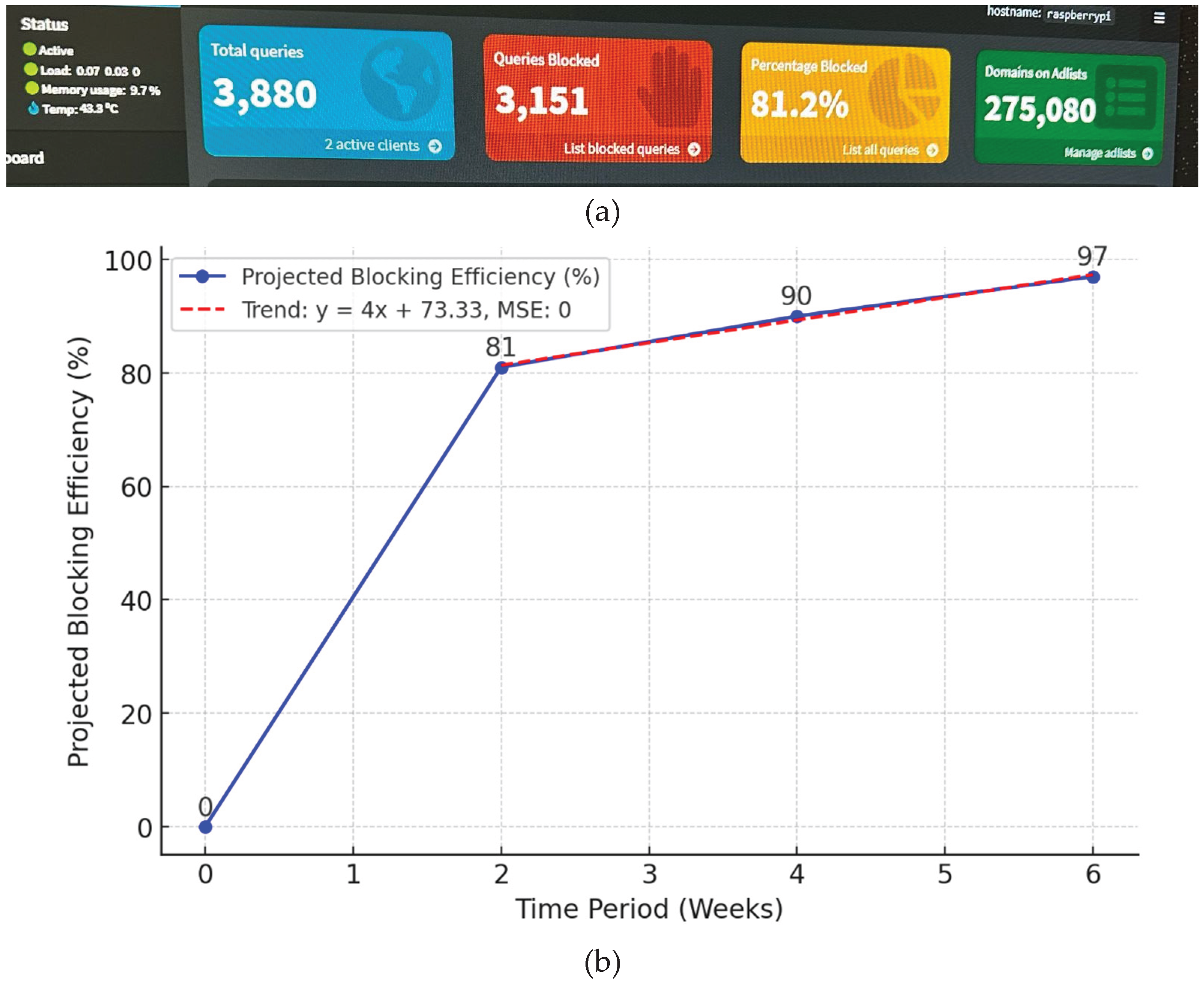
Figure 3.
VPN latency measurements under normal residential traffic conditions, showing RTT stability across four ICMP probes.” a) VPN connection test using the Ping command, b) Performance trend graph.
Figure 3.
VPN latency measurements under normal residential traffic conditions, showing RTT stability across four ICMP probes.” a) VPN connection test using the Ping command, b) Performance trend graph.
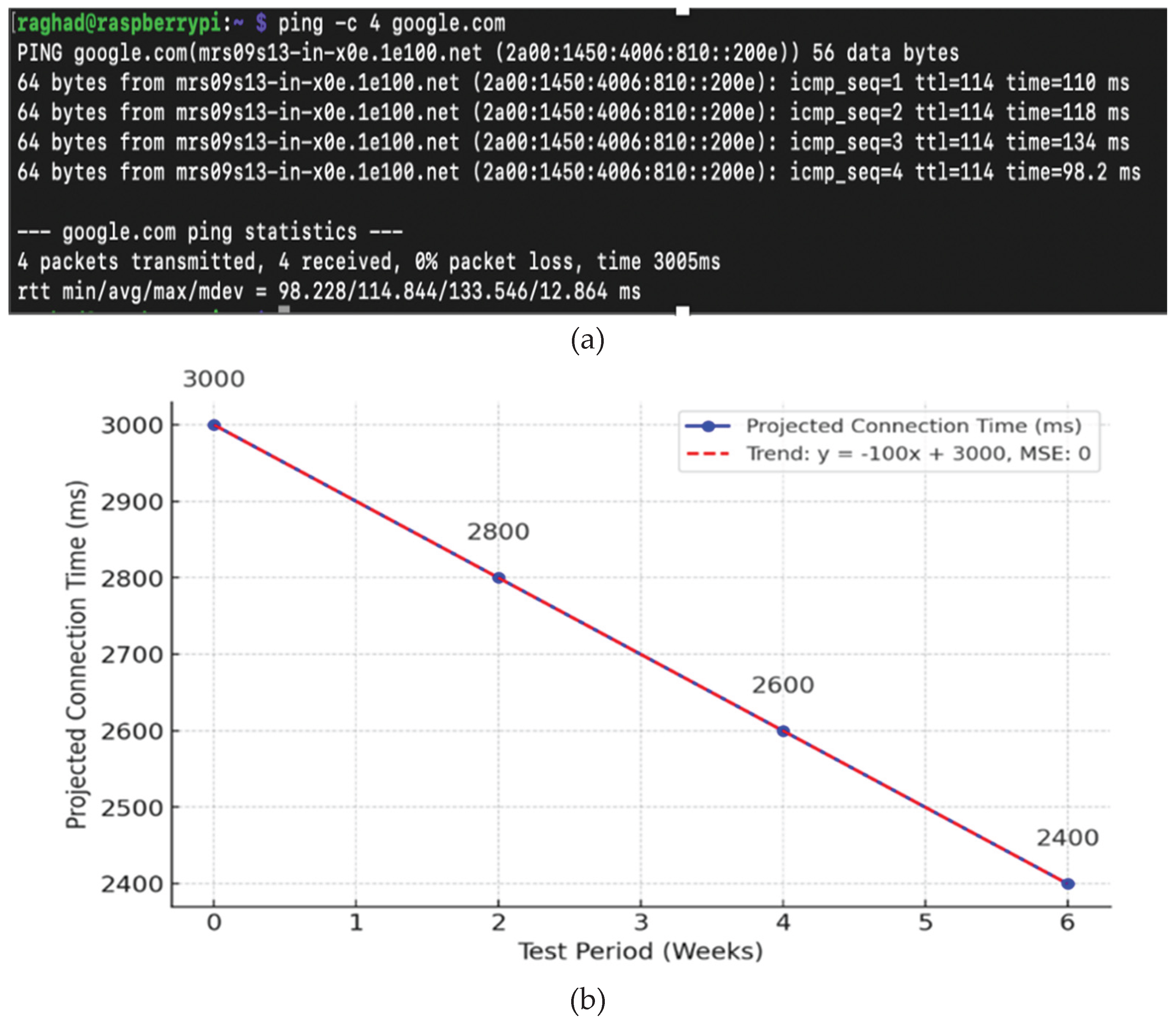
Figure 4.
Projected Firewall Blocking Attempts Over Time: (a) Terminal output showing UFW status and active ruleset for firewall policy enforcement. (b) Quadratic trend graph illustrating growth in blocked connection attempts during the evaluation period.
Figure 4.
Projected Firewall Blocking Attempts Over Time: (a) Terminal output showing UFW status and active ruleset for firewall policy enforcement. (b) Quadratic trend graph illustrating growth in blocked connection attempts during the evaluation period.
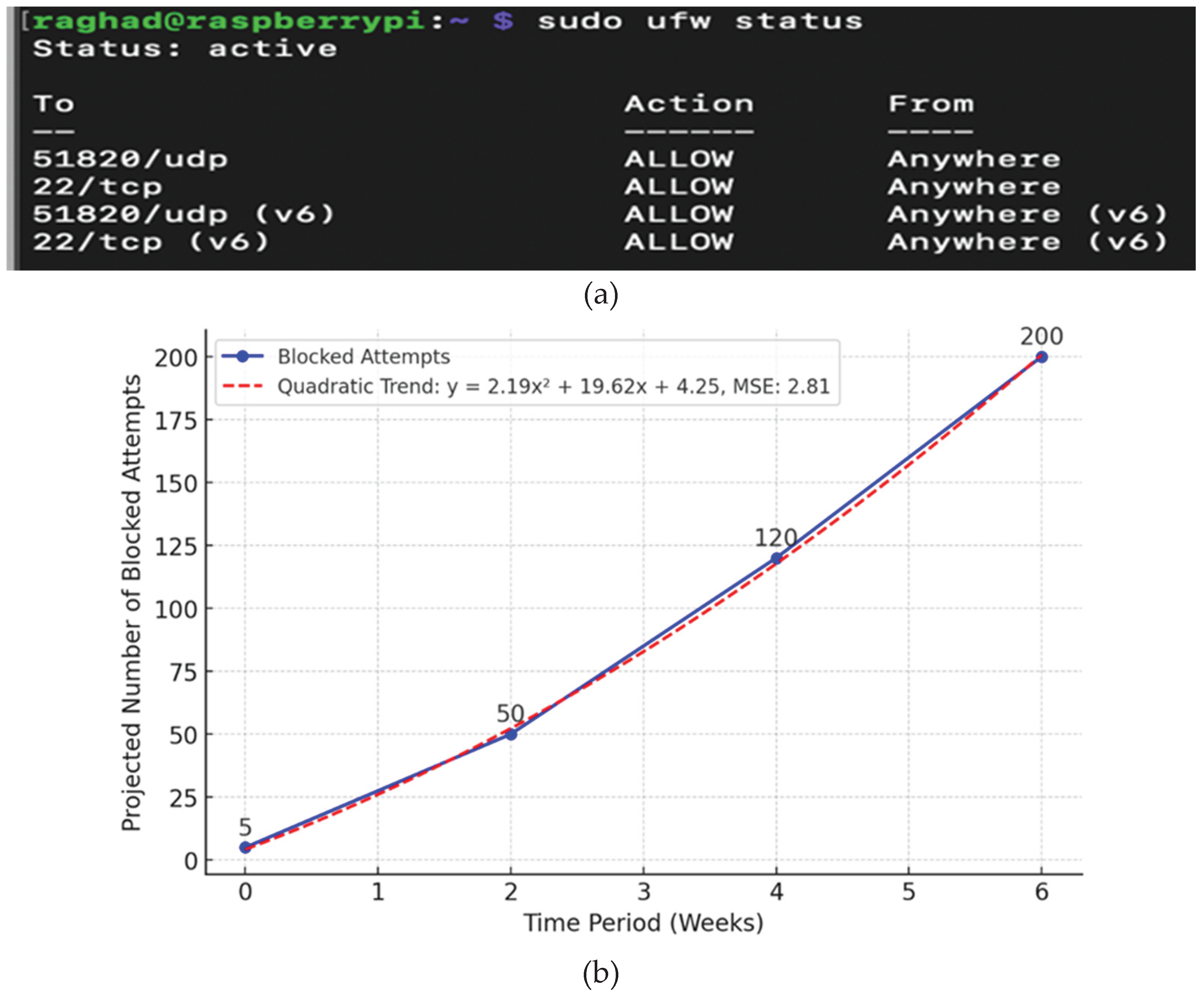
Figure 5.
Screenshot of the Android app interface showing active firewall, VPN, and ad blocker status.
Figure 5.
Screenshot of the Android app interface showing active firewall, VPN, and ad blocker status.
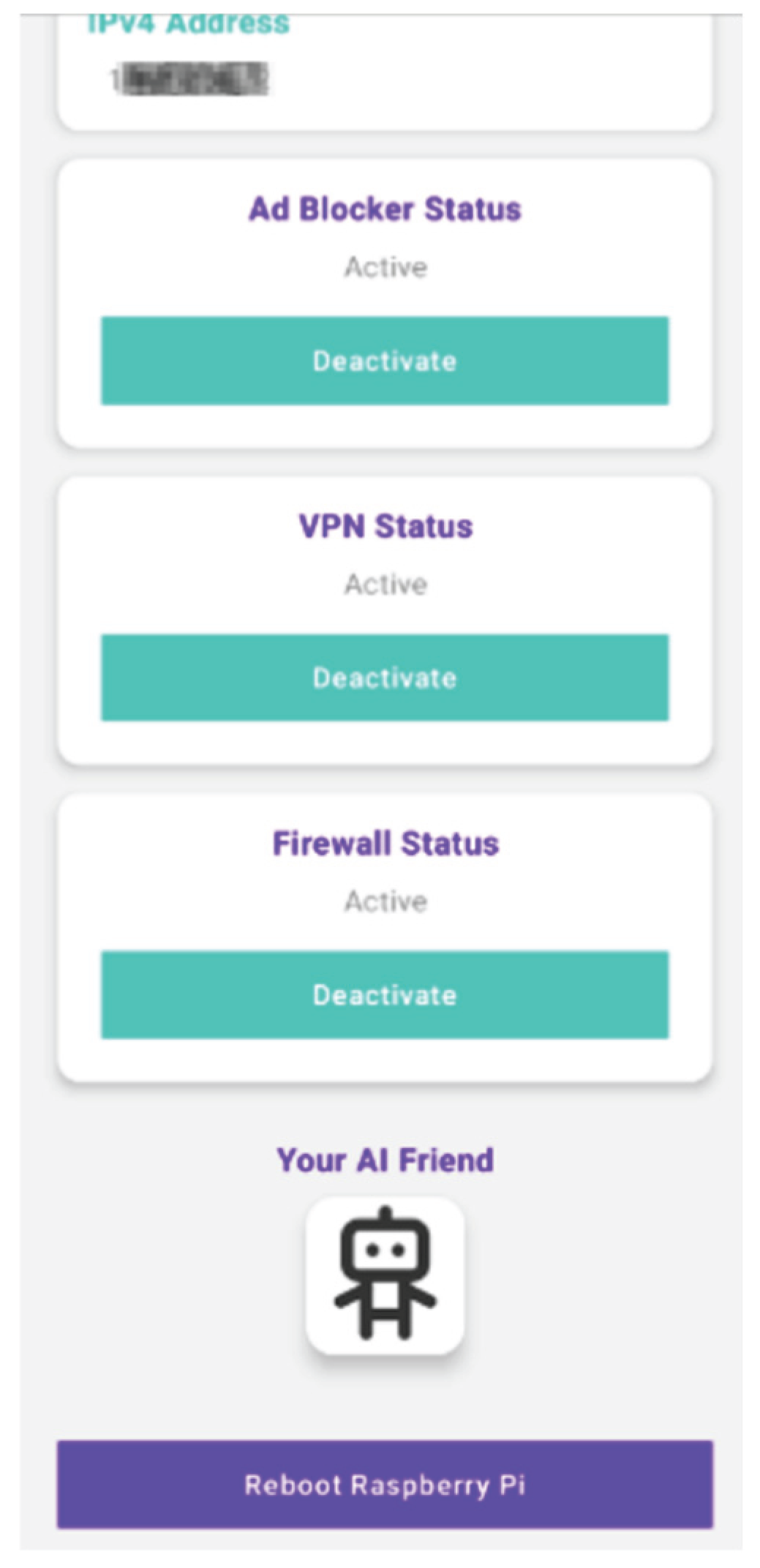

Table 1.
Experimental Parameters.
| Parameter | Value |
|---|---|
| Test duration | 6 weeks |
| Connected devices | 12 |
| Hardware platform | Raspberry Pi 4 (4 GB RAM) |
| Traffic type | Web browsing, streaming, IoT, VPN |
| Evaluation scenarios | Normal use, DNS spoofing, port scanning, VPN disruption |
Table 2.
Comparison of home network security solutions versus NetworkGuard.
| Feature | Traditional Solutions | NetworkGuard |
|---|---|---|
| Ad blocking | Browser-based extensions or separate tools | Built-in network-wide ad blocking via Pi hole |
| Firewall Protection | Basic Role-Player rules | Advanced firewall with UFW and customisable policies |
| VPN Services | Requires third-party subscription | Integrated OpenVPN with kill switch and split tunnelling |
| AI Assistance | Rare or unavailable | Open AI-powered security advice with real-time insights |
| Remote Management | Router Web Interface with Limited Usability | Android app with secure SSH and intuitive design |
| Ease of Use | Requires technical skills | Simple toggles through a user-centred app |
| Customisation | Very limited | Highly configurable with user-defined rules |
| Cost Efficiency | Subscription costs | One-time hardware cost, no recurring fees |
| Device Support | Often restricted by router model. | Compatible with all network-connected devices. |
| Performance Impact | May slow down the network | Efficient Processing via Raspberry Pi Hardware |
Table 3.
Initial performance and projected improvements.
| Feature | Initial Performance | Projected performance |
|---|---|---|
| Static IP Connectivity | Stable connection | No major issues are anticipated. |
| Ad-Blocking Efficiency | 81% at DNS level | 97% after 6 weeks |
| VPN Connection Time | ~3000 ms | Expected to reduce to ~2400 ms |
| Firewall Response | Immediate enforcement of rules | Enhanced Rule Adaptation over Time |
Disclaimer/Publisher’s Note: The statements, opinions and data contained in all publications are solely those of the individual author(s) and contributor(s) and not of MDPI and/or the editor(s). MDPI and/or the editor(s) disclaim responsibility for any injury to people or property resulting from any ideas, methods, instructions or products referred to in the content. |
© 2026 by the authors. Licensee MDPI, Basel, Switzerland. This article is an open access article distributed under the terms and conditions of the Creative Commons Attribution (CC BY) license (http://creativecommons.org/licenses/by/4.0/).
Copyright: This open access article is published under a Creative Commons CC BY 4.0 license, which permit the free download, distribution, and reuse, provided that the author and preprint are cited in any reuse.


