

Submitted:
16 June 2025
Posted:
17 June 2025
You are already at the latest version
Abstract
This paper introduces the Automated Zero Trust Risk Management with DevSecOps Integration (AZTRM-D) framework, a novel and comprehensive approach designed to intrinsically embed security throughout the entire Secure Software and System Development Lifecycle (S-SDLC). AZTRM-D strategically unifies established methodologies—DevSecOps practices, the NIST Risk Management Framework (RMF), and the Zero Trust (ZT) model—and significantly augments their capabilities through the pervasive application of Artificial Intelligence (AI). This integration shifts traditional, often fragmented, security paradigms towards a proactive, automated, and continuously adaptive security posture. AI serves as the foundational enabler, providing real-time threat intelligence, automating critical security controls, facilitating continuous vulnerability detection, and enabling dynamic policy enforcement from initial code development through operational deployment. By automating key security functions and providing continuous oversight, AZTRM-D enhances risk mitigation, reduces vulnerabilities, streamlines compliance, and significantly strengthens the overall security posture of software systems, thereby addressing the complexities of modern cyber threats and accelerating the delivery of secure software.
Keywords:
DevSecOps
; NIST Risk Management Framework (RMF)
; NIST Zero Trust (ZT)
; Artificial Intelligence (AI)
; Secure Software and System Development Life Cycle (S-SDLC)
; Automated Zero Trust Risk Management with DevSecOps Integration (AZTRM-D)
1. Introduction
The landscape of software development is undergoing a rapid transformation, driven by agile methodologies, cloud-native architectures, and continuous delivery pipelines. While these advancements promise increased efficiency and innovation, they concurrently introduce unprecedented security challenges. Traditional security approaches, often implemented as an afterthought or through fragmented, manual processes, are proving inadequate against an increasingly sophisticated and dynamic cyber threat environment [1,2]. The reactive nature of finding and fixing vulnerabilities late in the development cycle leads to significant costs, delays, and persistent risks. There is a pressing need for a paradigm shift—one that integrates security holistically from inception, fosters continuous vigilance, and leverages intelligent automation to keep pace with evolving threats. Current efforts to enhance software security often focus on individual components, such as adopting DevSecOps for faster integration of security, implementing Zero Trust principles for stricter access control, or applying risk management frameworks (like NIST RMF) for structured security governance [3,4,5,6]. While each of these methodologies offers distinct benefits, their isolated application can lead to gaps, inefficiencies, and a lack of cohesive defense. The true potential for robust and adaptive software security lies in their synergistic integration, empowered by advanced technologies.
This paper introduces the Automated Zero Trust Risk Management with DevSecOps Integration (AZTRM-D), a novel and comprehensive framework designed to address these critical challenges by unifying DevSecOps, the NIST Risk Management Framework, and the Zero Trust model, all underpinned and significantly enhanced by Artificial Intelligence (AI). AZTRM-D fundamentally redefines secure software development by weaving security into every phase of the Secure Software and System Development Lifecycle (S-SDLC). Unlike fragmented solutions, AZTRM-D leverages AI to provide continuous threat intelligence, automate vital security controls, enable real-time system oversight, and facilitate dynamic policy adaptation. This AI-powered automation extends across the entire lifecycle—from promoting secure coding practices and identifying vulnerabilities during development, through to continuous monitoring, threat response, and flexible policy adjustments in operational environments. The result is a proactive, adaptive, and highly resilient framework that not only mitigates risks but also accelerates the delivery of inherently secure software, preparing organizations for the complexities of the modern digital frontier. The subsequent sections detail the architectural components of AZTRM-D, its operational methodology, and how its integrated approach fortified by AI offers a superior path to achieving enduring software security.
1.1. Organization of the Paper
The paper is structured to offer a thorough look at how we can better secure software development. We begin with the Introduction, which sets the stage by discussing the current challenges in software security and the need for a new approach.
Following this, in Preliminary Research on Existing Development Models, we delve into existing development models. This section explores various methodologies and frameworks, tracing their evolution, highlighting their strengths, and pointing out their limitations when it comes to integrating security. We examine traditional methods like Waterfall, Agile, the V-Model, and the Spiral Method. We also specifically discuss DevSecOps, explaining why it’s a strong choice for secure development, especially for something as sensitive as the Internet of Battlefield Things (IoBT). This foundational review helps clarify the current landscape and explains why our proposed AZTRM-D framework is so necessary.
Next, Understanding the Risk Management Framework provides a solid understanding of the Risk Management Framework, focusing on the NIST RMF. We go through its seven steps: Preparation, Categorization, Selection, Implementation, Assessment, Authorization, and Monitoring. For each step, we explore how Artificial Intelligence (AI) can significantly enhance efficiency and accuracy. This section clarifies how a structured approach to risk is vital for protecting information systems.
Then, The Zero Trust Model introduces the Zero Trust (ZT) model, which operates on the principle of "never trust, always verify." We explain its core tenets and how it challenges traditional security thinking. We also discuss its five key pillars: Identity, Devices, Networks, Applications and Workloads, and Data. We then show how these pillars are supported by cross-cutting capabilities like Governance, Automation and Orchestration, and Visibility and Analytics, highlighting how AI and automation can boost their effectiveness.
In Automated Zero Trust Risk Management with DevSecOps Integration (AZTRM-D), we introduce our main contribution: the Automated Zero Trust Risk Management with DevSecOps Integration (AZTRM-D) framework. This section details each phase of AZTRM-D: Planning, Development, Building, Testing, Release and Deliver, and Operate, Monitor, and Feedback. For each phase, we explain how it integrates Zero Trust principles, the NIST Risk Management Framework, and DevSecOps methodologies, all enhanced by AI. We also discuss how the NIST AI Risk Management Framework helps manage the unique risks associated with AI models, emphasizing that AI itself needs to be treated with a Zero Trust mindset.
Finally, we provide practical validation for AZTRM-D. In AZTRM-D Simulated Real-World Scenario, we walk through a simulated real-world scenario involving a financial services provider to show how the framework works in practice against a sophisticated cyberattack. Then, in AZTRM-D Lab Built Scenario, we present a lab-built scenario using NVIDIA Orin devices and a GitLab server to demonstrate the setup and how it undergoes security testing. This section details our testing journey, including initial configurations, hardening steps, and the overall results from both outsider and insider perspectives, confirming the framework’s effectiveness.
We conclude in Conclusion by summarizing the importance of AZTRM-D as a comprehensive, AI-integrated approach to secure software development, and we outline future research directions to further enhance its capabilities.
We also emphasize that while we are focused on securing devices at all levels, we are not focused on postquantum cryptography, as we are targeting the current evolving technological landscape. However, we do believe that early adaption and research of PQC would enhance device security and this new model even further. Through this structured approach, the paper seeks to contribute to the creation of a new model used within the development stages that have a strong focus on security from start to end.
2. Preliminary Research on Existing Development Models
Effective secure software development requires a foundational understanding of the various methodologies and frameworks that govern how software is designed, built, and deployed. This section delves into preliminary research on existing development models, their evolution, and their inherent strengths and limitations concerning security integration. By examining traditional and modern approaches to software and system development, as well as established security and risk management frameworks, we lay the groundwork for understanding the complexities and challenges that the AZTRM-D framework aims to address through its integrated, AI-enhanced approach. This review highlights the current landscape and identifies the gaps that motivate the novel contributions of AZTRM-D.
2.1. Software and System Development Lifecycles
The Software and System Development Life Cycle (SDLC) is a critical framework that guides the creation, deployment, and maintenance of software systems. It provides a structured approach, encompassing key stages such as requirements analysis, design, implementation, testing, deployment, and maintenance, to ensure that software is developed systematically and meets specified requirements [1,2]. The choice of SDLC methodology significantly impacts the development process’s efficiency and security, especially when dealing with sensitive or classified systems [3]. As security requirements become more stringent, the chosen SDLC methodology must adapt to address the elevated demands of protecting sensitive data, such as personal information, financial records, and classified military technologies. For example, traditional methodologies like Waterfall, known for their linear and sequential structure, may be suitable for projects with stable and clearly defined requirements, but their rigidity can be a limitation in dynamic environments [4]. On the other hand, Agile methodologies offer a more flexible and iterative approach, allowing for continuous integration, testing, and deployment [5]. This adaptability makes Agile well-suited for projects where requirements are likely to evolve, such as in the development of consumer-grade IoT devices. However, the rapid pace of Agile development requires careful management to prevent security oversights. More advanced methodologies, such as DevSecOps, further integrate security into the SDLC, embedding security practices into every phase [6,7]. This approach ensures that security is continuously addressed throughout the software lifecycle, emphasizing automation, continuous integration and delivery (CI/CD), and real-time monitoring. Other SDLC models, such as the V-Model and Spiral methodology, offer a balance between structure and flexibility, each with its own strengths and weaknesses [8,9]. The choice of SDLC methodology ultimately depends on the specific requirements of the project, the sensitivity of the data involved, and the desired level of security.
2.1.1. Waterfall Method
The Waterfall methodology, with its linear and sequential structure, is well-suited for projects where requirements are stable and clearly defined [10,11]. In Waterfall, each phase of the development process is completed before the next begins, ensuring that all requirements are thoroughly understood and addressed before proceeding [4,12]. This makes Waterfall particularly effective for straightforward, low-risk projects, such as fully unclassified systems like commercial off-the-shelf IoT devices. The structured approach of the Waterfall model ensures that all project requirements are fully addressed, minimizing the risk of missing critical elements [1]. However, its rigidity can be a significant limitation in environments where rapid adaptation to market demands or user feedback is necessary [3,4]. When dealing with systems that handle sensitive information, such as PII, healthcare records, or financial data, the emphasis of the Waterfall model on detailed documentation provides clear evidence of compliance with standards such as HIPAA, GDPR, or PCI-DSS. Despite this, the inflexibility of the model may hinder the ability to respond quickly to emerging threats or regulatory changes, making it less suitable for environments requiring continuous security re-assessment [1,10,11]. For highly classified systems, particularly in military applications such as the Internet of Battlefield Things (IoBT), the Waterfall model is generally impractical. These systems require the flexibility to adapt rapidly to changing requirements and threats, a need that the sequential structure of the Waterfall model cannot accommodate [3].
2.1.2. Agile Method
In contrast to the Waterfall method, the Agile methodology offers a more flexible and iterative approach, emphasizing adaptability and responsiveness to change [4,5]. Agile breaks development into small, manageable units called sprints, allowing for continuous integration, testing, and deployment. This methodology is particularly effective in environments where requirements are expected to evolve throughout the development process [2]. For consumer-grade IoT devices that are not classified, Agile supports rapid development cycles, enabling teams to quickly bring functional components to market [3]. This iterative approach fosters continuous improvement and is particularly beneficial in competitive markets where speed and agility are crucial. However, Agile’s fast pace necessitates strong management to prevent security oversights. As systems become more sensitive, managing data such as PII, healthcare information, or financial records, Agile’s flexibility allows continuous security integration and compliance with regulatory requirements such as HIPAA, GDPR, or CCPA [4,5]. This ongoing assessment ensures that the system remains secure throughout its development, although Agile’s rapid iterations require rigorous oversight to maintain security and compliance standards [2,3]. In highly classified environments, such as military systems like IoBT, Agile’s adaptability is a significant strength. These systems often require the ability to rapidly incorporate new intelligence and adjust to shifting operational needs [4]. However, strict controls must be implemented to prevent vulnerabilities, particularly when dealing with classified information.
2.1.3. V-Model
The V-Model, an extension of the Waterfall methodology, emphasizes verification and validation at each stage of development [8,13]. Each development phase is paired with a corresponding testing phase, ensuring thorough validation before progressing. This structured approach is beneficial for projects where reliability and rigorous testing are paramount [3]. For unclassified systems with stable requirements, the V-Model ensures that all components meet their functional and security requirements before integration [13]. However, in environments where requirements may change, the V-Model’s rigidity can be a limitation. For systems handling sensitive information, the V-Model’s structured approach to verification and validation is advantageous, ensuring rigorous testing against regulatory standards such as HIPAA, GDPR, and PCI-DSS [8]. This reduces the risk of vulnerabilities in the final system. However, the lack of flexibility of the V-Model can hinder rapid adaptation to new security threats or regulatory changes. For highly classified systems, such as military IoBT, the V-Model may be less suitable due to its rigidity [3]. However, it can be valuable in scenarios where rigorous testing and validation are required before deployment, ensuring that each component meets strict security standards.
2.1.4. Spiral Method
The Spiral methodology offers a compelling hybrid approach that merges the iterative nature of Agile with the structured aspects of Waterfall, placing a strong emphasis on risk assessment at each phase [3,9]. This approach is particularly well-suited for projects characterized by high levels of uncertainty and risk, where flexibility and risk mitigation are paramount. The Spiral model’s iterative cycles of planning, risk analysis, engineering, and evaluation facilitate continuous refinement based on meticulous risk assessments and invaluable stakeholder feedback [9]. While it may be more complex than necessary for unclassified systems, it proves highly effective for large-scale projects where risk management is critical. As the sensitivity of the system increases, especially when handling sensitive data such as PII, financial data, or healthcare records, the Spiral model’s emphasis on iterative development and continuous risk assessment ensures that security and compliance are steadfastly maintained [3]. This approach is particularly valuable in environments where the ability to respond swiftly to new threats and regulatory changes is essential. For highly classified systems, the Spiral methodology’s core focus on risk management is truly invaluable. Its capacity to continuously reassess risks and adapt seamlessly to changing environments makes it exceptionally effective for developing military technologies like IoBT, where security and adaptability are non-negotiable [9].
2.1.5. DevSecOps Method
Development, Security, and Operations (DevSecOps) is a transformative approach that embeds a security-first mindset throughout the entire software and system development lifecycle (SDLC) [6,14]. Unlike traditional SDLC models that often prioritize rapid development over robust security, DevSecOps champions the integration of security practices into every stage of the process [3,7]. This paradigm shift emphasizes shared security responsibility, ensuring that security considerations are paramount from the initial planning phases through to ongoing operations [15].
At its core, DevSecOps promotes automation, continuous integration and delivery (CI/CD), and real-time monitoring [16]. This enables the proactive identification and mitigation of vulnerabilities early in the development process, significantly reducing the risk of security flaws in the final product. By weaving security into the very fabric of the SDLC, DevSecOps moves beyond the traditional notion of security as an afterthought. The DevSecOps lifecycle comprises ten phases across three main components: Development, Security, and Operations, as illustrated in Figure 1.
The process initiates with the Planning phase, where the scope, requirements, and security considerations are defined. Security is prioritized in every requirement, and threat assessments are conducted to understand potential risks [14]. The Development phase focuses on secure coding practices, including rigorous code reviews, parameter checks, and secure coding techniques to prevent vulnerabilities [3]. For hardware, this involves tamper-proof design and secure communication protocols.
Following development, the Build phase compiles or assembles the technology for testing. The Testing phase then involves penetration testing to identify and mitigate vulnerabilities [14]. The Release phase prepares the technology for secure deployment, including security reviews, risk assessments, and a secure deployment guide. In the Delivery phase, the technology is securely delivered to the end customer, who deploys it using the provided guide and performs their own security scans.
The Deployment phase sees the end customer securely deploy and continuously monitor the technology. The Operations phase involves ongoing monitoring and maintenance by both the development team and the end customer, with security patches released as needed [7,14].
The importance of DevSecOps amplifies across various domains. For unclassified systems, such as commercial IoT devices, DevSecOps provides a proactive, built-in security approach [15,16]. As systems handle sensitive data like PII, healthcare records, or financial information, DevSecOps becomes essential for continuous monitoring and enforcing security policies, ensuring compliance with regulations like HIPAA, GDPR, and PCI-DSS [6]. In highly classified environments, such as military systems, DevSecOps provides a robust framework for integrating security into every aspect of development and operation, vital for preserving the confidentiality and integrity of classified data.
2.1.6. Method Chosen for AZTRM-D
In the realm of secure software development, where the stakes are high and the threat landscape is constantly evolving, the choice of methodology is paramount. For Automated Zero Trust Risk Management with DevSecOps Integration (AZTRM-D), the selection of DevSecOps as the foundational security framework is a deliberate and strategic decision [15]. DevSecOps, with its emphasis on continuous integration of security measures throughout the development process, emerges as the most secure method for IoBT use [6,7]. In highly classified environments, where the integrity and confidentiality of data are paramount, DevSecOps shines. Its ability to automate security processes and continuously monitor the system ensures that security controls are not only implemented but also meticulously validated at every stage [16]. This seamless integration of security and development aligns perfectly with Zero Trust principles, ensuring that no component, user, or process is inherently trusted [14,17]. Instead, every action is rigorously verified, and access is continuously monitored and adjusted in real-time based on the latest data and threat intelligence. This unwavering commitment to security makes AZTRM-D particularly well-suited to the demanding security requirements of military applications, where the stakes are high, and the threat landscape is constantly evolving. In these critical scenarios, AZTRM-D provides a robust and adaptive security framework that empowers organizations to stay ahead of threats and safeguard their most sensitive assets.
2.2. Secure Software and System Development Lifecycles
The Secure Software Development Life Cycle (S-SDLC) encompasses various approaches to integrating security into the traditional Software Development Life Cycle (SDLC) [18,19]. These approaches aim to weave security considerations into every stage of software development, ensuring the final product can withstand evolving security threats [16]. Before delving into the specifics of my method, it’s essential to understand the existing landscape of S-SDLC methodologies.
One prominent S-SDLC method emphasizes embedding security measures deeply into each phase of the traditional SDLC. This approach starts with the Requirement Stage, where security requirements are identified and prioritized alongside functional and business needs, as highlighted in [18]. By integrating security considerations early on, the software’s architecture is designed with potential threats in mind. This stage involves a comprehensive analysis of the system’s objectives and the identification of potential security risks that could compromise the software’s functionality and integrity. The method advocates for structured techniques like threat modeling to anticipate and mitigate risks before they become vulnerabilities. Moving into the Analysis and Design Stage, the focus shifts to a detailed examination of potential vulnerabilities within the system’s architecture. Tools such as threat modeling and historical data analysis are used to identify security flaws that could be exploited. The method encourages developers to consider both current and emerging threats, ensuring the software’s design can withstand a wide array of security challenges. The design phase is crucial, as it lays the blueprint for how security controls will be implemented throughout the system. Design reviews and security assessments are employed to validate that the proposed architecture can effectively mitigate identified risks [18]. In the Development Stage, secure coding practices are prioritized. Developers are encouraged to adhere to industry-standard coding practices that minimize the introduction of security flaws, such as buffer overflows and SQL injection vulnerabilities. The method emphasizes using static analysis tools during coding to detect and rectify security issues as the code is being written. These tools help identify potential vulnerabilities early in the development cycle, allowing for more efficient and cost-effective remediation. Additionally, peer reviews and pair programming are recommended to ensure consistent security application throughout development. The Testing Stage focuses on both functional and security testing [18]. The method advocates for a layered approach to security testing, where multiple testing techniques are applied to uncover a wide range of vulnerabilities. Dynamic analysis, penetration testing, and fuzz testing are among the recommended techniques, each targeting different aspects of the software’s security posture. Dynamic analysis tests the software in a running state to identify vulnerabilities that may not be apparent in the static code. Penetration testing simulates real-world attacks to evaluate how the software would perform under malicious conditions. Fuzz testing subjects the software to unexpected or malformed inputs to uncover potential security weaknesses [18]. Once the software is deemed operational, the method moves into the Operational and Maintenance Stage, where the focus is on continuous monitoring and updating. This stage recognizes that the security landscape is constantly evolving, and software must be regularly updated to defend against new vulnerabilities and threats. The method emphasizes implementing a robust patch management process to address any vulnerabilities that may arise post-deployment. Continuous monitoring tools are recommended to detect and respond to security incidents in real-time, ensuring the software remains secure throughout its operational life. This stage also involves regular security audits and assessments to verify that the software continues to meet security standards over time. The Disposal Stage is the final phase in this methodology, addressing the secure decommissioning of software. The method ensures that all sensitive data is securely erased and that no residual information is left behind that could be exploited. This stage is critical in preventing data breaches that could occur if old software systems are not properly disposed of. The method suggests using secure deletion tools and techniques that comply with industry standards to ensure that all data is irretrievably erased [18]. While this method provides a solid foundation, it primarily focuses on integrating security into the basic SDLC, which, although a good starting point, can be significantly enhanced.
Another S-SDLC method emphasizes the early and continuous integration of security throughout the SDLC. Grounded in qualitative research and insights from industry experts, this approach positions security as a core component of the software development process [19]. It advocates for early security integration, ensuring security is considered from the project’s inception. This involves embedding security requirements into the initial project planning and system architecture phases, aligning security goals with overall business objectives. The method highlights involving security experts during requirement gathering to identify potential threats and vulnerabilities that could impact the system [19]. Stakeholder involvement is another crucial aspect of this method. Engaging stakeholders, including developers, security professionals, and business leaders, ensures that security considerations align with the project’s goals and objectives. This collaborative approach fosters a culture of security awareness within the organization, ensuring all parties are committed to building a secure software product. Continuous security testing is a cornerstone of this methodology [19]. The method suggests that security testing should be an ongoing activity throughout the SDLC, rather than confined to the final stages of development. By integrating security tests into each phase, vulnerabilities are identified and mitigated as they arise, reducing the risk of security issues being discovered late in the process. This approach includes various testing techniques, such as unit testing, integration testing, and system testing, each focused on identifying different types of security vulnerabilities. The method also recommends incorporating automated testing tools to streamline the testing process and ensure consistent execution of security tests [19,20]. Education and awareness are also highlighted as critical components. The method emphasizes training developers and other stakeholders in security best practices and the potential risks associated with insecure software. By providing ongoing education, the method aims to equip all members of the development team with the knowledge and skills needed to identify and address security issues before they become critical problems. This focus on education fosters a culture of security within the organization, where security is viewed as a shared responsibility [19]. While there are similarities with the previous method, this one focuses on stakeholder involvement and automation for security integration.
A third method offers a unique perspective on integrating security into Agile methodologies, making it particularly well-suited for dynamic and iterative development environments [5]. This method embeds security within Agile sprints, ensuring that security considerations are integrated into each sprint cycle. This approach aligns with the Agile philosophy of iterative development, where software is developed in small, incremental steps. By incorporating security activities into each sprint, the method ensures that security is considered continuously throughout the development process. During each sprint, the method emphasizes threat modeling and security reviews. These activities are carried out during sprint planning sessions to identify potential security threats and vulnerabilities that could arise from the features being developed [5]. Addressing these threats early in the sprint reduces the likelihood of vulnerabilities being introduced into the software. Security reviews are also conducted during sprint retrospectives, providing an opportunity to assess the effectiveness of security measures implemented during the sprint and identify areas for improvement. Iterative security testing is another key aspect of this approach. Given the iterative nature of Agile development, the method advocates for security testing at the end of each sprint [5]. This allows the development team to identify and address security issues as they arise, rather than waiting until the end of the project to conduct a comprehensive security test. The introduction of a security backlog is another innovative aspect of this method. The security backlog is a prioritized list of security tasks and vulnerabilities that need to be addressed alongside other development tasks. By managing security tasks in the same way as other development work, the method ensures that security is consistently prioritized and integrated into the development process. The security backlog allows the development team to track and manage security-related activities, ensuring they are addressed in a timely manner and do not fall by the wayside as other development priorities emerge [5].
Another S-SDLC method is tailored to meet the rigorous requirements of Common Criteria (CC) certification [21]. This method focuses on ensuring that the SDLC aligns with the security requirements necessary to achieve CC certification, which involves a comprehensive and systematic approach to security. The method emphasizes compliance with CC standards, requiring the SDLC to be closely aligned with the security controls and documentation practices mandated by CC certification. This involves implementing specific security measures throughout the SDLC to ensure that the software meets the stringent security requirements necessary for certification [21]. The method emphasizes detailed documentation, which is required to demonstrate compliance with CC standards and provide evidence of the security controls implemented during development. Risk management is another critical aspect of this method [21]. The document highlights the importance of identifying and mitigating risks early in the development process to ensure that the software meets the necessary security standards. This involves conducting extensive risk assessments during the requirement gathering and design phases, identifying potential threats and vulnerabilities that could impact the security of the software. The method recommends using formal risk assessment methodologies, such as those outlined in ISO/IEC 27005, to systematically identify and assess risks and implement appropriate mitigation strategies [22]. The method also places significant emphasis on comprehensive documentation. Given the rigorous documentation requirements of CC certification, the method stresses the importance of maintaining detailed records of all security-related activities throughout the SDLC [21]. This includes documenting security requirements, design decisions, risk assessments, testing procedures, and mitigation strategies. Documentation serves as a critical component of the certification process, providing the necessary evidence to demonstrate that the software meets the security requirements mandated by CC certification.
An S-SDLC method that integrates security into the DevOps process, transforming it into a holistic DevSecOps approach, is designed to ensure that security is a shared responsibility in all stages of development, from initial design to deployment and beyond [6,15]. One of the key features of this method is automated security integration. By embedding security tools into the Continuous Integration/Continuous Deployment (CI/CD) pipeline, the method ensures that security checks are performed automatically and consistently. Automation is crucial in a DevSecOps environment because it allows security tasks to be seamlessly integrated into the development workflow, reducing the risk of human error and ensuring that security is maintained without slowing down development [20,23]. Automated tools can perform various security checks, including code analysis, vulnerability scanning, and compliance validation, providing continuous assurance that software remains secure throughout its lifecycle [15]. Collaboration between teams is another fundamental aspect of the DevSecOps approach. The method breaks down traditional silos between development, operations, and security teams, fostering a culture of collaboration and shared responsibility. By encouraging close communication and collaboration, the method ensures that security is considered at every stage of development, from initial design to final deployment. This collaborative approach also helps ensure that security concerns are promptly addressed, as all team members are aligned in their commitment to delivering a secure software product [15]. The method also emphasizes continuous monitoring and feedback. In a DevSecOps environment, the software is continuously monitored in production, with real-time feedback provided to the development team. This approach allows for rapid identification and remediation of security issues, ensuring that vulnerabilities are addressed before they can be exploited. Continuous monitoring tools, such as security information and event management (SIEM) systems, are used to detect potential threats and anomalies, providing the development team with the information needed to maintain the security of the software over time [15]. This method delves deeper and moves away from the traditional Agile SDLC norms. It focuses on security for every aspect of the development process. This research highlighted the importance of the DevSecOps method, which is why I incorporated it into my AZTRM-D model.
The final S-SDLC method examined provides a comprehensive categorization of software security strategies throughout the SDLC [24]. This method systematically maps out existing approaches, offering information on various ways security can be embedded in different stages of software development. The research acknowledges the increasing need for security integration due to the critical role software systems play in modern society. It identifies and categorizes 118 primary studies into five main approaches: Secure Requirements Modeling, Vulnerability Identification, Adaptation, and Mitigation, Software Security-Focus Processes, Extended UML-Based Secure Modeling Profiles, and Non-UML-Based Secure Modeling Notations. Each of these approaches addresses different phases of the SDLC, highlighting the multifaceted nature of software security [24]. Secure Requirements Modeling emphasizes incorporating security considerations during the earliest stages of the SDLC. This method underscores that embedding security during the requirements phase can result in an inherently secure foundational design of the software. The study notes that although this approach is less frequently addressed in the literature, its significance lies in setting a strong security foundation that influences subsequent phases. Techniques such as abuse and misuse cases are highlighted as effective tools for capturing security requirements early on, ensuring that potential threats are anticipated and mitigated before they can manifest [24]. Identification, adaptation, and mitigation of vulnerabilities are another major focus of the study, particularly during the coding phase where vulnerabilities are most likely to be introduced. The method underscores the importance of static and dynamic analysis tools for detecting and mitigating security flaws. Static analysis examines the source code without execution, allowing for the early detection of potential issues, while dynamic analysis tests the software during execution to identify vulnerabilities that may not be apparent in static code. The study also highlights hybrid analysis methods, which combine static and dynamic techniques to provide a more thorough security assessment, ensuring that complex vulnerabilities are identified and addressed [24]. Software Security-Focused Processes are explored as holistic approaches that integrate security into every phase of the SDLC. The study examines frameworks such as Microsoft’s Security Development Lifecycle (SDL) and CLASP, which guide organizations to embed security from initial requirements gathering to final maintenance. These processes cultivate a culture of security within organizations, where security is treated as a continuous concern rather than an afterthought. By following these structured processes, organizations can systematically address security risks throughout the development lifecycle [24]. Extended UML-Based Secure Modeling Profiles extend traditional UML diagrams to include security considerations during the design phase, ensuring that security is built into the software architecture from the beginning. The study identifies profiles such as SecureUML and UMLsec, which allow developers to model security constraints directly within UML diagrams. This approach is particularly valuable for complex systems, where security needs to be addressed across multiple components and interactions [24]. Lastly, Non-UML-Based Secure Modeling Notations are discussed as alternative methods for representing security concerns during software design. These notations, such as Petri nets and formal methods, offer flexibility and rigor in modeling security properties, providing developers with tools to ensure that the design of the system meets the specified security requirements. The study suggests that these notations are particularly useful in contexts where UML-based approaches may not be applicable, offering developers additional means to verify the security of their designs [24].
My proposed AZTRM-D methodology enhances existing S-SDLC methods by integrating DevSecOps, the NIST Risk Management Framework (RMF), and Zero Trust (ZT) into a unified, AI-augmented process. Unlike traditional approaches that embed security at various stages, AZTRM-D incorporates AI-driven tools for real-time threat intelligence, automated security controls, and continuous monitoring [25]. This ensures that security is a dynamic, ongoing process. What sets AZTRM-D apart is applying ZT principles directly to AI systems within the SDLC, ensuring they are continuously verified and protected against vulnerabilities, particularly in specialized contexts like critical infrastructure. Additionally, RMF principles are employed to manage AI-related risks, maintaining the reliability and trustworthiness of these systems throughout development. By combining the proactive security measures of DevSecOps, the structured risk management of RMF, and the stringent access controls of ZT [17], AZTRM-D provides a robust and adaptive security framework that addresses existing gaps and ensures that both the software and the AI supporting its development are thoroughly protected. This comprehensive approach makes AZTRM-D more resilient and responsive to modern cybersecurity challenges, exceeding the capabilities of previous methods.
3. Understanding the Risk Management Framework
Effective cybersecurity in complex technological environments necessitates a structured approach to identifying, assessing, and managing risks. Risk Management Frameworks (RMFs) offer systematic processes that guide organizations in safeguarding their information systems and data. These frameworks provide a foundation for making informed decisions about security controls and risk mitigation strategies. This section delves into the principles of risk management, with a primary focus on the widely adopted NIST Risk Management Framework, exploring its core components and the potential for enhancement through Artificial Intelligence.
3.1. NIST Risk Management Framework
Let’s first clarify the role of risk management frameworks. These frameworks serve as crucial guides for safeguarding information systems, the data they house, and organizations as a whole [26,27]. It’s important to note that not all aspects of these frameworks are solely focused on technology. However, the non-technical components are still valuable because they establish governance over technology handling, access control, and the organizational hierarchy’s role in protecting systems and data. Numerous methods have been proposed for risk management, but this investigation will primarily focus on the NIST RMF [28,29,30]. NIST’s RMF is widely recognized and used across various industries, from the public to private sectors [31]. Although all risk management frameworks share similarities in formatting, the NIST methodology has emerged as an industry standard.
The general thought process behind a risk management framework begins with understanding the systems within an environment and their interconnections. Once this is understood, the next step is to assess the current security posture of the systems and the environment. This involves identifying existing weaknesses that could be exploited by adversaries to tamper with the system or systems within that environment. According to all frameworks, the next step is to determine, incorporate, and assess various ways to mitigate these vulnerabilities. Based on the assessment, the system is granted approval to continue operating if it is deemed safe enough. Finally, the system must be continuously assessed to ensure ongoing security. While this may seem like a lot to grasp, each framework breaks it down into steps and tasks that should be followed, and we’ll explore how AI can enhance each step [28,29,30,31].
Before we delve into how artificial intelligence can be integrated into the RMF, it’s crucial to have a clear understanding of AI’s capabilities and limitations. Artificial intelligence (AI) involves enabling a computer or device to mimic human intelligence and thought processes. These capabilities are built within a database until the AI can accurately mimic human thinking, make accurate decisions, and provide informed guesses as a human would. AI can be incorporated into various aspects of the RMF, from the preparation phase to the monitoring phase [25]. AI offers transformative potential when integrated into the Risk Management Framework (RMF). By utilizing AI, organizations can enhance the efficiency and accuracy of various RMF processes [32]. AI can help automate complex tasks, reducing the potential for human error and providing real-time insights that support informed decision-making throughout the RMF lifecycle [20,23]. In the early stages of RMF, AI can streamline the gathering and organization of critical information, ensuring that all relevant data is accurately captured and evaluated. As the process progresses, AI can be used to analyze and categorize systems, identify potential vulnerabilities, and assess risks more effectively [33,34]. This capability allows organizations to make more informed decisions about which security controls to implement and how to apply them to protect their systems. Additionally, AI can play a crucial role in the continuous monitoring and auditing of systems, helping organizations stay ahead of emerging threats by identifying and responding to potential security issues in real-time [22]. Through the automation of documentation and compliance checks, AI can also ensure that all necessary protocols are followed and that the system remains secure throughout its operational lifecycle. The NIST RMF breaks this down into seven steps that are dynamic in nature, meaning each step is performed multiple times over the system’s lifecycle to maintain its security [28,29,30,31].
3.1.1. Preparation Phase
The first step in the NIST RMF is the Preparation Phase. This phase lays the groundwork for effective risk management by establishing clear roles, responsibilities, and procedures for managing systems and data within the organization [28,35]. It involves determining who has access to devices and data, establishing a hierarchy for authorization and change management, and defining the processes for document preparation and dissemination [26]. This phase essentially sets the stage for governance within the organization, ensuring that everyone understands their role in protecting sensitive information [28,29,30,31]. It’s important to note that the steps in this phase are not isolated; they are interwoven with and support tasks in subsequent phases, forming a continuous thread throughout the risk management lifecycle [28,35].
Figure 2.
NIST RMF. This image has been completely re-modified; however, the idea of the image was inspired by [28,35]
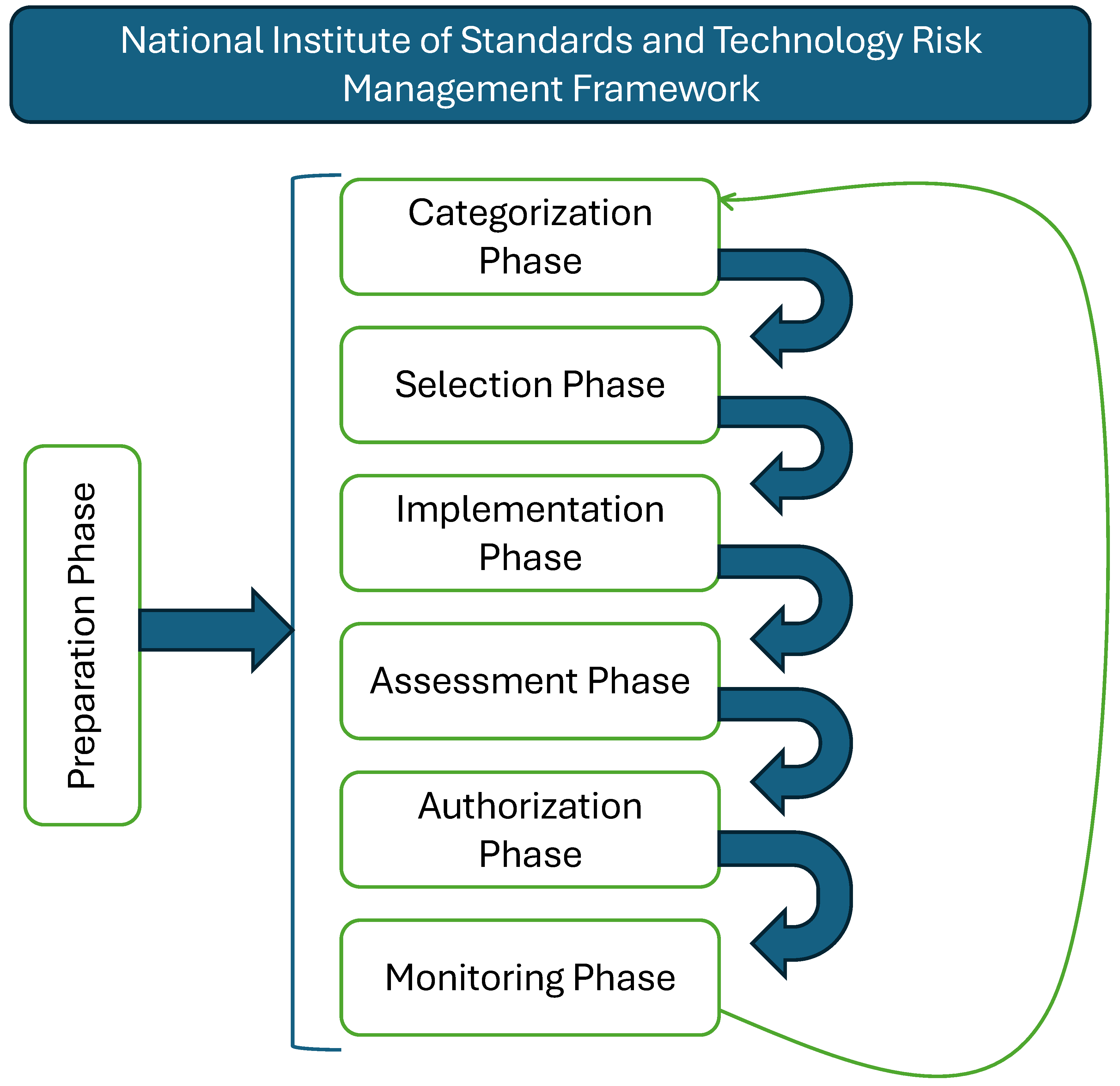
The Preparation Phase also involves ensuring the organization is fully prepared to implement the RMF at all levels [28,29,30]. This includes establishing a risk management strategy that aligns with organizational goals [31], securing buy-in from senior leadership, identifying key stakeholders, developing a continuous monitoring strategy, and implementing a robust risk assessment methodology [27,28,35].
AI can significantly enhance the effectiveness of the Preparation Phase by automating and optimizing various tasks [23]. For example, AI can analyze historical data to predict which team members or departments should have access to specific data or devices based on past usage patterns and potential risks. This can help dynamically adjust access controls, ensuring that only the most relevant personnel have access, thereby minimizing the attack surface. AI-driven tools can also automate the creation and management of the hierarchy for authorization and change management, monitoring organizational activities to identify emerging threats or anomalies, and automatically reassigning responsibilities within the hierarchy in real-time to address these risks [25,36].
Figure 3.
Mapping out a System. TThis image has been completely re-modified; however, the idea of the image was inspired by [28]
Figure 3.
Mapping out a System. TThis image has been completely re-modified; however, the idea of the image was inspired by [28]
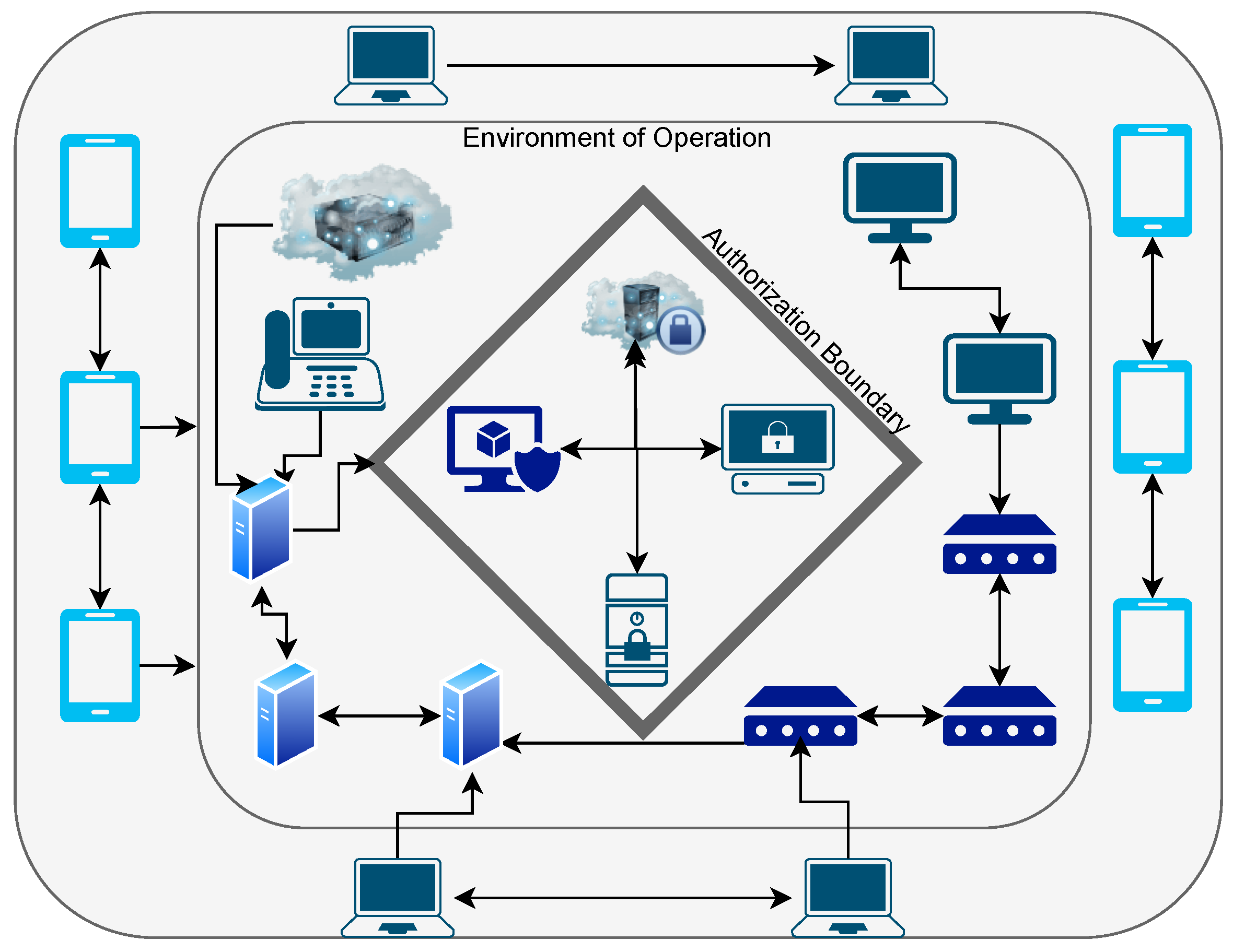
In terms of document preparation and workflow, AI can streamline these processes by automatically categorizing documents, determining their sensitivity, and identifying the appropriate recipients based on predefined rules and real-time context [32]. AI can also monitor the flow of documents to ensure secure delivery and flag any deviations from the established workflow.
Finally, AI can improve governance by providing real-time analytics and insights into how data, devices, and modifications are managed throughout the organization. By continuously learning operational patterns, AI can refine governance policies and ensure they evolve in response to emerging threats and organizational changes, maintaining resilience against cybersecurity challenges throughout the system’s lifecycle [36,37].
3.1.2. Categorization Phase
The Categorization Phase is a critical step in the NIST RMF, as it provides a comprehensive understanding of the systems within an environment and their interconnections [28,35]. This phase involves meticulously analyzing the entire system layout, from the smallest devices like cameras to the largest systems such as data centers, and mapping out how these systems communicate with each other and exchange data [30]. It also reveals how these systems connect to various networks, including internet connections, Bluetooth, Zigbee, Z-Wave, and other communication protocols. One of the most crucial aspects of this phase is identifying critical systems and their interdependencies, which is essential for understanding the potential impact of a security incident and ensuring the continuity of operations [28,29]. For example, in a hypothetical battlefield scenario where a soldier is equipped with technologies from the Internet of Battlefield Things (IoBT), such as communication modules, health monitoring devices, GPS, and cameras, this phase allows those at home base to fully understand the soldier’s interconnected systems and how they connect back to base [31]. This includes understanding how data is transmitted, the type of data exchanged between systems, the security levels of these transmissions, any encryption methods in use, and the wireless protocols deployed by the soldier’s devices. The categorization of these systems is critical for assessing the soldier’s safety and the overall security of the information systems environment [28,35].
In addition to mapping system interconnections, the Categorization Phase involves assigning impact levels to systems based on the sensitivity of the data they handle and the potential impact on the organization if that data is compromised [28,29,30]. These impact levels—low, moderate, or high—are crucial for determining the appropriate security controls in subsequent phases of the RMF [31]. This phase also requires a detailed analysis of data flows between systems to identify potential vulnerabilities in communication paths and understand the security posture of each connection [27,28,35].
AI can significantly enhance the effectiveness of the Categorization Phase by automating the mapping of system interconnections and data flows, providing a more accurate and comprehensive view of the environment [33,34]. AI can analyze vast amounts of network traffic and system logs to identify communication patterns that might not be immediately apparent to human analysts, helping to uncover hidden dependencies between systems, which are crucial for understanding the full scope of potential risks. AI can also dynamically update the categorization of systems as new devices are added to the network or as existing systems evolve, ensuring that the categorization remains current and reflective of the actual environment [36].
Moreover, AI can enhance the impact assessment process by analyzing historical data on security incidents and their consequences to predict the potential impact of a compromise on specific systems [32]. This predictive capability allows for a more nuanced categorization that considers not just the current state of the environment but also potential future threats. AI can also be employed to continuously monitor the security posture of categorized systems, identifying any changes in risk levels and alerting security teams to take proactive measures [22]. Integrating AI into the Categorization Phase empowers organizations to achieve a deeper understanding of their systems’ interconnections and vulnerabilities, ultimately leading to a more robust and resilient security posture.
3.1.3. Selection Phase
The Selection Phase marks a crucial juncture in the risk management process, where a baseline level of security controls is established and initial assessments are conducted to understand the organization’s security posture [28,29]. This phase involves a comprehensive evaluation of potential threats, vulnerabilities, and risks [30,31], culminating in the selection of appropriate security controls to mitigate those risks [28,35].
Before delving into the specifics of this phase, the concept of security controls must be clear. These controls encompass a wide range of measures implemented to protect systems and data, ranging from physical controls like locks and keycards to digital controls such as encryption, multi-factor authentication, and intrusion detection systems [28,35]. In essence, security controls are the safeguards that protect systems from unauthorized access, use, disclosure, disruption, modification, or destruction [26,29].
The Selection Phase commences with a thorough threat assessment, where potential threats to the organization are identified and analyzed [28,30]. These threats can range from unintentional threats, such as natural disasters or human error, to intentional threats, such as malicious attacks by hackers or insider threats. Understanding the threat landscape is crucial for selecting appropriate security controls [31]. Next, vulnerability assessments are conducted to identify weaknesses in the organization’s systems and infrastructure that could be exploited by threats [28,35]. These assessments involve a systematic evaluation of all components, including hardware, software, networks, and data, to pinpoint potential vulnerabilities. Once threats and vulnerabilities are identified, a risk assessment is conducted to determine the likelihood and potential impact of a threat exploiting a vulnerability [27,30]. This assessment involves analyzing the severity of the impact and the probability of occurrence, allowing for prioritization of risks and resource allocation accordingly. Based on the risk assessment, initial security controls are selected to mitigate the identified risks [28,35]. These controls are chosen based on their effectiveness, feasibility, and compliance with relevant security standards and regulations, considering factors such as data sensitivity, system criticality, and organizational risk tolerance [26,29].
AI can significantly enhance the Selection Phase by automating and optimizing several key tasks. AI-driven tools can analyze vast amounts of threat intelligence data to identify emerging threats more accurately and in real-time, providing a more dynamic and up-to-date threat assessment [32,34]. This allows for quicker identification of potential adversaries and threat vectors that may not be immediately apparent. AI can also be used to automate the vulnerability assessment process by continuously scanning systems for weaknesses and analyzing the likelihood of these vulnerabilities being exploited based on historical data and current threat landscapes [20,33]. This continuous assessment ensures that the risk evaluation isn’t just a one-time process but an ongoing effort that evolves with the threat environment. Furthermore, AI can assist in the risk assessment process by simulating potential attacks on the system, predicting the outcomes, and determining the most effective controls to mitigate these risks [25]. This capability enables a more informed selection of controls, tailored to the specific threats and vulnerabilities of the system. By integrating AI into the Selection Phase, organizations can achieve a more proactive and adaptive security posture, ensuring that the controls selected are not only based on current threats but also forward-looking, anticipating and mitigating future risks.
3.1.4. Implementation Phase
The Implementation Phase is where the carefully selected security controls are put into action, transforming the organization’s security posture from a theoretical framework into a tangible defense against cyber threats [28,35]. This phase involves meticulous deployment of the chosen controls, ensuring that they are seamlessly integrated into the existing systems and infrastructure.
One of the crucial aspects of the Implementation Phase is thorough documentation [26,27]. Every step of the implementation process, from configuration changes to policy updates, must be meticulously documented. This documentation serves as a valuable resource for tracking changes, troubleshooting issues, and demonstrating compliance with security standards and regulations. Another key element of this phase is training and awareness [28,38]. Personnel who interact with the systems and data must be adequately trained on the newly implemented controls. This training ensures that everyone understands their role in maintaining security and can effectively utilize the controls to protect sensitive information [29,35].
AI can play a pivotal role in the Implementation Phase by automating the deployment of controls and ensuring that they are applied consistently across all relevant systems [20,23]. AI-driven tools can help manage the complexity of deploying multiple controls across a diverse set of systems, ensuring that each control is correctly configured and that any potential conflicts between controls are identified and resolved [25,34]. Moreover, AI can assist in the real-time monitoring of the implementation process, providing immediate feedback if a control is not functioning as intended or if there are any issues with its integration into the existing system. This level of automation and monitoring ensures that the implementation process is efficient and effective, reducing the risk of human error. In addition, AI can be used to train personnel on the newly implemented controls by providing interactive simulations and real-time guidance [32]. This training can be tailored to the role of each individual, ensuring that everyone has the knowledge they need without overwhelming them with unnecessary details. Furthermore, AI can help to continuously assess the effectiveness of implemented controls, providing insight into how well they protect the system, and suggesting adjustments if needed [22,33]. By implementing AI in the Implementation Phase, organizations can ensure that controls are not only implemented correctly, but also remain effective over time, adapting to new threats and changing operational conditions.
3.1.5. Assessment Phase
The Assessment Phase is a critical checkpoint in the risk management lifecycle, where the effectiveness of the implemented security controls is evaluated to ensure they are meeting their intended objectives [28,35]. This phase involves a thorough reassessment of vulnerabilities, threats, and risks, taking into account the impact of the newly implemented controls [29,38].
One of the primary goals of the Assessment Phase is to verify that the controls are effectively mitigating the vulnerabilities they were designed to address [26,27]. This involves conducting vulnerability scans, penetration testing, and security audits to identify any remaining weaknesses or gaps in the security posture [28,30]. Another important aspect of this phase is evaluating the overall effectiveness of the controls. This includes assessing their performance, efficiency, and impact on system functionality [31,35]. It’s crucial to ensure that the controls are not only providing adequate security but also not hindering the operational capabilities of the systems they protect.
AI can significantly improve the Assessment Phase by automating the continuous monitoring and analysis of the effectiveness of controls [32]. AI-driven tools can perform real-time vulnerability scans and threat assessments, identifying any gaps in the controls that might have been missed during the initial implementation [23,34]. AI can also simulate potential attack scenarios to test the robustness of controls, providing immediate feedback on their performance, and suggesting modifications if necessary [25,33]. Additionally, AI can help in analyzing the impact of the controls on system functionality, using machine learning algorithms to detect patterns that indicate when security measures are beginning to interfere with the device’s performance [20,22]. By adding automation to the Assessment Phase, organizations can ensure that their security measures are both effective and balanced, providing strong protection without compromising the operational capabilities of the technology.
3.1.6. Authorization Phase
The Authorization Phase marks a crucial decision point in the risk management process, where the system is formally authorized to operate based on a comprehensive review of its security posture [28,35]. This phase involves a meticulous evaluation of the implemented security controls, the results of the assessments, and the overall risk to the organization [26,29].
The responsibility of making the authorization decision typically falls on a senior official, often someone with high authority within the organization or an external auditor [28,38]. This official reviews all relevant documentation, including risk assessments, security control implementations, and test results, to determine whether the system meets the required security standards and regulatory compliance requirements [31,35]. The authorization decision is not merely a rubber stamp; it’s a critical judgment call that considers the potential impact of a security breach on the organization’s mission, reputation, and assets [27]. If the system is deemed to have unacceptable risks, the authorizing official may mandate further security enhancements or deny authorization altogether.
AI can significantly improve the Authorization Phase by optimizing the review process for the authorizing official [32]. By rapidly analyzing the extensive documentation, assessments, and system-related data, AI can highlight areas that require closer scrutiny, thus speeding up the decision-making process and ensuring that no critical details are missed [34,36]. AI can also compare the current security posture of the system with industry standards and previous authorizations, providing the authorized official with a broader perspective on the overall risk of the system [33]. Incorporating AI into the Authorization Phase allows organizations to streamline the decision-making process, ensuring it is thorough and efficient. This approach provides a higher level of confidence that the system is secure and ready for operational deployment.
3.1.7. Monitoring Phase
The Monitoring Phase is the final but ongoing stage of the risk management lifecycle, where the system’s security posture is continuously monitored and evaluated to ensure its ongoing effectiveness [28,29,35]. This phase involves a relentless pursuit of maintaining security, adapting to emerging threats, and ensuring that the system remains resilient in the face of evolving challenges [26,31].
Continuous monitoring is a cornerstone of this phase, involving real-time surveillance of the system’s activity, performance, and security controls [28,38]. This monitoring includes intrusion detection, vulnerability scanning, security event log analysis, and performance monitoring to identify any signs of compromise or degradation in security. Another crucial aspect of the Monitoring Phase is responding to security incidents [30,35]. When a potential security breach or vulnerability is detected, a swift and coordinated response is essential to contain the damage and restore normal operations. The monitoring phase also involves regular reviews and updates of the security controls to ensure that they remain effective against emerging threats and evolving vulnerabilities [27].
AI can significantly improve the Monitoring Phase by providing real-time analysis and insights that would be difficult to achieve manually [32]. AI-driven systems can continuously scan for vulnerabilities and analyze data transmissions to detect any anomalies that could indicate a security breach [33,34]. These systems can also predict potential future threats by analyzing patterns and trends, allowing for preemptive action before a vulnerability is exploited [23,25]. AI can automate the monitoring process, ensuring that no aspect of the system goes unchecked, and can also manage the vast amount of data generated during this phase, prioritizing alerts based on the severity of potential threats [20,22]. Integrating AI into the Monitoring Phase ensures a more proactive, adaptive, and thorough approach to maintaining the security of the system throughout its entire lifecycle.
4. The Zero Trust Model
Zero Trust (ZT) is a security framework built on the principle of "never trust, always verify" [39,40]. It challenges the traditional perimeter-based security model, which assumes that entities within the network can be trusted by default [17]. Instead, Zero Trust mandates that every user, device, and application, regardless of their location or network, must be continuously authenticated and authorized before accessing any resource [41,42].
The fundamental principle of Zero Trust is that no entity, internal or external, is trusted by default [39,43]. Every interaction within the system, whether it involves connections, hardware, software, networks, or users, is subject to continuous scrutiny [44]. The underlying assumption is that an adversary may have already infiltrated the system, and therefore, the entire system and its data must be treated as potentially compromised. Even if this is not the case, the guiding principle remains: trust nothing, verify everything [40]. This rigorous approach ensures that security is always proactive rather than reactive, addressing potential threats before they can materialize into actual breaches [37,45]. Figure 4 provides a general overview of the NIST Zero Trust Architecture concept.
With this fundamental understanding of Zero Trust, it’s natural to question how interaction with a system is possible if no trust is assumed. This is where the concept of trust zones comes into play [46]. The first zone is the untrusted zone, which encompasses the area outside the Policy Decision/Enforcement Point (PDP/PEP). In this zone, absolutely no trust is extended to the end-user until their identity and credentials are verified. The PDP/PEP zone serves as the gateway where the user is authenticated and authorized based on predefined organizational policies for that specific resource [39,47]. These policies could include factors such as user identity, the device being used, the location of access, the time of access, and more. Once the user successfully passes through the PDP/PEP and their identity is confirmed, they enter the implicit trust zone [43]. However, even within this zone, trust is not absolute; user access and activities are continuously monitored and re-evaluated as long as they interact with the resource [48,49,50]. This continuous evaluation ensures that if any anomalous or suspicious behavior is detected, the user’s access can be immediately revoked, thereby minimizing potential damage.
Although the specific implementation of Zero Trust may vary depending on the organization’s needs, there are fundamental principles that must be followed [40,51]. The first tenet is that all data sources and devices, regardless of their origin, are treated as resources. This means that even personal devices used to access organizational resources are subjected to the same security scrutiny as organizational devices [17]. The second tenet mandates that all communications between devices, individuals, and systems are secured, regardless of where they occur. For example, if an employee works remotely, their device must establish a secure connection when interacting with company resources. Another crucial tenet involves the granular verification of access rights on a per-session basis, ensuring that users are only granted the minimum necessary access required for their tasks [52]. Additionally, the organization must continuously monitor and measure the integrity and security of all resources [44], ensuring that every interaction is authenticated and authorized before any access to data or other systems is allowed. Finally, organizations must consistently collect and analyze data about every device that interacts with the system to maintain an accurate understanding of the security posture of the system at all times [53,54]. Collectively, these tenets emphasize the need for an organization to maintain comprehensive visibility and control over who or what interacts with their systems, how they do so, and to what extent.
Figure 5 illustrates the architecture of a Zero Trust system. All elements, from threat intelligence and activity logs to compliance regulations and identity management, feed into the data plane, which serves as the core of the Zero Trust architecture [39]. Within this plane, a user attempting to access an organizational resource must first log onto the system and verify their identity at the Policy Enforcement Point (PEP). This verification process is governed by the policy engine and policy administrator, which enforce the organization’s security policies [47]. Only after successful verification can the user access the resources they are authorized to use. The data plane is where all interactions and transactions are monitored, analyzed, and controlled, ensuring that any deviation from the established norms is detected and addressed immediately [50]. This architecture not only secures access but also ensures that any data transferred within the system is protected through continuous monitoring and enforcement of security policies.
The integration of Zero Trust and the Risk Management Framework (RMF) can be streamlined by following pathways recommended by NIST [39,55]. The architecture provided by NIST demonstrates how the steps of Zero Trust can be mapped onto the RMF steps, creating a cohesive approach to security that leverages the strengths of both methodologies. During the Preparation and Categorization phases of the RMF, organizations can inventory their systems to gain a comprehensive understanding of all resources, including devices, applications, and data, as well as identify the users and accounts that have access to these resources. This inventory process is crucial for establishing a baseline of what needs to be protected and who has access to it. In the Selection phase of the RMF, risk assessments are conducted to evaluate the potential threats and vulnerabilities associated with each resource. This phase also involves the development of security policies tailored to the specific needs and risks of the organization, ensuring that Zero Trust principles are embedded in every aspect of the security strategy [17,51]. The policies created during this phase should address not only who has access but also under what conditions access is granted, how data is protected, and what actions are taken in the event of a security breach. During the Implementation and Assessment phases, these Zero Trust policies are deployed across the organization’s systems and networks. This step involves configuring the necessary controls and technologies to enforce the Zero Trust policies effectively [40]. It may include implementing multi-factor authentication, encryption, and continuous monitoring tools to ensure that all interactions within the system adhere to the established security protocols [44]. The assessment phase is equally critical, as it involves testing the effectiveness of the deployed controls. This testing can include simulated attacks and other techniques to evaluate how well the Zero Trust policies protect the system against potential threats. Any weaknesses identified during this phase should be addressed promptly to strengthen the overall security posture. Continuous feedback from the assessment phase can also be used to refine and improve the Zero Trust policies over time, making them more resilient to emerging threats [48]. Finally, in the Monitoring phase of the RMF, the Zero Trust policies are fully operationalized, ensuring that they function as intended and continue to protect all resources over time. This phase involves continuous monitoring of all systems, networks, and user activities to detect and respond to potential threats in real-time [36]. The monitoring tools should be capable of analyzing large volumes of data to identify patterns indicative of security breaches or other suspicious activities. In this phase, AI can play a crucial role by automating the monitoring process and providing advanced analytics to predict and prevent security incidents before they occur [56,57]. The ongoing evaluation of Zero Trust policies during this phase ensures that the organization remains vigilant and adaptive to new security challenges, maintaining a strong defense against both internal and external threats.
With this fundamental understanding of Zero Trust, the model is further elaborated through five key pillars: Identity, Devices, Networks, Applications and Workloads, and Data, as depicted in Figure 6. Each pillar is supported by three cross-cutting capabilities: Visibility and Analytics, Automation and Orchestration, and Governance [40,51]. This section delves into the technical aspects of each pillar, with a focus on how AI and automation can enhance the implementation and operation of Zero Trust. We will also explore the progression from Traditional to Optimal maturity stages within each pillar, emphasizing that achieving an Optimal state is crucial, particularly in securing IoT technologies and specialized environments like ICS/SCADA systems [49,58].
4.1. Identity
The Identity pillar in the Zero Trust model is crucial because it ensures that every access request is authenticated, authorized, and audited, leveraging the principle of least privilege [39,51]. This pillar encompasses Identity and Access Management (IAM) systems, Multi-Factor Authentication (MFA), and Continuous User Behavior Analytics [40]. AI and automation play a pivotal role in improving identity management, primarily through real-time risk-based adaptive access controls [36,57].
In the Traditional stage, identity management might rely on static credentials like passwords, which are manually provisioned and often inadequately monitored. This stage is marked by basic identity verification processes, with limited automation and a strong reliance on manual checks, making the system vulnerable to phishing and credential theft [17]. As organizations progress to the Initial stage, MFA is introduced, adding an additional layer of security. AI-driven adaptive authentication begins to take shape, where access decisions are influenced by contextual data such as user behavior, device health, and network conditions [42,44]. At this stage, some automation is introduced in identity lifecycle management, helping to mitigate risks such as privilege creep by automatically adjusting access rights as roles change.
The Advanced stage sees a deeper integration of AI into identity management. AI continuously analyzes user behavior to create dynamic risk profiles, enabling real-time adjustments to authentication requirements [36,44]. For example, if an employee logs in from an unusual location, the system might require additional verification or restrict access based on the calculated risk. Privileged Access Management (PAM) is also enhanced by AI, which monitors and flags suspicious activity, triggering automated responses such as session termination or access revocation [56].
Reaching the Optimal stage, AI-driven systems provide continuous validation of identities with phishing-resistant MFA, not just at the initial point of access but throughout the user’s session [37,53]. This continuous validation is particularly vital in environments with IoT devices, which often lack robust security features [49]. By achieving an optimal level of maturity, organizations can ensure that identity management is secure and seamless, with AI and automation handling the complexity of real-time risk assessments and adaptive responses.
4.2. Devices
The Devices pillar focuses on ensuring that every device accessing the network is authenticated and that its security posture is continuously monitored and verified [39,51]. This includes both managed devices, such as corporate laptops, and unmanaged devices, such as personal smartphones under BYOD policies [40]. The security of IoT devices, which often have limited computational resources and are vulnerable to exploitation, is particularly dependent on progress through the maturity stages of this pillar [54,58].
In the Traditional stage, device security is often rudimentary, relying on periodic manual checks and basic antivirus software. The visibility into device status is minimal, and there is little or no automation in managing device compliance [17]. Upon reaching the Initial stage, organizations start incorporating basic automated tools to monitor device health and compliance. AI begins to play a role in analyzing device behavior, identifying unusual patterns that might indicate a compromise [42,51]. Automated patch management is introduced to ensure that devices are kept up-to-date, although it may still be partially manual and reactive.
In the Advanced stage, AI-driven device posture assessments become more sophisticated [40]. AI can monitor device behavior, configuration, and security status in real-time, identifying any signs of compromise, such as unauthorized configuration changes or unusual network traffic [36,53]. Automated systems not only deploy patches but also prioritize them according to the criticality of the vulnerabilities and the risk profile of the devices. For IoT devices, which often cannot handle extensive security software, AI helps in offloading some security tasks to the cloud, where more powerful systems can monitor and manage these devices remotely.
Reaching the Optimal stage in device security involves continuous verification of device compliance throughout its lifecycle. AI-driven systems monitor all connected devices, including IoT, for compliance with security policies and can automatically quarantine or remediate devices that deviate from expected behavior [51,54]. This level of maturity is essential for IoT environments, where devices often operate unattended and are exposed to external threats [53,58]. By achieving an optimal state, organizations can ensure that even the most resource-constrained devices are securely integrated into the network, with AI providing real-time oversight and automated responses to any potential threats.
4.3. Networks
The Networks pillar emphasizes securing network infrastructure and communication channels, ensuring that all network traffic, whether internal or external, is treated as untrusted until verified [39,51]. This pillar focuses on implementing micro-segmentation, encryption, and continuous monitoring of network traffic to prevent unauthorized access and lateral movement within the network [17,40].
In the Traditional stage, network security often relies on a perimeter-based approach, with static segmentation and limited encryption. This approach is inadequate in a Zero Trust environment, where internal threats and lateral movement by attackers can bypass perimeter defenses [43]. As organizations transition to the Initial stage, they begin to implement basic network segmentation and encryption. AI starts to be used to monitor network traffic, identifying anomalies that might indicate a breach [45,51]. However, this stage is still largely reactive, and automated systems are mainly used to alert rather than actively defend against threats [46].
In the Advanced stage, AI significantly enhances network security by analyzing vast amounts of network traffic data in real-time, using machine learning to identify patterns that could indicate malicious activity [40,57]. Automated network management systems dynamically adjust segmentation based on real-time assessments of device and user behavior, ensuring that traffic is restricted to only what is necessary [52]. Encryption is enforced more consistently across all communications, with AI helping to manage and rotate encryption keys to mitigate the risk of compromise [36,37].
In the Optimal stage, AI systems continuously monitor and analyze all network traffic, applying advanced techniques such as deep learning to detect even the most subtle indicators of compromise [42,54]. These systems dynamically enforce micro-segmentation, ensuring that each application, workload, or device operates within its own secure environment [47,52]. This is particularly important for IoT devices, which often have limited and specific communication needs [49]. By enforcing just-in-time and just-enough connectivity, AI ensures that these devices only communicate with authorized systems and only for the duration necessary, significantly reducing the attack surface [53]. Optimal network security maturity is essential for organizations that rely on IoT technologies, as it ensures that their networks are resilient against a wide range of threats, and AI provides the agility needed to respond to emerging risks in real-time.
4.4. Applications and Workloads
The Applications and Workloads pillar focuses on securing applications and workloads throughout their lifecycle, from development to deployment and ongoing operation [39,51]. This involves ensuring that applications are developed securely, deployed in a controlled manner, and continuously monitored for security threats [17,40].
In the Traditional stage, application security is often reactive, with vulnerabilities addressed only after they are discovered. This stage is characterized by static access controls and limited integration of security into the development lifecycle [43]. As organizations move to the Initial stage, they begin to incorporate security into their development processes, adopting practices such as DevSecOps [14]. AI is introduced to scan code for vulnerabilities during development, ensuring that only secure code is deployed [42,51]. However, this stage may still rely on manual interventions for remediation and enforcement of security policies.
The Advanced stage sees a deeper integration of AI into the DevSecOps pipeline [6]. AI continuously analyzes code for vulnerabilities and enforces security policies throughout the CI/CD process, ensuring that any detected issues are automatically addressed before deployment [34]. During operation, AI-driven systems monitor application behavior in real-time, detecting any deviations that could indicate a compromise [37]. Automated systems are used to dynamically enforce security policies, adjusting them based on the current threat landscape and operational context [40].
In the Optimal stage, AI systems provide continuous protection for applications and workloads, with real-time monitoring and automated remediation of security threats [53,54]. AI can detect when an application begins to execute unexpected commands, which may indicate a remote code execution exploit [25]. Automated responses include isolating the affected workload, applying patches, or returning to a secure state, all without human intervention [23]. For IoT applications, which often run in resource-constrained environments, achieving this level of security maturity is crucial. The placement and orchestration of AI-driven workloads ensure that applications are deployed in environments that balance security with performance needs, dynamically adjusting to the threat landscape [22,58].
4.5. Data
The Data pillar is central to the Zero Trust model, focusing on protecting data at rest, in transit, and in use [39,51,59]. This pillar emphasizes the importance of data discovery, classification, and encryption, as well as controlling and auditing access to data [40]. As IoT devices generate vast amounts of data, securing this data becomes increasingly important, particularly as the data may contain sensitive or mission-critical information [54].
In the Traditional stage, data security is often rudimentary, with organizations relying on basic encryption for data at rest and manual access controls. Data classification and inventorying are typically manual processes that can lead to inconsistencies and gaps in data protection [17]. Lack of automation means that data is often left vulnerable, especially in environments where data flows across different systems and devices, such as IoT ecosystems [51].
As organizations progress to the Initial stage, they begin to implement automated tools for data discovery and classification [40]. AI can assist by analyzing data flows and content to identify sensitive information, ensuring that it is classified and protected appropriately [32,36]. Encryption practices become more robust, with data in transit and at rest consistently encrypted based on established security policies. Automated Data Loss Prevention (DLP) systems are introduced to monitor and prevent unauthorized data exfiltration, though these systems may still require significant manual oversight.
In the Advanced stage, AI-driven systems provide comprehensive visibility into all data interactions, enabling real-time analytics that detect potential threats before they materialize [45,51]. AI automates data classification based on content, context, and metadata, ensuring that all sensitive data is identified and protected accordingly [33,36]. Automated encryption systems dynamically manage and rotate encryption keys, reducing the risk of key compromise. Data access controls are automatically enforced, and AI continuously assesses the risk associated with data access requests and adjusts permissions based on real-time analysis of user behavior, device health, and network conditions [37].
Reaching the Optimal stage in data security involves achieving a level of automation and intelligence where data protection is seamlessly integrated into all processes and workflows [20,59]. AI systems provide real-time analytics and predictive insights into data security, enabling organizations to proactively address potential risks [53]. Data access is governed by dynamic, just-in-time, and just-enough access controls, ensuring that users and devices only have access to the data they need when they need it [44,52]. For IoT environments, where data is often generated and processed in real-time, achieving this level of maturity is essential [54]. AI-driven systems ensure that data remains secure from creation to disposal, with automated governance ensuring compliance with regulatory requirements and organizational policies.
4.6. Cross-Cutting Capabilities: Governance, Automation and Orchestration, and Visibility and Analytics
While the five pillars of Zero Trust—Identity, Devices, Networks, Applications and Workloads, and Data—form the core of the model [39], they are supported and enhanced by three cross-cutting capabilities: Governance, Automation and Orchestration, and Visibility and Analytics [40,51]. These capabilities are essential to ensure that Zero Trust principles are effectively implemented and maintained across the entire IT environment [17,37].
4.6.1. Governance
Governance refers to the policies, procedures, and frameworks that guide the implementation and enforcement of security across the organization [51]. In the context of Zero Trust, governance ensures that security policies are consistently applied and that all actions are auditable and comply with regulatory requirements [40].
In the Traditional stage, governance is often ad hoc, with policies applied inconsistently across different systems and environments. Manual processes dominate, making it difficult to ensure compliance and enforce security policies uniformly [17]. As organizations progress to the Initial stage, they begin to formalize governance frameworks, defining policies that apply across the enterprise. Automation is introduced to enforce these policies, although manual processes may still be required for certain tasks [20,51]. AI can assist in monitoring compliance, identifying areas where policies are not being followed, and providing recommendations for remediation [36].
In the Advanced stage, governance becomes more integrated and automated, with AI-driven systems providing real-time insights into policy enforcement and compliance [32,52]. Policies are regularly updated and dynamically enforced across all systems, ensuring that security remains aligned with the latest threats and regulatory requirements. AI also plays a role in identifying emerging risks, allowing organizations to proactively update their governance frameworks to address new challenges [36,60].
In the Optimal stage, governance is fully automated and dynamic, with AI continuously monitoring and adjusting policies based on real-time data and predictive analytics [37,52,61]. This ensures that security policies are always up-to-date and that compliance is maintained without the need for manual intervention. In IoT environments, where devices and data flows are constantly changing, achieving this level of governance is crucial for maintaining a robust security posture [49,58].
4.6.2. Automation and Orchestration
Automation and orchestration are critical for the efficient management and operation of security controls in a Zero Trust environment [51,52]. Automation ensures that security processes are carried out consistently and without delay, while orchestration integrates these processes across different systems and environments, enabling a cohesive and responsive security strategy [23,40].
In the Traditional stage, security processes are largely manual, with automation limited to specific tasks, such as basic system monitoring or scheduled updates [17]. This can lead to delays in responding to security incidents and inconsistencies in enforcing security policies.
As organizations move to the Initial stage, they begin to adopt automated tools for specific security tasks, such as patch management, user provisioning, and network segmentation [20,51]. Orchestration begins to play a role in coordinating these tasks across different systems, though integration may still be limited [42,52].
In the Advanced stage, automation and orchestration become more sophisticated, with AI driving the automation of complex security processes, such as threat detection, incident response, and policy enforcement [25,56]. Orchestration ensures that these processes are seamlessly integrated across all systems, enabling a more responsive security strategy. For example, when a potential threat is detected, AI can automatically trigger a series of actions, such as isolating the affected system, applying patches, and updating security policies, without the need for human intervention [57].
In the Optimal stage, automation and orchestration are fully integrated across the entire IT environment, with AI continuously optimizing and refining security processes [33,53]. This level of maturity is essential for environments where IoT devices are prevalent, as these devices often require real-time security responses that cannot be managed manually [54]. AI-driven automation ensures that security processes are carried out consistently and at scale, while orchestration integrates these processes across different systems and environments, allowing for a cohesive and responsive security strategy.
4.6.3. Visibility and Analytics
Visibility and analytics are fundamental to the Zero Trust model, as they provide the information needed to understand and manage the security posture of the organization [39,40,51]. Visibility refers to the ability to monitor and understand all activities within the IT environment, while analytics involves processing and analyzing this data to identify risks, detect threats, and inform decision-making [45,46].
In the Traditional stage, visibility is often limited to specific systems or environments, with data collected manually and analyzed in isolation. This can lead to blind spots in security posture and delays in detecting and responding to threats [17,51].
As organizations progress to the Initial stage, they begin to adopt tools that automate data collection and analysis across different systems [40]. AI is introduced to assist in analyzing this data, identifying patterns and anomalies that may indicate a security threat [45]. However, visibility may still be fragmented, with data siloed across different systems and environments.
In the Advanced stage, visibility and analytics become more comprehensive, with AI-driven systems providing real-time insights into the security posture of the entire IT environment [32,36,51]. Data from all systems, including IoT devices, is continuously collected and analyzed, enabling the organization to detect and respond to threats in real-time. AI enhances this process by identifying emerging risks and providing predictive insights that allow the organization to proactively address potential security challenges [34].
Reaching the Optimal stage involves achieving a level of visibility and analytics where all activities within the IT environment are continuously monitored and analyzed in real-time [40,53]. AI-driven systems provide predictive insights that enable the organization to stay ahead of emerging threats, while automated processes ensure that any detected risks are immediately addressed [22,54]. This level of visibility is particularly important in IoT environments, where devices may be distributed across different locations and networks. By achieving optimal maturity, organizations can ensure that they have a comprehensive and real-time understanding of their security posture, with AI providing the insights and automation needed to maintain a robust defense against even the most sophisticated threats.
4.7. Implementation of RMF with ZT
Figure 7 provides a clear visualization of how to implement Zero Trust and RMF together, creating a comprehensive strategy to protect systems and data [39,55]. Beyond this integration, the introduction of automation through AI can significantly enhance the implementation of Zero Trust [57]. AI can be used to automate the discovery of all accounts, users, and devices within information systems, ensuring that all potential points of interaction are identified [36]. This is especially important in large, complex environments where manual inventory would be impractical and prone to errors. AI can also assist in developing the most effective security policies by analyzing vast amounts of data to identify patterns and risks that may not be immediately apparent [32,34]. This data-driven approach allows organizations to create more precise and effective policies that address the unique challenges they face. Additionally, AI can enforce these policies across all devices and continuously verify their compliance, ensuring that no policy is overlooked or ignored [33]. This level of enforcement ensures that the organization maintains a consistent security posture across all its assets, reducing the likelihood of a security breach due to human error or oversight.
However, the use of AI within a Zero Trust framework raises the important question of whether AI itself can be trusted [60,62]. Given the sensitive nature of its role, AI should be treated similarly to any other user within the system. This means limiting its capabilities to specific tasks to minimize potential risks [63]. For example, one AI system might be tasked with developing security policies, another with enforcing them, and yet another with verifying compliance. This separation of duties reduces the risk that any single AI system is compromised and gains too much control. Additionally, AI systems should be required to verify their own identities before interacting with other systems, ensuring that they are subject to the same security protocols as human users [37,61]. This approach not only enhances security but also aligns with the core principles of Zero Trust, ensuring that every aspect of the system, including AI, is continuously verified and never fully trusted [17,40]. By taking these precautions, organizations can leverage the power of AI to enhance their Zero Trust implementations while mitigating the risks associated with relying too heavily on automated systems [64,65].
5. Automated Zero Trust Risk Management with DevSecOps Integration (AZTRM-D)
To address the increasingly sophisticated landscape of cybersecurity threats and the growing necessity for security-first software development, I propose a novel security methodology—Automated Zero Trust Risk Management with DevSecOps (AZTRM-D). This methodology, visually summarized in Figure 8, provides a structured and scalable approach by integrating Zero Trust (ZT) principles [39,40], the Risk Management Framework (RMF) [28], and DevSecOps methodologies [6,14] into a cohesive, AI-enhanced software development lifecycle [25]. AZTRM-D is designed to systematically embed risk management, security controls, and adaptive policy enforcement at every stage of software development, ensuring a robust security posture from planning through operational deployment [2,5,7,15,16].
5.1. Phases of AZTRM-D
5.1.1. Planning Phase
The Planning Phase serves as the cornerstone of AZTRM-D, where security, risk management, and compliance strategies are established before any development begins [26]. This phase ensures that security is embedded from the outset, integrating Zero Trust principles [17] and Risk Management Framework (RMF) methodologies [28] into the software development lifecycle. By incorporating a proactive security model that enforces risk-based access control, identity verification, automated security validation, and real-time threat modeling, the planning phase establishes a security-first approach to DevSecOps [14]. Security in this phase is not simply about defining policies but rather about embedding adaptive, AI-driven security mechanisms that continuously assess, refine, and enforce security postures as new threats emerge [32].
In essence, the planning phase defines key security objectives, risk tolerance levels, compliance requirements, and architectural designs that will guide the entire development and deployment process [27]. This phase also includes threat modeling, system interdependency mapping, and security control selection to ensure that all components align with the broader security strategy. In AZTRM-D, security planning is dynamic, continuously refining itself through real-time AI-driven risk assessments and security intelligence integration [33,34]. Rather than relying on static policies, AI algorithms ingest historical attack data, real-time threat intelligence, and system telemetry to predict emerging risks and adjust security parameters accordingly. This prevents security gaps from forming at the outset while ensuring that the software remains resilient to evolving attack techniques.
At the identity level, the planning phase enforces risk-based authentication and least-privilege access policies [51]. AI-driven identity verification continuously evaluates user behavior patterns, dynamically adjusting access privileges based on contextual risk analysis [36,44]. If an account exhibits anomalous activity—such as accessing sensitive repositories from an unrecognized location or attempting to escalate privileges—the system automatically triggers an adaptive access control mechanism, requiring additional verification steps such as multi-factor authentication (MFA) or biometric validation before access is granted. This continuous authentication model ensures that trust is never assumed and is instead reassessed based on real-time conditions [52].
For device security, the planning phase ensures that all developer, administrator, and workload devices comply with security baselines before they are permitted to interact with the system [53]. AI-driven endpoint security analytics validate device posture, checking for known vulnerabilities, outdated security patches, or indicators of compromise before allowing connections to development environments [54]. If a compromised or non-compliant device attempts to access a secure resource, Zero Trust policies enforce automated remediation actions, such as isolating the device from critical workloads or restricting access until security compliance is restored.
From a network security perspective, the planning phase defines micro-segmentation strategies and least-privilege network access policies to prevent lateral movement within development and deployment environments [39,45]. AI-powered network monitoring tools analyze real-time traffic patterns, automatically detecting and blocking unauthorized east-west communication attempts between workloads [37]. This ensures that even if an attacker gains access to one system, they cannot move laterally through the network to escalate their attack. Furthermore, software-defined perimeters (SDP) and zero-trust network access (ZTNA) policies are implemented to enforce identity-aware, just-in-time access to critical resources, preventing unauthorized exposure of sensitive systems [40].
Applications and workloads must also be designed with Zero Trust security principles from inception [17]. The planning phase incorporates AI-driven risk modeling for application components, ensuring that security controls are embedded at the design level [25]. AI-powered dependency analysis tools automatically scan third-party libraries and frameworks, flagging potentially vulnerable components before development begins [15]. Additionally, security-by-design principles are enforced through automated policy validation, ensuring that developers only use secure coding practices, hardened configurations, and cryptographic standards that align with organizational security policies [5,7,16].
Data security remains a critical focus of the planning phase, ensuring that all data assets are identified, classified, and governed under strict access control policies [59]. AI-driven data discovery and classification tools automatically scan repositories for sensitive data, applying encryption policies, access controls, and automated audit logging mechanisms [32,36]. If a developer attempts to store sensitive credentials in an unapproved location, AI-powered data loss prevention (DLP) mechanisms immediately flag the violation and enforce remediation actions. Furthermore, Zero Trust ensures that access to data is granted on a per-session basis, with dynamic risk assessments determining access privileges in real-time [51].
To enforce governance and compliance, AI-driven security auditing tools continuously validate that all planned security controls align with industry regulations such as NIST 800-53, ISO 27001, and FedRAMP [28,38]. Rather than relying on periodic compliance checks, AI automates real-time policy enforcement, detecting misconfigurations or non-compliant actions before they pose a risk [20,31]. Governance policies are also dynamically adjusted based on new regulatory requirements, ensuring that security frameworks remain up to date without requiring extensive manual intervention.
5.1.2. Development Phase
The Development Phase of AZTRM-D is where security is woven into the fabric of the software development process, ensuring that every line of code, dependency, and integration adheres to the principles of Zero Trust [39] and the Risk Management Framework (RMF) [28]. This phase prioritizes secure coding practices [16], real-time security scanning, stringent access control enforcement [52], and automated security policy validation [34] to prevent vulnerabilities from infiltrating the software from its inception. Unlike traditional software development approaches where security is often relegated to later stages, AZTRM-D mandates that security controls be implemented throughout the development process, ensuring that applications are inherently resilient against cyber threats [6].
Developers are required to authenticate using robust identity verification mechanisms, with AI-driven risk scoring dynamically adjusting access permissions based on behavior and contextual analysis [36,44]. For instance, if a developer attempts to push code from an unrecognized device or unusual location, Zero Trust policies trigger an adaptive authentication process, requiring additional verification such as biometric authentication or approval from a privileged security administrator [51]. AI-powered Just-in-Time (JIT) access controls ensure that developers are granted the minimum privileges necessary for their coding tasks and only for a limited time, reducing the attack surface if credentials are compromised [40,52].
All development devices must meet stringent security compliance requirements before interacting with secure repositories, build pipelines, or cloud environments [53]. AI-driven endpoint security validation continuously assesses whether developer workstations and CI/CD build agents adhere to baseline security policies, including updated patches, endpoint detection and response (EDR) coverage, and secure operating system configurations [54]. If a non-compliant device attempts to access a development resource, automated remediation workflows either restrict access until compliance is restored or isolate the device from production workloads entirely.
At the network level, all development activities occur within micro-segmented, identity-aware network zones that enforce strict communication policies [45]. Developers working on different projects or codebases are assigned to separate network segments, ensuring that access to repositories, databases, and build environments is controlled based on identity attributes, risk scores, and contextual awareness. AI-driven network anomaly detection continuously monitors developer traffic, detecting unusual patterns such as excessive data transfers, unauthorized API requests, or unexpected outbound communications that may indicate insider threats, credential misuse, or potential supply chain attacks [32,37]. If a potential breach is detected, automated security mechanisms enforce containment policies such as revoking API tokens, disabling compromised credentials, or requiring re-authentication for sensitive operations.
To secure applications and workloads, the Development Phase incorporates AI-driven static and dynamic security scanning tools that automatically analyze source code, third-party dependencies, and libraries for vulnerabilities in real-time [7,15]. These tools enforce secure coding practices, detect common software weaknesses (e.g., buffer overflows, SQL injection, and cross-site scripting), and provide immediate remediation guidance to developers [5]. AI-powered secure coding assistants help developers adhere to best practices by providing real-time suggestions, automated patching recommendations, and alerts for insecure functions or deprecated cryptographic algorithms [2,16]. If a developer attempts to introduce insecure configurations, such as hardcoded credentials, weak encryption methods, or excessive API permissions, the security automation system prevents the code from being committed until the issue is resolved [6].
Workloads must also adhere to Zero Trust security controls at the code level. AI-enhanced software composition analysis (SCA) tools continuously scan code dependencies, flagging known vulnerabilities and enforcing supply chain security policies [34,42]. If a third-party library introduces a critical vulnerability, the AI system automatically suggests safe alternatives or applies compensating security controls such as runtime integrity verification and enhanced input validation. Security teams are notified, and risk assessments are automatically updated to reflect the impact of the newly identified vulnerability on the project.
Data security remains a key focus throughout the Development Phase, ensuring that sensitive information is never stored or transmitted insecurely [59]. AI-driven data loss prevention (DLP) tools analyze code repositories and developer workstations for signs of sensitive data exposure, such as unintended inclusion of personal data, hardcoded credentials, or cryptographic key leakage [33,36]. If detected, automated enforcement mechanisms block commits, notify security teams, and require remediation before allowing the developer to proceed. Additionally, tokenization and encryption policies are enforced at the API and database levels to ensure that sensitive data remains protected in transit and at rest.
Security governance is dynamically integrated into the development workflow through AI-powered compliance validation, ensuring that all code aligns with regulatory requirements such as NIST 800-53, ISO 27001, and OWASP Application Security Verification Standard (ASVS) [26,28]. AI-driven policy enforcement tools automatically flag non-compliant development practices, preventing unapproved code changes from being merged into production branches [20,31,38]. This eliminates the risk of policy drift and ensures that security remains a continuous, automated, and adaptive process rather than a manual checkpoint.
5.1.3. Building Phase
The Build Phase of AZTRM-D is where source code is compiled, dependencies are resolved, and executable artifacts are generated [14]. This phase plays a crucial role in maintaining the integrity of the software supply chain by enforcing Zero Trust principles at every stage of the build process [39,51]. Traditional build processes often prioritize functionality and performance while treating security as a secondary concern. In contrast, AZTRM-D integrates continuous security validation, cryptographic integrity checks, AI-driven anomaly detection, and strict Zero Trust access control policies to ensure that every component of the build process adheres to risk-based security enforcement [6].
In this phase, identity security is paramount to prevent unauthorized modifications to build environments. Every action within the continuous integration/continuous deployment (CI/CD) pipeline must be verified through identity-based access controls [40]. AI-driven authentication mechanisms ensure that only authorized developers, automation processes, and security-approved build scripts can execute build tasks [36,44]. If an identity anomaly is detected—such as an unexpected modification to the build script by an unfamiliar identity or unauthorized process—AI-driven risk analysis enforces multi-factor authentication (MFA), just-in-time (JIT) approvals, or automated build process isolation to prevent potential supply chain attacks [52].
Device security is equally critical during this phase. The build environment—whether it runs on on-premises infrastructure, cloud-based CI/CD systems, or containerized build runners—must adhere to strict endpoint security policies [53]. AI-driven endpoint integrity monitoring continuously assesses the security posture of build servers, validating that they meet baseline configurations, enforce least-privilege execution policies, and operate with hardened system images [45,54]. If a build server is found to be compromised, misconfigured, or running outdated security patches, automated remediation mechanisms halt the build process, notify security teams, and enforce corrective actions before any artifacts are compiled.
Network segmentation ensures that build environments remain isolated from unauthorized external access, mitigating the risk of man-in-the-middle (MITM) attacks, unauthorized dependency injection, or external command execution [17]. AZTRM-D enforces software-defined perimeters (SDP) and Zero Trust Network Access (ZTNA) policies to strictly control inbound and outbound connections for build systems [37,47]. Any attempt by a build server to communicate with an unapproved external IP address, fetch an unverified dependency, or execute an unauthorized API request is immediately blocked, and an incident is logged for further investigation.
To secure applications and workloads, the Build Phase integrates automated software composition analysis (SCA), static application security testing (SAST), and dependency vulnerability analysis within the CI/CD pipeline [7,15]. These security mechanisms ensure that compiled binaries, containerized workloads, and packaged artifacts do not introduce security vulnerabilities. AI-driven dependency management tools continuously monitor third-party libraries, open-source frameworks, and package managers for security advisories, automatically blocking the use of known-vulnerable dependencies and suggesting secure alternatives or remediation patches [2,5,16,34].
The security of software artifacts is further reinforced through cryptographic integrity validation. Every generated binary, container image, and packaged artifact must be digitally signed using cryptographic hash verification to prevent unauthorized modifications [14]. AI-driven integrity verification mechanisms scan compiled artifacts for unexpected modifications, hidden malware, or unauthorized insertions, ensuring that no supply chain compromises occur between development and deployment [32,33]. If an artifact’s checksum deviates from the expected value, the system automatically flags the artifact as compromised, quarantines it, and initiates an investigation before allowing it to progress further in the pipeline.
Data security in this phase ensures that sensitive information is never embedded within build artifacts [59]. AI-driven data loss prevention (DLP) tools continuously scan compiled binaries and container images for hardcoded credentials, API keys, personally identifiable information (PII), and other sensitive data leaks [36]. If detected, automated enforcement mechanisms block the artifact from being deployed, notify security teams, and enforce remediation actions before allowing it to pass security gates.
Governance and compliance are maintained through automated policy enforcement [26]. AI-driven compliance validation ensures that all security controls, cryptographic integrity checks, and vulnerability scanning requirements align with industry standards such as NIST 800-53, ISO 27001, and CIS Benchmark recommendations [28,38]. Security gates are enforced dynamically, preventing artifacts from proceeding through the pipeline unless they meet the defined security and compliance baselines [20,31].
5.1.4. Testing Phase
The Test Phase in AZTRM-D serves as a critical security checkpoint where software undergoes rigorous validation to identify vulnerabilities, enforce compliance, and ensure that Zero Trust security principles are consistently applied [28,51]. Unlike traditional testing methodologies that primarily focus on functionality and performance, AZTRM-D integrates automated security testing [23], AI-driven vulnerability detection [34], risk-based threat modeling, and Zero Trust access enforcement [39] to identify and remediate security flaws before deployment. The goal of this phase is to systematically verify that all identity, device, network, application, workload, and data security controls function as expected while maintaining compliance with industry security standards [26].
Security testing begins with identity verification enforcement to ensure that all user authentication, access controls, and session management mechanisms adhere to least-privilege access principles and continuous authentication policies [40,44]. AI-driven identity attack simulations validate multi-factor authentication (MFA) effectiveness, privilege escalation resistance, and session hijacking protection mechanisms [36,56]. If an identity-related weakness is detected, the AI system automatically generates risk reports, recommends mitigation strategies, and enforces security policy adjustments before allowing the software to proceed.
Device security is validated through automated endpoint testing, ensuring that applications interact only with trusted, compliant, and secured devices [53]. AI-driven device integrity analysis evaluates whether connected systems have proper patch management, endpoint detection and response (EDR) enforcement, and hardened security baselines before granting software execution privileges [45,54]. If an untrusted or compromised device is detected attempting to execute test cases, Zero Trust policies immediately revoke access, isolate the device from the network, and notify security teams for remediation.
Network security is enforced through AI-powered penetration testing, dynamic firewall policy verification, and software-defined network access simulations [25,37]. Automated security tools simulate adversarial network attacks, MITM (man-in-the-middle) exploits, and lateral movement attempts to validate the application’s resistance against network-based threats [46]. Additionally, micro-segmentation enforcement tests ensure that application components only communicate over explicitly authorized channels, preventing unauthorized east-west movement within production environments [47]. If network misconfigurations or unauthorized communication attempts are detected, automated network security controls adjust firewall policies, revoke unauthorized API access, and apply dynamic security group restrictions before deployment.
To secure applications and workloads, the Test Phase integrates AI-driven static application security testing (SAST), dynamic application security testing (DAST), fuzz testing, and runtime application self-protection (RASP) validation [2,5,16]. These tools analyze source code, compiled binaries, and running applications for security vulnerabilities, logic flaws, and exploitable weaknesses [6,7]. AI-powered fuzzing engines generate randomized and edge-case inputs to test application resilience against buffer overflows, injection attacks, and race conditions [15]. If vulnerabilities are detected, security automation enforces code remediation, risk prioritization, and secure coding best practices before allowing the application to move forward.
Workload security is tested through container and cloud security posture management (CSPM) tools that analyze orchestration configurations, Kubernetes security policies, and infrastructure-as-code (IaC) deployments for potential misconfigurations [22,42]. AI-driven compliance engines scan for excessive permissions, exposed secrets, and privilege escalation risks within containerized workloads and cloud-based environments. If security drift is detected—such as a container running with root privileges or a misconfigured AWS IAM role allowing unrestricted access—automated enforcement policies immediately block deployment, alert security teams, and enforce remediation workflows.
Data security testing ensures that all stored and transmitted data remains encrypted, access-controlled, and protected from exfiltration attempts [51,59]. AI-powered data classification and leakage detection tools analyze how applications handle sensitive information, ensuring that encryption policies, key management mechanisms, and access control enforcement align with Zero Trust security mandates [33,36]. Automated compliance validation tools enforce data governance policies, regulatory encryption standards (AES-256, TLS 1.3), and secure API authentication methods before software release. If data exposure risks are detected—such as insecure storage of personally identifiable information (PII) or unencrypted API communication—the system enforces automatic remediation actions, blocks deployment, and generates a compliance violation report.
Governance and compliance are continuously enforced throughout the Test Phase using AI-driven security auditing and real-time compliance validation [31,38]. Every test case is analyzed against NIST 800-53, ISO 27001, OWASP Top 10, and CIS Benchmarks to ensure that the application meets the latest security best practices [26,28]. Automated compliance gates prevent software from advancing unless all required security checks pass, risk scores remain within an acceptable threshold, and security controls align with organizational policies [20,27].
5.1.5. Release and Deliver Phase
The Release and Deliver Phase of AZTRM-D marks the transition of software from the rigorous testing environment to a production-ready state, where it is prepared for deployment [14]. This phase focuses on ensuring that the application, its infrastructure configurations, and all associated security policies have successfully met the stringent requirements of Zero Trust security [39,51] and all necessary compliance standards [26]. Unlike traditional release processes that primarily focus on functionality, AZTRM-D prioritizes a risk-based approach to security validation [28]. This involves implementing Zero Trust access control measures [40], AI-driven release verification [32], and cryptographic integrity checks to prevent the introduction of vulnerabilities during the software distribution process. The ultimate objective is to guarantee that software artifacts remain secure, their integrity can be verified, and they are resistant to any unauthorized tampering before they are deployed [6].
Security in this phase begins with robust identity verification and privileged access enforcement [44]. This ensures that only authorized personnel and automated processes can approve and execute the release process. AI-driven behavioral analytics continuously monitor the activities of developers, security personnel, and operations teams to detect any anomalies, such as unusual access patterns, attempts to escalate privileges, or unauthorized modifications to the release process [36,56]. If any suspicious activity is detected, Zero Trust policies immediately revoke access, require additional authentication factors, and alert security teams for further investigation. All release approvals are meticulously logged, cryptographically signed, and audited to prevent any unauthorized modifications to the deployment configurations [14].
Device security remains a critical concern in this phase, as all endpoints involved in the release process must adhere to strict security requirements [53]. AI-driven endpoint integrity verification ensures that release servers, CI/CD pipelines, and automation tools are hardened against attacks, free from any compromise, and operate within predefined security baselines [45,54]. If a non-compliant or compromised device attempts to participate in the release process, Zero Trust policies automatically isolate the device, revoke its execution privileges, and enforce remediation workflows before allowing it to proceed.
Network security is rigorously enforced through strict micro-segmentation, dynamic firewall rules, and Zero Trust Network Access (ZTNA) controls [37,47]. The release process is confined to pre-approved, segmented network zones, effectively preventing any unauthorized communication between release systems and unverified external services. AI-driven network anomaly detection continuously scans for unexpected data transfers, unauthorized access attempts, or any deviations from the normal release behavior [33,46]. If any suspicious network activity is detected, such as an unapproved outbound API request or an attempt to upload artifacts to an unverified repository, the system automatically blocks the request, logs the incident, and initiates a thorough investigation.
Application and workload security in this phase is reinforced through automated release validation checks, runtime integrity monitoring, and pre-deployment security scanning [7,15]. AI-driven binary and container verification mechanisms ensure that the compiled software has not been tampered with or modified by unauthorized entities, effectively preventing supply chain attacks [2,5]. Software Bill of Materials (SBOM) validation ensures that all dependencies are accounted for, verifiable, and free from known vulnerabilities before deployment [16,34]. If a compromised or unverified dependency is detected during the release process, Zero Trust policies immediately block the release, enforce remediation workflows, and prevent deployment until the issue is resolved.
Data security is a top priority in this phase to prevent unauthorized data exposure, loss, or corruption during the release process [59]. AI-powered data loss prevention (DLP) mechanisms analyze software artifacts, release configurations, and system logs to detect any potential exposure of sensitive information, such as embedded credentials, API keys, or personally identifiable information (PII) [36]. If a security violation is detected, automated enforcement mechanisms prevent the release, revoke associated access permissions, and notify compliance teams for remediation. Additionally, all software artifacts are cryptographically signed using strong hashing algorithms (e.g., SHA-256, SHA-512) to guarantee their integrity and authenticity before deployment [14].
Governance and compliance enforcement remain a continuous process throughout this phase [31,38]. AI-driven real-time compliance validation ensures that the software release aligns with industry standards such as NIST 800-53, ISO 27001, FedRAMP, and CIS Benchmarks [26,28]. Every release process is automatically audited, and security documentation is generated dynamically to maintain a comprehensive record of security controls, risk assessments, and compliance adherence [27]. If any compliance gap is detected, Zero Trust policies automatically enforce corrective actions, generate detailed compliance reports, and ensure that all necessary approvals are in place before proceeding [20].
5.1.6. Deployment Phase
The Deployment Phase in AZTRM-D is the culmination of the secure software development lifecycle, where the thoroughly tested, risk-assessed, and security-validated software is finally released into a controlled production environment [14]. Unlike traditional deployment strategies that often focus primarily on functionality, AZTRM-D enforces a Zero Trust deployment model [17,39], ensuring that all security controls, authentication mechanisms, and access policies remain firmly in place throughout the entire deployment process [51]. The primary goal of this phase is to prevent any security misconfigurations, unauthorized changes, or post-deployment vulnerabilities that could potentially expose the application to cyber threats.
At a high level, The Deployment Phase revolves around three core objectives: secure software rollout, real-time security monitoring, and risk-adaptive deployment enforcement [6]. These objectives collectively ensure that the deployment process is fully auditable, continuously monitored for any suspicious activity, and dynamically adjusted based on live security intelligence. By integrating AI-driven deployment validation [34], automated configuration enforcement [23], and Zero Trust access controls [40], AZTRM-D guarantees that applications are deployed with minimal security risk and maximum operational stability.
One of the key components of this phase is automated deployment validation, where AI-driven security mechanisms meticulously verify that all application components are deployed in strict accordance with predefined security policies [7,15]. AI-enhanced deployment integrity checks analyze deployment scripts, infrastructure configurations, and runtime permissions to ensure that no unauthorized modifications or security misconfigurations have been introduced [2,5]. For example, if an infrastructure-as-code (IaC) template contains overly permissive firewall rules or insecure authentication settings, AI-driven validation tools will immediately flag the issue, block the deployment, and recommend remediation steps before allowing the process to proceed [16,25].
To enforce Zero Trust security principles, AZTRM-D integrates identity-based access control mechanisms within the deployment process itself [39]. AI-powered Continuous Access Evaluation (CAE) ensures that only authorized users, automated processes, and predefined workloads can initiate or participate in deployment actions [36,44,52]. If an unauthorized entity attempts to modify deployment configurations, the system automatically halts the deployment, revokes access permissions, and generates a detailed audit log for security review. Additionally, AI-driven risk-aware privilege escalation prevention ensures that no unauthorized user or process gains elevated permissions during the deployment cycle [56].
Another critical security measure in this phase is real-time security monitoring and anomaly detection. AI-driven runtime security analytics continuously observe the deployment environment, analyzing system logs, application behaviors, and network traffic patterns to detect any potential security breaches or configuration drift [32,37]. If an anomaly is detected—such as an application attempting to communicate with an unapproved external IP address or unauthorized data exfiltration attempts—AI-driven security mechanisms can automatically trigger containment actions, isolate affected workloads, and alert security teams for immediate intervention. This proactive approach ensures that deployment risks are mitigated before they can escalate into major security incidents.
To further reduce deployment risk, AZTRM-D employs secure rollback mechanisms that provide a crucial failsafe in case a security issue is detected post-deployment. AI-powered predictive rollback analytics analyze past deployment patterns, identifying which versions of the software are known to be secure and stable [33,34]. If a deployment introduces a high-risk vulnerability or operational instability, the system can automatically roll back to the last known secure state, mitigating exposure and minimizing any potential downtime. These rollback mechanisms are tightly integrated with incident response workflows, ensuring that security teams can quickly investigate the root cause of deployment issues before reattempting the deployment.
Another essential aspect of this phase is adaptive deployment enforcement, where AI-driven security models dynamically adjust deployment parameters based on real-time security intelligence [57]. If global cyber threat levels rise due to an active exploit campaign or a newly discovered zero-day vulnerability, AI-driven security policies can enforce additional security controls, delay non-essential deployments, or require manual security approvals before proceeding. This risk-adaptive approach ensures that deployment conditions remain aligned with the ever-changing cybersecurity landscape.
To further protect deployed applications, AZTRM-D incorporates automated post-deployment security assessments [53]. AI-enhanced runtime security scanning tools continuously evaluate deployed workloads for security vulnerabilities, configuration drift, and newly emerging threats [45,54]. These assessments ensure that the deployed application remains compliant with Zero Trust principles, regulatory security standards, and internal security policies. If a new vulnerability is identified post-deployment, AI-driven security automation can trigger immediate remediation workflows, deploy security patches, or isolate affected components before attackers can exploit the vulnerability.
Additionally, AZTRM-D enforces secure deployment environments through AI-driven infrastructure security validation [22,42]. AI-enhanced infrastructure monitoring tools continuously assess cloud configurations, container security settings, and network segmentation policies to ensure that the deployed application maintains a hardened security posture. For example, if an unauthorized container is launched within the production environment, AI-driven behavioral monitoring tools will immediately detect the anomaly and enforce automated containment actions.
5.1.7. Operate, Monitor and Feedback Phase
The Operate, Monitor, and Feedback Phase is the final but arguably the most critical stage in the AZTRM-D methodology, ensuring that deployed applications, infrastructure, and data remain secure throughout their operational lifecycle [14]. Unlike traditional security models that rely on periodic audits and static security policies, AZTRM-D integrates real-time threat monitoring, Zero Trust adaptive access control [39,51], automated risk mitigation [28], and AI-driven anomaly detection to maintain continuous protection, rapid threat response, and dynamic security adjustments based on evolving attack patterns [32].
At the core of this phase is identity and access control enforcement, ensuring that all users, processes, and workloads maintain strict, continuous authentication and least-privilege access permissions throughout the application’s operation [40,44]. AI-driven Continuous Access Evaluation (CAE) dynamically adjusts privilege levels, session durations, and authentication requirements based on real-time risk assessments [36,52]. If an identity exhibits anomalous behavior—such as an administrative account attempting to execute privileged actions outside of standard operating hours or from an unfamiliar device—the system immediately triggers adaptive access restrictions, re-authentication requests, and session terminations to mitigate potential account compromise [56].
Device security remains a priority during operations, as workloads, endpoints, and infrastructure components must be continuously assessed for compliance drift, security posture degradation, or active exploitation attempts [45,53]. AI-driven endpoint detection and response (EDR) solutions continuously scan server instances, cloud workloads, and developer endpoints for indicators of compromise (IOCs), ensuring that no unauthorized modifications occur in live production environments. If an endpoint deviates from its hardened baseline configuration, exhibits malware-like behavior, or begins communicating with known malicious domains, automated security enforcement policies immediately isolate the affected device, quarantine suspicious processes, and trigger forensic analysis workflows to prevent further spread of the threat [54,58].
Network security is continuously maintained through real-time AI-powered anomaly detection, Zero Trust micro-segmentation, and encrypted communication enforcement [37,47]. AI-driven network traffic analysis tools monitor all east-west and north-south traffic within the application environment, blocking unauthorized lateral movement, preventing command-and-control (C2) beaconing, and identifying exfiltration attempts before sensitive data can be leaked [33,46]. If an unauthorized connection is detected—such as an application workload attempting to communicate with an external server that is not explicitly approved—automated security policies terminate the connection, alert security teams, and trigger automated containment workflows to prevent further risk exposure.
Workload and application security within this phase is enforced using runtime security validation, behavioral analytics, and automated security patching mechanisms [5,7,15]. AI-driven runtime application self-protection (RASP) ensures that applications remain resilient against real-time exploitation attempts, unauthorized API calls, and injection-based attacks [2,16]. Behavioral security models continuously analyze application execution patterns, automatically blocking abnormal system calls, unexpected file modifications, or privilege escalation attempts within running workloads [6,25]. If a zero-day vulnerability is discovered, AI-driven risk analysis prioritizes mitigation strategies, determines if compensating security controls can be enforced, and automates emergency patching procedures to protect against active exploitation [23,34].
Data security in the Operate, Monitor, and Feedback Phase is maintained through continuous encryption enforcement, automated data classification, and AI-powered data loss prevention (DLP) [51,59]. AI-driven data behavior analytics continuously scan database transactions, file access patterns, and cloud storage interactions to detect unauthorized data exposure, suspicious access requests, or exfiltration attempts [36]. If an application component unexpectedly attempts to access high-risk data, export large volumes of sensitive records, or modify encryption keys without explicit authorization, Zero Trust data governance policies automatically block the request, enforce additional access controls, and generate forensic audit logs for investigation.
To maintain governance and compliance in live production environments, AI-driven security compliance automation continuously enforces alignment with NIST 800-53, ISO 27001, GDPR, FedRAMP, and other regulatory frameworks [26,28,38]. Unlike traditional compliance models that rely on manual audits and periodic policy checks, AI-driven enforcement dynamically detects security policy deviations in real-time, applies automated remediation actions, and generates compliance evidence for regulatory reporting [20,31]. If a security configuration drifts from an approved baseline—such as an IAM role being modified to grant excessive permissions—automated rollback mechanisms restore the last known compliant state and prevent unauthorized policy changes from persisting [27].
The feedback mechanism in this phase is designed to provide continuous learning, security refinement, and AI-driven risk adaptation for future development cycles [32,57]. AI-driven security analytics aggregate operational security incidents, intrusion detection alerts, and risk intelligence data to identify emerging attack trends, optimize security control effectiveness, and refine Zero Trust policies dynamically [22,33,34]. If certain security policies generate excessive false positives, hinder application performance, or fail to prevent specific attack patterns, AI-driven optimization algorithms recommend policy adjustments, updated security heuristics, and improved risk scoring models to enhance future enforcement capabilities.
5.2. NIST Artificial Intelligence Risk Management Framework
While the AZTRM-D model is meticulously structured to address a wide range of cybersecurity challenges, the integration of AI introduces unique and evolving risks that demand a rigorous and ongoing approach to risk management [60,62]. Unlike traditional software systems, AI operates with a degree of autonomy, enabling it to make decisions, learn from vast amounts of data, and adapt its behavior in response to environmental changes [61]. These dynamic capabilities, while powerful, present significant challenges in terms of predictability, accountability, and transparency. The risks associated with AI are multifaceted and can evolve as the system interacts with real-world data, potentially leading to unintended outcomes, reinforcing biases, or making independent decisions with significant, unforeseen consequences [64,65]. These challenges are further amplified by the socio-technical complexity of AI systems, which are intricately woven into human behavior, societal norms, and complex regulatory frameworks [63,66].
Managing these risks requires a more sophisticated approach than traditional methods, one that acknowledges the unique challenges posed by AI. This necessitates a structured and comprehensive strategy that addresses both the technical and societal dimensions of AI deployment [60]. The NIST AI Risk Management Framework (AI RMF 1.0) provides a robust foundation for addressing these challenges, ensuring that AI systems remain effective, trustworthy, secure, and aligned with ethical standards throughout their lifecycle [61,63].
The framework begins with the Govern function, which focuses on establishing the organizational infrastructure necessary for effective AI risk management [63]. This function emphasizes the integration of trustworthiness characteristics into AI systems, ensuring that they meet stringent standards for validity, reliability, safety, security, and transparency [62,65]. The achievement of trust in AI is not a one-time goal but an ongoing process that requires continuous attention and improvement throughout the system’s operational lifecycle. The Govern function also highlights the need for clear accountability structures, where roles and responsibilities for AI risk management are explicitly defined and supported through continuous training and education [60,64]. Furthermore, this structured governance approach advocates for proactive engagement with a diverse range of AI stakeholders, including external experts, regulators, and the public, to incorporate varied perspectives into the risk management process [66]. This participatory approach is essential to understanding the broader social and environmental impacts of AI, ensuring that its design and deployment align with societal values, organizational goals, and regulatory standards.
Once the governance structures are in place, the framework proceeds to the Map function, which involves a deep dive into the operational context of the AI system [63]. This phase is critical for defining the scope and boundaries of risk management activities. It requires a thorough understanding of the AI system’s intended purpose, its potential applications, and the specific environments in which it will operate [61]. During this phase, the goals, capabilities, and limitations of the AI system are meticulously documented, and the potential risks and impacts on individuals, groups, and society are carefully mapped out [67]. The Map function also involves categorizing the AI system based on its complexity and risk profile, which serves as a guide to determine the necessary level of scrutiny and oversight. This comprehensive contextual analysis allows for the identification of specific risk factors that could impact the performance, security, and trustworthiness of the AI system, providing a solid foundation for developing targeted risk management strategies that address the unique challenges posed by AI.
Following the Map function, the framework progresses to the Measure function, which focuses on the quantitative and qualitative assessment of AI risks [63,67]. This phase involves developing and applying specific metrics designed to evaluate the performance of the AI system against key trustworthiness criteria, including accuracy, reliability, fairness, and explainability [62]. The process of measuring AI risks is not a one-time event but an ongoing, iterative process that requires continuous monitoring and evaluation to ensure that the AI system remains aligned with predefined safety, security, and ethical standards [61]. During this phase, AI systems undergo rigorous testing and validation to ensure that they adhere to these standards before being deployed. The Measure function also places significant emphasis on transparency in the risk assessment process. Detailed documentation of all metrics, methodologies, and findings is crucial for enabling thorough external audits and reviews, which are essential to maintain public trust and ensure regulatory compliance [60,65]. Advanced analytical tools, including machine learning-based predictive models, are used during this phase to anticipate potential risks and vulnerabilities before they manifest in real-world scenarios. These predictive tools enable organizations to remain ahead of emerging threats, allowing for the continuous refinement of risk management strategies and ensuring that AI systems are deployed and operated safely and responsibly.
The final phase of the AI RMF, the Manage function, represents the culmination of the AI risk management process, where the focus shifts to actively mitigating the identified risks and continuously monitoring and adapting the AI system as needed [61,63]. This ensures that the AI system remains aligned with organizational goals and compliant with evolving regulatory requirements throughout its operational lifecycle [60,64]. The risk mitigation strategies developed during this phase are informed by the findings of the Measure function and specifically tailored to address the unique risks associated with the AI system. The Manage function also involves implementing real-time monitoring tools that provide continuous oversight of AI system performance and security [62]. These tools are essential for detecting and responding to new risks as they arise, ensuring that the AI system remains resilient against evolving threats. Additionally, the Manage function includes developing contingency plans and response protocols to manage unexpected failures or adverse events [66]. These plans are critical to maintaining operational continuity and minimizing the impact of any disruptions caused by AI-related incidents. Through a continuous and adaptive risk management process, organizations can effectively navigate the complexities inherent in AI, harnessing its potential while mitigating its risks, and ensuring that AI systems contribute positively to societal well-being and security [63,65].
5.3. Implementation of Zero Trust Methodologies on Artificial Intelligence Models/Features
While AI and automation offer significant advantages in enhancing security within the AZTRM-D framework [25], it’s crucial to acknowledge that these technologies should not be blindly trusted [60]. The Zero Trust model, with its core principle of "never trust, always verify," applies equally to AI systems as it does to human users and traditional IT systems [17,39]. AI, by its nature, can introduce unforeseen risks, and its decisions can be influenced by biased data, adversarial attacks, or unexpected environmental changes [61,62]. Therefore, implementing Zero Trust methodologies in the context of AI and automation requires a multi-layered approach that continuously validates and monitors AI activities to ensure alignment with security and operational objectives [40].
One of the fundamental layers of Zero Trust implementation within AI involves rigorous identity verification and access controls for AI models and automation processes [51]. Each AI model and automated task must be treated as an independent entity with its own identity, requiring authentication and authorization before interacting with any data, systems, or networks [44]. This necessitates implementing strict identity and access management (IAM) protocols where AI processes are assigned specific roles and permissions, with access granted on a least-privilege basis [36,52]. For example, an AI model designed to analyze network traffic should only have access to the specific datasets required for its function and should be isolated from other critical systems. Additionally, multi-factor authentication (MFA) mechanisms can be applied to AI processes, requiring verification from multiple sources before the AI can execute critical actions [42]. This ensures that AI systems are not only authenticated but also authorized to perform only the tasks they are designed for, minimizing the risk of unauthorized access or malicious activities.
Continuous monitoring and anomaly detection are critical components of Zero Trust for AI and automation [32]. AI systems must be subjected to real-time monitoring that scrutinizes their behavior and decision-making processes [56]. This monitoring should include the use of AI-powered security tools that can detect deviations from expected patterns, flagging any anomalous behavior that could indicate a security breach or malfunction [34]. For instance, if an AI system that typically processes user authentication requests suddenly starts accessing sensitive financial data, this behavior should trigger an immediate investigation. Monitoring tools should also be capable of auditing the AI’s decision-making logic to ensure that it adheres to predefined security policies and does not engage in unauthorized actions [37]. This real-time oversight is essential in preventing AI from being exploited by adversaries or making decisions that could compromise the security of the broader system.
Implementing Zero Trust methodologies on AI also requires enforcing strict data integrity and validation protocols [59]. AI models and automation processes must be fed with accurate and verified data, as the quality and trustworthiness of the data directly influence the reliability of AI outputs [62]. To this end, data inputs to AI systems should undergo rigorous validation checks to ensure they are free from tampering, bias, or corruption. This can be achieved by employing cryptographic techniques such as digital signatures and hash functions to verify the integrity of data before it is processed by AI models. Furthermore, AI systems should be designed to operate on encrypted data where possible, ensuring that even if the data is compromised, it remains unintelligible to unauthorized entities. This multi-layered approach to data security ensures that AI systems are not only protected from external threats but also from the risks associated with inaccurate or manipulated data [67].
While AI can automate and optimize numerous tasks, critical decisions, especially those involving security, should always involve human validation [63,65]. This hybrid approach ensures that while AI handles routine tasks, humans remain in control of decisions that could have significant implications for security or operations. For example, in the AZTRM-D method, AI might be used to continuously assess risks and suggest mitigation strategies, but the final decision on implementing these strategies should rest with a human operator who can evaluate the broader context and potential consequences. This human oversight is crucial in ensuring that AI systems are used responsibly and ethically, preventing them from making decisions that could have unintended or harmful consequences [64,66].
The Zero Trust approach also requires continuous validation and updating of AI models [53]. AI systems should not be static; they must evolve with changing threats and operational environments. This necessitates regular retraining of AI models with new data, as well as continuous testing against adversarial attacks to ensure resilience [45,54]. Moreover, the AI’s security protocols and access controls must be periodically reviewed and updated to reflect the latest threat intelligence and security practices. This ongoing process of validation and updating ensures that AI systems remain effective and secure in the face of evolving threats and challenges [57].
While AI and automation are integral components of the AZTRM-D method, they must be implemented with a Zero Trust mindset. Granting full trust to AI systems is inherently risky, as their decisions can be influenced by factors outside of human control [60]. By applying Zero Trust principles—such as stringent access controls, continuous monitoring, data validation, human oversight, and regular updates—organizations can harness the power of AI while ensuring that it operates within secure and controlled parameters [39,40,51]. This approach not only enhances the security of the AI systems themselves but also strengthens the overall security posture of the organization, enabling it to effectively mitigate the evolving risks associated with AI and automation in the digital age.
6. AZTRM-D Simulated Real-World Scenario
To demonstrate the practical efficacy and integrated operation of the AZTRM-D framework, we present a detailed simulated real-world scenario. This illustrative case study provides a tangible example of how the framework’s core tenets—DevSecOps, the NIST Risk Management Framework, and Zero Trust, all powered by Artificial Intelligence—coalesce to create a robust and adaptive secure software development environment.
6.1. Initial Scenario
To illustrate the practical implementation of the AZTRM-D methodology, let’s consider a hypothetical scenario involving Company A, a global financial services provider entrusted with safeguarding a vast amount of sensitive data, including customer personally identifiable information (PII), transactional records, proprietary investment models, and regulatory compliance reports. Given the complexity of its operations and the stringent regulatory requirements it must adhere to—including NIST 800-53, PCI DSS, SOX, and GDPR—the company needs a robust security strategy that not only enforces Zero Trust principles [39,51] but also seamlessly integrates Risk Management Framework (RMF) methodologies [28] and DevSecOps automation [14] into every phase of its software development lifecycle.
Company A operates a hybrid infrastructure that spans on-premises data centers, private cloud deployments, and multi-cloud platforms, each presenting unique security and operational challenges. Managing identity and access across these diverse environments, securing data against potential breaches, continuously monitoring for emerging threats, and enforcing compliance at scale requires a security approach that transcends traditional measures. By adopting AZTRM-D, Company A ensures that security, risk management, and compliance enforcement are embedded directly into its DevSecOps framework, enabling a proactive, automated, and adaptive security posture that can effectively address the multifaceted challenges of modern cybersecurity.
6.2. AZTRM-D Walkthrough
Company A’s security architecture is meticulously designed to enforce continuous Zero Trust validation [40,44], automated risk assessments based on RMF principles [26,28], and dynamic access controls across all systems and workloads. At the core of its security model is a risk-based identity and access management (IAM) system, where every user, workload, and automated process undergoes continuous authentication and authorization checks before being granted access to any resource [51]. AI-driven identity verification mechanisms assess risk dynamically, adjusting permissions based on user behavior, device security posture, and contextual factors [36]. If an anomaly is detected—such as an administrative account executing privileged actions outside of its normal behavior—the system automatically enforces adaptive authentication or revokes access until manual verification is performed. This ensures that only authorized entities with legitimate intentions can access sensitive resources.
To prevent lateral movement within the network and contain potential breaches, Company A implements Zero Trust micro-segmentation across all its networked environments [17,39]. Development, testing, and production workloads are kept completely isolated, ensuring that even if one segment is compromised, the impact is limited and contained within that segment. AI-driven network monitoring and anomaly detection continuously analyze traffic patterns, blocking unauthorized communications and triggering investigations when deviations from expected behavior are detected [32,37]. This proactive approach to network security helps to identify and mitigate potential threats before they can escalate into a full-blown security incident.
Security monitoring is further strengthened through AI-powered Security Information and Event Management (SIEM) and Security Orchestration, Automation, and Response (SOAR) platforms, which collect security data in real-time, correlate threat intelligence, and initiate automated incident response workflows [23]. These systems enable proactive risk mitigation, allowing for immediate containment of security threats such as unauthorized data exfiltration, privilege escalation attempts, or suspicious insider activity. If a high-risk event is identified, the system can isolate affected workloads, revoke compromised credentials, and initiate forensic analysis, ensuring that threats are neutralized before they escalate.
Data security remains a top priority, given the nature of the company’s financial operations. All data at rest, in transit, and in use is encrypted using AES-256 encryption standards, with AI-powered data classification and governance tools enforcing strict access control policies [36,59]. Any unauthorized attempt to access, modify, or transfer protected datasets results in an automated security response, ranging from additional identity verification to immediate access revocation. To maintain software integrity, cryptographic signing and supply chain security mechanisms validate all software artifacts, ensuring that they remain tamper-proof and resistant to compromise [14].
The AZTRM-D methodology is applied throughout Company A’s software development lifecycle, ensuring that security, risk management, and compliance are integrated into every stage rather than treated as separate phases [6]. During the planning phase, security architects utilize AI-driven risk modeling to assess potential vulnerabilities and define security policies dynamically [33]. These policies adapt to emerging threats, regulatory requirements, and system changes, ensuring that security planning is an ongoing, intelligence-driven process rather than a static documentation exercise. In the development phase, strict security controls govern source code, dependencies, and build environments. Developers authenticate using risk-based identity verification, and all code is automatically scanned for vulnerabilities through static and dynamic security testing before being merged into production branches [15,34]. AI-driven dependency analysis tools continuously monitor third-party libraries for known vulnerabilities, preventing the integration of outdated or compromised components. If security violations are detected, automated alerts and enforcement mechanisms require developers to remediate issues before progressing further.
During the build phase, software is compiled within hardened, ephemeral environments, isolated from external access to eliminate long-term exposure to potential threats. Each build artifact undergoes cryptographic integrity verification, ensuring that no unauthorized modifications have occurred [16]. AI-powered supply chain security monitoring continuously scans build environments for signs of tampering, unauthorized script execution, or misconfigurations, effectively preventing supply chain attacks before deployment. The test phase serves as the final checkpoint before software is deployed, incorporating AI-driven penetration testing, runtime application self-protection (RASP), and real-time compliance validation [5,7]. AI-powered security testing tools simulate adversarial attack scenarios, probing for weaknesses such as SQL injection, privilege escalation vulnerabilities, and logic flaws. Any deviation from expected execution patterns is immediately flagged, preventing insecure applications from reaching production.
Once software is validated and ready for deployment, Zero Trust release and deployment policies ensure that only verified, risk-assessed applications proceed [51]. Automated cryptographic integrity checks confirm software authenticity, and AI-driven risk assessments determine whether additional security controls are required before finalizing the deployment [25]. Post-deployment, continuous runtime security monitoring ensures that workloads remain resilient to new and evolving threats, with AI-enhanced anomaly detection scanning for unexpected network activity, unauthorized API requests, or unusual data access patterns [54]. Once software is live, the monitoring and feedback phase ensures continuous threat detection, risk-based security enforcement, and automated compliance verification [38]. AI-driven security monitoring platforms track real-time system behavior, identifying deviations that could indicate potential breaches, insider threats, or zero-day exploits. If an application suddenly begins accessing restricted datasets, communicating with unauthorized systems, or exhibiting abnormal processing patterns, automated remediation workflows can suspend the process, apply additional security controls, or escalate the issue for human review.
Company A’s Zero Trust framework ensures that security and compliance are not treated as isolated events but as continuous, evolving processes that dynamically adapt to operational and threat landscape changes [53]. AI-driven security automation continuously updates risk controls, ensuring that security policies remain relevant and effective [20]. Compliance enforcement is fully automated, with real-time audits, adaptive security policy adjustments, and proactive threat remediation ensuring that regulatory adherence is maintained across all environments [29,31].
6.3. AZTRM-D Enabled System Versus the Hacker
To truly appreciate the effectiveness of the Automated Zero Trust Risk Management with DevSecOps (AZTRM-D) methodology, let’s examine how a sophisticated adversary might attempt to breach Company A’s infrastructure. A hacker, whether part of an organized cybercrime syndicate or a nation-state-sponsored group, would likely employ a multi-pronged attack strategy, targeting different layers of the enterprise to gain an initial foothold, escalate privileges, and ultimately exfiltrate sensitive financial data. However, as this hypothetical attack unfolds, it becomes evident how AZTRM-D’s Zero Trust enforcement, AI-driven threat mitigation, and continuous security automation effectively neutralize each phase of the attack, demonstrating the robustness and resilience of this security framework.
The attacker’s first move is often reconnaissance, scanning Company A’s public-facing infrastructure for any exploitable weaknesses. Using network enumeration tools, they attempt to identify misconfigured cloud storage, unpatched software, or exposed APIs. In a traditional enterprise, an oversight in identity access management (IAM), API security, or cloud configurations might provide an entry point for the attacker. However, Company A’s AZTRM-D implementation ensures that all cloud environments undergo continuous posture management, with AI-driven compliance tools automatically identifying and correcting misconfigurations before they can be exploited. Public APIs are secured behind Zero Trust Access Policies, requiring not only authentication but also continuous validation of device security posture and behavioral analysis. Every request is dynamically assessed for risk, and if an unusual pattern is detected—such as API requests originating from an unrecognized location or a high volume of queries attempting to enumerate user accounts—the system automatically blocks the request, triggers an investigation, and alerts security teams.
Frustrated by the lack of exposed vulnerabilities in the cloud, the attacker might pivot to a more aggressive network attack, attempting to infiltrate Company A’s internal infrastructure. Using a Man-in-the-Middle (MITM) attack, they try to intercept and manipulate network traffic between critical systems, aiming to steal authentication credentials or inject malicious payloads. However, all network communications within Company A’s infrastructure are encrypted using TLS 1.3 and AES-256, ensuring that even if an attacker successfully intercepts traffic, it remains unreadable. Additionally, Zero Trust Network Access (ZTNA) policies require all connections to be continuously authenticated and dynamically assessed for risk, making it nearly impossible for an attacker to maintain persistent access. If network monitoring tools detect an unusual pattern—such as a sudden surge in authentication attempts, unauthorized device communication, or irregular API calls—the system automatically isolates the affected network segment and initiates an automated forensic investigation, effectively cutting off the attacker’s ability to pivot deeper into the infrastructure.
Recognizing that direct network penetration is proving ineffective, the adversary might shift tactics and attempt a social engineering attack, targeting employees through phishing emails, executive impersonation, and business email compromise (BEC) scams. They might craft a convincing email disguised as an urgent request from the company’s CFO, urging an employee to approve a fraudulent wire transfer or provide login credentials to a financial database. However, Company A’s AI-driven email security filters analyze communication patterns, scanning for linguistic anomalies, domain spoofing, and suspicious sender metadata, automatically flagging and quarantining the email before it ever reaches an employee’s inbox. Even if an attacker somehow bypasses these defenses, Zero Trust Identity Verification ensures that compromised credentials alone are not enough to access sensitive systems. Every login attempt undergoes continuous behavioral analysis, multi-factor authentication (MFA), and session risk evaluation, meaning that if a hacker attempts to log in using stolen credentials from an unrecognized location or device, access is immediately blocked.
Having failed to penetrate through phishing, the hacker might escalate their attack by targeting Company A’s software supply chain. They might attempt to introduce a malicious dependency into the company’s software build pipeline, hoping that once compiled and deployed, the infected software will grant them backdoor access. Many organizations struggle with supply chain security, as third-party dependencies can introduce vulnerabilities without immediate detection. However, AZTRM-D enforces AI-driven Software Composition Analysis (SCA) and static application security testing (SAST) at every stage of development. The moment a suspicious library or dependency is introduced, it is flagged, quarantined, and replaced with a secure alternative before ever reaching production. Additionally, every build artifact undergoes cryptographic integrity validation, ensuring that no unauthorized modifications occur between development and deployment. When the hacker’s manipulated code is detected and automatically blocked, they are left without a means to inject their backdoor into the company’s infrastructure.
Desperate for another way in, the attacker might pivot toward wireless sensor networks (WSN) and IoT devices, looking for vulnerable endpoints that might provide indirect access to core systems. They might attempt RF jamming attacks, rogue access point deployment, and firmware tampering on Company A’s smart financial kiosks and security cameras, hoping to use them as an entry point for deeper network penetration. However, Company A’s AZTRM-D implementation mandates strong cryptographic protections (AES-256 and WPA3 Enterprise) for all wireless communications, while tamper-resistant hardware security modules (HSMs) protect IoT firmware from unauthorized modifications. AI-powered anomaly detection continuously monitors IoT device behavior, instantly identifying and isolating any compromised sensors or suspicious wireless activity, rendering the attacker’s tactics useless.
As a final attempt, the hacker might turn to hardware-based attacks, targeting employee endpoints and company-issued laptops. They might deploy a rogue USB drive embedded with a firmware-level exploit, hoping that an unsuspecting employee will plug it into their workstation, allowing malware to execute and create a persistent foothold. However, Company A’s Zero Trust Endpoint Protection strategy ensures that all devices undergo continuous integrity verification before they can execute code or access internal resources. When an unauthorized peripheral is detected, AI-driven security automation immediately isolates the device from the network, preventing malware from spreading. Secure boot policies and firmware attestation mechanisms ensure that even if the adversary were to modify a device at a hardware level, it would be identified and blocked before the system is compromised.
At every stage of this hypothetical attack, the adversary encounters insurmountable barriers, each dynamically reinforced by real-time security analytics, Zero Trust access controls, AI-powered anomaly detection, and continuous risk assessment. Unlike traditional security models that rely on static defenses and periodic audits, AZTRM-D continuously evolves, adapting its security posture based on live threat intelligence and environmental changes. The adversary, having exhausted every conceivable attack vector—from network penetration and software exploitation to social engineering and hardware tampering—is ultimately left with no viable path forward.
The AZTRM-D methodology doesn’t just make it difficult for an attacker to infiltrate an enterprise system; it fundamentally disrupts every phase of the cyberattack lifecycle, from reconnaissance and initial access to lateral movement and data exfiltration. With its continuous authentication, dynamic privilege enforcement, cryptographic security, behavioral analytics, and AI-driven threat detection, the system becomes nearly impenetrable, ensuring that even the most sophisticated cyber adversaries are rendered ineffective.
7. AZTRM-D Lab Built Scenario
The practical efficacy of the AZTRM-D methodology is demonstrated through a lab-built scenario. This scenario utilizes NVIDIA Orin devices as the core IoT components and a local GitLab server to embody DevSecOps principles within a Zero Trust architecture. The setup is designed to provide the most secure setup for devices while maintaining usability.
7.1. Currently Implemented Setup
The lab setup meticulously implements Zero Trust principles, leveraging the capabilities of NVIDIA Orin devices and a GitLab-centric workflow. The security controls are mapped to core pillars of Zero Trust, establishing a strong baseline in the current implementation, with future additions planned to further mature this security posture. Through every step of the development cycle for both software and hardware, this device was audited, tested for security and had security as the forethought of every single design and development decision.
The existing AZTRM-D setup integrates a comprehensive suite of security measures, thoughtfully aligned with core Zero Trust concepts. The security model first addresses the human element, focusing on user identity and ensuring appropriate, least-privilege access. In this setup, stringent identity and user security measures govern all system interactions. Access to GitLab repositories is strictly confined to authorized users, with secure authentication mechanisms mandated for all developers and administrators. A robust SSH key management policy necessitates key changes every seven days. Multi-factor authentication (MFA) is enforced for all user logins to the GitLab server. Account lifecycle management is rigorously enforced through automated workflows; for instance, user accounts are automatically locked after three failed login attempts, and accounts are automatically suspended after 10 days of inactivity and subsequently purged if inactivity persists for an additional 30 days, minimizing risks associated with dormant accounts. Current policy also includes provisions for periodic re-authentication during active sessions to ensure continued authorized access. Role-Based Access Control (RBAC) is rigorously enforced, ensuring users operate with the minimum necessary permissions. Regular audits of user access to the local GitLab server verify these permissions. Addressing user awareness and responsibility, comprehensive security training is provided to all users interacting with the IoT system, alongside strict onboarding and offboarding procedures for personnel.
Following the focus on users, comprehensive measures are in place to secure the devices themselves. To minimize the attack surface on the NVIDIA Orin devices, a foundational hardening process has been completed. This involves disabling or restricting all unnecessary services and curtailing internet access through short-term, scheduled connections, with Bluetooth connectivity entirely disabled. Secure access to the local GitLab server is enforced using SSH keys protected by strong passphrases. Communication from the Orin devices to the GitLab server employs reverse SSH tunnels, preventing the devices from exposing listening ports. Operating systems and applications on the devices are consistently kept updated and hardened; this includes major quarterly updates, minor monthly updates, and as-needed patches, with their distribution managed via automated processes through the local GitLab server. Device integrity is actively maintained through firmware integrity checks designed to prevent tampering. Additionally, the devices undergo periodic scans to catalog installed applications and their versions, facilitating anomaly detection. The continuous monitoring of the health status of each Orin device, which flags errors or operational deviations, leverages automated tools. Devices connecting to the network must also use strong certificate-based authentication. The physical security of these devices is addressed by monitoring systems for changes in temperature, humidity, and power supply, maintaining a detailed physical device inventory, and keeping historic logs that record who accessed specific physical components and when.
The integrity of network communications and the operational environments is maintained through several layers of security. The IoT network segment is isolated to limit its exposure to unauthorized access from other network zones. Microsegmentation is applied to the network hosting the Orin devices, effectively limiting potential lateral movement between nodes should a compromise occur. Virtual Private Networks (VPNs) are currently utilized to provide secure remote access to the local GitLab server. Configured firewalls block all unauthorized outbound traffic originating from the IoT network. Network exposure is further reduced by closing all unused ports and disabling ICMP (ping) functionality to thwart external network reconnaissance.
Protecting the applications and workloads running within this environment involves several key practices. Runtime Application Self-Protection (RASP) capabilities are integrated, enabling applications to actively detect and prevent attacks during execution. All code changes intended for monitored applications undergo mandatory code reviews prior to being merged. The integrity of the software supply chain is reinforced by requiring all commits to the local GitLab server to be cryptographically signed. Software Bills of Materials (SBOMs) are generated and maintained, meticulously tracking all software dependencies. The identification of potential threats within this supply chain is supported by automated dependency scanning, and automated security scanning routines are integrated within the local GitLab environment to further streamline vulnerability identification for applications.
Central to the security strategy is the protection of data. Sensitive data is secured by ensuring it resides within access-controlled repositories on the GitLab server. A data classification scheme is employed, labeling data based on its importance to ensure it receives commensurate protection. Data transfers are encrypted using the SFTP protocol. Mechanisms are also established to detect and prevent unauthorized data transfers from the Orin devices or associated systems.
To ensure ongoing security and detect potential threats, the setup incorporates robust analytics and visibility capabilities. Comprehensive logging and auditing of all GitLab server activities provide crucial oversight. The system actively monitors for unusual login behavior, such as unexpected access times or attempts from unrecognized devices, which can indicate compromised user accounts. Anomaly detection systems are deployed to identify suspicious behaviors originating from the Orin devices, complemented by real-time behavioral analysis, often leveraging AI-driven techniques, for dynamic and proactive threat detection. This extends to monitoring unusual user behavior that might indicate potential insider threats. These analytical systems inherently operate with a high degree of automation in data collection, correlation, and initial alerting, forming a key input for security responses.
Finally, the overarching strategy for efficiency, consistency, and proactive enforcement across all these security domains is significantly enhanced through automation and orchestration. This pillar describes the foundational approach to automating various security processes mentioned earlier, such as user account lifecycle management, device update distributions, health monitoring, and security scanning for applications and dependencies. By automating these diverse mechanisms, the AZTRM-D setup ensures the timely and consistent application of security policies, more reliable enforcement of security controls, and proactive execution of maintenance tasks. This reduces the manual burden on security personnel and minimizes the potential for human error, allowing security operations to scale more effectively and respond with greater agility.
7.1.1. System Technical Overview
Figure 9, shows the Device Overview Flow. The entire sequence initiates with Bootup. Immediately following this, the device engages in a Secure boot process. This isn’t just a simple boot process but rather it’s a fundamental security step that verifies the integrity of the initial boot software and the operating system. Essentially, it establishes a root of trust, ensuring that the device isn’t launching with compromised or malicious code right from the start. This prevents malware that targets the boot process from taking hold. Once the system is up and running with trusted software, Device health monitoring tools become active. These tools are designed to continuously observe the device’s operational state. They check for signs of malfunction, resource exhaustion (like critically low memory or CPU overload), or unusual system behavior that could indicate a security issue, such as a process consuming excessive resources, or an impending failure. Simultaneously, Environmental monitoring keeps track of physical conditions like temperature and power. Drastic changes here can be significant. For example, overheating might suggest a cooling system failure, physical obstruction, or even physical tampering. Unexpected power fluctuations could point to an unstable supply or an attempt to disrupt the device, potentially leading to data corruption or denial of service. Effective management of the device itself is handled by Device Inventory management. This system is crucial for knowing exactly what hardware components and software versions are deployed. This information helps in tracking necessary updates, managing licenses, ensuring configurations are standardized, and identifying any unauthorized or rogue devices that might appear on the network. Closely linked to this is the regular execution of Firmware integrity checks. Firmware is the low-level software that controls the device’s hardware. These checks, often using cryptographic hashes or digital signatures, confirm that the firmware hasn’t been altered by malware aiming for persistent control at a very fundamental level of the device.
The diagram then points to Security scanning automation in Git server. This step highlights how security is integrated even before updates or new configurations reach the device. It reflects a DevSecOps approach: code and configuration changes managed in a Git version control system (the server) are automatically scanned for vulnerabilities or policy violations. This ensures that new software deployments are vetted for security flaws during the development and integration pipeline, significantly reducing the chances of introducing new risks to the operational device. Protecting the data on the device is paramount, which is where Labeling sensitive data for differentiated protection comes in. This process involves identifying and classifying data based on its sensitivity or criticality. For instance, personal identifiable information (PII) or financial records would be labeled as highly sensitive. Once classified, more stringent security measures—such as stronger encryption, stricter access controls, more intensive logging, or dedicated network segmentation—can be applied to the most critical information. This ensures that protection efforts are focused and proportionate to the data’s value and the risk of its exposure.
To address threats that might originate from within the system or from compromised authenticated accounts, the system employs Behavioral monitoring for insider threat detection. This involves establishing a baseline of normal operational behavior for users and system processes and then looking for deviations. Such deviations might include a user account trying to access unusual files or systems, a process attempting to escalate privileges without authorization, or an account suddenly trying to aggregate or transfer large amounts of data. Complementing this, Unauthorized data transfer detection specifically monitors for and attempts to block attempts to move data off the device or to unapproved external locations. This is a key indicator of data exfiltration, whether malicious or accidental, and can also detect communication with unauthorized command-and-control servers.
As Figure 9 shows, several ongoing security processes run in parallel, continuously feeding information into the access control decision-making process. Application version scanning for anomaly detection is vital. Outdated software versions often contain known, unpatched vulnerabilities that attackers can exploit. This scanning ensures applications are up-to-date. It also looks for anomalous behavior in current application versions, which might signal a novel attack, a misconfiguration, or unexpected interactions. Runtime Application Self-Protection (RASP) is an advanced security feature embedded within applications. It allows them to detect and block attacks in real-time as they happen. RASP provides a last line of defense at the application layer by identifying and neutralizing malicious inputs, unexpected execution flows, or attempts to exploit known vulnerability patterns from within the running application itself. Many applications rely on external libraries and components, and Automated dependency scanning addresses the risks these introduce. This process automatically checks these third-party software dependencies for known security flaws. By identifying vulnerabilities in these building blocks, the system can ensure they are patched or replaced before they can be exploited.
General Automated anomaly detection and Real-time behavioral analysis serve as broad nets. These systems capture a wide range of unusual activities or patterns at both the system and network levels that might not be caught by more specific checks. This could include unexpected network connections being established, unusual process activity, significant changes in data access patterns, or deviations from established communication protocols.
All these streams of security information converge at the Centralized policy engine for access control decisions. This engine acts as the central nervous system for security decisions on the device. It dynamically evaluates the device’s security posture based on the continuous inputs from all the monitoring and detection systems—from device health and firmware integrity to behavioral analytics and detected anomalies. Based on this holistic and real-time assessment, it enforces access policies, determining if a user or process should be granted, denied, or have their access restricted.
Ultimately, this entire orchestrated sequence of boot-time checks, ongoing multifaceted monitoring, and intelligent analysis culminates in how the system manages the User Access flow. The goal is to ensure that any access granted to the device or its data is continuously verified, context-aware (considering factors like user identity, device posture, location, and resource sensitivity), and adheres to the principle of least privilege. This provides a robust and adaptive security posture capable of responding to evolving threats both inside and outside the system.
7.1.2. User Interaction with AZTRM-D Implemented System
Figure 10 details the user interaction flow with the Git server, illustrating a structured and secure process for software development and deployment. This workflow begins with individual developers and culminates in a production-ready application, emphasizing security checks and approvals at each critical juncture.
The process typically involves multiple developers, such as Developer 1 and Developer 2 shown in the diagram, working in parallel from their respective Developer Repositories. When a developer is ready to integrate their changes, they initiate a Request to Commit to Main Repository. Each significant action, starting with this request, is meticulously recorded, as indicated by the recurring Audit Logged steps.
Before any code is considered for merging, it undergoes a Vulnerability Scan (SAST), which stands for Static Application Security Testing. This scan analyzes the source code for potential security flaws without executing it. If the Vulnerability scan Pass decision is ’No’, the commit is implicitly rejected, requiring the developer to address the identified issues. If it passes, an audit log is made, and the changes then require approval from Admin 1. Should Admin 1 not approve, the process halts for that developer’s changes.
Following Admin 1’s approval, the developer’s code, likely from their DEV Clone of Main Repository (representing their development branch or version), undergoes a Secrets Scan. This scan is crucial for detecting any accidentally embedded credentials, API keys, or other sensitive information within the code. If this Passed Secret Scan results in a ’No’, the changes are again rejected. A successful scan is logged before the developer’s code is ready for the next stage.
Once individual developers have successfully passed these initial checks and approvals, their work is ready for integration. A Merge operation combines the code from Developer 1 and Developer 2 (and potentially others) into a unified QA (Merge of all Dev Repositories) environment. This integrated codebase is logged and then requires approval from Admin 2, who might be a QA lead or a different administrator.
If Admin 2 approves, the integrated code proceeds to a Dependency and SBOM (Software Bill of Materials) Check. This step examines all third-party libraries and components for known vulnerabilities and ensures a complete inventory of software ingredients, which is vital for ongoing security management. A failure here (Passed Dependency and SBOM Check is ’No’) sends the code back for remediation. Success at this stage is logged, and the QA version then undergoes a dynamic Vulnerability Scan (DAST). Unlike SAST, DAST tests the application in its running state to find vulnerabilities that only appear during execution. If the DAST is not passed, the build is rejected.
After successfully passing DAST, the code, now thoroughly vetted at the QA level, is subjected to an Infrastructure as Code Scan. This ensures that any configuration scripts or templates used to deploy the application are also secure and compliant. If this scan is passed, the code moves to the Stage (QA Approved Version Repository), which serves as a pre-production environment. Every successful step continues to be logged.
The final gate before production is the Super Admin Approved decision. Upon receiving this approval, the release artifact is formally signed (Sign Release Artifact), a critical step for ensuring its integrity and authenticity. This signed artifact is then stored in a Secure Rep (repository). From this secure storage, the application is finally deployed to the Prod (Production Repository). Each of these final steps is also carefully logged, maintaining a complete audit trail of the entire lifecycle from development to deployment.
Figure 11 outlines the detailed process governing user access and interaction with a server hosted on one of the devices, emphasizing rigorous security checks and account management protocols. The interaction begins when a User attempts to connect from an Assigned Computer. Immediately, this action is logged for audit purposes, a practice repeated throughout the entire flow.
Before proceeding with authentication, the system checks the account’s status. If an Account is Inactive for 10 days, it is automatically Suspended, and this event is logged. If this inactivity extends to 30 days, the Account is Purged entirely, with a corresponding audit log. An account that is Suspended, either due to inactivity or other reasons encountered later in the flow, requires intervention to be restored. This typically involves an Admin Approval or, in some cases, a Super Admin Approval. If approval from an admin is granted ("Approved by Admin"), the Account is Restored, and these actions are logged. Similarly, if super admin approval is granted ("Approved by Super Admin"), the account is restored and logged. Without approval, the account remains suspended. It is important to note that the terms ’admin’, and ’super admin’ symbolize an admin that is higher the current users level. So, if the user is already an admin, they would need approval from the next level admin above them.
Assuming the account is active and not suspended, the login sequence commences with a check to ensure the Assigned USB Security Key is connected during connection. If the Security Key USB is not connected, the login attempt is logged ("Audit Logged (attempt to login)") and the Account is Suspended. If the key is present, this is logged, and the process moves to SSH key validation.
The system then verifies the SSH Key. If SSH Key Attempts have Exceeded 3 tries, the account is suspended and logged. Otherwise, it checks if the Developer has the Correct SSH Key. An incorrect key is logged, and this implicitly counts towards the attempt limit. A correct SSH key allows the process to continue after logging. A similar procedure applies to the SSH key’s passphrase: if SSH Phrase Attempts Exceeded 3 tries, the account is suspended. An incorrect Entered SSH Passphrase is logged and counts towards this limit, while a correct one, after logging, permits further progress.
Next, password authentication is performed. Exceeding 3 Password Attempts results in account suspension. An incorrect password entry is logged. If the Entered password is correct, it’s logged, and the system then checks for password freshness. If Seven Days have passed since last password change, this is logged, and the user is Prompted to select one of the provided new passwords within 30 seconds. Failure by the Developer to pick new password within 30 seconds leads to account suspension. Successfully changing the password is logged. If seven days have not passed, this check is bypassed after logging, and the flow advances to Two-Factor Authentication (2FA). For 2FA, if 2FA Attempts have Exceeded 3 tries, the account is suspended. An incorrect 2FA Password entry is logged. If the 2FA Password entered is Correctly verified, this successful step is logged.
Upon successful completion of all these authentication stages, the user has Successfully accessed Assigned Developer Git, and this access is logged. The session is then monitored; if the Session time Exceeded 60 minutes, the session is automatically Terminated, with all relevant actions logged. This comprehensive flow ensures that access is multi-layered, strictly controlled, and thoroughly audited from initiation to termination.
7.1.3. Future Setup Additions
To further enhance the AZTRM-D implementation and mature the Zero Trust architecture for the NVIDIA Orin-based IoT environment, several key improvements are planned. The network and environmental security architecture is set to evolve. The existing VPN infrastructure will be either replaced or complemented by a comprehensive Zero Trust Network Access (ZTNA) solution. This advancement will enforce identity- and context-aware access to internal services, such as the local GitLab server, moving away from perimeter-based trust.
Improvements in automation and orchestration will focus on responsiveness and refined policy enforcement. The system’s ability to react to threats will be improved by establishing automatic incident response triggers. These pre-defined triggers will enable automated actions, such as isolating a compromised Orin device from the network or locking a suspicious user account, significantly reducing the mean time to respond. A more dynamic and granular access control model, which will impact user access and overall governance, will be achieved through the implementation of a centralized policy engine. This engine, orchestrated with automation, will facilitate real-time, context-aware access control decisions based on a richer set of inputs, including device posture, user behavior, and environmental factors.
7.2. Security Testing Journey Through the AZTMR-D Model
This section details the methodical approach taken to assess the security posture of the Jetson Nano Developer Kit at various stages of its hardening journey, guided by the principles of the AZMTR-D model. Each testing scenario is presented from both an external attacker’s viewpoint and an insider’s perspective. From the outsider’s perspective, we employed a standard penetration testing methodology, encompassing reconnaissance, scanning, gaining access, maintaining access, and clearing tracks. For the insider’s perspective, our methodology centered on evaluating the system’s adherence to Zero Trust principles, scrutinizing authentication, access controls, and the integrity of internal processes. This dual-faceted approach allowed for a comprehensive understanding of the evolving effectiveness of the implemented security measures.
7.2.1. Security Testing Scenario - Factory Default Configuration and Setup
This initial scenario describes the security assessment of the Jetson Nano in its unconfigured, out-of-the-box state, mirroring the conditions an attacker would encounter a newly deployed, unhardened device.
- Outsider Perspective:
Our initial steps involved reconnaissance, where our primary goal was to gather intelligence about the untouched device without overtly alerting it. We started by observing network traffic to identify the Jetson Nano’s presence; merely seeing its MAC address and assigned IP on our lab network confirmed its existence. A simple ping sweep then established that the device was active, a fundamental piece of information. The importance here was simply establishing that the device was online and reachable. We also conducted Google dorking, a technique involving specialized search queries, to uncover any publicly available information about default Jetson Nano configurations, common network setups, or developer discussions that might detail initial setup procedures or known default credentials. This was vital because it often led us to crucial information like the common nvidia:nvidia default login, which directly informed our password guessing efforts later. At this stage, we weren’t expecting to find specific developer code or applications, but rather system-level default behaviors.
Next, in the scanning phase, we moved to actively probe the device for specific vulnerabilities present in its untouched state. We used Nmap, a powerful network scanning tool, to perform a comprehensive port scan (nmap -sV -p- <Jetson_Nano_IP>). This was critically important because it allowed us to see all open ports on the Jetson Nano as it ships from the factory, revealing its inherent attack surface. The most crucial discovery was Port 22 for SSH, which is a standard remote access service and consistently found open by default in all out-of-the-box JetPack configurations. We frequently found Port 5900 for VNC as well, indicating a graphical remote access service that could be targeted. In some cases, we even observed web services on Port 80 or Port 443; while these might not serve complex developer applications yet, they often hosted default pages or basic system management interfaces (like a simple web server for an initial setup guide). The -sV (service version detection) switch in Nmap was invaluable because it performed "banner grabbing," telling us the exact software versions running on these open ports. For example, knowing it was "OpenSSH 8.2p1 Ubuntu" immediately narrowed down our search for known vulnerabilities (CVEs) specific to that version. This version information was then fed into automated vulnerability scanners like Nessus and OpenVAS. These tools are immensely important as they automatically cross-reference the identified software versions against vast databases of known security flaws. The results consistently highlighted numerous unpatched CVEs within the Linux kernel, NVIDIA’s proprietary drivers (NvGPU, bootloader components, Trusty TEE), and various third-party libraries. These weren’t just theoretical weaknesses; they represented concrete pathways for privilege escalation (gaining higher access), denial of service (making the device unusable), or even remote code execution (running our own code on the device) directly on the default system components. The network mapping aspect also revealed that the default firewall settings were extremely permissive, essentially exposing all active services to the entire network without any strong filtering. This lack of a robust perimeter defense meant that once a service was found, it was directly accessible for exploitation.
With a clear understanding of open services and identified vulnerabilities on the default setup, we moved into the pivotal gaining access phase. The most straightforward and consistently successful method for initial entry was brute-forcing the SSH service. The existence of the default nvidia user account, almost always paired with a weak or default password like nvidia:nvidia on a fresh install, was a critical finding. We employed Hydra, a powerful password cracking tool, using a targeted dictionary of common default passwords and a brute-force approach. The significance of this lies in the fact that the default SSH daemon lacked any robust account lockout mechanisms; this allowed us to try thousands of password combinations without triggering alerts or temporary blocks, making eventual success highly probable. This process frequently resulted in successful SSH login, granting us a direct command-line shell as the nvidia user. If VNC was also exposed, Hydra could be adapted for VNC password cracking, potentially providing graphical access. Beyond brute-force, if our Nessus scans had identified a particularly severe and easily exploitable CVE—for instance, a remote code execution vulnerability in a specific kernel module or a default web service—we would have leveraged matching modules within the Metasploit Framework. Metasploit is crucial because it automates the complex process of exploiting known vulnerabilities, often providing a direct shell, sometimes even as root, bypassing the need for password cracking entirely. Even when our initial access was as the unprivileged nvidia user (e.g., through a weak password), the default sudo privileges commonly granted to this user were a major win. This allowed for immediate privilege escalation to root simply by executing sudo su - or sudo bash. This means that even a simple default login vulnerability directly grants us full control over the out-of-the-box system. If sudo wasn’t configured this way, we’d then actively look for local privilege escalation vulnerabilities, often by using tools like LinPEAS or manually searching for outdated binaries with SUID bits set that could be abused to gain root. The ability to escalate privileges is paramount as it grants full control over the compromised system, regardless of what applications are installed.
Once we had secured a shell, ideally with root privileges, the next critical objective was maintaining access to ensure our continued presence on the compromised system. This phase is important because it ensures that even if the Jetson Nano is rebooted or basic security patches are applied, we retain control. Our primary method involved establishing persistent reverse shells. We would typically modify system initialization files like ~/.bashrc (for user-specific persistence) or /etc/rc.local (for system-wide persistence, if present and executable) to automatically launch a simple Netcat reverse shell or a more sophisticated Python or Bash script that would connect back to our attacker-controlled listener. This ensures that upon every system startup, a backdoor connection is re-established. For a more robust and covert backdoor, we could compile a static binary backdoor and place it in a common system path (e.g., /usr/local/bin/), or more aggressively, replace a legitimate system binary like sshd with our own altered version. As a root user, we could also create hidden user accounts with administrative privileges. These accounts are significant because they are specifically designed to be difficult for system administrators to discover during routine checks, providing a stealthy persistent foothold on the otherwise default system. To secure our command and control communications, we employed tunneling techniques, specifically SSH tunneling. This was crucial because it allowed us to route our traffic over an encrypted SSH connection, masking our activities and making it harder for network defenders to detect our malicious traffic. Keystroke logging mechanisms were also deployed, aiming to capture user entries. While an out-of-the-box system might not have sensitive user data immediately, this capability is important for any future activity on the device, including any sensitive data or commands typed by the user as they begin to set it up. Furthermore, we integrated applications that appeared legitimate but permitted unauthorized entry, commonly known as Trojan horses. These are vital for blending into the system’s normal operations and ensuring covert, long-term access.
The culmination of our external attack revolved around clearing tracks, a critical phase ensuring the attacker remained undetected. This step is crucial for avoiding detection and hindering any subsequent forensic investigation. It involved the systematic wiping of logs, concealment of malicious files, and manipulation of timestamps to eradicate any evidence or proof of our activities. Our initial step involved targeted log tampering; we diligently deleted or modified relevant logs within /var/log/, specifically focusing on /var/log/auth.log for authentication attempts and /var/log/syslog for general system activities, to remove any trace of our intrusion. Concurrently, we cleared or altered shell command histories, such as ~/.bash_history, so that no one could easily see what commands we had executed during our initial compromise and persistence setup. For more sophisticated concealment, steganography was a viable option; this involved embedding malicious files or data within legitimate, innocuous system files, thereby evading detection by rudimentary file integrity checks. File timestamp alteration, using tools like Timestomp, was important because it allowed us to meticulously change the access, modification, and creation timestamps of any system files we touched. This effectively misled forensic investigators by making it appear as though no recent changes had occurred, blending our activities with legitimate system operations. Finally, encrypting any remaining hidden files or our command and control communications served to obscure our activities and significantly complicate forensic analysis, making it far more challenging for anyone to trace our steps or understand the full scope of the compromise on the default system.
- Insider Perspective:
When we approached the Jetson Nano as a normal user, specifically logging in with the default nvidia account, the Zero Trust model would immediately flag several critical security failures. First, the very existence of a hardcoded, default username and a common, weak password (like nvidia:nvidia) meant that the first "trust" decision—authentication—was already profoundly compromised. A true Zero Trust system would mandate strong, unique, and multi-factor authenticated credentials from the absolute outset, never relying on defaults. Once logged in, even without any user-created developer code, the user had unfettered access to their home directory, /home/nvidia/. Within this directory, the presence of ~/.bash_history (the shell’s command history file) was a significant Zero Trust concern. In a robust Zero Trust environment, command execution logs should be immutable, centralized, actively monitored, and streamed off-device, not just a local file readable (and thus modifiable) by the user who executed them. Our ability to simply read this history file locally, without an external audit stream, represented a gap in accountability. Furthermore, we could easily read many critical system configuration files located in /etc/. This is a direct Zero Trust violation because it means basic system information (e.g., network settings, service configurations) is freely available to any authenticated user, regardless of their specific role or explicit need-to-know. A Zero Trust approach would apply granular access controls, limiting read access to even configuration files based on the specific role and current context of the user, ensuring that unauthorized information disclosure is prevented. Most critically, the default nvidia user had unconstrained sudo privileges. This is a catastrophic failure from a Zero Trust perspective. Zero Trust fundamentally operates on the principle of least privilege, meaning users (and processes) are granted only the absolute minimum access required for their current, authenticated task, and this access is continuously re-evaluated. Granting sudo without specific, granular policy enforcement (e.g., requiring re-authentication for each sudo command, limiting which commands can be run, or enforcing time-bound access) means that an initial, weak authentication immediately granted full administrative control. This single default configuration completely bypassed the "never trust, always verify" ethos, as one initial, easily compromised verification led to total system control without further checks. Additionally, the log files in /var/log/ were broadly accessible to the nvidia user. While logs are essential for auditing, a Zero Trust approach would ensure these logs are instantly forwarded to a secure, immutable, and external logging system where they cannot be tampered with or deleted by the user (or process) who generated them. Our ability to simply read these logs locally, combined with the later ability to clear them (as root), represented a severe gap in the auditable chain of trust.
The situation worsened dramatically when we considered the implications of root user access, which, as previously detailed, was trivially achieved from the default nvidia user via sudo. From a Zero Trust perspective, this is the ultimate failure of security. Zero Trust aims to prevent even a compromised internal entity from having unchecked access to sensitive resources. With root, we had complete, unconstrained control over the entire file system. This means we could read and copy any data on the device, including NVIDIA’s core JetPack software, system libraries, and the underlying structure of any pre-installed Docker containers or web server content, even if their data directories were initially empty. While there was no user-created code yet, the ability to exfiltrate the base operating system image itself, or to gain deep, unauthorized insights into NVIDIA’s proprietary components, represented a significant security breach under Zero Trust. Every access request, even for fundamental system files, should be explicitly authorized and logged, and with root, all authorizations were essentially "granted by default." More alarmingly, root access allowed us to bypass all access control mechanisms to modify any system configuration file. This directly violates Zero Trust principles of continuous validation, policy enforcement, and immutable configuration. We could create new hidden user accounts (completely bypassing identity management and authentication policies), modify system network settings (circumventing network segmentation and network access policies), or alter SSH configurations to establish persistent backdoors (undermining authorization, monitoring, and patch management). The ability to install rootkits or other malware anywhere on the system meant we could inject untrusted, malicious code directly into the trusted computing base, a direct affront to Zero Trust’s emphasis on continuous device posture assessment and integrity verification. Furthermore, root access provided the capability to clear tracks by deleting or modifying logs. This is a critical Zero Trust failure. If logs can be altered or erased by the entity generating them or by a compromised entity, there is no way to independently verify behavior, detect compromise, or reconstruct an incident. A Zero Trust architecture would absolutely rely on immutable, centralized logging to maintain an undeniable audit trail, making it impossible for even a root user on the device to hide their actions. In essence, the default Jetson Nano setup, by its very nature of weak default credentials and immediate, unconstrained sudo privileges, effectively created a single, catastrophic point of failure. Once this single point was breached, it completely dismantled any implicit Zero Trust principles that should have been in place. The initial, easily compromised trust granted to the nvidia user immediately expanded to encompass full, unmonitored, and unverified control over the entire system, making it an open book to an insider.
- Overall Results:
From an outsider perspective, the Jetson Nano is remarkably exposed. Simple reconnaissance quickly identifies the device on the network. Our scans revealed multiple open service ports, notably SSH (Port 22) and often VNC (Port 5900), all running with outdated software versions that have known vulnerabilities. Crucially, the default firewall rules were virtually nonexistent, offering no protection against incoming connections. The most significant vulnerability for external access was the widespread use of default, easily guessable credentials for the nvidia user (e.g., nvidia:nvidia). The SSH service also lacked basic brute-force protection, allowing unlimited password attempts. Once initial access was gained with these weak defaults, the attacker could immediately escalate to root privileges due to the default sudo configuration. This full control allowed for installing persistent backdoors, establishing hidden communication channels, capturing any future user input, and completely wiping all forensic evidence, ensuring the compromise was both deep and stealthy.
From an insider perspective, even as a regular, non-root user, the default configuration offered little resistance to information gathering and privilege escalation. The nvidia user, right out of the box, had immediate and unrestricted sudo access. This is a severe security flaw, as any compromise of this single default user account instantly grants complete administrative control over the entire system. We could read critical system configuration files (/etc/) and system logs (/var/log/), gaining significant intelligence about the device’s operation. More importantly, with root access, we could manipulate any system file, install malicious software permanently, create hidden user accounts, alter network configurations, and destroy all traces of our activity. This lack of proper user separation and excessive default privileges for a standard user directly undermines principles of least privilege and strong access control.
7.2.2. Security Testing Scenario - After Initial Security Hardening Using AZTMR-D Model
This scenario outlines the security testing conducted after the Jetson Nano underwent its initial phases of hardening with the AZMTR-D model, focusing on addressing network-based vulnerabilities while identifying residual physical attack surface.
- Outsider Perspective:
Our reconnaissance phase began with passive observation of network traffic within our lab environment. We identified the Jetson Nano’s MAC address and assigned IP address, confirming its presence. A subsequent, non-intrusive ping sweep verified that the device was active and responding. We continued with Google dorking, crafting specialized search queries to uncover any publicly available information related to the Jetson Nano with AZMTR-D hardening. Our goal was to find any inadvertently exposed details, misconfigurations, or known bypasses for the implemented security model. However, unlike previous tests on the default configuration, these efforts yielded no significant leads regarding default credentials, open services, or common deployment patterns that could be exploited. The initial hardening measures appeared to have successfully obscured typical reconnaissance footholds.
Moving into the scanning phase, we employed Nmap, a powerful network scanning tool, to perform a comprehensive port scan across the Jetson Nano’s IP address. In stark contrast to previous assessments on the out-of-the-box system, this hardened configuration revealed no open network ports accessible from the outside. No SSH, no VNC, no web services (HTTP/HTTPS), nor any other application-level ports were found listening or responding. This indicated that the network-based attack surface had been effectively eliminated by the hardening efforts. Automated vulnerability scanners like Nessus and OpenVAS, typically used to identify unpatched CVEs on open services, subsequently returned no actionable findings, as there were no network services to probe. This confirmed the effectiveness of the network-level segmentation and firewall rules implemented during the hardening process.
With no network-accessible services, our efforts in the gaining access phase were redirected to physical attack vectors, as remote access was completely blocked. The only remaining external interfaces identified as potential points of compromise were the General Purpose Input/Output (GPIO) pins and the unencrypted SD card. Our primary focus shifted to the physical manipulation of the SD card. The fact that the SD card was unencrypted represented a critical bypass of remote security measures, transforming a logical attack surface into a physical vulnerability.
Once the SD card was physically removed from the target device, we mounted it on a separate Linux virtual machine. This allowed us to gain full access to the root filesystem , including critical files such as /etc/shadow, which contains hashed user passwords. This immediate access to the entire file system demonstrated that the lack of full-disk encryption on the SD card was the remaining, severe vulnerability. We could perform direct filesystem manipulation, including creating new directories like /mnt/sd, mounting the SD card’s root partition to it (sudo mount /dev/sda1 /mnt/sd) , and then listing its contents.
With full access to the filesystem, we moved to an offline password reset for a local user. We used the chroot utility to emulate the target environment directly from our host system. This involved binding critical system directories like /dev, /proc, and /sys from the host to the mounted SD card’s filesystem within the chroot environment (e.g., sudo mount –bind /dev /mnt/sd/dev). Once inside the chrooted environment (sudo chroot /mnt/sd /bin/bash) , we gained a root shell within the device’s own operating system. From this root shell, we leveraged the passwd utility to set a new password for an existing local user (e.g., koda01). A sync command was executed immediately afterward to ensure these changes were permanently written to the disk. This process effectively bypassed any configured authentication mechanisms as it was performed offline, directly on the filesystem.
After the password reset, we proceeded with remounting and safe ejection. All virtual filesystems mounted for the chroot environment (/dev, /proc, /sys) were properly unmounted , followed by the unmounting of the main SD card partition. The SD card was then safely ejected and returned to the target Jetson Nano device.
The final step in our external attack was the successful login. With the SD card back in the Jetson Nano, we connected via a UART serial console (ttyTHS1) to the device. This physical console access is typically used for debugging and initial setup, and unlike network ports, it remained open. We were able to boot the device and, when prompted, successfully authenticated using the newly set password for the koda01 account. This granted us a standard user shell under the koda01 account. Crucially, once authenticated as koda01, we could immediately escalate privileges to root using sudo su - , as the koda01 user was already a member of the sudo group and possessed full administrative rights. This demonstrated that while network access was blocked, the combination of unencrypted storage and the default sudo configuration for local users allowed for a complete system compromise via physical access.
- Insider Perspective:
When we approached the Jetson Nano as a developer or administrator, interacting with the system hardened by the AZMTR-D model, our experience began with a highly structured and restrictive environment designed to enforce strict security policies at every interaction point. Our initial attempt to connect from an assigned computer was immediately Audit Logged, establishing a continuous and fundamental audit trail. Before proceeding with authentication, the system rigorously checked our account’s status. We observed that accounts inactive for 10 days were automatically Suspended and logged, and if this inactivity extended to 30 days, the account was Purged entirely, with a corresponding audit log. Account restoration, if suspended, required explicit Admin Approval or Super Admin Approval, ensuring that such actions were verified and not unilateral. Assuming our account was active and not suspended, the login sequence mandated that our Assigned USB Security Key be connected. Failure to connect the Security Key USB resulted in the login attempt being logged as "Audit Logged (attempt to login)" and the account being Suspended. With the key present and logged, the process moved to SSH key validation. The system verified our SSH Key, suspending the account and logging the event if SSH Key Attempts Exceeded 3 tries. An incorrect SSH Key was logged and counted towards this limit, while a correct one allowed progress after logging. A similar procedure applied to the SSH key’s passphrase: exceeding 3 SSH Phrase Attempts resulted in account suspension, an incorrect Entered SSH Passphrase was logged, and a correct one, after logging, permitted further progress. Following this, password authentication was performed. Exceeding 3 Password Attempts led to account suspension, with incorrect entries logged. If the Entered password was correct and logged, the system then checked for password freshness. If Seven Days had passed since the last password change, this was logged, and we were Prompted to select one of the provided new passwords within 30 seconds. Failure to pick a new password within 30 seconds led to account suspension, while successful changes were logged. If seven days had not passed, this check was bypassed after logging, and the flow advanced to Two-Factor Authentication (2FA). For 2FA, exceeding 3 Attempts resulted in account suspension, and an incorrect 2FA Password entry was logged. Only if the 2FA Password entered was Correctly verified, was this successful step logged. Upon successful completion of all these stringent authentication stages, we were granted access to the Assigned Developer Git, with this access immediately logged. Our session was then continuously monitored; if the Session time Exceeded 60 minutes, the session was automatically Terminated, with all relevant actions logged.
Beyond initial access, our interaction as developers with the Git server followed a meticulously structured and secure process, significantly different from an unhardened environment. We worked from our respective Developer Repositories. When ready to integrate changes, we initiated a Request to Commit to Main Repository, with each action meticulously Audit Logged. Before any code was considered for merging, it underwent a Vulnerability Scan (SAST). If this scan failed, the commit was implicitly rejected, requiring us to address the identified issues. If it passed, an audit log was made, and the changes then required approval from Admin 1. Without Admin 1’s approval, our changes would not proceed. Following Admin 1’s approval, our code, from our DEV Clone of Main Repository, underwent a Secrets Scan, crucial for detecting embedded credentials or sensitive information. A failed Secrets Scan would result in rejection. A successful scan was logged before readiness for the next stage. Once individual developers’ work passed these checks, a Merge operation combined our code into a unified QA (Merge of all Dev Repositories) environment. This integrated codebase was logged and required approval from Admin 2. Upon Admin 2’s approval, the integrated code proceeded to a Dependency and SBOM (Software Bill of Materials) Check, examining third-party components for vulnerabilities and ensuring inventory. A failure here would send the code back for remediation. Success was logged, and the QA version then underwent a dynamic Vulnerability Scan (DAST). If DAST was not passed, the build was rejected. After successfully passing DAST, the code was subjected to an Infrastructure as Code Scan, ensuring configuration scripts were secure. If this scan passed, the code moved to the Stage (QA Approved Version Repository), serving as a pre-production environment. All successful steps continued to be logged. The final gate before production was the Super Admin Approved decision. Upon this approval, the release artifact was formally signed (Sign Release Artifact) for integrity and authenticity. This signed artifact was then stored in a Secure Rep (repository). From this secure storage, the application was finally deployed to the Prod (Production Repository). Each of these final steps was also carefully logged, maintaining a complete audit trail of the entire lifecycle from development to deployment.
Despite these comprehensive controls, the core limitation identified from an insider perspective was the system’s assumption that all access would strictly follow these defined workflows. The AZMTR-D model, as implemented, did not explicitly account for what would happen if a user, particularly one with an administrator role, somehow gained root access to the underlying operating system of the Jetson Nano outside of these defined application and authentication layers. This means that if a physical vulnerability (like the unencrypted SD card discussed in the outsider perspective) were exploited, or if an obscure kernel exploit allowed root access, the granular controls and audit logs of the Git server and user access flows would likely be bypassed or rendered irrelevant at the OS level. The strict lateral movement restrictions, which normally prevent an admin from easily elevating privileges or accessing other systems without explicit approval, would be circumvented by an underlying root compromise. This represents a significant gap where the "never trust, always verify" principle of Zero Trust could be fundamentally undermined at the lowest system layers.
- Overall Results:
From an outsider perspective, the Jetson Nano, after being hardened with the AZMTR-D model, demonstrated exceptional resilience against network-based attacks. Our reconnaissance yielded no exploitable leads, and comprehensive port scanning confirmed that no network services (SSH, VNC, web servers, etc.) were open or responsive, effectively eliminating the remote network attack surface. Automated vulnerability assessments found no actionable network-level vulnerabilities. However, this robust network defense did not extend to physical security. The system’s critical vulnerabilities shifted entirely to physical access points: specifically, the General Purpose Input/Output (GPIO) pins and, most critically, the unencrypted SD card. With physical access to the SD card, we were able to mount the device’s root filesystem on an external machine, gaining full access to sensitive files like /etc/shadow. This permitted an offline password reset for a local user (e.g., koda01) via a chroot environment, completely bypassing all authentication mechanisms. Upon physically reinserting the SD card and connecting via a UART serial console (ttyTHS1), we successfully logged in with the new credentials. Crucially, this user possessed default sudo privileges, allowing immediate and trivial root escalation. This demonstrated that while network access was blocked, the combination of unencrypted storage and the default sudo configuration for local users allowed for a complete system compromise via physical access.
From an insider perspective, when we approached the Jetson Nano as a developer or administrator interacting with the system hardened by the AZMTR-D model, we encountered a highly structured and restrictive environment enforcing strict security policies. Access controls were comprehensive, including multi-factor authentication, robust audit logging, and strict session management. The development and deployment pipeline was meticulously secure, integrating continuous security checks (SAST, Secrets Scan, Dependency/SBOM, DAST, IaC Scan) and mandatory multi-admin approvals. Despite these strong controls, a core limitation emerged: the AZMTR-D model, as initially implemented, did not explicitly account for a user gaining root access to the underlying operating system outside of these defined application and authentication layers. This meant a physical vulnerability, such as the unencrypted SD card, or an obscure kernel exploit, could lead to a fundamental bypass of the granular controls and audit logs at the OS level, effectively circumventing lateral movement restrictions and undermining the Zero Trust principle at its foundation.
7.2.3. Security Testing Scenario - After Final Security Hardening Using AZTMR-D Model
This section details the security testing scenario conducted after implementing the final security hardening measures on the Jetson Nano Developer Kit, guided by the AZMTR-D model. This comprehensive round of hardening specifically addressed the critical vulnerabilities identified in previous assessments, focusing on physical attack vectors and root access controls. Our objective was to validate the complete elimination of viable compromise paths from both external and internal perspectives.
- Outsider Perspective:
Our re-assessment from an outsider perspective on the Jetson Nano, following the final security hardening using the AZMTR-D model, involved reiterating our previous test phases. During reconnaissance, passive network observation and Google dorking again yielded no significant leads. The device remained inconspicuous on the network, with no inadvertently exposed configurations or public bypasses for the implemented security measures, indicating that the initial hardening efforts to obscure typical reconnaissance footholds remained effective. Moving into the scanning phase, comprehensive port scans with Nmap confirmed, once more, that there were absolutely no open network ports accessible from the outside. SSH, VNC, web services, and all other application-level ports were closed and unresponsive. Automated vulnerability scanners like Nessus and OpenVAS continued to return no actionable findings, reaffirming that the network-based attack surface had been completely eliminated.
With network access definitively blocked, our efforts in the gaining access phase again shifted to physical attack vectors. However, the critical vulnerabilities identified in the previous assessment had been addressed. The most significant change was the encryption of the SD card. When we physically removed the SD card and attempted to mount it on a separate Linux virtual machine, it presented as an encrypted volume. All attempts to access its contents or perform an offline password reset were met with failure, as the encryption successfully protected the root filesystem. This rendered the previous method of direct filesystem manipulation and offline credential bypass entirely ineffective. Furthermore, the GPIO pins, previously identified as an open interface, were now closed or disabled, eliminating this alternative physical attack vector. While the UART serial console (ttyTHS1) remained physically accessible for debugging, its utility for an attacker was severely limited. Without the ability to tamper with the SD card or exploit easily accessible root escalation paths, the console simply presented a login prompt for which we had no credentials, and attempts to brute-force or bypass authentication through it were unsuccessful due to the new root access controls and policies. Consequently, we were unable to gain initial access to the system via any physical means, signifying that the previous "maintaining access" and "clearing tracks" phases were rendered impossible for an outsider.
- Insider Perspective:
From an insider perspective, interacting with the Jetson Nano after the final AZMTR-D hardening, the robust access controls and development workflows remained consistently applied, successfully preventing lateral movement within our defined roles as developers and administrators. Our stringent authentication process, involving Audit Logging, account status checks (inactivity suspension/purging with multi-tiered admin approvals), mandatory Assigned USB Security Key, rigorous SSH key/passphrase validation with strict attempt limits, multi-stage password authentication including freshness checks, and mandatory Two-Factor Authentication (2FA), continued to ensure highly controlled and audited access. Session monitoring with automatic termination after 60 minutes also remained in force. The development and deployment pipeline continued to enforce security from code commit to production deployment, with compulsory SAST, Secrets Scans, Dependency and SBOM checks, DAST, Infrastructure as Code Scans, multi-admin approvals, and signed release artifacts. These layered controls consistently ensured that all our actions within the application and Git server environment were strictly governed, verified, and logged.
Crucially, the major limitation identified in the previous assessment—the critical blind spot concerning out-of-band root access—had been effectively addressed. With the implementation of access controls and policies for Root users, and the increased difficulty in obtaining and validating root privileges, the system no longer presented a trivial path to full compromise even if an attacker were to bypass physical security measures like SD card encryption. Our tests confirmed that attempts to gain root access, even from an authenticated administrative account (e.g., koda01), were now significantly more challenging and required explicit validation that was not easily circumvented. The system’s response to such attempts indicated granular controls were active, preventing the automatic and unconstrained privilege escalation previously observed. This means that even if a future physical vulnerability were discovered, or an obscure kernel exploit was attempted, the hardened root access mechanisms would prevent a complete system takeover that bypasses all the carefully implemented AZMTR-D controls and audit trails. The "never trust, always verify" principle now extended to the deepest system layers, significantly mitigating the risk of an insider gaining unauthorized root privileges or circumventing the established security architecture.
- Overall Results:
This was our final round of testing on the Jetson Nano, conducted after implementing the comprehensive security hardening measures derived from the AZMTR-D model, including SD card encryption, closed GPIO pins, and robust root access controls. From an outsider perspective, the device demonstrated exceptional resilience. Our reconnaissance efforts yielded no exploitable network leads, and comprehensive port scanning confirmed that the entire network attack surface had been eliminated; no open network ports were detected, rendering remote exploitation impossible. Furthermore, the critical physical vulnerabilities identified in previous assessments were successfully addressed. The SD card was encrypted, preventing offline filesystem manipulation and credential bypasses, and the GPIO pins were closed, eliminating them as an attack vector. While the UART serial console (ttyTHS1) remained physically accessible, its utility to an external attacker was neutralized by the new root access controls, making it impossible to gain a foothold or escalate privileges. Consequently, we were unable to gain any access to the system via external or physical means, confirming a robust external security posture.
From an insider perspective, the AZMTR-D model enforced a highly structured and restrictive environment that effectively prevented lateral movement within the defined roles of developers and administrators. The system’s multi-layered authentication processes, including mandatory USB security keys, rigorous SSH key and passphrase validation, stringent password policies, and two-factor authentication, coupled with meticulous audit logging and strict session management, ensured all access was meticulously controlled and verified. The development and deployment pipeline remained exceptionally fortified, with automated security checks (SAST, Secrets Scans, Dependency and SBOM, DAST, Infrastructure as Code Scans), multi-admin approvals, and signed release artifacts safeguarding the integrity of the software supply chain. Crucially, the significant blind spot regarding trivial root access, identified in prior testing rounds, was comprehensively addressed. The newly implemented access controls and policies for root users, combined with the increased difficulty in obtaining and validating root privileges, meant that even if an authenticated administrative account were compromised, or an obscure kernel exploit attempted, it would no longer grant unconstrained system control. This final hardening round successfully extended the "never trust, always verify" principle to the deepest system layers, significantly mitigating the risk of an insider gaining unauthorized root privileges or circumventing the established security architecture.
8. Conclusion
The rapid evolution of software development and the increasing sophistication of cyber threats demand a new approach to secure software development. This paper introduced the Automated Zero Trust Risk Management with DevSecOps Integration (AZTRM-D), a comprehensive framework designed to embed security throughout the entire Secure Software and System Development Lifecycle (S-SDLC). AZTRM-D achieves this by unifying DevSecOps methodologies, the NIST Risk Management Framework (RMF), and the Zero Trust (ZT) model, all of which are orchestrated and significantly enhanced by Artificial Intelligence (AI).
This framework shifts security from a reactive, fragmented approach to a proactive, continuously adaptive, and intelligently automated security posture across the entire Secure Software and System Development Lifecycle (S-SDLC). By integrating security practices from the very beginning and leveraging AI for real-time threat intelligence, automated vulnerability detection, dynamic policy enforcement, and continuous monitoring, AZTRM-D ensures that security is an intrinsic part of the software, not an afterthought. This holistic integration greatly improves an organization’s security posture, reduces its attack surface, simplifies compliance with regulations, and ultimately speeds up the delivery of robust and trustworthy software systems.
A key contribution of AZTRM-D is its synergistic combination of established security principles, elevated by AI’s ability to drive automation, adaptability, and predictive insights. While this paper has provided a detailed architectural design and theoretical foundation, future work will focus on the practical implementation and empirical validation of AZTRM-D. This involves developing specific AI models for threat intelligence and anomaly detection, building a prototype to show seamless component integration, and conducting case studies or simulations to quantify improvements in security posture, efficiency, and compliance. Further research will also explore how AZTRM-D scales in large enterprise environments and how it adapts to emerging technologies like quantum computing and advanced IoT ecosystems, ensuring its continued relevance in the ever-changing cybersecurity landscape.
Crucially, AZTRM-D also focuses on protecting its own AI features. Even though AI is vital for the framework’s efficiency and security, it must be protected from the very risks it’s designed to mitigate, by following Zero Trust principles. This means applying Zero Trust directly to the AI and automation components themselves. We ensure AI systems don’t become vulnerabilities by implementing strict identity verification, continuous monitoring, and access control measures. AI processes undergo rigorous validation, real-time monitoring, and anomaly detection, to guarantee they operate within secure parameters and produce reliable, trustworthy outputs. Furthermore, AI features in AZTRM-D do not operate with full autonomy without human oversight, a principle central to responsible AI frameworks. Human operators validate critical security decisions to prevent unintended consequences from AI-driven actions. This hybrid approach allows AI to optimize and automate routine tasks while human judgment remains central to decisions with significant security implications.
Figure 12.
High-Level AZTRM-D Methodology
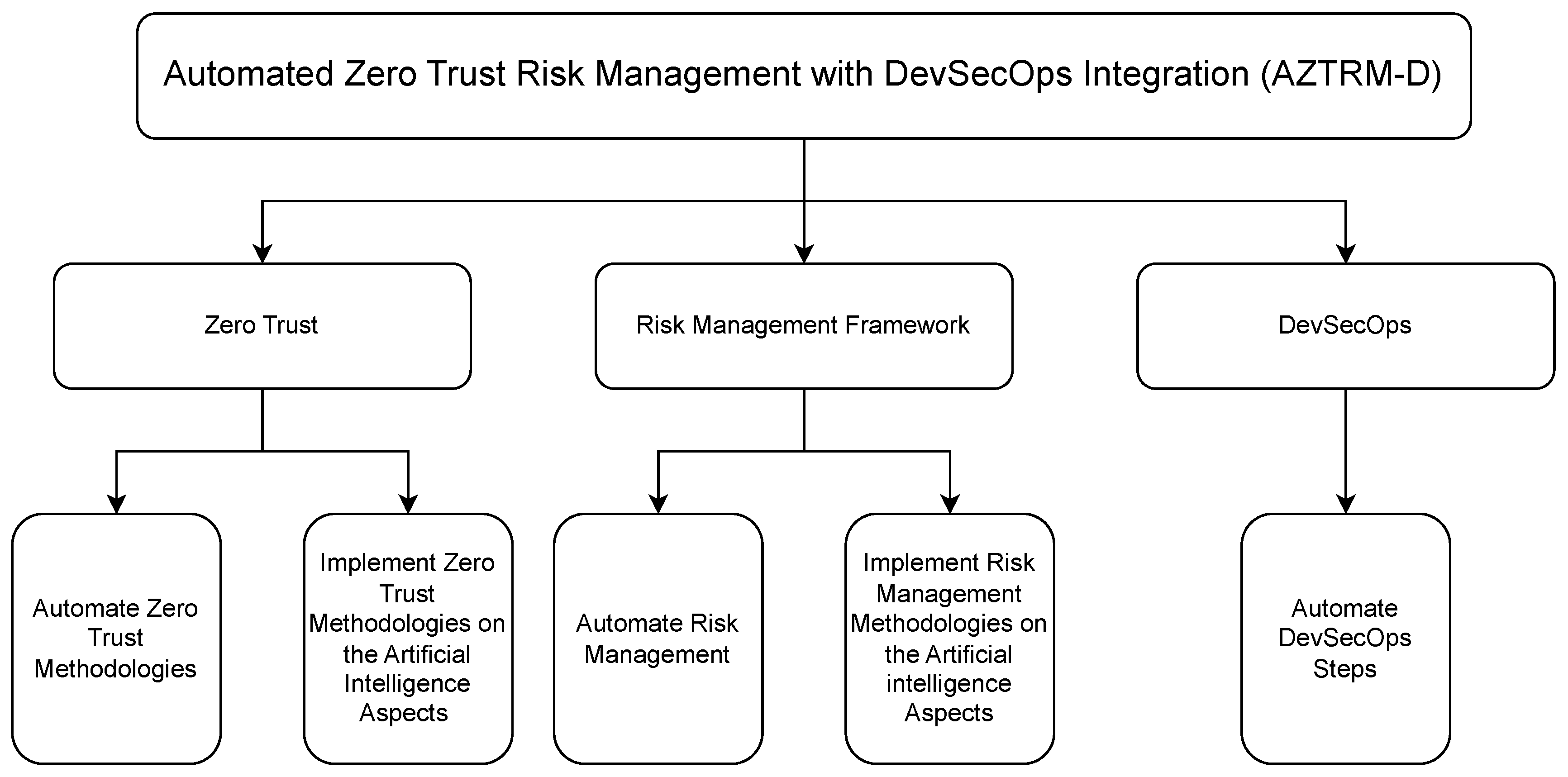
Ultimately, AZTRM-D not only integrates AI into the core of cybersecurity practices but also ensures that this integration is continuously refined and safeguarded. The methodology’s adaptive nature, driven by AI insights and automation, guarantees that the system remains resilient and secure as it evolves. By harmonizing DevSecOps, RMF, and Zero Trust within this framework, AZTRM-D emerges as a critical solution for the multifaceted challenges of cybersecurity in the digital age.
As cybersecurity threats continue to evolve, several areas for future work could further enhance AZTRM-D’s security and effectiveness, especially in safeguarding its AI features. One promising area is integrating post-quantum cryptography. As quantum computing technologies advance, they pose a significant threat to current cryptographic methods, potentially rendering traditional encryption algorithms obsolete. Incorporating post-quantum cryptographic techniques into AZTRM-D would future-proof the methodology, ensuring that it remains robust against the threats posed by quantum computing. Another potential enhancement involves the use of advanced machine learning techniques, such as federated learning, to improve the accuracy and reliability of AI-driven security measures while safeguarding data privacy. Federated learning allows AI models to be trained across decentralized devices without centralizing data, thus improving privacy and security. By integrating federated learning into AZTRM-D, organizations can leverage diverse datasets to improve AI models without compromising sensitive information, thereby safeguarding AI features against potential data breaches. Additionally, applying blockchain technology could boost the transparency and immutability of security logs, audit trails, and AI decision-making processes. Blockchain’s decentralized ledger technology could ensure that all AI decisions, changes, and transactions are recorded in an immutable manner, making it significantly harder for malicious actors to manipulate AI output. Continuous research into adversarial AI techniques will also be critical to anticipate and mitigate attacks that exploit AI vulnerabilities. Developing defenses against adversarial attacks, such as adversarial training or defensive distillation, would make AI components within AZTRM-D more resilient to sophisticated threats. By exploring these and other advancements, AZTRM-D can continue to evolve, offering an even more secure and resilient solution for the future. AZTRM-D represents a significant step towards achieving truly resilient and secure software systems in the digital age.
Acknowledgments
The authors thank Karl Hezel and Eadan Plotnizky for their contribution to the research efforts and to the writing/editing of this survey. Finally, we thank the anonymous reviewers for their constructive feedback and insightful comments. The invaluable comments of the reviewers significantly improved this survey document.
Abbreviations
The following abbreviations are used in this manuscript:
| Abbreviation | Spell Out | Abbreviation | Spell Out |
| 2FA | Two-Factor Authentication | AES | Advanced Encryption Standard |
| AI | Artificial Intelligence | API | Application Programming Interface |
| ASVS | Application Security Verification Standard | AWS | Amazon Web Services |
| AZTRM-D | Automated Zero Trust Risk Management with DevSecOps Integration | BEC | Business Email Compromise |
| BYOD | Bring Your Own Device | C2 | Command and Control |
| CAE | Continuous Access Evaluation | CC | Common Criteria |
| CCPA | California Consumer Privacy Act | CI/CD | Continuous Integration/Continuous Deployment |
| CIS | Center for Internet Security | CISA | Cybersecurity and Infrastructure Security Agency |
| CLASP | Comprehensive, Lightweight Application Security Process | CSPM | Cloud Security Posture Management |
| DAST | Dynamic Application Security Testing | DLP | Data Loss Prevention |
| DoD | Department of Defense | EDR | Endpoint Detection and Response |
| FedRAMP | Federal Risk and Authorization Management Program | GDPR | General Data Protection Regulation |
| GPS | Global Positioning System | HIPAA | Health Insurance Portability and Accountability Act |
| HSM | Hardware Security Module | IaC | Infrastructure as Code |
| IAM | Identity and Access Management | ICMP | Internet Control Message Protocol |
| ICS/SCADA | Industrial Control Systems/Supervisory Control and Data Acquisition | IoBT | Internet of Battlefield Things |
| IOCs | Indicators of Compromise | IoT | Internet of Things |
| ISO | International Organization for Standardization | ISO/IEC | International Organization for Standardization/International Electrotechnical Commission |
| IT | Information Technology | JIT | Just-in-Time |
| MFA | Multi-Factor Authentication | MITM | Man-in-the-Middle |
| NIST | National Institute of Standards and Technology | OWASP | Open Web Application Security Project |
| PAM | Privileged Access Management | PCI-DSS | Payment Card Industry Data Security Standard |
| PDP/PEP | Policy Decision/Enforcement Point | PII | Personally Identifiable Information |
| Prod | Production | QA | Quality Assurance |
| RASP | Runtime Application Self-Protection | RBAC | Role-Based Access Control |
| RF | Radio Frequency | RMF | Risk Management Framework |
| SAST | Static Application Security Testing | SBOM | Software Bill of Materials |
| SCA | Software Composition Analysis | SDL | Security Development Lifecycle |
| SDLC | Software Development Life Cycle | SDP | Software-Defined Perimeter |
| SFTP | Secure File Transfer Protocol | SHA | Secure Hash Algorithm |
| SIEM | Security Information and Event Management | SOAR | Security Orchestration, Automation, and Response |
| SOX | Sarbanes-Oxley Act | SQL | Structured Query Language |
| SSH | Secure Shell | S-SDLC | Secure Software and System Development Life Cycle |
| TLS | Transport Layer Security | UML | Unified Modeling Language |
| USB | Universal Serial Bus | VPN | Virtual Private Network |
| WSN | Wireless Sensor Networks | ZT | Zero Trust |
| ZTNA | Zero Trust Network Access | MAC | Media Access Control |
| CVEs | Common Vulnerabilities and Exposures | NvGPU | NVIDIA GPU Driver |
| TEE | Trusted Execution Environment | SUID | Set owner User ID |
| LinPEAS | Linux Privilege Escalation Awesome Script | UART | Universal Asynchronous Receiver-Transmitter |
| ttyTHS1 | Teletype Terminal High-Speed 1 | chroot | Change Root |
| Dev | Developer | Rep | Repository |
| Git | Global Information Tracker |
References
- Gupta, A.; Rawal, A.; Barge, Y. Comparative Study of Different SDLC Models. Int. J. Res. Appl. Sci. Eng. Technol 2021, 9, 73–80.
- Olorunshola, O.E.; Ogwueleka, F.N. Review of system development life cycle (SDLC) models for effective application delivery. In Proceedings of the Information and Communication Technology for Competitive Strategies (ICTCS 2020) ICT: Applications and Social Interfaces. Springer, 2022, pp. 281–289.
- Chahar, S.; Singh, S. Analysis of SDLC Models with Web Engineering Principles. In Proceedings of the 2024 2nd International Conference on Advancements and Key Challenges in Green Energy and Computing (AKGEC). IEEE, 2024, pp. 1–7.
- Pargaonkar, S. A Comprehensive Research Analysis of Software Development Life Cycle (SDLC) Agile & Waterfall Model Advantages, Disadvantages, and Application Suitability in Software Quality Engineering. International Journal of Scientific and Research Publications (IJSRP) 2023, 13, 345–358.
- de Vicente Mohino, J.; Bermejo Higuera, J.; Bermejo Higuera, J.R.; Sicilia Montalvo, J.A. The application of a new secure software development life cycle (S-SDLC) with agile methodologies. Electronics 2019, 8, 1218.
- Jeganathan, S. DevSecOps: A Systemic Approach for Secure Software Development. ISSA Journal 2019, 17.
- Krasnov, A.P.; Maiti, R. Overview of DevSecOps frameworks for Software Development Lifecycle and its current limitations. Journal of Software Engineering Practice 2024, 5, 12–20.
- Agarwal, P.; Singhal, A.; Garg, A. SDLC model selection tool and risk incorporation. Int. J. Comput. Appl 2017, 172, 6–10.
- Shylesh, S. A study of software development life cycle process models. In Proceedings of the National Conference on Reinventing Opportunities in Management, IT, and Social Sciences, 2017, pp. 534–541.
- Christanto, H.J.; Singgalen, Y.A. Analysis and design of student guidance information system through software development life cycle (sdlc) and waterfall model. Journal of Information Systems and Informatics 2023, 5, 259–270.
- Saravanos, A.; Curinga, M.X. Simulating the Software Development Lifecycle: The Waterfall Model. Applied System Innovation 2023, 6, 108.
- Kristanto, E.B.; Andrayana, S.; Benramhman, B. Application of Waterfall SDLC Method in Designing Student’s Web Blog Information System at the National University: Application of Waterfall SDLC Method in Designing Student’s Web Blog Information System at the National University. Jurnal Mantik 2020, 4, 472–482.
- Doğan, O.; Bitim, S.; Hızıroğlu, K. A v-model software development application for sustainable and smart campus analytics domain. Sakarya University Journal of Computer and Information Sciences 2021, 4, 111–119.
- of Defense Chief Information Officer (DoD CIO), D. DoD Enterprise DevSecOps Strategy Guide, 2021. Accessed: 2024-08-12.
- Portell Pareras, O. DevSecOps: S-SDLC. B.S. thesis, Universitat Politècnica de Catalunya, 2023.
- Chun, T.J.; En, L.J.; Xuen, M.T.Y.; Xuan, Y.M.; Muzafar, S. Secured Software Development and Importance of Secure Software Development Life Cycle. Authorea Preprints 2023.
- Horne, D.; Nair, S. Introducing zero trust by design: Principles and practice beyond the zero trust hype. Advances in security, networks, and internet of things 2021, pp. 512–525.
- Khari, M.; Kumar, P.; et al. Embedding security in software development life cycle (SDLC). In Proceedings of the 2016 3rd International Conference on Computing for Sustainable Global Development (INDIACom). IEEE, 2016, pp. 2182–2186.
- Arrey, D.A. Exploring the integration of security into software development life cycle (SDLC) methodology. PhD thesis, Colorado Technical University, 2019.
- Brunner, M.; Sillaber, C.; Breu, R. Towards automation in information security management systems. In Proceedings of the 2017 IEEE International Conference on Software Quality, Reliability and Security (QRS). IEEE, 2017, pp. 160–167.
- Lee, M.g.; Sohn, H.j.; Seong, B.m.; Kim, J.b. Secure Software Development Lifecycle which supplements security weakness for CC certification. International Information Institute (Tokyo). Information 2016, 19, 297.
- Granata, D.; Rak, M.; Salzillo, G. Risk analysis automation process in it security for cloud applications. In Proceedings of the International Conference on Cloud Computing and Services Science. Springer, 2021, pp. 47–68.
- Sterbak, M.; Segec, P.; Jurc, J. Automation of risk management processes. In Proceedings of the 2021 19th International Conference on Emerging eLearning Technologies and Applications (ICETA). IEEE, 2021, pp. 381–386.
- Mohammed, N.M.; Niazi, M.; Alshayeb, M.; Mahmood, S. Exploring software security approaches in software development lifecycle: A systematic mapping study. Computer Standards & Interfaces 2017, 50, 107–115.
- Yaseen, A. Reducing industrial risk with AI and automation. International Journal of Intelligent Automation and Computing 2021, 4, 60–80.
- Kohnke, A.; Sigler, K.; Shoemaker, D. Strategic risk management using the NIST risk management framework. EDPACS 2016, 53, 1–6.
- Reimanis, D. Risk Management Framework. In Realizing Complex Integrated Systems; CRC Press, 2025; pp. 367–382.
- of Standards, N.I.; Technology. Guide for Applying the Risk Management Framework to Federal Information Systems: A Security Life Cycle Approach. Technical Report NIST Special Publication (SP) 800-37r2, U.S. Department of Commerce, Gaithersburg, MD, 2018. [CrossRef]
- Locascio, L.E.; Director, N. NIST Risk Management Framework (RMF) Small Enterprise Quick Start Guide 2024.
- Majumder, S.; Dey, N. Risk Management Procedures. In A Notion of Enterprise Risk Management: Enhancing Strategies and Wellbeing Programs; Emerald Publishing Limited, 2024; pp. 25–40.
- Stoltz, M. The Road to Compliance: Executive Federal Agencies and the NIST Risk Management Framework. arXiv preprint arXiv:2405.07094 2024.
- Pandey, P.; Katsikas, S. The future of cyber risk management: AI and DLT for automated cyber risk modelling, decision making, and risk transfer. In Handbook of Research on Artificial Intelligence, Innovation and Entrepreneurship; Edward Elgar Publishing, 2023; pp. 272–290.
- Ferreira, L.; Pilastri, A.L.; Martins, C.; Santos, P.; Cortez, P. An Automated and Distributed Machine Learning Framework for Telecommunications Risk Management. In Proceedings of the ICAART (2), 2020, pp. 99–107.
- Althar, R.R.; Samanta, D.; Kaur, M.; Singh, D.; Lee, H.N. Automated risk management based software security vulnerabilities management. IEEE Access 2022, 10, 90597–90608.
- McCarthy, C.; Harnett, K.; et al. National institute of standards and technology (nist) cybersecurity risk management framework applied to modern vehicles. Technical report, United States. Department of Transportation. National Highway Traffic Safety …, 2014.
- Ajish, D. The significance of artificial intelligence in zero trust technologies: a comprehensive review. Journal of Electrical Systems and Information Technology 2024, 11, 30.
- Tsai, M.; Lee, S.; Shieh, S.W. Strategy for Implementing of Zero Trust Architecture. IEEE Transactions on Reliability 2024, 73, 93–100. [CrossRef]
- Swaminathan, N.; Danks, D. Application of the NIST AI Risk Management Framework to Surveillance Technology. arXiv preprint arXiv:2403.15646 2024.
- Rose, S.; Borchert, O.; Mitchell, S.; Connelly, S. Zero Trust Architecture. Technical Report 800-207, National Institute of Standards and Technology, 2020. [CrossRef]
- Garbis, J.; Chapman, J.W. Zero Trust Security: An Enterprise Guide; Springer, 2021.
- Madsen, T. Zero-trust–An Introduction; CRC Press, 2024.
- Gupta, A.; Gupta, P.; Pandey, U.P.; Kushwaha, P.; Lohani, B.P.; Bhati, K. ZTSA: Zero Trust Security Architecture a Comprehensive Survey. In Proceedings of the 2024 International Conference on Communication, Computer Sciences and Engineering (IC3SE). IEEE, 2024, pp. 378–383.
- Simpson, W.R. Zero trust philosophy versus architecture. In Proceedings of the World Congress on Engineering, 2022.
- Meng, L.; Huang, D.; An, J.; Zhou, X.; Lin, F. A continuous authentication protocol without trust authority for zero trust architecture. China Communications 2022, 19, 198–213.
- Kim, Y.; Sohn, S.G.; Jeon, H.S.; Lee, S.M.; Lee, Y.; Kim, J. Exploring Effective Zero Trust Architecture for Defense Cybersecurity: A Study. KSII Transactions on Internet and Information Systems (TIIS) 2024, 18, 2665–2691.
- He, Y.; Huang, D.; Chen, L.; Ni, Y.; Ma, X. A survey on zero trust architecture: Challenges and future trends. Wireless Communications and Mobile Computing 2022, 2022, 6476274.
- Edo, O.C.; Tenebe, T.; Etu, E.E.; Ayuwu, A.; Emakhu, J.; Adebiyi, S. Zero Trust Architecture: Trend and Impacton Information Security. International Journal of Emerging Technology and Advanced Engineering 2022, 12, 140.
- Teerakanok, S.; Uehara, T.; Inomata, A. Migrating to zero trust architecture: Reviews and challenges. Security and Communication Networks 2021, 2021, 9947347.
- Zanasi, C.; Russo, S.; Colajanni, M. Flexible zero trust architecture for the cybersecurity of industrial IoT infrastructures. Ad Hoc Networks 2024, 156, 103414.
- Poirrier, A. Formal Security of Zero Trust Architectures. PhD thesis, Institut Polytechnique de Paris, 2024.
- Cybersecurity.; (CISA), I.S.A. Zero Trust Maturity Model v2, 2023. Accessed: 2024-08-12.
- Yao, Q.; Wang, Q.; Zhang, X.; Fei, J. Dynamic access control and authorization system based on zero-trust architecture. In Proceedings of the Proceedings of the 2020 1st international conference on control, robotics and intelligent system, 2020, pp. 123–127.
- Weinberg, A.I.; Cohen, K. Zero Trust Implementation in the Emerging Technologies Era: Survey. arXiv preprint arXiv:2401.09575 2024.
- Annabi, M.; Zeroual, A.; Messai, N. Towards zero trust security in connected vehicles: A comprehensive survey. Computers & Security 2024, p. 104018.
- Phiayura, P.; Teerakanok, S. A comprehensive framework for migrating to zero trust architecture. Ieee Access 2023, 11, 19487–19511.
- Ahn, G.; Jang, J.; Choi, S.; Shin, D. Research on Improving Cyber Resilience by Integrating the Zero Trust security model with the MITRE ATT&CK matrix. IEEE Access 2024.
- Hosney, E.S.; Halim, I.T.A.; Yousef, A.H. An Artificial Intelligence Approach for Deploying Zero Trust Architecture (ZTA). In Proceedings of the 2022 5th International Conference on Computing and Informatics (ICCI), 2022, pp. 343–350. [CrossRef]
- Sims, R. Implementing a Zero Trust Architecture For ICS/SCADA Systems, 2024. Masters Theses & Doctoral Dissertations, 445. Accessed: 2024-08-12.
- Greenwood, D. Applying the principles of zero-trust architecture to protect sensitive and critical data. Network Security 2021, 2021, 7–9.
- Schwartz, R. Informing an Artificial Intelligence risk aware culture with the NIST AI Risk Management Framework 2024.
- AI, N. Artificial intelligence risk management framework: Generative artificial intelligence profile, 2024.
- Levene, M.; Adel, T.; Alsuleman, M.; George, I.; Krishnadas, P.; Lines, K.; Luo, Y.; Smith, I.; Duncan, P. A Life Cycle for Trustworthy and Safe Artificial Intelligence Systems 2024.
- Hoffman, R.; Mueller, J.; Klein, G.; Litman, J. Four Principles of Explainable Artificial Intelligence. Technical Report NIST.AI.100-1, National Institute of Standards and Technology, Gaithersburg, MD, 2022. [CrossRef]
- Law, T.; McCall, L. Artificial intelligence policymaking: An agenda for sociological research. Socius 2024, 10, 23780231241261596.
- Rawal, A.; Johnson, K.; Mitchell, C.; Walton, M.; Nwankwo, D. Responsible Artificial Intelligence (RAI) in US Federal Government: Principles, Policies, and Practices. arXiv preprint arXiv:2502.03470 2025.
- Lisaldy, F.; Ismail, I.; Iryani, D. Lex AI: Solution for Governance of Artificial Intelligence in Indonesia. DiH: Jurnal Ilmu Hukum 2024, pp. 50–67.
- Schröder, J.; Breier, J. RMF: A Risk Measurement Framework for Machine Learning Models. In Proceedings of the Proceedings of the 19th International Conference on Availability, Reliability and Security, 2024, pp. 1–6.
Figure 1.
DevSecOps Steps. This image has been completely re-modified; however, the idea of the image was inspired by [14]
Figure 1.
DevSecOps Steps. This image has been completely re-modified; however, the idea of the image was inspired by [14]
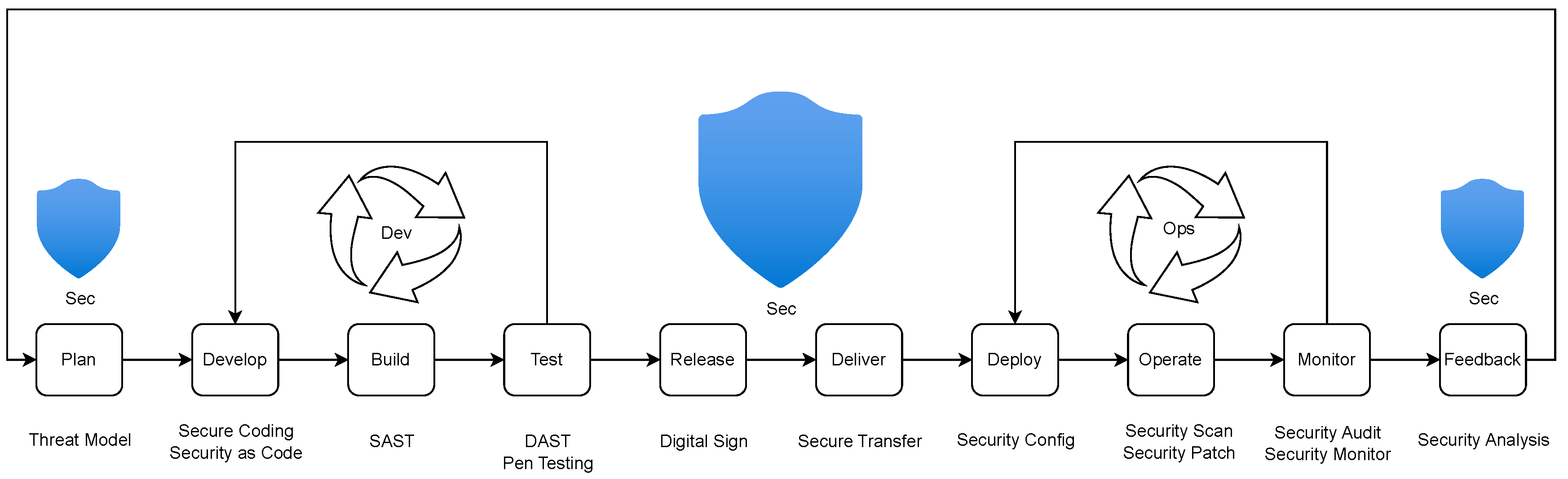
Figure 4.
NIST ZT General Idea. This image has been completely re-modified; however, the idea of the image was inspired by [39,46]
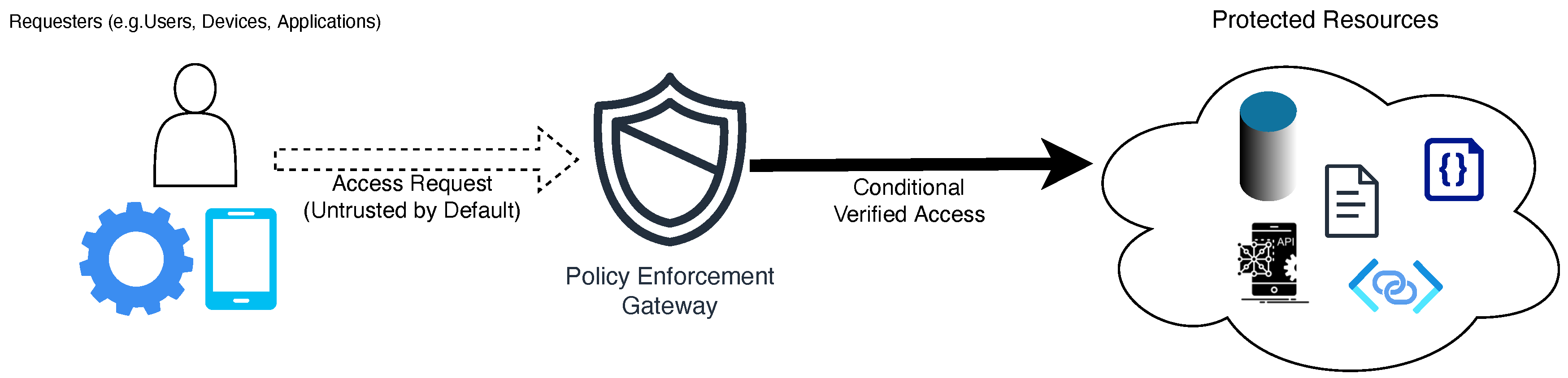
Figure 5.
Core ZT Model. This image has been generated with the assistance of AI; however, the idea of the image was inspired by [39,47]
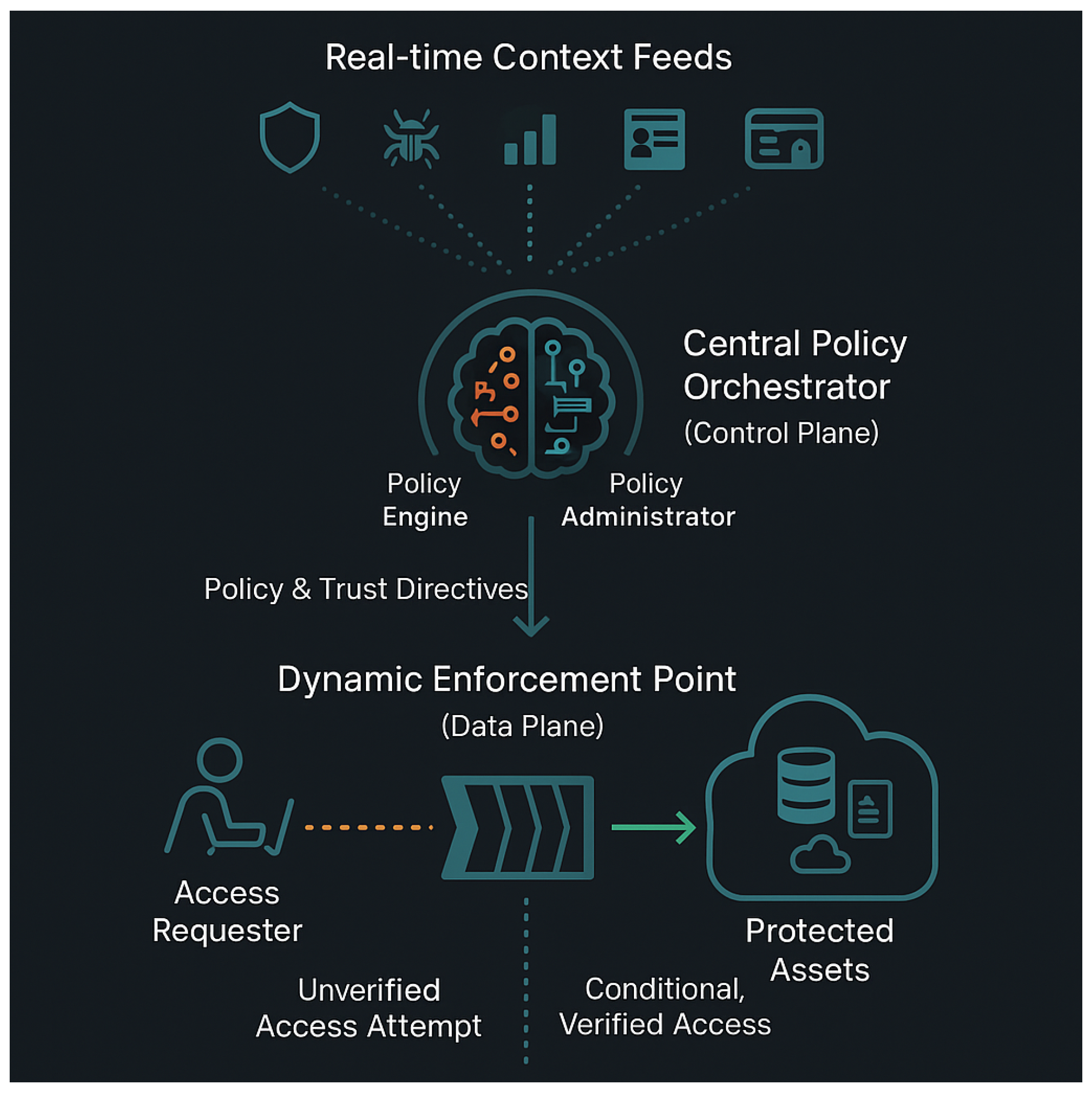
Figure 6.
Zero Trust Pillars. This image has been completely re-modified; however, the idea of the image was inspired by [40,51]
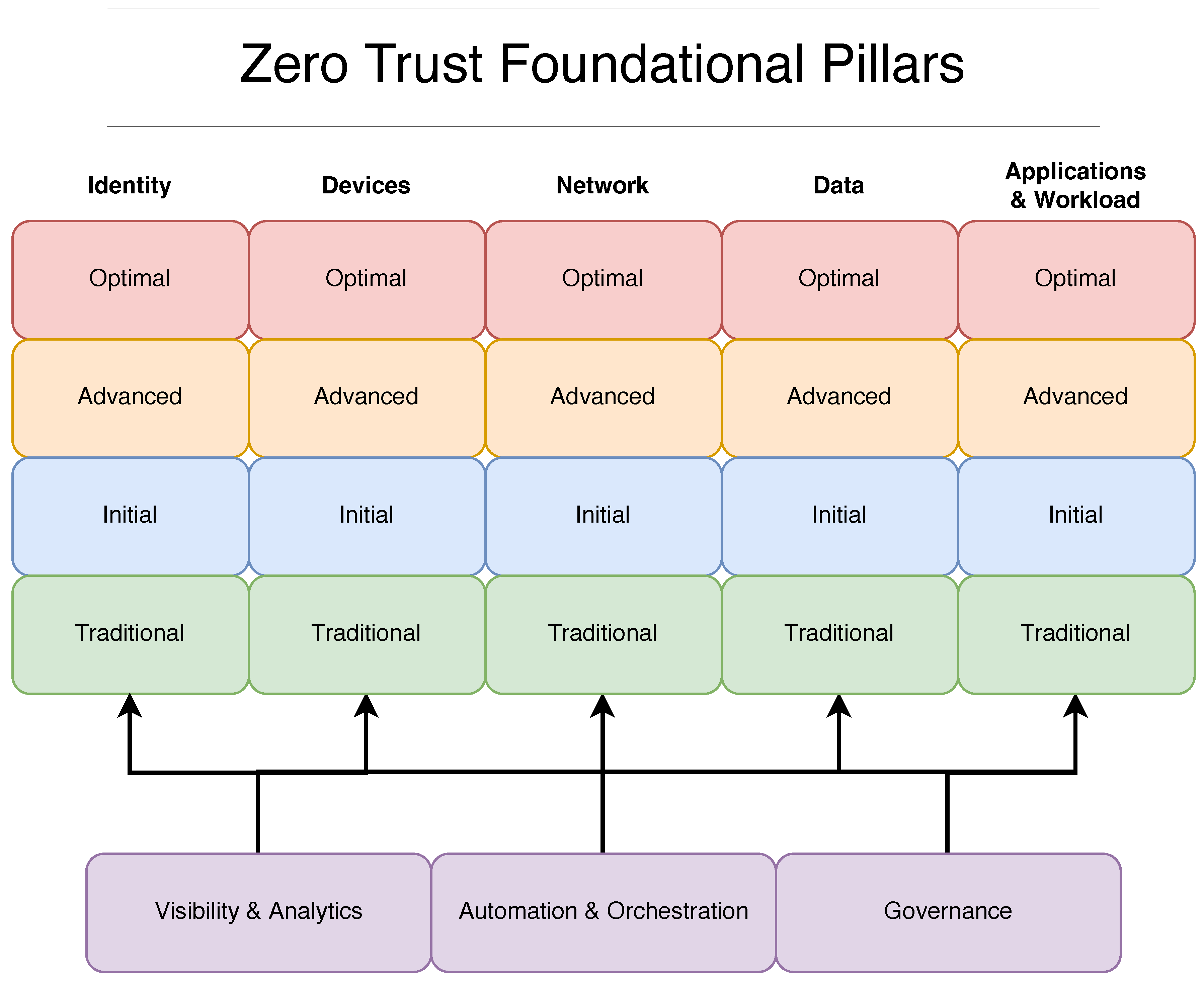

Figure 8.
Proposed General AZTRM-D Mapping
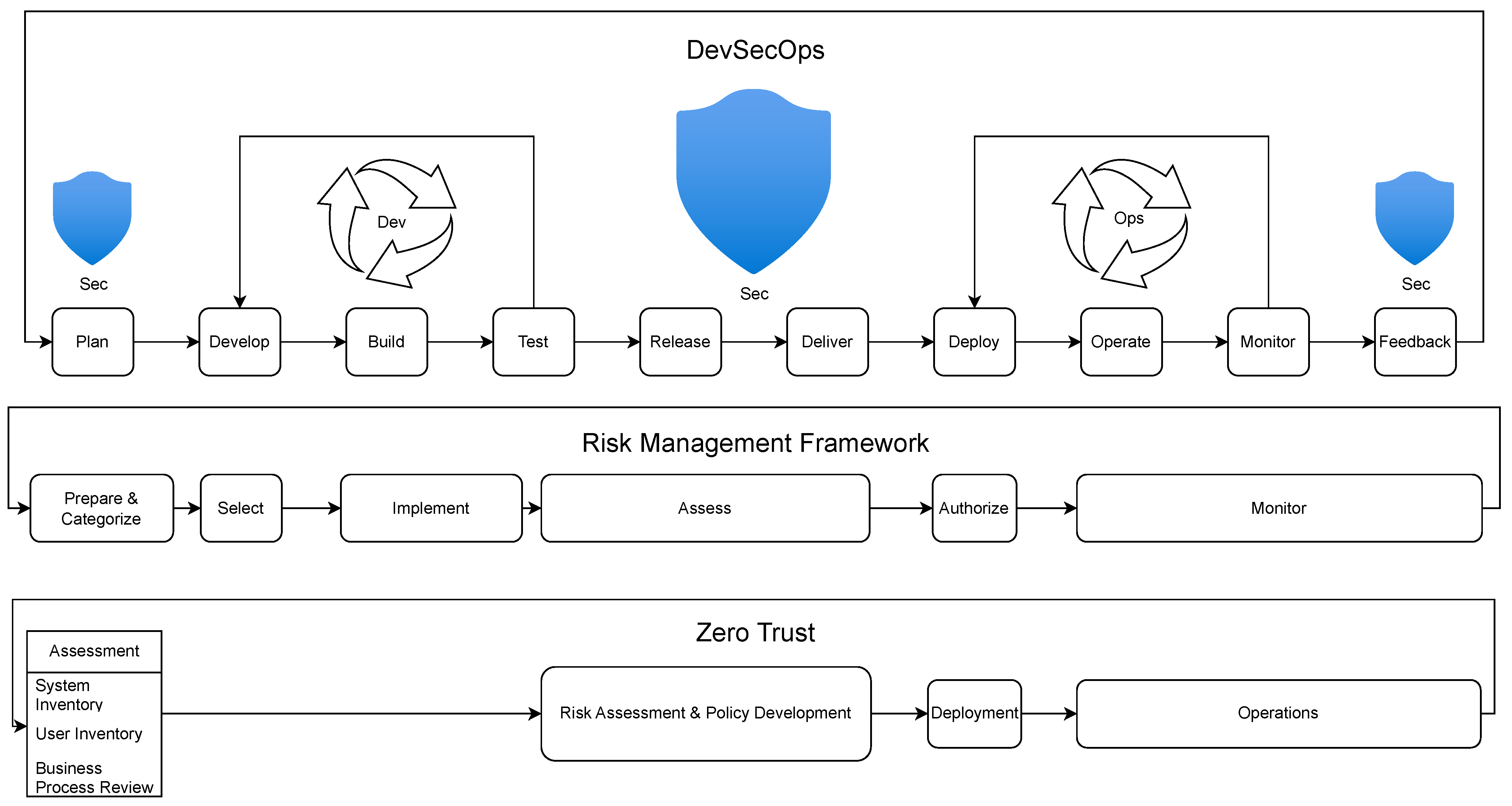
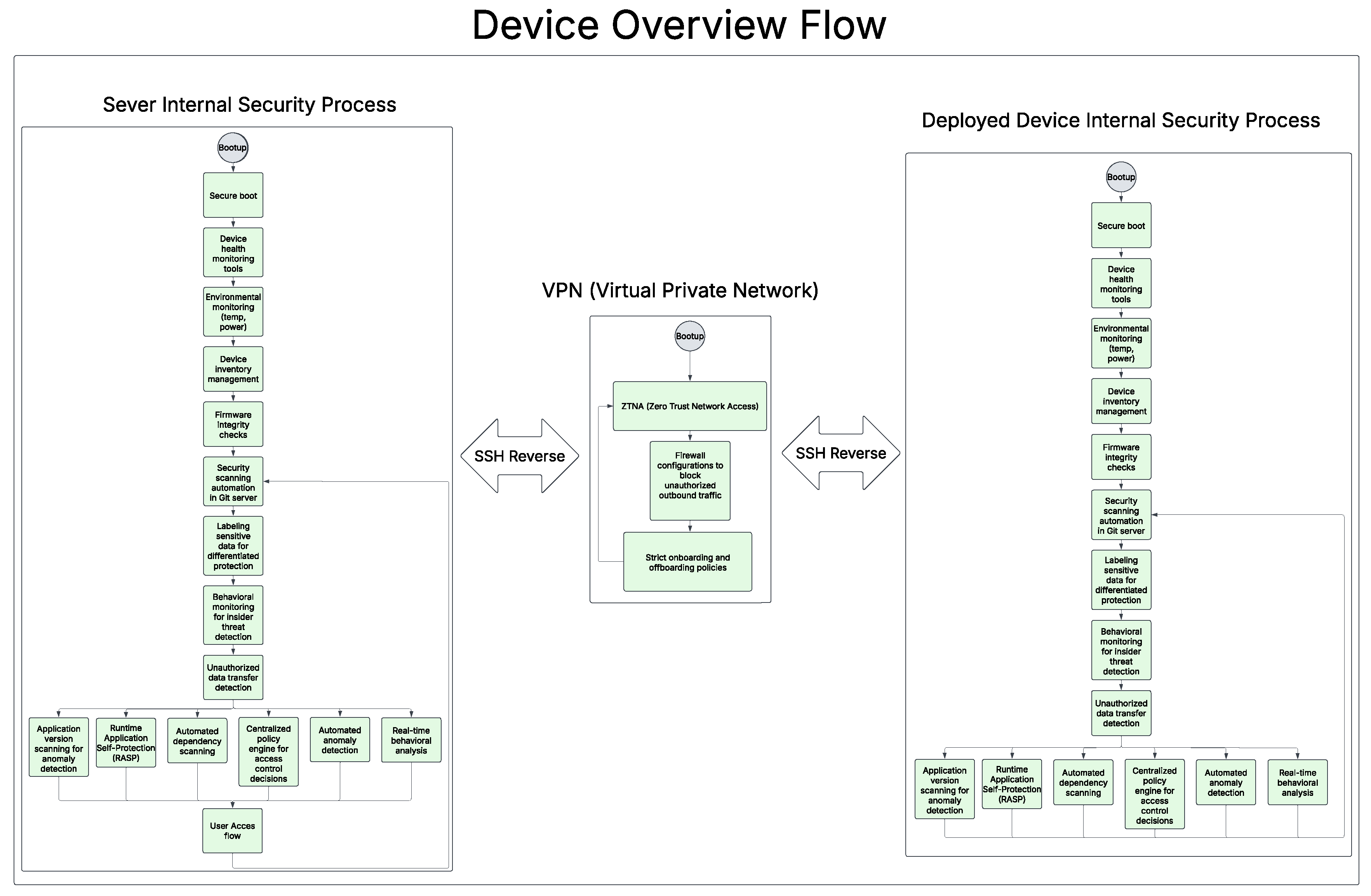
Figure 10.
Git Server Flowchart

Figure 11.
Overall User Access to the Device Hosted Server Flowchart
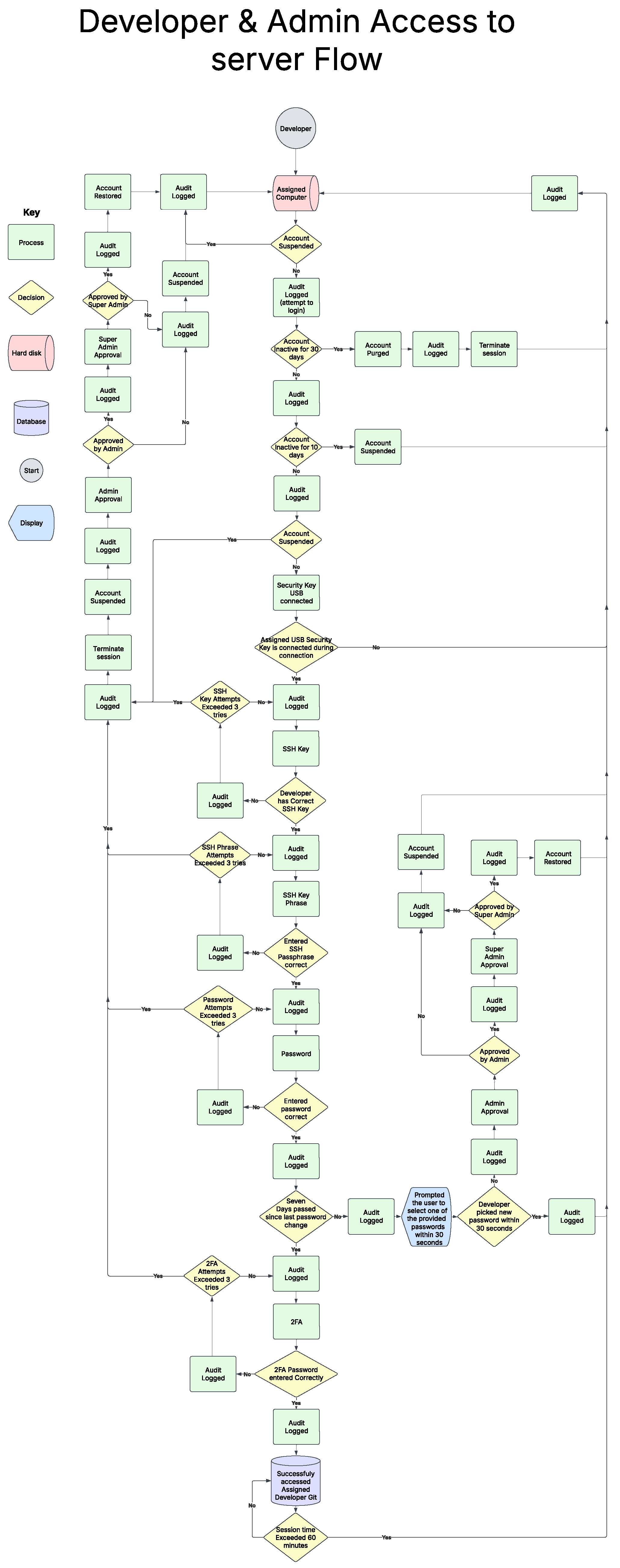
Disclaimer/Publisher’s Note: The statements, opinions and data contained in all publications are solely those of the individual author(s) and contributor(s) and not of MDPI and/or the editor(s). MDPI and/or the editor(s) disclaim responsibility for any injury to people or property resulting from any ideas, methods, instructions or products referred to in the content. |
© 2025 by the authors. Licensee MDPI, Basel, Switzerland. This article is an open access article distributed under the terms and conditions of the Creative Commons Attribution (CC BY) license (http://creativecommons.org/licenses/by/4.0/).
Copyright: This open access article is published under a Creative Commons CC BY 4.0 license, which permit the free download, distribution, and reuse, provided that the author and preprint are cited in any reuse.