

Submitted:
30 January 2025
Posted:
31 January 2025
You are already at the latest version
Abstract
The increasing demand for engaging UI/UX designs has highlighted the importance of color selection as a critical element influencing user engagement and aesthetics. However, existing design tools such as Figma and Adobe XD lack advanced, context-aware AI functionalities, particularly in areas like automated palette generation, real-time analytics, and beginner-friendly interfaces. These gaps hinder accessibility for novice designers and force reliance on third-party plugins, which can complicate workflows. This study introduces AI-UIX, an AI-driven system that integrates functionalities such as image-based color extraction, palette generation using additive and subtractive models, and AI-powered recommendations through third-party APIs. The system is developed using modular methodologies and evaluated through computational complexity analysis, expert validation rubrics, and user-centered metrics like ease of use and feature relevance. Results showed that AI-UIX significantly enhances design workflows by automating color selection and generating contextually relevant palettes. Expert validation indicated strong accuracy and usability, with over 90% of participants rating the system as highly effective and user-friendly. Furthermore, computational analysis demonstrated linear scalability, making the system adaptable for both novice and advanced designers. AI-UIX addresses key limitations in existing tools and provides a streamlined, intuitive interface that bridges the gap for users with limited design expertise. This innovation has the potential to transform UI/UX design processes and will be further refined based on broader user feedback to extend its capabilities.
Keywords:
UI/UX Design
; Analytics
; Artificial Intelligence
; Palette
; Algorithms
; Functionalities
1. Introduction
In UI/UX design, one crucial factor that affects productivity is color selection(Ding & Song, 2024; Vijay Bhasker Reddy Bhimanapati et al., 2024; L. Wang & Zhang, 2023; Yang et al., 2024; Yu & Ouyang, 2024; Zheng, 2024). Beyond that, color selection in UI/UX design also impacts user engagement and the visual appeal of final outputs. Additionally, the exponential growth in the digitalization of services has also heightened the demand for visually appealing designs; creating urgency for designers to be efficient at color selection and combination(Lu, 2024; Mengyao et al., 2024; Rafiyev et al., 2024). However, it is noted that both beginner and expert designers find the selection of contextually befitting colors for designs challenging. Factors like the amount of time required to experiment with different color combinations, insufficient color theory knowledge, and varying judgments of aesthetics could be concluded as causes of this challenge designers face(Gu et al., 2022; Z. Wang et al., 2023; Zhao et al., 2021). Current tools and platforms like Figma, Adobe XD, and Sketch provide robust features for UI/UX design including image color picking, shared palettes, and real-time collaborations. However, these existing tools generally lack the support of context-aware and user-friendly integration of AI to support with suggestions of color combinations(Eswaran & Eswaran, 2024; Liu et al., 2024; Sun et al., 2024; Ünlü, 2024; R. Zhang, 2024). At best some of the tools like Figma, come with third-party plugins that add some layers of complexity to the overall usability(Delcourt et al., 2023). Furthermore, there is the absence of in-built analytics features that allow tracking of design activities such as popular color combinations used(Tsui & Kuzminykh, 2023). Such analytics capabilities could be relevant for providing insights necessary for enhancing designs(Tsui & Kuzminykh, 2023). For beginner designers, most of these conventional tools appear not to be friendly as they come with functionalities that require expert knowledge in color theory(Borysova et al., 2024; Gupta, 2020; Kowalczyk et al., 2022). In other words, it is either the case that current systems that aid UI/UX designs have sophisticated environments that do not accommodate novice designers, or they come with very basic functionalities such that they are not fit for industry-level projects. To address these gaps, this study presents the AI-UIX, an AI-driven system for color recommendation, designed to provide UI/UX designers ease of workflow. AI-UIX leverages the integration of context-aware AI recommendations, an image-based color extraction algorithm, and a palette generation algorithm. In addition, the proposed system is characterized by an analytics functionality that allows tracking of repetitive design activities such as color choices. A core principle emphasized within the development of AI-UIX is user-friendliness, as it aims at providing support to both beginner and expert designers. This study focusses on a few key contributions; Firstly, proposing a novel system that blends AI-powered suggestion on palette generation with enhanced techniques for color extraction. Secondly, the research presents a user-friendly color selection scheme that widens up accessibility to UI/UX designers with or without adequate prior technical knowledge. Thirdly, the study assesses the proposed system via performance metrics such as, ease of use, and correctness algorithm outputs. Finally, through an incorporated analytics feature, the proposed scheme presents relevant insights into choices of designers to be used to incrementally create a more seamless design process.
The rest of the paper is organized as follows; in Section 2 we present some preliminaries of integral concepts at the core of our proposed framework. In Section 3 we present the proposed framework. Section 4 focuses on the analysis of the results presented, and finally, Section 5 provides the Summary and Conclusion of the paper.
2. Literature Review
2.1. Challenges in Traditional UI/UX Design Tools
Zhu et al. (2024) explain that existing UI/UX design tools do not leverage AI to enhance the workflows of designers. Some of these tools including Figma and Adobe XD, insufficiently incorporate automation in core functionalities like palette generation, and color recommendations (Zhu et al., 2024). Such limitations inconvenience both beginner and expert designers as color selection plays a crucial role in overall productivity. T. Zhang et al. (2023) also highlight that due to the lack of AI integration, most traditional UI/UX design tools present manual and time-consuming color selection processes. This challenge is also discussed by Li et al. (2021), emphasizing that it affects the accuracy of design outputs. At best some of the tools like Figma, come with third-party plugins to make up for the absence of inbuilt AI-driven features. Delcourt et al. (2023) opined that such incorporation of plugins adds layers of complexity to the overall usability and can create issues of vulnerability. Additionally, conventional tools for UI/UX design are noted not to have advanced analytics functionalities to help track designer activities like most selected colors or palettes(Zhou et al., 2024). The absence of such analytics features in these UI/UX platforms limited their ability to enhance user-friendliness (Zhou et al., 2024). Finally, Shi et al. (2024) argue that traditional tools are characterized by steep learning curves especially for beginner designers, due to the need for prior knowledge for seamless user interaction. These challenges with traditional UI/UX systems form the foundation for inspiring the proposed AI-UIX system presented in this study.
2.1. Artificial Intelligence (AI) in Enhancing Design Systems
Ünlü (2024) proposed integration of AI via predictive analysis and adaptive design in UI/UX design to enhance user engagement and designer satisfaction. Again, with the proposed model’s utilization of machine learning and behavioral data, Ünlü (2024) sought to make interfaces meet the dynamic nature of user needs. Li et al. (2021) proposed a color selection method based on the MEA-BP-Adaboost neural network. The goal was to achieve a seamless design process that eliminates experimentation and enhances precision. Zhu et al. (2024) proposed a similar integration of AI into the UI/UX design to help improve the decision-making of designers. Zhu et al. (2024) believe that the subjective nature of designers’ perceptions regarding design choices, prolongs user activities like palette selection, via experimentation. The goal then, is to eliminate such subjectivity by leveraging AI tools for UI/UX design processes. Other studies like those by Ghosh & Dubey (2024) , Karaman (2024) Eswaran & Eswaran (2024), and Sun et al. (2024) also, propose or discuss AI integration into UI/UX design. These studies leverage tools like LLMs, neural network analytics, APIs, etc. A common problem with some such studies, however, is the little to no focus on the additional computational complexities such integration presents. Additionally, most of the recent studies on AI integration in UI/UX are over-reliant on the AI models and provide less insight into the use of conventional color theory principles in the algorithms of their proposed systems.
3. Methodology & Experimentation
3.1. Overview of Methodology
In this study, a modular software development process was adopted for designing and implementing the proposed AI-UIX system. Figure 1 illustrates the entire methodological framework used in this study.
The study’s methodology has a problem identification stage where authors generally establish research and system gaps by independently assessing related literature and existing systems or tools. The next phase, “Needs Assessment”, highlights the interaction with expert and novice designers to gather feedback for enhancing the functionality of the AI-UIX. Knowledge from the 2 initial phases was then channeled into designing the proposed system’s framework and detailing its core features. Which is what the “Conceptual Framework Development” stage is about. The System implementation phase involves leveraging various web technologies and algorithms to develop the core system. The final phase in the methodology’s modular process involves testing and evaluating the AI-UIX system. Evaluation metrics used include color accuracy, system usability scale, expert validation, and system performance.
3.2. Needs Assessment Analysis
Expert feedback was sought from a group of UI/UX professionals with varying years of experience (ranging from 5 to 10 years) to help in the identification of limitations posed by conventional tools and systems. This process mainly involved the use of open-ended interviews and surveys. First, it was gathered that in selecting complementary and analogous colors, most designers struggle with being able to appropriately find a balance in their palettes such that outputs are visually appealing. Again, professionals indicated the lack of in-built intelligent recommendations and automation to hep make the UI/UX design process seamless. It was also noted that Beginner designers are mostly inconvenienced since most traditional tools are more suitable for users with prior design knowledge or a good understanding of color theory principles. The final major drawback noted has to do with the intensity of the amount of time required to generate palettes manually and/or test their suitability in workflows. Professionals noted that current tools hardly provide the convenience of automatically generating contextually-aware palettes.
3.1. The Proposed System’s Conceptual Framework
Figure 2 is an illustration of the AI-UIX’s conceptual framework, that highlights the core functionalities or algorithms of the system. The Color Picker and Image Analysis section includes image-based color extraction, palette generation, and blending and mixing simulation functionalities. While image-based extraction functionality extracts pixel data from an uploaded image’s selected portion, the palette generation functionality generates complementary or analogous colors using the extracted base colors. The blending and mixing simulation functionality constitute the additive blending and subtractive blending models. These functionalities are conceptualized to allow users to experiment with real-time blending simulations. The two models help designers understand the logic of color blending theory and how it is practically applied in design. The AI-driven tools section is a composition of the system's AI recommendations and analytics features. The AI recommendations feature proposes optional contextually-aware palettes by leveraging an already existing trained model via a third-party API. The Analytics feature is conceptualized to provide real-time analytics by giving insight into frequent tasks like color selection and palette combinations. Furthermore, the interactive visualization section purposely enhances beginner designers' learning experiences via a user-friendly interface and features. Finally, the system testing and debugging section ensures reliability and accuracy. It provides such functionality through the validation of algorithms used and performs debugging functions to help with resolving errors.
3.1. System Implementation
Various frontend and backend technologies are leveraged to implement the proposed AI-UIX. Frontend technologies used include HTML, CSS, and JavaScript. HTML is used to structure features like palettes on the user interface. CSS serves the purpose of styling such features structured via the use of HTML. Finally, on frontend, the system incorporates the use of JavaScript for developing color processing algorithms and all other core functionalities. The key operation in the system’s backend development involves interaction with APIs. These third-party APIs such as Colormind API and Adobe Color API are used to access existing pre-trained models used for AI-driven color recommendations and analytics in the IA-UIX.
Figure 3 represents the algorithm for the image-based extraction functionality of the AI-UIX system. According to the algorithm, the pickColorFromImage function creates a canvas and overlays an image inputted into the system on it. The RGBA values of the image’s section clicked by a user, are extracted. The generatePalette function is used to determine the analogous and complementary colors of RGB values. These resulting analogous and complementary colors are then displayed via the displayPalette function. Finally, it important to note that the algorithm in Figure 3 highlights pixel-level precision and enables user-friendly color selection.
Figure 4 shows the algorithm responsible for the palette generation in the proposed AI-UIX system. The generatePalette function is purposely for producing harmonious palettes based on the RGB values generated by the pickColorFromImage function. The algorithm accommodates the generation of both complementary and analogous colors. Each RGB value is subtracted from 255 to generate complementary colors. Meanwhile, for analogous colors to be computed, 30 is added and subtracted from each RGB value, while using modulo arithmetic to keep resulting values within 0-255. In the output of the generatePalette function, the original, complementary, and analogous colors are seen. Just like in some existing tools, the core idea underpinning this function is to ease the process of palette generation and selection by automating with a color theory basis.
Figure 5 represents the algorithm for the blending and mixing simulation feature in the proposed AI-UIX system. The additiveBlend function sums up RGB values and caps the results at 255 to simulate light-based color mixing. Meanwhile, the subtractiveBlend function multiplies the RGB components and normalizes by 255 to simulate pigment-based color mixing. Finally, the simulateBlending function allows users to choose between the two blending models. This feature aims to allow experimentation with color blending purely based on color theory principles; additive and subtractive blending.
Figure 6 shows the algorithm for generating AI-powered color recommendations. The algorithm indicates that AI-driven color suggestions are made using the base color extracted from inputted images. A third-party API is leveraged in this algorithm to produce AI-generated recommendations. A POST request that contains a base color as an input is sent to the API. An array of suggested colors is then returned via the API response. The algorithm only integrates already existing trained models for such AI recommendations. Such color recommendations are contextually aware and hence enhance the system’s relevance.
Figure 7 presents the algorithm for integrating the analytics feature into the AI-UIX. The purpose of the algorithm is to keep track of all user interactions or activities like the most selected color, and log data. Just like in the case of the AI-driven recommendations algorithm, this algorithm, as shown in Figure 7 incorporates sending a POST request to an API with the log data. The second section of the algorithm then displays the analytics data to the designer. This enables designers to be informed of usage patterns and helps them make well-informed decisions in the system’s usage.
Figure 8 shows the algorithm for testing and debugging the proposed system. The purpose of this is to check the correctness of all the algorithms’ logic. More precisely, the algorithm is projected to test and validate test cases to prove the accuracy and robustness of the palette generation functionality. Additionally, the algorithm is shown to serve debugging purposes and provide detailed logs to help with error resolution.
Measurement Evaluation Metrics
This paper adopts two main metrics for evaluating the proposed AI-UIX;
3.5.1. Computational complexity (Big O analysis)
As a theoretical approach of evaluation, the Big O complexity assesses the efficiency of the algorithm of the AI-UIX system. This evaluation is specifically to estimate how space and time are affected with an increase in the size of input. The Big O analysis is used to estimate the overall worst-case scenario of the entire AI-UIX implementation by considering the algorithm of each core functionality; palette generation, blending simulations, AI recommendations, analytics integration, and testing and debugging. This theoretical based analysis helps ascertain that the proposed system is computationally efficient, scalable and robust for implementation.
3.5.1. Expert Validation
This metric is used to assess the practicality and user satisfaction of a system. In the case of this study, expert validation incorporated the engagement of UI/UX design experts to evaluate the efficiency, functionality, and overall user experience of the AI-UIX. Furthermore, it involved the selection of a group of professionals in UI/UX design to test and assess the system on accuracy, ease of use, and relevance of features. Figure 9, Figure 10, and Figure 11 provide details of the rubrics provided to experts to assess the AI-UIX system after experiments were conducted. These detailed rubrics provide a clear benchmark for assessing the simulated system. They provide a clear sense of direction in the assessments of the professionals who engaged in the experimentation of the AI-UIX system.
The average for scores each expert provided for all criteria under each metric (System Accuracy, Relevance of features, and Ease of Use) was estimated. For the System Accuracy metric, descriptions were associated with corresponding range of averages as follows;
- (i)
- ≤ 1 = Poor Accuracy; The system has major inaccuracies.
- (ii)
- > 1 and ≤ 2.5 = Fair Accuracy; The system meets basic requirements but is characterized by many non-negligible inconsistencies.
- (iii)
- > 2.5 and ≤ 3 = Good Accuracy; The system performs well overall with minor negligible issues.
- (iv)
- > 3 and ≤ 4 = Strong Accuracy; Accurate and consistent results are delivered with areas of improvement that do not affect usability.
- (v)
- > 4 and ≤ 5 =Excellent Accuracy; The accuracy of the system is flawless and beyond expectation.
For the Relevance of Features metric, descriptions were associated with a corresponding range of averages as follows;
- (i)
- ≤ 1 = Irrelevant Features; Major enhancements are needed to achieve basic features’ relevance.
- (ii)
- > 1 and ≤ 2 = Minimal Relevant Features; Features address only a small set of user needs and hence are limited in relevance.
- (iii)
- > 2 and ≤ 3= Moderately Relevant Features; Features are functional but require some amount of enhancement for seamless usability.
- (iv)
- > 3 and ≤ 4 = Highly Relevant Features; Features meet professional standards and address most designer needs.
- (v)
- > 4 and ≤ 5 =Exceptionally Relevant Features; Features are absolutely relevant and meet diverse designer requirements.
For the Ease of Use metric, descriptions were associated with the corresponding range of averages as follows;
- (i)
- ≤ 1 = Poor Usability; Not even favorable for experts since the system is difficult to use and has major workflow challenges.
- (ii)
- > 1 and ≤ 2 = Minimal Usability; The system includes several usability challenges that cause user frustrations.
- (iii)
- > 2 and ≤ 3= Moderate Usability; Designers with some expertise might even struggle to adapt at the initial stages as the system requires improvement to make the user experience seamless.
- (iv)
- > 3 and ≤ 4 = Good Usability; The system is user-friendly and a user with any expertise level requires minimal guidance.
- (v)
- > 4 and ≤ 5 =Excellent Usability; The system is highly intuitive, polished, and designed for effortless use.
4. Results & Analysis
4.1. Computational Complexity
Table 1 details the breakdown of the proposed system’s computational complexity in the worst case (via the Big O notation). Each core functionality of the AI-UIX algorithm was analyzed to determine the worst time sub functions operate in. In cases where different Big O notations are estimated for a particular function, the dominant worst time is concluded as the overall complexity for that function. This theoretical approach of evaluation is relevant for determining the nature of worst-case complexity the algorithm possesses and to know how scalable and robust a system is under prospective varying circumstances.
From the table, the key functionalities like that used for, extracting color from image, generating palette, and blending simulations all operate in O(1). Additionally, functions for AI-processed recommendations operate in O(p), with p being the number of recommendations. Table 1 also shows that the analytics integration function runs in O(q), with q being the data points fetched. Again, the algorithm for testing and debugging operates in O(r), where r represents the number of test cases. The worst-case aggregate complexity of the algorithm can then be said to be O(p + q + r), with p, q, and r, considered independent variables affecting the system’s complexity individually. This implies that the system’s performance scales linearly to p, q, and r, hence the system is capable of scaling while maintaining robustness and not increasing computational overhead, all other things being equal. In theory, this shows that the AI-UIX system presents less complexity computationally, compared to proposed systems in most recent studies such as those by Zhu et al. (2024), Ghosh & Dubey (2024) , Karaman (2024), Eswaran & Eswaran (2024), Sun et al. (2024) and many others, that add layers of complexity by incorporating AI into UI/UX.
4.1. Expert Validation
Figure 12 represents results from the 4 rounds of simulations performed on the AI-UIX system fourteen (14) UI/UX professionals with varying years of experience (ranging from 5 to 10 years), participated in these simulations. Based on their experience and the results from the experimentation, the experts provided assessment feedback on the metrics of system on accuracy, ease of use, and relevance of features, with the aid of rubrics presented in Figure 9, Figure 10, and Figure 11.
4.1.1. System Accuracy
Figure 13 illustrates the ratings UI/UX professionals gave to the AI-UIX system regarding its accuracy. Notably, most respondents considered the AI-UIX to have good, strong, and excellent accuracies, with ratings ranging between 2.5 to 5 out of 5. More specifically, over 9 out of the 14 respondents, constituting a majority of 64.29%, believed that the system delivers accurate and consistent results with areas of improvement that do not affect usability. None of the experts the system as either fairly accurate or poorly accurate; an indication of the system’s high accuracy standards, with issues that do not affect output or precision.
4.1.1. Relevance of Features
Figure 14 shows the distribution of experts’ ratings on the relevance of AI-UIX system features. With 11 out of the 14 respondents (78.57%) indicating that the system’s features are highly relevant, it shows how the integration of features like AI color recommendations and analytics for tracking user patterns are useful for UI/UX experts. These features help make the design process easy and less time-consuming for professionals.
4.1.1. Ease of Use
Figure 15 details the number of respondents that rated the AI-UIX system as one characterized by poor usability, minimal usability, moderate usability, good usability, or excellent usability. 13 out of the 14 experts, representing 92.86% opined that the AI-UIX system is either of good usability or excellent usability. More precisely these experts validated the fact the AI-UIX system provides optimum user-friendliness that makes it accessible to professionals of varying expertise and hence does not require users to have any precise amount of prior knowledge.
The feedback from experts on the proposed, as diagrammatically presented in Figure 13, Figure 14, and Figure 15, was intuitively weighed against their opinions on traditional tools like Figma and Adobe XD, presented in the “Needs Assessment” section. As noted from interactions with the professionals, the conventional design tools present a steep learning curve for beginner designers and are suitable for users with prior design expertise. Figure 15 however shows that above 90% of them rated the AI-UIX as requiring no prior design knowledge for a seamless design process. Again, it was gathered from the experts that traditional design tools presented the challenge of difficulty in color selection or generating contextually relevant palettes, which mostly led to time-consuming experimentations on which combinations are most suitable. The ratings from these experts on the relevance of the system’s features, as well as the system's accuracy highlight that an appreciable majority of the respondents considered the inexpensive integration of IA-color recommendations as very efficient and relevant, and contributed to the seamless design process in the proposed framework. These and others, justify the AI-UIX’s superiority over conventional design tools.
5. Summary & Conclusion
This study presents the AI-UIX, a novel framework for enhancing the UI/UX design process, that leverages AI-driven color processes along with conventional functionalities such as image-based color extraction and palette generation. Traditional design tools present quite several challenges which include a steep learning curve for beginner designers, time-consuming processes due to subjectivity in design choices and the tendency of experimentation, and the lack of context-aware palette generation. Such challenges in traditional tools were the focus of the proposed AI-UIX. The system is characterized by key functionalities responsible for image-based color extraction, palette generation, AI-color recommendations third-party API, Analytics integration, and system testing and debugging. These functionalities were modularly developed and implemented via frontend and backend technologies in a simple web environment. The study used two (2) main metrics for evaluating the proposed system; Big O(n) analysis for computational complexity and Expert validation via interviews and surveys involving UI/UX professionals. It was demonstrated in theory that the proposed system was computationally less costly compared to what is presented in some present literature, as it scales in linear time even in the worst of cases. Also, with expert validation on ease of use, system accuracy, and feature relevance, the proposed AI-UIX was demonstrated to have superiority over traditional design tools. More specifically, over 90% of UI/UX experts engaged in the research, validated the AI-UIX as very user-friendly and accurate in functionalities, hence addressing challenges within traditional systems. In future studies, a larger number of simulations can be performed with self-trained AI models that result in optimized computational complexities.
Data Availability Statements
The authors declare that the data supporting the findings of this study are available within the paper.
Competing Interest
The authors declare no conflicts of interest related to this research. This work was conducted independently, and there were no external influences that could compromise the integrity of the study
Compliance with Ethical Standards
The authors declare that the research described in this paper has been conducted per all ethical standards and guidelines.
Informed Consent
All participants in this study provided their consent to participate in the research. Consent was obtained either directly through participant agreement or, in the case of minors, through their legal guardians. Participation was entirely voluntary, and participants were informed about the nature and scope of the study before registering. Data collection was conducted using Google Forms, where participants explicitly agreed to have their information used for research and system evaluation purposes. This study involved no sensitive personal information, and all collected data were anonymized and stored securely. The need for additional formal consent was waived by the approving ethics committee, as the research complied with institutional guidelines and ethical standards for minimal-risk studies
Funding
The authors did not receive support from any organization for the submitted work.
References
- Borysova, S.; Borysov, V.; Kochergina, S.; Spasskova, O.; Kushnarova, N. Involvement of interactive educational platforms in the training of graphic design students using the Figma platform as an example. International Journal of Education and Information Technologies 2024, 18, 119–132. [Google Scholar] [CrossRef]
- Delcourt, C.; Jin, Z.; Kobayashi, S.; Gu, Q.; Bassem, C. Demonstration of A Figma Plugin to Simulate A Large-Scale Network for Prototyping Social Systems. Adjunct Proceedings of the 36th Annual ACM Symposium on User Interface Software and Technology 2023, 1–3. [Google Scholar] [CrossRef]
- Ding, X.; Song, J.-S. To improve the efficiency of the color adjustment function of the photo editing app A Comparative Analysis Study on UI Design: Focusing on VSCO, Hypic, Lightroom, and Snapseed. Korea Soc Pub Des 2024, 14, 65–77. [Google Scholar] [CrossRef]
- Eswaran, U.; Eswaran, V. AI-Driven Cross-Platform Design; 2024; pp. 19–48. [Google Scholar] [CrossRef]
- Ghosh, S.; Dubey, S. The Field of Usability and User Experience (UX) Design; 2024; pp. 117–154. [Google Scholar] [CrossRef]
- Gu, C.; Lu, X.; Zhang, C. Example-based color transfer with Gaussian mixture modeling. Pattern Recognition 2022, 129, 108716. [Google Scholar] [CrossRef]
- Gupta, S. An Analysis of UI/UX Designing With Software Prototyping Tools; 2020; pp. 134–145. [Google Scholar] [CrossRef]
- Karaman, M. Use of Artificial Intelligence Technologies in Visual Design. Medeniyet Sanat Dergisi 2024, 10, 121–138. [Google Scholar] [CrossRef]
- Kowalczyk, E.; Glinka, A.; Szymczyk, T. Comparative analysis of interface sketch design tools in the context of User Experience. Journal of Computer Sciences Institute 2022, 22, 51–58. [Google Scholar] [CrossRef]
- Li, X.; Li, Y.; Jae, M.H. Neural network’s selection of color in UI design of social software. Neural Computing and Applications 2021, 33, 1017–1027. [Google Scholar] [CrossRef]
- Liu, Y.; Xu, Y.; Song, R. Transforming User Experience (UX) through Artificial Intelligence (AI) in Interactive Media Design. World Journal of Innovation and Modern Technology 2024, 7, 30–39. [Google Scholar] [CrossRef]
- Lu, Q. Exploration of Art Digital Design Technology Guided by Visual Communication Elements. Archives Des Sciences 2024, 74, 57–65. [Google Scholar] [CrossRef]
- Mengyao, Y.; Zainal Abidin, S.B.; Shaari, N.B. Enhancing Consumer Visual Experience through Visual Identity of Dynamic Design: An Integrative Literature Review. International Journal of Academic Research in Business and Social Sciences 2024, 14. [Google Scholar] [CrossRef]
- Rafiyev, R.; Novruzova, M.; Aghamaliyeva, Y.; Salehzadeh, G. Contemporary trends in graphic design. InterConf 2024, 43, 570–574. [Google Scholar] [CrossRef]
- Sun, L.; Qin, M.; Peng, B. LLMs and Diffusion Models in UI/UX: Advancing Human-Computer Interaction and Design; 2024. [Google Scholar] [CrossRef]
- Tsui, A.S.M.; Kuzminykh, A. Detect and Interpret: Towards Operationalization of Automated User Experience Evaluation; 2023; pp. 82–100. [Google Scholar] [CrossRef]
- Ünlü, S.C. Enhancing User Experience through AI-Driven Personalization in User Interfaces. Human Computer Interaction 2024, 8, 19. [Google Scholar] [CrossRef]
- Vijay Bhasker Reddy Bhimanapati, Pandi Kirupa Gopalakrishna Pandian,; Prof.(Dr.) Punit Goel. UI/UX Design Principles for Mobile Health Applications. International Journal for Research Publication and Seminar 2024, 15, 216–231. [Google Scholar] [CrossRef]
- Wang, L.; Zhang, Y. The visual design of urban multimedia portals. PLOS ONE 2023, 18, e0282712. [Google Scholar] [CrossRef] [PubMed]
- Wang, Z.; Zhao, N.; Hancke, G.; Lau, R.W.H. Language-based Photo Color Adjustment for Graphic Designs. ACM Transactions on Graphics 2023, 42, 1–16. [Google Scholar] [CrossRef]
- Yang, L.; Qi, B.; Guo, Q. The Effect of Icon Color Combinations in Information Interfaces on Task Performance under Varying Levels of Cognitive Load. Applied Sciences 2024, 14, 4212. [Google Scholar] [CrossRef]
- Yu, N.; Ouyang, Z. Effects of background colour, polarity, and saturation on digital icon status recognition and visual search performance. Ergonomics 2024, 67(3), 433–445. [Google Scholar] [CrossRef]
- Zhang, R. The impact of artificial intelligence represented by ChatGPT on UI design. Applied and Computational Engineering 2024, 77, 56–62. [Google Scholar] [CrossRef]
- Zhang, T.; Zhao, Y.; Ma, Y. Research on International UI Graphic Design Color Intelligent Matching System Based on Internet Communication Technology. 2023 3rd International Conference on Communication Technology and Information Technology (ICCTIT); 2023; pp. 64–69. [Google Scholar] [CrossRef]
- Zhao, N.; Zheng, Q.; Liao, J.; Cao, Y.; Pfister, H.; Lau, R.W.H. Selective Region-based Photo Color Adjustment for Graphic Designs. ACM Transactions on Graphics 2021, 40, 1–16. [Google Scholar] [CrossRef]
- Zheng, K. Analysis and Study of Color Design in Graphic Design. Forum on Research and Innovation Management 2024, 2. [Google Scholar] [CrossRef]
- Zhou, S., Zheng. Enhancing User Experience in VR Environments through AI-Driven Adaptive UI Design. Journal of Artificial Intelligence General Science (JAIGS) ISSN:3006-4023 2024, 6, 59–82. [Google Scholar] [CrossRef]
- Zhu, Z.; Lee, H.; Pan, Y.; Cai, P. AI assistance in enterprise UX design workflows: enhancing design brief creation for designers. Frontiers in Artificial Intelligence 2024, 7. [Google Scholar] [CrossRef] [PubMed]
Figure 1.
Overview of Methodology. Source: Authors’ own data
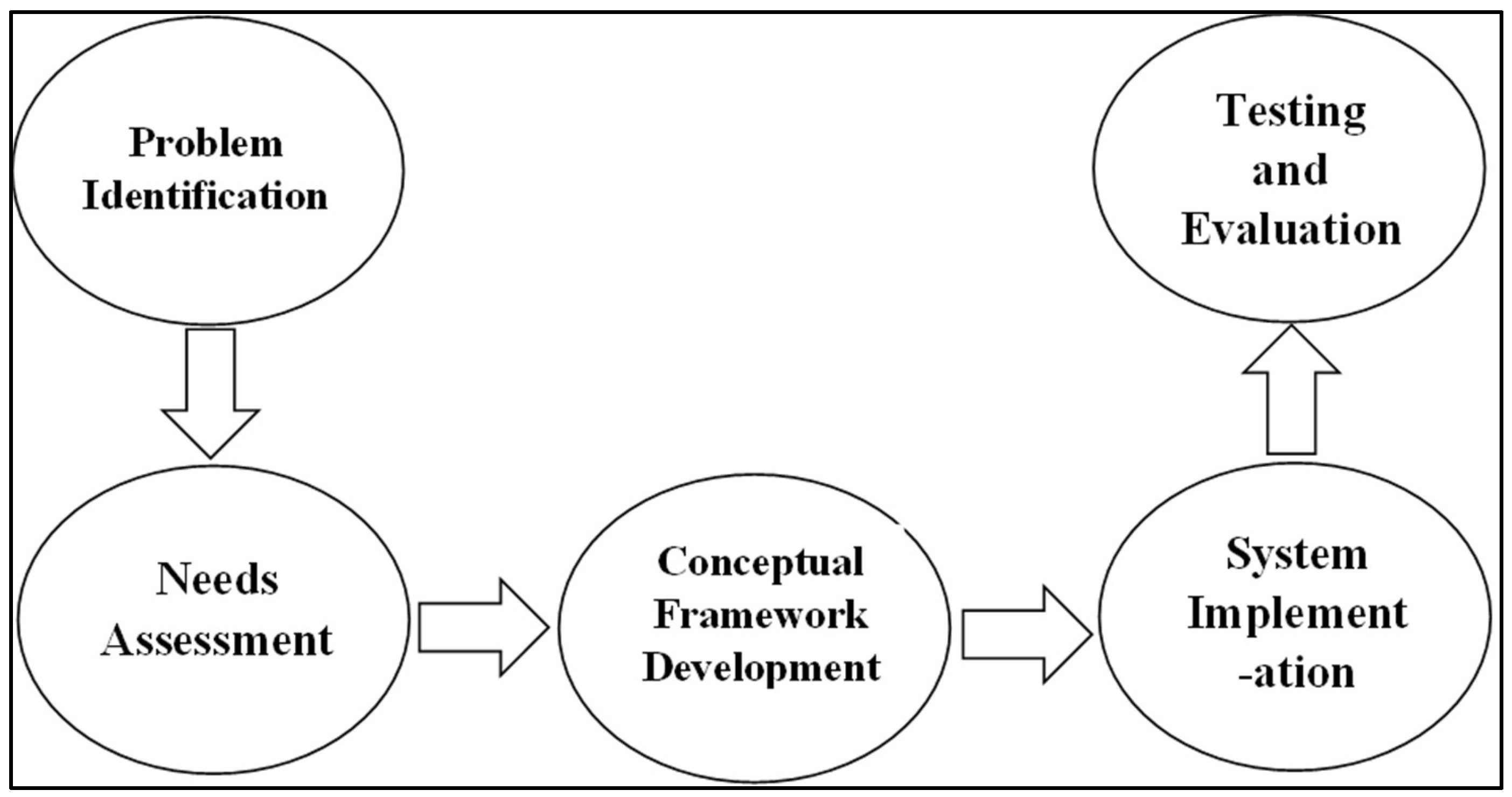
Figure 2.
The Conceptual Framework of the AI-UIX. Source: Authors’ own data
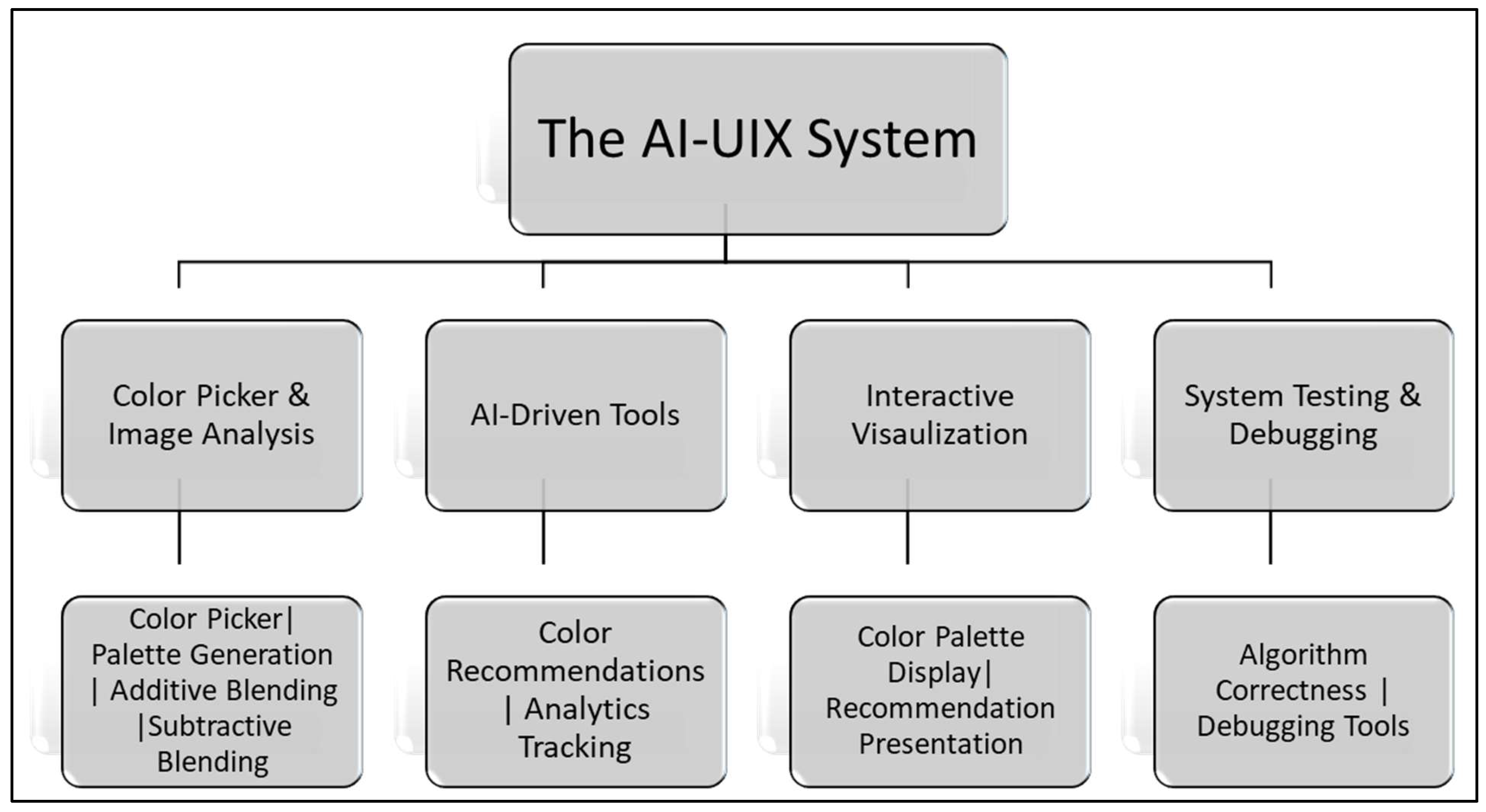
Figure 3.
Image-based color extraction Algorithm. Source: Authors’ own data
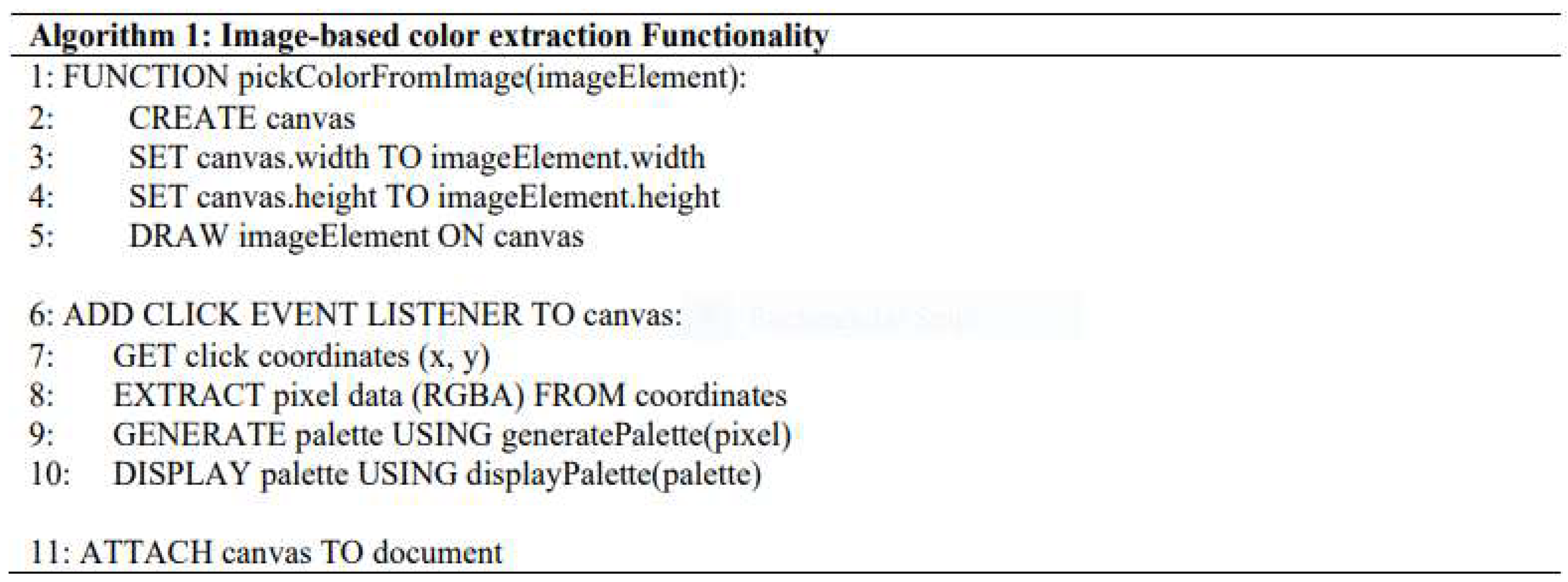
Figure 4.
Palette Generation Algorithm. Source: Authors’ own data
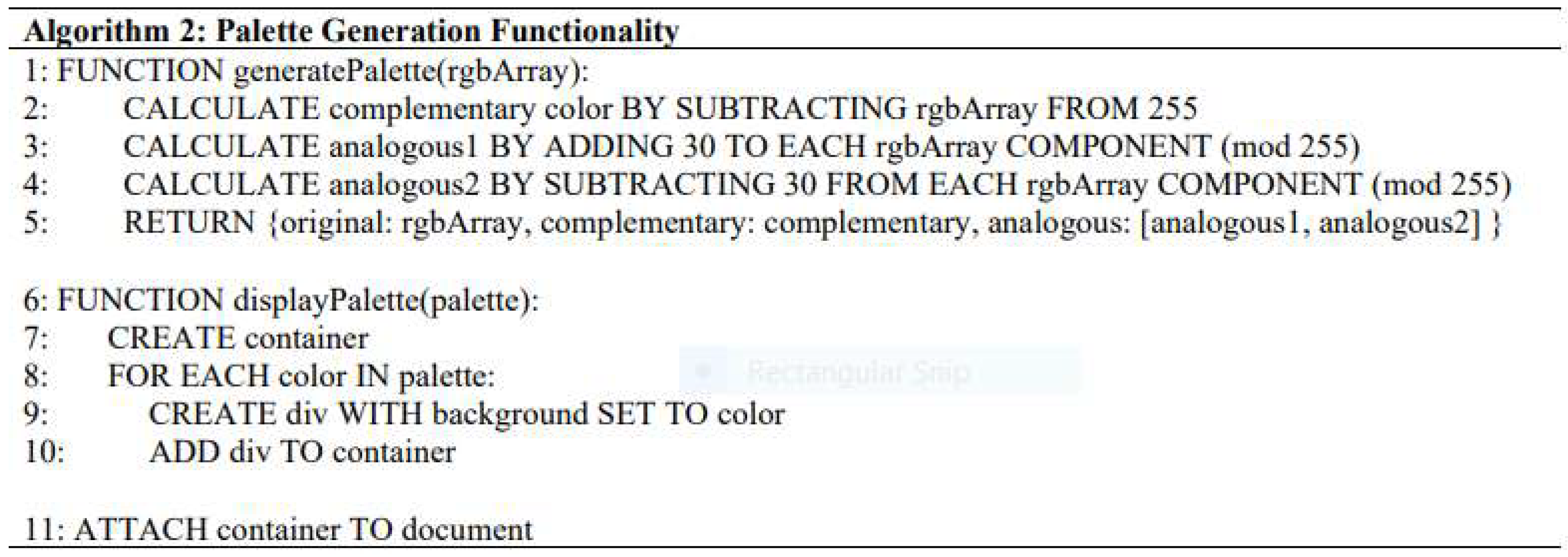
Figure 5.
Blending and Mixing Simulation Algorithm. Source: Authors’ own data
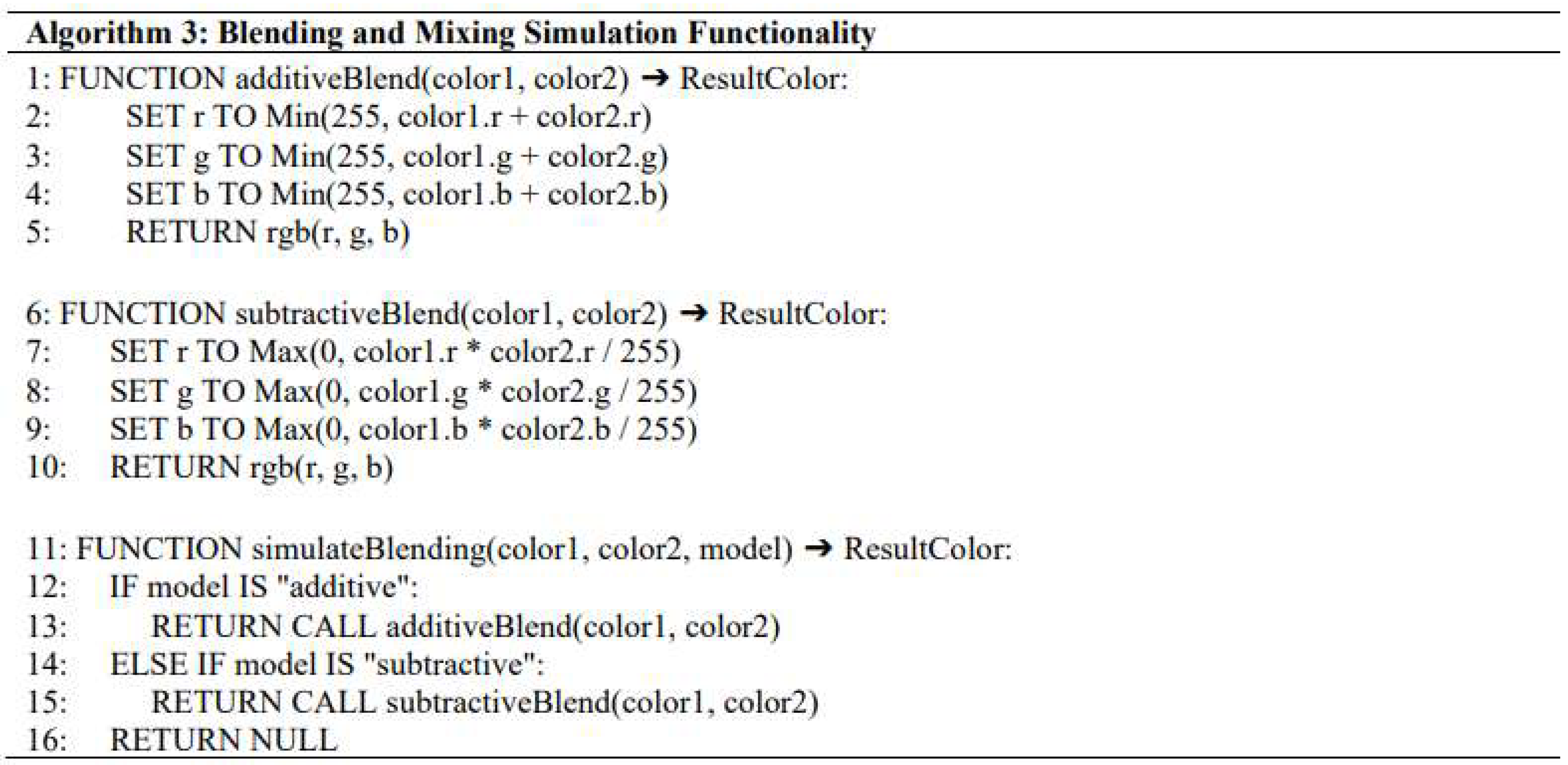
Figure 6.
AI-Driven Recommendation Algorithm. Source: Authors’ own data.
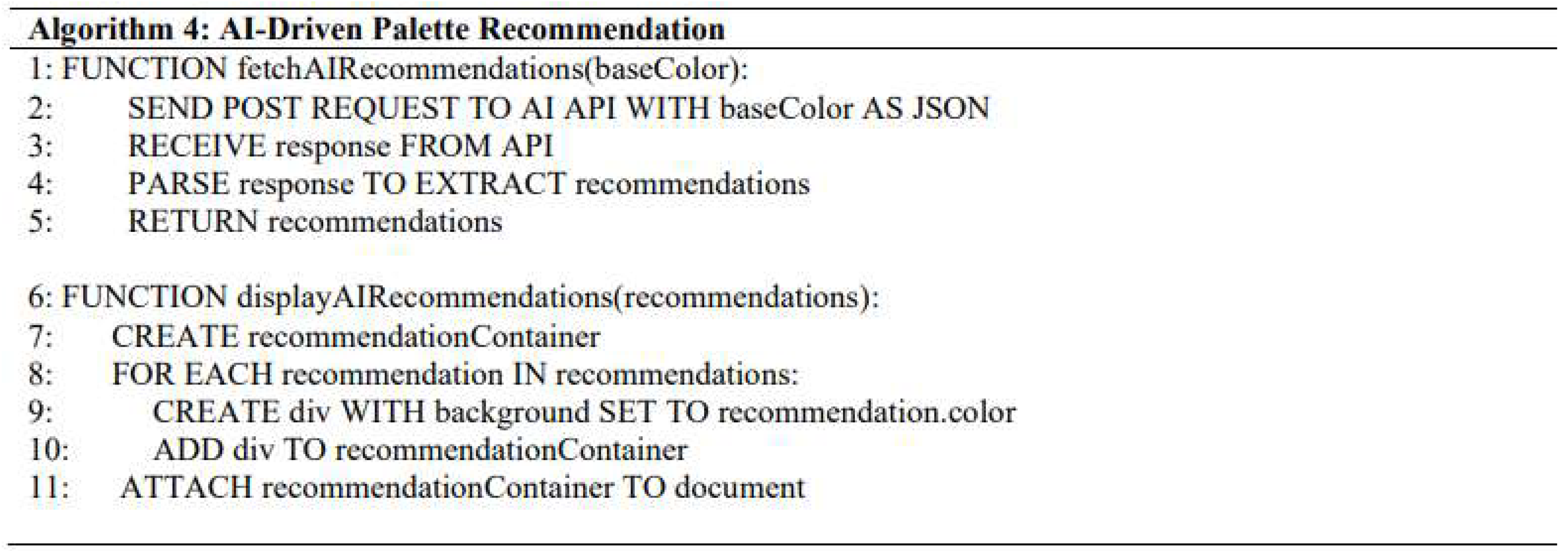
Figure 7.
Analytics Integration Algorithm. Source: Authors’ own data
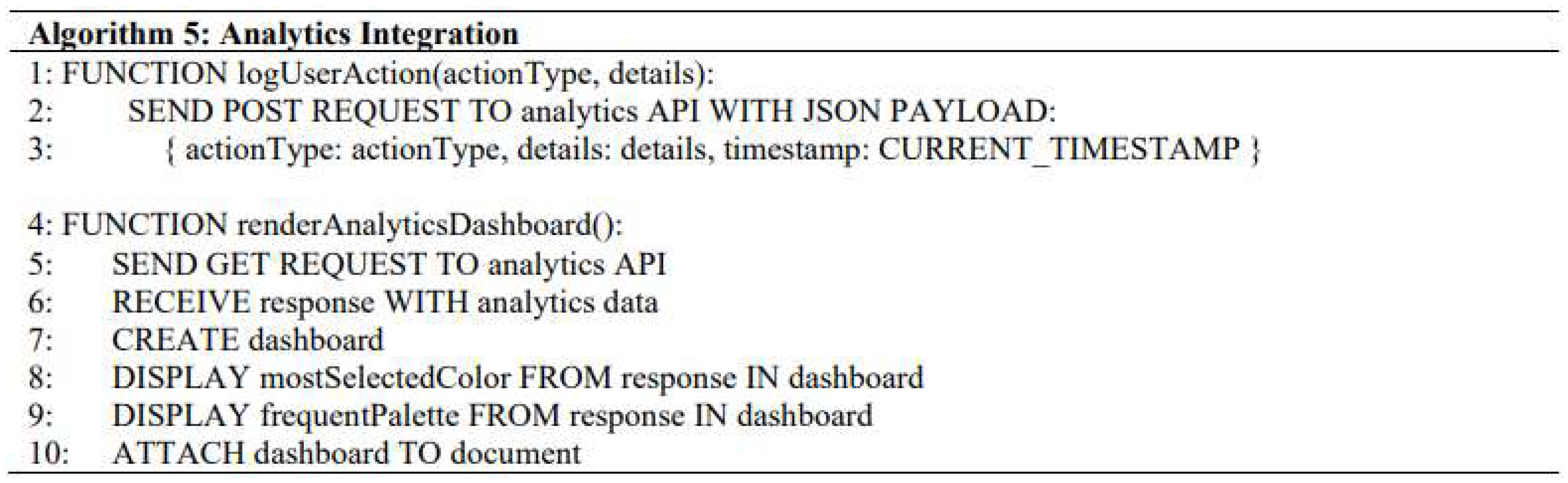
Figure 8.
System Testing and Debugging Algorithm. Source: Authors’ own data
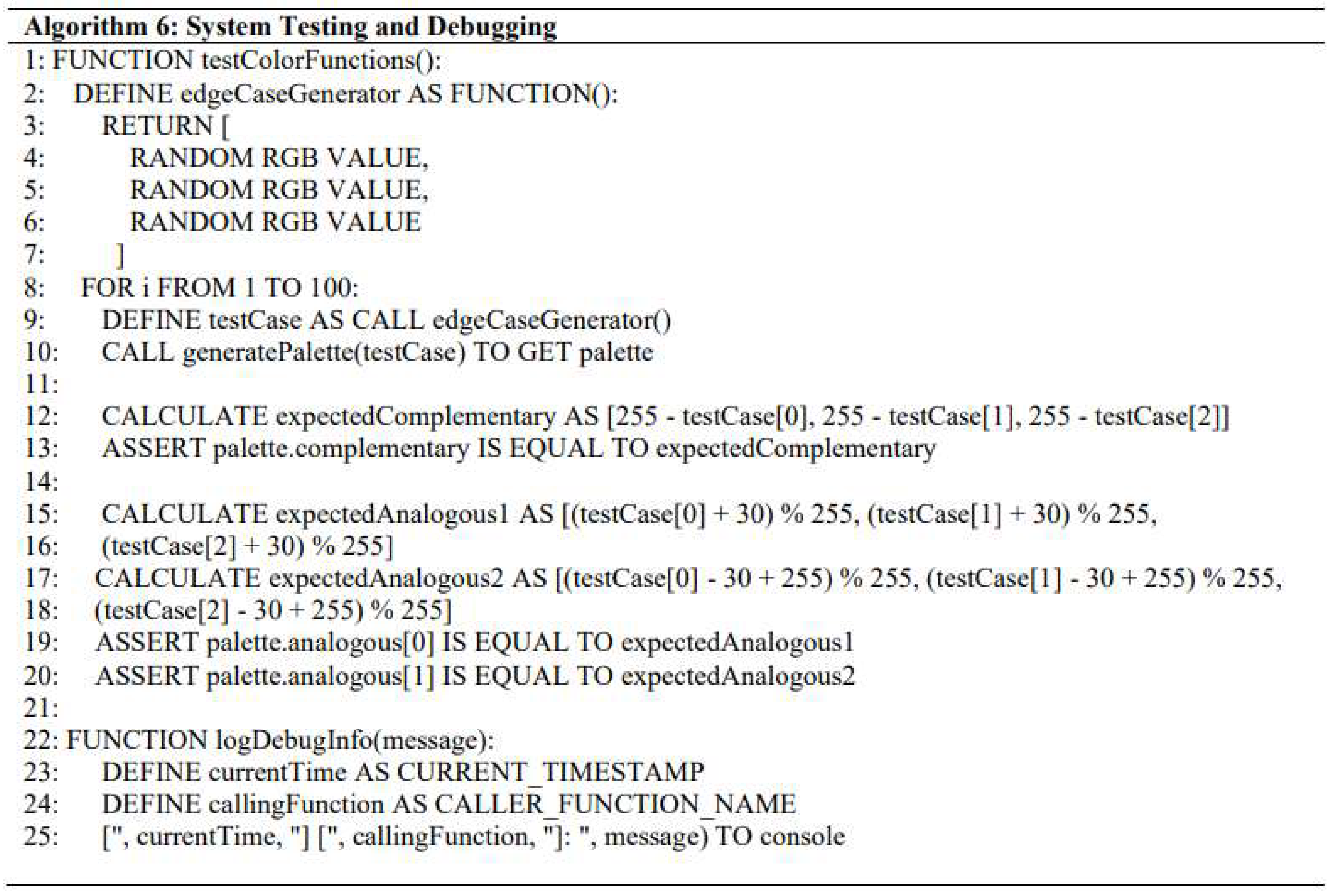
Figure 9.
AI-UIX Accuracy Evaluation Rubric. Source: Authors’ own data
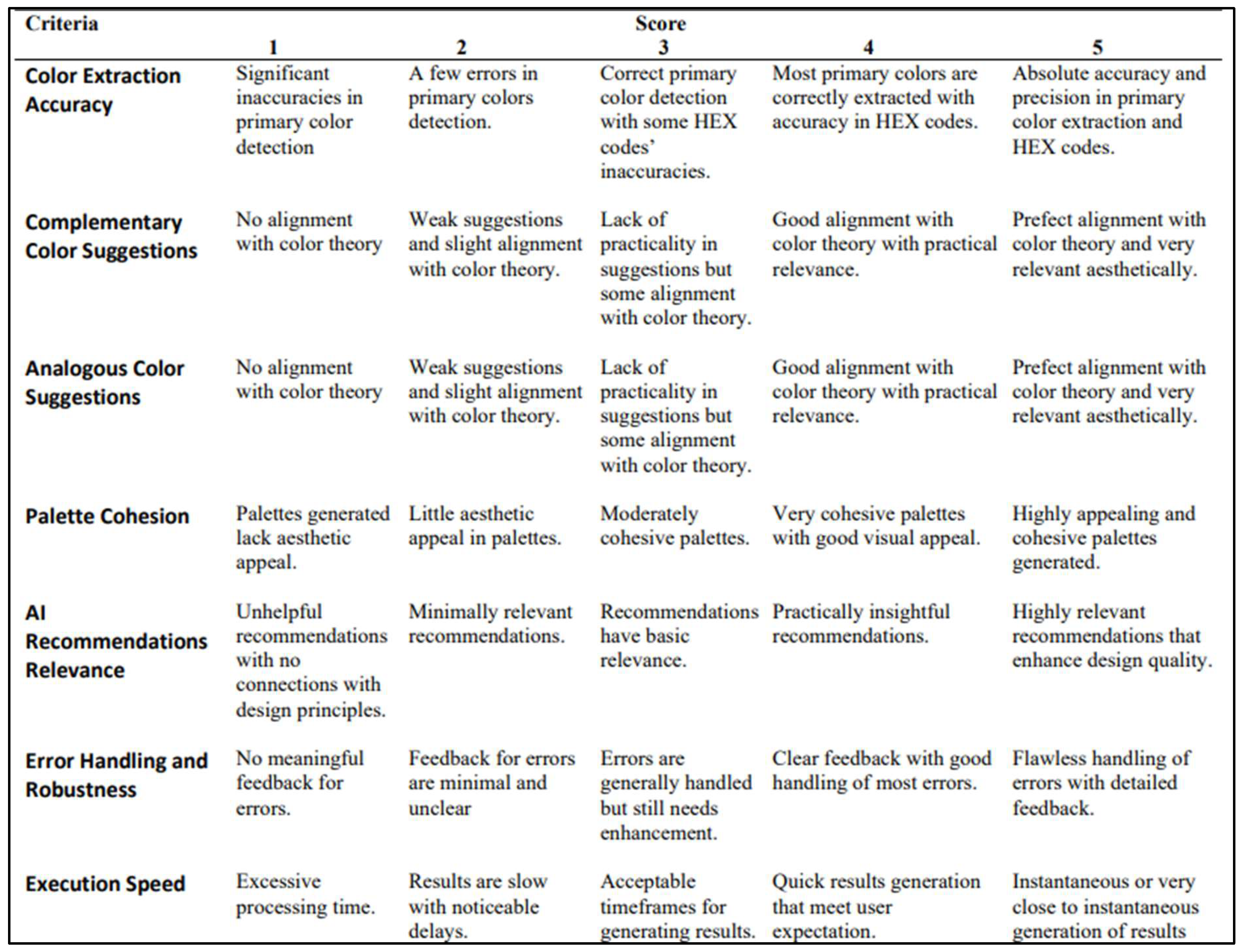
Figure 10.
AI-UIX Relevance of Features Evaluation Rubric. Source: Authors’ own data
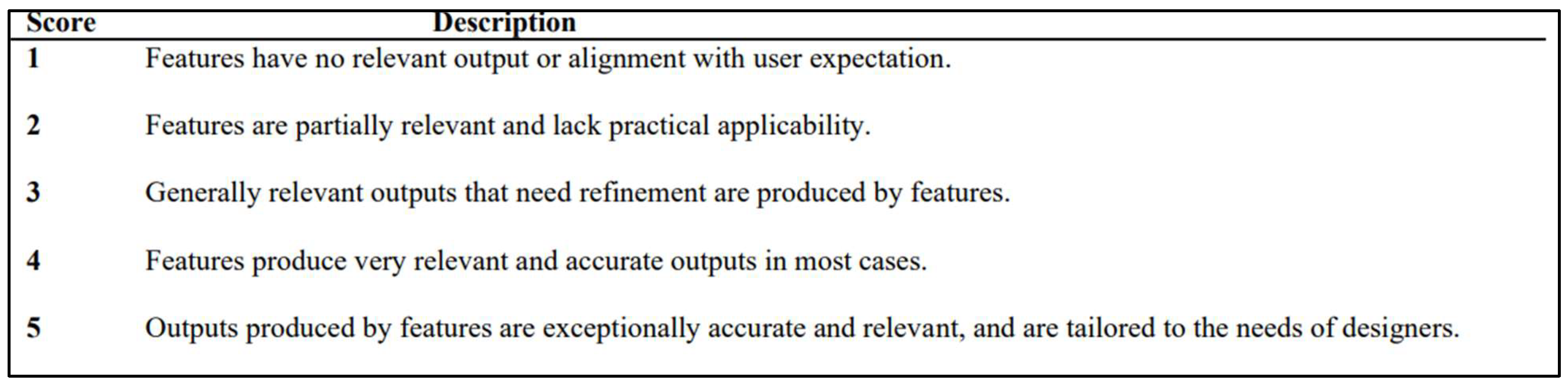
Figure 11.
AI-UIX Ease of Use Evaluation Rubric. Source: Authors’ own data
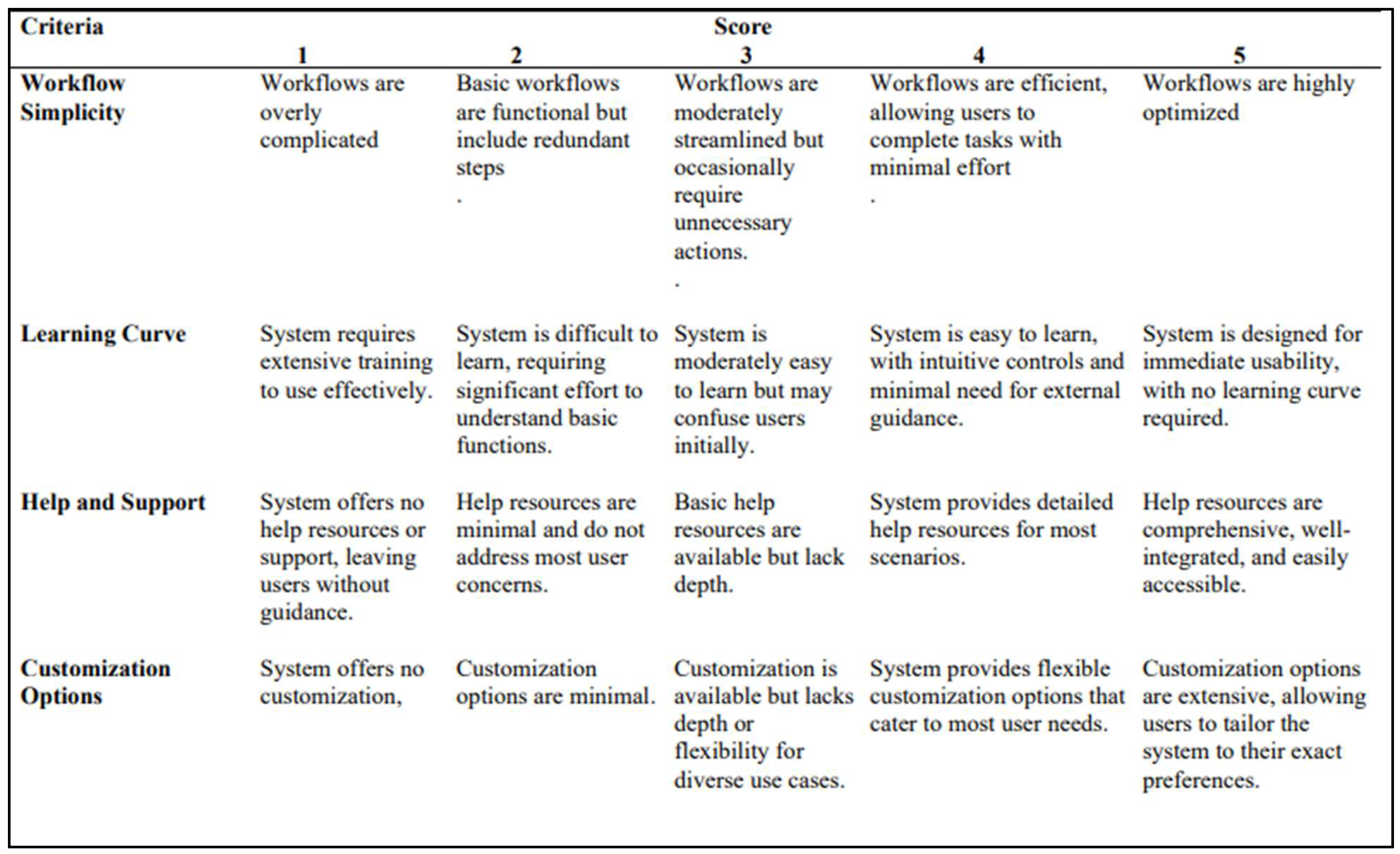
Figure 12.
Results from AI-UIX System Testing/Experimentation.. Source: Authors’ own data
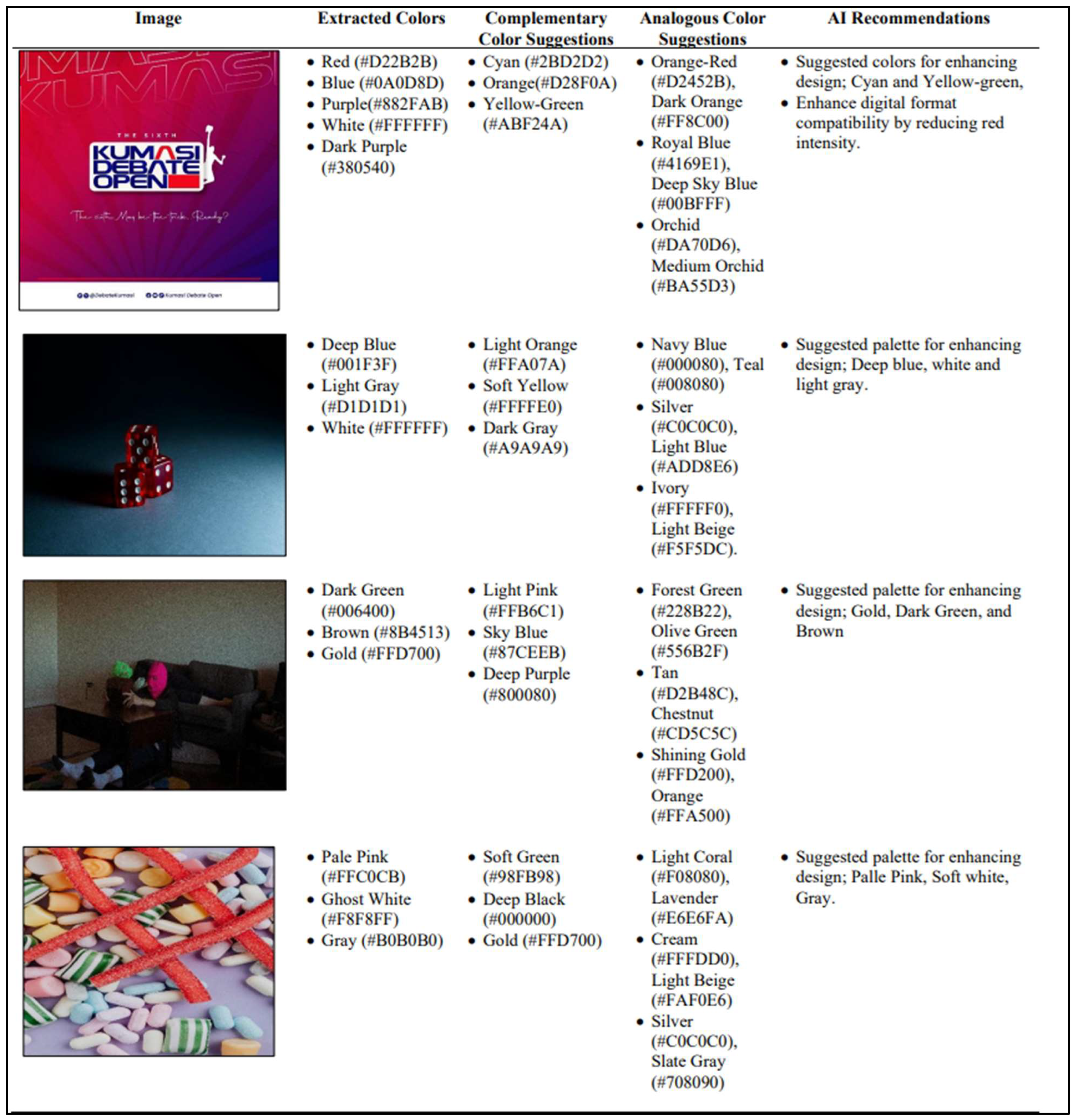
Figure 13.
Expert Validation of System Accuracy.
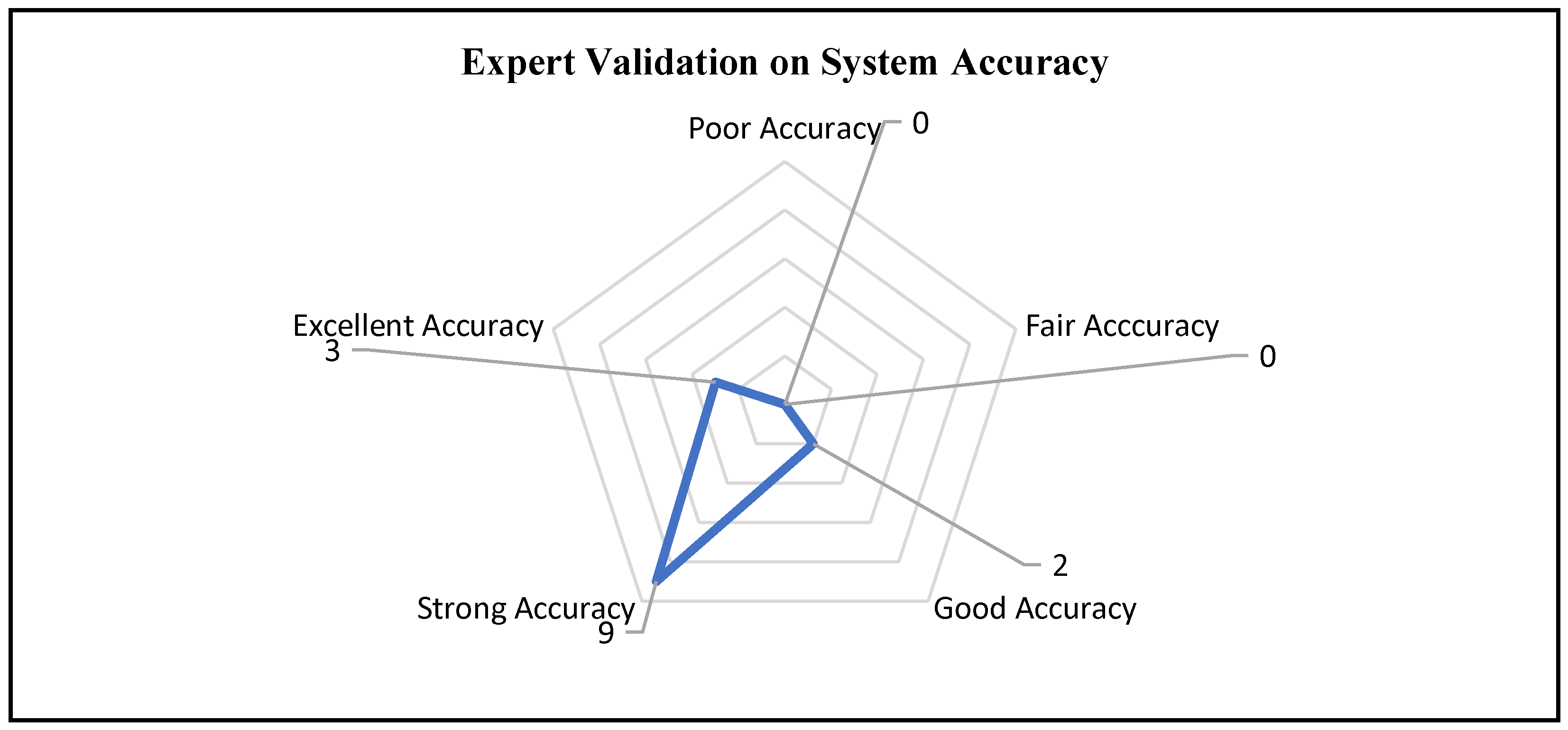
Figure 14.
Expert Validation of System Features' Relevance.
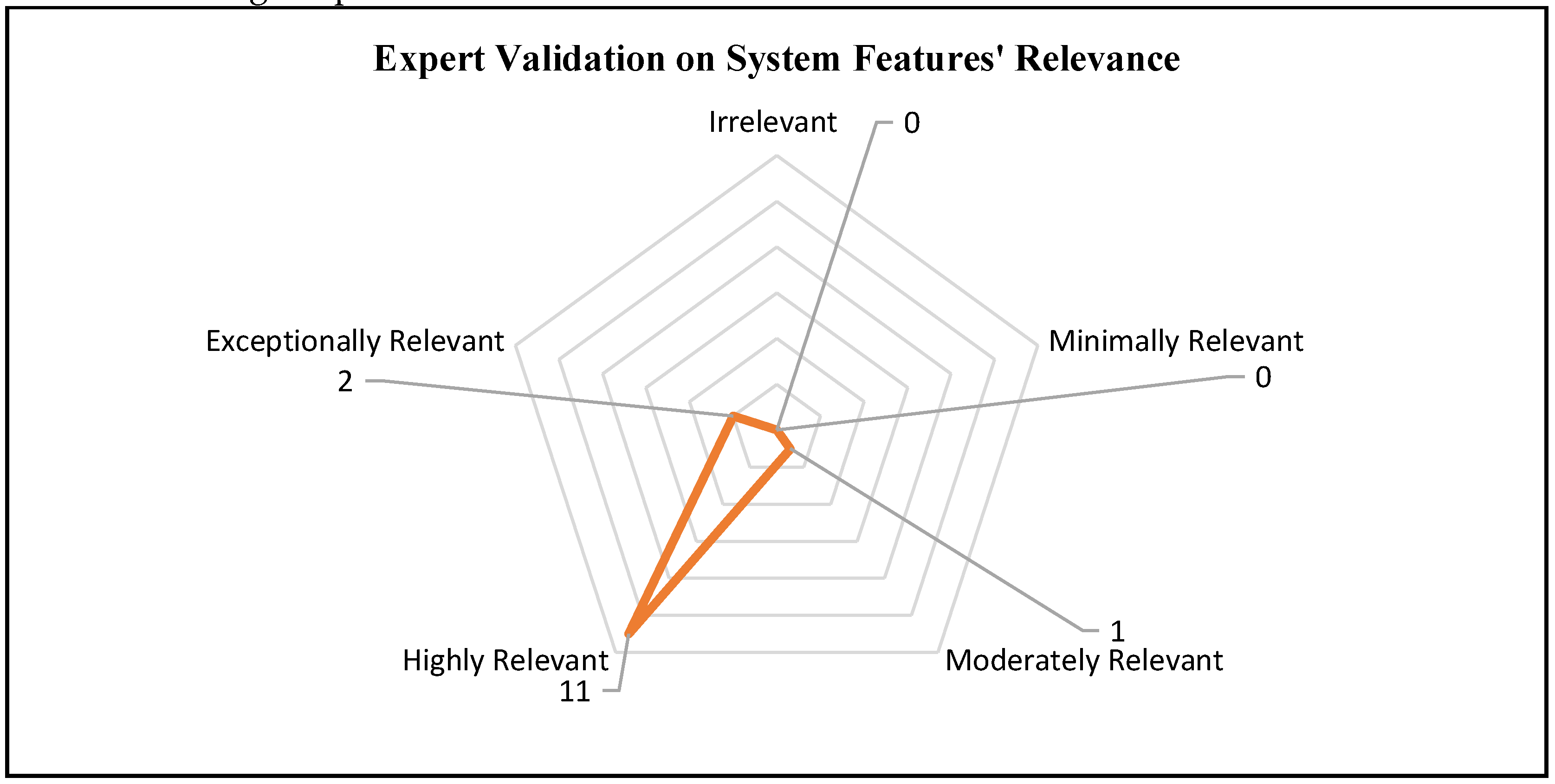
Figure 15.
Expert Validation of the System's Ease of Use.
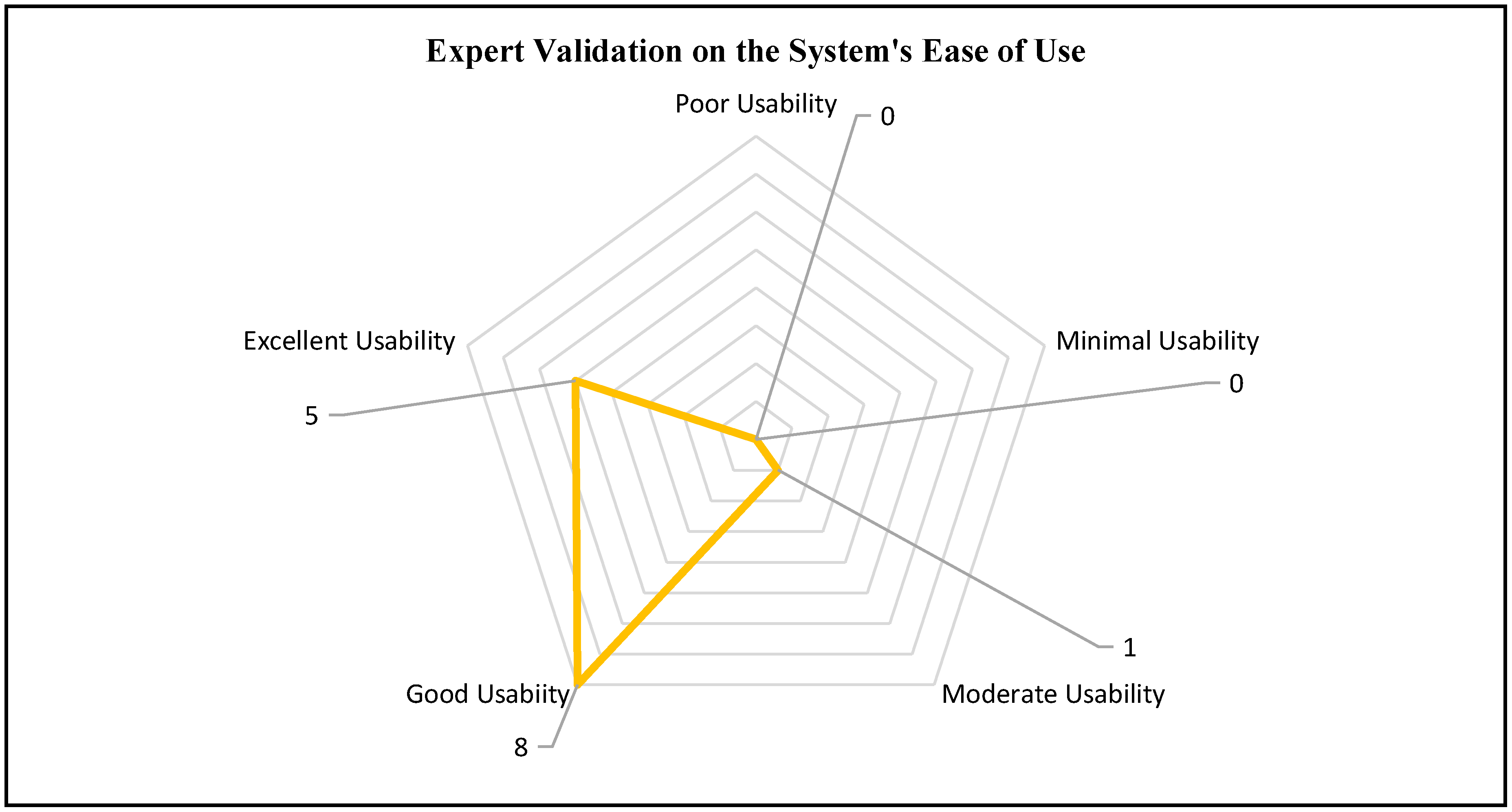

Table 1.
Computational Complexity Analysis of the AI-UIX.
| Functionality | Primary Operation | Complexity | Overall Complexity |
|---|---|---|---|
| pickCoorFromImage | Extracts pixel data from an uploaded image. | Extracting pixel data operates in constant time, O(1). Including event listeners and drawing an image on canvas also operates O(1). | Constant time - O(1) |
| generatePalette | Performs arithmetic on RGB components to produce complementary and analogous colors. | Arithmetic operations on the RGB values operate in constant time; O(1). | Constant time - O(1) |
| displayPalette | Creates a palette by iterating over a set ofColors. | Looping through a fixed number of colors runs in constant time; O(1). | Constant time - O(1) |
| additiveBlend, subtractiveBlend, & simulateBlending | Computes resulting color by performing arithmetic operations on RGB components. | Arithmetic operations on the RGB values operate in O(1). | Constant time - O(1) |
| fetchAIRecommendations & displayAIRecommendations | Sends a POST request and processes the response. | Operate in linear time with respect to p, the number of recommendations. | Linear time - O(p) |
| logUserAction | Sends data via POST request to log user actions. | Computation with payload in constant time. | Constant time - O(1) |
| renderAnalyticsDashboard | Gets and outputs analytics data. | Operates in linear time with respect to the number of fetched data points, q. | Linear time - O(q) |
| testColorFunctions | Dynamically generates test cases to check the correctness of the generatePalette function | Generating RGB components operates in constant time, O(1). When testing cases, the function operates in linear time with respect to the number of test cases, r; hence, O(r). | Linear time - O(r) |
Disclaimer/Publisher’s Note: The statements, opinions and data contained in all publications are solely those of the individual author(s) and contributor(s) and not of MDPI and/or the editor(s). MDPI and/or the editor(s) disclaim responsibility for any injury to people or property resulting from any ideas, methods, instructions or products referred to in the content. |
© 2025 by the authors. Licensee MDPI, Basel, Switzerland. This article is an open access article distributed under the terms and conditions of the Creative Commons Attribution (CC BY) license (http://creativecommons.org/licenses/by/4.0/).
Copyright: This open access article is published under a Creative Commons CC BY 4.0 license, which permit the free download, distribution, and reuse, provided that the author and preprint are cited in any reuse.


