
Submitted:
12 January 2025
Posted:
13 January 2025
You are already at the latest version
Abstract
This research work draws the design, development, and evaluation of the Jom Tarik Ordering Management System, a digital platform created to optimize food ordering processes for restaurants. The system features a user-friendly interface, secure authentication mechanisms, and an efficient ordering workflow, all aimed at enhancing the overall customer experience. The development process followed the Agile methodology, specifically the Scrum framework, to promote iterative progress, scalability, and continuous improvement. Rigorous testing strategies, including unit, integration, and system testing, were employed to ensure the system's reliability and functionality. This report also highlights the collaborative efforts of a six-member team, the challenges faced, and the methodologies adopted to deliver a comprehensive, feature-rich solution.
Keywords:
Scrum
; framework
; iterative progress
; scalability
; Agile
1. Introduction
In the modern era, technology plays a pivotal role in optimizing business operations, particularly within the food and beverage industry. Digital ordering systems have transformed the way restaurants manage customer interactions, enhancing efficiency and improving user satisfaction (Hamilton, 2019). Recognizing the limitations of traditional ordering methods, the Jom Tarik Ordering Management System was conceptualized as a solution to address operational inefficiencies by leveraging web-based technologies and agile development practices. The primary goal of this project is to design and implement an online ordering platform that delivers a seamless and intuitive experience for both customers and restaurant staff. Key features of the system include secure user authentication, simplified order placement, and real-time updates. The project followed a structured development process, starting with requirements gathering, followed by analysis, design, development, testing, and deployment. Agile methodologies, specifically Scrum, ensured that the system remained flexible and adaptable to evolving user needs. Furthermore, the adoption of advanced testing practices ensured the system's robustness, reliability, and readiness for real-world use.
2. Literature Review
The increasing adoption of digital ordering systems in recent years reflects the growing demand for efficiency and superior user experiences. As Hamilton (2019) notes, robust software testing is a cornerstone for ensuring system reliability and enhancing user satisfaction. Testing methodologies, including black-box and white-box testing, are vital in uncovering design flaws, security risks, and performance bottlenecks, which can otherwise compromise the effectiveness of such systems.
Agile methodologies, particularly Scrum, have emerged as highly effective approaches for software development due to their adaptability and iterative nature (Bhakhra, 2019). By fostering cross-functional collaboration, Scrum enables development teams to deliver incremental updates and seamlessly integrate user feedback. Additionally, incorporating risk management strategies ensures that potential threats to project timelines and deliverables are identified and mitigated proactively, safeguarding project outcomes (CodiLime, 2022; Chesti et.al, 2020; Alkinani et.al, 2021; Babbar, et.al, 2021).
In digital ordering systems, the role of UI/UX design is paramount in driving user engagement and satisfaction. Athuraliya (2022) highlights the significance of sequence and activity diagrams in mapping user interactions and system workflows. These tools provide a visual framework that ensures intuitive navigation and smooth functionality throughout the system. Features such as multilingual support, personalized recommendations, and real-time updates further enhance usability, making the platform accessible and appealing to a diverse user base.
The evolution of database systems has revolutionized how organizations store, manage, and retrieve data. Elmasri and Navathe (2015) emphasize the pivotal role of Entity-Relationship (ER) modeling in database design, highlighting its effectiveness in representing real-world entities and their relationships. This approach has become a cornerstone in modern database design, finding applications in systems such as order management and customer tracking (Connolly & Begg, 2014; Alferidah et.al, 2020).
Adopting agile methodologies, particularly Scrum, has proven invaluable in software development projects requiring iterative progress and continuous feedback (S, 2022). Scrum promotes cross-functional collaboration and adaptive planning, making it well-suited for dynamic project environments (GeeksforGeeks, 2019). Research by Bhakhra (2019) supports Scrum's ability to enhance teamwork and efficiency, aligning with the methodology’s application in the project.
Effective risk management is another critical element of successful software development. Shah (2021) and CodiLime (2022) stress the need for proactive risk identification and mitigation strategies. In software projects, where unforeseen challenges can hinder progress, techniques like SWOT analysis and contingency planning are essential to maintain project momentum and achieve goals despite uncertainties.
Testing methodologies are integral to the software development lifecycle, ensuring quality and reliability. Hamilton (2019) underscores the importance of functional and non-functional testing in identifying defects early, enhancing product quality, and satisfying user expectations. Yasar (2022) expands on testing techniques such as unit testing and integration testing, which validate both individual components and their interactions(Srinivasan et al,. 2021). For complex systems (Humayun et al,. 2020) like order management platforms, these testing practices are indispensable in delivering a robust and reliable product. The incorporation of UI/UX design principles is crucial for creating user-centric applications. Lucidchart (2019) and Athuraliya (2022) advocate the use of sequence and activity diagrams to visualize user interactions and workflows. These diagrams not only streamline the design process but also facilitate clearer communication among project stakeholders, ensuring alignment and functionality. Advancements in software features, including personalization, gamification, and multilingual support, have significantly enhanced user experiences (Konatham et al,. 2024). Research suggests that these features increase user engagement and extend the system's accessibility to a diverse audience (Jhanjhi et.al, 2021;ClickUp Blog, 2021). Their integration into applications underscores the importance of tailoring systems (Mughal et al,. 2024) and (Humayun et al,. 2023) to meet the varied needs of users, ensuring both functionality and appeal.
3. Problem Statement
Traditional ordering systems in restaurants are often plagued by inefficiencies such as lengthy wait times, errors in manual order-taking, and limited scalability. These issues result in reduced customer satisfaction and impede business growth (Yasar, 2022). Additionally, many existing digital solutions fail to offer the level of customization, adaptability, and user-friendly design required to meet the unique needs of individual restaurants. The Jom Tarik Ordering Management System seeks to overcome these challenges by providing a comprehensive digital platform with features such as secure login, streamlined order processing, and robust management tools. Designed to handle high traffic and peak loads, the system supports real-time updates and evolves through iterative development cycles to meet user demands. By employing the Scrum methodology, the project emphasizes flexibility, adaptability, and continuous improvement, ensuring a tailored and effective solution for restaurant operations.
Use Case Diagram
Figure.1 shows the A use case diagram is a visual tool used to represent the functional requirements of a system, demonstrating how various actors interact with the system to achieve specific goals. In Figure 1: Use Case Diagram from the document, the interactions between users and the Jom Tarik Order Management System are clearly illustrated, offering insights into its components and functionality. The central box in the diagram represents the "Jom Tarik Order Management System", encapsulating all the functionalities provided by the platform. Surrounding this are the actors who interact with the system. The primary actor is the Business Analyst, responsible for overseeing system analysis and ensuring alignment with business objectives. Another actor, the Branch Manager, engages with the system to manage orders, track performance, and oversee branch-level operations.
The system’s use cases are depicted as ovals within the system boundary, each representing a specific functionality. Key use cases include Place Order, allowing customers to request food and customize orders, and Login, where users provide credentials to access the system. Additionally, the Manage Orders use case, labeled as an "extends" relationship, encompasses activities like viewing, updating, or canceling orders. This dependency implies that order management is contingent upon an order being placed first.
The diagram also highlights the relationships between actors and use cases. Association lines connect actors to their respective use cases, such as the Branch Manager interacting with both the Login and Manage Orders functionalities. Extend relationships, shown as dotted lines, indicate optional or conditional features, emphasizing how some functionalities depend on others.
The purpose of this diagram is to illustrate how various user roles interact with the system, the key features offered, and the dependencies between functionalities. It serves as a critical blueprint for system designers and developers, ensuring clarity in system requirements and comprehensive user interaction mapping. By visualizing these interactions, the use case diagram enhances communication among stakeholders and guides the development process effectively.
4. Use Case Descriptions
Table 1 describes two important use cases for the system: Login and Place Order. Each use case is divided into three main paths in order to make its behavior clear in various scenarios. The Basic Flow, or Happy Path, describes the very ideal path with no errors where the use case ends successfully. Alternate Flow: This would involve a different route the user takes in the case when, under some conditions, the basic flow is not completed. Finally, the Exception Flow describes how an error or some other unusual condition has obstructed the use case. In UC01: Login, the Basic Flow describes how the user logs in by inputting the correct credentials. The Alternative Flow happens when the user inserts wrong credentials and therefore can't log in; for the Exception Flow, it is specified that in case of nonexistence of the user account, the latter has to be created. In UC02: Place Order, in the Basic Flow, there is explained the flow in which an order is successfully made by a customer, while the Alternative Flow faces the flow where the customer cancels the order before its completion. The Exception Flow describes a situation when the system is unable to process an order, which could be during server-down situations. This table would help the developer have a good idea about the system's behavior under both normal and abnormal conditions for quicker development and troubleshooting.
5. Use Case Specifications
Specification 1
Name: UC01: Login
Description: All the customer can login to the Jom Tarik portal or their website by using their correct user credentials
Author(s): Ansari Adip Junayen Actor(s): Customer Location(s): Taylor’s University Status: Active
Priority: User Login
Assumption(s): System and server must be online and active
Precondition(s): The user/customer must have an active id
Postcondition(s): The system should be active, and the user should be able to login to the website on in their portal
Primary (Happy) Path: The user Logged in successfully with correct username and password
Alternate Pathway(s): The login method was unsuccessful because of the wrong username or wrong password.
Exception Pathway(s): User account does not exist, so users have to create a new account.
Specification 2 Name: UC02: Place Order
Description: All users request to place orders and customize them and cancel their orders.
Author(s): Fardeen Sameer Khan
Actor(s): Customer, Cashier
Location(s): Taylor’s University
Status: Active
Priority: User
Assumption(s): Customer must have a valid account. Precondition(s): The system is available, and the user is logged in. Postcondition(s): The order is placed successfully.
Primary (Happy) Path: The user has received the delivery successfully.
Alternate Pathway(s): The customer cancels the order.
Except Pathway(s): The item has finished so it cannot be ordered.
Figure 2, the Sequence Diagram for the Order Placement System, illustrates graphically the interaction of the different components in placing an order. It is time-based, showing what and when the elements of the system interact. The actors involved in this diagram include the Customer, who initiates the order, and the System, which will process the customer's request. Lifelines, shown as vertical dashed lines, represent the actors and system components. It identifies messages between the customer and the system. There is the Login Request and Response, which refers to the instances when the customer sends credentials, and the system authenticates them; the Place Order message, during which the customer would have selected his order and thus is placing for an order; and the Order Confirmation, where upon processing, the system confirms the customer's order. The diagram can also show decision points or branch conditions, error checking, confirmation of order. A sequence diagram is used by developers and the stakeholders to understand the dynamic interactions among system components; each step should be properly ordered, and system responses to user activities are well defined.
Figure 3 shows the Login System Sequence Diagram. This diagram portrays the interaction of a user with the system in the login process. It is an abstract picture showing actions ordered in time to describe the process from inputting credentials by the user through authentication by the system to, and including, either successful login or an error message of invalid credentials. The decision points that include incorrect input are also depicted.
Figure 4 shows the Activity Diagram of the Software. The activity diagram describes the overall flow of control within the system with regard to interactions, backend functions, and how results are dispensed. There are various decision paths across alternative and exception flows, a very useful tool as it visualizes the overall software workflow.
Figure 5 shows the State Chart Diagram for the Software. This diagram represents the different states that the system goes through in operation, from the initial state to states such as login, placing an order, processing an order, and finally to the final state. The transitions between states are driven by user actions or system responses, ensuring clarity in dynamic system behavior.
Figure 6 shows the design sequence visually communicates the different user interface interactions visually; the focus was on intuitive navigation, centered around user-based design. It conveys the overview of the layout and arrangement of elements in the application for smooth user experiences with functional clarity.
6. Prototype
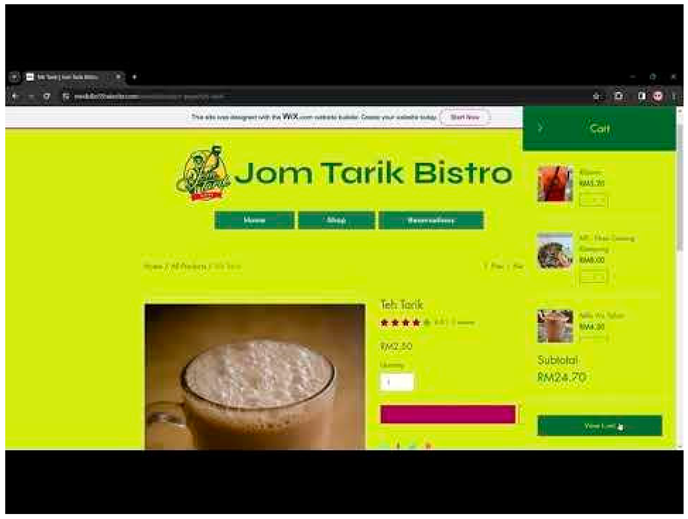
The link to our prototype demonstration video: (https://youtu.be/AUZS4ZbdMsg)
7. Methodology and Validity
The Jom Tarik Ordering Management System will be iteratively and incrementally developed using the Scrum methodology. This approach allows for flexibility, adaptability, and continuous improvement through frequent development cycles. We will be working in small cross-functional teams with the aim of efficiently building the website and mobile application, incorporating feedback from stakeholders at every stage. Scrum methodology comes tagged with a number of advantages, such as incrementally adding features, keeping customers updated on new functionalities, and quickly adapting to changes in requirements. The project also ensures a very good balance between technical and user-centric aspects by having team members specialized in UI/UX design and back-end development. Major tasks will be delegated among the developers and designers, hence allowing early delivery of features that can enable quicker deployment and real-time validation.
The research work will be executed in a few main, well-defined phases to ensure systematic progress and completion within an appropriate frame of time:
1. Initial Phase
The initial phase formed the six-man team to define the vision and mission of the "Jom Tarik" system. Research on tools and technologies was conducted, identification of customer requirements through questionnaires was also done, market research and competitor analysis were conducted to develop insights and define a strategic approach.
2. Planning Phase
In this phase, the project team identifies priorities and effort estimation for the tasks. In sprint planning sessions, deadlines will be drawn and responsibilities delegated to the members according to their expertise.
3. Analysis and Design Phase
This involves extensive documentation with stakeholders and analysis of user stories for extended requirements. It then goes ahead to design the architecture, the database that would be used for the system, and develops the prototype, showing what the software looks like visually. It revises through stakeholder feedback and improvements.
4. Development Phase
Development in this phase will be done with the moves of Scrum. The Sprints will kick-start on scheduled dates, the validity of the code will continuously be tested, features will be integrated incrementally, and issues will be analyzed and resolved via team discussions.
5. Testing Phase
Testing shall involve prototype testing and detailed testing of all the use cases. Unit testing, integration, and system testing shall be followed. Test cases detailing everything shall be written and conducted. User testing to receive feedback shall be provided to identify areas for improvement.
6. Deployment Phase
This deployment phase will witness smaller teams working in cohesion for the smooth release of all components. The process of deployment will be closely monitored, and post-deployment activities will be performed in order to make the system stable and performant.
7. Maintenance and Support Phase
The identification and resolving of bugs or issues will be focused on by the team after the deployment. User feedback will be used for planning and executing further sprints for system evolution. The system will be continuously maintained for robustness and efficiency.
Thus, by following this structured methodology and work plan, the Jom Tarik Ordering Management System provides a solution that is dependable, can grow easily, and user-friendly, especially for dynamic demands from restaurants to their customers' needs.
Figure 7 shows the Gantt Chart of the Project Management Timeline. This chart shows the sequence and the timing of the different phases that the project goes through, such as planning, development, testing, and deployment. It shows task dependencies, duration, and milestones to help in organizing the views into the workflow of the research.
Software Testing Strategy
Software testing is imperative, as it identifies any issues and defects with the written code so they can be fixed before the software product is delivered. Improves product quality. When it comes to customer appeal, delivering a quality product is an important metric to consider.
Early software testing uncovers problems before a product goes to market. The sooner development teams receive test feedback, the sooner they can address issues such as: Architectural flaws, Poor design decisions, Invalid or incorrect functionality, Security vulnerabilities, Scalability issues.
7.1. Identifying Requirements & Objectives
Define the functional and non-functional requirements of the website, mobile apps (Android & iOS), and backend systems.
Identify critical user journeys and functionalities.
Set testing objectives like ensuring smooth user experience, order accuracy, and system performance.
7.2. Unit Testing
Unit testing is used fundamentally to verify the units, which may be functions, classes, or modules, at the individual system level. The foremost aim is a check for functionality and behavior in views of reliability concerning these components alone, separated from the rest of the system. In the case of the Jom Tarik Order Management System, unit testing embraces the website covering both mobile applications' operating systems, Android and iOS, in addition to all backend systems. Automation of test cases is done via frameworks like JUnit for Java or Android and XCTest for iOS. In tests, the modules are supported by simple, easily replaceable versions that simulate their interactions, thus allowing for the thorough validation of individual components.
This Figure 8 illustrates the modular approach towards unit testing. It shows how individual units, such as functions or classes, are isolated and tested independently to assure correctness and reliability. This diagram shows frameworks and test cases playing a major role in the validation of code behavior.
7.3. Integration Testing
Integration testing checks the interaction between different components interacting with each other, such as a website, mobile applications, an API gateway, a database, and backend services. The focus is to find problems arising out of integrating these components together. Simulating API calls and data flow to test the integrated working of interactive modules is performed accordingly.
Figure 9 represents the interaction between different components of an integrated system, such as databases, APIs, and user interfaces. It visually depicts how modules interact with one another to exchange data and also shows potential issues in integration. A key aspect is that this is all about making sure everything works together.
7.5. System Testing
System testing concerns the testing of the whole system as a unit, ensuring that it behaves as expected when it is delivered. It also involves the testing of user workflows, business processes, and performance of the system under conditions of variable load. Simulated end-to-end scenarios, such as user registration, browsing food menus, placing an order, payment processing, and tracking an order, are carried out in order to validate the overall behavior of the system.
7.6. Acceptance Testing
Acceptance testing ensures that the system meets the predefined acceptance criteria as defined by the stakeholders and end-users. The stakeholders and potential users participate in testing sessions in order to find out if the system addresses their needs and expectations. Such sessions will also point out the usability or functionality gaps, making the system able to provide user-friendly experience.
7.7. Black-Box Testing
Black box testing means checking a system from an external or, rather, the end-user point of view, taking its behavior into account rather than the internal structure of the code. This test can be conducted on the software unit, integration, system, and acceptance testing levels. It has test cases made based on the system requirements and specification, with focus on the user interface elements, navigation, features, and functionalities to ensure continuity in user experience.
7.8. White-Box Testing
White-box testing delves into the internal structure and logic of the system, where the verification regards, for instance, decision statements, loops, and multiway branches. It finds bugs in codebases and logical inconsistencies that test cases aim at paths, algorithms, and error-handling mechanisms.
7.9. Testing Conclusion
The Jom Tarik Ordering Management System has followed a combination of functional and non-functional testing strategies. In these, white-box and black-box testing are followed properly. These comprehensive methodologies ensure that the validation of the system will be robust in functionality, reliability, and user experience. Rigorous testing throughout the entire development lifecycle optimizes this system for a variety of scenarios to bring about the most reliable and user-friendly food delivery platform.
7.10. Test Plan

Table 2.
Use Case “Login” Test Plan.
| Use Case | Test Case | Description | Procedure | Expected Results |
|---|---|---|---|---|
|
UC01: Login |
TC01-1: Successful login |
User logs in successfully Providing correct username and password |
Users put their Login details which is their correct username and password for logging in | User should be logged in as User and username should be visible at the top and the so the user can experience all the facilities of the portal and website |
|
TC01-2: System Error |
The system has some technical or software related errors or the server is down | User tries to login to the website or the portal | Due to system error or the server is down, the user gets a unsuccessful login and cant access the website or the portal |
Table 3.
Use Case “Place Order” Test Plan.
| Use Case | Test Case | Description | Procedure | Expected Results |
|---|---|---|---|---|
|
UC02: Place Order |
TC01: Successfully placed the order. |
User will place the order he desires. | The user requests the “place order” he has placed. The cashier “accepts” or “denies” the requested “place order”. | Our expected result is that the cashier sends their placed order to the appropriate chef who then begins to prepare the order. Afterwards it is delivered to the customer in the method they desired namely “Dine in”, “Takeaway”, and “Home Delivery”. |
|
TC02: Order Canceled |
The user cancels his order |
The users may change their mind. So, there will be an option to “cancel “the order. | Once the order is canceled, the user should see a message in the app “The order is canceled successfully” | |
|
TC03: System Error |
Sometimes there can be an error in the system, and so the order may not be placed online. | Systems may get an error for various reasons, such as overloading, bugs in the code etc. In this case, the order might not be placed successfully. |
Users should see a message in the app “Sorry, something's wrong, the order cannot be placed at the moment. Please try again” |
8. Risk Management Plan
8.1. Identify Risks
We can identify risks by conducting special sessions with major project stakeholders. This will help discover most of the risks that might affect your project. Use risk control techniques such as SWOT analysis, brainstorming, and analysis of past records to address both internally and externally generated risk factors.
8.2. Assess Risks
Assess the identified risks based on their potential impact on project objectives and the likelihood of occurrence. Utilize both qualitative and quantitative techniques to measure risks, aiding in informed decision-making.
8.3. Contingency Plans
Develop specific contingency plans for high-impact risks that cannot be avoided. Outline escalation procedures to manage project interruptions effectively. Identify risk triggers or thresholds to activate contingency plans before risks escalate into critical issues.
8.4. Monitoring and Control
Establish a continuous risk monitoring system using status reports, progress meetings, and key performance indicators. These tools will help track changes in the risk environment and evaluate the efficiency of mitigation strategies. Empower project teams with the authority to manage daily risk tasks, fostering a culture of proactive risk management throughout the project lifecycle.
8.9. Plan for Maintenance and Evolution
8.9.1. Establish Maintenance Protocols
Clearly detail the areas of responsibility for maintenance. Establish escalation procedures and response times to ensure issues are resolved efficiently and promptly. Enhance monitoring systems by integrating alerts to detect potential problems early, thereby preventing user downtime.
8.9.2. Integration of User Feedback
Encourage user engagement through surveys, feedback forms, and in-app prompts to collect valuable insights on service usage and suggestions for quality improvements. Develop a system to categorize, prioritize, and select user feedback based on its relevance, impact, and feasibility for future development efforts.
8.9.3. Version Control and Documentation
Follow best practices for version control and maintain comprehensive documentation to support collaboration among team members. Provide necessary context for future developers to troubleshoot issues or implement improvements effectively.
8.9.4. Scalability and Adaptability
Evaluate the system's architecture for scalability and adaptability. Ensure the system can accommodate new features, support a growing user base, and integrate emerging technologies seamlessly.
8.9.5. Continuous Improvement
Foster a culture of continuous improvement within the development team by promoting knowledge sharing and conducting regular retrospectives. Reflect on past performance to identify areas for enhancement and invest in continuous skills development and training.
8.10. Evolution Plan
8.10.1. Personalization Feature
Enhance user engagement with personalized features by refining algorithms for improved relevance. Optimize features based on user behavior and data. Collaborate with UX designers and data scientists to explore innovative approaches for better recommendation accuracy.
8.10.2. Chatbot Feature
Establish a dedicated support team to monitor chatbot performance, resolve technical issues, and update its knowledge base. Incorporate NLP and ML algorithms to improve the chatbot's understanding and response accuracy. Expand its knowledge base continuously to handle a broader range of user queries.
10.2.3. Gamification Feature
Create an engagement index to measure user retention and satisfaction regarding gamification elements. Release diverse gaming content at varying intervals to maintain user interest and prolong engagement. Provide updated event schedules, including promotions, websites, and activities, to boost participation and interaction among users.
10.2.4. Multilingual Feature
Design a multilingual CMS to simplify content localization and translation efforts. Employ professional translators to ensure cultural sensitivity and accuracy. Provide a tool for automatic language detection and instant retranslation, creating a seamless language experience that fosters engagement and comprehension across diverse audiences.
Conclusion
The Jom Tarik Ordering Management System helps resolve most of the inefficiencies related to conventional ordering methods in restaurants by utilizing modern technologies and agile software development practices. These are projects in which the understanding of system workflows and functionality involves detailed diagrams for robust strategies concerning testing. Using an iterative methodology, like Scrum, allowed the team to keep flexibility and give a quick response to emerging requirements. Its application of modular design principles, further enhanced with elaborate testing, fosters reliability in the system and satisfaction for the consumer. As such, this ensures smooth interactivity through the provision of a seamless experience, hence optimally enhancing process flow from an operational perspective for restaurants while boosting customer service engagements. It thus allows room for comments and further work to offer considerable improvements that give strength to making the system scalable and effective.
8. Appendix
8.1. List of Figures
- Figure 1: Our Use Case Diagram
- Figure 2: Sequence Diagram for Order Placement System
- Figure 3: Sequence Diagram for Login System
- Figure 4: Activity Diagram for our software
- Figure 5: State Chart Diagram for our software
- Figure 6: [From left to right, top to bottom] sequence of interactions in our User Interface Design
- Figure 7: Gannt Chart for our Project Management Timeline
- Figure 8: Diagrams explaining the role of Modules in Unit Testing
- Figure 9: Diagram explaining the role of Modules in Integration Testing
8.2. List of Tables
- Table 1: Use Case descriptions.
- Table 2: Use Case “Login” Test Plan
- Table 3: Use Case “Place Order” Test Plan
8.3. Link to our UI Mock up on Wix.com
Our website on Wix.com can be accessed through this link: (https://mridulbr59.wixsite.com/mysite)
References
- Elmasri, R., & Navathe, S. B. (2015). Fundamentals of database systems. Pearson.
- Connolly, T., & Begg, C. (2014). Database systems: A practical approach to design, implementation, and management. Pearson Education.
- S, B. (2022). What is Scrum methodology? & Scrum project management. Nimble. Retrieved from https://www.nimblework.com/agile/scrum-methodology/.
- GeeksforGeeks. (2019). Agile software testing. GeeksforGeeks. Retrieved from https://www.geeksforgeeks.org/agile-software-testing/.
- Bhakhra, S. (2019). Scrum (software development). GeeksforGeeks. Retrieved from https://www.geeksforgeeks.org/scrum-software-development/.
- Shah, K. (2021). Risk management in software development: A complete guide. Third Rock Techkno. Retrieved from https://www.thirdrocktechkno.com/blog/risk-management-in-software-development-a-complete-guide/.
- CodiLime. (2022). Risk management in software development projects. CodiLime. Retrieved from https://codilime.com/blog/risk-management-in-software-development-projects/.
- Chesti, I. A., Humayun, M., Sama, N. U., & Jhanjhi, N. Z. (2020, October). Evolution, mitigation, and prevention of ransomware. In 2020 2nd International Conference on Computer and Information Sciences (ICCIS) (pp. 1-6). IEEE.
- Alkinani, M. H., Almazroi, A. A., Jhanjhi, N. Z., & Khan, N. A. (2021). 5G and IoT based reporting and accident detection (RAD) system to deliver first aid box using unmanned aerial vehicle. Sensors, 21(20), 6905. [CrossRef]
- Babbar, H., Rani, S., Masud, M., Verma, S., Anand, D., & Jhanjhi, N. (2021). Load balancing algorithm for migrating switches in software-defined vehicular networks. Computational Materials and Continua, 67(1), 1301-1316. [CrossRef]
- Alferidah, D. K., & Jhanjhi, N. Z. (2020, October). Cybersecurity impact over big data and IoT growth. In 2020 International Conference on Computational Intelligence (ICCI) (pp. 103-108). IEEE.
- Hamilton, T. (2019). What is software testing? Guru99.com. Retrieved from https://www.guru99.com/software-testing-introduction-importance.html.
- Yasar, K. (2022). What is software testing? Definition, types, and importance. WhatIs.com. Retrieved from https://www.techtarget.com/whatis/definition/software-testing.
- Athuraliya, A. (2022). Sequence diagram tutorial: Complete guide with examples. Creately. Retrieved from https://creately.com/guides/sequence-diagram-tutorial/.
- Lucidchart. (2019). How to draw a sequence diagram in UML. Lucidchart. Retrieved from https://www.lucidchart.com/pages/how-to-draw-a-sequence-diagram-in-uml.
- Athuraliya, A. (2022). The easy guide to UML activity diagrams. Creately. Retrieved from https://creately.com/guides/activity-diagram-tutorial/.
- Lucidchart. (2023). UML activity diagram tutorial. Lucidchart. Retrieved from https://www.lucidchart.com/pages/uml-activity-diagram.
- Tutorialspoint. (2019). UML - Statechart diagrams. Tutorialspoint. Retrieved from https://www.tutorialspoint.com/uml/uml_statechart_diagram.htm.
- ClickUp Blog. (2021). How to make a Gantt chart in Excel? ClickUp Blog. Retrieved from https://clickup.com/blog/gantt-chart-excel/.
- Yasar, K. (2022). What is software testing? Definition, types, and importance. WhatIs.com. Retrieved from https://www.techtarget.com/whatis/definition/software-testing.
- Hamilton, T. (2019). What is software testing? Introduction, definition, basics & types. Guru99.com. Retrieved from https://www.guru99.com/software-testing-introduction-importance.html.
- GeeksforGeeks. (2019). Agile methodology in software testing. GeeksforGeeks. Retrieved from https://www.geeksforgeeks.org/agile-methodology-in-software-testing/.
- S, B. (2022). What is Scrum methodology? & Scrum project management. Nimble.
- CodiLime. (2022). Risk management in software development projects. Retrieved from https://codilime.com/blog/risk-management-in-software-development-projects/.
- Konatham, B., Simra, T., Amsaad, F., Ibrahem, M. I., & Jhanjhi, N. Z. (2024). A Secure Hybrid Deep Learning Technique for Anomaly Detection in IIoT Edge Computing. Authorea Preprints.
- GeeksforGeeks. (2019). What is risk management? GeeksforGeeks. Retrieved from.
- Srinivasan, K., Garg, L., Chen, B. Y., Alaboudi, A. A., Jhanjhi, N. Z., Chang, C. T., ... & Deepa, N. (2021). Expert System for Stable Power Generation Prediction in Microbial Fuel Cell. Intelligent Automation & Soft Computing, 30(1). [CrossRef]
- Humayun, M., Niazi, M., Jhanjhi, N. Z., Mahmood, S., & Alshayeb, M. (2023). Toward a readiness model for secure software coding. Software: Practice and Experience, 53(4), 1013-1035. [CrossRef]
- Mughal, M. A., Ullah, A., Cheema, M. A. Z., Yu, X., & Jhanjhi, N. Z. (2024). An intelligent channel assignment algorithm for cognitive radio networks using a tree-centric approach in IoT. Alexandria Engineering Journal, 91, 152-160. [CrossRef]
Figure 1.
Our Use Case Diagram.
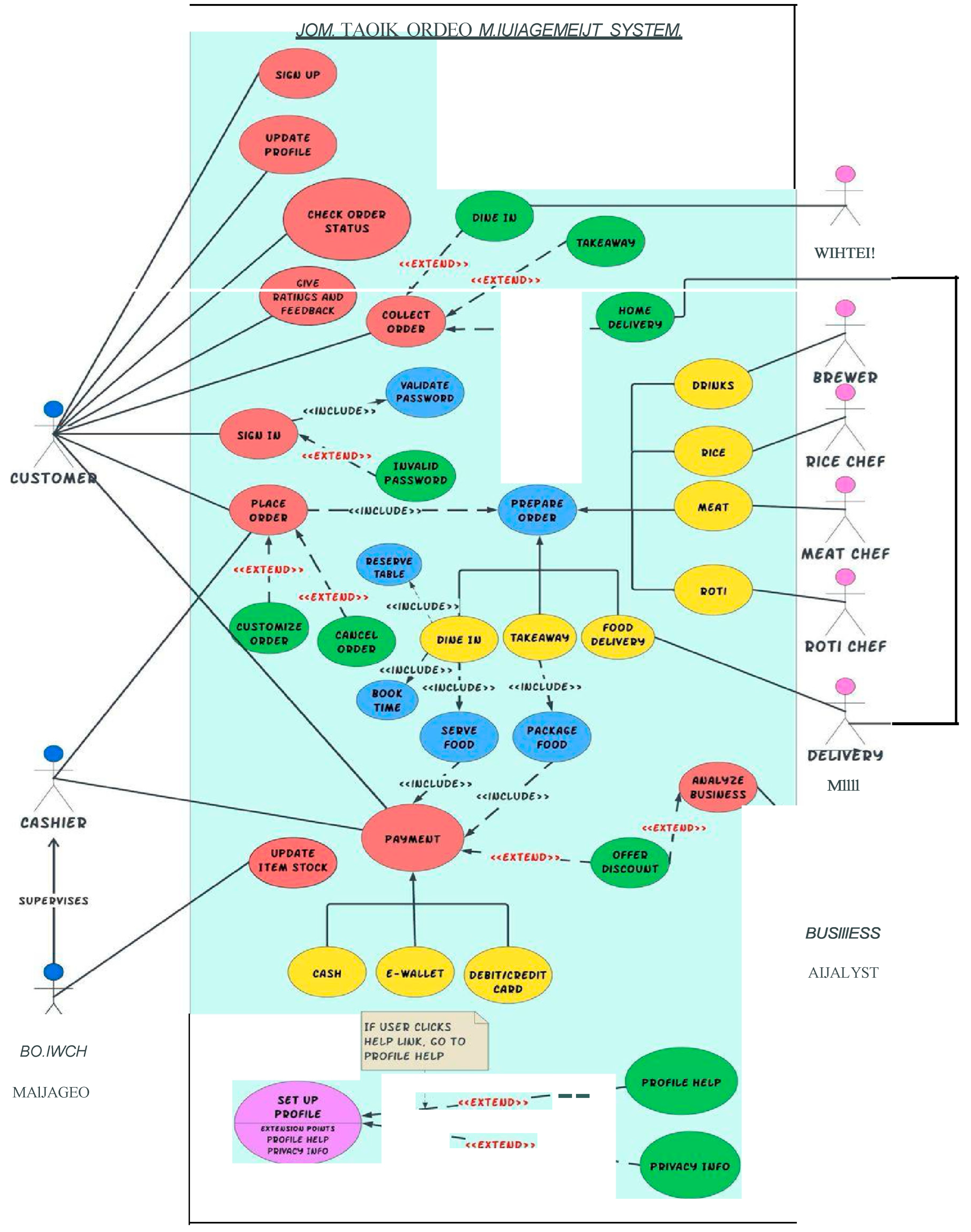
Figure 2.
Sequence Diagram for Order Placement System.
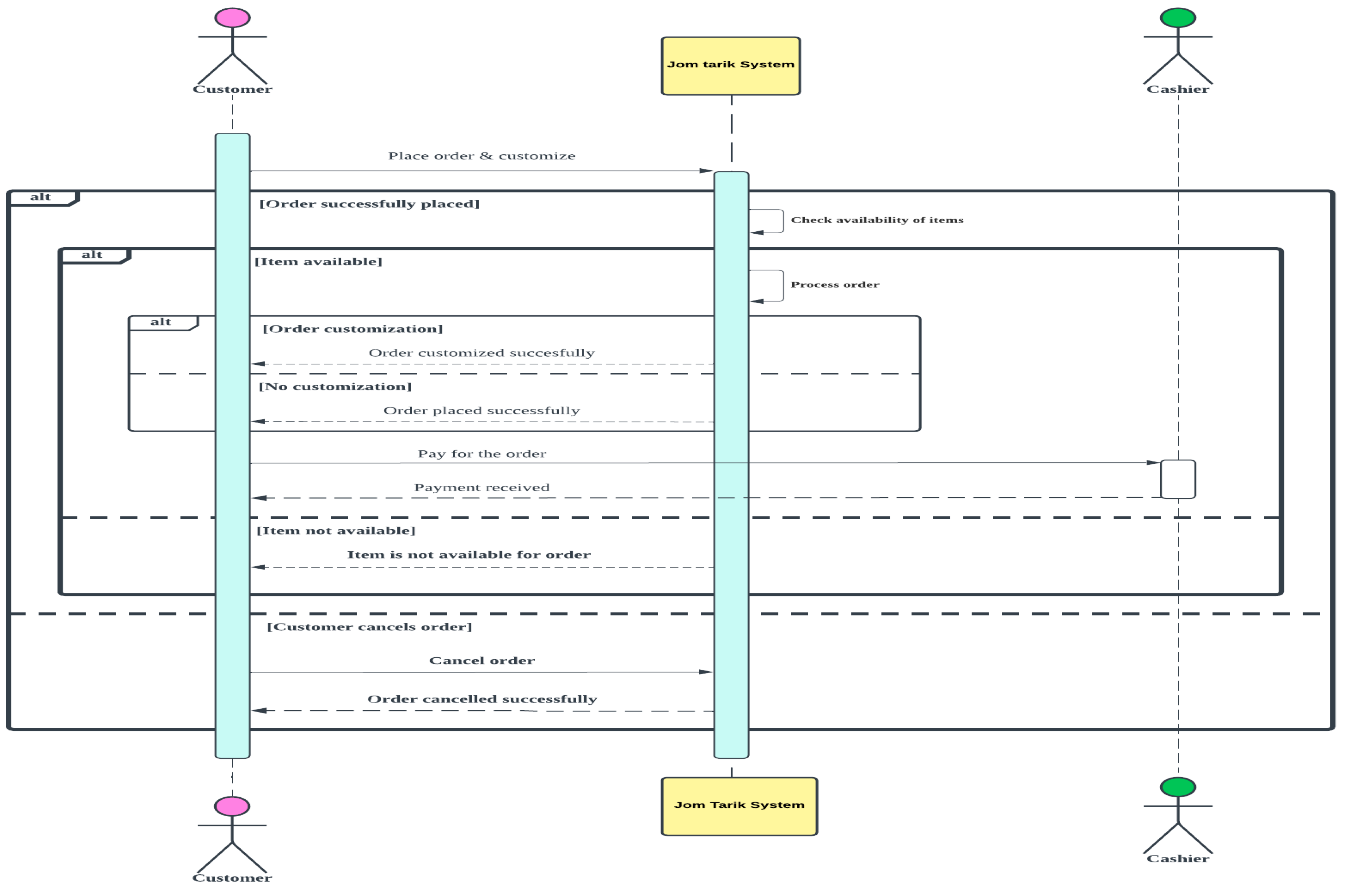
Figure 3.
Sequence Diagram for Login System.
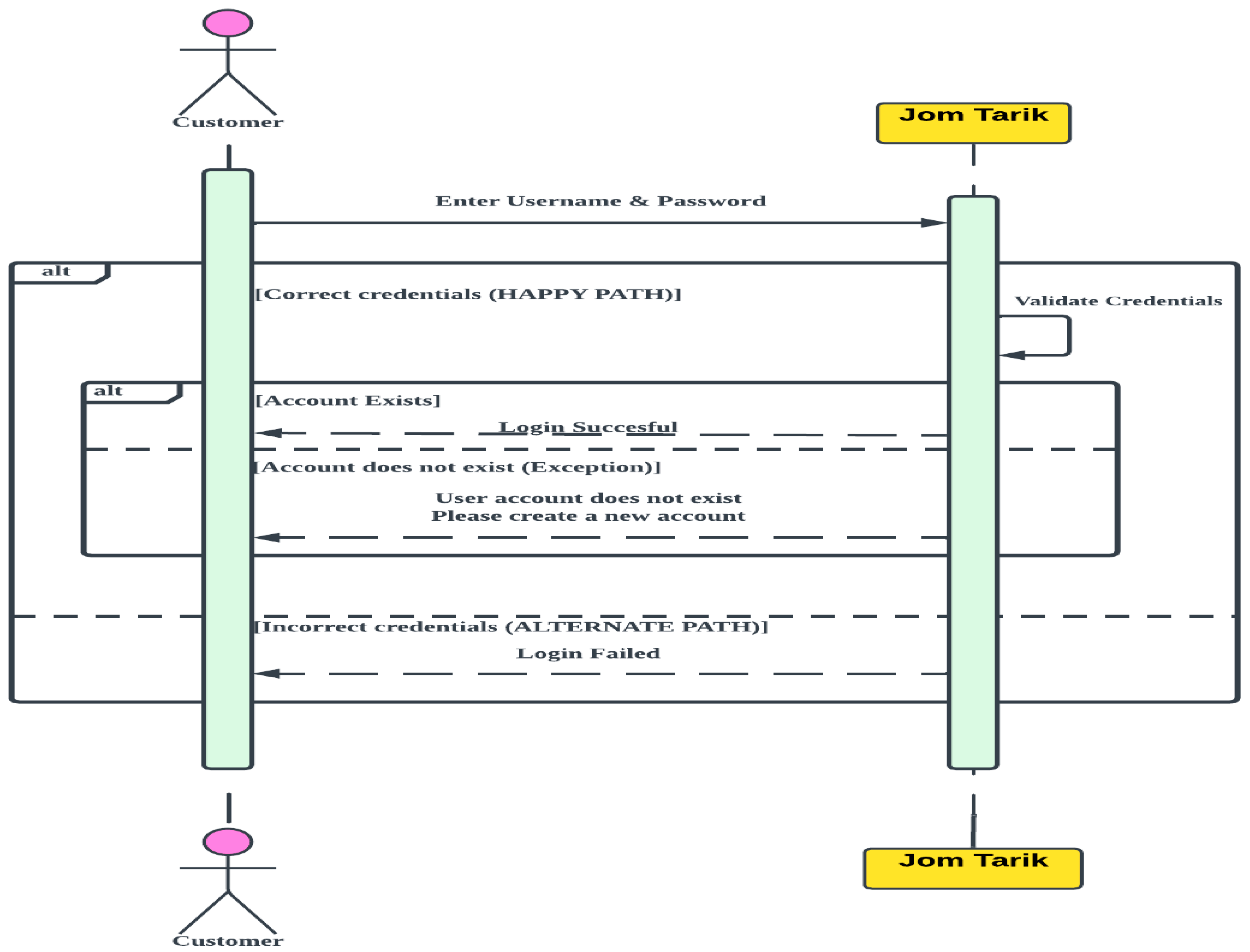
Figure 4.
Activity Diagram for our software.
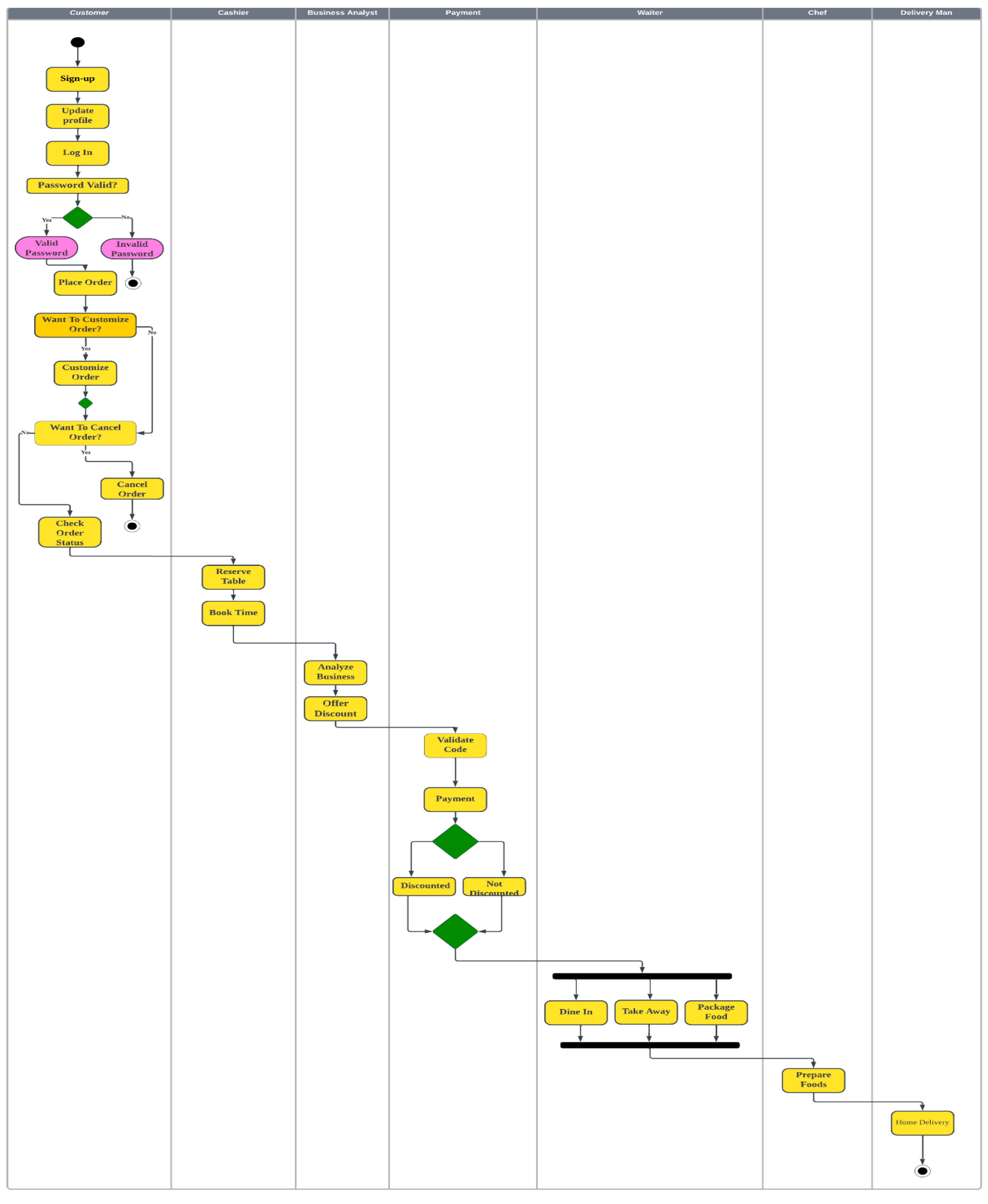
Figure 5.
State Chart Diagram for our software
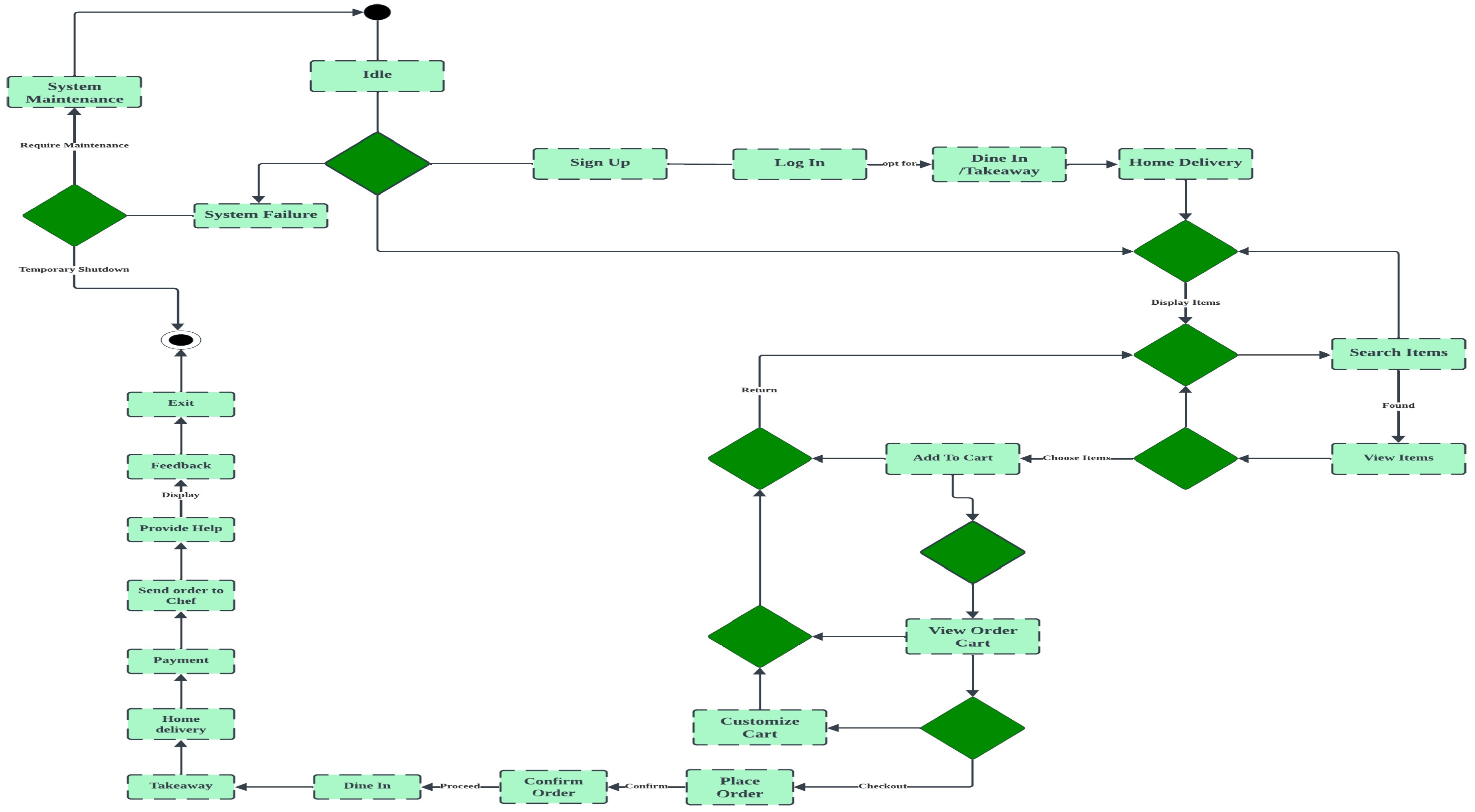
Figure 6.
UI/UX Design Sequence
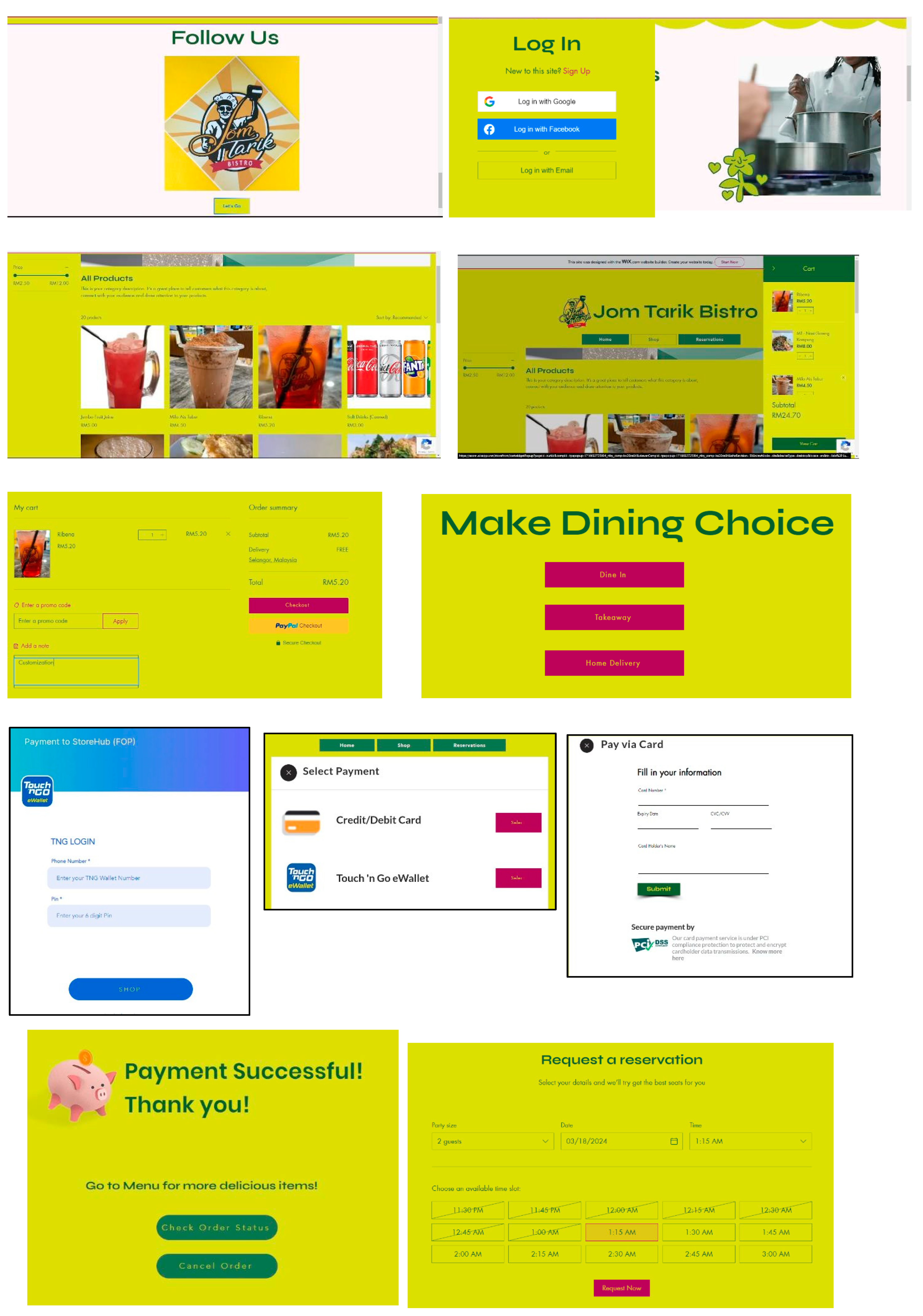
Figure 7.
Gannt Chart for our Project Management Timeline.
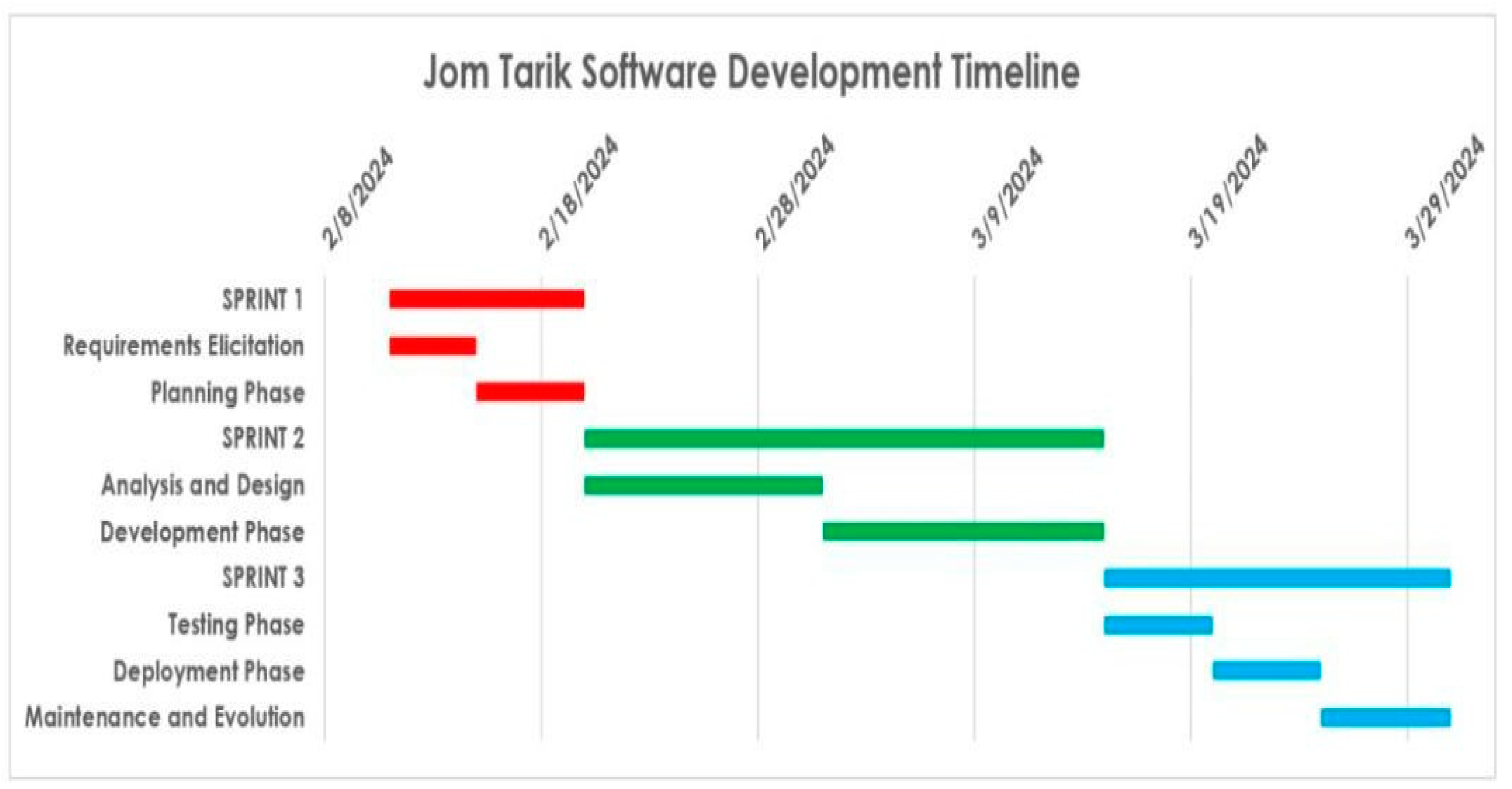
Figure 8.
Diagrams explaining the role of Modules in Unit Testing.
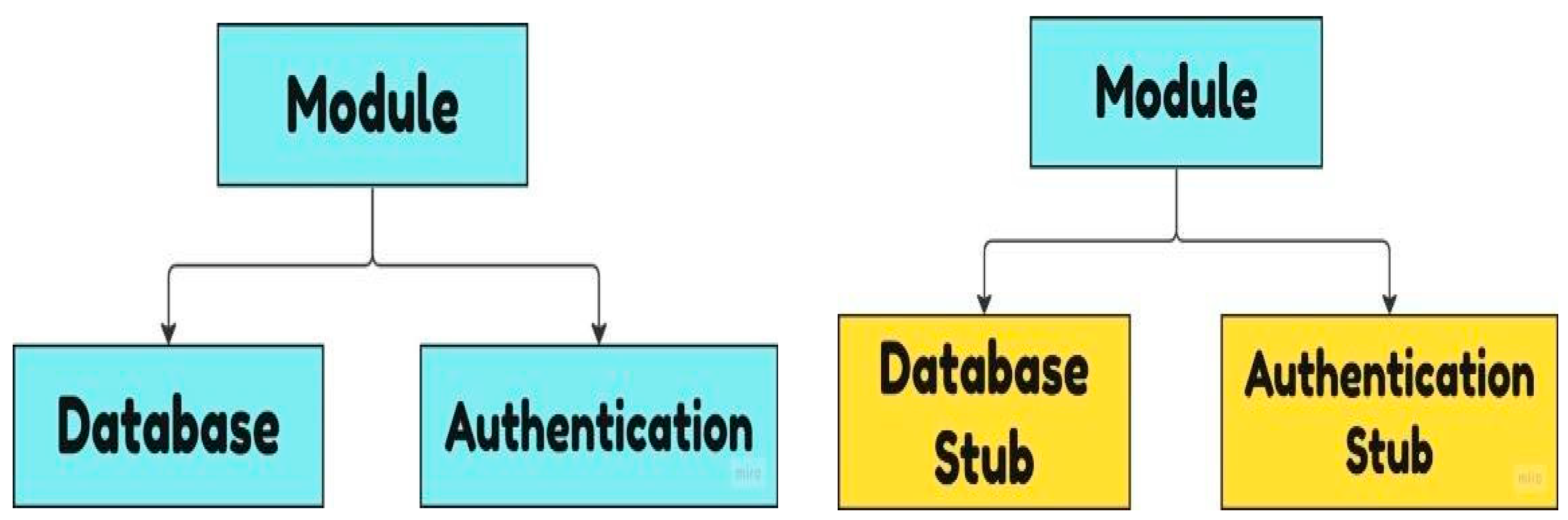
Figure 9.
Diagram explaining the role of Modules in Integration Testing.
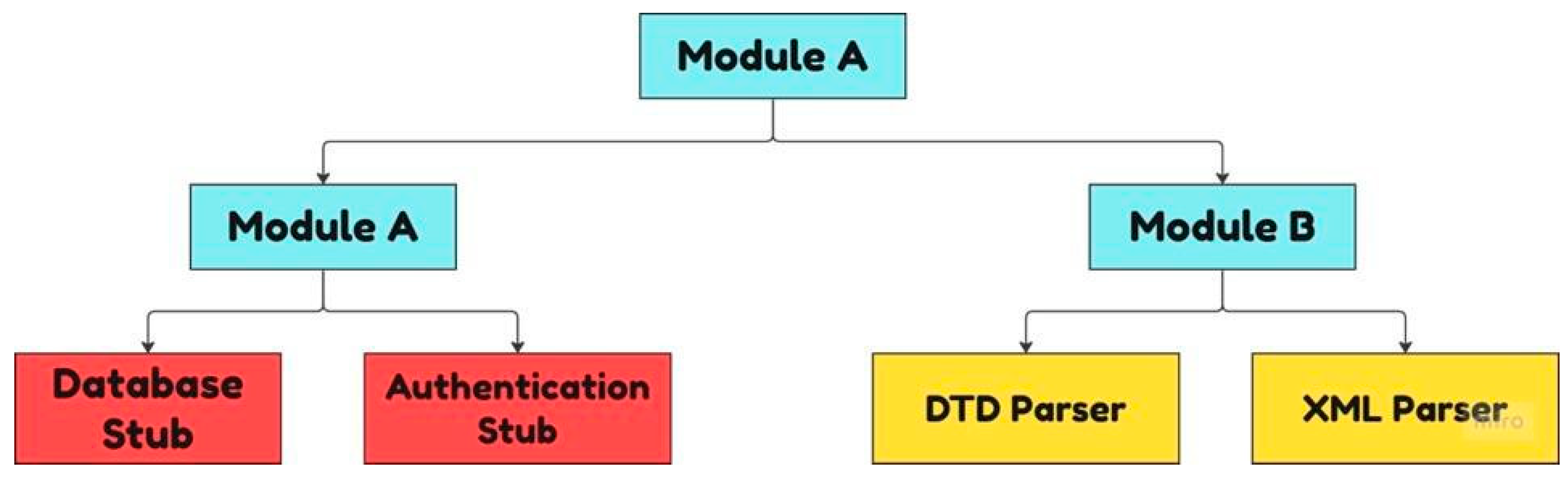
Table 1.
Use Case Descriptions.
| Use Case Name | Basic Flow @ Happy Path | Alternate Flow @ Alternate Path | Exception Flow @ Exception Pathway |
|---|---|---|---|
| UC01: Login |
The user successfully logged in with correct username and password | The login method was unsuccessful because of the wrong username or wrong password. | User account does not exist, so user have to create a new account. |
| UC02: Place Order |
The customer requests their desired food by placing an order from our ordering system | The customer cancels the order | System error, so order cannot be placed |
Disclaimer/Publisher’s Note: The statements, opinions and data contained in all publications are solely those of the individual author(s) and contributor(s) and not of MDPI and/or the editor(s). MDPI and/or the editor(s) disclaim responsibility for any injury to people or property resulting from any ideas, methods, instructions or products referred to in the content. |
© 2025 by the authors. Licensee MDPI, Basel, Switzerland. This article is an open access article distributed under the terms and conditions of the Creative Commons Attribution (CC BY) license (http://creativecommons.org/licenses/by/4.0/).
Copyright: This open access article is published under a Creative Commons CC BY 4.0 license, which permit the free download, distribution, and reuse, provided that the author and preprint are cited in any reuse.


