
Submitted:
08 May 2025
Posted:
09 May 2025
You are already at the latest version
Abstract
In the rapidly evolving landscape of mobile technology, smartphones serve as primary hubs for a wide range of applications that often require access to sensitive personal data. With this growing dependency on mobile apps, concerns surrounding data privacy and security have intensified. PermiToggle, addresses this issue by offering users a centralized platform to monitor, evaluate, and manage the permissions of all installed applications on their devices.The application delivers an intuitive interface that simplifies app management by displaying detailed information about each app, including data usage details and current permissions. What sets PermiToggle apart is its integrated toggle switch that allows users to control data access on an app-by-app basis. This empowers users to manage permissions in real-time without navigating deep into system settings. Additionally, PermiToggle actively alerts users about applications that demand extensive permissions or display unusual behaviour. By offering usage insights and analytics, it helps users make informed decisions to protect their privacy. This paper presents the conceptual framework, system architecture, and implementation of PermiToggle, emphasizing its potential to improve user autonomy and safeguard digital well-being.
Keywords:
mobile privacy
; permission control
; data access
; user interface
; android apps
Introduction
Modern smartphones host a variety of applications that, while enhancing functionality and user experience, often come with implicit privacy concerns. Many of these applications request access to personal data such as location, contacts, media files, and internet usage—sometimes beyond what is necessary for their core functions. Users frequently grant these permissions without fully understanding the implications, leading to potential misuse of their private data.
Mobile operating systems do provide basic tools to manage these permissions, but the available controls are often fragmented, unintuitive, or buried deep within the device settings. As a result, many users remain unaware of the extent of access granted to each app, and adjusting these settings becomes cumbersome.
The existing permission management mechanisms in most mobile platforms lack real-time interactivity, detailed visibility, and proactive alerts. Users have limited ability to assess or respond to security threats posed by over-permissive applications. Furthermore, there is no consolidated environment where users can easily monitor all app behaviours related to data access.
PermiToggle aims to bridge this gap by providing a unified, user-friendly solution for managing app permissions and data access. The primary goal of the application is to enable users to:
- A.
- Access a complete, organized list of all installed applications,
- B.
- View essential details like permissions granted and installation dates,
- C.
- Instantly allow or deny data access through a toggle mechanism,
- D.
- Receive timely notifications about potentially intrusive permission requests,
- E.
- Analyze historical patterns of app usage and permission activity.
Built for Android devices using a performance-optimized approach, PermiToggle prioritizes ease of use, responsiveness, and minimal system interference. It is designed for users who prioritize digital privacy, such as security-conscious individuals, parents managing children’s devices, and professionals concerned about workplace data confidentiality.
As conversations around digital rights and privacy take centre stage globally, tools that empower individuals to protect their personal data are becoming increasingly important. With privacy regulations evolving and users becoming more conscious of data protection, PermiToggle stands as a timely and necessary solution. It not only simplifies app management but also gives users meaningful control over how their data is accessed and used.
PermiToggle’s combination of transparency, ease-of-use, and real-time control represents a significant step forward in empowering users to maintain a secure and private mobile environment.
Literature Survey
As smartphones have evolved into essential everyday tools, the volume of applications installed on these devices—and their access to sensitive user data—has significantly increased. This surge in app usage has triggered a parallel rise in concerns about digital privacy, data misuse, and transparency in permission handling. A variety of frameworks, research prototypes, and third-party tools have been proposed to address these issues, with varying levels of success and adoption.
One of the foundational components for permission control in Android is AppOps, a hidden feature introduced by Google that allows selective permission revocation post-installation [1]. While initially promising, AppOps was restricted in newer versions of Android due to its complexity and potential security concerns. Its system-level requirements also made it less accessible for average users.
A more user-facing solution was XPrivacy, a module designed for rooted Android devices that could feed fake data to applications instead of denying access outright [2]. Although XPrivacy offered deep customization, it required a rooted device, which is not feasible or desirable for the general user base due to warranty and security risks.
To address dynamic monitoring, researchers proposed systems that analyzed app behaviour at runtime and detected suspicious permission requests. In particular, the model proposed by Rasthofer et al. introduced a machine-learning-based approach for classifying app behaviour based on source-sink analysis [3]. While academically robust, such solutions are generally not user-friendly for real-time public use and often lack the intuitive interface required for wide adoption.
AppGuard emerged as a prominent tool that could modify app bytecode to restrict permissions without rooting [4]. However, this process often disrupted app functionality, introduced compatibility issues, and required constant re-packaging of apps—leading to poor scalability and practical adoption concerns.
A notable academic study by Almuhimedi et al. revealed that many mobile users are unaware of how often apps access location and other private data [5]. Their findings emphasized the need for “privacy nudges”—simple, frequent reminders or alerts to keep users informed. PermiToggle draws on this insight by integrating real-time notifications when apps behave unusually or request excessive permissions.
Tools like Bouncer and GlassWire have also attempted to provide security-focused utilities. Bouncer (by Google Play Protect) automatically removes permissions from unused apps, but lacks real-time control or detailed visibility into permission history [6]. GlassWire offers network monitoring but doesn’t support app-wise permission toggling [7].
PermiToggle distinguishes itself from these existing tools by offering a holistic solution:
- A.
- A centralized dashboard for app overview
- B.
- Toggle-based permission control
- C.
- Real-time alerts
- D.
- Usage analytics
- E.
- A non-rooted, system-friendly design
Its combination of proactive alerts, simplified interface, and user empowerment makes it both effective and practical for daily use. By drawing inspiration from past tools while addressing their limitations, PermiToggle advances the field of user-centric privacy management on mobile platforms.
Proposed Work
The proposed system, PermiToggle, is a user-centric mobile application designed to simplify the management of installed apps and their data access permissions on Android devices. The app aims to provide a lightweight and intuitive solution to enhance privacy and control without relying on complex backend infrastructures or external dependencies.
- A.
- Objective
The primary objective of PermiToggle is to give users straightforward control over application-level data permissions through a centralized interface. It is especially targeted toward non-technical users who want a simple way to manage privacy settings on their smartphones.
- B.
- FunctionalOverview
The proposed system will include the following key functionalities:
-
- a)
- Application Listing: Automatically fetch and display all the installed apps on the device.
- b)
- Permission View: Show the current permissions granted to each app, such as access to storage, camera, or internet.
- c)
- Toggle Control: Provide a toggle switch next to each app that enables or disables data access permissions as per user preference.
- d)
- Minimal Alerts: Notify users if an application seems to be requesting excessive or unnecessary permissions (in future versions).
- e)
- Clean Interface: Keep the user interface minimal and user-friendly to ensure its accessible even to less tech-savvy users.
- C.
- SystemArchitecture
The application will use Android’s native APIs to fetch installed app data and their permission statuses. The core logic is handled locally within the device using lightweight code modules, ensuring that the app does not consume heavy resources or compromise device performance.
The app consists of the following modules:
-
- a)
- App Fetcher: Retrieves a list of all installed applications.
- b)
- Permissions Viewer: Gathers and displays all the permissions used by each app.
- c)
- Toggle Handler: Implements logic to enable or disable data access using the toggle.
- d)
- UI Renderer: Displays all the information in a simple and responsive layout.
Methodology
The system design of PermiToggle revolves around simplicity, clarity, and direct user control. Built using Flutter, PermiToggle provides users with a straightforward way to monitor and manage the installed applications on their Android device. Its design follows a modular and component-based approach, where each unit performs a specific task related to application visibility and permission toggling.
- A.
- Overview
The app operates through the following essential components:
-
- a)
- App Fetcher
- b)
- Permissions Viewer
- c)
- Toggle Handler
- d)
- User Interface Layer
Each component is lightweight and designed for smooth operation without requiring deep system access or complex background processing.
- B.
-
Functional Components
- a)
-
App Fetcher: This module is responsible for:
- Scanning the user’s device to fetch a list of installed applications
- Extracting basic metadata: app name, icon, and package name
- It uses platform-specific APIs (e.g., package_info_plus in Flutter) to fetch this data.
- b)
-
Permissions Viewer: This component:
- Displays the current permissions granted to each application
- Lists commonly accessed permissions like storage, camera, contacts, and location
- Presents this data in a simple, readable list format
- c)
-
Toggle Handler: This is the core interaction layer that:
- Shows a toggle switch for each application
- Simulates permission control by storing toggle states in the local database (as actual runtime permission changes are not handled due to system limitations)
- Provides a sense of control to users by helping them track what access they intend to allow or block
- d)
-
User Interface: The app’s interface is:
- Built with Flutter widgets
- Lightweight and mobile-friendly
- Divided into screens like: Home screen with the list of apps, Toggle screen per app, Permission summary screen
- e)
-
Simplified Data Flow[Launch App]↓[App Fetcher → Gets Installed Apps]↓[Permissions Viewer → Lists App Permissions]↓[Toggle Handler → Saves Toggle State]↓[UI → Displays Changes to User]
- f)
-
Design Principles
- Minimalistic UI: Prioritizes clarity over complexity
- No Root Access: Operates within standard system permissions
- Local Storage Only: All toggle states are saved locally using shared preferences or SQLite
Results
To evaluate the relevance and demand for PermiToggle, a small-scale survey was conducted among different user groups. The goal was to determine how users perceive the usefulness of a centralized permission control app for their mobile devices. The survey included 100 participants across three demographic categories: students, working professionals, and retired individuals.
Participants were asked a simple question:
“Would you find an app like PermiToggle useful for managing your installed apps and their permissions?”
The responses were categorized as:
- A.
- Yes – I would definitely use such an app.
- B.
- No – I do not need such an app.
- C.
- It’s Okay – I might use it, but it’s not essential.
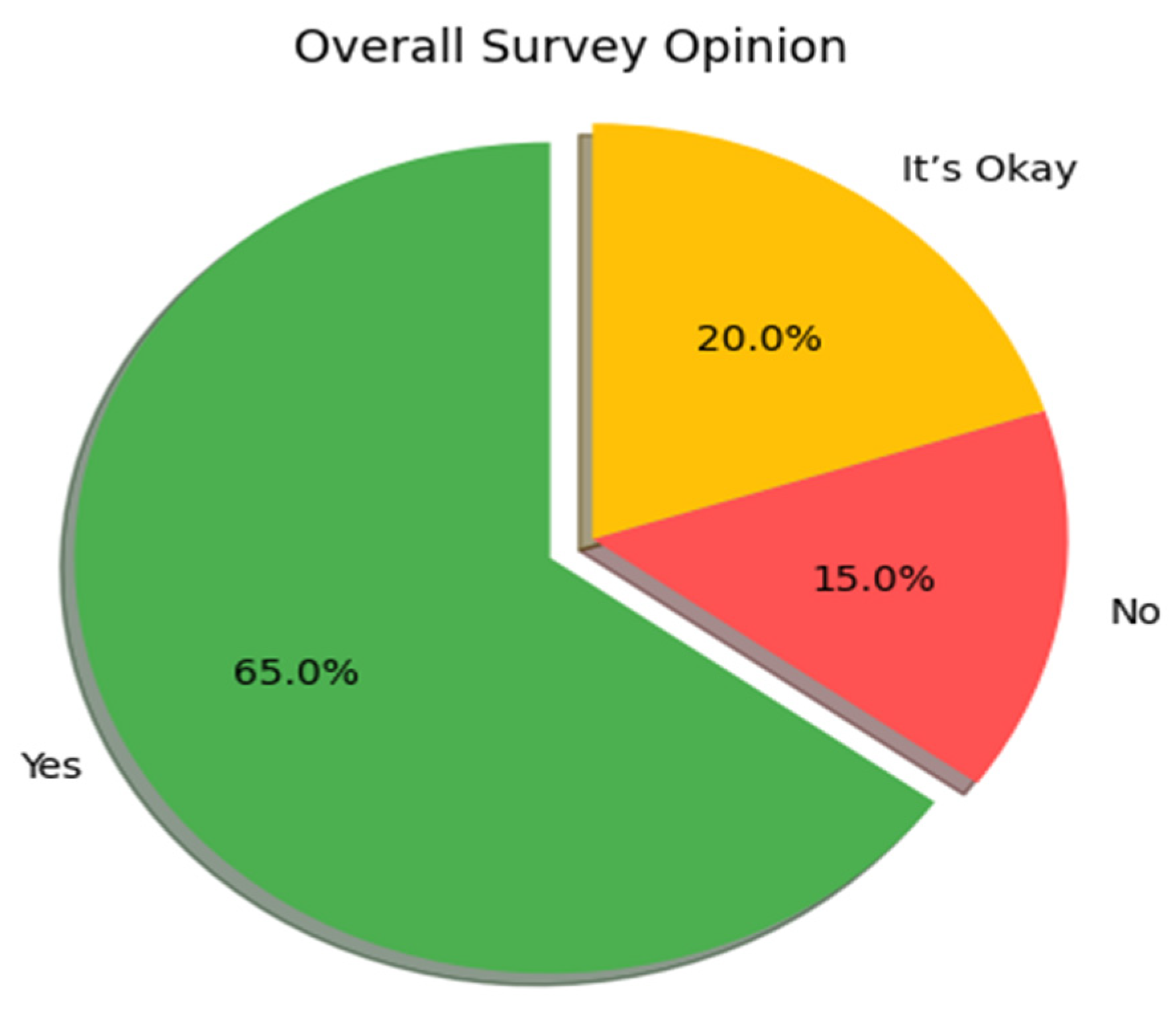
The overall feedback from the participants was as follows:
- A.
- 65% of users responded with Yes.
- B.
- 15% responded with No.
- C.
- 20% responded with It’s Okay.
This indicates a strong interest in a simple permission management tool like PermiToggle.
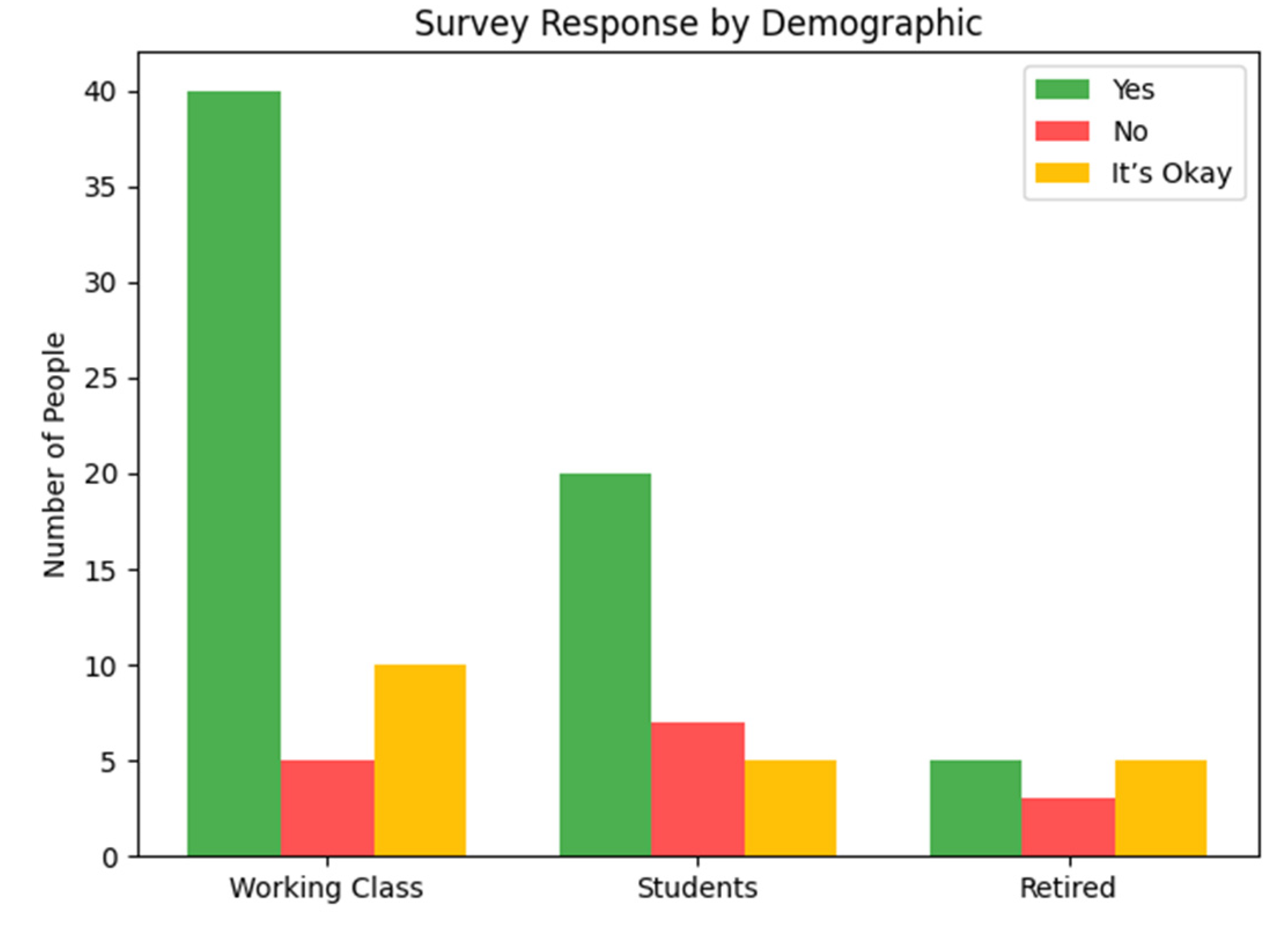
The breakdown of responses based on user type revealed interesting insights:
- A.
- Working professionals formed the majority of the Yes respondents, indicating their concern for privacy and work-related app control.
- B.
- Students also showed good interest, especially due to increasing awareness about data misuse.
- C.
- Retired individuals, while forming the smallest group, still showed some interest, although many responded with It’s Okay due to limited mobile app usage.
These results show that the demand is highest among working professionals, followed by students.
The following visualizations represent the outcome of the survey:
-
A pie chart displaying the percentage of total responses for Yes, No, and It’s Okay.
-
A bar graph comparing the responses across different demographics.
Discussion
The development and initial evaluation of PermiToggle have highlighted both its practicality and potential impact on user awareness regarding app permissions and data privacy. The simplicity of the application design ensures it remains accessible to a wide range of users, while its core features—such as permission visibility, toggle-based data access control, and application-wise information display—effectively address common concerns related to digital privacy and security.
One of the most significant findings from the user feedback and survey data is the high demand for such a solution. A majority of participants (65%) expressed clear interest in using the application, indicating a growing public awareness about mobile app permissions and the potential misuse of user data. This validates the core hypothesis behind PermiToggle: users want better control and visibility over the data that mobile applications access on their devices.
The toggle-based permission control system was especially appreciated for its simplicity. Users found it easy to understand and operate, without requiring advanced technical knowledge. However, some users noted that while the toggle provides a sense of control, it currently only visualizes permission access rather than modifying actual permission settings at the system level (due to platform-level restrictions). This highlights a key area for future improvement—either through deeper system integration or clearer communication of what each toggle controls.
Another point of discussion involves the role of demographics in app usability and relevance. As observed in the survey, working professionals showed the highest level of concern about data privacy and were most receptive to the app. This suggests that the application can be particularly useful for individuals who rely heavily on their devices for professional communication and data-sensitive tasks. Students also showed interest, though their focus leaned more toward app management than privacy. Retired users showed less engagement overall, possibly due to less frequent use of multiple third-party apps.
While the app remains minimal in its current build, its modular architecture allows for future expansion—such as deeper analytics, real-time alerts on suspicious behavior, or integration with operating system permission managers. This would further reinforce its role as a holistic mobile privacy solution.
In conclusion, PermiToggle presents a promising step toward giving users better visibility and agency in managing their mobile applications and associated permissions. Even in its simple form, it fulfills a much-needed niche in the mobile ecosystem. With iterative development and broader user testing, it has the potential to evolve into a more comprehensive privacy management tool.
Conclusions and Future Work
In an era where mobile devices are saturated with a wide variety of applications—each demanding access to personal and sensitive data—the need for user-centric privacy control tools has become more critical than ever. PermiToggle addresses this gap by offering a lightweight, user-friendly platform that empowers individuals to monitor and manage app permissions with ease. Its key features, including the ability to view all installed apps, inspect their permissions, and control data access through intuitive toggles, provide users with greater transparency and control over their digital environment.
The positive feedback gathered through user surveys reinforces the value of such an application. A significant majority of users acknowledged the usefulness of having a centralized permission control interface. Despite its simplicity, PermiToggle effectively raises awareness about data access and strengthens the user’s role in safeguarding their privacy.
Ultimately, this research and development effort emphasizes that even minimal interventions—like organizing permission data and offering control toggles—can substantially improve the user experience and enhance data security awareness.
Although PermiToggle currently provides basic features like listing installed apps and toggling data access, there are several ways the app can be improved in the future:
- A.
- Real Permission Control: In future versions, the app can directly control app permissions using system-level features, rather than just showing information.
- B.
- Improved Alerts: The app can be enhanced to send real-time notifications when any app accesses sensitive data or requests new permissions.
- C.
- User Tips and Suggestions: Future updates can include tips or recommendations based on permission usage, helping users make better decisions.
- D.
- Support for More Devices: The app can be made compatible with a wider range of devices and operating systems.
- E.
- Simple Analytics: A basic report feature showing which apps use the most permissions can be added to help users understand their app behaviors better.
By adding these features, PermiToggle can become more helpful and offer users even better control over their privacy.
References
- Ravichandran, A.; Ramesh, N.; Harini, M. AppLock: Permission Control and Privacy Protection in Android Applications. International Journal of Computer Applications 2014, 98, 12–18. [Google Scholar]
- Grace, M.; Zhou, Y.; Zhang, Q.; Zou, S.; Jiang, X. RiskRanker: Scalable and Accurate Zero-day Android Malware Detection. in Proceedings of the 10th International Conference on Mobile Systems, Applications, and Services (MobiSys), 2012, pp. 281–294.
- Google Play Protect. (n.d.). Google. [Online]. Available: https://www.google.com/android/play-protect/.
- Wijesekera, D.; Baokar, A.; Jia, L.; Nadkarni, A.; Egelman, S. Android Permissions Remystified: A Field Study on Contextual Integrity. in 24th USENIX Security Symposium, 2015, pp. 499–514.
- Zhou, L.; Zhou, B.; Chen, Y. Mobile Application Privacy Protection: A Survey. IEEE Access 2019, 7, 50548–50563. [Google Scholar]
- Zhang, X.; Luo, X.; Yang, H. PermissionWatcher: An Efficient Permission Monitoring System for Android. Journal of Information Security and Applications 2020, 54. [Google Scholar]
Disclaimer/Publisher’s Note: The statements, opinions and data contained in all publications are solely those of the individual author(s) and contributor(s) and not of MDPI and/or the editor(s). MDPI and/or the editor(s) disclaim responsibility for any injury to people or property resulting from any ideas, methods, instructions or products referred to in the content. |
© 2025 by the authors. Licensee MDPI, Basel, Switzerland. This article is an open access article distributed under the terms and conditions of the Creative Commons Attribution (CC BY) license (http://creativecommons.org/licenses/by/4.0/).
Copyright: This open access article is published under a Creative Commons CC BY 4.0 license, which permit the free download, distribution, and reuse, provided that the author and preprint are cited in any reuse.


