Preprint
Article

This version is not peer-reviewed.

Are We Inclusive? Accessibility Challenges in Philippine E-Government Websites

A peer-reviewed article of this preprint also exists.

Submitted:

05 February 2025

Posted:

06 February 2025

You are already at the latest version

Abstract

Website accessibility is critical for e-government in the Philippines to ensure all citizens, including those with disabilities, can access essential information and services. This study evaluates government website accessibility based on the Web Content Accessibility Guidelines (WCAG) of the World Wide Web Consortium (W3C), which provide comprehensive checkpoints for assessment. A combination of automated testing tools and visual inspection was employed to achieve a thorough evaluation. Compliance percentages for web accessibility ranged from 28.00% to 82.67%, with an average of 53.43%, highlighting a need for improvement, particularly in advanced web presence stages. Usability compliance was higher, ranging from 62.32% to 97.10%, with an average of 82.50%. Significant usability checkpoints with low compliance rates were identified, emphasizing areas where government agencies must focus to enhance user experience and accessibility. The study recommends specific tools for evaluating these accessibility checkpoints and underscores the importance of improving government website usability. Enhancing accessibility is vital for fostering inclusivity, increasing citizen engagement, and promoting trust through transparent governance. Improved accessibility is expected to positively impact local and regional development by enabling better service delivery and encouraging active public participation in government initiatives.

Keywords: 
;  ;  ;  ;  

1. Introduction

E-government serves multiple purposes, including enhancing administrative efficiency by streamlining processes, promoting democratic governance by facilitating citizen participation and feedback mechanisms and fostering trust between citizens, the private sector, and governments through increased transparency and accountability [11]. However, achieving these goals has been difficult due to usability problems in many e-government websites [12]. This has led to increasing demands for assessing the usability of e-government websites, which are widely recognized as the main way for governments to interact with citizens. Several studies have investigated the content and web accessibility of government websites, focusing specifically on their web presence and website usability [13,14,15]. These studies highlight the critical role of accessible web design in promoting equal opportunities for all users. Research indicates that implementing accessible design features on government websites not only ensures that individuals with disabilities can access information and services but also enhances overall usability for all visitors. By incorporating accessible web design principles, government websites can better serve the diverse needs of their citizens and promote inclusivity. Implementing accessible design features not only accommodates the needs of individuals with disabilities but also enhances the overall user experience for all visitors [16]. A strong web presence and website usability are of utmost importance in effectively serving e-citizens. This ensures that citizens can easily access information and services, fostering transparency and accountability in governance.
Government websites can be checked for accessibility compliance by following WCAG standards, which include providing text alternatives, ensuring keyboard accessibility, and making content easy to understand. [10,13]. Moreover, evaluating government websites for usability also involves considering factors such as intuitive navigation, clear and concise content, and efficient forms and transactions. By adhering to the WCAG standards and considering usability principles, government websites can enhance the overall user experience and ensure that all citizens, regardless of abilities, can effectively access information and utilize online services. Various approaches have been utilized to conduct these studies, encompassing both automated and manual approaches. According to [36], Automated tools can be just as effective as manual methods in pinpointing web accessibility problems. Most studies used automated methods, utilizing popular tools such as WAVE (Web Accessibility Evaluation Tool), Google Lighthouse, and TAW (Test d’Accessibilitat Web) [8,9,25].
In the Philippines, the legal basis of web accessibility can be traced back to several laws and policies. The most notable among these is the Republic Act No. 7277, or the Magna Carta for Persons with Disabilities (PWDs) [1]. This law mandates the government to ensure that PWDs are provided with equal opportunities, particularly in the field of education, employment, and accessibility to public facilities and services, including information and communications technology (ICT). The National Council on Disability Affairs (NCDA) issued the Implementing Rules and Regulations (IRR) of the Magna Carta, which explicitly states that "all government websites shall comply with the guidelines on web accessibility" [7]. Additionally, the Department of Information and Communications Technology (DICT) issued Memorandum Circular 004 (2017) policy that provides guidelines on the implementation of web accessibility in government websites [29]. The memorandum circular provides specific guidelines for achieving web accessibility, including the use of alternative text for non-text content, the provision of captions and transcripts for multimedia content, and the use of descriptive links and headings. It also requires government agencies to conduct regular accessibility audits of their websites and web-based applications to ensure compliance with the WCAG 2.0 Level AA. Moreover, the memorandum circular mandates the establishment of a Web Accessibility Compliance Team (WACT) within each government agency, responsible for ensuring compliance with web accessibility guidelines and conducting regular accessibility audits of the agency’s website. These laws and policies serve as the legal basis for the implementation of web accessibility standards in the Philippines, particularly for the benefit of PWDs. As per the 2010 Census of Population and Housing in the Philippines, out of the total household population of 92.1 million, approximately 1.44 million individuals, constituting 1.57 percent, were reported to have a disability. [30]. This presents an opportunity for governments to improve their web accessibility. As such, this study aims to contribute to the existing knowledge by evaluating the web presence and usability of e-government websites in the Philippines. This endeavor is particularly significant considering the limited understanding of e-government website usability within the country. Ensuring equitable access to government services for all citizens, including those with visual, auditory, dexterity, and cognitive impairments, is imperative. This evaluation is important because it will help identify any barriers or challenges that may exist, and provide recommendations for improving accessibility and usability. Having an accessible website supports government agencies in their commitment to serving all members of the public equally.

2. Accessibility Issues and Concerns

2.1. Visual Impairments

Accessibility is a crucial aspect of ensuring equal access and opportunities for individuals with disabilities in various settings, including digital platforms [31]. In the context of visual difficulties, individuals with disabilities may face challenges in accessing content that relies solely on visual cues such as images, videos, and diagrams [32,33]. This can impact their ability to understand and engage with the information presented. Numerous studies have highlighted the difficulties faced by individuals with visual impairments when accessing digital content. For example, a study conducted by [34] found that only 2.4% of research articles delivered in PDF format were accessible to people with disabilities. In terms of reading text, individuals with visual difficulties may also struggle with text that is too small or not presented in a high-contrast format. This can make it challenging for them to read and comprehend the content effectively. For individuals with visual difficulties, developers can implement alternative text for images and graphics, allowing screen readers to describe the content to users who are unable to see it. Additionally, providing options to adjust text size and contrast can greatly improve readability for individuals with visual impairments [40].

2.2. Auditory Impairments

Individuals with auditory disabilities may encounter barriers when audio content is not adequately transcribed or captioned. This can significantly hinder their access to information presented through podcasts, videos, and other audio-based media [2]. Moreover, individuals with auditory difficulties may face challenges with poorly designed sound interfaces or systems that do not accommodate their specific needs, affecting their overall user experience. In a study conducted by [5], it was found that a majority of online videos lack accurate captions, making it challenging for individuals with auditory impairments to fully comprehend the content. Furthermore, there is a need for developers to address these accessibility issues by incorporating features that cater to individuals with visual and auditory impairments. For individuals with auditory difficulties, developers should ensure that all audio content is accompanied by accurate transcriptions or captions. This not only benefits individuals with hearing impairments but also provides a better user experience for all users, especially in noisy environments where audio may be difficult to hear.

2.3. Dexterity Impairments

Individuals with dexterity impairments may encounter challenges in navigating digital interfaces that require precise and coordinated movements, such as using a mouse or typing on a keyboard [6]. This can limit their ability to interact with websites, applications, and other digital platforms effectively. Developers and designers can address these challenges by implementing features such as keyboard shortcuts, voice command options, and customizable input methods. These accommodations can provide individuals with dexterity impairments the flexibility to interact with digital content in a way that suits their abilities and needs.

2.4. Cognitive Differences

In the context of cognitive differences, individuals with disabilities may face additional challenges when interacting with digital content [3]. For example, individuals with cognitive differences may have difficulty processing complex information or navigating websites with cluttered layouts. Developers and designers can address these challenges by simplifying the language used in content, providing clear navigation paths, and minimizing distractions on the interface. Furthermore, individuals with cognitive differences may benefit from features such as visual cues, consistent layout designs, and the option to customize the display settings to reduce cognitive overload. By incorporating these features, developers can create a more inclusive digital environment that caters to individuals with cognitive differences.
It is evident that there are numerous accessibility issues and concerns that individuals with disabilities face when interacting with digital content. The lack of accommodations for visual, auditory, dexterity, and cognitive impairments can create significant barriers to equal access and opportunities. It is crucial for developers and designers to prioritize accessibility in their digital platforms by implementing features such as alternative text for images, accurate transcriptions or captions for audio content, customizable input methods for dexterity impairments, and simplified language and clear navigation for cognitive differences. By doing so, they can create a more inclusive digital environment that caters to individuals with disabilities, ultimately promoting equal access and participation for all users.

3. Methodology

3.1. Website Accessibility Framework

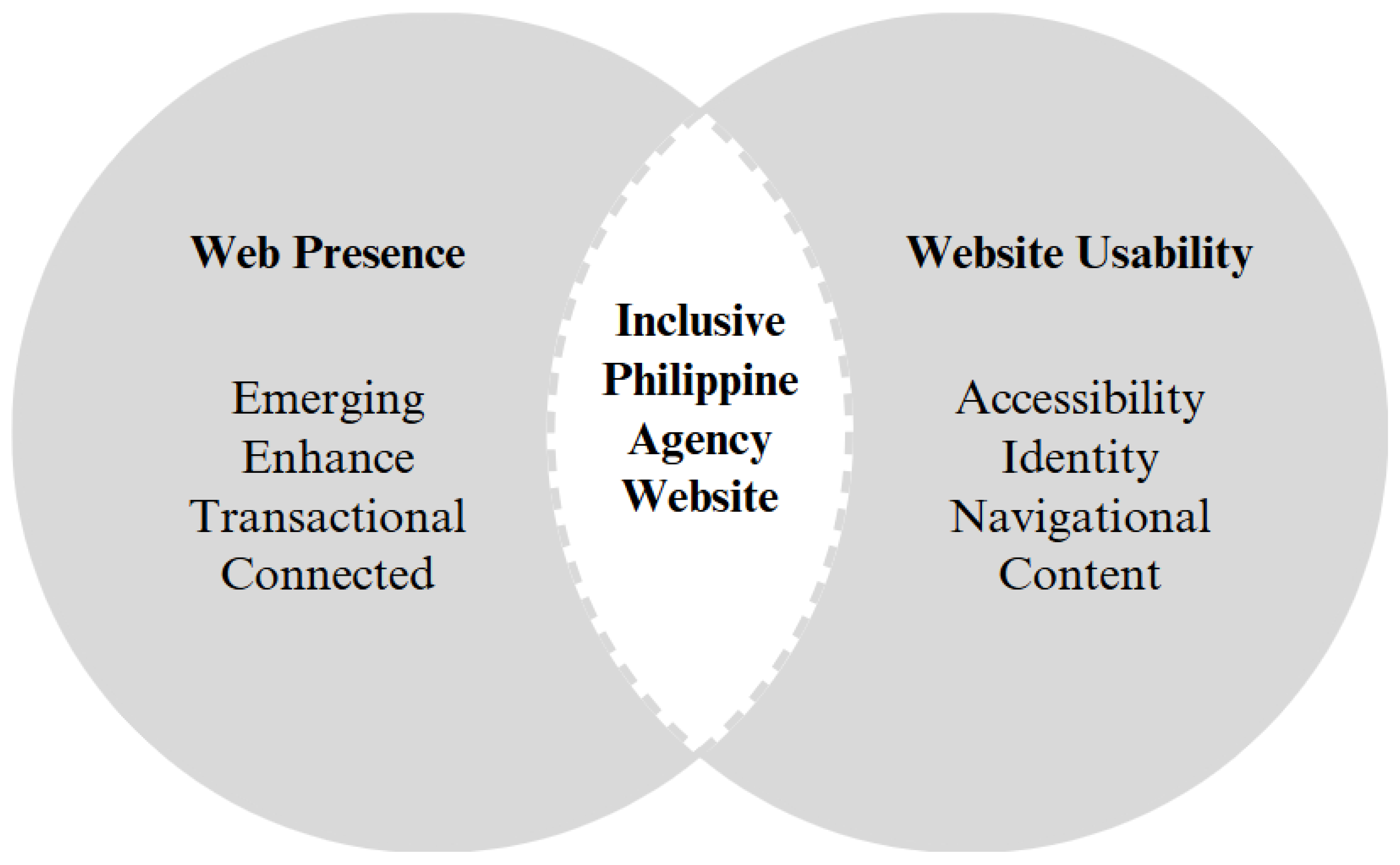
To fully achieve an inclusive Philippine government agency website, it is essential that the website meets the requirements for both web presence and website usability, as shown in Figure 1.
The evaluation process involves a total of 144 checkpoints, encompassing both aspects of web presence and usability. Web presence is assessed through a set of 75 specific checkpoints, with a website required to meet at least 80% of these to be deemed compliant. In addition, website usability is evaluated based on a distinct set of 69 guidelines, with full compliance achieved only when 100% of these usability checkpoints are satisfied. Websites that meet between 85% and 99% of the usability guidelines are considered partially compliant, while those satisfying fewer than 85% of the guidelines are classified as non-compliant. This comprehensive framework ensures that both web presence and usability standards are rigorously evaluated, paving the way for websites that are truly accessible and inclusive for all users.

3.2. Website Presence

The web presence of a government agency plays a crucial role in its ability to effectively serve and engage with citizens [38]. It refers to its online presence, including the availability of information, services, and tools. A strong web presence allows citizens to easily access government services and information, resulting in greater transparency and accountability [39].
Stage 1 (emerging), an initial stage of web presence where a website or digital platform is in its early development phase, focusing on establishing basic features and providing essential information to users. This stage consist of 26 checkpoints. Stage 2 (enhance) goes beyond its basic features and incorporates additional elements to improve user experience, interaction, and access to information. Stage 2 consist 17 checkpoints to review various enhancements to make the platform more dynamic, user-friendly, and informative. Stage 3 (transactional) facilitates online transactions and interactions, providing users with a range of services and features. This consist of 12 checkpoint focusing on the implementation of various functionalities to enable seamless and secure online transactions. Lastly, stage 4 (connected) establishes a comprehensive and interconnected online ecosystem, fostering active engagement and collaboration between the organization or government and its users or citizens. This stage consist of 20 checkpoints. A total of 75 checkpoints are included across all web presence categories as shown in Table 1.

3.3. Website Usability

Website usability ensures that the website is not only technically accessible but also usable and effective in creating a positive user experience [37]. A government agency’s website serves as the primary point of access for citizens to obtain information, access services, and engage with their government. Therefore, the usability of the website directly impacts the accessibility of government services and the overall user experience. It also ensures that the website is inclusive and accessible to all users. The usability website testing checkpoints are divided into different sections: (1) accessibility, (2) identity, (3) navigation, and (4) content. Accessibility prioritizes easy access to information and functionalities for all users. Identity refers to the distinct and recognizable characteristics and elements that represent a company or website. Transactional enables users to engage in online services and transactions. It involves the implementation of features and functionalities that facilitate secure online transactions and interactions. Lastly, connected establishes a comprehensive and interconnected online ecosystem, facilitating active engagement and collaboration between the government and its users or citizens. It involves the implementation of various features and functionalities that promote transparency, e-participation, and effective communication. A total of 69 checkpoints for all website usability sections are shown in Table 2.

3.4. Website Selection

The study obtained a comprehensive list of government websites by accessing the official government directories of websites. The list includes the URLs of the government websites for easy access. Each selected website was visited and evaluated for its website presence and accessibility. A total of 45 government websites were obtained. Among these websites, 37 were found to have corresponding URLs. Upon further evaluation, it was discovered that out of the 37 websites with URLs, only 27 were accessible and visible. Table 3 shows the list of 27 government websites that were utilized for evaluating web presence and website usability.

3.5. Evaluation Procedure

Evaluation of the websites follows a process of opening the URL for visual inspection. This evaluation occurred between June and August 2024. Recommended tools were used to test the website for accessibility. To ensure compliance with the Web Content Accessibility Guidelines, each website was inspected for website accessibility. These include text descriptions for images and media, ensuring content flows and can be presented in different ways, creating easily identifiable content, emphasizing keyboard navigation, providing sufficient time for users to consume content, avoiding design elements that could trigger seizures or physical reactions, structuring content to enhance navigation and orientation, designing text to be readable and understandable, maintaining consistent interface behavior, offering help for input where necessary, and ensuring compatibility with various devices and user agents. Verify if the website has complied with the checkpoint. Make a note of any accessibility issues, then provide recommendations to further enhance the website. Regular monitoring of website accessibility is necessary to ensure continued compliance and improvements as needed.

3.6. Website Evaluation Tools

Studies have utilized a combination of both automated testing tools and visual inspection can provide a more comprehensive evaluation of website accessibility [35,42,43,44]. Automated testing tools can help researchers quickly evaluate a large number of websites, but it is important to note that they may not detect all accessibility issues [43]. Visual inspection, on the other hand, can provide a more detailed understanding of the website’s accessibility but can be time-consuming [44]. Using a combination of reliable methods, including automated testing tools and visual inspection can provide a more comprehensive evaluation of website accessibility. A Philippine agency, Department of Information and Communications Technology (DICT) provides the guidelines for web accessibility intended for government agencies [45]. It includes guidelines and checkpoints to evaluate web presence and website usability. These guidelines are based on the Web Content Accessibility Guidelines (WCAG) developed by the World Wide Web Consortium (W3C). The recommended tools were used to review the checkpoints of the government websites’ accessibility as shown in Table 4.
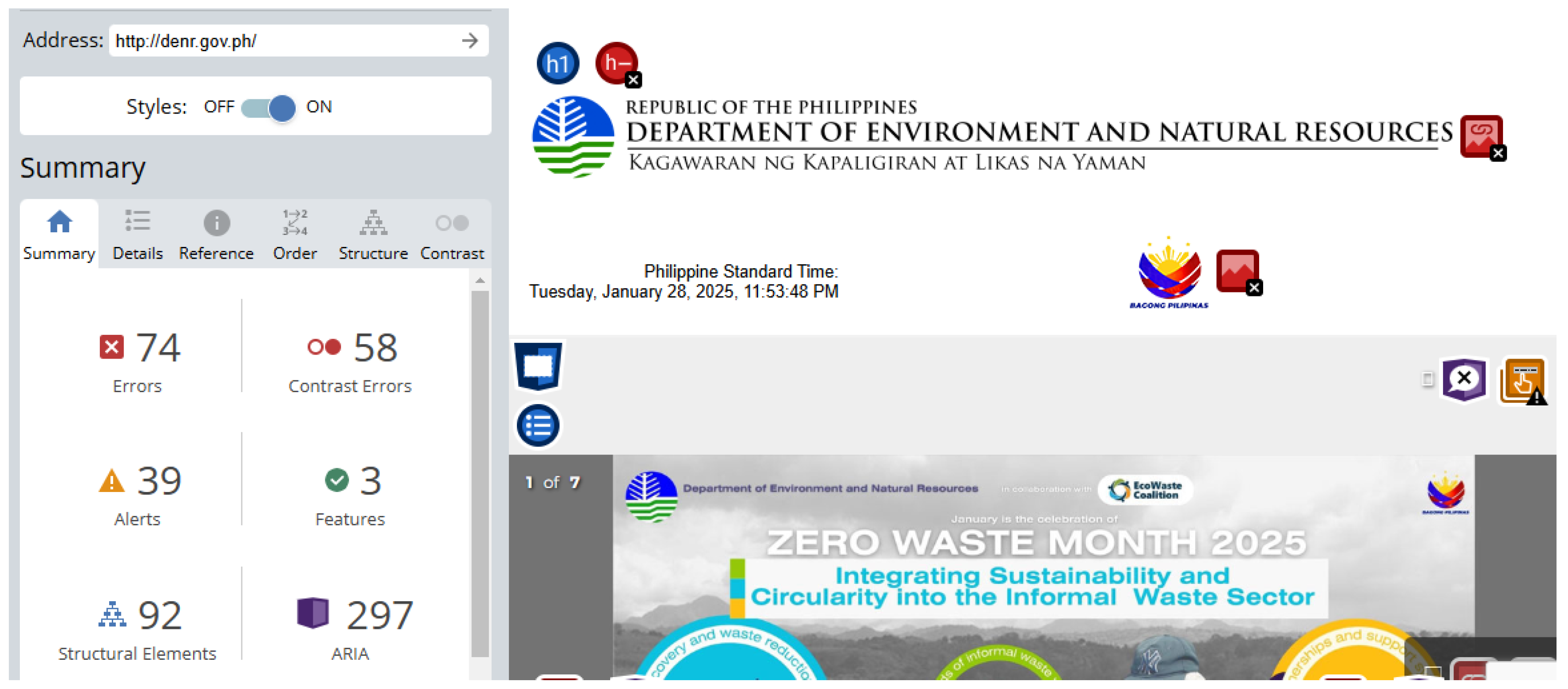
Automated tools can efficiently detect common accessibility barriers such as missing alt text, inadequate color contrast between background and foreground, and issues related to keyboard navigation and form controls, they may not capture the full range of potential accessibility concerns.
As shown in Figure 2, automated tools can struggle to detect context-based errors, such as improper use of ARIA (Accessible Rich Internet Applications) or the nuances of how screen readers interpret content. Therefore, it is essential to perform visual inspection alongside automated checks, particularly to verify the accuracy of results in areas like alt-text descriptions, color contrast, and other critical evaluation checkpoints. Visual inspection allows evaluators to ensure that the automated tools’ findings align with real-world user experience and accessibility guidelines, addressing technical compliance and usability considerations for individuals with diverse disabilities. This dual approach—combining automated evaluation with manual inspection—enhances the reliability of the accessibility audit, ensuring that websites provide a truly inclusive experience for all users.

4. Results and Discussion

4.1. Web Presence Results

The web presence stages and the corresponding percentage of compliance of different government agencies with each stage. The compliance rates were divided into four stages: (1) emerging, (2) enhanced, (3) transactional, and (4) connected.
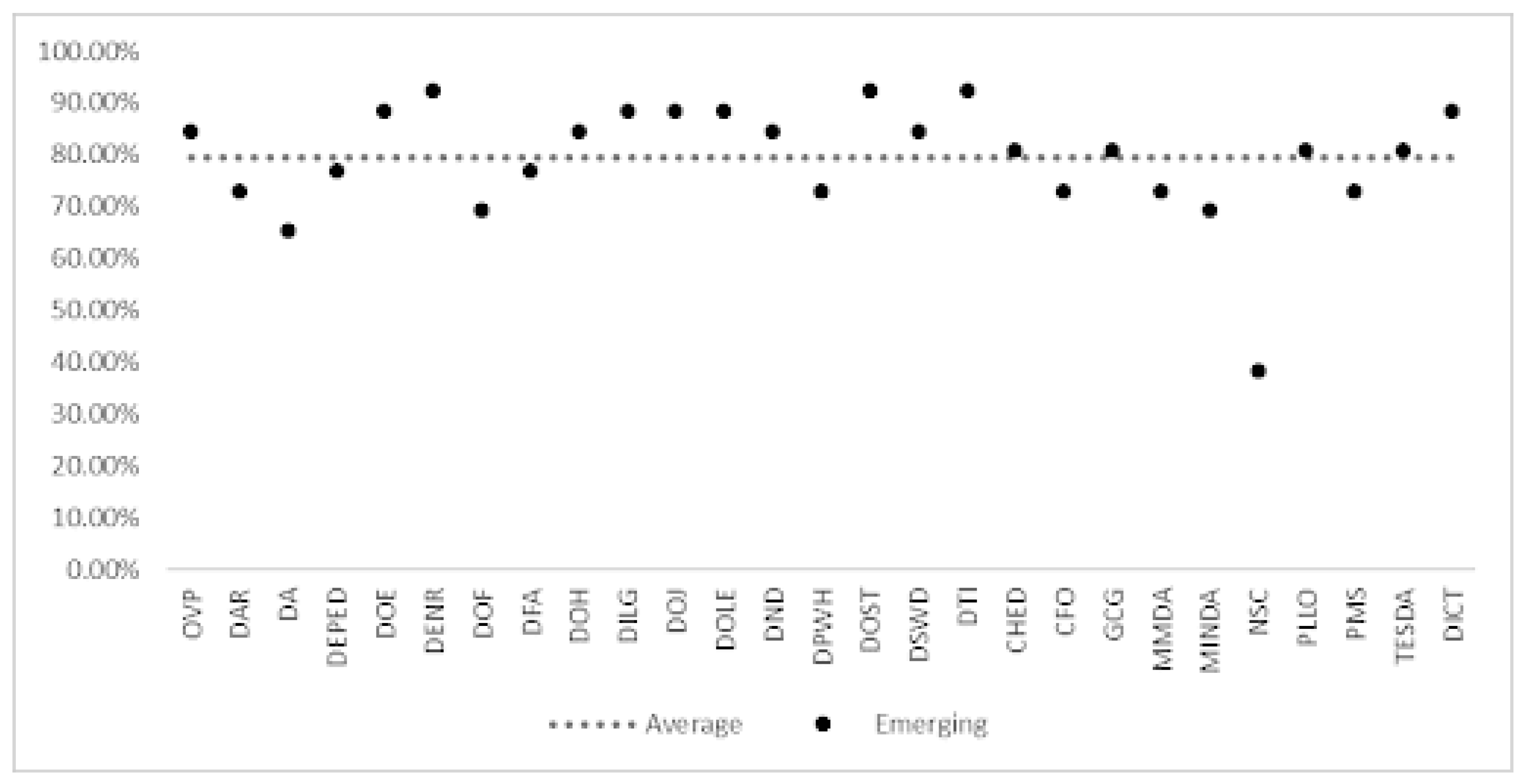
Figure 3 shows the emerging web presence stage, the websites achieved an average compliance rate of 79.34% on the 26 checkpoints. Furthermore, 16 out of 27 websites successfully met the required percentage of 80%. The agencies that demonstrated the highest compliance rates are DENR, DOST, and DTI, each achieving a compliance rate of 92.31% or 24 checkpoints. Conversely, NSC exhibited the lowest compliance rate with only 38.46% or 10 checkpoints.
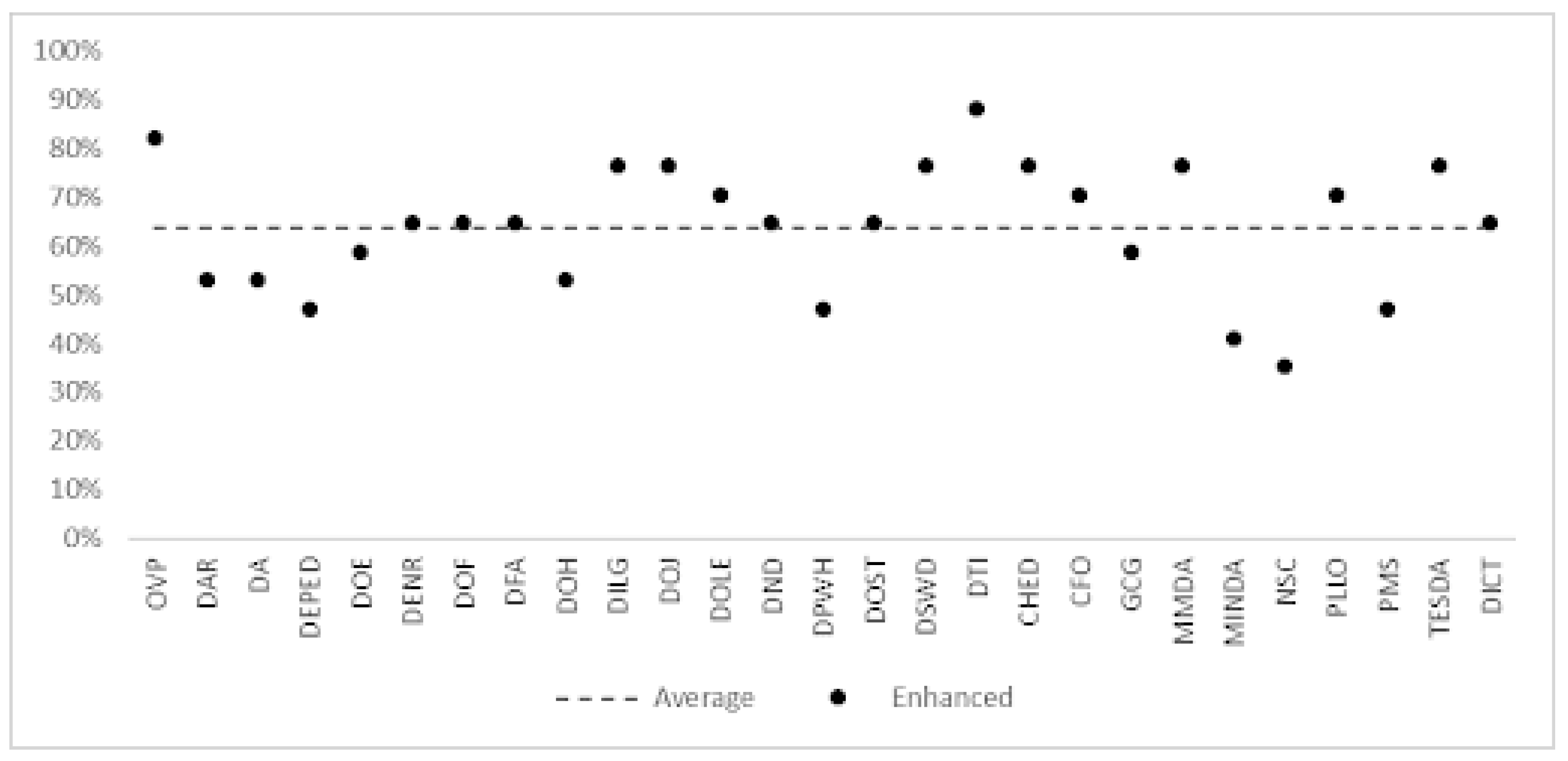
Figure 4 shows the stage 2, enhanced web presence, the compliance percentage significantly drops in all websites, averaging at 79.34%. Only two websites, DTI with 88.24% and OVP with 82.35%, were able to surpass the required percentage. This indicates that 93% (25) of the websites failed to meet the minimum requirement of 80% compliance for web presence.
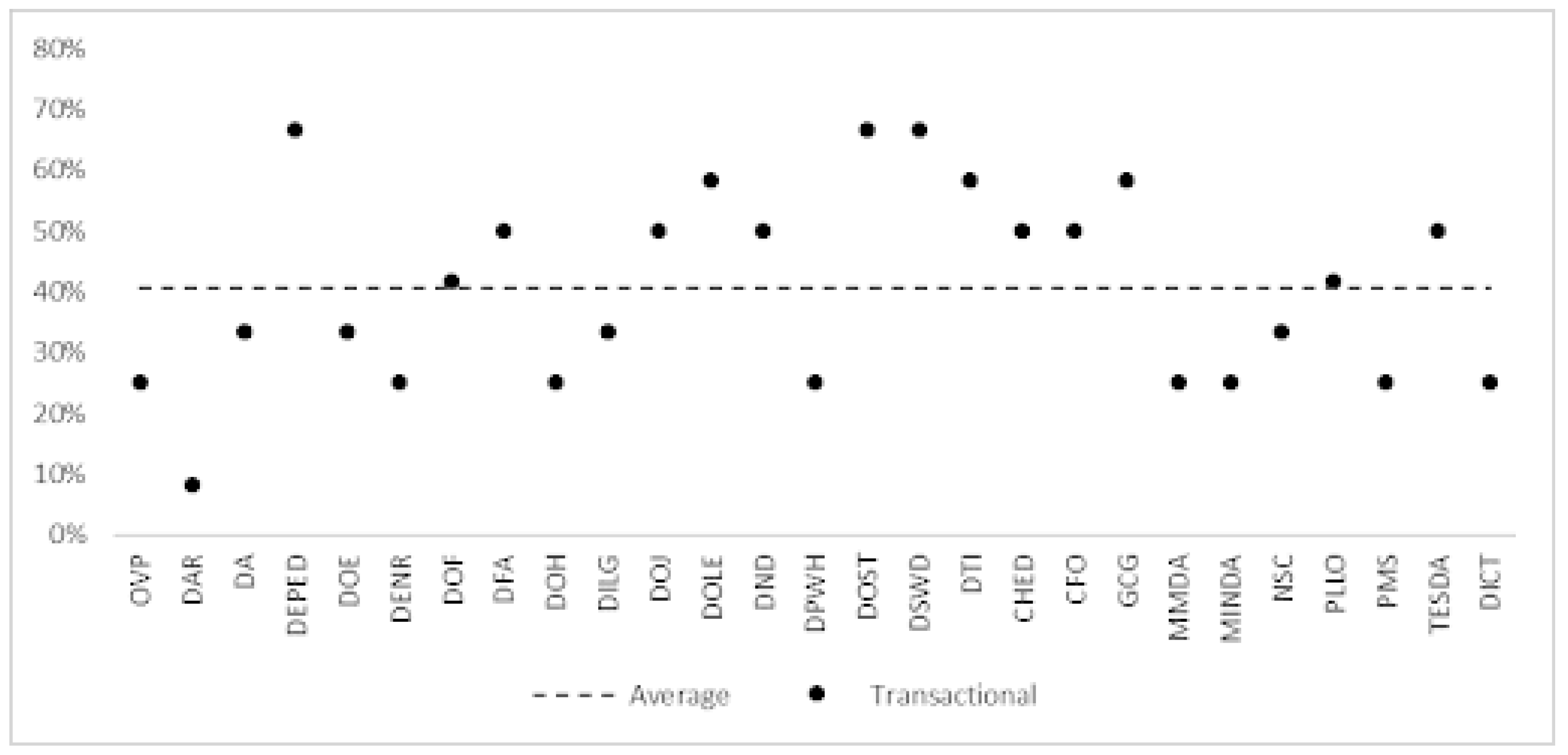
Figure 5 shows the stage 3, transactional, none of the websites were able to meet the required percentage of 80%. The average compliance rate across all websites is only 40.74%. The highest percentage compliance rate achieved is 66.67% by DEPED, DOST, and DSWD.
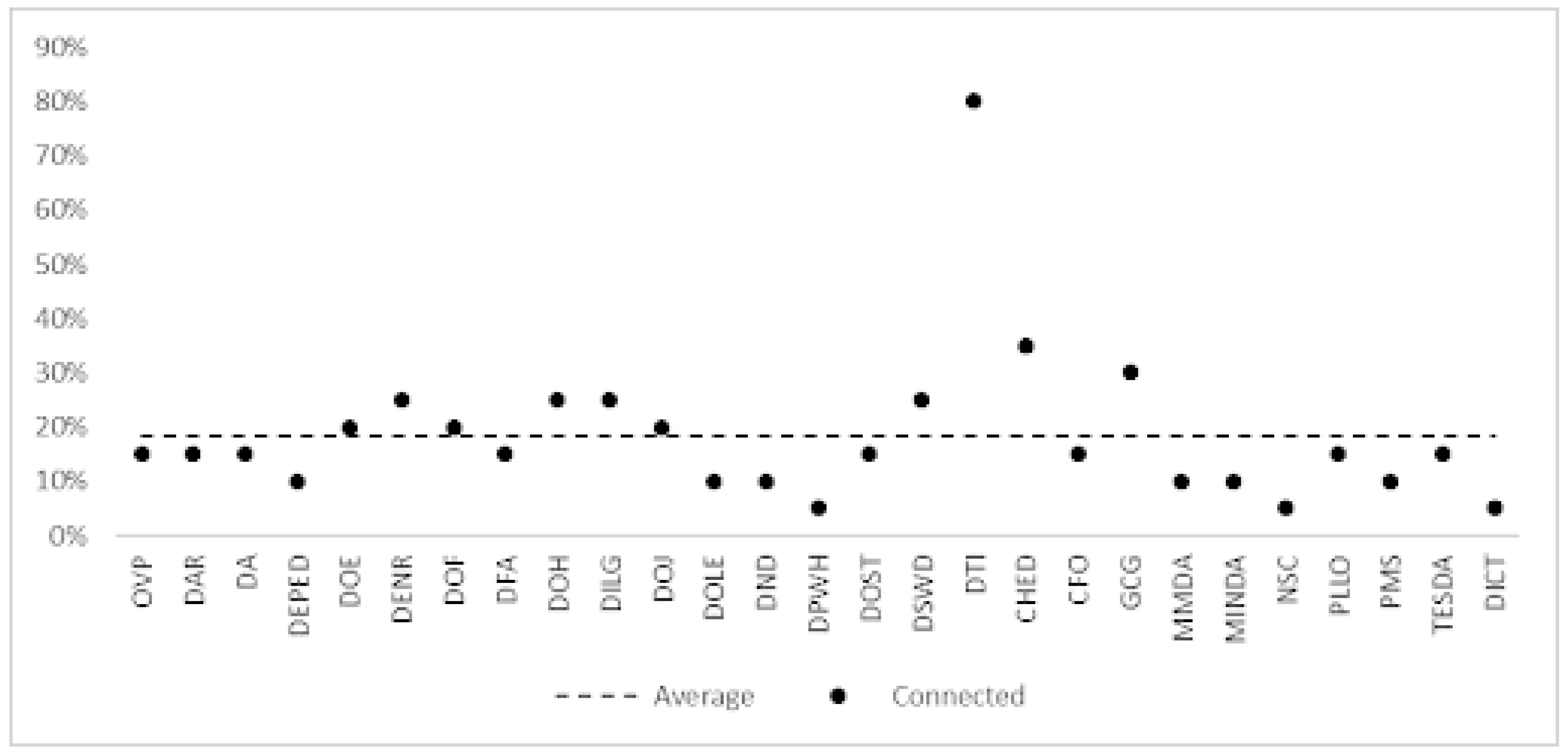
Finally, Figure 6, connected, the overall compliance percentages for all agencies are relatively low, with an average of 18.52%. However, DTI stands out with a compliance rate of 80%, being the only website that passed the required percentage. On the other hand, the remaining websites fall below 40% compliance. This highlights the high level of web interactivity and data exchange required in stage 4.
Table 5 shows the number of web presence compliant and non-compliant checkpoints for each government agency. Only the DTI website passed with a percentage of 82.67%, while the NSC has the lowest compliance percentage at 28%. Overall, the average compliance percentage for all government agencies in all four stages is 53.43%, indicating that there is still much room for improvement in their web presence. Government agencies should focus on enhancing their websites to improve compliance with web presence stages.
Table 6 shows checkpoints with compliance rate below 50% that need to be improved by government agency websites in different stages of web presence, from Stage 1 (Emerging) to Stage 4 (Connected). It highlights that as the stage gets higher, the compliance rate of the checkpoints decreases, indicating that there is a need for more improvement in the advanced stages. For instance, some of the checkpoints in Stage 4 have 0% compliance rate, such as e-signature and Opinion Polls.
In addition, each checkpoint holds significant importance in ensuring compliance with standards and optimizing the user experience. Starting with Stage 1, accurately displaying the local time, especially in the context of the Philippines Standard Time, is vital for users to synchronize with events and deadlines efficiently. The Emerging Site Map and Citizen’s Charter are foundational elements that provide clarity and transparency in navigating the website and understanding governmental processes and services. Archives serve as a repository of historical data and documents, offering valuable insights and reference points for users seeking information or tracking past events. Moving to Stage 2, supporting Multiple Languages expands accessibility and inclusivity, accommodating users from diverse linguistic backgrounds. Enhanced User Login and Password features bolster security while ensuring a seamless and user-friendly authentication process. Leveraging Wireless Technology for Mobile Messages facilitates instant communication and updates, enhancing user engagement and responsiveness. In Stage 3, Captcha integration strengthens security measures, protecting against automated bots and unauthorized access. Transactional Email Alerts provide timely notifications, keeping users informed and involved in relevant activities. Confirmation of Request and e-Signature functionalities add layers of verification and authorization, enhancing the integrity and security of transactions. Finally, in Stage 4, Discussion Forums foster community engagement and collaboration, while Connected Opinion Polls gather valuable feedback and insights, shaping decision-making processes and fostering a sense of involvement among users. Each checkpoint, when meticulously addressed and optimized, contributes to a compliant, user-friendly, and impactful web presence. Overall, it suggests that agencies should focus on improving the checkpoints with low compliance rate to enhance their web presence and provide better services to their constituents.

4.2. Website Usability Results

The results of the evaluation of the government agency websites in terms of usability, specifically in the areas of accessibility, identity, navigation, and content.
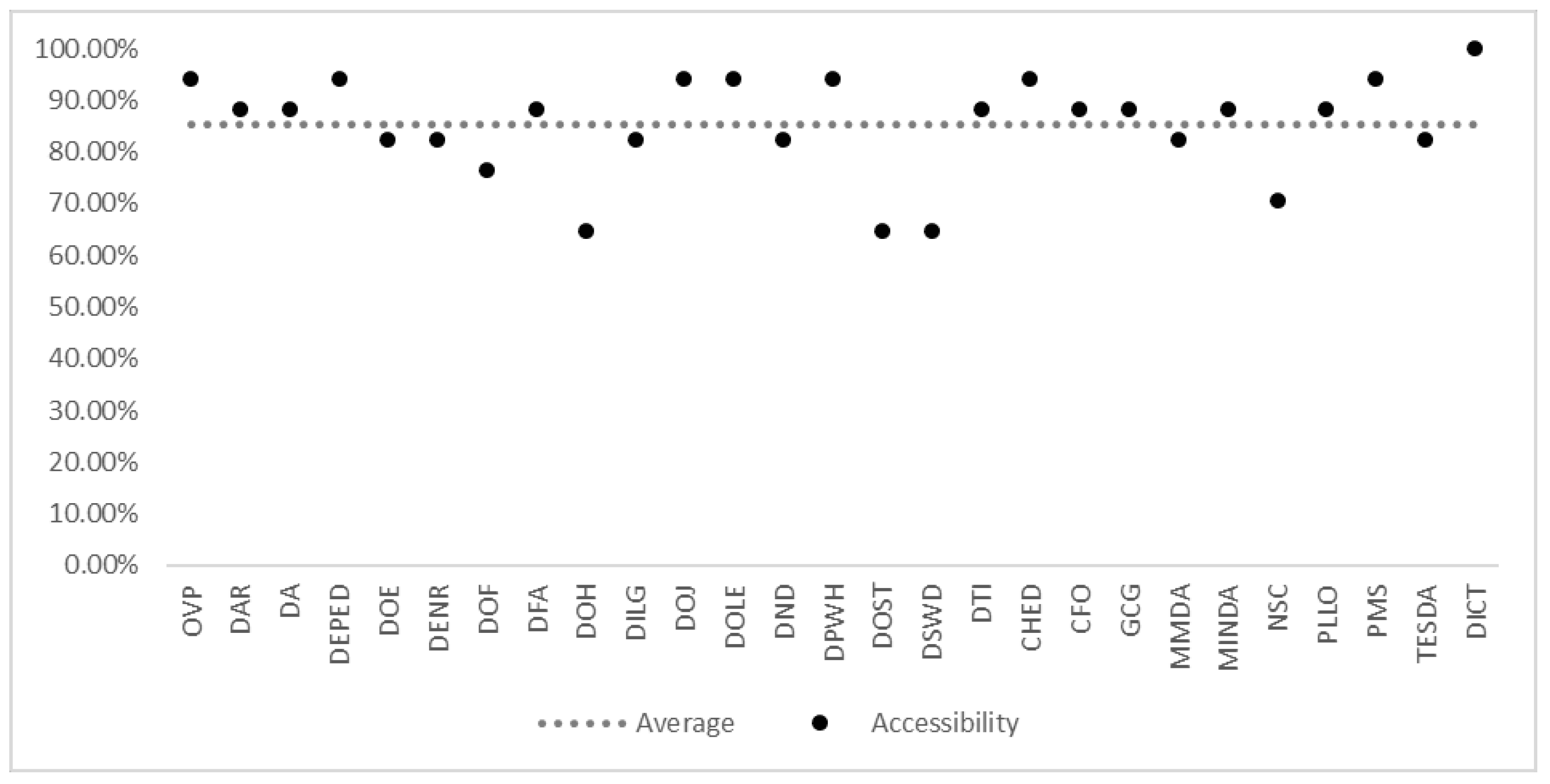
Figure 7 shows the Accessibility section which focuses on how easy it is for all users to access and use the website. The table shows that most government agency websites scored well in this section, with an average score of 85.19%. Specifically, 16 out of 27 agencies scored above 85%, with the highest score being 100% for DICT. The agency with the lowest score of 64.71% is DOH, DOST and DSWD.
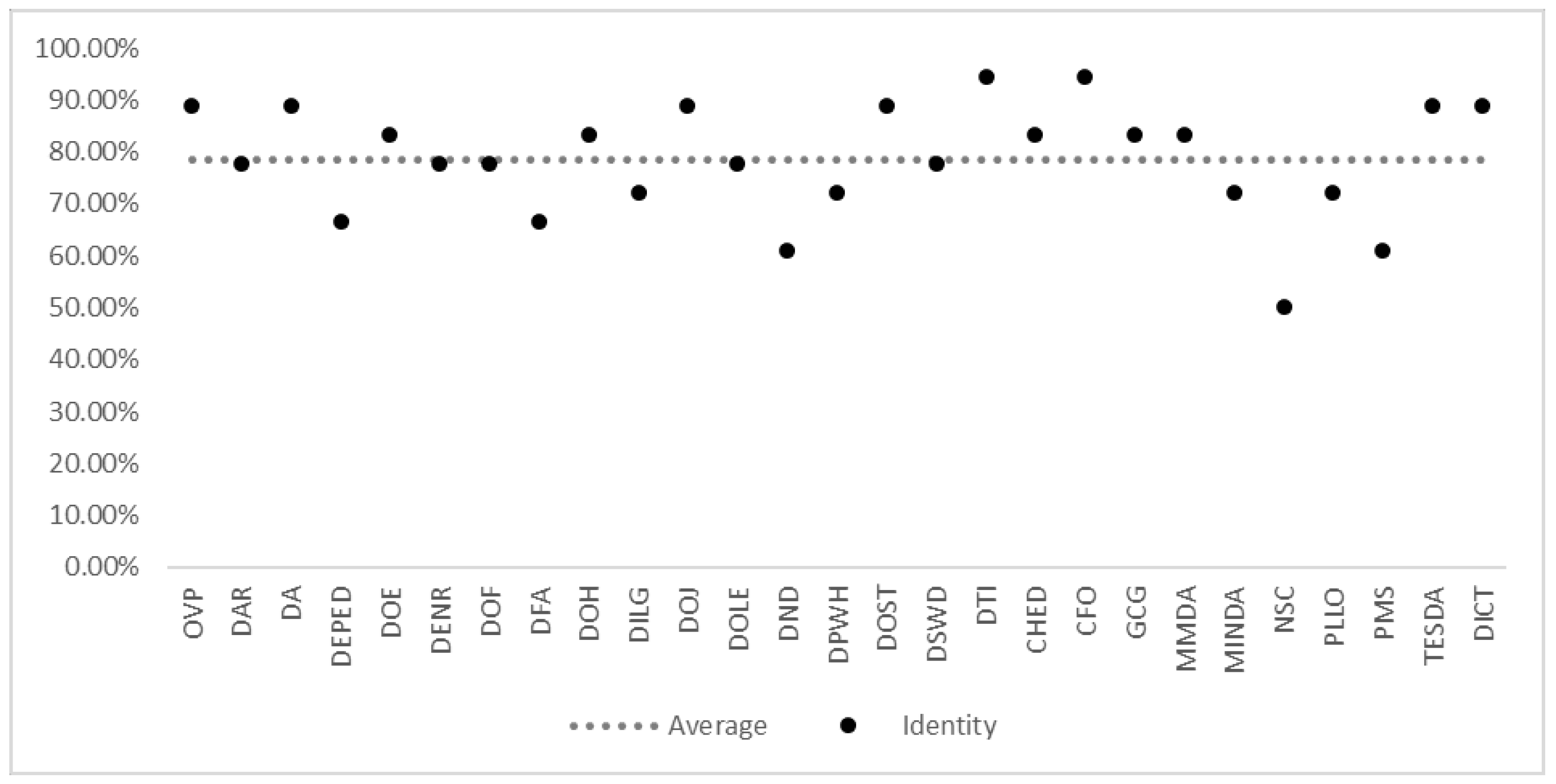
In the Identity section, Figure 8 shows that government agency websites have an average score of 78.60%. This section refers to how well a website’s design reflects the agency’s identity and branding. Only 8 out of 27 agencies scored above 85%, with the highest score being 94.44% for DTI and CFO. On the other hand, five agencies, DEPED, DFA, DND, NSC and PMS, scored below 70%, which indicates a need for improvement in their website design to better reflect their identity and branding.
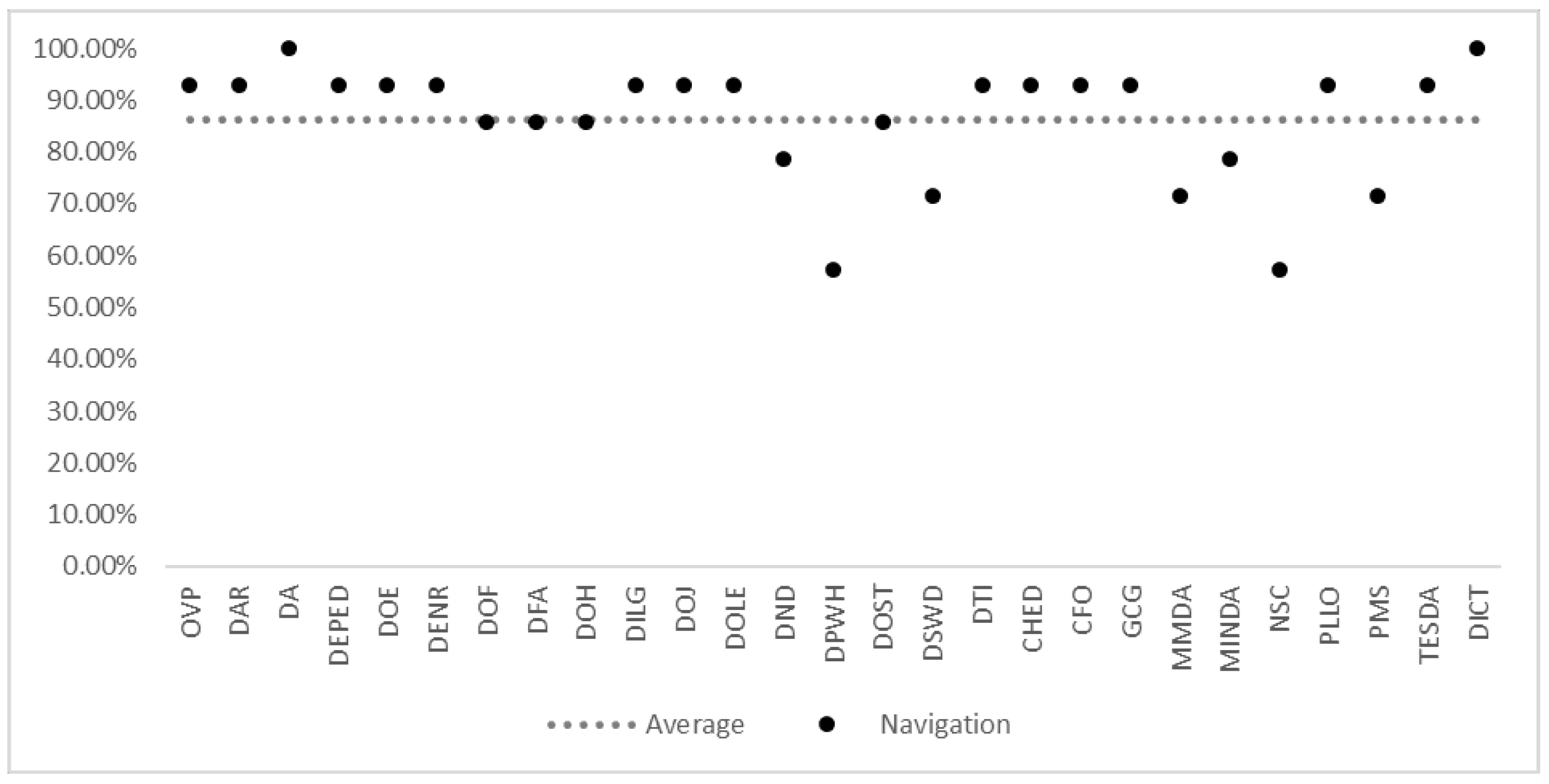
Figure 11 shows the Navigation section which measures how easily users can navigate the government agency websites. It indicates that most government agency websites scored well in this section, with an average score of 86.24%. Specifically, 20 out of 27 agencies scored above 85%, with the highest score being 100% for DA and DICT. On the other hand, the agencies with the lowest scores are DND, DPWH, DSWD, MMDA, MINDA, NSC and PMS, scoring below 80%. It is worth noting that navigation is crucial in ensuring a user-friendly website, as it affects user experience and engagement.
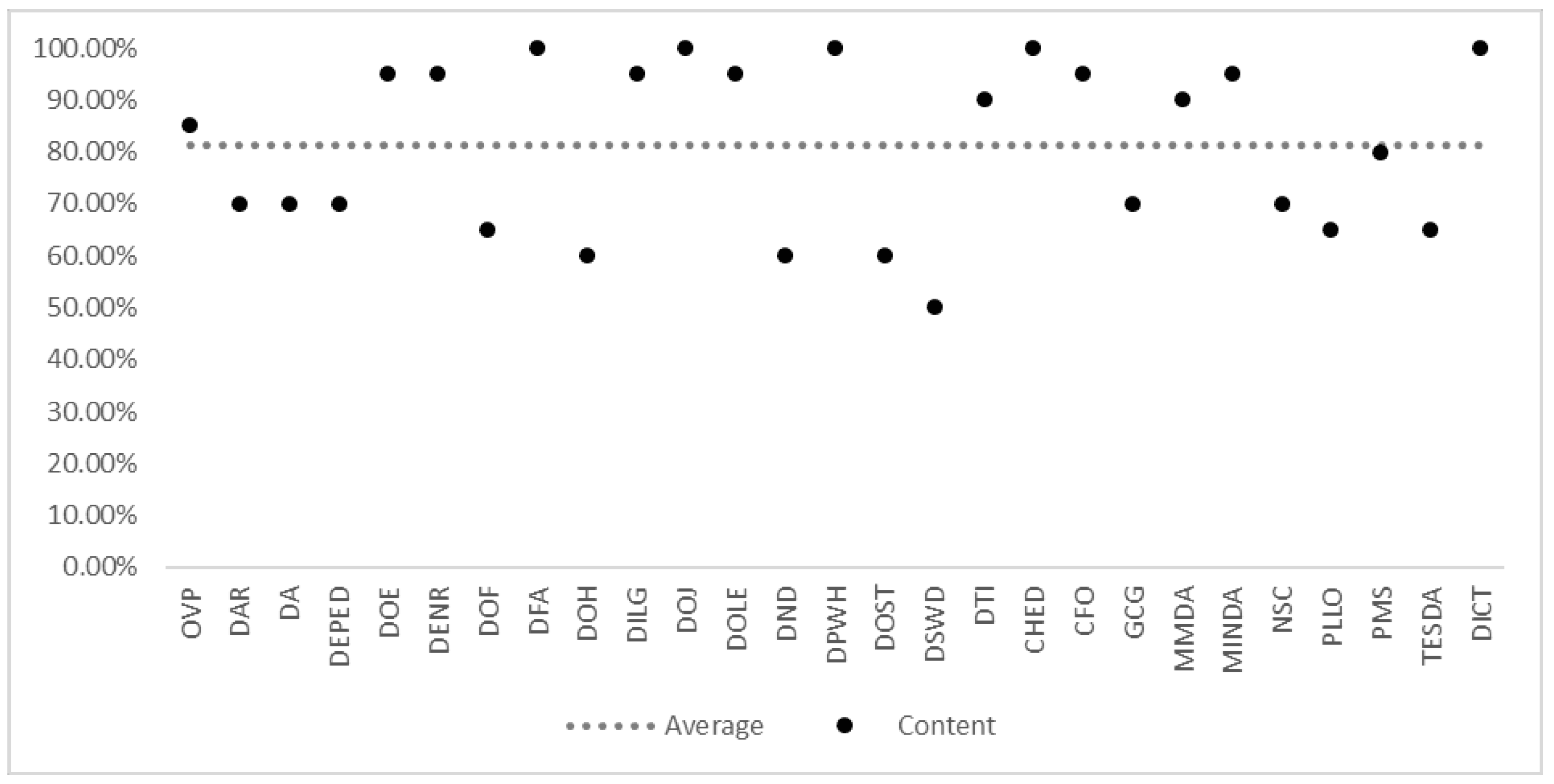
Finally, Figure 10 shows the Content section which refers to the information displayed on the government agency websites. From the figure, it can be seen that DFA, DOJ, DPWH, CHED and DICT are fully compliant with the content checkpoints with a score of 100%. OVP, DOE, DENR, DILG, DOLE, DTI, CFO, MMDA and MINDA are partially compliant with a score above 85%. On the other hand, DAR, DA, DEPED, DOH, DND, DOST, DSWD, GCG, NSC, PLLO, PMS and TESDA scored below 85%, indicating that they are non-compliant with the content checkpoints. The average score for this section is 81.11%, indicating that there is still a need for improvement in the content displayed on government agency websites.
Figure 10. Result of the content section
Preprints 148309 g010
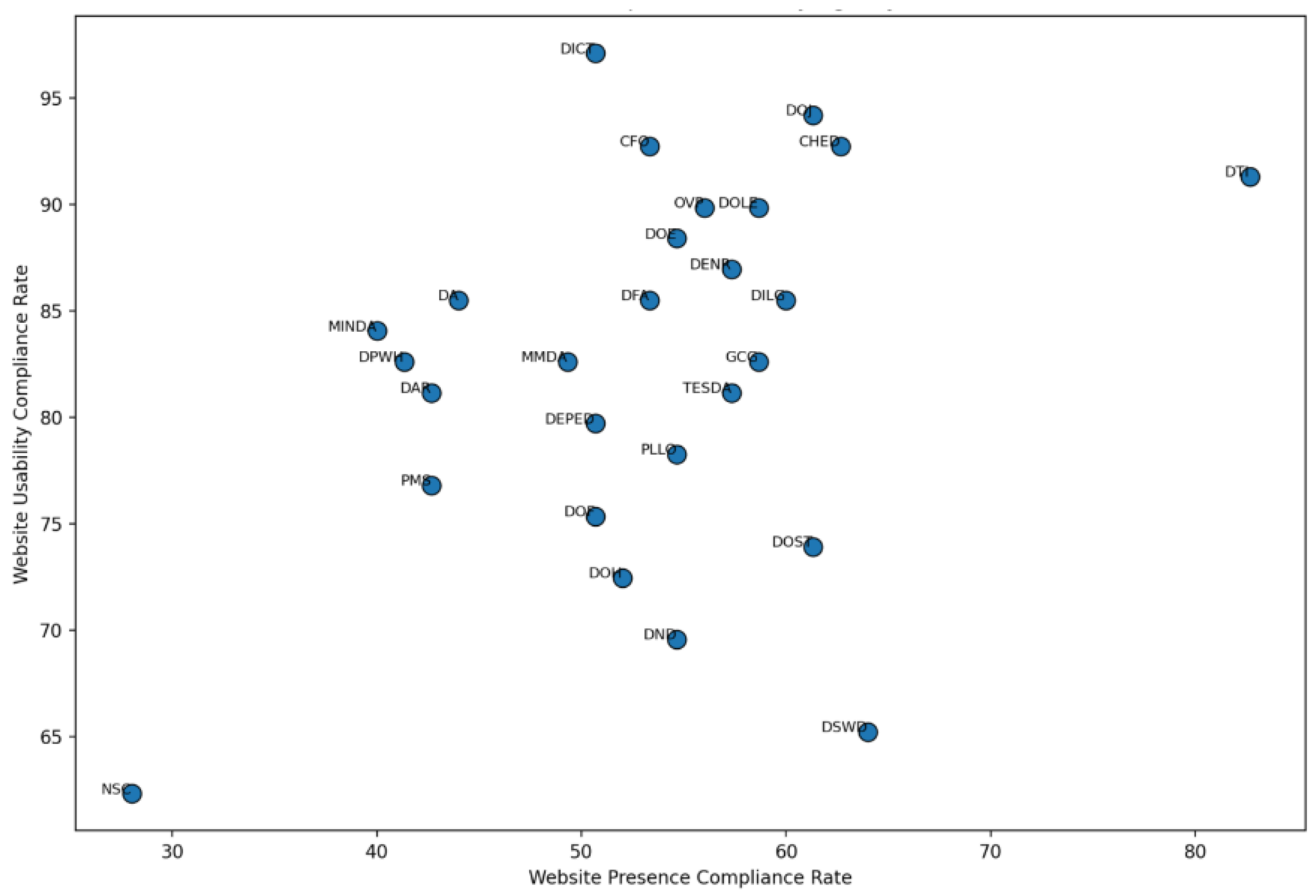
Figure 11. Analysis across government agencies
Preprints 148309 g011
Table 7 shows the number of web usability complied and not complied checkpoints and the overall compliance percentage of each government agency. The average overall percentage of compliance for all agencies is 82.50%. Specifically, 12 out of 27 agencies are classified as partially compliant and scored above 85%, with the highest score being 97.10% for the DICT. However, 15 out of 27 agencies are considered noncompliant, with the lowest score being 62.32% for NSC. Overall, there is room for improvement for the government agency websites in terms of meeting the usability standards.
Table 8 shows various sections and their corresponding checkpoints with compliance rate below 65% and require improvement. One significant checkpoint is the compliance rate for images with appropriate ALT tags in the Accessibility section, with only 51.85% compliance. The Identity section has low compliance rates for having a Key Official Corner, fax number, and mobile number. The Navigation section has low compliance rates for providing a clear and well-structured site map or index and indicating the user’s current location within the site. The Content section has low compliance rates for providing meta descriptions and text labels for form inputs.
Moreover, each checkpoint for compliance plays a crucial role in ensuring that the website is accessible to all users, regardless of their abilities or limitations. Accessible images with appropriate ALT tags are essential as they provide alternative text descriptions for users who rely on screen readers or those who have images disabled in their browsers, enabling them to understand the content of the images. Flash and add-on usage must be minimized to ensure compatibility with assistive technologies and to prevent potential barriers for users with disabilities. Identity key official corner, including fax and mobile numbers, ensures that important contact information is readily available and accessible to all visitors, fostering inclusivity. A comprehensible site map or index aids navigation for users with cognitive disabilities or those who may have difficulty navigating complex website structures. A clear indication of the current location within the website helps users orient themselves and efficiently navigate through the content. Additionally, meta descriptions provide succinct summaries of page content, aiding users in understanding the relevance of the page before navigating to it. Text labels for form inputs are essential for users who rely on assistive technologies to interact with web forms effectively. Proper labeling of embedded multimedia content ensures that users can access and understand audio or video elements on the website. Descriptive alternative text for linked images enhances the user experience by providing context and aiding navigation. Lastly, appropriately handling decorative images ensures that they do not clutter the user experience or confuse users relying on screen readers. Overall, adherence to these checkpoints ensures that the website is accessible to all users, promoting inclusivity and compliance with web accessibility standards. Overall, there is a need to improve website accessibility to ensure that everyone can access and use the website with ease.

4.3. Comparative Analysis

The findings reveal significant disparities in compliance rates across agencies, with the largest gaps observed between web presence and website usability ratings.
For instance, the Department of Information and Communications Technology (DICT) recorded the highest usability compliance at 97.10%, surpassing its presence rate of 50.67% by 46.43 percentage points. Similarly, the Department of Justice (DOJ) and agencies like the Commission on Higher Education (CHED) and the Commission on Filipinos Overseas (CFO) showed substantial gaps, with usability rates exceeding presence compliance by 32.87 and 30.08 percentage points, respectively. In contrast, the Department of Social Welfare and Development (DSWD) exhibited the smallest disparity with a mere 1.22 percentage point difference between usability (65.22%) and presence (64.00%). However, certain agencies, such as the National Security Council (NSC), demonstrated underperformance, with presence compliance at only 28.00% and usability at 62.32%, highlighting the challenges faced in achieving balanced compliance. These findings suggest the need for targeted interventions to address the significant gaps and improve overall performance across both web presence and website usability dimensions.

5. Conclusion and Recommendations

The evaluation of website accessibility for government agencies in the Philippines underscores the pressing need for improvements across various accessibility checkpoints. Utilizing the Web Content Accessibility Guidelines (WCAG) developed by the World Wide Web Consortium (W3C), the evaluation revealed significant discrepancies in compliance between web presence and usability. Compliance rates for web presence ranged from 28.00% to 82.67%, with an average of 53.43%, while website usability compliance was notably higher, ranging from 62.32% to 97.10%, with an average of 82.50%. These findings highlight a clear disparity, particularly in the advanced stages of web presence, where some checkpoints, especially in Stage 4 for comprehensive and interconnected online ecosystem demonstrated a concerning 0% compliance rate. To improve their web presence and better serve their constituents, government agencies should prioritize enhancing areas with low compliance, such as images missing appropriate ALT tags in the Accessibility section, missing contact information in the Identity section, lack of clear navigation features like site maps in the Navigation section, and inadequate meta descriptions or form labels in the Content section. These gaps indicate a need for more comprehensive efforts to improve overall website accessibility. Recommendations for addressing these issues include adhering to accessible design principles, conducting regular accessibility audits, collaborating with disability advocacy organizations, and integrating assistive technologies into website testing and evaluation processes. Such measures will ensure that government websites are more inclusive and accessible to all users, particularly those with disabilities, fostering a more equitable digital environment.

Acknowledgments

This research is supported and funded by MSU-IIT (Mindanao State University - Iligan Institute of Technology). Their generous contribution has been instrumental in enabling us to carry out this study and achieve the research objectives. We express our sincere gratitude to MSU-IIT for their unwavering support in promoting academic excellence and research endeavors.

Conflicts of Interest

The authors declare no conflicts of interest.

References

  1. Cabauatan, A. J. The Politics of Inclusion: Perspectives on Persons with Disabilities in Society; Alexis Jose Cabauatan, 2024.
  2. Ohshiro, K.; Cartwright, M. How People Who Are Deaf, Deaf, and Hard of Hearing Use Technology in Creative Sound Activities. Proceedings of the 24th International ACM SIGACCESS Conference on Computers and Accessibility 2022, 1–4. [Google Scholar]
  3. Gartland, S.; Flynn, P.; Carneiro, M. A.; Holloway, G.; Fialho, J. de S.; Cullen, J.; Hamilton, E.; Harris, A.; Cullen, C. The State of Web Accessibility for People with Cognitive Disabilities: A Rapid Evidence Assessment. Behavioral Sciences 2022, 12. [Google Scholar] [CrossRef] [PubMed]
  4. Li, F. M.; Lu, C.; Lu, Z.; Carrington, P.; Truong, K. N. An Exploration of Captioning Practices and Challenges of Individual Content Creators on YouTube for People with Hearing Impairments. Proc. ACM Hum.-Comput. Interact. 2022, 6, 1–26. [Google Scholar] [CrossRef]
  5. Seixas Pereira, L.; Coelho, J.; Rodrigues, A.; Guerreiro, J.; Guerreiro, T.; Duarte, C. Authoring Accessible Media Content on Social Networks. Proceedings of the 24th International ACM SIGACCESS Conference on Computers and Accessibility 2022, 1–11. [Google Scholar]
  6. Malalasekara, S. A. P. Breaking Barriers to Computer Accessibility: A Wireless Mouse System for People with Hand Disabilities, 2023.
  7. Susmerano, E. B.; Yamada, K. Revisiting Auxiliary Social Services for Persons with Disability: The Philippines Case. Int. J. Soc. Welfare 2022, 31, 187–202. [Google Scholar] [CrossRef]
  8. Mañez-Carvajal, C.; Cervera-Mérida, J. F.; Fernández-Piqueras, R. Web Accessibility Evaluation of Top-Ranking University Websites in Spain, Chile, and Mexico. Univ. Access Inf. Soc. 2021, 20, 179–184. [Google Scholar] [CrossRef]
  9. Akgül, Y. Accessibility, Usability, Quality Performance, and Readability Evaluation of University Websites of Turkey: A Comparative Study of State and Private Universities. Univ. Access Inf. Soc. 2021, 20, 157–170. [Google Scholar] [CrossRef]
  10. Csontos, B.; Heckl, I. Accessibility, Usability, and Security Evaluation of Hungarian Government Websites. Univ. Access Inf. Soc. 2021, 20, 139–156. [Google Scholar] [CrossRef]
  11. Grigalashvili, V. E-Government and E-Governance: Various or Multifarious Concepts. Int. J. Sci. Manag. Res. 2022, 5, 183–196. [Google Scholar] [CrossRef]
  12. Palma, J. P. B.; Avila, L. S.; Mag-iba, M. A. J.; Buman-eg, L. D.; Nacpil Jr, E. E.; Dayrit, D. J. A.; Rodelas, N. C. E-Governance: A Critical Review of E-Government Systems Features and Frameworks for Success. Int. J. Comput. Sci. Res. 2023, 7, 2004–2017. [Google Scholar] [CrossRef]
  13. Al-Sakran, H. O.; Alsudairi, M. A. Usability and Accessibility Assessment of Saudi Arabia Mobile E-Government Websites. IEEE Access 2021, 9, 48254–48275. [Google Scholar] [CrossRef]
  14. Agrawal, G.; Kumar, D.; Singh, M. Assessing the Usability, Accessibility, and Mobile Readiness of E-Government Websites: A Case Study in India. Univ. Access Inf. Soc. 2022, 21, 737–748. [Google Scholar] [CrossRef]
  15. Legaspi, P. E.; Marigza, R. B. Exploring and Assessing Government Website as an Instrument of E-Governance at the Local Government Level in Pangasinan. ASEAN Multidiscip. Res. J. 2021, 9, 126–141. [Google Scholar]
  16. Malodia, S.; Dhir, A.; Mishra, M.; Bhatti, Z. A. Future of E-Government: An Integrated Conceptual Framework. Technol. Forecast. Soc. Change 2021, 173, 121102. [Google Scholar] [CrossRef]
  17. Pedersen, C. S. The UN Sustainable Development Goals (SDGs) are a Great Gift to Business! *Procedia CIRP* **2018**, *69*, 21–24. [CrossRef]
  18. Bertot, J. C.; Jaeger, P. T.; Hansen, D. The impact of policies on government social media usage: Issues, challenges, and recommendations. *Gov. Inf. Q.* **2012**, *29* (1), 30–40. [CrossRef]
  19. Baroudi, M.; Alia, M.; Marashdih, A. W. Evaluation of Accessibility and Usability of Higher Education Institutions’ Websites of Jordan. 2: In *Proceedings of the 2020 11th International Conference on Information and Communication Systems (ICICS)*; IEEE, 2020. [Google Scholar] [CrossRef]
  20. Adepoju, S. A.; Shehu, I. S.; Bake, P. Accessibility Evaluation and Performance Analysis of e-Government Websites in Nigeria. *J. Adv. Inf. Technol.* **2016**, *7* (1), 49–53. [CrossRef]
  21. Bakhsh, M.; Mehmood, A. Web Accessibility for Disabled: A Case Study of Government Websites in Pakistan. 2: In *Proceedings of the 2012 10th International Conference on Frontiers of Information Technology*; IEEE, 2012. [Google Scholar] [CrossRef]
  22. Murah, M. Z.; Ahmed, A. Web Assessment of Libyan Government e-Government Services. *Int. J. Adv. Comput. Sci. Appl.* **2018**, *9* (12). [CrossRef]
  23. Huang, Z.; Benyoucef, M. Usability and credibility of e-government websites. *Gov. Inf. Q.* **2014**, *31* (4), 584–595. [CrossRef]
  24. Alim, S. Web Accessibility of the Top Research-Intensive Universities in the UK. *SAGE Open* **2021**, *11* (4), 21582440211056614. [CrossRef]
  25. Ismailova, R.; Inal, Y. Comparison of Online Accessibility Evaluation Tools: An Analysis of Tool Effectiveness. *IEEE Access* **2022**, *10*, 58233–58239. [CrossRef]
  26. Lujan-Mora, S.; Navarrete, R.; Penafiel, M. Egovernment and web accessibility in South America. 2: In *Proceedings of the 2014 First International Conference on eDemocracy & eGovernment (ICEDEG)*; IEEE, 2014. [Google Scholar] [CrossRef]
  27. İşeri, E. İ.; Uyar, K.; İlhan, Ü. The accessibility of Cyprus Islands’ Higher Education Institution Websites. *Procedia Comput. Sci.* **2017**, *120*, 967–974. [CrossRef]
  28. Pimentel, S. F. Improved Access and Participation for Persons with Disabilities in Local Governance. *Policy Gov. Rev.* **2020**, *4* (1), 1. [CrossRef]
  29. Salvio, K. B. V. Extending the Evaluation on Philippine E-Government Services on its Accessibility for Disabled Person. 2: In *Proceedings of the 2020 Fourth World Conference on Smart Trends in Systems, Security and Sustainability (WorldS4)*; IEEE, 2020. [Google Scholar] [CrossRef]
  30. Red, G. V.; Palaoag, T. D.; Naz, V. A. Creating a Framework for Care Needs Hub for Persons with Disabilities and Senior Citizens. *Int. J. Adv. Comput. Sci. Appl.* **2023**, *14* (11).
  31. Khasawneh, M. A. Digital inclusion: Analyzing social media accessibility features for students with visual impairments. *Stud. Media Commun.* **2023**, *12* (1), 71.
  32. Zhao, K.; Mulet, J.; Sorita, C.; Oriola, B.; Serrano, M.; Jouffrais, C. Remote Graphic-Based Teaching for Pupils with Visual Impairments: Understanding Current Practices and Co-designing an Accessible Tool with Special Education Teachers. *Proc. ACM Hum.-Comput. Interact.* **2022**, *6* (ISS), 538–567.
  33. McClure, N. A. *Now You See It: Creating Accessible Online Content for the Blind/Visually Impaired*; The University of West Florida: 2023.
  34. Pradhan, D.; Rajput, T.; Rajkumar, A. J.; Lazar, J.; Jain, R.; Morariu, V. I.; Manjunatha, V. Development and evaluation of a tool for assisting content creators in making pdf files more accessible. *ACM Trans. Accessible Comput.* **2022**, *15* (1), 1–52.
  35. Campoverde-Molina, M.; Luján-Mora, S.; Valverde, L. Accessibility of university websites worldwide: a systematic literature review. *Universal Access in the Inf. Soc.* **2023**, *22* (1), 133–168.
  36. Iannuzzi, N.; Manca, M.; Paternò, F.; Santoro, C. Usability and transparency in the design of a tool for automatic support for web accessibility validation. *Universal Access in the Inf. Soc.* **2024**, *23* (1), 435–454.
  37. Kivijärvi, H.; Pärnänen, K. Instrumental usability and effective user experience: Interwoven drivers and outcomes of Human-Computer interaction. *Int. J. Hum.-Comput. Interact.* **2023**, *39* (1), 34–51.
  38. Paul, S. Accessibility analysis using WCAG 2.1: Evidence from Indian e-government websites. *Universal Access in the Inf. Soc.* **2023**, *22* (2), 663–669.
  39. Hujran, O.; Al-Debei, M. M.; Al-Adwan, A. S.; Alarabiat, A.; Altarawneh, N. Examining the antecedents and outcomes of smart government usage: An integrated model. *Gov. Inf. Q.* **2023**, *40* (1), 101783.
  40. Firth, A. Low Vision and Color Blindness. In *Practical Web Accessibility: A Comprehensive Guide to Digital Inclusion*; Springer: 2024; pp 57–96.
  41. Philippine Statistics Authority. *Persons with disability in the Philippines: Results from the 2010 Census*; 2010. Available at: [https://psa.gov.ph/content/persons-disability-philippines-results-2010-census](https://psa.gov.ph/content/persons-disability-philippines-results-2010-census).
  42. Ferri, D.; Favalli, S. Web Accessibility for People with Disabilities in the European Union: Paving the Road to Social Inclusion. *Societies* **2018**, *8* (2), 40. [CrossRef]
  43. Abuaddous, H. Y.; Zalisham, M.; Basir, N. Web Accessibility Challenges. *Int. J. Adv. Comput. Sci. Appl.* **2016**, *7* (10). [CrossRef]
  44. Singh, H.; Singh, A. Factors Influencing Web Accessibility of Corporate Information: Indian Evidence. *Int. J. E-Business Res.* **2020**, *16* (3), 1–19. [CrossRef]
  45. DICT. *DICT Memo Circular 2019*; 2020. Available at: [https://www.pwag.org/wp-content/uploads/ 2020/01/DICT-Memo-Circular-2019-04-txt-format.txt](https://www.pwag.org/wp-content/uploads/ 2020/01/DICT-Memo-Circular-2019-04-txt-format.txt).
Figure 1. Web accessibility framework for Philippine government wesite.
Preprints 148309 g001
Figure 2. Using automated tools in evaluation
Preprints 148309 g002
Figure 3. Result of the emerging web presence stage
Preprints 148309 g003
Figure 4. Result of the enhanced web presence stage
Preprints 148309 g004
Figure 5. Result of the transactional web presence stage
Preprints 148309 g005
Figure 6. Result of the connected web presence stage
Preprints 148309 g006
Figure 7. Result of the accessibility section
Preprints 148309 g007
Figure 8. Result of the identity section
Preprints 148309 g008
Figure 9. Result of the navigation section
Preprints 148309 g009
Table 1. Web Presence Checkpoints.
Stages Description Number of checkpoints
Stage 1: Emerging - Basic Web Feature - Information About the Agencies - Strategic Information of the Agency - Resources (Downloads, Archives, etc.) 26
Stage 2: Enhance - Accessible information at the website, regularly updated (at least every 1.5 months) - Search function and sitemap - Forms, publications, and other downloadable documents - Interactive elements are present - Bid announcements and other external links 17
Stage 3: Transactional - Online Services - Security - Simple e-Participation - Other features such as e-mail alerts, job opportunities, and e-signature 12
Stage 4: Connected - Mission statement or policy for e-participation - Schedule of forthcoming e-participation events - Archived data regarding past e-participation endeavors - Tools for e-participation to collect public opinions - Public feedback on national strategies, policies, and e-services - Disclosure of outcomes from citizen feedback - Repository of government replies to citizen inquiries and contributions 20
Table 2. Web Usability Checkpoints.
Sections Description Number of checkpoints
Section 1: Accessibility - User Experience such as reasonable loading time - Content and Text - Strategic Information of the Agency - Error Handling 17
Section 2: Identity - Company / site logo is prominently placed - The homepage can be understood within 5 seconds - Company information is easily accessible - Contact information, like the Contact Us link, is clearly visible 18
Section 3:Navigational - The main navigation is readily recognizable. - Clear and succinct labels are used for navigation - Supports browser standard functions like ’back’, ’forward’, and ’bookmark’- The company logo is linked to the homepage - Links are uniform and straightforward to recognize - Accessing the site search is convenient. 14
Section 4: Content - Major headings are easily understood and descriptive - Essential content appears before the fold - Consistency is maintained in styles and colors - Emphasis, such as bolding, is used sparingly - Ads and pop-ups are not disruptive, and content does not trigger seizures - The main text is brief yet informative - HTML page titles provide clear descriptions - Non-textual content includes text alternatives - Language, terminology, and tone are appropriate and comprehensible to the target audience 20
Table 3. List of Government Agency Websites.
No Agency/Code URL
1 Office of the Vice President (OVP) http://www.ovp.gov.ph/
2 Department of Agrarian Reform (DAR) http://dar.gov.ph/
3 Department of Agriculture (DA) http://www.da.gov.ph/
4 Department of Education (DEPED) http://www.deped.gov.ph/
5 Department of Energy (DOE) https://www.doe.gov.ph/
6 Department of Environment and Natural Resources (DENR) http://denr.gov.ph/
7 Department of Finance (DOF) http://www.dof.gov.ph/
8 Department of Foreign Affairs (DFA) http://www.dfa.gov.ph/
9 Department of Health (DOH) http://www.doh.gov.ph/
10 Department of the Interior and Local Government (DILG) http://www.dilg.gov.ph/
11 Department of Justice (DOJ) http://www.doj.gov.ph/
12 Department of Labor and Employment (DOLE) http://www.dole.gov.ph/
13 Department of National Defense (DND) http://www.dnd.gov.ph/
14 Department of Public Works and Highways (DPWH) http://www.dpwh.gov.ph/
15 Department of Science and Technology (DOST) http://www.dost.gov.ph/
16 Department of Social Welfare and Development (DSWD) http://www.dswd.gov.ph/
17 Department of Trade and Industry (DTI) http://www.dti.gov.ph/
18 Commission on Higher Education (CHED) https://ched.gov.ph/
19 Commission on Filipino Overseas (CFO) http://www.cfo.gov.ph/
20 Governance Commission for GOCC’s (GCG) http://gcg.gov.ph/
21 Metropolitan Manila Development Authority (MMDA) http://www.mmda.gov.ph/
22 Mindanao Development Authority (MINDA) http://www.minda.gov.ph/
23 National Security Council (NSC) http://www.nsc.gov.ph/
24 Presidential Legislative Liaison Office (PLLO) http://pllo.gov.ph/
25 Presidential Management Staff (PMS) http://www.pms.gov.ph/
26 Technical Education and Skills Development Authority (TESDA) http://www.tesda.gov.ph/
27 Department of Information and Communication Technology (DICT) https://dict.gov.ph/
Table 4. Recommended Evaluation Tools.
Evaluation Tool Purpose
]3* Achecker This tool verifies individual HTML pages to ensure they conform to accessibility standards, making the content accessible to all.
]3* Contrast Checker A web tool that can check the level of contrast based already on WCAG 2.0 parameters
]3* European Internet Inclusion Initiative Automatically detects barriers in web documents (including PDF documents)
]3* Wave Web Accessibility Evaluation Tool
]3* W3C Markup Validation Service This validator checks the markup validity of web documents in formats like HTML, XHTML, SMIL, and MathML.
]3* Developer Tool of Firefox/Google Chrome Used for checking loading time of webpages
]3* Screen Reader Browser Extension Used to test webpages on the screen reader
Table 5. Web Presence Checkpoints with Compliance Rate.
No Websites Complied Checkpoints (%) No Websites Complied Checkpoints (%)
1 OVP 42 (56%) 15 DOST 46 (61.33%)
2 DAR 32 (42.67%) 16 DSWD 48 (64%)
3 DA 33 (44%) 17 DTI 62 (82.67%)
4 DEPED 38 (50.67%) 18 CHED 47 (62.67%)
5 DOE 41 (54.67%) 19 CFO 40 (53.33%)
6 DENR 43 (57.33%) 20 GCG 44 (58.67%)
7 DOF 38 (50.67%) 21 MMDA 37 (49.33%)
8 DFA 40 (53.33%) 22 MINDA 30 (40%)
9 DOH 39 (52%) 23 NSC 21 (28%)
10 DILG 45 (60%) 24 PLLO 41 (54.67%)
11 DOJ 46 (61.33%) 25 PMS 32 (42.67%)
12 DOLE 44 (58.67%) 26 TESDA 43 (57.33%)
13 DND 41 (54.67%) 27 DICT 38 (50.67%)
14 DPWH 41 (54.67%)
Table 6. Web Presence Checkpoints With Low Compliant Rate.
Stages Checkpoints that needs improvement Compliance Rate
Stage 1: Emerging Philippines Standard Time 48.15%
Site Map 37.04%
Citizen’s Charter 37.04%
Archives 33.33%
Stage 2: Enhanced Multiple Languages 18.52%
User login and password 14.81%
Wireless technology is used to send messages to mobile devices 7.41%
Stage 3: Transactional Captcha 18.52%
e-Mail alerts for participation 14.81%
Confirmation of request 3.70%
e-Signature 0.00%
Stage 4: Connected Discussion Forums 3.70%
Opinion Polls 0.00%
Table 7. Website Usability Checkpoints with Compliance Rate.
No Websites Complied Checkpoints (%) No Websites Complied Checkpoints (%)
1 OVP (62) 89.86% 15 DOST (51) 73.91%
2 DAR (56) 81.16% 16 DSWD (45) 65.22%
3 DA (59) 85.51% 17 DTI (63) 91.30%
4 DEPED (55) 79.71% 18 CHED (64) 92.75%
5 DOE (61) 88.41% 19 CFO (64) 92.75%
6 DENR (60) 86.96% 20 GCG (57) 82.61%
7 DOF (52) 75.36% 21 MMDA (57) 82.61%
8 DFA (59) 85.51% 22 MINDA (58) 84.06%
9 DOH (50) 72.46% 23 NSC (43) 62.32%
10 DILG (59) 85.51% 24 PLLO (54) 78.26%
11 DOJ (65) 94.20% 25 PMS (53) 76.81%
12 DOLE (62) 89.86% 26 TESDA (56) 81.16%
13 DND (48) 69.57% 27 DICT (67) 97.10%
14 DPWH (57) 82.61%
Table 8. Web Usability Checkpoints With Low Compliant Rate.
Section Checkpoints that needs improvement Compliance Rate
Section 1: Accessibility Images have appropriate ALT tags. 51.85%
Flash & add-ons are used sparingly. 18.52%
Section 2: Identity
Key Official Corner 48.15%
Fax Number 29.63%
Mobile Number 37.04%
Feedback Form 59.26%
Section 3: Navigation
A comprehensible and organized site map or index is furnished when required 48.15%
The current location is clearly indicated 59.26%
Section 4: Content
Meta descriptions 44.44%
All images, including image buttons and hot spots on image maps, are accompanied by suitable alternative text. 48.15%
Images used solely for decoration purposes are assigned null alt text (alt="") or utilized as CSS backgrounds. 62.96%
Every linked image is provided with descriptive alternative text. 48.15%
Text labels are associated with form inputs. 62.96%
Embedded multimedia content is labeled with accessible text. 51.85%
Disclaimer/Publisher’s Note: The statements, opinions and data contained in all publications are solely those of the individual author(s) and contributor(s) and not of MDPI and/or the editor(s). MDPI and/or the editor(s) disclaim responsibility for any injury to people or property resulting from any ideas, methods, instructions or products referred to in the content.
Copyright: This open access article is published under a Creative Commons CC BY 4.0 license, which permit the free download, distribution, and reuse, provided that the author and preprint are cited in any reuse.
Prerpints.org logo

Preprints.org is a free preprint server supported by MDPI in Basel, Switzerland.

Subscribe

Disclaimer

Terms of Use

Privacy Policy

Privacy Settings

© 2025 MDPI (Basel, Switzerland) unless otherwise stated