

Submitted:
30 October 2024
Posted:
30 October 2024
You are already at the latest version
Abstract
This paper discusses the design and evaluation of a set of heuristics (U+A) to assess the usability and accessibility of interactive systems in terms of cognitive diversity in an integrated way. Method: An analysis of the usability and accessibility aspects that have the greatest impact on people with cognitive disabilities is presented. A set of cognitive usability and accessibility heu-ristics targeted at people with cognitive disabilities is generated with the support of Generative Artificial Intelligence (GenAI). Result: Several interactive systems are evaluated to validate the U+A heuristics. A quantitative classification of the evaluated systems is obtained, i.e., the “U+Aindex”, which reveals the most and least usable and accessible systems for people with cognitive and learning disabilities. Conclusion: This study demonstrates that it is possible to car-ry out a classification of heuristic criteria considering accessibility, usability, and cognitive disa-bility. The results also show that the selection of criteria proposed by GenAI is optimal and that this technology can be used to improve usability and accessibility of interactive systems in a practical way. Yet, further evaluations are needed to support the results of the analyzed proposal.
Keywords:
Artificial Intelligence
; Generative AI (GenAI)
; Accessibility
; Heuristic Evaluation
; Usability
1. Introduction
This paper discusses an exploratory study aimed to design and evaluate a set of usability and accessibility heuristics focused on cognitive diversity with the support of Generative AI (GenAI). This paper proposes a novel and practical approach for calculating in a single numerical index the level of accessibility and usability of interactive systems for people with cognitive disabilities.
According to the Global Digital report [1], the number of internet users in 2024 will reach 5.35 billion, with a year-on-year growth of 1.8% in the last 12 months. The World Health Organization [2] estimates that between 15-20% of the population, approximately one billion people worldwide, live with a disability [3]. Among these people, around 200 million live with an intellectual disability, representing 2.6% of the world's population. The Universal Declaration of Human Rights states that people with intellectual disabilities have the right to enjoy technology and to perceive, understand, navigate and interact appropriately in any user interface [4]. However, efforts made to improve web accessibility for people with cognitive and intellectual disabilities remain limited. This is due mainly to the fact that cognitive impairments are the least understood disability categories [5]. Also, much of the literature related to cognitive disabilities comes from medicine, which does not directly address issues related to website accessibility [6].
Usability and accessibility are two fundamental concepts of interactive systems. Usability is an internal quality of interactive systems defined as ‘the ability of software to be understood, learned, used and attractive to the user, under specific conditions of use’ [7]. The factors that measure usability are navigability, ease of learning, speed of use, user efficiency and error rates. Accessibility is a practice that ‘ensures that websites, technologies and tools are designed to be used by people with disabilities’ [8]. Web accessibility concerns many types of disabilities, including visual, hearing, physical, cognitive, neurological and speech impairments. In addition, it benefits other people, including older people whose functional abilities decline as a result of ageing. Accessibility is measured based on automatic evaluation tools, manual evaluation by an expert and user testing of people with disabilities [9].
Usability is a concept that is closely linked to accessibility. Usability is a necessary but not sufficient condition for good accessibility. And accessibility alone does not guarantee usability [10]. For example, a system may be usable for some users. Yet, it might not be accessible for people with disabilities because, for example, it does not provide good colour contrast and users with low vision may not be able to perceive the elements with which they can interact. An accessible application, which meets the accessibility criteria, does not guarantee a good user experience for all users. Despite being technically accessible, it may have a confusing navigation structure. Thus, designing a system that meets usability and accessibility objectives rests upon dealing with both aspects.
Yet, bringing together usability and accessibility is difficult, as each of them addresses different issues, as we have discussed above. However, both concepts aim to improve the user experience and are a key part of inclusive design, which truly benefits all users. Thus, this paper argues that designing a metric or index that combines usability and accessibility is worth the effort. To this end, we focused on inspection evaluation techniques: heuristic evaluation [11] in the case of Usability and verification of WCAG guidelines criteria [12] in the case of accessibility. In both cases, a set of criteria are checked to observe whether they are fulfilled in an interface and subsequently obtain a quantitative index of the evaluated system. These criteria were selected with the support of ChatGPT and evaluated in case study with 5 websites.
In summary, the main contributions of this paper are:
- A unique list of heuristic criteria focused on the evaluation of systems for people with cognitive learning disabilities and additionally for older people.
- An objective numerical index of cognitive usability and accessibility evaluation.
- A case study that evaluates the cognitive usability and accessibility heuristics.
- A ranking of usable and accessible systems for people with cognitive disabilities.
2. Background and Related Work
Section 2.1 discusses usability and accessibility with respect to the objectives of this paper. Section 2.2. focuses on evaluation metrics and the potential of GenAI to generate heuristics and metrics.
2.1. Usability and Accessibility, Context and Evaluation
To assess usability, several methods exist [13]. These are classified into: (i) inspection, where a set of experts analyse the degree of usability of a system based on an examination of a system's interface; (2) enquiry, where a system is analysed through observations of its use and with interviews and/or questionnaires; and (3) testing, where users perform tasks on the system and the results are analysed to see the suitability of the interface [14]. This paper focuses on Heuristic Evaluation, which belongs to the first category (inspection).
Heuristic evaluation (HE), which is an inspection method based on expert evaluation, makes it possible to identify a large number of problems with few financial resources and little time [15,16]. HE is guided by heuristic principles [17] to identify user interface designs that violate these principles. Studies such as [18] indicate that the most commonly used heuristics are those proposed by Nielsen [19], but also point out the need to adapt them to new technologies and contexts: mobile applications [20], artificial intelligence [21], educational Games [22], metaverse [23]. All these studies show the importance of usability evaluation considering HE. They also propose different sets of heuristic criteria (depending on the domain) aimed at evaluating each system or environment. With HE, a qualitative result can be obtained, indicating aspects to be improved of a system according to the criteria analysed and also quantitative ones, indicating the level of criteria that are being fulfilled in the system [24]. However, in most of the abovementioned investigations, they do not consider a numerical quantification to obtain a single index of the level of usability of the evaluated system. A noteworthy exception is [25], wherein Granollers proposes a list of heuristic criteria that synthesise J. Nielsen's Heuristic Usability Principles for User Interface Design [19] and B. Tognazzini's Interface Design Principles [26]. This integrated set of heuristics enables us to assess each principle in an integrated way and generate a single quantitative index at the end of the evaluation. A proof of concept was carried out and we were able to quickly measure the level of usability and accessibility of an interactive system [27].
Web accessibility evaluation methods are qualitative and/or quantitative [28,29]. Qualitative methods are applied to assess the compliance of a website with the WCAG (Web Content Accessibility Guidelines) by using automatic tools [30] or with some heuristics by experts manually [31]. Quantitative methods calculate the level of accessibility of the website with the use of accessibility metrics [32]. The WCAG Guidelines [12] provide us with an important framework for evaluating the accessibility of a system. These guidelines include many of the evaluation points needed to improve the accessibility of systems for people with disabilities. Yet, they do not address in much depth the evaluations directly related to cognitive and comprehension disabilities.
In this regard, W3C offers the document ‘Making Content Usable for People with Cognitive and Learning Disabilities’ [33], called in a short way ‘the COGA Guidelines’. These criteria are a complementary guide to the WCAG guidelines, presenting concrete advice on how to make content understandable for people with cognitive and learning disabilities, ensuring that they can navigate, interact and access digital information as successfully as possible.
The research work presented here is based on the guidelines of Granollers [25], ‘WCAG 2.2 Guidelines’ [12] and ‘COGA Guidelines’ [33]. This paper extends these previous works by proposing a set of heuristics that combine the key aspects of usability and accessibility for people with cognitive disabilities using Generative AI.
2.2 Usability and Accessibility Metrics and Generative AI
Metrics are important for several reasons: (i) they quantify the performance of a system, (ii) they provide objective data that serve as a basis for making decisions about the system, (iii) periodic evaluations allow a graph to be calculated over time to observe the evolution of the system and to measure the impact of changes made to it. Metrics allow us to determine whether a system achieves its objectives and to identify areas that require optimisation. Obtaining in a single value (or numerical index) the level of usability and accessibility of a system makes it possible to quantify the effort needed to improve the system under evaluation [43]. The present work proposes a usability and accessibility index (U+Aindex), that will make it possible to cover the above points: quantify the performance of the system in terms of usability and accessibility, provide objective data on compliance with usability and accessibility and finally make a comparison of the results obtained over time, observing the evolution of a system in terms of the usability and accessibility evaluated.
Designing an usability + accessibility index (U+Aindex), is not straightforward, as several studies argue [35,36,37,38]. Although researchers have been concerned with providing mechanisms that serve as guidelines for Web systems in terms of usability and accessibility requirements, we are not aware of any tool that provides a unique value that helps specialists to verify the extent to which these requirements are present in a Web system.
Generative AI tools have recently been used to conduct studies on interface evaluations [39,40,41]. There is also a growing interest in the HCI community to explore the potential of Generative AI in interaction design [42]. We suggest that Generative AI could be used to help us select a set of heuristic criteria to evaluate usability and accessibility aspects focused on specific users, for example, users with disabilities. Previous research combines usability and accessibility measurements in a single index in an e-commerce environment without GenAI [27] and it does not focus on specific users with disabilities. This paper addresses an evaluation of systems considering usability and accessibility criteria in environments more suitable for people with cognitive disabilities.
3. Designing a Set of Cognitive Usability and Accessibility Heuristics
This section presents the steps that have been carried out to develop the usability and accessibility evaluation proposal with a focus on people with cognitive disabilities. The steps are important to carry out a systematic and accurate evaluation of the usability and accessibility of a system, especially adapted to the needs of people with cognitive disabilities. These steps are outlined next and depicted in Figure 1.
The criteria to be evaluated are collected in raw form (step 1) based on existing criteria in the literature; then they are interrelated through the Gen AI (step 2) in order to synthesize the important points of each type of evaluation (usability and accessibility). Afterwards, they are filtered to adapt them to people with specific disabilities (step 3), in this specific case, people with cognitive disabilities. The evaluation itself is carried out in the system (step 4) to obtain the validations of the evaluation experts and finally the results of the evaluation (step 5) are synthesised in a single quantifiable index of the level of usability and accessibility of the system according to people with cognitive disabilities. Each step plays an important role in ensuring that the criteria chosen for the assessment are relevant, adapted and validated, thus enabling meaningful results to be obtained.
Step 1. Exploring the Data Source
In order to develop a proposal to evaluate usability and accessibility focused on people with cognitive disabilities, a series of links to relevant information was made. This was based on sources of information found in the scientific literature and on reference sites:
- Table: ‘Heuristic Criteria’: The heuristic principles developed by Granollers [44] were selected because they are a generic set of heuristics to evaluate interactive systems, including web pages, and generates an index that indicates the level of usability of the analyzed system.
- Table: ‘WCAG Guidelines’: WCAG 2.2 guidelines [33] were chosen as the latest W3C recommendation at the time of writing this paper.
- Table ‘COGA Guidelines’: ‘Making Content Usable for People with Cognitive and Learning Disabilities’[34] by focusing on assessment related to cognitive impairment.
- Table: ‘Disabilities’: List of disabilities contained in the WCAG 2.2 guidelines, document “understanding” [45] in order to know that WCAG 2.2 guidelines impact certain users with disabilities.
Step 2. Obtaining Criteria According to the Data Relationship with Generative AI
With the data sources presented in step 1, data joins were carried out and related relationships were explored (see Figure 2). The joins were performed in the following tables:
- Disabilities and WCAG guidelines (disabilities-WCAG relationship)
- Heuristic criteria and WCAG guidelines (Heuristic-WCAG relationship)
- COGA guidelines and WCAG guidelines (COGA-WCAG relationship)
The data linkage refers to e.g. a specific heuristic criterion, to which WCAG guideline (or guidelines) it is most closely related. For example, heuristic criterion 1.1 The application visibly includes the page title, refers to WCAG guideline criterion 2.4.2 Page titles. Similarly, for each COGA guideline criterion, we looked for which WCAG criterion it is most closely related to. For example, COGA criterion 5.1 Limit interruptions relates to WCAG guideline 2.2.4, Avoidable interruptions. These links were made with the aim of obtaining a list of usability and accessibility criteria to evaluate a system where the common link was the WCAG guidelines, and where the filtering of information was easy.
No previous works were found that specifically addressed the relationships between the proposed linkages (heuristic criteria-WCAG guidelines) and (COGA guidelines -WCAG guidelines), which made manually performing this work a considerable effort and time-consuming. For this reason, it was decided to use Generative AI (Chat GTP) to automatically generate the correspondences between the data in the tables in step 1.
It should be noted that the use of the Generative AI system was exploratory, as it was initially expected that the results would not be sufficiently accurate. However, as the research progressed, the relationships generated were found to be adequate, leading to the continuation of the data produced by Generative AI. The validity of this data will be further verified in the use case described in Section 4.
We explain below how the data for each of the data relationships (which are n..n and formalised in a table) was obtained from the above sources. See Figure 2.
‘WCAG_Disabilities’: there are references in the literature with a correspondence between disability and WCAG guidelines [12], and this data provided a solid basis for creating the remaining relationships. However, they had to be completed manually so as to adapt them to version 2.2 and level AAA of the WCAG guidelines. We drew on the section ‘beneficiaries’ in the document “understanding” [44] to do so. The results are presented in Table A1 (Appendix A).
‘Heuristis_WCAG’ relationship: previous works have explored the link between generic heuristic criteria and WCAG guidelines [38,46]. Yet, these works (e.g., [44]) have not addressed the specific heuristic criteria analysed in this paper. As this was a complex task to carry out manually, Generative AI was used to get the data. Table A2 (Appendix A) was the result and the steps taken was:
- First, we introduce the table “Heuristics criteria” into Generative AI tool
- After, we wrote this prompt in ChatGPT:
‘Relate each of the rows in the table (of “Heuristics criteria”) to the WCAG 2.2 guidelines. Indicates whether it relates to one or more criteria of the WCAG 2.2 guidelines (or maybe none). Displays the result in a table’.
‘COGA_WCAG’ relationship: For this data, we found a previous study in the literature where the WCAG guidelines were considered for each of the COGA recommendations, but no academic reference was found. An expert in the field of natural language who had worked on the translation of the COGA recommendations into Spanish [47] was asked. This expert told the first author that no official reference was available. Therefore, in this step we considered doing the generation manually. Yet, it was a tedious job with the possibility of error. For this reason, we used Generative AI as follows: (Table A3 (Appendix A)):
- First, we introduced the table “COGA guidelines” into ChatGPT
- Afterwards, we wrote this prompt:
According to the COGA criteria table that has been entered into the system, associate each of the specific recommendations for improving cognitive accessibility with the relevant WCAG 2.2 guidelines. It links each row with a WCAG criterion. Displays the result in a table.
It might be worth noting that not all relationships were generated using generative AI. For ‘Heuristis_WCAG’ and ‘COGA_WCAG’ we use generative AI because don’t exist references in the literature, but for the relation ‘WCAG_Disabilities’, we use previous research that provided a solid basis for moving forward in obtaining the remaining relationships. In this context, the relationships considered in the experimentation included both the proposals generated by Generative AI (‘Heuristis_WCAG’) and (‘COGA_WCAG’) and those established by experts (‘WCAG_Disabilities’). This combination sought to provide a more robust and grounded framework for the research.
It is important to note that not all relationships were generated using generative AI. For the correspondences between the heuristic criteria and the WCAG guidelines (‘Heuristis_WCAG’), as well as between the COGA criteria and the WCAG guidelines (‘COGA_WCAG’), generative AI was used due to the absence of references in the literature. However, for the relationship between WCAG guidelines and disabilities (‘WCAG_Disabilities’), previous research was used, which provided a solid basis to move forward in obtaining the remaining relationships. This combination was intended to provide a more robust and informed research framework.
Although the data obtained from the Generative AI tools may contain approximate relationships and there is a margin of error to improve, these data served as an important starting point to begin to test the relationship between usability and accessibility with cognitive disabilities.
Step 3. Adapting Heuristics for Disability
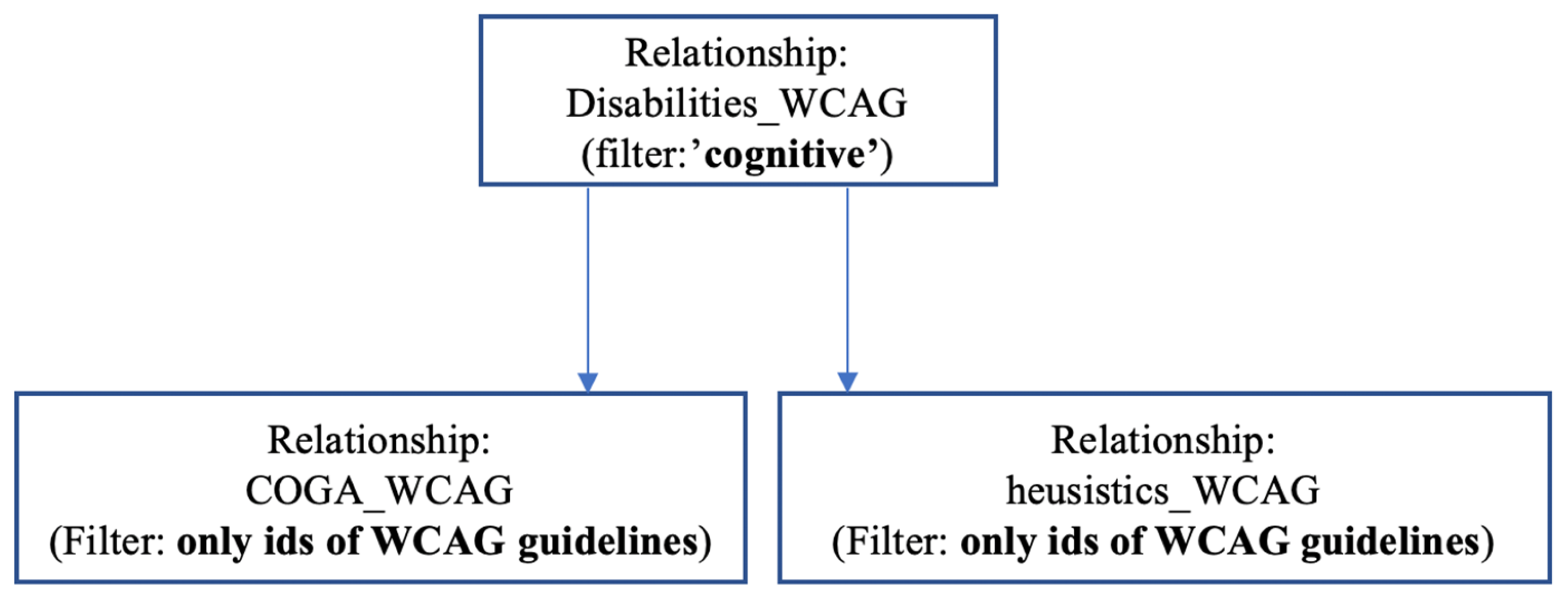
The aim of this step was to use the data obtained and related (in step 2) to select only those heuristics criteria and COGA guidelines that directly affect people with cognitive disabilities (see Figure 3 for the outline of the process). Therefore, the WCAG guidelines form ‘WCAG_Disabilities’ with the ‘cognitive’ disability were selected (see Table A4 (Appendix A)).
From this data, a filtering of the WCAG guidelines was performed in each of the tables: ‘heuristics_WCAG’ and ‘COGA_WCAG’, with the purpose of selecting only the Heuristics criteria and COGA guidelines that impacted most directly with people with cognitive disabilities. Table A5 (Appendix A) shows the selection of the heuristics criteria and Table A6 (Appendix A) shows the selection of the COGA guidelines.
Step 4. Conducting the Assessment
This step consists of carrying out the evaluation of the system with the guidelines obtained according ‘Heuristic criteria’ (Table A5 (Appendix A)) and the ‘COGA guidelines’ (Table A6 (Appendix A)) to the only those that have a more direct impact on people with cognitive disabilities. For this purpose, an Excel document (in two different sheets) was used to collect all the evaluator's data.
There are three possible responses from the evaluator:
- ‘pass’, indicating that it is not a problem in the assessed system
- ‘fail' indicates that the assessed criteria is not met in the assessed system.
- ‘NA' indicates “not applicable” and is selected by the assessor when the criteria cannot be assessed in the system.
Each of these outcomes has a value associated with it:
- ‘pass’ is a 1 when the criterion is met in the system.
- ‘fail’ is a 0 when the criterion is not fulfilled in the system.
- ‘NA’ is an empty field and will not be considered in the computation of the “U+Aindex”.
Complementarily, the evaluator can also include a textual observation that can clarify why he/she has chosen each option in the evaluation. This information can later be used to enrich the final quantitative result.
Step 5. Quantitative and Qualitative Results
Once the experimentation and completion of the usability and accessibility criteria with the evaluator's assessments have been carried out, we proceed to obtain the “U+A index” for each of the evaluations carried out. For this purpose, the criteria that have been considered as ‘pass’ are added up, with a value of ‘1’. Criteria that the assessor has classified as ‘Not Applicable’ (NA) have also been considered and will be excluded from the calculation to ensure the accuracy of the results.
No specific weighting is considered for each of the criteria, since the filter of criteria to be applied in each evaluation (usability or accessibility) already eliminates unimportant aspects in the evaluation and only the most relevant criteria are evaluated according to the evaluated disability. This is the case for both the U-index (1) and the A-index (2). The “U+AIndex” (3) the result is an index that is appropriate and optimised for the specific users that have been selected in the evaluation.
The formula to get the U-index is presented below:
U-index = [Σ of “PASS” / (All Heuristic Criteria – NA) ] *100
The formula to get the A-index is:
A-index= [Σ of “PASS” / (All COGA guidelines – NA) ] *100
Finally, both indices are added together and divided by 2 to obtain a single index.
U+Aindex = (U-index + A-index) / 2
4. Use Case
A use case was carried out to validate the proposal that allowed the evaluation of usability (with the heuristics) and accessibility (with the COGA) of interactive systems for people with cognitive disabilities.
4.1. Scope of the study
Four websites were selected. These websites are done to accessed by people with cognitive disabilities and older people. Fundació Viver Bell-lloc and Fundació Auria were chosen because they are websites aimed at presenting information from the foundations to people with cognitive disabilities and could usually be used by them. The imserso and senioric were chosen because they are two portals that offer information to the elderly.
- -
- Fundacio Viver Bell-lloc- https://www.vivelloc.cat/ca/
- -
- Fundacio auria: https://www.auria.org/
- -
- Imserso: https://imserso.es/web/imserso
- -
- Seniortic- https://www.seniortic.org/
Evaluating the homepage alone allows critical usability and accessibility issues to be identified from the user's first contact, as it contains representative design and navigation elements. It is also an efficient way to conduct an evaluation when resources are limited [49].
4.2. Experimentation
4.2.1. Selection of usability and accessibility guidelines
The starting point was the data from ‘Step 3. Adaptation of heuristics to disability’, as it already presented the list of ‘heuristic criteria’ and ‘COGA guidelines’ that most impacted people with cognitive disabilities. All of them were evaluated on the homepages of the selected websites.
4.2.2 Implementation of the assessment
We assessed all the items in each list (usability and accessibility). The items ‘passed’ the evaluation if it was met on the website. ‘NA’ as used when the criterion could not be applied because the website did not contain it.
The evaluation was carried out first on the heuristics criteria (Table A5 (Appendix A)) and then on COGA guidelines (Table A6 (Appendix A)).
4.2.3 Results
Once the assessments had been carried out, calculations were made in order to obtain a single cognitive u+a index.
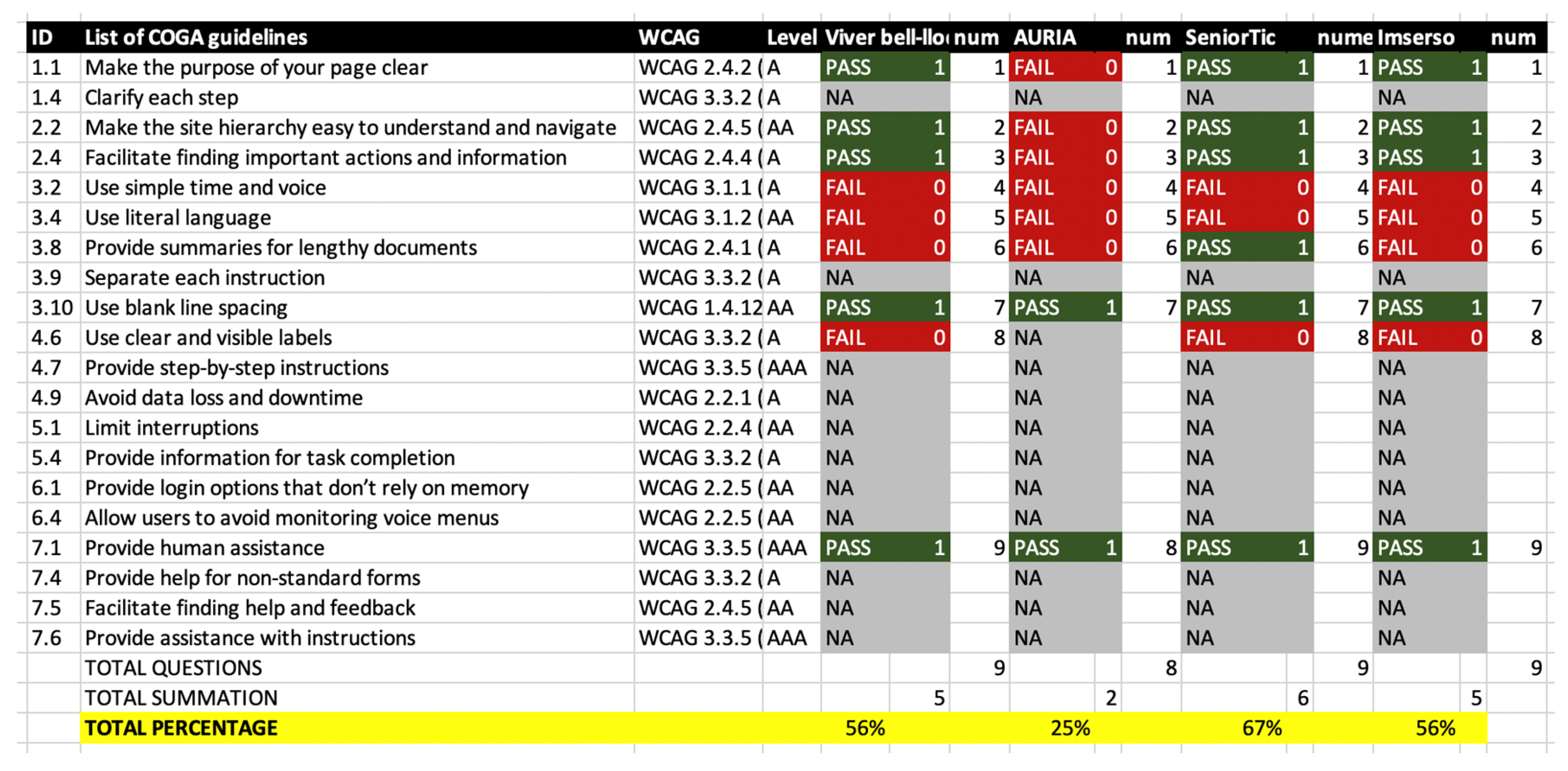
Calculations were performed for this purpose (presented in step 5 of the proposal). Table A7 and Table A8 present the results of whether ‘pass’, ‘fail’, ‘NA’ results from the user evaluation. These tables also include the points associated with each answer, together with the sum of questions to be applied to obtain an index.
As for the assessment of the U-index based on the ‘Heuristics criteria’, we get the table presented in Table A5 (Appendix A).
Table A7 shows the identifier of the heuristic, the description of the heuristic criterion and the WCAG criterion that is related to it for information purposes. Then, for each website evaluated, the answer, the score associated with the answer and the question number to be considered in the calculation of the index are presented.
Thus, 'Viver Bell-lloc' gets a U-index of 75%; 'Fundació Auria' gets a U-index of 57%; 'seniorTIC' gets a U-index of 75% and finally 'Imserso' gets a U-index of 75%.
Table A7 shows that the criteria evaluated for each website were different, despite the fact that the same U-index result was obtained in 3 of the 4 websites evaluated. As we can see on Table A4, there are differences between the assessment: about how links are presented, because they are not distinguishable on all websites and about the font size could be improved to facilitate the legibility of the content.
The assessment of the U-index is very low at the Fundació Auria (only 57%), because the main page of the website presents the information in a large font size and in an uncommon interactive format (there are titles in boxes that, when clicked, display more information).
As for the assessment of the A-index (cognitive) based on the ‘COGA guidelines’, we get the table presented in Table A6 (Appendix A).
Table A8 shows the identifier and description of the criterion and the associated WCAG guideline are presented here for information. Then, for each website evaluated, the rating (pass/fail/NA), the points associated with each answer and the question number to be considered in the calculation of the index are presented.
Table A8 shows that A-index has more variation in the results. In the case of the ‘viver bell-lloc foundation’, an A-index of 56% was obtained; the ‘Auria foundation’ gets a A-index of 25%; ‘seniorTIC’ gets a A-index of 67% and finally ‘Imserso’ gets a A-index of 56%.
The lowest value was obtained in the evaluation of the ‘Auria foundation’ as it presented a homepage interface with complex interactions. In the case of the other websites, all presented similar results, with the SeniorTIC website showing the best A-index result because it presents the information better when blog articles are displayed.
Once the U-index and A-index were calculated, the final calculation was made: U+A-index(cognitive). The results are shown in Table A9.
Table A9 shows that the three websites (Viver bell-lloc, SeniorTic and Imserso) are similar in terms of usability and accessibility, with the SeniorTic site being better in terms of cognitive accessibility. The highest U+Aindex value is obtained by the SeniorTIC website. With regard to ‘Auria foundation’, the website presents the information in a not very comprehensible way and with an unusual structure and interaction. It has been concluded that this website is not suitable for users with cognitive disabilities, as it is a website with information that is aimed more at companies.

Table A9.
U+A-index result table.
| Heuristics | COGA guidelines | TOTAL | |
| Viver bell-lloc | 75% | 56% | 65,28% |
| AURIA Foundation | 57% | 25% | 41,07% |
| SeniorTic | 75% | 67% | 70,83% |
| Imserso | 75% | 56% | 65,28% |
5. Discussion
We consider that addressing usability and accessibility with respect to cognitive diversity and developing a set of cognitive usability and accessibility heuristics was worth the effort and the results seem to confirm it. Although usability and accessibility are key aspects of the user experience of interactive systems, we argue that cognitive impairments are the least understood in usability and accessibility research. To fill (partially) this gap, we develop a list of heuristics that bring together usability and accessibility issues, hoping to facilitate the design and evaluation of better interactive systems, and quantifying the usability and accessibility of interactive systems for people with cognitive disabilities. The guidelines were developed with the support of Generative Artificial Intelligence, because the task of creating an integrated set of heuristics turned out to be far from straightforward, and the results of a case study show that the new set of heuristics can be effectively used.
The development of a set of criteria for assessing cognitive usability and accessibility, with people with intellectual disabilities in mind, would have been considerably more difficult without the use of generative AI. The main difficulty lies in the need to consult all the documentation for each WCAG guideline to see which COGA guideline or heuristic criterion it most directly relates to. This complexity is compounded if it has to be done manually because of the possibility of errors in these links. The use of Generative AI has significantly optimised time, effort and resources by providing a solid basis for evaluation through the generation of criteria filters, which would have otherwise been difficult to achieve. In addition, the proposals generated by generative AI have proven to be sufficiently accurate and have contributed to minimising human errors, such as those arising from evaluator fatigue, transfer of information between multiple sources or difficulty in interpreting data from different domains, such as usability and accessibility. These results present an interesting future scenario of Generative AI in HCI [42].
The exploratory case study shows that the cognitive U+A heuristics enable us to identify errors and quantify the level of usability and accessibility of web systems. The websites evaluated present different degrees of compliance of the heuristics, and this level corresponds to well-known design aspects, such as navigation structure and complex or unnatural interactions, which suggests that the heuristics are valid and might be applied by usability and accessibility professionals. The U+A index displays the websites organized in a ranking, which was another objective of the research presented in this paper.
5.1. Limitations
Regarding the quantification of usability, it could be done otherwise; for instance, we could have conducted a SUS survey [50]. However, a SUS survey is often conducted at the end of a user test, so that the user can assess their satisfaction with a system. With the results of the HE evaluation, an expert assessment is obtained which can be much more objective (and less biased by user tastes). Calculating a usability index considering the SUS index of user testing is not addressed in this research work, as only expert evaluations have been considered. The incorporation of user evaluations could be a further step to enrich the quantitative (and qualitative) data of the evaluations, and above all to obtain an index more adjusted to reality (combining an evaluation by experts and evaluation by users). This could be done in future studies.
Regarding the evaluation of accessibility with the WCAG guidelines, a numerical index of the level of compliance with each criterion can be obtained. However, accessibility criteria tend to be related to more than type of disability, i.e., there is no 1-to-1 relationship between accessibility issues and disabilities. Also, the usefulness of the quantification proposed in the article focuses on a very specific profile of users (people with cognitive disabilities). Future research can explore the U+A heuristics with specific types of intellectual disabilities.
Regarding the formula proposed to obtain the single index of cognitive U+A, it may be necessary to adjust the weights of each of the criteria; however, in this initial proposal, all the criteria have been considered to have the same weight and equal importance in terms of usability and accessibility. This proposal is supported by the filter of each criterion to be analysed only in users with a specific disability, in this case cognitive disability. In a next iteration of the calculation process, different weightings could be considered for each usability and accessibility criterion in order to adjust the index more precisely to the context of users with disabilities considered in the evaluation of the system.
We want to highlight that the data collection through the Generative AI system was an incipient result, and it would be necessary to explore other Generative AI tools to obtain complementary classifications and allow for a more accurate approximation of the criteria to be analysed according to a selected type of disability.
It should be noted that the criteria evaluated (the raw results of the Generative AI showed in tables) were not validated by a person beforehand. This was done consciously and was part of an important point in the experimentation, because we wanted to see whether the results obtained could be sufficiently satisfactory without the intervention of a person in this step.
6. Conclusion
The research work discussed in this paper presents a proposal for evaluating usability and accessibility together. The proposal focuses on the context of users with cognitive disabilities. Generative AI has been used to generate a set of cognitive usability and accessibility heuristics. These GenAI-generated heuristics are useful to evaluate the usability and accessibility of web sites for people with intellectual disabilities. A ranking of websites optimised for people with cognitive and learning disabilities has been obtained.
Future research includes the development of an U+A index to address different types of disabilities, because the process carried out to obtain this index is ‘scalable’ and can be modified to take into account other disabilities. For example, different lists of usability and accessibility heuristics could be created for different disabilities (total visual, low vision, motor and hearing) if another disability was selected in step 3 of the methodology. Also, evaluation of other websites considering usability and accessibility heuristics as well as considering different user profiles with disabilities is needed.
Supplementary Materials
Appendix A
This appendix shows the tables created in order to carry out the experimentation.
Table A1.
‘WCAG_Disabilities’, List of WCAG guidelines and disabilities.
| WCAG Success Criterion | Level | Versions | Disabilities |
| 1.1.1: Non-text Content | A | Blind, Deaf, Deaf-blind | |
| 1.2.1: Audio-only and Video-only (Prerecorded) | A | Blind, Deaf, Deaf-blind, Cognitive | |
| 1.2.2: Captions (Prerecorded) | A | Deaf | |
| 1.2.3: Audio Description or Media Alternative (Prerecorded) | A | Blind | |
| 1.2.4: Captions (Live) | AA | Deaf | |
| 1.2.5: Audio Description (Prerecorded) | AA | Blind, Low vision,Cognitive | |
| 1.2.6 Sign Language (Prerecorded) | AAA | Deaf | |
| 1.2.7 Extended Audio Description (Prerecorded) | AAA | Blind, Deaf, Deaf-blind, Cognitive | |
| 1.2.8 Media Alternative (Prerecorded) | AAA | Deaf, Deaf-blind, Low Vision | |
| 1.2.9 Audio-only (Live) | AAA | Deaf | |
| 1.3.1: Info and Relationships | A | Blind, Deaf-blind | |
| 1.3.2: Meaningful Sequence | A | Blind | |
| 1.3.3: Sensory Characteristics | A | Blind, Low Vision | |
| 1.3.4: Orientation | AA | New in 2.1 | Low vision,Motor |
| 1.3.5: Identify Input Purpose | AA | New in 2.1 | Motor, Cognitive, Languaje and learning |
| 1.3.6 Identify Purpose | AAA | Cognitive, Languaje and learning | |
| 1.4.1: Use of Color | A | Low vision,color-blindness | |
| 1.4.2: Audio Control | A | Blind | |
| 1.4.3: Contrast (Minimum) | AA | Low vision,color-blindness | |
| 1.4.4: Resize text | AA | Low Vision | |
| 1.4.5: Images of Text | AA | Low vision,Cognitive | |
| 1.4.6 Contrast (Enhanced) | AAA | Low vision,color-blindness | |
| 1.4.7 Low or No Background Audio | AAA | Low Deaf | |
| 1.4.8 Visual Presentation | AAA | Low vision,Cognitive, Languaje and learning | |
| 1.4.9 Images of Text (No Exception) | AAA | Low vision,Cognitive, Languaje and learning | |
| 1.4.10: Reflow | AA | New in 2.1 | Low Vision |
| 1.4.11: Non-text Contrast | AA | New in 2.1 | Low Vision |
| 1.4.12: Text Spacing | AA | New in 2.1 | Low vision,Cognitive |
| 1.4.13: Content on Hover or Focus | AA | New in 2.1 | Low vision,Motor, Cognitive |
| 2.1.1: Keyboard | A | Blind, Low vision,hand tremors | |
| 2.1.2: No Keyboard Trap | A | Blind, Motor | |
| 2.1.3 Keyboard (No Exception) | AAA | Blind, low vision | |
| 2.1.4: Character Key Shortcuts | A | New in 2.1 | Motor, Languaje and learning |
| 2.2.1: Timing Adjustable | A | Blind, Deaf, Low vision,Motor, Cognitive, Languaje and learning, Reading disabilities | |
| 2.2.2: Pause, Stop, Hide | A | Deaf | |
| 2.2.3 No Timing | AAA | Blind, Deaf, Low vision,Motor, Cognitive, Languaje and learning | |
| 2.2.4 Interruptions | AAA | Low vision,atention deficit disorders | |
| 2.2.5 Re-authenticating | AAA | Deaf, Cognitive | |
| 2.2.6 Timeouts | AAA | Cognitive | |
| 2.3.1: Three Flashes or Below Threshold | A | Photosensitive epilepsy | |
| 2.3.2 Three Flashes | AAA | Photosensitive epilepsy | |
| 2.3.3 Animation from Interactions | AAA | Vestibular Disorder | |
| 2.4.1: Bypass Blocks | A | Low vision,Cognitive | |
| 2.4.2: Page Titled | A | visual impairments, severe mobility impairments, Cognitive, Reading disabilities, Short-term memory | |
| 2.4.3: Focus Order | A | visual impairments, Motor, Reading disabilities | |
| 2.4.4: Link Purpose (In Context) | A | visual disabilities, Motor, Cognitive | |
| 2.4.5: Multiple Ways | AA | visual impairments, Cognitive | |
| 2.4.6: Headings and Labels | AA | visual impairments, Reading disabilities, Short-term memory | |
| 2.4.7: Focus Visible | AA | Low vision,Motor, Attention limitations | |
| 2.4.8 Location | AAA | Attention limitations | |
| 2.4.9 Link Purpose (Link Only) | AAA | Blind, Languaje and learning | |
| 2.4.10 Section Headings | AAA | Attention limitations, Short-term memory | |
| 2.4.11 Focus Not Obscured (Minimum) | AA | New in 2.2 | Low vision,Motor, Cognitive |
| 2.4.12 Focus Not Obscured (Enhanced) | AAA | New in 2.2 | Low vision,Motor, Cognitive |
| 2.4.13 Focus Appearance | AAA | New in 2.2 | Motor, Cognitive |
| 2.5.1: Pointer Gestures | A | New in 2.1 | Motor |
| 2.5.2: Pointer Cancellation | A | New in 2.1 | Blind, Low vision,Motor, Cognitive |
| 2.5.3: Label in Name | A | New in 2.1 | Blind, Speech-input users |
| 2.5.4: Motion Actuation | A | New in 2.1 | Motor |
| 2.5.5 Target Size (Enhanced) | AAA | Low vision,Motor | |
| 2.5.6 Concurrent Input Mechanisms | AAA | Motor, Speech-input users | |
| 2.5.7 Dragging Movements | AA | New in 2.2 | Motor |
| 2.5.8 Target Size (Minimum) | AA | New in 2.2 | Motor |
| 3.1.1: Language of Page | A | Blind, Cognitive, Languaje and learning, Reading disabilities | |
| 3.1.2: Language of Parts | AA | Blind, Cognitive, Languaje and learning, Reading disabilities | |
| 3.1.3 Unusual Words | AAA | Low vision,Languaje and learning | |
| 3.1.4 Abbreviations | AAA | Low vision,Languaje and learning | |
| 3.1.5 Reading Level | AAA | Cognitive, Languaje and learning, Reading disabilities | |
| 3.1.6 Pronunciation | AAA | Cognitive, Languaje and learning, Reading disabilities | |
| 3.2.1: On Focus | A | visual, Motor, Cognitive | |
| 3.2.2: On Input | A | Blind, Low vision,intellectual disabilities, Reading disabilities | |
| 3.2.3: Consistent Navigation | AA | cognitive limitations,ow vision, intellectual disabilities, blind. | |
| 3.2.4: Consistent Identification | AA | Reading disabilities | |
| 3.2.5 Change on Request | AAA | Blind, Low vision,Cognitive, Reading disabilities, dificulty interpreting visual | |
| 3.2.6 Consistent Help | A | New in 2.2 | Cognitive, Languaje and learning |
| 3.3.1: Error Identification | A | Blind, color blind, Cognitive, Languaje and learning | |
| 3.3.2: Labels or Instructions | A | Cognitive, Languaje and learning | |
| 3.3.3: Error Suggestion | AA | Blind, impairment vision, Motor, Learning | |
| 3.3.4: Error Prevention (Legal, Financial, Data) | AA | All disabilities | |
| 3.3.5 Help | AAA | Intellectual disabilities, writing disabilities, Reading disabilities | |
| 3.3.6 Error Prevention (All) | AAA | All disabilities | |
| 3.3.7 Redundant Entry | A | New in 2.2 | Cognitive |
| 3.3.8 Accessible Authentication (Minimum) - NEW in 2.2 | AA | New in 2.2 | Cognitive |
| 3.3.9 Accessible Authentication (Enhanced) | AAA | New in 2.2 | Intellectual disabilities, writing disabilities, Reading disabilities |
| 4.1.1: Parsing | A | All disabilities | |
| 4.1.2: Name, Role, Value | A | Blind | |
| 4.1.3: Status Messages | AA | New in 2.1 | Blind |
Table A2. ‘Heuristis_WCAG’ relationship.
Excel Document: Tables-1-2-3.xls (Tabla2)
Table A3. ‘COGA_WCAG’ relationship.
Excel Document: Tables-1-2-3.xls (Tabla3)
Table A4.
‘WCAG_Disabilities’. Relationship between WCAG guidelines and disability where Disability is ‘cognitive or learning’.
Table A4.
‘WCAG_Disabilities’. Relationship between WCAG guidelines and disability where Disability is ‘cognitive or learning’.
| WCAG Success Criterion related with disabilities (cognitive) | Level | Versions |
|---|---|---|
| 1.2.1: Audio-only and Video-only (Prerecorded) | A | |
| 1.2.5: Audio Description (Prerecorded) | AA | |
| 1.2.7 Extended Audio Description (Prerecorded) | AAA | |
| 1.3.5: Identify Input Purpose | AA | New in 2.1 |
| 1.3.6 Identify Purpose | AAA | |
| 1.4.5: Images of Text | AA | |
| 1.4.8 Visual Presentation | AAA | |
| 1.4.9 Images of Text (No Exception) | AAA | |
| 1.4.12: Text Spacing | AA | New in 2.1 |
| 1.4.13: Content on Hover or Focus | AA | New in 2.1 |
| 2.2.1: Timing Adjustable | A | |
| 2.2.3 No Timing | AAA | |
| 2.2.4 Interruptions | AAA | |
| 2.2.5 Re-authenticating | AAA | |
| 2.2.6 Timeouts | AAA | |
| 2.4.1: Bypass Blocks | A | |
| 2.4.2: Page Titled | A | |
| 2.4.4: Link Purpose (In Context) | A | |
| 2.4.5: Multiple Ways | AA | |
| 2.4.11 Focus Not Obscured (Minimum) | AA | New in 2.2 |
| 2.4.12 Focus Not Obscured (Enhanced) | AAA | New in 2.2 |
| 2.4.13 Focus Appearance | AAA | New in 2.2 |
| 2.5.2: Pointer Cancellation | A | New in 2.1 |
| 3.1.1: Language of Page | A | |
| 3.1.2: Language of Parts | AA | |
| 3.2.1: On Focus | A | |
| 3.2.2: On Input | A | |
| 3.2.5 Change on Request | AAA | |
| 3.2.6 Consistent Help | A | New in 2.2 |
| 3.3.1: Error Identification | A | |
| 3.3.2: Labels or Instructions | A | |
| 3.3.5 Help | AAA | |
| 3.3.7 Redundant Entry | A | New in 2.2 |
| 3.3.8 Accessible Authentication (Minimum) | AA | New in 2.2 |
Table A5.
‘Heuristis_WCAG’ relationship. Join between heuristic criteria and WCAG guidelines from Table A2.
Table A5.
‘Heuristis_WCAG’ relationship. Join between heuristic criteria and WCAG guidelines from Table A2.
| ID | Description | Related WCAG 2.2 Criterion | Level |
|---|---|---|---|
| 1.1 | Does the application visibly include the title of the page, section, or site? | WCAG 2.4.2 (Page Titles) | A |
| 1.4 | Are the links clearly defined? | WCAG 2.4.4 (Link Purpose) | A |
| 3.1 | Is there a link to return to the initial state or homepage? | WCAG 2.4.5 (Multiple Ways) | AA |
| 4.1 | Do the link labels have the same names as their destinations? | WCAG 2.4.4 (Link Purpose) | A |
| 5.1 | Is it easy to use the system for the first time? | WCAG 3.2.1 (On Focus) | A |
| 5.1 | Is it easy to use the system for the first time? | WCAG 3.2.2 (On Input) | A |
| 5.2 | Is it easy to find information that has been previously searched for? | WCAG 2.4.5 (Multiple Ways) | AA |
| 5.3 | Can the system be used at all times without having to remember previous screens? | WCAG 2.4.4 (Link Purpose) | A |
| 6.2 | If they exist, is it clear how to use them? | WCAG 3.3.2 (Labels or Instructions) | A |
| 6.3 | When performing any action for the first time, is it clear how to perform it permanently? | WCAG 3.2.1 (On Focus) | A |
| 6.6 | Is the user always kept occupied? (Without unnecessary waiting times) | WCAG 3.2.2 (On Input) | A |
| 6.6 | Is the user always kept occupied? (Without unnecessary waiting times) | WCAG 3.3.1 (Error Identification) | A |
| 7.2 | Are the errors made displayed in real-time? | WCAG 3.3.1 (Error Identification) | A |
| 8.2 | Is it clear what needs to be entered in each form field? | WCAG 3.3.2 (Labels or Instructions) | AAA |
| 8.3 | Does the search engine tolerate typographical and spelling errors? | WCAG 3.3.5 (Help Text) | AAA |
| 9.1 | Has a design been used without redundancy of information? | WCAG 1.4.8 (Visual Presentation) | AA |
| 9.2 | Is the textual information concise and precise? | WCAG 1.4.5 (Images of Text) | AA |
| 9.4 | Is the text structure correct, with short and easy-to-interpret sentences? | WCAG 1.4.5 (Images of Text) | AA |
| 10.2 | If it exists, is it visible and easily accessible? | WCAG 2.4.5 (Multiple Ways) | A |
| 10.3 | Is the help oriented towards problem-solving? | WCAG 3.3.2 (Labels or Instructions) | AA |
| 10.4 | Is there a frequently asked questions section? | WCAG 2.4.5 (Multiple Ways) | A |
| 11.1 | Can users continue from a previous state they left in at another time or from another device? | WCAG 2.5.2 (On Focus) | A |
| 11.2 | Is the "autosave" utility implemented? | WCAG 3.2.2 (On Input) | A |
| 11.3 | Does it respond well to external failures? (Power outages, internet disruptions, etc.) | WCAG 3.2.2 (On Input) | AA |
| 12.1 | Are the text fonts of an adequate size? | WCAG 1.4.12 (Text Spacing) | A |
| 15.2 | Is the remaining time or some animation shown for heavy tasks being executed? | WCAG 2.2.1 (Timing Adjustable) | A |
Table A6.
‘COGA_WCAG’ relationship. Join between COGA guidelines and WCAG guidelines from Table A2.
| Recommendation | Description | WCAG 2.2 Guideline |
| 1.1. Make the purpose of your page clear | Clarity in the purpose of the page and its content. | WCAG 2.4.2 (Page Title) |
| 1.4. Clarify each step | Provide clear explanations about the steps involved in tasks. | WCAG 3.3.2 (Labels or Instructions) |
| 2.2. Make the site hierarchy easy to understand | Ensure clarity in the site's structure for effective navigation. | WCAG 2.4.5 (Multiple Ways) |
| 2.4. Facilitate finding important actions/info | Place key actions in prominent locations. | WCAG 2.4.4 (Link Purpose) |
| 3.2. Use simple time and voice | Avoid complex grammatical structures. | WCAG 3.1.1 (Page Language) |
| 3.4. Use literal language | Avoid figurative or confusing language. | WCAG 3.1.2 (Language of Parts) |
| 3.8. Provide summaries for lengthy documents | Include clear summaries for long or complex documents. | WCAG 2.4.1 (Bypass Blocks) |
| 3.9. Separate each instruction | Keep instructions in separate steps. | WCAG 3.3.2 (Labels or Instructions) |
| 3.10. Use blank line spacing | Prevent content from blending with other visual elements. | WCAG 1.4.12 (Text Spacing) |
| 4.6. Use clear and visible labels | Ensure well-visible and understandable labels for each field. | WCAG 3.3.2 (Labels or Instructions) |
| 4.7. Provide step-by-step instructions | Offer clear and detailed instructions on how to perform a task. | WCAG 3.3.5 (Help Text) |
| 4.9. Avoid data loss and downtime | Prevent data loss when time is limited or connections fail. | WCAG 2.2.1 (Timing Adjustable) |
| 5.1. Limit interruptions | Minimize interruptions during task completion. | WCAG 2.2.4 (Interruptions Avoidable) |
| 5.4. Provide information for task completion | Include all necessary information to complete a task without overloading the user. | WCAG 3.3.2 (Labels or Instructions) |
| 6.1. Offer login options that don’t rely on memory | Provide login options that do not require remembering a lot of information. | WCAG 2.2.5 (Authentication Help) |
| 6.4. Allow users to avoid monitoring voice menus | Do not require users to remember long lists of options. | WCAG 2.2.5 (Authentication Help) |
| 7.1. Provide human assistance | Make human assistance available when needed. | WCAG 3.3.5 (Help Text) |
| 7.4. Provide help for non-standard forms | Include clear instructions on how to use non-traditional forms. | WCAG 3.3.2 (Labels or Instructions) |
| 7.5. Facilitate finding help and feedback | Include visible links to access help. | WCAG 2.4.5 (Multiple Ways) |
| 7.6. Provide assistance with instructions | Offer clear assistance for completing tasks or following instructions. | WCAG 3.3.5 (Help Text) |
Table A7.
List of results of heuristics criteria evaluation.
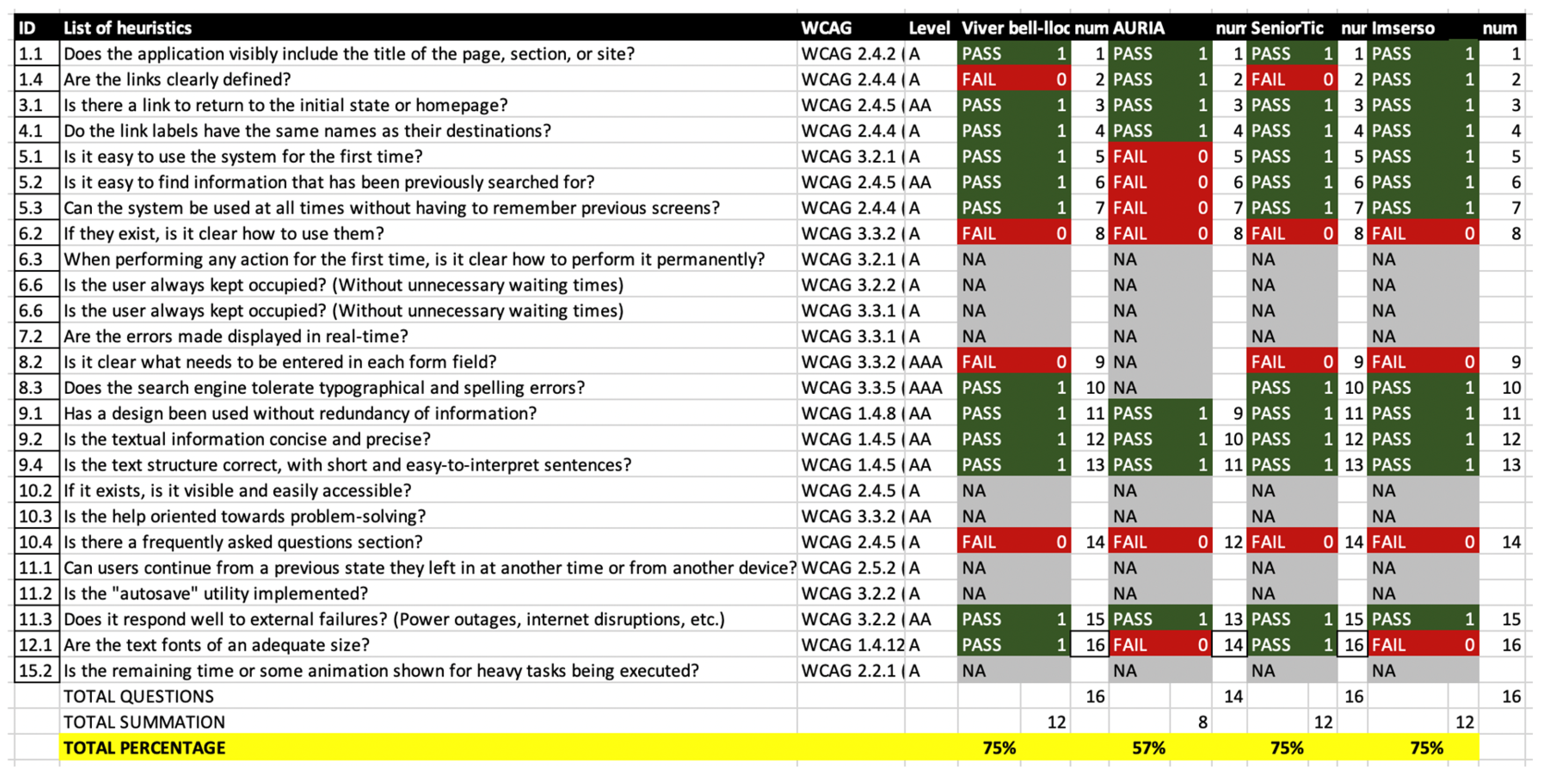
Table A8.
List of results of COGA guideline evaluation
References
- Digital 2024: Global Overview Report (2024). Disponible en: https://datareportal.com/reports/digital-2024-global-overview-report.
- World Report on Disability 2011 https://www.who.int/teams/noncommunicable-diseases/sensory-functions-disability-and-rehabilitation/world-report-on-disability.
- World Health Organization: Summary World Report on Disability (2011). Available in https://cutt.ly/ZrDBPje.
- Universal Declaration of Human Rights. (2022) https://www.un.org/es/about-us/universal-declaration-of-human-rights.
- Novak, ME y Paciello, MG (2002). La conquista de la accesibilidad de X-Windows: desarrollo para personas con discapacidades. The Paciello Group. [en línea] Disponible en: http://www.paciellogroup.com/resources/whitepapers/WPX-Windows.htm.
- Hudson, R., Weakley, R. y Firminger, P. (2005). Una frontera de accesibilidad: discapacidades cognitivas y dificultades de aprendizaje. Webusability – Servicios de accesibilidad y usabilidad. http://www.usability.com.au/resources/cognitive.php.
- ISO/CD 9241-11. Ergonomics of human-system interaction–Part 11: Guidance on usability (1998). http://www.iso.org/iso/catalogue_detail.htm?csnumber=63500.
- Introduction to web accessibility (2018). Available in https://www.w3.org/standards/webdesign/accessibility.
- Evaluating Web Accessibility Overview (2020). Available in https://www.w3.org/WAI/test-evaluate/.
- Quintal, C., Macías, J.A. Measuring and improving the quality of development processes based on usability and accessibility. Univ Access Inf Soc 20, 203–221 (2021). [CrossRef]
- González, M. P., Pascual, A., & Lorés, J. (2001). Evaluación heurística. 2001). Introducción a la Interacción Persona-Ordenador. AIPO: Asociación Interacción Persona-Ordenador.
- WCAG 2 Overview (2024). https://www.w3.org/WAI/standards-guidelines/wcag/.
- Cockton, G. (2014, January 1). Usability Evaluation. Interaction Design Foundation - IxDF. https://www.interaction-design.org/literature/book/the-encyclopedia-of-human-computer-interaction-2nd-ed/usability-evaluation.
- La Interacción Persona Ordenador (2001) Asociación en Interacción Persona Ordenador. ISBN: 84-607-2255-4. Available in https://aipo.es/educacion/material-editado-por-aipo/?id_rec=2.
- Polson P Rieman J Wharton C Olson J Kitajima M . Usability inspection methods: rationale and examples. The 8th Human Interface Symposium (HIS92). Kawasaki, Japan. 1992;1992:377–384.
- Jeffries R Miller JR Wharton C Uyeda K . User interface evaluation in the real world: a comparison of four techniques. Proceedings of the SIGCHI Conference on Human Factors in Computing Systems. ACM. 1991;1991:119–124.
- Nielsen J . Finding usability problems through heuristic evaluation. Proceedings of the SIGCHI Conference on Human Factors in Computing Systems. ACM. 1992;1992:373–380.
- C. Jimenez, P. Lozada and P. Rosas, "Usability heuristics: A systematic review," 2016 IEEE 11th Colombian Computing Conference (CCC), Popayan, Colombia, 2016, pp. 1-8. [CrossRef]
- Nielsen, J.: 10 Usability Heuristics for User Interface Design [Online Resource]. https://www.nngroup.com/articles/ten-usability-heuristics/.
- Durães Dourado, Marcos Antonio & Canedo, E.D.. (2018). Usability Heuristics for Mobile Applications - A Systematic Review. 483-494. [CrossRef]
- Kuhail, M. A., Farooq, S., & Almutairi, S. (2023). Recent Developments in Chatbot Usability and Design Methodologies. In M. Kuhail, B. Abu Shawar, & R. Hammad (Eds.), Trends, Applications, and Challenges of Chatbot Technology (pp. 1-23). IGI Global. [CrossRef]
- Vieira, Estela & Silveira, Aleph & Martins, Ronei. (2019). Heuristic Evaluation on Usability of Educational Games: A Systematic Review. Informatics in Education. 18. 427-442. [CrossRef]
- Omar K, Fakhouri H, Zraqou J, Marx Gómez J. Usability Heuristics for Metaverse. Computers. 2024; 13(9):222. [CrossRef]
- González, Marta & Masip, Llúcia & Granollers, Toni & Oliva, Marta. (2008) Análisis Cuantitativo en un Experimento de Evaluación Heurística. IX Congreso Internacional Interacción,.
- Bonastre, L., Granollers, T.: A set of heuristics for user experience evaluation in Ecommerce websites. In: Proceedings of the Seventh International Conference on Advances in Computer-Human Interactions, ACHI 2014, pp. 27–34 (2014). ISBN 978-1-61208-325-.
- B. Tognazzini, “First Principles, HCI Design, Human Computer Interaction (HCI), Principles of HCI Design, Usability Testing“. [Online]. Available from: http://www.asktog.com/basics/firstPrinciples.html, 2014.
- Pascual-Almenara, Afra & Saltiveri, Toni & Navarro, Juan & Albets, Marta. (2024). Enhancing Usability Assessment with a Novel Heuristics-Based Approach Validated in an Actual Business Setting. Journal on Interactive Systems. 15. 615-631. [CrossRef]
- Onay Durdu, P. & Soydemir, Ö. N. (2022). A Systematic Review of Web Accessibility Metrics. In Y. Akgül (Ed.), App and Website Accessibility Developments and Compliance Strategies (pp. 77-108). IGI Global. [CrossRef]
- Firas Masri, Sergio Luján-Mora. A Combined Agile Methodology for the Evaluation of Web Accessibility. IADIS International Conference Interfaces and Human Computer Interaction 2011 (IHCI 2011), p. 423-428, Rome (Italy), July 24-26 2011. ISBN: 978-972-8939-52-6.
- Web Accessibility Evaluation Tools List (2024). https://www.w3.org/WAI/test-evaluate/tools/list/.
- Brajnik, Giorgio & Vigo, Markel. (2019). Automatic Web Accessibility Metrics: Where We Were and Where We Went. 10.1007/978-1-4471-7440-0_27.
- André P. Freire, Renata P. M. Fortes, Marcelo A. S. Turine, and Debora M. B. Paiva. 2008. An evaluation of web accessibility metrics based on their attributes. In Proceedings of the 26th annual ACM international conference on Design of communication (SIGDOC '08). Association for Computing Machinery, New York, NY, USA, 73–80. [CrossRef]
- Web Content Accessibility Guidelines 2.2 (WCAG). World Wide Web Consortium (W3C) (2023). http://www.w3.org/TR/WCAG22/.
- Making Content Usable for People with Cognitive and Learning Disabilities. (2021) https://www.w3.org/TR/coga-usable.
- Ana Luiza Dias, Renata Pontin de Mattos Fortes, and Paulo Cesar Masiero. Heua: A heuristic evaluation with usability and accessibility requirements to assess web systems. In Proceedings of the 11th Web for All Conference, pages 18:1–18:4, New York, NY, USA, 2014. ACM.
- Rodrigues, Sandra & Fortes, Renata. (2020). A Checklist for the Evaluation of Web Accessibility and Usability for Brazilian Older Adults. Journal of Web Engineering (JWE). 19. 63-108. [CrossRef]
- Tateo, L. (2021). Web accessibility and usability: limits and perspectives. Workshop on Technology Enhanced Learning Environments for Blended Education.
- Moreno, Lourdes & Martinez, Paloma & Ruíz-Mezcua, Belén. (2009). A Bridge to Web Accessibility from the Usability Heuristics. 290-300. [CrossRef]
- Alba Bisante, Venkata Srikanth Varma Datla, Emanuele Panizzi, Gabriella Trasciatti, and Stefano Zeppieri. 2024. Enhancing Interface Design with AI: An Exploratory Study on a ChatGPT-4-Based Tool for Cognitive Walkthrough Inspired Evaluations. In Proceedings of the 2024 International Conference on Advanced Visual Interfaces (AVI '24). Association for Computing Machinery, New York, NY, USA, Article 41, 1–5. [CrossRef]
- P. Acosta-Vargas, G. Acosta-Vargas, B. Salvador-Acosta and J. Jadán-Guerrero, "Addressing Web Accessibility Challenges with Generative Artificial Intelligence Tools for Inclusive Education," 2024 Tenth International Conference on eDemocracy & eGovernment (ICEDEG), Lucerne, Switzerland, 2024, pp. 1-7. [CrossRef]
- Eric York. 2023. Evaluating ChatGPT: Generative AI in UX Design and Web Development Pedagogy. In Proceedings of the 41st ACM International Conference on Design of Communication (SIGDOC '23). Association for Computing Machinery, New York, NY, USA, 197–201. [CrossRef]
- Interactions. Volume XXXI.1 January - February 2024 https://interactions.acm.org/archive/toc/january-february-2024/https://interactions.acm.org/archive/toc/january-february-2024/.
- Pascual-Almenara, A. and Granollers-Saltiveri, T. (2021).Combining two inspection methods: Usability heuristicevaluationandwcagguidelinestoassesse-commerceweb-sites. In Ruiz, P. H., Agredo-Delgado, V., and Kawamoto,A. L. S., editors,Human-Computer Interaction, pages 1–16, Cham. Springer International Publishing.
- Granollers, T. Albets, Marta (2021). Heuristic Evaluations new proposal. https://mpiua.invid.udl.cat/evaluacion-heuristica-una-nueva-propuesta/.
- WCAG 2.2 Understanding Docs (2023). https://www.w3.org/WAI/WCAG22/Understanding/.
- Casare, Andréia & Guimarães da Silva, Celmar & Martins, Paulo & Moraes, Regina. (2019). Mapping WCAG Guidelines to Nielsen's Heuristics. [CrossRef]
- García Muñoz, O. Pautas de accesibilidad cognitiva web (2020). García Muñoz, O (Plena Inclusión Madrid). https://plenainclusionmadrid.org/wp-content/uploads/2020/12/Guia-Pautas-Accesibilidad-2020-final.pdf.
- M. Campoverde-Molina, S. Luján-Mora and L. V. García, "Empirical Studies on Web Accessibility of Educational Websites: A Systematic Literature Review," in IEEE Access, vol. 8, pp. 91676-91700, 2020. [CrossRef]
- Nielsen, J., & Tahir, M. (2001). Homepage usability: 50 websites deconstructed. New Riders Press.
- Brooke J. (1996). SUS: A ‘quick and dirty’ usability scale. In Jordan P.W., Thomas B., Weerdmeester A., McClelland I.I. (Eds.) Usability evaluation in industry, london (pp 189-194). Taylor & Francis.
Figure 1.
Steps for development of the research.

Figure 2.
Relational schema of the information on which the heuristics have been based (all relationships are n..n).
Figure 2.
Relational schema of the information on which the heuristics have been based (all relationships are n..n).
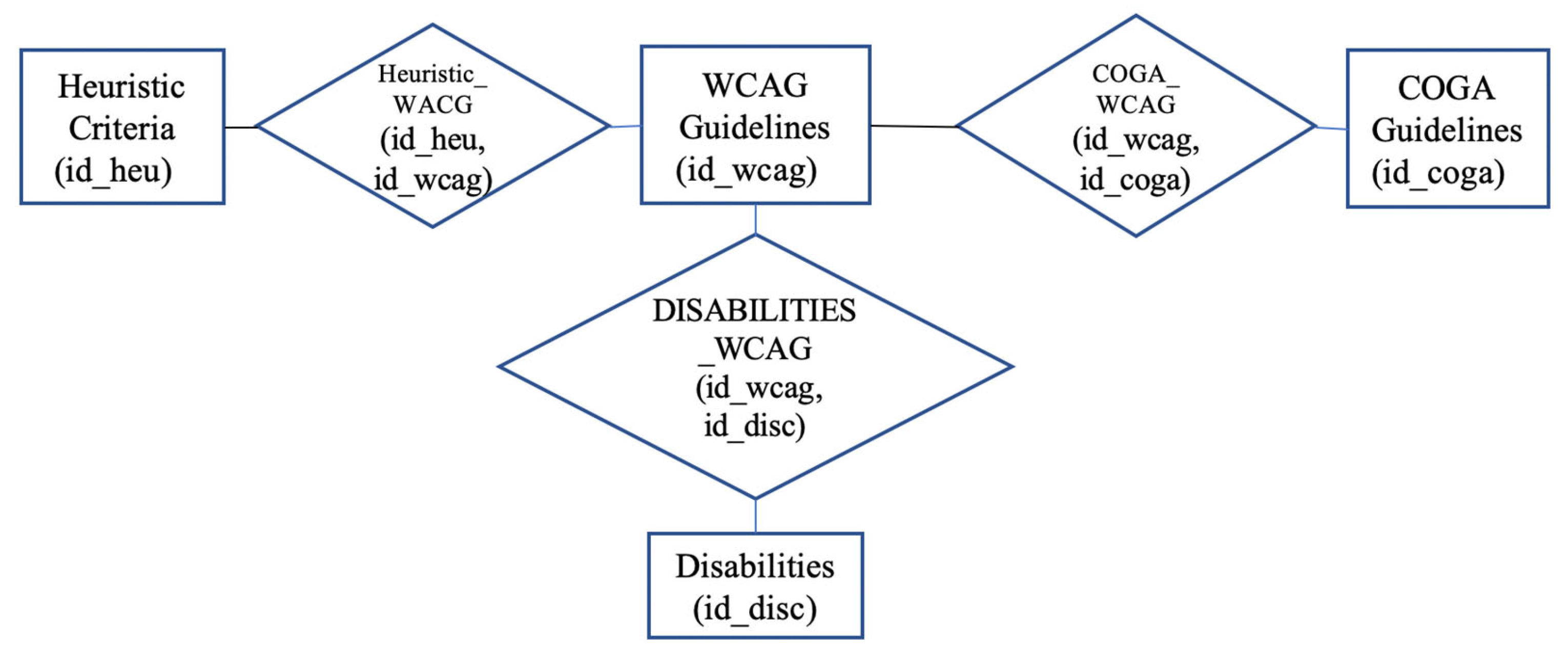
Figure 3.
Information filters with ‘cognitive’ disability.
Disclaimer/Publisher’s Note: The statements, opinions and data contained in all publications are solely those of the individual author(s) and contributor(s) and not of MDPI and/or the editor(s). MDPI and/or the editor(s) disclaim responsibility for any injury to people or property resulting from any ideas, methods, instructions or products referred to in the content. |
© 2024 by the authors. Licensee MDPI, Basel, Switzerland. This article is an open access article distributed under the terms and conditions of the Creative Commons Attribution (CC BY) license (http://creativecommons.org/licenses/by/4.0/).
Copyright: This open access article is published under a Creative Commons CC BY 4.0 license, which permit the free download, distribution, and reuse, provided that the author and preprint are cited in any reuse.


