

Submitted:
10 April 2026
Posted:
14 April 2026
You are already at the latest version
Abstract
The preparation of annotated datasets remains a critical bottleneck in the machine learning (ML) pipeline. Existing tools are fragmented across cloud-hosted services, self-hosted web applications, and lightweight desktop tools—none simultaneously ad-dressing diverse annotation modalities, offline-first operation, integrated training, and serverless collaboration. We present Annotix, an open-source, cross-platform desktop application built on a Rust backend (Tauri 2) and React 19 frontend, designed to unify the entire ML data preparation workflow within a single privacy-preserving environ-ment. To evaluate its practical utility, we conducted a controlled annotation efficiency study using 60 synthetic images (bounding box and mask tasks) annotated by three expert evaluators across Annotix, CVAT, and Label Studio, analyzed via Krus-kal-Wallis with Dunn–Bonferroni post-hoc tests, and a heuristic usability evaluation over standardized tasks on real medical images (retinographies and otoscopies). Re-sults demonstrate that Annotix achieves statistically significant annotation efficiency relative to established tools while offering substantially broader feature coverage, in-cluding 7 image annotation primitives, 19 ML training backends, ONNX-based infer-ence-assisted labeling, and serverless P2P collaboration. Annotix provides a complete, privacy-preserving ML data preparation workflow suited to regulated domains such as medical imaging and ecological monitoring and is freely available under the MIT license.
Keywords:
data annotation
; computer vision
; machine learning pipeline
; collaborative labeling
; object detection
; image segmentation
; time-series analysis
; desktop application
; ONNX inference
; peer-to-peer collaboration
1. Introduction
Supervised machine learning methods require large volumes of accurately labeled data to achieve robust generalization. In computer vision alone, tasks such as object detection [1], semantic segmentation [2], instance segmentation [3], pose estimation [4], and oriented object detection [5] each demand distinct annotation modalities—bounding boxes, pixel-level masks, keypoint skeletons, and rotated rectangles, respectively. Beyond vision, time-series classification [6], anomaly detection [7], and forecasting [8] introduce additional labeling paradigms that few existing tools address. The heterogeneity of these requirements forces practitioners to adopt multiple disjoint tools, leading to fragmented workflows, format conversion errors, and significant overhead in dataset management.
Current annotation solutions fall into three broad categories: (i) cloud-hosted services (Roboflow [9], V7 [10], Supervisely [11]), which offer rich functionality but require uploading data to third-party servers, a constraint incompatible with privacy-sensitive domains such as clinical research and defense; (ii) self-hosted web applications (CVAT [12], Label Studio [13]), which provide flexibility but demand non-trivial server infrastructure and DevOps expertise; and (iii) lightweight desktop tools (LabelImg [14], LabelMe [15], MakeSense [16]), which operate offline but support limited annotation types and lack integration with training pipelines. None of these categories simultaneously satisfies the requirements of diverse annotation modalities, offline-first data sovereignty, integrated multi-framework training, model-assisted labeling, and real-time collaboration without centralized servers. This fragmentation is particularly consequential in regulated application domains such as medical imaging, where data sovereignty is a hard constraint and annotation tooling has been identified as a critical bottleneck in the ML pipeline [17]. Prior work on annotation quality in medical imaging has further highlighted that tool design directly influences annotator behavior and inter-annotator variability [18], underscoring the importance of usability alongside functional coverage.
We present Annotix to address this gap. The key contributions of this work are: (1) a unified offline annotation environment spanning seven image primitives, temporal video annotation, nine time-series paradigms, and tabular data labeling; (2) end-to-end training integration with 19 ML backends via automated environment provisioning; (3) model-assisted labeling through a built-in ONNX Runtime inference engine; (4) serverless P2P collaboration over the QUIC protocol without any cloud infrastructure; and (5) comprehensive interoperability with 11 export and 8 import formats. Beyond the architectural description of the platform, this work contributes an empirical evaluation along two complementary dimensions: a controlled annotation efficiency study comparing Annotix against CVAT and Label Studio on standardized tasks, and a structured heuristic usability evaluation conducted on real medical imaging data. We hypothesize that an offline-first desktop application integrating the full annotation-to-training cycle within a native canvas environment will yield measurably lower annotation times and higher usability scores in a first-use scenario relative to server-dependent web tools. Together, these assessments provide evidence that Annotix is not only functionally broader than existing tools but also practically viable for users with varying annotation experience and for domain-specific workflows where data sovereignty is a hard requirement.
2. Materials and Methods
2.1. Tools and Comparative Feature Analysis
2.1.1. Annotix
Annotix v2.4.4 was used throughout this study. The platform is an open-source desktop application built on a Rust/Tauri 2 backend and a React 19 frontend. The platform source code is publicly available at https://github.com/Debaq/Annotix, under the MIT license, and can be used to replicate all platform-level descriptions reported in this work. Its feature set was characterized directly from the platform itself, encompassing annotation capabilities, training integrations, export/import formats, collaboration subsystem, and localization support.
2.1.2. Comparative Feature Analysis
The comparative feature matrix (Table 2) was constructed through systematic review of the official documentation of each tool, accessed in March 2026. Features were selected according to a workflow coverage criterion: we included dimensions that directly determine the completeness of the ML data preparation pipeline, specifically annotation modality breadth, data type support beyond images, training pipeline integration, model-assisted labeling, collaboration model, format interoperability, deployment model (offline vs. server-dependent), and localization. Feature states were verified against documentation for all tools; direct testing was performed only for the tools involved in the experimental evaluation (Annotix, CVAT, Label Studio).
2.1.3. Reference Comparators
Among the tools identified in the comparative analysis (Table 2), CVAT and Label Studio were selected as reference comparators for the empirical evaluation. This selection is justified on several grounds. First, both tools consistently appear as the primary benchmarks in the annotation tool literature and are widely adopted in academic and applied ML workflows [12,13], making them the closest approximation to a gold standard among open-source alternatives. Second, both are freely available, which ensures reproducibility of the comparison without licensing barriers—a prerequisite for scientific validity. Third, both tools exemplify the paradigm against which Annotix's core contribution is most clearly evaluated: as annotation-only platforms that require server deployment, they represent the architectural model — and the pipeline boundary — that Annotix is designed to transcend. Where CVAT and Label Studio end at labeled data export, Annotix continues through training, inference, and model distribution within a single offline application, making this comparison the most informative test of whether integrating the full pipeline yields practical benefits in efficiency and usability. In our laboratory environment, Label Studio collaborative sessions are accessible only within the institutional network, and CVAT restricts certain functionalities in its free tier. These operational constraints—absent in Annotix—are precisely the conditions under which an efficiency and usability comparison is most informative for prospective users in resource-limited or privacy-sensitive settings. CVAT v2.61.1 and Label Studio v1.23.0 were deployed on the institutional laboratory server using their default configurations. During experimental sessions, each evaluator accessed these tools from their own workstation via the institutional network; Annotix ran locally on the same workstations without network dependency.
2.2. Study Design and Participants
Three evaluators (AE-1, AE-2, AE-3), members of the research laboratory with a background in Medical Technology and intermediate-to-high general computer proficiency, participated in both experiments. None had prior experience with any annotation platform. This profile reflects the typical onboarding scenario for new members of a research or clinical team and avoids the confound of tool-specific expertise, ensuring that observed differences in efficiency are attributable to intrinsic workflow characteristics of each tool rather than to pre-existing skill asymmetries.
Prior to the first timed session with each tool, evaluators received a standardized 10-minute demonstration conducted by the principal investigator (PI), covering the core annotation workflow required for that session's tasks. During all timed sessions, the PI did not provide usage assistance; only protocol-related questions (what to annotate, how many structures) were answered.
For the heuristic usability evaluation (Section 2.4), the same three evaluators participated after completing all efficiency sessions. By that point, each evaluator had direct hands-on experience with all three tools, providing the informed basis required for issuing heuristic severity judgments.
A within-subjects design was employed across both experiments: each evaluator used all three tools across all tasks. Tool order was counterbalanced using a Latin square to control for learning and fatigue effects:
AE-1: Annotix → CVAT → Label Studio;
AE-2: CVAT → Label Studio → Annotix;
AE-3: Label Studio → Annotix → CVAT.
2.3. Annotation Efficiency Evaluation of Synthetic Images
2.3.1. Stimulus Materials
Two sets of 30 synthetic images (400×400 px, JPG) were generated: SYN-BBOX-001–030 for the bounding box task and SYN-MASK-001–030 for the mask task. Each image depicted a circular field of view (black background, white-textured circular region) containing standardized geometric shapes: a red circle, a blue circle, a yellow star, an orange rectangle, and a green triangle. Synthetic rather than real images were used to ensure that all evaluators encountered identical visual content across tools and sessions, eliminating any variability attributable to image complexity or anatomical ambiguity. The same 30 images were annotated by all three evaluators in all three tools, yielding 90 time measurements per tool per task.
2.3.2. Procedure
Each evaluator performed a standardized five-step protocol (CRUD: Create, Move, Resize, Delete) per image, designed to exercise the complete lifecycle of an annotation object. For the bounding box task: (1) create a bounding box over the red circle; (2) create a bounding box over the blue circle; (3) create a bounding box over the yellow star and move it to enclose the orange rectangle; (4) create a bounding box over the apex of the green triangle and resize it to enclose all three vertices; (5) delete the bounding box of the blue circle. For the mask task: (1) create a complete mask of the bicolor circle (half red / half blue); (2) create a mask of the thick worm (yellow); (3) reduce brush diameter and create a mask of the thin worm (green); (4) erase the red half of the bicolor circle, retaining only the blue half; (5) delete the complete class of the thin worm. Time per image (in seconds) was recorded from first interaction to task completion. Images within each set were presented in a shuffled order common to all evaluators and tools.
2.3.3. Statistical Analysis
Normality within each group (tool × task) was assessed using the Shapiro-Wilk test. For the mask task, CVAT did not meet the normality assumption (p < 0.05), while Annotix and Label Studio did (p > 0.05). Per the convention that non-normality in any group within a comparison warrants a non-parametric approach for the full set, Kruskal-Wallis tests (α = 0.05) were applied to both the bounding box and mask datasets. Pairwise post-hoc comparisons (Annotix vs. CVAT, Annotix vs. Label Studio, CVAT vs. Label Studio) were performed using Dunn's test with Bonferroni correction. All analyses were conducted in GraphPad Prism v10.6.0; results are presented as box-and-whisker plots (Tukey style).
2.4. Heuristic Usability Evaluation of Medical Images
2.4.1. Method
Heuristic usability was evaluated using the 10 heuristics of Nielsen and Molich [19], each rated on a severity scale of 0 (no usability problem) to 4 (usability catastrophe) per heuristic per tool. This evaluation was conducted using real medical images to contextualize usability within clinically relevant annotation tasks—the primary application domain of the research team—and to simultaneously demonstrate the platform's applicability to medical imaging workflows. Two independent evaluation blocks were defined, one per annotation modality.
2.4.2. Task Protocol
Block A — Retinographies (bounding box): Evaluators (1) created a project with two classes (fovea, optic_disc); (2) loaded 5 real retinal fundus images; (3) annotated each image with one bounding box per class (fovea and optic disc); and (4) exported in COCO JSON format. Block B — Otoscopies (mask): Evaluators (1) created a project with class hammer_umbo; (2) loaded 5 real tympanic membrane images; (3) annotated each image with a mask covering the malleus handle and umbo as a continuous region; and (4) exported in COCO JSON format. Anatomical structures were selected based on having visually well-defined borders, minimizing variability attributable to anatomical ambiguity rather than tool behavior. Each block was completed independently in all three tools in counterbalanced order (same Latin square as Section 2.2). Heuristic severity scores were recorded on the evaluation worksheet (D-H) immediately after completing each block in each tool, while the interaction experience remained fresh.
2.4.3. Analysis
Mean heuristic severity scores per heuristic per tool were computed for each block independently. Inter-rater reliability was quantified using the intraclass correlation coefficient (ICC; two-way mixed model, absolute agreement, single measures). An ICC ≥ 0.70 was set as the acceptable reliability threshold [20].
2.5. Use of Generative AI Tools
During the preparation of this manuscript, generative AI assistance (Claude Sonnet 4.6, Anthropic) was used for the following purposes: (1) assistance in manuscript drafting and revision; (2) generation of SVG flow diagrams presented in Figure 1 and Figure 4; (3) generation of the radar chart presented in Figure 6, based on the heuristic severity data reported in Section 3.3; and (4) code debugging support. No AI tool was used to generate, modify, or interpret experimental data. All AI-assisted content was reviewed and edited by the authors, who take full responsibility for the accuracy and integrity of this publication.
3. Results
3.1. The Annotix Platform
3.1.1. Architectural Overview
Annotix follows a layered architecture consisting of three principal tiers: a presentation layer (React 19 + TypeScript), a bridge layer (Tauri 2 IPC), and a core layer (Rust). The frontend communicates with the backend through 132 registered IPC commands. This architecture is illustrated in Figure 1.
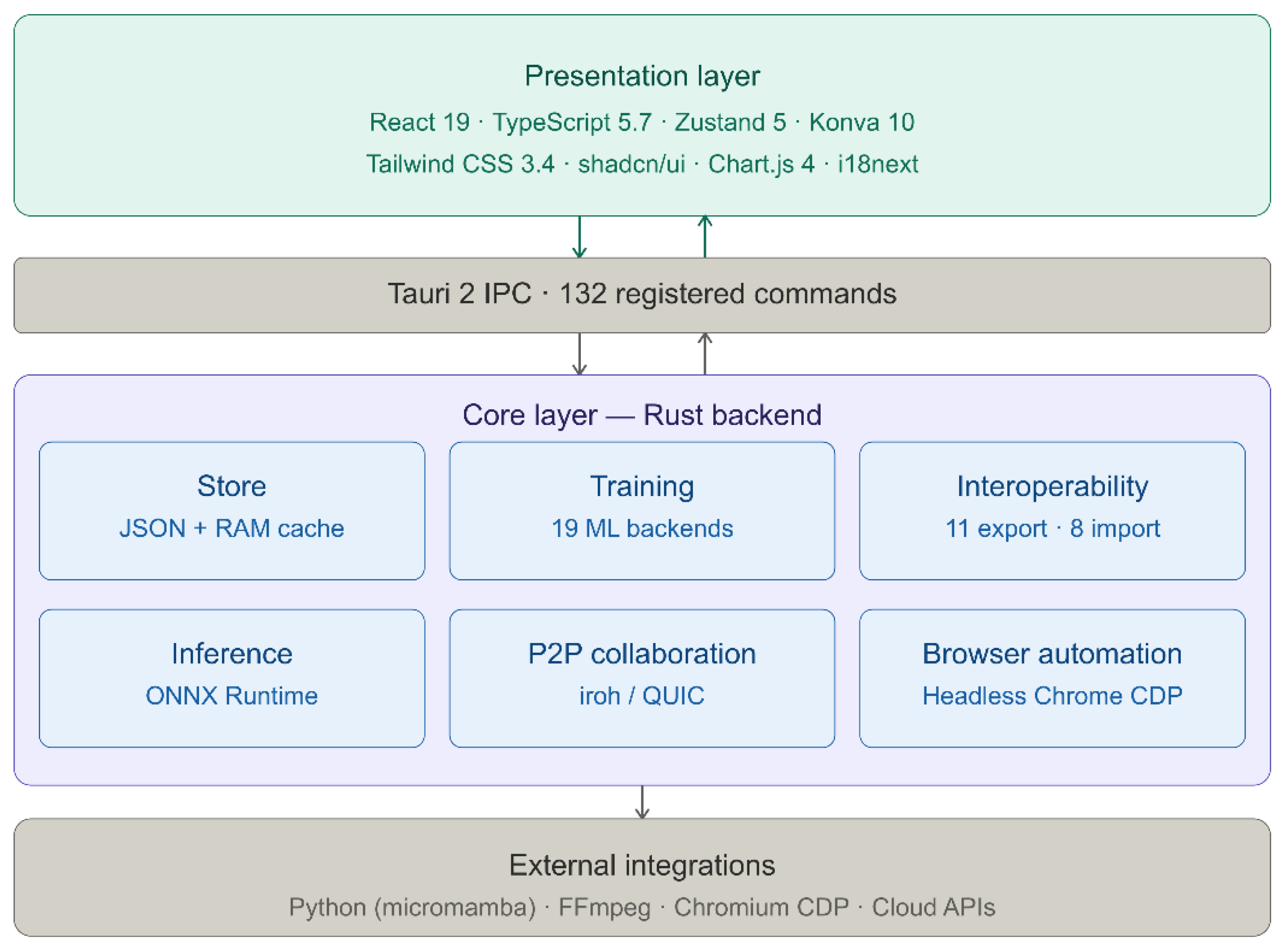
Figure 1.
Layered architecture of Annotix v2.4.4. The platform is organized in three tiers: a presentation layer (React 19 + TypeScript 5.7) handling the annotation canvas and user interface via Konva 10 and Zustand 5; a bridge layer implementing 132 Tauri 2 IPC commands for typed communication between frontend and backend; and a core Rust layer hosting the project store (in-memory cache with atomic JSON persistence), the training subsystem (19 ML backends), the export/import engine (11 and 8 formats respectively), the ONNX Runtime inference engine, the peer-to-peer collaboration system (iroh/QUIC), and the browser automation module (headless Chrome via CDP). External dependencies (Python/micromamba, FFmpeg, Chromium) are managed automatically by the core layer.
Figure 1.
Layered architecture of Annotix v2.4.4. The platform is organized in three tiers: a presentation layer (React 19 + TypeScript 5.7) handling the annotation canvas and user interface via Konva 10 and Zustand 5; a bridge layer implementing 132 Tauri 2 IPC commands for typed communication between frontend and backend; and a core Rust layer hosting the project store (in-memory cache with atomic JSON persistence), the training subsystem (19 ML backends), the export/import engine (11 and 8 formats respectively), the ONNX Runtime inference engine, the peer-to-peer collaboration system (iroh/QUIC), and the browser automation module (headless Chrome via CDP). External dependencies (Python/micromamba, FFmpeg, Chromium) are managed automatically by the core layer.
The Rust backend employs an in-memory cache with atomic persistence. Each project is represented as a single JSON file (project.json) containing all metadata, class definitions, image entries, annotations, video tracks, training jobs, and inference models. The AppState structure maintains a HashMap<String, CachedProject> that serves read operations from memory and flushes mutations atomically via a temporary-file-then-rename strategy, ensuring crash consistency via filesystem-level atomicity guarantees of the rename(2) system call [21].
Two accessor patterns govern all project interactions:
| Listing 1. Rust accessor patterns for project state management in Annotix. |
 |
This design eliminates the need for an embedded database (e.g., SQLite), reducing dependency complexity while maintaining data integrity.
The annotation canvas is implemented using Konva 10, providing hardware-accelerated rendering through the HTML5 Canvas API. All entities use UUID v4 identifiers; serialization is handled by serde/serde_json on the Rust side and native JSON on the TypeScript side.
3.1.2. Annotation Capabilities
Annotix provides seven image annotation primitives: (1) bounding boxes (axis-aligned rectangles for object detection); (2) oriented bounding boxes (rotated rectangles parameterized by center, dimensions, and angle θ ∈ [0°, 360°), essential for aerial imagery [5]); (3) polygons (ordered vertex sequences for instance segmentation); (4) segmentation masks (raster-based brush tool with configurable radius and eraser mode for pixel-level annotation); (5) keypoints with skeleton (anatomical or structural points connected by predefined graphs, with built-in presets for COCO 17-point human pose [4], face 68-point, hand 21-joint, and MediaPipe 33-point full body [22]); (6) landmarks (named reference points with individual text labels); and (7) classification labels (single-label and multi-label image-level classification). Figure 2 illustrates the annotation canvas during a bounding box session on retinal fundus images, showing the image gallery, active annotations, class panel, and integrated export and training controls.
The annotation canvas supports zoom, pan, 90° image rotation, real-time grid overlay, and a complete undo/redo system. Keyboard shortcuts enable rapid tool switching and class selection. A non-destructive image adjustment panel provides real-time control over brightness, contrast, color temperature, sharpness, and CLAHE (Contrast Limited Adaptive Histogram Equalization), operating exclusively on the canvas rendering layer without modifying source files on disk. This is particularly relevant for low-contrast medical imagery where anatomical boundaries may be difficult to delineate at default settings. Figure 3 illustrates the effect of CLAHE on an otoscopic image, where the borders of the pars tensa and the umbo become substantially more defined prior to mask annotation.
Video annotation follows a track-based paradigm: FFmpeg extracts frames at configurable FPS; tracked objects receive class labels and persistent identifiers; keyframes are manually placed and intermediate frames receive linearly interpolated bounding boxes; a bake operation materializes interpolated annotations for export. This reduces annotation effort approximately proportionally to the keyframe interval. Additionally, Annotix supports nine time-series annotation paradigms (classification, forecasting, anomaly detection, segmentation, pattern recognition, event detection, regression, clustering, imputation) from CSV files, and an integrated tabular data editor for classical ML tasks
3.1.3. Training and Inference
Annotix integrates 19 ML training backends organized by task (Table 1). Training environments are provisioned automatically using micromamba [23], a C++-based conda package manager that installs backend dependencies in isolated environments. GPU detection is automatic: NVIDIA GPUs via CUDA and Apple Silicon via Metal Performance Shaders. Four execution modes are supported: local (real-time metric streaming), download package (self-contained ZIP), cloud (Vertex AI, Kaggle, Lightning AI, HuggingFace Spaces, Saturn Cloud), and browser automation (headless Chrome via Chrome DevTools Protocol for Google Colab GPU sessions). Six domain-specific training presets (small_objects, industrial, traffic, edge_mobile, medical, aerial) provide optimized hyperparameter configurations.
The inference subsystem enables model-assisted labeling through a built-in ONNX Runtime integration [24]. Users upload ONNX or PyTorch models; the system performs automatic metadata extraction, flexible class mapping to project definitions, batch inference with configurable confidence thresholds, and per-prediction accept/reject controls in a human-in-the-loop workflow. Together, these five stages — annotate, train, export to ONNX, batch inference, and human review — form a closed iterative cycle that runs entirely on the user's machine without cloud dependency, as illustrated in Figure 4. Trained models can be exported to PyTorch (.pt), ONNX, TorchScript, TFLite, CoreML, and TensorRT formats.
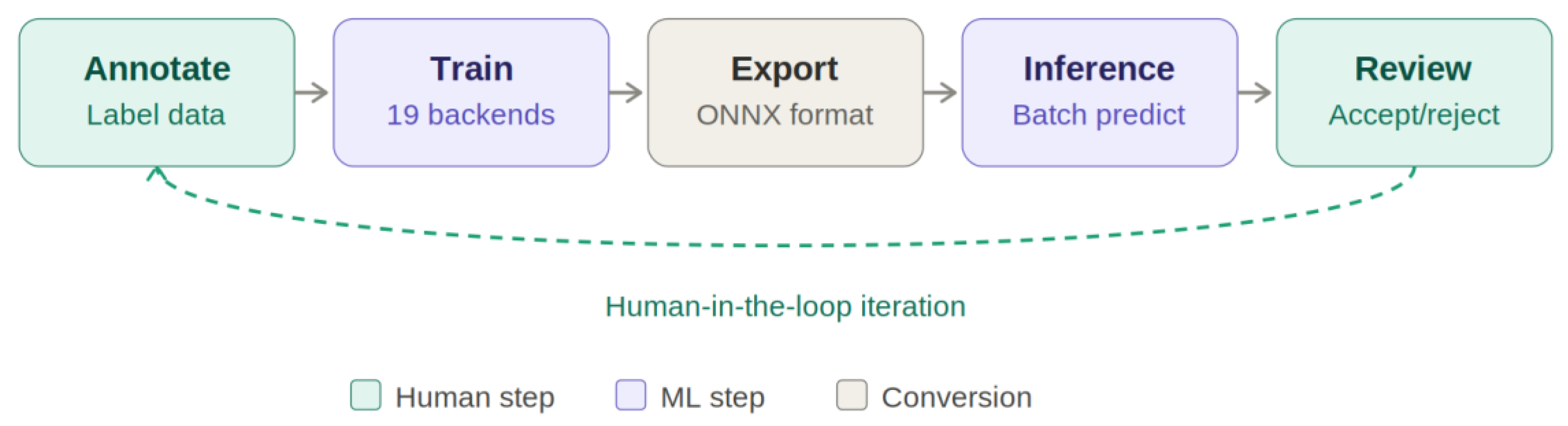

Table 1.
Training backends integrated in Annotix.
| Task | Backend | Architectures |
|---|---|---|
| Object Detection | Ultralytics | YOLOv8, v9, v10, v11, v12 |
| Object Detection | Ultralytics | RT-DETR-l, RT-DETR-x |
| Object Detection | Roboflow | RF-DETR-base, RF-DETR-large |
| Object Detection | MMDetection | 30+ architectures |
| Semantic Segmentation | SMP | U-Net, DeepLabV3+, FPN, PSPNet, MAnet, LinkNet, PAN |
| Semantic Segmentation | HuggingFace | SegFormer, Mask2Former |
| Semantic Segmentation | MMSegmentation | Full OpenMMLab catalog |
| Instance Segmentation | Detectron2 | Mask R-CNN, Cascade Mask R-CNN |
| Pose Estimation | MMPose | HRNet, ViTPose, RTMPose |
| Oriented Detection | MMRotate | Oriented R-CNN, RoI Transformer |
| Image Classification | timm | 700+ architectures |
| Image Classification | HuggingFace | ViT, BEiT, DeiT, Swin Transformer |
| Time-Series (DL) | tsai | InceptionTime, LSTM-FCN, TSTPlus |
| Time-Series (DL) | PyTorch Forecasting | TFT, N-BEATS, DeepAR |
| Anomaly Detection | PyOD | Isolation Forest, LOF, AutoEncoder |
| Clustering | tslearn | k-Shape, DTW Barycenter |
| Imputation | PyPOTS | SAITS, Transformer-based |
| Pattern Recognition | STUMPY | Matrix Profile |
| Tabular ML | scikit-learn | RandomForest, SVM, kNN, GBM |
Figure 4.
Human-in-the-loop annotation pipeline implemented in Annotix. The cycle consists of five stages: (1) Annotate — manual labeling of the dataset using any supported annotation primitive; (2) Train — model training via any of the 19 integrated ML backends, executed locally without cloud infrastructure; (3) Export — conversion of the trained model to ONNX format for deployment within the platform; (4) Inference — batch prediction over unlabeled images using the built-in ONNX Runtime engine; (5) Review — human acceptance or rejection of machine-generated predictions, which are converted to editable annotations upon acceptance. The dashed arc represents the iterative feedback loop: accepted predictions augment the labeled dataset, triggering a new training cycle with improved supervision. Teal boxes indicate human-driven steps; purple boxes indicate automated ML computation; gray indicates format conversion. No tool among the comparators (CVAT, Label Studio) closes this cycle locally.
Figure 4.
Human-in-the-loop annotation pipeline implemented in Annotix. The cycle consists of five stages: (1) Annotate — manual labeling of the dataset using any supported annotation primitive; (2) Train — model training via any of the 19 integrated ML backends, executed locally without cloud infrastructure; (3) Export — conversion of the trained model to ONNX format for deployment within the platform; (4) Inference — batch prediction over unlabeled images using the built-in ONNX Runtime engine; (5) Review — human acceptance or rejection of machine-generated predictions, which are converted to editable annotations upon acceptance. The dashed arc represents the iterative feedback loop: accepted predictions augment the labeled dataset, triggering a new training cycle with improved supervision. Teal boxes indicate human-driven steps; purple boxes indicate automated ML computation; gray indicates format conversion. No tool among the comparators (CVAT, Label Studio) closes this cycle locally.
3.1.4. Peer-to-Peer Collaboration
Annotix implements serverless real-time collaboration using the iroh protocol [25] over QUIC (RFC 9000 [26]). Three iroh components underpin the system: iroh-docs (replicated key-value document synchronization for annotation state), iroh-blobs (content-addressed transfer for image distribution), and iroh-gossip (pub-sub messaging for real-time coordination). A host creates a session and distributes a unique session code; collaborators join via direct encrypted connections without intermediary servers. Configurable permissions govern collaborator rights (image upload, class editing, annotation deletion, export). Image-level locking prevents conflicting edits: collaborators acquire exclusive write access per image; batch assignment distributes disjoint subsets; automatic lock expiration prevents deadlocks from disconnected peers.
3.1.5. Interoperability
Annotix supports 11 export formats: YOLO Detection, YOLO Segmentation, COCO JSON [4], Pascal VOC [27], CSV Detection, CSV Classification, CSV Keypoints, CSV Landmarks, Folders by Class, U-Net Masks, and TIX (native project archive). Eight import formats are supported with automatic format detection based on file structure and content patterns: YOLO (detection and segmentation), COCO JSON, Pascal VOC, CSV (four variants), U-Net Masks, Folders by Class, and TIX. The platform is localized in 10 languages.
3.1.6. Comparative Feature Analysis
Table 2 summarizes the positioning of Annotix against representative tools across key dimensions.
Table 2.
Comparative analysis of annotation tools. Annotation types for images include: bounding box, oriented bounding box, polygon, mask, keypoints, landmarks, and classification.
Table 2.
Comparative analysis of annotation tools. Annotation types for images include: bounding box, oriented bounding box, polygon, mask, keypoints, landmarks, and classification.
| Feature | LabelImg | LabelMe | CVAT | Label Studio | Roboflow | Annotix |
|---|---|---|---|---|---|---|
| Offline operation | ✓ | ✓ | ✗ | ✗ | ✗ | ✓ |
| Annotation types | 1 | 2 | 5 | 4 | 3 | 7 |
| Video annotation | ✗ | ✗ | ✓ | ✗ | ✗ | ✓ |
| Time-series support | ✗ | ✗ | ✗ | ✓ | ✗ | ✓ |
| Tabular data | ✗ | ✗ | ✗ | ✗ | ✗ | ✓ |
| Integrated training | ✗ | ✗ | ✗ | ✗ | ✓1 | ✓ |
| Training backends | 0 | 0 | 0 | 0 | 1 | 19 |
| Model-assisted labeling | ✗ | ✗ | ✓ | ✓ | ✓ | ✓ |
| P2P collaboration | ✗ | ✗ | ✗ | ✗ | ✗ | ✓ |
| Export formats | 2 | 1 | 6 | 5 | 8 | 11 |
| Import formats | 0 | 0 | 4 | 3 | 5 | 8 |
| Localization | 1 | 1 | 2 | 1 | 1 | 10 |
| Data sovereignty | ✓ | ✓ | Partial | Partial | ✗ | ✓ |
1 Roboflow offers cloud-based training with limited model selection.
3.2. Annotation Efficiency Evaluation
3.2.1. Bounding Box Task
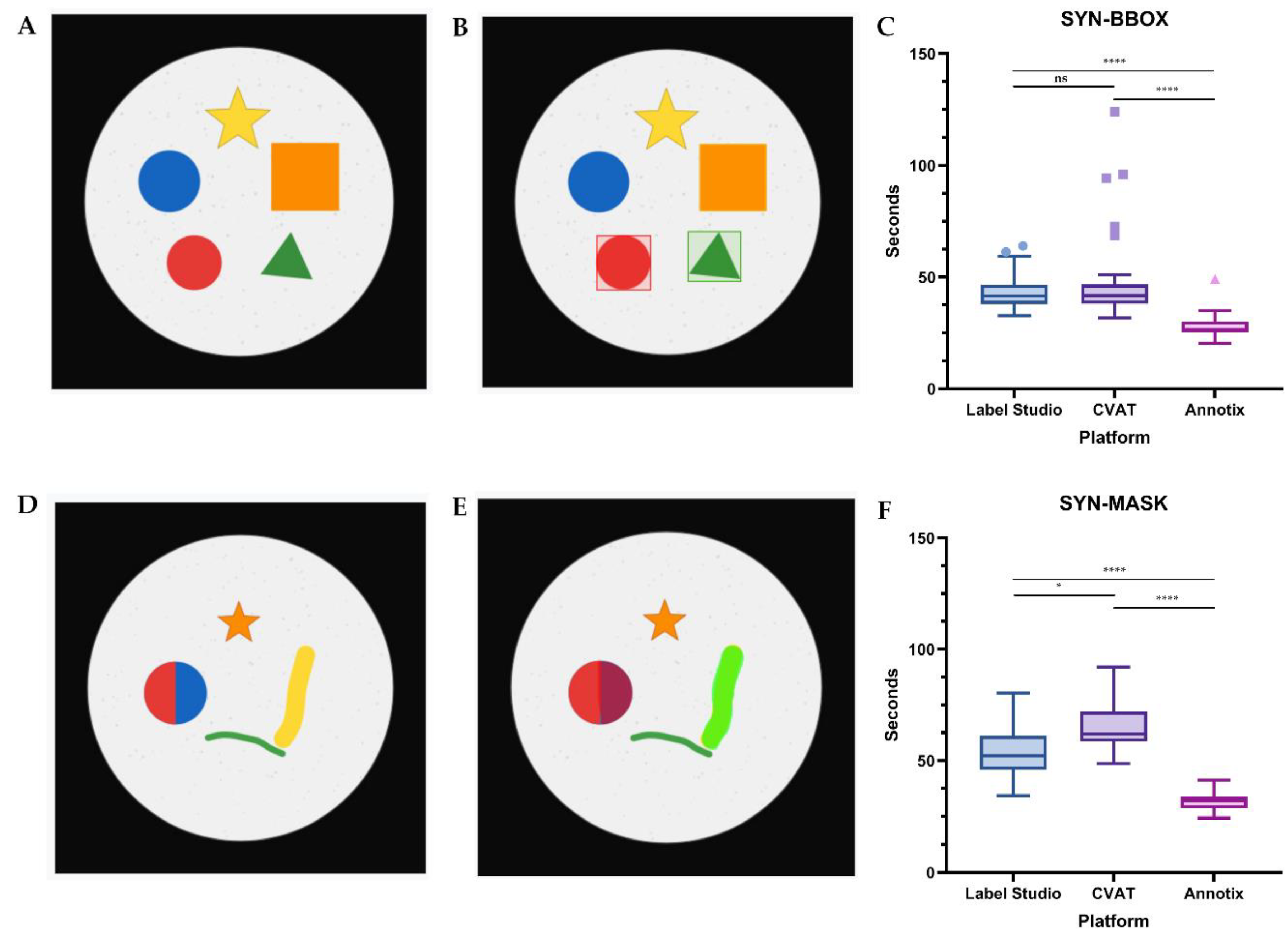
Shapiro-Wilk tests indicated that none of the three groups met the normality assumption for the bounding box task (Annotix: W = 0.897, p = 0.007; CVAT: W = 0.634, p < 0.0001; Label Studio: W = 0.802, p < 0.0001). The Kruskal-Wallis test revealed a statistically significant difference in annotation time across tools (H(2) = 52.41, p < 0.0001). Median annotation times per image were: Annotix 26.50 s (IQR 25.25–30.08), CVAT 41.67 s (IQR 38.00–46.75), and Label Studio 41.50 s (IQR 37.92–46.58). Dunn–Bonferroni post-hoc comparisons showed that Annotix was significantly faster than both CVAT (mean rank difference = 43.15, Z = 6.40, p < 0.0001) and Label Studio (mean rank difference = 41.35, Z = 6.13, p < 0.0001), while no significant difference was found between CVAT and Label Studio (mean rank difference = 1.80, Z = 0.27, p > 0.9999). Results are presented in Figure 5C.
3.2.2. Mask Task
Shapiro-Wilk tests for the mask task indicated that Annotix (W = 0.959, p = 0.286) and Label Studio (W = 0.939, p = 0.083) met the normality assumption, while CVAT did not (W = 0.846, p = 0.0005). Because at least one group violated normality, Kruskal-Wallis was applied to all three groups. The test revealed a statistically significant difference in annotation time (H(2) = 65.00, p < 0.0001). Median annotation times were: Annotix 31.83 s (IQR 28.58–34.00), Label Studio 52.17 s (IQR 45.92–61.17), and CVAT 62.00 s (IQR 58.58–72.00). Dunn–Bonferroni post-hoc tests revealed significant differences across all three pairs: Annotix vs. CVAT (mean rank difference = 53.27, Z = 7.90, p < 0.0001), Annotix vs. Label Studio (mean rank difference = 36.08, Z = 5.35, p < 0.0001), and CVAT vs. Label Studio (mean rank difference = 17.18, Z = 2.55, p = 0.033), indicating that all three tools differed significantly from one another for the mask task. Results are presented in Figure 5F.
3.3. Heuristic Usability Evaluation
In the Heuristic Usability Evaluation (0-4 scale), Annotix achieved the lowest mean total severity across all heuristics (0.23), followed by Label Studio (0.50) and CVAT (0.87). No tool reached a group mean severity of ≥ 2.5 for any heuristic, indicating an absence of critical usability failures across all three platforms. One isolated individual rating of 4 (usability catastrophe) was recorded for Label Studio on H3 (User control and freedom), reflecting one evaluator's experience of limited undo capability during a project reconfiguration step.
CVAT showed the highest severity on H7 (Flexibility and efficiency of use, mean = 2.00) and H6 (Recognition rather than recall, mean = 1.67). These findings suggest that CVAT's interface, while functionally comprehensive, imposes a steeper learning curve: workflow acceleration features such as keyboard shortcuts and annotation templates were perceived as non-discoverable, and tool-mode transitions required more interaction steps than the evaluators expected following the 10-minute training session. Label Studio's highest severity was H3 (User control and freedom, mean = 1.67), reflecting constraints encountered when attempting to modify or delete annotations mid-session. Annotix showed the lowest individual heuristic values, with no heuristic exceeding 0.67 (H1: Visibility of system status and H9: Error recovery). Figure 6 presents the heuristic severity profiles of all three tools as a radar chart.
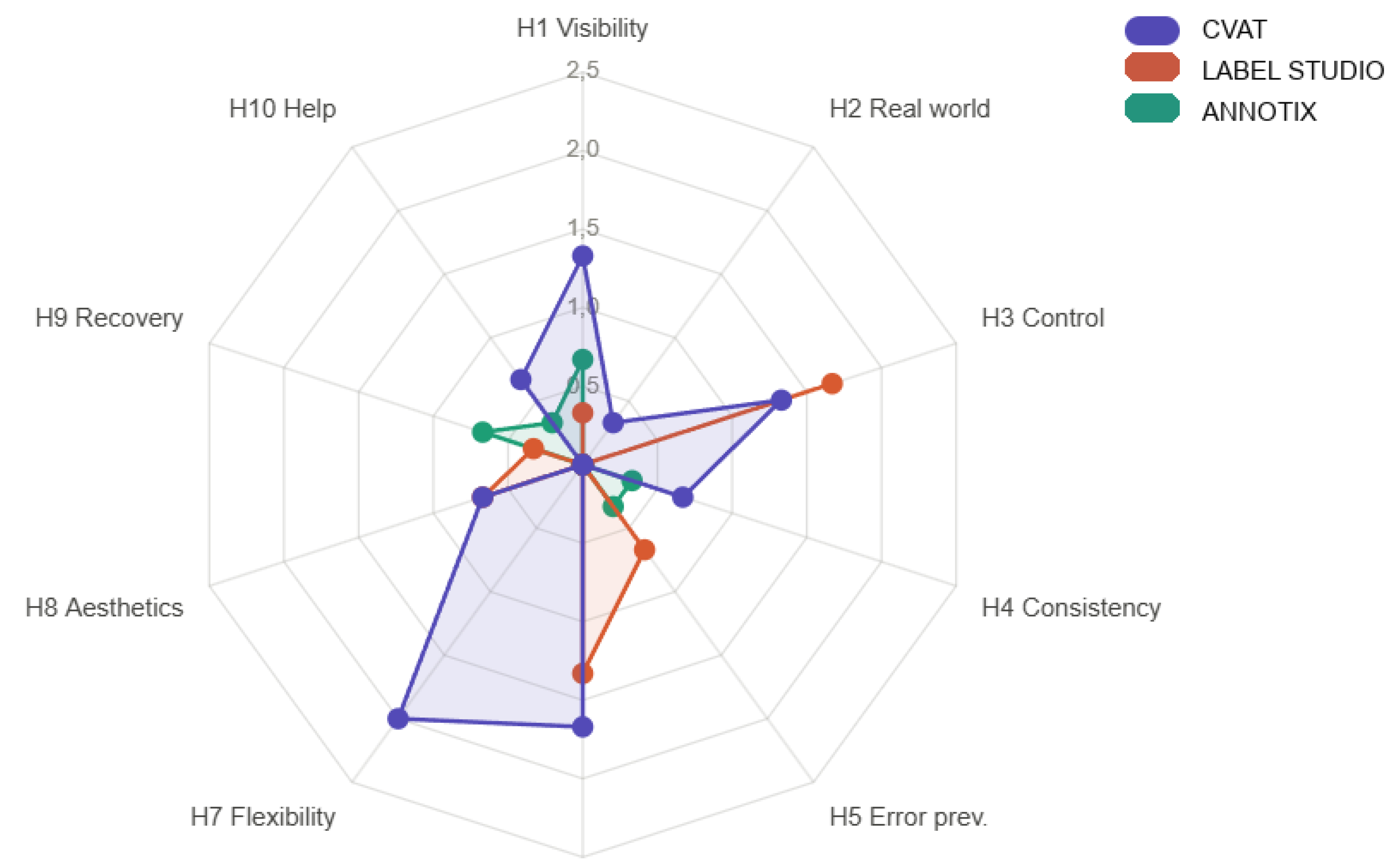
Figure 6.
Heuristic severity profiles of the three annotation platforms across the ten Nielsen–Molich heuristics, averaged across three evaluators. The scale goes from 0 = no usability problem to 4 = usability catastrophe. Each axis represents one heuristic; the area enclosed by each polygon reflects the overall severity burden of that platform. Annotix (green) shows the smallest enclosed area and the lowest individual scores across all heuristics (maximum mean = 0.67 for H1 and H9). CVAT (purple) exhibits the largest enclosed area, with the highest severity on H7 (Flexibility and efficiency of use, mean = 2.00) and H6 (Recognition rather than recall, mean = 1.67), consistent with an interface designed for expert users that presents a steeper initial learning curve. Label Studio (orange) shows an intermediate profile, with its highest severity on H3 (User control and freedom, mean = 1.67), reflecting constraints on annotation modification mid-session. No platform reached a mean severity ≥ 2.5 on any individual heuristic, indicating an absence of critical usability failures across all three tools. Evaluation was conducted by three evaluators (AE-1, AE-2, AE-3) following hands-on experience with all platforms across the efficiency sessions. H1 Visibility of system status; H2 Match between system and real world; H3 User control and freedom; H4 Consistency and standards; H5 Error prevention; H6 Recognition rather than recall; H7 Flexibility and efficiency of use; H8 Aesthetic and minimalist design; H9 Help users recognize, diagnose, and recover from errors; H10 Help and documentation.
Figure 6.
Heuristic severity profiles of the three annotation platforms across the ten Nielsen–Molich heuristics, averaged across three evaluators. The scale goes from 0 = no usability problem to 4 = usability catastrophe. Each axis represents one heuristic; the area enclosed by each polygon reflects the overall severity burden of that platform. Annotix (green) shows the smallest enclosed area and the lowest individual scores across all heuristics (maximum mean = 0.67 for H1 and H9). CVAT (purple) exhibits the largest enclosed area, with the highest severity on H7 (Flexibility and efficiency of use, mean = 2.00) and H6 (Recognition rather than recall, mean = 1.67), consistent with an interface designed for expert users that presents a steeper initial learning curve. Label Studio (orange) shows an intermediate profile, with its highest severity on H3 (User control and freedom, mean = 1.67), reflecting constraints on annotation modification mid-session. No platform reached a mean severity ≥ 2.5 on any individual heuristic, indicating an absence of critical usability failures across all three tools. Evaluation was conducted by three evaluators (AE-1, AE-2, AE-3) following hands-on experience with all platforms across the efficiency sessions. H1 Visibility of system status; H2 Match between system and real world; H3 User control and freedom; H4 Consistency and standards; H5 Error prevention; H6 Recognition rather than recall; H7 Flexibility and efficiency of use; H8 Aesthetic and minimalist design; H9 Help users recognize, diagnose, and recover from errors; H10 Help and documentation.
4. Discussion
4.1. Annotix as a Tool Paper Contribution
The central contribution of this work is not an annotation tool with additional features, but an environment that enables any professional with domain knowledge — a medical technologist, a field biologist, an ecologist, a clinical researcher — to complete the full data preparation and model training cycle for computer vision without programming knowledge, without server infrastructure, and without dependence on cloud services. The fragmentation of the ML pipeline across disjoint tools is not merely an operational efficiency problem: it is an entry barrier that systematically excludes researchers with deep domain knowledge but without technical ML training. A recent survey on annotation tools for medical imaging [17] confirms that this gap remains unresolved in the current open-source ecosystem, where no platform simultaneously closes annotation, training, and model distribution within a unified and accessible environment.
CVAT [12] and Label Studio [13] are mature, well-engineered tools that represent the current practical standard for open-source annotation. However, both address only the first step of the pipeline: producing labeled data. The next step — converting that data into a functional model, validating it, and distributing it for use — requires in practice knowledge of Python, virtual environment management, access to GPU infrastructure, and familiarity with training frameworks. Annotix addresses this gap by integrating the entire cycle within a single installable application: the user annotates, trains, obtains a model in ONNX or PyTorch format, validates it through assisted inference on new images, and can package the result for distribution — all without leaving the interface and without writing a single line of code. The underlying design vision is that domain knowledge, not technical knowledge, should be the entry requirement for building an ML model.
The comparative feature analysis (Table 2) makes this distinction concrete. The difference that defines Annotix's design space is not any individual feature but their co-occurrence within a single friction-free environment: offline data sovereignty, multi-modal annotation, 19 training backends with automatic environment provisioning, ONNX-assisted labeling, and serverless P2P collaboration. The efficiency and usability results reported in Section 3.2 and Section 3.3 are empirical evidence that this environment is practically viable — not that it is categorically superior to tools that address a different subset of the problem.
4.2. Annotation Efficiency
The efficiency results reveal consistent patterns across both modalities. In the context of democratizing the ML pipeline, annotation efficiency matters not only as a performance metric but as an attrition factor: for a non-technical user learning to build their first model, each additional point of friction in the workflow represents an opportunity to abandon the entire process. For the bounding box task, CVAT and Label Studio were statistically indistinguishable from each other (p > 0.9999), while both differed substantially from Annotix (p < 0.0001 in both cases). This convergence between the two web-based tools suggests that the performance difference reflects the browser-mediated interaction model — including per-request network latency, page rendering overhead, and multi-step project navigation — rather than tool-specific design choices. This interpretation is consistent with a classic Human-Computer Interaction (HCI) research demonstrating that users perform structured interaction tasks significantly more slowly in web applications than in their desktop counterparts, a difference attributed primarily to the browser's constrained interaction mechanisms and the absence of direct hardware access [28].
The mask task produced a more differentiated picture: all three tools differed significantly, with the ordering Annotix < Label Studio < CVAT. The additional gap between CVAT and Label Studio for mask annotation (p = 0.033) likely reflects structural differences in how the two web tools implement brush-based segmentation. CVAT requires more initialization steps and tool-mode switching; Label Studio provides a more streamlined brush interface. Annotix's advantage in both tasks is attributable to its native canvas rendering pipeline and a workflow design in which all annotation operations are accessible within a single screen context without server round-trips.
These results should be interpreted in context. The study used evaluators with no prior annotation platform experience, which means the observed differences reflect out-of-the-box learnability following minimal training — exactly the scenario of a user approaching the ML pipeline for the first time. As a benchmark, annotation times documented in large-scale crowd-sourced pipelines have been reported at approximately 42 seconds per bounding box [4], a figure consistent with the medians observed for CVAT (41.67 s) and Label Studio (41.50 s), and notably higher than the 26.50 s obtained by Annotix under equivalent conditions. For teams that have already invested in CVAT or Label Studio infrastructure, the efficiency differences observed here do not by themselves constitute a reason to migrate. Rather, the results demonstrate that a user adopting Annotix for the first time can achieve annotation throughput competitive with established tools, while completing the training and inference stages within the same environment without additional technical knowledge.
4.3. Heuristic Usability
The heuristic evaluation takes on particular significance in the context of a tool designed for non-technical users: the learning curve is not a minor inconvenience but the primary filter determining whether the target user can or cannot complete the pipeline. CVAT's elevated scores on H7 (Flexibility and efficiency of use) and H6 (Recognition rather than recall) reflect a design oriented toward the expert annotator that maximizes efficiency for familiar users at the cost of higher initial cognitive load. This pattern is consistent with the fundamental trade-off in interface design between learnability and efficiency of use: platforms that expose a large feature surface to maximize expert throughput necessarily impose higher initial cognitive load on first-time users, as workflow accelerators such as keyboard shortcuts require prior knowledge to discover [29]. For a clinical researcher or field biologist who needs to build their first object detector, this initial cognitive load may be sufficient to abandon the attempt before producing a usable model.
Label Studio's elevated score on H3 (User control and freedom) reflects its template-driven project model, which offers flexibility in task configuration but constrains mid-session operations such as annotation deletion and class reassignment. This behavior, reasonable in structured labeling campaigns with defined schemas, is disorienting for the exploratory user who is discovering their own data categories while annotating — a common scenario in domain research.
Annotix's low severity scores across all heuristics are consistent with a design that prioritizes pipeline completability over the maximization of advanced features: direct manipulation on a native canvas, minimal navigation between screens, and annotation state that is immediately visible and reversible. The two heuristics where Annotix showed its highest severity (H1: Visibility of system status and H9: Error recovery, both mean = 0.67) point to areas for improvement specifically in the training and export stages — precisely the longest operations in the pipeline and where a non-technical user needs the most guidance on process state.
The evaluation was conducted by three evaluators, which is within the range recommended by Nielsen for heuristic evaluation (3–5 evaluators). However, the small sample size limits generalizability; a larger study with user profiles from the target domain — clinical researchers, biologists, students from non-computing disciplines — would substantially strengthen these findings. Inter-annotator variability in annotation quality — a distinct but complementary dimension to the usability evaluated here — represents an additional challenge documented in the medical image segmentation literature [18], and future studies should incorporate inter-rater reliability metrics alongside heuristic severity scores to provide a more complete characterization of performance in clinical annotation workflows.
4.4. Applicability to Medical Imaging
The medical imaging domain represents the prototypical use case for Annotix's target user: a professional with deep clinical knowledge — capable of identifying the fovea, the optic disc, the malleus handle, or the umbo with precision — but facing two simultaneous barriers to building ML models. The first is regulatory: privacy requirements established by HIPAA (Health Insurance Portability and Accountability Act) and GDPR (General Data Protection Regulation) preclude the use of cloud-based annotation services for sensitive clinical data. A review of annotation and curation pipelines for medical images [30] documents that both regulatory frameworks impose informed consent, data encryption, access control, and defined retention periods as preconditions for any workflow involving identifiable patient images — requirements structurally incompatible with third-party cloud services. The second barrier is technical: even with the regulatory issue resolved through local deployment of CVAT or Label Studio, the path from annotated data to a trained and deployable model requires technical expertise that most clinical professionals do not possess. Aljabri et al. [17] identify data sovereignty as one of the central unresolved requirements in existing medical annotation tools, but do not address this second barrier — the training pipeline. Annotix resolves both simultaneously: data never leaves the local machine, and the path from raw image to exportable model requires no programming knowledge.
The use of real retinal and tympanic membrane images in the heuristic evaluation (Section 3.3) demonstrates that the platform is functional and usable for these tasks. The non-destructive CLAHE image adjustment (Figure 3) directly addresses the low-contrast conditions common in otoscopy and fundus photography, enabling more precise anatomical boundary delineation without modifying source files — a design detail that reflects an understanding of the actual working conditions of the target clinical user.
4.5. Limitations and Future Work
Several limitations of the current study and platform should be acknowledged. The efficiency and usability evaluation was performed with three evaluators from a single research laboratory with a Medical Technology profile; studies with users spanning the full range of the target audience — clinical researchers, biologists, ecologists, students from non-computing disciplines — are needed to establish the generalizability of the results. The efficiency protocol used synthetic images that, while methodologically valid for comparative tool benchmarking, may not capture the complexity of annotation tasks on real-domain images with ambiguous or variable content. To our knowledge, no prior empirical study has evaluated mask annotation performance between CVAT and Label Studio under controlled conditions equivalent to those used here; this absence represents a gap in the literature that future work should address.
At the platform level, current limitations include: (i) P2P collaboration requires direct peer connectivity — NAT traversal via iroh may fail in restrictive corporate networks; (ii) the browser automation approach for Colab training is sensitive to UI changes in the target platform; (iii) time-series annotation lacks waveform-specific assistance tools such as peak detection; and (iv) 3D annotation over point clouds and volumetric data is not yet supported. The long-term development vision extends the democratization principle toward both ends of the pipeline: toward the input end, through integration of foundation models such as SAM 2 [31] and GroundingDINO [32] to reduce the volume of manual annotation required; and toward the output end, through model packaging and distribution mechanisms that allow the user to deliver a functional detector to a colleague or clinical system without additional configuration steps. Federated learning across P2P peers and a plugin architecture for community-contributed backends are also planned to extend the platform's reach and adaptability.
5. Conclusions
We have presented Annotix, an open-source desktop platform that addresses the fragmentation of the ML data preparation pipeline by integrating annotation, training, inference-assisted labeling, and serverless collaboration in a single offline-first application. The platform's design is motivated by a gap that existing tools — individually excellent within their respective paradigms — do not close: the need for a complete, privacy-preserving annotation and training environment that requires no cloud infrastructure, no server deployment, and no DevOps expertise.
Empirical evaluation on synthetic and medical imaging tasks demonstrates that Annotix performs at a competitive level relative to CVAT and Label Studio — the de facto open-source standards — with annotation throughput measurably higher in a first-use scenario and heuristic usability severity consistently lower across the Nielsen ten heuristics. These results establish that the platform is practically viable, not merely architecturally novel.
With seven image annotation primitives, 19 ML training backends, ONNX-based model-assisted labeling, serverless P2P collaboration, and support for video, time-series, and tabular data, Annotix provides a comprehensive toolset for ML workflows in regulated and resource-limited settings, including medical imaging, ecological monitoring, remote sensing, and industrial inspection. The platform is freely available at https://github.com/Debaq/Annotix under the MIT license.
Supplementary Materials
The following supporting information can be downloaded at the website of this paper posted on Preprints.org. Complete source code and data set images used in this work are available as supplementary materials.
Author Contributions
Conceptualization, N.B.Q., V.U.H., F.L.M.; Methodology, N.B.Q., F.L.M., V.U.H., H.B.T.; Software, N.B.Q., V.U.H.; Validation, N.B.Q., F.L.M., V.U.H., H.B.T., C.V.B.; Formal Analysis, N.B.Q., F.L.M., V.U.H; Investigation, N.B.Q., F.L.M., V.U.H., H.B.T., C.V.B; Writing —Original Draft Preparation, N.B.Q., V.U.H., F.L.M.; Writing—Review and Editing, N.B.Q., F.L.M., V.U.H., H.B.T., C.V.B; Visualization, N.B.Q., F.L.M., V.U.H.; Supervision, N.B.Q., V.U.H., F.L.M.; Project Administration, N.B.Q., V.U.H., F.L.M.;. All authors have read and agreed to the published version of the manuscript.
Funding
This research received no external funding.
Data Availability Statement
Annotix is freely available at https://github.com/Debaq/Annotix under the MIT license.
Acknowledgments
The authors thank Mrs. Ercilia Águila for her administrative support throughout this project. During the preparation of this manuscript, the authors used Claude Sonnet 4.6 (Anthropic) for the following purposes: assistance in manuscript revision, generation of the radar chart presented in Figure 6, generation of SVG flow diagrams presented in Figure 1 and Figure 4; and code debugging support. The authors have reviewed and edited all AI-assisted content and take full responsibility for the content of this publication.
Conflicts of Interest
The authors declare no conflicts of interest.
Abbreviations
The following abbreviations are used in this manuscript:
| AE | Annotator-Evaluator (AE-1, AE-2, AE-3) |
| API | Application Programming Interface |
| CDP | Chrome DevTools Protocol |
| CLAHE | Contrast Limited Adaptive Histogram Equalization |
| COCO | Common Objects in Context |
| CRUD | Create, Read, Update, Delete (also: Create, Move, Resize, Delete in task protocol) |
| CUDA | Compute Unified Device Architecture |
| CVAT | Computer Vision Annotation Tool |
| FPS | Frames Per Second |
| GDPR | General Data Protection Regulation |
| GPU | Graphics Processing Unit |
| HIPAA | Health Insurance Portability and Accountability Act |
| ICC | Intraclass Correlation Coefficient |
| IPC | Inter-Process Communication |
| IQR | Interquartile Range |
| JSON | JavaScript Object Notation |
| ML | Machine Learning |
| NAT | Network Address Translation |
| ONNX | Open Neural Network Exchange |
| P2P | Peer-to-Peer |
| QUIC | Quick UDP Internet Connections (IETF RFC 9000) |
| RFC | Request for Comments |
| SAM | Segment Anything Model |
| SYN-BBOX | Synthetic Bounding Box stimulus dataset |
| SYN-MASK | Synthetic Mask stimulus dataset |
| UUID | Universally Unique Identifier |
| VOC | Visual Object Classes (Pascal VOC) |
References
- Ren, S.; He, K.; Girshick, R.; Sun, J. Faster R-CNN: Towards Real-Time Object Detection with Region Proposal Networks. IEEE Trans. Pattern Anal. Mach. Intell. 2017, 39, 1137–1149. [Google Scholar] [CrossRef] [PubMed]
- Shelhamer, E.; Long, J.; Darrell, T. Fully Convolutional Networks for Semantic Segmentation. IEEE Trans. Pattern Anal. Mach. Intell. 2017, 39, 640–651. [Google Scholar] [CrossRef] [PubMed]
- He, K.; Gkioxari, G.; Dollár, P.; Girshick, R. Mask R-CNN. In Proceedings of the IEEE International Conference on Computer Vision (ICCV), Venice, Italy, 22–29 October 2017; pp. 2980–2988. [Google Scholar] [CrossRef]
- Lin, T.Y.; Maire, M.; Belongie, S.; Hays, J.; Perona, P.; Ramanan, D.; Dollár, P.; Zitnick, C.L. Microsoft COCO: Common Objects in Context. In Computer Vision -- ECCV 2014; Fleet, D., Pajdla, T., Schiele, B., Tuytelaars, T., Eds.; Springer: Cham, Switzerland, 2014; pp. 740–755. [Google Scholar] [CrossRef]
- Xie, X.; Cheng, G.; Wang, J.; Yao, X.; Han, J. Oriented R-CNN for Object Detection. In Proceedings of the IEEE/CVF International Conference on Computer Vision (ICCV), Montreal, QC, Canada, 11–17 October 2021; pp. 3500–3509. [Google Scholar] [CrossRef]
- Ismail Fawaz, H.; Forestier, G.; Weber, J.; Idoumghar, L.; Muller, P.A. Deep Learning for Time Series Classification: A Review. Data Min. Knowl. Discov. 2019, 33, 917–963. [Google Scholar] [CrossRef]
- Chalapathy, R.; Chawla, S. Deep Learning for Anomaly Detection: A Survey. arXiv 2019, arXiv:1901.03407. [Google Scholar] [CrossRef]
- Lim, B.; Zohren, S. Time-Series Forecasting with Deep Learning: A Survey. Philos. Trans. R. Soc. A 2021, 379, 20200209. [Google Scholar] [CrossRef]
- Roboflow. Available online: https://roboflow.com (accessed on 13 March 2026).
- V7 Labs. Available online: https://www.v7labs.com (accessed on 13 March 2026).
- Supervisely. Available online: https://supervisely.com (accessed on 13 March 2026).
- Sekachev, B.; et al. CVAT. 2020. Available online: https://github.com/opencv/cvat (accessed on 13 March 2026).
- Tkachenko, M.; et al. Label Studio: Data Labeling Software. 2020. Available online: https://github.com/heartexlabs/label-studio (accessed on 13 March 2026).
- Tzutalin. LabelImg. 2015. Available online: https://github.com/tzutalin/labelImg (accessed on 13 March 2026).
- Russell, B.C.; Torralba, A.; Murphy, K.P.; Freeman, W.T. LabelMe: A Database and Web-Based Tool for Image Annotation. Int. J. Comput. Vis. 2008, 77, 157–173. [Google Scholar] [CrossRef]
- Makesense.ai. Available online: https://www.makesense.ai (accessed on 13 March 2026).
- Aljabri, M.; et al. Towards a Better Understanding of Annotation Tools for Medical Imaging: A Survey. Multimed. Tools Appl. 2022, 81, 25877–25911. [Google Scholar] [CrossRef] [PubMed]
- Yang, F.; Zamzmi, G.; Angara, S.; Rajaraman, S.; Aquilina, A.; Xue, Z.; Jaeger, S.; Papagiannakis, E.; Antani, S.K. Assessing Inter-Annotator Agreement for Medical Image Segmentation. IEEE Access 2023, 11, 21300–21312. [Google Scholar] [CrossRef] [PubMed]
- Nielsen, J.; Molich, R. Heuristic Evaluation of User Interfaces. In Proceedings of the SIGCHI Conference on Human Factors in Computing Systems (CHI '90), Seattle, WA, USA, 1–5 April 1990; pp. 249–256. [Google Scholar] [CrossRef]
- Landis, J.R.; Koch, G.G. The Measurement of Observer Agreement for Categorical Data. Biometrics 1977, 33, 159–174. [Google Scholar] [CrossRef] [PubMed]
- The Open Group. The Single UNIX Specification, Version 4: Rename. Available online: https://pubs.opengroup.org/onlinepubs/9699919799/functions/rename.html (accessed on 13 March 2026).
- Lugaresi, C.; Tang, J.; Nash, H.; McClanahan, C.; Uboweja, E.; Hays, M.; Zhang, F.; Chang, C.L.; Yong, M.; Lee, J.; et al. MediaPipe: A Framework for Building Perception Pipelines. arXiv 2019, arXiv:1906.08172. [Google Scholar] [CrossRef]
- QuantStack. micromamba. Available online: https://github.com/mamba-org/mamba (accessed on 13 March 2026).
- ONNX Runtime. Available online: https://onnxruntime.ai (accessed on 13 March 2026).
- n0 Computer. iroh: Efficient QUIC-based Data Transfer. Available online: https://iroh.computer (accessed on 13 March 2026).
- Iyengar, J.; Thomson, M. QUIC: A UDP-Based Multiplexed and Secure Transport; RFC 9000; Internet Engineering Task Force: Fremont, CA, USA, 2021; pp. 1–151. [CrossRef]
- Everingham, M.; Van Gool, L.; Williams, C.K.I.; Winn, J.; Zisserman, A. The Pascal Visual Object Classes (VOC) Challenge. Int. J. Comput. Vis. 2010, 88, 303–338. [Google Scholar] [CrossRef]
- Pop, P. Comparing Web Applications with Desktop Applications: An Empirical Study. 2002.
- Nielsen, J. Enhancing the Explanatory Power of Usability Heuristics. In Proc. CHI '94, Boston, MA, USA, 24–28 April 1994; pp. 152–158. [CrossRef]
- Lutz de Araujo, A.; Wu, J.; Harvey, H.; Lungren, M.P.; Graham, M.; Leiner, T.; Willemink, M.J. Medical Imaging Data Calls for a Thoughtful and Collaborative Approach to Data Governance. PLoS Digit. Health 2025, 4, e0001046. [Google Scholar] [CrossRef] [PubMed]
- Ravi, N.; Gabeur, V.; Hu, Y.T.; Hu, R.; Ryali, C.; Ma, T.; Khedr, H.; Rädle, R.; Rolland, C.; Gustafson, L.; et al. SAM 2: Segment Anything in Images and Videos. arXiv 2024, arXiv:2408.00714. [Google Scholar] [CrossRef]
- Liu, S.; Zeng, Z.; Ren, T.; Li, F.; Zhang, H.; Yang, J.; Jiang, Q.; Li, C.; Yang, J.; Su, H.; et al. Grounding DINO: Marrying DINO with Grounded Pre-training for Open-Set Object Detection. In Computer Vision -- ECCV 2024; Leonardis, A., Ricci, E., Roth, S., Russakovsky, O., Sattler, T., Varol, G., Eds.; Springer: Cham, Switzerland, 2024; pp. 38–55. [Google Scholar] [CrossRef]
Figure 2.
Annotation canvas of Annotix v2.4.4 during a bounding box annotation session on retinal fundus images. The interface shows: (left) the image gallery panel with annotation status indicators (green checkmark = annotated, orange dot = pending); (center) the main canvas displaying image RET-OD-002.png (640×640 px) with two active bounding box annotations — fovea (green, selected, with resize handles visible) and optic disc (red); (right) the class panel listing the two defined classes with their associated colors and visibility controls. The bottom strip displays per-annotation thumbnails with class label, instance count, and quick-delete controls. The top toolbar provides one-click access to project export, model training, and model inference workflows. The tools panel (vertical, center-left) shows the pan and bounding box tools; the zoom and image adjustment controls are accessible from the top-right of the canvas. This view corresponds to Block A of the heuristic usability evaluation (Section 2.4.2), in which evaluators annotated fovea and optic disc structures across five retinographies per tool.
Figure 2.
Annotation canvas of Annotix v2.4.4 during a bounding box annotation session on retinal fundus images. The interface shows: (left) the image gallery panel with annotation status indicators (green checkmark = annotated, orange dot = pending); (center) the main canvas displaying image RET-OD-002.png (640×640 px) with two active bounding box annotations — fovea (green, selected, with resize handles visible) and optic disc (red); (right) the class panel listing the two defined classes with their associated colors and visibility controls. The bottom strip displays per-annotation thumbnails with class label, instance count, and quick-delete controls. The top toolbar provides one-click access to project export, model training, and model inference workflows. The tools panel (vertical, center-left) shows the pan and bounding box tools; the zoom and image adjustment controls are accessible from the top-right of the canvas. This view corresponds to Block A of the heuristic usability evaluation (Section 2.4.2), in which evaluators annotated fovea and optic disc structures across five retinographies per tool.
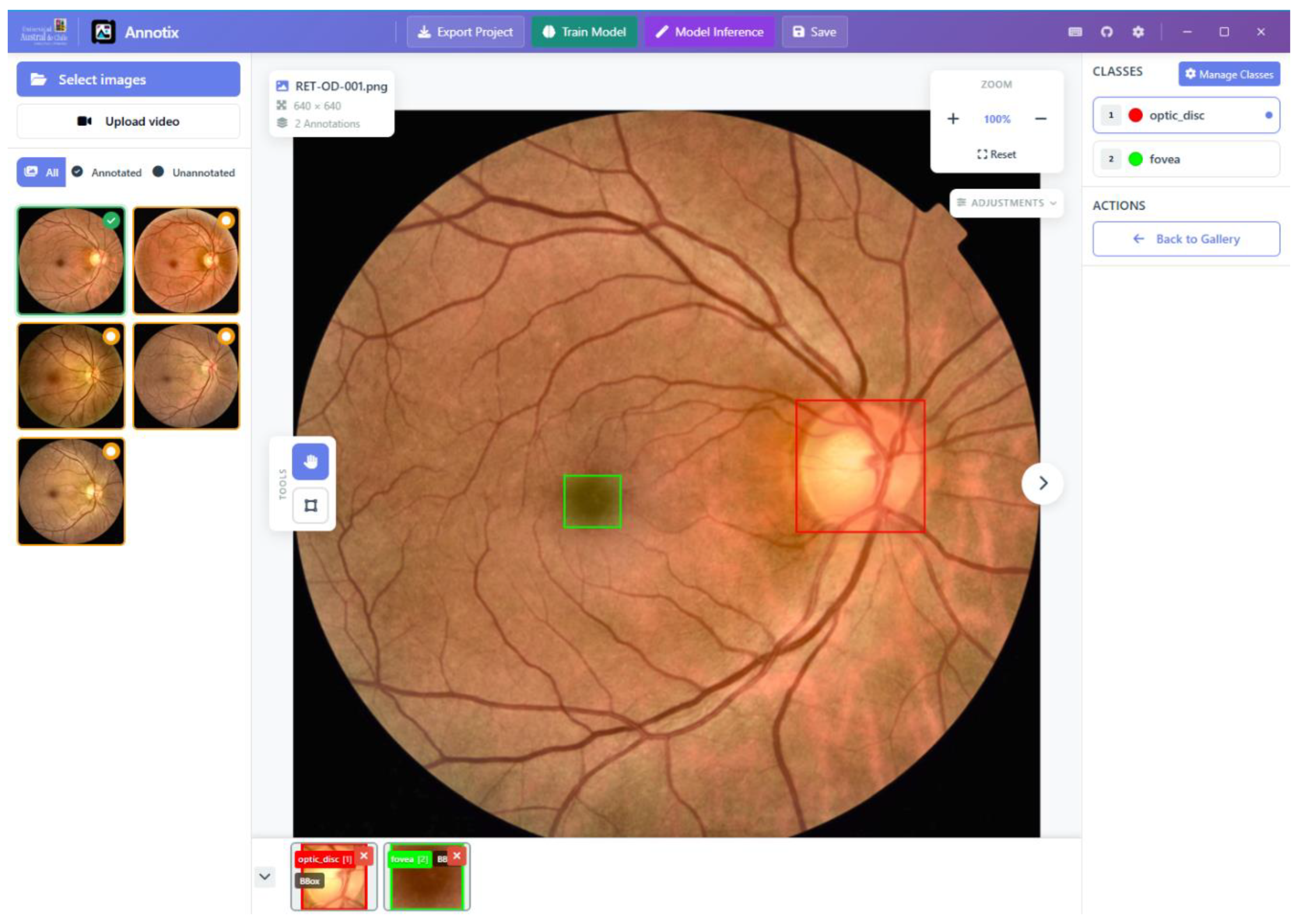
Figure 3.
Image adjustment capabilities of Annotix applied to an otoscopic image. (A) Original image at default adjustment settings; the tympanic membrane structures (pars tensa, malleus handle) are partially obscured by low contrast and uneven illumination. (B) Same image after applying CLAHE (Contrast Limited Adaptive Histogram Equalization) via the built-in Adjustments panel, alongside increases in brightness and contrast. The anatomical borders of the pars tensa and the light reflex of the umbo become substantially more defined, facilitating precise mask annotation without modifying the source file on disk. Adjustment controls (brightness, contrast, CLAHE, color temperature, sharpness) operate exclusively on the canvas rendering layer and are non-destructive.
Figure 3.
Image adjustment capabilities of Annotix applied to an otoscopic image. (A) Original image at default adjustment settings; the tympanic membrane structures (pars tensa, malleus handle) are partially obscured by low contrast and uneven illumination. (B) Same image after applying CLAHE (Contrast Limited Adaptive Histogram Equalization) via the built-in Adjustments panel, alongside increases in brightness and contrast. The anatomical borders of the pars tensa and the light reflex of the umbo become substantially more defined, facilitating precise mask annotation without modifying the source file on disk. Adjustment controls (brightness, contrast, CLAHE, color temperature, sharpness) operate exclusively on the canvas rendering layer and are non-destructive.
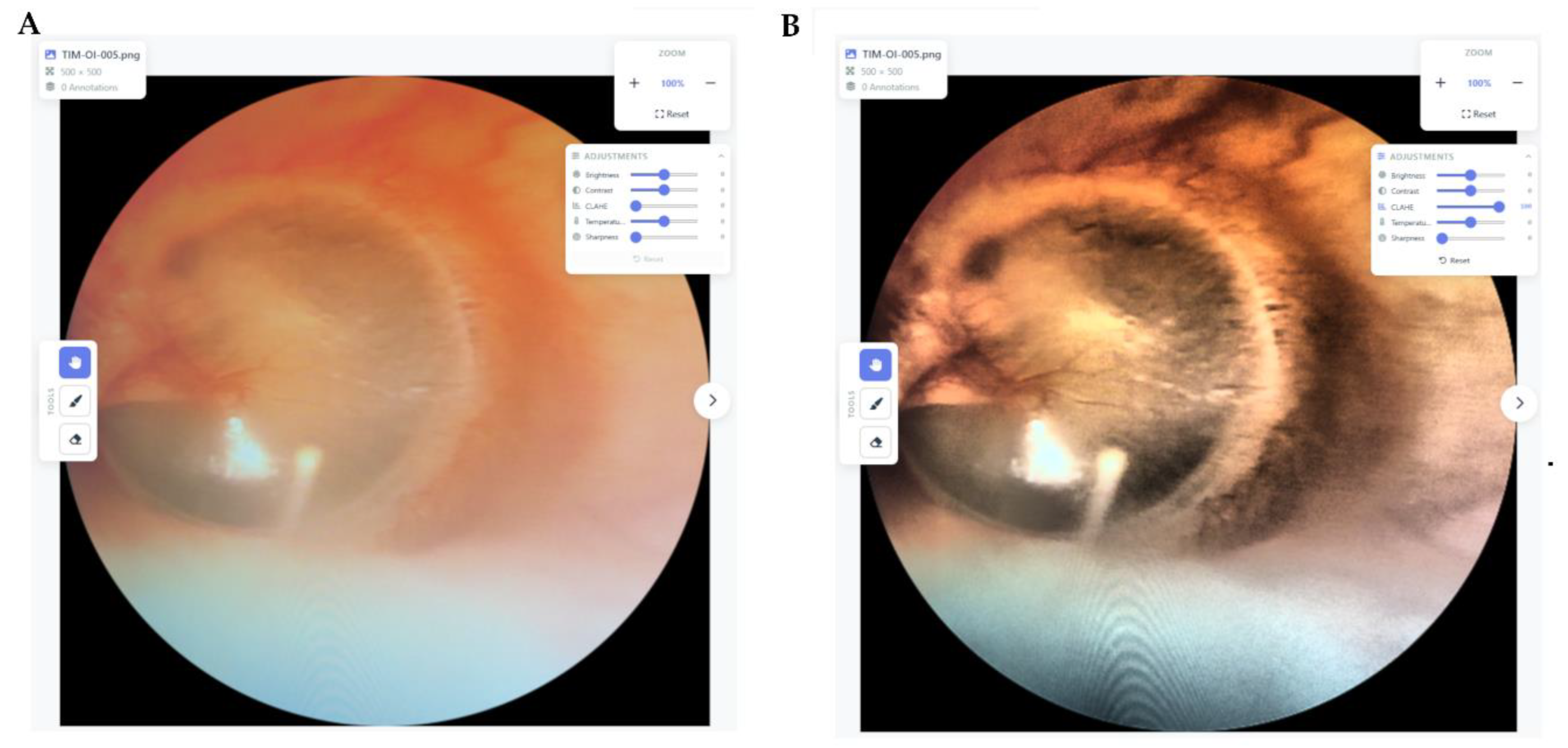
Figure 5.
Synthetic stimuli and annotation efficiency results for the bounding box (top row) and mask (bottom row) tasks. (A) Representative unannotated synthetic image from the SYN-BBOX set (400×400 px), depicting a circular field of view containing standardized geometric shapes (red circle, blue circle, yellow star, orange rectangle, green triangle) on a black background. (B) Same image after completing the five-step bounding box CRUD protocol in Annotix: bounding boxes shown for the red circle and green triangle following steps 1 and 4 of the protocol. Annotations from Annotix are shown as representative; visual rendering of bounding boxes and masks is equivalent across all three platforms. (C) Box-and-whisker plots (Tukey style) of annotation time per image (seconds) for the SYN-BBOX task; n = 90 observations per platform (30 images × 3 evaluators). (D) Representative unannotated synthetic image from the SYN-MASK set, containing a bicolor circle (half red / half blue), a thick yellow worm, a thin green worm, and an orange star. (E) Same image after completing the five-step mask CRUD protocol in Annotix: masks shown for the bicolor circle (red and blue regions) and the thick worm (green). (F) Box-and-whisker plots (Tukey style) of annotation time per image (seconds) for the SYN-MASK task; n = 90 per platform. In both C and F, horizontal brackets indicate pairwise comparisons: ns = not significant; * p < 0.05; **** p < 0.0001 (Dunn's test with Bonferroni correction, α = 0.05). AN = Annotix; CV = CVAT; LS = Label Studio.
Figure 5.
Synthetic stimuli and annotation efficiency results for the bounding box (top row) and mask (bottom row) tasks. (A) Representative unannotated synthetic image from the SYN-BBOX set (400×400 px), depicting a circular field of view containing standardized geometric shapes (red circle, blue circle, yellow star, orange rectangle, green triangle) on a black background. (B) Same image after completing the five-step bounding box CRUD protocol in Annotix: bounding boxes shown for the red circle and green triangle following steps 1 and 4 of the protocol. Annotations from Annotix are shown as representative; visual rendering of bounding boxes and masks is equivalent across all three platforms. (C) Box-and-whisker plots (Tukey style) of annotation time per image (seconds) for the SYN-BBOX task; n = 90 observations per platform (30 images × 3 evaluators). (D) Representative unannotated synthetic image from the SYN-MASK set, containing a bicolor circle (half red / half blue), a thick yellow worm, a thin green worm, and an orange star. (E) Same image after completing the five-step mask CRUD protocol in Annotix: masks shown for the bicolor circle (red and blue regions) and the thick worm (green). (F) Box-and-whisker plots (Tukey style) of annotation time per image (seconds) for the SYN-MASK task; n = 90 per platform. In both C and F, horizontal brackets indicate pairwise comparisons: ns = not significant; * p < 0.05; **** p < 0.0001 (Dunn's test with Bonferroni correction, α = 0.05). AN = Annotix; CV = CVAT; LS = Label Studio.
Disclaimer/Publisher’s Note: The statements, opinions and data contained in all publications are solely those of the individual author(s) and contributor(s) and not of MDPI and/or the editor(s). MDPI and/or the editor(s) disclaim responsibility for any injury to people or property resulting from any ideas, methods, instructions or products referred to in the content. |
© 2026 by the authors. Licensee MDPI, Basel, Switzerland. This article is an open access article distributed under the terms and conditions of the Creative Commons Attribution (CC BY) license (http://creativecommons.org/licenses/by/4.0/).
Copyright: This open access article is published under a Creative Commons CC BY 4.0 license, which permit the free download, distribution, and reuse, provided that the author and preprint are cited in any reuse.


