

Submitted:
03 February 2026
Posted:
03 February 2026
You are already at the latest version
Abstract
Software engineering activities have shifted from building new systems to maintaining 2
code bases. Yet teaching software engineering rarely echoes that reality. It is easier to teach 3
students to develop software from scratch rather than guide them to maintain an existing 4
project by suggesting and implementing modifications and enhancements. We believe that 5
the best way to teach maintenance is through practical experience. This paper describes the 6
evolution of an agent modelling tool called AMMBER. It started as a software engineering 7
team project eight years ago. Tens of students have been involved in the subsequent years 8
in maintaining and extending the software through projects in capstone units, internships 9
and casual employment. The paper authors are the current team maintaining the software. 10
The maintenance activities have included corrective maintenance, adaptive maintenance 11
and perfective maintenance, and we describe lessons learned through our failures and 12
successes. We advocate exposing students to maintenance activities on active code bases 13
and share lessons learned about increasing the capability of software engineering students 14
to usefully perform maintenance activities.
Keywords:
software engineering
; maintenance
; motivational modelling
; teaching
1. Introduction
It is a challenge to ensure that graduates of software engineering courses learn practical skills. One common way to teach those skills is through project subjects. Project subjects in university courses typically have students build a piece of software from scratch - eliciting requirements, designing, coding, testing, and deploying. Yet currently, it is rarely the case in industry that you would build software from scratch. Most students will be maintaining code bases when working as software engineers.
Despite software engineering activities shifting from building new systems to maintaining code bases, teaching software engineering rarely echoes that reality. It is easier for students to develop software from scratch rather than be guided in a maintenance project on an existing code base where bugs need to be fixed, and where enhancements are desired to be defined and implemented. While agile development is ostensibly updating working code each sprint, most student projects don’t reach a mature state where sprints are effectively performing maintenance.
Undertaking a maintenance project has challenges. Two major issues are having students work on code written by other people and sourcing suitable projects. The first issue arises because students have limited experience in reading code written by other people. Overcoming that limitation is largely a matter of time. Students can eventually understand others’ code, especially if it has been clearly written. Appropriate comments also help significantly. The second issue, sourcing both projects and clients with needs to improve the project, is more difficult to overcome. Companies will not willingly give access to students to view critical code, nor should they. Some university subjects use open source projects, which can be successful, but need an interested supervisor. Many projects are available on the Internet, but it is unclear how suitable they will be for students to first understand and then extend.
At the University of Melbourne we have preferred to use past student projects, with mixed success. Some previous projects have been built upon, one example of which is the focus of this paper. For other projects, students have been unable to extend previous work. It is tempting for students to claim that the code they have been assigned to extend is poorly written, and they need to start again. Checking whether the code is indeed badly written is often hard to do. The supervisor/teaching staff may have neither the time nor the experience to ascertain the claim, which usually goes unchallenged.
This paper is effectively using a case study research methodology. The underlying research question is what are the key characteristics of running a software maintenance project which will best guide students in software maintenance. We draw on experience from twenty-five years of running software engineering project subjects, and the last ten years of running software projects using an agile methodology.
To make concrete observations, it is helpful to focus on one specific project. This paper describes a piece of software which has been enhanced continually for eight years. The project modifications have encompassed corrective maintenance, adaptive maintenance, and perfective maintenance. The software was originally developed as a student project. It has been used and enhanced for over eight years. We were able to extend the code because we had complete control over it, and a client in the first author who was interested in improving it. Over the time of modifying and enhancing the project, we have developed an excellent way of teaching software maintenance, especially for interns. The purpose of this paper is to share the experience by distilling important lessons.
The structure of the paper is as follows. In the next section we give background and related work — in software requirements elicitation especially for agent-oriented software engineering, and in teaching software maintenance. We next describe what the software does. The following section explains the issues that had built up over the previous five years, before we describe our current work. We focus on what was needed to be done to refactor the code, and better manage the repository. We then discuss lessons learned and provide some tips, before concluding.
2. Background
The purpose of the paper is to contribute to teaching software maintenance. The software project we describe is concerned with building models to describe complex software. Our discussion of background research begins with the evolution of software modelling environments from object-oriented to agent-oriented. We look at software elicitation methods. Finally in this section we describe what research has been done on teaching software maintenance within software engineering degrees.
2.1. Methodologies for Describing Complex Software Systems
Software development initially focused on depicting functional requirements. As software development moved more towards object-oriented methods, there was a need to develop models and environments to construct them. UML [1] emerged as the leading approach for modelling the various entities in object-oriented systems.
Requirements moved beyond functional requirements to nonfunctional requirements [2], better called quality requirements. i* was an early way to try and model these new non-functional requirements. Efforts at modelling at a high level include i* [3] and Tropos [4].
Agents are a useful metaphor for understanding complex systems. The idea of intelligent agents boomed in the 1990’s, with roots both from artificial intelligence and distributed software engineering. Agents have become trendy again with agentic AI associated with LLMs, but that is beyond the scope of this paper. From the software development perspective, researchers had learned that abstractions mattered if one were to successfully build complex systems, and the dominant computing paradigm had evolved from procedural to object-oriented. From there it was natural to progress beyond classes, objects and methods to agents performing tasks as part of their roles as a way of describing more complicated systems. Agent systems evolved to multi-agent systems. A key textbook was [5].
Methodologies emerged to describe agent-oriented systems. Gaia [6] built from early work by Kenny. Gaia described agents in terms of goals and roles, and the latter in terms of responsibilities and constraints. Agents were designed to perform tasks that achieved goals. The concepts of goals, roles and agents were key. Gaia evolved into ROADMAP [7]. ROADMAP further led to goal modelling as described in [8]. Motivational models are the subsequent evolution of goal models. Goals were originally describing agent behaviour, but increasingly became more abstract. The current depiction views goals as separate from any agent implementation.
While much of the research concentrated on methodologies for building multi-agent systems, there was other research that focused on applying agent-oriented concepts within software engineering. A new focus was agent-oriented modelling, [8] with no commitment to any particular architecture.
An agent method that built from i* was Tropos [4]. Complexity of diagrams is an issue and Tropos was too complicated to use effectively. Ref. [9] shows that simplicity of a model aids in understanding a system. Consequently, tools were needed to help with modelling tasks. The visual formulations used in the diagrams have evolved independently. They have been used extensively and there is much anecdotal feedback of what works well.
2.2. Methods for Eliciting Requirements
The need to address more complex systems led to new methods for requirements engineering. The transition from object oriented methods to goal-oriented methods is described in [10]. Goal-oriented requirements engineering (GORE) was advocated [11]. Also proposed but less advocated was role-oriented requirements engineering.
New diagrams were needed to depict agents. However it was also necessary to think differently about how requirements elicited. HOMER [12] emerged from a research project to see how agents could help with management of research activities within an AI lab. Without asking different questions, requirements echoed object-oriented methods. Ideally it would be useful have a process and a tool linked to elicit requirements and then record them.
A more recent development has been the emergence of emotional requirements [9,13]. They have a different part in system description than other quality requirements, despite claims to the contrary by researchers. Values and emotions are interesting topics but are beyond the scope of this paper.
It is a jump for students from writing code to meet specifications given for an assignment to collecting requirements from a client who either may not exactly what they want or have to fixed ideas on what needs to be done to achieve a particular objective. To help students get on the same page as clients, we teach the method of motivational modelling which arose from research on agent-oriented modelling [8,14].
2.3. Teaching Software Maintenance
It has long been recognised that students might need to be taught separately about software maintenance in addition to a standard software engineering subject. For example, in 1989 the Software Engineering Institute published Software Maintenance Exercises for a Software Engineering Project Course which gave students experience in maintaining Ada code. There was a considerable focus on maintaining documentation.
The first 4-year software engineering program to be officially accredited in Australia was developed by the University of Melbourne and was accredited in 1996. The specialist subjects were in the third and fourth years of the program. In the third year, the subject in the second semester involved maintaining software. Over the next fifteen years the course changed, and maintenance projects slipped from the curriculum. A description of the Melbourne software project experience is described in [15]. As agile software development became more prevalent, it became more important to be able to give students a perspective on maintenance. Papers discussing how to run a software maintenance project subject date back to the 1980s. A more recent example is [16].
An IEEE Training course found on the Internet gave the following four learning objectives for a self-paced Software Maintenance course.
- Apply software maintenance fundamentals, including terminology; the nature of and need for maintenance; maintenance costs; evolution and categories of maintenance.
- Incorporate key issues in software maintenance, to include technical issues; management issues; cost estimation; and software maintenance measurement.
- Utilize the best practices maintenance process.
- Exercise best practices techniques for maintenance
It is unclear how to best operationalise the objectives. Our teaching experience suggests it is best to expose students to realistic changes.
3. The Case Study of AMMBER
The essence of this paper is deriving lessons from experience with maintaining a software project. The software has been in continual use for over eight years. The software has been extended by a range of students mainly in masters project subjects, and by unpaid internships. By default it has been a way of giving real, practical experience of maintenance. However, the maintenance was done in a somewhat ad hoc capability affected by the resources available and affected by the knowledge or lack thereof of the team members. The context is teaching software engineering to masters students through project subjects. We believe that the lessons reported are widely applicable. While we focus on maintaining AMMBER, similar issues have arisen with other student projects we have been involved with. The lessons have certainly been relevant for the whole suite of student projects run.
Motivational Modelling (MM) [14] is distinctive in its ability to map motivations, goals, and intentions from different stakeholders into a holistic model, providing a non-technical perspective on system requirements which often involves high-level goals and motivations from different stakeholders. The high-level goals need to be translated into specific, actionable user stories. The process requires significant manual effort to interpret each stakeholder’s goals accurately, and differing perspectives can lead to inconsistencies. For instance, capturing both functional and contextual details while ensuring alignment with system goals often introduces variability, making the task time-consuming and prone to subjective interpretation. MM is a method designed to support understanding of a problem space by representing stakeholder roles, systems’ goals, and rationales in forms that are accessible to both technical and non-technical participants [8]. Originally developed as an extension of agent-oriented requirements engineering, MM emphasises the motivations underlying system behaviours rather than only the functional requirements. There are three main stages of motivational modelling: (1) running a do/be/feel session which produces lists of stakeholders and client goals including functional, quality and emotional goals; (2) transforming the lists into a single (hierarchical) diagram; and (3) fine-tuning the model with the client or other stakeholders. More details can be found in [14].
Motivational models have been used for teaching and research for fifteen years. It typically required a couple of hours to draw the model with a tool such as draw.io or even PowerPoint or Miro. AMMBER and the Motivational Model editor that preceded it simplifies each of the three stages of Motivational Modelling. Note that the particular symbols in the models used in this paper were drawn by James Marshall [13].
We briefly describe the three panes in AMMBER which loosely align with the three stages of developing a motivational model.
Figure 1.
First Pane: Goal List.
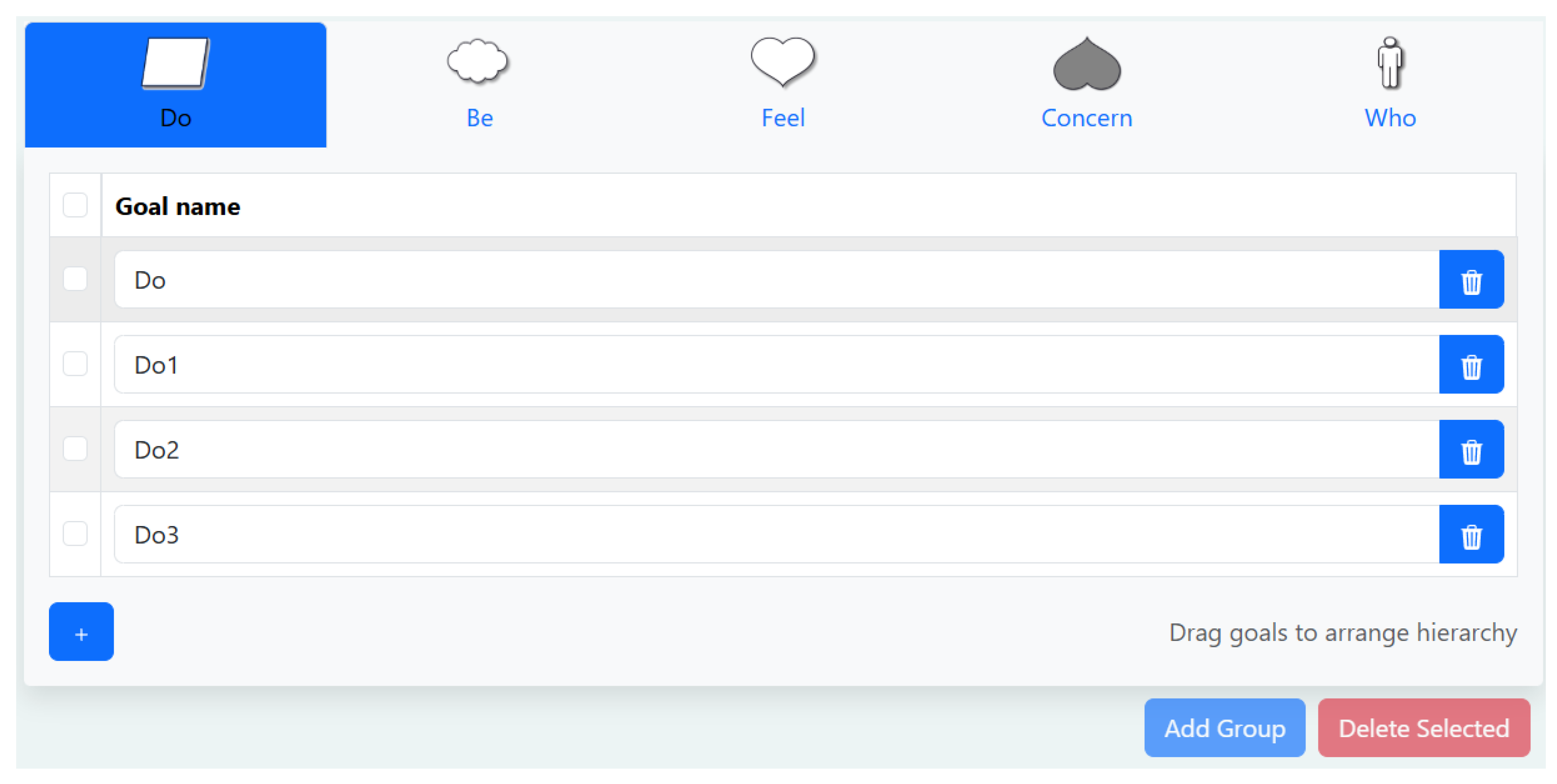
In the goal list pane, there are five categories into which items can be entered: do, be, feel, concern, and who. Do, be, feel are goals, who is a stakeholder, and concern is effectively an `anti=goal,’ which correspond to the elements of the do–be–feel framework. Entering items into these lists is straightforward.
Figure 2.
Second Pane: Hierarchy View.
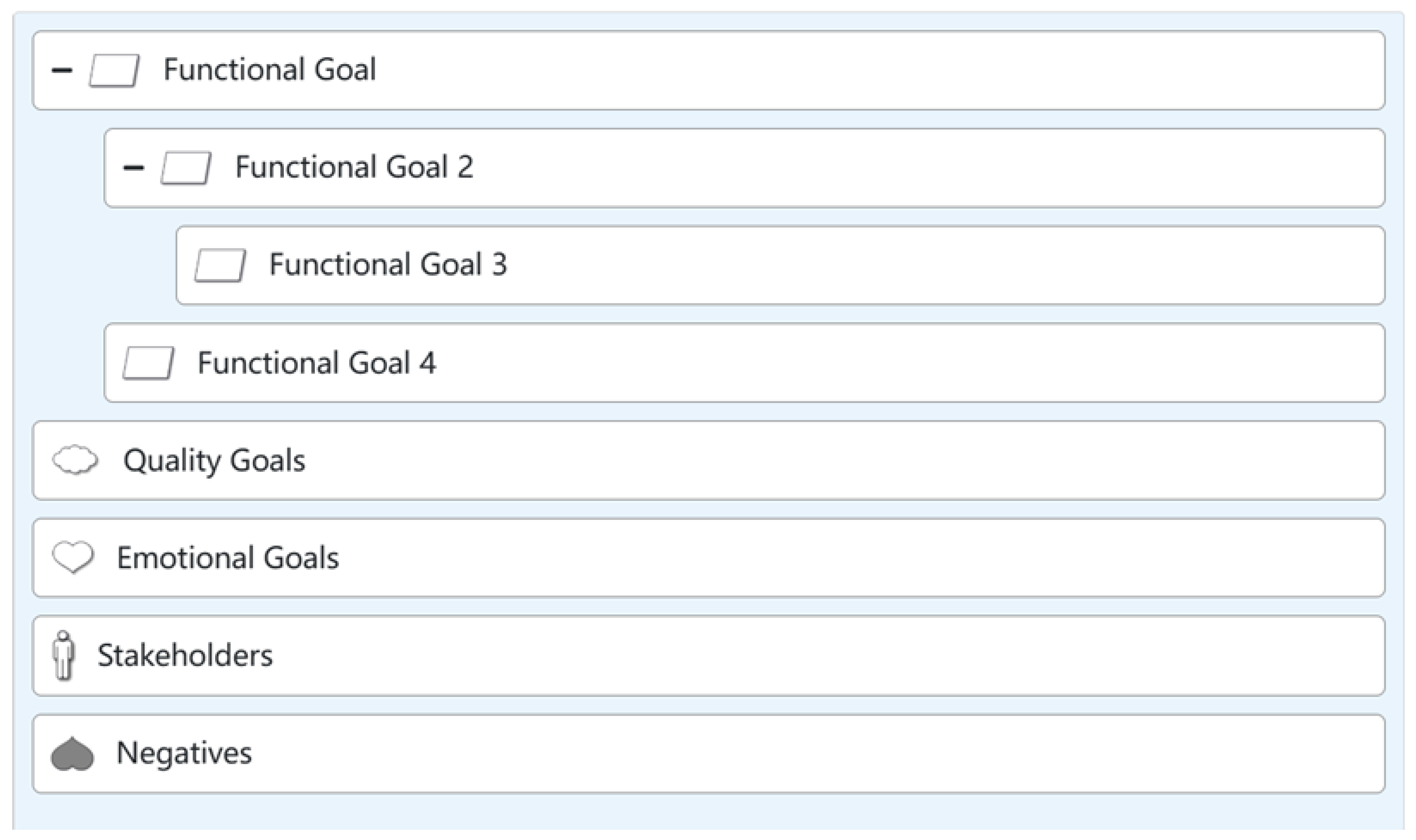
The second pane we call the hierarchy view. To incorporate goals into the hierarchy view, users may drag a goal from the goal list and drop it into a cluster. Alternatively, one or more goals can be selected, and the Add Group function can be used to add them simultaneously.
Goals from the goal list can be transferred into the hierarchy view to support the organisation of hierarchical relationships. Within this view, the relative positions of goals inside a cluster can be adjusted to refine the hierarchical structure. For instance, repositioning a goal horizontally within a cluster enables the construction or modification of parent–child relationships.
Figure 3.
Third Pane: Model View.
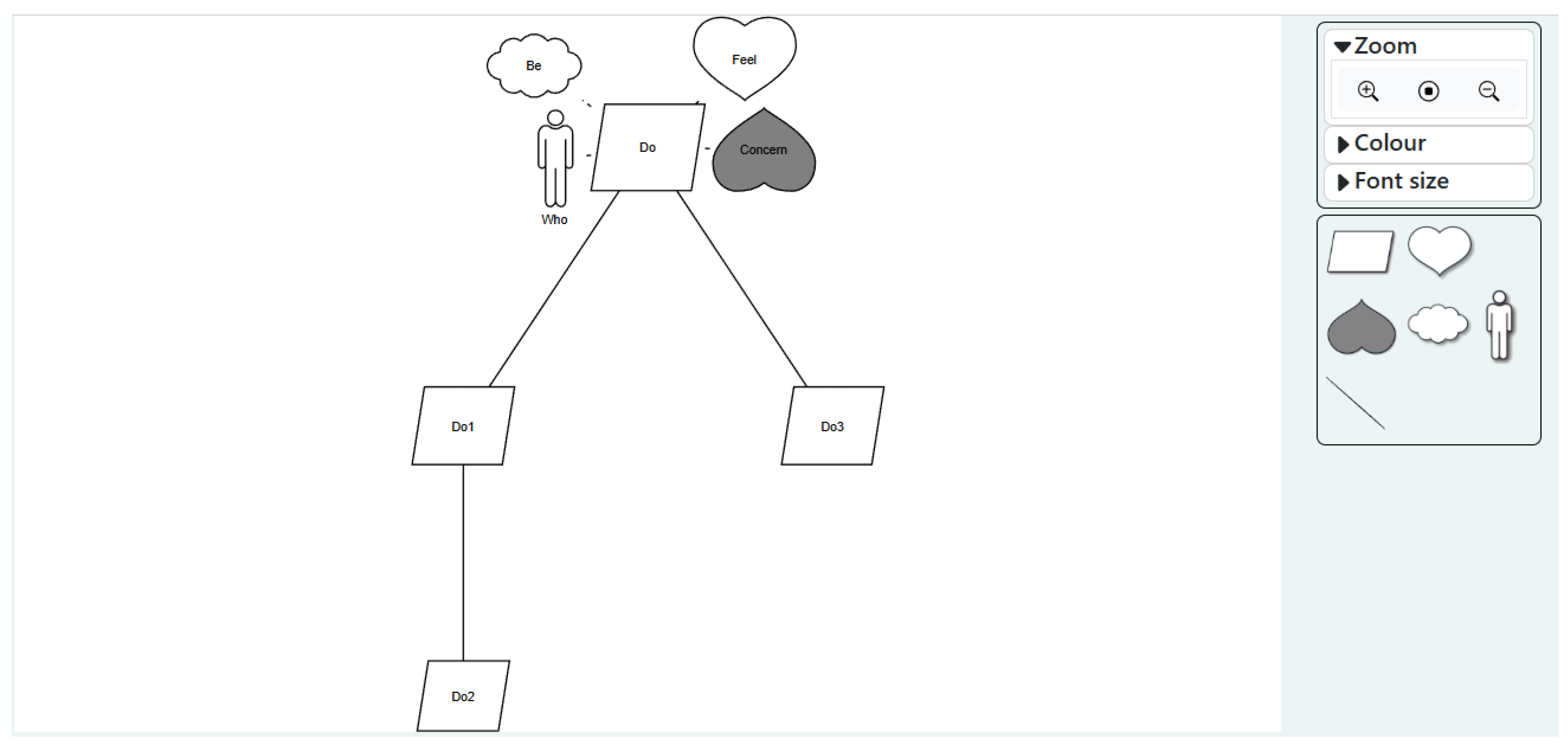
In the model view, the third pane, goals are represented as a structured hierarchical model. The layout of the model is generated automatically to enhance efficiency and reduce manual effort. Nonetheless, users retain the ability to select and drag individual goals to manually adjust their positions when finer control is required.
A toolbar positioned adjacent to the model provides controls for adjusting the model view and modifying goal presentation styles. Additionally, new goals can be introduced directly into the model by dragging the goal symbol from the toolbar into the hierarchy view.
Once the model has been finalised, AMMBER offers functionality to export the model in PNG or SVG formats, as well as to save the model as a JSON file to support future editing or collaborative use.
4. The Evolution of AMMBER
The prototype for AMMBER was built in 2018 as a year-long software engineering team project called MMeditor. The primary use that was envisaged for MMeditor was a means of drawing motivational models more quickly and efficiently. MMeditor was used in research projects, for drawing models for publications, and for consulting activities by the first author. MMeditor was subsequently offered to students who needed to build models for their projects, and for the students to use as a way of interacting with clients both to elicit requirements and to reach a shared understanding of the project that was being undertaken. Students found novel ways of using the models, and the interactions with clients suggested additional features and obviated the need for other features. An example was storing a picture with the model, which created complications for the database.
Over the next five years, five student team projects and approximately fifteen interns were involved with modifying the software. The changes were not integrated into the editor, and there were several inconsistencies due to poor handling of maintenance. Maintenance activities improved markedly once the second author joined the team near the end of 2023. Coincidentally one of the changes at that time was coining the new name, AMMBER - A Motivational Model Builder for Essential Requirements.
In this section, we summarise key issues that caused problems and explain why the maintenance improved. For the past two years, the maintenance has worked much more smoothly once the second author joined the team. We describe factors that have contributed both positively and negatively to the project. We describe the lessons that have been crystallised in these past two years, to help academics create meaningful maintenance activities for students.
Motivational Modelling has been taught to over two thousand software engineering students within three subjects which are part of the Master of Engineering (Software) since 2017. More recently (2020) motivational modelling has been used with an IT project subject within the Masters of Information Technology at the University of Melbourne. It has proved effective to teach, and for new project supervisors to adopt with no prior knowledge.
4.1. Issues That Influenced the State of the Software
- It is a characteristic of student projects that they are not thoroughly tested. The timing of the assessment mitigates against testing, and there isn’t the opportunity to exhaustively test features. Units of software testing taken by students during their degrees tend to be on the theoretical side which mitigates against a strong focus on testing. In general there is a lack of a testing culture among software engineering students in our experience. There was a lack of thorough testing of the features. For AMMBER the net effect was that there were many bugs that needed to be fixed and features to be fine-tuned.
-
The code base was disorganised. Since AMMBER was developed and maintained by multiple developers, coding standards were not applied consistently. The code quality was uneven, with some parts being better structured than others. In addition, coding styles varied across files; for example, some files use four-space indentation, while others use two-space indentation.There was also some commented-out code left by previous developers, which makes it confusing for future developers to determine whether this code should be retained or removed. Furthermore, some variables had unclear or poorly chosen names, making their purpose and usage difficult to understand.
- The repository was messy with too many branches. Each student project started with forking a new branch. Because the changes were not properly integrated, it was unclear what branches should be eliminated. The repository has still not been cleaned up adequately.
- The documentation was out of date. An intern built a manual in 2019, which was potentially a useful resource. However none of the enhancements touched the manual because it wasn’t clear what would be integrated, as a result there was inadequate documentation of new features. Ideally once a feature is finished, tested and integrated, it should be updated in the manual. The manual was not actually updated until 2025. It is an open question how best to describe the behaviour of the features. The unclear status of documentation was symptomatic of not having a maintenance culture.
-
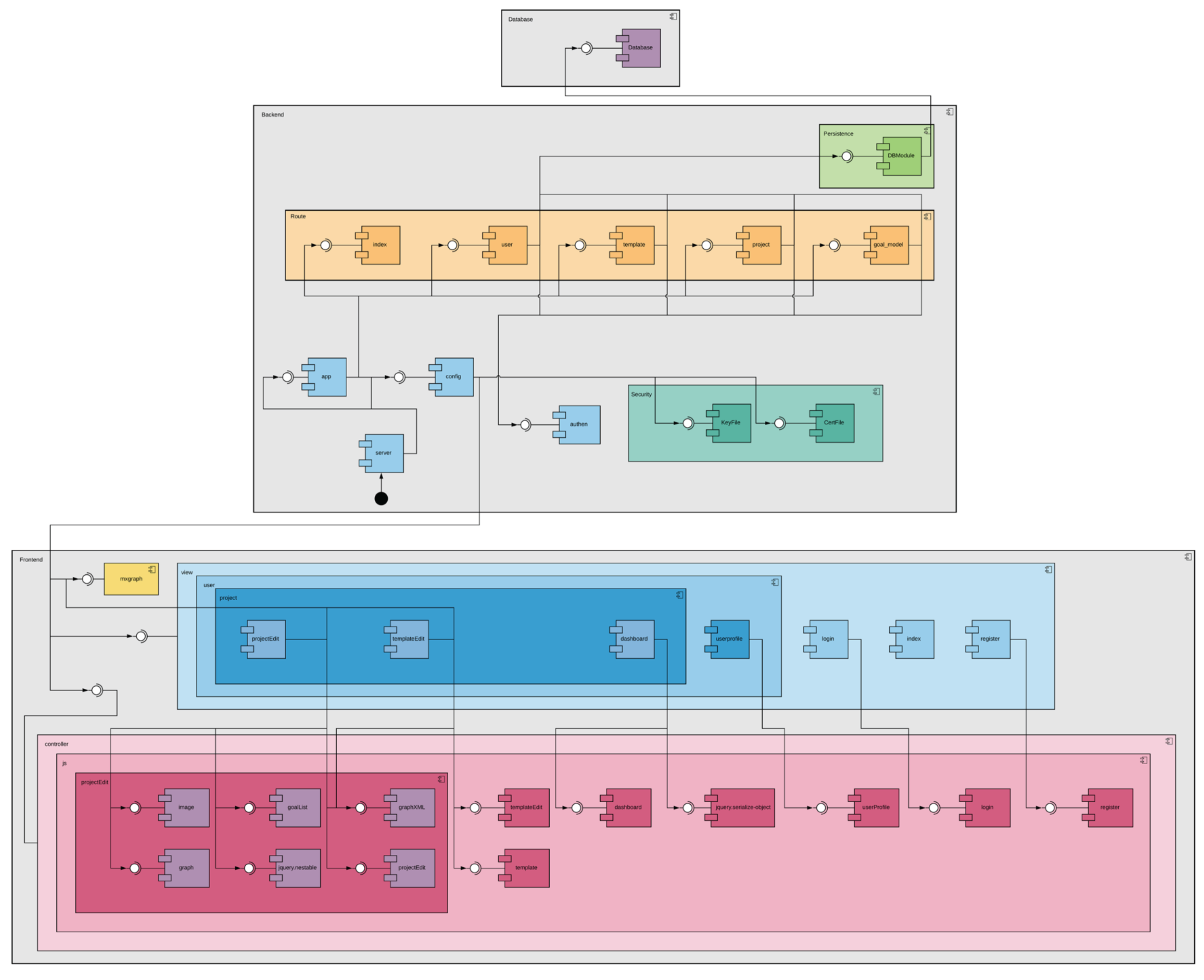
It was also unclear what diagrams would be helpful. The most notable example came from the architecture diagram. The original team that built the precursor did not provide a system architecture diagram. I asked one of the interns to produce an architecture diagram in 2020. What he drew is depicted in Figure 4.While the diagram was correct, it was not helpful for someone trying to understand the system. It was not sufficiently clear. There were many puzzling details, such as the colours chosen for the modules. Someone needed to understand the system to determine that the diagram was correct. The intern drawing the diagram had no experience in describing a system for others to gain an understanding.Ironically Figure 4 has been useful – as an example of a poor diagram. The figure has been shown to hundreds of software engineering students. No student has been able to understand the diagram without a lot of background. In general diagrams are only useful if they help with understanding the system. They should not be drawn for the sake of it. Unfortunately most students only draw diagrams because they are demanded in assignments, rather than because they will be a useful communication device. It should go without saying that part of maintenance is assembling useful diagrams.
- The architecture diagram may have been more useful if the intern was better directed. The project was driven by the first author, both as primary user of the software and source of initiating student projects. He lacked experience of maintaining software that would continually be used over a period of years. The maintenance was managed by the last author who had extensive experience with maintaining commercial software, but not with how software maintenance could be augmented by efforts from university students. The lack of experience of how best to work with students meant that there were multiple versions of code with some good additions, but which were not integrated into the deployed software. The issue was exacerbated by working over the period of COVID restrictions which limited the number of possible face-to-face meetings.
-
Many of the software requirements changed over time. An early version of the editor had the ability to upload an image, usually a copy of do, be, feel, and who lists from a whiteboard. The lists could then be more easily copied into the editor. Storing images caused some problems with the backend database. Being able to refer to an image became less useful, as we became more experienced in integrating the tool with running a do/be/feel session. It is not part of AMMBER.The biggest change of requirement was in fact changing where the models were being stored - from in the cloud to being stored locally on an individual laptop. The software was originally designed to allow groups to work on a model. That necessitated controlling access to the software and only allowing individuals or teams to see models they created. Models would be stored in the cloud and members of a project team would access the cloud and modify the model. Controlling access was unwieldy. It was necessary to build and maintain a login system, and who had access to which model. It was thought that clients and students would tinker with models as appropriate. That rarely happened for reasons of lack of ease of access, and that people didn’t often check back with models.We had multiple instances of the software running. There was one instance for research uses, and separate instances for each subject where students manipulated models. Storing files with respect to relative paths was complicated and tricky when porting from one instantiation to another.One suggested improvement to AMMBER was to allow group communication about models. At one stage requirements were gathered in one student project extension to allow a client to comment on a model, and potentially approve it. Allowing access to different people with different roles proved unwieldy. The feature was not fully implemented nor integrated into AMMBER.In retrospect, it has been easier to avoid the issue. There were problems with paths for models which is almost inevitable. It was easier to export a model which could be sent via email or via Slack and have another person upload the model. This is how AMMBER now works.Furthermore, hosting on the cloud became expensive. While some maintenance money was received from some projects, there was little external supported activity. At one stage there were three or four different versions sitting on different servers creating a different, separate maintenance problem. We also had an issue with another student project where a cloud provider did an upgrade causing the version not to run. The client did not have the expertise to fix the problem.The motivational model editor was envisaged as a web resource, where teams would work together. For reasons noted above, it was decided that models should be stored locally and re-loaded when modifying the model. Saving and exporting files had not been implemented properly in previous extensions. Storing files locally overcame a big problem where clients could not easily tinker with models. In retrospect, local versions are better.
- The initial version of the editor used MySQL for the backend database. A security issue emerged for MySQL which necessitated an upgrade which wasn’t easy to merge into the software because of our lack of a good pipeline. We switched to Postgres which was better maintained. Such issues are inevitable.
-
The final issue is software deprecation. Systems are usually built using libraries and components, which inevitably get upgraded. The updated versions may no longer work with older code. Decisions need to be made as to whether to allow an upgrade, or to stay with an older version of the software. That is an issue that students have no experience in navigating.The biggest decision of that kind for AMMBER involved the use of mxGraph for drawing shapes. mxGraph is no longer supported. Unfortunately there was no obvious supported resource to replace it. After searching we decided to stick with mxGraph as there were many people still using the components and they worked well enough and could be extended.
4.2. Why AMMBER Maintenance Improved
Having teams and interns working on maintaining AMMBER and its predecessors was largely positive. However the learning experience for the current maintenance team, and the authors of this paper, is significantly better. There are three main factors for the improved experience.
The first factor is dedicated knowledge of what it takes to maintain code in a professional environment. The second author made a huge difference when he joined the team. Being able to advise students on best practice drawn from forty years of professional experience was very positive. Students quickly appreciate who is knowledgeable and who is not. He also played the leading role in restructuring the code as described in the next section. As noted previously, without that experience students can flounder.
The second factor is having capable and motivated students working on the project. Not all team members of a student project team are equally motivated or equally capable. So not all the code developed by student teams was worth integrating. Consequently progress was slower than expected, especially in the case for the year-long team from a couple of years ago. Although some of the current maintenance team attended meetings virtually, there was a good connection between the members. All were motivated to both improve their skills and contribute positively to the code base.
The third factor is having a good environment. Organising the repository was helpful as is described in a later section. GitHub Issues was used effectively and in a timely manner both to note bugs that were found and needed fixing, and to record ideas for enhancement. There was clear ownership of who was assigned to fix a specific issue. There was good communication at the weekly meeting which operated both as a standup but also sharing information on careers, Australian culture and lessons learned from undertaking the software engineering degree.
We also note that it helped to call the tool AMMBER rather than mm-editor. The name was suggested after a similar naming of VENUS [17] improved a sense of belonging to the project. The name was discussed by the group and was universally adopted. Saying we are having an AMMBER meeting has been more positive.
5. Refactoring The Codebase
For six years, progress on the code base was ad-hoc. Some key requirements had changed, and programming technologies had evolved. At a certain point, it became clear that progress on the application from the interns was slowing and it was time to examine the app to understand why.
5.1. Refactoring Motivational Modeller
Several things about the internal structure of the motivational modeller needed attention:
- Two versions of the data structures used in the app, generating in effect two views of the same dataset. These two datasets were maintained separately. Each time they were modified, both views would be updated. Typically, both of the data structures would be updated inline in the code – this made testing those updates effectively impossible. There were regular bugs with the two data structures getting out of sync.
- The use of React context (useContext) was naive, exposing both sets of data structures to any code that would modify them unconstrained.
- The use of components was inconsistent. While some components had good structure and organisation, others were ad hoc. In some places the code to update the data structures was inline which made it difficult to understand and modify, let alone test.
- Concepts were insufficiently encapsulated. In one of the models, there is an isRowEmpty test which as it happens tests whether the name of the goal is empty. Instead of using that consistently in the app, the code would trim and test the string in-line losing the clarity and modifiability of using a named function.
- Deeply chained functions made it difficult to refactor because of the uncertainty as to what other functions used the functionality, eg, onKeyDown →handleKeyPress→ handleAddRow.
- Too much use of useEffect resulted in a disconnect of actions from their causes.
5.1.1. Converting to a Single Data Structure
To change the app to use a single data structure with multiple views, the storage of the data needed to be centralised. A state machine could then be used to update it. React has a facility for precisely this, a reducer hook. A custom hook was built which encapsulates the reducer hook as well as providing functions which will return different views of the data. This moves all the updates of the data into a single place and also allows the writing of tests to validate the updates to the data.
There was use of a central storage access FileProvider which just gave access to the data across the app where needed. The access was unconstrained.
- The use of a React context to share data among components without moderating access meant that wherever data updates were made, both views of the data needed to be updated. This made the code complex and difficult to maintain because updating logic was scattered through the codebase. It was an obvious opportunity to re-factor this using a React reducer (useReducer, effectively an event-driven state machine) which would dispatch specific events, eg, updateTextForGoalId, addGoalToTree, etc. This gave those updates to the data structure clear names and also moved the code that mutated the data structures into a single place. With the consolidation of the code, it became possible to write unit tests for the mutations and have confidence in their correctness. Another advantage of this approach was that the data structures exposed to the code became immutable , so that the only way to update them was to dispatch events to the state machine. The support for creating a reducer with these characteristics was available in the Redux Toolkit (RTK) reduxtoolkit, a powerful extension to React. While we haven’t used the rest of the functionality that provides, this has proved to be a good choice. Only a two line Typescript shim was needed to carry the types across correctly.
- When refactoring the code to use higher level operations, it was difficult to understand the code fragments and what they did: they all worked on the data in different ways.
- The React context was split into two parts: a context that shared the data values and a state machine (using useReducer) to update the state. This made a dramatic difference to the complexity of the code with enormous amounts of code being cut out of the app. It also removed a lot of dependency updates of the app (via useEffect) disappeared as well because all the data in the context would be updated each time a change was made and React would automatically update the changed components.
- This also removed a lot of the need for “prop drilling” because components in the app could send messages to the state machine directly using the dispatch method from the context, rather than needing to have functions passed to them to update the state where it was being modified in line.
The cost to address this was that it became difficult to find where the data structures were accessed and then understand what the code was doing.
5.2. Observations
While this describes the specific changes that were implemented in AMMBER, they are typical of what happens when software goes into an extended maintenance phase. Each of the changes to fix a problem or add new functionality is made in isolation, typically using the smallest possible change to solve the problem. Those changes are generally made in line where the change is needed which tends to bury them in code making them difficult to test. That also makes it difficult to find other related functionality that could be extracted and reused. The code stops being tested, is often repeated and when it needs to be updated, that has to happen in many places which, in practice, means that not all of those places are updated and bugs are introduced inadvertently. It becomes more and more difficult to stand back and look at the structure of the application, reason about it and then update the application’s architecture.
Interns working on the project are usually timid about making broader changes to the project. This is further amplified when there isn’t a meaningful test suite to check that the functionality of the app is consistent across changes. There is an unstated objective that it is important to make the minimum changes to the code to effect the change that is required. That factors into a lack of confidence on the developers’ behalf along with a wish to get the work done as quickly as possible. Exploring different approaches to address the issue is not on the agenda, it is just "get it done as quickly as possible."
The interns’ tenure on the project is also a factor here. There is not much incentive to "own" the codebase, that is, to understand it more broadly. This also means that a duty of care and curation of the project doesn’t occur in the same way as it would on a project with dedicated staff. The interns know that they won’t be working on the project after the end of the semester and it shows.
We found that by following some structured development processes by using GitHub issues to manage and prioritise the workflow, coupling that with pull requests (PR’s) requiring review by a more experienced developer, the code quality and development speed was increased. The interns also reported greater satisfaction with working on the project and much greater learning opportunities by having their proposed changes reviewed and returned to them with meaningful feedback and directions for improvement.
The cycle of interns has also brought different skill sets to the project, for instance, some have considerable experience with configuring CI/CD which has improved the development and deployment experience.
If the initial architecture isn’t built with extensibility and testability, it is difficult to retrofit it. The refactoring of the application occurred over a semester when there wasn’t active development on the codebase. This is a luxury that is rarely afforded in the real (commercial) world. Rethinking the architecture of an application is difficult while it is in a state of flux.
6. Using the Repository Effectively
For many years, the team working on the project had been using git to manage it in a very informal sense. While developers were developing on branches, the development work was just merged back onto the main branch and then deployed. This resulted in a lot of branches where development had been done but the main branch had diverged to the point where merging that work back into the project had become too difficult or onerous to complete. Control over the naming of the branches was non-existent and it was difficult to understand what branches with names GoalList and goal_list might be doing or how they differed.
To address this we adopted two strategies: we moved to using Gitflow [18] to manage the development process and GitHub issues to manage the work done by the team. The combination of these two techniques has had a profound impact on tightening up the development process making it comprehensible, manageable and accelerating development.
Gitflow’s underlying concept is to introduce a separate working branch for the project — typically called develop — which holds the current working version of the project with all the latest changes; the main branch then holds only the releases for the project. While this change seems inconsequential, its effect is quite profound because it separates releases from active development. There is a small overhead required to merge from develop to the user’s development or fix branch before merging back to develop which minimises the differences between the branches but this rarely proves problematic. Each user’s development or fix branch is intended to focus on a single objective, corresponding to one GitHub issue, thereby simplifying the review and merging process.
Expanding further about this, Gitflow’s methodology clearly outlines how to create branches for hotfixes, releases, and so on. Feature branches will also be created, each corresponding an issue in the GitHub Project. When the issue is solved, they will be merged into the develop branch. This ensures that the branches only focus on one goal, making reviewing and merging easier. Having branching organised and understood across the team makes cooperating across the team much simpler.
Managing work on the project using issues is similarly dramatic. It allows prioritisation of pieces of work in the system, allocation of work to developers, supports consistent generation of branch names, provides a log of work done on the issue and gives a method for work to be reviewed before release by requiring a PR (pull request) by a separate developer for the work to be integrated onto develop. The feedback to the interns from the PR’s from the senior developers has been well-received and given some great learning opportunities.
A strategy that we have returned to time and again when shaking down the project has been for the project owner to come in and sit down with the developers and use the app to build a model for a problem they have come across. As the model is entered into the system, any issues with the functionality of the system, vagaries, UI discrepancies, wording of errors, etc are logged into github with little review and often only just enough information to replicate the problem. The objective is to capture as many issues as possible, not to document them thoroughly. It is too easy for bigger issues to dominate development and for small issues to fall through the cracks and remain unaddressed over many releases, even though the work required to fix them is minimal.
During the review and prioritisation process, more detail is added and screenshots are included to describe the problem with enough detail to allow it to be solved. The intent is that the issue becomes a story of how the problem is addressed, from its initial description, possibly some discussion about different approaches or things to consider, links to relevant web pages or other resources that factored in the decision-making process and of course references to the code changes that were made along with the commit messages. Coming back to review some of these issues when needed has been a pleasure.
When we wanted to make a release, we would create a milestone on GitHub and then assign tickets to it. Those tickets would be assigned to developers and when they were all complete, we would do a system test and then merge develop to main, tag that on the main branch and close the milestone. While there’s nothing unexpected in that process, it works in seamlessly with our usage of issues and Gitflow to give structure to the development process.
7. Lessons Learned
Having observed the evolution of AMMBER over eight years, here are some important lessons that we learned.
-
Control the repository carefullyControlling the repository was discussed at length in the previous section. Without careful management of the repository, many good changes were not adopted. Several innovations in student team projects were never incorporated because there was poor control of branches. Keeping a repository tidy does not come naturally to students. In another student project, which was extended by several student teams, there ended up being 88 branches, most of which had no changes. They should have never been left in the repository. It took an intern several days work to clear up the branches, checking that there was nothing significant in each branch to be deleted.Systematic naming was important, but it needed to be consistent. In an earlier version of AMMBER there were develop, test, and main branches for both an editor and an admin interface. Almost none of the branches were used. Setting up the branches and maintaining them was an overhead which discouraged timely incorporation of changes. Changes need to be integrated when they are completed, which has not always been students’ practice.
-
Review design decisions regularly in light of technology developmentsAs decisions about changing requirements were made, there was no discussion about implications for system architecture. The project would have benefited from a more timely review of decisions.
-
Test as a Safeguard for Codebase IntegrityIn contemporary software projects, development is rarely carried out by a single individual. Instead, multiple contributors work concurrently on a shared codebase, often performing parallel changes and frequent merges. In such settings, maintaining codebase integrity—ensuring that new changes do not unintentionally break existing functionality—becomes a critical challenge. Automated testing plays a key role in addressing this concern.In our experience, testing was often discussed late in the development process, typically during deployment, when failures caused by recent merges became visible. Although we recognised the importance of testing, it was frequently deprioritised due to the perceived complexity arising from tight dependencies within the system. Writing unit or integration tests was seen as difficult and costly, especially in a rapidly evolving codebase. We often assumed that testing could wait until "everything was done"—but a codebase is never truly finished; it continuously evolves, and that endpoint never arrives.Despite these initial hesitations, tests proved essential in detecting regressions early and in supporting collaboration among multiple developers. This experience reinforced an important lesson: a codebase must be structured to support testing from the outset. Low coupling and high cohesion not only improve maintainability but also make automated testing feasible. Without such architectural considerations, testing risks becoming an afterthought—acknowledged in principle but avoided in practice.In project subjects, virtually all students fail to test their software adequately. There are two primary reasons for this. First, students often run out of time, and by the end of the semester are scrambling to make a demonstration run. Second, rigorous software testing is generally outside students’ direct experience of writing software for subject assignments. They don’t have the appropriate mindset. Although testing is commonly covered in dedicated subjects, it is frequently taught in a theoretical manner, and the practical skill of developing test scripts is not sufficiently practised. Furthermore, in the context of short-term student projects that typically last only a single semester, manual testing is often perceived as a more efficient temporary solution during development. As a result, students tend to prioritise completing functional requirements over establishing a robust testing framework, as the long-term benefits of automated testing seem to be irrelevant to their goals.
-
Ensure the involvement of real usersWhen testing the system, students tend to use unrealistic examples. This was true for all of the various student project groups that worked on AMMBER or its precursors. There not being any usable test data sets, and poor interns had left nothing useful. Student project teams were reluctant to schedule sessions with actual users. The students needed to see the system used by real users of the system. That had two positive effects. One was that students could see meaningful examples. The second was motivating students that their work would be valued. Getting an actual user to test the system also helped capture many small bugs, layout issues and inconveniences that were glossed over when developers were focused on just testing their latest changes.A corollary is that any software system used for a maintenance project should be chosen carefully. Students are motivated by the thought that the software will be used. There is a tradeoff between being used but being on a critical path in a project with the attendant pressure to deliver something.More recent testing has used AMMBER to redraw old projects. What worked easily led to several improvements. We in fact have a large collection of motivational models that have been stored as diagrams in Dropbox. They have been useful for testing, and some teaching and research. They need to be handled appropriately and integrated into a test suite. That is a topic for future work.
-
Consolidate code, don’t let it fractureOne of the earlier interns was tasked with changing the diagram for people when there was more than one stakeholder. It was difficult to fix as there were several places where the shape was stored which caused confusion. When the interns are making changes, there can be an instinctive reflex to copy a piece of code and work on that separately to try to minimize the scope of the changes. In this instance, copying the code caused problems because there should have been a single instance which was referenced everywhere. This is really just an instance of DRY — don’t repeat yourself — but that lesson can be hard to learn.
-
Be aware of software deprecation possibilitiesThere have been some major hiccoughs in development caused by packages used in the project no longer being supported. Specifically, the project had been using the MxGraph package but support for this had been dropped. We were able to move to a replacement package for this MaxGraph but resolving the incompatibilities between the packages were felt like a lot of work for minimal progress.There is also a need to be aware of security alerts that come up in packages used in the application. The nature of the React ecosystem is that even a modestly sized project like this uses a huge number of packages and any of these can be vulnerable. GitHub has started scanning package lists of projects it hosts and sends alerts about vulnerabilities which has been invaluable but also creates work to update the packages.
-
Interns work better than software project teamsIn the eight years since the original motivational model editor was built, five student project teams at the University of Melbourne have extended the project. That includes one team of eight over a whole year as part of a Masters of Software Engineering degree, and four teams of 4-5 students doing a one semester project as part of a Masters of Information Technology degree. There have been around ten cycles of interns working on the project. Mostly the students were undertaking an internship subject, but several were unpaid interns. The interns came from both the University of Melbourne and Swinburne University of Technology. The quality of interns varied considerably. Several of the internships run completely virtually, originally necessitated by COVID restrictions.Our observation is that internships work better than student project teams for maintaining software. There are several reasons. One is that the assessment criteria for the software project unit can get in the way of achieving outcomes for the project, and timelines are more fixed, and again not in alignment with the maintenance needs. There is also more direct mentoring offered to an intern, and the motivation level was usually higher. Internships have in fact led to research projects and other engagements on several occasions.
8. Conclusions
The current setup for AMMBER has been a great learning experience for the authors of this paper. For the student interns, it has been experience with software maintenance that they did not get in the other subjects in their software engineering degree. For the first author, it has been an opportunity to see at close hand, how software maintenance can work effectively. For the experienced software developers, it has been an opportunity to mentor enthusiastic students and pass on the benefit of their experience in a positive environment. It is ideal if there can be ongoing maintenance projects that students can work on.
Author Contributions
All authors contributed to the maintenance of AMMBER and effectively to the software. The conceptualisation and methodology were led by the first author. The first two authors wrote the first draft. All authors contributed to the validation and editing. All authors have read and agreed to the published version of the manuscript.
Funding
This research received no external funding.
Data Availability Statement
Details of the repository are available on request.
Acknowledgments
We acknowledge all students who have worked on AMMBER and its precursor.
Conflicts of Interest
The authors declare no conflicts of interest.
References
- Koc, H.; Erdoğan, A.M.; Barjakly, Y.; Peker, S. UML Diagrams in Software Engineering Research: A Systematic Literature Review. In Proceedings of the Proceedings 2021, 2021. [Google Scholar]
- Chung, L.; Nixon, B.; Yu, E.; Mylopoulos, J. Non-FUnctional Requirements in Software Engineering; Springer, 2000. [Google Scholar]
- Yu, E.S. Social modeling and i. Conceptual modeling: Foundations and applications: Essays in honor of John Mylopoulos 2009, 99–121. [Google Scholar]
- Bresciani, P.; Perini, A.; Giorgini, P.; Giunchiglia, F.; Mylopoulos, J. Tropos: An agent-oriented software development methodology. Auton. Agents Multi-Agent Syst. 2004, 8, 203–236. [Google Scholar] [CrossRef]
- Wooldridge, M. An Introduction to MultiAgent Systems - 2nd edition; John Wiley, 2009. [Google Scholar]
- Wooldridge, M.; Jennings, N.R.; Kinny, D. The Gaia methodology for agent-oriented analysis and design. Auton. Agents Multi-Agent Syst. 2000, 3, 285–312. [Google Scholar] [CrossRef]
- Juan, T.; Pearce, A.; Sterling, L. ROADMAP: Extending the Gaia methodology for complex open systems. In Proceedings of the Proceedings of the first international joint conference on Autonomous agents and multiagent systems: part 1, 2002; pp. 3–10. [Google Scholar]
- Sterling, L.; Taveter, K. The art of agent-oriented modeling; MIT Press, 2009. [Google Scholar]
- Miller, T.; Lu, B.; Sterling, L.; Beydoun, G.; Taveter, K. Requirements elicitation and specification using the agent paradigm: the case study of an aircraft turnaround simulator. IEEE Trans. Softw. Eng. 2014, 40, 1007–1024. [Google Scholar] [CrossRef]
- Mylopoulos, J.; Chung, L.; Yu, E. From object-oriented to goal-oriented requirements analysis. Commun. ACM 1999, 42, 31–37. [Google Scholar] [CrossRef]
- Van Lamsweerde, A. Goal-oriented requirements engineering: A guided tour. In Proceedings of the Proceedings fifth ieee international symposium on requirements engineering. IEEE, 2001; pp. 249–262. [Google Scholar]
- Wilmann, D.; Sterling, L. Guiding agent-oriented requirements elicitation: HOMER. In Proceedings of the Fifth International Conference on Quality Software (QSIC’05), 2005; IEEE; pp. 419–424. [Google Scholar]
- Marshall, J. Agent-based modelling of emotional goals in digital media design projects. In Innovative Methods, User-Friendly Tools, Coding, and Design Approaches in People-Oriented Programming; IGI Global, 2018; pp. 262–284. [Google Scholar]
- Lopez-Lorca, A.; Burrows, R.; Sterling, L. Teaching Motivational Models in Agile Requirements Engineering. In Proceedings of the Proceedings of the Requirements in Education and Training workshop at RE’18, 2018. [Google Scholar]
- Keogh, K.; Sterling, L.; Venables, A. A Scalable and Portable Structure for Conducting Successful Year-Long Undergraduate Software Team Projects. Journal of Information Technology Education 2007, 6(1), 515–540. [Google Scholar] [CrossRef] [PubMed]
- Ouhbi, S. Bridging Course: An Experience Report. In Proceedings of the IEEE/ACM 46th International Conference on Software Engineering: Software Engineering Education and Training (ICSESEET), 2024. [Google Scholar]
- Sammut, J.; Sterling, L.; Xiang, X.; Song, Y.; Cao, Y. VENUS: Designing a Validation Engine for User Stories. In Proceedings of the Communications in Computer and Information Science, 2025; Springer: Cham; vol 2263. [Google Scholar]
- Driessen, V. A Successful Git Branching Model. 2010. Available online: https://nvie.com/posts/a-successful-git-branching-model/.
Disclaimer/Publisher’s Note: The statements, opinions and data contained in all publications are solely those of the individual author(s) and contributor(s) and not of MDPI and/or the editor(s). MDPI and/or the editor(s) disclaim responsibility for any injury to people or property resulting from any ideas, methods, instructions or products referred to in the content. |
© 2026 by the authors. Licensee MDPI, Basel, Switzerland. This article is an open access article distributed under the terms and conditions of the Creative Commons Attribution (CC BY) license (http://creativecommons.org/licenses/by/4.0/).
Copyright: This open access article is published under a Creative Commons CC BY 4.0 license, which permit the free download, distribution, and reuse, provided that the author and preprint are cited in any reuse.


