

Submitted:
26 January 2026
Posted:
28 January 2026
You are already at the latest version
Abstract
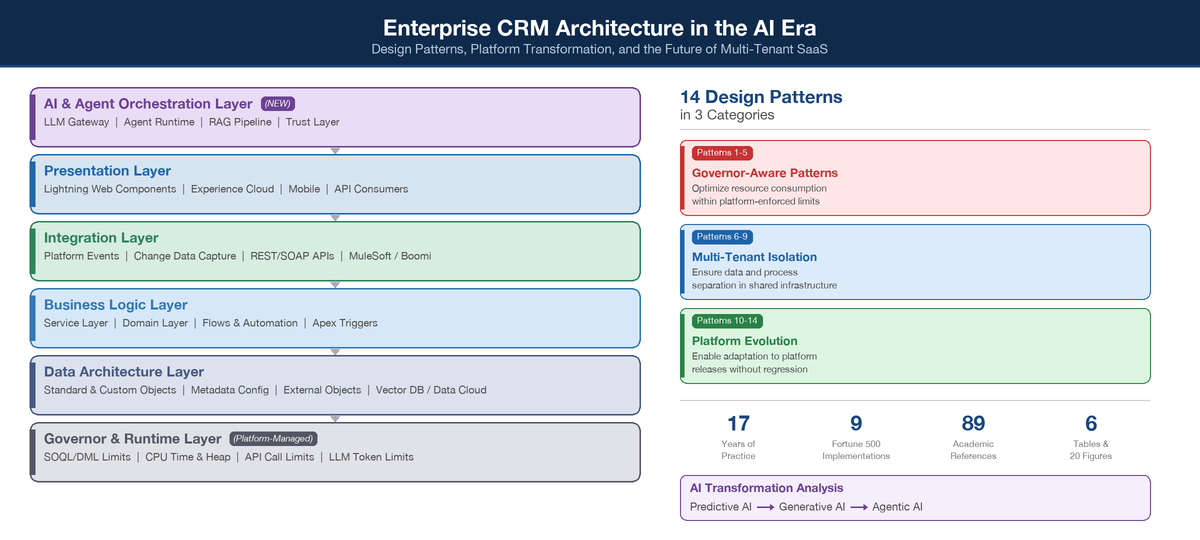
Enterprise Customer Relationship Management (CRM) platforms have evolved from simple contact databases into complex, multi-tenant cloud ecosystems that serve as the operational backbone for Fortune 500 organizations. Despite this criticality, no unified reference framework exists that catalogues the architecture and design patterns specifically adapted for constrained multi-tenant CRM environments, nor examines how the rapid integration of artificial intelligence is reshaping these architectural foundations. This paper presents a practitioner-driven reference framework comprising 14 architecture and design patterns organized across four layers — Data Architecture, Business Logic, Integration, and Presentation — derived from longitudinal analysis of enterprise CRM implementations spanning 17 years across financial services, telecommunications, healthcare, energy, and consumer goods sectors. We identify three categories of patterns: (1) Governor-Aware Patterns that optimize resource consumption within platform-enforced execution limits; (2) Multi-Tenant Isolation Patterns that ensure data and process separation in shared infrastructure; and (3) Platform Evolution Patterns that enable applications to adapt to platform releases without regression. Beyond the foundational pattern catalogue, we analyze the AI transformation reshaping CRM architecture across three generations — predictive, generative, and agentic AI — documenting how these capabilities introduce new architectural layers (vector databases, knowledge graphs, AI agent orchestration), governance frameworks (Trust Layer, NIST AI RMF), and integration protocols (MCP, A2A). We further examine the provocative question of whether AI coding agents could enable enterprises to bypass CRM platforms entirely by building custom applications, presenting evidence-based analysis of AI developer productivity (including studies showing experienced developers are 19% slower with AI tools on complex codebases), code quality concerns (45% security vulnerability rate in AI-generated code), and seven structural platform advantages that historical precedent confirms have withstood four prior waves of "build your own" disruption. The CRM market continues to accelerate ($128 billion, 13.4% growth) with AI-in-CRM emerging as the fastest-growing subsegment at 28% CAGR, suggesting that AI will transform rather than displace enterprise CRM platforms.
Keywords:
CRM architecture
; design patterns
; multi-tenant SaaS
; enterprise architecture
; Salesforce
; governor limits
; integration patterns
; event-driven architecture
; platform engineering
; agentic AI
; retrieval-augmented generation
; AI governance
; build vs. buy
; composable architecture
1. Introduction
Customer Relationship Management (CRM) systems have undergone a fundamental transformation over the past two decades. What began as on-premise contact management databases have evolved into cloud-native, multi-tenant platforms that orchestrate sales, service, marketing, commerce, and increasingly, autonomous AI agent operations across the enterprise [1,2]. Gartner's Magic Quadrant for Sales Force Automation reports that Salesforce has maintained its position as a Leader for 18 consecutive years, reflecting the platform's architectural maturity and market dominance [3]. Forrester's 2025 CRM Wave describes the market as "on the cusp of change," driven by the convergence of predictive, generative, and agentic AI capabilities within CRM platforms [4].
Despite this evolution, the software engineering literature has not kept pace with the unique architectural challenges that enterprise CRM platforms present. Classical design pattern literature — from the foundational Gang of Four catalogue [5] through Fowler's enterprise application patterns [6] to Hohpe and Woolf's integration patterns [7] — was authored in the context of single-tenant, self-hosted application environments where developers had full control over infrastructure, database schemas, and execution runtimes. Multi-tenant SaaS CRM platforms fundamentally alter these assumptions.
In a multi-tenant CRM environment, applications execute within a shared infrastructure governed by platform-enforced resource limits (commonly termed "governor limits"), a metadata-driven schema architecture, and a platform-controlled order of execution [8,9]. These constraints are not bugs to be worked around; they are deliberate architectural guardrails that ensure fair resource distribution across tenants sharing the same compute and storage infrastructure [10]. The challenge for enterprise architects is that classical design patterns, when applied naively to these environments, can produce anti-patterns — solutions that appear sound in isolation but fail under the unique constraints of multi-tenant execution.
This paper addresses this gap by presenting a reference framework of 14 architecture and design patterns specifically adapted for enterprise CRM platforms operating under multi-tenant constraints. The patterns are derived from the author's 17 years of practitioner experience across Fortune 500 CRM implementations at organizations spanning telecommunications, consumer goods, automotive, data analytics, financial services, healthcare, and energy sectors, complemented by the author's published work on Apex design patterns [11] and enterprise integration patterns [12].
The contributions of this paper are threefold:
- A four-layer CRM architecture reference model that maps classical enterprise architecture layers to multi-tenant CRM platform capabilities.
- A catalogue of 14 patterns organized into Governor-Aware, Multi-Tenant Isolation, and Platform Evolution categories, each documented with context, forces, solution, and consequences.
- An empirical evaluation of pattern applicability based on quality attribute trade-offs observed in production enterprise deployments.
The remainder of this paper is organized as follows:
- Section 2 reviews related work.
- Section 3 describes the research methodology.
- Section 4 presents the four-layer reference architecture.
- Section 5 catalogues the design patterns.
- Section 6 evaluates pattern trade-offs.
- Section 7 examines the AI transformation reshaping CRM architecture.
- Section 8 addresses whether AI agents could endanger SaaS CRM platforms by enabling custom application development.
- Section 9 discusses implications and limitations.
- Section 10 concludes with future research directions.
2. Background and Related Work
2.1. Multi-Tenant SaaS Architecture
Weissman and Bobrowski [10] described the Force.com platform's metadata-driven architecture at ACM SIGMOD 2009, introducing the Universal Data Dictionary (UDD) — a polymorphic database schema using flex columns and hash-partitioned OrgID isolation to achieve data separation without physical database separation. Krebs et al. [13] formalized multi-tenancy as an architectural concern, identifying performance isolation, tenant-specific customization, and data separation as the three primary tensions. Mietzner et al. [14] proposed variability patterns for multi-tenant environments that directly correspond to CRM platform capabilities. Bezemer and Zaidman [15] analyzed multi-tenancy maintenance implications, while Alannsary and Olatunji [16] compared silo, pool, and bridge isolation models, reporting that 39.2% of enterprise organizations have adopted multi-tenant architectures.
2.2. Classical Design Patterns in Enterprise Contexts
The GoF catalogue [5] established 23 canonical design patterns, but their applicability to multi-tenant SaaS requires significant adaptation — the Singleton pattern, for example, becomes problematic where static variables are shared across execution contexts within a transaction but isolated across transactions. Fowler's enterprise patterns [6] map more directly: Unit of Work, Service Layer, Domain Model, and Repository. The fflib framework [17] adapts these patterns to the Salesforce Apex runtime and represents the community's most widely adopted pattern framework. Evans' Domain-Driven Design [18] contributes Bounded Context and Aggregate Root concepts that inform multi-org CRM architectures.
2.3. Cloud-Native and Event-Driven Patterns
Newman's microservices patterns [19] (Strangler Fig, Circuit Breaker, Bulkhead) are increasingly relevant as CRM platforms adopt event-driven, API-first architectures. Richards [20] noted that the Microkernel pattern closely maps to CRM platform extensibility models. Event-driven architecture has become central to modern CRM platforms, with Salesforce's Platform Events and Change Data Capture [21,22] implementing Publish-Subscribe patterns. Overeem et al. [23] reported that 57% of organizations pair Event Sourcing with CQRS — a pattern increasingly relevant for CRM analytics.
2.4. Research Gap
While individual patterns have been studied extensively, no unified reference framework exists that:
- Maps classical patterns to multi-tenant CRM platform constraints
- Identifies patterns unique to governor-limited execution environments
- Evaluates pattern applicability through practitioner experience across multiple enterprise domains
- Provides architectural decision guidance specific to CRM platform development
This paper addresses this gap.
3. Research Methodology
This study employs a practitioner-research methodology combining reflective practice [24] with pattern mining [25]. The approach draws from 17 years of enterprise CRM architecture practice across nine Fortune 500 implementations, supplemented by the author's published design patterns book [11], 40 technical presentations with 100,000+ cumulative views [12], and 105 technical video tutorials [26].
3.1. Pattern Identification Process
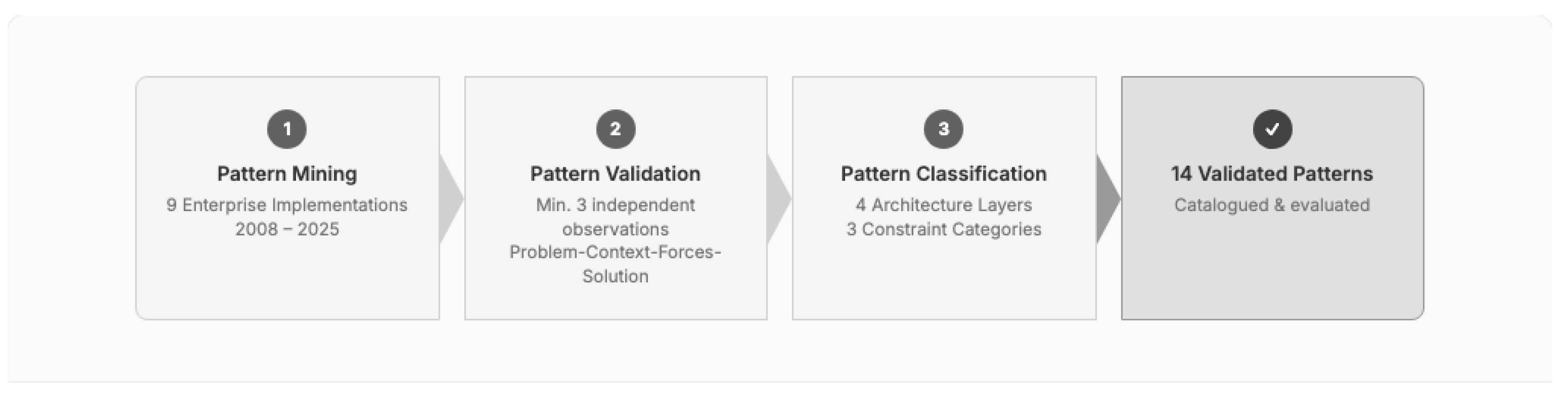
Patterns were identified through a three-phase process:
Phase 1 -- Pattern Mining: Recurring architectural solutions were extracted from production codebases and architecture documents across nine enterprise implementations (2008--2025). Each candidate pattern required observation in at least three independent implementations to qualify.
Phase 2 -- Pattern Validation: Candidate patterns were validated against the pattern quality criteria established by the software patterns community: a pattern must describe a recurring problem, the context in which it occurs, the forces at play, and a solution that resolves those forces [5,25].
Phase 3 -- Pattern Classification: Validated patterns were classified along two dimensions: (a) the architectural layer they address (Data, Logic, Integration, Presentation), and (b) the constraint category they respond to (Governor-Aware, Multi-Tenant Isolation, Platform Evolution).
Figure 1.
Three-phase pattern identification methodology.
3.2. Implementation Context
The patterns presented in this paper have been observed and refined across the following enterprise implementation contexts:

Table 1.
Enterprise implementation contexts informing pattern identification.
| Organization | Industry | Scale | Duration | Key Architectural Challenge |
|---|---|---|---|---|
| Telco-A | Telecommunications | 400M+ records | 2018--2019 | Legacy CRM replacement at scale |
| CPG-A | Consumer Goods | 25K field users | 2019--2022 | Field service for frontline workforce |
| Auto-A | Automotive | 14 business units | 2022--2023 | Multi-org consolidation |
| DataCo-A | Data & Analytics | Enterprise-wide | 2024--Present | CPQ migration and billing |
| Telco-B | Telecommunications | 4M records/day | 2025--Present | High-volume integration |
| FinServ-A | Financial Services | Regulated | 2018--2019 | Compliance and data security |
| Pharma-A | Healthcare | 13+ integrations | 2018 | Healthcare compliance |
| FinServ-B | Financial Services | Enterprise-wide | 2017--2018 | Data migration at scale |
| TechCo-A | Technology | Internal | 2025 | Procurement system redesign |
4. Enterprise CRM Architecture Reference Model
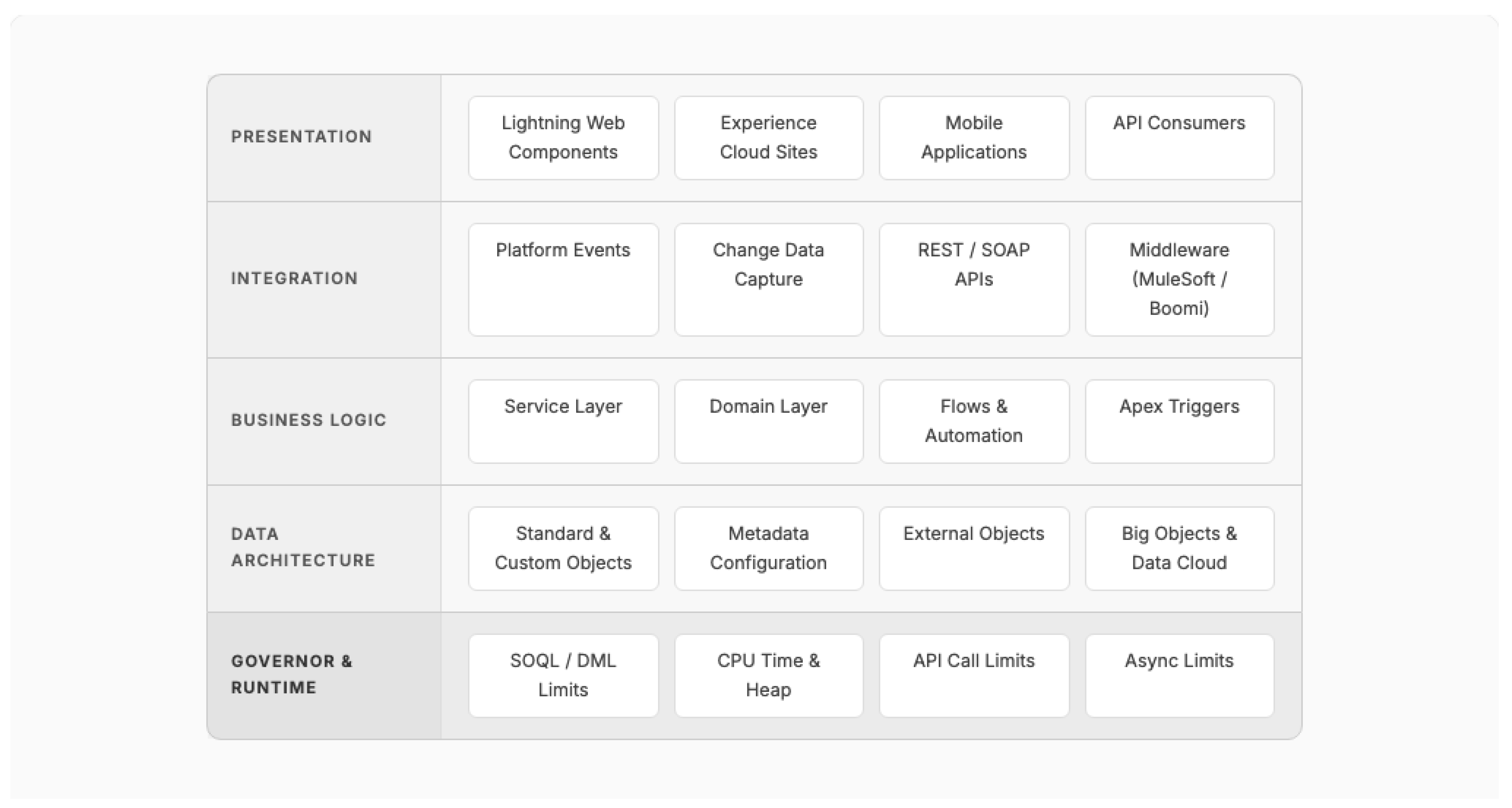
Before presenting individual patterns, we establish a four-layer reference architecture model that organizes CRM platform capabilities into coherent architectural concerns. This model synthesizes the Salesforce Well-Architected Framework [9], Fowler's enterprise application architecture layers [6], and the author's implementation experience.
Figure 2.
Four-layer Enterprise CRM Architecture Reference Model with platform-managed governor layer.
Figure 2.
Four-layer Enterprise CRM Architecture Reference Model with platform-managed governor layer.
4.1. Data Architecture Layer
The Data Architecture Layer encompasses the metadata-driven object model, relationships, and data storage mechanisms. In multi-tenant CRM platforms, this layer operates on a Universal Data Dictionary (UDD) architecture where all tenant data shares physical database infrastructure but is logically isolated through hash-partitioned organization identifiers [10]. Key concerns include data model design, indexing strategy, and the selection of storage mechanisms (standard objects, custom objects, external objects, big objects, or Data Cloud datasets) based on volume, access pattern, and latency requirements.
4.2. Business Logic Layer
The Business Logic Layer contains the executable business rules, automation, and orchestration logic. In a multi-tenant CRM platform, this layer is bounded by governor limits that constrain SOQL queries, DML operations, CPU time, and heap memory per transaction [9,27]. The critical architectural decision at this layer is the allocation of logic between declarative automation (Flows, Process Builder, Validation Rules) and programmatic automation (Apex triggers, classes, batch jobs). The Salesforce Well-Architected Framework [9] prescribes a "clicks before code" philosophy, recommending declarative tools for standard business logic and reserving Apex for scenarios requiring complex data manipulation, external callouts, or transactional control beyond declarative capabilities.
4.3. Integration Layer
The Integration Layer manages data exchange between the CRM platform and external systems. Hohpe and Woolf's Enterprise Integration Patterns [7] provide the canonical vocabulary for this layer, with CRM-specific adaptations including Platform Events (implementing Publish-Subscribe), Change Data Capture (implementing Event-Carried State Transfer), REST/SOAP APIs (implementing Request-Reply), and middleware orchestration through platforms such as MuleSoft, Boomi, or Informatica [22].
4.4. Presentation Layer
The Presentation Layer encompasses user interfaces, portals, and API surfaces exposed to external consumers. Modern CRM platforms support multiple presentation paradigms including component-based UI frameworks (Lightning Web Components), portal experiences (Experience Cloud), mobile applications, and headless API consumption patterns.
4.5. Governor and Runtime Layer
Unique to multi-tenant CRM platforms, the Governor and Runtime Layer is platform-managed rather than developer-controlled. This layer enforces per-transaction and per-org resource limits including SOQL query limits (100 synchronous / 200 asynchronous), DML statement limits (150), CPU time limits (10,000ms synchronous / 60,000ms asynchronous), and heap size limits (6MB synchronous / 12MB asynchronous) [27]. Understanding this layer is prerequisite to all pattern decisions in the layers above.
5. Design Pattern Catalogue
We organize 14 patterns into three categories based on the primary constraint they address. Each pattern is documented following an abbreviated pattern template: Context, Problem, Forces, Solution, Consequences, and Known Uses.
5.1. Governor-Aware Patterns
Governor-Aware Patterns optimize resource consumption within platform-enforced execution limits. These patterns have no direct equivalent in classical design pattern literature because they respond to constraints that do not exist in single-tenant environments.
Pattern 1: Bulkification
Context: Business logic must process records that arrive in variable batch sizes — from a single record via UI interaction to 200 records via API bulk operations or data loads.
Problem: Code written to handle a single record at a time will exceed governor limits when processing batches, causing runtime failures in production.
Forces:
- Platform governor limits are per-transaction, not per-record
- API and bulk operations deliver up to 200 records per trigger invocation
- Developers naturally reason about single-record logic
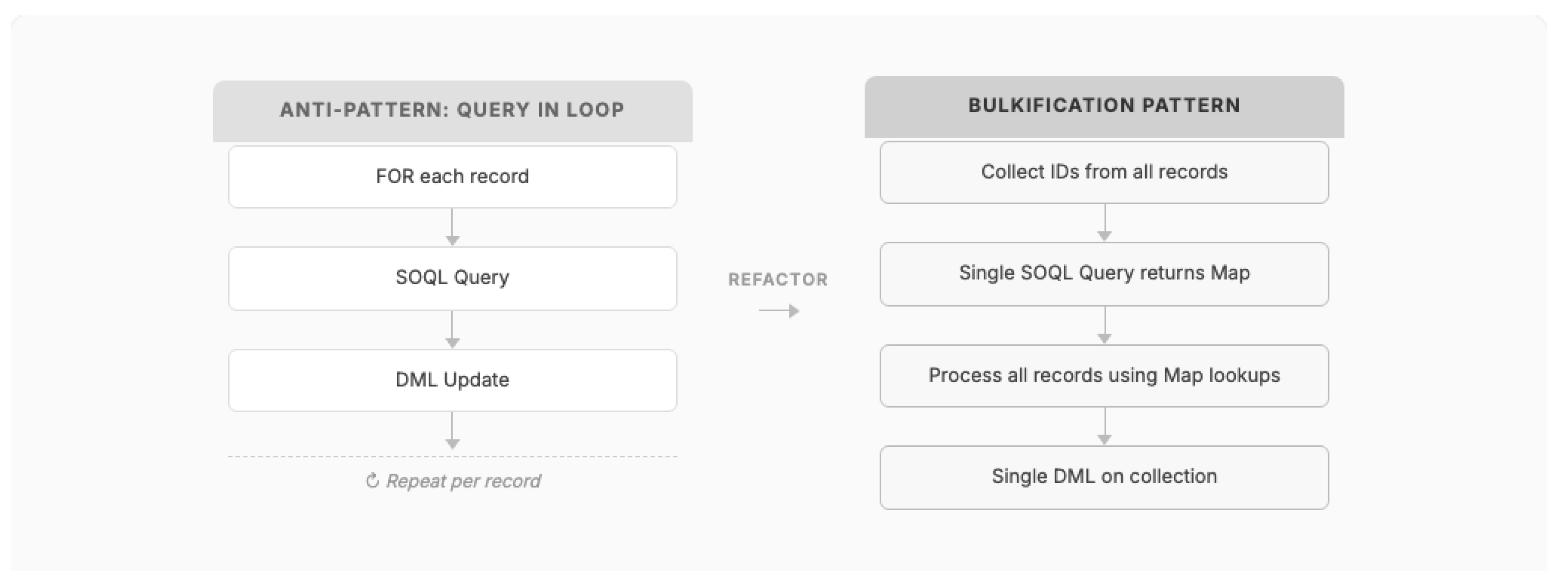
Solution: Design all data access and manipulation logic to operate on collections (lists, sets, maps) rather than individual records. Move all SOQL queries and DML operations outside of loops. Use map-based lookups to replace repeated queries.
Figure 3.
Bulkification pattern: replacing per-record operations with collection-based processing.
Consequences:
- (+) Eliminates governor limit exceptions under bulk data operations
- (+) Consistent performance regardless of batch size (1 to 200 records)
- (-) Increases code complexity; developers must think in terms of collections
- (-) Requires more upfront design compared to iterative single-record logic
Known Uses: Every production Salesforce implementation observed by the author employs this pattern. At a Tier-1 US telecommunications provider (Telco-A), where the org contained 400 million records on day one, bulkification was a mandatory code review criterion. At another major wireless carrier (Telco-B), refactoring Flows to use bulk processing patterns increased daily throughput from 500,000 to 4 million records (an 8x improvement).
Pattern 2: Queueable Chain
Context: A business process requires more computation than a single synchronous transaction allows (10,000ms CPU time, 100 SOQL queries) but must complete as a coordinated sequence.
Problem: Long-running processes that exceed single-transaction governor limits fail mid-execution, leaving data in an inconsistent state.
Forces:
- Synchronous transactions have strict CPU and query limits
- Asynchronous contexts (Queueable, Batch) have higher limits but cannot be directly chained in unlimited depth
- Business processes require sequential ordering of steps
- Error handling must allow resumption from the point of failure
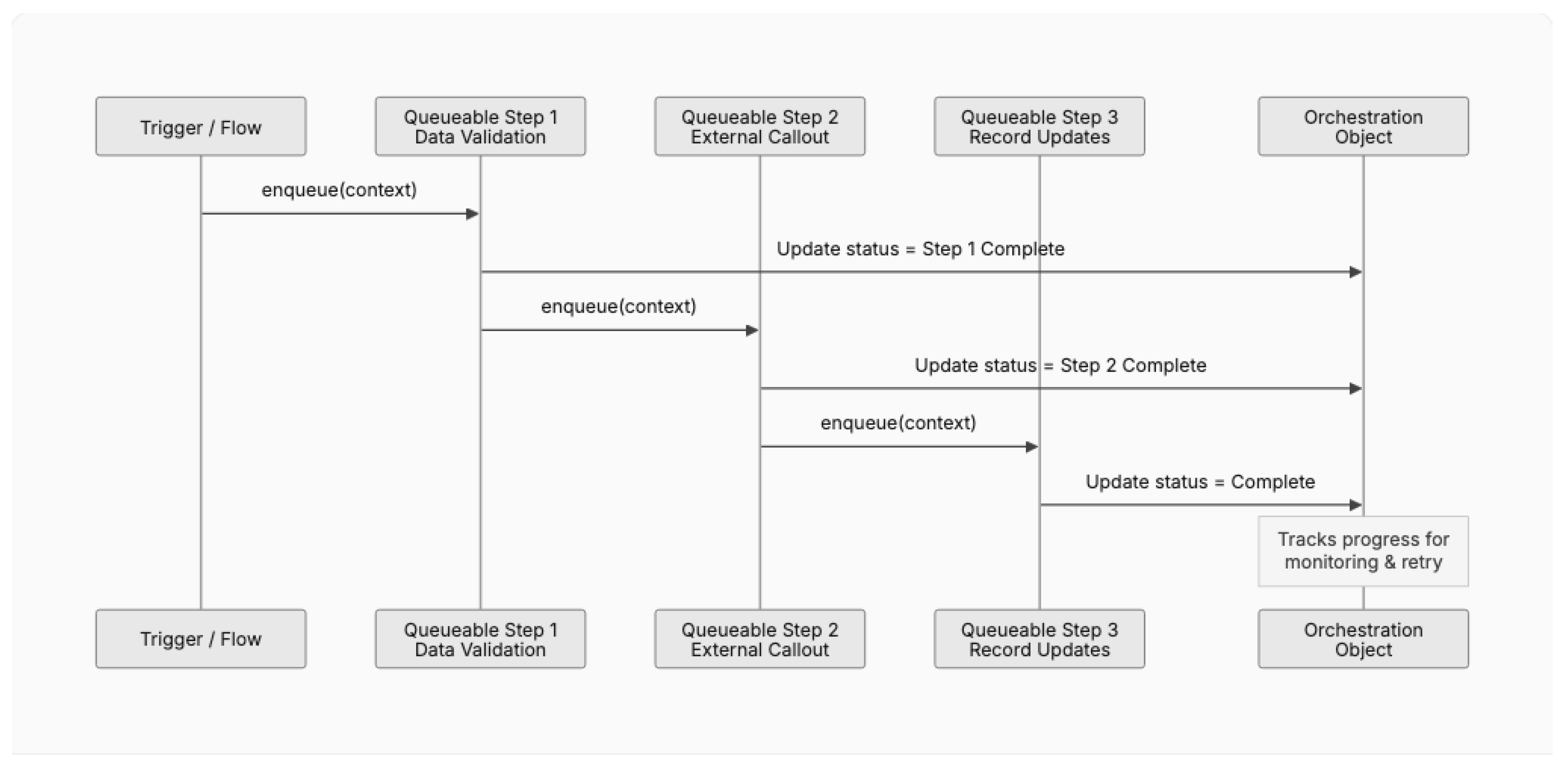
Solution: Decompose the process into discrete units of work, each implemented as a Queueable Apex class. Each unit, upon successful completion, enqueues the next unit in the chain. State is passed between units via serialized parameters or a custom orchestration object.
Figure 4.
Queueable Chain pattern with orchestration tracking.
Consequences:
- (+) Enables processes that exceed single-transaction limits
- (+) Provides natural checkpointing for error recovery
- (+) Each step runs in its own governor context with fresh limits
- (-) Introduces asynchronous complexity; harder to debug than synchronous code
- (-) Platform limits on chain depth (currently 1 Queueable per Queueable in some contexts)
- (-) Requires orchestration infrastructure for monitoring and retry
Known Uses: At a Fortune 500 consumer goods manufacturer (CPG-A), a Hyper Batch framework was designed using this pattern to process complex scheduling computations for 25,000 frontline employees. At a global data and analytics provider (DataCo-A), CPQ pricing calculations that exceeded synchronous limits were decomposed into chained Queueable steps.
Pattern 3: Selective SOQL
Context: Business logic requires querying related data, but query complexity and result set size vary dramatically based on runtime conditions.
Problem: Queries that retrieve all fields and all related records consume SOQL query rows (50,000 limit) and heap memory, even when only a subset is needed.
Solution: Build queries dynamically based on actual data requirements using the Selector Layer pattern [17] to centralize query construction with field-level, relationship-level, and row-level filtering based on calling context.
Consequences: (+) Minimizes governor consumption and heap usage per transaction. (-) Dynamic query construction requires security discipline to prevent SOQL injection.
Known Uses: The fflib Selector Layer [17] operationalizes this pattern. At Auto-A, consolidating 14 business units required Selective SOQL to manage dramatically different data volumes across business unit record types.
Pattern 4: Lazy Initialization
Context: An object or data set is expensive to construct but may not be needed in every code path within a transaction.
Problem: Eagerly loading all potentially needed data wastes governor resources when execution paths do not require it.
Solution: Defer data loading until first access using private properties with null-check accessors that initialize on first invocation and cache results within the transaction.
Consequences: (+) Reduces unnecessary governor consumption; particularly effective in trigger handlers managing multiple event types. (-) Can make execution order less predictable; cached values are not persisted across transactions.
Known Uses: Standard practice in enterprise Apex codebases. At Pharma-A, Lazy Initialization reduced average SOQL consumption by deferring queries to only the integration paths activated by each transaction across 13+ integration touchpoints.
Pattern 5: Governor Limit Monitor
Context: Complex business logic approaches governor limits during execution, and the consequences of exceeding limits (transaction abort) are unacceptable for business-critical processes.
Problem: Without runtime awareness of governor consumption, code cannot adapt its behavior when approaching limits, resulting in hard failures.
Forces:
- Platform provides runtime introspection of governor consumption (Limits class)
- Some processes can degrade gracefully (defer remaining work) rather than abort entirely
- Monitoring overhead must be minimal to avoid consuming the resources being monitored
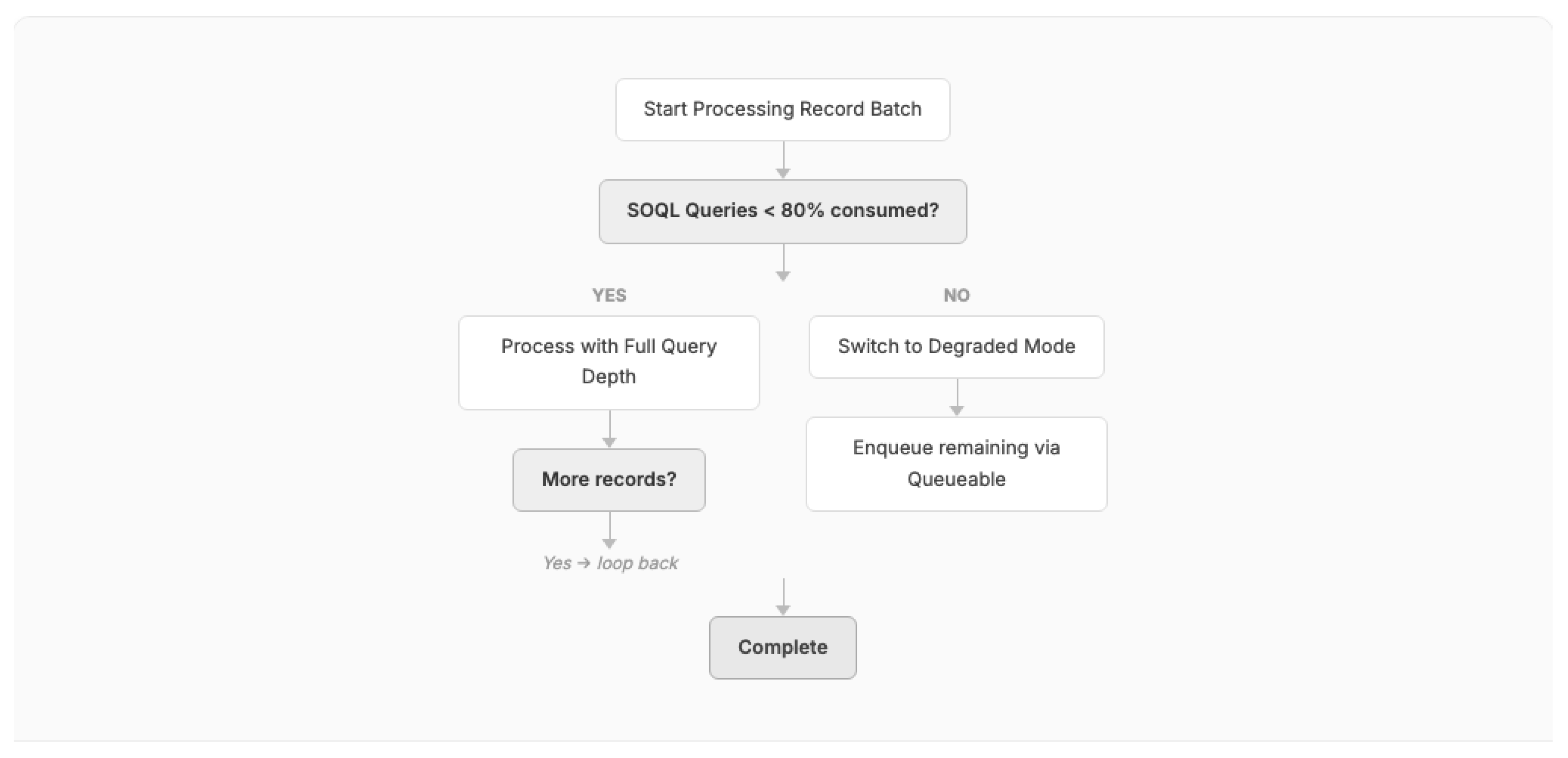
Solution: Instrument business logic with checkpoints that query remaining governor limits (using the platform's Limits class). When consumption approaches thresholds (e.g., 80% of SOQL queries consumed), switch to a degraded mode: reduce query scope, defer non-critical operations to asynchronous processing, or log a warning and enqueue remaining work via the Queueable Chain pattern.
Figure 5.
Governor Limit Monitor pattern with graceful degradation.
Consequences:
- (+) Prevents hard transaction failures in complex, variable-load scenarios
- (+) Enables graceful degradation rather than all-or-nothing execution
- (-) Adds monitoring overhead to every checkpoint
- (-) Requires defining "degraded mode" behavior for each process, increasing design complexity
Known Uses: At a major US wireless carrier (Telco-B), the integration pipeline processing 4 million records daily uses governor monitoring to dynamically adjust batch sizes. At a Fortune 500 consumer goods manufacturer (CPG-A), the Hyper Batch framework employed this pattern to ensure scheduling calculations completed even under variable data loads.
5.2. Multi-Tenant Isolation Patterns
Multi-Tenant Isolation Patterns ensure data and process separation in shared infrastructure environments. These patterns address the unique security, compliance, and operational challenges of multi-tenant architecture.
Pattern 6: Tenant-Scoped Configuration
Context: An application must behave differently across business units, regions, or customer segments within a single multi-tenant CRM organization.
Problem: Hard-coding configuration values creates deployment and maintenance overhead. Environment-specific configurations cannot be managed through code deployments in production environments.
Forces:
- CRM platforms prohibit direct database manipulation in production
- Configuration must be changeable by administrators without developer involvement
- Different business units within the same org may require different thresholds, routing rules, or feature toggles
- The Twelve-Factor App methodology [28] prescribes strict separation of config from code
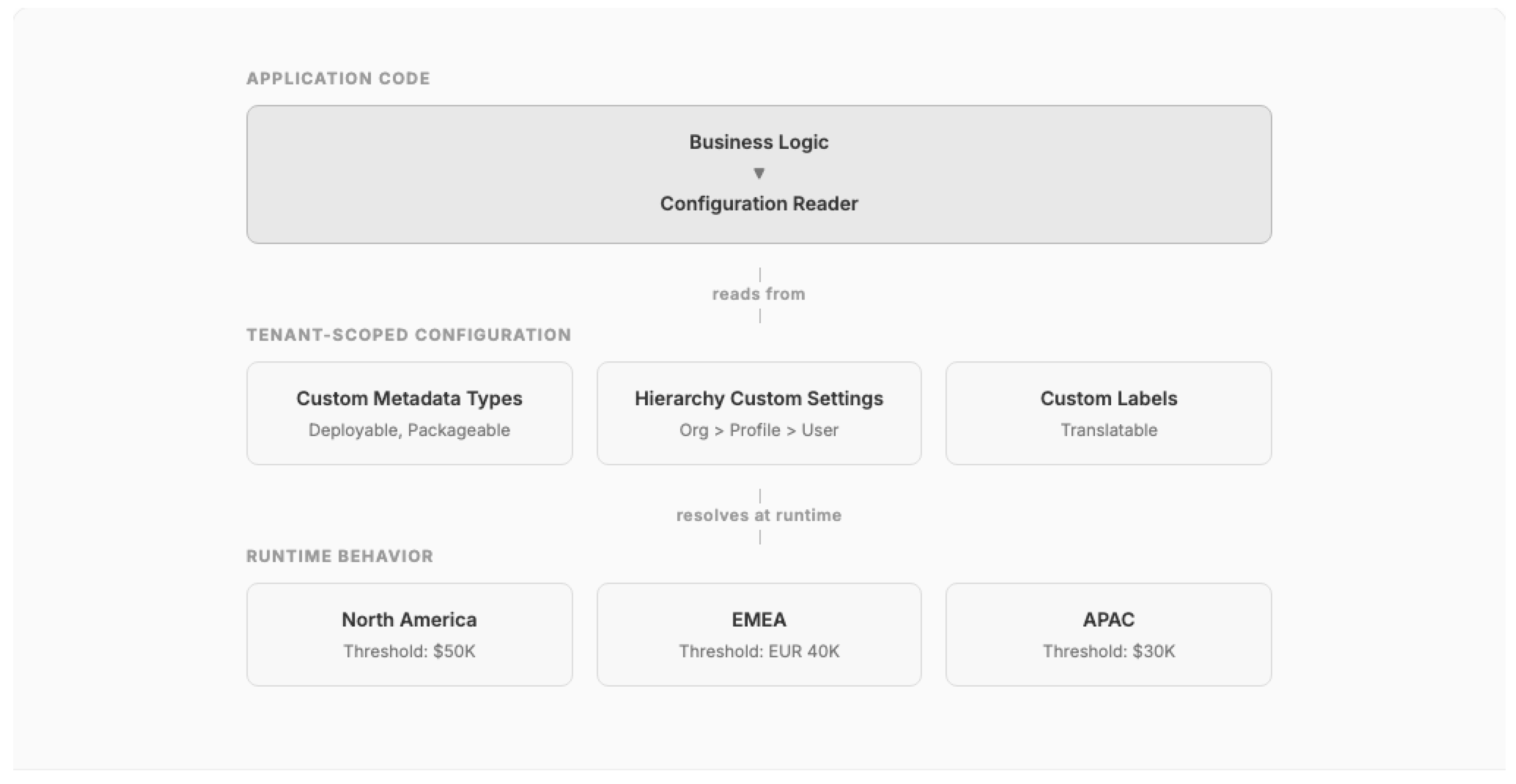
Solution: Use the platform's metadata-driven configuration mechanisms — Custom Metadata Types, Custom Settings, or Custom Labels — to externalize all environment-specific and tenant-specific configuration. Organize configurations hierarchically (org-wide defaults overridden by profile or user-level settings).
Figure 6.
Tenant-Scoped Configuration pattern with hierarchical overrides.
Consequences:
- (+) Eliminates hard-coded values; enables admin-driven configuration changes
- (+) Custom Metadata Types are deployable through CI/CD pipelines
- (+) Supports multi-business-unit architectures within a single org
- (-) Over-reliance on configuration can create a "configuration sprawl" anti-pattern
- (-) Custom Settings cached in memory count against governor limits
Known Uses: At Auto-A, consolidating 14 business units required extensive Tenant-Scoped Configuration for unit-specific approval thresholds, routing rules, and feature toggles. At TechCo-A, configuration-driven workflows enabled different approval hierarchies per business function.
Pattern 7: Namespace Partitioning
Context: Multiple development teams or managed packages contribute code and metadata to the same CRM organization.
Problem: Without naming conventions, metadata conflicts arise between teams, packages, and org-level customizations, leading to deployment failures and runtime errors.
Solution: Establish hierarchical naming conventions prefixing all metadata with team or domain identifiers. Use unlocked packages (Salesforce DX) [26] to create formal dependency boundaries between teams without the overhead of managed packages.
Consequences: (+) Prevents metadata collisions; enables independent development and deployment cycles; unlocked packages enforce dependency graphs. (-) Naming conventions require governance tooling; cross-package references create coupling.
Known Uses: At CPG-A, managing 50+ developers required strict namespace partitioning to prevent deployment conflicts.
Pattern 8: Security Boundary Enforcement
Context: Enterprise CRM implementations must enforce data visibility rules that align with organizational hierarchy, regulatory requirements, and partnership structures.
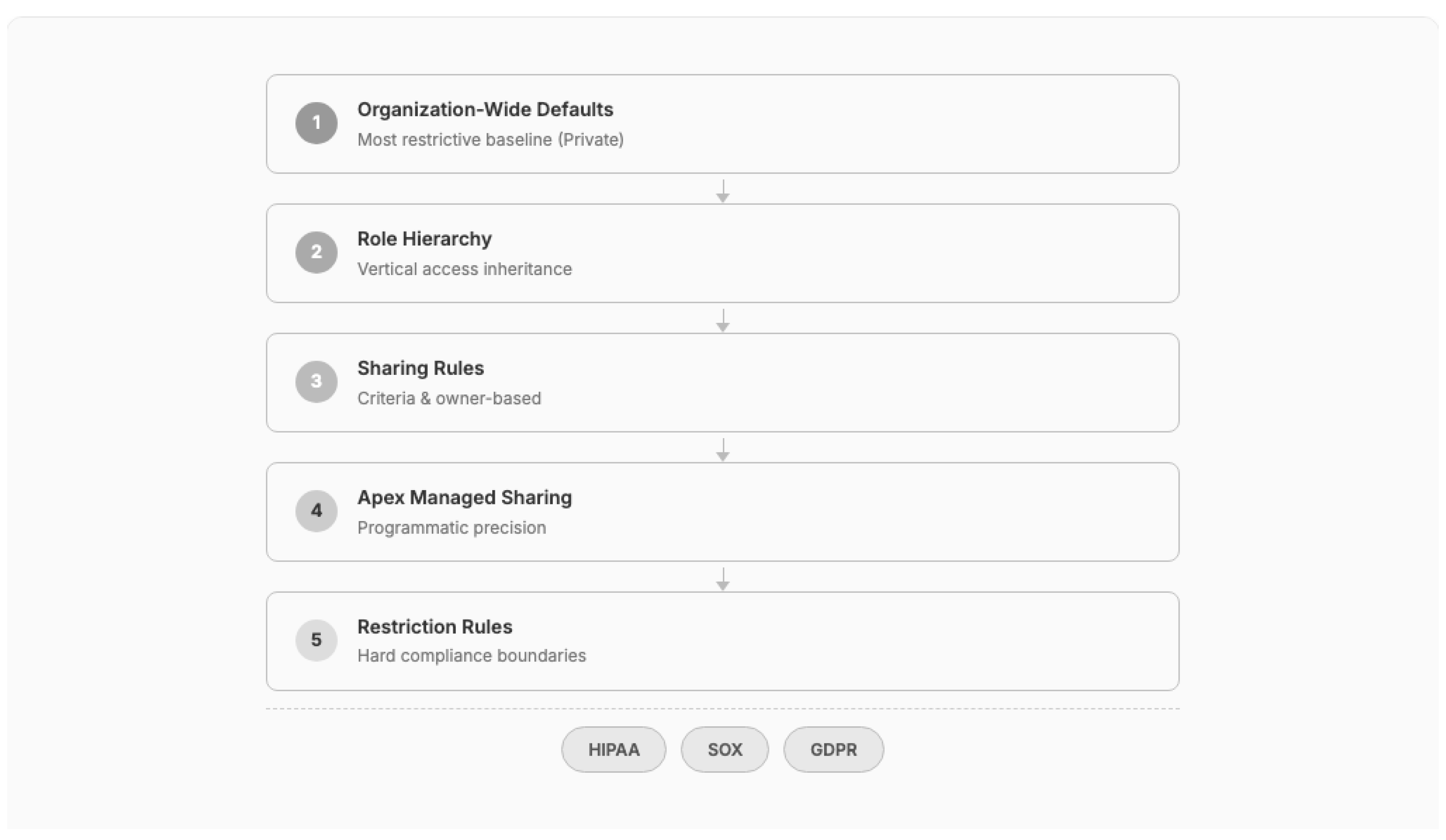
Problem: CRM platforms provide multiple overlapping security mechanisms (OWD, Role Hierarchy, Sharing Rules, Apex Sharing, Restriction Rules), and incorrect configuration creates data leakage or over-restriction.
Forces:
- Regulatory requirements (HIPAA, GDPR, SOX) demand provable data isolation
- Performance degrades with complex sharing calculations on large data volumes
- Security models must accommodate both hierarchical (role-based) and lateral (team-based) access patterns
- Point-in-time security requirements (financial services) conflict with platform-native sharing models
Solution: Design security from the data model outward. Start with the most restrictive Organization-Wide Defaults (Private), then layer role hierarchy, sharing rules, and programmatic sharing to open access precisely where needed. Use Restriction Rules for hard compliance boundaries that cannot be overridden. For point-in-time requirements, implement Apex-managed sharing with explicit share record management.
Figure 7.
Security Boundary Enforcement: layered access control from restrictive baseline.
Consequences:
- (+) Provable data isolation for regulatory compliance
- (+) Layered approach simplifies auditing
- (-) Complex sharing models degrade query performance at scale
- (-) Apex Managed Sharing requires careful maintenance as organizational structure evolves
Known Uses: At FinServ-A, Financial Service Cloud required point-in-time security where relationship managers could only see client data during their active advisory period, implemented through Apex-based temporal sharing. At Pharma-A, HIPAA compliance required Restriction Rules to prevent cross-division data access.
Pattern 9: Cross-Org Data Federation
Context: An enterprise operates multiple CRM organizations (due to mergers, acquisitions, or regulatory requirements) that need to share selected data without full consolidation.
Problem: Full org consolidation is prohibitively expensive and disruptive for organizations with established processes, integrations, and customizations.
Solution: Implement federation through Salesforce Connect (OData protocol) to expose external org data as External Objects, or use middleware-mediated synchronization for selected data sets. Maintain a Master Data Management (MDM) strategy designating data ownership per entity per org.
Consequences: (+) Avoids consolidation cost and disruption; respects data residency requirements; allows gradual convergence. (-) External Objects have query limitations; federated queries introduce latency; MDM governance overhead is significant.
Known Uses: At Telco-A, Salesforce Connect enabled real-time access to legacy system data without migration — the org had 400 million records on day one. At Auto-A, the architecture assessed federation vs. consolidation for 14 business units before determining consolidation was feasible.
5.3. Platform Evolution Patterns
Platform Evolution Patterns enable applications to adapt to platform releases, API version changes, and evolving capabilities without regression.
Pattern 10: Metadata-Driven Configuration
Context: Business rules and process behaviors change frequently but code deployments are governed by release management processes with lead times.
Problem: Embedding business rules in code requires developer involvement and deployment cycles for changes that are business-operational in nature.
Forces:
- Business agility demands rapid rule changes (pricing rules, routing logic, SLA thresholds)
- Code deployments require testing, staging, and change management
- CRM platforms provide metadata mechanisms that administrators can modify in production
- Not all business logic can be expressed declaratively
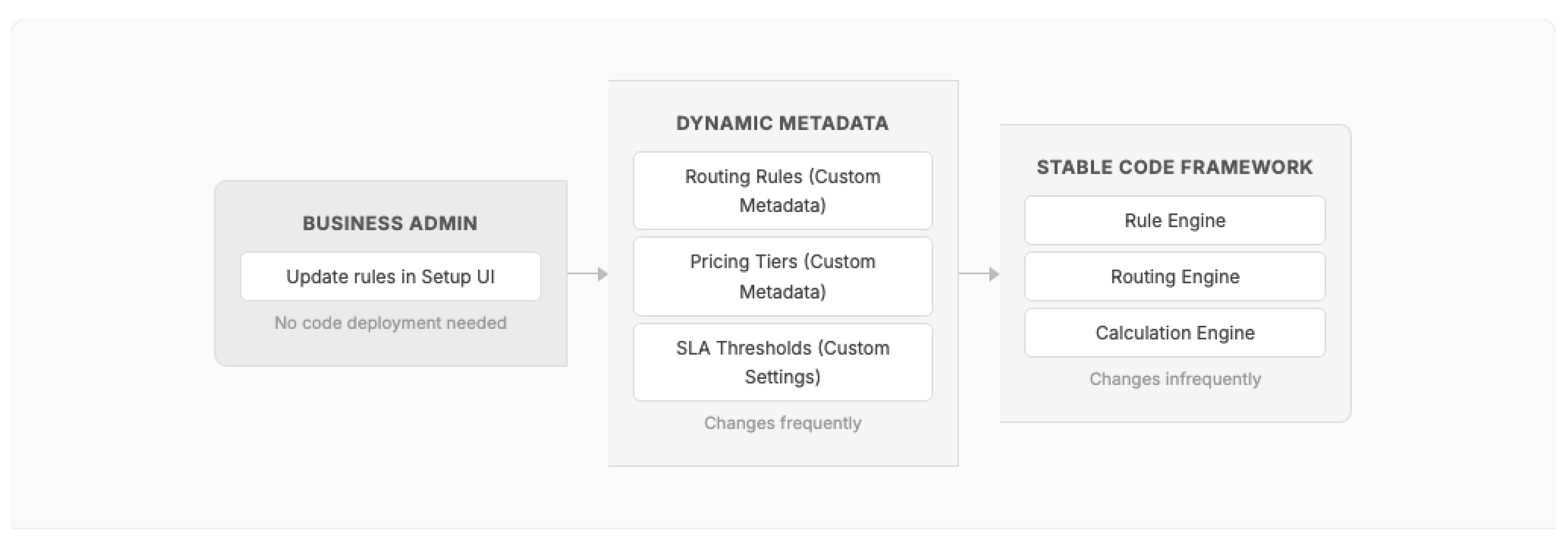
Solution: Decompose business logic into a stable code framework that reads its behavioral parameters from platform metadata (Custom Metadata Types, Flow definitions, or custom configuration objects). The code framework remains static across releases; behavior changes are effected through metadata changes managed by business administrators.
Figure 8.
Metadata-Driven Configuration: separating stable code from dynamic business rules.
Consequences:
- (+) Business rule changes do not require code deployments
- (+) Reduces developer bottleneck for operational configuration changes
- (+) Custom Metadata Types are versionable and deployable through CI/CD when needed
- (-) Requires upfront investment in building the metadata-reading framework
- (-) Complex rule interactions may exceed what metadata can express, requiring code changes
Known Uses: At TechCo-A, approval hierarchies and routing rules were metadata-driven, enabling business teams to modify procurement workflows without developers. At CPG-A, scheduling rules for 25,000 field workers were externalized to metadata for regional manager adjustment.
Pattern 11: Feature Toggle
Context: New features must be deployed to production but activated selectively — by user group, business unit, or rollout percentage.
Problem: Deploying features to all users simultaneously creates risk, and rolling back CRM deployments is complex and error-prone.
Solution: Implement feature toggles using Custom Permissions (user/profile-level) or Custom Metadata Types (org-level). Guard new feature code paths with toggle checks that can be activated or deactivated without code changes.
Consequences: (+) Enables phased rollouts and rapid feature deactivation. (-) Accumulated toggles create "toggle debt"; testing combinatorial states increases QA complexity.
Known Uses: At Auto-A, feature toggles governed the phased rollout of CPQ capabilities to 14 business units over 18 months.
Pattern 12: Backward-Compatible Polymorphism
Context: A CRM application must support multiple versions of an API, business process, or integration protocol simultaneously during migration periods.
Problem: Breaking changes disrupt downstream consumers, but indefinite backward compatibility creates unsustainable maintenance burden.
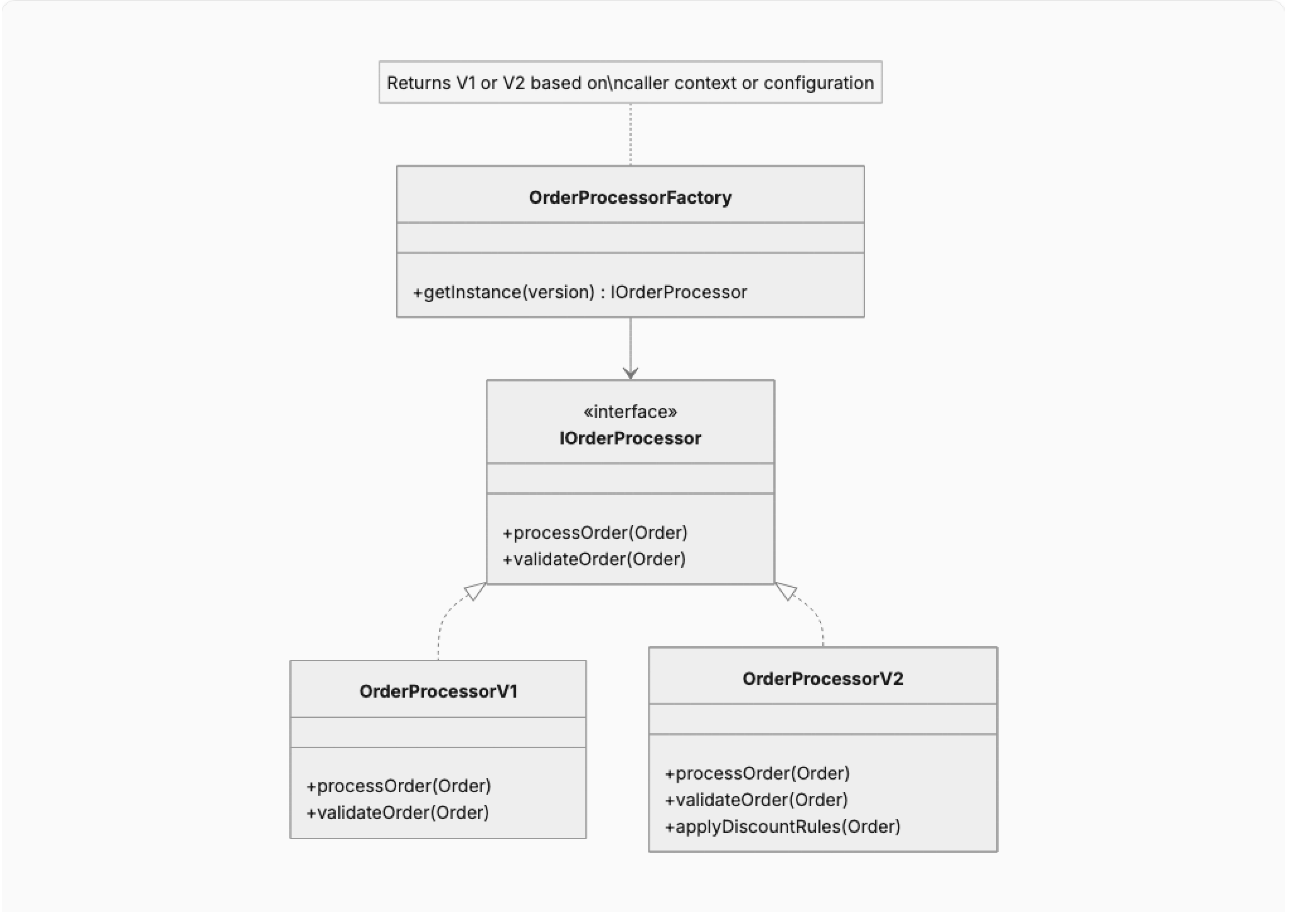
Solution: Define stable interfaces (Apex interfaces or abstract classes) that represent the contract. Implement version-specific behavior in concrete classes selected at runtime through a factory based on caller context or configuration. Deprecate old implementations on a published schedule.
Figure 9.
Backward-Compatible Polymorphism using interface-based version management.
Consequences:
- (+) Enables non-disruptive API evolution
- (+) Consumers migrate on their own timeline
- (-) Maintaining multiple implementations increases codebase size
- (-) Factory logic must be managed and tested for all active versions
Known Uses: At a global data and analytics provider (DataCo-A), migrating from a legacy CPQ platform to Salesforce CPQ required maintaining dual processing paths for 12+ months while downstream systems migrated.
Pattern 13: Event-Driven Decoupling
Context: Multiple systems (CRM, ERP, data warehouse, marketing automation) must stay synchronized without creating brittle point-to-point integrations.
Problem: Direct system-to-system integrations create tight coupling where changes to one system cascade failures to all connected systems.
Forces:
- Enterprise landscapes comprise 10-50+ integrated systems
- Each system has different availability SLAs and maintenance windows
- Data consistency requirements vary (eventual vs. strong consistency)
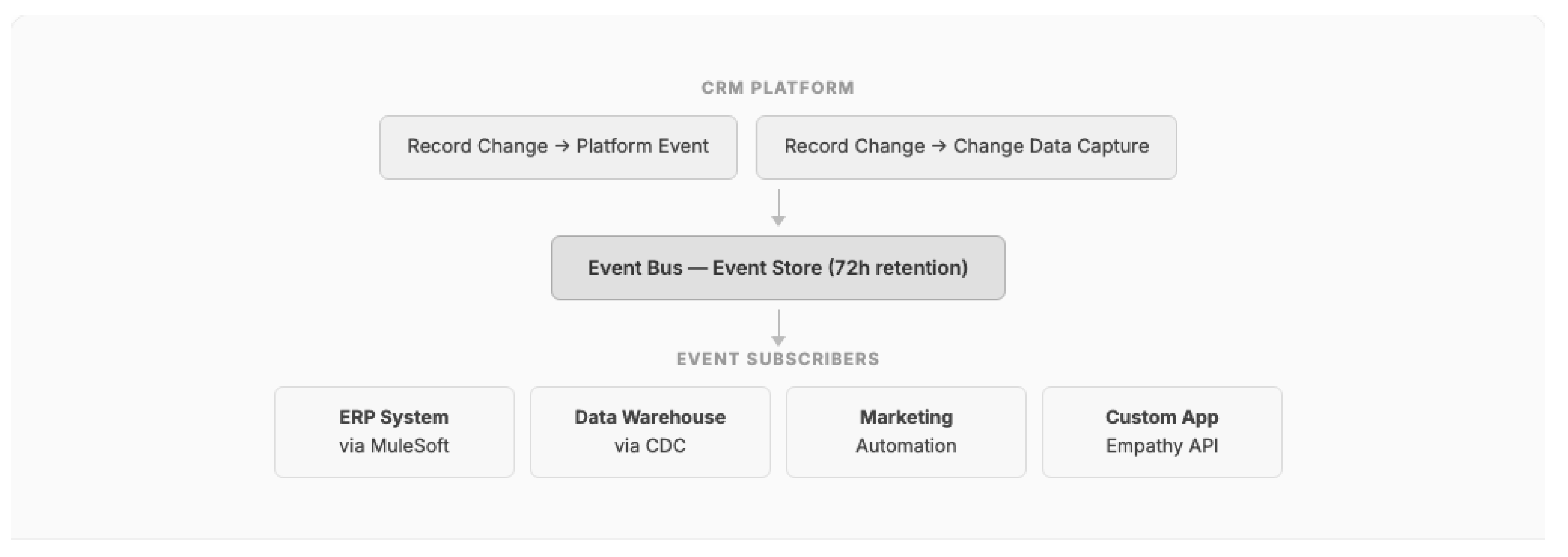
Solution: Use the CRM platform's event bus (Platform Events, Change Data Capture) as the integration backbone. Publishers emit domain events without knowledge of subscribers. Subscribers process events asynchronously, with the platform managing delivery guarantees and replay capabilities. Middleware (MuleSoft, Boomi) acts as an event mediator for systems that cannot directly consume platform events.
Figure 10.
Event-Driven Decoupling using Platform Events and Change Data Capture.
Consequences:
- (+) Eliminates brittle point-to-point integrations
- (+) Publishers and subscribers evolve independently
- (+) Platform-managed event delivery with replay capability
- (-) Eventual consistency requires business process adaptation
- (-) Event schema evolution must be managed carefully [23]
- (-) Debugging asynchronous event chains is more complex than synchronous calls
Known Uses: At Telco-A, 22 integrations were delivered in 10 weeks using MuleSoft as event mediator. At Telco-B, event-driven middleware handles 4 million daily records with retry and dead letter queues. At Pharma-A, 13+ integrations were managed through event-mediated architecture using Informatica and Boomi.
Pattern 14: Layered Test Architecture
Context: Enterprise CRM applications require comprehensive testing but platform constraints (governor limits, shared environment, metadata dependencies) make testing fundamentally different from traditional application testing.
Problem: Test methods in multi-tenant CRM platforms share governor limits with the code under test, meaning test setup and assertions consume the same finite resources as the business logic being validated.
Forces:
- Platform requires minimum 75% code coverage for production deployment
- Test methods run in an isolated transaction (seeAllData=false by default)
- Test data creation consumes DML and SOQL limits
- Integration tests that call external systems are prohibited in test context
- Complex org metadata (validation rules, flows, triggers) fire during test execution
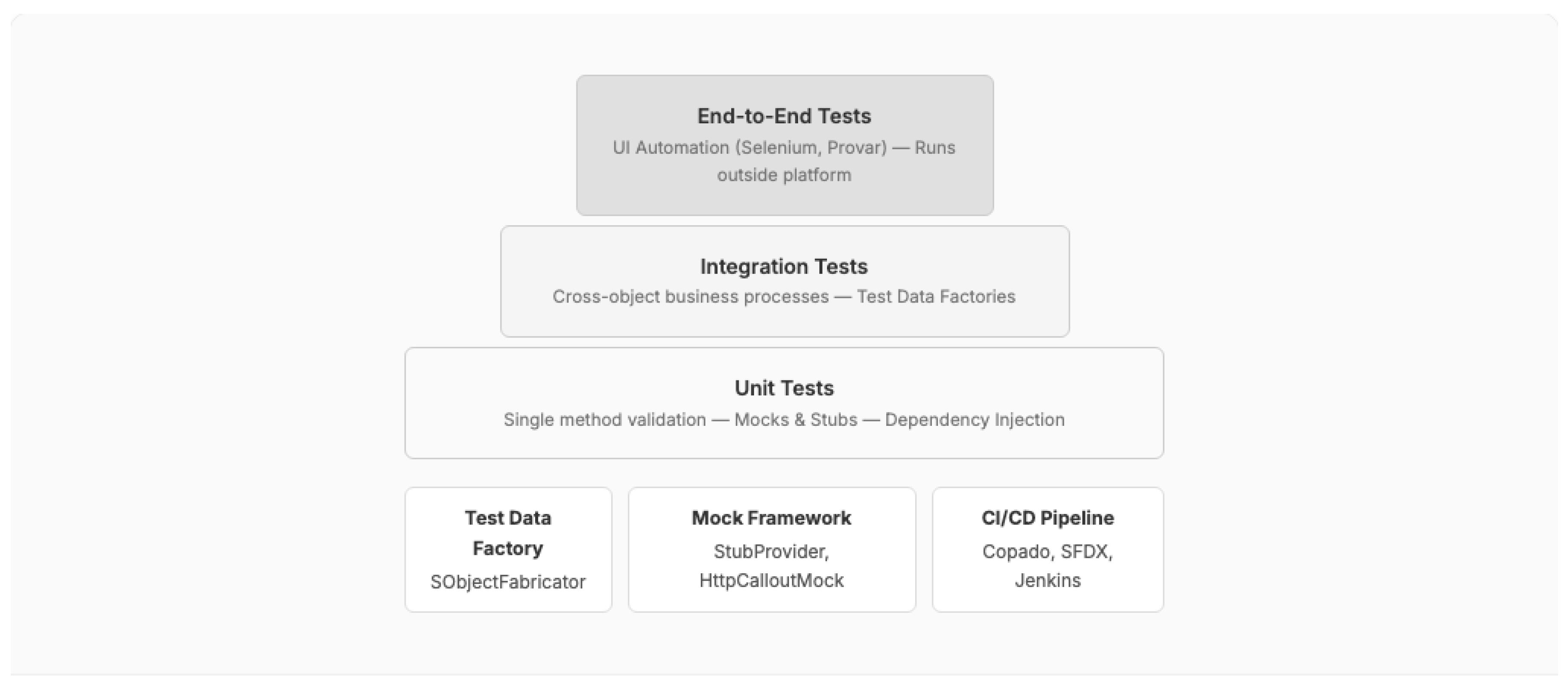
Solution: Organize tests in three layers: (1) Unit Tests that validate individual methods using dependency injection and mock objects (HttpCalloutMock, StubProvider); (2) Integration Tests that validate cross-object business processes using test data factories; and (3) End-to-End Tests executed outside the platform (Selenium, Provar) for UI-level validation.
Figure 11.
Layered Test Architecture: test pyramid adapted for multi-tenant CRM platforms.
Consequences: (+) Maximizes test coverage while minimizing governor consumption; mock-based unit tests execute quickly without org data dependency. (-) Requires investment in test data factories and mock frameworks; end-to-end tests are fragile and expensive to maintain.
Known Uses: At DataCo-A, Copado was used as the CI/CD platform with layered test execution. At CPG-A, the CoE established test architecture standards for all 50+ developers. The author's Udemy course [26] teaches CI/CD test pipeline architecture.
6. Pattern Evaluation
We evaluate the 14 patterns against five enterprise quality attributes: Scalability, Maintainability, Security, Performance, and Complexity Cost. Each pattern is rated on a three-point scale (Low, Medium, High) for its impact on each quality attribute.
Table 2.
Pattern evaluation against enterprise quality attributes.
| # | Pattern | Scalability | Maintainability | Security | Performance | Complexity Cost |
|---|---|---|---|---|---|---|
| 1 | Bulkification | High | Medium | Neutral | High | Low |
| 2 | Queueable Chain | High | Medium | Neutral | High | Medium |
| 3 | Selective SOQL | High | Medium | Medium | High | Medium |
| 4 | Lazy Initialization | Medium | High | Neutral | Medium | Low |
| 5 | Governor Limit Monitor | High | Low | Neutral | Medium | High |
| 6 | Tenant-Scoped Configuration | High | High | Neutral | Neutral | Medium |
| 7 | Namespace Partitioning | High | High | Medium | Neutral | Medium |
| 8 | Security Boundary Enforcement | Medium | Medium | High | Low | High |
| 9 | Cross-Org Data Federation | High | Low | High | Low | High |
| 10 | Metadata-Driven Configuration | Medium | High | Neutral | Neutral | Medium |
| 11 | Feature Toggle | Medium | Medium | Neutral | Neutral | Low |
| 12 | Backward-Compatible Polymorphism | Medium | Medium | Neutral | Neutral | Medium |
| 13 | Event-Driven Decoupling | High | High | Medium | Medium | Medium |
| 14 | Layered Test Architecture | High | High | Neutral | Neutral | Medium |
6.1. Key Findings
Finding 1: Governor-Aware Patterns are non-optional. Unlike classical design patterns where adoption is a quality trade-off, Patterns 1-5 (Governor-Aware) are effectively mandatory in production enterprise CRM implementations. Failure to apply Bulkification (Pattern 1) results in runtime failures, not merely degraded quality. This distinguishes CRM platform patterns from classical patterns where non-adoption produces suboptimal but functional systems.
Finding 2: Security and Performance are inversely correlated. Security Boundary Enforcement (Pattern 8) and Cross-Org Data Federation (Pattern 9) both improve security posture but degrade performance. Complex sharing models increase query execution time, and federated queries introduce network latency. This trade-off is a defining characteristic of multi-tenant CRM architecture decisions.
Finding 3: Event-Driven Decoupling provides the best overall quality attribute profile. Pattern 13 scores High or Medium across all five quality attributes, making it the single most impactful architectural decision for enterprise CRM implementations. This finding aligns with the industry trend toward event-driven CRM architecture documented by Salesforce [21,22] and Forrester [4].
Finding 4: Metadata-Driven patterns reduce long-term total cost of ownership. Patterns 6, 10, and 11 (Tenant-Scoped Configuration, Metadata-Driven Configuration, Feature Toggle) collectively form a "configuration layer" that, when implemented early, significantly reduces the cost of ongoing business rule changes by shifting modification authority from developers to administrators.
7. The AI Transformation of Enterprise CRM Architecture
The patterns catalogued in Section 5 and Section 6 represent the established architectural foundation of enterprise CRM platforms. However, the rapid integration of artificial intelligence — spanning predictive analytics, generative AI, and autonomous agents — is fundamentally reshaping CRM architecture requirements, introducing new architectural layers, and altering the trade-offs that govern pattern selection. This section examines the AI transformation through five lenses: the evolving AI capability stack, architectural implications for each layer of the reference model, emerging AI-native design patterns, governance and trust frameworks, and economic impact evidence.
7.1. The AI Capability Stack in Enterprise CRM
AI capabilities in enterprise CRM have evolved through three distinct generations, each introducing progressively more complex architectural requirements:
Figure 12.
Three generations of AI capabilities in enterprise CRM platforms.
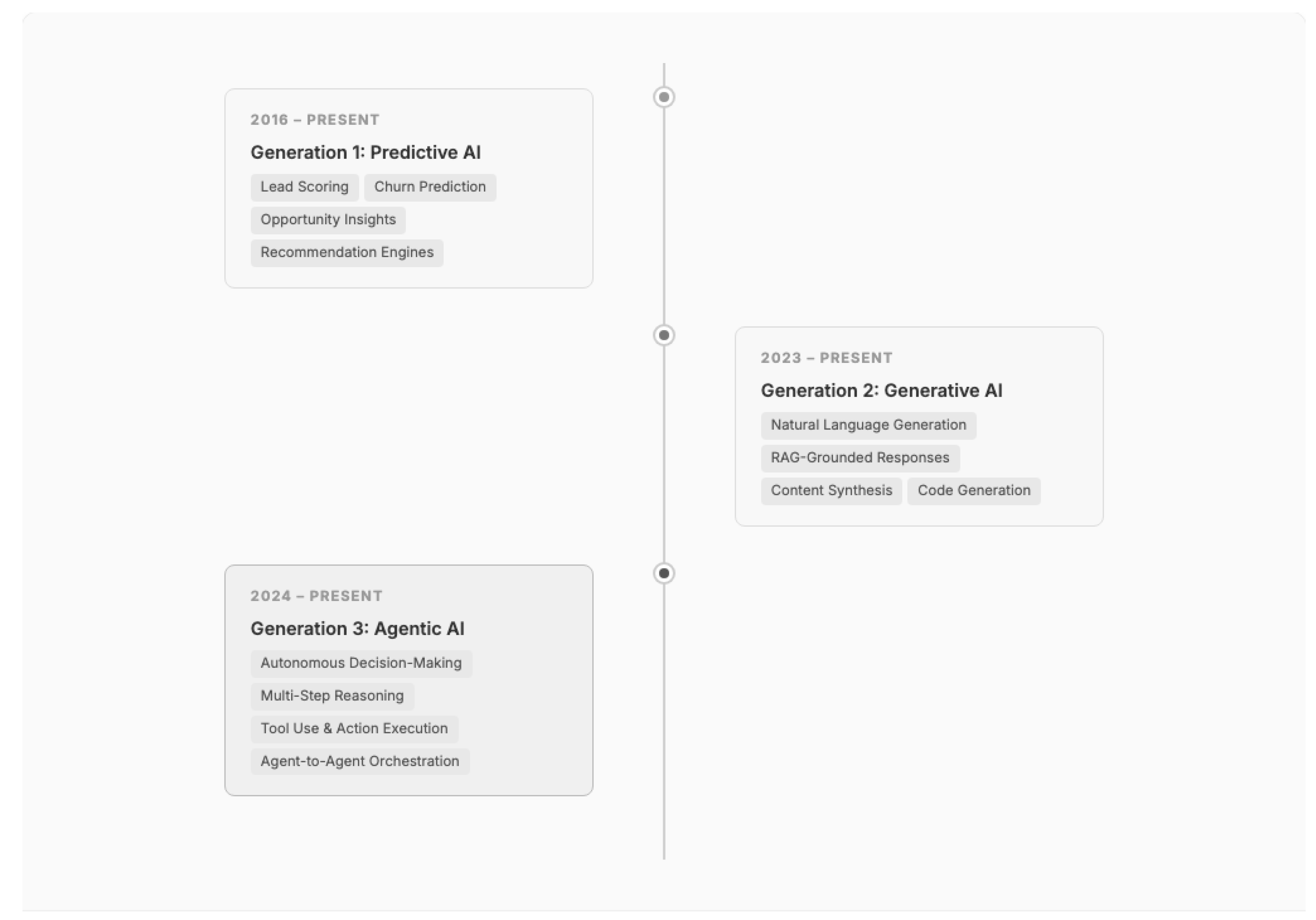
Generation 1 -- Predictive AI (2016--Present): Salesforce Einstein introduced predictive AI to CRM at scale, now delivering over 1 billion predictions per day across lead scoring, opportunity insights, and churn prediction [39]. These capabilities operate within the existing CRM data model, consuming structured CRM data (fields, relationships, activity histories) to produce probability scores and recommendations. Architecturally, predictive AI added a computation layer but did not fundamentally alter the four-layer reference model — predictions are stored as standard fields and consumed through existing UI and API patterns.
Generation 2 -- Generative AI (2023--Present): The introduction of large language models (LLMs) to CRM platforms created the first fundamental architectural disruption. Generative AI capabilities — including email drafting, case summarization, knowledge article generation, and conversational search — require access to unstructured data (documents, emails, chat transcripts, knowledge articles) that the traditional CRM data model was not designed to store or query efficiently [40]. Gartner forecasts worldwide generative AI spending at $644 billion in 2025, a 76.4% increase from 2024, with CRM-adjacent functions (marketing, sales, customer care) representing the largest enterprise value pool [41,42].
Generation 3 -- Agentic AI (2024--Present): The emergence of autonomous AI agents capable of multi-step reasoning, tool use, and independent action execution represents the most significant architectural paradigm shift since the move from on-premise to cloud CRM. Salesforce launched Agentforce in October 2024 with the Atlas Reasoning Engine, reporting over 10,000 agents built at Dreamforce and measurable results including 70% autonomous resolution rates at early adopters [43,44]. Microsoft introduced 10 autonomous agents for Dynamics 365 in the same period [45]. Gartner predicts that 40% of enterprise applications will feature task-specific AI agents by 2026, up from less than 5% in 2025 [46].
7.2. Architectural Impact on the CRM Reference Model
Each AI generation introduces specific requirements that ripple through the four-layer reference model presented in Section 4.
Figure 13.
AI-augmented CRM Reference Model: the four-layer architecture extended with an AI & Agent Orchestration Layer.
Figure 13.
AI-augmented CRM Reference Model: the four-layer architecture extended with an AI & Agent Orchestration Layer.
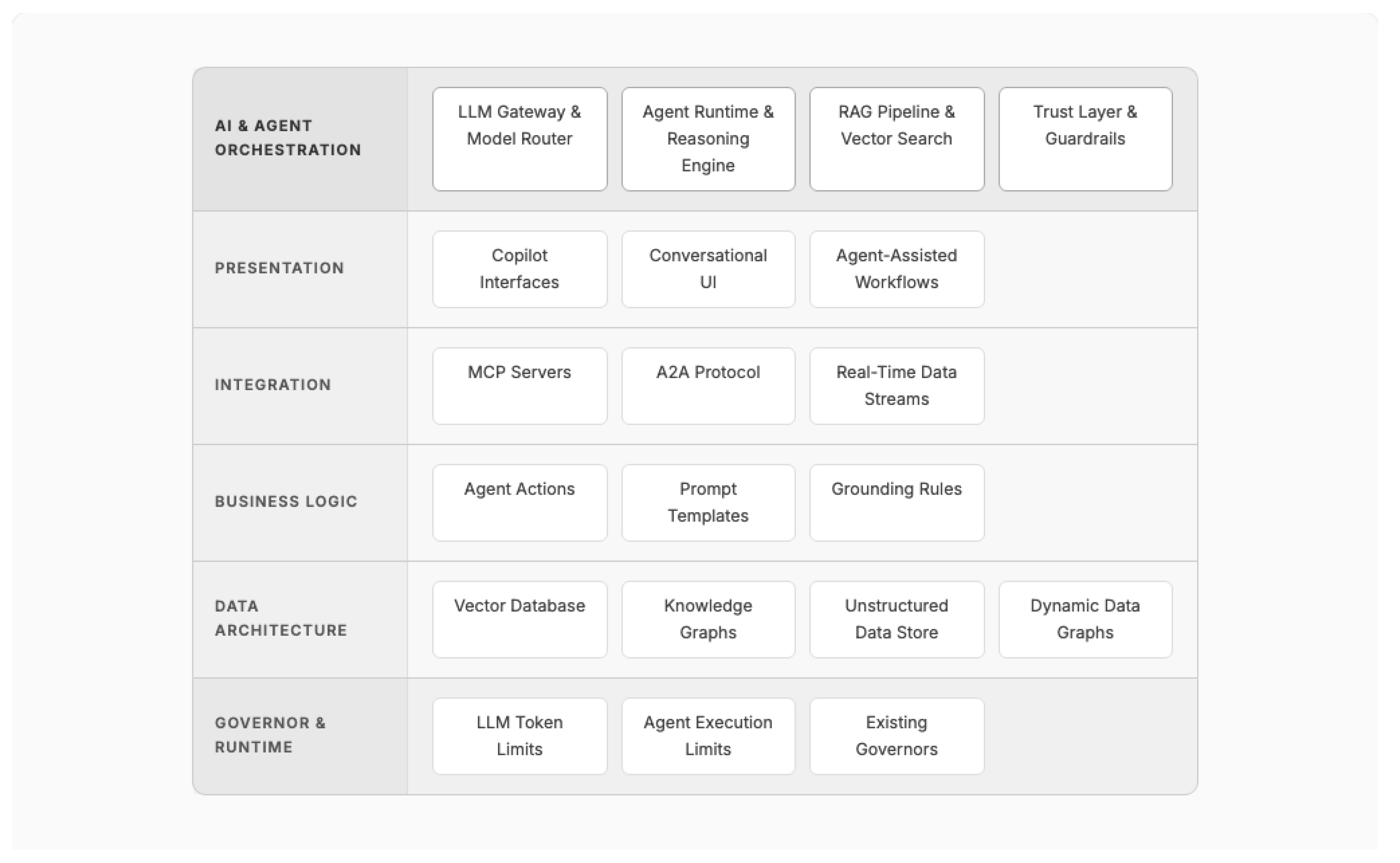
7.2.1. Data Architecture Layer: The Unstructured Data Revolution
The most fundamental architectural impact of AI on CRM is the elevation of unstructured data to first-class status. Traditional CRM data models optimize for structured, relational data — accounts, contacts, opportunities, cases stored in rows and columns. AI capabilities, particularly generative and agentic AI, require access to unstructured data: email threads, PDF documents, chat transcripts, voice recordings, and knowledge articles [40].
This requirement has driven three architectural additions to the Data Architecture Layer:
- 4.
- Vector Databases: CRM platforms now embed vector storage and similarity search capabilities directly into their data infrastructure. Salesforce's Data Cloud includes a native vector database supporting multiple embedding models (E5, SFR, Clop) and hybrid retrieval combining semantic and keyword search [47]. Microsoft added native vector capabilities to SQL Server 2025 using DiskANN indexing and Azure Cosmos DB [48]. This represents a shift from CRM platforms as purely relational systems to hybrid relational-vector data platforms.
- 5.
- Knowledge Graphs and Dynamic Data Graphs: Beyond flat vector embeddings, enterprise CRM requires understanding relationships between entities across structured and unstructured data. Salesforce's Dynamic Data Graphs enable millisecond-latency traversal across unified customer profiles, combining CRM records, behavioral data, and external signals into a queryable graph structure [49]. GraphRAG architectures, which layer knowledge graph traversal on top of vector retrieval, are particularly well-suited for CRM's inherently relational data model [50].
- 6.
- Zero-Copy Data Integration: AI workloads require access to data distributed across CRM, data warehouses, and data lakes without the latency and governance complications of data replication. Zero-copy architectures enable CRM platforms to query external data stores (Snowflake, Databricks, BigQuery) in place, preserving source-of-truth semantics while enabling AI models to access the full breadth of enterprise data [49].
7.2.2. Business Logic Layer: From Deterministic to Probabilistic
The introduction of AI fundamentally alters the nature of the Business Logic Layer. Traditional CRM business logic is deterministic — given the same inputs, a trigger, flow, or validation rule produces the same output every time. AI-powered business logic is inherently probabilistic — an LLM may generate different responses to the same prompt, and a predictive model's scores shift as training data evolves.
This shift introduces new architectural concerns:
- Prompt Templates as Business Logic: In AI-augmented CRM, prompt templates become a new form of business logic artifact, joining triggers, flows, and validation rules. These templates must be versioned, tested, and governed through the same release management processes as code [51].
- Grounding Rules: Business logic must include rules that constrain AI outputs to organizationally acceptable boundaries — preventing hallucinated pricing, unauthorized commitments, or compliance violations. Salesforce's Einstein Trust Layer implements grounding through retrieval-augmented generation, ensuring AI responses are anchored in verified CRM data rather than model training data alone [52].
- Agent Actions as Composable Business Logic: In agentic architectures, AI agents invoke discrete "actions" (query a record, update a field, send an email, create a task) that are individually deterministic but orchestrated through probabilistic reasoning. The catalog of available agent actions becomes a critical architectural artifact [43,51].
7.2.3. Integration Layer: MCP, A2A, and the Agent Interoperability Challenge
AI agents that operate across multiple systems require new integration protocols beyond traditional REST APIs and event-driven messaging. Two emerging standards are reshaping the CRM Integration Layer:
- Agent-to-Agent Protocol (A2A): Salesforce's Enterprise Agentic Architecture defines A2A protocol for cross-organization agent collaboration, enabling agents in separate CRM orgs to negotiate, share context, and coordinate actions while preserving governance, identity, and observability boundaries [51].
These protocols represent a new integration paradigm: while traditional CRM integration moves data between systems, AI-era integration moves reasoning context and action authority between autonomous agents.
7.2.4. Governor Layer: New Constraints for AI Workloads
AI capabilities introduce new resource constraints that extend the Governor Layer:
- LLM Token Limits: Per-transaction limits on tokens sent to and received from LLM APIs
- Agent Execution Limits: Constraints on the number of reasoning steps, tool invocations, and chain depth an autonomous agent may execute
- Embedding Compute Limits: Rate limits on vector embedding generation and similarity search operations
- Trust Layer Overhead: The computational cost of real-time PII masking, prompt injection defense, toxicity detection, and hallucination checking [52]
These AI-specific governors interact with existing platform governors (SOQL, DML, CPU), creating a compound constraint environment that demands careful architectural planning.
7.3. Retrieval-Augmented Generation: The Bridge Pattern
RAG has emerged as the dominant architectural pattern for integrating LLMs with enterprise CRM data. Over 1,200 RAG papers were published on arXiv in 2024 alone, up from fewer than 100 in 2023, reflecting the pattern's rapid adoption [50]. In the CRM context, RAG serves as a bridge between the probabilistic world of LLMs and the deterministic, governed world of enterprise data.
Figure 14.
RAG pipeline architecture in enterprise CRM context with hybrid retrieval and Trust Layer guardrails.
Figure 14.
RAG pipeline architecture in enterprise CRM context with hybrid retrieval and Trust Layer guardrails.
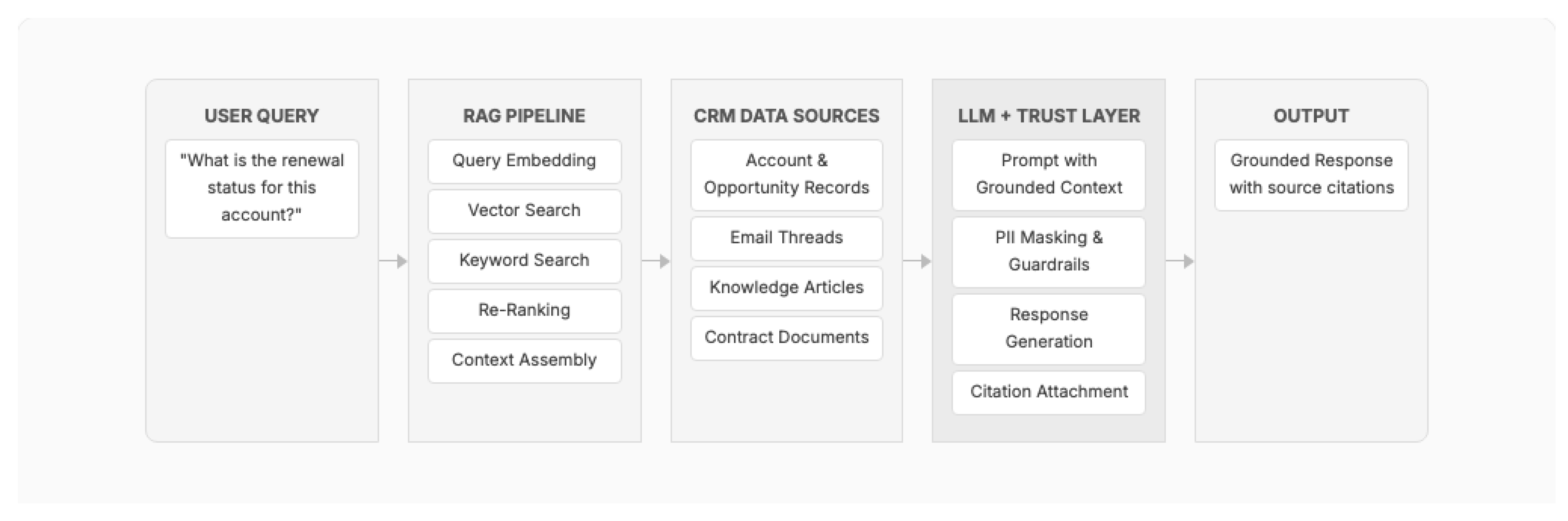
Five RAG architectural variations are emerging for enterprise CRM deployments:
Table 3.
RAG architectural variations for enterprise CRM deployments.
| RAG Pattern | Description | CRM Use Case | Trade-off |
|---|---|---|---|
| Standard RAG | Single vector store, single retrieval step | Knowledge base search, FAQ | Simple but limited for complex queries |
| Hybrid RAG | Combines semantic (vector) + keyword retrieval | Case resolution, product search | Higher accuracy, moderate complexity |
| GraphRAG | Knowledge graph traversal + vector retrieval | Account relationship analysis, cross-sell | Best for relational CRM data, highest complexity |
| Agentic RAG | Agent decides when/what to retrieve iteratively | Multi-step customer inquiries | Most flexible, hardest to govern |
| Cascading RAG | Progressive retrieval refinement | Complex contract analysis | High accuracy for complex queries, higher latency |
7.4. Agentic Architecture Patterns
Salesforce's Enterprise Agentic Architecture documentation [51] represents the most comprehensive vendor-published pattern library for AI agents in CRM, defining four orchestration archetypes:
Figure 15.
Four agentic orchestration archetypes for enterprise CRM deployments.
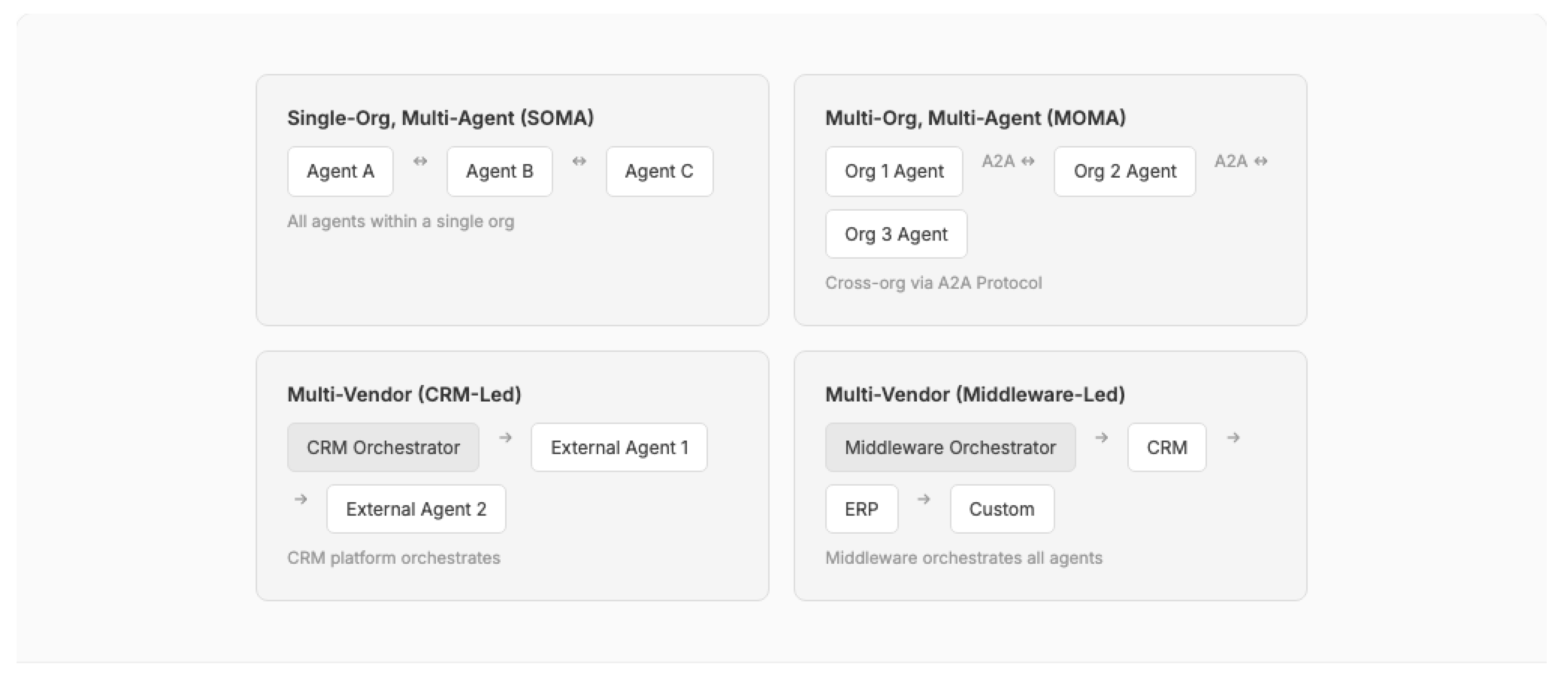
The agentic paradigm introduces specialized agent roles that function as architectural building blocks:
- Greeter Agent: Classifies incoming requests and routes to specialized agents, implementing the Content-Based Router pattern [7] at the AI level
- Orchestrator Agent: Decomposes complex requests into subtasks and coordinates multiple specialist agents, analogous to a Saga pattern [37] for AI workflows
- Answerbot Agent: RAG-powered agent for knowledge retrieval and response generation
- Judge & Jury Pattern: A secondary agent evaluates the primary agent's response for accuracy and compliance before delivery to the user, providing an architectural guardrail against hallucination [51]
These patterns interact with the foundational CRM patterns from Section 5 — agents still operate within governor limits (Pattern 1-5), their configurations are metadata-driven (Pattern 10), and their inter-system communication uses event-driven decoupling (Pattern 13).
7.5. AI Governance and the Trust Architecture
Enterprise CRM deployments of AI require a dedicated governance architecture that addresses risks unique to probabilistic systems operating on sensitive customer data. The NIST AI Risk Management Framework (AI RMF 1.0) [53] provides the foundational governance vocabulary organized around four functions: GOVERN, MAP, MEASURE, and MANAGE. The NIST Generative AI Profile (AI-600-1) [54] extends this framework with 12 generative AI-specific risks including confabulation, data privacy, and information integrity.
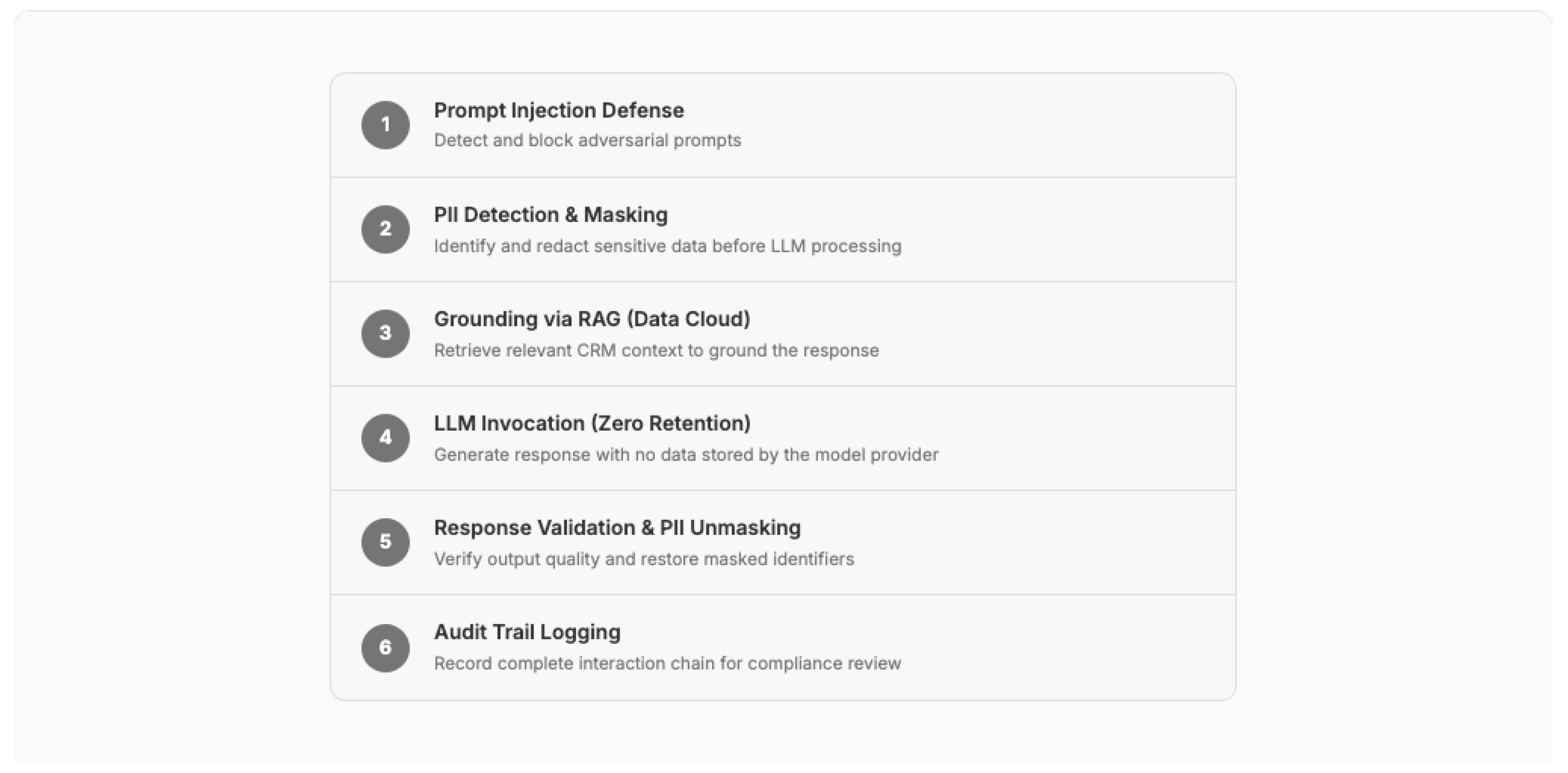
Salesforce's Einstein Trust Layer [52] operationalizes these governance principles as an architectural layer with five components:
- 7.
- Zero Data Retention: Customer data sent to LLMs is not retained by model providers for training or storage, enforced at the API contract level
- 8.
- Dynamic PII Masking: Personally identifiable information is automatically detected and masked before reaching the LLM, with unmasking applied to responses before delivery to users
- 9.
- Prompt Injection Defense: Input validation and sandboxing prevent adversarial prompts from bypassing agent instructions or accessing unauthorized data
- 10.
- Hallucination Mitigation: RAG grounding, confidence scoring, and citation attachment reduce the risk of AI-generated content that contradicts organizational data
- 11.
- Audit Trail: Every AI interaction (prompt, context, response, confidence score, grounding sources) is logged for regulatory compliance and continuous improvement
Figure 16.
Trust Layer architecture: six-stage pipeline ensuring AI governance in enterprise CRM.
7.6. Economic Evidence and Adoption Trajectory
The economic case for AI in enterprise CRM is supported by multiple independent analyses from major research firms:
Table 4.
Economic impact evidence for AI in enterprise CRM from tier-1 research firms.
| Source | Finding | Year |
|---|---|---|
| McKinsey [42] | GenAI could add $2.6--4.4 trillion in annual value globally; marketing, sales, and customer care represent the largest value pool | 2023 |
| Forrester TEI [55] | Agentforce delivers 396% ROI, $2.2M NPV, <6 month payback; 50% case handling time reduction | 2025 |
| IDC [56] | Global AI spending projected at $307B in 2025, reaching $632B by 2028 (29% CAGR); CRM leads SaaS AI spending | 2025 |
| Stanford HAI [57] | AI inference costs dropped 280x between 2022 and 2024; hardware costs declining 30% annually | 2025 |
| Gartner [41] | Worldwide GenAI spending forecast at $644B in 2025 (76.4% YoY increase) | 2025 |
However, the evidence also reveals significant adoption risks. Gartner predicts that 30% of generative AI projects will be abandoned after proof of concept by end of 2025 due to poor data quality, escalating costs, or unclear business value [58]. Forrester's 2026 predictions warn that enterprises will defer 25% of planned AI spend and that one-third of brands will harm customer experience with premature AI-powered self-service [59]. Harvard Business Review observes that "the AI revolution won't happen overnight," noting that enterprise transformation timelines are measured in years, not quarters [60].
These findings have direct architectural implications: enterprise CRM architects must design AI capabilities for incremental adoption rather than wholesale transformation. The patterns from Section 5 — particularly Feature Toggle (Pattern 11), Metadata-Driven Configuration (Pattern 10), and Queueable Chain (Pattern 2) — provide the architectural mechanisms for phased AI rollouts with measurable checkpoints and rapid rollback capability.
7.7. Future Trajectory: From AI-Augmented to AI-Native CRM
Gartner's 2025 Hype Cycle positions generative AI in the Trough of Disillusionment, AI agents at the Peak of Inflated Expectations, and multimodal AI as an Innovation Trigger expected to reach mainstream adoption within five years [61]. MIT Sloan and BCG report that agentic AI adoption is outpacing both traditional and generative AI adoption curves, suggesting that the agent paradigm may compress the typical hype cycle timeline [62].
The trajectory points toward three architectural shifts that will reshape the patterns presented in this paper:
- 12.
- Multimodal Data as Default: Gartner predicts that 80% of enterprise software will be multimodal by 2030, up from less than 10% in 2024 [63]. CRM platforms will process images (product photos, document scans), voice (call recordings, voicemail), and video (customer interactions) alongside traditional text and structured data, requiring architectural patterns for multimodal data ingestion, embedding, and retrieval.
- 13.
- Domain-Specific AI Models: Gartner forecasts that by 2027, more than half of enterprise GenAI models will be domain-specific, up from 1% in 2024 [41]. CRM platforms will shift from general-purpose LLM invocation to hosting fine-tuned, industry-specific models (financial services CRM, healthcare CRM, manufacturing CRM), requiring new patterns for model lifecycle management, A/B testing, and performance monitoring within the CRM governor framework.
- 14.
- The Agentic Business Fabric: Forrester describes an emerging "agentic business fabric" — a network of autonomous agents that spans organizational boundaries, perpetually learns, and optimizes without human intervention [4]. This vision, if realized, will require the CRM architecture patterns from this paper to evolve from supporting human-driven workflows to governing machine-driven autonomous operations where the "user" of the CRM system may be another AI agent rather than a human.
8. Will AI Agents Endanger Enterprise SaaS? The Build vs. Buy Calculus Revisited
A provocative question has emerged alongside the AI developments examined in Section 7: if AI coding agents can dramatically accelerate software development, will enterprises bypass CRM platforms entirely and build custom applications tailored to their exact needs? This section examines the disruption thesis, evaluates the evidence, and assesses the structural advantages that make enterprise CRM platforms more resilient — but also more pressured to evolve — than the disruption narrative suggests.
8.1. The Disruption Thesis
The argument is straightforward: AI coding agents (GitHub Copilot, Cursor, Claude Code, Devin) are making software development faster and cheaper. If an enterprise can instruct an AI agent to "build me a CRM system that does exactly what I need," why pay $300/user/month for a SaaS platform loaded with features the organization never uses? Bond Capital (Mary Meeker) argues that the SaaS point-solution era is ending, with AI enabling rapid custom application assembly [64]. SaaS stock multiples have compressed from 7x to below 5x revenue, and seat-based pricing — the economic foundation of SaaS CRM — is declining rapidly, falling from 21% to 15% of enterprise contracts in a single year [65]. Bessemer Venture Partners' State of the Cloud reports document a "tectonic shift" where AI is collapsing the traditional SaaS value chain [66].
Gartner predicts that by 2026, 75% of new applications will be built using low-code or no-code technologies, up from less than 25% in 2020 [38]. Combined with AI-powered code generation, this suggests that the barriers to building custom enterprise applications are falling faster than at any point in software history.
8.2. The Productivity Evidence: More Nuanced Than Headlines Suggest
Before evaluating the disruption thesis, it is essential to examine the actual evidence on AI-assisted development productivity, which is considerably more mixed than vendor marketing suggests.
Table 5.
AI developer productivity evidence: a divided landscape across controlled studies.
| Optimistic Findings | Cautionary Findings | Code Quality Evidence |
|---|---|---|
| GitHub: 55% faster task completion (controlled lab) | METR RCT: 19% SLOWER on complex real-world codebases (2025) | Veracode: 45% vulnerability rate in AI-generated code |
| McKinsey: Up to 2x speed gains (org-level survey) | Uplevel: No significant productivity gains, 41% more bugs (n=800) | GitClear: Code churn UP 8x, refactoring DOWN from 25% to <10% |
| Microsoft Research: 26% faster (RCT, simple tasks) | Google DORA 2025: Improves throughput, DECREASES stability | CodeRabbit: 2.74x more XSS vulnerabilities |
Optimistic evidence: GitHub's research reports 55% faster task completion in controlled laboratory conditions [67]. McKinsey documents up to 2x speed gains at organizations with 80-100% AI tool adoption [68]. A Microsoft Research randomized controlled trial found 26% faster completion on simple programming tasks [69].
Cautionary evidence: A 2025 METR randomized controlled trial — the most rigorous study to date — found that experienced open-source developers were actually 19% slower when using AI coding tools on complex real-world codebases, while simultaneously believing they were 20% faster, revealing a 40-percentage-point perception gap [70]. An Uplevel study of 800 developers found no significant productivity gains and a 41% increase in bugs [71]. Google's 2025 DORA (DevOps Research and Assessment) report confirmed that AI tools improve developer throughput but decrease delivery stability [72].
The critical insight for the build-vs-buy calculus is this: AI coding tools demonstrably accelerate the creation of new code, but the evidence suggests they do not yet reduce — and may increase — the long-term maintenance burden. Building a CRM application is a 3-month project; maintaining it is a 10-year commitment.
8.3. Seven Structural Advantages of Enterprise CRM Platforms
The disruption thesis underestimates seven structural advantages that enterprise CRM platforms possess and that custom-built applications must replicate entirely from scratch:
Table 6.
The seven structural advantages of enterprise CRM platforms that custom applications must independently replicate.
Table 6.
The seven structural advantages of enterprise CRM platforms that custom applications must independently replicate.
| # | Enterprise CRM Platform Advantage | Custom Application Must Replicate |
|---|---|---|
| 1 | Multi-Tenant Economics | Build & operate own infrastructure |
| 2 | Ecosystem Network Effects | Build every integration from zero |
| 3 | Regulatory Compliance | Achieve SOC 2, HIPAA, GDPR independently |
| 4 | Platform Evolution Velocity | Ship 3 releases/year with own team |
| 5 | Data Model Maturity | Design data model from scratch |
| 6 | Integration Pre-Built Connectors | Build every connector from scratch |
| 7 | Talent Ecosystem | Hire, train, retain specialized talent |
1. Multi-Tenant Economics: Single-tenant custom deployments cost 2--5x more in infrastructure than multi-tenant platforms that amortize compute, storage, networking, and operations across thousands of tenants [10,16]. This cost disparity compounds annually: a multi-tenant platform spreads infrastructure upgrades, security patching, and performance optimization across its entire customer base, while a custom deployment bears these costs alone.
2. Ecosystem Network Effects: Salesforce's AppExchange hosts over 7,000 pre-built applications and integrations, with 88% of customers using at least one AppExchange product [73]. Morningstar assigns Salesforce a "Wide Moat" rating specifically citing these network effects [73]. A custom-built CRM starts with zero ecosystem — every integration, every extension, every add-on must be built or procured independently.
3. Regulatory Compliance at Scale: Enterprise CRM platforms maintain SOC 2 Type II, HIPAA, GDPR, FedRAMP, and industry-specific compliance certifications as a shared service. For a custom application, achieving and maintaining these certifications is a dedicated, ongoing, and expensive undertaking. Financial services, healthcare, and government sectors face particularly acute compliance burdens that strongly favor certified platforms.
4. Platform Evolution Velocity: Salesforce ships hundreds of features across three major releases per year (Spring, Summer, Winter). The 2024--2025 period alone saw the launch of Agentforce, Data Cloud Vector Database, Einstein Trust Layer, SLDS 2, and Flow orchestration capabilities [43,44]. A custom application team cannot match this velocity — every new AI capability, security patch, and performance optimization must be independently researched, developed, tested, and deployed.
5. Data Model Maturity: Enterprise CRM platforms encode decades of domain knowledge in their standard data models — Account-Contact-Opportunity for sales, Case-Knowledge-Entitlement for service, Lead-Campaign-Journey for marketing. These models embody best practices refined across millions of implementations. A custom application must design its data model from scratch, a process where errors are expensive to correct after production deployment.
6. Integration Pre-Built Connectors: Enterprise CRM platforms provide pre-built connectors to hundreds of external systems (ERP, marketing automation, telephony, data providers). At a Tier-1 telecommunications provider (Telco-A), 22 integrations were delivered in 10 weeks using MuleSoft's pre-built connectors — a timeline impossible with custom integration development.
7. Talent Ecosystem: The Salesforce ecosystem includes over 4 million certified professionals. The CRM talent market is mature, with established training paths, certification programs, and a global workforce. Custom application development requires specialized talent that is harder to recruit, more expensive to retain (tech industry turnover is 36% [74]), and creates key-person risk when developers with institutional knowledge leave.
8.4. The Hidden Costs of Custom: Why Enterprise CRM Replacements Fail
The historical evidence on custom enterprise application development is unambiguous in its severity:
Table 7.
Hidden cost evidence for custom enterprise application development.
| Metric | Finding | Source |
|---|---|---|
| Project failure rate | 75--85% of custom IT projects fail to meet objectives | Gartner [75] |
| Build-vs-buy failures | 67% of enterprise failures trace to wrong build-vs-buy decisions | Forrester [65] |
| Cost multiplier | Custom builds cost 3--5x more upfront than SaaS alternatives | McKinsey [68] |
| Post-deployment costs | 65% of total custom AI solution costs materialize post-deployment | a16z [76] |
| Maintenance burden | Enterprise applications require 15--20% of initial build cost annually for maintenance | Industry consensus |
The post-deployment cost finding is particularly relevant: 65% of total costs emerge after the application is live, in the form of bug fixes, security patches, performance optimization, compliance updates, user training, and feature enhancements [76]. AI coding agents can accelerate the initial build, but they do not eliminate — and current evidence suggests they may exacerbate — the long-term maintenance burden [70,71,72].
Furthermore, McKinsey's analysis of enterprise AI strategy now frames the decision as four options rather than a binary build-vs-buy: build, buy, blend, or partner [77]. Their recommendation is clear: buy standardized capabilities (CRM, ERP) and reserve custom development for proprietary workflows that create genuine competitive differentiation. Only 24% of enterprise AI use cases are now custom-built, down from a majority in 2024, with 76% being purchased or blended from vendor platforms [76].
8.5. AI-Generated Code: The Quality and Security Problem
Even if AI tools reduce the time to write code, the evidence on code quality raises serious concerns for mission-critical enterprise applications that handle customer data:
- Security vulnerabilities: Veracode's analysis of code generated by 100+ LLMs found a 45% security vulnerability rate — nearly half of all AI-generated code contained exploitable security flaws [78]. CodeRabbit's independent analysis found 2.74x more cross-site scripting (XSS) vulnerabilities and 1.7x more issues overall in AI-generated code compared to human-written code [79].
- Code quality degradation: GitClear's 2025 research found that code duplication increased 8x in repositories with heavy AI coding tool usage, while refactoring activity declined from 25% to less than 10% of code changes [80]. This pattern — more new code, less maintenance of existing code — is the precise opposite of sustainable software engineering practice.
For enterprise CRM applications handling personally identifiable information (PII), financial data, and healthcare records, these quality and security risks are not abstract concerns — they are potential regulatory violations with material financial consequences.
Table 8.
The divergent trajectories of custom-built vs. platform-based CRM in the AI era.
| Step | Build Custom CRM with AI Agents | Buy Enterprise CRM Platform |
|---|---|---|
| 1 | AI generates code — 45% vulnerability rate | Platform-managed security — SOC 2, HIPAA certified |
| 2 | Team deploys fast but maintenance backlog grows | 3 releases/year, auto-upgraded |
| 3 | Security audit reveals XSS, SOQL injection, PII exposure | AppExchange ecosystem — 7,000+ pre-built apps |
| 4 | Remediation costs exceed SaaS licensing savings | AI features (Agentforce) included in platform |
| 5 | Organization migrates to SaaS platform | Focus on business differentiation |
8.6. Historical Precedent: Why Every "Build Your Own CRM" Movement Has Failed
The current AI-enabled "build your own" narrative is not novel. Four previous waves of technology promised to make custom CRM development feasible at enterprise scale, and each was ultimately absorbed into — rather than displacing — the dominant platform ecosystem:
Wave 1 -- 4GL and RAD Tools (1990s): Fourth-generation programming languages and rapid application development tools promised to accelerate custom application development. Enterprise CRM vendors (Siebel, SAP) absorbed the productivity gains into their own platforms.
Wave 2 -- Open Source CRM (2004--2015): SugarCRM raised $110 million in venture funding on the thesis that open-source CRM could displace proprietary platforms. Despite significant investment and a capable product, SugarCRM never achieved meaningful enterprise market penetration against Salesforce [83]. SuiteCRM, vTiger, and other open-source alternatives remain niche solutions.
Wave 3 -- Low-Code Platforms (2014--Present): Low-code and no-code platforms (OutSystems, Mendix, Appian) promised to democratize application development. The market reached $30 billion, but rather than displacing CRM platforms, low-code capabilities were absorbed into them — Salesforce Flow, Microsoft Power Platform, and ServiceNow App Engine are now the largest low-code platforms in their respective ecosystems [38,83].
Wave 4 -- AI Coding Agents (2023--Present): The current wave. The pattern from Waves 1--3 is instructive: productivity-enhancing development technologies do not eliminate the need for enterprise platforms; they are absorbed by them. Salesforce's Einstein for Developers, Agentforce, and Flow generation capabilities represent the platform absorption of AI coding assistance, just as Salesforce Flow absorbed the low-code movement.
The consistent historical pattern is not that enterprise platforms are disrupted by development productivity tools — it is that enterprise platforms incorporate those tools, using them to increase their own velocity while maintaining the structural advantages (multi-tenancy, compliance, ecosystem) that custom applications cannot replicate.
8.7. Where AI Actually Threatens SaaS: The Real Pressure Points
While AI agents are unlikely to replace enterprise CRM platforms wholesale, the disruption thesis identifies real pressure points that CRM vendors must address:
1. Point Solution Displacement: Narrow, single-function SaaS tools (email sequencing, call logging, data enrichment) are genuinely vulnerable. An AI agent can replicate a $50/user/month email sequencing tool in hours. The SaaS applications most at risk are those with shallow feature sets, limited data moats, and easily replicable logic [64,66].
2. Pricing Model Pressure: AI agents commoditize per-seat licensing by automating tasks that previously required human users. If an AI agent handles 70% of customer service cases autonomously [43], the per-seat economic model breaks down. Forrester documents the rapid decline of seat-based pricing [65], and CRM vendors are responding with outcome-based and consumption-based pricing models.
3. Customization Layer Competition: The most expensive part of CRM implementations is customization — the triggers, flows, integrations, and UI components that tailor a platform to organizational needs. AI coding agents directly compete in this layer, potentially enabling smaller teams to achieve customization that previously required large consulting engagements. This threatens the CRM consulting ecosystem more than the CRM platforms themselves.
4. Platform Lock-In Backlash: Counterintuitively, Forrester finds that AI is deepening vendor lock-in rather than reducing it, as major vendors use AI features to increase switching costs [84]. This risks provoking a backlash: Gartner recommends that 30% of enterprise GenAI spending target open models by 2028 as an antidote to vendor lock-in [82].
8.8. The Market Verdict: Acceleration, Not Displacement
Despite the disruption narrative, the CRM market is not contracting — it is accelerating:
Table 9.
CRM market indicators show acceleration, not displacement, despite the AI disruption narrative.
Table 9.
CRM market indicators show acceleration, not displacement, despite the AI disruption narrative.
| Metric | Value | Source |
|---|---|---|
| Global CRM market (2024) | $128 billion (13.4% growth) | Gartner [85] |
| CRM market projection (2032) | $263 billion | Fortune Business Insights [86] |
| AI-in-CRM subsegment growth | 28% CAGR ($4.1B to $48.4B by 2033) | Grand View Research [87] |
| Salesforce CRM revenue (FY25) | $21.6 billion (4x nearest competitor) | IDC [88] |
| Salesforce Data Cloud + AI ARR | $900 million | Salesforce [49] |
The evidence suggests that AI is not replacing CRM platforms but rather becoming the primary growth driver within them. The AI-in-CRM subsegment is growing at 28% CAGR — faster than any other CRM category — and platform vendors are capturing this growth by embedding AI capabilities directly into their platforms [87].
8.9. The Composable Middle Ground
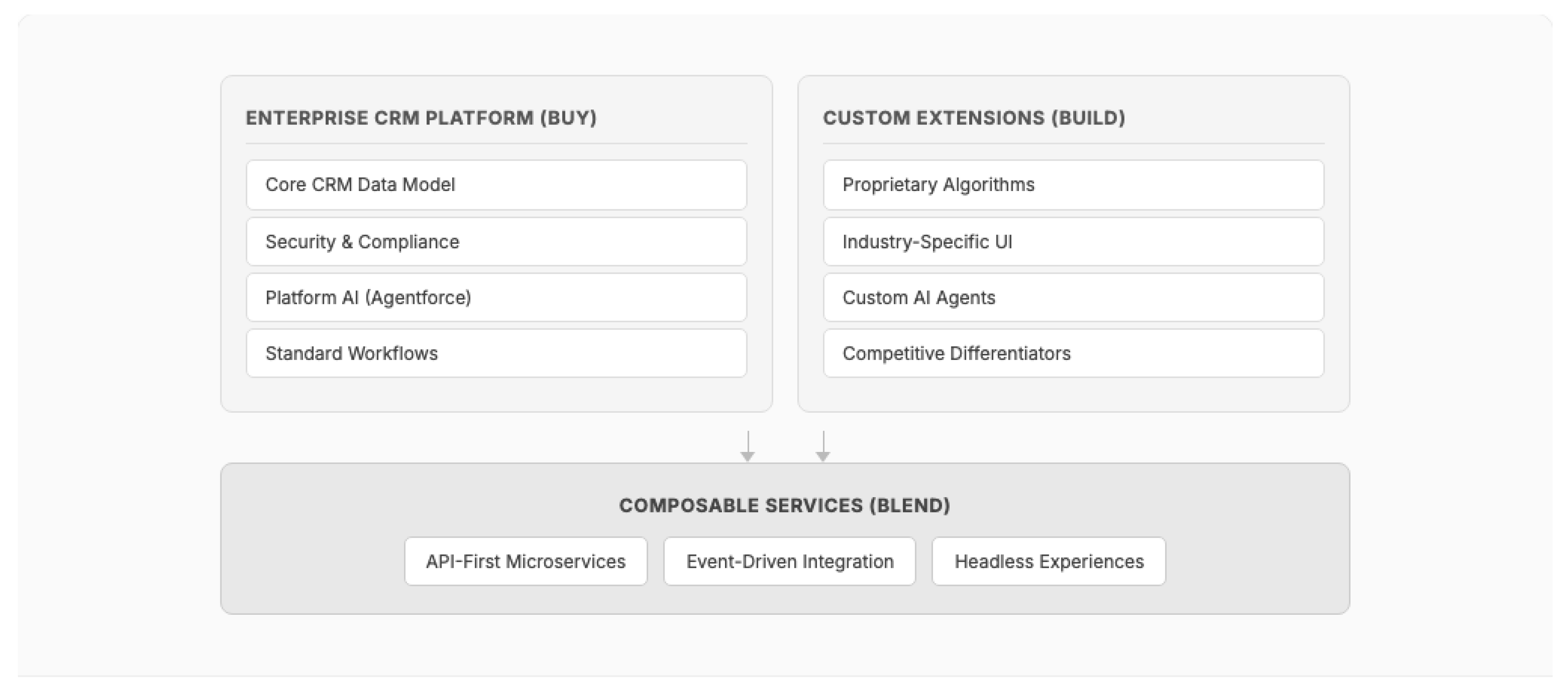
The true architectural response to the build-vs-buy tension is not a binary choice but a composable architecture that combines platform capabilities with targeted custom development. Gartner's Composable Enterprise framework predicts that 70% of organizations will use composability as a key selection criterion for new technology [89]. The MACH (Microservices, API-first, Cloud-native, Headless) architecture movement reinforces this trend, with 60% of new digital commerce solutions projected to use composable principles by 2027 [89].
In this model, enterprises buy the CRM platform for its structural advantages (multi-tenancy, compliance, ecosystem, data model, evolution velocity), build custom components only where they create genuine competitive differentiation (proprietary algorithms, industry-specific workflows), and blend through composable API-first services that enable both platform and custom components to interoperate. AI coding agents accelerate the "build" and "blend" layers without eliminating the need for the "buy" foundation.
Figure 17.
The composable middle ground: combining platform capabilities with targeted custom development through API-first integration.
Figure 17.
The composable middle ground: combining platform capabilities with targeted custom development through API-first integration.
9. Discussion
9.1. Relationship to Classical Patterns
The patterns presented here complement rather than replace classical design pattern literature. GoF patterns [5] remain applicable within individual classes; Fowler's enterprise patterns [6] map directly through the fflib framework [17]; and Hohpe and Woolf's integration patterns [7] provide the canonical vocabulary for CRM Platform Events and Change Data Capture. The contribution of this paper is to document the additional patterns — particularly Governor-Aware patterns with no classical equivalent — that arise when classical patterns meet multi-tenant platform constraints.
9.2. Implications for Practice
For Enterprise Architects: The four-layer reference model (Section 4) provides a structured framework for organizing architectural decisions in CRM platform implementations. Architects should establish pattern compliance as a code review criterion, particularly for Governor-Aware patterns where non-compliance produces runtime failures rather than quality degradation.
For Development Teams: The pattern catalogue provides a shared vocabulary for design discussions. Teams new to CRM platform development should prioritize Bulkification (Pattern 1), Tenant-Scoped Configuration (Pattern 6), and Event-Driven Decoupling (Pattern 13) as foundational patterns, adopting additional patterns as implementation complexity demands.
For CRM Platform Vendors: The Governor Limit Monitor pattern (Pattern 5) highlights that platform-provided runtime introspection (the Limits class) enables adaptive application behavior. Expanding these introspection capabilities — including real-time governor consumption dashboards and predictive limit warnings — would further enable this pattern category.
9.3. The AI-Pattern Interaction
As detailed in Section 7, the AI transformation does not obsolete the foundational patterns catalogued in this paper — it layers new capabilities and constraints on top of them. Every autonomous CRM agent still operates within governor limits (Patterns 1--5), reads its configuration from metadata (Patterns 6, 10, 11), enforces security boundaries (Pattern 8), and communicates through event-driven mechanisms (Pattern 13). The key insight is that AI introduces probabilistic behavior into a deterministic architectural foundation, and the governance challenge lies in managing this interaction without sacrificing either the flexibility of AI or the reliability of established patterns.
9.4. Limitations
This study has several limitations. First, the patterns are derived primarily from implementations on the Salesforce platform. While the multi-tenant constraints that motivate these patterns exist across other CRM platforms (Microsoft Dynamics 365, ServiceNow), the specific pattern implementations may require adaptation. Second, the evaluation in Section 6 is based on practitioner assessment rather than controlled experimentation. Quantitative metrics (deployment frequency, defect density, mean-time-to-resolution) would strengthen the evaluation but require access to production telemetry data that is typically proprietary. Third, the pattern catalogue is not exhaustive; additional patterns exist in specialized domains (CPQ configuration, Field Service optimization, Commerce Cloud architecture) that merit dedicated treatment.
10. Conclusions and Future Work
This paper presents a practitioner-driven reference framework for enterprise CRM architecture comprising a four-layer reference model, 14 design patterns organized into Governor-Aware, Multi-Tenant Isolation, and Platform Evolution categories, and a comprehensive analysis of how artificial intelligence is transforming CRM architecture across every layer. The patterns are derived from 17 years of enterprise CRM implementation experience across nine Fortune 500 organizations.
Our key contributions are:
- 15.
- Identification of Governor-Aware Patterns as a pattern category with no classical equivalent, arising from the unique constraints of multi-tenant execution environments. Unlike classical patterns where adoption is a quality trade-off, Governor-Aware patterns are effectively mandatory for production viability.
- 16.
- A four-layer reference architecture model that maps classical enterprise architecture concerns to CRM platform capabilities, providing a structured framework for architectural decision-making.
- 17.
- Empirical pattern evaluation demonstrating that Event-Driven Decoupling provides the best overall quality attribute profile, and that Security and Performance are inversely correlated in multi-tenant CRM architectures.
- 18.
- Analysis of the AI transformation reshaping enterprise CRM, documenting how three generations of AI capabilities (predictive, generative, agentic) introduce new architectural layers, data infrastructure requirements (vector databases, knowledge graphs), governance frameworks (Trust Layer, NIST AI RMF), and integration protocols (MCP, A2A) — while remaining dependent on the foundational patterns established in this paper.
- 19.
- Evidence-based assessment of the SaaS disruption thesis (Section 8), demonstrating that while AI coding agents accelerate custom application development, the structural advantages of enterprise CRM platforms — multi-tenant economics, ecosystem network effects, regulatory compliance, platform evolution velocity, and talent ecosystems — create a durable moat that historical precedent (open source CRM, low-code movements) confirms has withstood four prior waves of "build your own" disruption. The CRM market is accelerating ($128 billion, 13.4% growth) rather than contracting, with AI-in-CRM emerging as the fastest-growing subsegment at 28% CAGR.
Future work will address three areas. First, formalizing AI-native CRM patterns — including RAG pipeline variations, agent orchestration archetypes, and Trust Layer governance patterns — into the same rigorous pattern template used for the foundational patterns in Section 5. Second, conducting controlled experiments to quantify the impact of both foundational and AI pattern adoption on measurable quality metrics (defect density, deployment frequency, system reliability, AI accuracy, hallucination rate). Third, longitudinal tracking of the build-vs-buy calculus as AI coding agents mature — specifically, whether the code quality and maintenance burden evidence (Section 8.2 and Section 8.5) improves sufficiently to alter the structural economics favoring multi-tenant CRM platforms, and how composable architectures (Section 8.9) evolve as the practical bridge between platform and custom development.
Author Contributions
Jitendra Zaa conceived the research, identified and validated patterns from practitioner experience, designed the reference architecture model, and wrote the manuscript.
Funding
This research received no external funding.
Data Availability Statement
No new data were created in this study. This work is based on analysis of existing literature, publicly available platform documentation, and the author's practitioner experience across enterprise CRM implementations. Specific client implementation details are anonymized to maintain confidentiality.
Use of AI Tools
The author used AI-assisted tools (Anthropic) for drafting assistance, literature search support, and editorial refinement during manuscript preparation. All technical content, architectural patterns, practitioner insights, and analytical conclusions are based on the author's professional experience and independent research. The author takes full responsibility for the accuracy and integrity of the work.
Conflicts of Interest
The author is employed by IBM, which provides CRM consulting services. The patterns and evaluations presented reflect the author's independent professional analysis and do not represent IBM's official position.
References
- Meena, P.; Sahu, P. Customer Relationship Management Research from 2000 to 2020: An Academic Literature Review and Classification. In Vision: The Journal of Business Perspective; SAGE, 2021. [Google Scholar] [CrossRef]
- Guerreiro, S.; et al. Customer Relationship Management (CRM) Systems and their Impact on SMEs Performance: A Systematic Review. Preprints.org 2024, 2024100538. Available online: https://www.preprints.org/manuscript/202410.1538. [CrossRef]
- Gartner. Magic Quadrant for Sales Force Automation Platforms. In Gartner Research; 2024. [Google Scholar]
- Forrester. The Forrester Wave: Customer Relationship Management Software, Q1 2025. Forrester Research Report RES182106, 2025. [Google Scholar]
- Gamma, E.; Helm, R.; Johnson, R.; Vlissides, J. Design Patterns: Elements of Reusable Object-Oriented Software; Addison-Wesley: Reading, MA, USA, 1994. [Google Scholar]
- Fowler, M. Patterns of Enterprise Application Architecture; Addison-Wesley Professional: Boston, MA, USA, 2002. [Google Scholar]
- Hohpe, G.; Woolf, B. Enterprise Integration Patterns: Designing, Building, and Deploying Messaging Solutions; Addison-Wesley: Boston, MA, USA, 2004. [Google Scholar]
- Salesforce. Architecture Basics. Salesforce Architects. 2025. Available online: https://architect.salesforce.com/fundamentals/architecture-basics.
- Salesforce. Salesforce Well-Architected Framework. Salesforce Architects. 2025. Available online: https://architect.salesforce.com/well-architected/overview.
- Weissman, C.D.; Bobrowski, S. The Design of the Force.com Multitenant Internet Application Development Platform. In Proceedings of the 2009 ACM SIGMOD International Conference on Management of Data, Providence, RI, USA, 29 June--2 July 2009; ACM: New York, NY, USA, 2009; p. pp. 889--896. [Google Scholar]
- Zaa, J.; Verma, A. Apex Design Patterns; Packt Publishing: Birmingham, UK, 2016. [Google Scholar]
- Zaa, J. Salesforce Integration Patterns & Best Practices with Video. JitendraZaa.com. 2021. Available online: https://www.jitendrazaa.com/blog/salesforce/salesforce-integration-patterns-best-practices-with-video/ (accessed on 26 January 2026). Views: 113,000+.
- Krebs, R.; Momm, C.; Kounev, S. Architectural Concerns in Multi-tenant SaaS Applications. In Proceedings of the 2nd International Conference on Cloud Computing and Services Science (CLOSER 2012), Porto, Portugal, 18--21 April 2012. [Google Scholar]
- Mietzner, R.; Metzger, A.; Leymann, F.; Pohl, K. Variability Modeling to Support Customization and Deployment of Multi-Tenant-Aware Software as a Service Applications. In Proceedings of the 2009 ICSE Workshop on Principles of Engineering Service Oriented Systems (PESOS), Vancouver, BC, Canada, 18--19 May 2009; IEEE: Piscataway, NJ, USA, 2009; p. pp. 18--25. [Google Scholar]
- Bezemer, C.P.; Zaidman, A. Multi-Tenant SaaS Applications: Maintenance Dream or Nightmare? In Proceedings of the Joint ERCIM Workshop on Software Evolution (EVOL) and International Workshop on Principles of Software Evolution (IWPSE), Antwerp, Belgium, 20--21 September 2010; ACM: New York, NY, USA, 2010. [Google Scholar]
- Alannsary, M.O.; Olatunji, K.A. Multi-Tenant System Design for Platform Scalability: Architectural Patterns and Implementation Strategies for Modern Cloud-Native Applications. Journal of Information Systems Engineering and Management 2024. [Google Scholar]
- Fawcett, A. Salesforce Lightning Platform Enterprise Architecture, 3rd ed.; Packt Publishing: Birmingham, UK; GitHub, 2021; Available online: https://github.com/apex-enterprise-patterns/fflib-apex-common.
- Evans, E. Domain-Driven Design: Tackling Complexity in the Heart of Software; Addison-Wesley: Boston, MA, USA, 2003. [Google Scholar]
- Newman, S. Building Microservices: Designing Fine-Grained Systems, 2nd ed.; O'Reilly Media: Sebastopol, CA, USA, 2021. [Google Scholar]
- Richards, M. Software Architecture Patterns; O'Reilly Media: Sebastopol, CA, USA, 2015. [Google Scholar]
- Salesforce. Event-Driven Software Architecture. Platform Events Developer Guide, Version 66.0, Spring '26, 2025. Available online: https://developer.salesforce.com/docs/atlas.en-us.platform_events.meta/platform_events/platform_events_intro_architecture.htm.
- Salesforce. Event-Driven Architecture Decision Guide. Salesforce Architects. 2025. Available online: https://architect.salesforce.com/decision-guides/event-driven.
- Overeem, M.; Spoor, M.; Jansen, S.; Brinkkemper, S. An Empirical Characterization of Event Sourced Systems and Their Schema Evolution. Journal of Systems and Software 2021, 178, 110970. [Google Scholar] [CrossRef]
- Schon, D.A. The Reflective Practitioner: How Professionals Think in Action; Basic Books: New York, NY, USA, 1983. [Google Scholar]
- Buschmann, F.; Meunier, R.; Rohnert, H.; Sommerlad, P.; Stal, M. Pattern-Oriented Software Architecture: A System of Patterns; John Wiley & Sons: Hoboken, NJ, USA, 1996. [Google Scholar]
- Zaa, J.; Chaudhary, A. Mastering Salesforce DX and Visual Studio Code. Udemy. 2020. Available online: https://www.udemy.com/course/salesforcedx/ (accessed on 26 January 2026). Students: 2,819.
- Salesforce. Execution Governors and Limits. Apex Developer Guide. Version 66.0, Spring '26, 2025. Available online: https://developer.salesforce.com/docs/atlas.en-us.apexcode.meta/apexcode/apex_gov_limits.htm.
- Wiggins, A. The Twelve-Factor App. Heroku. 2011. Available online: https://12factor.net/.
- Martin, R.C. Clean Architecture: A Craftsman's Guide to Software Structure and Design; Prentice Hall: Upper Saddle River, NJ, USA, 2017. [Google Scholar]
- McKinsey; Company. The State of AI: How Organizations Are Rewiring to Capture Value. McKinsey Global Survey. 2025. Available online: https://www.mckinsey.com/capabilities/quantumblack/our-insights/the-state-of-ai.
- IDC. Worldwide Semiannual Software Tracker: CRM Applications Market Shares. International Data Corporation. 2024. Available online: https://my.idc.com/getdoc.jsp?containerId=US53469426.
- Sousa, G.; Ferreira, H.S.; Correia, F.F. A Survey on the Adoption of Patterns for Engineering Software for the Cloud. IEEE Transactions on Software Engineering 2022, 48(6), 2128--2140. [Google Scholar] [CrossRef]
- Blinowski, G.; Ojdowska, A.; Przybylek, A. Monolithic vs. Microservice Architecture: A Performance and Scalability Evaluation. IEEE Access 2022, 10, 20357--20374. [Google Scholar] [CrossRef]
- Kitsios, F.; Kamariotou, M. A Systematic Literature Review of Enterprise Architecture Evaluation Methods. ACM Computing Surveys 2024, 57(4), 90. [Google Scholar]
- Salesforce. The Force.com Multitenant Architecture. Salesforce Whitepaper. 2008. Available online: https://www.developerforce.com/media/ForcedotcomBookLibrary/Force.com_Multitenancy_WP_101508.pdf.
- Velepucha, V.; Flores, P. A Survey on Microservices Architecture: Principles, Patterns and Migration Challenges. IEEE Access 2023, 11. [Google Scholar] [CrossRef]
- Indrasiri, K.; Suhothayan, S. Design Patterns for Cloud Native Applications: Patterns in Practice Using APIs, Data, Events, and Streams; O'Reilly Media: Sebastopol, CA, USA, 2021. [Google Scholar]
- Gartner. Gartner Top 10 Strategic Technology Trends for 2024. Gartner. 2024. Available online: https://www.gartner.com/en/articles/gartner-top-10-strategic-technology-trends-for-2024.
- Salesforce. Einstein AI Platform. Salesforce Developers. 2025. Available online: https://developer.salesforce.com/docs/einstein/genai/overview.
- Salesforce. Data Cloud: Unstructured Data and AI Search. Salesforce News. 14 December 2023. Available online: https://www.salesforce.com/news/press-releases/2023/12/14/unstructured-data-ai-search-einstein/.
- Gartner. Gartner Forecasts Worldwide GenAI Spending to Reach $644 Billion in 2025. Gartner Newsroom. 31 March 2025. Available online: https://www.gartner.com/en/newsroom/press-releases/2025-03-31-gartner-forecasts-worldwide-genai-spending-to-reach-644-billion-in-2025.
- McKinsey; Company. The Economic Potential of Generative AI: The Next Productivity Frontier. McKinsey Technology & AI. June 2023. Available online: https://www.mckinsey.com/capabilities/tech-and-ai/our-insights/the-economic-potential-of-generative-ai-the-next-productivity-frontier.
- Salesforce. Agentforce: A New Era of AI-Powered Customer Experiences. Salesforce News. 12 September 2024. Available online: https://www.salesforce.com/news/press-releases/2024/09/12/agentforce-announcement/.
- Salesforce. Agentforce 2.0: The Digital Labor Platform. Salesforce News. 17 December 2024. Available online: https://www.salesforce.com/news/press-releases/2024/12/17/agentforce-2-0-announcement/.
- Microsoft. Transform Work with Autonomous Agents Across Your Business Processes. Microsoft Dynamics 365 Blog. 21 October 2024. Available online: https://www.microsoft.com/en-us/dynamics-365/blog/business-leader/2024/10/21/transform-work-with-autonomous-agents-across-your-business-processes/.
- Gartner. Gartner Predicts 40 Percent of Enterprise Apps Will Feature Task-Specific AI Agents by 2026. Gartner Newsroom. 26 August 2025. Available online: https://www.gartner.com/en/newsroom/press-releases/2025-08-26-gartner-predicts-40-percent-of-enterprise-apps-will-feature-task-specific-ai-agents-by-2026-up-from-less-than-5-percent-in-2025.
- Salesforce. Platform Transformation. Salesforce Architects. 2025. Available online: https://architect.salesforce.com/fundamentals/platform-transformation.
- Microsoft. Announcing Microsoft SQL Server 2025: The Enterprise AI-Ready Database. Microsoft SQL Server Blog. 19 November 2024. Available online: https://www.microsoft.com/en-us/sql-server/blog/2024/11/19/announcing-microsoft-sql-server-2025-apply-for-the-preview-for-the-enterprise-ai-ready-database/.
- Salesforce. Agentforce 360: Salesforce Elevates Human Potential in the Age of AI. Salesforce Investor Relations. 2025. Available online: https://investor.salesforce.com/news/news-details/2025/Welcome-to-the-Agentic-Enterprise-With-Agentforce-360-Salesforce-Elevates-Human-Potential-in-the-Age-of-AI/default.aspx.
- ACM. GraphRAG: A Survey of Graph-Based Retrieval-Augmented Generation. In ACM Computing Surveys; 2025. [Google Scholar] [CrossRef]
- Salesforce. Enterprise Agentic Architecture and Design Patterns. Salesforce Architects. 2025. Available online: https://architect.salesforce.com/fundamentals/enterprise-agentic-architecture.
- Salesforce. Einstein Trust Layer: Trusted AI for CRM. Salesforce. 2025. Available online: https://www.salesforce.com/artificial-intelligence/trusted-ai/.
- NIST. AI Risk Management Framework (AI RMF 1.0). National Institute of Standards and Technology; U.S. Department of Commerce, January 2023. Available online: https://www.nist.gov/itl/ai-risk-management-framework.
- NIST. Artificial Intelligence Risk Management Framework: Generative Artificial Intelligence Profile (NIST AI 600-1). National Institute of Standards and Technology. July 2024. Available online: https://www.nist.gov/publications/artificial-intelligence-risk-management-framework-generative-artificial-intelligence.
- Forrester. The Total Economic Impact of Salesforce Agentforce. Forrester Consulting. 2025. Available online: https://tei.forrester.com/go/Salesforce/Agentforce/.
- IDC. Worldwide AI and Generative AI Spending Guide. International Data Corporation. 2025. Available online: https://my.idc.com/getdoc.jsp?containerId=prUS52530724.
- Maslej, N.; et al. The AI Index 2025 Annual Report. In Stanford Institute for Human-Centered Artificial Intelligence (HAI); Stanford University, April 2025; Available online: https://hai.stanford.edu/ai-index/2025-ai-index-report.
- Gartner. Gartner Predicts 30% of Generative AI Projects Will Be Abandoned After Proof of Concept by End of 2025. Gartner Newsroom. 29 July 2024. Available online: https://www.gartner.com/en/newsroom/press-releases/2024-07-29-gartner-predicts-30-percent-of-generative-ai-projects-will-be-abandoned-after-proof-of-concept-by-end-of-2025.
- Forrester. Predictions 2026. Forrester Research. 2025. Available online: https://www.forrester.com/predictions/.
- Business Review, Harvard. The AI Revolution Won't Happen Overnight. Harvard Business Review. June 2025. Available online: https://hbr.org/2025/06/the-ai-revolution-wont-happen-overnight.
- Gartner. Hype Cycle for Artificial Intelligence, 2025. Gartner Research. 2025. Available online: https://www.gartner.com/en/articles/hype-cycle-for-artificial-intelligence.
- BCG; MIT Sloan Management Review. The Emerging Agentic Enterprise: How Leaders Must Navigate a New Age of AI. MIT Sloan Management Review. 2025. Available online: https://sloanreview.mit.edu/projects/the-emerging-agentic-enterprise-how-leaders-must-navigate-a-new-age-of-ai/.
- Gartner. Gartner Predicts 80 Percent of Enterprise Software and Applications Will Be Multimodal by 2030. Gartner Newsroom. 2 July 2025. Available online: https://www.gartner.com/en/newsroom/press-releases/2025-07-02-gartner-predicts-80-percent-of-enterprise-software-and-applications-will-be-multimodal-by-2030-up-from-less-than-10-in-2024.
- Capital, Bond. AI Trends 2025. Bond Capital (Mary Meeker). 2025. Available online: https://www.bondcap.com/report/tai/.
- Forrester. Predictions 2026: AI Agents, Changing Business Models, and Workplace Culture Impact Enterprise Software. Forrester Blogs. 2025. Available online: https://www.forrester.com/blogs/predictions-2026-ai-agents-changing-business-models-and-workplace-culture-impact-enterprise-software/.
- Bessemer Venture Partners. State of the Cloud 2024. Bessemer Venture Partners. 2024. Available online: https://www.bvp.com/atlas/state-of-the-cloud-2024.
- GitHub. Research: Quantifying GitHub Copilot's Impact on Developer Productivity and Happiness. GitHub Blog. 2022. Available online: https://github.blog/news-insights/research/research-quantifying-github-copilots-impact-on-developer-productivity-and-happiness/.
- McKinsey; Company. Unleashing Developer Productivity with Generative AI. McKinsey Technology. 2023. Available online: https://www.mckinsey.com/capabilities/tech-and-ai/our-insights/unleashing-developer-productivity-with-generative-ai.
- Peng, S.; Kalliamvakou, E.; Cihon, P.; Demirer, M. The Impact of AI on Developer Productivity: Evidence from GitHub Copilot. arXiv. 2023. Available online: https://arxiv.org/abs/2302.06590.
- METR. AI Makes Experienced Developers 19% Slower: A Randomized Controlled Trial of AI-Assisted Open Source Development. METR Research. July 2025. Available online: https://metr.org/blog/2025-07-10-early-2025-ai-experienced-os-dev-study/.
- Uplevel. Measuring GitHub Copilot's Impact on Developer Productivity. In Uplevel Research; 2024. [Google Scholar]
- Google. DORA Report 2025: The State of DevOps. DevOps Research and Assessment (DORA). Google Cloud. 2025. Available online: https://dora.dev/research/2025/dora-report/.
- Morningstar. Salesforce Inc. — Wide Moat Rating. Morningstar Equity Research 2024. [Google Scholar]
- LinkedIn. 2024 Workforce Report: Technology Industry Turnover. In LinkedIn Economic Graph; 2024. [Google Scholar]
- Gartner. IT Project Success Rates and Common Failure Patterns. In Gartner Research; 2024. [Google Scholar]
- a16z. AI Enterprise 2025: The CIO Survey. Andreessen Horowitz. 2025. Available online: https://a16z.com/ai-enterprise-2025/.
- Harvard Business Review. It's Time for Your Company to Invest in AI — Here's How. Harvard Business Review. July 2025. Available online: https://hbr.org/2025/07/its-time-for-your-company-to-invest-in-ai-heres-how.
- Veracode. GenAI Code Security Report 2025: Security Analysis of Code Generated by 100+ LLMs. Veracode. 2025. Available online: https://www.veracode.com/blog/genai-code-security-report/.
- CodeRabbit. State of AI vs Human Code Generation Report. CodeRabbit. 2025. Available online: https://www.coderabbit.ai/blog/state-of-ai-vs-human-code-generation-report.
- GitClear. AI Code Quality Research 2025: Measuring the Impact of AI Coding Assistants on Code Quality. GitClear. 2025. Available online: https://www.gitclear.com/ai_assistant_code_quality_2025_research.
- IBM. Cost of a Data Breach Report 2025. IBM Security 2025. [Google Scholar]
- Gartner. Gartner Predicts 30% of Enterprise GenAI Spend Will Target Open Models by 2028. Gartner Newsroom 2025. [Google Scholar]
- Forrester. Low-Code Development Platforms: Market Overview. In Forrester Research; 2024. [Google Scholar]
- Forrester. AI Is Deepening Enterprise Software Vendor Lock-In. Forrester Research. August 2025. Available online: https://www.theregister.com/2025/08/01/forrester_ai_enterprise_software/.
- Gartner. Market Share Analysis: CRM, Worldwide, 2024. In Gartner Research; 2025. [Google Scholar]
- Fortune Business Insights. Customer Relationship Management (CRM) Market Size, Share & Trends. Fortune Business Insights. 2025. Available online: https://www.fortunebusinessinsights.com/customer-relationship-management-crm-market-103418.
- Grand View Research. CRM Market Size, Share & Growth Analysis Report. Grand View Research. 2025. Available online: https://www.grandviewresearch.com/industry-analysis/customer-relationship-management-crm-market.
- IDC. Worldwide Semiannual Software Tracker: CRM Applications Market Shares, 2024. International Data Corporation. 2025. Available online: https://www.salesforce.com/news/stories/idc-crm-market-share-ranking-2025/.
- Gartner. Future of Applications: Delivering the Composable Enterprise. Gartner Research. 2024. Available online: https://www.gartner.com/en/doc/465932-future-of-applications-delivering-the-composable-enterprise.
Disclaimer/Publisher’s Note: The statements, opinions and data contained in all publications are solely those of the individual author(s) and contributor(s) and not of MDPI and/or the editor(s). MDPI and/or the editor(s) disclaim responsibility for any injury to people or property resulting from any ideas, methods, instructions or products referred to in the content. |
© 2026 by the author. Licensee MDPI, Basel, Switzerland. This article is an open access article distributed under the terms and conditions of the Creative Commons Attribution (CC BY) license.
Copyright: This open access article is published under a Creative Commons CC BY 4.0 license, which permit the free download, distribution, and reuse, provided that the author and preprint are cited in any reuse.


