

Submitted:
13 December 2025
Posted:
16 December 2025
You are already at the latest version
Abstract
With the rise of computational thinking in education, Scratch has become an important tool for integrating programming into various subject areas. This study explores the effectiveness, strategies, and challenges of using Scratch in secondary school mathematics teaching. Through literature review, classroom practices, and case analysis, the research demonstrates that Scratch can enhance students’ conceptual understanding, problem-solving skills, and engagement in mathematics. Scratch, as a graphical programming tool, is characterized by its ease of use and strong visualization capabilities. It effectively addresses the disconnect between theory and practice in traditional classrooms, providing concrete visual support for student learning. Traditional teaching in mathematics is understood as the teacher being the main figure of the educational act, which is a situation more focused on teaching. Based on the characteristics of secondary school mathematics courses, this study takes the application of Scratch in secondary school mathematics teaching as its starting point, proposing strategies such as scientifically allocating class time, dynamically decomposing teaching content, animate demonstrations of logical processes, procedural task design, and the construction of engaging interactive activities. The aim is to utilize Scratch to optimize classroom teaching design and enhance students' learning experience. Meantime, the study concludes with practical instructional recommendations for effective integration.
Keywords:
Scratch
; graphics
; secondary school mathematics
; programming instruction
1. Introduction
In recent years, the integration of technology into education has shifted from optional enhancement to essential transformation. Among the various technological tools available, programming has gained particular attention due to its strong connection to computational thinking, problem-solving, and digital literacy (Block, 1995). Traditional teaching in mathematics is understood as the teacher being the main figure of the educational act, which is a situation more focused on teaching (Fuentes-Cabrera, 2020). Secondary mathematics, as a subject deeply rooted in logic and abstraction, stands to benefit significantly from the introduction of programming tools that enable students to visualize, manipulate, and explore mathematical structures.
Scratch is a graphical, easy-to-use programming software developed by the MIT Media Lab. Its core functions include event triggering, variable control, conditional judgment, and loop structures. It supports users in designing animations, games, and interactive works, offering intuitive operation and strong appeal. We already know that games are generally good motivators (Zichermann, 2011). Scratch can make computer science approachable for people of any age (Marji, 2014). As a software integrating creative expression and logical training, Scratch demonstrates unique value in secondary school mathematics teaching. Teachers can leverage its modular design features to create engaging and interactive teaching tasks, transforming abstract mathematical concepts into intuitive operational scenarios. This allows students to explore and understand mathematical knowledge through interactive experiences, thereby achieving deep learning and knowledge transfer (Alturayeif, 2020). Scratch is a block-based programming language specifically designed to help learners create animations, simulations, stories, and interactive programs without the complexity of syntax. As educational systems worldwide pursue STEM and STEAM initiatives, Scratch has become one of the most widely adopted tools in classrooms from primary school through early secondary school.
Although Scratch is often associated with introductory computer science, research increasingly highlights its potential in supporting mathematics learning. Scratch works efficiently, and the user is not forced to wait for individual elements of the interface to load (Żyła, 2024). Scratch enables the modeling of functions, geometric transformations, probability experiments, number operations, and dynamic simulations. By constructing interactive mathematical artifacts, students can engage in mathematical reasoning while simultaneously developing computational thinking skills.
This study investigates how Scratch can be effectively used in secondary school mathematics teaching. It examines the theoretical underpinnings of Scratch-based instruction, demonstrates its applications through detailed examples, evaluates pedagogical advantages and challenges, and provides recommendations for teachers and curriculum designers.
2. Exploring the Teaching Potential of Scratch Based on Student Learning Analysis
2.1. Rationally Allocating Class Time and Optimizing Teaching Pace
Secondary school mathematics covers a large number of knowledge points and has a complex content system. Many students easily encounter problems such as weak logical reasoning ability or lack of comprehension during the learning process. The teachers bring new possibilities of thinking and action that testify a change of perspective towards the teaching and learning of mathematics (Baccaglini-Frank, 2020). After introducing Scratch into teaching, teachers should rationally plan class time in conjunction with the textbook content to ensure the organic integration of programming and mathematics learning. Scientifically allocating class time should follow the following two principles: First, proceed step by step, ensuring that students progress from being familiar with basic functions to being able to complete complex operations; second, arrange in a modular manner, closely linking teaching links such as observation, practical operation, and reflection and summarization to form a mutually supportive teaching structure.
For example, teachers can use Scratch’s programming functions to divide the teaching of “Three-Dimensional Shapes in Life” into three class periods (Figure 1), guiding students to gradually recognize, understand, and construct three-dimensional shapes. In the first class period, the teacher uses Scratch’s “Graphics Drawing” function to guide students to understand the basic composition and characteristics of three-dimensional shapes. At the beginning of the class, the teacher can show a dynamic cube drawn with Scratch, allowing students to intuitively experience the spatial sense of three-dimensional shapes. Students use Scratch’s “Coordinate System” and “Draw Shapes” modules to create 3D shapes such as cuboids and cubes, adjusting the length and angle parameters of each side to initially construct basic shapes.
In the second lesson, the learning objectives shift to the unfolding of 3D shapes and the calculation of surface area. The teacher pre-designs a program that unfolds a cube into six squares, allowing students to observe the relationships between the faces. In the hands-on activity, students use Scratch’s “Clone” function to simulate the unfolding process of a 3D shape, adding simple area calculation code to the program and dynamically displaying the results using Scratch’s “Variables” function.
In the third lesson, the focus is on using Scratch to simulate real-world applications of 3D shapes. The teacher can create a virtual “Gift Wrapping Designer” using Scratch, requiring students to design gift boxes of different shapes, such as cylinders, cubes, or spheres, based on customer needs, and then programmatically calculate their surface area and volume. During the activity, students were required to use Scratch’s “Event Trigger” function to set up dynamic feedback when a customer selected different shapes, and to use the “Conditional Judgment” module to automatically switch between surface area and volume calculation logic. At the end of the class, students ran their programs and presented their work, further refining their designs through peer review.
2.2. Decomposing Teaching Content to Enhance Conceptual Understanding
With the technical support of Scratch, teachers should break down complex knowledge structures into clear learning units, effectively reducing students’ cognitive load and deepening their understanding of concepts. To achieve this goal, teachers should break down learning objectives step by step based on the logical relationships between knowledge points, presenting core concepts and their related sub-concepts in a progressive manner. In the process of decomposing teaching content, teachers should focus on students’ mastery of basic knowledge, design programming tasks, guide students to explore the intrinsic connections between knowledge points, and ultimately build a systematic cognitive structure in real-world contexts.
At the beginning of the “Number Line” course, teachers can use Scratch’s character functionality to set a starting point in the center of the stage (Figure 2), guide students to observe the position of this point, and pose the task: move the character along a straight line and record the numerical changes that occur during the movement. Students must use Scratch’s “Motion” blocks to set the character’s movement path and use the “Variables” function to dynamically generate numerical values corresponding to the character’s position. After students complete the initial operation, the teacher further breaks down the task, requiring students to add a marked straight line on the stage and connect each step of the character’s movement to a specific numerical value. Students must set variable values to positive or negative and observe the dynamic process of the variable value decreasing when the character moves left and increasing when moving right. Based on this, the teacher designs a group activity, requiring each group to design a number line model with scale markings. Students must use Scratch’s “Repeat” function to set a cyclical movement with a certain step size, inserting commands to draw line segments within the loop to generate uniform number line scales. Simultaneously, to enhance the clarity of the number line model, the teacher guides students to assign color labels to different intervals of values, such as blue for positive intervals and red for negative intervals, and use text blocks to label each scale with a specific value. The course then moves to the number line application stage, where students must use Scratch to complete a comprehensive task. The teacher poses the question: “How can we represent temperature changes on a number line?” Students set a variable to represent the current temperature and control the movement of points on the number line by inputting different increment or decrement values. After completing the task, students present their models and explain the mathematical patterns and real-world significance through the Scratch results, achieving a progressive understanding from basic concepts to comprehensive applications.
3. Building a Scratch Learning System from a Task-Driven Approach
3.1. Enhancing Logical Thinking Skills Through Animation Design
Scratch’s animation design module is simple to operate and highly logical. Utilizing its dynamic demonstration function, teachers can break down complex mathematical knowledge into actionable steps, helping students establish clear logical chains through observation and manipulation. In teaching, teachers should design animation tasks based on problems, breaking down the target task into modular steps. Each step should clearly define the variables and their applications, and achieve dynamic demonstration effects by controlling variable changes. While running the program, students can observe the animation effects through real-time feedback, and trace back the code structure according to the problem requirements, locate the problem, and adjust the code logic, thus developing their logical thinking skills.
Taking the teaching of “comparing angles” as an example (Figure 3), teachers can use Scratch to design a set of dynamic animations and operate preset Scratch models to demonstrate the dynamic generation process of angles: one point moves around the center of rotation at a fixed speed, forming a gradually expanding fan-shaped area; the other angle unfolds synchronously at a different speed (Figure 4). Students observe the differences and contrasts between the two angles during generation and change, thereby intuitively perceiving the dynamic characteristics of angle size. Under the teacher’s guidance, students must use Scratch’s “Character” function to draw two initial angles, using the same point as the rotation center and setting a uniform initial radius. They then control the angle generation process using the rotating blocks in the “Motion” module, adjusting the rotation angle and step size parameters to smoothly draw the angle outline. Simultaneously, the teacher guides students to set dynamic parameters such as the step size and rotation direction for angle changes, ensuring the animation generation process is smooth and logical. To visually compare the angle sizes, students use the “Logical Judgment” module to set conditional statements. For example, during the generation of two angles, the code must judge the numerical relationship of variables, display the larger angle in real time, and highlight it with color or label it with “Larger Angle: Angle X”. During the presentation phase, students work in groups to demonstrate their work and share detailed explanations of their code logic: how to record angle changes through variables, how to dynamically compare angle sizes using conditional judgments, and how to use visual elements to enhance the comparison effect, thereby improving their logical thinking and expression skills.
3.2. Strengthening Mathematical Problem-Solving Awareness Through Programming
The essence of programming is the decomposition and solution of problems. Scratch, with its graphical programming mode, presents variable relationships, logical judgments, and loop operations in the form of building blocks, greatly reducing the technical threshold for students while retaining the rigor of mathematical reasoning. During the program design process, students must clearly understand the input and output logic of the problem and use the dynamic adjustment of variables to achieve the verification and visualization effects of mathematical formulas. When logical loopholes appear, students must trace back the code structure, adjust variable settings or loop conditions, and optimize the program logic, thereby enhancing their mathematical problem-solving awareness and abilities.
When teaching the difference of squares formula, the teacher uses Scratch to demonstrate a dynamic model: two variables, a and b, are set on the stage, and their changes are controlled by building blocks (Figure 5). In the model, the areas of the two rectangles are updated in real time according to the variable values, and the calculated values on both sides of the formula are displayed simultaneously on the side of the screen (Figure 6). The teacher asks, “How can we use a program to verify the dynamic change process of the difference of squares formula (a+b)(a-b)=a²-b²?” Under the teacher’s guidance, students define two variables, a and b, in Scratch and use the “pen” function to dynamically draw two sets of rectangles: one representing the area distribution of (a+b)(a-b), and the other representing a²-b². Based on the “operation” block, students write the calculation logic for the left and right parts of the formula and output the numerical results on the stage in real time. To make it easier to distinguish, students display the results of the two expressions in different colors, such as blue for the left side of the formula and red for the right side. Students use this method to verify whether the left and right parts of the formula are equal. The core of the program is to dynamically verify the equality of both sides of the formula. Students must use the “conditional judgment” block to set logical statements. When (a+b)(a-b)=a²-b², the program displays “Verification passed”; otherwise, the program prompts “Formula not true” and requires a re-examination of the variable values. During program execution, students adjust the values of ‘a’ and ‘b’ to observe the dynamic changes in the calculation results, while noting that certain combinations of variables may lead to incorrect output. The teacher then guides students to trace back the code structure, checking the initial values of variables, the order of operations, and the rigor of the conditional statements. In the class summary, students run their own programs, demonstrate their design ideas, and compare their programs with those of other students to understand the advantages and disadvantages of different implementation methods. This fosters a mathematical problem-solving awareness centered on programming and deepens their understanding of formula logic and its applicability.
4. Optimizing Scratch Classroom Design by Delving into the Teaching Process
4.1. Optimizing the Introduction to Create an Effective Teaching Context
A good introduction can quickly attract students’ attention and create a positive atmosphere for subsequent learning. In Scratch teaching, teachers should design scenarios around the teaching objectives, embedding mathematical problems into familiar life scenarios or engaging situations. Using Scratch’s dynamic display capabilities, teachers can utilize intuitive methods such as character movement and shape changes to highlight the core elements of mathematical concepts and guide students to naturally focus on the essence of the problem. The introduction problem must be open-ended and appropriately challenging, while avoiding overly complex or lengthy content, ensuring the introduction is concise and efficient, thereby stimulating students’ independent thinking and desire for exploration.
When teaching “axial symmetry,” teachers can display a pre-written Scratch animation. At the start of the animation, a vertical straight or a horizontal straight line appears in the center of the stage as the axis of symmetry, with a randomly generated colored dot above the line (Figure 7). A corresponding symmetrical point is automatically generated right or below this point on the axis of symmetry, and the changes of the two points occur synchronously: regardless of how the left or the upper point moves, the right or the lower point always remains symmetrical. The teacher drags the top point in different directions, displaying the coordinate changes of the two points in real time, while posing the question: “How is the position of the symmetrical point determined? Is there a specific pattern between the two points?” The scenario continues as the teacher adds multiple points to Scratch, generating complex symmetrical scenes. Students observe the dynamic changes of these points on the other side of the axis of symmetry and try to summarize the rules for generating symmetrical points. The teacher further expands the question: “What happens if a complete shape is reflected by the axis of symmetry?” At this point, the teacher runs the Scratch program, displaying a dynamically generated triangle and its symmetrical shape. In the interactive session, the teacher asks students to complete simple Scratch operations. Students drag points with the mouse, observe the coordinate changes of the corresponding symmetrical points, and experience the core role of the axis of symmetry in determining the relationship between two points. Based on Scratch’s event-triggered function, students set up the program to update the coordinates of two points in real time and use formulas to verify the equidistant property of the two points.
Subsequently, the teacher allows students to further participate in creating a complete symmetrical model. Students draw a shape (such as a polygon or freeform shape) on the stage and set the symmetry rules for each vertex through the program. When students adjust the shape or position of the original figure, the program automatically generates its symmetrical counterpart and updates it in real time, visually presenting the dynamic change process of the symmetrical figure. In the summary and guidance section, the teacher runs a complete animation demonstrating the generation process of an axially symmetric figure, emphasizing the mathematical properties of symmetrical points, axes of symmetry, and symmetrical figures, and posing a higher-level question: “If the position of the axis of symmetry changes, how will the symmetry relationship of the figure be adjusted?” This guides students to reflect on their existing knowledge, thus laying the foundation for subsequent learning about rotational symmetry and other geometric transformations.
4.2. Designing Engaging Interactive Activities to Enhance Students’ Learning Experience
Scratch’s interactivity offers numerous possibilities for classroom teaching. Based on Scratch’s event-triggered, variable-control, and conditional judgment functions, teachers can create challenging, dynamic, and interactive scenarios, allowing students to experience the joy of interaction through observation, manipulation, and reflection. The core of engaging interaction lies in the synchronization of visual and operational elements. Combining graphical animation and dynamic feedback, teachers can intuitively present the results of students’ operations, guiding them to summarize patterns through continuous experimentation. Instructional design should be based on the characteristics of knowledge points, transforming them into structured programming tasks, and dynamically adjusting parameters or controlling object behavior in real time. This allows students to gradually deepen their understanding of concepts while completing tasks, thereby continuously stimulating their enthusiasm for exploration and learning motivation.
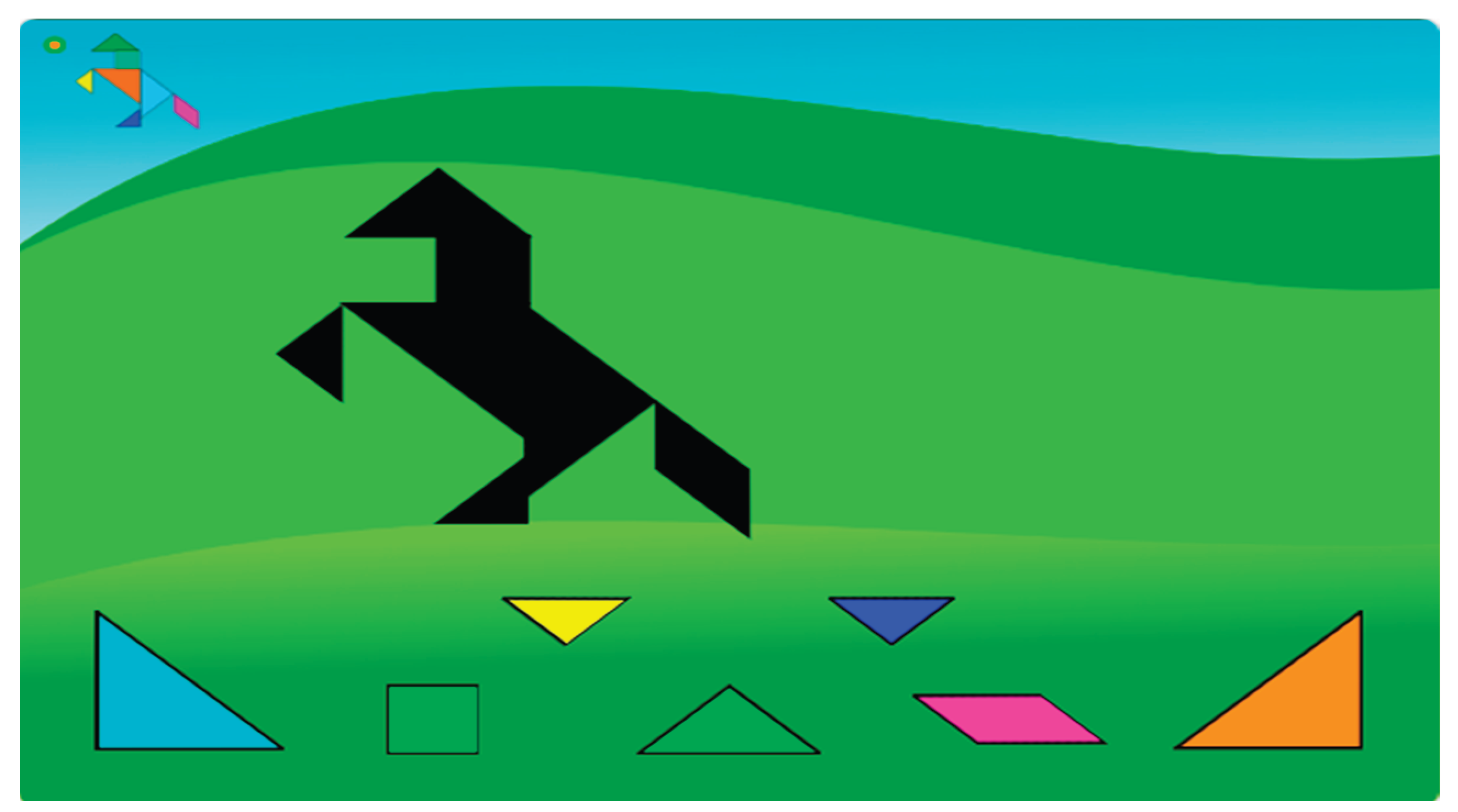
Taking the “Tangram” lesson as an example, teachers can use Scratch’s event-triggered function to create a dynamic puzzle interaction scene, requiring students to complete the puzzle task through observation, manipulation, and exploration (Figure 8). At the start of the lesson, students click to select a puzzle module, triggering a highlighting effect and dynamic edge flashing. The puzzle module can be dragged freely, and when it approaches the target area, Scratch’s conditional judgment function calculates the matching degree between the module and the target graphic in real time. If the position and angle meet the requirements, the module immediately triggers “automatic snapping,” smoothly aligning with the target area, accompanied by a sound effect confirming the successful operation. If the match is incorrect, the module instantly returns to its initial position and displays adjustment prompts in the real-time feedback area, such as “Incorrect rotation angle” or “Position offset direction.” To enhance the interactive experience, teachers can use Scratch’s variable control function to set dynamically changing task conditions, such as randomly adjusting the size, position, and initial angle of the target graphic (Figure 9).
As a model of deep integration of teaching and technology, Scratch demonstrates enormous potential in optimizing classroom interaction, promoting student self-directed learning, and enhancing teaching effectiveness. In teaching, teachers must design program tasks reasonably and implement them step-by-step, considering specific teaching objectives and student characteristics, to help students achieve deep understanding through exploration and practice. In the future, teachers can further explore the extended applications of Scratch in mathematics teaching, fully tapping its educational potential, improving students’ comprehensive qualities, and providing more practical experience and theoretical support for the innovation of information-based teaching. According to the curriculum, solving a particular problem by creating a computer program involves not only standard program development procedures, but also innovation, entrepreneurship, and taking the initiative in designing and developing new models and products using computer technology (Holenko Dlab, 2021). Meanwhile, by combining gamified teaching methods with computer programming courses, secondary school students can cultivate innovative skills and computational thinking abilities.
4.3. Limitations and Future Research Lines
Although we have identified interesting trends, the study presents limitations regarding the sample size and the scope of qualitative instruments. Nevertheless, the data provides a solid foundation for this exploratory research. Future iterations of this work will extend the sample and employ structured interviews to enhance qualitative assessment. We also plan to broaden the research scope by combining the presented aspects with robotics (e.g., Scratch 3.0, mBlock or ScratchMaths.) and applying other programming languages to different grade levels. The teachers of the secondary school could also participate in learning communities with educators and computer scientists, who are experienced in computational thinking (Yadav, 2014). Computational thinking is the thought processes involved in formulating problems and their solutions so that the solutions are represented in a form that can be effectively carried out by an information-processing agent (Grover, 2013). In this study, we actually evaluated secondary school mathematics education using computational thinking approach. Although we didn’t give much more detail to computational thinking, we believe that focusing on the computational thinking approach is of great importance and should be emphasized in education.
5. Discussion and Conclusions
The aim of Scratch is to enable students to use programming concepts by means of a visual intuitive language to situate different colored blocks and apply commands to make a product (Saez-Lopez, 2021). This study investigates the integration of Scratch programming into secondary school mathematics education, evaluating the efficacy of various pedagogical approaches. Meanwhile, this study takes the characteristics of secondary school mathematics courses as its starting point and proposes strategies such as scientifically allocating class time, dynamically decomposing teaching content, using animation to demonstrate logical processes, designing procedural tasks, and constructing highly interactive learning activities. It proposes a novel framework that combines Scratch-based activities with proactive teaching strategies to maximize instructional benefits. Additionally, the research establishes a comprehensive assessment system to measure student outcomes. Scratch offers meaningful opportunities to enhance secondary school mathematics teaching by visualizing abstract concepts, promoting active learning, and developing problem-solving skills. While challenges exist, thoughtful pedagogical design and teacher support can make Scratch an effective tool for integrating computational thinking into mathematics education.
Author Contributions
Conceptualization, A.S.A.; methodology, A.S.A. and A.U.; validation, A.U.; analysis, A.S.A. and A.U.; investigation, A.S.A.; resources, A.S.A. and A.U.; writing original draft preparation, A.S.A.; writing review and editing, A.S.A. and A.U.; supervision, A.S.A. and A.U.; funding acquisition, A.S.A. and A.U. All authors have read and agreed to the published version of the manuscript.
Disclosure Statement
No potential conflict of interest was reported by the author(s).
Notes on Contributors
Ali Şir Attila is a doctorate in the Computer and Instructional Technologies PhD Program at the Institute of Educational Sciences, Bursa Uludag University. E-Mail: attilaali@hotmail.com; Prof. Dr. Adem Uzun works at the Institute of Educational Sciences, Bursa Uludag University. E-Mail: auzun@uludag.edu.tr; ORCID: Ali Şir Attila https://orcid.org/0000-0001-7661-6176; Adem Uzun https://orcid.org/0000-0001-6935-346X.
References
- Alturayeif, N. A. DeepScratch: Scratch programming language extension for deep learning education. International Journal of Advanced Computer Science and Applications 2020, 11. [Google Scholar] [CrossRef]
- Baccaglini-Frank, A. E. Teachers’ perspectives on the intertwining of tangible and digital modes of activity with a drawing robot for geometry. Education Sciences 2020. [Google Scholar] [CrossRef]
- Block, J. H. School Improvement Programs: A Handbook for Educational Leaders.; Scholastic Inc.: New York, NY, 1995. [Google Scholar]
- Fuentes-Cabrera, A. P.-G.-B.-R. Learning mathematics with emerging methodologies: The escape room as a case study. Mathematics 2020. [Google Scholar] [CrossRef]
- Grover, S. Computational thinking in K–12: A review of the state of the field. Educational researcher 2013, 38. [Google Scholar] [CrossRef]
- Holenko Dlab, M. &.-B. Effectiveness of game development-based learning for acquiring programming skills in lower secondary education in Croatia. Education and Information Technologies 2021, 26. [Google Scholar] [CrossRef]
- Marji, M. Learn to program with Scratch: A visual introduction to programming with games; No Starch Press, 2014. [Google Scholar]
- Saez-Lopez, J. M. Introducing robotics and block programming in elementary education. Revista Iberoamericana de Educación a Distancia 2021, 95. [Google Scholar]
- Yadav, A. M. Computational thinking in elementary and secondary teacher education. ACM Transactions on Computing Education (TOCE) 2014, 15. [Google Scholar] [CrossRef]
- Zichermann, G. Gamification by design: Implementing game mechanics in web and mobile apps; O’Reilly Media, Inc., 2011. [Google Scholar]
- Żyła, K. C. Evaluating Usability and Accessibility of Visual Programming Tools for Novice Programmers. Applied Sciences 2024, 21. [Google Scholar] [CrossRef]
Figure 1.
Math graphic Scratch project main codes, see https://scratch.mit.edu/projects/1254830281/.
Figure 1.
Math graphic Scratch project main codes, see https://scratch.mit.edu/projects/1254830281/.
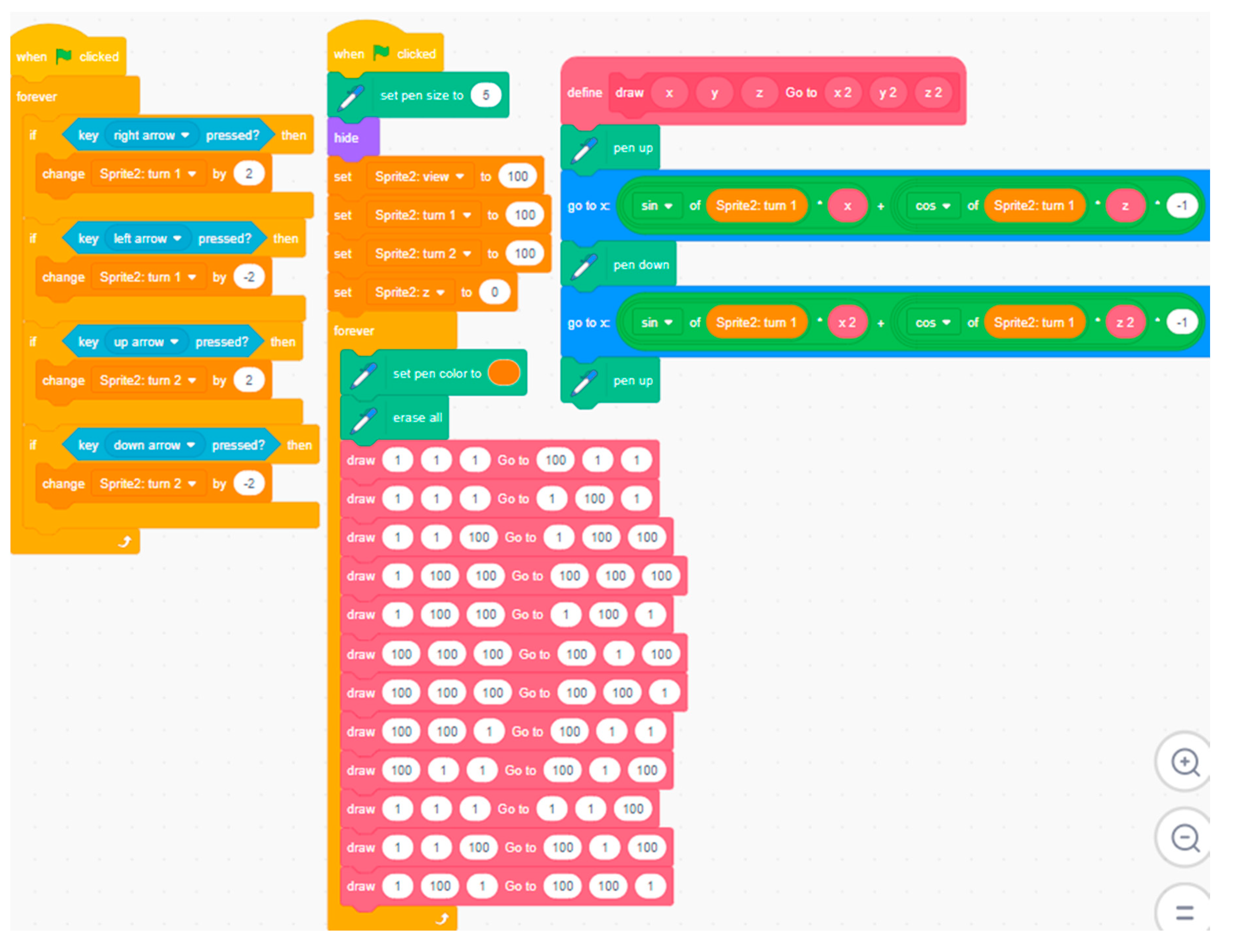
Figure 2.
Math Number Line Scratch project main codes, see https://scratch.mit.edu/projects/1254873978/.
Figure 2.
Math Number Line Scratch project main codes, see https://scratch.mit.edu/projects/1254873978/.
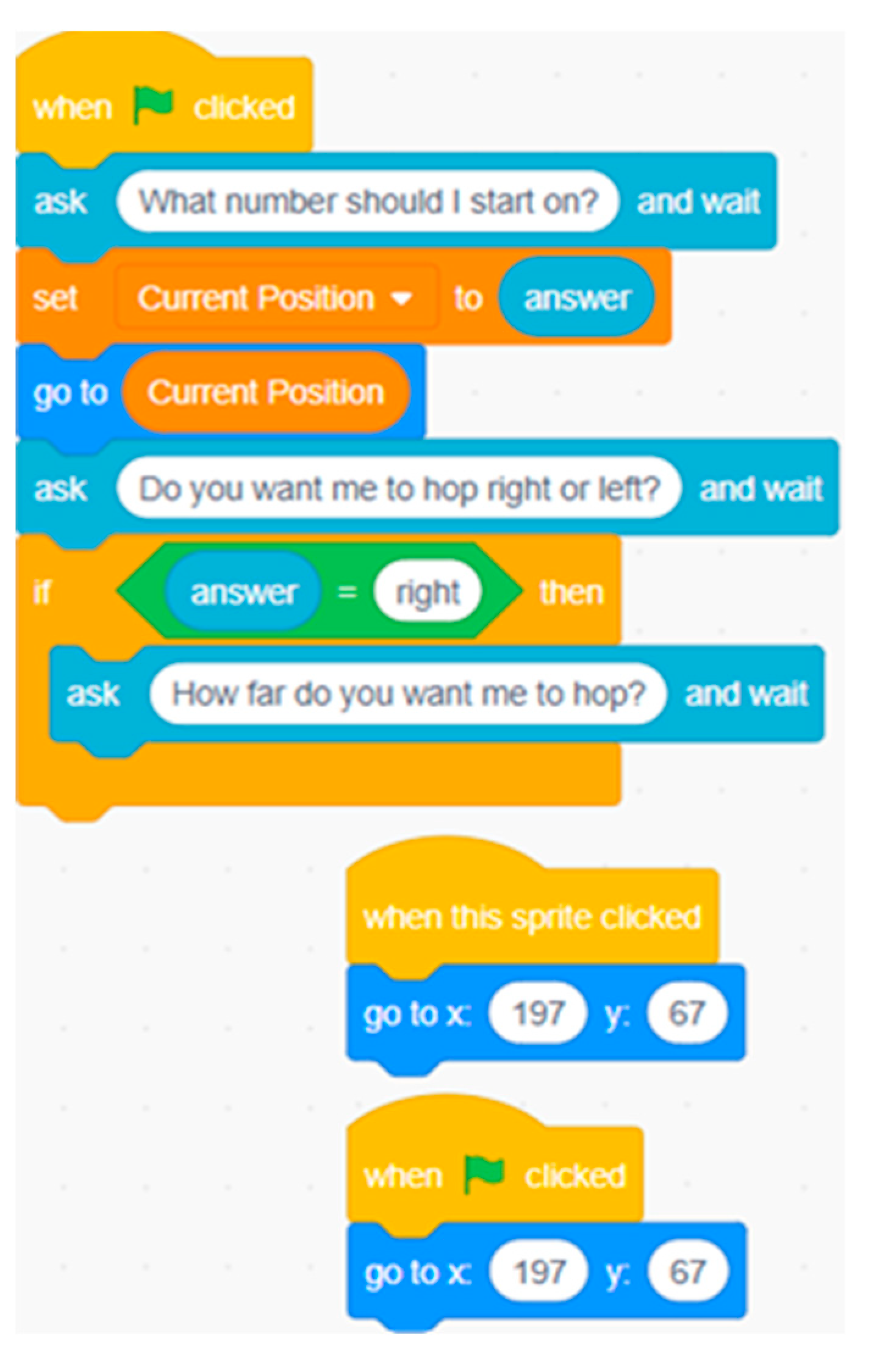
Figure 3.
Comparing mathematic angles Scratch project main codes.
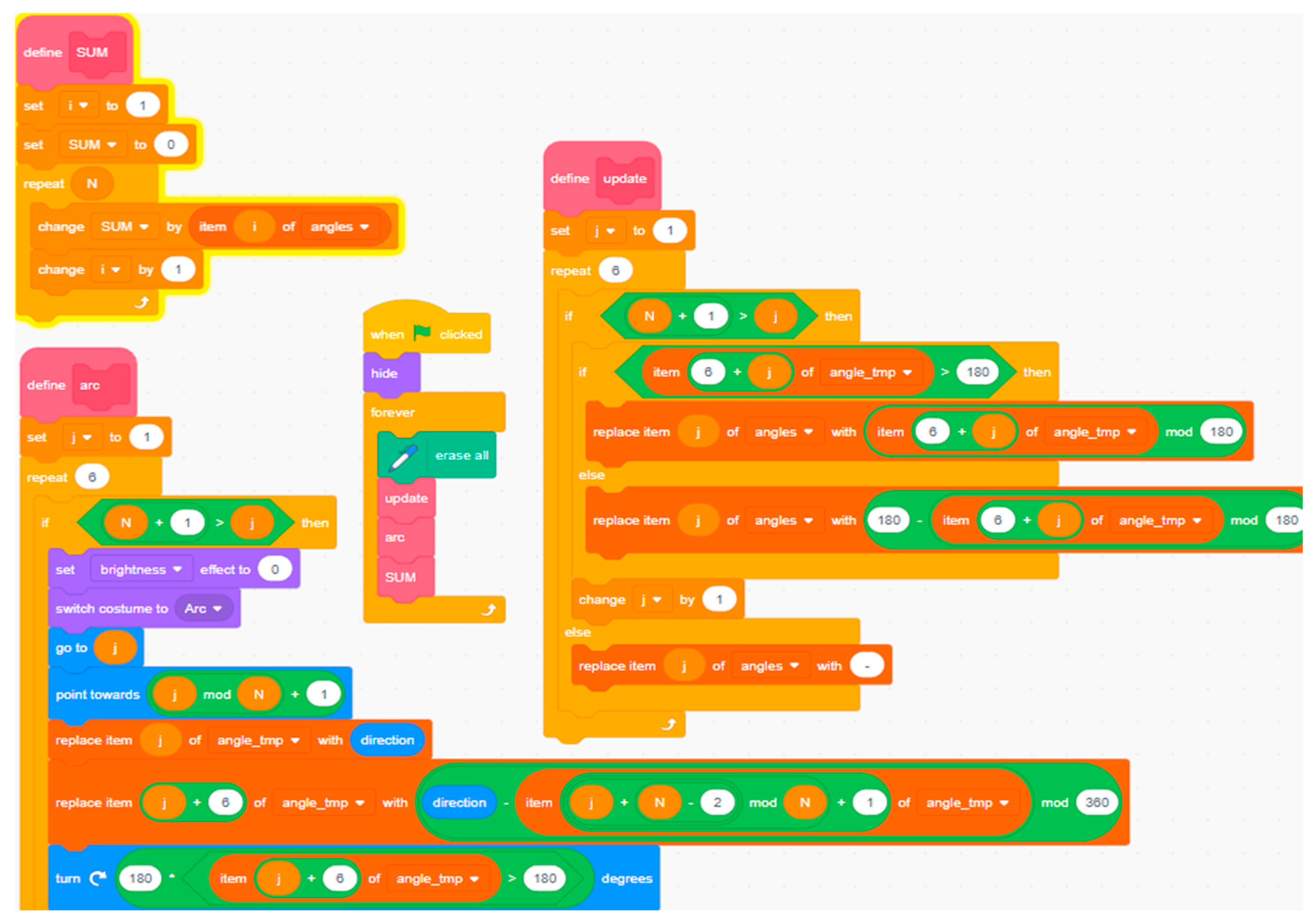
Figure 4.
Comparing mathematic angles Scratch project result, see https://scratch.mit.edu/projects/1254875556/.
Figure 4.
Comparing mathematic angles Scratch project result, see https://scratch.mit.edu/projects/1254875556/.
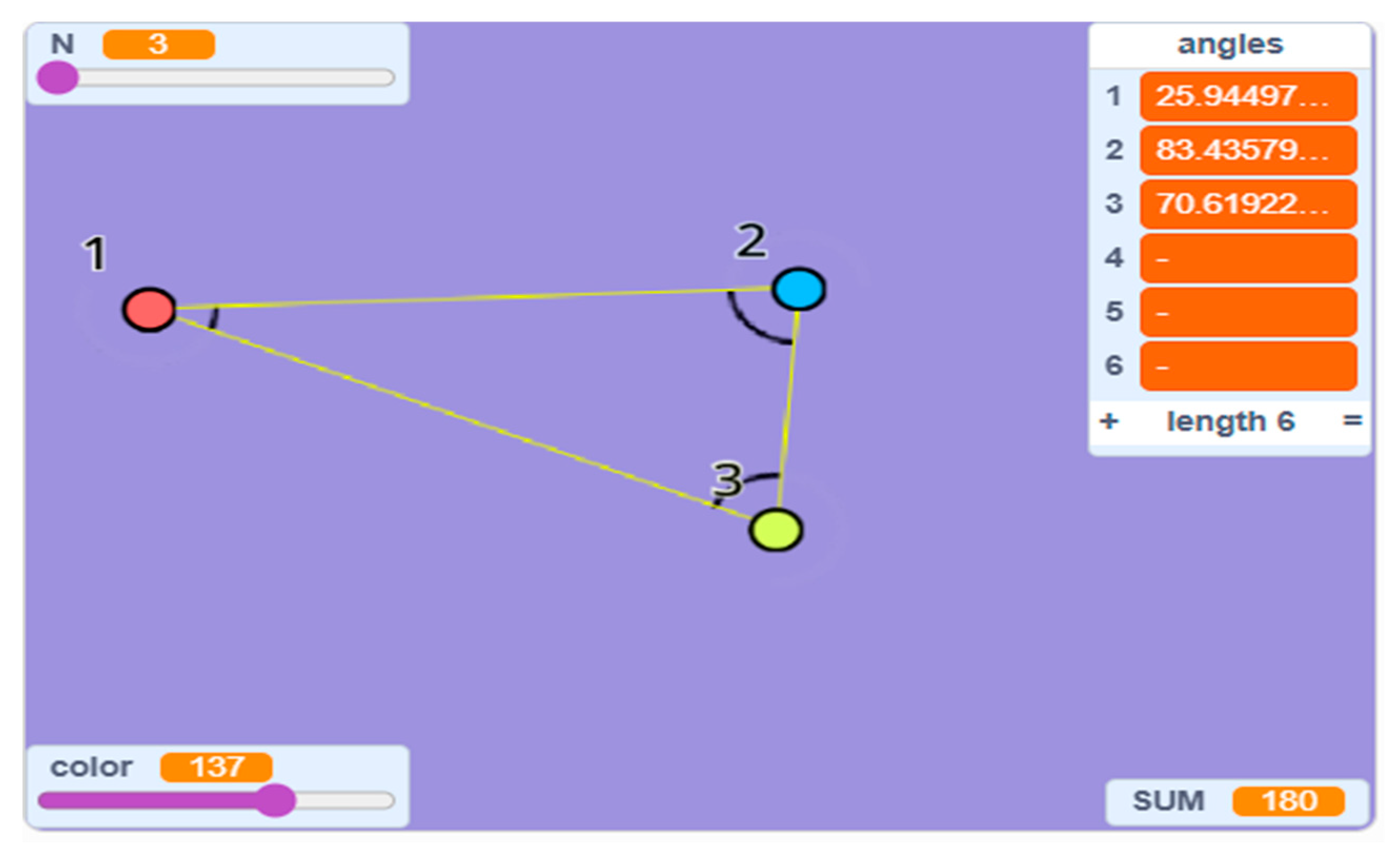
Figure 5.
Teaching the difference of squares formula Scratch project main codes.
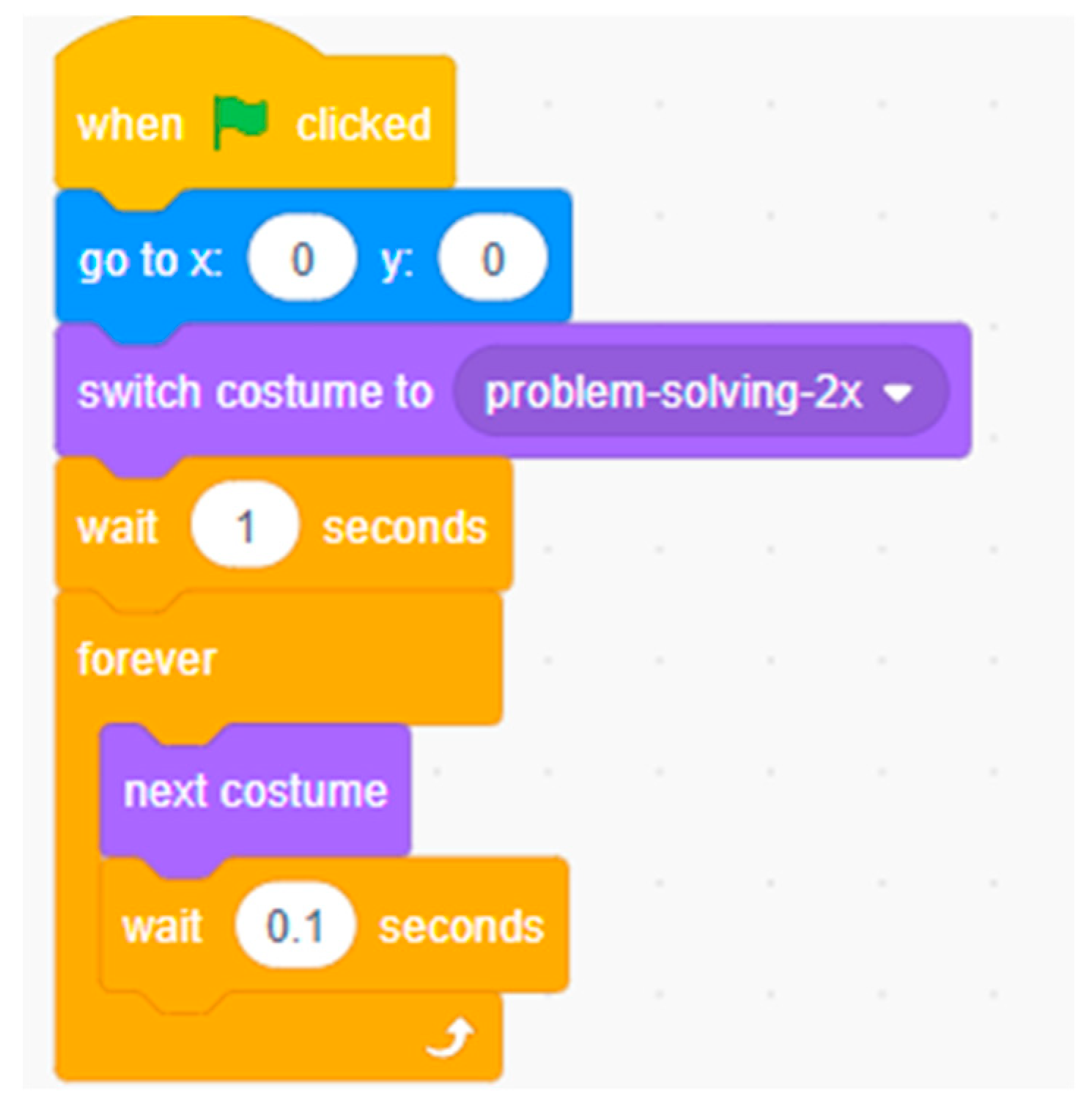
Figure 6.
Teaching the difference of squares formula Scratch project result, see https://scratch.mit.edu/projects/1254882738/.
Figure 6.
Teaching the difference of squares formula Scratch project result, see https://scratch.mit.edu/projects/1254882738/.
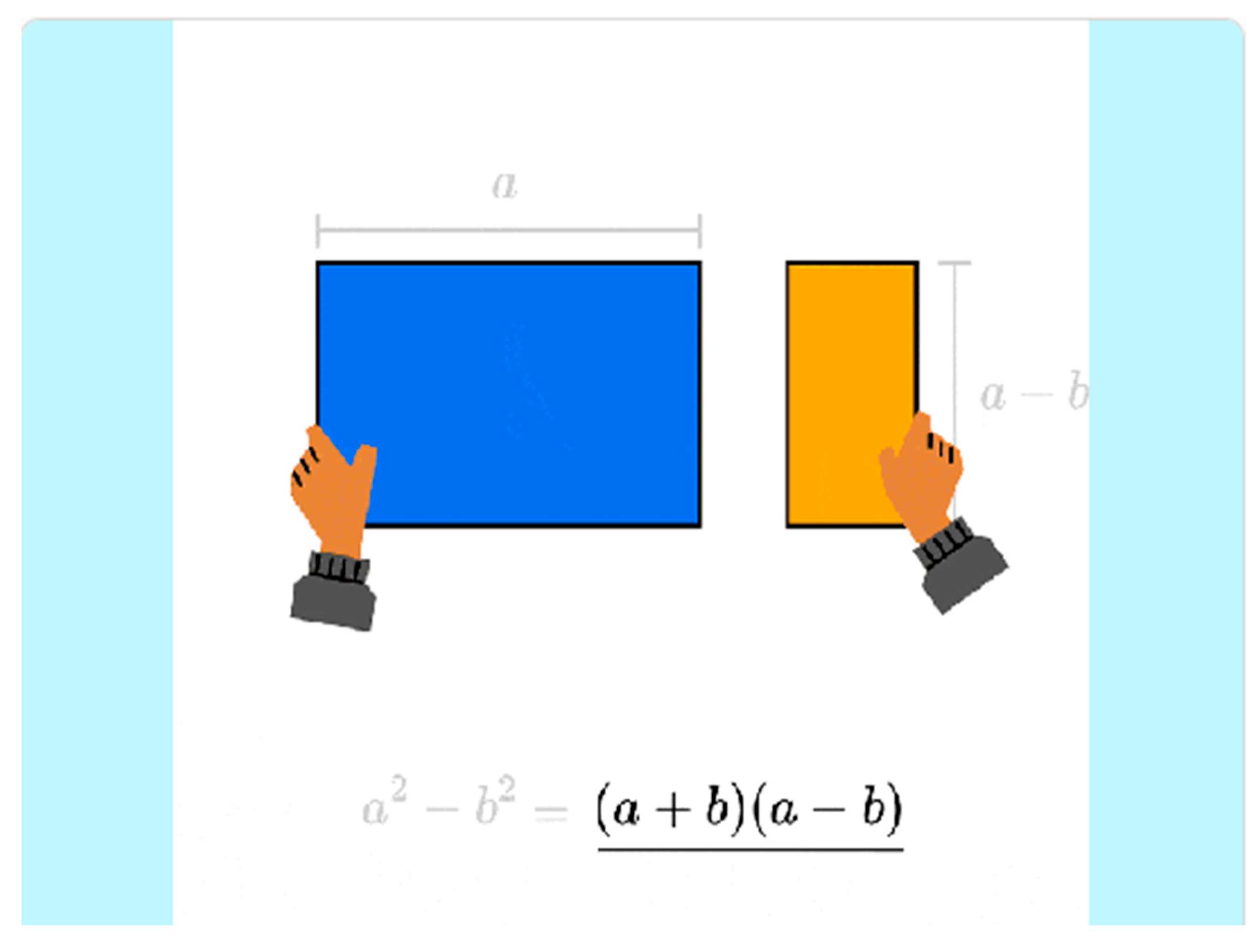
Figure 7.
Axisymmetric math problem Scratch project main codes, See https://scratch.mit.edu/projects/1254884863/.
Figure 7.
Axisymmetric math problem Scratch project main codes, See https://scratch.mit.edu/projects/1254884863/.
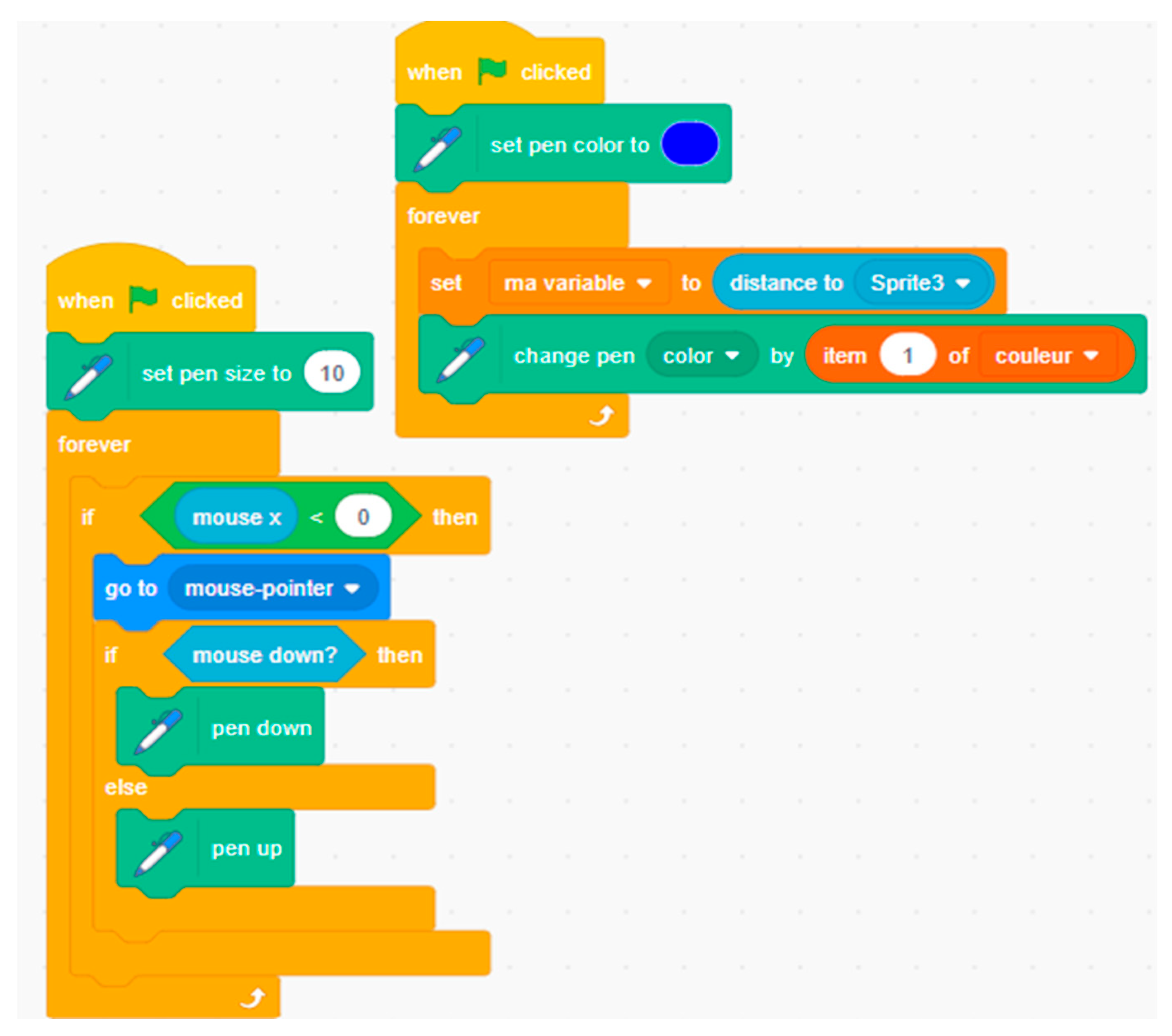
Figure 8.
Tangram math puzzle task Scratch project main codes.
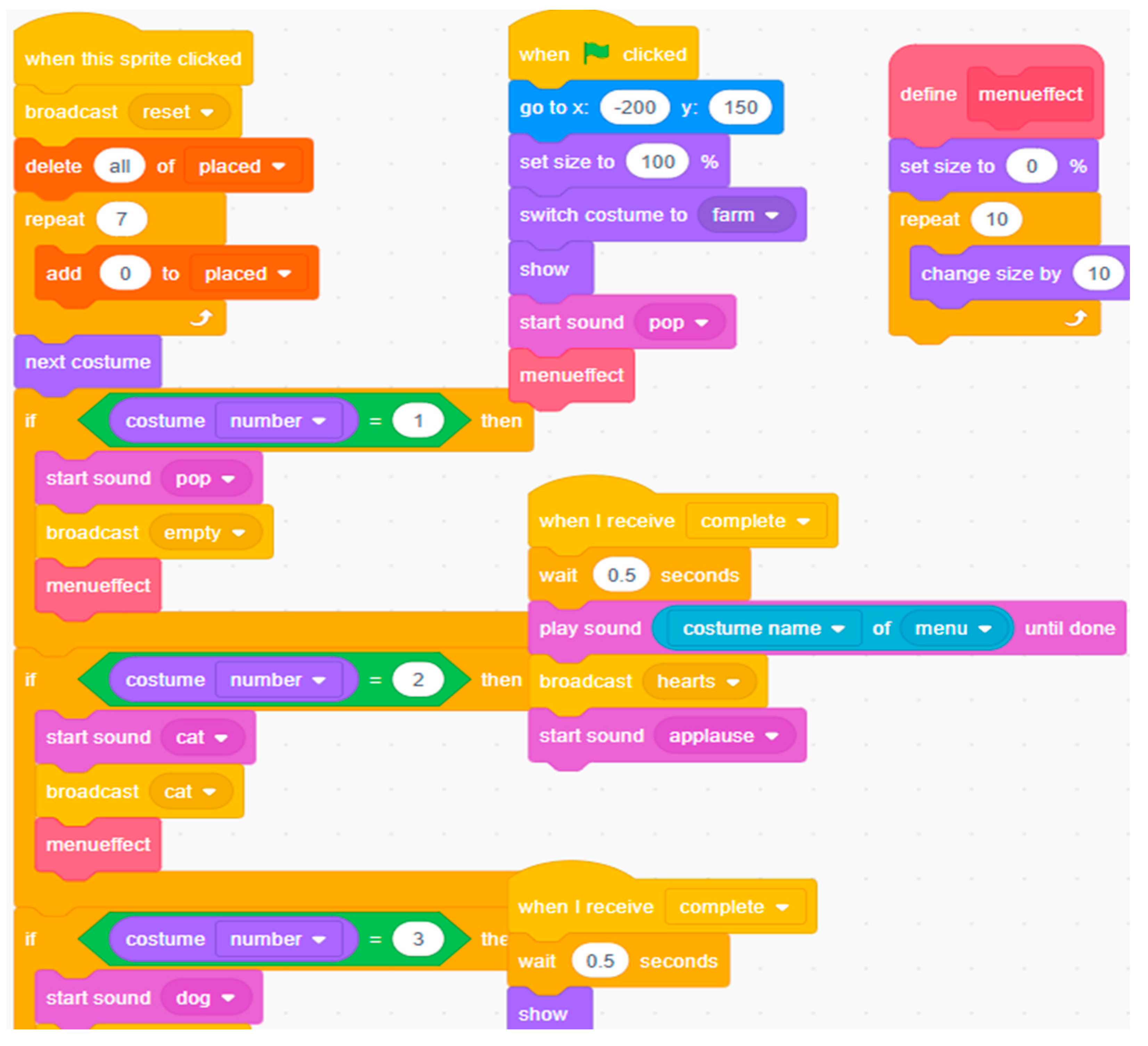
Figure 9.
Tangram math puzzle task Scratch project result, see https://scratch.mit.edu/projects/1254885505/.
Figure 9.
Tangram math puzzle task Scratch project result, see https://scratch.mit.edu/projects/1254885505/.
Disclaimer/Publisher’s Note: The statements, opinions and data contained in all publications are solely those of the individual author(s) and contributor(s) and not of MDPI and/or the editor(s). MDPI and/or the editor(s) disclaim responsibility for any injury to people or property resulting from any ideas, methods, instructions or products referred to in the content. |
© 2025 by the authors. Licensee MDPI, Basel, Switzerland. This article is an open access article distributed under the terms and conditions of the Creative Commons Attribution (CC BY) license (http://creativecommons.org/licenses/by/4.0/).
Copyright: This open access article is published under a Creative Commons CC BY 4.0 license, which permit the free download, distribution, and reuse, provided that the author and preprint are cited in any reuse.


