

Submitted:
11 May 2025
Posted:
12 May 2025
You are already at the latest version
Abstract
Training tools based on virtual reality (VR) are an up-and-coming solution in high-risk environments where practical and cognitive skills are vitally important and, at the same time, significantly cost-intensive. Presently, VR allows the most advanced simulation and comprehensive performance tracking, thus effectively supporting the practical training of personnel in the most complex and sensitive operations. The present paper aims to design and develop a VR training tool for the assembly of a prototype infrared computed tomography (CT) machine by providing users with high-precision, modular, and interactive components in a controlled virtual environment. The project implementation involved the wide-ranging use of tools, including Unity (runtime development), Visual Studio (integrated development), Blender (3D models’ creation), Substance Painter (texturing), Meta SDK (VR interaction), and AutoCAD for reference models. The augmented use of these tools resulted in creating a VR Training and Maintenance System (VRTMS), delivering highly optimized performance and overcoming the drawbacks of traditional training systems by providing an adaptive and immersive user experience. The tool enables the creation of a rich and user-friendly experience, crucial for training the employees in the assembly and maintenance procedures to impart precise enhancement in the skill development programs.
Keywords:
Virtual reality
; training
; simulator
; deep learning
; maintenance
; modular system
Introduction
There are many obstacles that Industry 4.0 brings for manufacturing firms and their employees. In order to adjust to the ever-changing landscape of manufacturing technology and production settings, creative and practical training approaches are crucial [1]. Workers in the industry play a vital role in its development. They shape the direction of the industry and meet the public demands. The ideal organization is operated by flawless workers for sustainable operations to be executed. It has been challenging for the industry to get a highly-trained workforce [2]. Many businesses have suggested using immersive virtual reality (VR)-based training to help employees become more adept at identifying hazards and modifying risky behavior.
On the other hand, not much is known about how VR-based training affects user behavior and learning [3]. Organizations spend millions of dollars annually to train employees-. Employees should be trained in health, security, machine usage, and other duties. This issue is so critical that it is significantly costly for an organization to lose highly skilled employees [4]. Arranging training sessions, buying training equipment, and maintaining damage tolerance consume vast amounts of funds from the organization. Traditional training has used expensive actual equipment, running the risk of damage and injury, wear and tear being accounted for [5]. The widespread use of virtual simulators in employee cognitive training can improve productivity, accuracy, economy, and efficiency of training and manufacturing [6]. Therefore, the VR Training and Maintenance System (VRTMS) is an innovative training tool for staff working in sensitive and strategic environments.
Belen Jiménez et al. [7] used digital 3D models of cultural heritage sites, using Unity 3D, as a prerequisite to the essential VR technology for its preservation. Gabriela et al. [8] used prototype modeling for an efficient and safe workspace to identify and correct design flaws before actual construction. In our work, we modeled a prototype infrared computer tomography (CT) machine [9,10] and designed a workspace fed into the Unity engine.
Consumers' VR headsets were released to the public by the 1990s, though the first concept was revealed to the world in 1935 by American science fiction writer Stanley Weinbaum [11]. This has revolutionized the world, giving an experience never imagined. This industry got so much promotion that with time, it started being used in factories, medical, and other industries, in addition to being used for entertainment [12].
VR systems have proved to be significantly efficient for education purposes. They have given students an immersive experience of exploring the system in a virtual space [13]. Students may control the components, observe the product on the proper scale, and better explore it from various angles by utilizing head-mounted devices (HMDs) to experience the VR application, which recreates an immersive environment [14].
Daling and Schlittmeier [15] reviewed that traditional training techniques are expensive, involving the maintenance cost of simulated equipment, face-to-face sessions, and the risk of damage to expensive lab equipment. VR has recently gathered significant interest as a tool that surpasses the limitations of traditional approaches by offering chances for novel encounters devoid of temporal or spatial restrictions while guaranteeing a secure educational setting [16]. Further, Bulu [17] investigated the trainee experience of co-presence with the virtual entities in the VR system to be aware that other individuals were present and perceived us.
Xie et al. [18] discussed numerous training applications in the development of VR technology, viz., medical training [19,20,21,22,23], workforce training [24,25,26,27,28], and military training [29,30,31,32]. In this context, VR technology allows users to interact with a computer-simulated environment. In the past, the SARSCoV-2 (COVID-19) pandemic made VR a beneficial substitute [33]. VR applications offer a safe, affordable, and controlled environment where staff can practice with virtual tools, mimicking scenarios that could happen in the real world. This technology enhances learning by enabling medical practitioners, engineers, and technicians to develop technical skills and build confidence through risk-free experimentation. This allows them to learn from mistakes without causing harm or damage. With technology, VR can also imitate the haptic, olfactory, kinesthetic, and aural senses [34].
According to Hernandez-de-Menendez et al. [35], conventional training programs usually require high investments in infrastructure, including specialized laboratories and state-of-the-art technological equipment. Interpersonal skills are traditionally taught through role-playing. Participants receive performance feedback (e.g., by watching their recordings, receiving comments from peers or instructors, or giving a brief presentation in front of other trainees) and encounter certain social settings [36]. VR technology was initially used in educational science and showed promising results [37,38]. The effect of virtual teachers has also been explored by [39].
Much research was conducted on using various concepts to support this new technology in industrial training settings. While some have succeeded, others still require development [40]. Advances in research have proffered enhanced quality and affordability for VR systems. Hardware and software costs for VR have been reduced, making it more available to most businesses and institutions [41]. These advances have also elevated immersion and realism in the VR training environment, making it more and more effective for learning or training purposes. Therefore, VR systems increasingly offer the attraction missing in the training systems for others, both with immersion and interactivity. The industrial assembly must keep up with the most recent advancements in automation, complexity, and industrial trends. Mass customization has replaced mass production as the dominant industrial trend [42]. Good training is expected to seek to instill the appropriate skills and decision-making in trainees that they would need in the field rather than guide them directly [43]. Information should be presented in a clear, manageable format and pace for successful learning to maintain learner engagement. The effectiveness of immersive VR assembly training depends on various factors, including individual differences, didactic concepts, visual rendering quality, and documentation quality [44].
Virtual and augmented realities offer immersive, contextual visualization, enhancing learning outcomes through interactive engagement. This approach creates a sense of presence and relevance, making learning environments more authentic and engaging. By situating learning in an immersive setting, students learn meaningfully, retain information better, and apply it more effectively [45]. Where there is Augmented and Virtual Reality (AVR) experiential learning, the development of deeply immersed learning is deepened with learners thrown into interactive virtual environments. Research within the AVR training skills assessment model proves that developing skills and knowledge is expected to be practical.
Over and above, there are many obstacles that Industry 4.0 brings for manufacturing firms and their employees. Ulmer et al. [1] introduced a novel idea for flexible assembly related to an industrial problem and its evaluation strategy. Workers are crucial to shaping the industry's direction and meeting demands, but securing a highly skilled workforce has been a persistent challenge [2,46]. Further, Boden et al. [47] provided the potential for immersive and interactive learning experiences that can significantly enhance the training process on the application of manufacturing and logistics procedures. Fitz-Enz [4] disclosed that companies invest heavily in training employees in health, safety, and machine operation, as losing skilled workers is costly. MacLeod [5] has described that traditional training methods rely on expensive, damage-prone equipment, while virtual simulators enhance productivity, accuracy, and efficiency. Our VRTMS offers an innovative, cost-effective solution for training staff in sensitive environments.
Using computer graphics (CG) to build realistic and aesthetically appealing virtual environments increases user immersion and improves the quality of the training experience [48]. We have designed a visually appealing environment for our virtual workplace that grabs the user’s attention and motivates them to interact with the system more efficiently. Through the use of proper lighting and shaders, we are able to render fine details of the hardware, providing maximum information to the user.
In addition to all the above, with VR, data can be gathered about how long a task takes to finish, how far it needs to go, whether there are any ergonomic hazards (like bad body posture), and how well a layout works. The highly skilled workforce and data are critical to maximizing technology investments and ensuring efficient and effective outcomes for educational institutions, industries, governments, and communities [46]. The theory postulates that working memory has limited capacity; for effective learning, the incoming information must be integrated with prior knowledge to create long-term memory schemas. It also accounts for things like aging and aids in designing instructional methods that conform to cognitive limitations for better learning outcomes [49].
Research has indicated that training using simulation, mainly when using simulators, can efficiently teach technical and non-technical skills together. The dynamic learning environment is also highly cognitively and emotionally engaging and can directly influence what students learn [50,51]. VR applications enable users to perceive and modify the world as accurate, simulating physical things in realistic surroundings. VR has improved the cognitive performance of the subjects under training. The dynamic learning environment is also highly engaging both cognitively and emotionally and can directly influence what students learn [51,52]. It also accounts for things like aging and aids in designing instructional methods that conform to cognitive limitations for better learning outcomes [49]. According to Bloom's Taxonomy, cognitive learning is an individual's ability to remember and utilize previously learned information. The rise in mental-intensive professional activities has consequently fueled the growth of cognitive ergonomics, which has important implications for planning and evaluating training programs. Its goal is to enhance cognitive function in dynamic, technologically advanced environments by designing supportive systems and comprehending the basic ideas behind human behavior as they relate to engineering design and development[53]. Cognitive and psychomotor training enhances cognitive function and motor skills in young and older adults, improving performance and maintaining functional abilities, especially as aging impacts task execution effectiveness [54]. VR technology allows users to interact with a computer-simulated environment. VR applications enable users to perceive and modify the world as accurate, simulating tangible things in believable surroundings [55].
Using VR for an assembly simulation enables employees to receive training at a reasonable cost. To prevent undesirable training effects in these assembly simulations, however, the training content must be as realistic as feasible [56]. VR training helps alleviate these problems by offering lower-cost alternatives with minimal logistical and financial burdens and minimal equipment wear. Traditional training challenges can be lifted now that VR technology has finally arrived. VR negates the need for expensive hardware and maintenance to create immersive simulations on-demand where trainees can practice with virtual tools and devices that simulate real-world equipment [57].
On the other hand, VR technology was relatively expensive in past times, making it barely applicable to most training settings. For most of the fifty years that have passed, VR technology has mainly been used by military organizations and big research agencies that could afford its costs [58]. Early adopters have applied VR to quite specific and complex simulation training needs where the capability to create a controlled environment is an advantage. However, its high cost has prevented its wide diffusion across industries, thwarting its growth as a mainstream tool for training. VR is believed to close the gap between the user and the experience since it presents the knowledge more realistically or more closely than traditional learning materials like books or films [59].
This study aims to design and develop a cognitive interactable system for training, assembly, and disassembling machines in the VR ecosystem. The product is user-friendly and provides an essential toolkit for assembling and disassembling classified machines. The system provides tasks for users to perform and evaluate the performance. The system is aided by the guidance system, which guides the user throughout the session to perform the tasks in the sequence. We focused on the Prototype Infrared Computed Tomography (PI-CT) machine for research purposes, demonstrating the system’s effectiveness in industrial training contexts. The proposed framework allows users to practice it in a virtual environment, minimizing the risks and costs associated with using physical equipment for training. By offering an immersive, interactive experience, the system improves technical skills and enhances cognitive performance as trainees engage with the material more meaningfully. The key contributions of this study may be given by:
It introduces an optimized methodology for training engineers in machine assembly/disassembly, mitigating risks to physical equipment. The research addresses the limitations of conventional training approaches by using VR to deliver an immersive and interactive training experience.
The developed tool enhances cognitive performance, equipping trainees to proficiently operate on actual hardware in production environments.
A comprehensive evaluation system is incorporated to assess trainee performance. It features a leaderboard that ranks participants based on completion time and error frequency metrics.
This study proposes a cost-effective framework for training personnel in industrial assembly tasks.
The paper is organized as follows: The Materials and Methods section outlines the assembly procedure for the PI-CT machine, including model design, graphic quality, optimization, and VR-assisted assembly. The Results and Discussion section presents the findings and analyses, leading to the Conclusions section, which summarizes the key takeaways.
2. Material and Methods
The project is highly focused on designing and training the assembly of PI-CT machines in VR. The research and development of the project are divided into multiple phases, including CAD Designs, Design conversions to engine-supported format, synchronizing the VR hardware, components assembly, scene development, and performance improvement. The methodology is highly scalable and robust and can be applied in any assembly training, including engineering, medical, and other fields. We aim to develop a training module to train the employees to assemble the PI-CT machine efficiently, and the same technique can be applied if one is expected to develop an assembly simulator for automobiles, engines, and other electronic appliances.
2.1. CAD Designs
Our goal is to design a virtual assembly simulator for the PI-CT machine. The machine consists of various parts; each is interactable and designed precisely using Blender. The design follows the Computer-Aided Design (CAD) developed by the expert engineers. These design files are designed using various CAD tools [60], and single geometry is highly precise and follows the standards of PI-CT machine architecture. Computer Tomography is significantly sensitive to its components, and extreme precautions are taken in designing the elements as it deals with X-rays; a simple mistake in the component may affect the working of the machine. We have distributed the design files in our repository. Figure 1 illustrates some of the CAD designs of our PI-CT machine. Each element contributes to the assembly of the machine and has its unique responsibilities. Table 1 illustrates the design of each component used in the PI-CT machine. This individual has a role in the assembly of the PI-CT machine. Our proposed system utilizes these components and reflects the real-world assembly.
2.2. Converting CAD to Game Engine Supported Format
CAD software primarily operates using non-polygonal surfaces. Polygonal meshes are rendered by VR software and 3D graphics cards due to real-time limitations [61]. Unfortunately, these design tools lack the formats, and game engines do not directly support these formats. We need to make these components in a Game engine-friendly model. Game engines mainly utilize the Filmbox (FBX) or Wavefront files. CAD file formats are not directly supported in the game engines [62]. These file formats use the polygon-vertices topology and contain the UV and lightmap data game engines require to process the 3D model. We can convert the CAD files to .obj or .fbx format. Obj files are much more efficient and can be rendered by any game engine. It compresses the model, optimizes it, and makes it engine-friendly [63]. Figure 2 describes the conversion process of the CAD models to the OBJ files, which are the engine's standard file format.
These models are created with high precision in mind, and mesh is optimized for the game engines to process. For real-time processing, the optimal model is generally advised. The models with many vertices are called High-Poly Models, while those with fewer polygons are known as low-poly models. The low poly models are lightweight and optimized for the game engines, but these models sometimes compromise on quality and details. Therefore, it is advised to take high care of the polygons, and the model should have a clean topology and the least number of vertices as possible. Also, this topology plays a vital role in UV mapping, which is generally used for texturing the model. Figure 3 shows the clean and optimal topology. The sample model contains 216 vertices, 342 edges, 122 faces, and 440 triangles. Such a model is considered optimal for game engines to process. If standard shaders are used, the frame with 700k triangles is generally processable for most graphic cards and 300k for mobile devices.
2.3. Utilizing models in game engine
The research has selected Unity3D (www.unity3d.com) as the game engine for various reasons. Its rich built-in features include 3D creation and editing, real-time lighting and shadow effects, and shaders that enhance graphic quality. Additionally, it offers terrain, physics engines, and user interaction capabilities. Second, it can read native file formats from various 3D application software. Once 3D data is imported into Unity3D, it is expected to synchronize with its counterpart in other applications. We can now import this model in Unity and use it in the project. The process begins with designing the engineering diagram of the PI-CT machine in AutoCAD. Reference images of each component are then saved, which are subsequently loaded into Blender. In Figure 4, a mesh is created using these reference images, followed by topology and UV mapping adjustments. The resulting model is saved as a .obj file and imported into Unity for further development.
2.4. Adding logic to the components of PI-CT machine
Our next goal is to enable physics operations in the model. For simulating physics, Unity provides the Component Rigidbody [64]. These components are attached to the Game Object [65], the building block of each element in the scene. The Game Object contains the properties and behavior of the model through the components. Each Component is the base class Mono Behavior [66]. Unity Engine relies intensely on object-oriented programming. Figure 5 shows the structure of the game object, which provides the entity's behavior and gives it function in the scene. Unity provides a set of pre-built components [67]. We have developed our custom behaviors for objects to interact with VR hardware. These components give the object overall functionality
2.5. Adding support for VR
We are utilizing XR toolkit interaction [68] to ensure compatibility across the various VR hardware platforms, such as Meta Quest 2, Meta Quest 3, Oculus Rift, HTC Vive, and SteamVR. In this case, this toolkit is also essential in enhancing the user's ergonomics, as it enables the developers to fully use VR touch controllers and acquire accurate head and hand tracking of the user's body. Such attributes are essential in the real-time execution of character orientation and character movement within the scene, making it highly interactive. A central distinguishing feature of the XR Interaction Toolkit is its modularization and flexibility in the basic design of core interactions within VR and augmented reality (AR) applications. It supports various activities, including engagement in the buoys where users can lift, drag, or otherwise manipulate virtual artifacts. Also, the toolkit has an integrated system supporting the teleport mechanisms that can make navigation within a virtual space effective without the problems of motion sickness associated with overt movement. This is especially advantageous in the case of bigger-scale virtual worlds, where such mechanisms need to be effective and easy to use.
Besides this, the XR Interaction Toolkit is also practical in user interface engagement throughout the VR spaces. It provides an easy way for audiences to use the menus, buttons, and other components available in motion, controller, or virtual screen manners. There is always a way that users can interact with the virtual environment, irrespective of how graphical the interface may be. The same flexibility of the toolkit also ensures it can be integrated with various VR device hardware interfacing to give the user a uniform experience. By exposing a standard interface to device-dependent features, such as mappings for different controller inputs and spatial tracking devices, most of the complexities brought in by working on many platforms using the XR Interaction Toolkit are simplified without compromising efficiency and effectiveness. This makes the end-users more satisfied with global VR experiences on diverse classes of hardware systems.
2.6. Interactable Scene Development
We need to develop an interactable area that acts as a workplace for the user. This 3D room contains the essential components and training materials. Graphics play a vital role in the cognition behavior of the human brain [69]. Graphics that appeal to the human brain grab more attention than unrealistic or non-attractive visuals. As of 2024, the graphics hardware market for gaming PC graphics stands at approximately $38 billion [70]. This study indicates the role of graphics in the human brain for longer interactivity sessions. Training employees is the best approach to enhance the visual experience.
2.6.1. Scene Visual Enhancement
We needed to post-process the scene. For it, we used various techniques to render an appealing frame. To create a general scene, we make a room with basic lighting. There are some limitations to real-time lighting, such as it does not accurately illuminate the scene. To attain global illumination [71], a system designed to simulate how light bounces off surfaces and onto other surfaces, known as indirect lighting, instead of only considering direct sunlight that hits a surface from a light source. By simulating indirect lighting, the system can produce effects that enhance the realism and interconnectedness of the virtual world, as objects influence each other's visual appearance.
To make the frame more visually appealing, we are post-processing the frame, which enhances the visual quality. We have added tone mapping, bloom, color grading, and volumetrics. These simulate the lights perfectly and make the scene more realistic. We have optimized the fog, which has simulated the scene with excellent aesthetics. For the proper optimization, we have set the fog attenuation distance to 400 and the base height to 10.27. This setting provides the optimal volumetric according to our needs, as shown in Figure 6. The fog has various properties like attenuation distance, base height, max height, fog distance, color mod, and GI dimmer. These parameters adjust the quality of the fog according to need.
This fog profile simulates the volumetrics in the scene, providing physically accurate lighting. The spotlight interacts with the fog created through the volume profile, rendering a volumetric scene. It gives a good user experience, and in the scene where we have to test the lighting condition, the volumetric fog can play a vital role, giving a realistic render. Figure 7 shows the comparison of visuals when volumetrics is disabled and enabled. We can see that without volumetrics, the scene seems unrealistic and gives low-quality visuals, while volumetrics gives better visuals.
One of the challenges we faced in rendering was accurate reflections. For optimization reasons, game engines do not compute the reflections directly; instead, they need spatial information to process them. For this, we used a reflection probe, another component in unity used to make accurate reflections. Reflection Probes in Unity help address the inadequacies found in basic reflection modes for instances of metallic objects or materials with other reflective natures. The basic level of reflection using the traditional rendering method can be secured. However, it is often inaccurate enough to assure truthful or realistic reflection, especially on significantly reflective surfaces. Reflection probes can assist in incorporating a much larger surrounding area into the picture, making it more realistic and enhancing lighting.
Reflection probes enable fine-grained reflection mapping through reflection capture at different angles, which ensures that, for example, reflection on a metallic object or other surfaces being reflected abides by the ambiance around that surface. Such fine-grained mapping enhances realism and contributes to a more convenient visual experience. It solves all lighting fractures, enhances lighting, and improves the reflectivity of the scene, thus resulting in better rendering. The reflection probe also needs to bind the environment, and it is expected to affect the things it overlaps. It gets the data of an object that overlaps in its region. It holds the shader and surface information of the mesh, and light bounces from the objects and gives accurate reflection. The surface can be rough, metallic, specular, or even transparent. It computes the reflection in its range and can be manipulated using controllers, as shown in Figure 8. The reason behind this is not global, as this feature causes much stress in performance; therefore, we need to use it only in the area of interest.
These enhancements created a more pleasing environment with realism and aesthetic appeal. It is not just the accurate and well-blended reflections but also the exact details in shadows that allow the scene to look more convincing and complete. Apart from enhancing the looks of the scene itself, this enables the viewer to get a much more natural and aesthetic presentation of the environment. Figure 9 clearly shows the light reflection issues. The inaccurate reflection from the surface, which does not simulate the light correctly, might be noticed, resulting in poor quality.
We now have set the scene with all the required features. Figure 10 describes the scene setup process from the start to the final frame. It includes all the steps to render a photorealistic frame with accurate lighting, reflections, and performance improvement.
2.7. System Design and Development
From a technical implementation perspective, Unity uses an object-oriented programming model. We have utilized advanced concepts of OOP to build our project. We have highlighted some essential classes in this section. We have illustrated a UML view for the proposed VRTMS, as illustrated in Figure 11, designed for managing user interaction, object manipulation, and progress tracking in a virtual assembly environment. It includes several classes with specific methods and relationships that contribute to the assembly process. The Input Controller handles user input events such as grabbing, releasing, and menu selections. It provides methods like OnGrabPressed(), OnGrabReleased(), OnPressedPrimary(), and OnPressedMenu(), which are called in response to user actions. This controller is connected to the Interactable class, allowing interaction with objects. The Interactable class includes the methods Pickup() and Drop(), which allow users to pick up and release objects in the virtual environment.
Our scripts provided the essential workflow for our project. InputController.cs was responsible for taking user inputs and returning actions such as picking up and dropping items when interacting with the objects. These interactable objects had instructions for the virtual reality hardware, namely touch hand controllers. Once the object was interacted with, it returned the callback to the manager, checked out the stack, and returned whether the picked-up object was correctly chosen. The guidance system, controlled by the manager instance, highlighted the target destination of the picked item, and the user needed to take further action as per the objective requirement. The Assemble Machine class managed the overall assembly process, keeping track of the root component and the entities that were organized in a stack. Key methods include GetEntities(), OnStackEmpty(), GetTopEntity(), and OnSuccessOrder(). These methods ensured the correct assembly order and triggered actions when tasks were completed. The Assembly Reference class worked closely with the Assemble Machine, providing methods like GetEntities(), DisableEntities(), EnableEntity(int), and CompareEntity(int) to manage which entities were enabled for interaction and to verify that the assembly was in order.
Each object in the system was represented by an Entity class. The methods isEmptyMatchedInOrder() and isProperlyPlaced() checked if the object was correctly positioned in the assembly sequence. The Entity class was linked with the Assemble Machine and Assembly Reference classes to ensure the proper placement of objects during assembly. The Progress System tracked the user's progress during the assembly task. It calculated progress using the method CalculateProgress(), displays progress with ShowProgress(), and evaluated the user's performance through Evaluate(). The Assistant class served as a support system, offering guidance through the GetGuide() method. It interacted with the user to provide additional instructions or resources to complete the assembly task. Relationships between the classes showed how user input flows from the Input Controller to the Interactable objects, and how the Assemble Machine and Assembly Reference coordinated to manage the correct order of object placement.
Islam and Chaudhry [72] investigated speech-based interaction systems and found it to be very efficient for gathering the attention of most adults and providing a better user experience. Therefore, we developed the speech system that was audible to the user and the guidance system used this to instruct the user. This instruction system gave a good user experience to the trainee. The Progress System interacted with the Assemble Machine, and Voice Assistant, ensuring real-time feedback and progress tracking. The Voice Assistant provided auditory feedback to guide the user through the assembly process. It used the Speak() method to offer verbal instructions and updates based on the current task state. This component was closely tied to the Progress System, as it delivered feedback based on progress evaluations. Once the entity was placed correctly, the progress system updated the user's progress, and the stack was popped out until it got empty; after that, once all the tasks were done, the user's performance was evaluated. This evaluation reports suggested the user performance based on how long he took to complete the session, and number of errors made.
2.8. Workplace Setup
We have made custom interactable components and assigned them to our CAD models. We have also provided the user in the scene with whom to interact. The scene includes all separate components of PI-CT machines with which users may interact. Figure 12 shows the separated components placed on a tabletop. This is the toolkit we provide the user to start the training process.
By breaking down a PI-CT machine into its components, users can practice assembling the machine step-by-step in a virtual environment. To enhance the sense of realism, each component is simulated using Unity’s physics engine, allowing it to behave like a physical object. This means components have weight, can collide with each other, and respond to forces in a lifelike manner. Furthermore, these components are designed to be ‘XR grabbable,’ enabling users to interact with them directly using their VR controllers. This hands-on approach allows trainees to pick up, move, and assemble components as if working with actual hardware. Figure 13 illustrates the assembly workspace, including the project cycle and setup. The workspace provides good-quality graphics, simulation, and a guide instructing the user. The project initialization includes the component designs of each component, a unity project setup with optimal project settings as per the requirement suited for the task, and the addition of support for the interaction with VR hardware. The features include graphical robustness, physics simulation, and an assistance system that improves the user experience. System Development phases include the component setup, in which we add interaction behavior to the components, and the environment system, where we interact with components. The objective system assigns the objective to the user to perform suitable actions, and the assembly system is responsible for mounting the components in their desired position. The progress tracking system evaluates the overall progress of the user.
The simulator offers a safe and effective way to learn PI-CT machine assembly by combining realistic physics with immersive VR interaction. Trainees can practice their skills repeatedly without the risk of damage to equipment or injury. The player is provided virtual hands for interaction, as illustrated in Figure 14. These hands align themselves based on the item they interact with using Inverse Kinematics. Each component is a separate entity and contains VR interaction-supported components, like touch hand controllers that enable the user to interact with the VR hardware. These components give the object-specific physics behavior so the user can interact.
The custom-designed components, Interactable and Grabbable, facilitate interaction between game objects and VR hardware, as illustrated in Figure 15. The simulator provides high user immersion through sophisticated hand tracking and interaction capabilities. Leveraging the touch controllers supplied with the VR system, the simulator accurately replicates the movement of the user’s hands, including the nuanced articulation of fingers and palms. Crucially, the virtual hands are imbued with physics properties, enabling them to interact dynamically with the simulated environment. This physics-based interaction allows users to grasp, manipulate, and inspect objects within the scene with realism, significantly enhancing the training experience. Users can employ their virtual hands to examine the progress of their assembly, verify the correct placement of components, and pick up or move objects as needed, as shown in Figure 16. This advanced hand interaction system contributes to the simulator’s authenticity, bridging the gap between the virtual and real worlds. The simulator fosters deeper engagement with the training content and improves learning outcomes by giving users tactile control.
2.9. Performance Improvement
Our PI-CT machine assembly simulator presents significant performance challenges. To address these demands, the project leverages cutting-edge hardware and software technologies. The project is developed using Unity Engine 2022.3.1611. For designing 3D models, we used Blender 4.0 and AutoCAD 23.1. The development relies on a robust system equipped with an Intel Xeon E5-2570 v4 processor, 32GB of DDR4 memory operating at 2133 MHz, and an RTX 3090 Ti graphics card. This powerful configuration enables the simulator to achieve a stable frame rate of 60–75 frames per second (FPS). The project incorporates static baked lighting and NVIDIA’s Deep Learning Super Sampling (DLSS) [73] technology to optimize performance while maintaining visual fidelity. Static-baked lighting recalculates lighting conditions, reducing the real-time rendering workload. DLSS, on the other hand, employs advanced AI techniques to upscale lower-resolution images to higher resolutions, resulting in improved image quality without a substantial performance hit.
2.10. PI-CT machine
In our previous studies [74,75], a PI-CT machine embodies a simplified implementation of a computed tomography system, leveraging a synergistic mixture of mechanical and optical additives to facilitate tomographic imaging. The version CT device incorporates a precision stepper motor governing the rotational motion of the item or phantom, ensuring correct angular positioning within the variety zero ≤ θ < π. A second stepper motor controls the linear translation of the infrared transmitter and sensor assembly, permitting unique spatial sampling. The model contains paired infrared transmitter and sensor arrangements to facilitate the transmission and detection of infrared radiation, quantifying object absorption coefficients. A dedicated data acquisition card collects and processes sensor data, leveraging analog-to-digital conversion and digital signal processing techniques. For an object f(x,y), a projection along (θ, t)-line is called the Radon transform of the object for θ given by [74]
The rotational axis mechanism positions the object at discrete angular increments, followed by a linear translation of the infrared optics to capture spatially resolved transmission data. Infrared radiation is transmitted through the object, interacting with internal structures. Infrared sensors detect transmitted radiation, generating analog signals compatible with solid objects. The data is then processed for inverse Radon estimation [9]. The dataset is available at link:
3. Results and Discussion
We developed software that uses VR to train engineers to assemble hardware for several machines. The project is robust to this kind of machine, but we specify the assembly of the PI-CT machine as the reference. The project tracks the performance of the engineers and benchmarks each engineer based on how long it took him to complete the tasks and the number of errors he made. We provide an overall immersive user experience that engages the users to get hands-on training on engineering problems and efficiently train at minimal cost to the organization.
3.1. System Interaction
The highly interactive system provides a professional toolkit for assembling the machine. All components in the machines are separate entities, and physics is simulated to reflect the essential attributes of the digital twin. The software simulates the player with IK-powered hands that can be controlled through the touch controllers, as described in Figure 17.
The user controls through a touch controller; VR hardware includes two of them, each for one hand, and each controller controls the respective hand in the software. These touch controllers take the spatial information and simulate the hands accordingly in the scene, e.g., if the user raises the right hand, the right hand is expected to be raised in the software. Each touch controller is bundled with buttons, triggers, and joysticks for creating events like holding, moving, and rotating. It can easily be observed using Figure 17 that the left-hand controller is responsible for the user's movement, while the right-hand controller is responsible for rotation. If the player's hand overlaps the interactable object in the scene, and the grab trigger is held, the Grab event is expected to be called, and that respective hand is expected to pick the object. The front trigger of touch controllers is responsible for simulating the finger; its role is to interact with UI elements of the interactable scene.
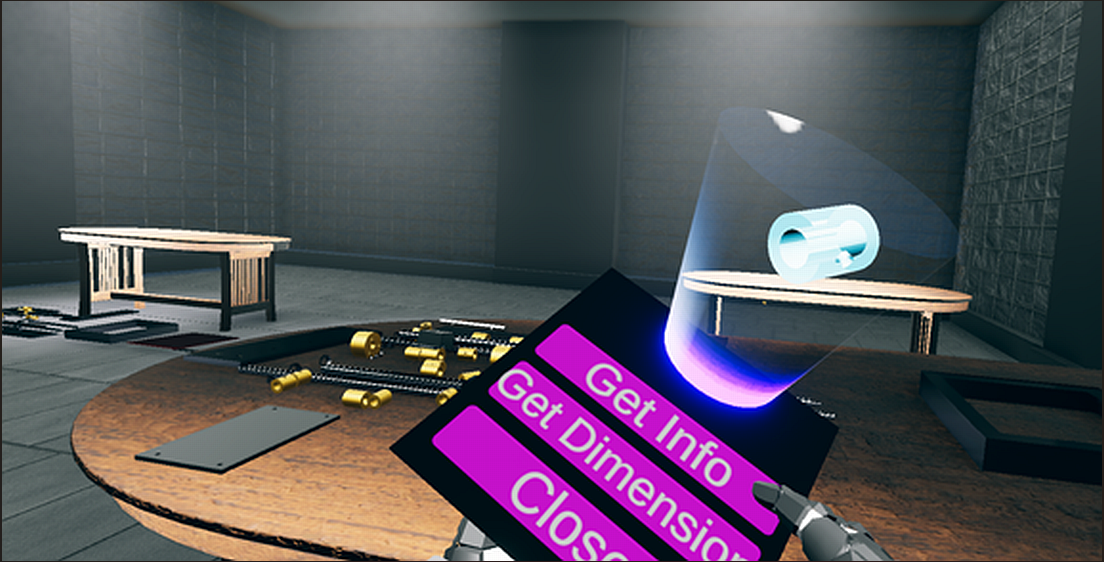
Using modern HCI techniques, we have designed a panel that demonstrates the general information of each component of the user's interest. Figure 18 demonstrates the GUI interaction with the components to understand their core properties and functions. It provides general information like its dimension and its role in the system's component design.
3.2. User Objectives
After demonstrating expertise in managing the virtual components and familiarizing themselves with the fundamental mechanics of the software, the user is given particular tasks to do. A thorough Objective System is integrated into the software, forming the basis of its training and assessment procedures. This system gives users well-defined objectives, evaluates their real-time performance, and monitors their advancement through significant assignments. The software's performance is assessed in a variety of ways. Along with monitoring the user's general progress, it also logs essential metrics such as the time needed to finish jobs and the number of mistakes made during assembly. Using these indicators, users can receive feedback on their overall performance, accuracy, and efficiency.
The Objective System has an integrated Progress Tracking System that shows users how far they have come. The progress meter is updated dynamically when the user completes each objective, ranging from 0% to 100%. When a user reaches 100% progress, they indicate that all goals have been successfully fulfilled. At this stage, the software considers the user's productivity and the time needed to finish the assembly to create an overall evaluation.
The software also includes a robust leaderboard system that tracks and scores the performance of users interacting with the system. Key performance indicators, like the time needed to do a task and the number of mistakes made during assembly, are used to evaluate each user's performance. This creates a competitive and exciting learning environment. These performance indicators are saved and presented in a scoreboard format. Users are motivated to improve their performance by the leaderboard, which lets them assess their abilities compared to others.
Further, five people tried the software in an experimental context. Table 2 illustrates how their performance was assessed using two primary metrics: the total number of errors committed throughout the procedure and the time required to finish the assembly. The data gathered from these users was examined to evaluate the efficacy of the Objective System and Progress Tracking System, which improved the software's capacity to produce precise and insightful evaluations.
This careful approach to performance monitoring, task-based learning, and user assessment highlights the software's worth as an effective virtual training tool for complex machine assembly. In addition to making practical learning more accessible, it gives users the tools they need to improve, thanks to organized feedback and a dynamic, performance-driven environment. The software uses the experiment results to collect and store comprehensive data on each user's productivity and cognitive behavior, giving essential insights into how they performed during the machine assembly process. This information is safely kept in the company database, enabling continuous examination and assessment of employees' cognitive abilities.
The software creates an extensive profile of each user's performance under different settings by tracking essential parameters, including task completion time, mistake count, and overall efficiency. This information is essential for comprehending how various workers approach solving problems, adhere to guidelines, and control mental strain when completing challenging jobs in a virtual setting. The data the business has stored can be used for several analytical purposes. For example, it is possible to spot trends in an employee's performance, which can be employed to identify people who could be particularly good at one thing or need more training in another. The organization can evaluate employees' capacity to follow specific procedures, adjust rapidly to new problems, and handle pressure using cognitive behavior analysis. Organizations can identify workers with high mental and technical capabilities who are qualified for more advanced tasks using this information, which can be extremely helpful for talent management.
Furthermore, the information might be utilized for long-term staff development and advancement evaluations. Organizations can monitor learning curves, gauge the value of extra training, and gauge the overall efficacy of the virtual training program by comparing results over several sessions. Aside from helping to customize upcoming training programs and guarantee that workers receive targeted support when required, trends and anomalies in cognitive performance data can also aid in maximizing both individual and team performance. Significant strategic advantages can be gained by storing and analyzing this performance data at the organizational level. It makes it possible to take a data-driven approach to workforce development and ensure that workers are sufficiently ready to put their training to use in the real world. Organizations may uphold high-performance standards, guarantee adherence to procedures, and improve their staff's productivity and efficiency by regularly assessing cognitive behavior. Thus, the software's integrated data gathering and analysis features go beyond the context of the current training program to facilitate long-term staff development and foster a continuous improvement culture. Figure 19 shows the whole training workflow from the very start of the session to its end. Once the session has started, it will walk the trainees through goals by informing them which components to click on and which order to follow. If a trainee does something out of order, the system will pause briefly and make the trainee comply before continuing. Once an objective has been achieved, it is removed from the queue and replaced with another. This process continues until all goals have been achieved to mark the end of the assembly process. Upon completion of the session, the trainee will be evaluated in terms of time, accuracy, and precision in execution.
The user's progress is tracked, and his performance can be evaluated once he has completed the assembly. Figure 20 illustrates the final assembly of the PI-CT machine after placing all components in the target destination. The user can now get the general information of the system. This assembly precisely reflects the assembly of a PI-CT machine.
3.3. Assistance System
The program has a sophisticated help system that guides users through the real-time engagement stage. This method ensures that users can accomplish tasks precisely and effectively, especially in complicated machine assembly. The speech agent, which gives users precise, step-by-step directions to help them stay on task and complete tasks correctly, is an essential part of this aid system. To provide an interactive learning environment, the speech agent gives instructions, suggestions, and corrections while continuously monitoring the user's progress. This voice-guided system utilizes the Oculus Voice SDK built into Unity and takes advantage of cutting-edge text-to-speech (TTS) technology. A powerful TTS engine powers the voice agent, translating software-generated instructional text into smooth, natural English speech. The system's voice agent offers a smooth user experience by giving conversational and engaging instructions, improving user focus, and lowering cognitive burden.
The system is also flexible and scalable, so when new exercises or training modules are added, the speech agent may be trained to deliver the most recent instructions, keeping the training material current and applicable. This makes it an effective tool for long-term training applications, especially in settings where accuracy and attention to detail are crucial. Figure 21 illustrates how user actions within the system influence the text-to-speech process. User Action: In this step, the user engages with the program or takes particular activities in the surrounding environment. After that, the user's activities are forwarded to the Analysis step, where the game manager assesses them to ascertain the proper reaction or educational feedback. The system proceeds to the Text Generation stage after the analysis is finished. Here, the system creates the appropriate language, which represents the instructions or feedback expected to be sent to the user based on the analysis's findings. Following the completion of the request processing stage by the TTS engine, the audio synthesis stage is when the synthesized speech output is produced and sent back to the user as audio feedback. This guarantees that users get voice-based, in-the-moment guidance directly related to what they do within the program.
3.4. Performance improvements using DLSS
We have utilized Deep Learning Super Sampling (DLSS) in this research. This algorithm, proposed by Nvidia, uses AI to upscale low-quality to high-quality frames. Generally, GPU computes low-resolution frames more efficiently than high-resolution frames, giving a better frame rate but compromising the quality. DLSS enables us to convert these low-resolution frames into high resolution without much throttling the performance, as modern Nvidia GPUs have specific DLSS cores specially designed for this job in parallel. Combining these optimizations allows the simulator to provide a smooth and immersive experience at an impressive 118 FPS, even on demanding scenes, as shown in Figure 22. This robust hardware foundation, coupled with intelligent optimization strategies, ensures that the simulator can handle the complex visual requirements of the PI-CT machine assembly process while providing a seamless user experience. We can observe that the CPU latency is 8.4 ms, with a 500 batch count, and the scene is flooded with 437k tris. By utilizing the performance enhancement from DLSS, we are witnessing a significant increase in performance.
DLSS has significantly improved project performance and reduced hardware usage, providing a safe user experience on low-end devices with minimal compromise on quality. We have run various tests to benchmark performance before and after applying DLSS. We used the Speed Fan application, which gives information about hardware usage as described in Table 3. We can figure out the less utilization of hardware when DLSS is enabled, which has significantly increased FPS and reduced the hardware temperature, boosting its longevity.
DLSS has significantly improved project performance and reduced hardware usage, providing a safe user experience on low-end devices with minimal compromise on quality. We have run various tests to benchmark performance before and after applying DLSS. We can figure out the less utilization of hardware when DLSS is enabled, which has significantly increased FPS and reduced the hardware temperature, boosting its longevity.
3.5. Main Findings
The main findings of this work may be summarized as follows: (1) The work developed here is an efficient and cost-effective VR training solution. It primarily targets the empowerment of engineers to assemble and maintain very complex machinery. Thus, immersive VR technology considerably minimizes the required number of training sessions in actual physical interactions, saving associated time and logistical challenges. It is highly accurate and engaging but scalable for traditional training approaches. (2) One of the significant characteristics of the system is that it offers a completely interactive environment through which users can very conveniently assemble and disassemble. The VR platform simulates real-world conditions that allow hands-on experience in an entity with well-controlled conditions. It is highly interactive and thus promotes an intuitive understanding of machine structure and behavior, and it helps learners develop skills needed to handle actual components in a production environment. The modularity of this system relies on the potential for realism in a training simulation by making it look like actual machinery. (3) The system uses the latest graphical rendering technology: NVIDIA's Deep Learning Super Sampling (DLSS) provides attractive graphics while maintaining performance. The system can support smooth and immersive interactions with high frame rates and greater visual fidelity, even on hardware with limited computational power. Using DLSS allows the system to use much greater visual fidelity more extensively, reduces latency, and enhances the responsiveness of the virtual environment in general. (4) Other than providing a functional setting for training, the system includes an advanced framework for monitoring and assessing the trainee's performance. This framework would track completion and error rates while simultaneously tracking cognitive behavior by the trainee, offering insight into how much the trainee comprehends the machine and their ability to perform complex operations. Through this learning, the system provides personalized feedback for learners to improve their performance and achieve competency levels before interacting with physical machines.
Our research is based on modern Human-Computer Interaction techniques. We offer an intuitive and responsive system with quality training outcomes that require a minimum of a physical trainer, thus saving time, cost, and energy. Besides, our VR training system provides the user with in-depth knowledge of machinery and helps enhance his ability to handle the physical machine effectively once he is placed in the production environment.
4. Limitations and Future Recommendations
The existing system has several drawbacks, mainly collaboration capabilities and reliance on conventional hardware for user interaction. This limits its application to teamwork environments that require more intuitive modes of interaction.
4.1. Lack of Collaboration Support
One of the significant limitations of the present system is that it does not support shared activities. Most industrial processes involve several people working together on a particular project, either in an assembly line, troubleshooting, or training session. The suggested model's lack of networking or multiplayer options makes it unsuitable for such scenarios, as it cannot support teamwork. This makes it less useful for an industrial setting where multiple individuals need to be able to cooperate and work together to complete jobs in both a timely and effective manner. The inclusion of networking allows several people to interface with the same space simultaneously, thereby providing the ability to do teamwork operations and expanding the applications for which the system would be practical.
4.2. Dependency on Conventional Input Devices
It becomes apparent that today's system relies on the physical touch of hand controllers to track hands. At the same time, this technological reliance limits usability. Although touch-hand controllers are exact, their need to interact with anything limits the user's accessibility and realism. The more intuitive and user-friendly approach would not need physical controllers but allow the user to act upon and interact with the virtual environment using their hands.
Oculus Quest 2 and later support hand tracking visually; it can track users' hand motions with cameras. However, this technology is still in its infancy, has several accuracy issues, and has several limitations to tracking, especially when performing complex or fast hand movements. For these limitations, it is recommended that the touch-hand controllers be used for more reliable interaction. Advanced hand-tracking solutions, such as the Leap Motion controller, can track hands much better since it visually captures the hand movements, allowing users to interact with the system without controllers. Presently, the system does not allow the integration of Leap Motion to allow a fully immersive experience and controller-free interaction. This could include Leap Motion or other advanced hand-tracking systems that would further help provide more realistic and intuitive interaction models, improving usability and realism.
4.3. Limited Dynamic Capabilities
The other limitation is that the system is rigid; it works only with predefined models of machines programmed into the system. This allows for precise and accurate simulations of specific machines but can limit adaptability and scalability. The ability to dynamically change and configure such a system to simulate various machines and tasks greatly enhances its versatility in many industrial or educational settings.
A way out of this limiting factor could be to have a compiler that follows strict machine assembly rules and simulates fundamental physical properties like SolidWorks would work. Under such a compiler, users would input different configurations, and then the system would dynamically adjust to simulate just about any assembly process and physics. This will also enable scaling across more machines and tasks, thus turning the system into a powerful tool for training and simulation in various industries. Embedding an accurate and flexible physics simulation into the system can help through multiple use cases, from mechanical assembly to maintenance operations.
4.4. Game Engine Constraints
In addition to the system's intrinsic limitations, the game engine in use imposes limitations, especially concerning physics simulation. In this regard, rigid bodies in an engine must have associated non-convex mesh colliders that cannot correctly simulate holes or other geometrical features with complexities. This inhibits realistic simulation scenarios in machines or components with complex designs, such as hollow parts, gaps, or internal structures. This would be attained by implementing a custom physics-collision system that avoids the current ones' described issues and allows for better simulation in such geometries. It could also be done by having convex mesh colliders supported with future game engines, making the system fully capable of detecting precise collisions with complex objects and interacting precisely. This would significantly enhance the system's capability to simulate real-world physical interactions and make it much more relevant for application to high-precision simulation industries like aerospace, automotive, and healthcare.
5. Conclusions
This study demonstrated the potential of using VR in training employees. We have developed a robust tool that efficiently trains employees to interact perfectly with classified machines. All the components are designed with precision and accuracy. Robust HCI techniques have been practiced to make a user-friendly system. The system has proved essential for an organization to train its employees. Unlike other developed systems, the system uses modern computer graphic techniques, accompanied by the best visuals, and gives the user pleasing aesthetics. The system utilized standard optimization approaches and deep learning super sampling to enhance the frame rate. Our system tracked user performance. It calculated the user's work and recorded how long it took to complete the task and what errors he made. Our system also provided a medium for evaluating employees. Beyond financial and logistical advantages, our VRTMS contributes to safety and effectiveness throughout the training program. The system allows employees to practice doing and making mistakes without real-world consequences, building more profound familiarity with equipment and procedures ensuring better preparation for performance on actual equipment.
Acknowledgements
A heartfelt thank you to all the mentors, advisors, research team members, and loved ones who supported and contributed to the successful completion of this study.
Conflicts of Interest
The authors declare that they have no conflict of interest.
References
- J. Ulmer, S. Braun, C.-T. Cheng, S. Dowey, and J. Wollert, "Gamified virtual reality training environment for the manufacturing industry," in 2020 19th international conference on mechatronics-mechatronika (ME), 2020, pp. 1-6.
- H. O'Lawrence, "The workforce for the 21st century," International Journal of Vocational Education & Training, vol. 24, 2017.
- A. Abbas, J. Seo, S. Ahn, Y. Luo, M. J. Wyllie, G. Lee, et al., "How immersive virtual reality safety training system features impact learning outcomes: An experimental study of forklift training," Journal of Management in Engineering, vol. 39, p. 04022068, 2023. [CrossRef]
- J. Fitz-enz, "It’s costly to lose good employees: Workforce, 50," Work Redesign, MA: Addison Welsley, 1997.
- D. MacLeod, The ergonomics edge: improving safety, quality, and productivity: John Wiley & Sons, 1994.
- M. Zhabitskii, S. Kulak, and A. Novikova, "The problem of developing VR assembly/disassembly simulators, and a variant of a high-performance solution based on VR Concept technology," International Journal of Open Information Technologies, vol. 10, pp. 18-29, 2022.
- B. J. Fernández-Palacios, D. Morabito, and F. Remondino, "Access to complex reality-based 3D models using virtual reality solutions," Journal of cultural heritage, vol. 23, pp. 40-48, 2017.
- G. Gabajová, M. Krajčovič, M. Matys, B. Furmannová, and N. Burganová, "Designing virtual workplace using unity 3D game engine," Acta Tecnología, vol. 7, pp. 35-39, 2021. [CrossRef]
- S. A. Qureshi, S. M. Mirza, N. M. Rajpoot, and M. Arif, "Hybrid diversification operator-based evolutionary approach towards tomographic image reconstruction," IEEE transactions on image processing, vol. 20, pp. 1977-1990, 2011. [CrossRef]
- S. A. Qureshi, S. M. Mirza, and M. Arif, "Hybrid simulated annealing image reconstruction for transmission tomography," Inverse Problems in Science and Engineering, vol. 17, pp. 647-664, 2009. [CrossRef]
- (2024, Sep. 08, 2024). History of VR. Available: https://virtualspeech.com/blog/history-of-vr.
- F. Dai, Virtual reality for industrial applications: Springer Science & Business Media, 2012.
- A. A. Rizzo and J. G. Buckwalter, "Virtual reality and cognitive assessment and rehabilitation: the state of the art," Virtual reality in neuro-psycho-physiology, pp. 123-145, 1997.
- M. Rossoni, E. Spadoni, M. Carulli, C. Barone, G. Colombo, and M. Bordegoni, "Virtual reality in education to enable active learning and hands-on experience," Computer-Aided Design and Applications, vol. 21, pp. 258-269, 2024. [CrossRef]
- L. M. Daling and S. J. Schlittmeier, "Effects of augmented reality-, virtual reality-, and mixed reality–based training on objective performance measures and subjective evaluations in manual assembly tasks: a scoping review," Human factors, vol. 66, pp. 589-626, 2024.
- H. Shin, S. Hong, H.-J. So, S.-M. Baek, C.-R. Yu, and Y.-H. Gil, "Effect of virtual intervention technology in virtual vocational training for people with intellectual disabilities: Connecting instructor in the real world and trainee in the virtual world," International Journal of Human–Computer Interaction, vol. 40, pp. 624-639, 2024. [CrossRef]
- S. T. Bulu, "Place presence, social presence, co-presence, and satisfaction in virtual worlds," Computers & Education, vol. 58, pp. 154-161, 2012.
- B. Xie, H. Liu, R. Alghofaili, Y. Zhang, Y. Jiang, F. D. Lobo, et al., "A review on virtual reality skill training applications," Frontiers in Virtual Reality, vol. 2, p. 645153, 2021. [CrossRef]
- E. Salas, K. A. Wilson, C. S. Burke, and H. A. Priest, "Using simulation-based training to improve patient safety: what does it take?," The Joint Commission Journal on Quality and Patient Safety, vol. 31, pp. 363-371, 2005. [CrossRef]
- O. Hurd, S. Kurniawan, and M. Teodorescu, "Virtual reality video game paired with physical monocular blurring as accessible therapy for amblyopia," in 2019 IEEE Conference on Virtual Reality and 3D User Interfaces (VR), 2019, pp. 492-499.
- K. Krösl, C. Elvezio, M. Hürbe, S. Karst, M. Wimmer, and S. Feiner, "Icthroughvr: Illuminating cataracts through virtual reality," in 2019 IEEE Conference on Virtual Reality and 3D User Interfaces (VR), 2019, pp. 655-663.
- A. Gallagher, N. McClure, J. McGuigan, I. Crothers, and J. Browning, "Virtual reality training in laparoscopic surgery: a preliminary assessment of minimally invasive surgical trainer virtual reality (MIST VR)," Endoscopy, vol. 31, pp. 310-313, 1999. [CrossRef]
- P. G. Kenny, T. D. Parsons, and A. A. Rizzo, "Human computer interaction in virtual standardized patient systems," in Human-Computer Interaction. Interacting in Various Application Domains: 13th International Conference, HCI International 2009, San Diego, CA, USA, July 19-24, 2009, Proceedings, Part IV 13, 2009, pp. 514-523.
- Z. Brahim, "Nhmep Offers Virtual Training and Resources to Assist Manufacturers. New Hampshire Manufacturing Extension Partnership—NH MEP," ed, 2020.
- T. Baur, I. Damian, P. Gebhard, K. Porayska-Pomsta, and E. André, "A job interview simulation: Social cue-based interaction with a virtual character," in 2013 International Conference on Social Computing, 2013, pp. 220-227.
- H. Mechlih, "New employee education using 3D virtual manufacturing," in 2016 13th Learning and Technology Conference (L&T), 2016, pp. 1-3.
- C. Di Loreto, J.-R. Chardonnet, J. Ryard, and A. Rousseau, "Woah: A virtual reality work-at-height simulator," in 2018 IEEE Conference on Virtual Reality and 3D User Interfaces (VR), 2018, pp. 281-288.
- M. Hafsia, E. Monacelli, and H. Martin, "Virtual reality simulator for construction workers," in Proceedings of the Virtual Reality International Conference-Laval Virtual, 2018, pp. 1-7.
- C. Mann and H. Fischer, "Recent trends in active-duty military deaths Congressional Research Service in Focus Report June 1, 2018," ed, 2019.
- P. Shirk, "1st Wxg’s Virtual Training Brings Real Benefits," ed, 2019.
- T. S. Hussain, B. Roberts, E. S. Menaker, S. L. Coleman, V. Centreville, K. Pounds, et al., "Designing and developing effective training games for the US Navy," in The Interservice/Industry Training, Simulation & Education Conference (I/ITSEC), 2009, p. 39.
- Y. Dalladaku, J. Kelley, B. Lacey, J. Mitchiner, B. Welsh, and M. Beigh, "Assessing the effectiveness of virtual reality in the training of army aviators," in Proceedings of the 2020 Annual General Donald R. Keith Memorial Capstone Conference, New York, NY, 2020, p. 40.
- S.-A. Lee, S. Heo, S. Kim, C. Park, Y. Jung, G. Ji, et al., "The effectiveness of virtual reality intervention for COVID-19-related psychological distress: A systematic review," Psychiatry Investigation, vol. 20, p. 357, 2023. [CrossRef]
- M. Mulders, J. Buchner, and M. Kerres, "Virtual reality in vocational training: A study demonstrating the potential of a VR-based vehicle painting simulator for skills acquisition in apprenticeship training," Technology, Knowledge and Learning, vol. 29, pp. 697-712, 2024. [CrossRef]
- M. Hernandez-de-Menendez, C. Escobar Díaz, and R. Morales-Menendez, "Technologies for the future of learning: state of the art," International Journal on Interactive Design and Manufacturing (IJIDeM), vol. 14, pp. 683-695, 2020.
- O. Agboola Sogunro, "Efficacy of role-playing pedagogy in training leaders: some reflections," Journal of management development, vol. 23, pp. 355-371, 2004. [CrossRef]
- N. B. Berman, S. J. Durning, M. R. Fischer, S. Huwendiek, and M. M. Triola, "The role for virtual patients in the future of medical education," Academic medicine, vol. 91, pp. 1217-1222, 2016. [CrossRef]
- B. Lok, R. E. Ferdig, A. Raij, K. Johnsen, R. Dickerson, J. Coutts, et al., "Applying virtual reality in medical communication education: current findings and potential teaching and learning benefits of immersive virtual patients," Virtual Reality, vol. 10, pp. 185-195, 2006. [CrossRef]
- J. N. Bailenson, N. Yee, J. Blascovich, A. C. Beall, N. Lundblad, and M. Jin, "The use of immersive virtual reality in the learning sciences: Digital transformations of teachers, students, and social context," The journal of the learning sciences, vol. 17, pp. 102-141, 2008.
- P. Boonmee, B. Jantarakongkul, and P. Jitngernmadan, "VR training environment for electrical vehicle assembly training in EEC," in 2020-5th International Conference on Information Technology (InCIT), 2020, pp. 238-242.
- J. Martín-Gutiérrez, C. E. Mora, B. Añorbe-Díaz, and A. González-Marrero, "Virtual technologies trends in education," Eurasia journal of mathematics, science and technology education, vol. 13, pp. 469-486, 2017.
- N. S. Uletika, B. Hartono, and T. Wijayanto, "Gamification in assembly training: A systematic review," in 2020 IEEE International Conference on Industrial Engineering and Engineering Management (IEEM), 2020, pp. 1073-1077.
- A. Y. Nee, S. Ong, G. Chryssolouris, and D. Mourtzis, "Augmented reality applications in design and manufacturing," CIRP annals, vol. 61, pp. 657-679, 2012.
- S. Schwarz, G. Regal, M. Kempf, and R. Schatz, "Learning success in immersive virtual reality training environments: practical evidence from automotive assembly," in Proceedings of the 11th nordic conference on human-computer interaction: shaping experiences, shaping society, 2020, pp. 1-11.
- A. Ajanki, M. Billinghurst, H. Gamper, T. Järvenpää, M. Kandemir, S. Kaski, et al., "An augmented reality interface to contextual information," Virtual reality, vol. 15, pp. 161-173, 2011. [CrossRef]
- M. Slater and M. V. Sanchez-Vives, "Enhancing our lives with immersive virtual reality," Frontiers in Robotics and AI, vol. 3, p. 74, 2016. [CrossRef]
- A. Boden, A. Buchholz, M. Petrovic, and F. J. Weiper, "3D VR Serious Games for Production & Logistics," 2022.
- N. Lee, Encyclopedia of computer graphics and games: Springer, 2024.
- B. B. De Koning, H. K. Tabbers, R. M. Rikers, and F. Paas, "Attention cueing as a means to enhance learning from an animation," Applied Cognitive Psychology: The Official Journal of the Society for Applied Research in Memory and Cognition, vol. 21, pp. 731-746, 2007.
- D. M. Gaba, S. K. Howard, K. J. Fish, B. E. Smith, and Y. A. Sowb, "Simulation-based training in anesthesia crisis resource management (ACRM): a decade of experience," Simulation & gaming, vol. 32, pp. 175-193, 2001. [CrossRef]
- A. Nishisaki, R. Keren, and V. Nadkarni, "Does simulation improve patient safety?: self-efficacy, competence, operational performance, and patient safety," Anesthesiology clinics, vol. 25, pp. 225-236, 2007.
- M.-L. Tremblay, A. Lafleur, J. Leppink, and D. H. Dolmans, "The simulated clinical environment: cognitive and emotional impact among undergraduates," Medical teacher, vol. 39, pp. 181-187, 2017. [CrossRef]
- A. Brunzini, F. Grandi, M. Peruzzini, and M. Pellicciari, "Virtual training for assembly tasks: a framework for the analysis of the cognitive impact on operators," Procedia Manufacturing, vol. 55, pp. 527-534, 2021. [CrossRef]
- A. F. Kramer and S. L. Willis, "Enhancing the cognitive vitality of older adults," Current directions in psychological science, vol. 11, pp. 173-177, 2002. [CrossRef]
- Ö. K. Kalkan, Ş. Karabulut, and G. Höke, "Effect of virtual reality-based training on complex industrial assembly task performance," Arabian Journal for Science and Engineering, vol. 46, pp. 12697-12708, 2021. [CrossRef]
- F. Dyck, M. Pilates, L. Masjutin, and J. Stöcklein, "Physically Realistic Simulation of Mechanical Assembly Operations in a Virtual Reality Training Environment," in Online Engineering and Society 4.0: Proceedings of the 18th International Conference on Remote Engineering and Virtual Instrumentation, 2022, pp. 177-188.
- O. Almousa, R. Zhang, M. Dimma, J. Yao, A. Allen, L. Chen, et al., "Virtual reality technology and remote digital application for tele-simulation and global medical education: an innovative hybrid system for clinical training," Simulation & Gaming, vol. 52, pp. 614-634, 2021. [CrossRef]
- T. Lenoir, "All but war is simulation: The military-entertainment complex," Configurations, vol. 8, pp. 289-335, 2000. [CrossRef]
- J. Wolfartsberger, R. Zimmermann, G. Obermeier, and D. Niedermayr, "Analyzing the potential of virtual reality-supported training for industrial assembly tasks," Computers in Industry, vol. 147, p. 103838, 2023. [CrossRef]
- M. Sarcar, K. M. Rao, and K. L. Narayan, Computer aided design and manufacturing: PHI Learning Pvt. Ltd., 2008.
- G. Moreau, P. Fuchs, and P. Stergiopoulos, "Applications of Virtual Reality in the manufacturing industry: from design review to ergonomic studies," Mécanique & Industries, vol. 5, pp. 171-179, 2004. [CrossRef]
- S. Rasmus, "3D Conversion from CAD models to polygon models," ed, 2016.
- D. Ostrovka and V. Teslyuk, "The Analysis of File Format Conversion Tools for Storing 3D Objects for the iOS Platform," in MoMLeT+ DS, 2020, pp. 341-350.
- (2024, Sep. 12, 2024). Rigidbody. Available: https://docs.unity3d.com/ScriptReference/Rigidbody.html.
- (2024, Sep. 12, 2024). GameObject. Available: https://docs.unity3d.com/ScriptReference/GameObject.html.
- (2024, Sep. 12, 2024). MonoBehaviour. Available: https://docs.unity3d.com/ScriptReference/MonoBehaviour.html.
- (2024, 12. Sep, 2024). Scripting API. Available: https://docs.unity3d.com/ScriptReference/index.html.
- J. Linowes, Unity 2020 virtual reality projects: Learn VR development by building immersive applications and games with Unity 2019.4 and later versions: Packt Publishing Ltd, 2020.
- D. M. Beck and S. Kastner, "Top-down and bottom-up mechanisms in biasing competition in the human brain," Vision research, vol. 49, pp. 1154-1165, 2009. [CrossRef]
- (2024, 12. Sep, 2024). The Latest PC Gaming Statistics. Available: https://explodingtopics.com/blog/pc-gaming-stats.
- (2017, 12. Sep, 2024). Global Illumination. Available: https://docs.unity3d.com/560/Documentation/Manual/GIIntro.html.
- M. U. Islam and B. M. Chaudhry, "A framework to enhance user experience of older adults with speech-based intelligent personal assistants," IEEE Access, vol. 11, pp. 16683-16699, 2022. [CrossRef]
- A. Watson, "Deep learning techniques for super-resolution in video games," arXiv preprint arXiv:2012.09810, 2020.
- S. A. Qureshi, S. M. Mirza, and M. Arif, "Fitness function evaluation for image reconstruction using binary genetic algorithm for parallel ray transmission tomography," in 2006 International Conference on Emerging Technologies, 2006, pp. 196-201.
- S. A. Qureshi, A. U. Rehman, A. A. Mir, M. Rafique, and W. Muhammad, "Simulated annealing-based image reconstruction for patients with COVID-19 as a model for ultralow-dose computed tomography," Frontiers in Physiology, vol. 12, p. 737233, 2022. [CrossRef]
Figure 1.
Engineering drawings and 3D models: (a) l-bracket, (b) long bracket, (c) u-channel, (d) flat plate, (e) washer, (f) plate, (g) stepper motor, and (h) thin rod.
Figure 1.
Engineering drawings and 3D models: (a) l-bracket, (b) long bracket, (c) u-channel, (d) flat plate, (e) washer, (f) plate, (g) stepper motor, and (h) thin rod.
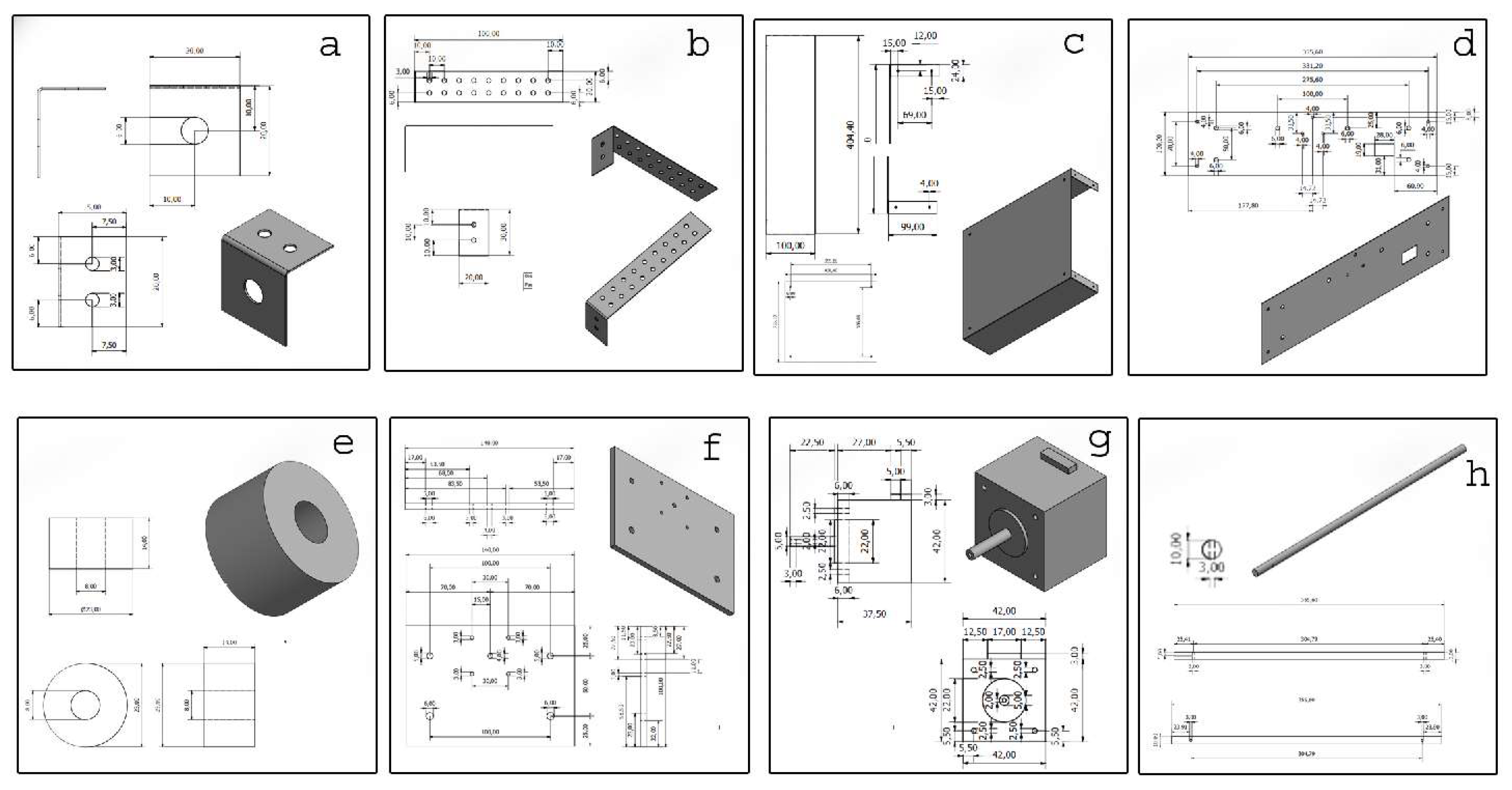
Figure 2.
CAD models converted into game engine supported models.
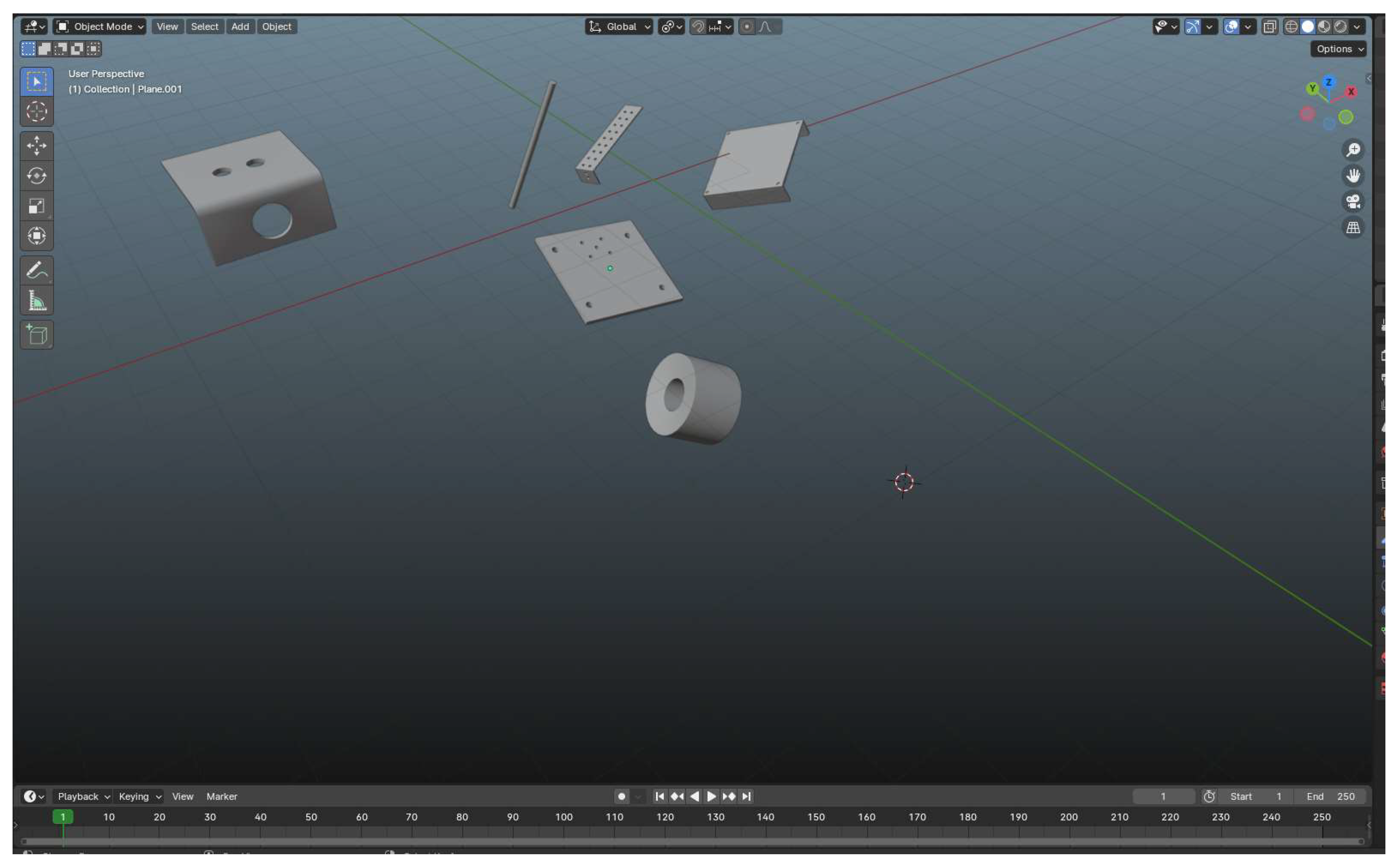
Figure 3.
A 3D mesh model in Blender, highlighting the topology with visible edge loops and vertices. Proper topology is critical for optimizing the model's geometry, ensuring smooth deformation, and efficient UV mapping, particularly in the curved mesh areas.
Figure 3.
A 3D mesh model in Blender, highlighting the topology with visible edge loops and vertices. Proper topology is critical for optimizing the model's geometry, ensuring smooth deformation, and efficient UV mapping, particularly in the curved mesh areas.
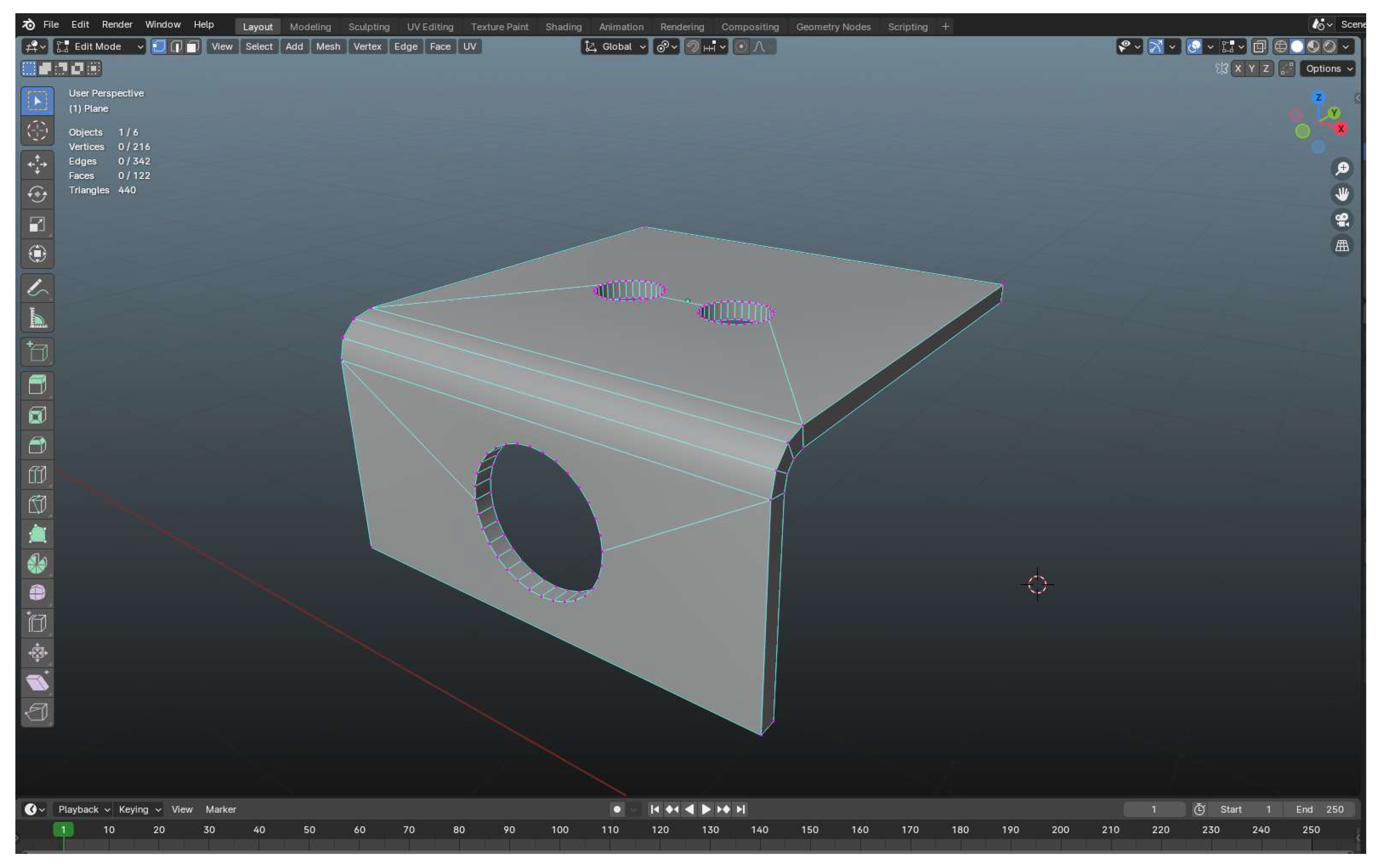
Figure 4.
Designing the PI-CT machine in AutoCAD, creating a mesh from reference images in Blender, adjusting topology and UV mapping, and saving the model as an ".obj" file for import into Unity.
Figure 4.
Designing the PI-CT machine in AutoCAD, creating a mesh from reference images in Blender, adjusting topology and UV mapping, and saving the model as an ".obj" file for import into Unity.
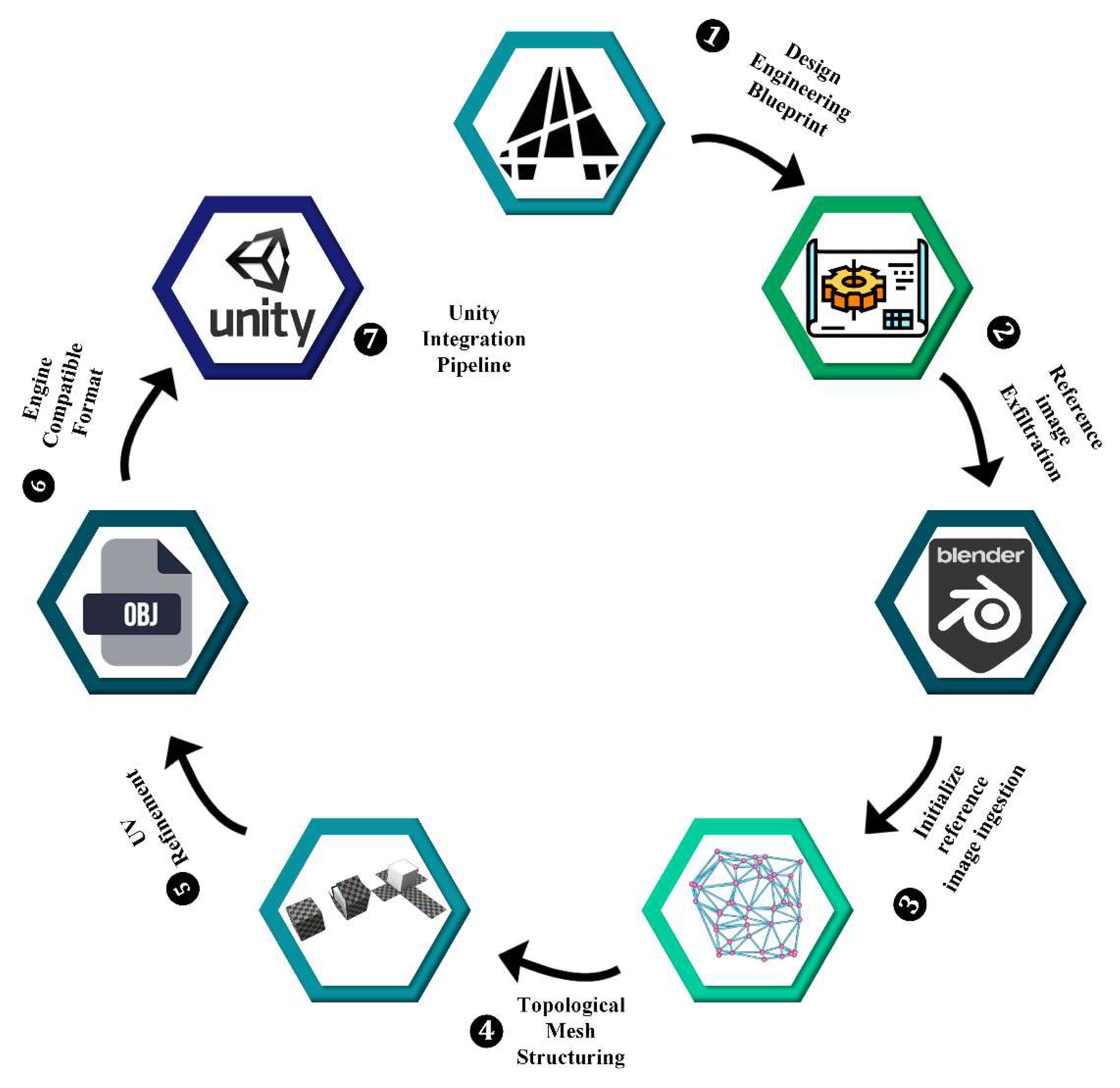
Figure 5.
Implementing interactive behaviors in VR: object manipulation and engagement.
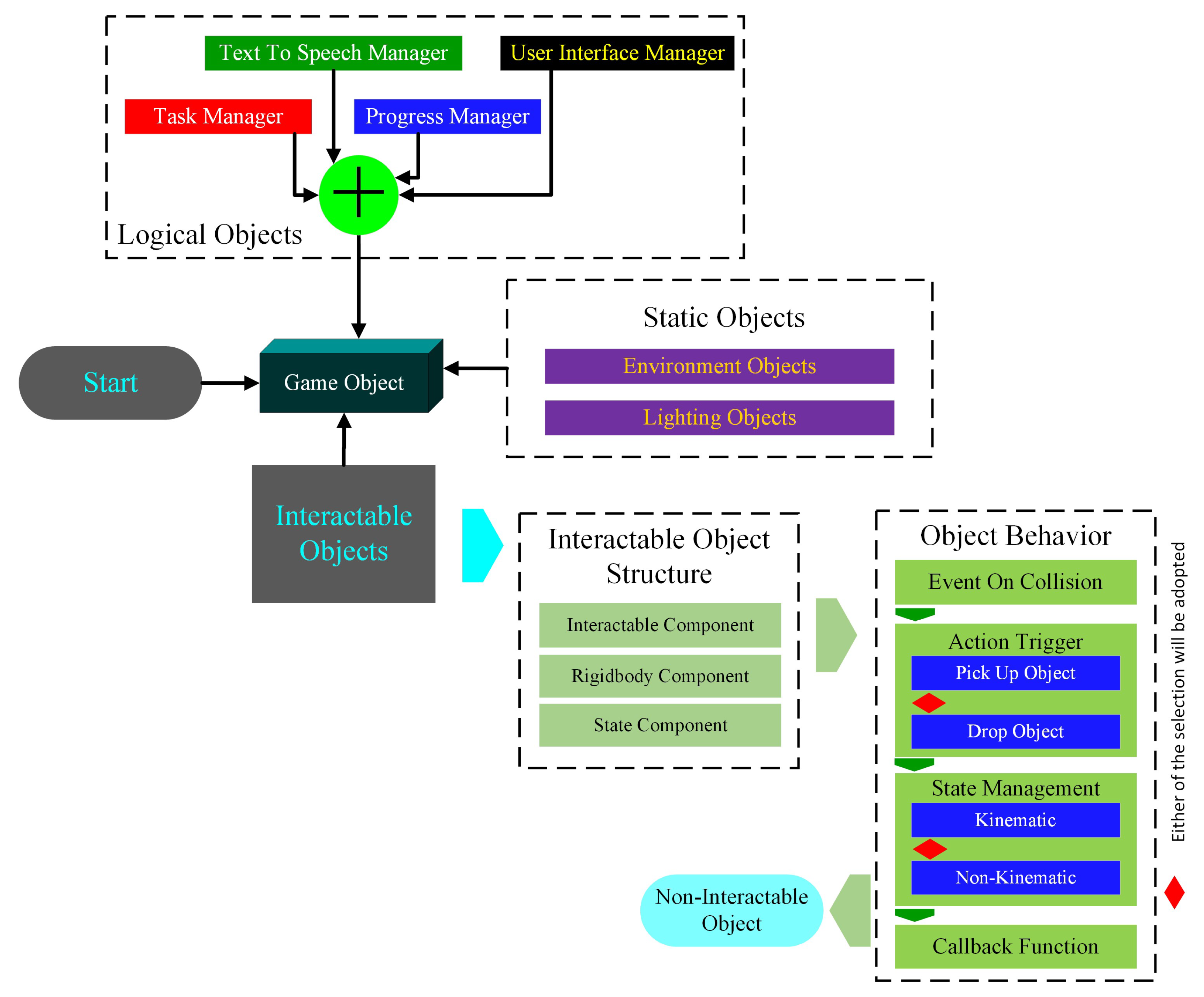
Figure 6.
Fog settings panel in a game engine or 3D software. Displaying various parameters to control fog effects, including distance, height, and color.
Figure 6.
Fog settings panel in a game engine or 3D software. Displaying various parameters to control fog effects, including distance, height, and color.
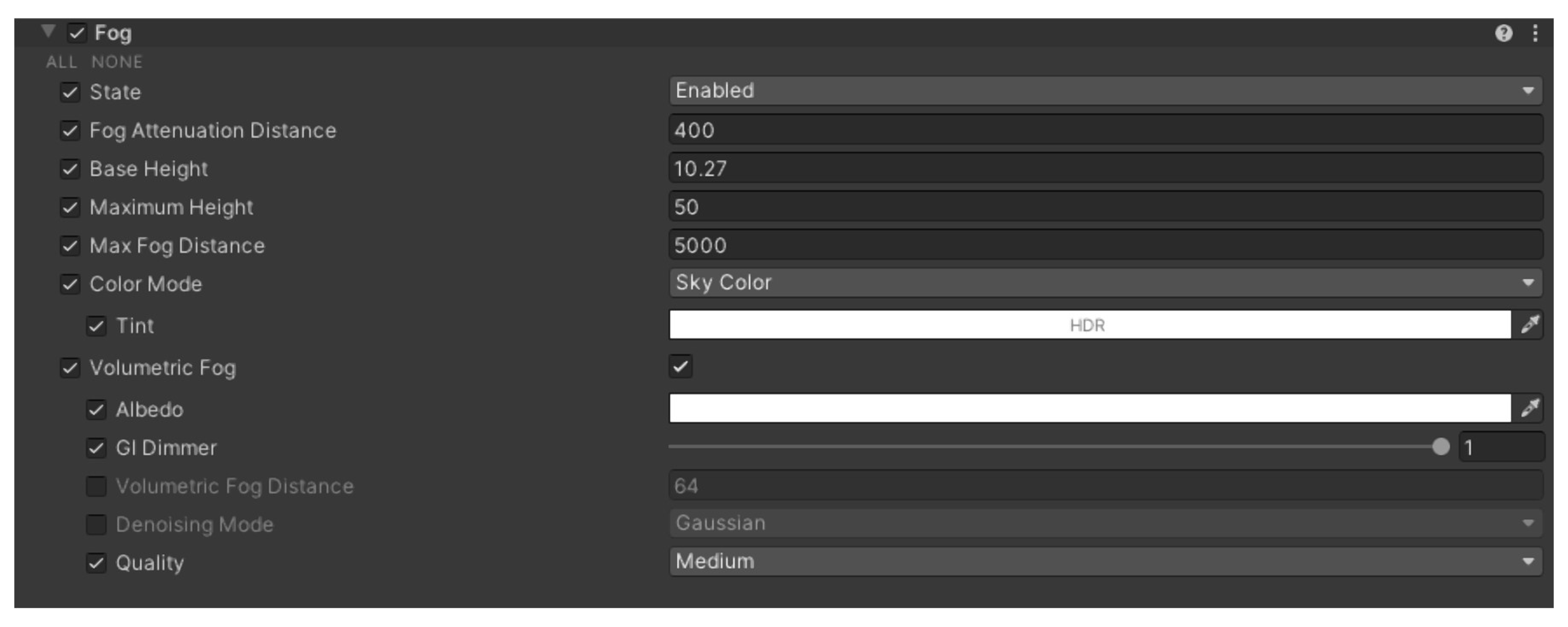
Figure 7.
Comparison of lighting effects in a 3D rendered room, (a) without volumetric lighting, (b) with volumetric lighting, showing enhanced atmosphere and light scattering.
Figure 7.
Comparison of lighting effects in a 3D rendered room, (a) without volumetric lighting, (b) with volumetric lighting, showing enhanced atmosphere and light scattering.
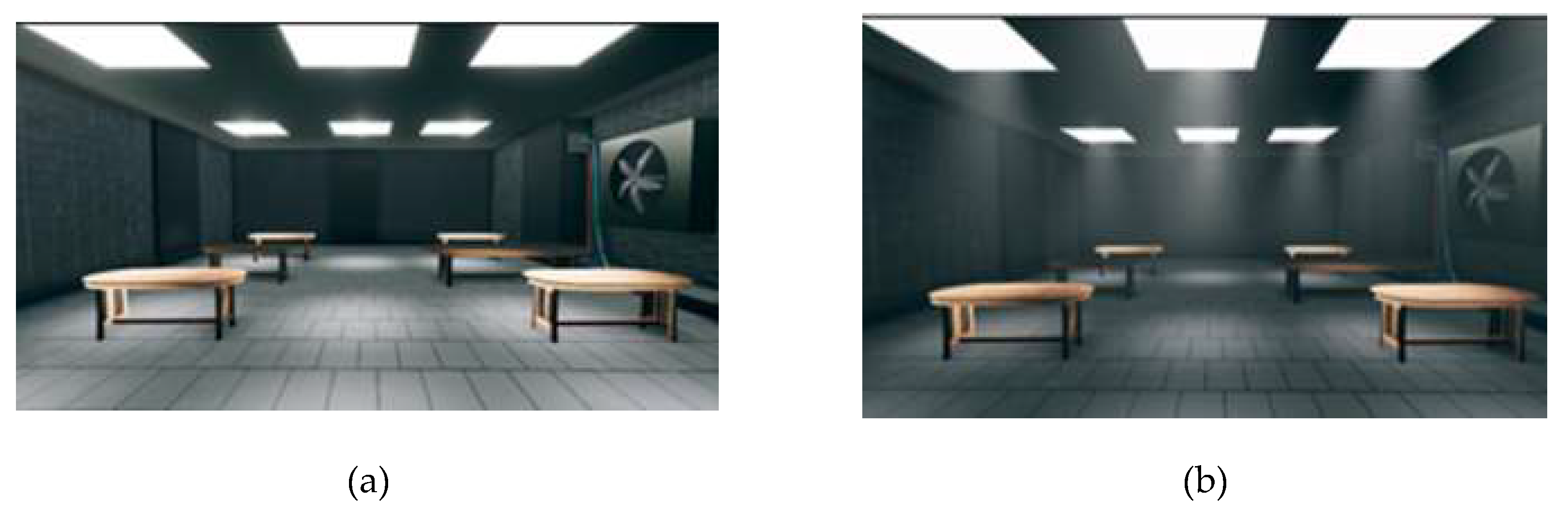
Figure 8.
Adjustment of the reflection probe volume that is expected to be responsible for rendering the accurate reflection of the surroundings.
Figure 8.
Adjustment of the reflection probe volume that is expected to be responsible for rendering the accurate reflection of the surroundings.
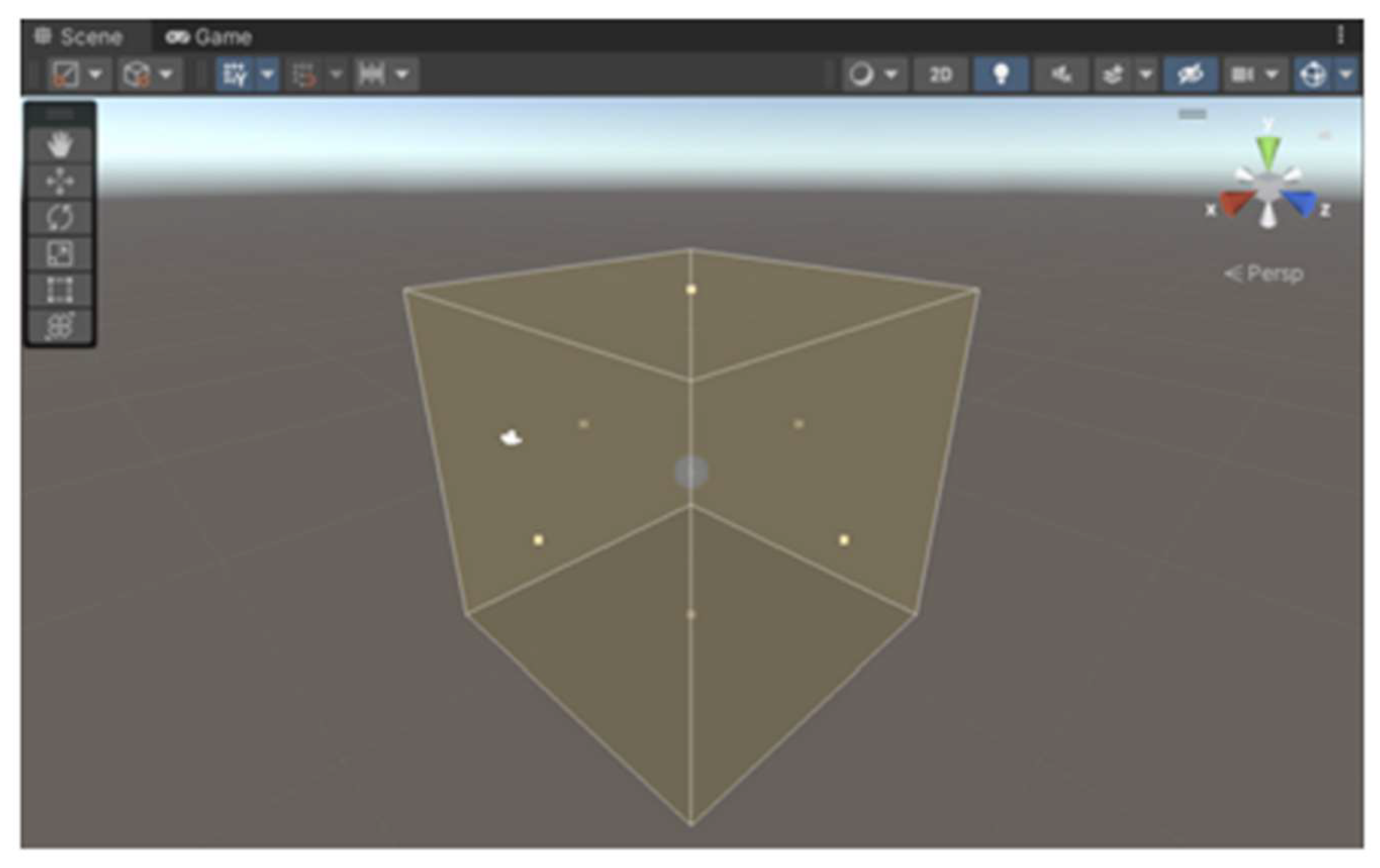
Figure 9.
A detailed comparison of visuals, (a) the scene which doesn’t include any reflection probe, (b) the scene which include reflection, it provides the accurate reflection and stable lighting.
Figure 9.
A detailed comparison of visuals, (a) the scene which doesn’t include any reflection probe, (b) the scene which include reflection, it provides the accurate reflection and stable lighting.
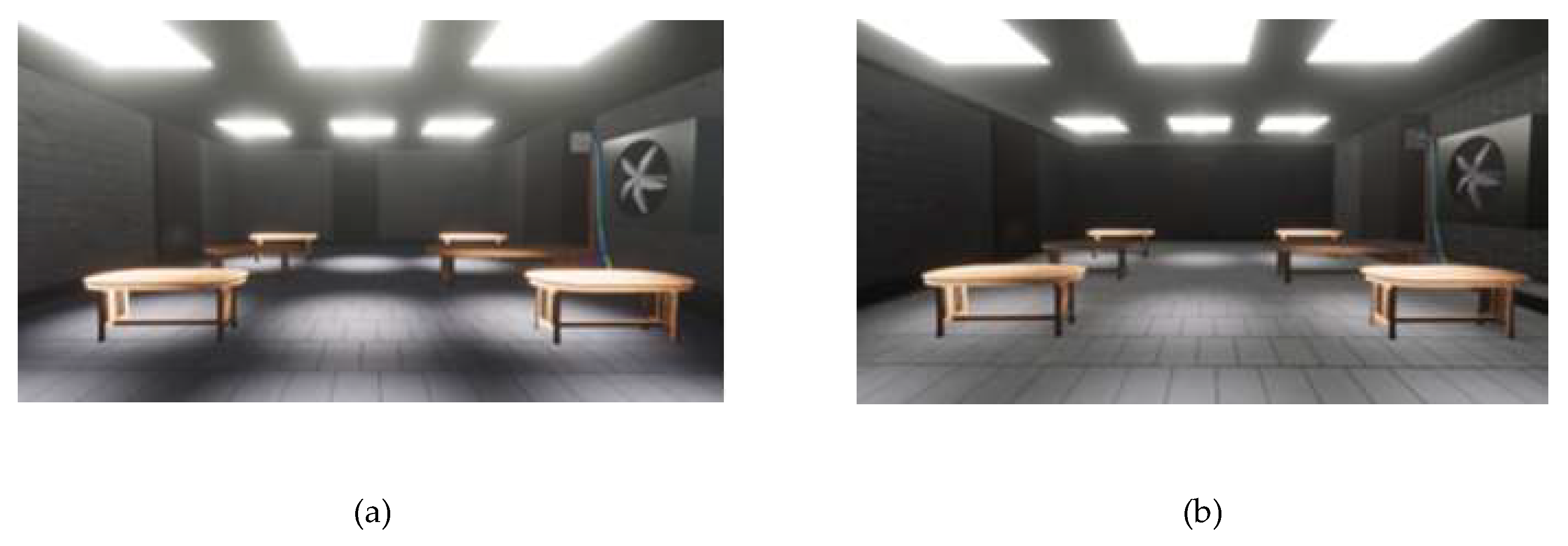
Figure 10.
Workflow for creating a high quality rendered scene in a virtual environment. It outlines the essential steps, including project creation, HDRP integration, scene setup, lighting setup, graphical optimization, and post-processing.
Figure 10.
Workflow for creating a high quality rendered scene in a virtual environment. It outlines the essential steps, including project creation, HDRP integration, scene setup, lighting setup, graphical optimization, and post-processing.

Figure 11.
Depiction of the proposed VRTMS using UML perspective. It includes an Input Controller that manages input events like grabbing and menu interactions and an InteractableClass for object interactions, such as picking up and dropping items. The Assemble Machine and Assembly Reference classes handle the assembly process, managing entities and their order in a stack. The Entity Class ensures items are placed correctly during assembly. The Progress System tracks and evaluates progress, while the Voice Assistant provides spoken guidance and the Assistant offers additional support and information.
Figure 11.
Depiction of the proposed VRTMS using UML perspective. It includes an Input Controller that manages input events like grabbing and menu interactions and an InteractableClass for object interactions, such as picking up and dropping items. The Assemble Machine and Assembly Reference classes handle the assembly process, managing entities and their order in a stack. The Entity Class ensures items are placed correctly during assembly. The Progress System tracks and evaluates progress, while the Voice Assistant provides spoken guidance and the Assistant offers additional support and information.
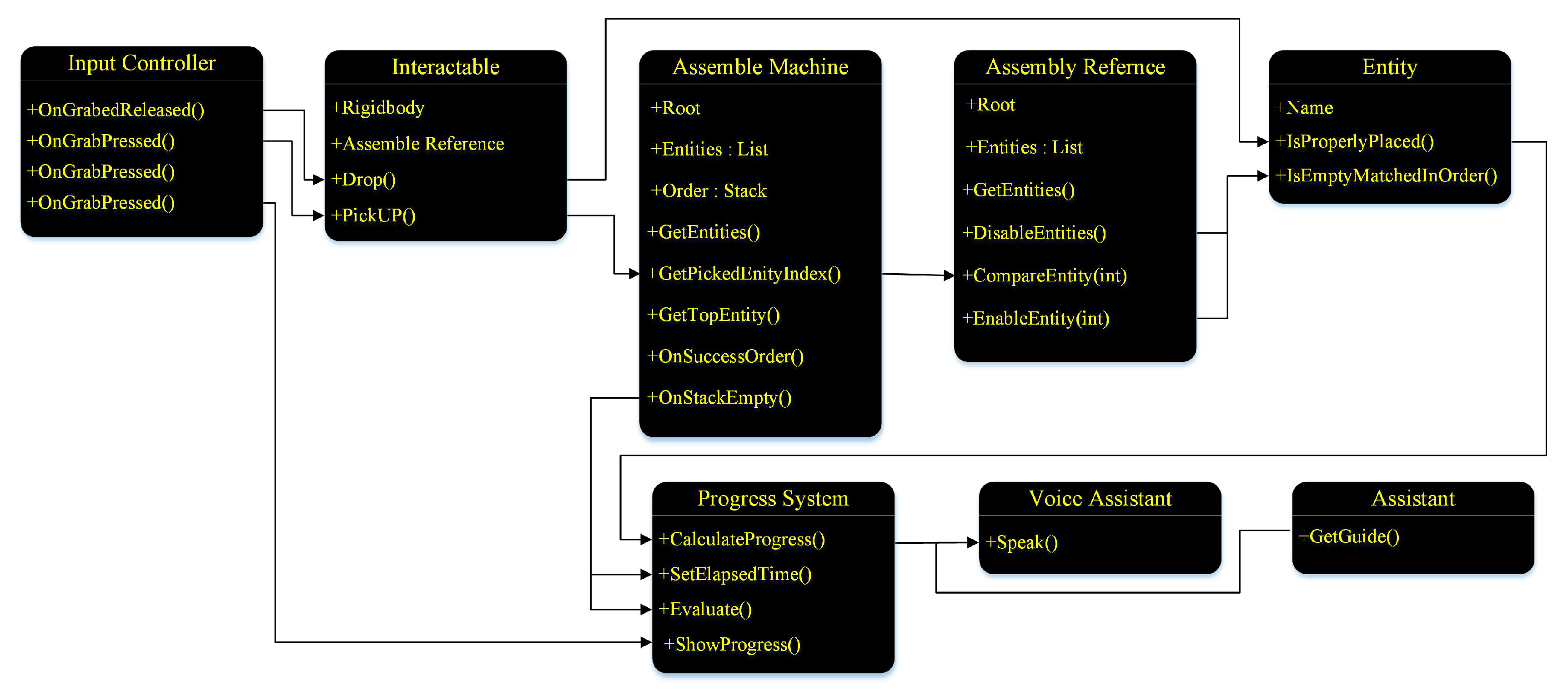
Figure 12.
Set of interactable components of PI-CT machine that can be interacted using hand touch controllers.
Figure 12.
Set of interactable components of PI-CT machine that can be interacted using hand touch controllers.
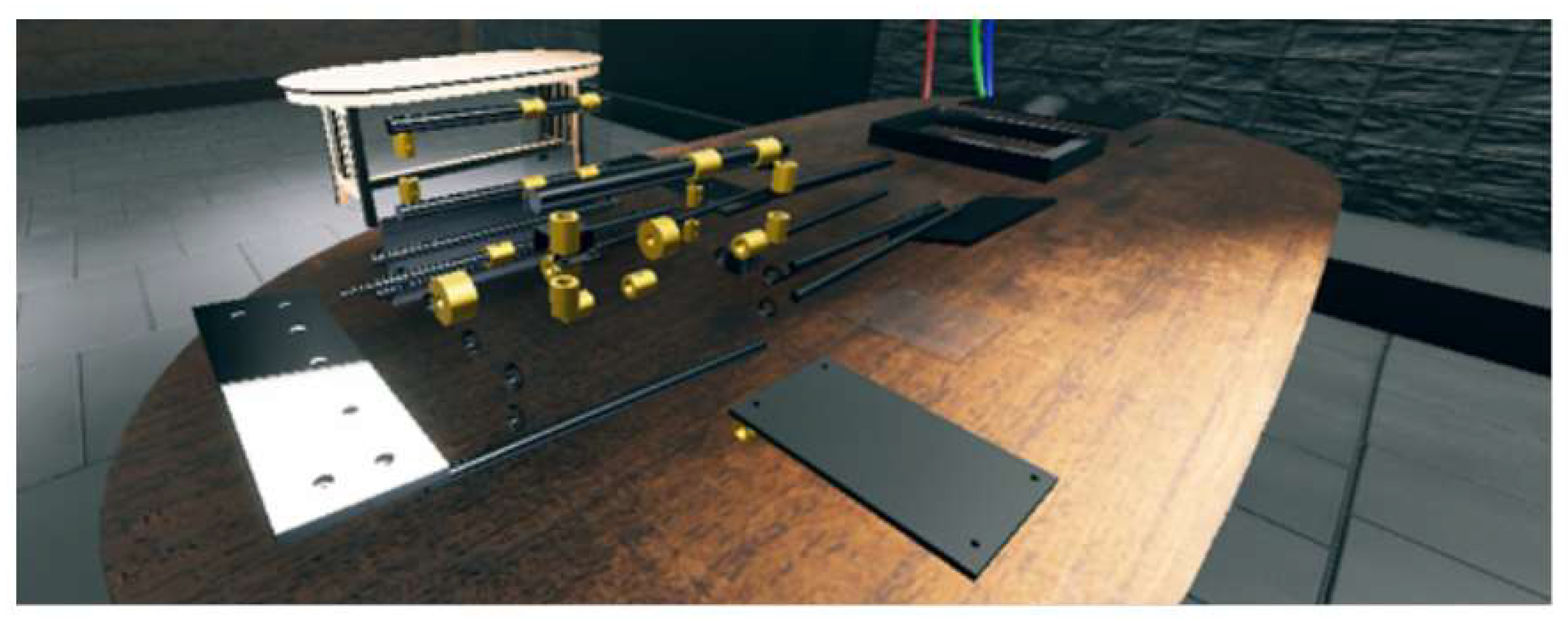
Figure 13.
Schematic diagram of the workflow of a VR Assembly Workspace, outlining the key stages involved in project setup, features, project cycle, and objectives, providing a visual representation of the process from initial component design to the final assembly.
Figure 13.
Schematic diagram of the workflow of a VR Assembly Workspace, outlining the key stages involved in project setup, features, project cycle, and objectives, providing a visual representation of the process from initial component design to the final assembly.
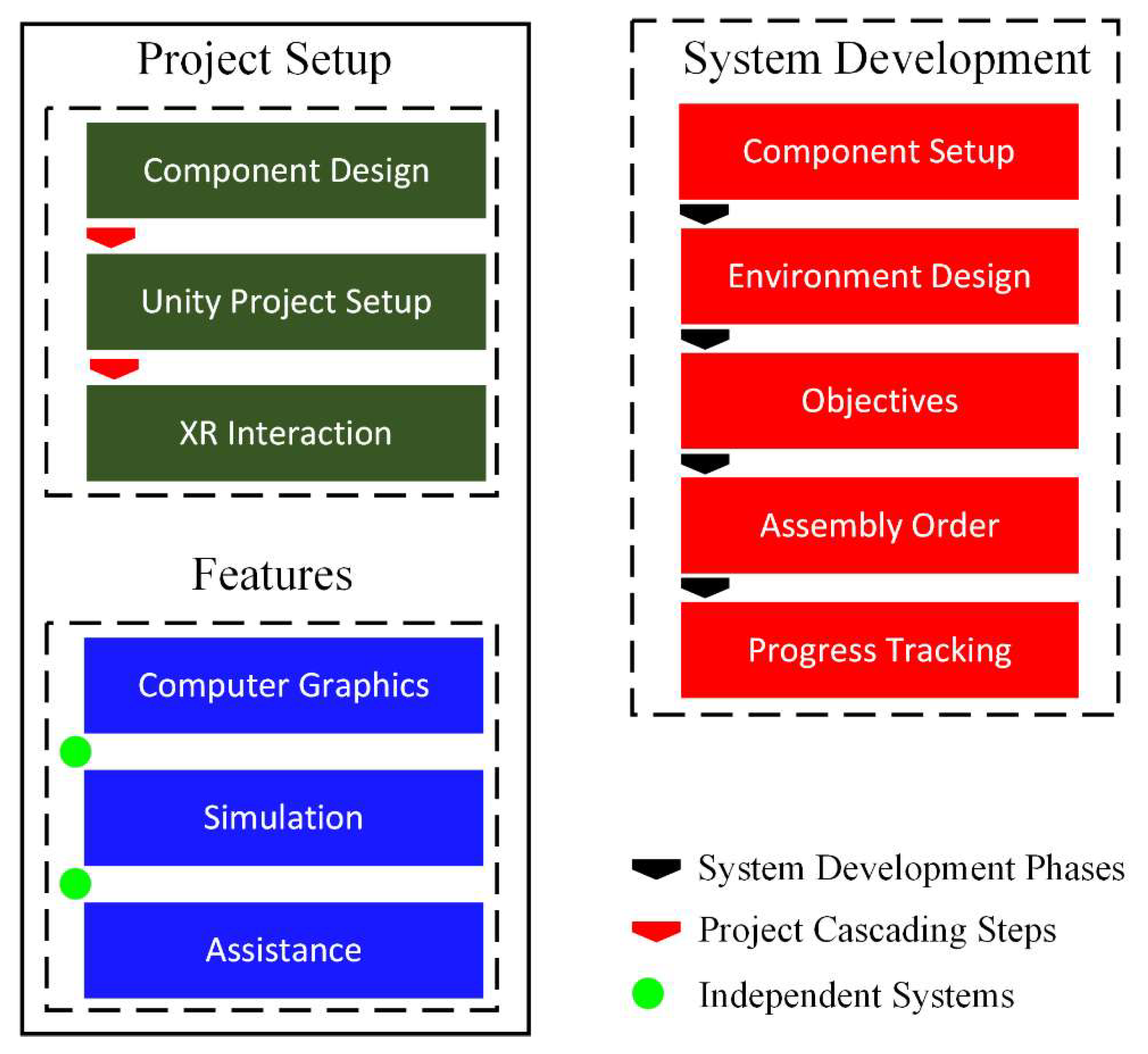
Figure 14.
Player controller in the scene with hands that can be controlled through touch controllers.
Figure 14.
Player controller in the scene with hands that can be controlled through touch controllers.
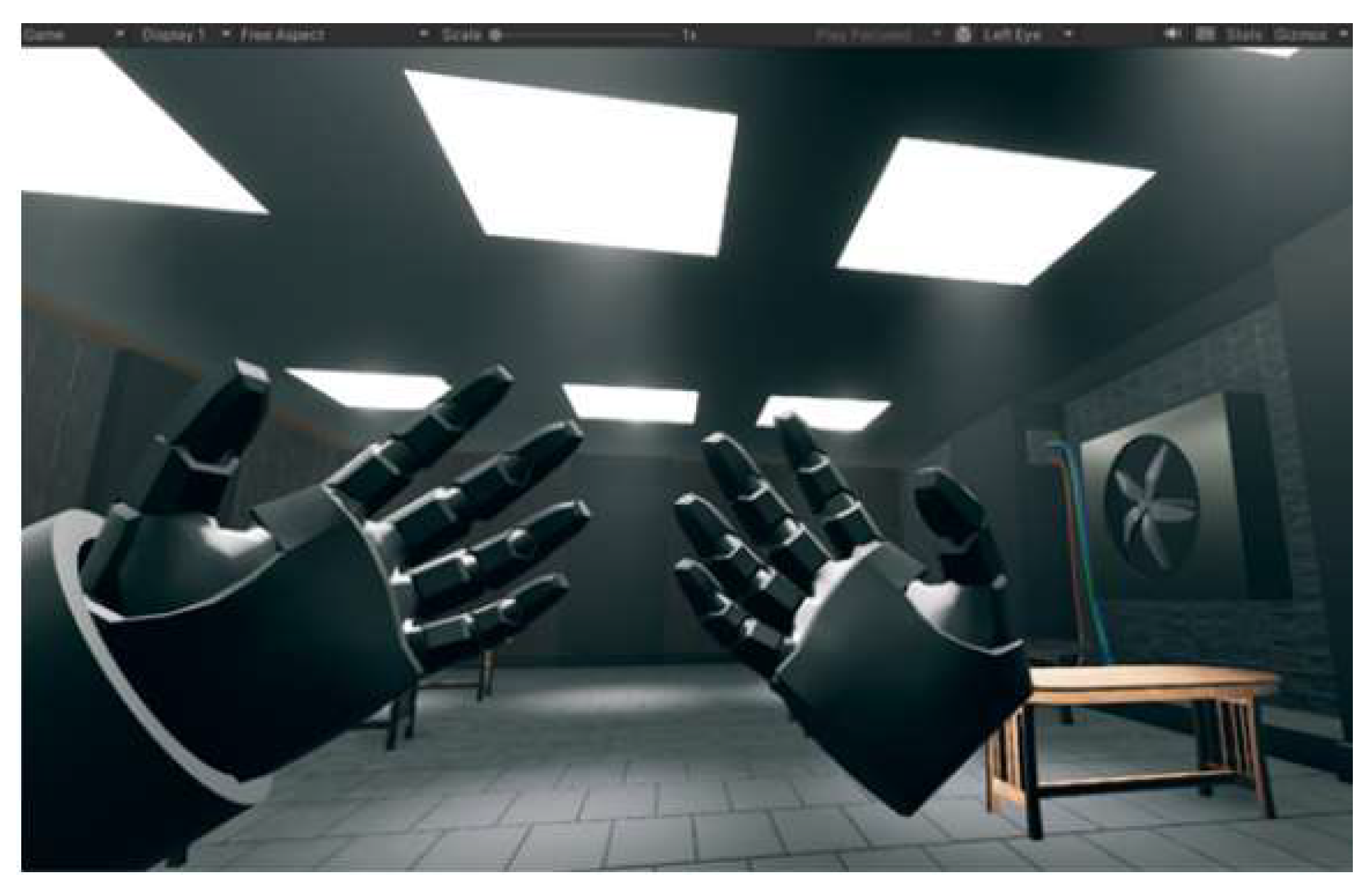
Figure 15.
Unity editor displaying two custom scripts: Interactable and Grabbable. The Interactable script manages object properties like Name, Xr Grab Interactable, and Assemble Reference. The Grabbable script configures grabbing behavior, including Grab Type, Hand Type, Instant Grab, and physics settings like Throw Power and Joint Break Force.
Figure 15.
Unity editor displaying two custom scripts: Interactable and Grabbable. The Interactable script manages object properties like Name, Xr Grab Interactable, and Assemble Reference. The Grabbable script configures grabbing behavior, including Grab Type, Hand Type, Instant Grab, and physics settings like Throw Power and Joint Break Force.
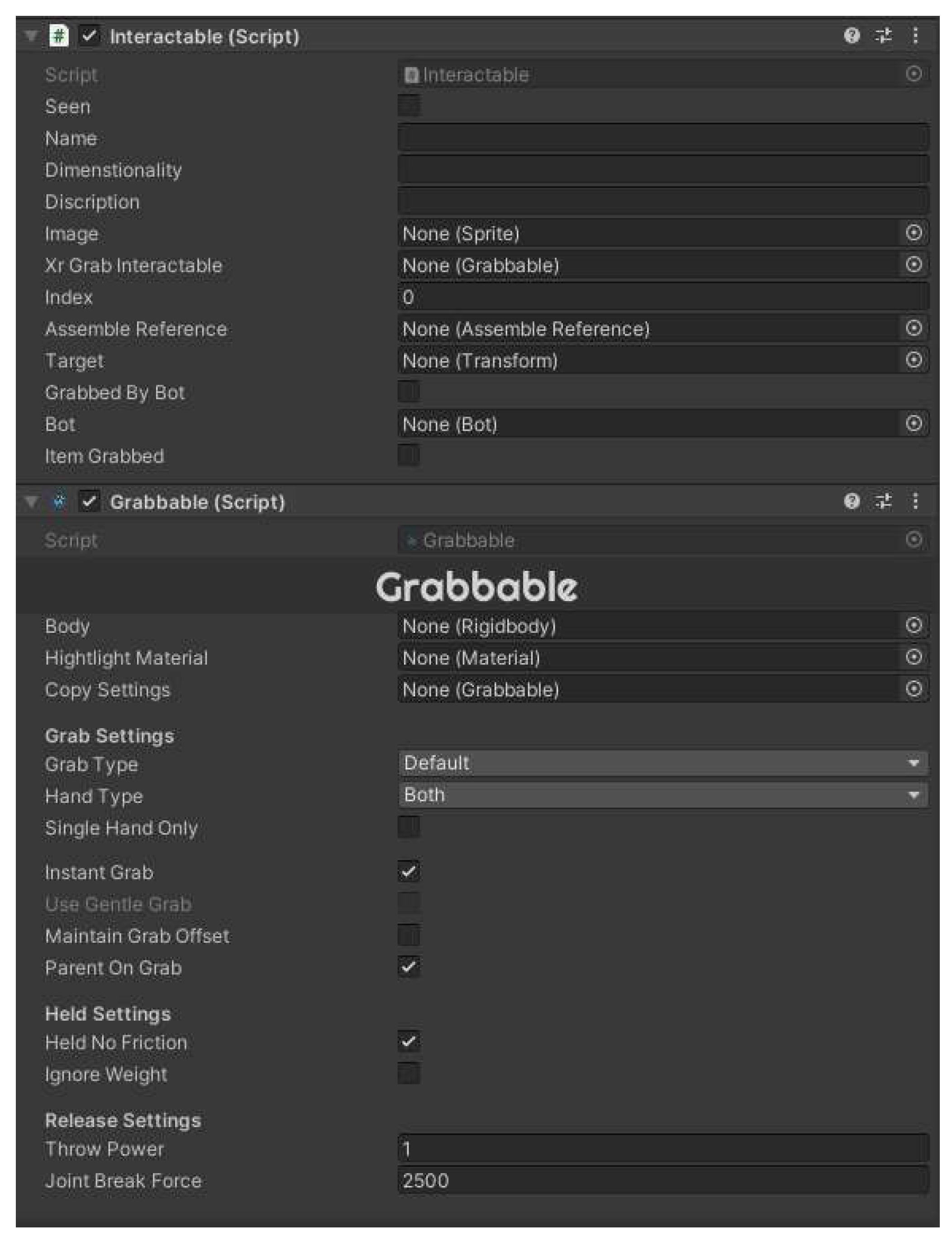
Figure 16.
IK controlled interaction of each component of PI-CT machine.
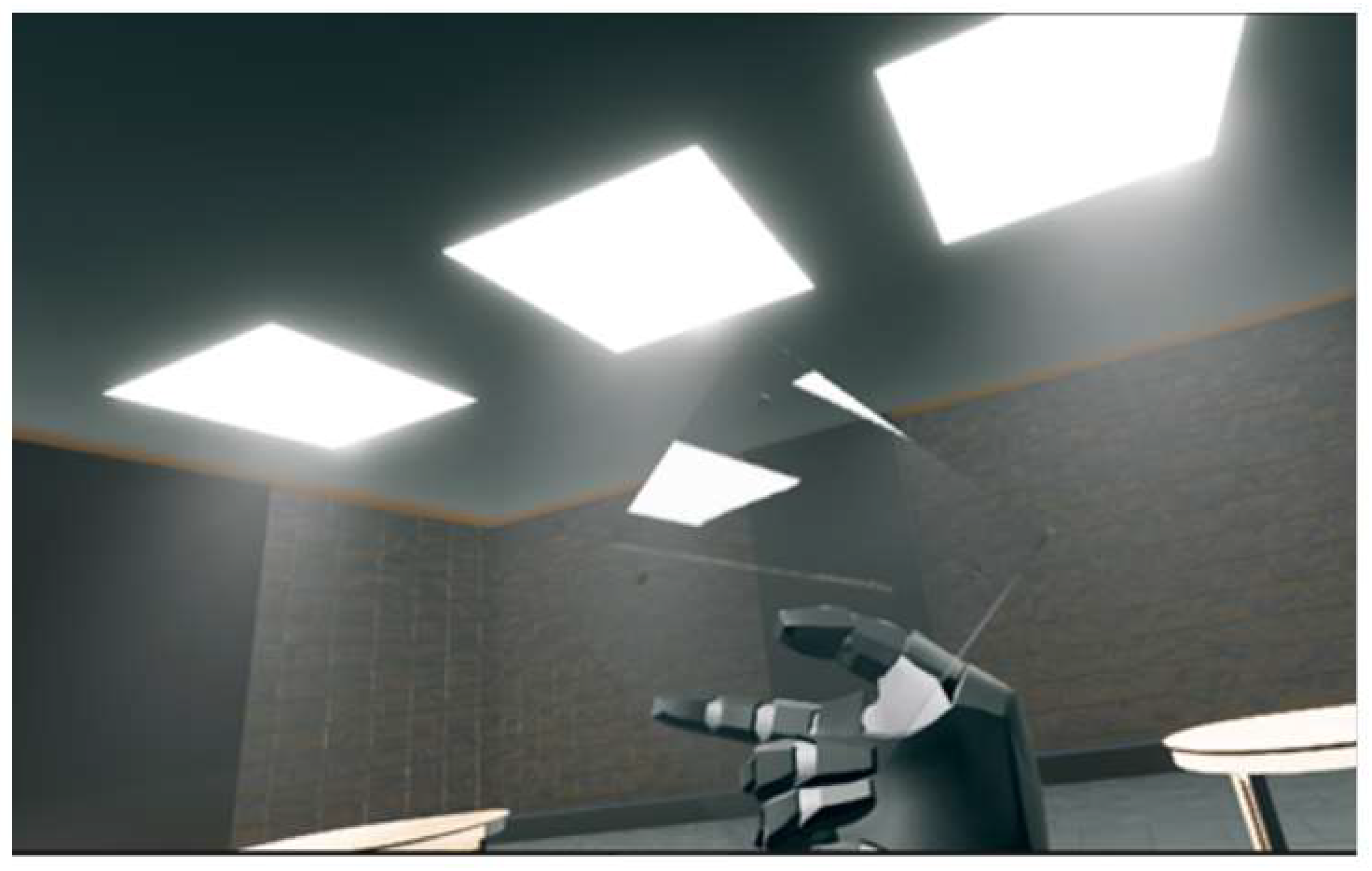
Figure 17.
Controls’ instructions using the hand-touch controller of the Meta Quest 2.
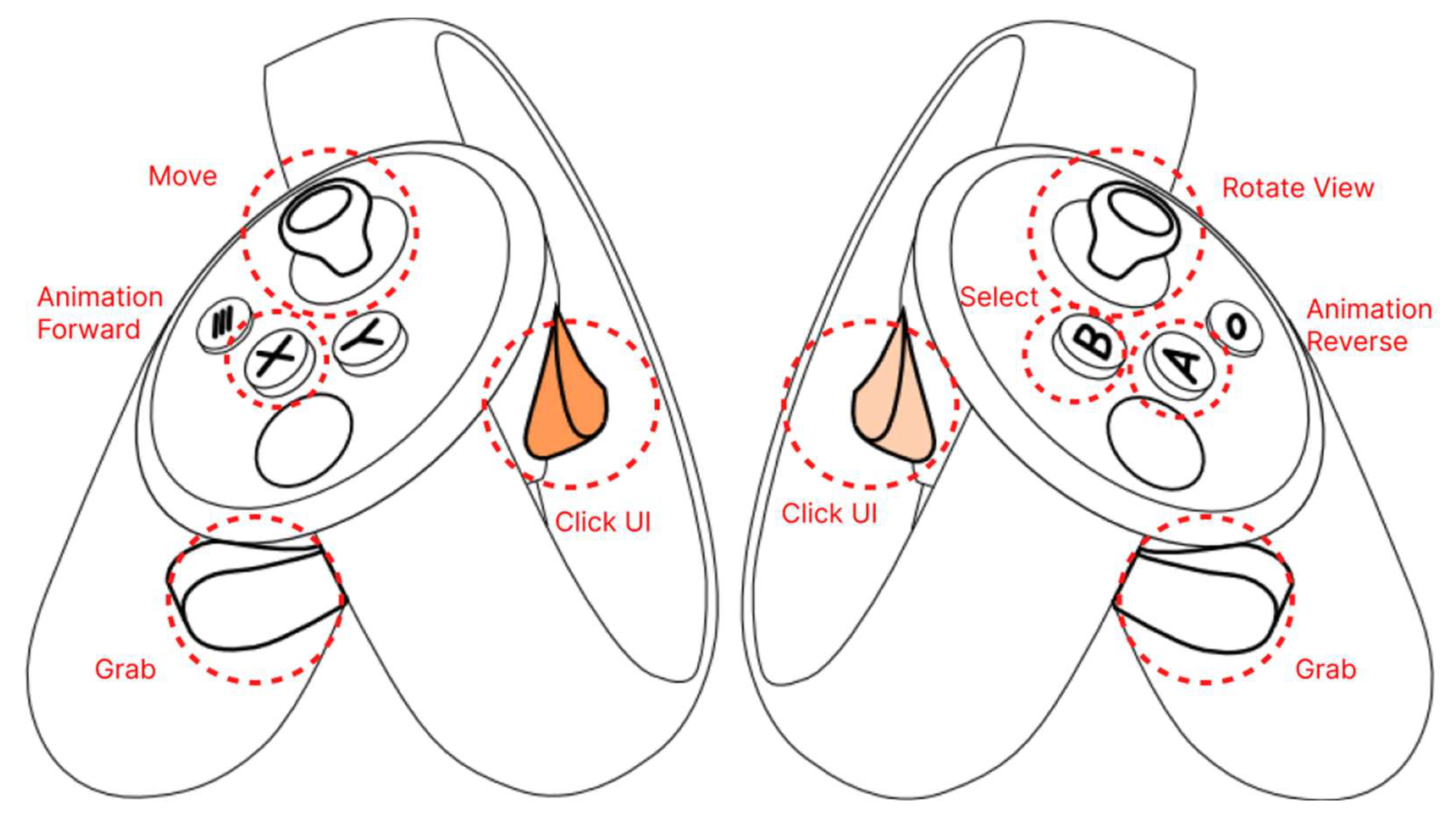
Figure 18.
An interactive training setup for assembly tasks. The user holds a holographic interface with options to "Get Info," "Get Dimension," and "Close" while interacting with a 3D model of a cylindrical component on a workbench. Various machine parts are laid out in the background for assembly.
Figure 18.
An interactive training setup for assembly tasks. The user holds a holographic interface with options to "Get Info," "Get Dimension," and "Close" while interacting with a 3D model of a cylindrical component on a workbench. Various machine parts are laid out in the background for assembly.
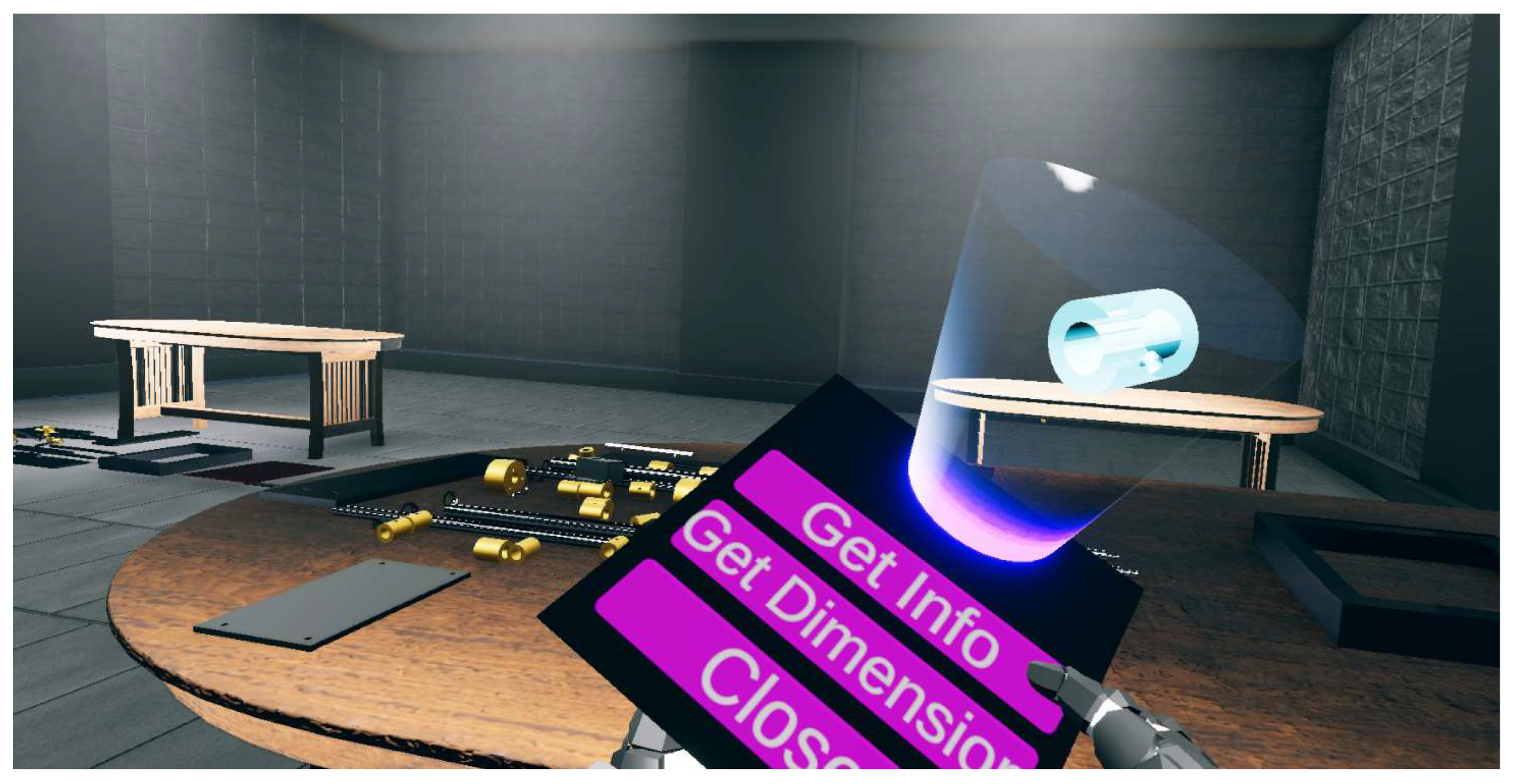
Figure 19.
Flowchart of a virtual assembly task outlining the steps involved, including system guidance, user interaction, collision checking, component placement, progress monitoring, and performance evaluation. It also depicts the role of a manager in overseeing the process and maintaining a stack of components to be placed.
Figure 19.
Flowchart of a virtual assembly task outlining the steps involved, including system guidance, user interaction, collision checking, component placement, progress monitoring, and performance evaluation. It also depicts the role of a manager in overseeing the process and maintaining a stack of components to be placed.
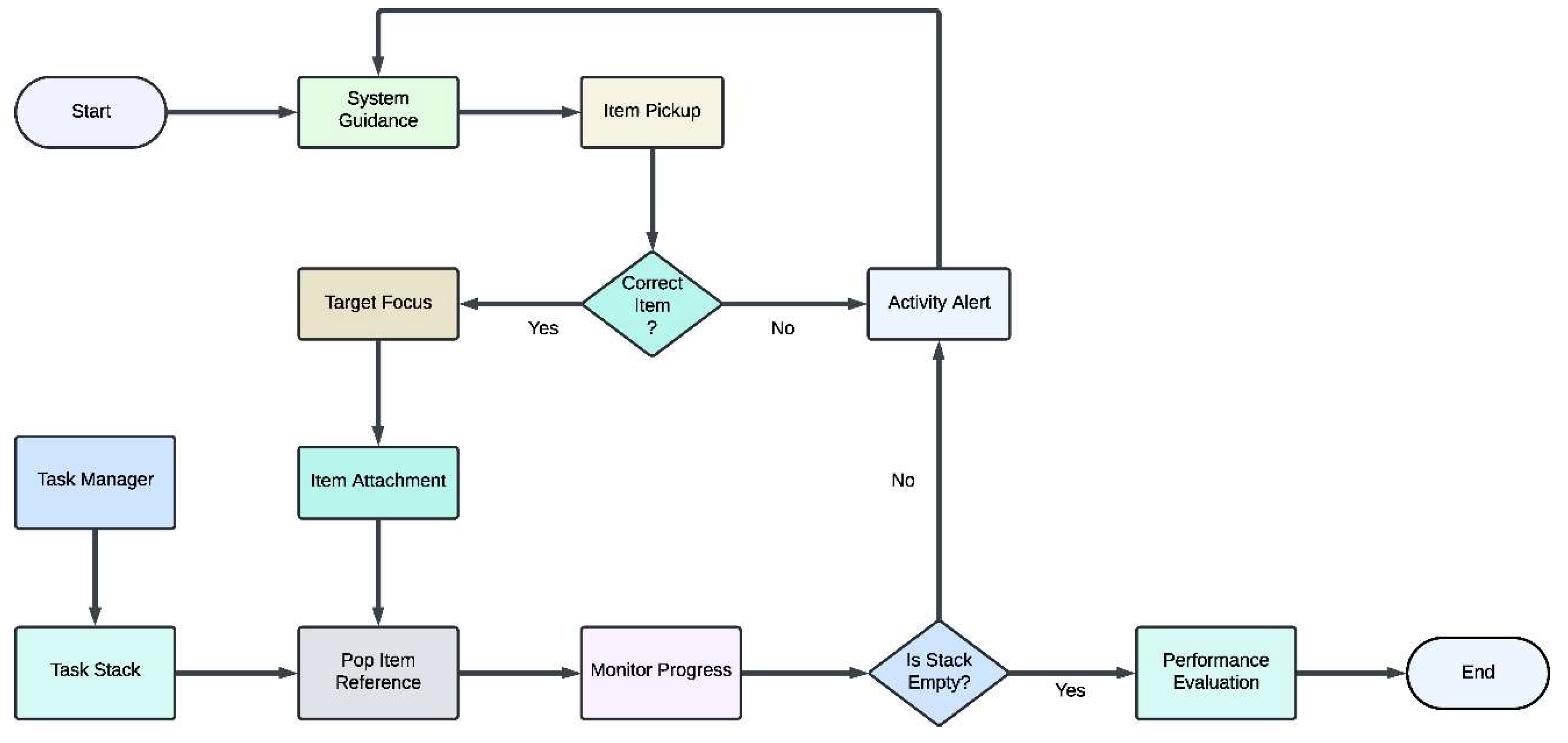
Figure 20.
The final assembly of the PI-CT machine in a virtual environment. All modular components are securely in place, demonstrating the complete structure. The interface provides interactive options for further exploration of the machine's features, such as retrieving information and dimensions.
Figure 20.
The final assembly of the PI-CT machine in a virtual environment. All modular components are securely in place, demonstrating the complete structure. The interface provides interactive options for further exploration of the machine's features, such as retrieving information and dimensions.
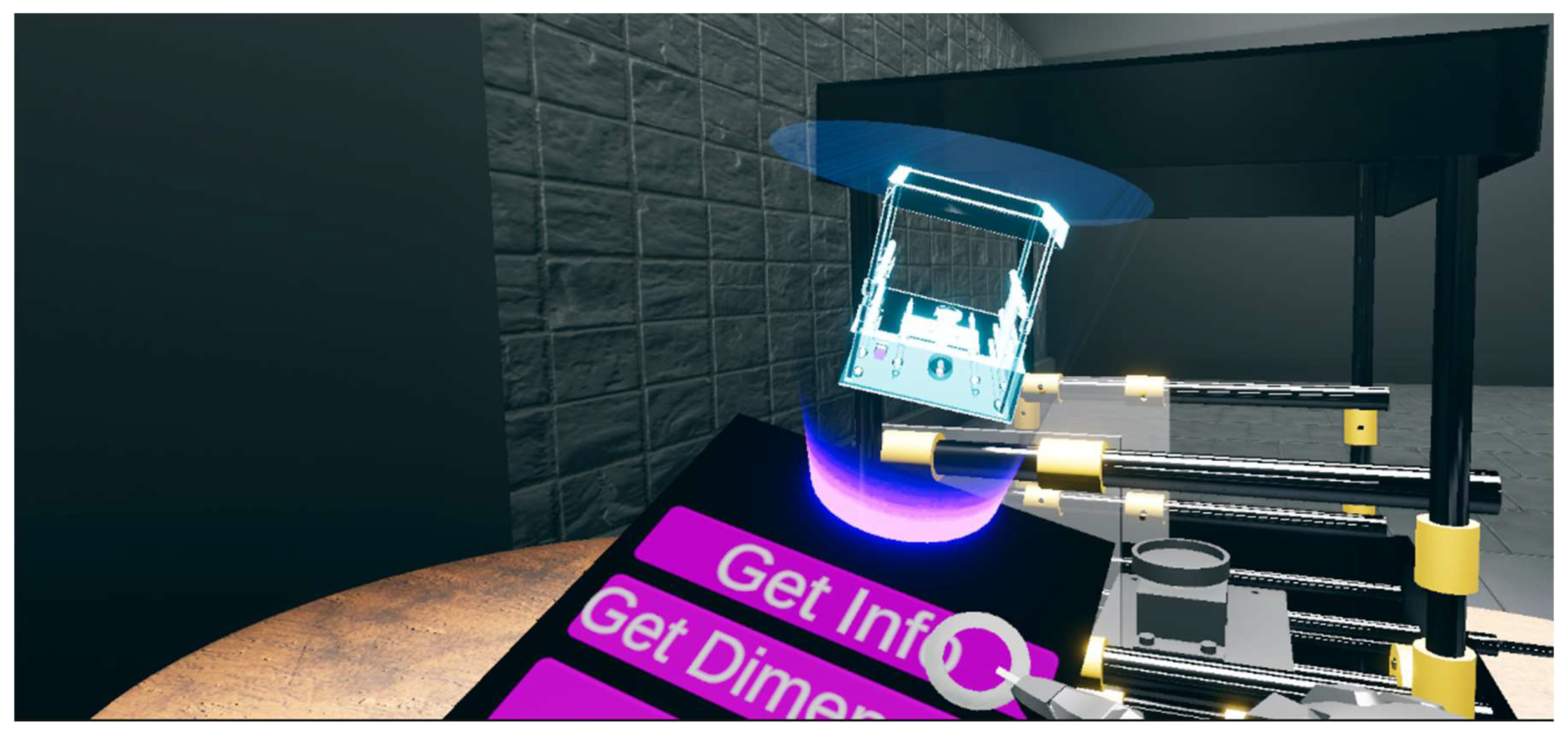
Figure 21.
The user action triggering the instruction of the speech synthesis by the WiT text-to-speech model.
Figure 21.
The user action triggering the instruction of the speech synthesis by the WiT text-to-speech model.
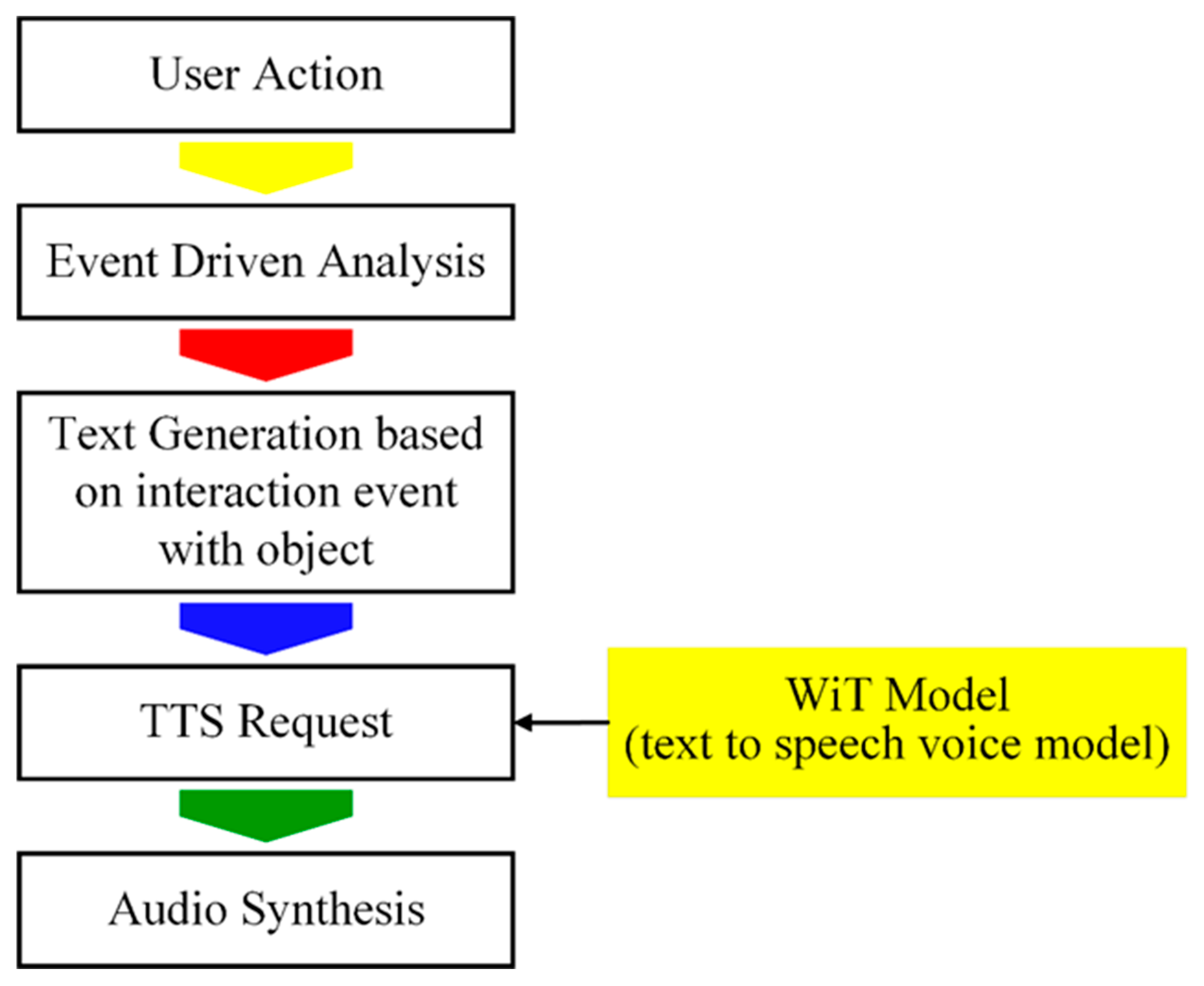
Figure 22.
Unity profiler statistics displaying key performance metrics. The frame rate is 118.4 FPS with a total frame time of 8.4 ms. The CPU's main thread runs 8.4 ms, and the render thread is 5.7 ms. Graphics data includes 500 batches, 437.2k triangles, and 367.6k vertices. DSP load stands at 0.2%.
Figure 22.
Unity profiler statistics displaying key performance metrics. The frame rate is 118.4 FPS with a total frame time of 8.4 ms. The CPU's main thread runs 8.4 ms, and the render thread is 5.7 ms. Graphics data includes 500 batches, 437.2k triangles, and 367.6k vertices. DSP load stands at 0.2%.
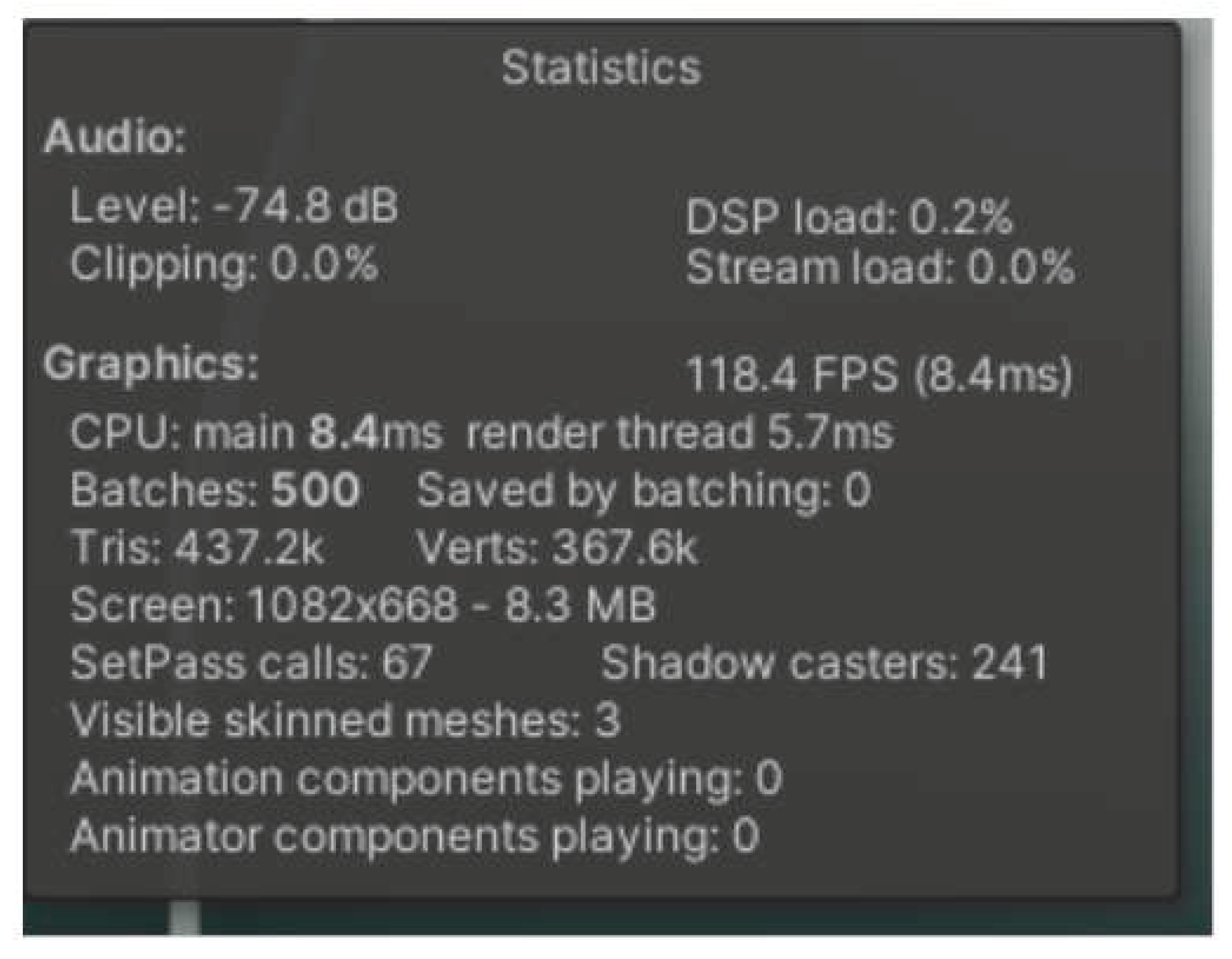

Table 1.
Various components of a mechanical assembly, including (a) base plate, (b) front plate, (c) vertical rods, (d) horizontal rods, (e) slide beds and threaded rods, (f) phantom, (g) stepper motor, (h) strip of stepper motor, (i) phantom holder, (j) washer, (k) stepper motor coupling, and (l) slider thread trans. Each labeled part is essential for constructing the system's structure and enabling precise movement.
Table 1.
Various components of a mechanical assembly, including (a) base plate, (b) front plate, (c) vertical rods, (d) horizontal rods, (e) slide beds and threaded rods, (f) phantom, (g) stepper motor, (h) strip of stepper motor, (i) phantom holder, (j) washer, (k) stepper motor coupling, and (l) slider thread trans. Each labeled part is essential for constructing the system's structure and enabling precise movement.
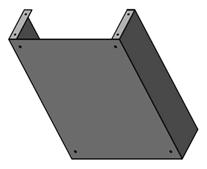 (a) |
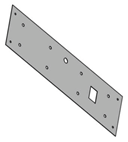 (b) |
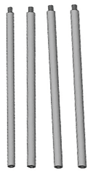 (c) |
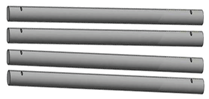 (d) |
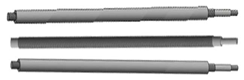 (e) |
 (f) |
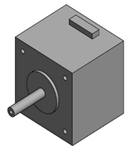 (g) |
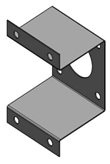 (h) |
 (i) |
 (j) |
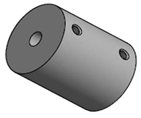 (k) |
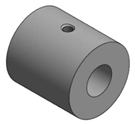 (l) |
Table 2.
Experimentation conducted by the users, monitoring their time taken and a number of mistakes they made in the session.
Table 2.
Experimentation conducted by the users, monitoring their time taken and a number of mistakes they made in the session.
| USER | TIME TAKEN (IN MINS) | NO. OF WRONG ATTEMPTS |
|---|---|---|
| USER 01 | 25 | 2 |
| USER 02 | 32 | 0 |
| USER 03 | 18 | 5 |
| USER 04 | 35 | 1 |
| USER 05 | 40 | 10 |
Table 3.
Performance Comparison Without and With DLSS.
| Metric | Without DLSS | With DLSS |
|---|---|---|
| CPU Usage | 12-14% | 6-7% |
| GPU Usage | 69% | 29%-31% |
| GPU temperature | 82 C | 62 C |
| FPS | 50-61 | 80-114 |
Disclaimer/Publisher’s Note: The statements, opinions and data contained in all publications are solely those of the individual author(s) and contributor(s) and not of MDPI and/or the editor(s). MDPI and/or the editor(s) disclaim responsibility for any injury to people or property resulting from any ideas, methods, instructions or products referred to in the content. |
© 2025 by the authors. Licensee MDPI, Basel, Switzerland. This article is an open access article distributed under the terms and conditions of the Creative Commons Attribution (CC BY) license (http://creativecommons.org/licenses/by/4.0/).
Copyright: This open access article is published under a Creative Commons CC BY 4.0 license, which permit the free download, distribution, and reuse, provided that the author and preprint are cited in any reuse.


