

Submitted:
28 April 2025
Posted:
30 April 2025
You are already at the latest version
Abstract
The comparison between Kotlin and Java for Android development has become increasingly relevant with Kotlin's rise as the preferred language for modern Android apps. This paper provides a comprehensive analysis of both languages from multiple perspectives, including syntax, productivity, null safety, concurrency handling, and build performance. Kotlin, introduced in 2017 as an officially supported language by Google, presents modern features such as reduced boilerplate code, enhanced null safety, and powerful asynchronous capabilities through coroutines. In contrast, Java, a long-standing staple in Android development, continues to be widely used due to its stability, extensive ecosystem, and backward compatibility. This study compares both languages in the context of Android development, examining their respective strengths and weaknesses, and discussing practical scenarios where one might be preferred over the other. Additionally, the paper delves into developer productivity, code quality, and real-world adoption of Kotlin, providing insights into future trends in Android development. By exploring these factors, the paper aims to offer a deeper understanding of how the choice between Kotlin and Java can impact Android development projects.
Keywords:
Kotlin
; Java
; Android Development
; Mobile Development
; Null Safety
; Coroutines
; Software Engineering
; Programming Languages
; Code Quality
; Developer Productivity
; Concurrency Handling
; Build Performance
; Android Studio
; Kotlin Multiplatform
; Mobile Programming
; Software Development Tools
I. Introduction
Android is the most widely used mobile operating system in the world. It runs on billions of devices and powers many of the most popular mobile apps. For a long time, Java was the standard language for Android development. It provided a reliable foundation and a strong community, making it easier for developers to create stable and scalable applications.
However, Java has its limitations. It tends to be verbose, and it lacks many modern language features. Kotlin, a newer programming language developed by JetBrains, was introduced as an official language for Android development by Google in 2017. Since then, it has gained rapid popularity among developers.
As a computer science student learning mobile app development, I wanted to understand the advantages and trade-offs of using Kotlin compared to Java. I explored both languages through hands-on projects, classroom exercises, and research. I created two versions of a small to-do list app—one in Java and one in Kotlin—and compared how long each took to write and how easy it was to debug. I also worked with classmates on a group project that involved a chat app, where we decided to migrate some modules from Java to Kotlin to see how it would affect performance and maintainability. This paper summarizes my findings from a student perspective, with examples and insights that can help other learners choose the right tool for their Android development journey.
II. Background and History
A. Java: The Traditional Choice
Java was released in 1995 by Sun Microsystems and quickly became a popular language for enterprise and Android devel- opment. It supports object-oriented programming and has a massive ecosystem, including a wide range of frameworks, tools, and libraries.
One of Java’s greatest strengths is its stability and long- term support. Many companies still rely on Java for large-scale applications. For Android development, Java was the primary language until Kotlin was introduced. Java’s syntax is con- sidered straightforward, but it often requires more boilerplate code to accomplish simple tasks.
Despite its popularity, Java has stagnated in terms of lan- guage innovation. While newer versions like Java 17 intro- duce enhancements, many Android projects remain tied to older versions due to compatibility concerns. This has limited developers from accessing modern programming paradigms. For example, Java does not have built-in support for modern features like data classes, extension functions, or concise lambda syntax, which can make development slower and more repetitive.
B. Kotlin: A Modern Alternative
Kotlin was released in 2011 and designed to be fully interoperable with Java. Its goal was to improve developer productivity by reducing code verbosity and introducing mod- ern language features. When Google made Kotlin a first-class language for Android in 2017, it quickly gained traction.
Kotlin includes powerful features like null safety, extension functions, and data classes. It also supports functional pro- gramming and offers better support for asynchronous program- ming through coroutines. These features have made Kotlin a favorite among many Android developers, especially for new projects.
Kotlin is continuously evolving with strong support from JetBrains and the open-source community. Features like Kotlin Multiplatform allow developers to share code across Android, iOS, and backend systems. This makes Kotlin not only useful for Android but also a gateway to cross-platform development. For me as a student, Kotlin felt like a language that was designed with modern developer needs in mind. I could accomplish more in less time, and I made fewer mistakes thanks to the compiler warnings and built-in safety features.
III. Syntax and Productivity
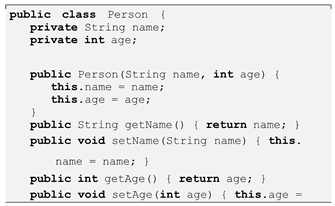
One of Kotlin’s main advantages is its concise syntax. Developers can achieve the same functionality with fewer lines of code compared to Java. This not only saves time but also improves code readability and reduces the chance of bugs.
A. Example: Creating a Data Class
1). Java Version:
- A.
- Array Syntax in Java

- B.
- Array Syntax in Kotlin

In Java, we need to define the type of the array and initialize its size. Kotlin makes this easier with built-in functions like ‘arrayOf()‘ and ‘intArrayOf()‘, which automatically infer the size and type.
Another difference is how we access array elements. Both languages use the same bracket syntax (‘numbers [0]‘), but Kotlin also supports functional-style operations on arrays:

This is more concise than the Java version:

2). Kotlin Version:
Kotlin’s data class automatically generates useful methods like toString(), equals(), and hashCode(), making the code more maintainable. This is especially useful in larger projects where boilerplate code can become difficult to manage.
B. Additional Syntax Features
Kotlin supports default parameters, named arguments, smart casts, and string templates. For example:
In contrast, Java requires method overloading to handle default values. These Kotlin features improve productivity and reduce the chance of human error. Moreover, Kotlin allows top-level functions and properties, which are not possible in Java, thus further simplifying architecture in certain cases.
In my Kotlin to-do list app, I was able to implement all the basic features with significantly fewer lines of code than the Java version. It also made it easier to focus on logic rather than syntax.
IV. Arrays and Data Structures
When learning Android development, understanding how arrays work in both Java and Kotlin is important. Arrays are one of the most basic data structures used for storing collections of data.
Also, Kotlin arrays are immutable by default when declared with ‘val‘, which helps avoid unintended changes. As a student, I found Kotlin arrays much easier to work with when doing list manipulations and sorting.

V. JetpackCompose andUI Development
Jetpack Compose is a modern UI toolkit for Android that is designed to work seamlessly with Kotlin. It allows developers to create UIs using a declarative syntax, similar to React or Flutter.

In contrast, Java-based Android development relies on XML layouts and imperative UI code, which can be harder to manage as the app grows.
Compose uses Kotlin’s features like lambdas and DSLs (domain-specific languages), which makes building UI feel more intuitive. For example, lists can be built with ‘LazyCol- umn‘ and events are handled directly in the UI layer, which was more enjoyable to work with in my student projects.
Compose also integrates better with state handling. In one of our group projects, we used ‘remember‘ and ‘mutableStateOf‘ to dynamically update the screen based on user actions, without needing to refresh the whole activity or use extra classes like ‘Adapter‘. This really simplified our codebase.
Jetpack Compose reduced the time I spent switching be- tween layout XML files and Kotlin/Java files. I also found it easier to implement dynamic UI updates and animations. From a student’s perspective, learning Compose was easier than mastering XML and RecyclerViews.
VI. NullSafety
One of the major benefits of Kotlin is its built-in null safety system. In Java, null references are a common source of runtime exceptions, particularly ‘NullPointerException‘. Kotlin, on the other hand, aims to eliminate this problem by distinguishing nullable and non-nullable types at the type level. In Kotlin, by default, all variables are non-null. If you want to allow a variable to hold a null value, you explicitly declare it as nullable by appending a ”?” to the type.
A. Java: Null References
In Java, a variable can hold a ‘null‘ value unless it’s a primitive type. For instance, if you try to call a method on a ‘null‘ reference, it will result in a ‘NullPointerException‘:

B. Kotlin: Null Safety
In Kotlin, you need to explicitly declare that a variable can hold a ‘null‘ value:
A. Java: Threads and Callbacks
In Java, we use threads or callbacks to manage concurrency. This can lead to verbose code, especially when multiple asynchronous operations are involved.

While Java provides features like ‘ExecutorService‘ and ‘CompletableFuture‘, they can still be cumbersome to work with, especially in complex asynchronous workflows.
B. Kotlin: Coroutines
Kotlin’s coroutines offer a more streamlined approach to concurrency. Coroutines are lightweight threads that allow you to write asynchronous code in a sequential style, making it easier to handle background tasks and UI updates. For example:

Kotlin also offers the ‘!¡ operator to assert that a value is non-null, which throws a ‘NullPointerException‘ if the value is actually null:

Coroutines help avoid callback hell and are easier to read and maintain than Java’s traditional concurrency mechanisms. In my student projects, I found working with coroutines much more intuitive, and they helped make my apps more responsive without unnecessary complexity.

VIII. Tooling, Build Performance, and IDE Support
In addition to ‘?.‘ (safe call), Kotlin provides operators like ‘?:‘ (Elvis operator) to provide default values when a nullable variable is ‘null‘:
These null safety features make Kotlin much safer to work with compared to Java, especially in preventing the dreaded ‘NullPointerException‘ at runtime.
For my student projects, these features helped me avoid many common mistakes, and the Kotlin compiler provided immediate feedback when I tried to assign or use null values incorrectly.
VII. Concurrency and Asynchronous Code
Concurrency and asynchronous programming is an essential part of modern app development, especially for Android apps. Kotlin offers more modern approaches to concurrency compared to Java.
A. IDE Support
Both Java and Kotlin have excellent support in Android Studio, which is the official IDE for Android development. Kotlin’s integration with Android Studio is highly optimized, offering features like code completion, refactoring, and error highlighting, which enhance the development experience.

Kotlin’s compiler is generally faster than Java’s when it comes to build performance, though this can depend on project size. Kotlin has improved build times over time, making it more suitable for larger projects as well.
IX. Learning Curve and Student Experience
As a student, I found Kotlin easier to pick up compared to Java, especially for mobile development. Its modern syntax and features made development more enjoyable and efficient. The strong focus on developer productivity in Kotlin meant fewer errors and more immediate feedback, which helped me learn faster.
The transition from Java to Kotlin was smoother than ex- pected. Given the interoperability between the two languages, I could easily leverage existing Java libraries in Kotlin projects, which made the learning curve less steep.
X. Migration and Real-World Use
Many companies have already started migrating their An- droid codebases from Java to Kotlin. This is largely due to Kotlin’s improved productivity, null safety, and modern syntax. However, this transition is not always straightforward, as it requires careful planning, particularly in large codebases.
I worked on a group project where we migrated a small feature from Java to Kotlin. The process was surprisingly easy thanks to Kotlin’s excellent interoperability with Java. It was a learning experience that showed the practical benefits of Kotlin in real-world development.
XI. Conclusion
In conclusion, Java and Kotlin each have strengths and weaknesses. Java is mature, well-documented, and widely used, especially in older codebases. Kotlin is more modern, expressive, and better suited for new Android projects.
For students like myself, Kotlin is easier to use and helps write cleaner, safer code. It encourages best practices and im- proves developer productivity. However, knowing Java remains important because it forms the basis of many backend and Android systems.
With features like Jetpack Compose, Kotlin Multiplatform, and coroutines, Kotlin gives students access to modern tools and practices that are becoming industry standards. Master- ing Kotlin can make it easier to transition into professional development environments.
Choosing between Kotlin and Java depends on project needs, team experience, and goals. For most modern Android apps, Kotlin is the better choice, especially for beginners who want a smooth and efficient development experience.
References
- V. Vasiliy, “Kotlin vs Java in Android, Four Years Later,” 2021. Available online: https://www.techyourchance.com/ kotlin-vs-java-in-android-four-years-later/.
- JetBrains, “Kotlin Documentation. Available online: https:// kotlinlang.org/docs/home.html.
- Google Developers, “Kotlin for Android Developers. Available online: https://developer.android.com/kotlin.
- Android Developers Blog, “Kotlin Adoption in Android,” 2022. Available online: https://android-developers.googleblog.com/2022/ 04/kotlin-adoption.html.
- Stack Overflow, “Developer Survey Results 2023. Available online: https://survey.stackoverflow.co/2023/.
- Google, “Kotlin Multiplatform Overview. Available online: https://kotlinlang.org/lp/multiplatform/.
- JetBrains, “Why Kotlin. Available online: https://kotlinlang.org/ why-kotlin/.
Disclaimer/Publisher’s Note: The statements, opinions and data contained in all publications are solely those of the individual author(s) and contributor(s) and not of MDPI and/or the editor(s). MDPI and/or the editor(s) disclaim responsibility for any injury to people or property resulting from any ideas, methods, instructions or products referred to in the content. |
© 2025 by the authors. Licensee MDPI, Basel, Switzerland. This article is an open access article distributed under the terms and conditions of the Creative Commons Attribution (CC BY) license (http://creativecommons.org/licenses/by/4.0/).
Copyright: This open access article is published under a Creative Commons CC BY 4.0 license, which permit the free download, distribution, and reuse, provided that the author and preprint are cited in any reuse.


