
Submitted:
18 January 2025
Posted:
20 January 2025
You are already at the latest version
Abstract
The critical role and applications of hypervisors in empowering organizations toward improved operational efficiency and resource management form the basis for discussion. A hypervisor-a basic layer of virtualization-allows several virtual machines to work on one physical server, keeping resource utilization optimized and performance warranted. We will look into classifying hypervisors into mainly two classes, namely Type 1 and Type 2, discussing their particular characteristics, advantages, and scenarios of application. Key applications discussed include server virtualization, desktop virtualization, and cloud computing, all touting benefits that include multi-tenancy, better resource utilization, and centralized management. Practical scenarios analyzed further in the paper include legacy system support, testing new software applications, and server consolidation, showing how hypervisors can meet industry-specific challenges. The discussion also covers critical considerations for choosing the right hypervisor, with a focus on performance, security, compatibility, and management capabilities. The findings underline hypervisors as the bedrock of modern IT infrastructure, driving innovation, flexibility, and cost-effectiveness for organizations to meet the changing technological landscape.
Keywords:
Virtual Machines
; Hypervisors
; IT Infrastructure
; Driving Innovation
; Flexibility
1. Introduction
Hypervisors form the core of virtualization in today’s digital space, wherein one physical computer is enabled to run numerous VMs at a time. The software layer becomes imperative for organizations in optimizing their IT infrastructure, increasing resource utilization, and smoothing operations. Hypervisors are divided into two main types: Type 1, or native hypervisors, which operate directly on the host hardware without the need for an underlying operating system, and Type 2, or hosted hypervisors, running atop an operating system. Each has its advantages and is suited for different applications, choosing a hypervisor being one of the critical considerations for a business [1,2,3].
The versatility of hypervisors covers a wide area of applications, including server virtualization, desktop virtualization, and cloud computing. They allow for the efficient distribution of CPU, memory, and storage between VMs so that organizations can dynamically respond to changing demands. Besides, hypervisors support multi-tenancy, which enables several customers to share the same infrastructure while keeping their data secure and isolated.
As organizations like MyTax Advisory, SoftTech Inc., and NonOrthodox Apparel navigate their particular challenges, implementation of hypervisor technology offers some real ways to better performance, reduce costs, and generally offer greater flexibility. The discussion now shifts to the basic roles that hypervisors play, the differences in architecture, and what a search and selection checklist for appropriate organizational use would look like. Understanding the capabilities and limitations of hypervisors allows enterprises to make appropriate decisions that align with their strategic objectives within an increasingly complex IT environment as shown in Figure 1 [4,5,6,7,8,9].
2. Literature Review:
Hypervisors are the backbone of virtualization technologies and are specialized software solutions that enable running multiple virtual machines on a single physical computer. Hypervisors come in two forms: Type 1 and Type 2. Type 1 hypervisors, also called native or bare-metal hypervisors, run directly on hardware without any operating system in the background. In contrast, Type 2 hypervisors are installed on an existing operating system, which they use to manage hardware interactions. Examples of Type 2 hypervisors include VMware and Parallels Desktop, which are commonly used in endpoint devices such as personal computers [10,11,12,13,14].
Hypervisors play a crucial role in different applications. Firstly, during server virtualization, every physical server can host numerous VMs, and resources like CPU, memory, and storage are allocated dynamically for optimum resource utilization and cost reduction of hardware resources. In desktop virtualization, hypervisors provide secured, centralized management of desktop environments. This facilitates an organization’s work of bringing effective streamlining in the operation of desktops and raising the security bar. A hypervisor in cloud computing creates the backbone of virtualized infrastructure; this would mean enabling cloud providers to give flexible and scalable resources and also support multi-tenancy for resource isolation and security considerations of multiple customers. Besides, a hypervisor plays an essential role in resource management because it distributes the physical resources of CPU and memory among VMs according to demand. Some techniques for better use of resources and storage are memory ballooning, overcommitment, and thin provisioning [15,16,17,18,19].
Hypervisors also provide functional capabilities to extend the functionality of virtualization. They ease the management of VMs, enabling the user to create, delete, and customize virtual environments with ease. Their ability to run multiple operating systems on one device is particularly useful for training and IT environments managing diverse systems. Furthermore, hypervisors optimize performance by continuously monitoring resource usage and dynamically reallocating resources to prevent bottlenecks. For instance, during peak demand, additional resources can be temporarily allocated to ensure performance stability [20,21,22,23,24,25].
Advantages of hypervisors include power efficiency, lower dependency on hardware, and ease of administration. Cost-savings, flexibility, and scalability provided by running several operating systems on a single physical machine make hypervisors an irreplaceable solution for IT infrastructures. Being at the core of virtualization, hypervisors grant support for resource-efficient, flexible, and scalable environments, from application-specific ones like server and desktop virtualization and cloud computing up to custom-built applications. This is because their versatility and importance mean they will remain a critical enabler of innovation and efficiency in modern computing landscapes.
Hypervisors represent the foundational layer of virtualization that creates and manages a number of virtual machines on top of one physical system by abstracting out the hardware resources. It grants the organization high efficiency in using their system resources more constructively, provides a layer of security, and facilitates smoother, faster operations. Hypervisors are of two types: Type 1, mostly called bare-metal, and Type 2, referred to as hosted, each of which suits different use cases [26,27,28].
Type 1 hypervisors can run directly on host hardware without an intermediary OS. They guarantee high performance with very minimal overhead. Examples of these include VMware ESXi, Citrix XenServer, and Microsoft Hyper-V. Interaction at the hardware level minimizes latency and further enhances resource management efficiency. The absence of the underlying OS reduces the attack surface, adding in security. Due to their scalability and reliability, these hypervisors are the best suit for large-scale deployments, furthering advanced features like live migration, fault tolerance, and high availability. But they require very specific skills and particular tools in order to manage them efficiently [29,30,31,32,33,34].
By contrast, Type 2 hypervisors run on top of a standard operating system and rely on that to manage hardware resources. Examples include VMware Workstation and Parallels Desktop. While the added latency from the host OS layer makes them less fit for high-performance needs, they can serve perfectly in smaller-scale or non-critical use cases like testing and development. Type 2 hypervisors are easy to install and use, hence best for quick deployments, experiments, and scenarios where there is a need to run more than one OS. However, their dependence on a host OS increases the attack surface and, therefore, more security vulnerabilities [35,36,37,38].
While choosing a hypervisor, it becomes very important to analyze the priorities at organizational levels in terms of performance, scalability, security, and cost. It’s all about balancing initial investments with operational needs, assessing performance benchmarks, and ensuring adequate ecosystem support. Testing in controlled environments is also very important to ensure compatibility and performance [39].
Hypervisors find applications across various real-world scenarios. The solution to this problem of legacy software compatibility would be to create VMs of older operating system versions using hypervisors, apart from testing new software in quarantine. For central development, SoftTech Inc. will host VMs which then can be accessed by offshore teams, thereby alleviating code integration and version control issues with ease. Similarly, Nonorthodox Apparel can undertake server consolidation with Type 1 hypervisors and facilitate desktop virtualization which will cut down hardware requirements and also maintain better centralized administration [40,41]. In the end, hypervisors are the key to modern IT infrastructure, solving resource optimization, legacy system support, security, and scalability challenges. Type 1 hypervisors suit high-performance, large-scale deployments, while Type 2 hypervisors suit smaller-scale testing and development needs. The right hypervisor selection depends on aligning organizational requirements with performance objectives and budgetary considerations. In recent years, there has been a surge in technological innovations that are transforming various sectors, including smart cities, sustainability efforts, and security. For instance, advancements in deep learning, like attention-based models used for traffic flow prediction, are helping cities become more efficient and environmentally friendly [42]. At the same time, unmanned aerial vehicles (UAVs) are gaining traction in urban environments, with new secure communication protocols ensuring their safe and effective integration [43].
As cyber threats, particularly ransomware, become more common in the Internet of Things (IoT) space, there has been a stronger push to develop better defense strategies to protect connected devices and systems [44]. On the sustainability front, energy harvesting models for green IoT are making strides by enabling devices to generate their own power, reducing reliance on external sources [45,46]. Meanwhile, machine learning techniques are revolutionizing industries, from predicting stock market trends based on social sentiment [48] to improving healthcare outcomes, like the use of transfer learning for more accurate lung cancer detection [47].
The research surrounding Industry 4.0 is also advancing rapidly, with smart automation systems reshaping how industries operate, making processes more efficient and interconnected [49]. These technological advancements are not just changing the way businesses function—they are creating new opportunities for organizations to improve security, sustainability, and overall performance [50].
3. Proposed Methodology
The methodology starts with a Needs Assessment, where the objective is to understand the specific challenges the organization faces, such as software compatibility, testing environments, and server reliability. This involves stakeholder interviews to identify technical requirements, the assessment of existing hardware and software infrastructure, and the determination of priorities such as performance, cost savings, or security. This is followed by the selection of hypervisor selection to select the correct type of hypervisor. A suitable check has to be done considering Type 1 and Type 2 hypervisor demands: Type 1 hypervisor may be selected concerning high-performance needs and in situations for the production level as well while Type 2 is to work on an Operating system-based Testing and development required. Evaluating compatibility with current hardware and software is also crucial to avoid potential bottlenecks.
The third step is Virtual Environment Setup, which deals with the configuration of virtual environments suited for organizational needs. Virtual machines are created to emulate original hardware and software configurations for compatibility with legacy software, so that the needed operating systems can work correctly. Isolated VMs are used to test new software, allowing secure installations and performance analysis by implementing network segmentation to protect the main network from possible threats. Next, Resource Optimization is implemented to enhance efficiency. This includes server consolidation by migrating workloads to fewer machines using Type 1 hypervisors, apportioning virtual resources like CPU, RAM, and storage to balance the performance, and snapshots and backups for quick recovery and rollbacks.
Testing and Validation: This is where the performance and security standards of virtualized solutions are checked. Benchmark tests will be performed in order to validate the compatibility of existing and legacy software, while stress testing will be carried out to measure resource handling and scalability. The effectiveness of snapshots is also tested by implementing rollback mechanisms. Security Integration: Security features will be robustly integrated into the virtualized setup. It involves enabling Secure Boot and encryption for VMs, configuring virtual network isolation to deny unauthorized access, and maintenance updating of hypervisors together with monitoring vulnerabilities.
Documentation and Training follow after security integration, which is very important in order for the hypervisor environment to be used and maintained correctly. This involves the documentation of setup, configuration, and best practices for managing VMs, and the training of IT staff in hypervisor management tools and troubleshooting techniques. Lastly, the Performance Review step assesses the effectiveness of the implemented solution. User feedback is obtained, and feedback from the IT staff in analyzing system uptime, resource utilization, and application performance. Based on these findings, configurations are changed to achieve optimum performance. This methodology helps an organization address its needs in a structured way, and it will assure optimized resource utilization and security in its virtualized environment.
4. Choosing the Right Hypervisor Key
4.1. Factors to Consider
There are a few things that one needs to consider when choosing a hypervisor. First, it is necessary to understand your needs. This refers to the needs of the organization and its packages and the personal needs of the IT staff. The critical needs for a hypervisor of virtualization include flexibility, scalability, usability, availability, reliability, efficiency, and reliable support. The second most important factor is the value of the hypervisor. For many buyers, striking the right balance between cost and functionality can be challenging. While some entry-level hypervisor solutions are free or nearly free, high-end offerings can come with significant costs. Be aware of the different licensing frameworks so you know exactly what you’re getting for your money.
Another factor is the performance of the virtual system. Virtual systems should be at least as good as their physical counterparts, especially when it comes to the applications running on each server. This benchmark should be met, and any performance above that is a bonus.
Equally important is the ecosystem that exists around the hypervisor. This includes available documentation, support, training, third-party developers, and consultants. A strong ecosystem can significantly contribute to the long-term value and effectiveness of the solution.
It is highly recommended that you test the hypervisor yourself. You can easily use your current desktop or laptop to run both VMware vSphere and Microsoft Hyper-V in VMware Workstation or VMware Fusion for some real hands-on exploration of the options, and their suitability for your needs.
4.2. Hypervisor Reference Model
Thus, one can say that general hypervisor architecture is made up of three main components such as the dispatcher, allocator, and interpreter. The dispatcher directs the VMs to the other modules to process any incoming commands from virtual machines. The allocator is responsible for allocating system resources to the VM based on rules or real-time demand; last, the interpreter evaluates privileged commands received from the VMs to guarantee correct execution and resource isolation.
MyTax Advisory, already the market leader in the field of taxation in Malaysia, faces two principal mistakes in its operations. First, it is very frightened of amending the desktop computers, probably nullifying previous years’ tax computations that would be running on the latest operating systems, and, by the way, has no old installation CDs to reinstall the tax management software. The other issue relates to testing new tax management software applications since the company fears all the inherent risks of spyware or viruses from exposing itself to unknown software.
Solutions to both challenges exist in hypervisor technology. For the first one, a hypervisor can host VMs on which the settings of the older OS can be replicated to ensure that configuration is trouble-free and maintain backward compatibility so that MyTax Advisory would continue to run its tax calculations for the previous year without needing to reinstall it in a newer operating system. Hypervisors also allow the company to have legacy systems in a virtual space while continuing operations within the current configuration running older software.
This use of hypervisor technology confers advantages like running various types of VMs concurrently on a single physical machine, enhancing resource allocation, and ensuring compliance through different operating systems that can be activated on different virtual machines. These features allow MyTax Advisory to thoroughly try and test the different tax management software solutions without affecting core operations.
Take into consideration Type 1 or Type 2 hypervisors, hardware compatibility, management and monitoring tools, security features, snapshot, and backup capabilities when choosing the right hypervisor. A Type 1 hypervisor, like VMware ESXi or Microsoft Hyper-V, has more advantages over production environments due to its direct access to hardware and enhanced performance. In a different scenario, SoftTech Inc. faces systems integration problems because of the present model where all outsourced developers work on their servers and send the code back for integration. This lending model results in an elongation of the final delivery period, an increase in integration issues, and the introduction of security risks. Hypervisor technology can solve these challenges by allowing offshore developers to connect directly to a virtual machine hosted on a SoftTech Inc. server and, therefore, collaborate easily, exercise version control, and reduce integration overhead. Furthermore, VMs are independent from one another; thus, improving disaster management and security as the chances of malware or conflicting software are minimized. Lastly, NonOrthodox Apparel is another organization that is facing challenges of old servers as well as a very tight IT budget and will be perfect when it comes to saving overall resources through server consolidation in-hypervisor technology. Server consolidation will help in merging many underutilized servers into fewer powerful servers.
In Figure 2, A hypervisor is a type of system software or firmware that sits between computer hardware and virtual machines to achieve virtualization. Hypervisors are thus crucial to virtualization. The machine with a hypervisor is a host machine, while the virtual instances hosted on the machine are called guest virtual machines. Hypervisor shares virtual resources for supporting numerous guest virtual machines, hence emulating the available resources for the guest machines to use. Hypervisors can be categorized as follows: Type-1 hypervisors are directly installed on the host hardware, which includes bare-metal or physical hosts. They allocate resources from the host hardware to the virtual machines and offer much better performance attributed to direct interaction between the hardware and users, being fairly fast and efficient and outperforming the Type-2 hypervisors. Contrasted with this are Type-2 hypervisors, which are installed just on top of the operating system of the host machine and construct virtual machines within this surrounding. Type-2 hypervisors are easier to install and more user-friendly; however, their performance does not measure up to that of Type-1 hypervisors where their performance is concerned. The operation of this design would reduce performance when compared to Type-1 hypervisor use because the host operating system lies between the hardware and the hypervisor.
In Figure 3, Having comprehended hypervisors, let us analyze how these aid NonOrthodox Apparel. Server consolidation, which opens several benefits, does have a few approaches through which hypervisors can assist.
First, hypervisors efficiently use resources by consolidating workloads onto a few physical servers. NonOrthodox Apparel can aggregate the underused servers into virtual machines that can help cut costs. Hardware failure and frequent crashes take reduced risk if there are fewer physical servers, bringing improved reliability. The cost benefits are fairly significant, with fewer physical servers translating to reduced hardware costs, lower electricity consumption, and reduced maintenance costs. Server consolidation also provides greater operational capabilities, ensuring that people do not waste computing power and storage, which provides further improvement for the company. Finally, a consolidated environment has easier scalability; NonOrthodox Apparel gets the chance to easily adapt to the continual decisions of business needs, with no worries to infrastructure limitations.
Apart from server consolidation, the other challenge of NonOrthodox Apparel that can be solved by hypervisors is the centralized control over applications and desktops in most of Malaysia’s major cities. This can be obtained by a hypervisor through desktop virtualization, in which multiple virtual machines share a single physical machine, but their operating systems run separately. Instead of placing an operating system and applications onto individual physical devices, desktop virtualization does it on a centralized server, making company resources accessible from any other device via network access, regardless of operating system. That allows people to work from home-or from wherever-and gives them greater flexibility in their work environment.
The role of the hypervisor becomes very important in this scenario: it executes several virtual environments on one physical system with secure and flexible server access. It provides the software required to run multiple virtual desktops, including different operating systems and applications. In addition, desktop virtualization brings several benefits: it simplifies administration by centralizing operating system updates, patches, and application deployment. It also allows hardware savings because less expensive devices, such as laptops, smartphones, and tablets, could suffice since these devices will have to only handle input and output. It also allows a remote workforce through which employees could work almost from anywhere. The company can utilize its IT resources for virtualization rather than the management of physical end-user devices. Furthermore, desktop virtualization enhances security by focusing on the host servers rather than user devices, reducing risks. Access control is also improved with role-based permissions that restrict users to authorized applications and data.
The modes of desktop virtualization exist in three different forms: VDI, where a virtual server runs and controls a desktop environment. In this mode, users can access resources from any end-user device, and the desktop virtualization server may either be on-premise or located in the cloud.
In Figure 4, Two of the major desktop virtualization models that will help NonOrthodox Apparel achieve these objectives of applications and desktops centralized control are Remote Desktop Services and Desktop as a Service. In the implementation of RDS, the end-users connect using their operating systems while RDS supplies the applications to the users; in other terms, the applications are virtualized and not the whole desktop. On the other hand, DaaS is a model wherein service providers manage the desktop virtualization; thus, organizations such as NonOrthodox Apparel can outsource the task in a monthly rate. Through desktop virtualization, NonOrthodox Apparel will be able to manage its applications and desktops more effectively to maximize its investment in IT hardware infrastructure.
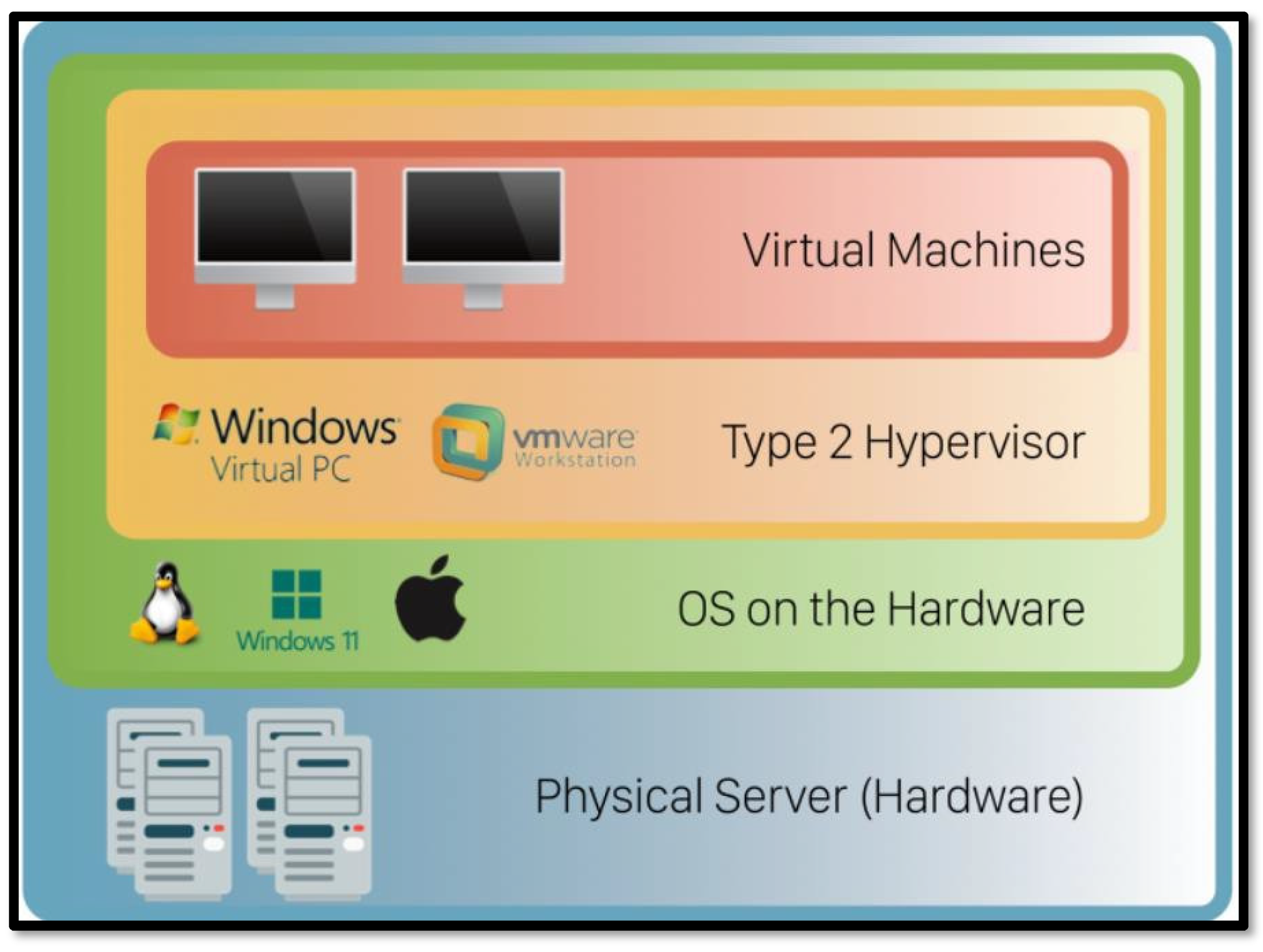
A Type-2 hypervisor, which runs on top of the host’s operating system and utilizes its drivers to communicate with the hardware, has a number of advantages that would be very helpful for NonOrthodox Apparel. First of all, it is rather easy to use. No additional software or physical devices are required; users can just install and configure a Type-2 hypervisor as an application on their system and virtually run a number of guest virtual machines. It is easy to install and set up; thus, it is convenient for the company. Another advantage is flexibility. Type-2 hypervisors are perfect for development, personal virtualization needs, and testing. They are very helpful when it is necessary to test new software or carry out some research projects. NonOrthodox Apparel can create several virtual instances on one physical device, establishing different environments to see how different applications will behave. They are also quite cost-effective since no extra hardware is needed to purchase; instead, one machine can run multiple virtual instances. Also, Type-2 hypervisors enable running many operating systems on a single desktop or laptop for further flexibility and efficiency in the company.
In Figure 5, Network virtualization offers huge gains in efficiency and flexibility to organizations by letting multiple virtual networks coexist on a single physical network. It enables businesses to better utilize their resources, scale up more effectively, and cut costs in the process. While network virtualization has proved a valuable tool for many, it is not a panacea, and there are some very real challenges and limitations that organizations should consider before adopting the technology. Probably the main obstacles regarding network virtualization concern the huge and extreme challenges during its implementation or management. Virtualization would invest deeply in infrastructure and software, as well as in expertise, considering that organizations may need special preparation to configure a virtual network environment in various important elements. After all, integrating with the existing system and process implementation could be far from easy and might even take up so much time, especially over the grounds of legacy infrastructure.
Another limitation can be the probable impact on performance. Though virtualization allows for efficient resource utilization, it may introduce latency and hence reduce network performance, especially when the underlying hardware is not sufficient to handle the additional load. Sometimes, network virtualization requires high-end equipment, increasing the cost and reducing its applicability for smaller organizations. Security is also one of the big concerns in network virtualization. This, in turn, made virtualized networks more vulnerable to some types of attacks, unauthorized access between the virtual networks, and breaches due to hypervisor vulnerabilities. Each of these could be prevented only through appropriate security protocols and monitoring mechanisms in place and thus may add more complexities to network administration. In conclusion, though network virtualization offers several benefits like efficiency, scalability, and cost-effectiveness, it is not one-size-fits-all. One has to be very cautious about issues with implementation, performance, and security. An organization has to assess its needs, resources, and infrastructure to see if network virtualization is appropriate for it. While the advantages may outweigh the limitations for some people, in other instances it may not be feasible or even required.
4.3. Detailed Issues and Limitations
Network virtualization provides a variety of benefits but at the same time, it brings several limitations and challenges an organization has to cope with. Among the key issues, one can point out performance overhead. Virtualization inserts an abstraction layer between hardware and operating systems that may lead to increased latency and lower performance. This is a particular problem in high-speed processing and real-time data access environments where even small delays can result in big impacts. Examples are real-time financial transaction systems, where even microseconds matter. Here, the communication overhead of the hypervisor adds latency that may negatively affect them.
Other challenges include virtualized environment management complexities. While centralization of network resources optimizes several processes, it adds to their complexity. The network administrators need to gain special skills to manage virtual settings proficiently. This problem scaling increases, as the management of large numbers of virtual machines and devices can become very clumsy and prone to human errors. For instance, it might be inconsistent to deploy and manage network policies on dozens of virtual machines without appropriate tools or expertise.
Other major concerns in virtualized environments are security risks. The hypervisor, which allows virtualization, becomes a very critical target of attacks. If compromised, it could allow attackers to access all hosted virtual machines-a kind of vulnerability known as “hyperjacking.” For example, an attack on the hypervisor could result in unauthorized access to all virtual servers on a physical machine, possibly leading to leakage of sensitive data from traditionally isolated network segments.
Other barriers include implementation costs. Although virtualization may save money in the long run by reducing how much hardware an organization needs, as well as using resources more efficiently, it has an expensive setup cost. This includes buying appropriate server hardware, software licensing of virtualization technologies, and training of IT staff. For example, the migration of an entire data center to a virtualization-supportive framework could demand sizeable upfront investments in new servers, software, and specialized staff training. Finally, when there is no full compatibility of legacy applications or systems with virtualized environments, compatibility issues may arise. This can be costly either to upgrade or replace legacy systems. For example, older CRM software might not work properly within a virtualized environment and therefore would need an upgrade that can be costly or a complete replacement of the system altogether. In other words, though network virtualization comes with many advantages, performance overhead, management complexity, security risks, implementation costs, and compatibility issues are only a few challenges that need to be considered by an organization before moving to a virtualized infrastructure. These aspects will influence the overall efficiency and viability of the adoption of network virtualization, and these businesses have to decide whether the advantages outweigh the limitations in their context.
5. Results and Discussion
The proposed research for implementing network virtualization was designed to address specific organizational challenges such as software compatibility, testing environments, and server reliability. The first step, Needs Assessment, identified that understanding an organization’s unique technical requirements, hardware, software infrastructure, and key priorities such as performance, cost, and security is essential for crafting a tailored virtualization strategy. The methodology was able to find a way out when MyTax Advisory encountered problems related to running its legacy tax management software. The fact that VMs can be set up using hypervisor technology in older operating systems assures compatibility without any need for an upgrade in the hardware or software installed, as noted by MyTax Advisory. It not only blunts the risk of disrupting ongoing operations but keeps the integrity of mission-critical business processes.
The subsequent step in Hypervisor Selection gave a great choice in choosing the right type: High-performance was for Type 1, and Test and Development were for Type 2. As such, a Type 1 hypervisor, such as VMware ESXi, is considered valuable for maintaining the production environments at MyTax Advisory. This was done to meet the requirements of direct access to hardware and enhanced performance, which were crucial for everyday operations at the firm. However, Type 2 hypervisors proved to be more applicable for SoftTech Inc. in the case of integrating systems of offshore developers due to increased flexibility and ease of installation for test purposes.
The steps on Virtual Environment Setup, Resource Optimization, and Testing and Validation proved that assurance of the virtual environment to meet the technical standards of the organization is paramount. The implementation of snapshots and backups allowed MyTax Advisory to revert virtual machines to previous states, ensuring the avoidance of any possible software vulnerabilities opening up during testing. Stress tests and benchmark evaluations were performed in order to verify that virtualized systems performed to standard, with particular focus on validating compatibility with legacy applications.
An important discovery in the process was security integration, which is very crucial in the methodology. By incorporating vigorous security measures, like secure boot, encryption for VMs, and network isolation, the methodology provided for any probable security risks thrown up by network virtualization. MyTax Advisory, for example, tested new software in isolated VMs so that any potential security breaches wouldn’t affect their main network. Moreover, the emphasis on periodic updating of hypervisors and tracking of vulnerabilities meant that the virtualized environment was guarded against even developing threats.
The Documentation and Training phase emphasized strongly that appropriate documentation of the setup, configuration, and best practices is a key to on-going management. Proper training to IT staff could easily manage the MyTax Advisory, SoftTech Inc. hypervisor technology with much minimal complexity and human errors during daily operations. In addition to this, there was the performance review that came with this methodology to identify any bottleneck through performance improvement and reconfiguration of resources by comments coming from either the users or IT staff to optimize resource usage.
It has to do with system performance, compatibility with the existing infrastructure, and cost consideration in choosing the appropriate hypervisor. Each choice between Type 1 and Type 2 hypervisors would depend on what the organization wanted to accomplish. Type 1 hypervisors have been chosen for production since it is fast and has direct access to hardware, while Type 2 was selected for testing since it has ease of installation and flexibility.
In addition, the methodology covered server consolidation and desktop virtualization, particularly for companies like NonOrthodox Apparel. Such consolidations of underutilized servers could save hardware costs, reduce energy consumption, and allow scalability. Additionally, it allowed NonOrthodox Apparel to centralize applications and desktops, thus enabling remote work and improving overall IT management.
Not everything, however, is so rosy with network virtualization. The most important limitations found in the course of this methodology are performance overhead, management complexity, and security risks. While virtualization optimizes resource utilization, it might introduce latency-insensitive environments that require high-speed processing. Besides, the management of a huge number of virtual machines is cumbersome and prone to human errors, especially without expertise. Security concerns also continue to be one of the main challenges, since the virtualized network is open to attacks like hyperjacking, whereby an intruder compromises the hypervisor and thereby obtains unauthorized access to all virtual machines.
Another limitation includes the initial implementation cost. Though network virtualization is likely to save money in the long run by reducing hardware requirements, the initial investments needed for buying servers, licensing of software, and training of the IT staff are usually substantial. In addition, compatibility issues with legacy systems can emerge that demand expensive upgrades or even replacement of older software unable to work effectively in virtualized environments. This methodology, after all, has illustrated a step-by-step implementation of network virtualization in order to meet organizational needs, optimize resources, and maintain security. On the other side, it can be assumed that network virtualization itself is not one-size-fits-all. One must be circumspect about the performance, complexity, security, and cost-related challenges linked with it. Every organization has to evaluate its needs and resources first before considering whether its advantages will outweigh the limitations of network virtualization. For most organizations, either because of high-performance requirements or lack of deep IT expertise, network virtualization is not an option. But for many, efficiency, scalability, and cost savings make it an attractive proposition.
6. Conclusion
Thus, the proposed methodology for implementing virtualization is a well-structured way of addressing the needs and challenges in organizations. In this regard, while evaluating organizational needs, selecting an appropriate hypervisor, and setting up virtual environments suitable for the company needs, will allow organizations to utilize resources effectively, enhance security, and still be able to preserve flexibility. Some key activities involved in the process include testing, validation, integration of security, and performance reviews to ensure that the solution meets both operational and security standards. However, despite these advantages of virtualization, an organization has to be cautious while going through the challenges and limitations associated with the concept. Among the performance overheads, management complexity, security risks, high costs of implementation, and incompatibility with legacy systems might balance off the advantages. Implementation of network virtualization should be done based on comprehensive consideration of organization-specific needs, resources, and infrastructure. In some scenarios, benefits might predominate over the limitations, while in other scenarios, this is not feasible because of complexity and financial obligations. In the end, an effective virtualization strategy can return very good cost savings, optimization of resources, and scalability; however, it requires careful planning and consideration to make it successful and reduce some risks.
References
- Uzochukwu-Theophilus, O. R. I. EFFICIENT DATA MANAGEMENT IN CLOUD STORAGE SYSTEMS CASE STUDY: ULK. Doctoral dissertation, ULK, 2024. [Google Scholar]
- Koloko, C. Assessing the Use of Public Cloud Computing in Developing Countries: A Case Study of the Malawian Telecommunications Industry. 2023. [Google Scholar]
- Plale, B. A.; Dickson, E.; Kouper, I.; Liyanage, S. H.; Ma, Y.; McDonald, R. H.; …; Withana, S. Safe open science for restricted data. Data and Information Management 2019, 3(1), 50–60. [Google Scholar] [CrossRef]
- Sangfor Technologies. What is a hypervisor? A key element of server virtualization. Sangfor Technologies. n.d. Retrieved July 10, 2024 from https://www.sangfor.com/glossary/cloud-and-infrastructure/what-is-hypervisor-in-server-virtualization.
- Naveen Kumar, K. R.; Priya, V.; Rachana, G. S. An overview of cloud computing for data-driven intelligent systems. Data-Driven Systems and Intelligent Applications 2024, 72. [Google Scholar]
- Spiceworks. What is a hypervisor? Definition, types, and software. Spiceworks. n.d. Retrieved from https://www.spiceworks.com/tech/virtualization/articles/what-is-a-hypervisor/.
- Lee, B. Hyper-V backup and disaster recovery features. BDRSuite. 2023. Retrieved July 9, 2024, from https://www.bdrsuite.com/blog/hyper-v-backup-and-disaster-recovery-features/.
- Dogra, V.; Singh, A.; Verma, S.; Kavita; Jhanjhi, N. Z.; Talib, M. N. Analyzing DistilBERT for sentiment classification of banking financial news. In Intelligent computing and innovation on data science; Peng, S. L., Hsieh, S. Y., Gopalakrishnan, S., Duraisamy, B., Eds.; Springer, 2021; Vol. 248, pp. 665–675. [Google Scholar] [CrossRef]
- Gopi, R.; Sathiyamoorthi, V.; Selvakumar, S.; et al. Enhanced method of ANN based model for detection of DDoS attacks on multimedia Internet of Things. Multimedia Tools and Applications 2022, 81(36), 26739–26757. [Google Scholar] [CrossRef]
- Chesti, I. A.; Humayun, M.; Sama, N. U.; Jhanjhi, N. Z. Evolution, mitigation, and prevention of ransomware. In 2020 2nd International Conference on Computer and Information Sciences (ICCIS); IEEE, October 2020; pp. 1–6. [Google Scholar]
- Alkinani, M. H.; Almazroi, A. A.; Jhanjhi, N. Z.; Khan, N. A. 5G and IoT based reporting and accident detection (RAD) system to deliver first aid box using unmanned aerial vehicle. Sensors 2021, 21(20), 6905. [Google Scholar] [CrossRef] [PubMed]
- Babbar, H.; Rani, S.; Masud, M.; Verma, S.; Anand, D.; Jhanjhi, N. Load balancing algorithm for migrating switches in software-defined vehicular networks. Computational Materials and Continua 2021, 67(1), 1301–1316. [Google Scholar] [CrossRef]
- .
- Daschott. Network isolation and security. Microsoft Learn. 2023. Retrieved July 9, 2024, from https://learn.microsoft.com/en-us/virtualization/windowscontainers/container-networking/network-isolation-security.
- SureLock Technology. Choosing the right virtualization platform: Hyper-V vs. VMware. SureLock Technology. n.d. Retrieved July 9, 2024, from https://surelocktechnology.com/blog/choosing-the-right-virtualization-platform-hyper-v-vs-vmware.
- Saeed, S.; Abdullah, A.; Jhanjhi, N. Z.; Naqvi, M.; Nayyar, A. New techniques for efficiently k-NN algorithm for brain tumor detection. Multimedia Tools and Applications 2022, 81(13), 18595–18616. [Google Scholar] [CrossRef]
- Saeed, S. Improved hybrid K-nearest neighbors’ techniques in segmentation of low-grade tumor and cerebrospinal fluid. 2024. [Google Scholar]
- Elbelgehy, A. G. A. Performance evaluation of virtual cloud labs using hypervisor and container. Indian Journal of Science and Technology 2020, 13(48), 4646–4653. [Google Scholar] [CrossRef]
- XenServer. Hypervisor: Definition, types, and benefits. XenServer. n.d. Retrieved from https://www.xenserver.com/what-is-a-hypervisor.
- Singh, T.; Mano, P. J.; Selvam, K. Emerging Trends in Data Engineering: amazon web services. 2020. [Google Scholar]
- Hammad, Madhuri. Difference between cloud computing and traditional computing. GeeksforGeeks. 2021. Retrieved from https://www.geeksforgeeks.org/difference-between-cloud-computing-and-traditional-computing/.
- Mary Ramya Poovizhi, J.; Devi, R. Performance Analysis of Cloud Hypervisor Using Network Package Workloads in Virtualization. Conversational Artificial Intelligence 2024, 185–198. [Google Scholar]
- VMware. What is desktop virtualization? VMware Glossary. 2022. Retrieved from https://www.vmware.com/topics/glossary/content/desktop-virtualization.html.
- Carroll, C. What is desktop virtualization? TechZone Omnissa. 2023. Retrieved July 9, 2024, from https://techzone.omnissa.com/blog/what-desktop-virtualization.
- Liquid Web. A deep dive into the benefits of virtualization. Liquid Web. 2024. Retrieved from https://www.liquidweb.com/blog/benefits-of-virtualization/.
- VMware. Server virtualization Server consolidation. VMware. 2020. Retrieved from https://www.vmware.com/solutions/consolidation.html.
- Saeed, S.; Abdullah, A. Hybrid graph cut hidden Markov model of K-mean cluster technique. CMC-Computers, Materials & Continua 2022, 1–15. [Google Scholar]
- Saeed, S.; Haron, H. Improved correlation matrix of discrete Fourier transformation (CM-DFT) technique for finding the missing values of MRI images. Mathematical Biosciences and Engineering 2021, 1–22. [Google Scholar]
- Saeed, S. Implementation of failure enterprise systems in an organizational perspective framework. International Journal of Advanced Computer Science and Applications 2017, 8(5), 54–63. [Google Scholar] [CrossRef]
- Web, Liquid. Server consolidation in cloud computing: An in-depth analysis. Liquid Web. 2024. Retrieved from https://www.liquidweb.com/blog/server-consolidation-in-cloud-computing/.
- Kostic, N. What is server consolidation? phoenixNAP Blog. 2023. Retrieved from https://phoenixnap.com/blog/server-consolidation.
- Singh, T.; Mano, P. J.; Selvam, K. Emerging Trends in Data Engineering: amazon web services. 2020. [Google Scholar]
- Freet, D.; Agrawal, R.; Walker, J. J.; Badr, Y. Open source cloud management platforms and hypervisor technologies: A review and comparison. SoutheastCon 2016 2016, 1–8. [Google Scholar]
- Simic, S. How to implement validation for RESTful services with Spring. phoenixNAP Knowledge Base. 2019. Retrieved from https://phoenixnap.com/kb/what-is-hypervisor-type-1-2.
- StarWind Blog. Type 1 vs. Type 2 hypervisor: What is the difference? StarWind Blog. 2023. Retrieved from https://www.starwindsoftware.com/blog/type-1-vs-type-2-hypervisor-what-is-the-difference.
- Rosenblum, M.; Garfinkel, T. Virtual machine monitors: Current technology and future trends. IEEE Computer 2005, 38(5), 39–47. [Google Scholar] [CrossRef]
- Goldberg, R. P. Survey of virtual machine research. IEEE Computer Magazine 1974, 7(6), 34–45. [Google Scholar] [CrossRef]
- Perez-Botero, D.; Szefer, J.; Lee, R. B. Characterizing hypervisor vulnerabilities in cloud computing servers. In Proceedings of the International Workshop on Security in Cloud Computing; 2013; pp. 3–10. [Google Scholar]
- Armstrong, D. J. Management challenges in creating and maintaining virtualization. Journal of Network and Computer Applications 2010, 33(3), 375–385. [Google Scholar]
- Jagatheesan, A.; Shanthi, N. An overview of virtualization technology. Network Protocols and Algorithms 2015, 7(4), 59–77. [Google Scholar]
- Turner, J.; Moore, T. Network performance overhead introduced by virtualization technologies. Journal of Computer Networks 2012, 56(1), 32–42. [Google Scholar]
- Vijayalakshmi, B.; Ramar, K.; Jhanjhi, N. Z.; Verma, S.; Kaliappan, M.; Vijayalakshmi, K.; …; Ghosh, U. An attention-based deep learning model for traffic flow prediction using spatiotemporal features towards sustainable smart city. International Journal of Communication Systems 2021, 34(3), e4609. [Google Scholar] [CrossRef]
- Khan, N. A.; Jhanjhi, N. Z.; Brohi, S. N.; Nayyar, A. Chapter Three-Emerging use of UAV’s: secure communication protocol issues and challenges; Editor (s): Fadi Al-Turjman, Drones in Smart-Cities; 2020. [Google Scholar]
- Humayun, M.; Jhanjhi, N. Z.; Alsayat, A.; Ponnusamy, V. Internet of things and ransomware: Evolution, mitigation and prevention. Egyptian Informatics Journal 2021, 22(1), 105–117. [Google Scholar] [CrossRef]
- Muzafar, S. Energy harvesting models and techniques for green IoT: A review. Role of IoT in Green Energy Systems 2021, 117–143. [Google Scholar]
- Soobia, S.; Afnizanfaizal, A.; Jhanjhi, N. Z. Hybrid graph cut hidden Markov model of k-mean cluster technique. CMC-Computers, Materials & Continua 2022, 72(1), 1–15. [Google Scholar]
- Humayun, M.; Sujatha, R.; Almuayqil, S. N.; Jhanjhi, N. Z. A transfer learning approach with a convolutional neural network for the classification of lung carcinoma. In Healthcare; MDPI, June 2022; Vol. 10, No. 6, p. 1058. [Google Scholar]
- Zaman, N.; Ghazanfar, M. A.; Anwar, M.; Lee, S. W.; Qazi, N.; Karimi, A.; Javed, A. Stock market prediction based on machine learning and social sentiment analysis. In Authorea Preprints; 2023. [Google Scholar]
- Sindiramutty, S. R.; Jhanjhi, N. Z.; Tan, C. E.; Lau, S. P.; Muniandy, L.; Gharib, A. H.; …; Murugesan, R. K. Industry 4.0: Future Trends and Research Directions. Convergence of Industry 4.0 and Supply Chain Sustainability 2024, 342–405. [Google Scholar]
- Srinivasan, K.; Garg, L.; Chen, B. Y.; Alaboudi, A. A.; Jhanjhi, N. Z.; Chang, C. T.; …; Deepa, N. Expert System for Stable Power Generation Prediction in Microbial Fuel Cell. Intelligent Automation & Soft Computing 2021, 30(1). [Google Scholar]
Figure 1.
Hypervisor types.
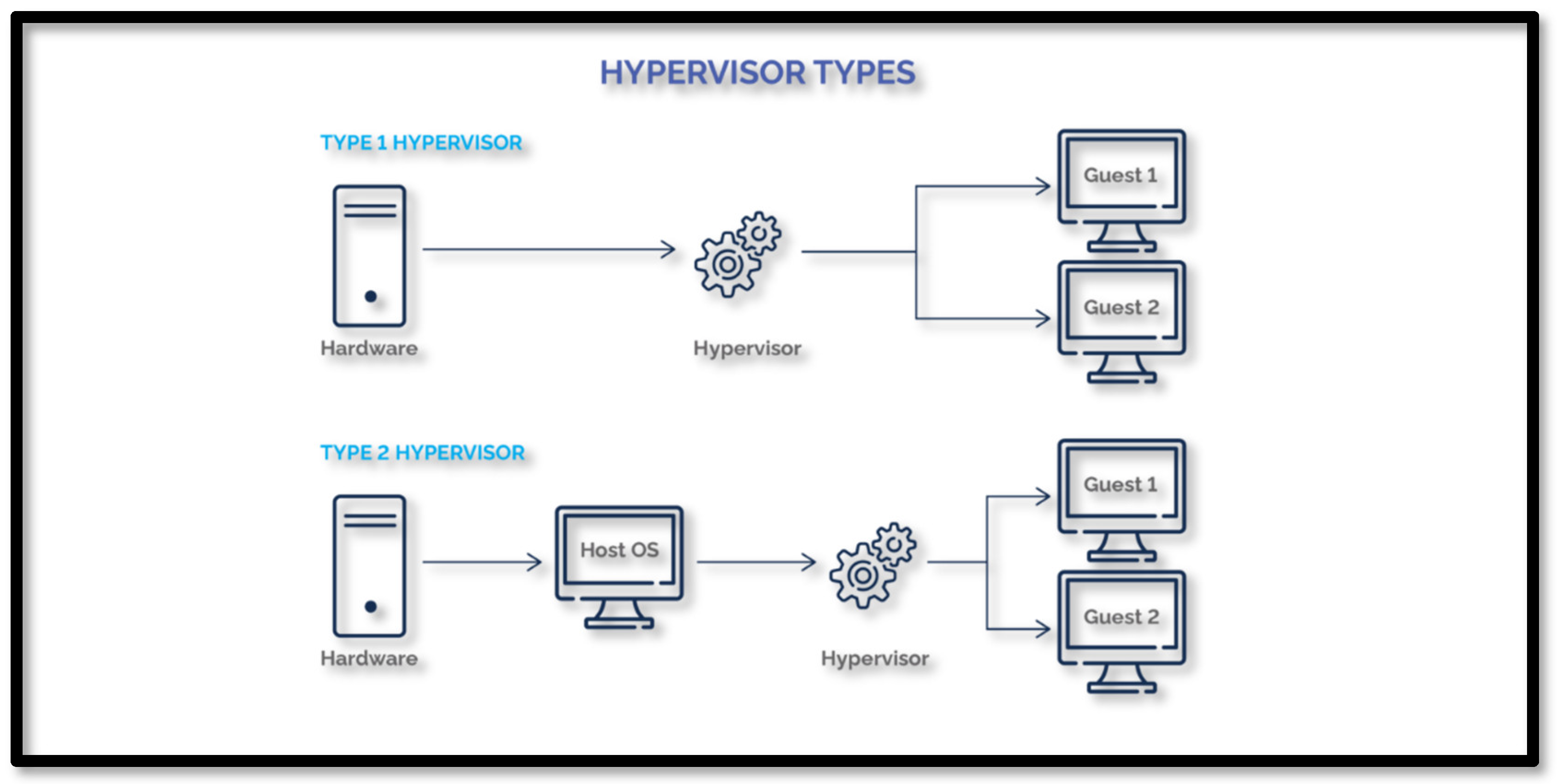
Figure 2.
Server Consolidation through Virtualization.
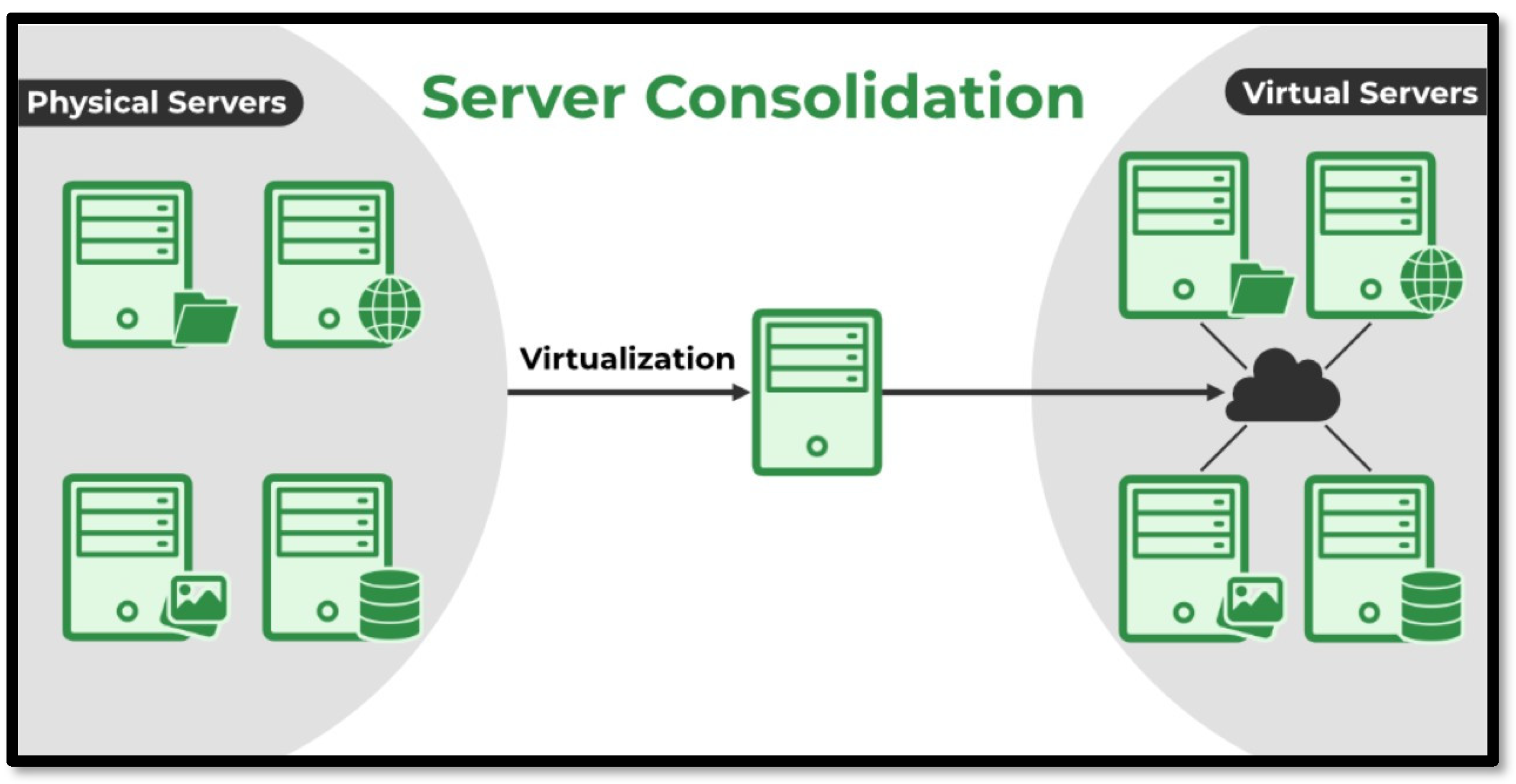
Figure 3.
Type-1 and Type-2 Hypervisors.
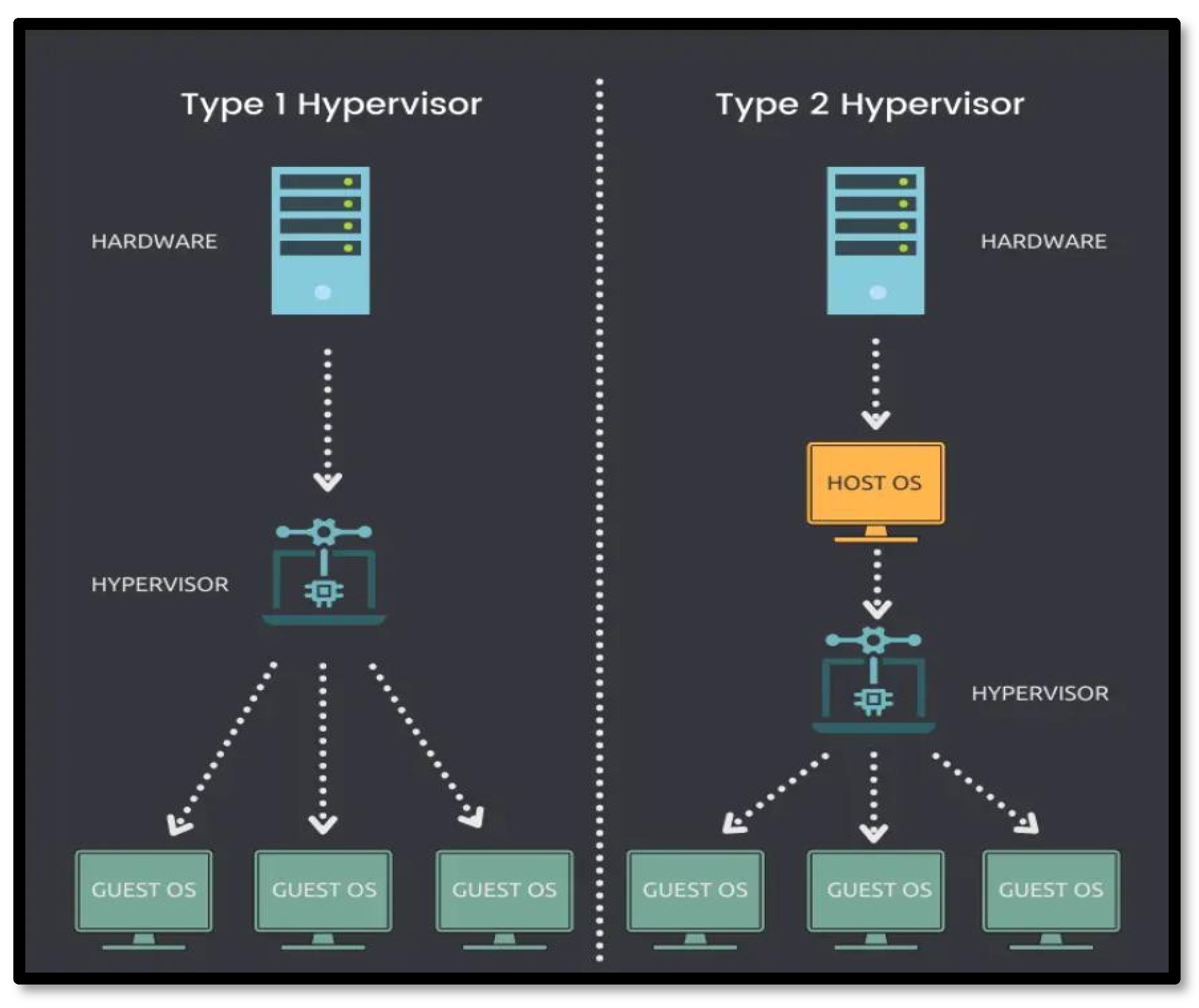
Figure 4.
Virtual Desktop Infrastructure.
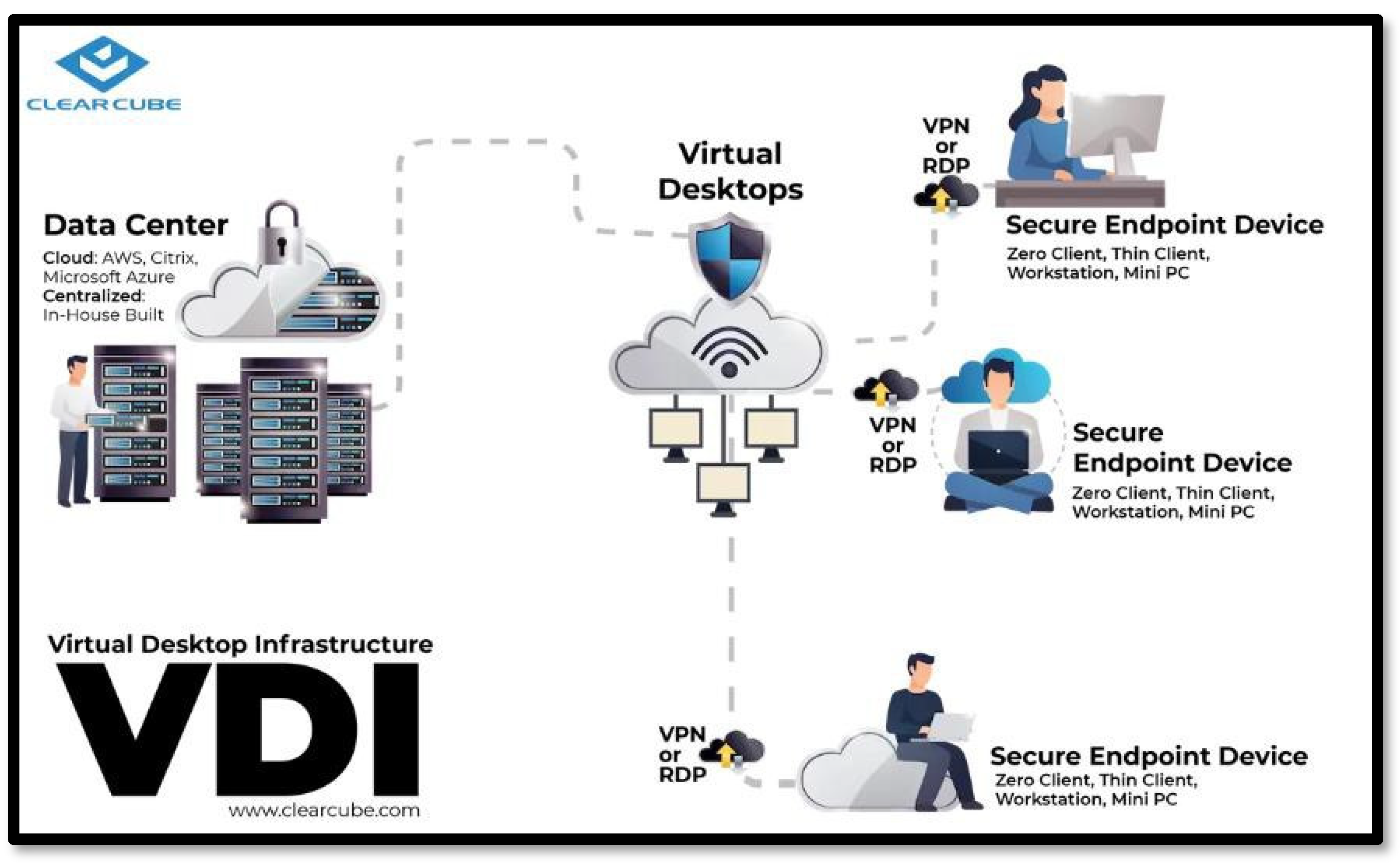
Figure 5.
Type-2 Hypervisor.
Disclaimer/Publisher’s Note: The statements, opinions and data contained in all publications are solely those of the individual author(s) and contributor(s) and not of MDPI and/or the editor(s). MDPI and/or the editor(s) disclaim responsibility for any injury to people or property resulting from any ideas, methods, instructions or products referred to in the content. |
© 2025 by the authors. Licensee MDPI, Basel, Switzerland. This article is an open access article distributed under the terms and conditions of the Creative Commons Attribution (CC BY) license (http://creativecommons.org/licenses/by/4.0/).
Copyright: This open access article is published under a Creative Commons CC BY 4.0 license, which permit the free download, distribution, and reuse, provided that the author and preprint are cited in any reuse.


