

Submitted:
11 November 2024
Posted:
12 November 2024
You are already at the latest version
Abstract
The outline of the Hybrid Automation Framework is made of the main principles of test automation, which are test independence, idempotency, and clarity that are very fundamental when building a robust testing suite. Moreover, the framework has a modular structure and a Page Object Model (POM) design pattern to facilitate flexibility and maintainability across disparate testing environments. The basic elements like the Object Repository, Name Mapping, Functions Library, and Data Manager are the nucleus of the framework, which allows smooth test management and proper execution. The framework's architecture is designed to allow for automation that can be more dynamically handled across different interfaces, such as the Command Line Interface (CLI), the Application Programming Interface (API), and the Graphical User Interface (GUI). Logging and reporting are the basic functions that help failure analysis become effective and the reporting system can be adjusted to determine how the test report is distributed to the stakeholders. This Hybrid Automation Framework, in the end, adds the aspect of full automation testing that permits the testers to carry out the critically important points, thus making it consistent while at the same time cutting down on the manual intervention. The proposed framework is expected to deliver the software test automation system that is scalable, flexible, and performance-driven, which is the methodology suitable for every organization (Halani et al., 2021).
Keywords:
Hybrid Automation Framework
; Automation Testing
; Page Object Model (POM)
; Modular Structure
; Application Programming Interface (API)
; Graphical User Interface (GUI)
; Logging and Reporting
; Failure Analysis
; Scalable Automation
; Flexible Automation
; Performance-Driven Testing
; Software Quality
1. Introduction
A combination of two or more frameworks approaches makes up a Hybrid Framework. In this thesis we are adopting same technique, pulling the strengths of different frameworks and trying to mitigate their weaknesses. In the below section hybrid approach is described. This document intends to explain the details and specifications of the Hybrid framework to be used for any Product Suite. A Test Automation Framework is a set of assumptions, concepts and best practices that provide support for automated software testing. The Framework is an attempt to simplify and speed-up scripting by reusing functionalities. The goal is to provide a complete end-to-end automation solution for testing the AUT. (Jain, 2022)
The document has the framework architectural diagram and its required components / layers. The framework will be designed specifically to cover the Product components and will contain the features to automate product faster. The details of components are covered below. Automated Testing can simply be considered as a solution to decrease costs in software testing and for achieving high quality in software products. Just like any other matter of life, in test automation also, an initial effort is required in order to gain advantages from it. These goals can be achieved if concentration is put on the implementation of automation project through best practices. The first and second phase of automation is quite sensitive and requires more human input for developing a mature process or we can say that automation testing requires care in beginning. The most important things which initially require attention are identification of test cases to be automated, selection/development of automation tool and modes of automated testing. If adequate care is applied on the initial phases of test automation and best practices are followed then consequences will be nothing less than time saving, high efficiency flexibility and usability. Automation Testing is not an alternative to manual testing. (White, 2023)
2. Automation Testing Principles
Before writing the automation scripts we need to consider the following:
- (a)
- Test cases are pre-written and not ambiguous.
Means that the test cases clearly show the exact functionality of test. And test cases did not give several meanings, before start writing automation scripts we need to consider the test case. If test case is not written we need to write test cases before starting automation also the test cases should be crystal clear and should not give several meanings.
- (b)
- Test cases are autonomous
Means that each test case should not depend on the other test cases. Every test case can be run autonomously.
- (c)
- Each test case can run independently.
Each test case is independent means that pre requsites should also cover in all the test cases and test case reverse all the changes performed during testing the object or application.
- (d)
- Test cases may not cover end to end scenarios.
Means that the test case document should cover all end to end scenerios. Nothing should remain after completion of test cases document. It also gives the meaning of covering all scenario by opening the first door first and closing the first door at last.
- (e)
- Keep test tests short
Test cases should be written preciously and consistently. Each test case is specific and cover more details in shorter words,
- (f)
- Each test case can cover only one functionality.
Means that every test case is designed to cover only one functionalities. We may have happy scenarios in covering more than one functionalities but in writing test cases we should acknowledge this principle, if we have more functionalities to be cover then we need to redesign the test cases or we can add more test cases.
- (g)
- Test cases are idempotent
Means that the test case may call as many times as required. If we want to call one test case or number of test cases for example 1000 times our test should be flexible enough to maintain this.
- (h)
- Minimize incident Test coverage.
A basic rule of incident prevention and response is to plan for the worst and hope for the best. For overcoming external incident we need to have dedicated server environment to minimize the test external event with only necessary software installed.
- (i)
- Automation testing tool selected via proper research.
Several companies uses different automation testing tools but you need to analyze your company requirements or your product first. A proper POC is required to for tool selection and automation. The rule of thumb is that before selecting the tool look at the coverage and help available online. Or some training material. Than go for it.
- (j)
- Coding standards should define for script writing.
Coding standards are necessary for analyzing and optimal code. You need to define coding standards it also depends on the language you have selected for writing scripts
Some practitioners believe that manual testing can be done as pre-requisite of automation testing. What we actually get through automated testing has been explored by many researchers, whereas this papers aims to present a solution of this common query ‘How to gain benefits from Automated Testing.’(Thummalapenta et al., 2012)
2.1. When to Automate?
A lot of work is to be done before you actually begin test automation. It must be guaranteed that following things have been verified before we jump into test automation:
2.2. Architecture and Flow
Automation framework should be designed to maintain test scripts and minimize efforts. Each framework should have following 3 properties. These are basically properties of framework.
- Reusability
- Maintainability
- Flexibility
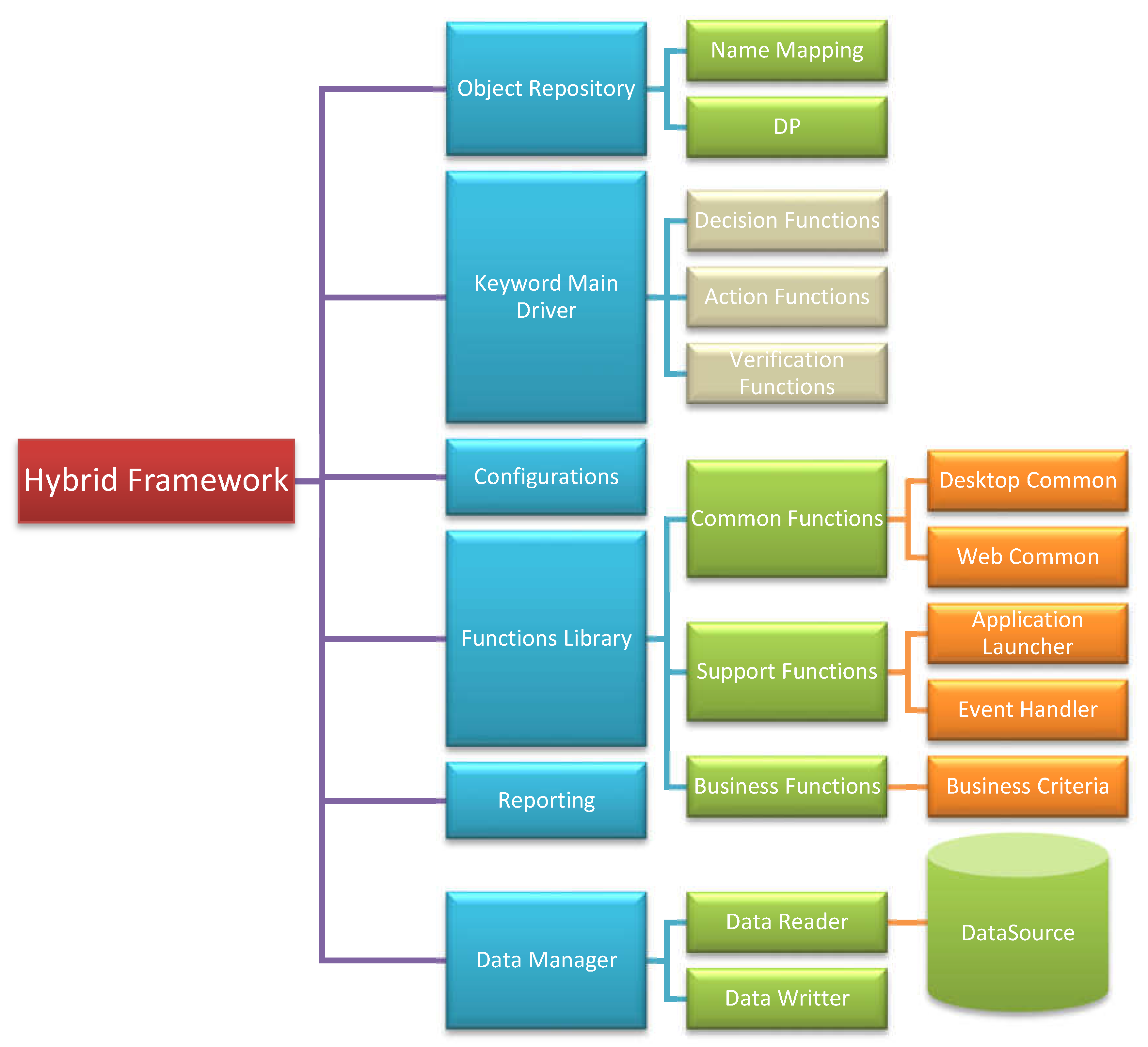
2.3. Architecture Diagram
Hybrid automation testing framework can be shown as follows:
Figure 1.
Architecture diagram of Hybrid Automation Testing Framework.
2.4. Control Flow of Hybrid Automation Testing Framework
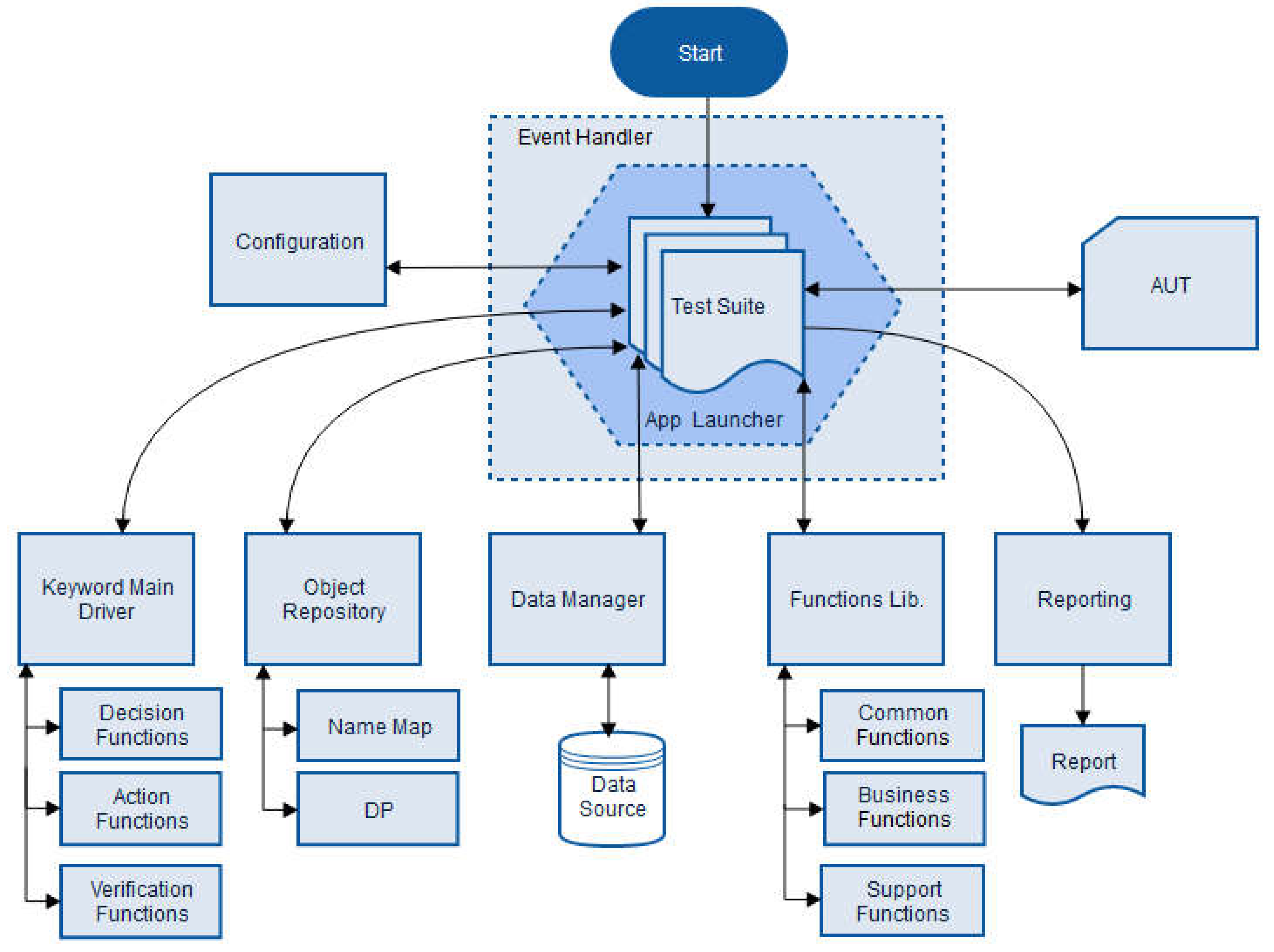
The below diagram describes the flow of control among different components. Execution starts with batch, events are triggered with execution of each test where Application Launcher checks the status of AUT. The configuration setting are loaded for the test and the execution of steps are enquired which use different components like Data Manager, Functions Lib, Object Repository to perform action on AUT and report the logs.
Figure 2.
Control Flow of Hybrid Automation Framework.
2.5. Object Repository
Object Repository is a collection of objects. OR saves objects with their properties in a container. OR can be maintain inside the testing application, or via some external resource like in excel or in DB
2.6. Name Mapping
In testing application, Name Mapping objects repository is a tree style container of AUT objects. It has two inner containers. It will return the complete hierarchy of the object i-e from the root (parent) to the object. This is relatively faster approach but sometimes this approach will not work if the hierarchy is changed this approach require remapping of all the objects for example if parent object changed the hierarchy of all the objects also changed. To avoid this we will use DP.
2.7. Mapped objects
Mapped objects allow us to map/store the AUT objects with their original hierarchy.
2.8. Aliases
Aliases allows us to reduce the original complex hierarchy. Objects in the Mapped Object repository has also a user defined names (aliases) that are used in the tests to make them more readable. We will map the complete hierarchy in some shorter name for example the hierarchy Browser(“Chrome”).Panal(0).abc.axc.xyz.username can be mapped into Aliases.username
In our framework only static objects will be in Name mapping
2.9. Descriptive Programming
Application objects can be accessed (even if they are not present in object repository) by describing properties directly in a script. This technique is called ‘Descriptive Programming’. DP normally comes into play when objects in the application are very dynamic in nature, and so will be in our framework or we are working on waterfall model and continuous integration testing should be the main requirement.
2.10. Functions Library
Functions Library facilitates users by providing different functions. This library is basically divided into three parts:
2.11. Common Functions
Common functions provide facility to the user to get the common functionality in one place and it increases reusability and maintainability of the code. Basically we are will make our frame work maintainable by using modular approach. In this approach we will divide main flow in several modules dependent on AUT. For example we can divide Common functionalities to base common, business common and several other dependent of the AUT.

Table 1.
Base Common Functions.
| Name | Description |
|---|---|
| SelectDropDownItem | It’s a function which can be used to select item from drop down List. Usage: SelectDropDownItem(Object,Val) |
| GetSelectedItemValue | It’s a function which can be used to get selected item from drop down list. Usage: GetSelectedItemValue (Object) |
| SetText | It’s a function which can be used to set text into required object. Usage: SetText(Object,Val) |
| GetText | It’s a function which can be used to get text from required object. Usage: GetText(Object) |
| FindRow | It’s a function which can be used to find row number from Grid/Table. Usage: FindRow(Object,ColName,Val) |
| ClickCell | It’s a function which can be used to click on specific grid cell. Usage: ClickCell(Object,RowID,ColName,Val) |
| DoubleClickCell | It’s a function which can be used to double click on grid cell. Usage: DoubleClickCell(Object,RowID,ColName,Val) |
| ClickTab | It’s a function which can be used to click on tab control. Usage: ClickTab(Object,Item) |
| ClickRibbonButton | It’s a function which can be used to click on ribbon. Usage: ClickRibbonButton(ButtonName) |
| ClickRibbonMenu | It’s a function which can be used to click on ribbon menu item. Usage: ClickRibbonMenu(Object,MenuItem) |
| ClickToolBarButton | It’s a function which can be used to click on tool bar button. Usage: ClickToolBarButton(Object) |
| clickMsgPopups | It’s a function which can be used to click on MsgPopups button. Usage: ClickMsgPopups(Object,buttonname) |
| getRowCount | It’s a function which can be used to get page row count from grid. Usage: GetRowCount (Object) |
| getCellValue | It’s a function which can be used to get cell value from grid. Usage: getCellValue(Grid,RowIndex,ColIndex) |
| getColIndexByName | It’s a function which can be used to get column index by its name from grid Usage: getColIndexByName(Grid,colName) |
| getColumnCount | It’s a function which can be used to get column count from grid Usage: getColumnCount (Grid) |
| getDropDownValueInGrid | It’s a function which can be used to get drop down value from grid Usage: getDropDownValueInGrid (Grid,rowIndex,ColName) |
| selectDropDownValueInGrid | It’s a function which can be used to select drop down value from grid Usage: selectDropDownValueInGrid (Grid,rowIndex,ColName,Value) |
2.12. Support Functions
These libs facilitates other framework libs by providing common functionalities. Like events required for initialization of different libs. Support functions are divided into sub libs
2.13. Events
An event is a specific action that occurs during the test run. There are different events that can facilitate user to handle different situations.
Table 2.
Event Handler Functions.
| Name | Description |
|---|---|
| OnLogMessage | It occurs when an informative message is posted to the test log. Usage: GeneralEvents_OnLogMessage(Sender, LogParams) |
| OnLogCheckpoint | It occurs when a checkpoint message is posted to the test log. Usage: GeneralEvents_OnLogCheckpoint(Sender, LogParams) |
| OnLogError | It occurs when an error message is posted to the test log. Usage: GeneralEvents_OnLogError(Sender, LogParams) |
| OnLogEvent | It occurs when an event notification is posted to the test log. Usage: GeneralEvents_OnLogEvent(Sender, LogParams) |
| OnLogWarning | It occurs when a warning message is posted to the test log. Usage: GeneralEvents_OnLogWarning(Sender, LogParams) |
| OnStartTest | It occurs when TestComplete starts a test run. Usage: GeneralEvents_OnStartTest(Sender) |
| OnStopTest | It occurs when a test run is over. Usage: GeneralEvents_OnStopTest(Sender) |
2.14. Application Launcher
Application launcher starts the application (AUT) based on the status of the application. It checks if the application is already running or not, also checks the network and database availability.
Table 3.
Application Launcher Common Functions.
| Name | Description |
|---|---|
| Application Launcher | It’s a function that starts the application, checks the availability of network and the Database. Usage: ApplicationLauncher(Process Name) |
| Network Availability | It’s a function which checks the Network Availability. Usage: NetworkAvailability() |
| Database Availability | This function is use to check Database Availability Usage: Function DatabaseAvailability() |
2.15. Business Functions
Business Functions will be used to facilitate the users by providing core application functionalities in the form of functions. These business functions will increase reusability and provide ease to perform complex business operations like calculations. This functions will grow with the passage of time.
2.16. Data Manager
Data manager is used to manipulate the data. Different operations will be performed through data manager like read and write.
Table 4.
Data Manager Common Functions.
| Name | Description |
|---|---|
| GetDriver | This function will be used to create a driver Usage: GetDriverInstance(DataSourceType,DataSourceName) |
| SetSourceData | This function will set a data source and filter can also be applied on that data source. Usage: SetSourceData(DriverObj,DataFilter,DataFilterColumn) |
| GetItemValue | This function will get data from a particular cell of Recordset. Usage: GetItemValue(RecordSet, ColumnName, RowId) |
| GetRowCount | This function will return the number of rows of RecordSet. Usage: GetRowCount(RecordSet) |
| GetColumnCount | This function will return the number of columns of RecordSet. Usage: GetColumnCount(RecordSet) |
| GetItemRowIndex | This function will return the row number of RecordSet. Usage: GetItemRowIndex(RecordSet,ColumnName,Value) |
| GetColumnIndex | This function will return the column number of RecordSet. Usage: GetColumnIndex(RecordSet,ColumnName) |
| DataWriter | This function will write the data in data source. Usage: DataWriter (DataSourceType, DataSourceName, RowId, ColumnName, Value, Appendmode) |
2.17. Decision Functions
Decision functions are used to decide which part of code should execute and what are the bases of execution, following decision functions are implemented in automation framework
Table 5.
Decision Common Functions.
| Name | Description |
|---|---|
| EvaluateObjectType (Decision) | It is used to decide the execution based on the ObjectType Keywords. Usage: fnSet (object, Action, Data) Note: Few functions will be developed such as fnClick, fnVerifyValue, fnVerifyExists etc |
| EvaluateAction (Decision) | It is used to decide the execution based on the Action Keywords. Usage: EvaluateAction (object, Action, Data) |
2.18. Action Functions
Action Functions is a set of functions/methods providing the ability to perform the required action/activity
Table 6.
Action Common Functions.
| Name | Description |
|---|---|
| FnTextBox_Set | It provides the ability to perform the required action/activity e.g. Textbox Set etc. It is the actual implementation of performing the actions. Usage: FnTextBox_Set (object, Data) |
| FnComboBox_Set | It provides the ability to perform the required action/activity e.g, Combobox Set etc. It is the actual implementation of performing the actions. Usage: FnComboBox_Set (object, Data) |
2.19. Verification Functions
Verification functions is a set of functions providing the ability to perform the required verifications.
Table 7.
Verification Common Functions.
| Name | Description |
|---|---|
| FnVerifyValue | It provides the ability to perform the required verifications e.g. VerifyValue etc. It is the actual implementation of performing the verifications. Usage: FnVerifyValue (object, Data) |
| FnVerifyExists | It provides the ability to perform the required verifications e.g. VerifyExists etc. It is the actual implementation of performing the verifications. Usage: FnVerifyExists (object, Data) |
| FnVerifyState | It provides the ability to perform the required verifications e.g. VerifyState etc. It is the actual implementation of performing the verifications. Usage: FnVerifyState (object, Data) |
2.20. Configuration
Configurations facilitates to declare and initialize variables necessary for different setups like paths, folder names etc. Configuration file is the start-up file which automation framework loaded automatically at startup and set their environment variables and several paths i-e database path, data files path, opject repository paths etc.
3. Characteristics of Hybrid Automation Framework
3.1. Introduction to Hybrid Automation Testing Framework
Automation framework should be designed to maintain test scripts and minimize efforts. Each framework should have following 3 properties
- Reusability
- Maintainability
- Flexibility
Our hybrid approach have few more:
- Adoptability,
- Hybrid (Adopt the good things of other frameworks and remove the limitations of other frame work )
3.2. Reusability
Reusability can be achieved with common functions. The formula for writing common function is simple. If you want to write code lines more than one you need to make a common functions Scripts Management “App Common functionalities” are those that are the same in whole application for example click on Title Bar button from top of the application is common function we use it by giving specific name (which may vary in different screens) in parameter to achieve more reusability. The advantage of common function is reusability. All common functions are written in desired Scripting language and it will be generic for all common buttons, forms and dropdown etc.
Following are some rules should be followed while creating common functions:
- Base Common functions are those functions which are used throughout the application, each function should describe in separate unit/file/class. Other functionalities of that particular function for example dialogue handling etc. should also describe in the same class.
- Module Common functions are those functions which are used for that particular module only and should never be used in outside the module or some other module each function should describe in separate unit/file/class. Other functionalities of that particular function for example dialogue handling etc. should also describe in the same class.
- The naming conventions of common functions should be according to some pre-defined standards for example function name can be written as Pascal case like ClickButton() is a perfect example of a function which can click on desired button
3.3. Maintainability
We can achieve maintainability by using modular approach, every test case placed in its particular module as well as its common functions can also retain in its particular module folder, also each test case should assign a particular name which has ATS(Automation Test Script) and name should same as in test case document, but the naming convention should be change. For example test case starts with FTC (Functional test case) in test case document but in script FTC should be replaced as ATS(automation test script) in automation framework.
3.4. Flexibility
Flexibility refers to the change adaption. Your framework should be flexible enough to adopt change in environment hybrid means power of adoption, at some point your framework is keyword driven and some other point it is data driven means your framework is hybrid and flexible enough to adopt changes.
Flexibility can be achieved by abstraction, we need to put abstract layer between actual functionalities and driver object for example function gotohomepage() lead you to the home page without asking you anything for example if your home page is 125.209.79.85 or mail.bahriatown.com.pk user should no need to know what is actual url.
3.5. Adoptability
Adoptability refers to the change in environment. Our hyrid automation framework is flexible enough to adopt the environment changes and modify its functionality accordingly for example same automation frame may be used in desktop and web AUT. This can also refer to the adaptation of development environment for example the AUT is designed and developed in silver light and later it will be converted to junit the same hybrid automation framework adopted the changes of development environment.
3.6. Hybrid
This is the main characteristic of our automation framework. Hybrid refer to the mixture of several framework depending on the environment and requirements of AUT. This approach lets you to get good things from other frameworks and discard limitations of other framework.
4. Design Pattern Involved
4.1. Design Pattern (POM)
The framework has been designed by the inspiration of Page Object Model (POM). Page object model is very common in selenium, by using the page object model we can make non-brittle test code and reduce or eliminate duplicate test code (scripts). Beside of that it improves the readability and allows us to create interactive documentation. This POM also suggests us to use Object Oriented approach and give us the concept of wrapper classes besides every implementation class. The above frame work is basically enhancement of POM. I have called the above framework is a hybrid approach which will cater the functionalities of Data Driven, Modular Driven at the same time. This framework will cater the following Objectives:(Van Merode, 2023)
4.2. Page Object Model
Page Object model is already defined in this thesis below, It is basically a design pattern used to develop automation framework.
4.3. Object Repository
Object Repository is collection of Objects in AUT, we can create Object repository in TestComplete’s built-in name mapped or we can put this repository in some external file for example excel or database. Object repository can be saving as the complete tree form of hierarchy of the desired object or it can be the properties and values for DP method. In hybrid AF we support object repository in some external resource file this will help us in migration of tool or can be easily update if the object is changed (remapped)
4.4. Modular Driven Technique
Our Modular driven approach enhances the maintainability of project. Application under test is divided in several modules depending upon the business of application. Each part of application is sub divided into several module and each module is further divided into several modules depending upon the application behavior. For example we have a module name common we can further divide this module into application common, business common, support common. This is how we can achieve the modularity of our framework.
4.5. Function Parameters
Functions parameters are defined to make functions more generic. This is another approach to minimize the coding redundancy. We can use function parameters to identify the objects resides in the same hierarchy. For example if there are several buttons in the ribbon TAB and the hierarchy from parent to child is same for all the objects we can use function parameter index or a content text to identify the several objects and create only one function for all the ribbon TAB objects.
4.6. Constants
Our framework also supports constants. These are the values which remains same throughout the program execution. The suggested approach is to use constants from some external resource this is the best way if you want to migrate code from one tool to other the frame work supports adoptability.
4.7. Data Driven Technique
Frame work also support Data Driven approach but it is based on the object oriented approach. Therefore we have written a wrapper class in which get, set functions those get set functions interact with driver object and that driver might be the excel file driver or might be the SQL driver. If the driver is changed and user wants to migrate data source it will not affect the functionality due to the wrapper class. User just call the get data function and this is the responsibility of getData to return appropriate data even user does not need to change the driver it just need to change the configuration file before running the test suite and appropriate driver automatically loaded.
4.8. Logging
Logging is essential part of hybrid test automation framework, there are two types of logging
- Explicit
- Implicit
In Explicit logging we can log exception messages, failure causes and other calculation scenarios. We also can log Expected and actual values in explicit logging in case of failure.
In Implicit logging we can log actions and may get some internal data to figure out the exact cause of failures etc.
4.9. Reporting
Reporting is the part in which client is interested. Report shows the output of test cases, logs failure and warnings. There are two kinds of reports:
- Auto Generated Report
- Custom Report
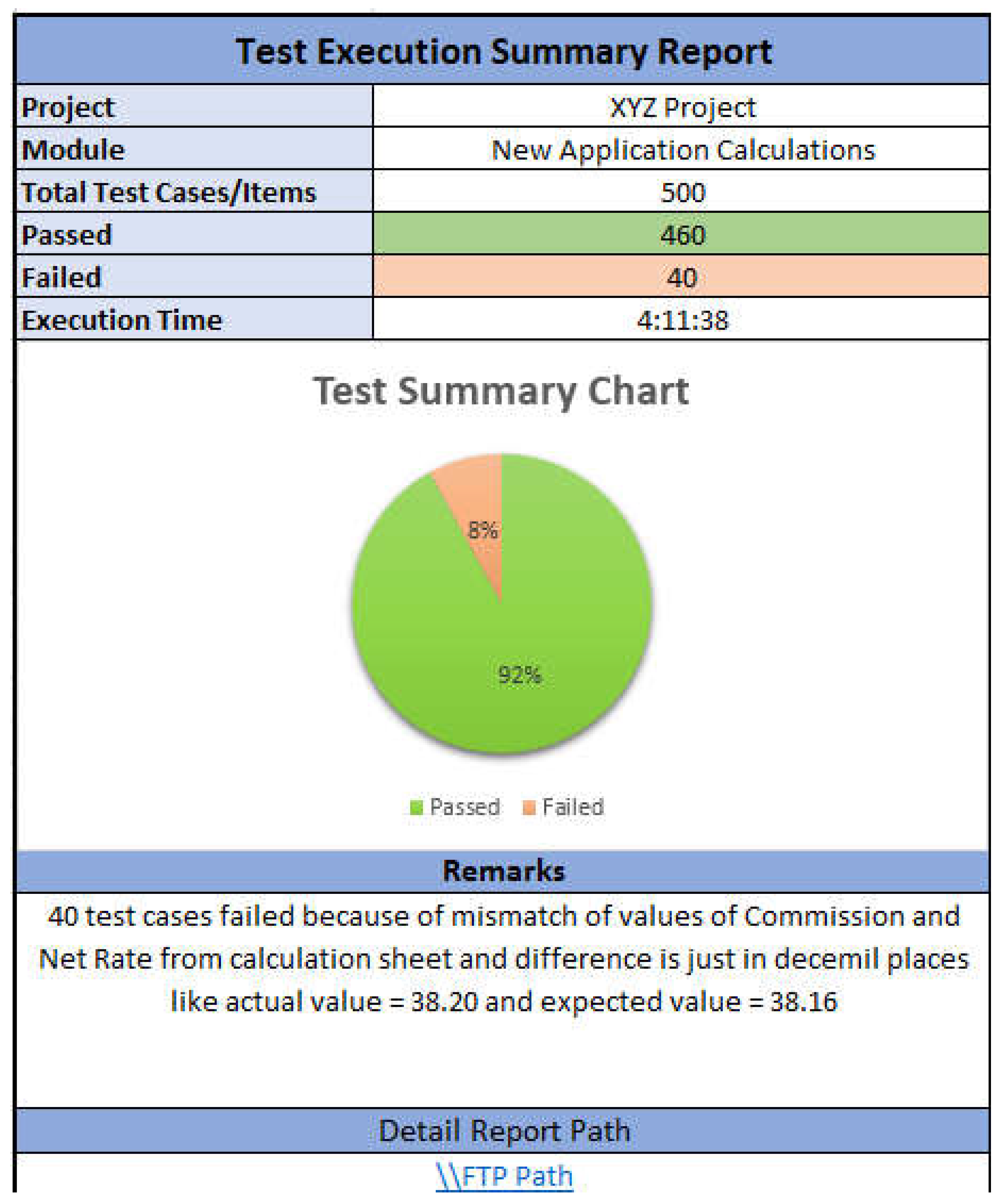
Auto generated reports are more detailed report in which each and everything is described briefly and along with screenshots. Size of auto generated report is very big and sometimes client is not interested in details he only wanted to see the count of test cases at that time we use custom reports
In Custom reports we give abstract overview of report. Following is an example of custom report
Figure 3.
Custom Report.
4.10. User Defined Functions
User Defined functions are those which are provided to the program by user to perform specific tasks. In normal execution environment those functions accept parameters, perform operations and return results. They might be designed to perform complex calculation tasks
4.11. Exception Handling
Exception handling is the process of responding to the occurrence, during computation, of exceptions – anomalous or exceptional conditions requiring special processing – often changing the normal flow of program execution. It is provided by specialized programming language constructs or computer hardware mechanisms.
5. Scripting
5.1. Scripting
Test case scripting will be done using ‘scripts Test, User use ‘Common functions’ by adding unit references and will change the value of parameter if require to make an automated test case.
5.2. Check Points
Check points are used for verification and validation. Check points should use where necessary but inside the code and specific. Check points should not be generic.
5.3. Exclusive Functions
Exclusive functions are those when any user wants to use some unique function in some other screen or forms that will be not present in common function script unit then user must create a script unit in the folder Exclusive Functions with name script name Function_Name_Test_Case_Name (Test Case in which exclusive function will be use) folder for call exclusive function in his keyword test script.
5.4. Script Validation Checklist
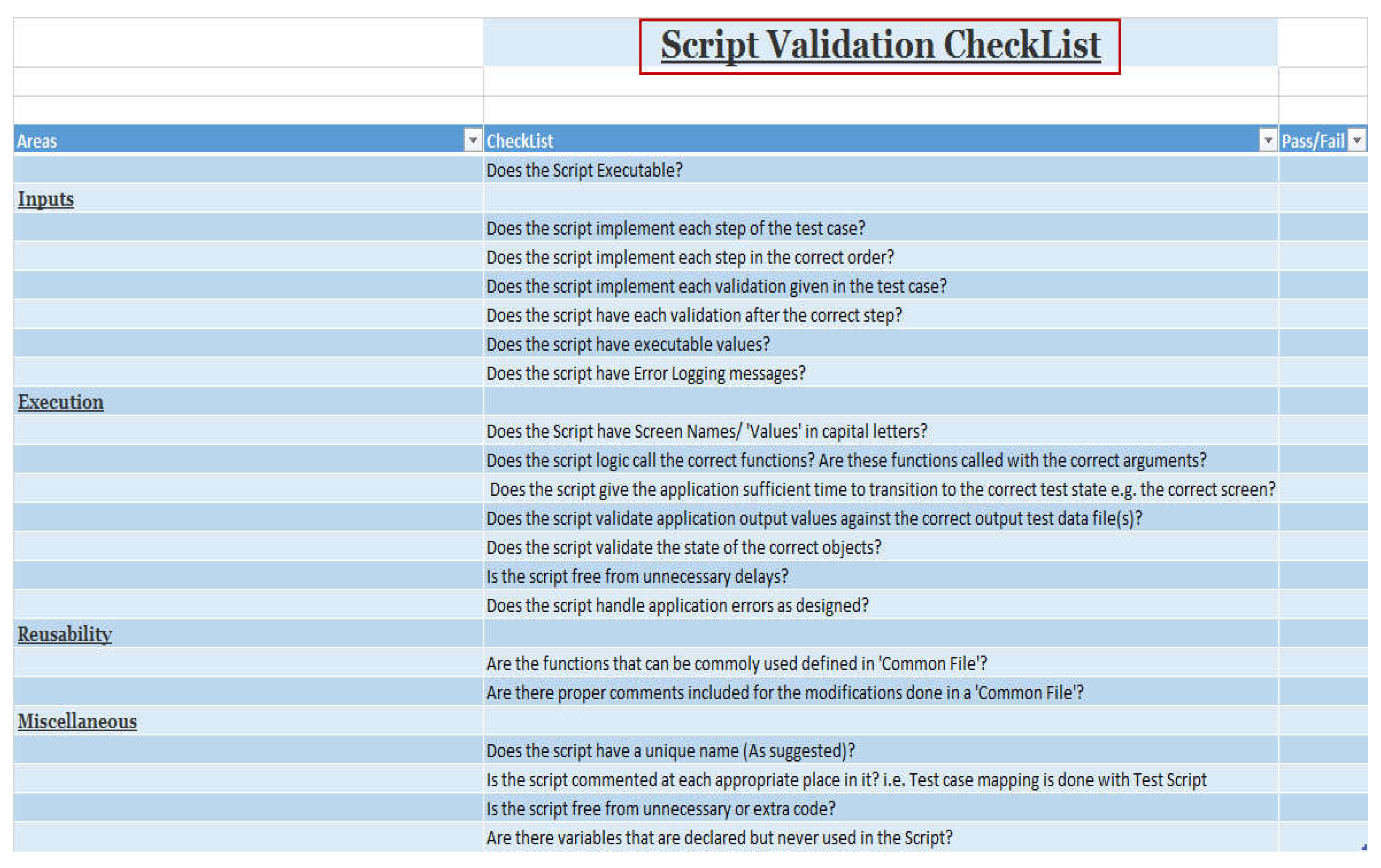
Validation check list should be design according to the standard. Following is some example of validation check list.
Figure 4.
Check List.
5.5. Performance of Application Under Testing
Automated testing is never going to pay back good if the application under testing is subjected to change every now and then or various functionalities are unstable. Automated testing is considered best for those applications which have already gone through some early cycles of testing and are quite mature. The changing behaviors cannot be handled by automated testing, even if there is a way to handle them, it will not be worthy. Dealing with changing behaviors does not refer to the context of inability of automated testing. In many cases automated testing is done to see change in error messages, change in GUIs or some modifications in calculation based fields. The applications which are facing structural changes are not considered good to be automated.
5.6. Identification of Interface Layers:
A software product may have different interfaces like command line interface (CLI), application programming interface (API) and graphical user interface. Some applications are developed with three of these interfaces and some have just two. In testing sense if we compare these interfaces, CLIs and APIs are quite easy to automate as compared to GUIs. It has to be decided earlier that which interface is to be automated first.
GUI automation is difficult due to following reasons:
GUI’s automation requires manual script writing.
GUI’s behavior is dynamic in nature.
GUI changes more frequently.
Execution is slow on GUI.
GUI’s test scripts require more maintenance.
7. Coding Standards
The main reason for using a consistent set of coding conventions is to standardize the structure and coding style of a script or set of scripts so that you and others can easily read and understand the code. Using good coding conventions results in precise, readable, and unambiguous source code that is consistent with other language conventions and as intuitive as possible.
Coding Standards
- 1.
- Indentation
- (a)
- Indentation of a code is a basic rule to improve the readability of code
- (b)
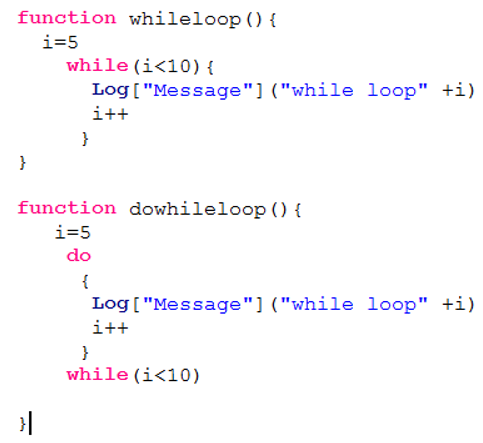
- Code in all routines/ functions will be indented with single tab. Code inside programming constructs such as If...Else, Switch, For, and Do...Loop will be indented one additional tab. Nested constructs will be indented an additional single tab for each level of nesting e.g.
- (c)
- Common Functions
Now we will have more than one function in one Unit, however in one unit all the related functions (e.g. same module functions) will be written
- (d)
- Function Names PascalCase
- 1.
- Functions name should be meaningful
- 2.
- Functions name should be written in Pascal case i.e. first letter must be in upper case e.g. “AddFlatCancellation”
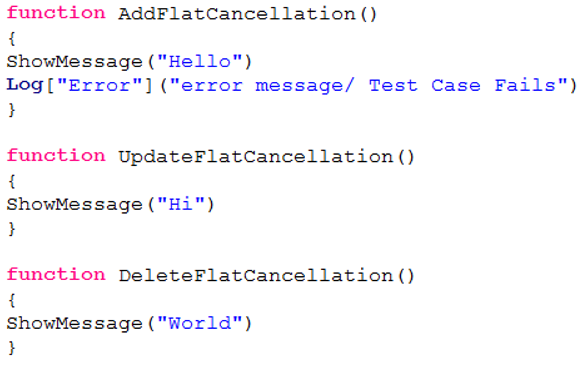
For longer Function names we should be using meaningful abbreviations. An abbreviation should not be greater than 5 characters. Moreover, for two characters abbreviations name should be in all caps and for greater the name should be in Pascal case.
- (e)
- Use of Prefixes
- 1.
- Use “Can”, “Is” and “Has” prefixes with Boolean functions e.g. IsEnable()
- 2.
- Append computational qualifiers to function names like Average, Count, Sum, Min, and Max where appropriate e.g. SumTotalAmount()
- (f)
- Hungarian Notation
Do not use Hungarian Notation! E.g. strName or iCount
- (g)
- Class/Unit Name in Pascal Case
Unit names should be meaningful in Pascal cases. Also the proper hierarchy of the units should be established according to the pattern they are shown in the application.
Figure 5.
Common Function.
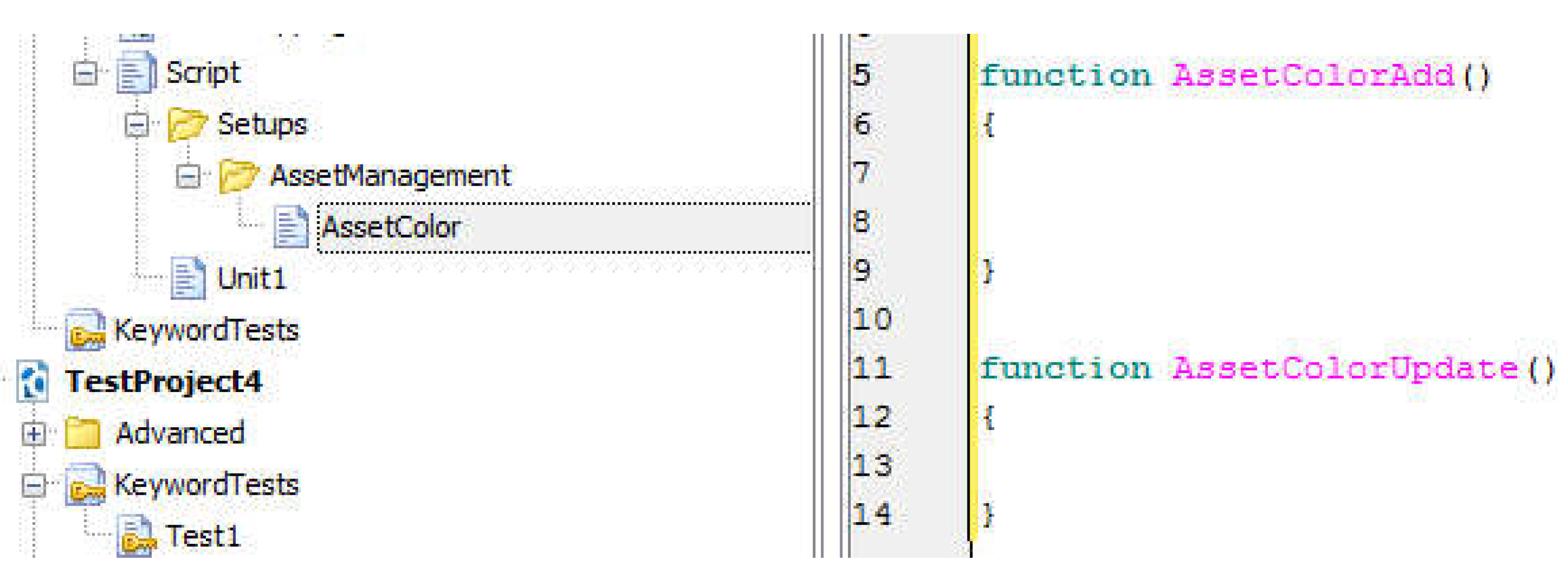
User will create common functions that will be commonly used in different modules also any code that is repetitive even within the unit a separate function will be written for that.
Moreover, there should be specific functions written for all same type of controls in the application.
- (h)
- Code Organization
- 1
- Keep modules to a manageable size. If module become larger split into functional criteria.
- 2
- Small, cohesive modules are more manageable and easier to understand
- 3)
- Any if or else block should not be empty.
- 4
- Apply spaces liberally. Spaces break up the code, making it easier to read.
- 5
- There should not be any unreachable code in the script
- 6
- Add comments for anything ambiguous in script like use of abbreviations.
- 7
- In case of multiple if else statements, use switch statement.
- (i)
- Variable Names
Following rules will be applicable for both local and Global variable
- 1
- Variable Name should be Descriptive and Meaningful.
- 2
- Array should be declared using “Arr ” prefix
- 3
- Example: “arrName(Camels case) for local variables” and “ArrName(Pascal case) for global variables”
- 4
- Local Variables should be written in camel case i.e. addButton
- 5
- Global Variables should be in Pascal case i.e. AddButton.
- 6
- For longer variable names we should be using meaningful abbreviations. An abbreviation should not be greater than 5 characters. Moreover, for two characters abbreviations name should be in all caps and for greater the name should be in Pascal case. Also comments should be provided where abbreviations will be used
- 7
- Use “Can”, “Is” and “Has” prefixes with Boolean variables.
- 8
- Append computational qualifiers to variable names like Average, Count, Sum, Min, and Max where appropriate.
- 9
- Do not use Hungarian Notation! Example: strName or iCount
- (j)
- Comments and Headers
- 1
- Add proper meaningful comments between coding statements.
- 2
- Use Proper English While Adding Comments. Don’t use Abbreviations while adding comments.
- 3
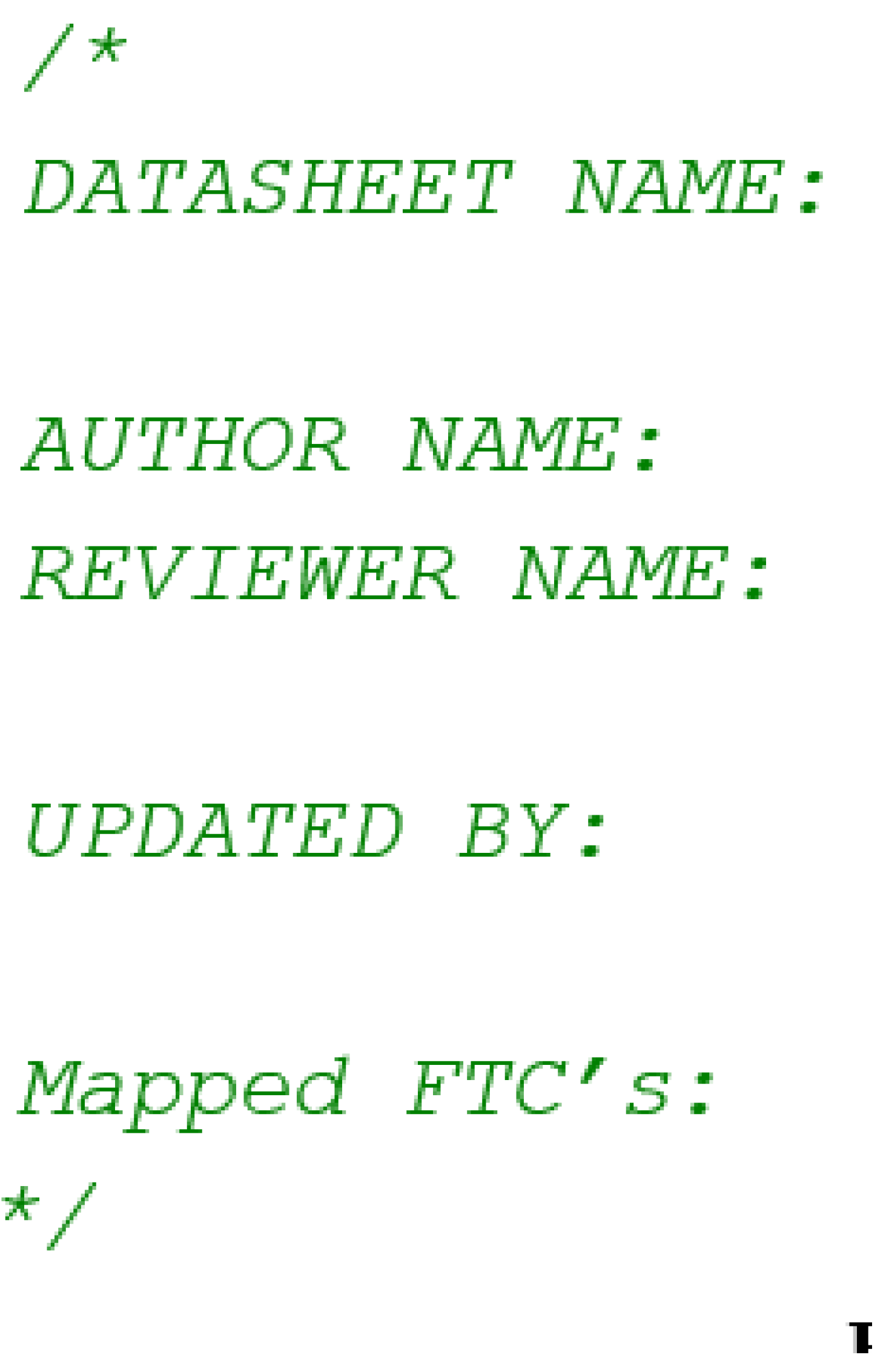
- On top of each script or function there should be a General information header. It should contains information such as description, summary, author name, reviewer name etc.
- 4
- This is very important that you explicitly mention the mapped FTCs ids in Script information header, since one ATS can mapped to multiple FTCs so use will mention all the FTCs ids that are covering in that particular ATS.
Figure 6.
Function Information Header.
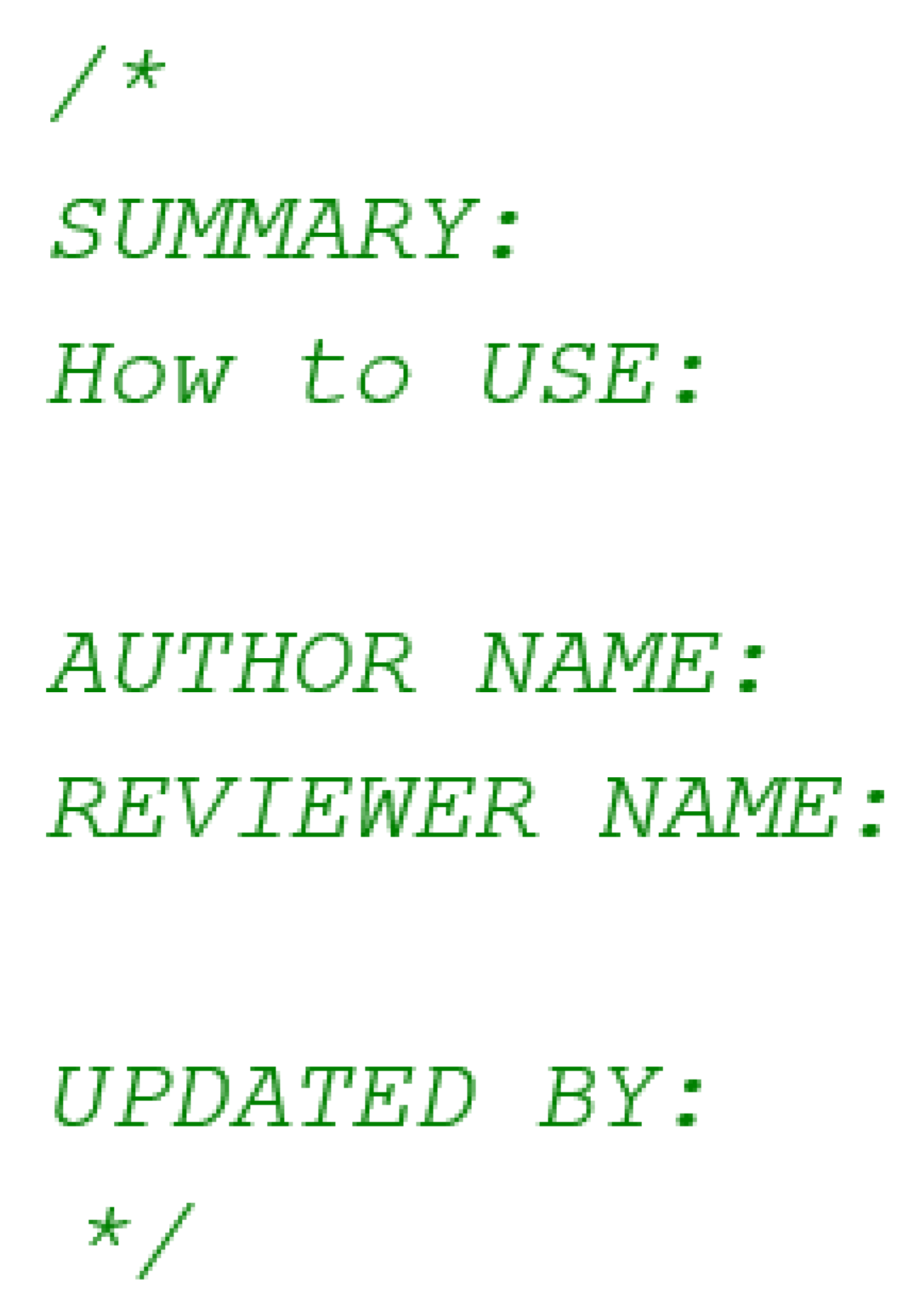
Figure 7.
Script Information Header.
- (a)
- Debugging Statements
All the debugging statements should be removed from the final code.
Example:
ShowMessage(“Test variable” + tmp)
- (b)
- (Error Logging
Possible Errors should be handled using If Else blocks. Errors should be printed using log.error.
Example.
Log["Error"]("error message/Test Case Fails")
Make sure there should not be any “If” that has no “else”
8. Automation Scope/ Coverage
8.1. Defining Scope of Automation
Before getting on the road of automation testing, define the scope of automation testing. It needs to be decided what we actually want to achieve from this type of testing. The scope may include selection of testing type like functional testing, regression testing or acceptance testing. Sometimes particular features or certain test cases can be automated.
8.2. Identification of Test Cases to Be Automated
Test cases serve as the base for automation testing. We know it is quite obvious that we cannot achieve 100% automation testing. Therefore test cases which we want to automated should be identified. Automation certainly reduces manual testing after some time. It should be understood that automation testing is not the replacement of manual testing. As every test case cannot be automated, therefore following test cases should be dropped immediately from scope of automated testing.
- Test cases that are lengthy and complex and require human involvement.
- Test case which can take long time to be automated.
- Test cases which cannot be reused.
- Test cases for usability testing. Usability testing is supposed to be done in real time end user environment.
It’s very important to consider those test cases which yield to high reusability, and are loosely coupled, less complex in nature, involves minimum human intervention and can be automated in small time.
8.3. Test Cases Have Been Adjusted:
The test cases need to be adjusted for automation. Many testers write test cases for manual testing purpose. However the way human tests an application is definitely different than how a robot is going to test it. Test cases written for manual testing purposed should be fine-tuned so that original functionalities can be automated.
Selection of automation tool
There are many automation tools available in market. Every tool is not capable of performing similar testing tasks. Majorly automation tools have been categorized as Functional/Regression Testing Tools, Load Testing Tools and API Testing Tools. There are many articles available on Internet which guide about selection of automation tool. A very well organized approach is to conduct a Proof of Concept to evaluate different tool. The evaluation criteria is mainly based on factors like Cost, Language Support, Compatibility with other technologies, offered features, complexity to use, result log details and integration options. As there are different mediums of applications like Web, Desktop and Mobile, mostly tools are designed to support one medium or are available in single flavors. However there are some expensive tools which capable of testing on every platform. Companies also have an option to develop their own automation tool if they can’t find anything in market which can add value to their work.
8.4. Choosing the Right Mode of Automation
As there are many ways of automating your tests, choosing the right method is really important. Modes like Record and Play, Script Writing, Key Word generation are some common modes which are used for automation. It depend on automation tool which mode it is offering. The maintenance and strength of automated test cases depends on how we have scripted them. For GUI test cases record and play is a good option, as it is quite easier to script test scripts for GUI test cases. When it is about complex scenarios and backend testing script writing is probably the best option. It gives the liberty to create custom functions and custom frameworks.
8.5. HOW to Automate?
After going through above mentioned process, the right approach has been identified, and now it is the time to get started with automation testing. But in order to reach the target a lot more needs to done.
8.6. Following Scripting Standards:
Automation testing can be called as mini development. Therefore some development standards specifically to automation project must be developed like we do in real software construction. It includes development of framework, development of scripting standards and development of procedures.
8.7. Identifying Common Actions:
There exists many common functionalities like record save, record addition, screen closure, deletion etc. which can be developed as a common function utilities. But before developing these common functions, all common actions need to be identified throughout whole applications. It will ultimately result in less scripting and more reusability.
8.8. Development of Objects Repository
Automation frameworks involves the development of object repositories through which testers are going to use objects of application under testing. This object repository can help in time saving for using these objects recursively throughout testing cycle. Test developers will be getting a readymade set of objects which just need to be called in current routine.
8.9. Extensibility
The automation suite should be developed in such a way that later on more and more test cases can be added in it. A time comes when there is a need for adding test cases of different platform. For example the testing team may begin automating the desktop application first, and then the web version of it. The architecture of automation suite should be designed to support addition of as many functions and test scripts.
8.10. Custom Logs
A common issue is what should we do when test fails? Failure analysis is mostly difficulty. A good automation suite should be capable of checking setup mistakes, setting up its environment and generate logs of its own. Logs should be developed as user friendly guides.
8.11. Test Batch for Execution
Automation suite should be capable of handling different type of test executions. In some case we have to execute smoke tests, sometimes regression test and sometimes functionality simulations. Therefore configuration of test batch should support multi way testing types.
8.12. Cleaning-Up
Once automation script has been executed, it has to be made sure that application is dragged back to its original state. Where execution entered a lot of data for testing purposes, at the same time automation should be capable of deleting or erasing all that data which it has added. Otherwise cleaning is an expensive job if it is to be done manually.
13. Conclusions & Recommendations
13.1. Conclusions
Test Automation is a great solution for making testing easier and valuable. Sufficient time and effort must be spent for the development of right automation framework and suite. The secret behind it is just to follow the right process. The process proposed in this paper will definitely lead towards gain of benefits which test automation is being implemented. And the only reason behind failure of test automation projects is the deviation from the right process.
13.2. Is it All Beneficial?
Finally when we have done above mentioned things, finally it’s the time to see what we are going to get out of whole effort. There reside real benefits which can be achieved if we follow this proposed process for beginning any automation activity.There will be clarity in scope of automation. Testers will be confident about what they are going to automate.
- Testers will be sure about the level of testing they need to focus on.
- Application under testing will not be vulnerable in behavior, which will ultimately help the testers to use scripts for longer time period.
- Because application will be stable, scripts maintenance cost will reduce ultimately.
- Testers focus will be more on inner functionalities rather than GUIs. This will save a lot of time in developing scripts for core functionalities.
- The effort which was to be put in for development of complex and lengthy test cases can be put in development of smaller and easier test cases. It means more test cases will be covered in similar time period.
- Selected tool will definitely adhere to all testing requirements
- More reliable test cases will produce through which testers will ultimately target more sophisticated areas to be tested.
- If test cases are fine-tuned then test developers can also develop fine test scripts.
- It will be easier to extend the automation suite for test cases related to other versions of applications.
- More consistent test cases and test scripts will be developed throughout whole testing cycle.
- Re-Usability factors will definitely increase. Test Developers can access more objects and data, quickly and use easily.
- A lot of manual object creation activity will be decreased.
- Faults analysis will be easier with help of customized logs.
- The manual effort in script cleaning will be decreased eventually with development of clean-up scripts.
- There will be clarity in scope of automation. Testers will be confident about what they are going to automate.
References
- Gauf B, D. E. , Garrett T. (n.d.). Implementing automated software testing: How to save time and lower costs while raising quality. (Pearson Education). Pearson. https://books.google.com.my/books? 2009. [Google Scholar]
- A Literature Review on Automation Testing Using Selenium+Sikuli. (2022, ). SciSpace - Paper; IGI Global eBooks. 1 January. [CrossRef]
- Mitra, D.; Offshore, A. Organization Need Based Specific NDE Development Application Research on Key Performance Areas (KPA). e-Journal Nondestruct. Test. 2022, 27. [Google Scholar] [CrossRef] [PubMed]
- Alavi, S. A. , M. (2024). Challenges for the Development of Artificial Intelligence Models to Predict the Compressive Strength of Concrete Using Non-destructive Tests: A Review. In R. Gupta, M. Sun, S. Brzev, M. S. Alam, K. T. W. Ng, J. Li, A. El Damatty, & C. Lim (Eds.), Proceedings of the Canadian Society of Civil Engineering Annual Conference 2022 (Vol.; pp. 367839–857. [CrossRef]
- Ashish Lathwal. (n.d.). Ashish Lathwal | 2 Publications | 1 Citations | Related Authors. SciSpace - Author. Retrieved , 2024, from https://typeset. 5 November.
- Bedick, C.; Tulgestke, A.; Nie, K.; Ferguson, D.H. Comparisons of RDE inlet dynamics in a linear testing platform and models of varying complexity. AIAA SCITECH 2022 Forum. LOCATION OF CONFERENCE, COUNTRYDATE OF CONFERENCE.
- Bennett, G.; Hall, T.; Winter, E.; Counsell, S. Semgrep*: Improving the Limited Performance of Static Application Security Testing (SAST) Tools. EASE 2024: 28th International Conference on Evaluation and Assessment in Software Engineering. LOCATION OF CONFERENCE, ItalyDATE OF CONFERENCE; pp. 614–623.
- Bierig, R.; Brown, S.; Galván, E.; Timoney, J. Essentials of Software Testing; Cambridge University Press (CUP): Cambridge, United Kingdom, 2021. [Google Scholar]
- Bishop, N.; Harris, R.; Marsh, D. Repurposing Spent Upper Stages into Platforms for In-Space Testing. AIAA SCITECH 2022 Forum. LOCATION OF CONFERENCE, COUNTRYDATE OF CONFERENCE;
- Braun, D.; Schwaiger, F.; Holzapfel, F.; Diepolder, J.; Ben-Asher, J.Z. Continuous Integration of Optimal Control Based Flight Control Law Clearance. AIAA SCITECH 2022 Forum. LOCATION OF CONFERENCE, COUNTRYDATE OF CONFERENCE.
- Ciptaningtyas, H.T.; Husni, M.; Rosyadi, F.D.; Qudus, R. Web based Application Quality from End User Perspective: Case Study - Assignment Letter LPPM ITS. The 7th Engineering International Conference (EIC), Engineering International Conference on Education, Concept and Application on Green Technology. LOCATION OF CONFERENCE, IndonesiaDATE OF CONFERENCE; pp. 365–373.
- Corbelli, G. (2024). reflectR: Automatic Scoring of the Cognitive Reflection Test (p. 2.1.3) [Dataset]. [CrossRef]
- Cunningham, M.; Nigam, N.; Mukhopadhaya, J.; Alonso, J.J.; Ayyalasomayajula, S.K. Multi-Fidelity Probabilistic Aerodynamic Database Generation with the ProForMA Tool. AIAA SCITECH 2023 Forum. LOCATION OF CONFERENCE, COUNTRYDATE OF CONFERENCE.
- Desai, P. (2024). Selenium in Cross-Browser Testing: Challenges and Solutions. International Journal of Advanced and Innovative Research, 10(1), 10.
- Fatima, S.; Mansoor, B.; Ovais, L.; Sadruddin, S.A.; Hashmi, S.A. Automated Testing with Machine Learning Frameworks: A Critical Analysis. International Electrical Engineering Conference. LOCATION OF CONFERENCE, COUNTRYDATE OF CONFERENCE; p. 12.
- García, B.; Munoz-Organero, M.; Alario-Hoyos, C.; Kloos, C.D. Automated driver management for Selenium WebDriver. Empir. Softw. Eng. 2021, 26, 1–51. [Google Scholar] [CrossRef]
- Garousi, V. , Joy, N. 0 arXiv:2409.00411). arXiv. http://arxiv.org/abs/2409, 0411.
- Garousi, V. , Joy, N. 0 arXiv:2409.00411). arXiv. http://arxiv.org/abs/2409, 0411.
- Halani, K.R. ; Kavita; Saxena, R. Critical Analysis of Manual Versus Automation Testing. 2021 International Conference on Computational Performance Evaluation (ComPE). LOCATION OF CONFERENCE, IndiaDATE OF CONFERENCE; pp. 132–135.
- Jain, J. (2022). Tools, Frameworks, and Libraries. In J. Jain, Learn API Testing (pp. 41–73). Apress. [CrossRef]
- Ji, P.; Feng, Y.; Liu, J.; Zhao, Z.; Xu, B. Automated Testing for Machine Translation via Constituency Invariance. 2021 36th IEEE/ACM International Conference on Automated Software Engineering (ASE). LOCATION OF CONFERENCE, AustraliaDATE OF CONFERENCE; pp. 468–479.
- Jones, H.W. Fault Tolerance Should No Longer Be Used. ASCEND 2022. LOCATION OF CONFERENCE, United StatesDATE OF CONFERENCE;
- Kedward, L.; Allen, C.B. Optimisation of a Finite-Volume Test-bench Code for Highly Parallel Architectures. AIAA Scitech 2021 Forum. LOCATION OF CONFERENCE, COUNTRYDATE OF CONFERENCE;
- Kim, H.; Swan, C.A. Development of a Web-based Test Procedure Authoring and Execution Environment for Space Systems. AIAA SCITECH 2023 Forum. LOCATION OF CONFERENCE, COUNTRYDATE OF CONFERENCE;
- Kumar, P.; Singh, S. An efficient security testing for android application based on behavior and activities using RFE-MLP and ensemble classifier. Multimedia Tools Appl. 2024, 1–30. [Google Scholar] [CrossRef]
- Manukonda, K.R.R. A COMPREHENSIVE EVALUATION OF SELENIUM WEBDRIVER FOR CROSS-BROWSER TEST AUTOMATION: PERFORMANCE, RELIABILITY, AND USABILITY. J. Artif. Intell. Mach. Learn. Data Sci. 2023, 1, 580–584. [Google Scholar] [CrossRef] [PubMed]
- Mathew, S. (2024). An Overview on Testing using Selanium. Computer Science and Mathematics. [CrossRef]
- Mitchell, T.; Hartman, M.; Johnson, D.; Allamraju, R.; Jacob, J.D.; Epperson, K. Testing and Evaluation of UTM Systems in a BVLOS Environment. AIAA AVIATION 2020 FORUM. LOCATION OF CONFERENCE, COUNTRYDATE OF CONFERENCE;
- S, S. Enhancing Performance of Software Testing Automation using Selenium Web Grid. Int. Res. J. Adv. Eng. Hub (IRJAEH) 2023, 1, 1–5. [Google Scholar] [CrossRef]
- Murakami, D.D.; Shaw-Lecerf, M.; Lash, E.L.; Lyons, K.; Roozeboom, N.; Li, J.; Califano, N.; Stremel, P.; Baerny, J.; Barreras, C.; et al. Implementation of the Lifetime Method in Unsteady Pressure-Sensitive Paint Measurements. AIAA SCITECH 2023 Forum. LOCATION OF CONFERENCE, COUNTRYDATE OF CONFERENCE;
- Prof. B K Srinivas4, R. S. N. Prof. B K Srinivas4, R. S. N. (2023). Dynamic Resource Allocation in Cloud Environments. International Journal for Research in Applied Science & Engineering Technology (IJRASET), 11(6 Jun 2023), 45–98.
- Ricca, F.; Marchetto, A.; Stocco, A. AI-based Test Automation: A Grey Literature Analysis. 2021 IEEE International Conference on Software Testing, Verification and Validation Workshops (ICSTW). LOCATION OF CONFERENCE, BrazilDATE OF CONFERENCE; pp. 263–270.
- Roopa Devi, E. M. , Shanthakumari, R., Dhanushya, S., & Kiruthika, G. (2024). AI Models for Predictive Maintenance. In A. Kumar Tyagi, S. Tiwari, & G. Soni, Data Analytics and Artificial Intelligence for Predictive Maintenance in Smart Manufacturing (1st ed., pp. 69–94). CRC Press. [CrossRef]
- Schmiechen, K.; Schwaiger, F.; Wechner, M.A.; Holzapfel, F. Combining ALM and MBD Tools for Continuous Requirement Validation Tests with Multi-Dimensional Test Parameters. AIAA AVIATION 2022 Forum. LOCATION OF CONFERENCE, COUNTRYDATE OF CONFERENCE;
- Schwaiger, F.; Schmiechen, K.; Holzapfel, F. Tico – a Toolbox to Author and Execute Large Parametrizable Test Suites in MATLAB. AIAA SCITECH 2023 Forum. LOCATION OF CONFERENCE, COUNTRYDATE OF CONFERENCE;
- Silva, J. R. , Silva, J. M., & Vaquero, T. S. (2020). Formal Knowledge Engineering for Planning: Pre and Post-Design Analysis. In M. Vallati & D. Kitchin (Eds.), Knowledge Engineering Tools and Techniques for AI Planning (pp. 47–65). Springer International Publishing. [CrossRef]
- Dhaliwal, A.S. Managing Artifacts and Binaries in Continuous Integration / Continuous Deployment (CI/CD) Pipelines. Int. J. Sci. Res. (IJSR) 2022, 11, 2003–2005. [Google Scholar] [CrossRef]
- Sonika; Pal, V. ; Chauhan, N.; Kumar, H. A review of the software testing tools. Int. J. Sci. Res. Arch. 2024, 12, 2387–2392. [Google Scholar] [CrossRef]
- Thorpe, A. (2023). selenium: Low-Level Browser Automation Interface (p. 0.1.4) [Dataset]. [CrossRef]
- Thummalapenta, S.; Sinha, S.; Singhania, N.; Chandra, S. Automating test automation. 2012 34th International Conference on Software Engineering (ICSE 2012). LOCATION OF CONFERENCE, SwitzerlandDATE OF CONFERENCE; pp. 881–891.
- Turner, J.; Bowen, J. Automating Test Scripts for Android UI Testing. 10th International Conference on Software Engineering. LOCATION OF CONFERENCE, COUNTRYDATE OF CONFERENCE;
- Uittenhove, K.; Jeanneret, S.; Vergauwe, E. From Lab-Testing to Web-Testing in Cognitive Research: Who You Test is More Important than how You Test. J. Cogn. 2023, 6, 13. [Google Scholar] [CrossRef] [PubMed]
- van Merode, H. Continuous Integration (CI) and Continuous Delivery (CD); Springer Nature: Dordrecht, GX, Netherlands, 2023. [Google Scholar]
- Van Merode, H. (2023b). Pipeline Development. In H. Van Merode, Continuous Integration (CI) and Continuous Delivery (CD) (pp. 207–284). Apress. [CrossRef]
- Van Merode, H. (2023c). Use case. Continuous Integration (CI) and Continuous Delivery (CD),. In H. Van Merode, Continuous Integration (CI) and Continuous Delivery (CD) (pp. 359–406). Apress. [CrossRef]
- Wechner, M.A.; Marb, M.M.; Holzapfel, F. A Strategy for Efficient and Automated Validation and Verification of Maneuverability Requirements. AIAA AVIATION 2023 Forum. LOCATION OF CONFERENCE, COUNTRYDATE OF CONFERENCE;
- White, J.T. Modular Open Architecture UAS Test Platform System of Systems. AIAA AVIATION 2023 Forum. LOCATION OF CONFERENCE, COUNTRYDATE OF CONFERENCE;
- Yadav, V.; Botchway, R.K.; Senkerik, R.; Oplatkova, Z.K. Robotic Automation of Software Testing From a Machine Learning Viewpoint. MENDEL 2021, 27, 68–73. [Google Scholar] [CrossRef]
- Yin, Y.; Jiang, B. L: Software System Testing; Taylor & Francis, 2023.
Disclaimer/Publisher’s Note: The statements, opinions and data contained in all publications are solely those of the individual author(s) and contributor(s) and not of MDPI and/or the editor(s). MDPI and/or the editor(s) disclaim responsibility for any injury to people or property resulting from any ideas, methods, instructions or products referred to in the content. |
© 2024 by the authors. Licensee MDPI, Basel, Switzerland. This article is an open access article distributed under the terms and conditions of the Creative Commons Attribution (CC BY) license (http://creativecommons.org/licenses/by/4.0/).
Copyright: This open access article is published under a Creative Commons CC BY 4.0 license, which permit the free download, distribution, and reuse, provided that the author and preprint are cited in any reuse.


