

Submitted:
31 October 2024
Posted:
01 November 2024
You are already at the latest version
Abstract
Cybersecurity, compliments authentication, has become the backbone of the Internet of 1
Things. In the authentication process, the word authentication is of the utmost importance as it is 2
the door through which both Mr. Right Guy and Mr. Wrong Guy can pass. It’s the key to opening 3
the most important and secure accounts worldwide. When authentication is complete, surely there 4
will be passwords. The passwords are the brain-confusing options for the user to choose when 5
making an account and during the registration/sign-up process. Graphical passwords overcome 6
the difficulties of textual passwords. This article reviews different threats to users’ passwords and 7
categorizes different authentication schemes proposed by researchers to secure password systems 8
against attacks. Standard data sets and performance evaluation measures are also studied. Finally, 9
research gaps and future directions in this essential and hot area of research are discussed.
Keywords:
Authentication Schemes
; Secure Passwords
; Threats
; Password Attacks
; Cybersecurity
; 11 Mobile Security
1. Introduction
With the emergence of the IoT, mobile password authentication schemes (MPAS) have become much more critical in cybersecurity. Mobiles and tablets are generally utilized to perform basic security and protection touchy exercises, such as versatile saving money, portable medicinal services, versatile shopping, etc. Smartphones will soon be able to support applications across a broad range of domains, including home care, social networks, healthcare, environmental monitoring, protection, and e-commerce, thanks to 5G technology, which offers continuous and secure connectivity [1]. With the advancement in technology, the attacking schemes and adversary options have also been widened for hacking, cracking, or guessing a password to gain illegal access to someone else account [2]. Many techniques have been introduced to tackle attacks, like shoulder surfing, dictionary attacks, brute force, etc. Patrick, Long, and Flinn [3] distinguish three security regions for which human factor issues are essential: authentication (passwords), security activities(interruption detection) what’s more, and creating secure frameworks (building up the security). MPAS is the mechanism of verifying whether or not someone or something is who or what they claim to be. While being the first line for the protection of the security, the management of user’s access authentication requires to be strong, that precisely recognizes all types of camouflage behaviors and comprehend the detection of illegal or venomous objects [4]. MPAS can be divided into four types (Figure 1).
Security is at its best when it satisfies the sole aim of securing computing atmospheres with the least amount of endangering usability. User easement for security has been the main motive of all researchers and scholars in the corresponding fields. User’s easement in the security field bonds all aspects related to human beings and intellectual sciences [5]. Passwords were proved and designed to be the most used security and the strength to bear any attack by the adversary. Security is the door through which the user passes and does all the jobs after entering his authenticated account. A man spends the least time unlocking the door while entering the office and performs much more work inside than on the door.
So, it should be noted that the door-unlocking process, known as security, should be the easiest part of the job. The ease of use should be one of the main aspects of the security issues [6], [7]. While giving solutions and making the system for securing assets, there should be feedback and review for the users who are using this system to make it more potent by knowing the leakages and through suggestions. This process of evolving should be done in a manner that relevant users must be capable of learning these improvements. The MPAS should be unpredictable to reduce the risk of exploitation by different authentication attacks [8].
According to mobile market statistics, mobile industry and shipments had overwhelmed the personal computers industry in 2011, and the number of smartphone users also outstripped the desktop computer users in 2014 [9]. People are used to accessing their web accounts through mobile devices. Usually, a PIN code or pattern lock unlocks cell phones. Passwords/PIN/pattern locks are exposed to risky environments, even if they are complex and secure. People use easy and straightforward passwords/pattern locks because it’s easy to recall them. Mobile device security is crucial and must be adequate to protect the user and their confidential and sensitive data [10]. A secure textual password scheme should provide security against different password attacks. Some attacks, like shoulder surfing and smudge attacks, don’t need extra software to steal the password. Shoulder surfing is a significant threat when users access their devices in public places [11]. A shoulder surfer can notice/observe which letters were pressed or what pattern was followed to unlock the device. In less than a minute, a security team at global firms can crack about 80% of the credentials of the employees by using a network password cracker to[12].
Even though smartphones are becoming more popular, several input techniques are available for users who are deficient in communicating with them. Because the availability of MPAS choices is limited, mobile device manufacturers must be more innovative with how they incorporate MPAS in their devices. Since attackers continuously refine their attack methods, MPAS must be strengthened and updated over time [13].
Several efforts have been made to study the challenges of the MPAS. Douglas et al.[14] reviewed the MPAS. The authors discussed different authentication protocols, android mobile security, and threats. Cost, protection, privacy, and the simplicity of the MPAS are the four obstacles to implementing strong authentication. More conventional MPAS, such as graphical pattern-based and password/pin authentication, though providing medium security, have the lowest cost. To overcome the problems of traditional passwords, graphical authentication systems were introduced to provide a good defense against smudge and shoulder surfing attacks. [15] gave a review on different graphical password techniques. This research paper uses various methods to discuss the benefits and drawbacks of graphical password protection. This review also provides a road map for potential changes to various graphical MPAS.
Biometric recognition is a promising area for researchers, but it is plagued by privacy and security issues [16]. A thorough, comprehensive study was carried out by Zhahg et al. [17] on biometric MPAS. They analyzed the risks of biometric MPAS and suggested several effective and privacy-preserving authentication requirements. The current biometric MPAS was further evaluated regarding its advantages and disadvantages. They found that almost all biometric systems lack biological information for user privacy protection. An important research topic worth studying is protecting private users’ biometric information, particularly when users’ biometConversely, this taxonomy a foreign entity(third party) that can not be fully trusted.
Aleksandr et al. [18] work gave a comprehensive summary of the current MPAS in terms of both usability problems and the main challenges in the current multi-factor authentication systems. Adaptive Authentication enables a system, based on factors like area, connectivity to devices, and other characteristics, to dynamically choose the finest technique(s) for user authentication. To recognize the major open challenges, Arias-Cabarcos et al. [19] reviewed the adaptive authentication literature using design concepts well-known in the adaptive systems discipline. Aris et al. [20] addressed the findings of an organized literature review to understand better the present situation regarding the mobile screen locking strategies concerning shoulder surf attacks. A total of 84 techniques were obtained, with 50 non-biometrics. Ten strategies to avoid shoulder surfing attacks were discovered from the 50 non-biometric approaches, which can be used alone or in conjunction with other techniques.
Yuan et al. [21] examined 107 papers using a multilevel taxonomy that included protection and adaptation factors. This taxonomy, on the other hand, only addresses the security objectives of confidentiality, reliability, and efficiency, not security. Tziakouris et al. [22] have a review with a somewhat different and more focused emphasis. They looked at how the underlying architectures of the published research could be applied to open and ultra-large environments by reviewing the literature on adaptive security. Moving beyond traditional username and password authentication systems has proved difficult. Robert et al. [23] discussed alternative authentication schemes besides the username and password mechanism used in Korea. It’s critical to avoid replacing a poor authentication scheme with one that’s just as bad (or worse) while looking for a replacement (or more possibly additional) authentication scheme. Researchers discussed token-based and biometric authentication schemes that are commonly used in Korea. Also, they proposed a complex authentication system for the Korean banking environment for secure money transactions from one bank to another. Mohamed et al. [24] paper examined a variety of MPAS in depth. They began by providing an overview of current reviewed articles dealing with mobile device privacy that have been published in recent years. The threat models in smart mobile devices are then classified into five categories. This review used two MPAS, i.e., biometric and number-based (PIN) authentication. Comparison in terms of performance and the limitation of each scheme is shown in tabular form.
This is the first effort to provide a detailed review of almost all the MPAS, with information on their implementation of significant models and their advantages and disadvantages.
The key contributions of this review paper include
- This study examines and categorizes multiple hazards to users’ credentials, focusing on imperfections in traditional password systems and the possible risks to mobile authentication security.
- It categorizes and investigates various authentication algorithms presented by researchers to secure password systems, providing a complete evaluation of methods for mitigating mobile device assaults.
- It studies the use of standard data sets and performance evaluation measures, offering insights into how different authentication methods perform under various conditions and against different types of attacks.
- The study identifies research gaps in the field of authentication systems, highlighting areas where current methods are insufficient and more research is required.
- It studies future research directions in the field, with a focus on fostering creativity and the creation of more robust, secure, and efficient mobile authentication techniques.
The remainder of this article is arranged as follows: Section 2 discusses MPAS and its applications. Section 3 discusses different password attacks on authentication systems. Section 4 describes different MPAS and their limitations. Section 5 discusses the performance evaluation and datasets available for the MPAS. We present research questions and relevant future directions in Section 6. The paper is concluded in Section 7.
2. Password Attacks
Users should be enlightened and aware about keeping their end of the deal by securing their data and not leaving it unprotected instantly. This rule applies to researchers and developers and keeps the system at the top security level[27]. For example, shoulder surfers are open to attack at the time of registration and login into a system, which makes the system vulnerable. One should know that the attacker knows what you know and what you propose, as well as what the weakest links in your system are that cannot be kept hidden for a long time from many adversaries worldwide. Problems with passwords are that strong passwords are hard to remember, and easy passwords are easy to remember but are under threat to different attacks [28]. Password attacks that can harm the MPAS are as follows:
2.1. Shoulder Attacks
Shoulder surfing is the latest weapon the hacker uses, through direct observations such as looking over someone’s shoulder [29] Figure 2 or recording his login or other information using a hidden camera. This attack is an effective way to steal the authentication data, i.e. passwords or PINs, as it requires no extra knowledge of any software [30]. Shoulder surfing is mostly pragmatic for spiteful insiders like friends and colleagues [31] [2].
2.2. Brute Force Attacks
This attack uses every combination of passwords to break the authentication system. Almost every password or encryption key can be broken down using a brute-force attack. The time it takes to brute-force into the system is an advantage for calculating its security level [32].
2.3. Dictionary Attack
Dictionary attack is faster than brute force attacks, rather than trying all the possibilities, it uses to catch the passwords with the most common words used by the user in the daily life, i.e. the name of favourite actress, mobile numbers etc. [33]. Dictionary attacks can easily judge these passwords. This type of attack is limited to exact matches, but somehow, it is successful since users prefer relatively short passwords that are easy to remember [34], [35].
2.4. Replay Attacks
Another name for replay attack is reflection attack [36]. When a hacker detects secure network communication, intercepts it, and then resends it (or "replays" it) as if it were his own. This class of attack involves the leak of the data unit and its transmission to obtain an unauthorized effect, to reuse the message to cheat other [37].
2.5. Phishing Attacks
The hacker redirects the user to the fake website to get the user authentication details [38]. For example, if a user desires to open a website that says www.facebook.com, the user is diverted to a different website by the attackers, i.e., www.faceboOk.com, whose interface is the same as the original one, and the user enters his username and password, without knowing that he has entered in the correct website. The hacker/attacker then redirects the user to the original website by stealing his login data from the fake one. Phishing frauds have been getting large-scale importance because these attacks have increased in numbers [39].
2.6. Key Loggers
Key logger is a computer software program that records user activities in various ways, i.e., screen, voice, keyboard, mouse, and keyboard logging in invisible mode [40]. The attacker installs the key logger software on the user’s computer system; the software creates a log file that keeps track and sends the log file to the attacker’s email address with all the user’s pressed keys, through which he can get the login data and can access the use important files [41].
2.7. Guessing Attacks
2.8. Smudge Attacks
Cell phones contain different kinds of touchy individual data, such as messages, notes, applications, music, pictures, and substantially more. Although it is extremely comfortable to have this data on our cell phones, it also permits security chances if most of the data is effectively available. One approach to maintain a strategic distance from and keep the security assaults is to set some screen lock, which gives validation on our cell phones [45]. To unlock a cell phone, the user draws a retained unlock pattern with a finger on the touchscreen while the finger leaves its slick buildups, called smudge, shown in Figure 3 on the touchscreen’s surface. An unauthorized user can abuse the smudge to recreate the mystery design [46].
2.9. Electroencephalography (EEG) Signal
Electrocardiogram (ECG) signals are one of the most significant biometric features produced by the electrical activities of the human heart [48]. By drawing the pattern of the user trying to imitate the user’s electroencephalography (EEG) signal, an intruder might try to gain access to the mobile phone. This is done with the headset of EEG; the pattern is drawn, and the machine is deceived into allowing mobile device access [49].
Table 1 illustrates attacks on mobile touchscreen devices.
3. Recent Security Reviews
The threat models and defenses of the 2FA mobile money scheme were reviewed in [25]. To review the pertinent literature, the writers employed a suitable search method. This review study shows that because the existing mobile money 2FA technique only uses a subscriber identity module (SIM) and a personal identification number (PIN) for user authentication, which are vulnerable to attacks, security vulnerabilities must be fixed. [51] focuses on the adversary models for mobile device authentication
Transparent authentication techniques for mobile device security are thoroughly analyzed and reviewed in [26] research. This study highlights the need to look into the sensitivity level of the application and determine whether or not a particular application needs to be protected when authenticating the mobile user.
Aslam et al.’s evaluation of authentication protocols - necessary to gain access to telecare medical information systems in [52] covered their advantages and disadvantages concerning computing costs, security, and privacy. One-factor, two-factor, and three-factor authentication techniques are separated into three main groups. To determine which authentication approaches and methods are most effective in various scenarios, Velasquez et al. presented them in [53]. Kilinc and Yanik examined and ranked several SIP authentication and key agreement protocols in [54] based on their security and performance characteristics.
With an emphasis on Android platforms, Faruki et al.’s survey from [55] included many security-related topics, including the strengths and weaknesses of well-known malware analysis and detection and code modification techniques. After examining many malware samples and various approaches to combating the diverse new malware, they concluded that a thorough evaluation framework with strong static and dynamic methodologies might answer this new issue.
Meng et al. in [56] extensively investigated biometric-based techniques for mobile phone authentication because passwords and PINs are authentication solutions with numerous disadvantages. The authors of the survey study examined the viability of implementing both physiological and behavioral approaches on touch-enabled mobile phones, identified potential attack spots, and suggested countermeasures. Their investigation led them to conclude that the system’s security and usability can be improved by implementing a hybrid authentication mechanism combining standard PINs or passwords with multi-modal biometric authentication.
Multimodal biometrics-based fusion methods have been determined to be the most efficient regarding security and usability, using physiological and behavioral biometrics-based procedures similar to those studied in [56] continually and not only during initial access. One major problem with biometric features is the potential for theft, which can be avoided using template protection measures. In 2016, a comparable survey [57] was released, covering touch dynamics authentication methods for mobile devices. Under the umbrella of behavioral biometrics, touch dynamics records how a user interacts with a touchscreen device for static and dynamic user authentication.
Password managers enable users to securely store and access credentials across devices, decreasing password repetition. While desktop and browser-based password managers have been extensively researched for security flaws, mobile password managers have received less attention. [58] looks at three popular Android password managers and evaluates their password generation, vault security, and autofill features. The findings show flaws, such as insecure password generation, unencrypted metadata storage, and phishing concerns. There are recommendations for upgrading mobile password managers and the Android operating system, as well as suggestions for future security research.
Only a few of the survey articles mentioned above address mobile device authentication systems; none of them detail their features. To the best of our knowledge, this study is the first to fully address the features of security analysis methodologies, security systems, authentication schemes, threat models, and countermeasures that the research community has recently offered.
Table 2 illustrates the recent survey papers summary.
4. Authentication Schemes
Different researchers have used different techniques to ensure secure MPAS. Some of them are discussed in this section (Figure 4).
4.1. Password/PIN and Pattern Authentication
Text passwords are still common because they offer several benefits. They are simple to learn, enforce, and adjust if they are corrupted or forgotten, and they are extremely reliable. Unfortunately, the widespread use of text passwords across thousands of modern user accounts has made creating and remembering a unique and random text password for each account cognitively impossible [59].
PINs were first utilized in automated dispensing and control systems at gas stations. They were later introduced to “the Chubb system” by the Westminster Bank in the United Kingdom in 1967 [60]. Since then, PINs have become increasingly common in the banking business worldwide. PINs operated as passwords to protect embedded devices (such as PDAs and smartphones) from unwanted access, thanks to the rapid development of microelectronic technology in the 1990s. The idea of employing passwords to imitate human choices of 4-digit PINs was initially proposed in [61], and it has sparked a slew of new PIN research [62].
The classic PIN-entry method is commonly used, however it is subject to attacks such as shoulder-surfing and spyware since it requires direct input. [63] present an indirect input method that uses addition mod 10 and a mini-challenge keypad to produce a one-time PIN (OTP) while concealing the original PIN. Their user study demonstrates that this strategy improves security over traditional PIN systems while maintaining usability, with user comments supporting its use in high-security contexts.
PIN/Password and pattern authentications are the most common authentication methods that exist so far. These approaches are vulnerable to classic attacks like guessing the attacks and surfing the shoulder [64,65]. Other MPAS schemes, such as fingerprint and face recognition, complement passwords but are not intended to replace them. Biometrics, according to security experts, make it easier to enter into the systems; on the other hand, passwords are used to create initial trust and as a backup, if biometrics fail [66]. The DRAW-A-PIN authentication scheme is a suggested way of further improving the pin system [67]. In this authentication scheme, a user must draw the pin code on his mobile screen instead of simply typing out his pin code. When a pin is drawn, the authentication system will verify the digits entered and then observe the user’s behavior during the pin entry.
Authentication based on patterns is also a very common form of authentication today on many mobile devices [68]. Many users prefer PIN or text-based passwords because psychological studies indicate that the human brain learns and recalls visual content better than letters and numbers [69]. Pattern unlock is quite vulnerable to attacks like shoulder surfing and smudge attacks. People choose simple and easy PIN/passwords and patterns to authenticate because these schemes are easy to use and available on almost every mobile device.
[70] proposed a CAPTCHA AI hard problem-based salted challenge-response MPAS. The proposed framework is based on the same principle as CAPTCHA. i.e., a bot’s ability to recognize twisted text in a picture is a difficult problem. Using the client’s password, the framework combines the challenge text and scatters within a random image rather than submitting it in a way humans will find easy but bots will find prohibitively difficult.
4.1.1. Opportunity
It is not necessary to use the direct password input technique. In social engineering attack scenarios, the attacker can observe the user’s behavior, including password entry operations, while the user is operating his/her mobile device. All types of display information, including user guide material, should be masked against new attack types if the methods entail direct password input procedures. The best approach to achieve this is to create a password entry method that isn’t direct. When using indirect input, guessing the information from the shown data is challenging. As a result, regular PIN codes can be combined with an indirect input mechanism to allow personal identification and authentication.
4.2. Authentication Using Behavioral Features
The widespread implementation of ubiquitous mobile phones is fast expanding due to advances in sophisticated hardware technologies with cutting-edge functionality. These capabilities enable users to save personal information on their devices, with cellphones being one of the most extensively used and accessible technologies in daily life. Smartphones include entry-point authentication techniques to safeguard stored data. However, typical authentication methods are insufficient without strict access restriction. To counter these problems, there is a rising preference for implicit or continuous authentication on smartphones. In the near future, smartphones are likely to include intelligent access control systems that allow for continuous authentication.Behavioral authentication and behavior modeling are closely related techniques. There is extensive study on using behavior modeling approaches to anticipate user characteristics such as traits, personality, and behavior [71].
Researchers have proposed to use behavioral touch MPAS as a second line of defense if initial authentication is compromised [72,73] or as the center for the user who does not configure any of the authentication techniques due to usability issues [74]. Behavioral authentication is a form of biometric authentication with two benefits: first, it is implicit, ensuring it is done unconsciously. Second, behavioral characteristics are difficult to mimic because it is difficult for others to learn and replicate a person’s behavioral habits after they have been established [75]. Behavioral biometric information, i.e., touch gestures, mouse movements, and keystrokes, can be gathered via sensor devices and can be helpful to analyze the user’s behavioral attributes for authentication [76,77]. In government departments, passport offices, border surveillance, and many consumer devices, there is a growing need for privacy-preserving biometric authentication systems [78].
A biometric device can be divided into two categories based on the number of modalities used: unimodal and multimodal. unimodal biometric systems focused on a single identifier depend on a single modality for authentication; therefore, they are easier to create. The authentication metric itself can be a single point of failure; an unimodal device faces challenges such as noisy data, poor recognition efficiency, less reliable results, and spoofing attacks [79] [80]. A multimodal biometric system uses multiple or combined parameters (for example, face and voice features). It does not depend on a single feature, making it much more stable and difficult to break. It is more resistant to spoofing threats, has higher recognition rates, and has improved accuracy and reliability [81].
Machine Learning schemes can be used to improve protection schemes for MPAS [82]. Machine learning techniques are highly successful in enhancing the protection of applications regarding the touch screen of mobile devices. The key advantages of mobile phone safety software training algorithms include recognizing biometric and sensor information to enhance the protection of mobile phones [56].
Bo et al.[83] suggested using a support vector machine (SVM) algorithm to create a classification model based on cell phone users’ biometric behavior. The classification model developed updates the SVM model by introducing new features found through self-learning to enhance classification accuracy. The results show that the proposed authentication scheme for identification is fast and accurate.
Song et al. proposed [84] a secure, easy, and fast authentication framework that was built using multi-touch devices for the use of physiological and behavioral biometrics by the consumer using K-nearest neighbor (KNN) and support vector machine algorithm (SVM). Legitimate hand geometry and compartmental knowledge of users are employed to create a one-class SVM and KNN classification model. The experiment shows that, although the proposed system uses a small number of experimental subjects and analyzes a few movements, the KNN outperforms the SVM in nearly every case.
Ehatisham-ul-Haq et al. [85] suggested that the performance of the three user-authentication algorithms should be measured and evaluated by Bayesian network (BN), SVM, and KNN. The classifiers were trained to create a mobile user MPAS based on their physical behavior. The three classifiers’ precision was compared. The proposed solution can not provide various access rates when identified based on their biometrics of actions.
Liang et al.[86] proposed a convolutionary neural network (ConvNet) to predict the user tap series and device usage behavior. Sensor data have been collected as users communicate with the system on different applications, and a classification model based on ConvNet, SVM, and KNN, is established using sensor data. The solution suggested did not make the CovNet model more complex to obtain stable and better performance.
Muhammad Sajjad et al [87] proposed a hybrid technology with two layers of security, the first layer integrates the palm vein, fingerprints and face recognition and second layer takes these things along with face anti-spoofing convolutional neural networks (CNN) based models to detect spoofing. After matching fingerprints successfully, it is checked on a CNN-based model to verify that it’s fake or real—repetition of the same method with face and palm. Experimental results verified the efficient work of the system, conquering the constraints in spoofing techniques.
Dynamic Time Wrapping (DTW) has been discovered to strengthen the security of mobile devices [88]. For the MPAS, only a small number of DTWs were used. DTW was used to build a scheme [89] that validates the user by observing how he/she draws a PIN on a touch screen rather than typing it. Based on the user’s PIN drawing behavior, the DTW algorithm is utilized to compare and realize the similarities between the two PIN drawing samples. The experiment’s findings show that users’ PIN writing behavior can be used for personal identification, and DTW can support the proposed model with promising results. The proposed research uses a small number of experimental subjects and does not equate its findings to those of other classification algorithms.
Current mobile authentication methods that use PIN numbers and physiological biometrics face severe security and usability problems. [90] focuses on Continuous Authentication (CA) utilizing behavioral biometrics, which allows for passive user verification without requiring explicit actions. A comparison analysis was undertaken using behavioral attributes gathered from common mobile interactions such as typing and tapping, as well as sensor data from numerous mobile sensors. HuMIdb, an innovative public dataset, has significant mobile interaction data that may be used for testing and research in passive authentication. The combination (fusion) of many modalities consistently increased authentication accuracy, resulting in a considerable reduction in EER compared to single-modality systems.
[91] introduces BehavePassDB, a publicly available database for mobile behavioral biometrics and benchmark evaluation. This database enables continuous authentication by exploiting multimodal data from user interactions with mobile devices, which are organized into separate sessions and jobs. The authors present an experimental protocol that allows for fair comparisons of various approaches while also investigating the performance differences between random and skilled impostor scenarios, emphasizing the effectiveness of Long-Short Term Memory (LSTM) architecture with triplet loss in distinguishing user identity from device characteristics.
[92] investigates the use of swiping motions as a mechanism for continuous identity verification on mobile devices, demonstrating that behavioral biometrics can be a more user-friendly and effective authentication method than older methods. The study shows that various machine learning classifiers, notably a deep learning model, outperform other models in reliably identifying users based on their distinctive swiping behavior. The study achieves a low Equal Error Rate (EER) of 0.20%, demonstrating hopeful progress in the field of continuous biometric authentication. Table 3 summarizes the behavioral authentication schemes.
4.2.1. Opportunity
Data encrypting and profiling procedures should be performed on the server to reduce unnecessary energy consumption. Mobile devices should consume as little energy as possible and should only be utilized to detect or sense the owner’s actions. Then, using algorithmic selection, a subset of the data retrieved from each sensor’s raw data should be sent to the server. The server could profile and encrypt the data for authentication purposes before sending it to the mobile device using the selected data. When the data is received, the mobile device can compare it to the current user’s behavior pattern.
4.3. Keystroke Authentication
For MPAS, keystroke dynamics have advanced over time and are now used in mobile phones. The main problem with cell phones, however, is that they can be used anywhere. As a result, examining the utilization of keystroke dynamics using data obtained in different typing positions becomes essential [94]. Keystroke elements successfully conduct biometric authentication for user validation at a workstation [95]. Several research works have been done for MPAS using keystroke techniques [96].
Khan et al. [97] test the vulnerability of smartphone keystroke dynamics to password stiffening and mimicry attacks. They use feature analysis on a publicly available dataset [98] to create interfaces that teach users to mimic their victim’s keystroke behavior and propose two schemes for an attacker to get real-time guidance when performing a mimicry attack. Against many passwords, their setup effectively circumvents keystroke dynamics. The researchers perform experiments to demonstrate how malicious insiders can use social engineering to gather keystroke data and then use that data to recreate the victim’s behavior.
Buchoux and Clarke [99] use a keystroke user authentication scheme and designed software that can be run on Microsoft Windows Mobile 5. They proposed two types of passwords: a strong alphanumeric password and a simple PIN. Three classifiers were also evaluated, namely Mahalanobis distance, FFMLP, and Euclidean distance. Their results suggested that as PIN increased the amount of input data, the performance of the defined classifiers was better when the password was employed. People normally use either a pin or pattern to unlock their cell phones. Users always prefer the simple PIN schemes proposed here because they are too short and easy to use.
Saevanee and Bhattarakosol [100] proposed a new mechanism for MPAS, named finger pressure, combined with inter-key features and existing hold time. To measure finger pressure, users utilize a mobile touchpad that acts as a touchscreen. Results show 99% accuracy, as this system doesn’t require remembering any complex passwords or pins, just a simple password combined with the user’s behavioral manners.
S Zahid et al. [101] examined keystroke data from 25 mobile device users. The proposed mechanism takes a total of six characteristics of the keystroke. These characteristics of various users are scattered, and a finicky classifier is utilized to classify and cluster the data. The proposed system has an error rate of 2%, which indicates that the system is user-friendly and can be adopted.
Hwang et al. [102] suggested MPAS using the keystroke dynamics, which depends on a four-digit PIN. Normally, a four-digit PIN can’t give secure authentication and is vulnerable to guessing and shoulder-surfing attacks. To make it more secure, the authors introduced an input scheme supported by tempo cues and artificial rhythms. Their experiment work shows that the proposed technique reduces the energy efficient ratio from 13% to 4%.
Table 4 summarizes the keystroke authentication schemes.
4.3.1. Opportunity
As technology advances, mobile and portable devices have become increasingly common in people’s daily lives. Smartphones and tablets have ever-increasing memory and processing power compared to a few years ago. Furthermore, advanced and sensitive microhardware sensors, such as multitouch screens, pressure-sensitive panels, accelerometers, and gyroscopes, can unlock new feature data. This upgraded hardware is now widely available, paving the way for future research into keystroke dynamics on this platform.
4.4. Touch Screen Authentication
The touch MPAS has been called "the more natural, unobtrusive future of smartphone biometrics." Google launched pattern lock as a security safety mechanism in 2008 [107].
Ashley Colley et al. [108] developed a touchscreen unlocking technique that improves the attack resistance of the commonly used pattern lock mechanism. Their scheme increases the touch password capacity for a specific smudge pattern by 15 factors. In a user test (n=36), users found our model to be more reliable than their current lock system while still being comparable in speed and memorability. The proposed process took an average of 2.2 seconds to unlock the phone (SD=0.9). 1.5 seconds is the average mean time (SD=0.6) for patterns with only the multi-select function, comparable to those illustrated for the regular mechanism for pattern locking.
Watching other users’ login credentials without their permission is commonly called shoulder surfing and has been intensively studied. Research by Malin Eiband et al. [109] has provided good measurement steps to hide the password or PIN codes by a bystander. Their presented work focuses on hiding the messaging text like chat from a shoulder surfer. The researchers think that text messages in public places should be written in the user’s personal handwriting since it’s not easy for everyone to read other handwritten words. It replaces the standard printing font on mobile devices with user-personal handwriting. The user study shows that there was variation between the times of reading the user’s handwriting and reading the text written in the handwriting of the different users.
Katharina Krombholz et al. [110] proposed a technique to avoid password attacks for the MPAS in public areas. The idea is to make the security of the PINS by applying force to the digits which are either bold or underlined, e.g., 1 2 1 4 as shown in the Figure 5. It also gives vibration feedback as the user enters any PIN with force authentication. This scheme is easy and simple, as most users use PIN authentication to log in.
Nilesh Chakraborty et al. [111] designed a system that lets the user choose his/her password, which will be of four characters, which can be both alphabetically and numerically. The characters in the password can also be repeated, e.g., ST4T, AR2A. MobSecure has 36 nodes that have all alphabets (A-Z) and numeric characters () (Figure 6). They are arranged in a circular pattern named orbit, so there are two orbits, inner and outer. All nodes are colored, and two adjacent nodes of both orbits are colored the same and named as sister nodes. The authentication process consists of two stages. In the first stage, the user is challenged, in which the user can hear a number through earphones, which can be random and consist of numbers between 0 to 17 or 0 to 17. The second stage entails the user has to select his/her number from the inner or outer orbit. Compared to existing approaches, the proposed process was reviewed based on usability and security perspectives.
In comparison to textual and numerical PINs, the 3X3 pattern lock scheme is standard. Due to a lack of instructions on complex drawing rules, users prefer to use fundamental patterns, making them vulnerable to attacks. Sukanya et al. [112] proposed a mobile unlocking application that uses a pattern formation with a PassO circular grid layout instead of a 3X3 grid. Using a mobile device, they examined the Passo patterns obtained from 32 participants in a lab study. According to the findings, the average duration of patterns was reduced by 25.47% in the mobile scenario. As a result, participants developed shorter patterns in real-life situations for ease of use and recall.
Vincenzo Gattulli et al. [113] explores a method for continuous user authentication on smartphones by leveraging touch events and human activities. The authors utilize the H-MOG dataset to analyze user behavior while reading documents on a smartphone, focusing on the combination of touch events and sensor data (accelerometer, gyroscope, and magnetometer). They propose a feature extraction method that includes the Signal Vector Magnitude and evaluate various machine learning models, including 1-class and 2-class SVMs, achieving high accuracy rates (98.9%) and F1-scores (99.4%). The study emphasizes the importance of continuous authentication to enhance smartphone security, particularly against unauthorized access during passive activities like reading.
The research [114] suggested a scoping review by Finnegan et al. that examines the current state of behavioral biometrics in user authentication and demographic characteristic detection, particularly in the context of measuring screen time on mobile devices. The review systematically analyzes 122 studies that utilize built-in sensors on smartphones and tablets for user authentication through methods such as motion behavior, touch dynamics, and keystroke dynamics. The findings indicate that touch gestures and movement are the most commonly used biometric methods, with a significant reliance on accelerometer and touch data streams. However, the overall quality of the studies is low, highlighting a need for more rigorous research, especially involving child populations, to effectively apply behavioral biometrics in public health contexts.
4.4.1. Opportunity
The issue of compatibility is a major worry for the scientific community. Some of the authentication methods proposed in the literature are incompatible with other smartphone platforms, which poses a problem. An ideal authentication system must be compatible with various systems to be widely used. No matter how powerful an authentication system is, its use will be limited if it only supports a few platforms. As a result, excluding a certain group of users from the authentication process reduces its overall efficiency.
Table 5 summarizes the touch screen authentication schemes.
4.5. Gaze-Based Authentication Techniques
Gaze is an appealing and vital communication methodology that gives the client an instinctive, without-hand method for connection. Traditional techniques like touch and clicking have usability advantages. Still, the gaze is more protective against observation attacks due to its subtlety and can be implemented to existing mobile pattern lock schemes with no additional changes to the interface[119]. Gaze data can be used in numerous viewpoints, for example, gadget verification, diversion plan, gadget controlling, client conduct examination, etc. [120]. Gaze as features of input [121] have empowered different look-based verification strategies, in the case of shoulder surfing, that can be grouped crosswise over common three classes [122] i.e., gaze pin-based, gaze gesture-based, and gaze pursuit based authentication.
Mohamed Khamis et al. [123] proposed GazeTouchPass, a multimodal verification conspire in which clients characterize four images; every single one must be typed in either utilizing touch (a digit somewhere in the range of 0 and 9) or utilizing gaze(looking to one side and one side). Successive look contributions to a similar heading would then be isolated by a gaze to the front. GazeTouchPass accomplishes a harmony between security and convenience, with low confirmation times and high observation resistance.
C Katsini et al. [124], developed a two-step process for evaluating the quality of client-made graphical passwords dependent on the eye-gaze behavior during password formation. In the first step, the user gaze patterns are determined, represented by the exceptional obsessions in each area of interest (AOI) and the all-out obsession length per AOI. Second, the gaze-based entropy of the user is determined. A feasibility study was conducted to determine password robustness. Results uncovered a solid positive relationship between the quality of the made passwords and the gazed-based entropy.
Yasmeen Abdrabou et al. [125] presented and evaluated six MPAS using gaze, gestures, and multimodal combinations and found that gaze offers a good balance between utility and protection, is highly protected in case of shoulder surfing attack, needs minimum time for authentication, and is barely vulnerable to mistakes. Experimental results show a 70% improvement over previous authentication time work due mainly to improved sensors and visual computing schemes.
Narishige et al. [126], from the peak velocity of the gaze, proposed a scheme for predicting the target gaze point coordinates. The polynomial approximation of the peak velocity and the distance to the target was used to model the prediction estimation function. Furthermore, this modeling result was experimentally accurate using data from BioEye 2015’s RAN task. Furthermore, it was demonstrated that this modeling outcome had individual variations, and the application of individual certification was described.
[127] an eye gaze-driven metric was proposed focusing on the hotspot vs. non-hotspot image sections for elegantly measuring the intensity of graphical passwords created by the users by evaluating eye gaze actions of the users during password formation. For testing the feasibility, An eye-tracking study (n=42) was conducted, i.e., the presence of link within the metric that is proposed and the intensity of passwords created by users, where a graphical password is constructed by the user using a customized image which activates declarative memory (familiar image) vs. an image demonstrating (generic image).
Omer Namnakani [128] introduces GazeCast, a novel system that utilizes users’ handheld mobile devices to facilitate gaze-based interaction with public displays. The authors highlight the limitations of traditional gaze interaction methods, which often rely on stationary or cumbersome eye trackers. Through a user study involving 20 participants, they compared GazeCast with a standard webcam setup and found that while GazeCast required more time and physical effort, it offered higher accuracy and flexible positioning. The study demonstrated that GazeCast could enhance user experience by allowing spontaneous, calibration-free interactions while also addressing privacy concerns by enabling local processing of gaze data on users’ devices. They concludes by discussing the potential applications of GazeCast in various public settings and the importance of further research to optimize its usability.
Table 6 summarizes the gaze-based authentication schemes
4.5.1. Opportunity
To be completely implicit and work without the user’s participation, gaze-based security solutions require highly accurate gaze estimates. Calibration is required to gather highly accurate gaze data [109]. Eye trackers used to require users to be extremely still, even requiring them to utilize chin rests [33]. While current eye trackers allow users to roam around to some extent, they frequently require recalibration whenever the user’s or setup’s state changes dramatically.
However, calibration adds a layer of complexity to the contact process, making it feel boring, awkward, and time-consuming [164]. Many studies have made calibration more implicit than explicit, such as including it in the engagement process while reading text or viewing videos. Previous research on implicit calibration focused on generic use cases rather than implicit authentication. This leaves room for future research into how to adjust implicit authentication to improve its performance. This necessitates first comprehending the implicit gaze-based authentication better trade between calibration time and accuracy.
4.6. Graphical Passwords Authentication
Initially, any MPAS necessitates acceptance of a security system that is simple, versatile, and adaptable. The graphical information-based MPAS is among the schemes of authentication that depend on the remembrance of protected passwords [131]. Researchers have found that graphical passwords are more memorable than textual alphanumeric passwords [132]. Organizations or different social networking websites force users to adopt a strong password policy, which requires users to select hard passwords that are less vulnerable to discovery. Nevertheless, on the other hand, it increases the burden on the users to remember those hard passwords [133]. The user tends to use easy passwords for all systems, increasing the security risk, as if one hack, all systems will be hacked [134]. If people choose easy passwords, it is easy to find through automated search [135]. The primary debate regarding graphical passwords is that they reduce the overhead load of user memory to remember hard textual passwords, as studies have proved that humans memorize graphics and images better than text [136]. Because of this memorability advantage, users are keen for graphical secret key [137].
Recognition-based, pure recall-based, and cued-recall graphical passwords are the three types of graphical passwords [138]. The images selected correctly during registration are recognized in a recognition-based authentication scheme. The procedure, however, is possibly interrupted by phishing attacks that mislead users from capturing screenshots of their passwords. Another drawback to this scheme is the discovery of some pre-selected images that involve scanning several images regarding the password, making the operation time-consuming [139]. Users must recreate or draw something because the password depends on a pure-recall authentication scheme. When a stylus is not used, the disadvantages of schemes depending on recognition are fixed by the schemes depending on pure-recall; however, they are vulnerable to misconceptions [140]. Since they automatically mimic human inputs, the systems that depend on pure recall are slightly exposed to social engineering, dictionaries, and brute-force rather than text-based passwords. Cued recall authentication involves the user seeing a specified picture and clicking on one or more predetermined locations in a prescribed sequence. In contrast to the complicated and real-world segment, preconceived click objects need clear, artificial images, such as cartoon-like images. The user is susceptible to selecting the image’s hot spot, which would be easy for a hacker to guess [141].
Graphical passwords are widely used in search of a remedy for shoulder surfing attacks. They are easy-to-remember and hard-to-crack passwords as pattern recognition of bio-metric passwords while drawing the graphical passwords has been considered to provide better security [142].
A Technique named pass matrix [143], which consists of four modules, namely, image discretization, horizontal and vertical axis module, login indicator generator module, and a communication module, gives a broad space for a password to the user. This technique avoids shoulder surfing and smudge attacks. The login indicator will generate a new password for every session; the users will use a dynamic pointer to identify the position of their password rather than clicking on the password directly. The user images are divided into a grid; the smaller the image, the larger the password space. Each time the user logs in, he will touch the screen to see the indicator, which can also be referred to as a session password shown in Figure 7. The given indicator will be converted into an image with horizontal and vertical axes from A to G and 1 to 11 characters representing a grid, respectively, shown in Figure 7. The module for password verification confirms the arrangement within the pass square for each image. If the arrangement is accurate in every image, then the user can log into the system.
Techniques depend on click, known as passport [144], is one of the earlier techniques in graphical passwords. Still, in this scheme, security analysis found that its simple geometric pattern with images is vulnerable to hotspots [145,146,147].
In their research, Ashley A. Cain et al. [148] concentrate on a series of graphics based on faster authentication while choosing the right images in 14 seconds. There are many distracting images from which the user has to touch or click the four target images. This series of images comprises low-grade line drawings of daily life objects. Low-quality or distorted unclear images are used to support cognitive object recognition. The system uses the Recognition by Components, which tells us that 3D objects can be recognized without the viewpoint of curving, linearity, shape, etc. These graphics are vague and unclear, making them hardly identifiable objects in Figure 8.
At the same time, these nebulous graphics can be quickly recognized if the user is acquainted with the original object. Tainted images are shown on the screen for a very small fraction of a second, 200 milliseconds to be precise, which is fast, but the authentic user can easily cope with it. The degraded images overlap to create a mask that stops for one second and comes after each degraded image shown in Figure 9. These degraded pictures are shown randomly in between 7 distracting masks. The correct target image is not shown initially to allow the user time to fine-tune the streaming speed.
A graphical MPAS known as Convex Hall Click Scheme [149] is based on a round of image selection to get the authentication as shown in Figure 10. The convex hall has pass icons that can be clicked without clicking the user’s actual password icons.
3D graphical passwords have introduced a new methodology for user authentication on mobile devices. Unity 3D package [150] is used to create the 3D graphical password and a device named Leap motion with the help of a scripting tool c#, which allows user interaction with mobile devices. The 3D graphical methodology is shaped like a cube matrix, consisting of nodes and edges that construct the user password. This cube has eight green cubes of the same structure; the leap can see the user’s hand movement. The activity by the user’s hand within the observation area, the 3D virtual hand will represent the user’s hand movement, which permits user interaction with objects as shown in Figure 11. The positions of the cube can be randomly set. When the user touches any cube, its state visibly changes. The arrangement of the being touched is meant to record and pass through an algorithm to create a unique password for every login.
Irfan et al. [151] suggested a graphical password scheme based on text. Out of sixteen random images, the user selects five images. The random images shown are a mixture of graphical and text-based images in password creation. This scheme’s login process consists of a grid in which the last vertical grid shifts continuously. If the selected moving grid image is matched with the other two selected static grid images, the user can tap the image to activate the unit. The drawback of this scheme is the waiting time for the synchronization of images, which results in increased login time.
The research title "Securing Access to Internet of Medical Things Using a Graphical-Password-Based User Authentication Scheme" by Khan et al.[152] proposes a novel graphical password authentication method aimed at enhancing security in the Internet of Medical Things (IoMT). The authors highlight the growing need for secure user authentication in digital healthcare services and address the limitations of traditional text-based passwords. The proposed scheme incorporates multiple factors, including simple arithmetic operations, machine learning for hand gesture recognition, and medical images for recall, to create a user-friendly and memorable authentication process. The effectiveness of the method was evaluated using the Post-Study System Usability Questionnaire (PSSUQ), which showed significant improvements in system quality, information quality, and interface quality compared to conventional PIN and pattern-based techniques. The study concludes that the proposed graphical authentication scheme is a promising solution for improving security and usability in IoMT applications.
[153] unique solution uses color as a memory cue to improve password memorability and security. A five-week longitudinal study looked at over 3000 passwords established, learned, and recalled. Our findings indicate that adding color to passwords can improve both memorability and security. Allowing users to select their own password colors instead than pre-selected ones promotes personalization and important memory cues. Color increased password entropy, adding another layer of security. These discoveries have practical consequences for academics and practitioners, potentially improving password security and reducing financial damages from breaches.
Table 7 summarizes the graphical authentication schemes.
4.6.1. Opportunity
A countermeasure could be developing a nonvisible user graphical password authentication mechanism. Graphical elements are usually prominent. As a result, when compared to text-based passwords, graphical passwords may be more vulnerable under certain circumstances. An image is larger than the text, assuming the graphical password using a predefined picture selection method; however, a shoulder surfing attacker may have problems acquiring the original password from a long distance with a text-based password. As a result, a shoulder surfing attacker may obtain the password from a considerable distance. As a result, one or more authentication measures must be used in conjunction with a graphical password.
4.7. Color Based Authentication
Color MPAS has been proposed as an alternative to textual and graphical image selection passwords. A method for detecting tampered regions on images is color image authentication [156].
Manish M. Potey et al. [157] proposed a technique whose registration process begins with entering the information submitted by the user, such as username, password, contact number, etc. Then, the user has to choose three colors from the colors grid arbitrarily, and the order of these colors is important, so the user has to remember the order in which he/she entered the colors. After this user has to click on three shades: white, black, and gray, this order is also to be memorized by the user, which will also be needed at the time of authentication. For authentication, the user must enter his/her username and then offer the same order of the shade of the three basic shades, white, black, and gray. This is the first step. If correct, the user has to choose the numbers shown on the colors grid, which signify the column number of the corresponding numeral grid. Those three cells have white, black, and gray in the numeral grid. Each corresponding row is recognized per the shade order selected in the registration process. Then the user has to select the three-digit numeric present in the numeral grid by applying the same procedure using the identified row. The user has to then append the three numbers from the numeral grid for a single time-made password. Then, the same procedure must be rerun for the second and third colors. After completing nine colors, the submit button is to be pressed, and if all of the combinations and the final digit are correct, authentication is granted.
Aayush Dilipku mar Jain et al. [158] proposed a system of authentication using graphical and color systems to overcome the attack of shoulder surfing. This system provides security against shoulder surfing and key logger attacks. By combining the color sector and numeric password, the user can easily authenticate to the system.
Chiang et al. [159] proposed a multi-layered drawing unlock scheme that, when compared to pattern unlock, significantly expands the pattern space. More complex patterns can be formed using multiple layers and warp cells at the grid’s corners. When a warp cell is touched while entering a pattern, for example, the second layer grid appears, concealing the authentic grid layer for proceeding with the pattern entry.
[160] proposed ColorSnakes, a software-based authentication system that protects in case of shoulder attack and, to a minimal level, attacks involving the videos. A ColorSnakes PIN begins with a single colored digit and ends with four digits. Users draw an arc from the first colored digit to their PIN. The users enter their PIN; various colored entrap pathways intend to be generated simultaneously among the starting colored digits, mimicking the alternative pathway to conceal the input. To prevent smudge attacks, the underlying numbers grid is created randomly after each successful input.
[153] introduced unique solution uses color as a memory cue to improve password memorability and security. A five-week longitudinal study looked at over 3000 passwords established, learned, and recalled. Our findings indicate that adding color to passwords can improve both memorability and security. Allowing users to select their own password colors instead than pre-selected ones promotes personalization and important memory cues. Color increased password entropy, adding another layer of security. These discoveries have practical consequences for academics and practitioners, potentially improving password security and reducing financial damages from breaches.
[161] advances color-based authentication by making the verification process more difficult, addressing flaws in textual authentication and improving security at the authentication layer. This color-based authentication technique has the potential to replace textual authentication and is suitable for sensitive data sectors like medical and banking organizations. This improves the authentication layer for websites that are prone to hacking, including brute force and dictionary attacks. This study can be used to the development process as well as systems. Color-based authentication can enhance password security.
Table 8 summarizes the Color-based authentication schemes.
4.7.1. Opportunity
Some authentication schemes use color combinations that may confuse the user when getting used to the system. As color-blind people have difficulty identifying colors, the schemes must be user-friendly.
4.8. Processed Authentication and Random Password
Authentication granted through textual passwords is the most common way to log in. Still, a lot of vulnerability is attached to this, so graphical passwords are used to prevent them. Sanket et al. [163] proposed a system of two methodologies against these attacks. In the first method, Pair Based Authentication, the user must choose a password of 8 minimum characters. It is referred to as a secret password as it will never be entered but will help make and enter the actual password at that session. When the user starts the login process, the system presents a grid shown in Figure 12 having session passwords made according to the hidden password. These session passwords are combinations of alphabets, numbers, special characters, and different symbols and change every session.
When the grid is shown to the user, the user considers the two letters of his/her hidden password from the grid, and then the intersection of those two hidden passwords is c, which is the real session password. For example, in Figure 12, the two hidden passwords are T and @. These two represent a row and column; their intersection is the letter L, which is the session password the user must enter. The password chosen at the time of registration should be an even number of characters so that each pair can generate an intersecting session password. The second scheme is the hybrid authentication of the user during registration, which includes a group of colors in which he/she has to select the ratings of the colors. The colors can have similar ratings, which the user has to remember. When the user wants to log in, the system uses an grid with random numbers from 1 to 8. 4 pairs of colors are shown to the user. Each pair represents a row and a column. The user considers his/her rating of the color and then concentrates on the crisscrossing number that intersects after combining the two numbers he/she got from the colors. This number would be the session password the user enters for authentication.
The use of extra equipment to strengthen the MPAS’s security and eliminate shoulder surfing attacks has increased. If the equipment is inexpensive and does not pose any difficulty to the users, it will be more acceptable and practical. Sami Ullah Afzal et al. [164] proposed an MPAS that uses a headphone and a graphical password to stop any chance of a shoulder surfing attack. The user listens to the voice of the server telling a random number which is used in a formula to process the password, which is then entered graphically using a numeric type graphic pad as shown in Figure 13. This graphic pad has many symbols, which is why the user clicking on the user to enter the password will never let the shoulder surfing attacker know what password was typed. Then, for the next authentication, the server voice changes the number, and the number pad also changes its numbering sequence along with the symbols and their orders. These are the proposed techniques addressing the issue of shoulder surfing attacks and duress attacks. This problem of shoulder surfing and duress attacks is an increasing one and poses threats day by day to users around the world while authenticating their precious property or assets.
Hussain Alsaiari et al. [30] proposed a technique by combining the graphical password and a one-time password system. Users register with a unique username and draw a shape on a pattern lock. In the login process, the user enters his username and draws a pattern; if this given data is correct, then a 4*4 grid of images appears, containing two user-pass Images and other distracting images to divert the attention of a bystander or a hacker. Codes associated with the correct images are automatically generated. The user has to recognize the correct images in his brain and does not have to click on the image but enter the code related to the correct pass image. In this way, the shoulder surfer does not know which images were selected. This technique provides a good solution against shoulder surfing attacks common in public places.
Sami Ullah Afzal [165] proposed a technique where the user needs to process his PIN code whenever he login to the system. The user has to process (mathematical operation) his PIN code digits with the server’s given numbers during every session.
The unique technique proposed in [166] combines the fifth element, machine learning, and behavioral authentication. The sixth factor prevents shoulder surfing as the arithmetic operation is hidden by a hand put on the screen. When a user places their palm on the screen to hide the code, the system displays the arithmetic operation and performs the calculation in their mind. The user is shown a public pattern, but the machine learns their touch dynamics and postures, including lying. The focus has been on providing an additional layer of defense to save users’ authentication processes.
Table 9 summarizes the process authentication schemes.
4.8.1. Opportunity
Process password authenticating schemes provide an extra layer of security. All authentication schemes discussed under this category require the user to log in with new credentials whenever he/she logs in. This provides good security against attacks such as guessing and shoulder surfing attacks. The user must process his/her password using the given server numbers. This processing should be simple enough not to require extra time to authenticate.
4.9. Augmented Reality Authentication
Augmented reality is a technique that eradicates the attacks like shoulder surfing. A device is used in which the user can only see what is on the screen or which keys are shown on the keyboard with different layouts. Other people nearby, which can be potentially dangerous, cannot see what will be shown on the screen or the typed password [170]. As the number of augmented applications grows, one factor that has gone unnoticed is the privacy and protection of augmented systems. User behavior in a virtual reality environment differs significantly from that of other digital devices such as smartphones or computers [171].
Cloaking note [172] a desktop interface for writing subtly, i.e., to misdirect the observer’s attention from the authentic text. It is used to write personal messages in crowded places that misdirect the attackers from the real action.
Hwajeong Seo et al. [173] proposed a system that uses a particular device, i.e., Google Glass (Figure 14), which deals with the concept of augmented reality and contains many properties as it can interact with the user based on voice, touch, and gestures. This technique is also beneficial when using an ATM or credit card in an open environment. The user performs the PIN entry using Google Glass, after which the user types the password and then chooses the existing operation.
Ruide Zhang et al. [174] proposed a system based on getting authenticated with an augmented reality display. The proposed system uses an augmented reality headset and a controlling device. The display is given through the headset, and the gesture device is responsible for recording the gestures and input. The user has to wear the device to input any gestures or data. After wearing it, the user has to execute numerous taps to record a pattern that will be a signature for that user and is named as labeled sensor data. A model that corresponds to a particular user is created. Then the user has to set a password, after which the headset will provide a virtual keyboard for the operator to enter the password. This virtual keyboard will have a numeric pad with eight keys from zero to seven, among which the user must set or insert the password. This system works on the principle it is quite effective in resisting shoulder surfing attacks.
Ilesanmi Olade et al. [175] paid central attention to the scheme of protection required to approve a user’s identity utilizing a variety of familiar characters tics that distinguish the user from other users in a virtual and augmented reality environment. Identifying the task comes first, followed by identifying the individual in the identification process. Machine learning was used to test 65,241 datasets regarding the movements of hands, head, and eyes to develop a continuous biometric authentication system and achieved an accuracy of 98.6%.
[176] introduced GazePair, a new pairing system that enhances previous local pairing strategies with an efficient and user-friendly protocol. GazePair employs eye tracking and a spoken key sequence cue (KSC) to generate 64-bit symmetric encryption keys that are identical and separately generated. GazePair improves pairing success rates and timeframes compared to current approaches. Additionally, it was also demonstrate that GazePair can support several users. Finally, GazePair can be used on any Mixed Reality (MR) device with eye gaze tracking.
The work [177] aims to create a non-contact authentication system employing ErPR epochs in an AR environment. Thirty participants were offered a quick visual presentation with familiar and unfamiliar human photos. ErPR was compared to Event-related Potential (ERP). ERP and ErPR amplitudes for familiar faces were substantially higher than those for strangers. The ERP-based authentication system achieved flawless accuracy using a linear support vector machine classifier. A quadratic discriminant analysis classifier trained on ErPR characteristics achieved 97% accuracy and had minimal false acceptance (0.03) and false rejection (0.03) rates. ERP and ErPR amplitudes had correlation values ranging from 0.452 to 0.829, and Bland-Altman graphs indicated good agreement.
Table 10 summarizes the augmented authentication schemes.
4.9.1. Opportunity
Augmented devices provide a stronger shield against attacks but are way expensive [173]. Users need to carry an extra device for authentication, which is sometimes a problem. If the extra device is lost or stolen, then authentication using the above-mentioned schemes in this section is impossible. So researchers should find a solution to get rid of the extra or augmented device, which should be small enough to carry.
5. Datasets and Performance Evaluation
The absence of publicly available datasets hinders the methods used for smartphone continuous authentication. For example, a small group of participants was utilized in various datasets to record the behavioral data. The best authentication scores may always be obtained from small-scale datasets [179], [180]. Furthermore, only a small number of datasets[181] [182] had collected biometric data from big member groups. These datasets were recorded in a laboratory or other controlled setting. Because of this issue, long-term authentication errors were common in the systems in place as they require a wide user base, and researchers find it difficult to create a huge public dataset in an uncontrolled setting. Researchers find it difficult to create a huge public dataset in an uncontrolled setting as they require a wide user base.
Additionally, many people could be reluctant to submit their biometrics because of concerns about privacy and security. Thus, this allows researchers to produce benchmark datasets that are free of charge and available to the general public. Adopting the right characteristics for authentication on a smartphone is difficult since choosing redundant elements can impact the performance of authentication as a whole. The goal is to enhance user authentication performance by creating a suitable similarity-matching method for authentication. MPAS, especially the behavioral authentication schemes, depends on the availability of datasets; some of the popular datasets are listed below.
5.1. MNIST Handwritten Database
A training set of 60,000 examples in the MNIST handwritten digits database, accessible from this list, and a test set of 10,000 examples. In a fixed-size picture, the digits have been normalized and centered in size. This database has been widely used by researchers [183,184] for handwritten digit authentication schemes.
5.2. e-BioDigitDB
For 93 users, the e-BioDigit database contains online handwritten numerical digits from 0 to 9 obtained using a Samsung Galaxy Note 10.1 general-purpose tablet. Using finger touch as input, all samples were collected so that only information relevant to X and Y spatial coordinates was considered. Researchers [185,186] have used this dataset as an experiment to verify and validate their work.
5.3. MobileTouchDB
MobileTouchDB is a modern mobile touch biometric database of handwritten characters that exceeds 64K online personality trials produced by 217 users [187]. The database examines an unsupervised mobile schema with no position, posture, and device limitations.
Evaluating any authentication system depends on three main factors, i.e., security, usability, and privacy.
5.4. Security
As discussed in Section 3, authentication systems risk different attacks, mainly shoulder attacks, which do not require the hacker to gain any extra knowledge of software, etc. Therefore, any MPAS should be able to resist any attack.
5.5. Usability
Evaluation of MPAS with the following requirements is important for usability:
Admissibility: The designed biometric authentication system should be widely acknowledged by users, including acceptance of the collection scheme (in the case of behavioral data.)
Extra Tool: If a user carries any extra device for authentication, it should not burden him/her. Extra special equipment is needed for the collection of biometric data.
Easy Retrieval: Easy retrieval is calculated by the mental effort to retrieve and deduce the authentication key that the user would use. MPAS should be easy enough for the user to recall in every session.
5.6. Privacy
The MPAS should be secure enough that users’ login credentials are not leaked at any stage. Two main loopholes can usually cause the leak of login information: the information can be leaked when a user is logged in in a public environment or stolen in a network environment during storage or transmission.
6. Challenges and Future Directions
This section describes various challenges with the existing MPAS and future directions as a possible remedy to the problems in the existing mechanisms.
6.1. Challenges
Now, authentication is as essential as it was in the past. In this modern era, users will mostly focus on biometrics to supplement traditional passwords in device protection and authorization matters. An authentication system should promise modern users security and ease of use when accessing sensitive data. A combination of various authentication schemes provides excessive security when verifying the user. In this paper, the most user-friendly authentication schemes mentioned involve minimal user interaction, such as the strategies requiring minimal user effort. As the trade-off between usability and security, designing a fallback MPAS that is both memorable and powerful is a challenging work [188]. Unfortunately, MPAS research often focuses on poor adversary frameworks, resulting in excessively optimistic security performance. [189]. To alleviate the discomfort, it is essential that attention be focused on schemes that are more effective, difficult to compromise, and, most importantly, simple to use, so that users can concentrate on the activities that take place behind the authentication interface rather than the visible authentication interface [190]. Based on our significant review, we found several open authentication research problems that should be well investigated.
6.1.1. Usability
Usability is essential to secure MPAS because it minimizes resistance and promotes acceptance. The review shows that traditional passwords, pattern-unlocked schemes, and augmented reality authentications are helpful because they ease the perception. Users of the systems studied tended to accept them, although there may be adverse effects on the types of users in the system. For instance, the concept of carrying multiple tokens has been shown to increase perceived personal accountability for effective authentication, producing the danger and discomfort related to disappearance and theft significant for the candidates [19]. Bad designs of MPAS can not promote simple deployment, quick integration of different components, and versatile reconfiguration. Therefore, the usability studies have been limited. There is no qualified analysis of various authentication models, e.g., diverse users in terms of numbers and types, or modifying the selection procedure. Therefore, it should be a priority to address the design problems, as it will provide the basis for further analysis of usability and security issues. Managing privacy, system efficiency, and usability remains an essential and open topic. It is essential to address how to detect user behavior and prevent attacks like shoulder surfing, replying, and spoofing since they are very simple means of attack.
6.1.2. Security
In a real-life world, disclosure of privacy and related security is still an open issue. Privacy disclosure in network transmission can be resolved by improving data’s unlinkability, non-invertibility, and revocability. In addressing the exposure of confidential data in real life, we must educate users about privacy. Realizing authentication mechanisms that react to environmental changes creates new vulnerabilities and attack avenues. Device theft is an issue when the user carries any external authentication device [191]. Data privacy is a serious issue for behavioral authentication, especially if such information is not stored locally or if algorithms are outsourced to third parties. Attacks aimed at system components based, for example, on machine learning techniques, to compel an illegitimate user to be incorrectly classified as authentic.
6.2. Future Direction
To concentrate on implementing a functional and reliable MPAS to preserve privacy, this article proposes a range of potential research directions.
There is a need for research on a safe biometric MPAS. To achieve high-level user acceptance and broad adoption, usability improvement and reliability insurance are worth special exploration. The commonly used biometric authentication system based on static features, such as touch-ID, probably needs to include a means of detecting liveliness. An important research topic worth studying is protecting private user biometric information, especially when biometric specifications are saved in a foreign entity that can not be fully trusted. The usability of any MPAS could be influenced by various factors, including user-device interaction design, method of data collection (in the case of biometric MPAS), and protocol design of authentication. Source-limited mobile device authentication costs should be taken into account. Most mobile devices have restricted electricity resources, computing power, and storage room.
Authentication protocols can be built with cryptography that is not vulnerable to phishing, but the challenge is to pack them up efficiently to be easy to use. There is a need to find alternatives that do not require users to be security professionals. However, to have guidelines in some way to help them along is a positive thing.
Multi-factor authentication (MFA) signifies integrating at least two different authentication factors. One emblematic factor is what you are (PINs and passwords); other factors can be the user’s choice. Adding a secondary factor to the primary factor strengthens the user’s privacy as the traditional single-factor authentication opens up an imposing violation routine that can be easily compromised. With MFA, multi-layers of protection can be achieved. Unfortunately, ignorance is shown whenever there is a question of managing the passwords and authentication scheme. At present, the users adopt a single authentication factor, but there is an absolute need to switch to MFA. The primary obstruction in implementing MFA is the delusion about the required external hardware or other hardware tools. The correction of this delusion may result in outstanding authentication schemes.
Owing to the many authentication methods covered in Section 3, it is evident that most authentication factors lack independent reliability, are susceptible to various attacks, or have an impact on output due to fault tolerance. Because the majority of authentication elements on their own are weak, password-based authentication is still widely used. Another common factor must be added to their procedures to fortify them against additional attacks and protect them if the first step is bypassed. Multi-factor authentication is a series of actions that strengthen the user login process. However, increasing the system’s complexity will impact other areas, such as performance and usability. Password rules are notoriously abused by users who must remember various, changeable passwords. Although a token alleviates the problem of forgetting passwords, the user must remember to carry the physical item, which might be difficult sometimes. Although biometrics eliminate the problem of forgetting, incorrect non-match findings and low battery life may cause difficulty for some users. Because the application determines the tolerable cost of an authentication system, it is desirable for the user to justify the cost of an attack on his/her personal data. Depending on how the user rates his/her data in terms of security levels, the installation of security to lower the danger of a successful assault must be determined accordingly. If the data is not as critical, weaker security methods such as passwords/PINs may be sufficient, owing to the concept that poor security is always preferable to no security. To allow application-specific access control decisions, smart authentication systems will, in the future, rely on many factors, or at least a combination of two authentication approaches.
The above-mentioned analysis has highlighted several research gaps, which must be addressed soon to improve performance.
6.2.1. Development and Implementation of an Efficient Mechanism for Balancing Security and Privacy
Most secured authentication systems are based on biometrics such as iris, fingerprints, and voice, or traditional authentication credentials like passwords. The investigation reveals that if the user-id is hacked, authentication scheme mechanisms become worthless [192]. Balancing security and privacy when implementing remote authentication techniques is critical in a contemporary global structure. It is necessary to establish an acceptable security and privacy trade-off limit. Without adequate security, there can be no privacy implementation [193]
6.2.2. Development and Implementation of an Energy-Efficient Authentication Mechanism for Diverse Applications
Cloud computing has now given way to the Internet of Things domain, where an application may request that the user’s every move be tracked to aid in remote applications such as healthcare. These information types are private to the individual and must be secured from security breaches [194]. Sensors used for detecting and data collectors used for relaying information consume very little energy, hence authentication techniques utilising them must be extremely energy efficient [195].
6.2.3. Development and Implementation of Cost-Effective Biometrics Mechanism for Recording Features
6.2.4. Development and Implementation of Reliable Authentication Mechanism
Reliability depends upon the implementation of factors involved in the authentication process and the number of factors used. Reliability can be achieved by reducing the error rate and improving the robustness [198]. Reliability is directly linked with the privacy and security of an MPAS. So, by strengthening the privacy and security of an MPAS, the scheme becomes more reliable.
7. Conclusion
The MPAS mentioned in this article are the easiest to use and require the least user interaction. The use of random characters for the password is a realistic way, and this makes text-based authentication easier, but the use of such complex passwords is also off-putting to a mobile device user. The four obstacles to effective MPAS are the cost of the authentication system, the user’s ease during the authentication, the protection provided by the authentication system, and the privacy provided by the authentication system. Consequently, the MPAS combines all these to the best possible dimensions and is a better system. Table 11 shows the more popular authentication schemes; the least expensive forms of authentication are password/pin and pattern-based authentication, which provide medium security at a low cost. However, these authentication schemes are less secure because users tend to recall their hidden codes using simple passwords. Biometric MPAS provides maximum privacy since the user does not need to worry about anyone peaking when he/she enters his/her credentials. This paper presents various existing password attack-resistant techniques. Much effort is made to make sure that the MPAS presented will be useful for researchers in this area now and in the future.
Author Contributions
Conceptualization, Hasan S.S. and Ghani.A; methodology, Hasan.S.S; software, Akbar.H; validation, Daud. A.and Khan. M.F ; investigation, Hasan.S.S; resources, Ghani.A; writing—original draft preparation, Hasan.S.S. and Akbar.H; writing—review and editing, Daud. A and Khan.M.F; visualization, Akbar.H; supervision, Ghani.A and Daud.A.; project administration, Ghani.A; funding acquisition, Khan.M.F. All authors have read and agreed to the published version of the manuscript.
Funding
This work is in part supported by the National Natural Science Foundation of China under Grant No. W2433158, and in part by the Guangzhou University Postdoctoral startup funding.
Conflicts of Interest
The authors declare no conflict of interest.
Abbreviations
The following abbreviations are used in this manuscript:
| MPAS | Mobile Password Authentication Schemes |
| PIN | Personal Identification Number |
| EEG | Electroencephalography |
| ECG | Electrocardiogram |
| SIM | Subscriber Identity Module |
| KNN | K-nearest Neighbor |
| SVM | Support Vector Machine |
| CNN | Convolutional Neural Network |
| DTW | Dynamic Time Warping |
| LSTM | Long Short-term Memory |
| RNN | Recurrent Neural Network |
| BN | Bayesian Network |
| CA | Continuous Authentication |
| EER | Equal Error Rate |
| CVS | Continuous Verification System |
References
- Khan, W.Z.; Xiang, Y.; Aalsalem, M.Y.; Arshad, Q. Mobile phone sensing systems: A survey. IEEE Communications Surveys & Tutorials 2012, 15, 402–427. [Google Scholar]
- Goyal, A.; Matta, P.; Lohumi, Y. Preventing Shoulder Surfing Attacks_Matrix Based Graphical Technique. 2024 IEEE International Conference for Women in Innovation, Technology & Entrepreneurship (ICWITE). IEEE, 2024, pp. 53–58.
- Patrick, A.S.; Long, A.C.; Flinn, S. HCI and security systems. CHI ’03 extended abstracts on Human factors in computing systems - CHI ’03. ACM Press, 2003. [CrossRef]
- Zhang, Z.; Ning, H.; Shi, F.; Farha, F.; Xu, Y.; Xu, J.; Zhang, F.; Choo, K.K.R. Artificial intelligence in cyber security: research advances, challenges, and opportunities. Artificial Intelligence Review 2021, 55, 1029–1053. [Google Scholar] [CrossRef]
- Said, G.; Ghani, A.; Ullah, A.; Azeem, M.; Bilal, M.; Kwak, K.S. Light-weight secure aggregated data sharing in IoT-enabled wireless sensor networks. IEEE Access 2022, 10, 33571–33585. [Google Scholar] [CrossRef]
- Wang, C.; Wang, Y.; Chen, Y.; Liu, H.; Liu, J. User authentication on mobile devices: Approaches, threats and trends. Computer Networks 2020, 170, 107118. [Google Scholar] [CrossRef]
- Ghani, A.; Mansoor, K.; Mehmood, S.; Chaudhry, S.A.; Rahman, A.U.; Najmus Saqib, M. Security and key management in IoT-based wireless sensor networks: An authentication protocol using symmetric key. International Journal of Communication Systems 2019, 32, e4139. [Google Scholar] [CrossRef]
- Dasgupta, D.; Nag, A.K.; Roy, A. Adaptive multi-factor authentication system, 2018. US Patent 9,912, 657.
- https://www.smartinsights.com/mobile-marketing/mobile-marketing-analytics/mobile-marketing statistics/. Mobile marketing statistics compilation. Date of access: 15,Jan, 2020.
- Tsoukas, V.; Gkogkidis, A.; Kakarountas, A. A Survey on Mobile User Perceptions of Sensitive Data and Authentication Methods. 24th Pan-Hellenic Conference on Informatics; Association for Computing Machinery: New York, NY, USA, 2020. [Google Scholar] [CrossRef]
- Kumar, S.A.; Ramya, R.; Rashika, R.; Renu, R. A Survey on Graphical Authentication System Resisting Shoulder Surfing Attack. In Advances in Artificial Intelligence and Data Engineering; Springer, 2021; pp. 761–770.
- Gilhooly, K. Biometrics: Getting back to business. Computerworld, May 2005, 9, 2005. [Google Scholar]
- Li, Y.; Yun, X.; Fang, L.; Ge, C. An Efficient Login Authentication System against Multiple Attacks in Mobile Devices. Symmetry 2021, 13, 125. [Google Scholar] [CrossRef]
- Kunda, D.; Chishimba, M. A survey of android mobile phone authentication schemes. Mobile Networks and Applications 2018, 26, 2558–2566. [Google Scholar] [CrossRef]
- Patel, S.S.; Jaiswal, A.; Arora, Y.; Sharma, B. Survey on Graphical Password Authentication System. Data Intelligence and Cognitive Informatics 2021, 699–708. [Google Scholar]
- Kumar, N.; others., *!!! REPLACE !!!*. Cancelable Biometrics: a comprehensive survey. Artificial Intelligence Review 2019, 53, 3403–3446. [Google Scholar]
- Rui, Z.; Yan, Z. A survey on biometric authentication: Toward secure and privacy-preserving identification. IEEE Access 2018, 7, 5994–6009. [Google Scholar] [CrossRef]
- Ometov, A.; Bezzateev, S.; Mäkitalo, N.; Andreev, S.; Mikkonen, T.; Koucheryavy, Y. Multi-factor authentication: A survey. Cryptography 2018, 2, 1. [Google Scholar] [CrossRef]
- Arias-Cabarcos, P.; Krupitzer, C.; Becker, C. A survey on Adaptive Authentication. ACM Computing Surveys (CSUR) 2019, 52, 1–30. [Google Scholar] [CrossRef]
- Aris, H.; Yaakob, W.F. Shoulder surf resistant screen locking for smartphones: A review of fifty non-biometric methods. 2018 IEEE Conference on Application, Information and Network Security (AINS). IEEE, 2018, pp. 7–14.
- Yuan, E.; Esfahani, N.; Malek, S. A systematic survey of self-protecting software systems. ACM Transactions on Autonomous and Adaptive Systems (TAAS) 2014, 8, 1–41. [Google Scholar] [CrossRef]
- Tziakouris, G.; Bahsoon, R.; Babar, M.A. A survey on self-adaptive security for large-scale open environments. ACM Computing Surveys (CSUR) 2018, 51, 1–42. [Google Scholar] [CrossRef]
- Rittenhouse, R.; Chaudhry, J. A survey of alternative authentication methods. International Conference on Recent Advances in Computer Systems. Atlantis Press, 2015, pp. 179–182.
- Ferrag, M.A.; Maglaras, L.; Derhab, A.; Janicke, H. Authentication schemes for smart mobile devices: Threat models, countermeasures, and open research issues. Telecommunication Systems 2020, 73, 317–348. [Google Scholar] [CrossRef]
- Ali, G.; Ally Dida, M.; Elikana Sam, A. Two-factor authentication scheme for mobile money: A review of threat models and countermeasures. Future Internet 2020, 12, 160. [Google Scholar] [CrossRef]
- Alotaibi, S.; Furnell, S.; Clarke, N. Transparent authentication systems for mobile device security: A review. 2015 10th International Conference for Internet Technology and Secured Transactions (ICITST). IEEE, 2015, pp. 406–413.
- Khan, I.; Ghani, A.; Saqlain, S.M.; Ashraf, M.U.; Alzahrani, A.; Kim, D.H. Secure Medical Data Against Unauthorized Access using Decoy Technology in Distributed Edge Computing Networks. IEEE Access 2023. [Google Scholar] [CrossRef]
- Yampolskiy, R.V. User Authentication via Behavior Based Passwords. 2007 IEEE Long Island Systems, Applications and Technology Conference. IEEE, 2007. [CrossRef]
- Eiband, M.; Khamis, M.; von Zezschwitz, E.; Hussmann, H.; Alt, F. Understanding Shoulder Surfing in the Wild. Proceedings of the 2017 CHI Conference on Human Factors in Computing Systems - CHI ’17. ACM Press, 2017. [CrossRef]
- Alhothaily, A.; Hu, C.; Alrawais, A.; Song, T.; Cheng, X.; Chen, D. A Secure and Practical Authentication Scheme Using Personal Devices. IEEE Access 2017, 5, 11677–11687. [Google Scholar] [CrossRef]
- Muslukhov, I.; Boshmaf, Y.; Kuo, C.; Lester, J.; Beznosov, K. Know your enemy. Proceedings of the 15th international conference on Human-computer interaction with mobile devices and services - MobileHCI ’13. ACM Press, 2013. [CrossRef]
- Chen, Y.; Yu, Y.; Zhai, L. InfinityGauntlet: brute-force attack on smartphone fingerprint authentication. Proceedings of the 32nd USENIX Conference on Security Symposium, 2023, pp. 2027–2041.
- Narayanan, A.; Shmatikov, V. Fast dictionary attacks on passwords using time-space tradeoff. Proceedings of the 12th ACM conference on Computer and communications security - CCS ’05. ACM Press, 2005. [CrossRef]
- Bosnjak, L.; Sres, J.; Brumen, B. Brute-force and dictionary attack on hashed real-world passwords. 2018 41st International Convention on Information and Communication Technology, Electronics and Microelectronics (MIPRO). IEEE, 2018. [CrossRef]
- Alkhwaja, I.; Albugami, M.; Alkhwaja, A.; Alghamdi, M.; Abahussain, H.; Alfawaz, F.; Almurayh, A.; Min-Allah, N. Password cracking with brute force algorithm and dictionary attack using parallel programming. Applied Sciences 2023, 13, 5979. [Google Scholar] [CrossRef]
- Syverson, P. A taxonomy of replay attacks [cryptographic protocols]. Proceedings The Computer Security Foundations Workshop VII. IEEE Comput. Soc. Press, 1994. [CrossRef]
- Li, J. Design of authentication protocols preventing replay attacks. 2009 International Conference on Future BioMedical Information Engineering (FBIE). IEEE, 2009. [CrossRef]
- Uusitalo, I.; Catot, J.M.; Loureiro, R. Phishing and Countermeasures in Spanish Online Banking. 2009 Third International Conference on Emerging Security Information, Systems and Technologies. IEEE, 2009. [CrossRef]
- Kirda, E.; Kruegel, C. Protecting Users Against Phishing Attacks with AntiPhish. 29th Annual International Computer Software and Applications Conference (COMPSAC’05). IEEE, 2005. [CrossRef]
- Baig, M.M.; Mahmood, W. A Robust Technique of Anti Key-Logging using Key-Logging Mechanism. 2007 Inaugural IEEE-IES Digital EcoSystems and Technologies Conference. IEEE, 2007. [CrossRef]
- Raza, M.; Iqbal, M.; Sharif, M.; Haider, W. A survey of password attacks and comparative analysis on methods for secure authentication. World Applied Sciences Journal 2012, 19, 439–444. [Google Scholar]
- Biddle, R.; Chiasson, S.; Oorschot, P.V. Graphical passwords. ACM Computing Surveys 2012, 44, 1–41. [Google Scholar] [CrossRef]
- Tang, Y.; Chen, Y.; Luo, Y.; Dong, S.; Li, T. VR-PEKS: A Verifiable and Resistant to Keyword Guess Attack Public Key Encryption with Keyword Search Scheme. Applied Sciences 2023, 13, 4166. [Google Scholar] [CrossRef]
- Pinkas, B.; Sander, T. Securing passwords against dictionary attacks. Proceedings of the 9th ACM conference on Computer and communications security - CCS ’02. ACM Press, 2002. [CrossRef]
- Patel, J.; Patel, A. A Survey on Different Authentication Schemes for Session Passwords. International Journal of Scientific Research in Science, Engineering and Technology 2015, 6, 190–192. [Google Scholar]
- Kwon, T.; Na, S. TinyLock: Affordable defense against smudge attacks on smartphone pattern lock systems. Computers & Security 2014, 42, 137–150. [Google Scholar] [CrossRef]
- Cha, S.; Kwag, S.; Kim, H.; Huh, J.H. Boosting the Guessing Attack Performance on Android Lock Patterns with Smudge Attacks. Proceedings of the 2017 ACM on Asia Conference on Computer and Communications Security. ACM, 2017, pp. 313–326.
- Hosseinzadeh, M.; Vo, B.; Ghafour, M.Y.; Naghipour, S. Electrocardiogram signals-based user authentication systems using soft computing techniques. Artificial Intelligence Review 2021, 54, 667–709. [Google Scholar] [CrossRef]
- Kumar, P.; Saini, R.; Roy, P.P.; Dogra, D.P. A bio-signal based framework to secure mobile devices. Journal of Network and Computer Applications 2017, 89, 62–71. [Google Scholar] [CrossRef]
- Fujita, K.; Hirakawa, Y. A study of password authentication method against observing attacks. 2008 6th International Symposium on Intelligent Systems and Informatics, 2008, pp. 1–6. [CrossRef]
- Mayrhofer, R.; Sigg, S. Adversary models for mobile device authentication. ACM Computing Surveys (CSUR) 2021, 54, 1–35. [Google Scholar] [CrossRef]
- Aslam, M.U.; Derhab, A.; Saleem, K.; Abbas, H.; Orgun, M.; Iqbal, W.; Aslam, B. A survey of authentication schemes in telecare medicine information systems. Journal of medical systems 2017, 41, 1–26. [Google Scholar] [CrossRef]
- Velásquez, I.; Caro, A.; Rodríguez, A. Authentication schemes and methods: A systematic literature review. Information and Software Technology 2018, 94, 30–37. [Google Scholar] [CrossRef]
- Kilinc, H.H.; Yanik, T. A survey of SIP authentication and key agreement schemes. IEEE communications surveys & tutorials 2013, 16, 1005–1023. [Google Scholar]
- Faruki, P.; Bharmal, A.; Laxmi, V.; Ganmoor, V.; Gaur, M.S.; Conti, M.; Rajarajan, M. Android security: a survey of issues, malware penetration, and defenses. IEEE communications surveys & tutorials 2014, 17, 998–1022. [Google Scholar]
- Meng, W.; Wong, D.S.; Furnell, S.; Zhou, J. Surveying the development of biometric user authentication on mobile phones. IEEE Communications Surveys & Tutorials 2014, 17, 1268–1293. [Google Scholar]
- Teh, P.S.; Zhang, N.; Teoh, A.B.J.; Chen, K. A survey on touch dynamics authentication in mobile devices. Computers & Security 2016, 59, 210–235. [Google Scholar]
- Sharma, A.; Mishra, S. A Security Analysis of Password Managers on Android. International Conference on Information Systems Security. Springer, 2023, pp. 3–22.
- Forget, A. A world with many authentication schemes. PhD thesis, Carleton University, 2013.
- Bátiz-Lazo, B.; Reid, R. The development of cash-dispensing technology in the UK. IEEE Annals of the History of Computing 2010, 33, 32–45. [Google Scholar] [CrossRef]
- Bonneau, J.; Preibusch, S.; Anderson, R. A birthday present every eleven wallets? the security of customer-chosen banking pins. International Conference on Financial Cryptography and Data Security. Springer, 2012, pp. 25–40.
- Staneková, L.; Stanek, M. Analysis of dictionary methods for PIN selection. Computers & security 2013, 39, 289–298. [Google Scholar]
- Binbeshr, F.; Por, L.Y.; Kiah, M.L.M.; Zaidan, A.A.; Imam, M. Secure PIN-Entry Method Using One-Time PIN (OTP). IEEE Access 2023, 11, 18121–18133. [Google Scholar] [CrossRef]
- Harbach, M.; De Luca, A.; Egelman, S. The anatomy of smartphone unlocking: A field study of android lock screens. Proceedings of the 2016 CHI Conference on Human Factors in Computing Systems, 2016, pp. 4806–4817.
- Jacomme, C.; Kremer, S. An Extensive Formal Analysis of Multi-Factor Authentication Protocols. ACM Trans. Priv. Secur. 2021, 24. [Google Scholar] [CrossRef]
- Walia, K.S.; Shenoy, S.; Cheng, Y. An Empirical Analysis on the Usability and Security of Passwords. 2020 IEEE 21st International Conference on Information Reuse and Integration for Data Science (IRI). IEEE, 2020, pp. 1–8.
- Van Nguyen, T.; Sae-Bae, N.; Memon, N. DRAW-A-PIN: Authentication using finger-drawn PIN on touch devices. computers & security 2017, 66, 115–128. [Google Scholar]
- Ku, Y.; Park, L.H.; Shin, S.; Kwon, T. Draw it as shown: Behavioral pattern lock for mobile user authentication. IEEE Access 2019, 7, 69363–69378. [Google Scholar] [CrossRef]
- Ye, G.; Tang, Z.; Fang, D.; Chen, X.; Wolff, W.; Aviv, A.J.; Wang, Z. A Video-Based Attack for Android Pattern Lock. ACM Trans. Priv. Secur. 2018, 21. [Google Scholar] [CrossRef]
- Alajmi, M.; Elashry, I.; El-Sayed, H.S.; Faragallah, O.S. A Password-Based Authentication System Based on the CAPTCHA AI Problem. IEEE Access 2020, 8, 153914–153928. [Google Scholar] [CrossRef]
- Wang, C.; Tang, H.; Zhu, H.; Zheng, J.; Jiang, C. Behavioral authentication for security and safety. Security and Safety 2024, 3, 2024003. [Google Scholar] [CrossRef]
- Li, L.; Zhao, X.; Xue, G. Unobservable Re-authentication for Smartphones. NDSS, 2013.
- Frank, M.; Biedert, R.; Ma, E.; Martinovic, I.; Song, D. Touchalytics: On the Applicability of Touchscreen Input as a Behavioral Biometric for Continuous Authentication. IEEE Transactions on Information Forensics and Security 2013, 8, 136–148. [Google Scholar] [CrossRef]
- Xu, H.; Zhou, Y.; Lyu, M.R. Towards Continuous and Passive Authentication via Touch Biometrics: An Experimental Study on Smartphones. 10th Symposium On Usable Privacy and Security (SOUPS 2014); USENIX Association: Menlo Park, CA, 2014; pp. 187–198. [Google Scholar]
- Wang, H.; Chen, T.; Liu, X.; Chen, J. Exploring the Hand and Finger-Issued Behaviors Toward Natural Authentication. IEEE Access 2020, 8, 55815–55825. [Google Scholar] [CrossRef]
- Fridman, L.; Weber, S.; Greenstadt, R.; Kam, M. Active Authentication on Mobile Devices via Stylometry, Application Usage, Web Browsing, and GPS Location. IEEE Systems Journal 2017, 11, 513–521. [Google Scholar] [CrossRef]
- Ul hassan, S.S.; Ghani, A.; Bilal, M.; Jolfaei, A. Multi-Factor Pattern Implicit Authentication. IEEE Consumer Electronics Magazine 2021, 11, 26–32. [Google Scholar] [CrossRef]
- Sudhakar, T.; Gavrilova, M. Deep Learning for Multi-Instance Biometric Privacy. ACM Trans. Manage. Inf. Syst. 2020, 12. [Google Scholar] [CrossRef]
- Dargan, S.; Kumar, M. A comprehensive survey on the biometric recognition systems based on physiological and behavioral modalities. Expert Systems with Applications 2020, 143, 113114. [Google Scholar] [CrossRef]
- Al Abdulwahid, A.; Clarke, N.; Stengel, I.; Furnell, S.; Reich, C. Continuous and transparent multimodal authentication: reviewing the state of the art. Cluster Computing 2016, 19, 455–474. [Google Scholar] [CrossRef]
- Ryu, R.; Yeom, S.; Kim, S.H.; Herbert, D. Continuous Multimodal Biometric Authentication Schemes: A Systematic Review. IEEE Access 2021. [Google Scholar] [CrossRef]
- Al-Garadi, M.A.; Mohamed, A.; Al-Ali, A.K.; Du, X.; Ali, I.; Guizani, M. A survey of machine and deep learning methods for internet of things (IoT) security. IEEE Communications Surveys & Tutorials 2020, 22, 1646–1685. [Google Scholar]
- Bo, C.; Zhang, L.; Li, X.Y.; Huang, Q.; Wang, Y. Silentsense: silent user identification via touch and movement behavioral biometrics. Proceedings of the 19th annual international conference on Mobile computing & networking, 2013, pp. 187–190.
- Song, Y.; Cai, Z.; Zhang, Z.L. Multi-touch authentication using hand geometry and behavioral information. 2017 IEEE symposium on security and privacy (SP). IEEE, 2017, pp. 357–372.
- Ehatisham-ul Haq, M.; Azam, M.A.; Naeem, U.; ur Rehman, S.; Khalid, A. Identifying smartphone users based on their activity patterns via mobile sensing. Procedia computer science 2017, 113, 202–209. [Google Scholar] [CrossRef]
- Liang, Y.; Cai, Z.; Yu, J.; Han, Q.; Li, Y. Deep learning based inference of private information using embedded sensors in smart devices. IEEE Network 2018, 32, 8–14. [Google Scholar] [CrossRef]
- Sajjad, M.; Khan, S.; Hussain, T.; Muhammad, K.; Sangaiah, A.K.; Castiglione, A.; Esposito, C.; Baik, S.W. CNN-based anti-spoofing two-tier multi-factor authentication system. Pattern Recognition Letters 2018. [Google Scholar] [CrossRef]
- Li, W.; Wang, Y.; Li, J.; Xiang, Y. Toward supervised shape-based behavioral authentication on smartphones. Journal of Information Security and Applications 2020, 55, 102591. [Google Scholar] [CrossRef]
- Nguyen, T.; Sae-Bae, N.; Memon, N. DRAW-A-PIN: Authentication using finger-drawn PIN on touch devices. Comput. Secur. 2017, 66, 115–128. [Google Scholar] [CrossRef]
- Stragapede, G.; Vera-Rodriguez, R.; Tolosana, R.; Morales, A.; Acien, A.; Le Lan, G. Mobile behavioral biometrics for passive authentication. Pattern Recognition Letters 2022, 157, 35–41. [Google Scholar] [CrossRef]
- Stragapede, G.; Vera-Rodriguez, R.; Tolosana, R.; Morales, A. BehavePassDB: public database for mobile behavioral biometrics and benchmark evaluation. Pattern Recognition 2023, 134, 109089. [Google Scholar] [CrossRef]
- Sejjari, A.; Moujahdi, C.; Assad, N.; Abdelfatteh, H. Dynamic authentication on mobile devices: evaluating continuous identity verification through swiping gestures. Signal, Image and Video Processing, 2024; 1–9. [Google Scholar]
- Bello, A.A.; Chiroma, H.; Gital, A.Y.; Gabralla, L.A.; Abdulhamid, S.M.; Shuib, L. Machine learning algorithms for improving security on touch screen devices: a survey, challenges and new perspectives. Neural Computing & Applications 2020, 32. [Google Scholar]
- Saini, B.S.; Singh, P.; Nayyar, A.; Kaur, N.; Bhatia, K.S.; El-Sappagh, S.; Hu, J. A Three-Step Authentication Model for Mobile Phone User Using Keystroke Dynamics. IEEE Access 2020, 8, 125909–125922. [Google Scholar] [CrossRef]
- Sun, Y.; Upadhyaya, S. Synthetic Forgery Attack against Continuous Keystroke Authentication Systems. 2018 27th International Conference on Computer Communication and Networks (ICCCN). IEEE, 2018. [CrossRef]
- Kambourakis, G.; Damopoulos, D.; Papamartzivanos, D.; Pavlidakis, E. Introducing touchstroke: keystroke-based authentication system for smartphones. Security and Communication Networks 2014, 9, 542–554. [Google Scholar] [CrossRef]
- Khan, H.; Hengartner, U.; Vogel, D. Mimicry attacks on smartphone keystroke authentication. ACM Transactions on Privacy and Security (TOPS) 2020, 23, 1–34. [Google Scholar] [CrossRef]
- Buschek, D.; De Luca, A.; Alt, F. Improving Accuracy, Applicability and Usability of Keystroke Biometrics on Mobile Touchscreen Devices. Proceedings of the 33rd Annual ACM Conference on Human Factors in Computing Systems; Association for Computing Machinery: New York, NY, USA, 2015. [Google Scholar] [CrossRef]
- Buchoux, A.; Clarke, N. Deployment of Keystroke Analysis on a Smartphone. ECU Publications 2008. [Google Scholar]
- Saevanee, H.; Bhattarakosol, P. Authenticating User Using Keystroke Dynamics and Finger Pressure. 2009 6th IEEE Consumer Communications and Networking Conference. IEEE, 2009. [CrossRef]
- Zahid, S.; Shahzad, M.; Khayam, S.A.; Farooq, M. Keystroke-Based User Identification on Smart Phones. In Lecture Notes in Computer Science; Springer Berlin Heidelberg, 2009; pp. 224–243. [CrossRef]
- seob Hwang, S.; Cho, S.; Park, S. Keystroke dynamics-based authentication for mobile devices. Computers & Security 2009, 28, 85–93. [Google Scholar] [CrossRef]
- Baig, A.F.; Eskeland, S. Security, Privacy, and Usability in Continuous Authentication: A Survey. Sensors 2021, 21, 5967. [Google Scholar] [CrossRef]
- Teh, P.S.; Teoh, A.B.J.; Yue, S. A survey of keystroke dynamics biometrics. The Scientific World Journal 2013, 2013. [Google Scholar] [CrossRef]
- Li, F.; Clarke, N.; Papadaki, M.; Dowland, P. Behaviour profiling for transparent authentication for mobile devices 2011.
- Chen, J.; Zhu, G.; Yang, J.; Jing, Q.; Bai, P.; Yang, W.; Qi, X.; Su, Y.; Wang, Z.L. Personalized keystroke dynamics for self-powered human–machine interfacing. ACS nano 2015, 9, 105–116. [Google Scholar] [CrossRef]
- Shi, D.; Tao, D.; Wang, J.; Yao, M.; Wang, Z.; Chen, H.; Helal, S. Fine-Grained and Context-Aware Behavioral Biometrics for Pattern Lock on Smartphones. Proceedings of the ACM on Interactive, Mobile, Wearable and Ubiquitous Technologies 2021, 5, 1–30. [Google Scholar] [CrossRef]
- Colley, A.; Seitz, T.; Lappalainen, T.; Kranz, M.; Häkkilä, J. Extending the Touchscreen Pattern Lock Mechanism with Duplicated and Temporal Codes. Adv. in Hum.-Comp. Int. 2016, 2016, 1. [Google Scholar] [CrossRef]
- Eiband, M.; von Zezschwitz, E.; Buschek, D.; Hußmann, H. My Scrawl Hides It All. Proceedings of the 2016 CHI Conference Extended Abstracts on Human Factors in Computing Systems - CHI EA ’16. ACM Press, 2016. [CrossRef]
- Krombholz, K.; Hupperich, T.; Holz, T. May the Force Be with You: The Future of Force-Sensitive Authentication. IEEE Internet Computing 2017, 21, 64–69. [Google Scholar] [CrossRef]
- Chakraborty, N.; Randhawa, G.S.; Das, K.; Mondal, S. MobSecure: A Shoulder Surfing Safe Login Approach Implemented on Mobile Device. Procedia Computer Science 2016, 93, 854–861. [Google Scholar] [CrossRef]
- Vaddepalli, S.; Nivas, S.; Chettoor Jayakrishnan, G.; Sirigireddy, G.; Banahatti, V.; Lodha, S. PassO–New Circular Patter Lock Scheme Evaluation. 22nd International Conference on Human-Computer Interaction with Mobile Devices and Services, 2020, pp. 1–5.
- Gattulli, V.; Impedovo, D.; Pirlo, G.; Volpe, F. Touch events and human activities for continuous authentication via smartphone. Scientific Reports 2023, 13, 10515. [Google Scholar] [CrossRef] [PubMed]
- Finnegan, O.; White III, J.; Armstrong, B.; Adams, E.; Burkart, S.; Beets, M.; Nelakuditi, S.; Willis, E.; von Klinggraeff, L.; Parker, H.; others. The utility of behavioral biometrics in user authentication and demographic characteristic detection: a scoping review. Systematic Reviews 2024, 13, 61. [Google Scholar] [CrossRef]
- Özbek, M.E.; Haytom, M.A.; Cherrier, E. Recognition of biometric unlock pattern by GMM-UBM. 2018 26th Signal Processing and Communications Applications Conference (SIU). IEEE, 2018, pp. 1–4.
- Bošnjak, L.; Brumen, B. Shoulder surfing experiments: A systematic literature review. Computers & Security, 1020. [Google Scholar]
- Huang, A.; Gao, S.; Chen, J.; Xu, L.; Nathan, A. High security user authentication enabled by piezoelectric keystroke dynamics and machine learning. IEEE Sensors Journal 2020, 20, 13037–13046. [Google Scholar] [CrossRef]
- Fang, L.; Li, Y.; Yun, X.; Wen, Z.; Ji, S.; Meng, W.; Cao, Z.; Tanveer, M. THP: A novel authentication scheme to prevent multiple attacks in SDN-based IoT network. IEEE Internet of Things Journal 2019, 7, 5745–5759. [Google Scholar] [CrossRef]
- Abdrabou, Y.; Pfeuffer, K.; Khamis, M.; Alt, F. GazeLockPatterns: Comparing Authentication Using Gaze and Touch for Entering Lock Patterns. ACM Symposium on Eye Tracking Research and Applications, 2020, pp. 1–6.
- Li, Y.; Cao, Z.; Wang, J. Gazture. Proceedings of the ACM on Interactive, Mobile, Wearable and Ubiquitous Technologies 2017, 1, 1–17. [Google Scholar] [CrossRef]
- Rajanna, V.; Hammond, T. GAWSCHI. Proceedings of the Ninth Biennial ACM Symposium on Eye Tracking Research & Applications - ETRA ’16. ACM Press, 2016. [CrossRef]
- Rajanna, V.; Malla, A.H.; Bhagat, R.A.; Hammond, T. DyGazePass: A gaze gesture-based dynamic authentication system to counter shoulder surfing and video analysis attacks. 2018 IEEE 4th International Conference on Identity, Security, and Behavior Analysis (ISBA). IEEE, 2018. [CrossRef]
- Khamis, M.; Alt, F.; Hassib, M.; von Zezschwitz, E.; Hasholzner, R.; Bulling, A. GazeTouchPass. Proceedings of the 2016 CHI Conference Extended Abstracts on Human Factors in Computing Systems - CHI EA ’16. ACM Press, 2016. [CrossRef]
- Katsini, C.; Raptis, G.E.; Fidas, C.; Avouris, N. Towards gaze-based quantification of the security of graphical authentication schemes. Proceedings of the 2018 ACM Symposium on Eye Tracking Research & Applications - ETRA ’18. ACM Press, 2018. [CrossRef]
- Abdrabou, Y.; Khamis, M.; Eisa, R.M.; Ismail, S.; Elmougy, A. Just gaze and wave: exploring the use of gaze and gestures for shoulder-surfing resilient authentication. Proceedings of the 11th ACM Symposium on Eye Tracking Research & Applications, 2019, pp. 1–10.
- Abe, N.; Yamada, S. A Novel Quality Assessment Method for Eye Movement Authentication. 2020 Asia-Pacific Signal and Information Processing Association Annual Summit and Conference (APSIPA ASC). IEEE, 2020, pp. 1430–1435.
- Constantinides, A.; Belk, M.; Fidas, C.; Pitsillides, A. An eye gaze-driven metric for estimating the strength of graphical passwords based on image hotspots. Proceedings of the 25th International Conference on Intelligent User Interfaces, 2020, pp. 33–37.
- Namnakani, O.; Sinrattanavong, P.; Abdrabou, Y.; Bulling, A.; Alt, F.; Khamis, M. Gazecast: using mobile devices to allow gaze-based interaction on public displays. Proceedings of the 2023 Symposium on Eye Tracking Research and Applications, 2023, pp. 1–8.
- Abdelrahman, Y.; Khamis, M.; Schneegass, S.; Alt, F. Stay cool! understanding thermal attacks on mobile-based user authentication. Proceedings of the 2017 CHI Conference on Human Factors in Computing Systems, 2017, pp. 3751–3763.
- Katsini, C.; Abdrabou, Y.; Raptis, G.E.; Khamis, M.; Alt, F. The role of eye gaze in security and privacy applications: Survey and future HCI research directions. Proceedings of the 2020 CHI Conference on Human Factors in Computing Systems, 2020, pp. 1–21.
- Golar, P.C.; Khandelwal, B. Study of Usability Parameter for Graphical Based Authentication System. 2020 9th International Conference System Modeling and Advancement in Research Trends (SMART), 2020, pp. 23–26. [CrossRef]
- Sarohi, H.K.; Khan, F.U. Graphical password authentication schemes: current status and key issues. International Journal of Computer Science Issues (IJCSI) 2013, 10, 437. [Google Scholar]
- Tari, F.; Ozok, A.A.; Holden, S.H. A comparison of perceived and real shoulder-surfing risks between alphanumeric and graphical passwords. Proceedings of the second symposium on Usable privacy and security - SOUPS ’06. ACM Press, 2006. [CrossRef]
- Florencio, D.; Herley, C. A large-scale study of web password habits. Proceedings of the 16th international conference on World Wide Web - WWW ’07. ACM Press, 2007. [CrossRef]
- Jermyn, I.; Mayer, A.; Monrose, F.; Reiter, M.K.; Rubin, A.D. The design and analysis of graphical passwords. In Proceedings of the 8th USENIX Security Symposium; USENIX Association; 1999. [Google Scholar]
- Gao, H.; Jia, W.; Ye, F.; Ma, L. A survey on the use of graphical passwords in security. JSW 2013, 8, 1678–1698. [Google Scholar] [CrossRef]
- Everitt, K.M.; Bragin, T.; Fogarty, J.; Kohno, T. A comprehensive study of frequency, interference, and training of multiple graphical passwords. Proceedings of the 27th international conference on Human factors in computing systems - CHI 09. ACM Press, 2009. [CrossRef]
- Vaddeti, A.; Vidiyala, D.; Puritipati, V.; Ponnuru, R.B.; Shin, J.S.; Alavalapati, G.R. Graphical passwords: Behind the attainment of goals. Security and Privacy 2020, 3, e125. [Google Scholar] [CrossRef]
- Kayem, A.V. Graphical Passwords–A Discussion. 2016 30th International Conference on Advanced Information Networking and Applications Workshops (WAINA). IEEE, 2016, pp. 596–600.
- Tari, F.; Ozok, A.A.; Holden, S.H. A comparison of perceived and real shoulder-surfing risks between alphanumeric and graphical passwords. Proceedings of the second symposium on Usable privacy and security, 2006, pp. 56–66.
- Wiedenbeck, S.; Waters, J.; Birget, J.C.; Brodskiy, A.; Memon, N. Authentication using graphical passwords: Effects of tolerance and image choice. Proceedings of the 2005 symposium on Usable privacy and security, 2005, pp. 1–12.
- Luca, A.D.; Hang, A.; Brudy, F.; Lindner, C.; Hussmann, H. Touch me once and i know it’s you! Proceedings of the 2012 ACM annual conference on Human Factors in Computing Systems - CHI ’12. ACM Press, 2012. [CrossRef]
- Sun, H.; Chen, S.; Yeh, J.; Cheng, C. A Shoulder Surfing Resistant Graphical Authentication System. IEEE Transactions on Dependable and Secure Computing 2018, 15, 180–193. [Google Scholar] [CrossRef]
- Wiedenbeck, S.; Waters, J.; Birget, J.C.; Brodskiy, A.; Memon, N. PassPoints: Design and longitudinal evaluation of a graphical password system. International Journal of Human-Computer Studies 2005, 63, 102–127. [Google Scholar] [CrossRef]
- Thorpe, J.; van Oorschot, P.C. Human-seeded Attacks and Exploiting Hot-spots in Graphical Passwords. Proceedings of 16th USENIX Security Symposium on USENIX Security Symposium; USENIX Association: Berkeley, CA, USA, 2007. [Google Scholar]
- van Oorschot, P.C.; Thorpe, J. Exploiting Predictability in Click-based Graphical Passwords. J. Comput. Secur. 2011, 19, 669–702. [Google Scholar] [CrossRef]
- Gołofit, K. Click passwords under investigation. In European Symposium on Research in Computer Security; Springer, 2007; pp. 343–358.
- Cain, A.A.; Still, J.D. A Rapid Serial Visual Presentation Method for Graphical Authentication. In Advances in Intelligent Systems and Computing; Springer International Publishing, 2016; pp. 3–11. [CrossRef]
- Wiedenbeck, S.; Waters, J.; Sobrado, L.; Birget, J.C. Design and evaluation of a shoulder-surfing resistant graphical password scheme. Proceedings of the working conference on Advanced visual interfaces - AVI ’06. ACM Press, 2006. [CrossRef]
- Yu, Z.; Olade, I.; Liang, H.N.; Fleming, C. Usable Authentication Mechanisms for Mobile Devices: An Exploration of 3D Graphical Passwords. 2016 International Conference on Platform Technology and Service (PlatCon). IEEE, 2016. [CrossRef]
- Irfan, K.; Anas, A.; Malik, S.; Amir, S. Text based graphical password system to obscure shoulder surfing. 2018 15th International Bhurban Conference on Applied Sciences and Technology (IBCAST). IEEE, 2018, pp. 422–426.
- Khan, M.A.; Din, I.U.; Almogren, A. Securing access to internet of medical things using a graphical-password-based user authentication scheme. Sustainability 2023, 15, 5207. [Google Scholar] [CrossRef]
- Woods, N.; Silvennoinen, J. Enhancing the user authentication process with colour memory cues. Behaviour & Information Technology 2023, 42, 1548–1567. [Google Scholar]
- Izadeen, G.Y.; Ameen, S.Y. Smart android graphical password strategy: A review. Asian Journal of Research in Computer Science.
- Das, S.; Wang, B.; Tingle, Z.; Camp, L.J. Evaluating user perception of multi-factor authentication: A systematic review. arXiv preprint arXiv:1908.05901, arXiv:1908.05901 2019.
- Hong, W.; Chen, J.; Chang, P.S.; Wu, J.; Chen, T.S.; Lin, J. A Color Image Authentication Scheme With Grayscale Invariance. IEEE Access 2021, 9, 6522–6535. [Google Scholar] [CrossRef]
- Potey, M.M.; Dhote, C.A.; Sharma, D.H. Secure authentication for data protection in cloud computing using color schemes. 2016 International Conference on Computation System and Information Technology for Sustainable Solutions (CSITSS). IEEE, 2016. [CrossRef]
- Jain, A.; Khetan, R.; Dubey, K.; Rambade, H. Color Shuffling Password Based Authentication. Int. J 2017, 10528. [Google Scholar]
- Chiang, H.Y.; Chiasson, S. Improving user authentication on mobile devices: A touchscreen graphical password. Proceedings of the 15th international conference on Human-computer interaction with mobile devices and services, 2013, pp. 251–260.
- Gugenheimer, J.; De Luca, A.; Hess, H.; Karg, S.; Wolf, D.; Rukzio, E. Colorsnakes: Using colored decoys to secure authentication in sensitive contexts. Proceedings of the 17th International Conference on Human-Computer Interaction with Mobile Devices and Services, 2015, pp. 274–283.
- Selamat, S.R.; Cai, S.Y.; Hassan, N.H.; Yusof, R. An Algorithm for Color-Based Password Authentication to Increase Security Level. Innovation in Research of Informatics (INNOVATICS) 2024, 6. [Google Scholar] [CrossRef]
- Fong, J.; Poet, R. Creating Graphical Passwords on a Mobile Phone: Graphical Passwords on a Mobile. 13th International Conference on Security of Information and Networks 2020. [Google Scholar]
- Prabhu, S.; Shah, V. Authentication Using Session Based Passwords. Procedia Computer Science 2015, 45, 460–464. [Google Scholar] [CrossRef]
- Hassan, S.S.; Ullah, S.; Afzal, S.; Khan, M.A.; Khan, M.A.; Akbar, H. Servers Voice Graphical Authentication. 2015 12th International Conference on Fuzzy Systems and Knowledge Discovery (FSKD). IEEE, 2015. [CrossRef]
- Afzal, S. ; others. Operation code authentication preventing shoulder surfing attacks. 2010 3rd International Conference on Computer Science and Information Technology. IEEE, 2010, Vol. 4, pp. 32–35.
- Imtiaz, N.; Wahid, A.; Hasan, S.S.U.; Akbar, H.; Ahmed, A. Behavioral Authentication for Smartphones backed by" Something you Process". Foundation University Journal of Engineering and Applied Sciences (HEC Recognized Y Category, ISSN 2706-7351) 2022, 3, 63–83. [Google Scholar] [CrossRef]
- Alajmi, M.; Elashry, I.; El-Sayed, H.S.; Faragallah, O.S. A password-based authentication system based on the CAPTCHA AI problem. IEEE Access 2020, 8, 153914–153928. [Google Scholar] [CrossRef]
- Dan, Y.X.; Ku, W.C. A simple observation attacks resistant PIN-entry scheme employing audios. 2017 IEEE 9th International Conference on Communication Software and Networks (ICCSN). IEEE, 2017, pp. 1410–1413.
- Hasan, A.; Qureshi, K. Internet of things device authentication scheme using hardware serialization. 2018 International conference on applied and engineering mathematics (ICAEM). IEEE, 2018, pp. 109–114.
- Xu, W.; Liang, H.N.; Zhao, Y.; Yu, D.; Monteiro, D. DMove: Directional motion-based interaction for augmented reality head-mounted displays. Proceedings of the 2019 CHI Conference on Human Factors in Computing Systems, 2019, pp. 1–14.
- Yu, D.; Liang, H.N.; Lu, X.; Zhang, T.; Xu, W. Depthmove: Leveraging head motions in the depth dimension to interact with virtual reality head-worn displays. 2019 IEEE International Symposium on Mixed and Augmented Reality (ISMAR). IEEE, 2019, pp. 103–114.
- L’Yi, S.; Koh, K.; Jo, J.; Kim, B.; Seo, J. CloakingNote. Proceedings of the 29th Annual Symposium on User Interface Software and Technology - UIST ’16. ACM Press, 2016. [CrossRef]
- Seo, H.; Kim, J.; Kim, H.; Liu, Z. Personal identification number entry for Google glass. Computers & Electrical Engineering 2017, 63, 160–167. [Google Scholar] [CrossRef]
- Zhang, R.; Zhang, N.; Du, C.; Lou, W.; Hou, Y.T.; Kawamoto, Y. AugAuth: Shoulder-surfing resistant authentication for augmented reality. 2017 IEEE International Conference on Communications (ICC). IEEE, 2017. [CrossRef]
- Olade, I.; Fleming, C.; Liang, H.N. BioMove: Biometric User Identification from Human Kinesiological Movements for Virtual Reality Systems. Sensors 2020, 20, 2944. [Google Scholar] [CrossRef]
- Corbett, M.; Shang, J.; Ji, B. Gazepair: Efficient pairing of augmented reality devices using gaze tracking. IEEE Transactions on Mobile Computing 2023, 23, 2407–2421. [Google Scholar] [CrossRef]
- Park, S.; Ha, J.; Kim, L. Event-related pupillary response-based authentication system using eye-tracker add-on augmented reality glasses for individual identification. Frontiers in Physiology 2024, 15, 1325784. [Google Scholar] [CrossRef]
- Miller, R.; Banerjee, N.K.; Banerjee, S. Within-system and cross-system behavior-based biometric authentication in virtual reality. 2020 IEEE Conference on Virtual Reality and 3D User Interfaces Abstracts and Workshops (VRW). IEEE, 2020, pp. 311–316.
- Dee, T.; Richardson, I.; Tyagi, A. Continuous transparent mobile device touchscreen soft keyboard biometric authentication. 2019 32nd international conference on vlsi design and 2019 18th international conference on embedded systems (vlsid). IEEE, 2019, pp. 539–540.
- Gunn, D.J.; Roy, K.; Bryant, K. Simulated cloud authentication based on touch dynamics with SVM. 2018 IEEE Symposium Series on Computational Intelligence (SSCI). IEEE, 2018, pp. 639–644.
- Sitová, Z.; Šeděnka, J.; Yang, Q.; Peng, G.; Zhou, G.; Gasti, P.; Balagani, K.S. HMOG: New behavioral biometric features for continuous authentication of smartphone users. IEEE Transactions on Information Forensics and Security 2015, 11, 877–892. [Google Scholar] [CrossRef]
- Eagle, N.; Pentland, A. Reality mining: sensing complex social systems. Personal and ubiquitous computing 2006, 10, 255–268. [Google Scholar] [CrossRef]
- Schott, L.; Rauber, J.; Bethge, M.; Brendel, W. Towards the first adversarially robust neural network model on MNIST. arXiv preprint arXiv:1805.09190, arXiv:1805.09190 2018.
- Prabhu, V.U. Kannada-MNIST: A new handwritten digits dataset for the Kannada language. arXiv preprint arXiv:1908.01242, arXiv:1908.01242 2019.
- Tolosana, R.; Vera-Rodriguez, R.; Fierrez, J.; Ortega-Garcia, J. Incorporating touch biometrics to mobile one-time passwords: Exploration of digits. Proceedings of the IEEE Conference on Computer Vision and Pattern Recognition Workshops, 2018, pp. 471–478.
- Tolosana, R.; Vera-Rodriguez, R.; Fierrez, J.; Ortega-Garcia, J. BioTouchPass2: Touchscreen Password Biometrics Using Time-Aligned Recurrent Neural Networks. IEEE Transactions on Information Forensics and Security 2020, 15, 2616–2628. [Google Scholar] [CrossRef]
- Acien, A.; Morales, A.; Fierrez, J.; Vera-Rodriguez, R.; Delgado-Mohatar, O. BeCAPTCHA: Behavioral bot detection using touchscreen and mobile sensors benchmarked on HuMIdb. Engineering Applications of Artificial Intelligence 2021, 98, 104058. [Google Scholar] [CrossRef]
- Han, J.K.; Bi, X.; Kim, H.; Woo, S.S. PassTag: A Graphical-Textual Hybrid Fallback Authentication System. Proceedings of the 15th ACM Asia Conference on Computer and Communications Security, 2020, pp. 60–72.
- Mayrhofer, R.; Mohan, V.; Sigg, S. Adversary Models for Mobile Device Authentication. arXiv preprint arXiv:2009.10150, arXiv:2009.10150 2020.
- Wazir, W.; Khattak, H.A.; Almogren, A.; Khan, M.A.; Din, I.U. Doodle-Based Authentication Technique Using Augmented Reality. IEEE Access 2020, 8, 4022–4034. [Google Scholar] [CrossRef]
- Badshah, A.; Ghani, A.; Daud, A.; Jalal, A.; Bilal, M.; Crowcroft, J. Towards smart education through internet of things: A survey. ACM Computing Surveys 2023, 56, 1–33. [Google Scholar] [CrossRef]
- Khan, B.U.I.; Olanrewaju, R.F.; Anwar, F.; Mir, R.N.; Yaacob, M. Scrutinising internet banking security solutions. International Journal of Information and Computer Security 2020, 12, 269–302. [Google Scholar] [CrossRef]
- Irshad, A.; Chaudhry, S.A.; Ghani, A.; Mallah, G.A.; Bilal, M.; Alzahrani, B.A. A low-cost privacy preserving user access in mobile edge computing framework. Computers & Electrical Engineering 2022, 98, 107692. [Google Scholar]
- Kamra, S.; Scott, J. Impact of Data Breaches to Organizations and Individuals. Available at SSRN 3510590 2019. [Google Scholar] [CrossRef]
- Che, Z.; Wang, Y.; Zhao, J.; Qiang, Y.; Ma, Y.; Liu, J. A distributed energy trading authentication mechanism based on a consortium blockchain. Energies 2019, 12, 2878. [Google Scholar] [CrossRef]
- Jan, S.U.; Ghani, A.; Alzahrani, A.; Saqlain, S.M.; Yahya, K.; Sajjad, H. Bandwidth and power efficient lightweight authentication scheme for healthcare system. Journal of King Saud University-Computer and Information Sciences 2023, 35, 101601. [Google Scholar] [CrossRef]
- Roy, A.; Razia, S.; Parveen, N.; Rao, A.S.; Nayak, S.R.; Poonia, R.C. Fuzzy rule based intelligent system for user authentication based on user behaviour. Journal of Discrete Mathematical Sciences and Cryptography 2020, 23, 409–417. [Google Scholar] [CrossRef]
- Croce, F.; Hein, M. Reliable evaluation of adversarial robustness with an ensemble of diverse parameter-free attacks. International conference on machine learning. PMLR, 2020, pp. 2206–2216.
- Yang, J.; Zhang, X. Feature-level fusion of fingerprint and finger-vein for personal identification. Pattern Recognition Letters 2012, 33, 623–628. [Google Scholar] [CrossRef]
- Zhang, Q.; Yin, Y.; Zhan, D.C.; Peng, J. A Novel Serial Multimodal Biometrics Framework Based on Semisupervised Learning Techniques. IEEE Transactions on Information Forensics and Security 2014, 9, 1681–1694. [Google Scholar] [CrossRef]
- Gupta, P.; Gupta, P. Multibiometric Authentication System Using Slap Fingerprints, Palm Dorsal Vein, and Hand Geometry. IEEE Transactions on Industrial Electronics 2018, 65, 9777–9784. [Google Scholar] [CrossRef]
Figure 1.
MPAS techniques
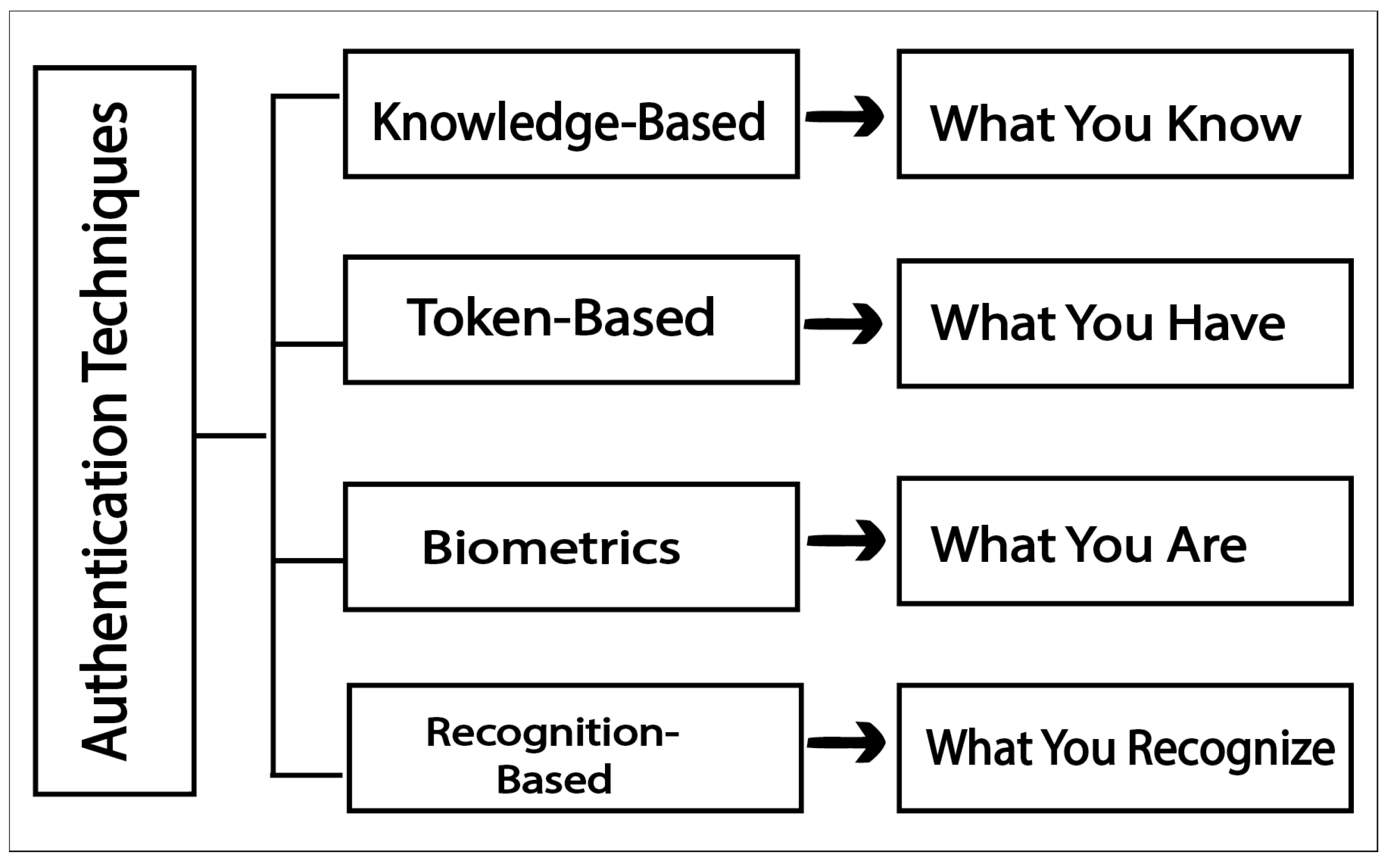
Figure 2.
A shoulder surfing situation in a cafe [29]
Figure 2.
A shoulder surfing situation in a cafe [29]
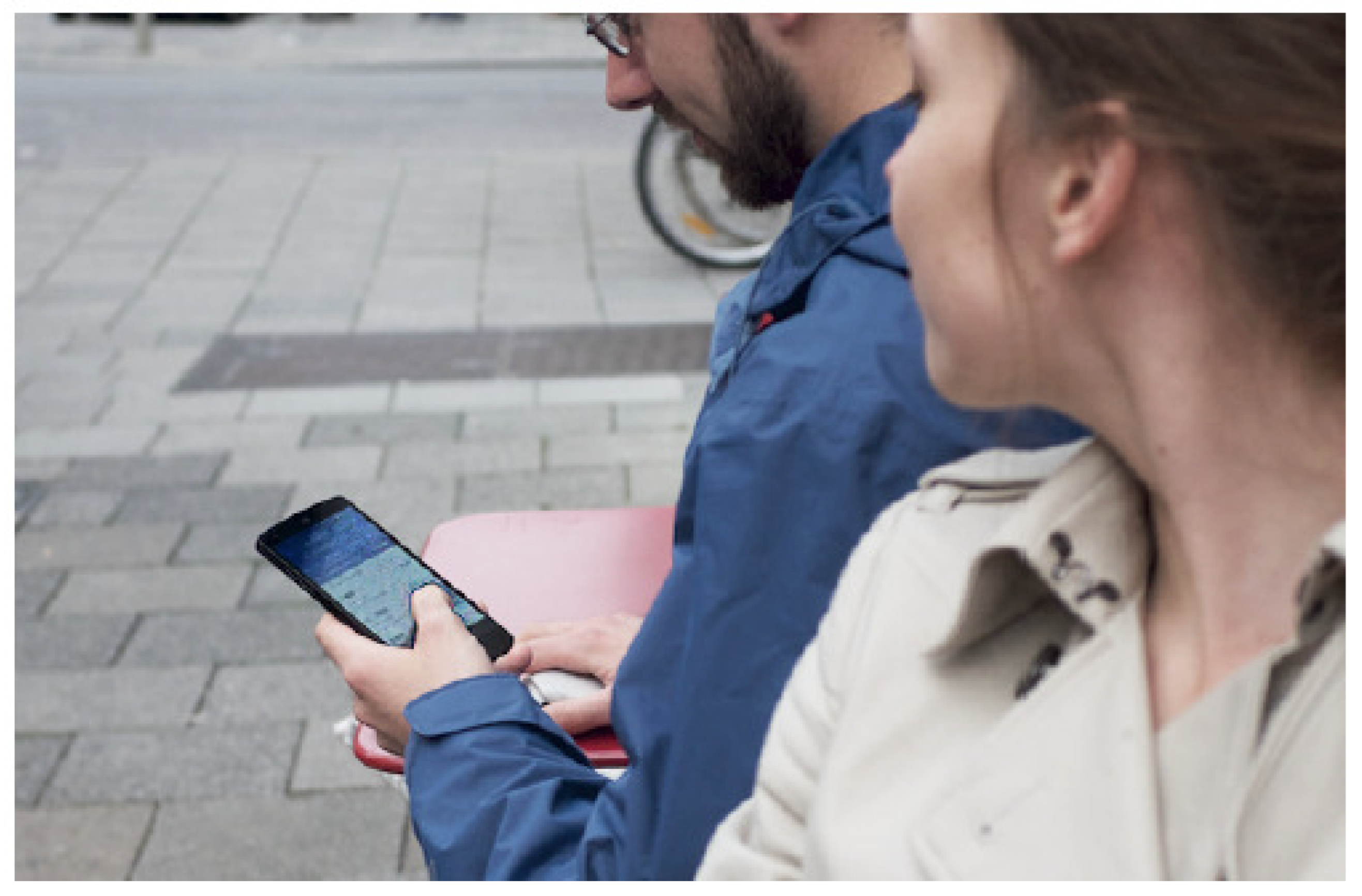
Figure 3.
smudge of finger on mobile [47]
Figure 3.
smudge of finger on mobile [47]
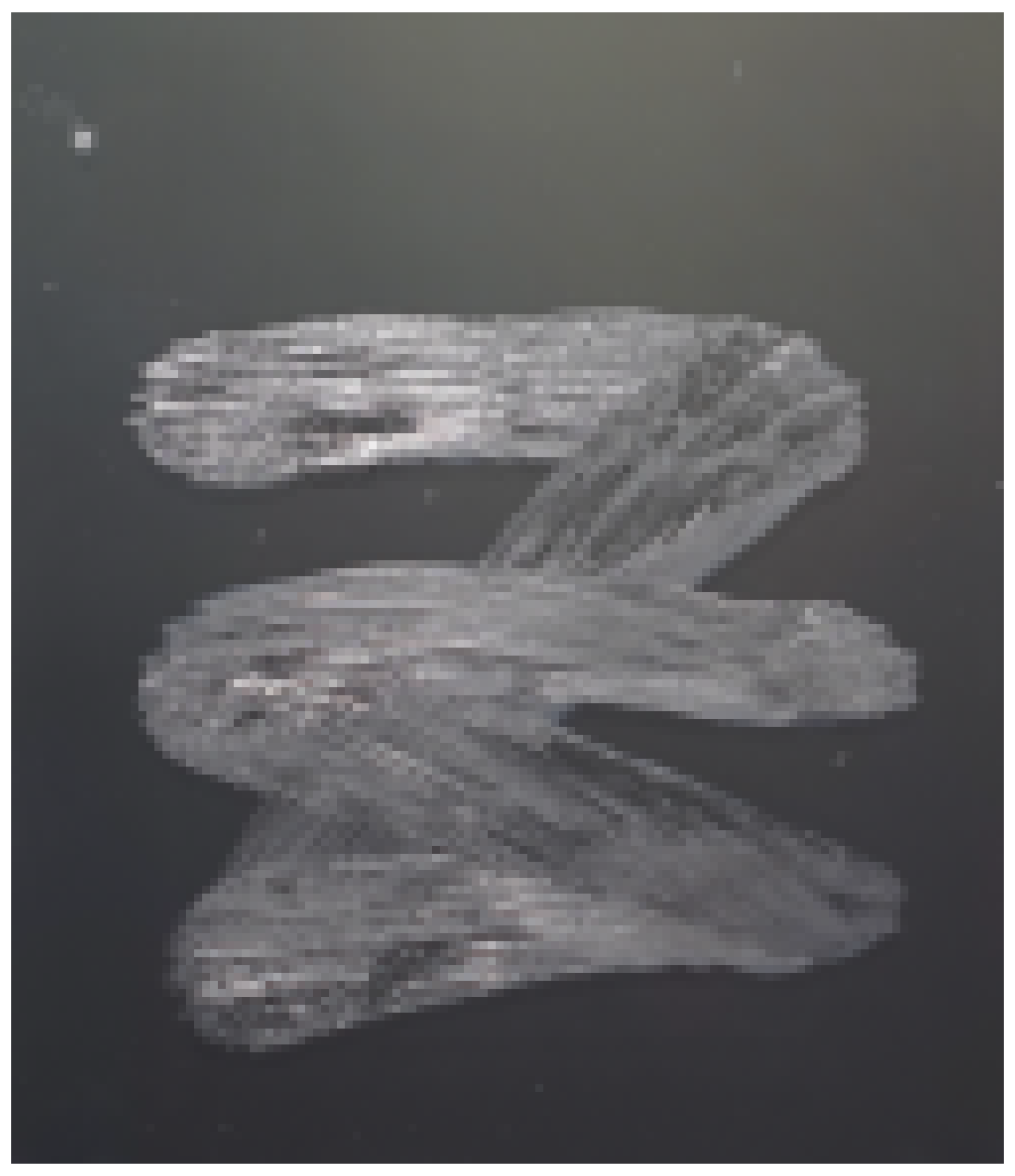
Figure 4.
Authentication Schemes
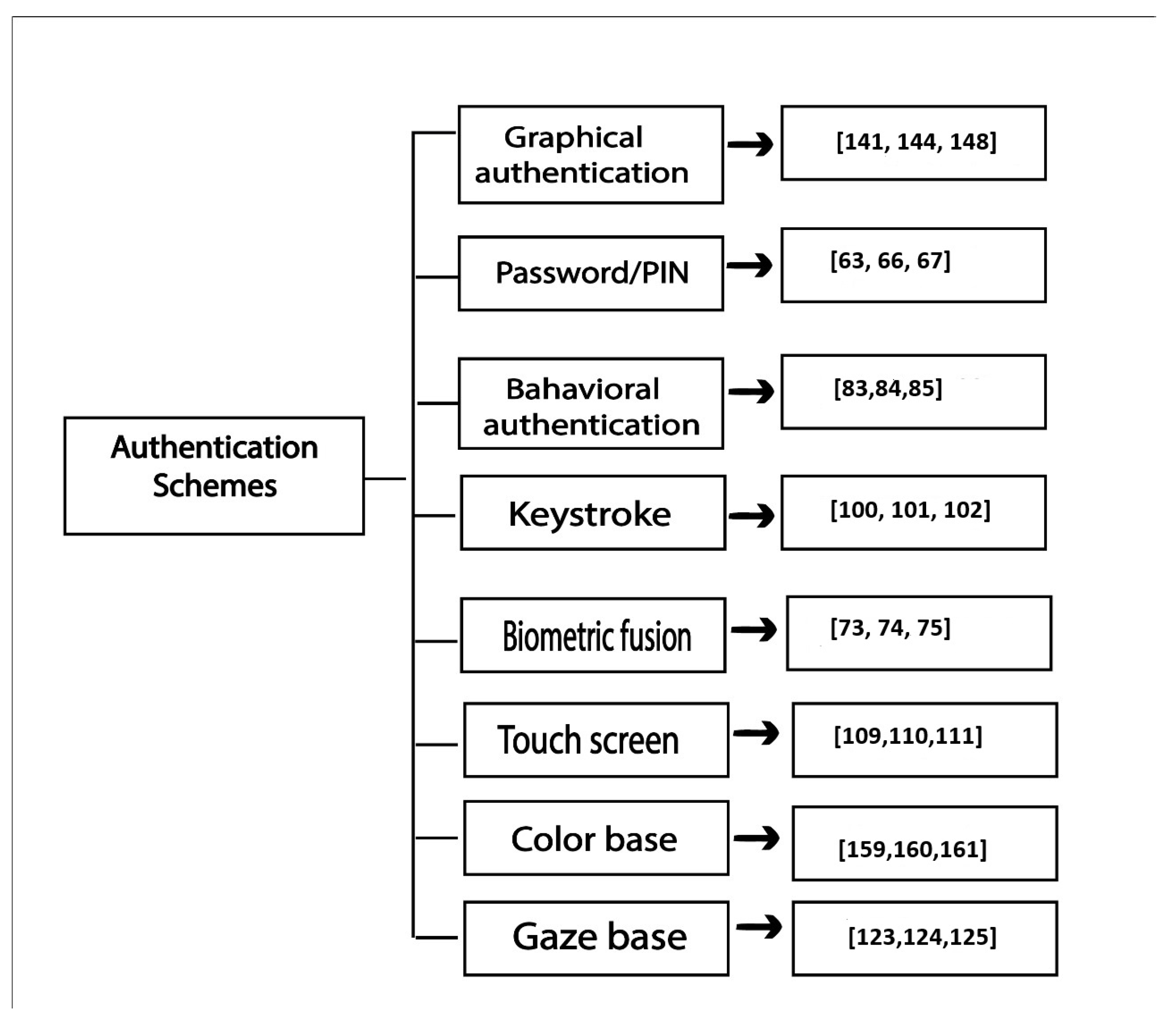
Figure 5.
Overview of force-PINs [110]
Figure 5.
Overview of force-PINs [110]
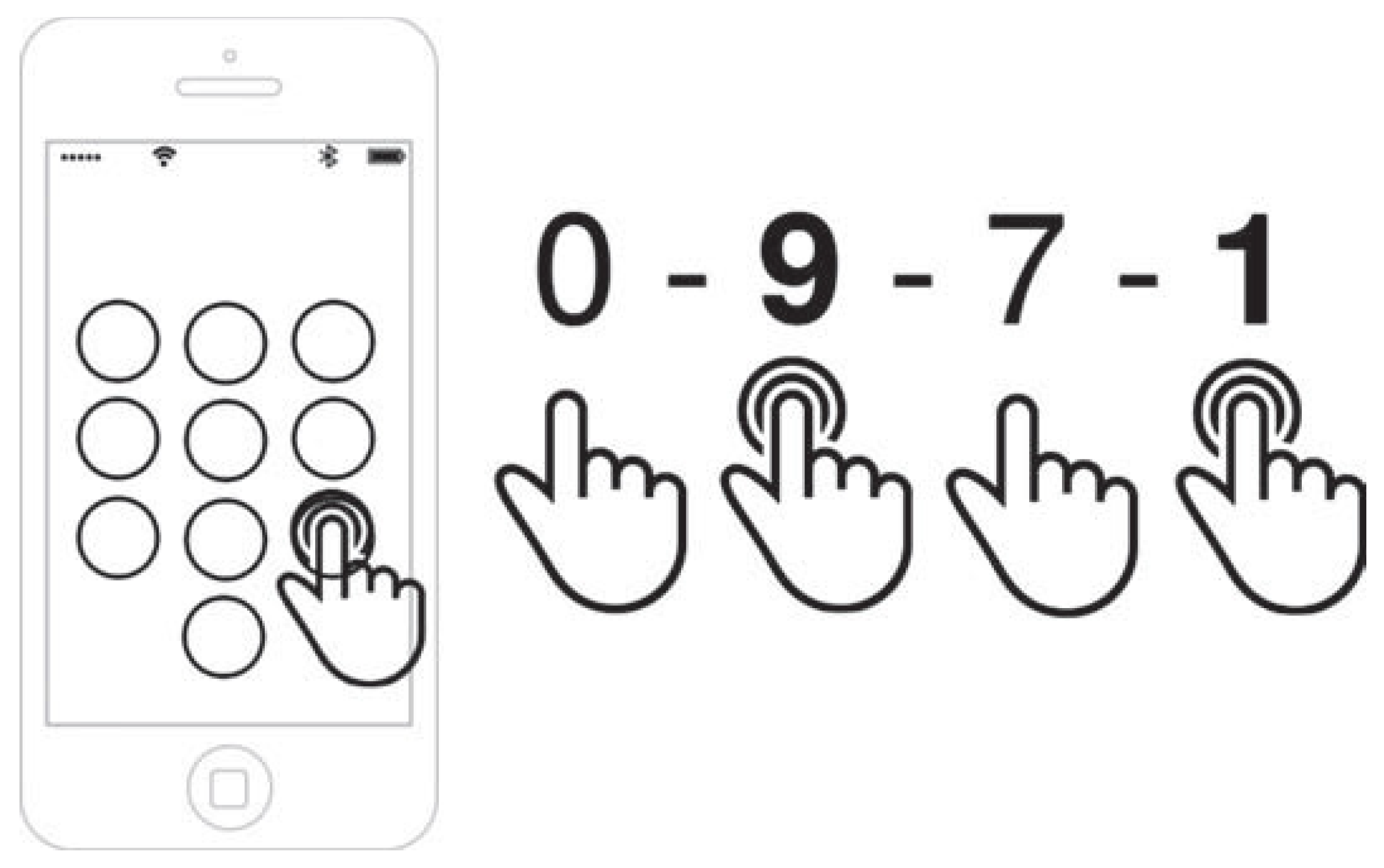
Figure 6.
User on-screen interface for smartphone [111]
Figure 6.
User on-screen interface for smartphone [111]
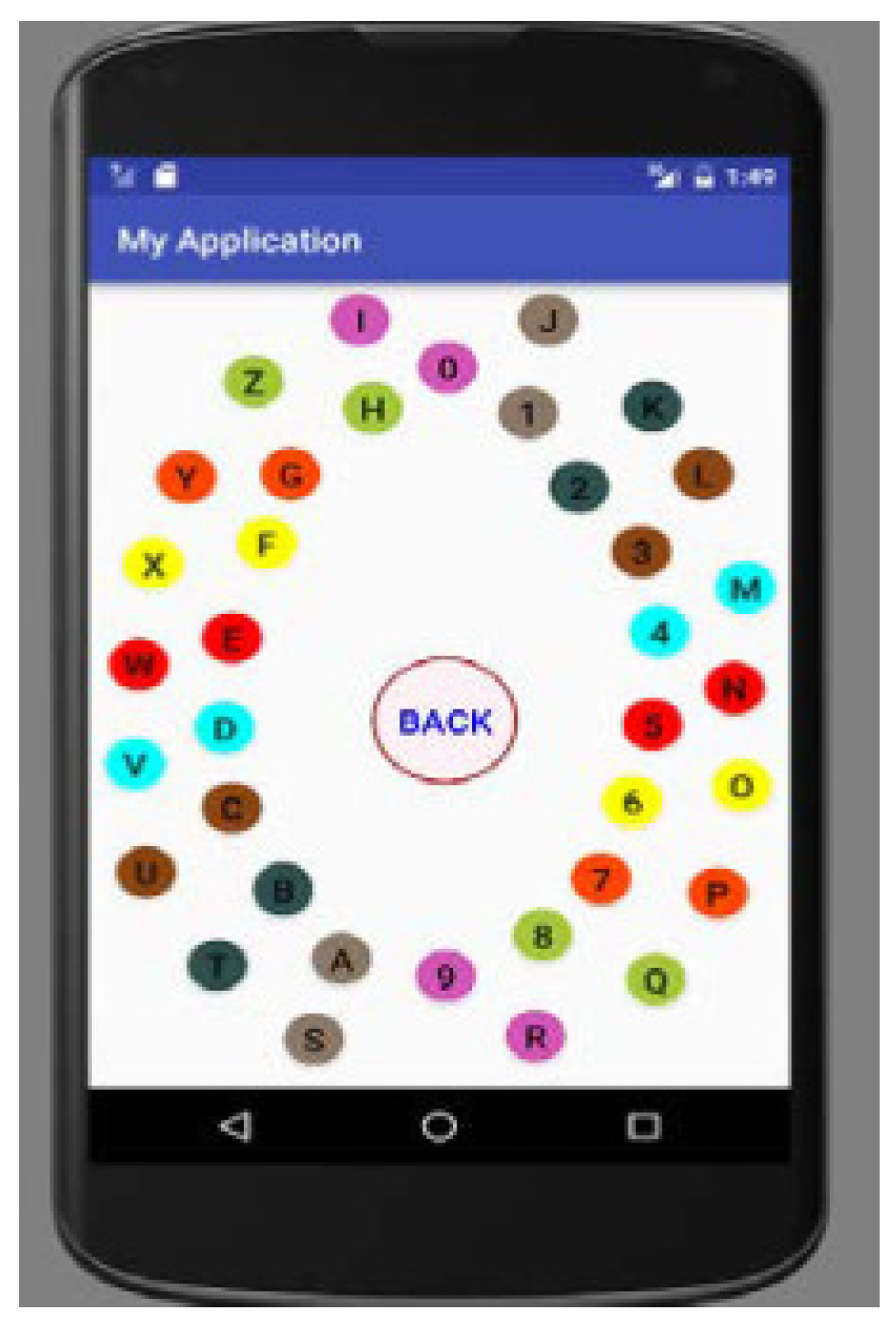
Figure 7.
Login indicator, Login screen of pass matrix authentication scheme [143]
Figure 7.
Login indicator, Login screen of pass matrix authentication scheme [143]
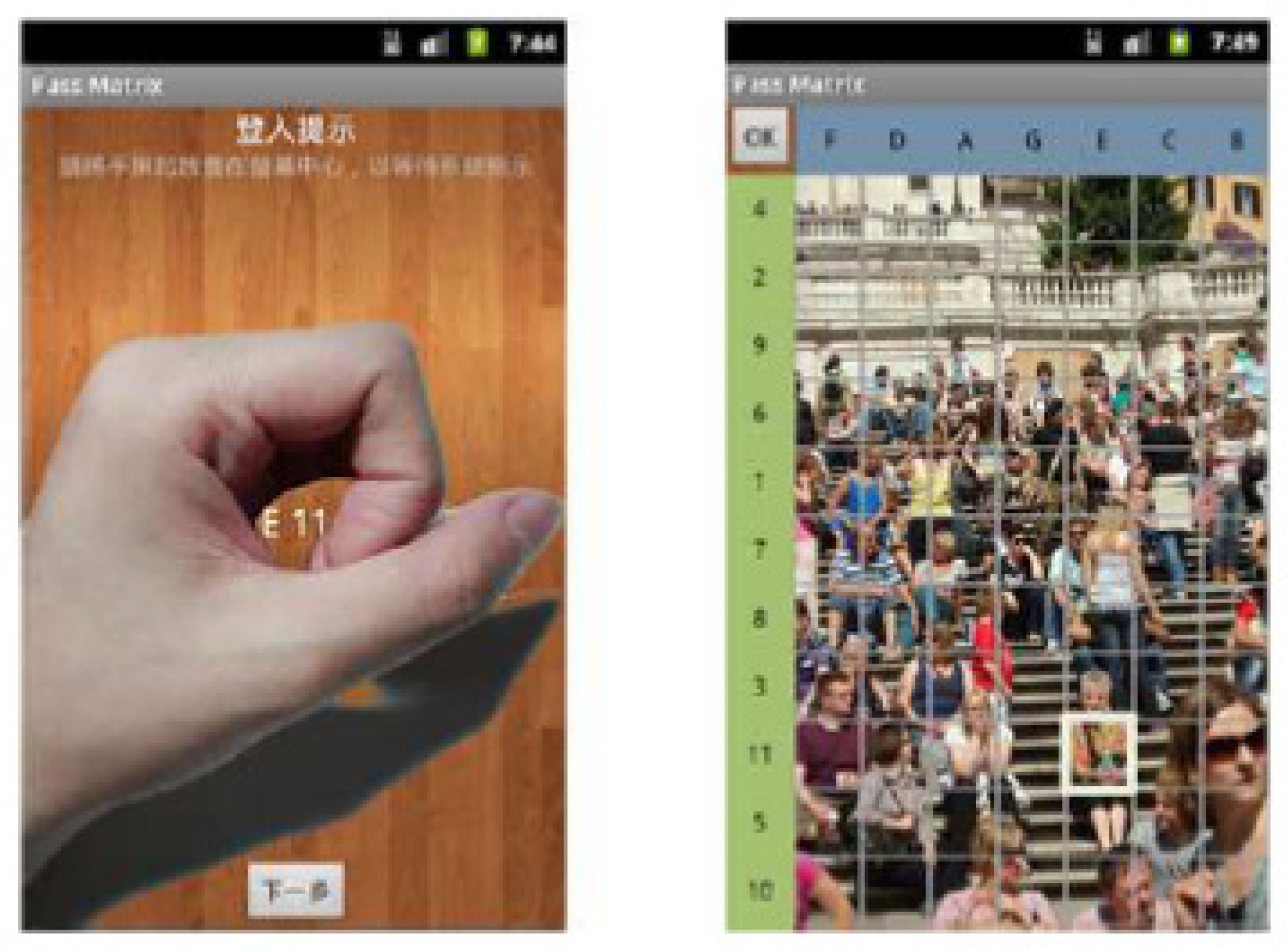
Figure 8.
The target image from the degraded version of the target image
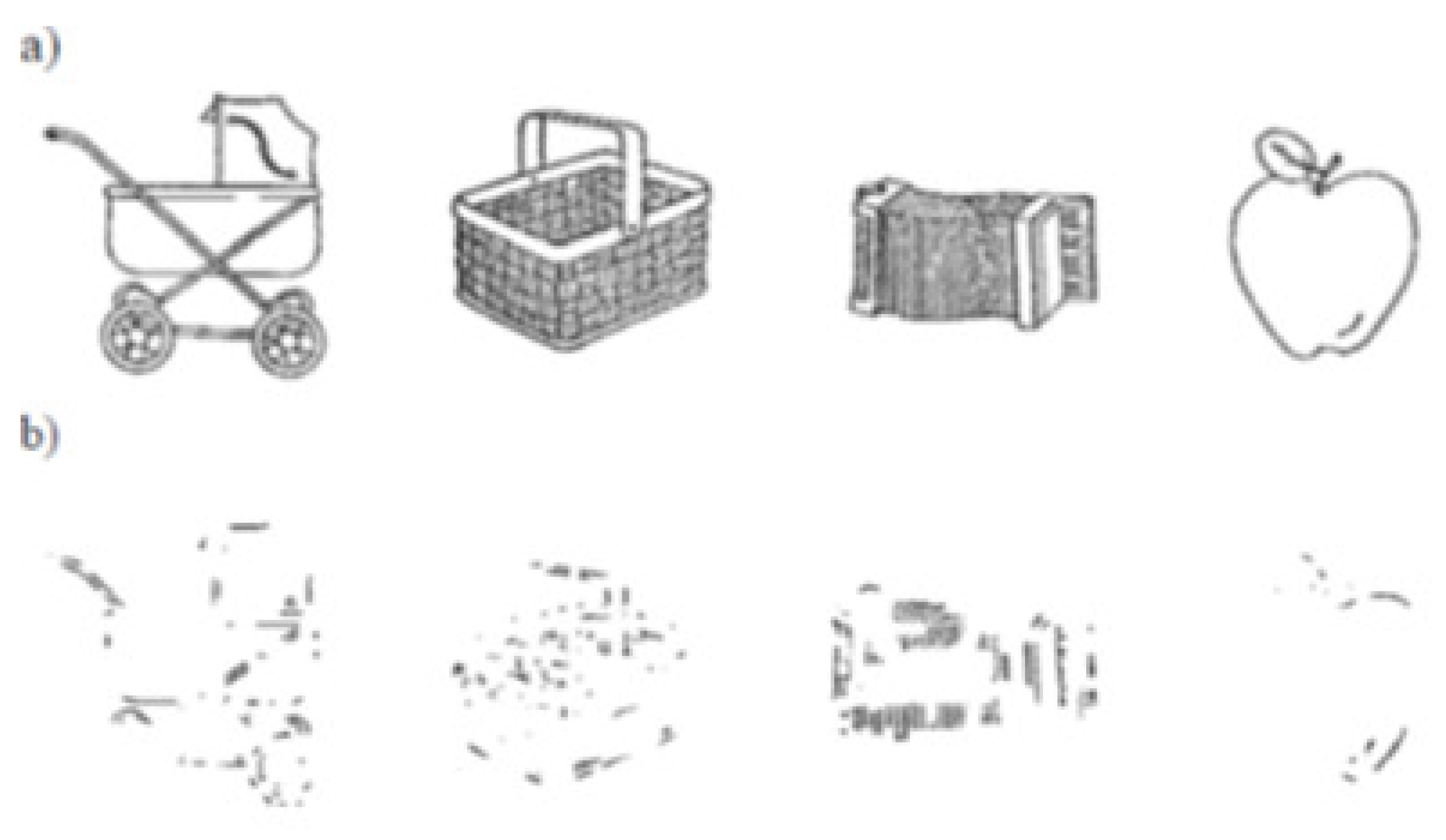
Figure 9.
degraded images and their masks
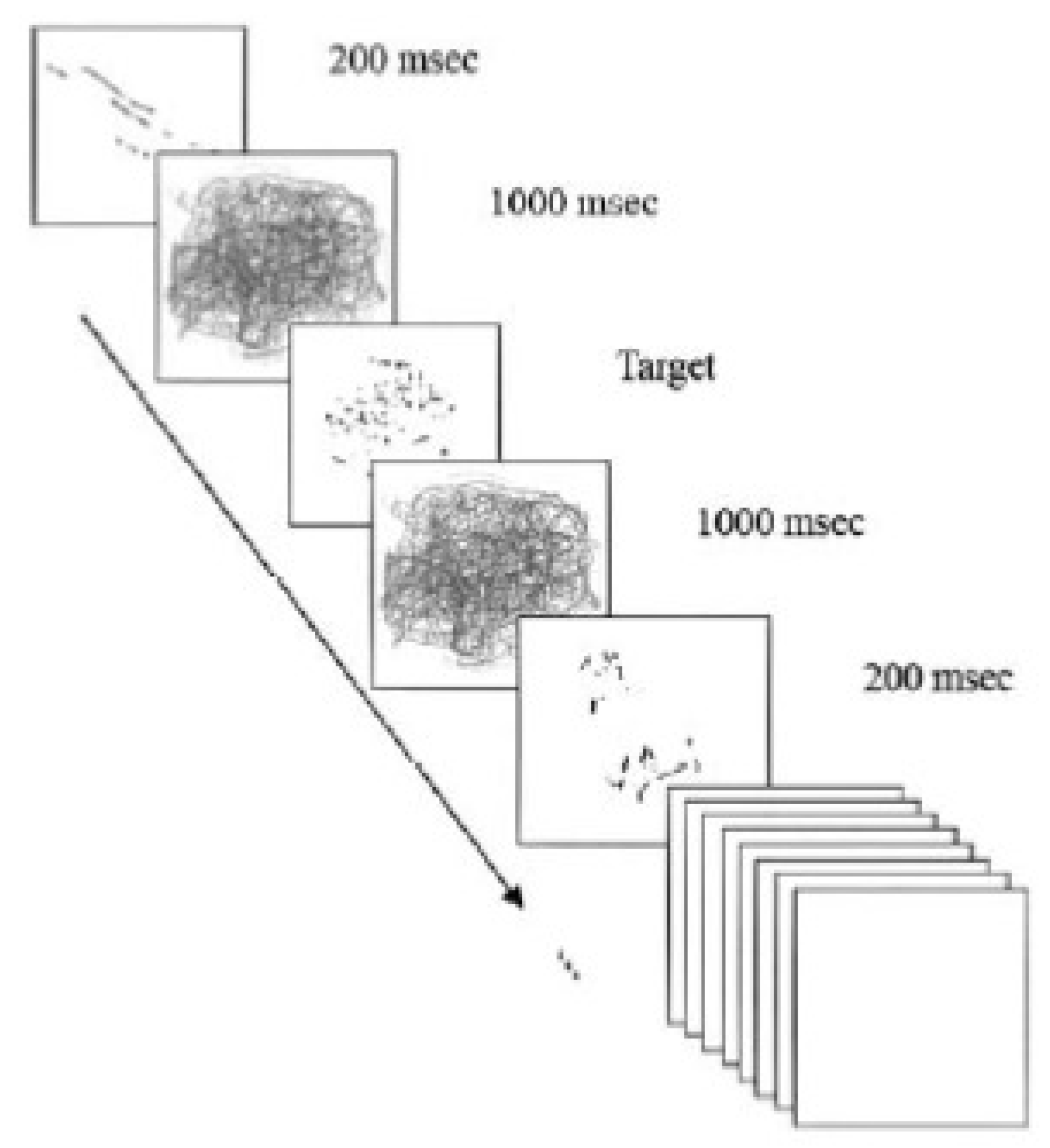
Figure 10.
Example of a convex hull with 3 pass-icons [149]
Figure 10.
Example of a convex hull with 3 pass-icons [149]
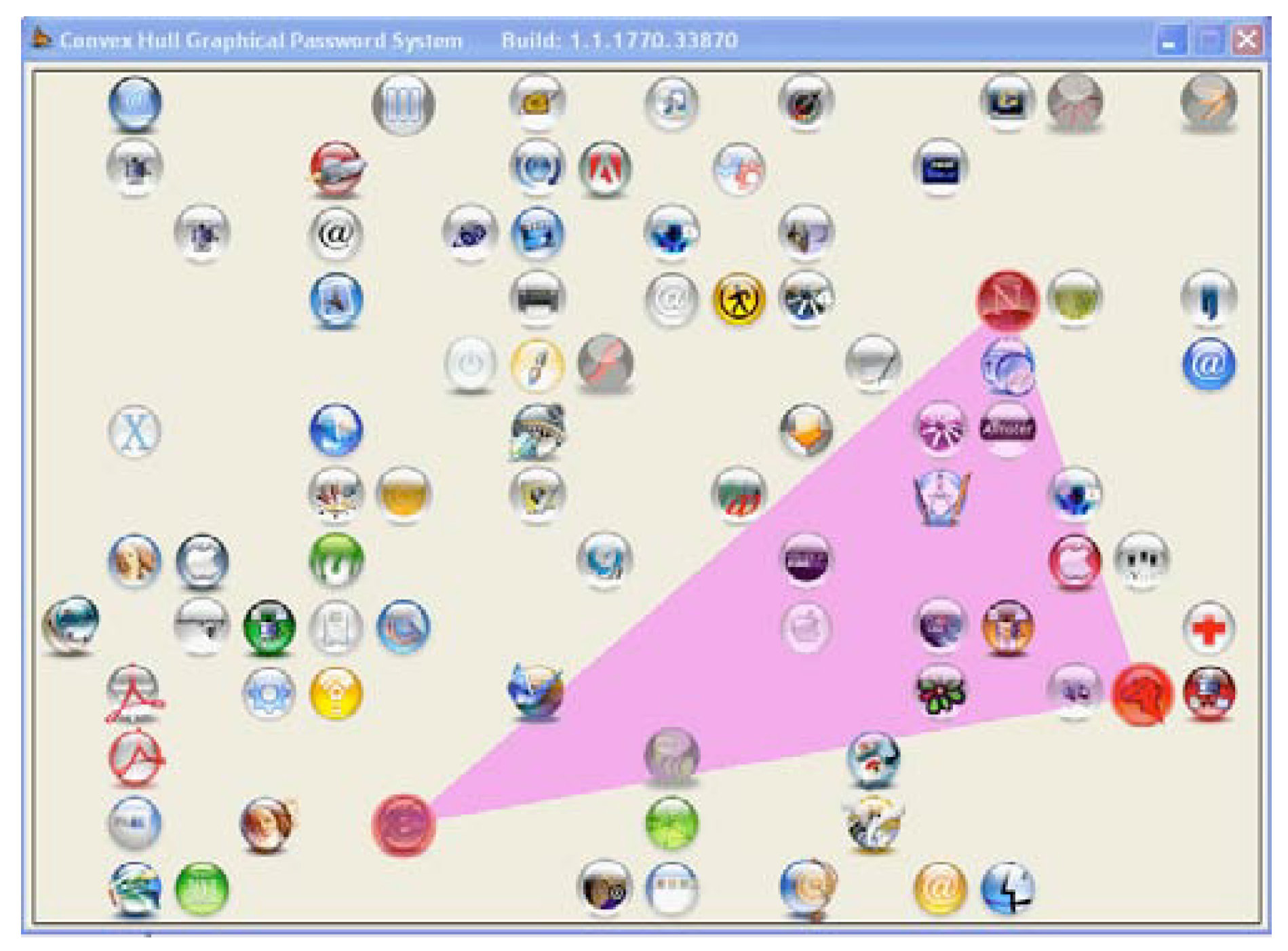
Figure 11.
An example of a 3D graphical password created by the user
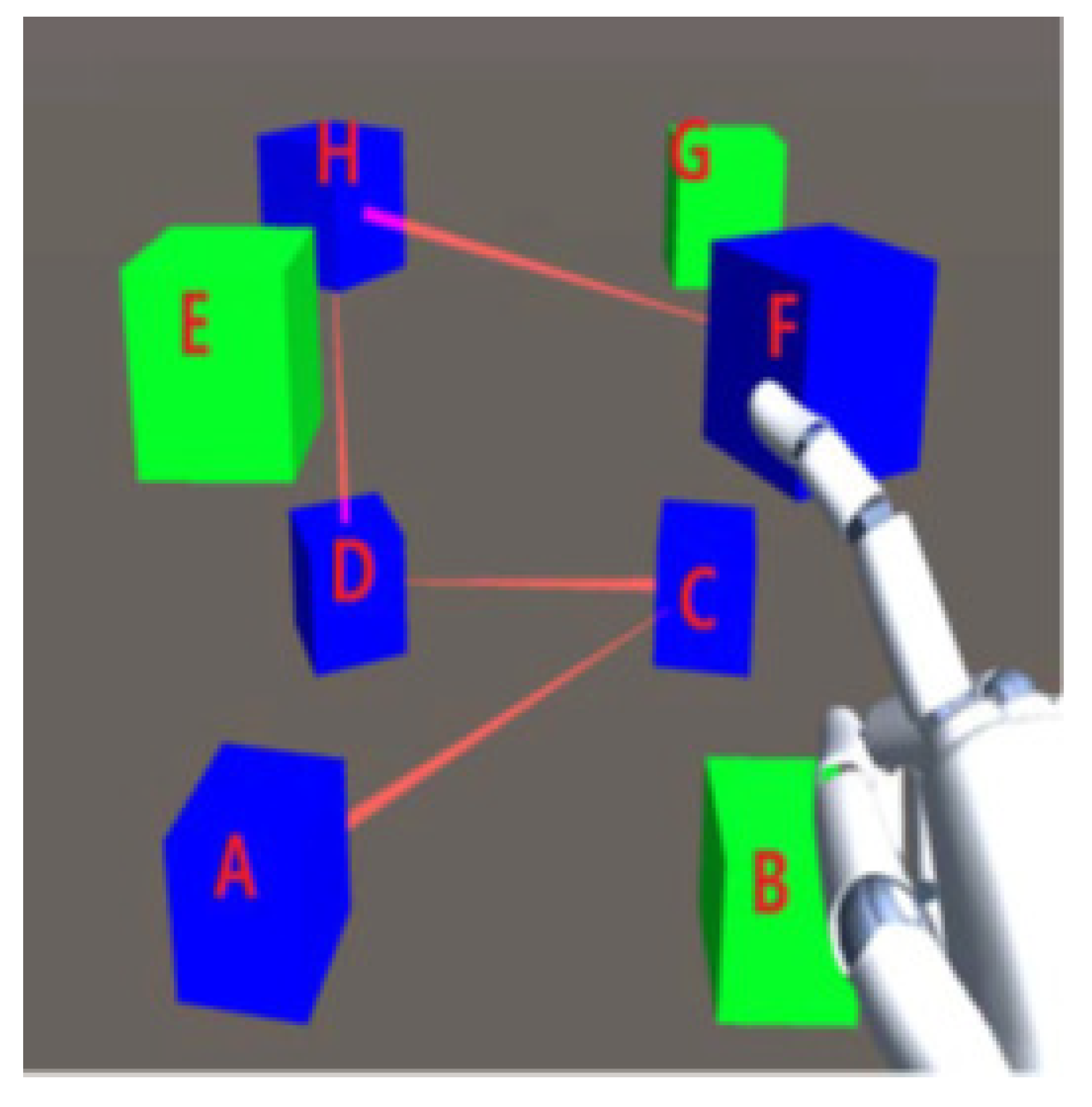
Figure 12.
login process of pair based authentication system
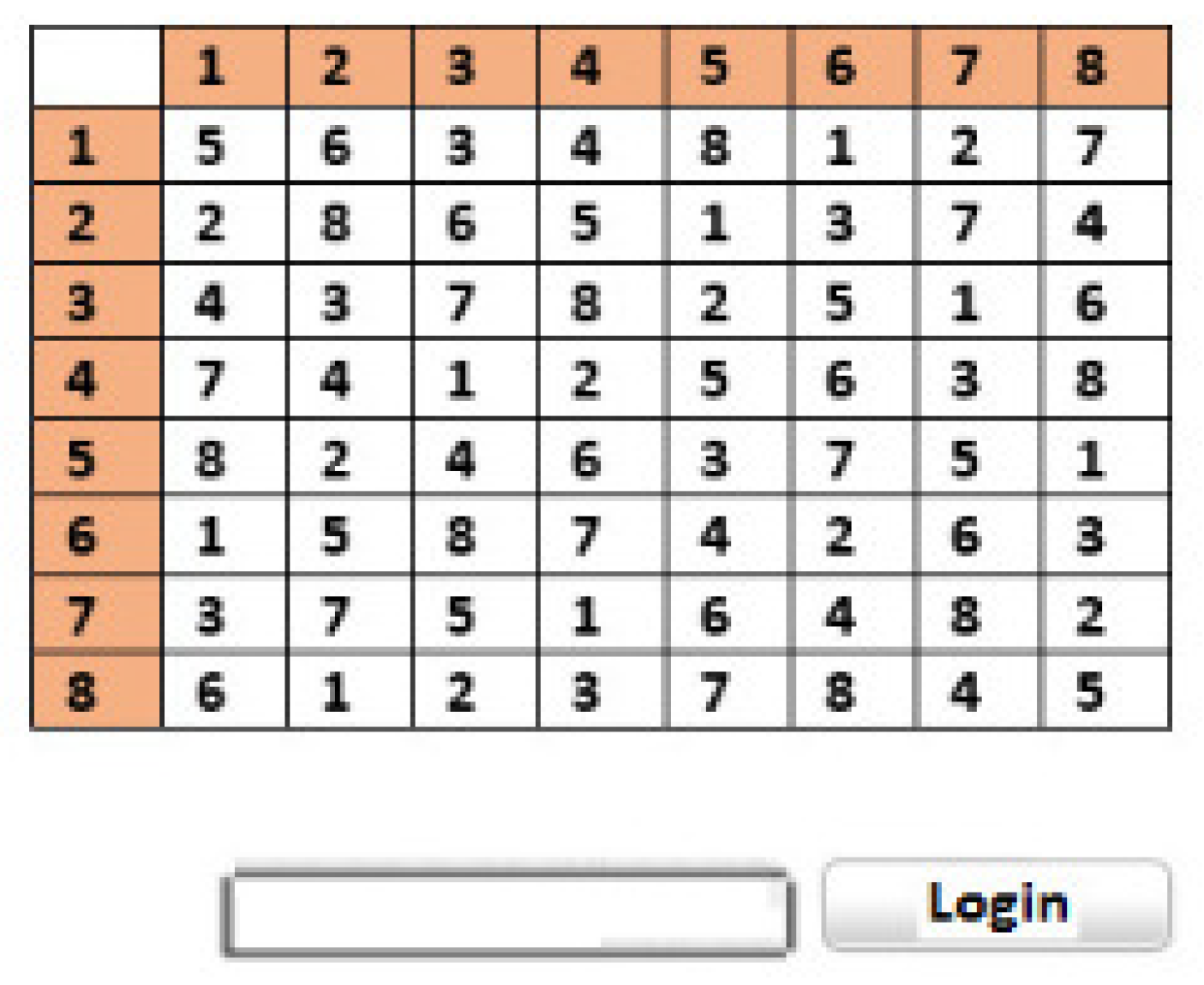
Figure 13.
Graphical pad of login process of server voice authentication
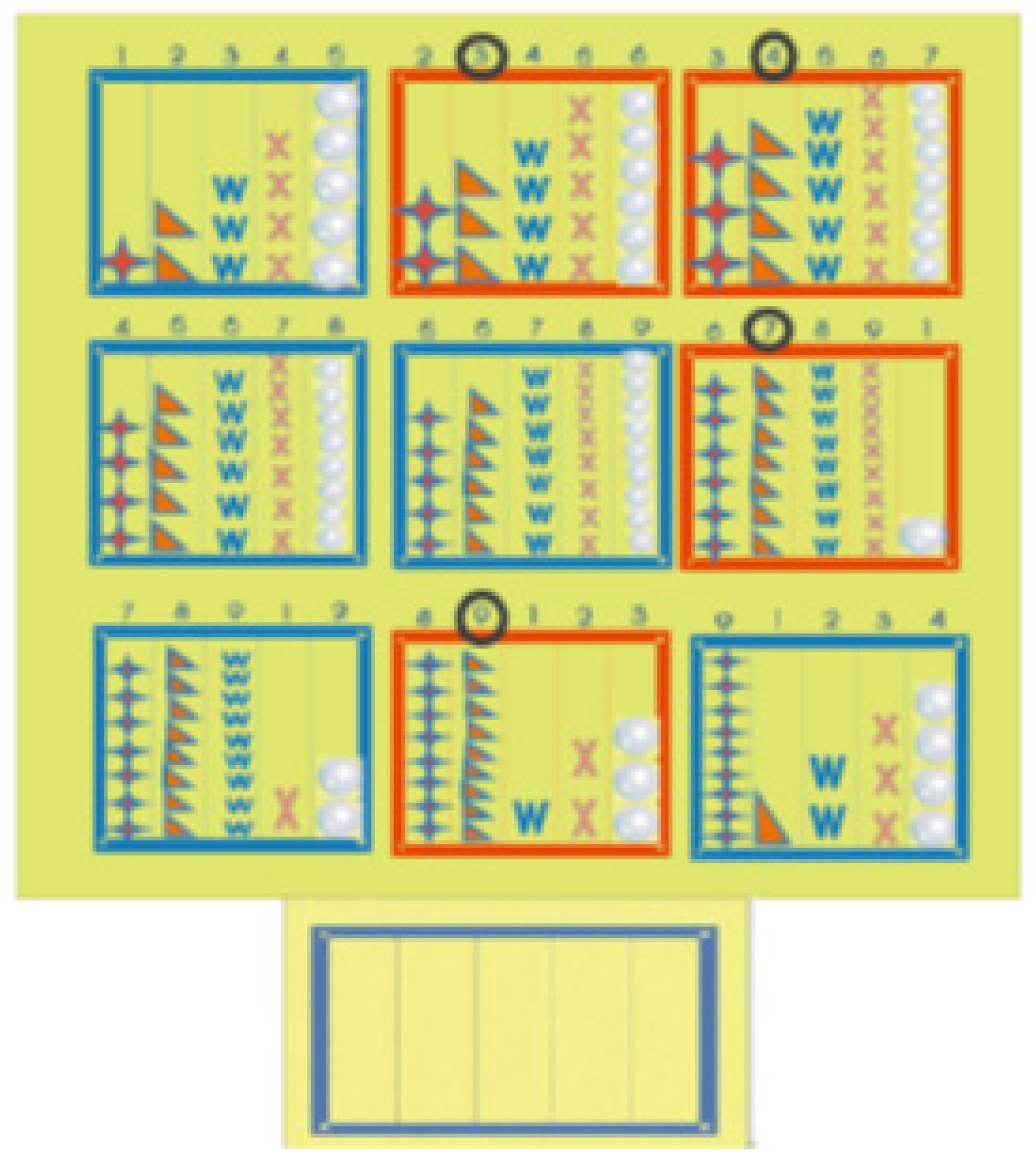
Figure 14.
Design of a Google Glass
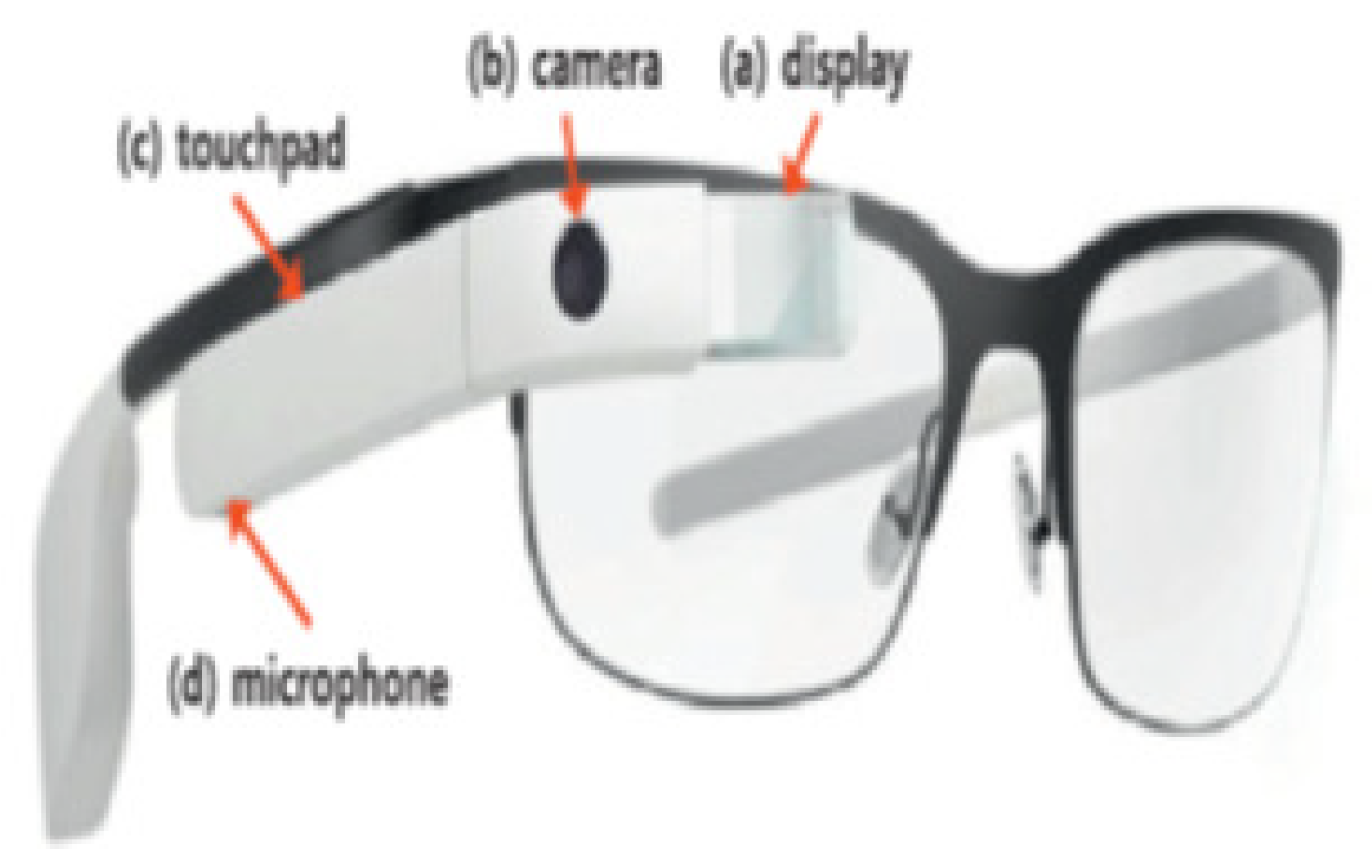

Table 1.
An overview of attacks on mobile devices
| Type of attack | Reference |
|---|---|
| Shoulder attack | [29] |
| Brute Force Attacks | [50] |
| Dictionary Attack | [34] |
| Replay Attacks | [36] |
| Phishing Attacks | [38] |
| Key loggers | [41] |
| Guessing Attacks | [42] |
| Smudge Attacks | [45] |
| Electroencephalography Signals | [49] |
Table 2.
Survey Papers Summary
| Title | Source | Authentication Schemes Discussed | Limitations |
|---|---|---|---|
| Two-factor authentication scheme for mobile money: A review of threat models and countermeasures | [25] | This evaluation research shows that the 2FA in mobile devices | The review only address one time of authentication |
| Adversary models for mobile device authentication | [51] | The suggested classification of adversaries provides a powerful and practical adversary model that enables a comparable and clear classification of security properties in mobile phones authentication | Focuses on adversary models only |
| Transparent authentication systems for mobile device security: A review | [26] | This study highlights the need to look into the sensitivity level of the application and determine whether or not a particular application needs to be protected when determining when to authenticate the mobile user | The review focuses only on touch authentication mechanisms |
| A survey of authentication schemes in telecare medicine information systems | [52] | The suggested authentication procedures are reviewed in this work, along with their advantages and disadvantages in terms of computing cost, guaranteed security, and privacy features | Hybrid authentication technique for pertinent authentication is missing |
| Android security: a survey of issues, malware penetration, and defenses | [55] | By providing an understanding of the advantages and disadvantages of established research methodology, this review enables researchers to propose approaches for malware analysis, harmful app identification, and next-generation Android security | Focuses only on android malware threats |
| Surveying the development of biometric user authentication on mobile phones | [56] | Evaluate current initiatives in the field of biometric phone authentication and assess how feasible it would be to implement them on touch-enabled smartphones | Biometric authentication techniques are discussed |
| A survey on touch dynamics authentication in mobile devices | [57] | This work aims to give some insights and a comparative analysis of the state-of-the-art in the field, covering experimental settings and evaluations, feature data representations, data gathering methodologies, and decision making strategies | Touch biometric on mobile devices are addressed |
| A Security Analysis of Password Managers on Android | [58] | This study explores the security of significant Android password managers, exposing flaws such as weak password generation, unprotected metadata, and phishing concerns. It makes recommendations to improve both user experience and security, as well as identifies future study areas. | The brief oversimplifies critical security issues and provides insufficient context on individual vulnerabilities and suggested remedies |
Table 3.
Summary of behavioral authentication schemes
| Algorithm | Reference | Year | Findings | Limitations |
|---|---|---|---|---|
| SVM | [83] | 2013 | The suggested technique consumes less energy while presenting quick and precise authentication | neglects context features [93] |
| KNN | [84] | 2017 | KNN has good efficiency than SVM in all cases | analyzed small number of gestures [93] |
| CNN | [86] | 2018 | ConvNet has the highest predictive accuracy in the tap behaviour of the user than the algorithms compared | need many layers to reach features layer [93] |
| CNN | [87] | 2018 | Three modalities for efficient identification and smart spoof recognition are used in the hybrid scheme | User need to carry extra device for authentication |
| DTW | [89] | 2017 | DTW is used to authenticate smartphone users using pin writing behaviors. | The proposed scheme is restricted to few subjects and does not include any form of assessment |
| LSTM RNNs | [90] | 2022 | A comparative analysis was conducted on behavioral traits acquired through common mobile interactions like typing and tapping, alongside sensor data from various mobile sensors. | Although the study focuses at a variety of background sensors, it may not completely investigate the possibilities of all available sensors on mobile devices. This shortcoming may limit the efficacy of the multimodal method. |
| LSTM | [91] | 2023 | ABehavePassDB is a comprehensive database of mobile behavioral biometrics that allows for continuous authentication using background sensors and touchscreen interactions. | While BehavePassDB makes a significant contribution, the document does not address potential limits in the diversity of the user population or the types of devices used, which could affect the generalizability of the results. |
| LSTM | [92] | 2024 | An innovative Continuous Verification System (CVS) adapts to user interactions in real-time, improving security and user experience. | The data collection is based on specific activities that may not capture the whole spectrum of user interactions with mobile devices, thereby affecting the system’s capacity to generalize to different situations. |
Table 4.
Summary of Keystroke authentication schemes
| Reference | Year | Findings | Limitations |
|---|---|---|---|
| [97] | 2020 | challenge by developing an augmented reality-based app that resides on the attacker’s smartphone | Cannot resist mimicry attacks [103] |
| [101] | 2009 | A user identification system that detects a cell phone user’s keystroke dynamics to identify authorized users from imposters | degradation of response time to the mobile device that might affect user acceptance [104]. |
| [99] | 2008 | Low computational requirements that can be used on a real computer have been shown by statistical classifiers, with faster response in both template generation and sample verification | only practical in scenarios with sufficient keystroke activity [105] |
| [100] | 2009 | Learn the potential of person behavioral biometrics, including finger pressure, hold-time and inter-key | Small number of participants were used for experimental study [104] |
| [102] | 2003 | keystroke dynamics-based authentication (KDA) provides better security against different attacks | biometric measure lacks universality, uniqueness, permanence, precision, and acceptance because it simply communicates keyboard timing features [106]. |
Table 5.
Summary of Touch screen authentication schemes
| Reference | Year | Findings | Limitations |
|---|---|---|---|
| [108] | 2016 | New changes to the existing pattern lock mechanism including the re-use of a node after it has already been used | Research is constrained by the small sample size and laboratory environment [115]. |
| [109] | 2016 | Replaces the traditional font of text messages with user handwriting | not using inferential statistics [116] |
| [110] | 2017 | Improves digit PINs security by assigning binary pressure to digits in the series | obtaining accurate force touch information can be challenging [117] |
| [111] | 2016 | The proposed scheme works in a partly measurable setting where an auxiliary device is required for authentication | External instruments such as headphones are used to transmit the challenge value [118]. |
| [112] | 2020 | Proposed PassO, an interface regarding touch screen devices depending on the circular grid. | Comprehensive usability evaluation is missing that should include more users to judge the proposed scheme |
| [113] | 2023 | Proposed a feature extraction method that includes the Signal Vector Magnitude and evaluate various machine learning models, including 1-class and 2-class SVMs. | The conclusions drawn from the study may not be generalizable due to the limited number of users in the dataset. |
| [114] | 2024 | The findings indicate that touch gestures and movement are the most commonly used biometric methods, with a significant reliance on accelerometer and touch data streams. | The review is limited by the low quality of the included studies, which hampers the ability to draw robust conclusions about the efficacy of behavioral biometrics. |
Table 6.
Gaze Based authentication schemes
| Reference | Year | Findings | Limitations |
|---|---|---|---|
| [124] | 2018 | Two-step process for analyzing the complexity of graphical passwords generated by users based on the behavior of the eye-gaze during the creation of passwords | Small sample size for the recall-based scheme |
| [123] | 2016 | allows user to create passwords with multiple switches between input modalities | Thermal attacks on this technique would be ineffective in revealing the PIN [129] |
| [125] | 2019 | A good balance between usability and protection is provided by gaze | Multimodal authentication, which has the disadvantage of making password entering more difficult. This may have an impact on the password symbols’ memorability [130] |
| [126] | 2020 | quality assessment scheme on eye movement authentication | Continuous lines of sight, such as the trajectory prediction estimation in reading the text, should be evaluated and investigated. |
| [127] | 2020 | Using eye gaze changeability and concentration on hotspots throughout graphical password generation, calculate the intensity of user-chosen grGaze-based security solutions require highly accurate gaze estimates to be completely implicit and work without the user’s participation. | |
| [128] | 2023 | They concludes by discussing the potential applications of GazeCast in various public settings and the importance of further research to optimize its usability. | The study’s findings may be limited by the small sample size and the lack of exploration into varying environmental factors that could affect gaze tracking accuracy |
Table 7.
Graphical authentication schemes
| Reference | Year | Findings | Limitations |
|---|---|---|---|
| [144] | 2005 | Graphical passwords provide more security against different attacks | There are no artificial predefined borders around portions of the image that the user can click within [141] |
| [148] | 2016 | Degraded images are used for authentication that decreases the login time to 14s | The proposed study uses a limited number of users for user study |
| [149] | 2006 | The framework helps a user with the easement of verifying the graphical password in an endangered environment as the user indirectly selects the images for his password. | An additional icon should be created to make the security settings more realistic |
| [150] | 2016 | 3D graphical password for mobile authentication | Shoulder surfing attacks are successful against 3D passwords [154] |
| [151] | 2018 | Combination of text and graphical password | Waiting time for the synchronization of images results in lengthy login time [155] |
| [152] | 2023 | The proposed scheme incorporates multiple factors, including simple arithmetic operations, machine learning for hand gesture recognition, and medical images for recall, to create a user-friendly and memorable authentication process. | The study’s findings may be limited by the small and homogeneous sample size, which could affect the generalization of the results. |
Table 8.
Color base authentication schemes
| Reference | Year | Findings | Limitations |
|---|---|---|---|
| [157] | 2016 | Authentication using color code that gives two-step authentication for use | Directed towards shoulder surfing attack if the attacker records the authentication process or observes the authentication process a few times. The authentication process takes time because of its many stages |
| [158] | 2017 | combination of Pass faces, Pass points, and Story for strong authentication | Color combination confuses the user to get authenticate |
| [159] | 2013 | Addressed input accuracy problems without the need to remember images while preserving a password space that is sufficiently protected | The new version is unlikely to be identical to the original; redrawing a picture is more difficult than retyping words [162] |
| [160] | 2015 | ColorSnakes can be used to add extra protection to specific applications like images, emails, and banking | The shift from a standard four-digit PIN to a four-digit + color or five-digit + color PIN may have affected memorability. |
| [153] | 2023 | Allowing users to select their own colors instead of pre-selected ones encourages them to build more personal and meaningful passwords. Color can improve password security by increasing entropy. | It excludes colorblind participants from the study, limiting the generalizability of the findings regarding color-based password memorability and security for all users. |
| [161] | 2024 | Color-based authentication is less prone to visual hacking and password guessing due to its complexity and lack of connection to user information compared to text-based authentication, which typically include personal information in the password. | it may reduce user-friendliness, particularly for colorblind users, as it requires color selection for password input, complicating the authentication process. |
Table 9.
Process authentication schemes
| Reference | Year | Findings | Limitations |
|---|---|---|---|
| [165] | 2010 | change PIN code on every login session prevent shoulder surfing | authentication process requires mathematical operation which is time consuming |
| [163] | 2015 | Text along with images are combined to create session passwords | the system can easily be compromised by taking a screenshot [167] |
| [164] | 2015 | Combination of something user process authentication factor and graphical password | the resistance of SVGA to observation attacks is very weak [168] |
| [30] | 2017 | using cryptography primitives, i.e., digital signature, hashing, and encryption, creating a secure authentication mechanism | The proposed approach is resistant to phishing attacks, replay attacks, and shoulder surfing attacks; nonetheless, key capturing poses a risk to the system [169]. |
| [166] | 2022 | The user is presented a public pattern, but the system learns their touch dynamics and postures, including lying posture. The focus is on adding additional layer of defense to secure users’ authentication processes | A key drawback of the article is that it relies on a limited sample size and participant diversity, which may affect the generalizability and robustness of the proposed behavioral authentication system across different user demographics and real-world scenarios |
Table 10.
Augmented authentication schemes
| Reference | Year | Findings | Limitations |
|---|---|---|---|
| [172] | 2016 | A new desktop application that enables subtle writing | The keystrokes observed by the adversary through shoulder surfing individually or through the camera will easily get to know about the password written by keys pressed |
| [173] | 2017 | Masked password that only includes offset numbers for the input password to be corrected | Google glass device is not accessible to every user |
| [174] | 2017 | Augmented reality gesture authentication, that is based on the interpretation that only the user is seen in augmented reality | User needs to carry extra device for authentication |
| [175] | 2020 | Biometric identification system in a virtual environment | there is a noticeable drop in the accuracy when considering cross-system behavior-based biometric authentication [178] |
| [176] | 2023 | GazePair improves pairing rates and times compared to current approaches. In addition, we demonstrate that GazePair can support several users. GazePair is compatible with any Mixed Reality (MR) device that has eye gaze tracking | GazePair’s reliance on a spoken key sequence cue (KSC) for out-of-band communication may create security concerns in public settings, as the KSC’s low entropy (only 9 bits) could be vulnerable to eavesdropping if not properly safeguarded |
| [177] | 2024 | The ERP-based authentication system achieved 100% accuracy using a linear support vector machine classifier. A quadratic discriminant analysis classifier trained on ErPR characteristics had high accuracy (97%) and low false acceptance (0.03) and false rejection (0.03) rates. ERP and ErPR amplitudes had correlation values ranging from 0.452 to 0.829, and Bland-Altman graphs indicated strong agreement between them. | It does not address the potential security risks associated with using color-based passwords, particularly for users with color vision deficiencies |
Table 11.
Authentication schemes performance
| MPAS | Security | Relative Cost | References |
|---|---|---|---|
| Password/Pin | Minimum | Less | [64,67,68] |
| Behavioural | Maximum | Less | [72,73,84] |
| Keystroke | Medium | Less | [95,96,100] |
| Biometric-Fussion | Maximum | High | [199,200,201] |
| Touch Screen | Minimum | Less | [109,110,111] |
| Gaze base | Maximum | High | [122,123,125] |
| Graphical Password | Maximum | Less | [143,144,148] |
| Color-base | Minimum | Less | [157,158] |
| Random password | Maximum | Less | [30,163,164] |
| Augmented | Maximum | High | [172,173,174] |
Disclaimer/Publisher’s Note: The statements, opinions and data contained in all publications are solely those of the individual author(s) and contributor(s) and not of MDPI and/or the editor(s). MDPI and/or the editor(s) disclaim responsibility for any injury to people or property resulting from any ideas, methods, instructions or products referred to in the content. |
© 2024 by the authors. Licensee MDPI, Basel, Switzerland. This article is an open access article distributed under the terms and conditions of the Creative Commons Attribution (CC BY) license (http://creativecommons.org/licenses/by/4.0/).
Copyright: This open access article is published under a Creative Commons CC BY 4.0 license, which permit the free download, distribution, and reuse, provided that the author and preprint are cited in any reuse.


