

Submitted:
17 July 2024
Posted:
19 July 2024
You are already at the latest version
Abstract
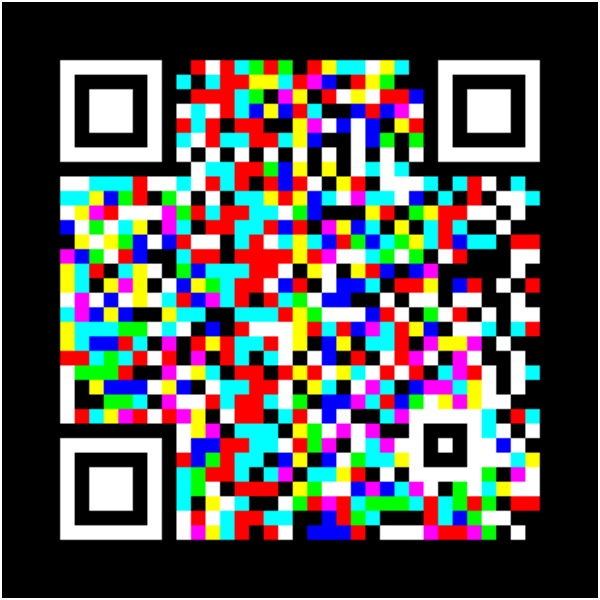
The present work titled QRGB consists of the development of a Python application for generating QR codes using the additive color generation method (RGB). This innovative method increases the information density stored in QR codes by using three color layers (red, green, and blue), each representing a different data set. QRGB offers an efficient and secure solution for storing and transmitting large amounts of information in limited spaces, significantly improving the capabilities of traditional black-and-white QR codes.By using three color layers (red, green, and blue), QRGB codes can store up to three times more information in the same space. This technique not only increases storage capacity but also enhances information security, making it more difficult to counterfeit or manipulate the code. The superposition of multiple data layers allows for redundancy implementation, increasing the code's robustness against damage or reading errors.QRGB codes are especially useful in applications that require the transmission of large amounts of data in limited spaces, such as in the packaging industry, digital business cards, and interactive advertising. Additionally, they have great potential in areas such as document and ticket security, where the authenticity and integrity of information are crucial.These points provide a solid foundation for understanding the innovation and advantages of colored QR codes (QRGB) compared to traditional QR codes, highlighting their applicability and potential in various sectors.The Python application developed for QRGB utilizes advanced color image processing techniques, applying models and methods to generate and decode QR codes using the RGB color system, thus enhancing information density and security through the innovative use of additive color layers.
Keywords:
App
; Color
; RGB
; Codes QR
; Python
What Is a Traditional QR Code
A QR (Quick Response) code is a type of two-dimensional barcode that can store information efficiently and quickly. It was created in 1994 by the Japanese company Denso Wave to be used in the automotive industry, although its use has spread to many other areas due to its versatility and storage capacity.
The structure of QR codes is made up of a matrix of black and white modules (dots) that represent the encoded data. The modules are organized in a square and can contain a large amount of information compared to traditional one-dimensional barcodes.
In terms of their storage capacity, QR codes can store various types of data, including numbers, letters, special characters, and even binary data. The amount of information they can contain varies depending on the size and version of the QR code, but they can store up to 7,089 numerical characters or 4,296 alphanumeric characters.
Regarding ease of scanning, one of the most significant advantages of QR codes is that they can be quickly scanned from multiple angles, even if partially damaged, thanks to their error detection and correction patterns. Most smartphones and mobile devices with cameras can scan QR codes using specific apps or the deviceʹs camera.
The most common uses of QR codes in marketing and advertising: They are used to provide quick access to websites, promotions and discounts. In mobile payments, QR codes facilitate transactions by scanning a code containing payment information. In inventory management, they help track products and manage inventories in various industries. In information and education, they provide access to additional information about products, services or educational materials.
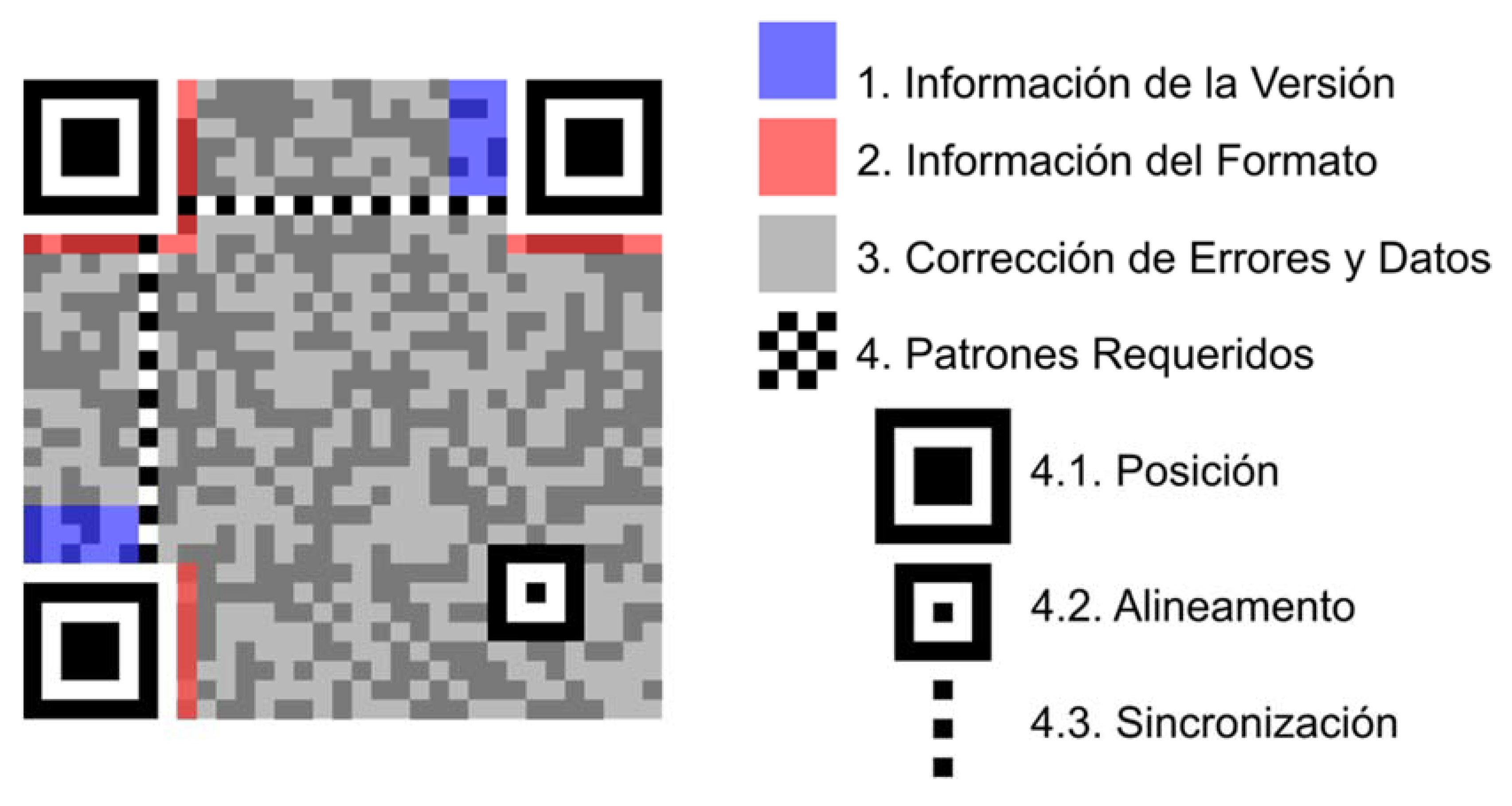
Components of the QR Code
Pattern Finder: Three large squares in the corners that allow the scanner to identify and orient the QR code.
Alignment Patterns:Small squares that help align the code if it is tilted or distorted.
Timing Patterns: Zigzag lines that help determine the width of the modules.
Data Area: The area containing the encoded data.
Error Correction: Sections containing additional information to recover data if the code is corrupted.
In summary, QR codes are a powerful and versatile tool for the rapid encoding and transfer of information, and their use has spread to multiple sectors due to their ability to store a large amount of data and their ease of scanning.
QR Codes for Personalized Marketing
Using QR codes with images is a creative practice that has evolved over time. Although there is no single pioneer, several companies and developers have contributed to popularizing this technique. Some QR code generators with images include:
-Me-QR: This generator allows you to convert images into QR codes, which provides branding opportunities and greater user engagement.
-QRGateway: Offers advanced functions to create QR codes with images, such as access to promotions, itineraries or product information.
-Canva: Although it does not specialize in QR codes, Canva provides a free generator to create custom QR codes, including images.
-My QR Code: Provides a QR code generator with options to add logos, colors and styles to your QR codes.
In short, the combination of images and QR codes has been adopted by various tools and platforms, offering creative opportunities in marketing, art, and more.
The first QR code with an embedded image to gain public notoriety was not necessarily that of the BBC in London. In fact, the concept of inserting images or logos within QR codes was popularized on various QR code generation platforms such as QRhacker and Pageloot, which allowed users to personalize their codes with photos and logos to improve aesthetics and brand recognition. .
These tools not only allowed inserting images, but also modifying the colors and arrangement of the pixels of the code, which led to the creation of more attractive and functional QR codes. Although the creation of the first image QR code cannot be attributed to a single entity, the technology and services to do so were developed around 2012.
However, some of the early notable examples and tools that popularized this technique are:
-Amit Agarwal of Digital Inspiration: Amit Agarwal is known for his technology innovations and tutorials, including customizing QR codes with images and logos. His 2012 article on how to embed images in QR codes helped spread this practice.
-Platforms like QRhacker and Pageloot: These tools have allowed users to create custom QR codes with images since the early 2010s. QRhacker, for example, offered advanced QR code editing options, including the ability to embed photos.
Then better QR Codes could be generated in colors and with graphics applied for personalized marketing. For more information see the report in Spanish at the following link: https://www.monografias.com/trabajos101/diseno-codigos-qr-marketing/diseno-codigos-qr- marketing
Theoretical Framework on the Creation of Color QR Codes (QRGB)
In todayʹs digital age, the need to store and transmit large amounts of information efficiently has led to the development of advanced technologies such as colored QR codes (QRGB). This section presents a detailed rationale for why QRGBs represent a significant improvement over traditional QR codes.
-Definition and Limitations of Traditional QR Codes: A QR (Quick Response) code is a type of two- dimensional barcode that can store information efficiently and quickly. It was created in 1994 by the Japanese company Denso Wave for the automotive industry, although its use has spread to many other areas due to its versatility and storage capacity. Traditional QR codes are made up of a matrix of black and white modules (dots) that represent the encoded data (QRGB).
-Justification of Colored QR Codes (QRGB): Traditional black and white QR codes are limited by their data storage capacity. By using three layers of colors (red, green and blue), QRGBs can store up to three times more information in the same space. This is because each color can represent a different set of data, allowing information to be overlaid without increasing the physical size of the code. QRGBs not only increase storage capacity, but also improve information security. Overlaying multiple layers of data can make it difficult to forge or manipulate code. In addition, by having multiple channels of information, redundancy can be implemented, which increases the robustness of the code against damage or reading errors (QRGB).
-Applications and Potential of QRGBs: QRGBs are especially useful in applications where the transmission of large amounts of data in limited spaces is required, such as in the packaging industry, digital business cards and interactive advertising. They also have potential in areas such as document and banknote security, where the authenticity and integrity of information are crucial. Although QRGBs are based on the RGB color model, compatibility with printers using the CMYK model has been considered, ensuring that the codes maintain their integrity and are readable even when printed (QRGB).
-Development of Decoding Algorithms: The development of advanced decoding algorithms that can identify and separate the different color layers is an essential component of QRGBs. These algorithms allow current scanning devices, with minor software modifications, to accurately read and decode the information stored in QRGBs. The introduction of QRGB represents a significant advance in QR code technology, offering substantial improvements in storage capacity, security and applicability (QRGB).
Theory of the Additive RGB Color System and Its Implementation in Color QR Codes (QRGB)
The RGB additive color system is based on the combination of red (Red), green (Green) and blue (Blue) light to create a wide range of colors. Combining these three colors in different intensities can produce any color in the visible spectrum.
The principle behind the RGB system is based on the way the human eye perceives color. Our eyes have three types of receptor cells, known as cones, that are sensitive to red, green and blue wavelengths. When light enters the eye, these cells activate to different degrees depending on the wavelength of the light, and the brain interprets the signals from these cells as color.
In the additive system, colors are created by adding light of different colors.
The primary colors of the RGB system (red, green and blue) are mixed to produce other colors by adding their intensities: Red + Green = Yellow, Red + Blue = Magenta, Green + Blue = Cyan, Red + Green + Blue = White. Each of these secondary colors is the result of the superimposition of two of the primary colors. When the three primary colors are mixed at their maximum intensity, they produce white light.
The RGB system is used in various technologies and applications, mainly in devices that emit light. Some examples include: electronic displays, computer monitors, televisions and mobile phone screens use the RGB system to produce color images. In image projection, video projectors use RGB lamps and filters to project color images onto a screen. LED lighting allows the creation of a wide range of colors by adjusting the intensity of the red, green and blue light-emitting diodes.
The use of the RGB additive system is theoretically justified by the nature of light and the way it interacts with the receptors in the human eye. Visible light is a small part of the electromagnetic spectrum and is made up of waves of different lengths. The cones in our eyes are sensitive to these different wavelengths and allow us to see colors. Red Sensitive Cones (L): Sensitive to long wavelengths (~564–580 nm). Green Sensitive Cones (M): Sensitive to medium wavelengths (~534–545 nm). Blue Sensitive Cones (S): Sensitive to short wavelengths (~420–440 nm). The combination of light from these three primary colors in different proportions allows our brain to perceive a wide range of colors.
The additive RGB color system (Red, Green, Blue) is a model used to create colors in electronic devices by combining light at different intensities, represented by values from 0 to 255. The primary colors are: Red (255, 0, 0), Green (0, 255, 0) and Blue (0, 0, 255). By mixing these colors you get: Red
+ Green = Yellow (255, 255, 0), Red + Blue = Magenta (255, 0, 255), and Green + Blue = Cyan (0, 255, 255). The combination of all colors produces White (255, 255, 255), while the absence of light generates Black (0, 0, 0). Other colors can also be obtained such as Orange (255, 165, 0) by mixing red and green, Light Green (144, 238, 144) and Light Blue (173, 216, 230) with specific proportions. The RGB system allows you to create a wide range of colors, essential for digital visualization and graphic design. But we will only focus on this one:
Methodology to be Implemented in the Creation and Reading of QRGB Codes
Three individual QR codes are created in the colors red, green and blue, each encoding different parts of the information. These QR codes are generated using Python tools and libraries like PyQRCode and OpenCV. QR codes in red, green and blue overlap to form a single colored QR code. This overlay process is done in the RGB color space, combining the three layers into a single image. For encoding, you work in the CMYK color space to ensure that colors are represented correctly when printing the QR code. Decoding is performed in the RGB color space, using advanced algorithms to separate the different color layers and extract the encoded information. Image processing techniques such as segmentation and thresholding are used to identify and process the color modules in the QR code. This involves analyzing entire modules rather than individual pixels, ensuring better decoding accuracy. Specific algorithms are developed for the decoding of QRGB codes, which can identify and separate the color layers. These algorithms must be able to handle color variations caused by printing and other environmental factors. It ensures that QRGB codes are compatible with current scanning devices, allowing them to read and decode the data stored in the color codes. QRGB codes are tested in various applications, such as document security, digital business cards, and interactive advertising, to validate their effectiveness and security. Continuous evaluation is carried out to improve the methodology and ensure that the codes are robust and reliable in different scenarios.
Development in Repli.it Python Programming Language
Replit.it is an online platform that allows users to write, run, and collaborate on code in various programming languages, including Python. It is especially useful for learning to program, making rapid prototypes, and collaborating on projects easily.
Replit.it Python features are:
-IDE in the Cloud: You donʹt need to install anything on your computer. You can code from anywhere with Internet access.
-Collaboration: Allows multiple users to work on the same project in real time.
-Support for Multiple Languages: In addition to Python, it supports many other languages such as JavaScript, Ruby, HTML/CSS, among others.
-Packages and Libraries: You can easily install libraries using the terminal, such as pip for Python.
-Simple Deployment: You can create web applications and easily share them with others.
You can access Replit and start using Python through the following link: https://replit.com/languages/online-python-compiler
Enter Replit through the mentioned link, there you must log in with your Gmail account. Once inside, you will be able to select from several simulations, programs or online programming environments (select Python).
Shell Libraries That You Will Need to Install in Repli.it Python
You will first need to install the Python libraries.To use these libraries open your Replit.it Python project (main.py) and go to the tab(in the left panel), find and click the “Shell” tab (to the right of “Console”).
-pip install qrcode[pil]: This command installs the qrcode library, which is used to generate QR codes. The [pil] option indicates that the Pillow dependency must also be installed, which is an image manipulation library required to work with images generated by qrcode.
-pip install pillow: This command installs Pillow, a Python library for opening, manipulating, and saving different image formats. It is very useful for working with images in projects that involve graphics or visualization.
-pip install opencv-python: This command installs OpenCV, a powerful library for computer vision. It is used to perform tasks such as image processing and object detection. It is very versatile and widely used in image analysis projects.
After running (Run) in the Console, the questions (imput) will appear to enter the information of the first, second and third QR code, which in these cases are my Google Scholar, Researchgate and Academia.edu profiles respectively.
Enter the information for the first QR code (Red): https://scholar.google.com/citations?user=WfLtjeoAAAAJ&hl=en
Enter the information for the second QR code (Green): https://www.researchgate.net/profile/Ibar-Federico-Anderson
Enter the information for the third QR code (Blue): https://unlp.academia.edu/IbarFedericoAnderson
Conclusion
Colored QR codes (QRGB) present an innovative solution to the growing demands for data storage and transmission in various sectors. By significantly improving storage capacity and security, QRGBs represent a significant technological advance over traditional QR codes (QRGB).
In todayʹs digital age, the need to store and transmit large amounts of information efficiently has led to the development of advanced technologies such as colored QR codes. Below is a detailed rationale for why QRGBs represent a significant improvement over traditional QR codes.
Traditional black and white QR codes are limited by their data storage capacity. By using three layers of colors (red, green and blue), QRGBs can store up to three times more information in the same space. This is because each color can represent a different set of data, allowing information to be overlaid without increasing the physical size of the code.
QRGBs not only increase storage capacity, but also improve information security. Overlaying multiple layers of data can make it difficult to forge or manipulate code. Additionally, by having multiple channels of information, redundancy can be implemented, which increases the robustness of the code against damage or read errors.
QRGBs are especially useful in applications where the transmission of large amounts of data in limited spaces is required, such as in the packaging industry, digital business cards, and interactive advertising. They also have potential in areas such as document and banknote security, where the authenticity and integrity of information are crucial.
Although QRGBs are based on the RGB color model, compatibility with printers that use the CMYK model has been considered. This ensures that the codes maintain their integrity and are legible even when printed, overcoming one of the main challenges of implementing colored QR codes in the physical world.
The development of advanced decoding algorithms that can identify and separate the different color layers is an essential component of QRGBs. These algorithms allow current scanning devices, with minor software modifications, to accurately read and decode the information stored in QRGBs. The introduction of QRGBs represents a significant advance in QR code technology, offering substantial improvements in storage capacity, security and applicability. These codes are an
innovative solution to the increasing demands for data storage and transmission in various sectors.
Components of the QR Code.
Figure 1.
QR code. Fountain:https://es.wikipedia.org/wiki/C%C3%B3digo_QR.
Figure 1.
QR code. Fountain:https://es.wikipedia.org/wiki/C%C3%B3digo_QR.
QR codes for personalized marketing.
Using QR codes with images is a creative practice that has evolved over time. Although there is no single pioneer, several companies and developers have contributed to popularizing this technique. Some QR code generators with images include:
-Me-QR: This generator allows you to convert images into QR codes, which provides branding opportunities and greater user engagement.
-QRGateway: Offers advanced functions to create QR codes with images, such as access to promotions, itineraries or product information.
-Canva: Although it does not specialize in QR codes, Canva provides a free generator to create custom QR codes, including images.
-My QR Code: Provides a QR code generator with options to add logos, colors and styles to your QR codes.
In short, the combination of images and QR codes has been adopted by various tools and platforms, offering creative opportunities in marketing, art, and more.
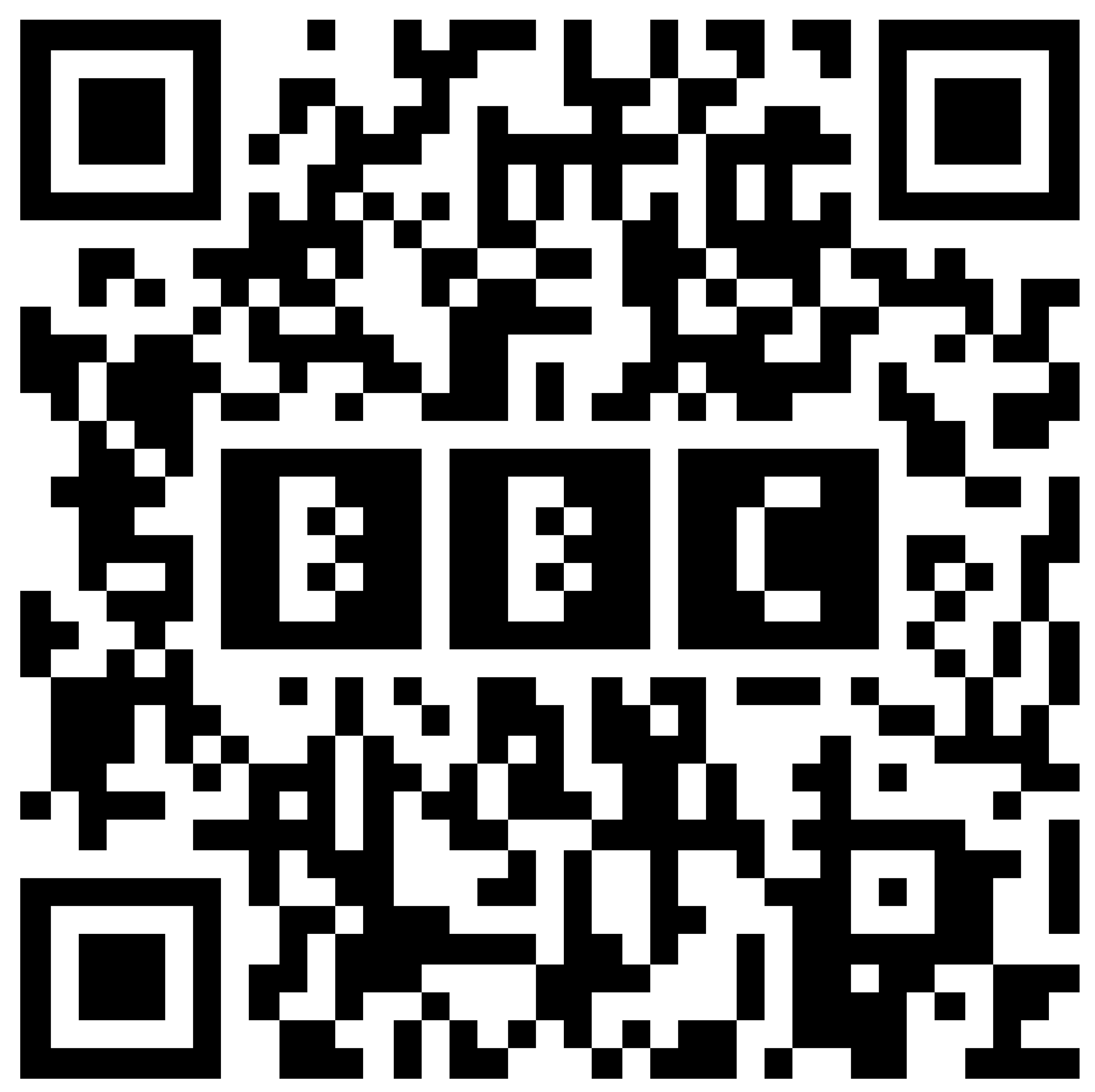
The first QR code with an embedded image to gain public notoriety was not necessarily that of the BBC in London. In fact, the concept of inserting images or logos within QR codes was popularized on various QR code generation platforms such as QRhacker and Pageloot, which allowed users to personalize their codes with photos and logos to improve aesthetics and brand recognition. .
These tools not only allowed inserting images, but also modifying the colors and arrangement of the pixels of the code, which led to the creation of more attractive and functional QR codes. Although the creation of the first image QR code cannot be attributed to a single entity, the technology and services to do so were developed around 2012.
However, some of the early notable examples and tools that popularized this technique are:
-Amit Agarwal of Digital Inspiration:Amit Agarwal is known for his technology innovations and tutorials, including customizing QR codes with images and logos. His 2012 article on how to embed images in QR codes helped spread this practice.
-Platforms like QRhacker and Pageloot:These tools have allowed users to create custom QR codes with images since the early 2010s. QRhacker, for example, offered advanced QR code editing options, including the ability to embed photos.
Figure 2.
BBC QR code. Fountain:https://www.bbc.co.uk/blogs/researchanddevelopment/2011/09/create-your-own-bbc-qrcode.shtml.
Figure 2.
BBC QR code. Fountain:https://www.bbc.co.uk/blogs/researchanddevelopment/2011/09/create-your-own-bbc-qrcode.shtml.
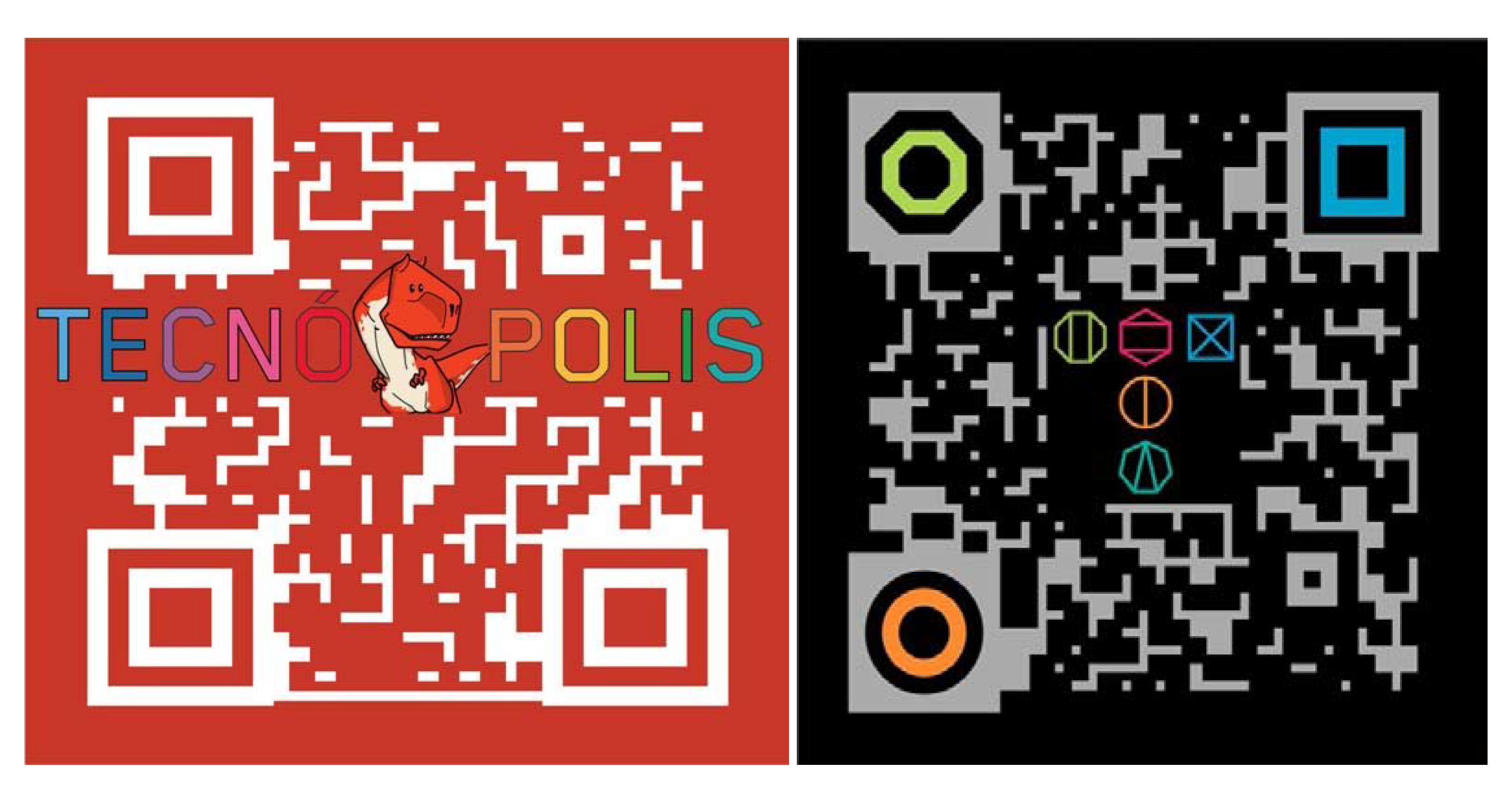
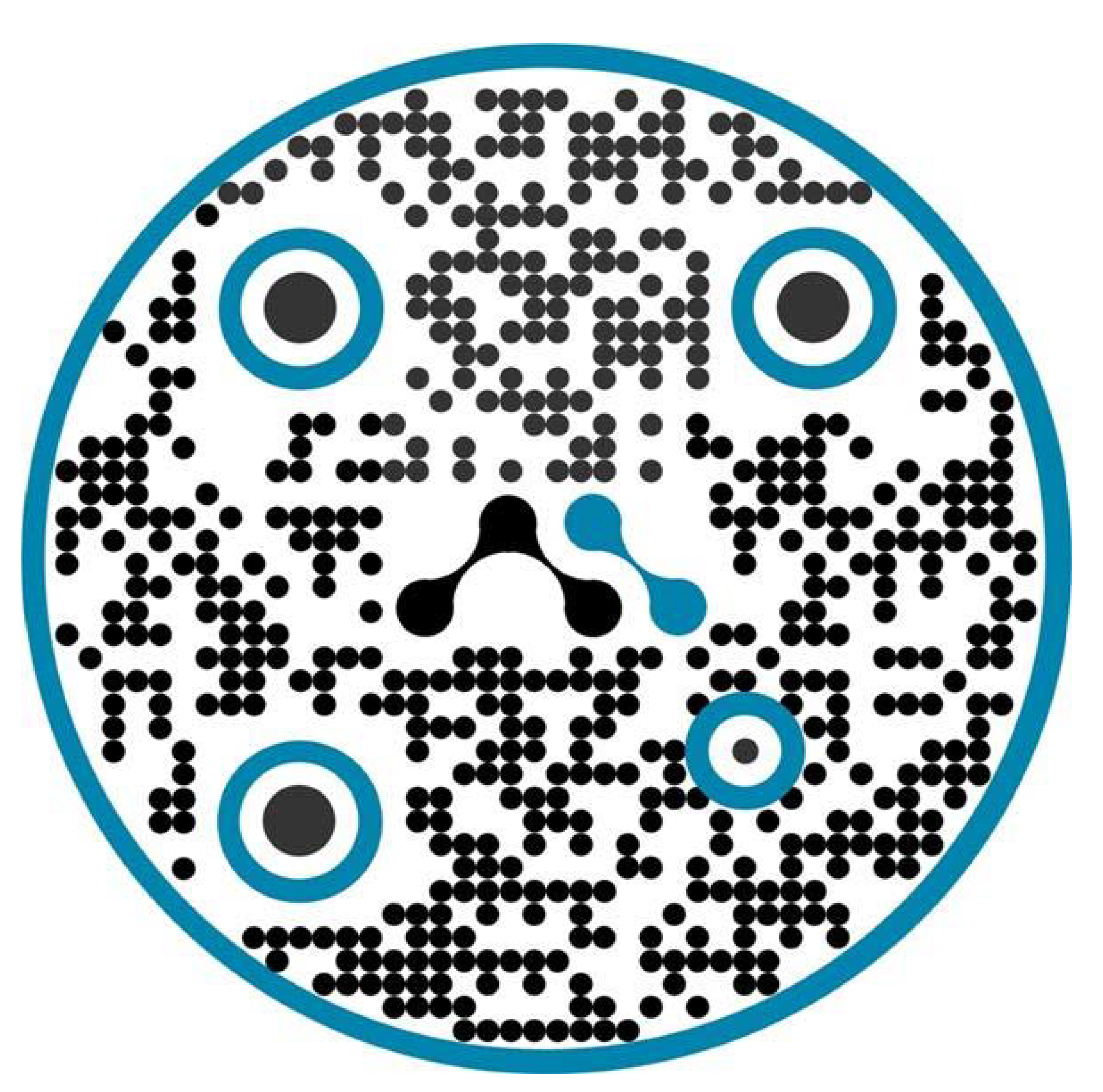
Then better QR Codes could be generated in colors and with graphics applied for personalized marketing. For more information see the report in Spanish at the following link:https://www.monografias.com/trabajos101/diseno-codigos-qr-marketing/diseno-codigos-qr-marketing
Figure 3.
Own preparation for the INNOVAR 2013 National Competition of the Ministry of Science and Technology of the Nation, Argentine Republic. Fountain: https://es.wikipedia.org/wiki/Archivo:C%C3%B3digo_QR_Innovar_2014._Ministerio_de_Ciencia,_Tecnolog%C3%ADa_e_Innovaci%C3%B3n_Productiva_Naci%C3%B3n_Argentina..jpg.
Figure 3.
Own preparation for the INNOVAR 2013 National Competition of the Ministry of Science and Technology of the Nation, Argentine Republic. Fountain: https://es.wikipedia.org/wiki/Archivo:C%C3%B3digo_QR_Innovar_2014._Ministerio_de_Ciencia,_Tecnolog%C3%ADa_e_Innovaci%C3%B3n_Productiva_Naci%C3%B3n_Argentina..jpg.
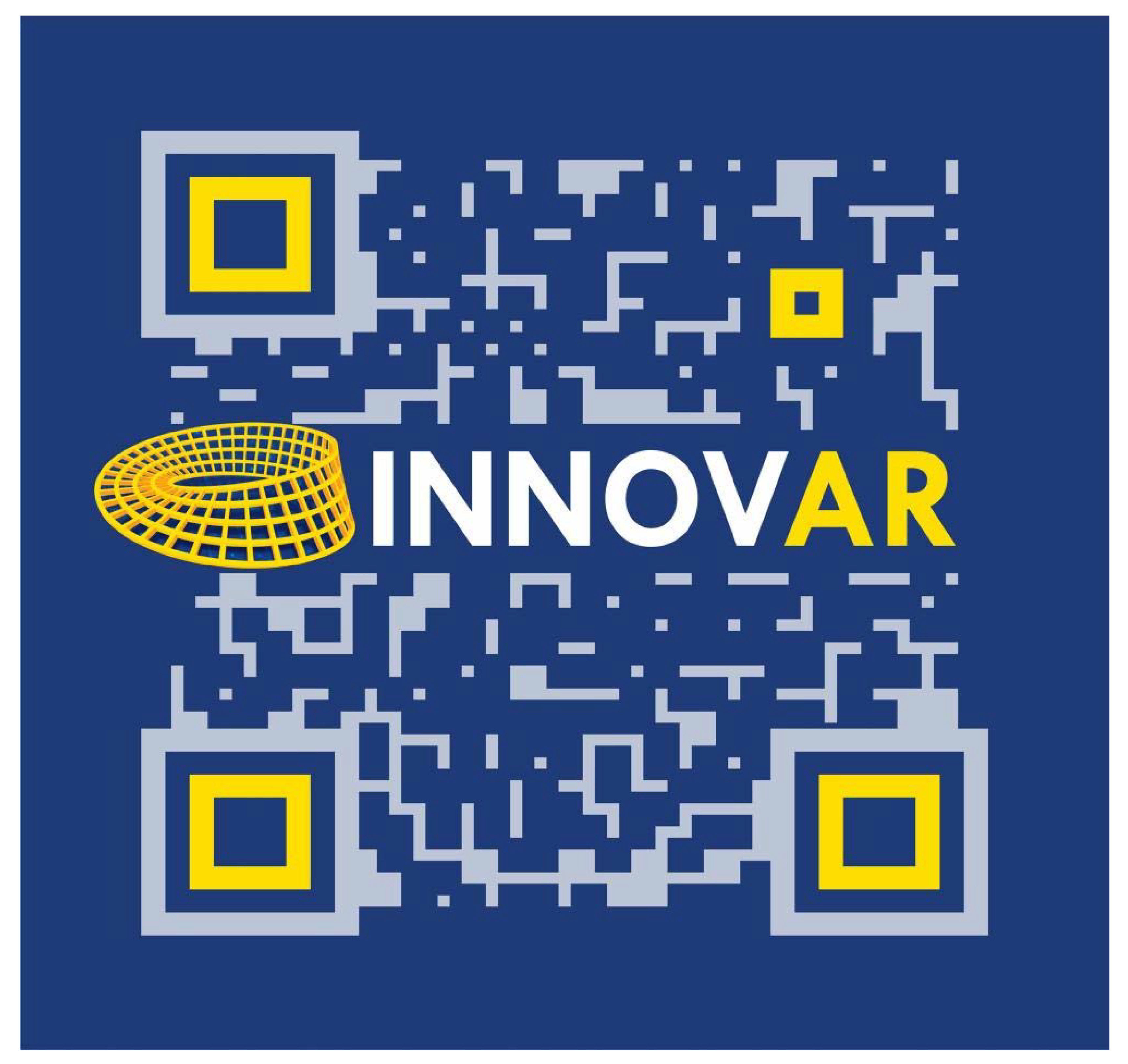
Figure 4.
5 and 6. Own elaboration, year 2013. Source:https://www.monografias.com/trabajos101/diseno-codigos-qr-marketing/diseno-codigos-qr-marketing.
Figure 4.
5 and 6. Own elaboration, year 2013. Source:https://www.monografias.com/trabajos101/diseno-codigos-qr-marketing/diseno-codigos-qr-marketing.
Theoretical Framework on the creation of Color QR Codes (QRGB).
The use of colors to increase the capacity of QR codes has been the subject of several academic studies. Kato and Tan (2007) in their study "Pervasive 2D Barcodes Using Color Information" explore how QR codes can use colors to increase information density, discussing the possibility of using multiple colors to represent more data compared to traditional QR codes. in black and white (Kato & Tan, 2007). Liu and Qiao (2011) in "Enhancing QR Code Capacity with Color" discuss methods for increasing the data capacity of QR codes using color, presenting an approach that encodes additional information in different color channels and evaluating the effectiveness and limitations of this technique (Liu & Qiao, 2011). Choi and Woo (2012) in "Data Encoding Technique Using Color QR Code" propose a method for encoding additional data into QR codes using colors, including a comparative analysis with traditional QR codes and demonstrating how the use of color can significantly improve the ability of data (Choi & Woo, 2012). Fang (2011) discusses offline QR code authorization based on visual cryptography, suggesting the use of color techniques to improve security and capacity (Fang, 2011). Fu, Cheng, Liu, and Yu (2019) present a two-level information protection scheme using visual cryptography and QR codes with multiple decryptions, highlighting the usefulness of colors in data encoding for information protection (Fu, Cheng, Liu, and Yu (2019) , Liu & Yu, 2019). Lin (2016) develops a distributed secret sharing approach with cheater prevention based on QR codes, exploring the use of colors to increase security and informativeness (Lin, 2016). Liu, Yan, and Pan (2019) investigate color visual secret sharing for QR codes with perfect module reconstruction, demonstrating how colors can improve the density and security of QR codes (Liu, Yan, & Pan, 2019). Tan, Liu, Yan, Wan, and Chen (2018) propose a visual secret sharing scheme for color QR codes, evaluating the effectiveness of this technique in improving information capacity (Tan et al., 2018). Mishra (2016) in his thesis "Region Identification and Decoding Of Security Markers Using Image Processing Tools" also addresses the use of image and color processing techniques in the identification and decoding of security markers, providing additional context for the use of colors in QR codes (Mishra, 2016). These studies show that the use of colors in QR codes can significantly increase information density. However, the practical implementation of these techniques has not been widely adopted in the commercial field,and more research is still required to overcome the technical and scannability challenges associated with color QR codes.
On the other hand, the idea of overlaying three QR codes using RGB colors, as described here, could be an innovative extension of these concepts, offering greater storage capacity in a single QR code.
In today's digital age, the need to store and transmit large amounts of information efficiently has led to the development of advanced technologies such as colored QR codes (QRGB). This section presents a detailed rationale for why QRGBs represent a significant improvement over traditional QR codes.
-Definition and Limitations of Traditional QR Codes:A QR (Quick Response) code is a type of two-dimensional barcode that can store information efficiently and quickly. It was created in 1994 by the Japanese company Denso Wave for the automotive industry, although its use has spread to many other areas due to its versatility and storage capacity. Traditional QR codes are made up of a matrix of black and white modules (dots) that represent the encoded data (QRGB).
-Justification of Colored QR Codes (QRGB):Traditional black and white QR codes are limited by their data storage capacity. By using three layers of colors (red,greenandblue), QRGBs can store up to three times more information in the same space. This is because each color can represent a different set of data, allowing information to be overlaid without increasing the physical size of the code. QRGBs not only increase storage capacity, but also improve information security. Overlaying multiple layers of data can make it difficult to forge or manipulate code. In addition, by having multiple channels of information, redundancy can be implemented, which increases the robustness of the code against damage or reading errors (QRGB).
-Applications and Potential of QRGBs:QRGBs are especially useful in applications where the transmission of large amounts of data in limited spaces is required, such as in the packaging industry, digital business cards and interactive advertising. They also have potential in areas such as document and banknote security, where the authenticity and integrity of information are crucial. Although QRGBs are based on the RGB color model, compatibility with printers using the CMYK model has been considered, ensuring that the codes maintain their integrity and are readable even when printed (QRGB).
-Development of Decoding Algorithms:The development of advanced decoding algorithms that can identify and separate the different color layers is an essential component of QRGBs. These algorithms allow current scanning devices, with minor software modifications, to accurately read and decode the information stored in QRGBs. The introduction of QRGB represents a significant advance in QR code technology, offering substantial improvements in storage capacity, security and applicability (QRGB).
Theory of the additive RGB color system and its implementation in Color QR Codes (QRGB):
The RGB additive color system is based on the combination of red (Red), green (Green) and blue (Blue) light to create a wide range of colors. Combining these three colors in different intensities can produce any color in the visible spectrum.
The principle behind the RGB system is based on the way the human eye perceives color. Our eyes have three types of receptor cells, known as cones, that are sensitive to red, green and blue wavelengths. When light enters the eye, these cells activate to different degrees depending on the wavelength of the light, and the brain interprets the signals from these cells as color.
In the additive system, colors are created by adding light of different colors.
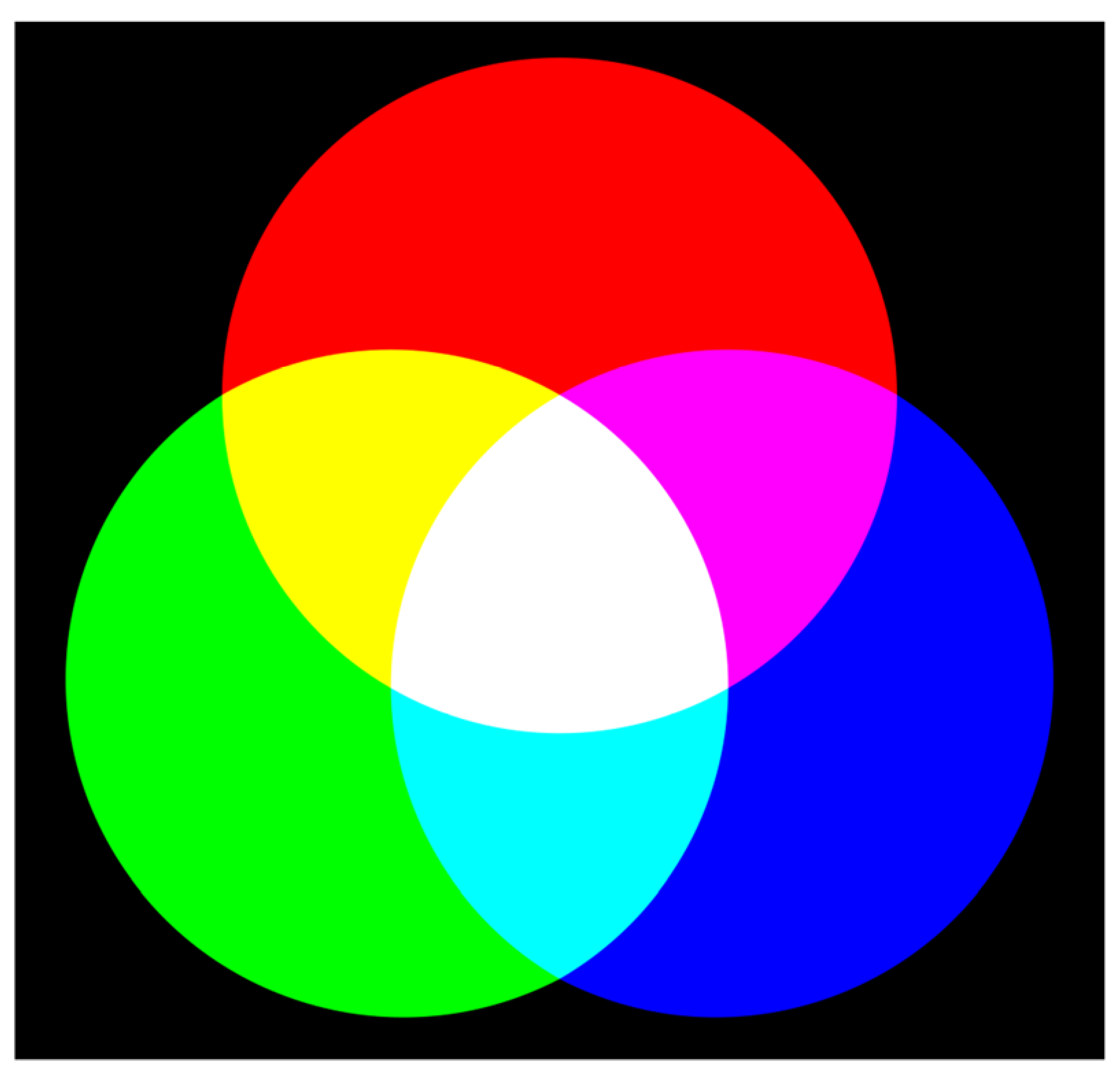
The primary colors of the RGB system (red, green and blue) are mixed to produce other colors by adding their intensities: Red + Green = Yellow, Red + Blue = Magenta, Green + Blue = Cyan, Red + Green + Blue = White. Each of these secondary colors is the result of the superimposition of two of the primary colors. When the three primary colors are mixed at their maximum intensity, they produce white light.
The RGB system is used in various technologies and applications, mainly in devices that emit light. Some examples include: electronic displays, computer monitors, televisions and mobile phone screens use the RGB system to produce color images. In image projection, video projectors use RGB lamps and filters to project color images onto a screen. LED lighting allows the creation of a wide range of colors by adjusting the intensity of the red, green and blue light-emitting diodes.
The use of the RGB additive system is theoretically justified by the nature of light and the way it interacts with the receptors in the human eye. Visible light is a small part of the electromagnetic spectrum and is made up of waves of different lengths. The cones in our eyes are sensitive to these different wavelengths and allow us to see colors. Red Sensitive Cones (L): Sensitive to long wavelengths (~564–580 nm). Green Sensitive Cones (M): Sensitive to medium wavelengths (~534–545 nm). Blue Sensitive Cones (S): Sensitive to short wavelengths (~420–440 nm). The combination of light from these three primary colors in different proportions allows our brain to perceive a wide range of colors.
The additive RGB color system (Red,Green,Blue) is a model used to create colors in electronic devices by combining light at different intensities, represented by values from 0 to 255. The primary colors are:Red (255, 0, 0),Green (0, 255, 0)andBlue (0, 0, 255). By mixing these colors you get: Red + Green =Yellow (255, 255, 0), Red + Blue =Magenta (255, 0, 255), and Green + Blue =Cyan (0, 255, 255).The combination of all colors producesWhite (255, 255, 255), while the absence of light generates Black (0, 0, 0). Other colors can also be obtained such as Orange (255, 165, 0) by mixing red and green, Light Green (144, 238, 144) and Light Blue (173, 216, 230) with specific proportions. The RGB system allows you to create a wide range of colors, essential for digital visualization and graphic design. But we will only focus on this one:
Methodology to be implemented in the creation and reading of QRGB Codes.
Figure 7.
Additive RGB color system. Fountain:https://es.wikipedia.org/wiki/RGB#/media/File:Synthese+.svg.
Figure 7.
Additive RGB color system. Fountain:https://es.wikipedia.org/wiki/RGB#/media/File:Synthese+.svg.
Three individual QR codes are created in the colors red, green and blue, each encoding different parts of the information. These QR codes are generated using Python tools and libraries like PyQRCode and OpenCV. QR codes in red, green and blue overlap to form a single colored QR code. This overlay process is done in the RGB color space, combining the three layers into a single image. For encoding, you work in the CMYK color space to ensure that colors are represented correctly when printing the QR code. Decoding is performed in the RGB color space, using advanced algorithms to separate the different color layers and extract the encoded information. Image processing techniques such as segmentation and thresholding are used to identify and process the color modules in the QR code. This involves analyzing entire modules rather than individual pixels, ensuring better decoding accuracy. Specific algorithms are developed for the decoding of QRGB codes, which can identify and separate the color layers. These algorithms must be able to handle color variations caused by printing and other environmental factors. It ensures that QRGB codes are compatible with current scanning devices, allowing them to read and decode the data stored in the color codes. QRGB codes are tested in various applications, such as document security, digital business cards, and interactive advertising, to validate their effectiveness and security. Continuous evaluation is carried out to improve the methodology and ensure that the codes are robust and reliable in different scenarios.
Development in Repli.it Python programming language.
Replit.itis an online platform that allows users to write, run, and collaborate on code in various programming languages, including Python. It is especially useful for learning to program, making rapid prototypes, and collaborating on projects easily.
Replit.it Python features are:
-IDE in the Cloud: You don't need to install anything on your computer. You can code from anywhere with Internet access.
-Collaboration: Allows multiple users to work on the same project in real time.
-Support for Multiple Languages: In addition to Python, it supports many other languages such as JavaScript, Ruby, HTML/CSS, among others.
-Packages and Libraries: You can easily install libraries using the terminal, such as pip for Python.
-Simple Deployment: You can create web applications and easily share them with others.
You can access Replit and start using Python through the following link:https://replit.com/languages/online-python-compiler
Enter Replit through the mentioned link, there you must log in with your Gmail account. Once inside, you will be able to select from several simulations, programs or online programming environments (select Python).
Figure 8.
Repli.it Python. Fountain:https://replit.com/languages/online-python-compiler.
Figure 8.
Repli.it Python. Fountain:https://replit.com/languages/online-python-compiler.

Figure 9.
and 10.Repli.it Python. Fountain:https://replit.com/languages/online-python-compiler.
Figure 9.
and 10.Repli.it Python. Fountain:https://replit.com/languages/online-python-compiler.
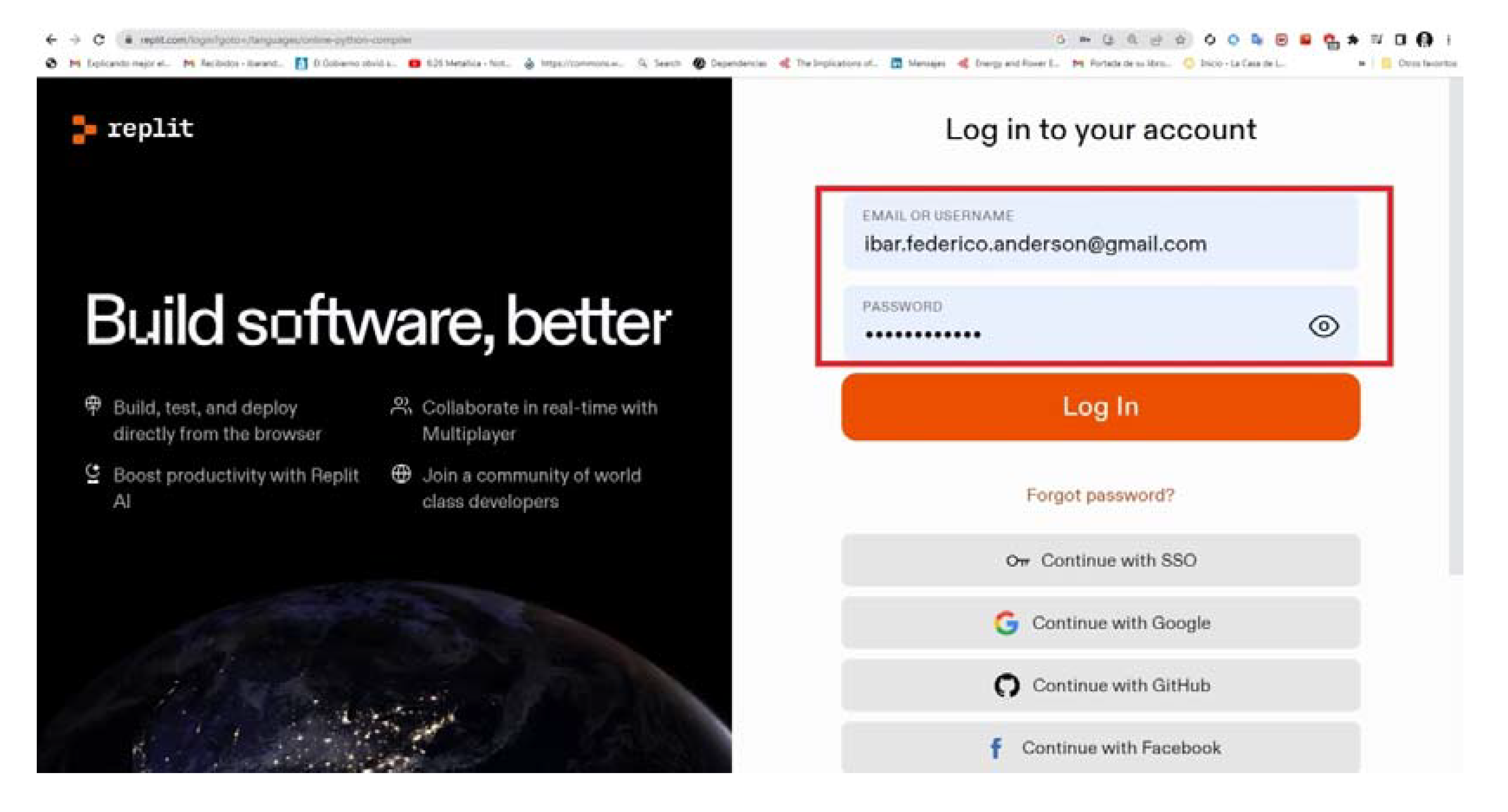
Figure 11.
Repli.it Python. Fountain:https://replit.com/languages/online-python-compiler.
Figure 11.
Repli.it Python. Fountain:https://replit.com/languages/online-python-compiler.
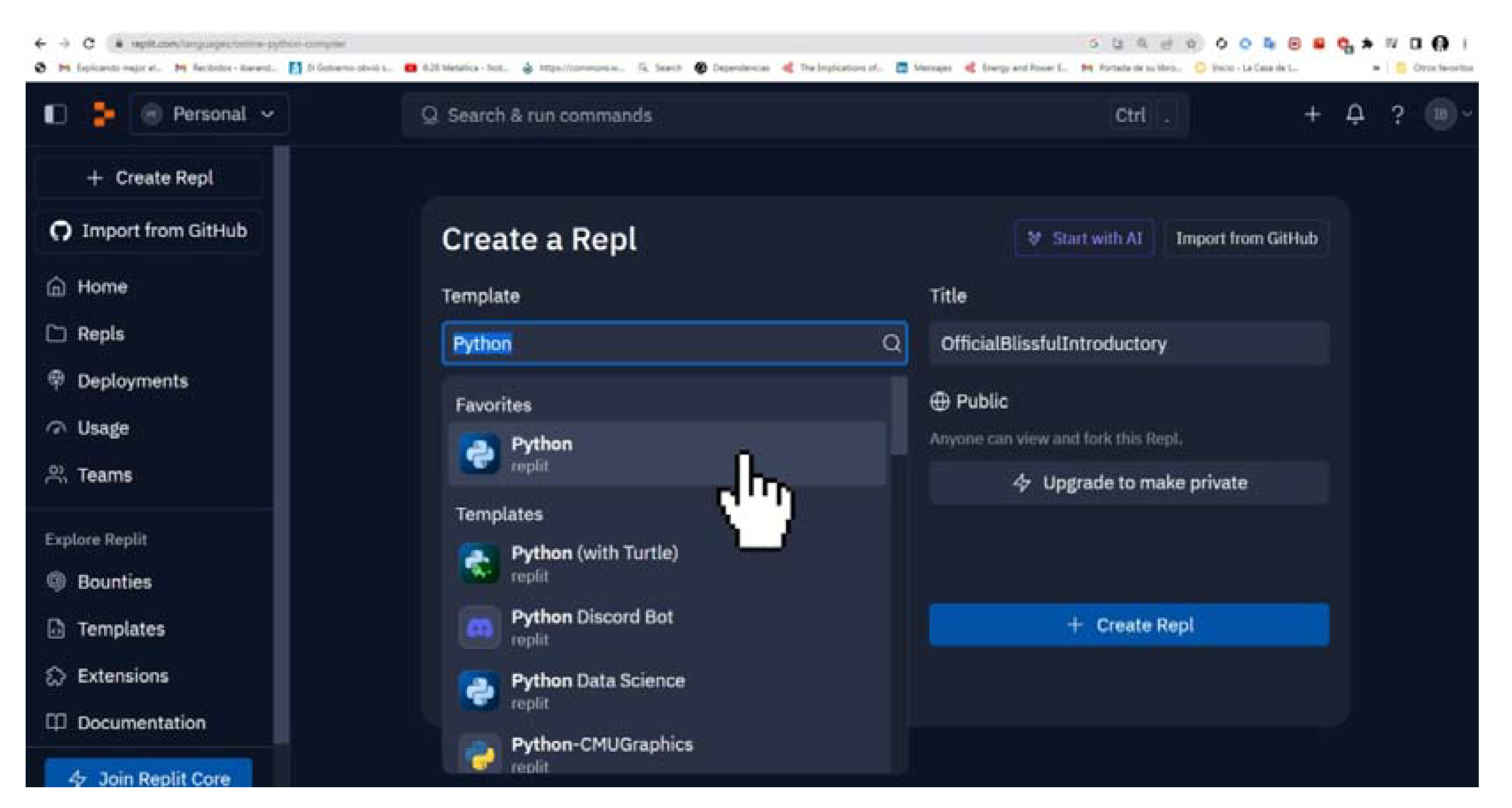
Shell libraries that you will need to install in Repli.it Python:
You will first need to install the Python libraries.To use these libraries open your Replit.it Python project (main.py) and go to the tab(in the left panel), find and click the “Shell” tab (to the right of “Console”).
Figure 12.
Python open source libraries: pip install qrcode [pil], pip install pillow, pip install opencv-python. Repli.it Python.Fountain:https://replit.com/languages/online-python-compiler.
Figure 12.
Python open source libraries: pip install qrcode [pil], pip install pillow, pip install opencv-python. Repli.it Python.Fountain:https://replit.com/languages/online-python-compiler.
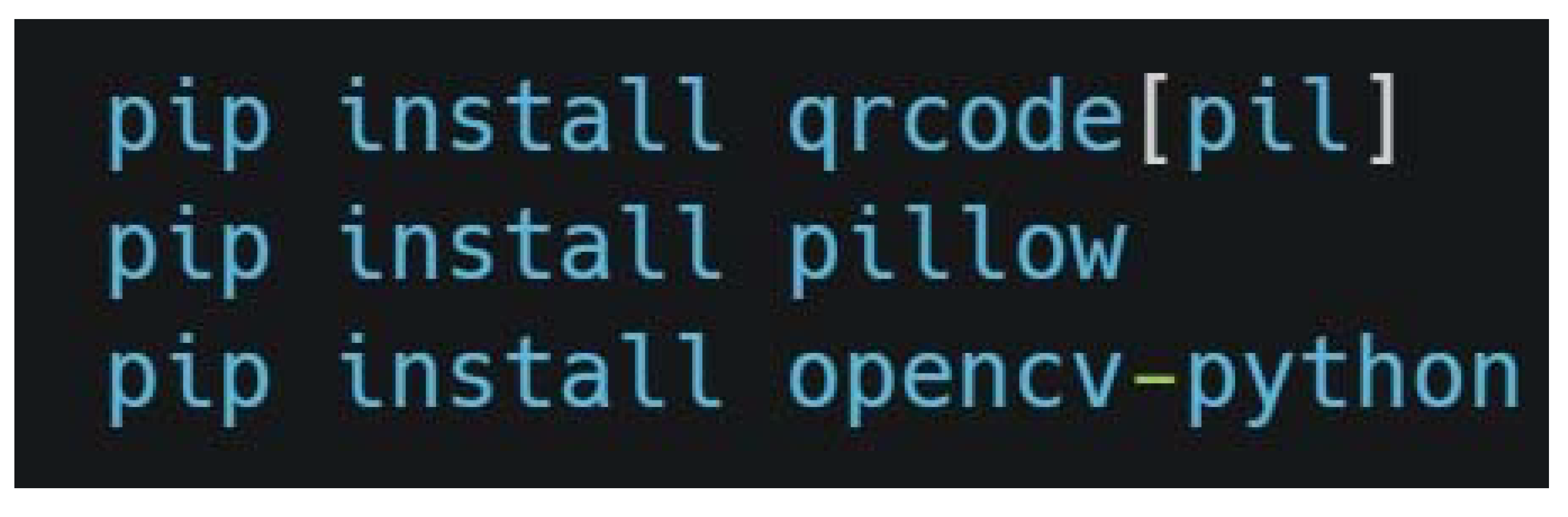
-pip install qrcode[pil]: This command installs the qrcode library, which is used to generate QR codes. The [pil] option indicates that the Pillow dependency must also be installed, which is an image manipulation library required to work with images generated by qrcode.
-pip install pillow: This command installs Pillow, a Python library for opening, manipulating, and saving different image formats. It is very useful for working with images in projects that involve graphics or visualization.
-pip install opencv-python: This command installs OpenCV, a powerful library for computer vision. It is used to perform tasks such as image processing and object detection. It is very versatile and widely used in image analysis projects.
Figure 13.
Installing the open source libraries in the Repli.it Python “Shell”: Pip install qrcode [pil], pip install pillow, pip install opencv-python.Fountain:https://replit.com/languages/online-python-compiler.
Figure 13.
Installing the open source libraries in the Repli.it Python “Shell”: Pip install qrcode [pil], pip install pillow, pip install opencv-python.Fountain:https://replit.com/languages/online-python-compiler.
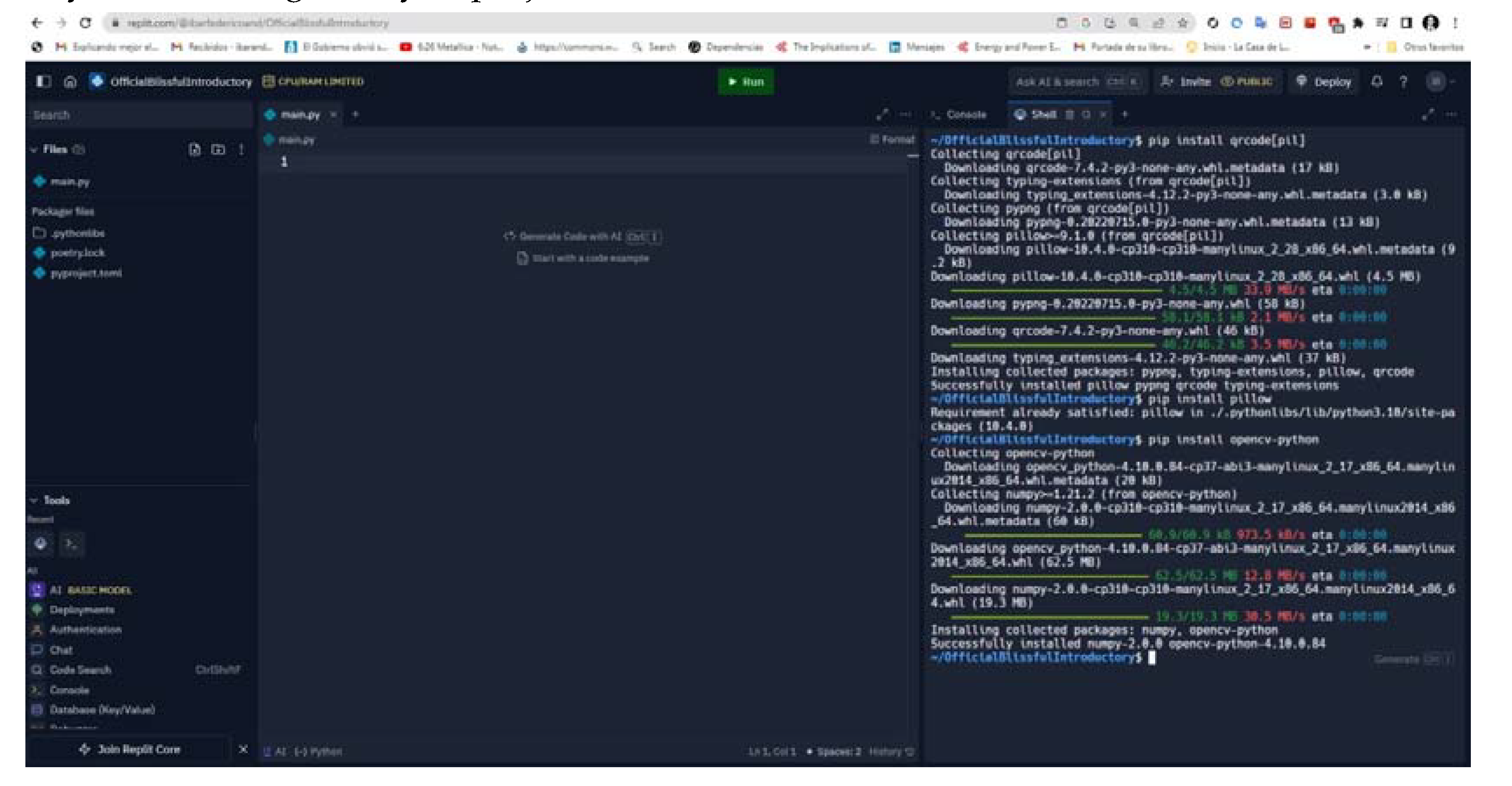
Program to create QRGB Codes (overlapping) in Repli.it Python.
Figure 14.
Own development of the QRGB encoding code in Python.
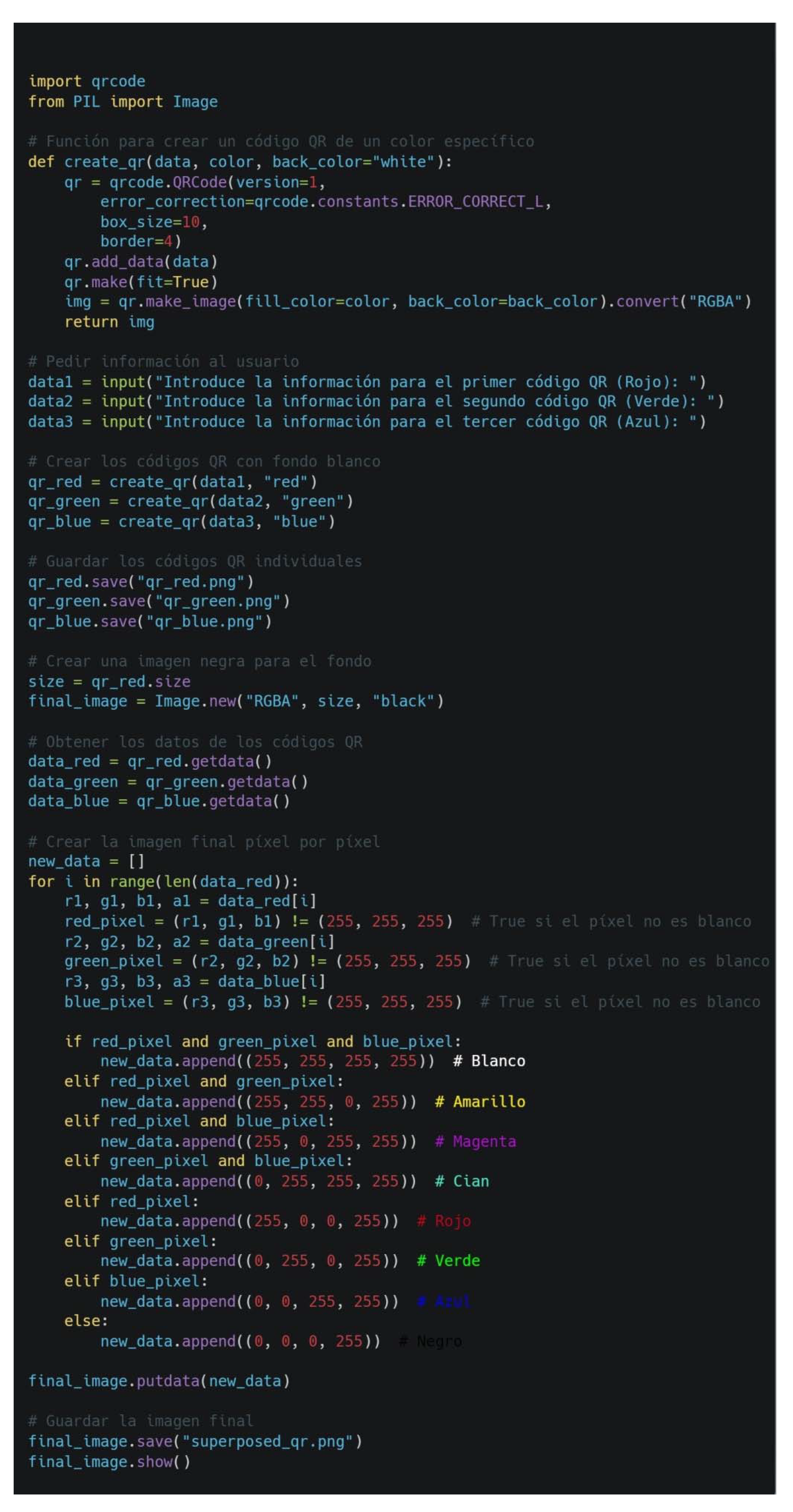
The information contained in this image can be copied and pasted (copy paste) to Repli.i and Python (to encode QRGB Codes):…
from PIL import Image
# Feature to create a QR code of a specific color
def create_qr(data, color, back_color="white"):
qr = qrcode.QRCode(version=1,
error_correction=qrcode.constants.ERROR_CORRECT_L,
box_size=10,
border=4)
qr.add_data(data)
qr.make(fit=True)
img = qr.make_image(fill_color=color, back_color=back_color).convert("RGBA")
return img
# Ask the user for information
data1 = input("Enter the information for the first QR code (Red): ")
data2 = input("Enter the information for the second QR code (Green): ")
data3 = input("Enter the information for the third QR code (Blue): ")
# Create QR codes with white background
qr_red = create_qr(data1, "red")
qr_green = create_qr(data2, "green")
qr_blue = create_qr(data3, "blue")
# Save individual QR codes
qr_red.save("qr_red.png")
qr_green.save("qr_green.png")
qr_blue.save("qr_blue.png")
# Create a black image for the background
size = qr_red.size
final_image = Image.new("RGBA", size, "black")
# Get QR code data
data_red = qr_red.getdata()
data_green = qr_green.getdata()
data_blue = qr_blue.getdata()
# Create the final image pixel by pixel
new_data = []
for i in range(len(data_red)):
r1, g1, b1, a1 = data_red[i]
red_pixel = (r1, g1, b1) != (255, 255, 255) # True if the pixel is not white
r2, g2, b2, a2 = data_green[i]
green_pixel = (r2, g2, b2) != (255, 255, 255) # True if the pixel is not white
r3, g3, b3, a3 = data_blue[i]
blue_pixel = (r3, g3, b3) != (255, 255, 255) # True if the pixel is not white
if red_pixel and green_pixel and blue_pixel:
new_data.append((255, 255, 255, 255)) # White
elif red_pixel and green_pixel:
new_data.append((255, 255, 0, 255)) # Yellow
elif red_pixel and blue_pixel:
new_data.append((255, 0, 255, 255)) # Magenta
elif green_pixel and blue_pixel:
new_data.append((0, 255, 255, 255)) # Cyan
elif red_pixel:
new_data.append((255, 0, 0, 255)) # Red
elif green_pixel:
new_data.append((0, 255, 0, 255)) # Green
elif blue_pixel:
new_data.append((0, 0, 255, 255)) # Blue
else:
new_data.append((0, 0, 0, 255)) # Black
final_image.putdata(new_data)
# Save the final image
final_image.save("superposed_qr.png")
final_image.show()
Figure 15.
and 16.Own development of the QRGB encoding code in Python and its execution (Run).
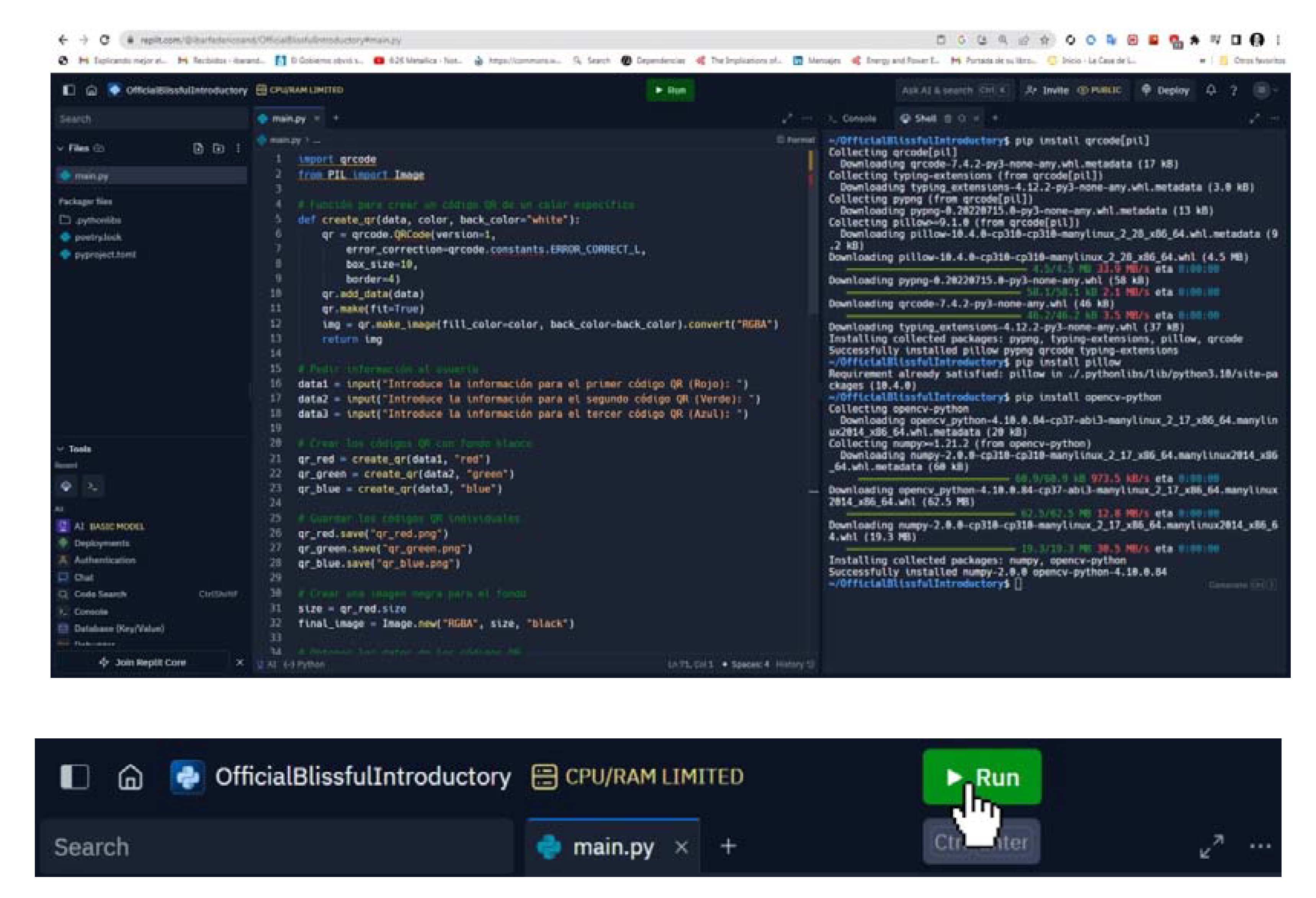
Figure 17.
After giving Run the execution of the Python code. The requested data is entered. Source: Own development of the QRGB encoding code in Python.
Figure 17.
After giving Run the execution of the Python code. The requested data is entered. Source: Own development of the QRGB encoding code in Python.
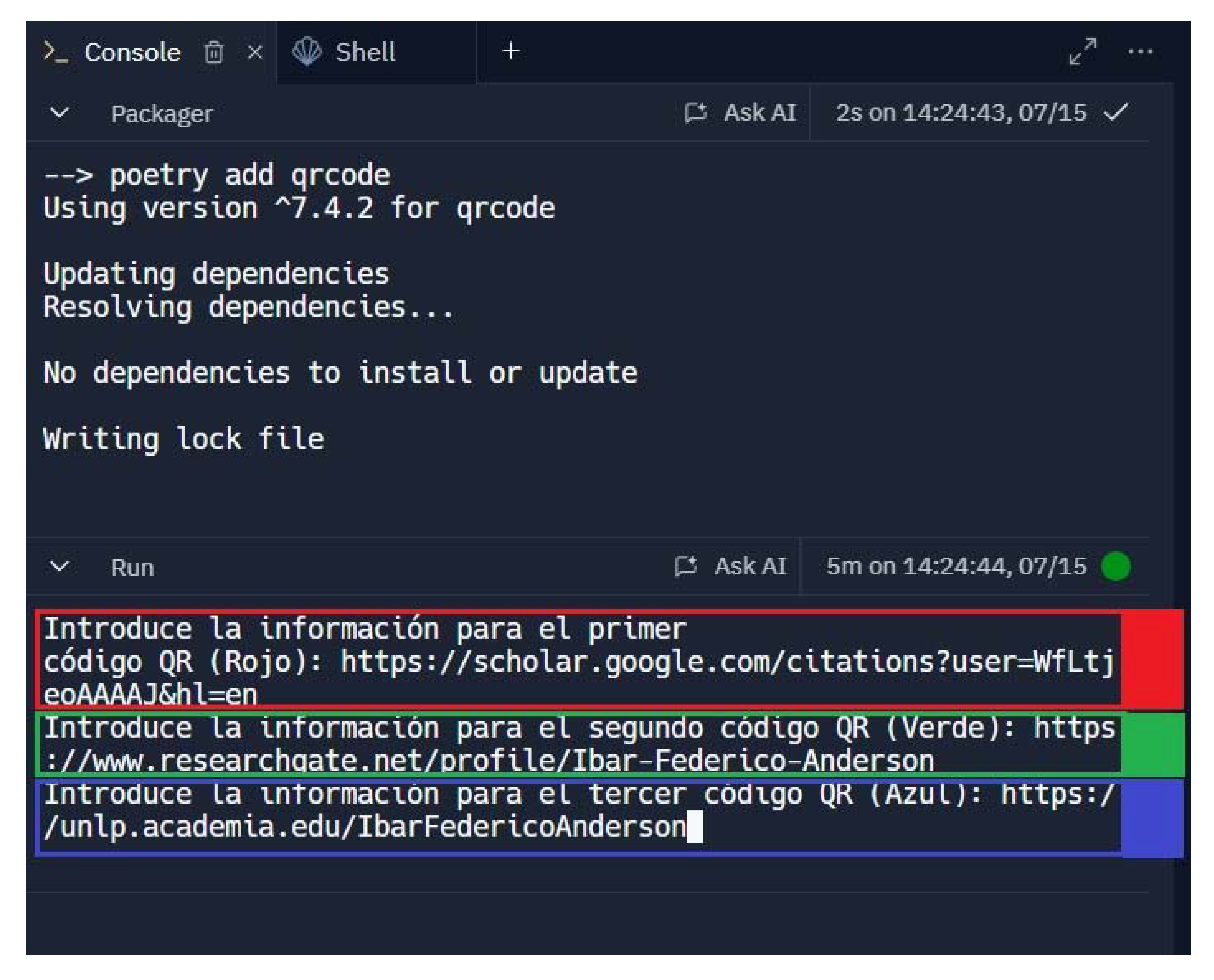
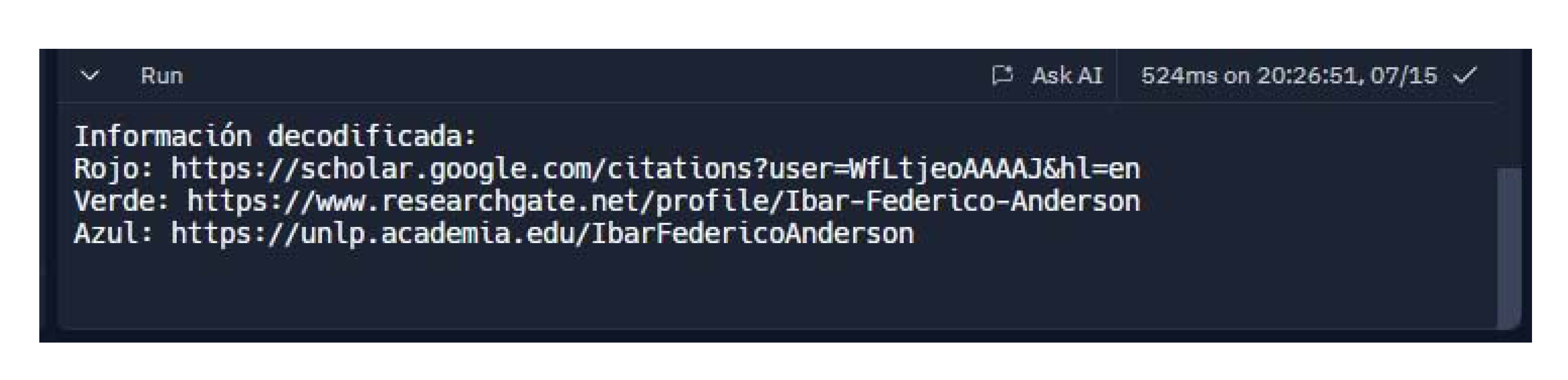
Indeed, after running (Run) in the Console, the questions (imput) will appear to enter the information of the first, second and third QR code, which in these cases are my Google Scholar, Researchgate and Academia.edu profiles respectively.
Enter the information for the first QR code (Red):https://scholar.google.com/citations?user=WfLtjeoAAAAJ&hl=en
Enter the information for the second QR code (Green): https://www.researchgate.net/profile/Ibar-Federico-Anderson
Enter the information for the third QR code (Blue): https://unlp.academia.edu/IbarFedericoAnderson
Figure 18.
EThe Python code generates the intermediate step of three (3) QR Codes in RGB colors (Red, Green and Blue) in image format (.png), with the data entered in “Console”. Source: Own development of the QRGB encoding code in Python.
Figure 18.
EThe Python code generates the intermediate step of three (3) QR Codes in RGB colors (Red, Green and Blue) in image format (.png), with the data entered in “Console”. Source: Own development of the QRGB encoding code in Python.
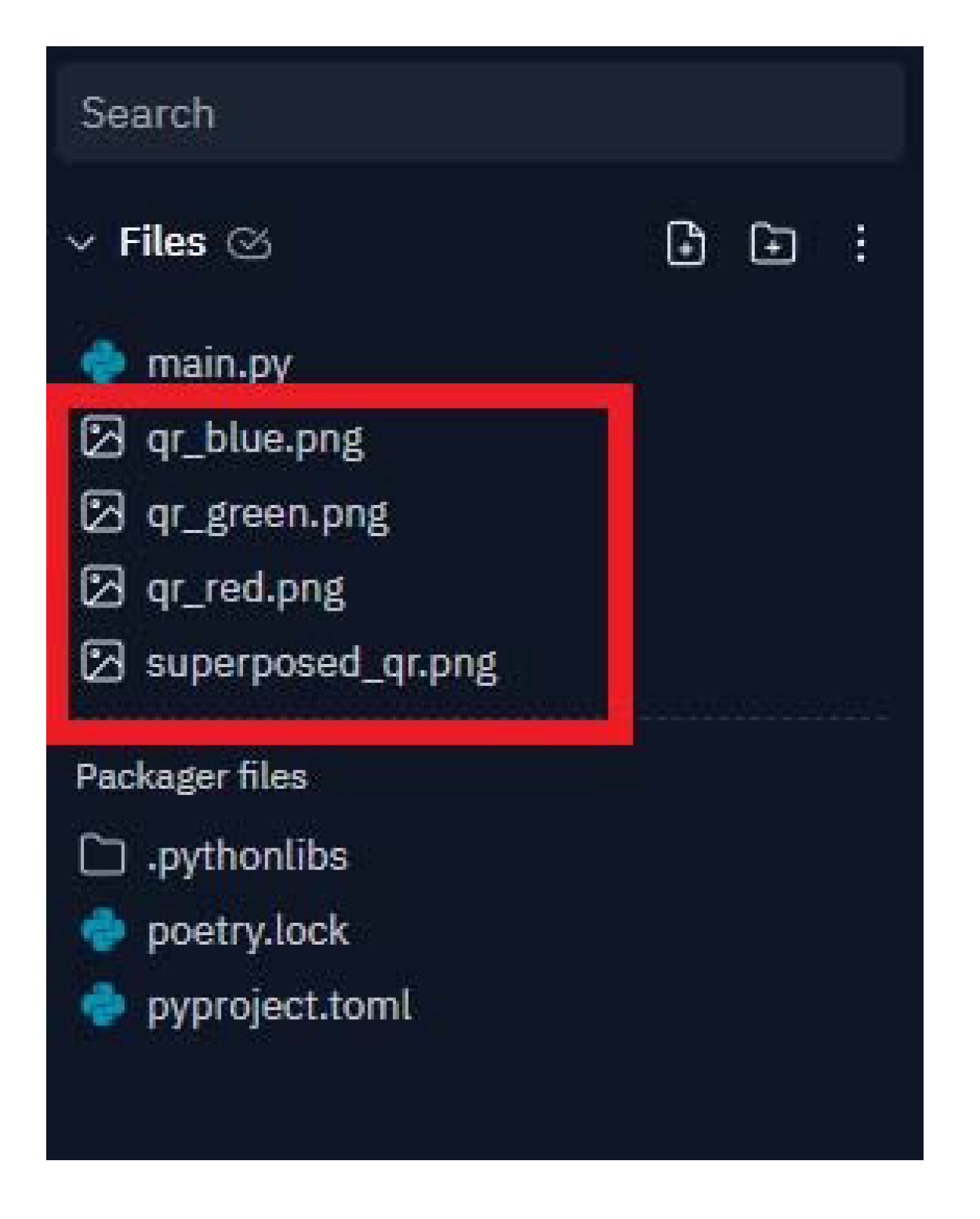
Figure 19.
With the intermediate step of three (3) QR Codes in RGB colors (Red, Green and Blue) in image format (.png), the pixels to generate the modules are processed (the pixels to generate the modules) of the final QRGB code. Source: self made.
Figure 19.
With the intermediate step of three (3) QR Codes in RGB colors (Red, Green and Blue) in image format (.png), the pixels to generate the modules are processed (the pixels to generate the modules) of the final QRGB code. Source: self made.
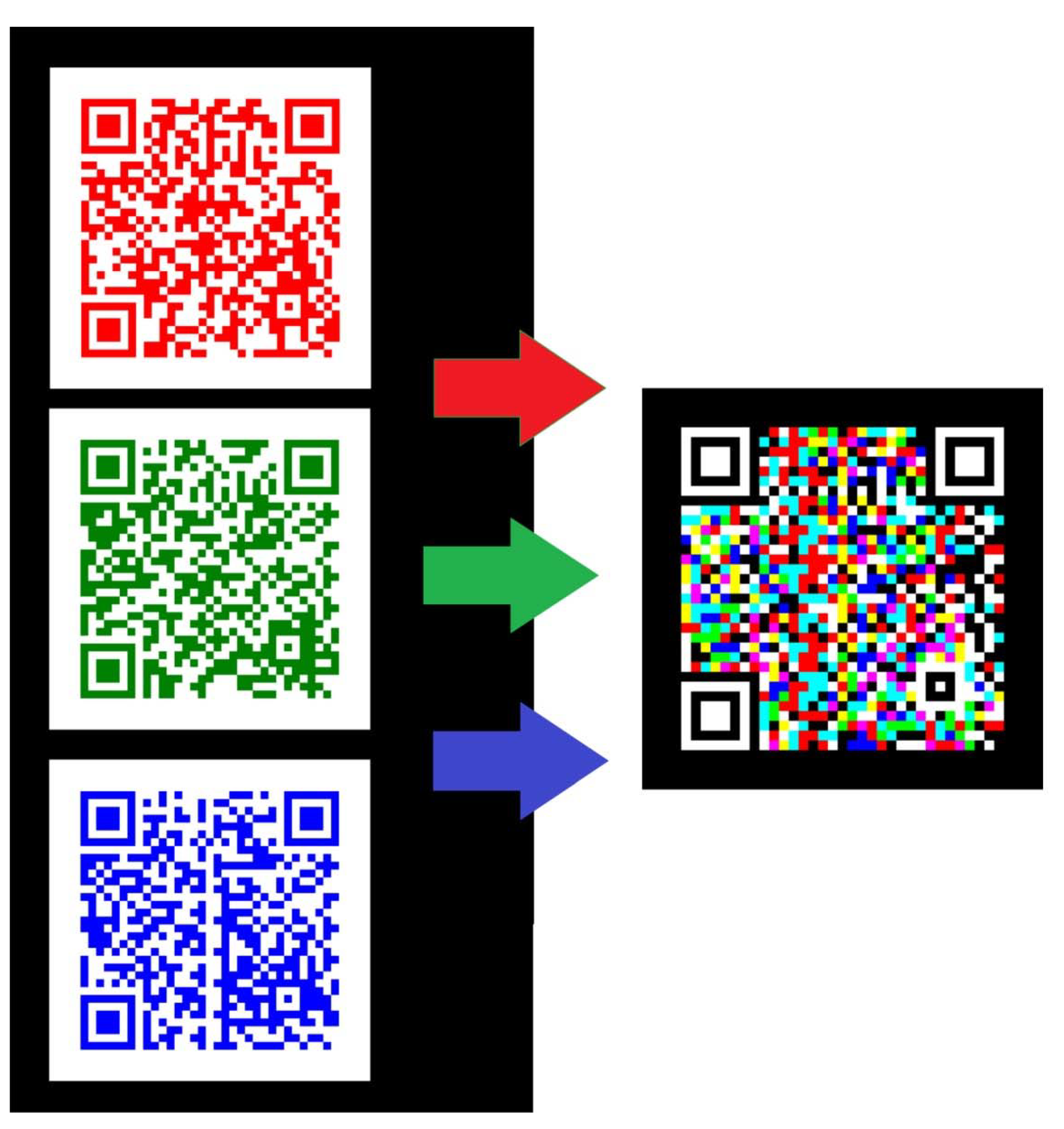
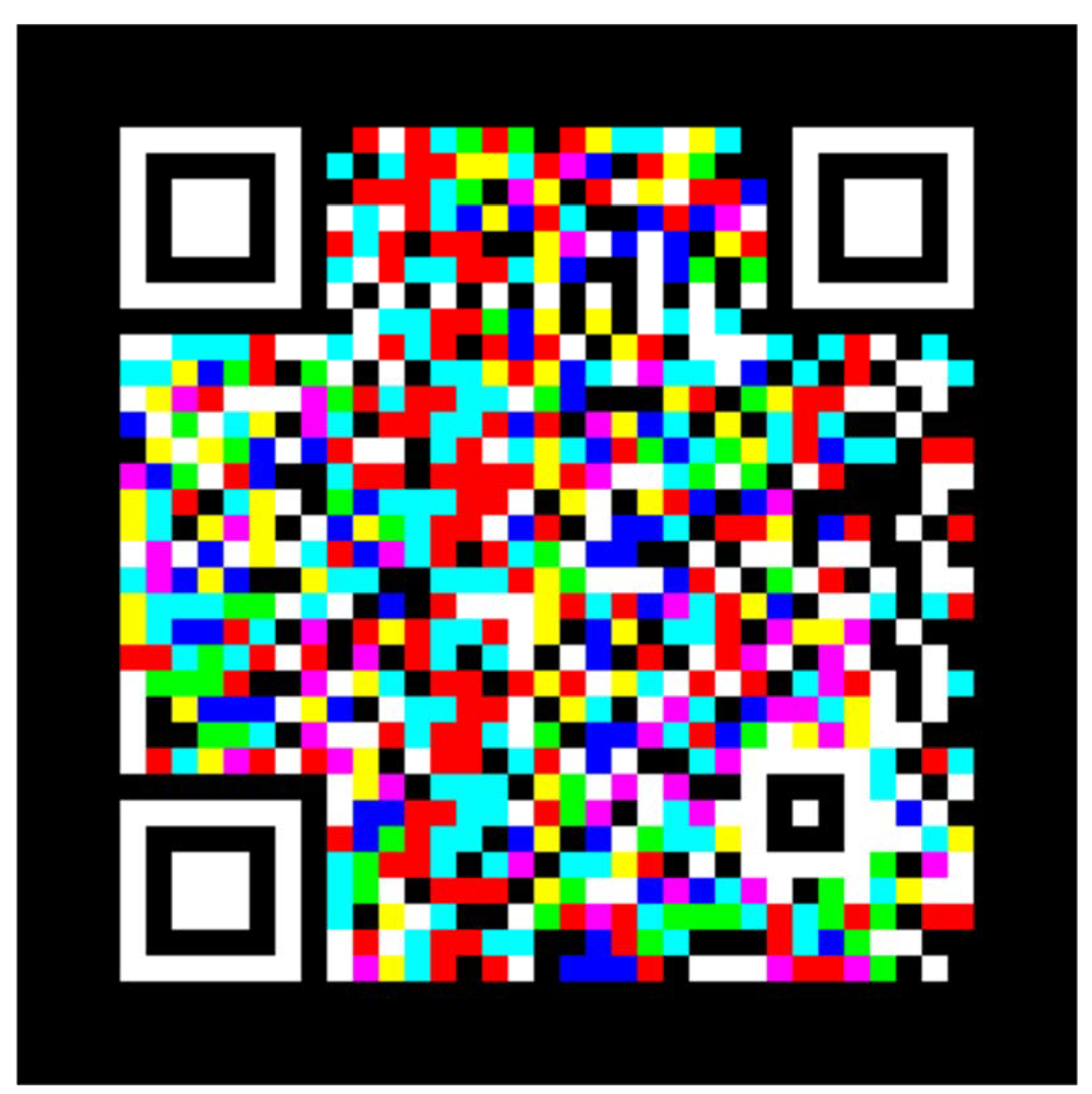
Figure 20.
QRGB code generated in image format (.png). Source: self made.
Program to read QRGB Codes (overlaid) in Repli.it Python.
Figure 21.
Own development of the QRGB decoding code in Python.
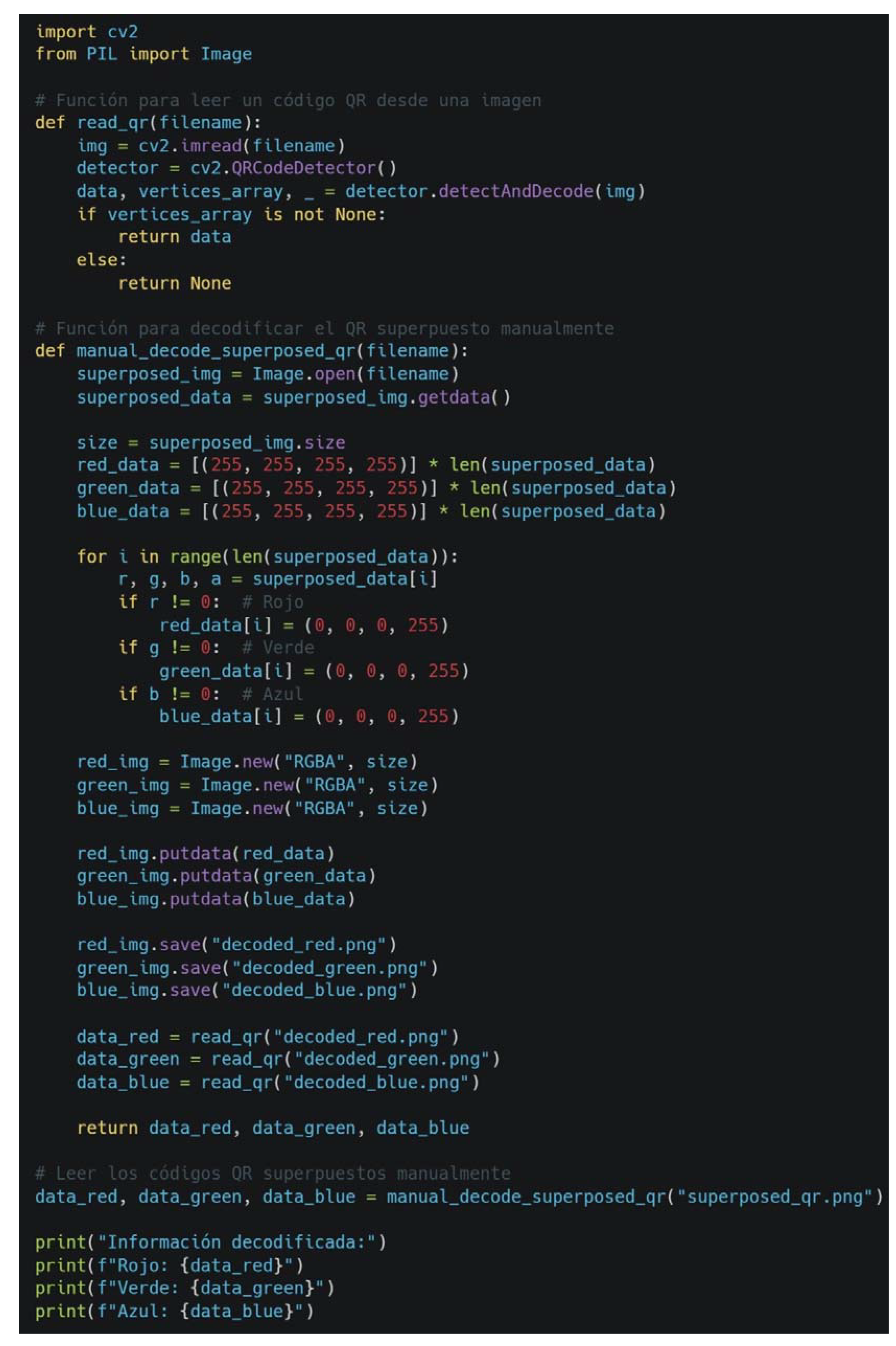
The information contained in this image can be copied and pasted (copy paste) to Repli.i and Python (to decode QRGB codes):…
import cv2
from PIL import Image
# Feature to read a QR code from an image
def read_qr(filename):
img = cv2.imread(filename)
detector = cv2.QRCodeDetector()
data, vertices_array, _ = detector.detectAndDecode(img)
if vertices_array is not None:
return data
else:
return None
# Feature to decode the overlay QR manually
def manual_decode_superposed_qr(filename):
superposed_img = Image.open(filename)
superposed_data = superposed_img.getdata()
size = superposed_img.size
red_data = [(255, 255, 255, 255)] * len(superposed_data)
green_data = [(255, 255, 255, 255)] * len(superposed_data)
blue_data = [(255, 255, 255, 255)] * len(superposed_data)
for i in range(len(superposed_data)):
r, g, b, a = superposed_data[i]
if r != 0: # Red
red_data[i] = (0, 0, 0, 255)
if g != 0: # Green
green_data[i] = (0, 0, 0, 255)
if b != 0: # Blue
blue_data[i] = (0, 0, 0, 255)
red_img = Image.new("RGBA", size)
green_img = Image.new("RGBA", size)
blue_img = Image.new("RGBA", size)
red_img.putdata(red_data)
green_img.putdata(green_data)
blue_img.putdata(blue_data)
red_img.save("decoded_red.png")
green_img.save("decoded_green.png")
blue_img.save("decoded_blue.png")
data_red = read_qr("decoded_red.png")
data_green = read_qr("decoded_green.png")
data_blue = read_qr("decoded_blue.png")
return data_red, data_green, data_blue
# Read the overlaid QR codes manually
data_red, data_green, data_blue = manual_decode_superposed_qr("superposed_qr.png")
print("Decoded information:")
print(f"Red: {data_red}")
print(f"Green: {data_green}")
print(f"Blue: {data_blue}")
Figure 22.
EThe Python code generates the intermediate step of decoding the three (3) QR Codes in RGB colors (Red, Green and Blue) in image format (.png), with the data entered in “Console”. Source: Own development of the QRGB encoding code in Python.
Figure 22.
EThe Python code generates the intermediate step of decoding the three (3) QR Codes in RGB colors (Red, Green and Blue) in image format (.png), with the data entered in “Console”. Source: Own development of the QRGB encoding code in Python.
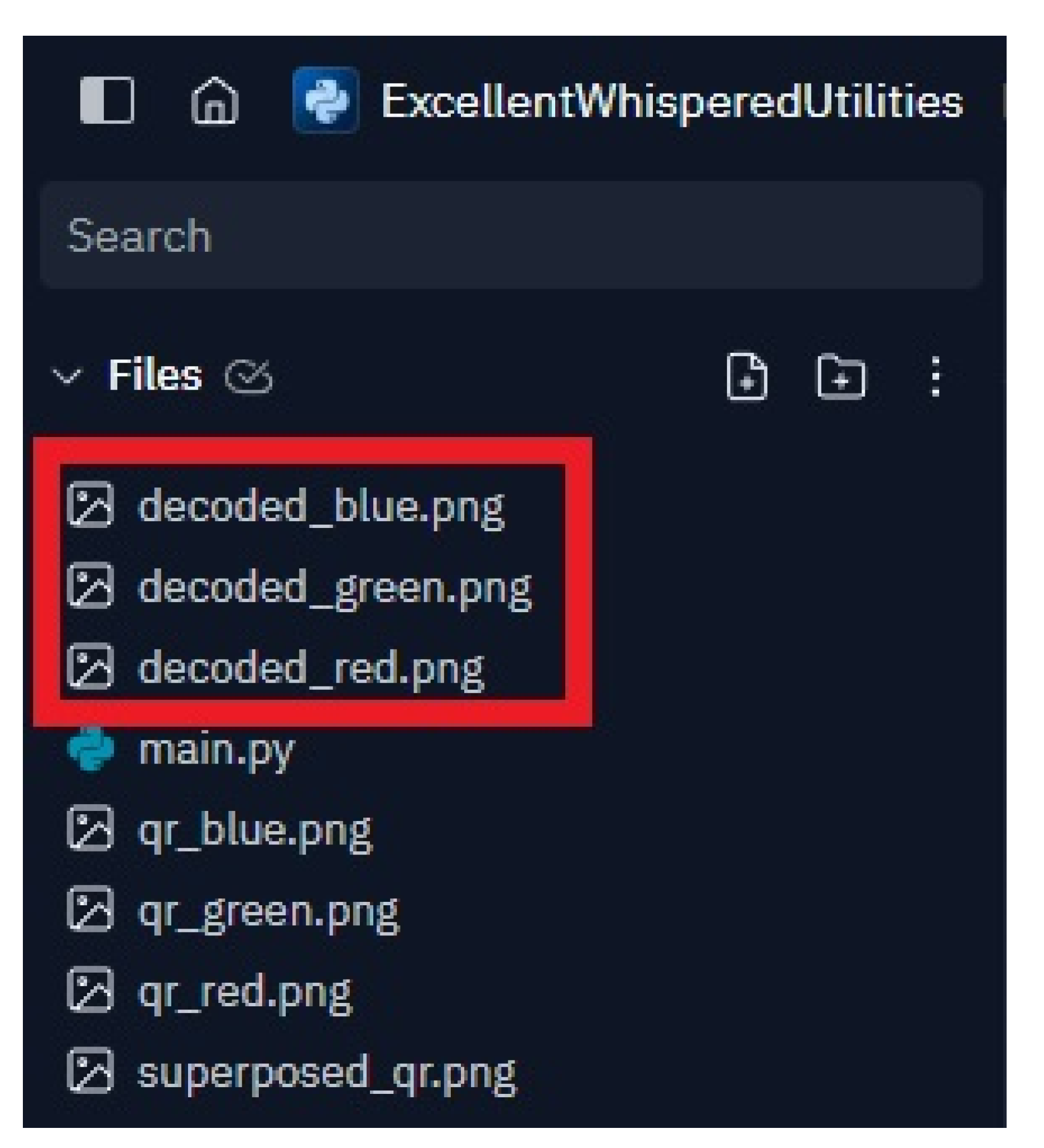
Figure 23.
EThe Python code generates the response in the “Console” after running the Repli.it Python decoding code and the information previously loaded with the data appears. Source: self made.
Figure 23.
EThe Python code generates the response in the “Console” after running the Repli.it Python decoding code and the information previously loaded with the data appears. Source: self made.
Conclusion.
The concept described in the QRGB.docx file, which combines three QR codes into one using RGB color coding to increase information density, is an innovative idea and is not widely known in commercial applications or standard systems. However, there are some developments and concepts in similar areas that deserve mention.
High Capacity Colored Two-Dimensional Codes (HCC2D) is a system developed to increase the capacity of QR codes using colors. Each point in the code can represent more information by having a specific color. It uses colors to increase the information capacity in a two-dimensional code. However, generally, it does not focus on overlaying three different QR codes into one, but on encoding more information at each point of a single QR code.
Microsoft Tag is a 2D code system that uses colors to encode information, developed by Microsoft. Use colors to encode additional information. However, it is a different system from the standard QR and does not involve the superimposition of multiple QR codes into a single one.
There are academic studies that have explored the use of colors to increase the capacity of QR codes, but the practical implementation of these studies has not been widely adopted or commercialized.
The idea of superimposing three QR codes using RGB colors to create a single QR code with greater information density is quite novel and does not seem to have an exact implementation in currently known commercial systems. Although there is research and proposals on the use of colors to increase the capacity of QR codes, the specificity of combining three QR codes into one by overlaying RGB colors seems to be unique.
This approach may offer a new way to increase data density in a single QR code, which could be very useful in applications that require storing large amounts of information in small spaces.
Colored QR codes (QRGB) present an innovative solution to the growing demands for data storage and transmission in various sectors. By significantly improving storage capacity and security, QRGBs represent a significant technological advance over traditional QR codes (QRGB).
In today's digital age, the need to store and transmit large amounts of information efficiently has led to the development of advanced technologies such as colored QR codes. Below is a detailed rationale for why QRGBs represent a significant improvement over traditional QR codes.
Traditional black and white QR codes are limited by their data storage capacity. By using three layers of colors (red, green and blue), QRGBs can store up to three times more information in the same space. This is because each color can represent a different set of data, allowing information to be overlaid without increasing the physical size of the code.
QRGBs not only increase storage capacity, but also improve information security. Overlaying multiple layers of data can make it difficult to forge or manipulate code. Additionally, by having multiple channels of information, redundancy can be implemented, which increases the robustness of the code against damage or read errors.
QRGBs are especially useful in applications where the transmission of large amounts of data in limited spaces is required, such as in the packaging industry, digital business cards, and interactive advertising. They also have potential in areas such as document and banknote security, where the authenticity and integrity of information are crucial.
Although QRGBs are based on the RGB color model, compatibility with printers that use the CMYK model has been considered. This ensures that the codes maintain their integrity and are legible even when printed, overcoming one of the main challenges of implementing colored QR codes in the physical world.
The development of advanced decoding algorithms that can identify and separate the different color layers is an essential component of QRGBs. These algorithms allow current scanning devices, with minor software modifications, to accurately read and decode the information stored in QRGBs. The introduction of QRGBs represents a significant advance in QR code technology, offering substantial improvements in storage capacity, security and applicability. These codes are an innovative solution to the increasing demands for data storage and transmission in various sectors.
Deepening of the conclusions for a paper to be written in the future.
Observed that it is an innovative proposal that seeks to increase the density of information stored in QR codes using an additive generation method of RGB colors. Several important points about the content, its strengths, areas for improvement and potential future applications are presented here.
The QRGB proposal is very innovative (it has not been possible to find open source developments in software that allows other people to create, encode and decode it in the way in which it is freely presented here to the experience of other users, but with intellectual property). Allowing – as has already been said – to store up to three times more information in the same physical space by superimposing layers of colors (red, green and blue). And also as already said, this technique not only increases storage capacity, but also improves security, making it difficult to forge or manipulate QR codes.
Emphasizing, as already mentioned above, that QRGBs have potential applications in various sectors such as the packaging industry, digital business cards, interactive advertising and document security. The possibility of applying this technology in areas where the authenticity and integrity of information are crucial, such as banknotes and official documents, highlights its practical value.
The implementation using Python libraries such as qrcode[pil], Pillow and opencv-python is a strength, since it takes advantage of open source tools, facilitating their access and customization. Creating a custom solution due to the lack of specific libraries demonstrates a level of adaptation and technical creativity intermediate between the creation (encoding) and decoding process with red, green and blue QR files (which make an intermediate encoding and decoding process ).
The overlay of multiple data layers allows redundancy to be implemented, increasing the robustness of the code against damage or reading errors. In addition, a correct color mix and adequate digital decoding were achieved. Only those who have the app to generate, transmit and decode it can use it. Those who do not have the app (or the Python code) will not be able to use it, since it is not widely implemented; It is an ongoing development.
Despite numerous strengths, the paper mentions technical challenges related to color mixing and accurate information retrieval in what I have previously defined as intermediate encoding and decoding. A detailed critique and details on how these problems can be solved and what steps are being taken to improve decoding accuracy will be included in a future paper.
On the other hand, ensuring compatibility with current scanners is vital (this work has not been done). The document could benefit from a more detailed section on how existing devices can be adapted to read these new QR codes. The scannability of QR codes in different lighting conditions and on different types of surfaces should be evaluated and improved if necessary.
Although some relevant studies are cited, the document could be enriched with more references to academic works and case studies that have explored the use of colors in QR codes. Including practical examples and real use cases where this technology has been successfully implemented would help strengthen the argument. Creating an intuitive user interface for QRGB generation and reading is essential for its mass adoption. Considering ease of use for both technical and non-technical users is crucial.
Using colors to improve security and storage capacity has great potential in visual cryptography and data protection. Exploring how this technology can be integrated with authentication and verification systems could open new opportunities. The ability to create visually appealing QR codes with custom graphics and logos offers great potential in marketing and advertising. The ability to include more information in the same QR code can improve user interaction and engagement. In the educational field, QRGBs can be used to provide access to large amounts of information in compact, easy-to-scan formats. This could be especially useful in educational materials, allowing students to access additional resources with a simple scan.
The QRGB document presents an innovative proposal with great potential to revolutionize the use of QR codes in various industries. However, it faces technical challenges that must be addressed to ensure its viability and mass adoption. With improvements in decoding accuracy, compatibility with existing devices and a friendly user interface, this technology has the potential to offer efficient and secure solutions for storing and transmitting information in the digital age. This analysis highlights both the project's strengths and areas where it can be improved, providing a solid foundation for its future development and practical implementation (already in progress in this document).
We will continue…
References
- -Anderson, IF (2013).Design of QR Codes for marketing. Online:https://www.monografias.com/trabajos101/diseno-codigos-qr-marketing/diseno-codigos-qr-marketing.
- Anderson, I.F. (n.d.). QRGB: App for generating QR Codes (method: 3-in-1), additive color generation method (RGB), using open source Python libraries to increase information density. Retrieved from osf.io/pbu65.
- -Choi, YS, & Woo, WT (2012). Data Encoding Technique Using Color QR Code. International Journal of Advanced Computer Science and Applications, 3(9), 45-49. [CrossRef]
- -Fang, W.P. (2011). Offline QR code authorization based on visual cryptography. In Seventh International Conference on Intelligent Information Hiding and Multimedia Signal Processing (pp. 89–92). IEEE.
- -Fu, Z. , Cheng, Y., Liu, S., & Yu, B. (2019). A new two-level information protection scheme based on visual cryptography and QR code with multiple decryptions. Measurement, 141, 267-276. [CrossRef]
- Kato, H., & Tan, K. (2007). Pervasive 2D Barcodes Using Color Information. Proceedings of the IEEE International Conference on Pervasive Computing and Communications Workshops, 2007, 24-29. [CrossRef]
- -Lin, P.Y. (2016). Distributed secret sharing approach with cheater prevention based on QR code. IEEE Transactions on Industrial Informatics, 12(1), 384-392. [CrossRef]
- -Liu, T. , Yan, B., & Pan, JS (2019). Color visual secret sharing for QR code with perfect module reconstruction. Applied Sciences, 9(21), 4670. [CrossRef]
- Liu, W., & Qiao, H. (2011). Enhancing QR Code Capacity with Color. Journal of Information Science and Engineering, 27(5), 1509-1520. [CrossRef]
- Mishra, P. (2016). Region Identification and Decoding Of Security Markers Using Image Processing Tools (Master's thesis, Banasthali Vidyapith, Rajasthan). Manipal University Jaipur. Available in: https://www.researchgate.net/publication/301788314.
Disclaimer/Publisher’s Note: The statements, opinions and data contained in all publications are solely those of the individual author(s) and contributor(s) and not of MDPI and/or the editor(s). MDPI and/or the editor(s) disclaim responsibility for any injury to people or property resulting from any ideas, methods, instructions or products referred to in the content. |
© 2024 by the authors. Licensee MDPI, Basel, Switzerland. This article is an open access article distributed under the terms and conditions of the Creative Commons Attribution (CC BY) license (http://creativecommons.org/licenses/by/4.0/).
Copyright: This open access article is published under a Creative Commons CC BY 4.0 license, which permit the free download, distribution, and reuse, provided that the author and preprint are cited in any reuse.


