

Submitted:
06 April 2024
Posted:
08 April 2024
You are already at the latest version
Abstract
Virtual tours with 360 photos present a quick, easy and accessible way to create immersive experiences. The visualization in diverse devices, provide a user experience that can be different. A virtual tour with 360 photos of the Chapel of Dolores (Tenerife), has been created. Whose access is limited to specific days, so the creation of a virtual tour allows you to visit it at any time, in addition, a pilot test has been carried out with students of the degree of restoration and conservation of cultural heritage in order to measure the user experience of the virtual tour depending on the device used. The participants took a virtual tour of the Dolores Chapel, first with a cell phone and then with the virtual reality headset, and then completed a user experience questionnaire. The results obtained comparing both visualization technologies are detailed, highlighting that when using the virtual reality headset no better results are obtained in the immersion subscale, in addition, the visualization on a Smartphone is more comfortable and obtains better results in consequences such as dizziness and vertigo. Therefore, it may be an interesting strategy to have simple versions that work quickly on the cell phones.
Keywords:
Virtual tour
; 360º photos
; user experience
; Chapel of Dolores
1. Introduction
For this work we created a virtual tour with 360 photos of the Chapel of Nuestra Señora de los Dolores, also known as Capilla de la Huerta, located in the municipality of Icod de los Vinos, on the island of Tenerife (Spain). This property is annexed to the dependencies of the former Convento Franciscano del Espíritu Santo, being considered part of the convent complex, which has the denomination of Asset of Cultural Interest, in the category of Monument since 2013 [1].
It was the family of Hurtado de Mendoza who promoted the construction of the chapel in the late eighteenth century at the request of Captain Hurtado de Mendoza, who wanted to dedicate it to the Virgin of Dolores. The chapel was finished in 1770, although it underwent modifications until 1774 [2]. Focusing on its interior, the temple has a single nave, rectangular floor plan and a roof of pair and knuckle, with suspenders that present an ornamentation of crosses and stars, being one of the few structures of these characteristics that are preserved in the archipelago (Figure 1).
Occupying the front of the chapel is the main altarpiece, which belongs to the second half of the 18th century and is catalogued as a Rococo-Chinesque altarpiece [3]. It can be said that this altarpiece is registrable, that means, it allows to be transited through several accesses that at the time were created for functional reasons (extraction and placement of niches and images, modification of the altar table, etc.) and this has allowed to identify and analyze its constructive system, of architectural box or sheet, which is hidden behind the facade of the altarpiece [4].
The interest aroused by this altarpiece has led to different technical studies and interventions on it [5]. The last of these works took place in 2021, within the framework of the Final Degree Project in Conservation and Restoration of Cultural Property, where the study and conservation-restoration of the central niche of the main altarpiece was carried out [6].
Although the chapel is still open for worship, its access is limited to specific days of the month and festivities, so the creation of a virtual tour provides the possibility of being able to visit it at any time. This chapel, as described above, is of historical-artistic interest and justifies its dissemination, encouraged by the good state of preservation in which it is found and the amount of documentation available thanks to the studies and interventions carried out. In short, this project aims to enhance the value of the Chapel of Dolores, also revealing rooms and spaces that, even on the days it is open, are not accessible to the public.
In any case, virtual reality, to be effective as an element of communication in the dissemination of heritage, must be accepted by the user. This means that the user of this technology must feel comfortable with the interface used and perceive that the scenario he or she visualizes is valid. Although virtual environments are considered a powerful tool for learning and communication [7,8] some authors have started to study the user experience (UX), i.e. the overall perception a person has when interacting with a product, in this case a virtual tour. This includes all aspects of the interaction, such as usability, accessibility, aesthetics, usefulness and satisfaction experienced by the user [9,10].
In this sense, one of the ways to evaluate user experience are surveys with specialized questionnaires. The first user experience questionnaire (UEQ) was created in 2005 [11] and consisted of eighty questions and six scales (Attractiveness, Perspicuity, Efficiency, Dependability, Stimulation and Novelty). This questionnaire allows an efficient quantitative measurement of a product's characteristics. The questionnaire is available in multiple languages and was validated several times [12,13]. User experience questionnaires can be used to test new versions of a product, compare one product to another, validate a new product to see if it is good enough for the user, as well as to determine where improvements need to be made [14].
Research on virtual tours has been conducted, for example at Princess Norah University in Saudi Arabia. The results revealed that the virtual tour lacked interest and adequate visualization options. Improvements in the graphic design were needed to make it more visible, as images of campus buildings and features requested by users were missing [15]. In another research forty virtual museum tours were analyzed, the study found a noticeable difference on user experience. With the results obtained, they offer specific recommendations to improve the creation of 360-degree virtual tours, making them more accessible and user-friendly [16]. Li and Huang [17] analyzed a virtual tour of the Palace Museum, concluding that, although virtual reality does not replace the real experience, it can enhance the understanding of artifacts and allows for a better understanding of their stories. In another study they compare the navigation of a virtual tour on the one hand with a mouse and on the other hand a navigation based on hand gestures with a user experience questionnaire. The study concludes that although the mouse is easier and faster to use, the gesture navigation gave better results in Interest/Enjoyment [18]. In other studies they compare the user experience of different virtual environments made on the one hand with 360 photos and on the other hand 3D modeling [19].
The aim of this work is to know the user experience provided by this virtual tour when visualized by different technologies in order to determine the validity as an element of dissemination of this historical-artistic space and to make a comparison of user perception when using different visualization technologies. The main research hypothesis is that the use of virtual reality headsets significantly improves the immersion in the virtual tour compared to the visualization on mobile devices. As a secondary hypothesis we consider that the virtual tour is an effective tool for the dissemination and learning of cultural heritage, regardless of the technology used.
To carry out this research, a pilot test was conducted with students of the degree of restoration and conservation of cultural property. The participants took a virtual tour of the chapel of Dolores, first with a Smatphone and then with virtual reality headset (Cardboard type), and then completed a user experience questionnaire. Specifically, the students were given the "Questionnaire on User Experience in Immersive Virtual Environments (QUXiVE)", which follows the ISO 9241-210 standard and is composed of nine subscales: presence, engagement, immersion, flow, usability, emotion, skill, judgment, Experience consequence and Technology adoption. An assessment of the virtual tour as a tool for learning is also conducted. This paper details the results obtained by comparing both visualization technologies, highlighting that when using virtual reality headset, results are obtained in the immersion subscale are similar to the Smartphone, but worse results are obtained in usability and consequences such as nausea and vertigo.
2. Background
A virtual tour is a recreation of an entirely virtual environment in which you can move freely and interact using a digital device. Virtual tours can be a copy of a reality or a fictitious space and even a mixture of both [20], where the user can walk through or examine the place. To create these tours there are a variety of programs and applications, on the one hand advanced, expensive technologies that require specialized knowledge for their use, and on the other hand simple and free technologies available to anyone [21].
One technology that makes it possible to create a virtual tour is 3D modeling using CAD (Computer Aided Design) tools [22]. With these programs it is possible to model, texture, illuminate and animate any scene or element. It is commonly used in video games and other entertainment media, however they require a large investment of time. In this case, the environments can be faithful copies of reality or invented scenarios as well as mixed. In order to turn these 3D models into virtual tours, video game engines such as Unity or Unreal Engine, among others, are usually used. A first-person controller (FPC), i.e., an element that moves through the space, is usually incorporated to traverse these environments, thus allowing the entire environment to be visited [23]. In addition, video game engines allow adding all kinds of interactivity, however, it takes time to achieve realistic scenarios.
In order to create virtual tours that are an exact copy of reality, technologies other than 3D modeling can be used. For example, two suitable technologies for this process would be photogrammetry and 3D scanning of the environment [24]. Photogrammetry uses multiple photographic images taken from different angles to perform a three-dimensional reconstruction of the space. 3D scanners, on the other hand, allow obtaining point clouds (x,y,z) of the existing space. Both techniques can be combined to optimize the workflow and improve the appearance of the 3D models. The use of 3D scanners and/or photogrammetry in complex environments such as the Chapel of Dolores requires knowledge of advanced software to be able to process, visualize or edit the tours. Despite this, these technologies are frequently used in the industry [25]. These tours are usually exact copies of reality and in some cases, they are referred to as digital twin since it represents with maximum possible detail the real environment in a virtual model [26].
However, there is another technology for virtual tours, based on 360 photos, which also captures the environment in a completely realistic way, but it is much simpler and faster to create, manipulate and visualize. To perform this type of tours, it is necessary to use a 360 camera. Such cameras record or take spherical 360-degree photographs. Although there are cameras aimed at professional sectors that require a very high resolution, there are also models aimed at the general public that are small, easy to handle and affordable. To create the virtual tour from the 360 photos, it is necessary to use specific software such as Matterport, Cloudpano, 3DVista, etc. that allows linking each of the photos to be able to move through the tour [21]. Virtual tours made with 360 cameras do not allow a completely free movement of the user as it happens with other technologies. In this case, the movement is performed as teleportation between one scene and the next. Normally this type of virtual tours are also conceived as digital twins since they are faithful to reality.
Once the virtual tour has been created, the form and technology to be used for its visualization must be taken into account. The types of visualizations of a virtual tour are classified into three levels of immersion (low immersion, semi-immersive and high immersion). Virtual tours on screens and controlled by a mouse or touch screen are considered as low immersion. Virtual reality booths (CAVEs) with projections on the floor and walls are considered semi-immersive and finally, virtual reality headsets are considered fully immersive [27]. On the other hand, virtual tours can be generated as an installable application on devices (computers, phones, virtual reality headsets, etc.) or as a web link that allows viewing the tour from the browser of our device.
In general, tours created with CAD programs and video game engines usually require a high level of processing so they can only be viewed on a computer or video game console. Likewise, point clouds or elements created with scanners require a device with high processing capacity to be displayed. Virtual tours made with 360 photographs usually require little processing and therefore are habitually accessible [21].
Due to the ease of creation and visualization of virtual tours created with 360 cameras, they are used in many areas. As for example to disseminate tourist attractions such as Puerto Bajaña in the Buena Fe canton [28]. In another case, the Teotihuacán Valley is shown in its antiquity and today in order to offer new experiences for tourists, as well as to raise awareness about the value and care for the conservation of heritage [29]. Another use is the design and implementation of virtual tours for University campuses, so that the navigation limitations of the map application can be replaced by the application of virtual tours [30]. Likewise in the real estate market 360 virtual tours have become the most relevant marketing strategy to sell the property [31]. The 360 virtual tours are implemented in hotels as a digital differentiation tool in the local hotel industry. These tours would allow customers to explore the facilities remotely, improving visibility and user experience, increasing bookings, customer satisfaction and long-term profitability [32]. In addition, virtual tours are used for marketing purposes, achieving user engagement through a multisensory virtual tour of the actual production site [33]. In other research, virtual tours are developed for places associated with famous personalities (e.g. the birthplace of an artist), presenting current photos of the place together with historical recreations using computer media, allowing visitors to travel back in time during the virtual tour [34]. A project was also carried out to raise students' awareness of environmental culture, through an interactive tour with 360 technology through ecosystems such as moorlands and Andean forests [35]. Another study investigates how the use of 360-degree virtual tours of mountains can motivate audiences to take real hikes in the mountains [36].
One of the uses of virtual tours created with 360 photos, in addition to those noted above, is the dissemination and enhancement of the historical and cultural heritage of cities. Many local entities, which have a limited budget, choose virtual tours based on photos360 for their dissemination tasks. For example, the tourist office of Alicante has tours of some of its monuments and historic buildings, such as the castle of Santa Barbara [37] or the Cathedral of Santiago de Compostela [38]. Other cultural institutions, such as museums or exhibition halls also use this type of virtual tours to disseminate their exhibitions [39]. It is interesting to note that in the field of heritage, chapels or hermitages in small towns do not usually use this type of technology.
3. Materials and Methods
In this work, we have made a virtual tour based on 360 photos of the chapel of Dolores in Icod de los Vinos in Tenerife. It is a chapel in a small town, which does not have many resources for the dissemination of its heritage. A 360 camera was used, specifically the Insta 360 X3 model (cost approximately 500 €). Subsequently, a pilot test was carried out with students of the degree of conservation and restoration of cultural heritage to measure the user experience of the virtual tour. An evaluation of the virtual tour as a learning tool was also carried out.
A total of 27 spheric photographs were taken with the Insta 360 X3 camera. Both the exterior, i.e. the entrance door and the visitable interior were photographed, as well as parts that are not normally visited due to their poor condition (Figure 2a). Due to the great height of the central nave and the altarpiece, photos were taken at a height of 5 meters, allowing a close-up view of the details of the ceiling and the altarpiece. An extendable monopod was used for the high-altitude photos to avoid the use of drones inside the chapel (Figure 2b). Since the altarpiece is walkable, we entered into the interior to capture 360 images that are very difficult to access and that allow a much more complete visualization.
The photographs are then entered into the online program Cloudpano to generate the virtual tour (Figure 3). The main task is to organize the photographs and to create the link points between one scene and the next. These links then allow the user to move within the virtual tour. The virtual tour can be accessed at the following URL: https://capilladoloresvr.cultimerse.com
3.1. Participants
The pilot test was carried out with 18 students of the fourth year course, Conservation and Restoration of Altarpieces, of the degree of conservation and restoration of cultural goods of the University of La Laguna (Tenerife, Spain). The participants were selected on the basis of their accessibility and willingness to participate, i.e. an ad hoc sampling.
3.2. Measurement tool
The tool used to determine the user experience in a virtual environment is the Questionnaire on User Experience in Immersive Virtual Environments (QUXiVE) [40]. According to ISO 9241-210, User Experience (UX) is defined as "User perceptions and responses resulting from the use of a system or service." This standardized questionnaire contains 10 scales measuring presence, engagement, immersion, fluency, usability, skill, emotion, experience consequence, judgment and technology adoption of virtual tours distributed in 88 questions. For this case, 27 questions have been selected from 9 of the 10 subscales of the original questionnaire. Each of the questions can be answered on a Likert scale from 1 to 10, where one is completely disagree and ten is completely agree.
In the QUXiVE (Questionnaire on User eXperience in Immersive Virtual Environments) questionnaire used in this work, the subscales are defined as follows.
- Presence: the sense of being there, of the user in the virtual environment.
- Engagement: the energy in action, the connection between a person and its
activity consisting of a behavioral, emotional and cognitive form.
- Immersion: the illusion that the virtual environment technology replaces the user’s sensory stimuli by the virtual sensory stimuli.
- Flow: defined as “a pleasant psychological state of sense of control, fun and joy”
- Skill: the knowledge the user gain in mastering his activity in the virtual environment.
- Emotion: defined as the feelings (of joy, pleasure, satisfaction, frustration, disappointment, anxiety …) of the user in the VE.
- Usability: the ease of learning (learnability and memorizing) and the ease of using (efficiency, effectiveness and satisfaction) the VE.
- Judgement: defined as the overall judgement of the experience in the virtual environment.
- Experience Consequence: defined as the symptoms (e.g. the "simulator sickness", stress, dizziness, headache …) the user can experience
- Technology adoption: defined as the actions and decisions taken by the user for a future use or intention to use of the VE
Of the 88 total questions that make up the questionnaire, the following 27 have been selected:
An additional question was asked to assess the extent to which these types of virtual environments can serve as a learning tool. The question is as follows: I believe that this type of VR environments serves me to disseminate and learn practical content.
3.3. Pilot Test
The participants first visualized the virtual tour on their cell phone (Figure 4). An expert in conservation, restoration and architecture who has carried out numerous studies on the Chapel of Dolores guided them, simulating a real visit. The tour lasted approximately twenty minutes and they received an explanation of the chapel and its significant elements. Once the tour was over, the participants filled out the user experience questionnaire.
The second part of the pilot test consisted of performing the virtual tour again, using Woxter Neo Vr1 Cardboard virtual reality headsets (Figure 5a), which allow the visualization of stereoscopic images (Figure 5b). Navigation within this type of device works as follows: if you fix your gaze for a few seconds on a point in the image where there is a link to change scenes, it automatically advances to the next location. Therefore these headsets do not need any external controller.
When using the headsets it is important to create a safety space around the user or to have a swivel chair as it is necessary to move and turn the head 360 degrees to be able to perform the virtual tour (Figure 6). Finally, the participants filled out a new user experience questionnaire.
4. Results
The results obtained, media and standard deviation, for each of the questions of the questionnaire can be seen in Table 2.
In the additional question on learning, a score of 9,44 (1,10) was obtained for the route taken on the cell phone and 9,06 (1,63) for the route viewed in the virtual reality headsets.
The results obtained grouped by the subscales of the questionnaire used are listed on Table 3.
5. Conclusions
Once the research has been carried out, we can affirm that it is possible to create virtual tours with a high level of detail and a high level of user acceptance through low-cost technologies. This methodology would allow local entities, with a limited budget, to disseminate their heritage through the use of virtual tours, accessible from any device.
Regarding immersion, the results indicate that the main research hypothesis is not fulfilled, i.e. that the use of virtual reality headsets significantly improves immersion in the virtual tour compared to visualization on mobile devices. The results obtained in the corresponding subscale (immersion) are very similar (8,25/10 smartphone and 8,53/10 in VR headsets). Despite the fact that Smartphone screens are considered low immersion devices and VR headsets are considered high immersion devices, similar results were obtained. It would be interesting to elaborate on this similarity in future work.
On the other hand, the secondary hypothesis, that the virtual tour is an effective tool for the dissemination and learning of cultural heritage, regardless of the technology used, is considered valid. The participants rated the virtual tour very positively as a tool for learning and dissemination of heritage (9,44/10 for mobile devices and 9,06/10 for virtual reality glasses). No major differences are observed between the use of screens or headsets for learning objectives. Therefore, it may be an interesting strategy to have simple versions that work quickly on Smartphones of potential users.
Additionally, we can see that the virtual tour created with 360 photos generates a user experience in both viewing alternatives that is very positive. We can highlight that in the subscale of presence, commitment and adoption of technologies the valuation is higher than 9 out of 10. Therefore we can conclude that the virtual tour will be very well accepted by potential users. On the other hand, fluency, emotion and judgment also obtain very positive values, but close to 8 out of 10. No notable differences are observed in these subscales in the comparison between cell phones and virtual reality headsets.
However, it should be noted that virtual tours can have negative consequences, such as dizziness or vertigo. In this study, it was found that when participants use virtual reality goggles, the consequences subscale increases significantly (4,02 out of 10 vs. 1,02 out of 10). Due to the use of stereoscopic images, it is difficult to improve the negative sensations of dizziness because the user floats above the scene. In other virtual reality headsets, environments such as cabins, visible paths, or the user's hands and body parts can be visualized, thus mitigating some of the negative effects.
Interestingly, the usability of the two devices is significantly different. To the specific question about the comfort of the device used the participants rated cell phones with 9,17/10 compared to 6,83/10 for virtual reality headsets. This indicates that virtual reality headsets would be necessary only for very specific cases. As a future work we propose the analysis of scenarios where the use of virtual reality headsets is necessary compared to other types of visualizations.
Author Contributions
Conceptualization, C.M. and J.L.S.; methodology, C.M. and S.D.P; software, J.L.S. and D.M.D.; validation, S.D.P., J.L.S. and C.M.; formal analysis, J.L.S.; investigation, C.M. and A.B.L.; resources, A.B.L.; data curation, J.L.S. and D.M.D.; writing—original draft preparation, C.M. and S.D.P.; writing—review and editing, J.L.S. and D.M.D.; visualization, A.B.L; supervision, C.M.; project administration, C.M.; funding acquisition, C.M. All authors have read and agreed to the published version of the manuscript.
Funding
This research was funded by the project "Virtual tours for the dissemination of cultural heritage: analysis of the user experience and knowledge transfer" (2023/2310) framed in the convocatoria de proyectos dirigidos por noveles investigadores, acción para la iniciación de la actividad investigadora que se enmarca en el plan de incentivación de la actividad investigadora de la Universidad de la Laguna 2023. It is also part of the project "Digital resources for the dissemination of cultural heritage and for the production of educational materials, through virtual spaces and augmented reality" corresponding to the Convocatoria de los Proyectos de Innovación y Transferencia Educativa para el curso académico 2023-24.
Conflicts of Interest
The authors declare no conflicts of interest.
References
- BOC, "Denominación del Bien de Interés Cultural a favor del Exconvento de San Francisco," Cabildo de Tenerife, 2013.
- D. Martínez de la Peña, El Convento del Espíritu Santo de Icod, Ayuntamiento de Icod de los Vinos, 1998.
- Trujillo Rodríguez, El retablo Barroco en Canrias, Excmo. Cabildo Insular de Gran Canaria, 1977.
- S. Díaz and M. Tudela, "Sistemas constructivo y estructural de los retablos en la isla de Tenerife a través de documentación digital del Patrimonio (HBIM).," in En Actas del XV Congreso Internacional de Rehabilitación del Patrimonio Arquitectónico y Edificación, Granada, 2021.
- S. Díaz, A. Sánchez and J. de la Torre, "An approach to HBIM methodology applied to the conservation of altarpieces: two case studies in the Canary Islands," Conservar Património, vol. 42, pp. 81-97, 2023.
- G. D. C. Chinea Peña, R. B. Acuña González and A. Delgado González, "Conservación y Restauración de la Hornacina Central del Retablo Mayor de la Capilla de los Dolores, Icod de los Vinos.," Universidad de La Laguna, 2021.
- C. Dede, "Immersive interfaces for engagement and learning," Science, vol. 323, pp. 66-69, 2009. [CrossRef]
- T. A. Mikropoulos and A. Natsis, "Educational virtual environments: A ten-year review of empirical research (1999–2009)," Comput. Educ., vol. 56, pp. 769-780, 2011. [CrossRef]
- K. Ramírez-Acosta, "User experience and user interface: important parameters for an effective design," Tecnología en Marcha, vol. 30, no. 1, 2017.
- R. Shikhri, J. Lanir and L. Poretski, "Evaluation Framework for Improving 360 Virtual Tours User Experience," in ACM WSDM WebTour, Jerusalem, Israel, 2021.
- M. Schrepp, "All you need to know to apply the UEQ successfully in your project," in User experience questionnaire handbook, 2015, pp. 50-52.
- B. Laugwitz, T. Held and M. Schrepp, "Construction and Evaluation of a User Experience Questionnaire," in HCI and Usability for Education and Work: 4th Symposium of the Workgroup Human-Computer Interaction and Usability Engineering of the Austrian Computer Society, Graz, Austria, 2008.
- M. Schrepp, A. Hinderks and J. Thomaschewski, "Applying the User Experience Questionnaire (UEQ) in Different Evaluation Scenarios," in Design, User Experience, and Usability. Theories, Methods, and Tools for Designing the User Experience: Third International Conference, DUXU, Crete, Greece, 2014.
- M. Schrepp, A. Hinderks and J. Thomaschewski, "Design and Evaluation of a Short Version of the User Experience Questionnaire (UEQ-S)," International Journal of Interactive Multimedia and Artificial Intelligence, vol. 4, no. 6, pp. 103-108, 2017. [CrossRef]
- M. Alenazi and F. Demir, "Understanding virtual reality tours: a user experience study with the princess Norah University," International Journal of Current Research in Life Sciences, vol. 8, no. 10, pp. 3248-3253, 2019.
- R. Shikhri, L. Poretski and J. Lanir, "Analyzing Behavior and User Experience in Online Museum Virtual Tours," arXiv, pp. 1-25, 2023.
- W. Li and X. Huang, "The Interactive Design and User Experience of Virtual Museums: Case Study of the Virtual Palace Museum," in Cross-Cultural Design. Applications in Learning, Arts, Cultural Heritage, Creative Industries, and Virtual Reality, 2022.
- V. M. Manghisi, A. E. Uva, M. Fiorentino, M. Gattullo, A. Bocaccio and G. Monno, "Enhancing user engagement through the user centric design of a mid-air gesture-based interface for the navigation of virtual-tours in cultural heritage expositions," Journal of Cultural Heritage, vol. 32, pp. 186-197, 2018. [CrossRef]
- C. Carbonell-Carrera and J. L. Saorín, "Virtual tours using 360º Photos and 3D models," in 15th International Conference on Education and New Learning Technologies, Palma, Mallorca, Spain, 2023.
- Sanchez Riera, C. Pàmies and I. Navarro, "Recorrido virtual mixto para la difusión del patrimonio descontextualizado : la sillería del coro de la Catedral de Oviedo," in "REHABEND 2022 Euro-American Congress on Construction Pathology, Rehabilitation Technology and Heritage Management"., Santander, 2022.
- Nieva García, P. Luna González and J. Arellano Pimentel, "Comparativa de características de software para la creación de recorridos virtuales 360 en Web. Revista De Investigación En Tecnologías De La Información, 9(19), 109–117. https://doi.org," Revista De Investigación En Tecnologías De La Información, vol. 9, no. 19, pp. 109-117, 2022.
- M. Janovský, P. Tobiáš and V. Cehák, "Janovský M, Tobiáš P, Cehák V. 3D Visualisation of the Historic Pre-Dam Vltava River Valley—Procedural and CAD Modelling, Online Publishing and Virtual Reality," ISPRS International Journal of Geo-Information, vol. 11, no. 7, p. 376, 2022.
- C. Meier, I. Sanchez Berriel and F. Pérez Nava, "Creation of a Virtual Museum for the Dissemination of 3D Models of Historical Clothing," Meier, C., Sanchez Berriel, I., Pérez Nava, F. (2021). Creation of a Virtual Museum for the (3D Technology for Sustainable Education, Culture and Divulgation), p. 12581, 2021. [CrossRef]
- H. Rüther, "3D scanning the 'New Jerusalem' and other ancient monuments," Quest, vol. 14, no. 4, pp. 18-20, 2020.
- J. A. Romero-Guerrero, D. Arenas-Islas, C. Reta, G. E. Bautista-Orduña, I. Juárez-Sosa and J. M. Suarez-Luna, "Evaluación de formatos de exportación e importación de nubes de puntos para su uso en motores gráficos de realidad virtual," Pädi Boletín Científico De Ciencias Básicas E Ingenierías Del ICBI, vol. 11, no. 22, pp. 11-19, 2022.
- E. Lucchi, "Digital twins for the automation of the heritage construction sector," Automation in Construction, vol. 156, p. 105073, 2023. [CrossRef]
- F. Di Natale, C. Repetto, G. Riva and D. Villani, "Di Natale, A. F., Repetto, C., Riva, G., & Villani, D. (2020). Immersive virtual reality in K-12 and higher education: A 10-year systematic review of empirical research," British Journal of Educational Technology, vol. 51, no. 6, pp. 2006-2033, 2020.
- T. L. Barre Briones, Elaboración de un recorrido virtual interactivo 360º grados del atractivo turístico Puerto Bajaña del cantón Buena Fe provincia de Los Ríos, Quevedo: Universidad técnica estatal de Quevedo, 2020.
- B. Almaraz, L. S. Chico, E. C. D. Martínez, A. Y. M. Rodríguez and A. P. G. Escobar, "Estudio de factibilidad para el desarrollo de paseos virtuales. caso de aplicación: Valle de Teotihuacán.," Pistas Educativas, vol. 44, p. 144, 2023.
- T. L. M. Suryanto and N. C. Wibowo, "Developing and Evaluating a Jejakatua Virtual Campus Tour Prototype Using Auto-stitching Technique," Journal of Physics: Conference Series, p. 1569, 2019. [CrossRef]
- M. Z. Sulaiman, "Matterport: Virtual Tour as A New Marketing Approach in Real Estate Business During Pandemic COVID-19," in International Conference of Innovation in Media and Visual Design (IMDES 2020), Tangerang, Indonesia, 2020.
- F. Valencia Pánchez and P. Vidal Fernández, "Tour virtual 360° en el Hotel emperador de la ciudad de Ambato, como estrategia de diferenciación digital a nivel local.," 593 Digital Publisher CEIT, vol. 8, no. 3, pp. 499-511, 2023.
- M. Peruzzini, S. Cavallaro, F. Grandi, E. Martinelli and F. De Canio, "Exploring how to use virtual tours to create an interactive customer remote experience," Journal of Industrial Information Integration, vol. 35, p. 100509, 2023. [CrossRef]
- V. Nemtinov, A. Borisenko, Y. Nemtinova, S. Tryufilkin and V. Morozov, "Development of virtual tours of memorable places associated with the residency and activities of famous personalities," in International Multidisciplinary Scientific GeoConference: SGEM, 2020.
- R. G. Aguilar Vega, "Recorrido inmersivo 360 - Protege tu páramo," in Experiencias de innovación educativa - Tomo 4, vol. 1(710), Institución Universitaria Politécnico Grancolombiano, 2020, p. 169–187.
- X. Wu and I. K. W. Lai, "The use of 360-degree virtual tours to promote mountain walking tourism: stimulus–organism–response model," Information Technology & Tourism , vol. 24, p. 85–107, 2022. [CrossRef]
- Alicanteturismo, "Alicante: Castillo de Santa Bárbara," 20 03 2024. [Online]. Available: https://alicanteturismo.com/castillo-de-santa-barbara/.
- Fotopanorama, "Fotopanorama," 20 3 2024. [Online]. Available: https://www.fotopanorama.com/tour-virtual-catedral-de-santiago/.
- TEA, "TEA Tenerife Espacio de las Artes," 20 03 2024. [Online]. Available: https://teatenerife.es/panorama-oscar-dominguez/.
- K. Tcha-Tokey, O. Christmann, E. Loup-Escande and S. Richir, "Proposition and Validation of a Questionnaire to Measure the User Experience in Immersive Virtual Environments," International Journal of Virtual Reality Année, vol. 16, no. 1, pp. 33-48, 2016. [CrossRef]
- R. Luks and F. Liarokapis, "Investigating motion sickness techniques for immersive virtual environments," in 12th ACM International Conference on PErvasive Technologies Related to Assistive Environments, Rhodes, Greece, 2019.
Figure 1.
Interior of a single nave. In the background, the main altarpiece that presides over the chapel.
Figure 1.
Interior of a single nave. In the background, the main altarpiece that presides over the chapel.
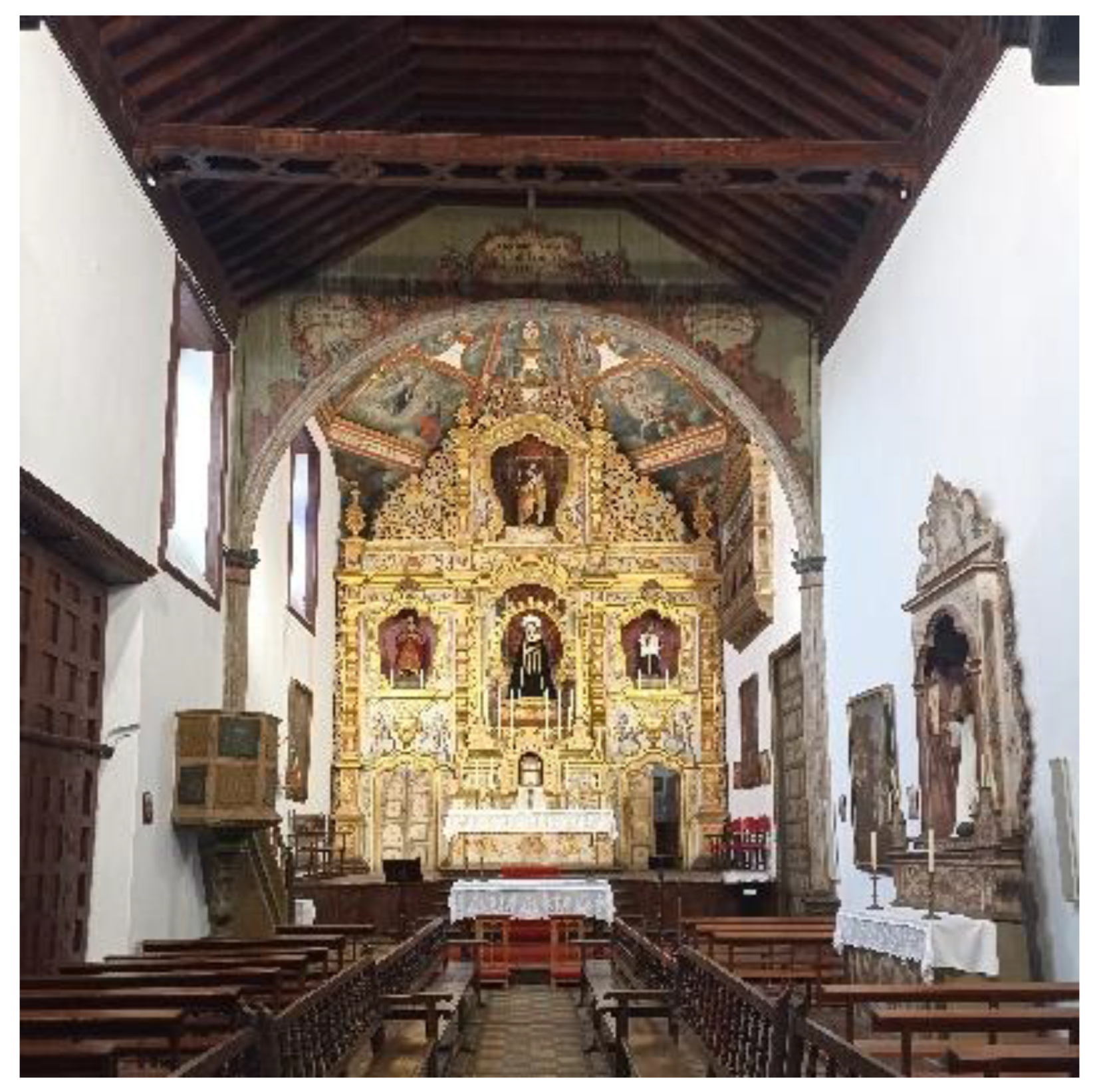
Figure 2.
(a) Parts not passable due to their poor condition Figure; (b) Photo from 5 meters above the ground.
Figure 2.
(a) Parts not passable due to their poor condition Figure; (b) Photo from 5 meters above the ground.
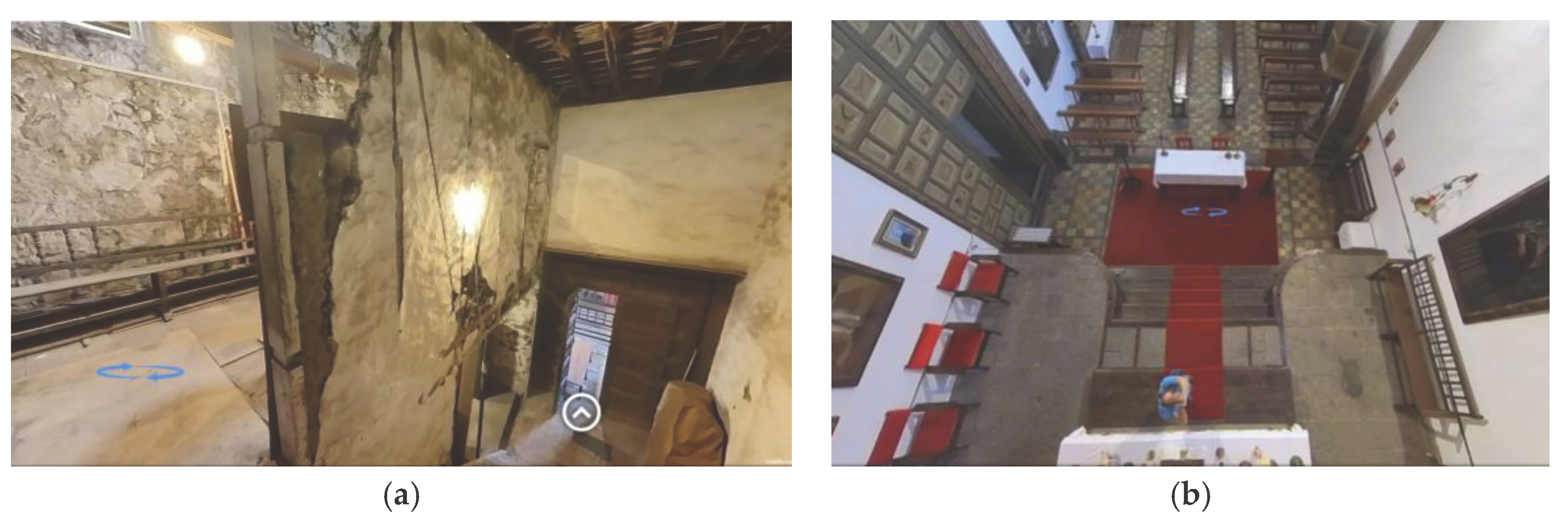
Figure 3.
Detail of the Cloudpano program used for the virtual tour.
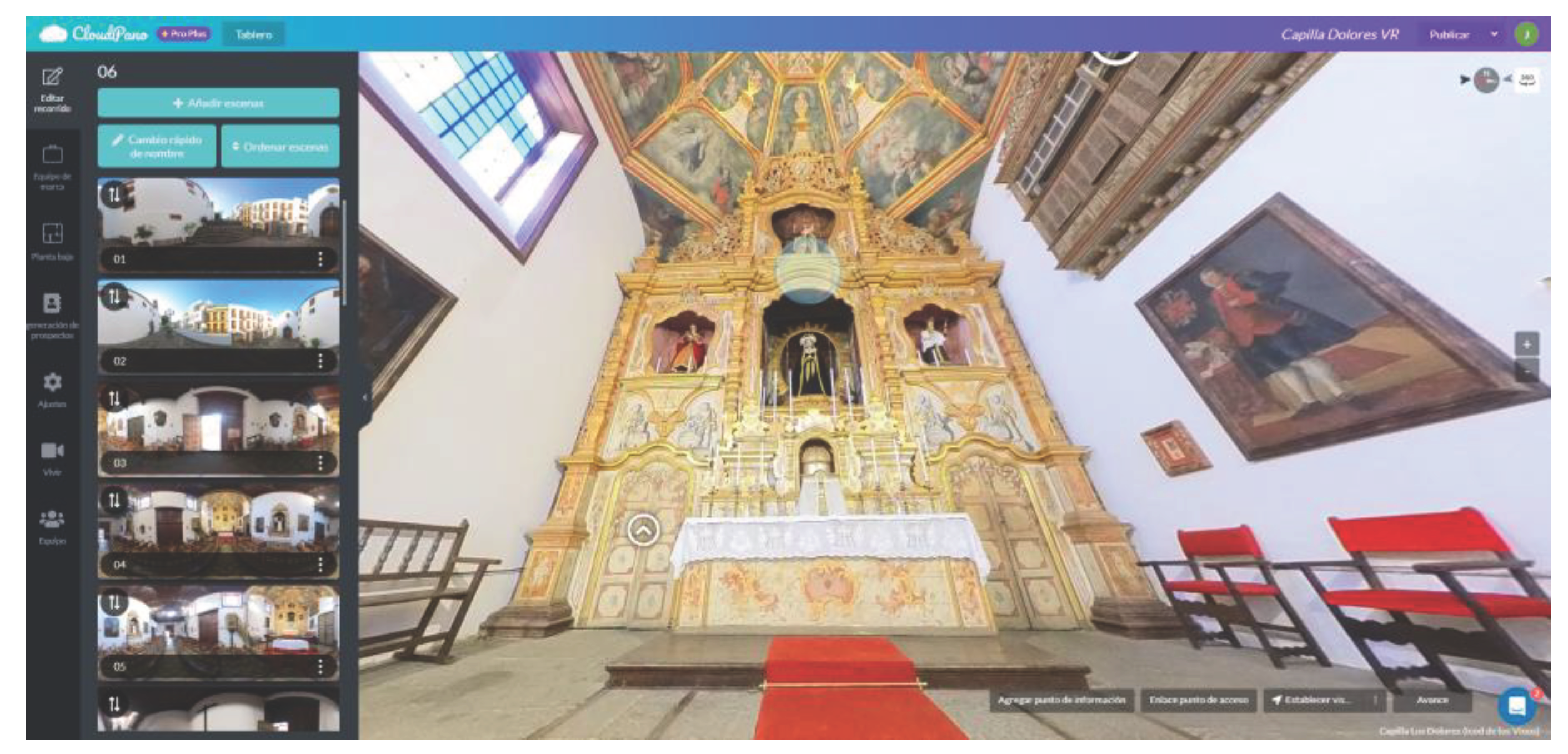
Figure 4.
Visualization of the virtual tour on a Smartphone.
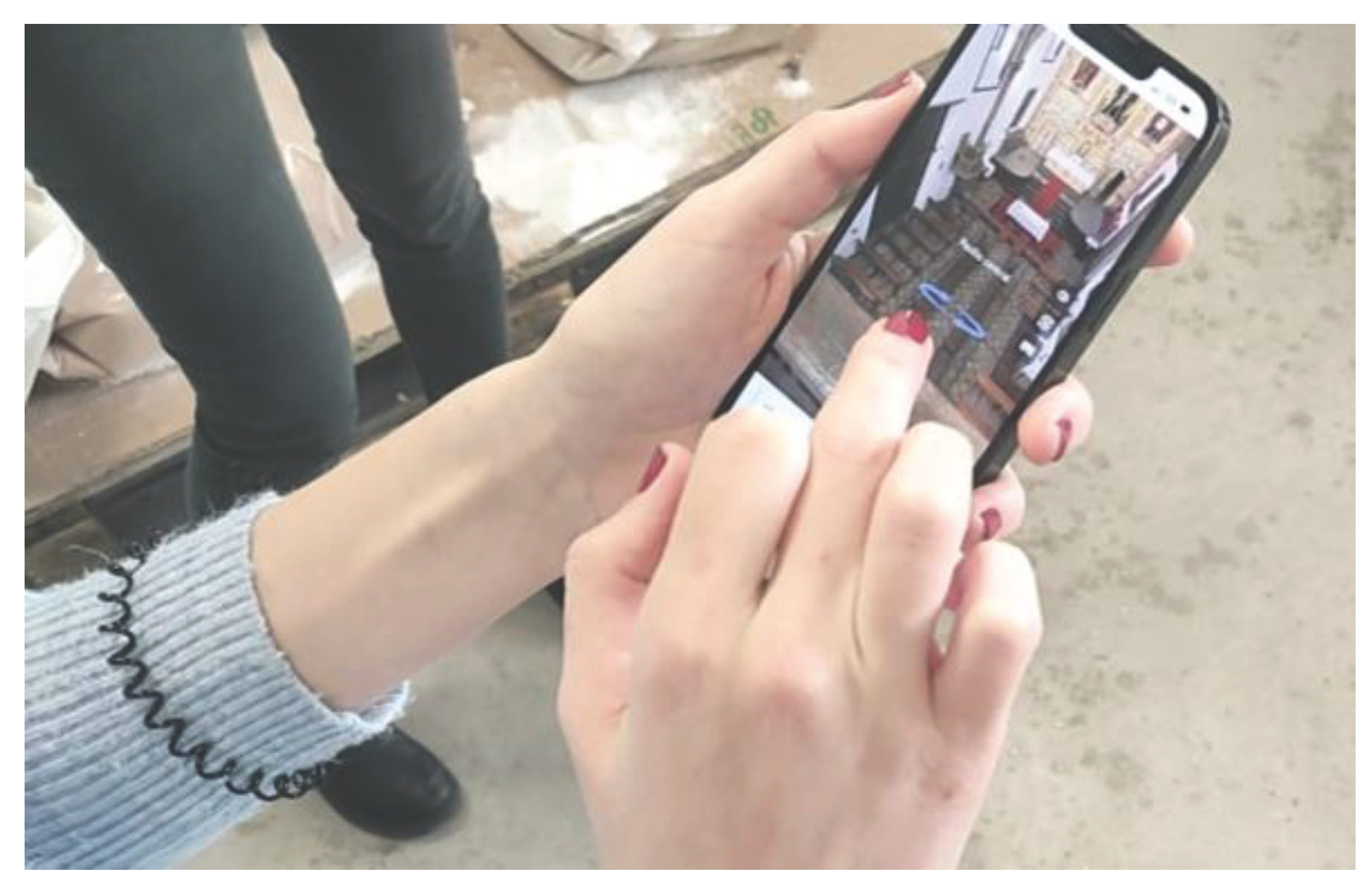
Figure 5.
(a) Visualization of the virtual tour on a smartphone using the Woxter Neo Vr1 virtual reality headset; (b) Visualization in stereoscopic mode for viewing in virtual reality headsets.
Figure 5.
(a) Visualization of the virtual tour on a smartphone using the Woxter Neo Vr1 virtual reality headset; (b) Visualization in stereoscopic mode for viewing in virtual reality headsets.
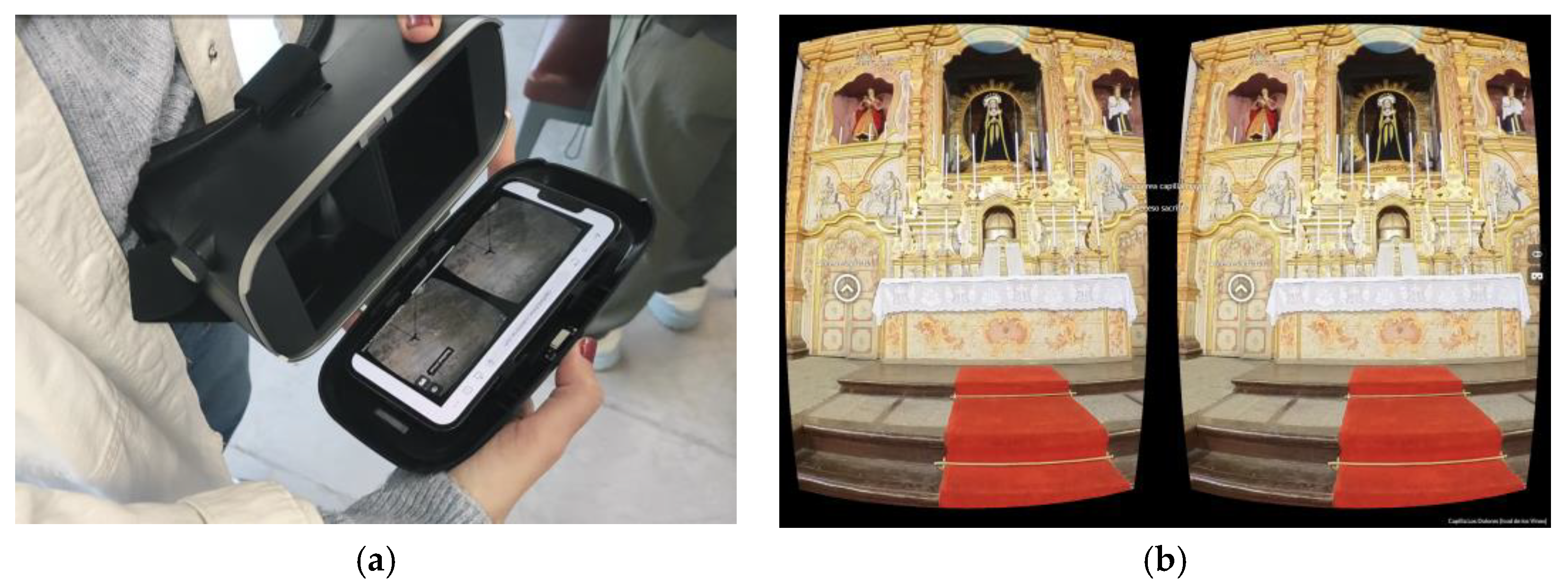
Figure 6.
Students during the virtual tour session using virtual reality headsets.
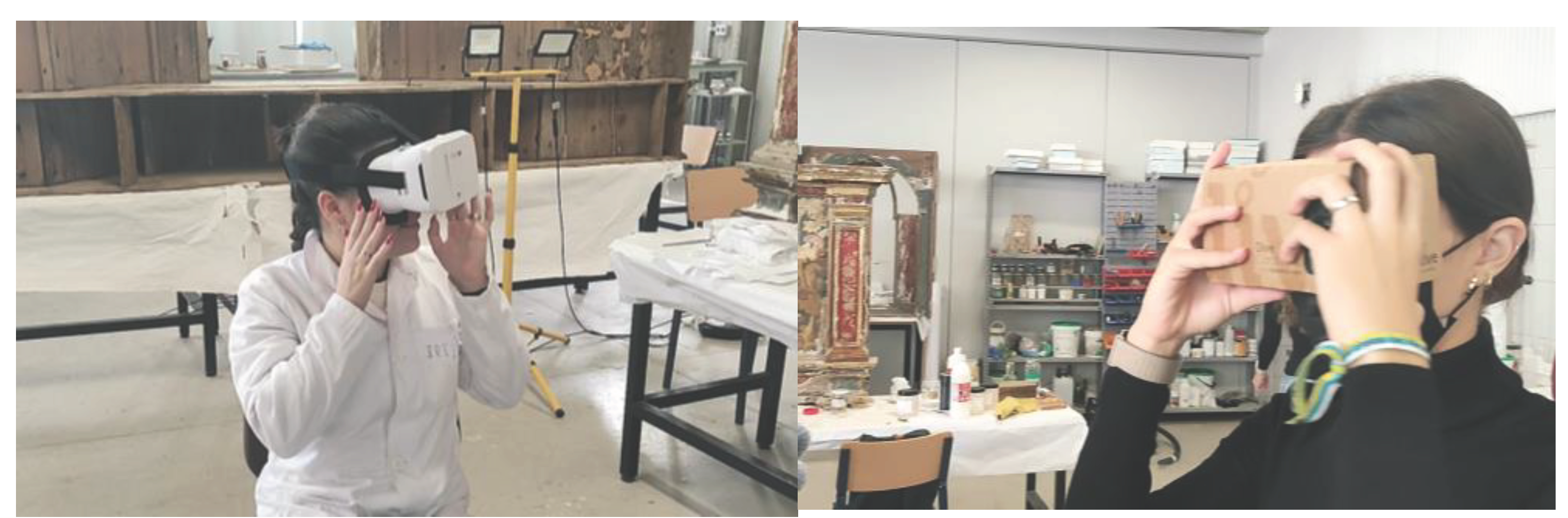

Table 1.
Questions of the user experience questionnaire.
| Subscale | Nº | Cuestion |
|---|---|---|
| Presence | 1 | I was able to actively survey the virtual environment using vision. |
| 2 | My interactions with the virtual environment seemed natural. | |
| 3 | I could examine objects from multiple viewpoints. | |
| 4 | The devices (gamepad or keyboard) which controlled my movement in the virtual environment seemed natural. |
|
| Engagement | 5 | The visual aspects of the virtual environment involved me. |
| 6 | The sense of moving around inside the virtual environment was compelling. |
|
| Immersion | 7 | I felt stimulated by the virtual environment. |
| 8 | I become so involved in the virtual environment that I was not aware of things happening around me. |
|
| 9 | I become so involved in the virtual environment that it is if I was inside the game rather than manipulating a gamepad and watching a screen. | |
| 10 | I become so involved in the virtual environment that I lose all track of time. |
|
| Flow | 11 | At each step, I knew what to do. |
| 12 | Time seemed to flow differently than usual. | |
| 13 | I felt I was experiencing an exciting moment. | |
| Usability | 14 | I thought the interaction devices was easy to use. |
| 15 | I found the interaction devices very cumbersome to use. | |
| Emotion | 16 | I enjoyed being in this virtual environment |
| 17 | I found my mind wandering while I was in the virtual environment. | |
| 18 | I enjoyed dealing with the interaction devices. | |
| Judgement | 19 | Personally, I would say the virtual environment is practical |
| 20 | Personally, I would say the virtual environment is clear (not confusing) | |
| 21 | I found this virtual environment amateurish (1) professional (10) | |
| 22 | I found that this virtual environment is ugly (1) beautiful (10) | |
| Experience Consequence | 23 | I suffered from fatigue during my interaction with the virtual environment. |
| 24 | I suffered from dizziness with eye open during my interaction with the virtual environment. |
|
| 25 | I suffered from nausea during my interaction with the virtual environment. |
|
| Technology adoption | 26 | The interaction devices would make work more interesting. |
| 27 | I would like working with the interaction devices |
Table 2.
Results obtained in the Questionnaire on User Experience in Immersive Virtual Environments (QUXiVE).
Table 2.
Results obtained in the Questionnaire on User Experience in Immersive Virtual Environments (QUXiVE).
| Subscale | Nº | Pregunta | 360 Smartphone (Des. Vest.) | 360 VR Cardboard (Des. Vest.) |
|---|---|---|---|---|
| Presence | 1 | I was able to actively survey the virtual environment using vision. | 9,98 (0,32) | 9,56 (0,78) |
| 2 | My interactions with the virtual environment seemed natural. | 8,94 (0,87) | 8,89 (1,32) | |
| 3 | I could examine objects from multiple viewpoints. | 9,56 (0,7) | 9,50 (0,71) | |
| 4 | The devices (gamepad or keyboard) which controlled my movement in the virtual environment seemed natural. |
9,28 (0,83) | 9,06 (1,21) | |
| Engagement | 5 | The visual aspects of the virtual environment involved me. | 9,67 (0,49) | 9,17 (1,10) |
| 6 | The sense of moving around inside the virtual environment was compelling. |
9,56 (0,70) | 8,56 (1,50) | |
| Immersion | 7 | I felt stimulated by the virtual environment. | 9,28 (0,75) | 8,72 (1,45) |
| 8 | I become so involved in the virtual environment that I was not aware of things happening around me. |
7,89 (1,45) | 8,67 (1,46) | |
| 9 | I become so involved in the virtual environment that it is if I was inside the game rather than manipulating a gamepad and watching a screen. | 8,39 (1,91) | 8,56 (1,72) | |
| 10 | I become so involved in the virtual environment that I lose all track of time. |
7,44 (1,79) | 8,17 (1,82) | |
| Flow | 11 | At each step, I knew what to do. | 9,00 (1,41) | 8,78 (1,83) |
| 12 | Time seemed to flow differently than usual. | 8,00 (1,68) | 7,78 (1,99) | |
| 13 | I felt I was experiencing an exciting moment. | 8,61 (1,50) | 8,72 (1,36) | |
| Usability | 14 | I thought the interaction devices was easy to use. | 9,61 (0,70) | 8,83 (1,63) |
| 15 | I found the interaction devices very cumbersome to use. | 9,17 (2,07) | 6,83 (3,31) | |
| Emotion | 16 | I enjoyed being in this virtual environment | 9,00 (1,03) | 8,22 (3,37) |
| 17 | I found my mind wandering while I was in the virtual environment. | 5,06 (2,69) | 6,56 (2,85) | |
| 18 | I enjoyed dealing with the interaction devices. | 9,22 (1,73) | 8,78 (2,18) | |
| Judgement | 19 | Personally, I would say the virtual environment is practical | 9,44 (0,86) | 8,94 (2,15) |
| 20 | Personally, I would say the virtual environment is clear (not confusing) | 9,50 (0,79) | 8,83 (2,15) | |
| 21 | I found this virtual environment amateurish (1) professional (10) | 7,50 (3,19) | 7,67 (3,05) | |
| 22 | I found that this virtual environment is ugly (1) beautiful (10) | 7,33 (3,27) | 7,24 (3,44) | |
| Experience Consequence | 23 | I suffered from fatigue during my interaction with the virtual environment. | 1,56 (1,69) | 4,56 (3,18) |
| 24 | I suffered from dizziness with eye open during my interaction with the virtual environment. |
1,17 (0,51) | 4,28 (3,37) | |
| 25 | I suffered from nausea during my interaction with the virtual environment. |
1,17 (0,51) | 3,22 (3,08) | |
| Technology adoption | 26 | The interaction devices would make work more interesting. | 9,17 (1,20) | 9,33 (0,84) |
| 27 | I would like working with the interaction devices | 9,17 (1,15) | 9,00 (1,71) |
Table 3.
Results grouped into subscales of the Questionnaire on User Experience in Immersive Virtual Environments (QUXiVE).
Table 3.
Results grouped into subscales of the Questionnaire on User Experience in Immersive Virtual Environments (QUXiVE).
| Subscale | Fotos 360 (Smartphone) | Fotos 360 (VR Headset) |
|---|---|---|
| Presencia | 9,42 (0,68) | 9,25 (1,01) |
| Engagament | 9,61 (0,59) | 8,86 (1,30) |
| Immersion | 8,25 (1,48) | 8,53 (1,61) |
| Flow | 8,61 (1,50) | 8,72 (1,36) |
| Usability | 9,39 (1,38) | 7,83 (2,47) |
| Emotion | 7,76 (1,82) | 7,85 (2,47) |
| Judgement | 8,09 (2,44) | 7,95 (2,88) |
| Experience Consequence | 1,30 (9,91) | 4,02 (3,21) |
| Technology adoption | 9,17 (1,18) | 9,17 (1,28) |
Disclaimer/Publisher’s Note: The statements, opinions and data contained in all publications are solely those of the individual author(s) and contributor(s) and not of MDPI and/or the editor(s). MDPI and/or the editor(s) disclaim responsibility for any injury to people or property resulting from any ideas, methods, instructions or products referred to in the content. |
© 2024 by the authors. Licensee MDPI, Basel, Switzerland. This article is an open access article distributed under the terms and conditions of the Creative Commons Attribution (CC BY) license (http://creativecommons.org/licenses/by/4.0/).
Copyright: This open access article is published under a Creative Commons CC BY 4.0 license, which permit the free download, distribution, and reuse, provided that the author and preprint are cited in any reuse.


