

Submitted:
20 June 2023
Posted:
21 June 2023
You are already at the latest version
Abstract
The overlap of visual items in data visualization techniques is a known problem aggravated by data volume and available visual space issues. Several methods have been applied to mitigate occlusion in data visualizations, such as Random Jitter, Transparency, Layout Reconfiguration, Focus+Context Techniques, etc. This paper aims to present a comparative study to read visual variables values with partial overlap. The study focuses on categorical data representations varying the percentage limits of partial overlap and the number of distinct values for each visual variable: Hue, Lightness, Saturation, Shape, Text, Orientation, and Texture. A computational application generates random scenarios for a unique visual pattern target to perform location tasks. Each scenario presented the visual items in a grid layout with 160 elements (10 x16), each visual variable had from 3 to 5 distinct values encoded, and the partial overlap percentage applied, represented by a gray square in the center o each grid element, were 0% (control), 50%, 60%, and 70%. Similar to the preliminary tests, the tests conducted in this study involved 48 participants organized into four groups, with 126 tasks per participant, and the application captured the response and time for each task performed. The result analysis indicates that the Hue, Lightness, and Shape visual variables are robust to high percentages of occlusion and gradual increase in encoded visual values. The Text visual variable show promising results for accuracy, and resolution time was a bit higher than the last visual variables mentioned. In contrast, the Texture visual variable presented lower accuracy to high levels of occlusion and more different visual encoding values. At last, the Orientation and Saturation visual variables got the highest error and worst perfomance rates during the tests.
Keywords:
Information Visualization
; Visual Variables
; Evaluation
; Occlusion
; Overlap
; Visual Perception
1. Introduction
The occlusion of visual items in 2D data visualization techniques is an old problem that can be observed in many studies present in the literature [1,2,3]. The occlusion issue is generally exacerbated due to the visual space available to present the data and the amount of data to be displayed. According to the level of occlusion increases, the user´s perception of visual data can be affected, causing data misinterpretation or even a loss of relevant information [4].
From most previous studies, it is possible to highlight that they mainly focused on the issue of reducing the occlusion effect for visual items on data visualization techniques [5,6,7]. Some solutions found are Random Jitter [8]; Transparency Technique [9]; Layout Reconfiguration [10]; Focus+Context Techniques [11]; Multiple Views [12]; etc.
Studies within psychology indicate that humans have mechanisms for recognizing partially occluded objects even in reduced sizes and low resolution [13]. However, [14] demonstrated that the recognition capacity of human beings decreases at higher levels of occlusion. Some research outside psychology has also suggested limits for occlusion levels tolerable for the human brain in detecting and identifying efficiently partially overlapped visual elements [2]. In general, clues about the efficiency and effectiveness of partially occluded visual variables in information visualization are split across multiple articles, making it difficult to compare and use the correct visual variable for a given data visualization scenario.
Thus, this research aims to present a comparative study on the perception of partially occluded visual variables in data visualization techniques, indicating how much the visual variable can be occluded and how many values it can encode in this condition. The results can be used as a set of good practices to apply visual variables in scenarios where occlusion is unavoidable, increase the visual items in data visualization technique, or even be used as an indicator to compose quality criteria to evaluate data visualization techniques concerning the perception of their visual items. It should be noted that this study is an extension of research presented in [15] which describes in detail the preliminary tests and initial results presented in the previous analysis.
The comparative study proposal between visual variables partially occluded is based on the location tasks for a visual target [16], focuses on categorical data representations, considering Hue, Lightness, Saturation, Shape, Text, Orientation, and Texture visual variables. To support the comparative study, a computational application was developed to generate random grid layout scenarios with 160 positions (10 x16), where each grid element presents one encoded value (from 3 to 5 values) of one visual variable, also including a gray square in the center of the grid element representing the level of partial overlap that should be applied to the visual item (0% (control), 50%, 60%, and 70%), and is generated one visual target as the task aim. The test involved 48 participants organized into four groups of 12 participants, with 126 tasks per participant, and the application captured the response and time for each task performed.
The result analysis indicates that the Hue, Lightness, and Shape visual variables maintain good accuracy and time performance for location tasks, even with 70% partial overlapping and five values encoded. For the Text and Texture visual variables, the results showed good accuracy for partial overlap until 60% and until four values encoded, and the time performance of the Text visual variable was a little bit better compared to the Texture variable. Only the 50% partial overlapping and three values encoded scenario for the Saturation variable showed good accuracy and time performance. At last, the Orientation variable got the worse accuracy and performance results for all partial overlap percentages and the number of values encoded. However, the control group showed similar problems, which suggests reviewing the visual encodes used.
This article is organized as follows: Theoretical Foundation presents the concepts related to the development of this study; Related Works lists previous studies that address the perception of visual variables and analyses from partial overlapping of elements; Methodology presents the methodological decisions and protocols used in the configuration and execution of the tests in this research; Results presents the results obtained and describes the collected data; Discussion summarizes the main extracted results and highlights the recurring comments made by the participants; Final Remarks and Future Works provides the final considerations regarding this research and lists some possibilities for future works.
2. Theoretical Foundation
In this section, the concepts related to the development of this study will be presented, such as the definition and which visual variables were used, evaluation aspects adopted, and the statistical test applied for the analysis of the collected data.
2.1. Visual Variables
Visual variables can be defined as a set of visual characteristics that can be combined to create a unique visual item to convey information [17]. In the same study, the author proposed encoding visual information without ambiguity using seven visual variables (Cartesian plane [X, Y], Size, Value, Texture, Color, Orientation, and Shape) for four types of tasks (Association, Selection, Ordering, and Quantification).
As the present research focuses on the improvement of the study presented by [15], the initial structures of the visual variables will be presented together with the modifications made and the final configurations of the visual variables analyzed.
2.1.1. Hue, Saturation, and Lightness
For this research, we used the HSL system color (Hue, Saturation, Lightness) as a basis for the visual variables involving colors [18]. In this color system the hue’s values vary between the pure spectrums of colors, starting with red, passing through green, and ending with blue. The saturation values range between gray and the value assumed by hue. Finally, Lightness varies between black, passing through the color hue and ending with white [19].
The color spectrums pointed out by [16,20] are applied in the study presented by [15] and were kept for this research. However, the HSL system was not used in the initial study, and the Hue visual variable remained with the same characteristics. However, the Saturation and Lightness visual variables were not analyzed separately, which resulted in an analysis with discrepant results compared to the results presented in the following sections.
The spectrums used for the Hue visual variable in [15] are the same as in this research. For the combination of Saturation and Lightness variables, the purple color spectrum was used, which ranged from white to hue, thus not characterizing the HSL system.
2.1.2. Shape
We select geometric shapes widely used in the consulted literature were used [16,17,21]: Square, Circle, Cross, and Star. However, since this study considers five (5) values per visual variable, a fifth visual coding value was added, a square shape with serrated edges.
Compared with the study presented by [15], the diamond shape was previously used. However, it demonstrated significant identification problems in the presence of other elements with smooth edge squares and circles, so the diamond shape was replaced by the serrated edge square shape, which could stand out for its structure within the set of selected visual encodings.
2.1.3. Text
Visual coding values for the Text visual variable are generally alphanumeric characters (letters and numbers). As an example of the use of this variable, the study presented by [22], in which the authors chose to use numbers to represent the continuous attribute values of the database.
Alphabet letters were used to represent the possible visual enconding values the Text visual variable assumed. The selection criterion was based on letters with visual structures that could differ as much as possible from each other. The Text visual variable was used to represent categorical attribute values.
The letter "E" was initially added to the set of different values because it was present in [15]. However, it showed significant identification problems for all levels of partial overlap, so it was decided to replace it. The letter "W" was placed in its position. The set of all different values of the visual variables will be presented in the following sections of this study.
2.1.4. Orientation
According to [17], the Orientation visual variable has its structure formed by the change in the alignment of the elements that compose it. The studies consulted in the literature [16,20,23,24] use a group of lines as the base element to form the Orientation visual variable where their angles are modified to represent different values.
In this research, a group of arrows was used because the arrow’s direction would provide additional information to identify different visual encoding values during the tasks and expand how the set of arrows can be arranged.
Compared to the study presented by [15], the different visual encoding values for the Orientation visual variable were based on straight lines where the elements had their inclination angles changed to represent these visual values, which resulted in many errors (accuracy) and difficulties in the identification tasks.
2.1.5. Texture
According to [17], Texture is a visual variable whose structure is formed by the variation of the granularity of the elements composing it. In this research, the texture structures were composed of circle shapes, and the different visual encoding values of their varied according to the increase in the number of circles that composed them.
Compared to the study presented by [15], the textures visual coding values composed of 3x3 and 5x5 circles were replaced by patterns with 4x4 and 6x6 circles. The replacement was due to the large number of errors in the preliminary study’s identification tasks.
2.2. Evaluation Aspects
The evaluation was conceived considering some key points, such as tasks, participants, and data. Some questions which guide the evaluation planning, for example, What should be evaluated? Which order and how the data should be collected? Which are the participants profile? and How would the participants be grouped? Those questions and others will be detailed in the next sections.
2.2.1. Between-Subjects-Design
A between-subjects-design is a way of organizing groups that aims to prevent the effects that a participant can cause from their involvement in more than one group of analysis in the study [25]. The participants were divided into groups based on the partial overlap level independent variable. Thus, four groups (0%, 50%, 60%, and 70%) of participants were formed to perform the tests proposed, which will be described in bit more detail in the methodology section.
2.2.2. Within-Subject-Design
A within-subject-design is an organization in which all participants are exposed to all possible analysis scenarios [25]. In the case of this study, all participants in each analysis group performed tests involving all evaluation scenario proposed for tasks involving the analyzed visual variables.
An example of a evaluation scenario proposed for a task performed by one of the participants is "a participant from the 70% partial overlap group; six tasks involving the Hue visual variable; with the Hue visual variable encoding four different visual encoding values". It should be noted that these configurations will be presented in a bit more detail in the methodology section.
2.2.3. Mixed-Design
This study applied the Mixed-Design evaluation model, which seeks to perform analyses of visual variables between two or more different groups. Simultaneously, each group’s participants are subjected to the same configurations of proposed evaluation scenarios tasks [25]. For this research, three independent variables were used: level of partial overlap, visual variables type, and the number of different visual encoding values. As mentioned earlier, each participant in the study performed tests involving each of the defined variables.
2.3. Bootstrap
Bootstrap is a statistical method Bradley Efron proposed using sampling techniques with replacement [26]. In Statistics, bootstrap is any random sampling test or metric with replacement. Bootstrap allows specifying accuracy measurements (defined from measures of tendency, variance, confidence intervals, or some other statistical measure) for estimates based on sampling techniques. [27].
This method can also be used to develop hypothesis tests and is often used as an alternative to statistical inference based on the assumption of a parametric model when this assumption is doubtful or where parametric inference is impossible or requires complex formulas to calculate standard errors [27].
3. Related Works
For the development of this research, studies with the following characteristics were analyzed: tests of visual variable perception, object recognition with partial overlap, and applications or techniques that utilize partially overlapping visual objects. The studies that aimed to mitigate the impact of partial overlap were not selected.
Groop and Cole [28] evaluated two overlapping approaches based on the circle size. In the first approach, the overlapping circles were cut to fit together (sectioned), and in the second one, the transparency technique was applied to the overlapping circles. As a result, it was observed that the transparency proposal performed better.
Cleveland [29] conducted perception tests in its research with ten visual variables (Common Scale Position, Position Unaligned Scale, Length, Direction, Angle, Area, Volume, Curvature, Shading, and Saturation) to determine which visual variables best represent a set of quantitative data.
The authors in [21] presented another classification based on visual perception evaluations using 12 visual variables (Position, Length, Angle, Slope, Area, Volume, Density, Saturation, Hue, Texture, Connection, Containment, and Shape). The classification was organized using three categories of data: quantitative, ordinal, and categorical. For the study proposal in this paper, we focus only on visual variables mapped categorical data.
Graham [30] in his study describes the challenges of visualizing structural changes in hierarchical techniques. The author suggested combining Hue and Shape visual variables to represent the leaf nodes in a tree diagram.
In the research presented by [23], an analysis was conducted based on visual perception tests involving visual variables when applied for tasks of selection, association, ordering, etc. Bertin [17] was the source for the visual variables used. Focusing on the research presented in this article, a high level of visual perception was observed for the Hue, Texture, and Orientation visual variables when used in selection tasks.
Carpendale [23] conducted a visual perception tests involving visual variables to tasks of selection, association, ordering, etc. Bertin [17] was the source for the visual variables used. As a result, it was highlighted a high level of visual perception for the Hue, Texture, and Orientation visual variables when used in selection tasks.
Theron [31] proposed multidimensional glyphs to depict information about cinematographic dataset, where each component of the glyph represents a function performed by a member of a film’s cast. The author created glyphs that are composed by vary elements (shapes) overlapping, and each inserted element encode a dataset attribute.
In the study presented by [22] conducted visual perception tests involving the Text, Area, Rectangles, Lightness, and Angle visual variables were administered. This study highlighted a good performance of the Text visual variable on the tests.
Brath [32] applied multidimensional glyphs in Venn and Euler diagrams. The author analyzed how combined Hue and Texture visual variables affected the user’s visual perception. The obtained results indicate that the use of multidimensional glyphs for visual mapping of multiple attributes of a dataset can be effective.
In research conducted by [33], the Hue, Shape, and Size visual variables were combined and evaluated in similarity and comparison tasks. The results indicated good performance for Hue and Shape visual variables used together.
Soares proposed in his study [34] a multidimensional layer glyph concept, in which one visual variable overlays on another in some percentage, such that the visual variable in the top layer partially hides the visual variable in the lower layer. The author conducted visual perception tests for the glyph components, and the data collected was analyzed by a decision tree algorithm, which generated good rules to build the multidimensional layer glyph, including the level of partial overlap and visual variables for each layer. The author’s suggested glyphs were utilized in conjunction with the Treemap technique.
Korpi says in his study [2] that, despite evidence that humans can extract information from partially overlapping objects, no research indicated which level of partial overlap a visual variable could have and still communicate information. Our study shares quite the same motivation as this one.
The visual perception tests have used three visual variables (Color, Shape, and Pictograms) with equal dimensions for four partial overlap levels ( 0%, 25%, 50%, and 75%) in cartography scenarios (maps) [2]. The results indicated that the Hue visual variable with 75% partial overlapping maintains good communication, and the Shape visual variable with 50% partial overlap had similar performance compared to the Pictogram visual variable without overlapping. Additionally, the author suggests that Pictograms could be combined with a Hue visual variable to improve their visual perception.
This study evaluates the robustness of visual variables to different visual encoding values (3, 4, and 5 different values) and different levels of partial overlap (0% (control group), 50%, 60%, and 70%).
Seven visual variables were selected from the literature: Hue, Lightness, Saturation, Shape, Text, Orientation, and Texture. These visual variables were chosen due to their widespread use, evaluation, and application within the field of information visualization [2,17,21,30,33] . The numbers of different visual encoding values were defined based on the research presented by [23], in which the author indicates that these quantities can be effectively interpreted in scenarios without partial overlap.
The levels of partial overlap were defined based on Korpi [2] and Soares [34]. The first demonstrated that a visual variable could efficiently communicate information with 50% partial overlap. The second one presented results showing that visual variable recognition decreases significantly with 80% partial overlap.
4. Methodology
In this section, all protocols followed for conducting the evaluation tests in this study will be described, such as the developed visualization scenarios, the computational environment used, the participants’ profiles, and the applied evaluation scenarios.
4.1. Evaluation Procedure
The evaluation was conducted in a closed, climatized room with artificial lighting, where the participant was accompanied only by an evaluation facilitator. In addition, the distance between the monitor and the participants’ eyes was approximately 70 cm, and the chair used by the participants had armrests and a backrest.
Before starting the test, the participant was invited to sign the FICF (Free and Informed Consent Form), where they were informed about the test goal, the data collected during the tests would be used anonymously, that they could withdraw from the tests at any time, regardless of the reason, and to fill out a screening questionnaire with information about their age, gender, educational level, and restriction to identify colors. The study was approved by the Institutional Review Board (or Ethics Committee) of 18-UFPA—Institute of Health Sciences of the Federal University of Pará (15522319.2.0000.0018 and 03/10/2019).
Since three of the analyzed visual variables refer to color (Hue, Lightness, and Saturation), if the participant claimed to have difficulty identifying colors, the participant could not participate in the test.
After participants responded to the digital questionnaire, a training stage was provided to inform the research objective and provide instructions on how the test would be applied. In the training stage, the participants were introduced to the application used in the test. At this point, six visualizations scenarios were presented to demonstrate to the participant how to answer the tasks during the test. After the training, the test began.
After completing the tasks proposal, a questionnaire containing questions about the participants’ perception of visual variables and their different visual encoding values was applied to collect data for analysis. The same sequence of stages was followed when conducting the initial tests [15] and when conducting the tests for this research. The flow of the general procedure adopted for the evaluation carried out in this study can be seen in Figure 1.
4.2. Participants Profile
The tests conducted in this study involved 48 participants, all of them from the academic community from the Federal University of Pará, aged between 18 and 42 years old, with education levels ranging from incomplete undergraduate to Ph.D., and belonging to various fields of knowledge, such as administration, biomedicine, natural sciences, computer science, etc. No participants declared to have any difficulty related to color identification. No specific knowledge was required to participate in the study, such as the concept of visual variables or information visualization techniques.
4.3. Computing Environment
A computer with 8GB of RAM, 1TB HD, and an Intel Core i7 processor was used to perform the tests. A 21" monitor with a 1920 x 1080 pixels resolution was also used in landscape orientation.
The application developed for this study presents the visual variables in a 10 x 16 grid layout. The visual elements that compose each visualization are randomly generated, varying the type of visual variable, the percentage of partial occlusion, and the number of distinct encoded values. Examples of visualization scenarios used to perform the evaluation tests can be seen in Figure 2.
Each evaluation task had a total of 160 elements containing only one distinct visual element (target iem), varying the percentage of partial overlap level, the type of visual variable, and the number of different visual encoding values, as can be seen in Figure 2.
The visualizations scenarios generated for the tests have a grid area size of 480x768 pixels. The size of each grid element was based on results presented by [34], where a decision tree algorithm applied on visual variables perception dataset considering different area sizes pointed out that the minimum area to perceive clearly visual variables would be 48 x 48 pixels. Figure 3 shows the visual variables and their respective visual values used in this study.
4.4. Test Procedure
As general rules for conducting the tests, it was defined that participants should know the visual characteristics of the target element and be unaware of its location. For this, a visual element model should be presented for searching in all locate tasks performed by the participant.
This configuration was defined based on the taxonomy defined in [16], where different types of search tasks are defined. For this study, the type of search task defined was Locate, which consists having prior knowledge about visual characteristics of the target element but without knowing any information about its location.
Based on pilot tests, it was possible to define some specifications regarding the composition of visual variables and the time to complete each task, as described below:
- The visual coding values for each visual variable (Figure 3);
- Maximum time of 30 seconds to complete each task.
The test was designed as a mixed-design study [25] with 3 independent variables:
- Visual variables: Hue, Lightness, Saturation, Texture, Orientation, Shape, and Text;
- Partial overlap levels: 0%, 50%, 60% and 70%;
- Number of different visual encoding values: 3, 4 and 5.
The participants were divided into four groups of 12 individuals, as suggested in [25] for a Between-Subjects design. The independent variables (visual variables and the number of distinct values) were permuted in 21 evaluations scenarios (visual variable x number of different visual encoding values x partial overlap level) and organized in a Within-Subject design [25]. For each evaluation scenario (21), the participant performed six (6) tasks, resulting in 126 tasks per participant. Figure 4 illustrates the distribution of the independent variables over the tasks.
The following data were captured automatically for each test scenario:
- The level of partial overlap applied;
- The number of different visual encoding values per visual variable;
- The visual variable type;
- The target visual element and its characteristics;
- The participant answer: click on the correct item, click on the erroneous item, or no answer (time out);
- Task resolution time, which is quantified in seconds.
4.5. Statistical Analysis
The sampling with replacement bootstrap method was applied to the data collected from the tests. The bootstrap method was chosen because of its simplicity, the possibility to use the method for complex distribution with many strata (visual variables, different visual encoding values, and different partial overlap levels), and provide accurate confidence intervals [35].
As from the proposed test scenarios, two hypotheses are considered:
- Alternative Hypothesis () - the performance analyzed from the overlap level (highest accuracy) and the resolution time (quickest resolution time) for the control group (0% occlusion) must return the best results;
- Null Hypothesis () - that the application of occlusion would not affect accuracy and resolution time.
The procedures followed by the sampling with replacement bootstrap algorithm, developed in the R programming language, are shown in Figure 5:
- The control group (0% occlusion) with 216 elements per visual variable was separated from the other groups (50%, 60%, and 70% occlusion) with 648 elements in total;
- The algorithm then drew 216 elements at random from each of the groups, always replacing the previously drawn element;
- After the simulation’s final drawing round of 216 elements (for each group), the algorithm calculates the average of each group;
- If the control group value obtained were greater than that of the other occlusion levels group, then the alternative hypothesis would receive one point;
- According to [25], this procedure was repeated 20,000 times for each analyzed variable;
- P-Value calculation: P = (1 - number of points) / 20.000;
- P-Value classifying: lack of significance (p >= 0,05), moderate significance (0,01 <= p < 0,05), strong significance (0,001 <= p < 0,01), and extreme significance (p < 0,001).
4.6. Evaluation Scenarios
The tasks’ precision and resolution time scenarios are considered for result analysis based on automatic logs. Moreover, a qualitative evaluation of participant’s perception of the visual variables partially overlapped was conduct
For the accuracy analysis, three situations were considered: TRUE, when the element selected by the participants corresponded to the correct answer; ERROR, when the visual element chosen by the participant is an incorrect response; and TIMEOUT, when the 30-second timeout occurred. In addition, each type of answer was analyzed separately concerning the combinations of visual variables, partial overlap levels, and different visual encoding values.
Considering the partial overlap, a questionnaire was applied to collect participants’ opinions about the perception concerning visual variables and their visual encodes. The participants could classify the following items: the recognition facility of visual variables, the difficulty category of visual variables (good, medium, or poor), and point out which visual encodes presented poor perception.
The following scale was utilized to classify the performance of the visual variables qualitatively by participants:
- GOOD - All variables with an mean accuracy greater than 95%;
- MEDIUM - Visual variables with mean accuracy values between 90% and 95%;
- POOR - Visual variables with mean accuracy values of less than 90%.
In summary, the proposed analysis scenarios were:
- Accuracy per resolution time;
- Visual variables error rates;
- Classification of difficulty in identifying visual variables;
- Visual variables ranking based on participant perceptions;
- Analysis of visual encode values performance.
5. Results
This section presents the results obtained in two stages: initial and final. For the initial stage, the study focused on evaluating the performance of the different values selected for each of the studied visual variables [15]. The results allowed us to identify some problems in the sets of visual encode chosen for the visual variables. In the next stage, the focus was to evaluate the visual variables under the partial overlap. It was proposed to gradually increase the level of partial overlap and the number of different visual encoding values to assess the perception of visual variables in each combined scenario. The two results stages that compose this study are presented in more detail as follows.
5.1. Initial Results
In this section, the results presented by [15] point out the issues find out in the sets of visual encode values of the analyzed visual variables (Saturation, Texture, Orientation, Shape, and Text) and the proposed solution to increase the efficiency of those visual variables to depict information on the partial overlap.
5.1.1. Saturation
For the Saturation visual variable, [15] utilized a combination of the visual variables Saturation+Lightness. However, after the initial analyses, the low performance of this combination was observed, resulting in an accuracy of less than 80% for partial overlap scenarios and a total of 165 errors during the execution of the tests.
After that, the combination of Saturation+Lightness was separated into two distinct visual variables, and each one was analyzed separately. The lightness variable accuracy increased by more than 98% with seven errors. The Saturation visual variable accuracy decreased, reaching values of less than 80% with 193 errors.
5.1.2. Texture
For the Texture visual variable, [15] used different quantities of circles to compose the texture pattern. The patterns were 2x2, 3x3, 5x5, 8x8, and 10x10 circles. From a total of 864 samples collected in the test, 80 were errors.
A significant error rate was observed when the Texture visual variable encoded the 3x3 circles pattern (50%) or encoded more than three different visual encoding values. The final set of encoded values was modified for the following structures: 2x2, 4x4, 6x6, 8x8, and 10x10 circles. However, even after the changes, a new test found 87 errors. The difference from the last result is that there is no concentration on one specific visual encoding, and the error increase was more observed in scenarios with five different visual coding values.
5.1.3. Orientation
For the Orientation visual variable, [15] utilized a set of values for visual encoding based on basic lines and the variation of their respective angles. The angles used are 36 degrees, 72 degrees, 108 degrees, 144 degrees, and 180 degrees.
The Orientation visual variable obtained the worst result among all visual variables analyzed, with an accuracy that remained consistently below 80% and a total of 262 errors during the tests. After the initial results, the encoded values (basic lines) element was substituted by arrows, giving the participants an additional visual perception clue to compare the different visual values encoded. The changes decreased errors to 128, with an accuracy greater than 80% for all scenarios.
5.1.4. Shape
For the Shape visual variable, [15] obtained a preliminary result of 45 errors in 864 samples collected, around 5% of the total. Analyzing the errors, 90% of them are related to diamond visual encoding, with 36 errors. After that, the diamond shape was replaced by a square with serrated edges. The Shape visual coding value substitution reduced the error occurrences during the new tests, with a total of 12 errors out of 864 collected samples, with the visual coding value Square with Serrated Edges not registering any errors.
5.1.5. Text
For the Text visual variable, [15] assigned the visual encode values A, C, E, J, and K. The initial results were 67 errors in 864 collected samples, with 45 errors referring to the visual coding value "E". The value "E" was replaced with "M" based on an analysis of the initial results, while the remaining values were maintained. The modification reduced the number of errors in the Text visual variable to 41, representing a reduction of more than 40% of the initial result. The letter "M" only registered four errors during the tests.
5.2. Final Results
New tests were conducted after modifying the visual encode set used by [15]. The analyses were performed following the evaluation scenarios described in the methodology section, and the final results are presented.
5.2.1. Accuracy per Resolution Time
Initially, the correlation between the resolution time of the tasks, the mean accuracy of the visual variable types perception, and the level of partial overlap applied were analyzed for each group of combined values. Figure 6 shows the results of the data collection. The following presents some analysis of those scenarios:
- Mean accuracy levels of Hue, Lightness, Text, and Shape visual variables were classified as GOOD and MEDIUM (consistently over or equal to 90%);
- The Hue visual variable had the best resolution time (constantly less than 2.5 seconds);
- The partial overlap effect on the mean accuracy of the Saturation visual variable when mapping three different values was minimal;
- The Lightness and Shape visual variables got very similar performance, which had to be distinguished by the resolution time analysis, which demonstrated that Lightness had the superior performance;
- The number of encoded values had the most significant impact on the resolution time of the Orientation visual variable (consistently over ten seconds);
- The progressive increase in the number of different visual encoding values significantly impacted the mean accuracy of the Saturation visual variable in all proposed scenarios (mean accuracy ranged from 74% to 82%);
- The visual variable most affected by the progressive increase in partial overlap level was the Text visual variable, whose mean accuracy presented values around 90% (the 70% partial overlap scenario).
Statistical tests based on hypotheses regarding the correlation between accuracy and resolution time were applied to each studied visual variable to determine the degree to which partial overlap influences each.
Figure 7 (Accuracy) and Figure 8 (Resolution Time) illustrate the influence of partial overlaps on each visual variable, as determined by the selection and comparison of twenty thousand samples (bootstrapping method).
Figure 7 shows that the Text visual variable is most affected by the partial overlap (p-value = 0 and a 6.33% reduction in its accuracy), followed by the Orientation visual variable (p-value = 0.013 and a 7.41% reduction in its accuracy). The other visual variables did not reach a statistically significant difference to get a conclusion.
Considering the resolution time of tasks, the Figure 8 shows that the Text visual variable is the most affected by the partial overlap (p-value = 0 and a rise of 2.54 sec), followed by the Shape visual variable (p-value = 0 and an increase of 1.12 sec), the Lightness visual variable (p-value = 0 and a rise of 0.87 sec), and Hue visual variable (p-value = 0.0005 and an increase of 0.31 sec). The other variables did not present statistically significant differences.
5.2.2. Error Rates of Visual Variables
The number of errors (incorrect clicks) and timeouts (when the participant did not answer within the task time limit) were analyzed. Figure 9 shows the number of errors for each visual variable, considering ERROR (blue) and TIMEOUT (orange).
Saturation and Orientation visual variables had the highest number of ERRORS and TIMEOUT. For ERRORS, Saturation and Orientation visual variables showed 40% and 27% of all registered occurrences, respectively. Specifically, the Saturation visual variable with three encoded values scenario presented fewer errors. Moreover, Saturation and Orientation variables obtained the highest TIMEOUT occurrences with 23.2% and 43.2%, respectively.
The results obtained for the Saturation visual variable could indicate similar encoded values, confusing the participant in scenarios with more than three different visual coding values.
The accentuated number of TIMEOUT occurrences for the Orientation visual variable can indicate a necessity to review the entire visual encode proposed for the visual variable. Even for the control group, there were excessive TIMEOUTS, mainly for scenarios with a higher level of partial overlap and more than three different visual values.
The Texture and Text visual variables presented 18% and 9% of all ERRORS registered during the tests. For TIMEOUT, the visual variables presented 15.4% and 13.3% of the total occurrences, respectively. In this context, it is essential to highlight the difficulty in identifying the "K" visual coding value (55% of the total events of TIMEOUT for this visual variable), indicating that this specific visual coding value must be replaced with another one.
The Shape, Lightness, and Hue visual variables had the lowest numbers of ERRORS during the tests, respectively 3%, 1%,and 1%. For TIMEOUT, the visual variables presented 3.2%, 0.7% and 0.3% of the total occurrences, respectively. In general, the results support the a conclusion that those visual variables are robust to high percentages of partial overlap (70%), even for five different visual encoding values per visual variable. It is possible to highlight a few errors with CROSS visual encode, when it corresponded to the target item. And, Lightness visual variable showed some ERRORS in a specific scenario with five different values.
Figure 10 shows the total number of errors (ERRORS+TIMEOUT) for each evaluation scenario (Visual Variable + Overlapping Level + Subset of Different Visual Encoding Values). The scenarios with Saturation or Orientation and five or four differents visual coding values get worse results in accuracy and time.
The data were ordered from the highest number of errors to the smallest, with 40 errors being the maximum number of errors in one evaluation scenario. During the data analysis, the Saturation, Orientation, and Texture visual variables have the most significant number of errors.
5.2.3. Visual Variables Ranking Based on Participant’s Perceptions
The participants ranked the visual variables according to the facility level to identify the target item during the tests. Figure 11 shows a heatmap representing the ranking obtained from participants’ answers, using a divergent color scale from easiest (green) to most difficult (red).
The visual variables ranking to identify the target item more ease was Hue, Shape, Lightness, Text, Texture, Orientation, and Saturation. The Shape visual variable was considered more effortless than the Lightness visual variable to identify the target item in the tasks. Still, they are practically tied when observing the difficulty level for both variables.
5.2.4. Performance Analysis of Visual Coding Values
An error ranking of visual values was made from data obtained automatically from the application developed for the evaluation test. This ranking was compared with the difficulty ranking for each visual value to identify target items in the proposed tasks, and the difference of positions in both rankings was calculated. In total, 471 data errors were collected automatically, while 478 answers for identification problems were obtained.
The primary purpose of the comparison is to find visual values with low and high discrepancy positions considering both rankings. The comparison results could indicate true correlations (if the visual item is good or bad for the identification task), false positives, and false negatives. From the 35 different values of visual coding used, those with more than ten errors were considered to have a significant identification problem.
Figure 12 presents the two rankings, highlighting the values with the most significant differences between the number of errors registered using the testing tool and the number of worse perceptions registered by participants through the applied questionnaires.
The first analyses discovered that the Hue, Lightness, Saturation, Texture, and Orientation visual variables presented the highest levels of position variance. The only values with more than ten recordings of errors were the 29th (Saturation - Test Tool 34 records and Perception Questionnaires 8 records) and 31st (Orientation - Test Tool 39 records and Perception Questionnaires 19 records). Additionally, some visual items are indicated as a worse perception by the participants, contrary to the fact that the test tool did not register significant errors.
A second analysis was to determine when the visual coding values that recorded more than ten errors from the test tool indicated a direct relationship with the participants’ perception. Figure 13 shows both rankings, emphasizing the visual coding values that recorded more than ten occurrences of errors by the test tool.
The results of the second analysis demonstrated a more effective relationship between objective and subjective data. They enabled the determination of the visual coding values that presented the highest identification problems. At this point, it can be emphasized that many visual coding values of the Saturation, Orientation, and Texture visual variables had elevated identification problems.
A visual coding value that diverged from the standards and stood out in this analysis was "K" (Text visual variable), which presented a high number of testing tool errors (23 errors) and worse perception indication (20 indications).
6. Discussion
This section presents a summary of the study’s findings for each of the visual variables analyzed.
6.1. Hue
For all proposed analysis scenarios involving partially overlapping levels and subsets of different visual encoding values, the Hue visual variable proved to be robust. The visual variable with the lowest number of identification errors (testing tool) and participant observations (questionnaires) regarding identification difficulty.
After the analyses conducted in this study, the Hue visual variable was ranked as the most robust visual variable considering a gradual increase in partial overlap level and the number of different visual encoding values. Its mean accuracy was between 99.6% and 100% (GOOD).
6.2. Lightness
The Lightness visual variable got a high robustness level, close to the Hue visual variable accuracy result. Its mean accuracy reached 99% (GOOD), not showing increased identification problems in any evaluation scenario proposed. A total number of seven errors were recorded during the evaluation tests, which means two percent of all global data collection errors. Regarding overall performance, lightness ranked second among the studied visual variables.
The difference between the results extracted from the data collected via the test tool and applied questionnaires is emphasized. More records (57 records) from participants were observed than the data collected via the test tool (seven errors). Even though participants reported a small degree of difficulty in identifying the visual coding values, the Lightness visual variable presented a high level of accuracy for mapping categorical data in all evaluation scenarios proposed in this study.
6.3. Shape
The Shape visual variable presents a high level of robustness for all percentage levels of partial overlap, with a minor increase in resolution time compared to the scenario without partial overlap (control group). However, most errors with the Shape visual variable occurred in scenarios where the Cross visual value represented the visual target, which was also reflected in the analysis of the participant’s opinions.
Eleven participants registered difficulty in locating the Cross visual coding value when it was adjacent to elements encoding the Square value. Nevertheless, the Shape visual variable exhibited 12 errors during the evaluation tests, representing just three percent of global errors. Finally, the Shape visual variable ranked third among the visual variables analyzed, with a mean accuracy ranging from 98% and 99% (GOOD).
6.4. Text
When analyzing the scenario without partial overlap, the Text visual variable had the highest accuracy (100%) among the visual variables studied. It obtained good results, with a slightly negative effect on mean accuracy and resolution time as the level of partial overlap increased, and its mean accuracy varied between 90% and 100% (varying between MEDIUM and GOOD). In terms of performance, it ranked fourth among the studied visual variables.
Most participants in groups with overlapping levels could not easily locate the "K" visual item. This identification difficulty can be explained by the fact that the letter "K" has a rectangular shape similar to the overlapping element used in this study (gray square). Participants noted that the visible portions of the "K" visual item were more challenging to locate than those of the other letters.
This analysis may suggest that the Text visual variable overlapped with a polygon approximating the shape of the encoded value may impair the participant’s visual perception; however, additional research with different overlap shapes is required to reach more conclusive results.
It is worth highlighting that the Text visual variable was the one that most diverged from the results found in the consulted literature [22], as its performance in scenarios with partial overlap levels performed better than expected.
6.5. Texture
The accuracy and resolution time results of the Texture visual variable ranged from POOR to MEDIUM (88% to 91%), placing it fifth in performance among the visual variables studied.
From the questionnaires, it can be seen that the Texture visual variable with the most divergent opinions. The participants identified the visual items 6x6, 8x8, and 10x10 circles as having a more difficult identification level. It is also important to observe that there were no comments regarding coding 2x2 circles.
It was found that the 2x2 and 4x4 circle encodings were the easiest to identify. These results suggest that fewer Texture encodings are simpler to distinguish, which is supported by the low error rate when the visual variable maps only three distinct values (See Figure 31).
Even so, good performance can be obtained for the subset in which four different visual encoding values were used for the Texture visual variable (2x2, 4x4, 6x6, and 10x10 circles), as the number of test-related errors is reduced.
Lastly, the results suggest that the Texture variable for those encoded values is not a robust visual variable when considering the gradual increase in the number of different visual encoding values and percentage of partial overlaps.
6.6. Orientation
Based on the participants’ comments, the Orientation visual variable presented a high difficulty in identifying visual targets. From the results obtained, the accuracy of the Orientation visual variable got the following values: 81% for 70% partial overlap (POOR classification), 83% for 60% partial overlap, 87% for 50% partial overlap (POOR classification), and 91% without any occlusion (MEDIUM classification).
The Orientation visual variable also received several negative comments and had significant errors (128 errors using the test tool) for all visual coding values. At the end of the analyses, this variable ranked sixth among the studied variables.
The mean time for solving tasks involving this visual variable was considered high, above 10 seconds. All visual values received many negative comments, suggesting that the variable has general identification problems for scenarios with partial overlap.
Finally, it should be noted that the values based on the angles of 45o and 135o showed the lowest number of errors and negative comments from the participants.
6.7. Saturation
Even though the Saturation visual variable demonstrated good robustness in scenarios of three distinct values, it presented heightened levels of difficulty in scenarios for four or five different visual encoding values.
The accuracy of the Saturation visual variable ranged between 74% and 82% (POOR), placing it in seventh and last place in the performance classification of the visual variables studied. It is worth highlighting that the problem with this visual variable occurred at all percentages of partial overlap and resulted in many identification errors (test tool - 193 in total). The Saturation visual variable received many negative comments from the participants (questionnaire - 137 in total).
When considering the gradual increase in the number of different visual encoding values, the Saturation visual variable also demonstrated accuracy issues; this can be seen through the analysis of the results obtained from the control group (without partial overlap), in which the accuracy obtained was only 44% when five different values were mapped; this percentage is considered low for analysis in a scenario without partial overlap.
7. Final Remarks and Future Works
The objective of this research was to evaluate the visual perception of the Hue, Saturation, Lightness, Texture, Orientation, Shape, and Text visual variables when used for visual mapping of categorical data and gradually increasing the level of partial overlap (0%, 50%, 60%, and 70%) and different visual encoding values (3, 4, and 5), in the context of location search tasks [16] with a single-value target item.
In the evaluation tests, 48 participants were divided into four groups of 12, one for each level of partial overlap [25]. The results obtained were arranged as follows:
- The Hue visual variable is robust to high percentages of partial overlap and different visual encoding values;
- The Lightness and Shape visual variables showed good results even after being subjected to a gradual increase in the percentage of partial overlap and different visual encoding values;
- The Text visual variable showed promising results for the lowest partial overlapping percentage (50%) and three visual coding values. However, its performance was affected by the highest percentages of partial overlap (60% and 70%) and four and five visual coding values;
- The performance of the texture visual variable was significantly affected when subjected to gradual increase for all levels of partial overlap and different visual encoding values;
- The Saturation visual variable obtained good results for the subset of three different visual encoding values for all levels of partial overlap. However, its performance significantly reduced when subjected to an increase of different visual encoding values for all levels of partial overlap;
- The Orientation visual variable obtained unsatisfactory results in all evaluation scenarios proposed in this study.
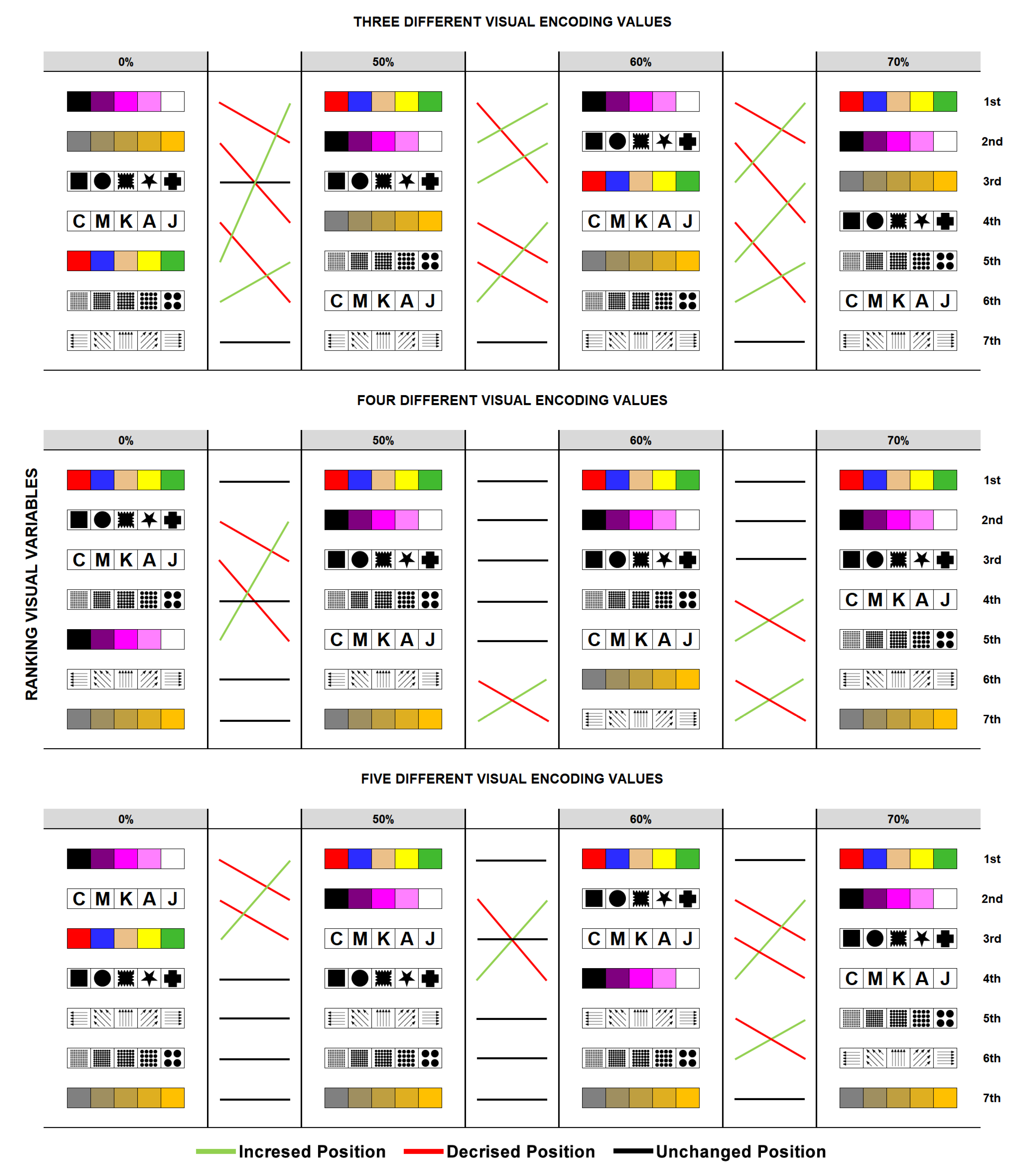
As a summary of the findings and correlation about visual variables x partial overlap x different visual encoding values, rankings groups are shown in Figure 14.
As suggestions for the extension of this research, the following possibilities have been presented:
- Evaluate other types of search tasks, such as Direct Search, Navigation, and Exploration [36], as well as similarity, comparison, and grouping;
- Evaluate the partial overlap at other levels, thus expanding the results presented here;
- Evaluate additional visual variables, including Transparency, Arrangement, Lightness, Focus, and Resolution;
- Consider partial overlap when proposing novel InfoVis designs (e.g., Treemaps + Multidimensional Glyphs).
References
- Scheepens, R.; Wetering, H.V.D.; Wijk, J.J.V. Non-overlapping Aggregated Multivariate Glyphs for Moving Objects. In Proceedings of the 2014 IEEE Pacific Visualization Symposium. IEEE; 2014. [Google Scholar] [CrossRef]
- Korpi, J.A.; Haybatollahi, M.; Ahonen-Rainio, P. Identification of partially occluded map symbols. Cartographic Perspectives 2014, 1, 19–32. [Google Scholar] [CrossRef]
- Halik, L. The analysis of visual variables for use in the cartographic design of point symbols for mobile Augmented Reality applications. Geodesy and Cartography 2012, 61, 19–30. [Google Scholar] [CrossRef]
- Ellis, G.; Dix, A. Density control through random sampling: an architectural perspective. In Proceedings of the Proceedings Sixth International Conference on Information Visualisation. IEEE Comput. Soc; 2002. [Google Scholar] [CrossRef]
- Leung, Y.K.; Apperley, M.D. A review and taxonomy of distortion-oriented presentation techniques. ACM Transactions on Computer-Human Interaction 1994, 1, 126–160. [Google Scholar] [CrossRef]
- Shneiderman, B. The eyes have it: A task by data type taxonomy for information visualizations. In Proceedings of the Proceedings 1996 IEEE symposium on visual languages. IEEE; 1996; pp. 336–343. [Google Scholar]
- Keim, D.A. Visual techniques for exploring databases. In Proceedings of the Knowledge Discovery in Databases (KDD’97), 1997. [Google Scholar]
- Keim, D.; Herrmann, A. The Gridfit algorithm: an efficient and effective approach to visualizing large amounts of spatial data. In Proceedings of the Proceedings Visualization 98 (Cat. No.98CB36276). IEEE; 1998. [Google Scholar] [CrossRef]
- Johansson, J.; Ljung, P.; Jern, M.; Cooper, M. Revealing Structure in Visualizations of Dense 2D and 3D Parallel Coordinates. Information Visualization 2006, 5, 125–136. [Google Scholar] [CrossRef]
- Bederson, B.B.; Shneiderman, B.; Wattenberg, M. Ordered and Quantum Treemaps: Making Effective Use of 2D Space to Display Hierarchies. In The Craft of Information Visualization; Elsevier, 2003; pp. 257–278. [CrossRef]
- Stasko, J.; Zhang, E. Focus+context display and navigation techniques for enhancing radial, space-filling hierarchy visualizations. In Proceedings of the IEEE Symposium on Information Visualization 2000. INFOVIS 2000. Proceedings. IEEE Comput. Soc; 2000. [Google Scholar] [CrossRef]
- Fekete, J.D.; Plaisant, C. Interactive information visualization of a million items. In Proceedings of the IEEE Symposium on Information Visualization, 2002. INFOVIS 2002. IEEE Comput. Soc, 2002. [CrossRef]
- Ribeiro, R.S.T. Sensorial do corpo: via régia ao inconsciente. Niterói: UFF, 2016. [Google Scholar]
- Rosenholtz, R.; Li, Y.; Nakano, L. Measuring visual clutter. Journal of Vision 2007, 7, 17. [Google Scholar] [CrossRef] [PubMed]
- Santos, D.H.; Marques Soares, A.G.; do Amor Divino Lima, R.S.; Miranda, E.T.C.; dos Santos, C.G.R.; Meiguins, B.S. Analyzing the Effect of Different Partial Overlap Sizes in Perceiving Visual Variables. In Proceedings of the 2019 23rd International Conference Information Visualisation (IV); 2019; pp. 37–43. [Google Scholar] [CrossRef]
- Munzner, T. Visualization analysis and design; AK Peters/CRC Press, 2014.
- Bertin, J.; Berg, W.J.; Wainer, H. Semiology of graphics: diagrams, networks, maps; Vol. 1, University of Wisconsin press Madison, 1983.
- MacDonald, L.W. Using color effectively in computer graphics. IEEE Computer Graphics and Applications 1999, 19, 20–35. [Google Scholar] [CrossRef]
- Hanbury, A. Constructing cylindrical coordinate colour spaces. Pattern Recognition Letters 2008, 29, 494–500. [Google Scholar] [CrossRef]
- Ware, C. Information visualization: perception for design; Elsevier, 2012.
- Mackinlay, J. Automating the design of graphical presentations of relational information. ACM Transactions on Graphics 1986, 5, 110–141. [Google Scholar] [CrossRef]
- Causse, M.; Hurter, C. The Physiological User’s Response as a Clue to Assess Visual Variables Effectiveness. In Human Centered Design; Springer Berlin Heidelberg, 2009; pp. 167–176. [CrossRef]
- Carpendale, M.S.T. Considering visual variables as a basis for information visualisation. Research report 2001-693-16, Dep. of Computer Science, University of Calgary, 2003. [Google Scholar]
- Ward, M.; Grinstein, G.; Keim, D. Interactive Data Visualization Foundations, Techniques, and Applications, 2 ed.; CRC Press: United States - Florida, 2015. [Google Scholar]
- Forsell, C. A guide to scientific evaluation in information visualization. In Proceedings of the 2010 14th International Conference Information Visualisation. IEEE; 2010; pp. 162–169. [Google Scholar]
- Efron, B. Bootstrap Methods: Another Look at the Jackknife. The Annals of Statistics 1979, 7, 1–26. [Google Scholar] [CrossRef]
- Efron, B.; Tibshirani, R. An Introduction to the Bootstrap, 1 ed.; CRC Press: United States - Florida - Boca Raton, 1994. [Google Scholar]
- Groop, R.E.; Cole, D. Overlapping Graduated Circles/Magnitude Estimation and Method of Portrayal. Cartographica: The International Journal for Geographic Information and Geovisualization 1978, 15, 114–122. [Google Scholar] [CrossRef]
- Cleveland, W.S.; McGill, R. Graphical Perception: Theory, Experimentation, and Application to the Development of Graphical Methods. Journal of the American Statistical Association 1984, 79, 531–554. [Google Scholar] [CrossRef]
- Graham, M.; Kennedy, J.; Hand, C. The challenge of visualising multiple overlapping classification hierarchies. In Proceedings of the Proceedings User Interfaces to Data Intensive Systems. IEEE; 1999. [Google Scholar] [CrossRef]
- Theron, R.; Santamaria, R.; Garcia, J.; Gomez, D.; Paz-Madrid, V. Overlapper: movie analyzer. Infovis Confererence Compendium 2007, pp. 140–141.
- Brath, R. Multi-attribute glyphs on Venn and Euler diagrams to represent data and aid visual decoding. In Proceedings of the 3 rd International Workshop on Euler Diagrams; 2012; p. 122. [Google Scholar]
- Demiralp, C.D.; Bernstein, M.S.; Heer, J. Learning Perceptual Kernels for Visualization Design. IEEE Transactions on Visualization and Computer Graphics 2014, 20, 1933–1942. [Google Scholar] [CrossRef] [PubMed]
- Soares, A.G.M.; dos Santos, D.H.; Barbosa, C.L.R.; Goncalves, A.S.; dos Santos, C.G.R.; Meiguins, B.S.; Miranda, E.T.C. Visualizing Multidimensional Data in Treemaps with Adaptive Glyphs. In Proceedings of the 2018 22nd International Conference Information Visualisation (IV). IEEE; 2018. [Google Scholar] [CrossRef]
- Diciccio, T.; Efron, B. Bootstrap confidence intervals (with discussion). Statist Sci 1996, 11, 189–228. [Google Scholar] [CrossRef]
- Brehmer, M.; Munzner, T. A Multi-Level Typology of Abstract Visualization Tasks. IEEE Transactions on Visualization and Computer Graphics 2013, 19, 2376–2385. [Google Scholar] [CrossRef] [PubMed]
Figure 1.
The participant followed a sequence of steps in order to complete the evaluation tests.

Figure 2.
Examples of evaluation scenarios used in the tests: (A) Hue visual variable with 70% partial overlap, (B) Orientation visual variable with 60% partial overlap, (C) Texture visual variable with 50% partial overlap, and (D) Shape visual variable with 0% partial overlap.
Figure 2.
Examples of evaluation scenarios used in the tests: (A) Hue visual variable with 70% partial overlap, (B) Orientation visual variable with 60% partial overlap, (C) Texture visual variable with 50% partial overlap, and (D) Shape visual variable with 0% partial overlap.
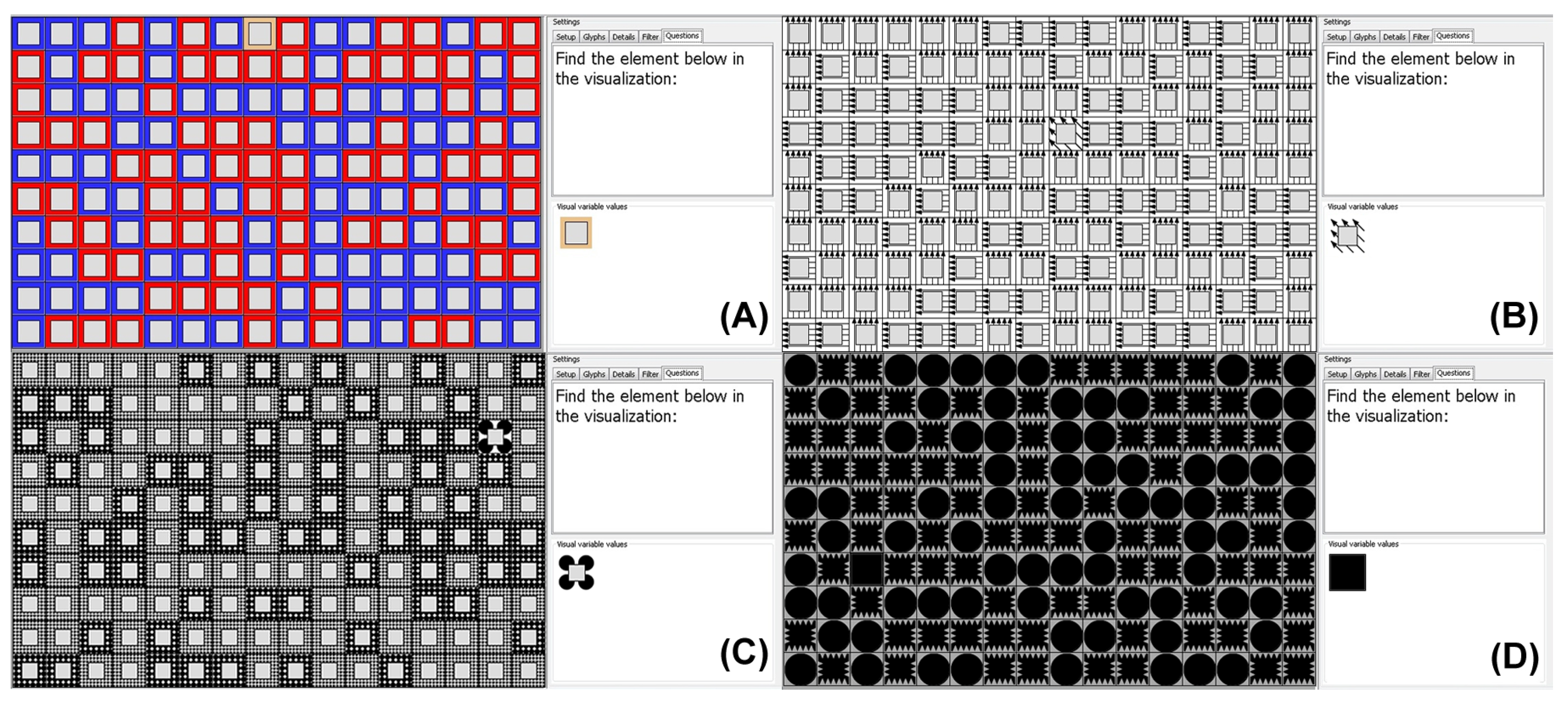
Figure 3.
The visual variables analyzed in this study are represented by their respective subsets of visual coding values (3, 4, and 5 values).
Figure 3.
The visual variables analyzed in this study are represented by their respective subsets of visual coding values (3, 4, and 5 values).
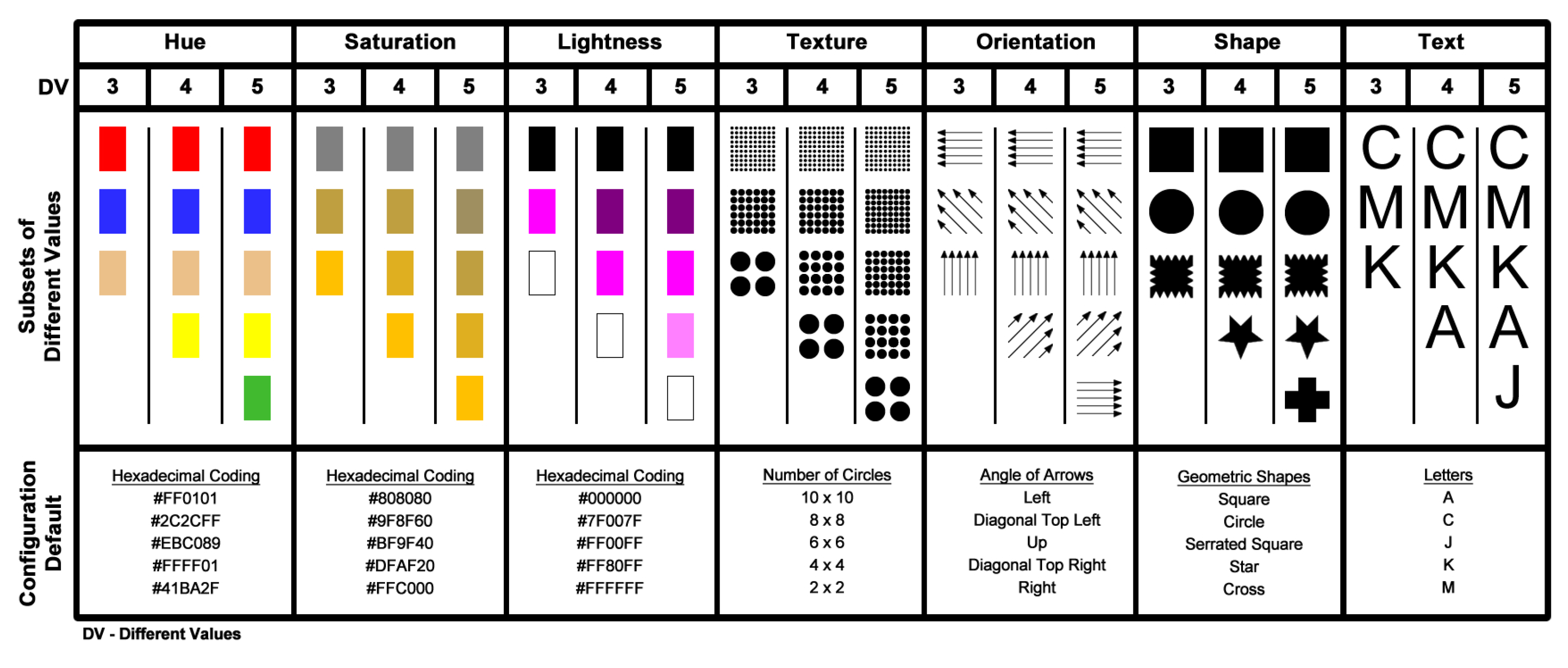
Figure 4.
Organization of tasks by a group of participants, considering visual variables, the number of distinct visual encodes, and partial overlap level.
Figure 4.
Organization of tasks by a group of participants, considering visual variables, the number of distinct visual encodes, and partial overlap level.
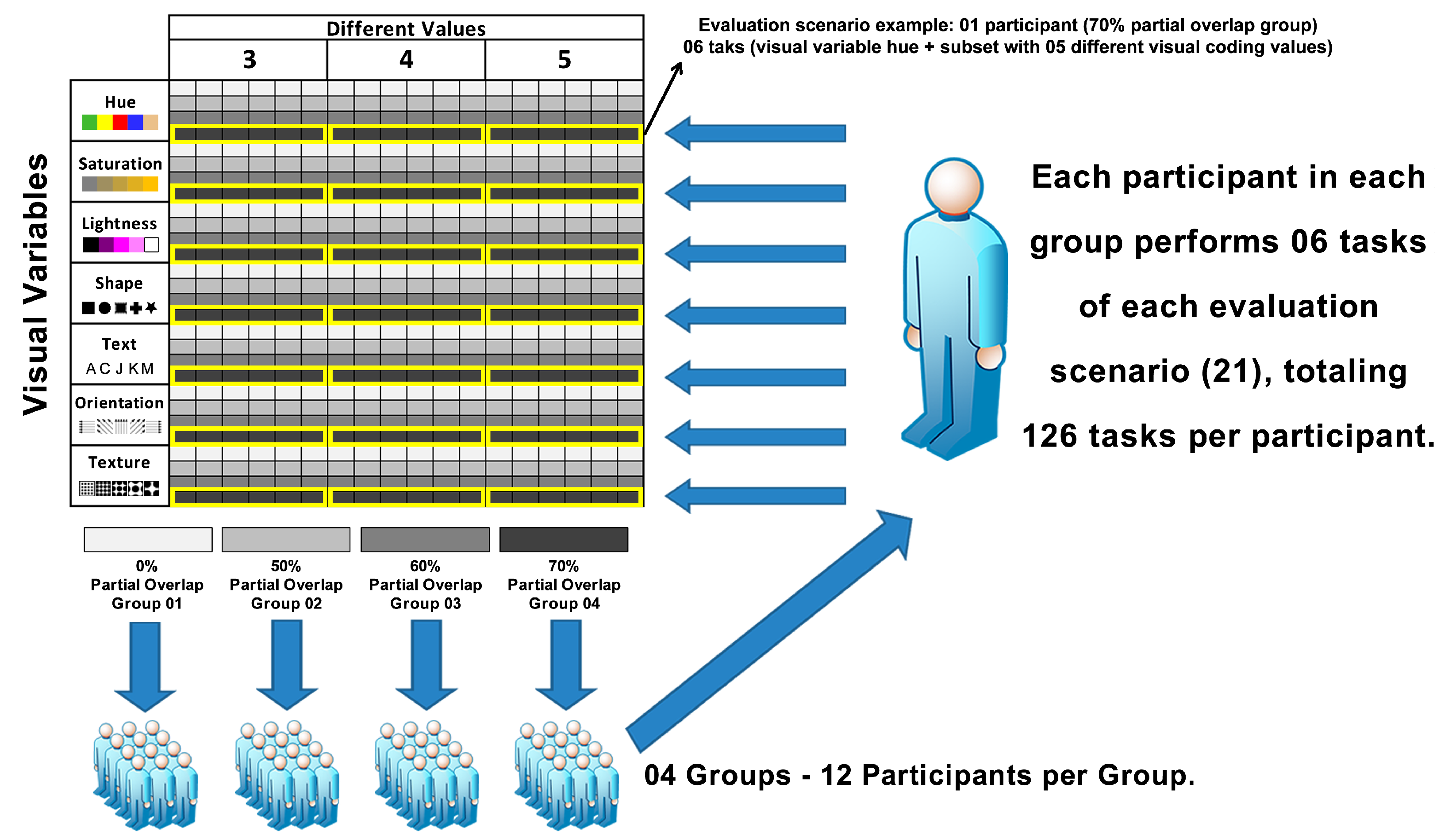
Figure 5.
The hypothesis test procedure for estimating the effect of partial overlap level on the visual perception of each visual variable.
Figure 5.
The hypothesis test procedure for estimating the effect of partial overlap level on the visual perception of each visual variable.
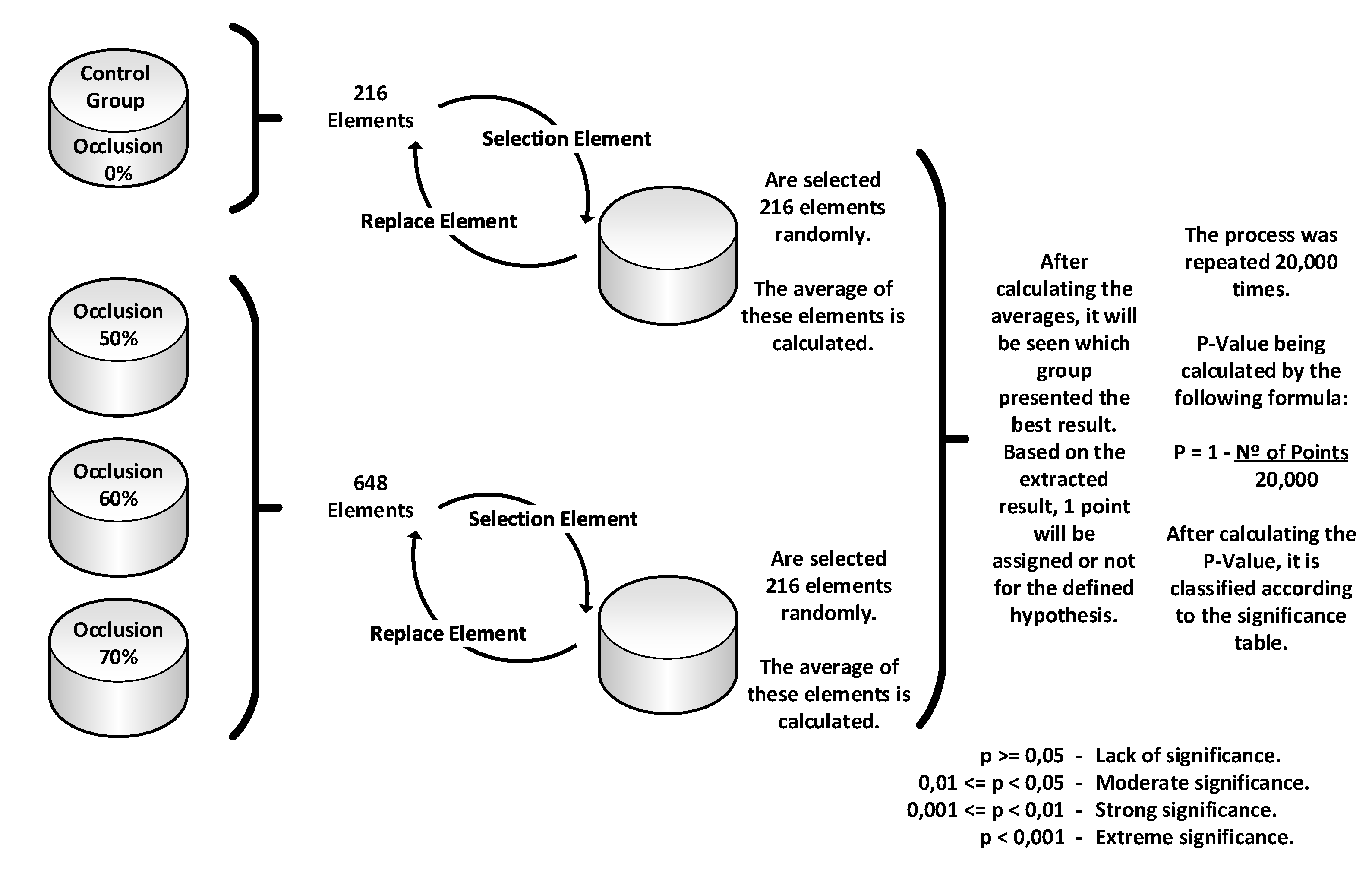
Figure 6.
Resolution time, mean accuracy, and partial overlap for each proposed scenario of visual variables studied, partial overlap levels, and the number of different visual coding values.
Figure 6.
Resolution time, mean accuracy, and partial overlap for each proposed scenario of visual variables studied, partial overlap levels, and the number of different visual coding values.
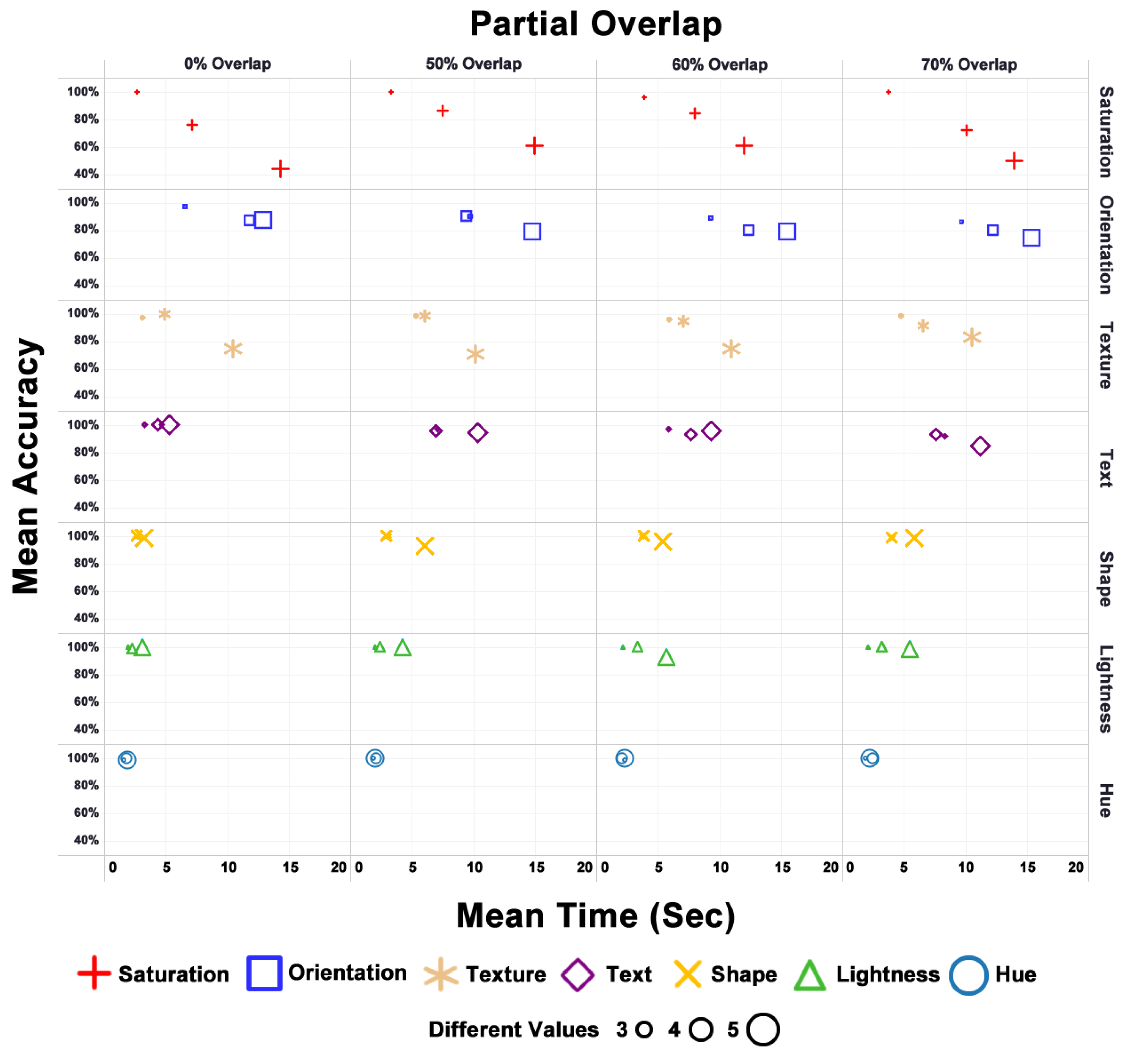
Figure 7.
Bootstrap results with and without partial overlap (n = 216). Text (p < 0.001 ***) and Orientation (p < 0.05 *) visual variables showed a difference in significance at alpha = 0.05 due to partial overlap.
Figure 7.
Bootstrap results with and without partial overlap (n = 216). Text (p < 0.001 ***) and Orientation (p < 0.05 *) visual variables showed a difference in significance at alpha = 0.05 due to partial overlap.
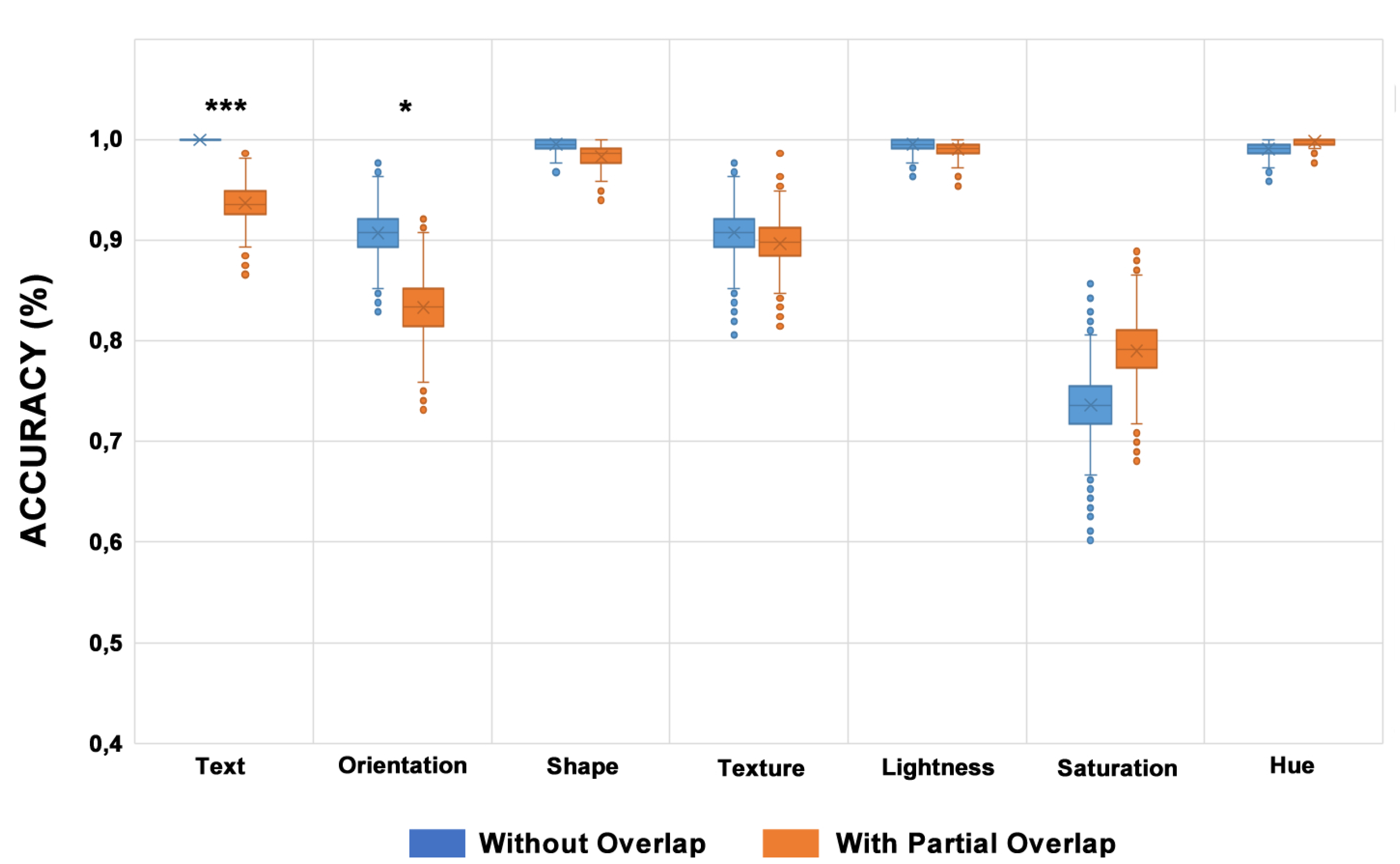
Figure 8.
The mean time of bootstrap results with and without partial overlap (n = 216). Text, Shape, Lightness, and Hue visual variables showed a statistically significant difference because of the use of partial overlap (p < 0.001 ***), alpha = 0.05
Figure 8.
The mean time of bootstrap results with and without partial overlap (n = 216). Text, Shape, Lightness, and Hue visual variables showed a statistically significant difference because of the use of partial overlap (p < 0.001 ***), alpha = 0.05
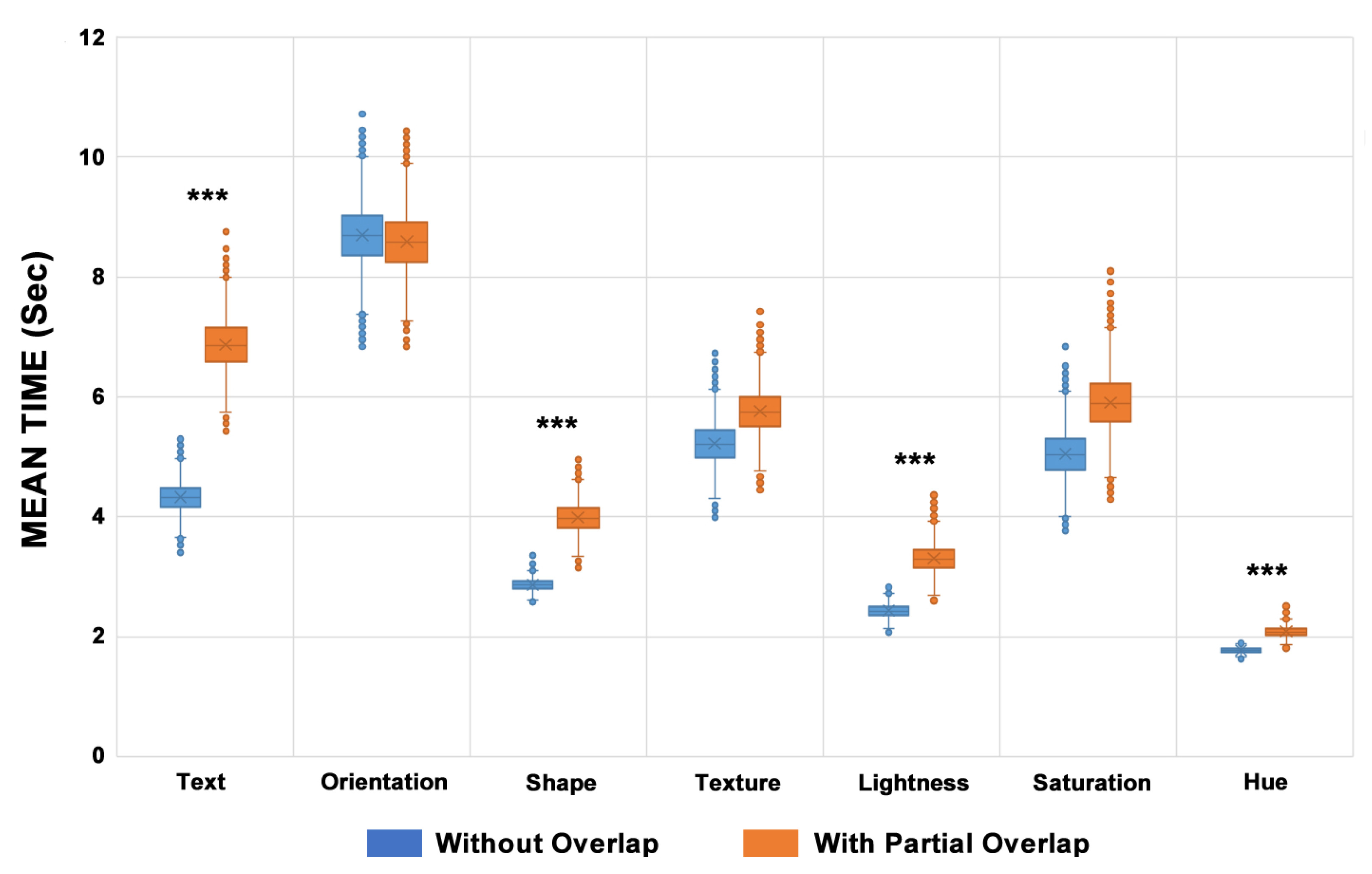
Figure 9.
Analysis based on the number of ERRORS and TIMEOUTS for each visual variable. The Saturation visual variable showed 40% of all errors registered considering all proposed scenarios.
Figure 9.
Analysis based on the number of ERRORS and TIMEOUTS for each visual variable. The Saturation visual variable showed 40% of all errors registered considering all proposed scenarios.
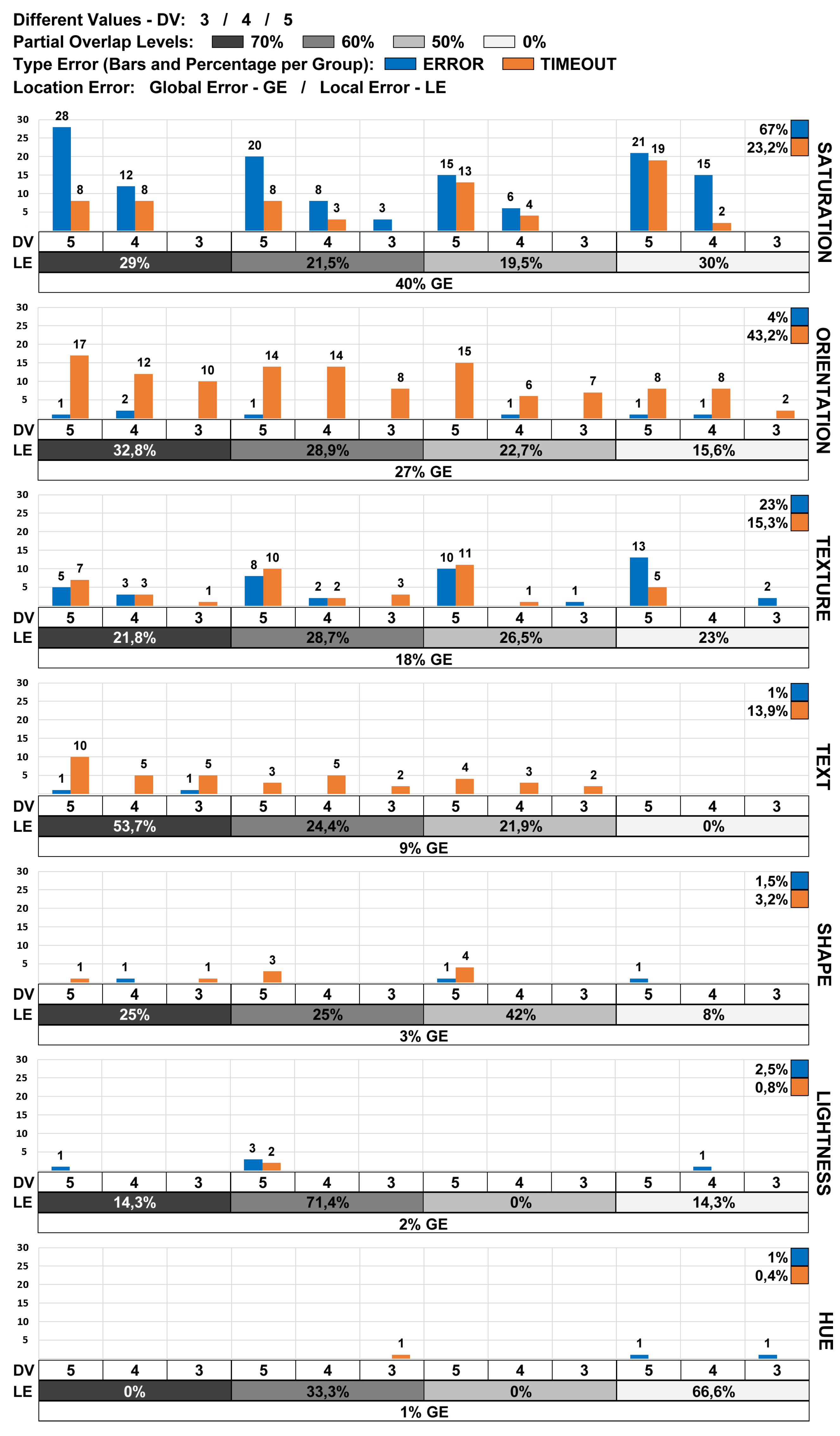
Figure 10.
Total number of errors (ERRORS+TIMEOUT) for each evaluation scenario (Visual Variable + Overlapping Level + Subset of Different Visual Coding Values).
Figure 10.
Total number of errors (ERRORS+TIMEOUT) for each evaluation scenario (Visual Variable + Overlapping Level + Subset of Different Visual Coding Values).
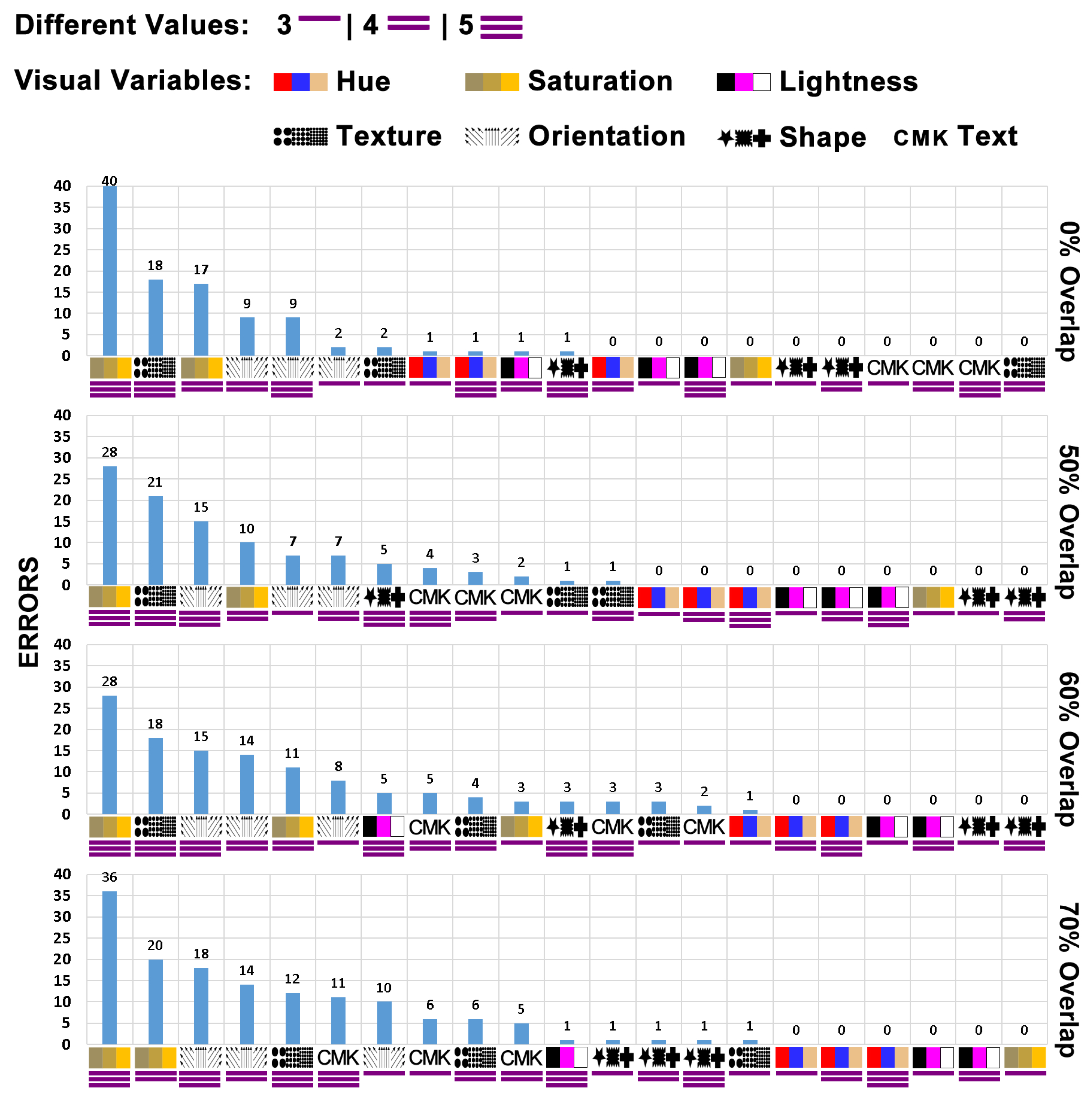
Figure 11.
The ranking of visual variables to identify the target item more ease.
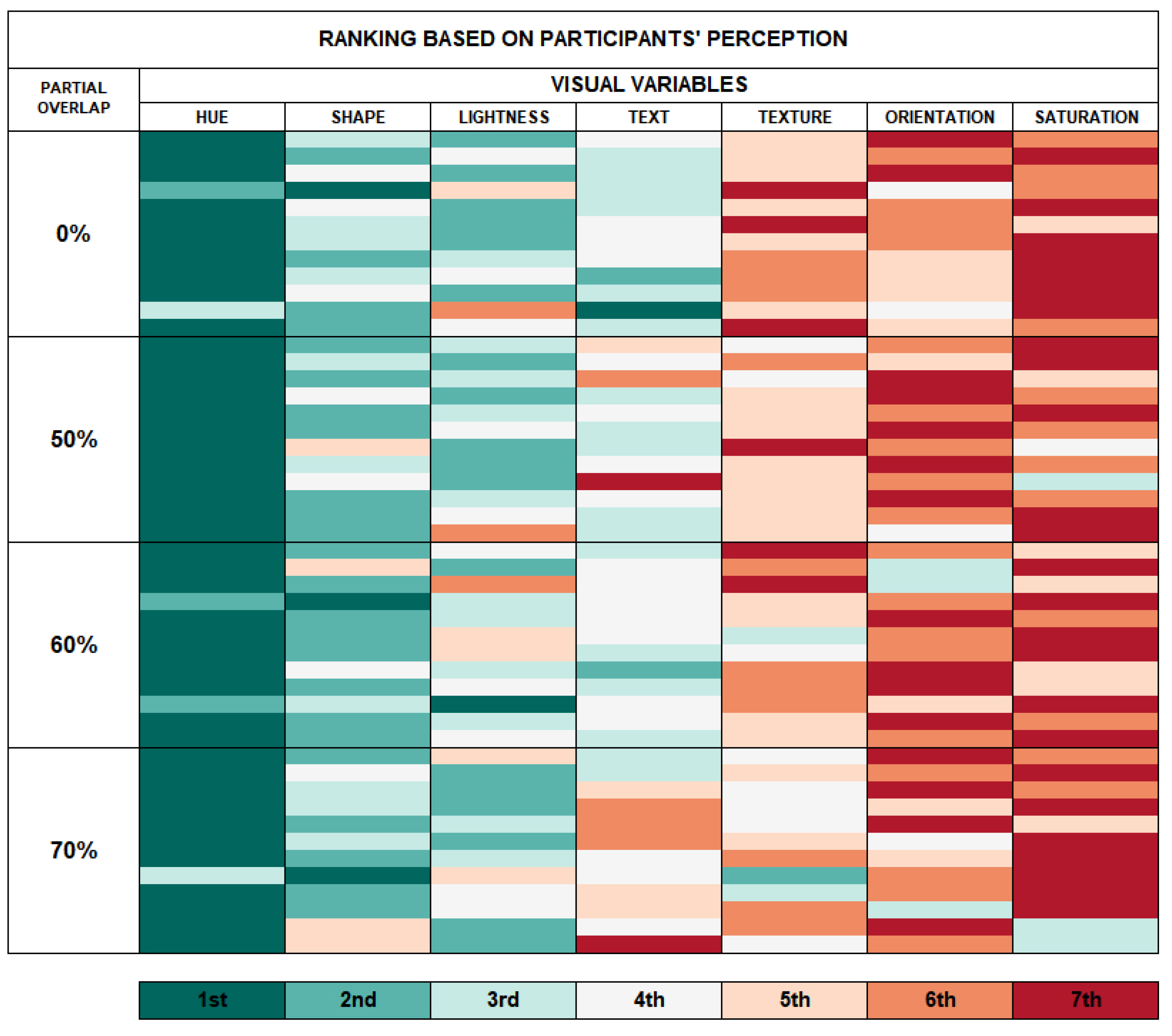
Figure 12.
Visual encoded items with the most significant position difference in both rankings. Highlight the elements in the 29th (Saturation) and 31st (Orientation) positions.
Figure 12.
Visual encoded items with the most significant position difference in both rankings. Highlight the elements in the 29th (Saturation) and 31st (Orientation) positions.
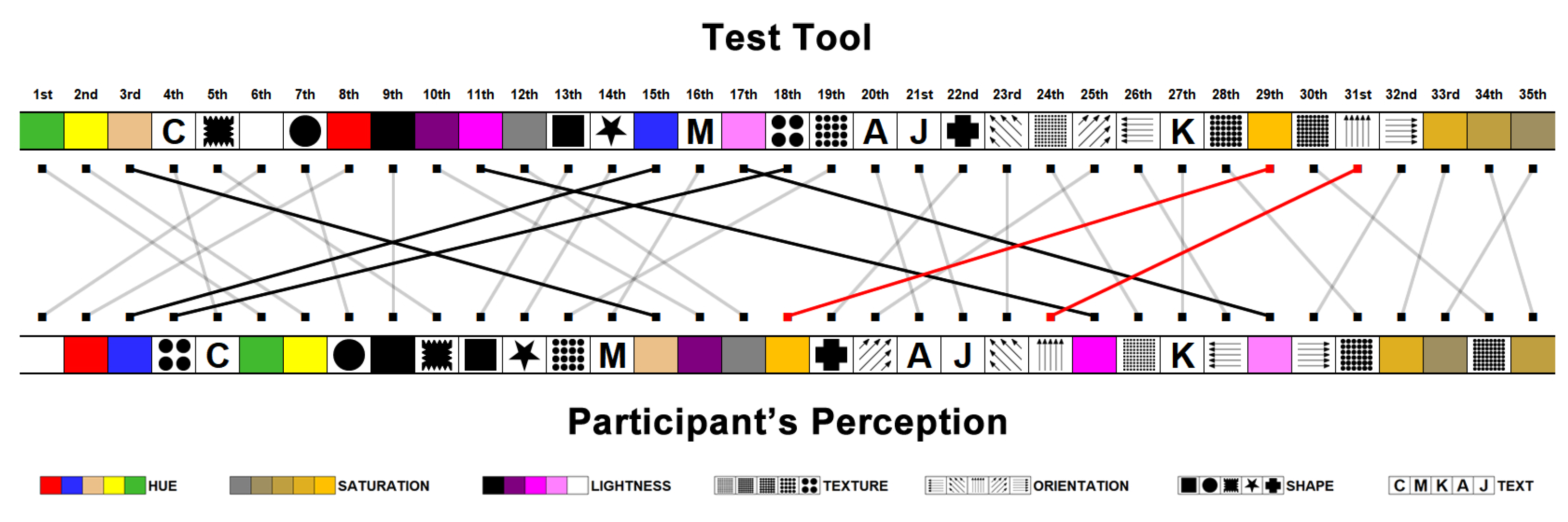
Figure 13.
The visual coding values with the highest number of errors got by the test tool compared with the number of identification difficulty perceptions registered by the participants.
Figure 13.
The visual coding values with the highest number of errors got by the test tool compared with the number of identification difficulty perceptions registered by the participants.
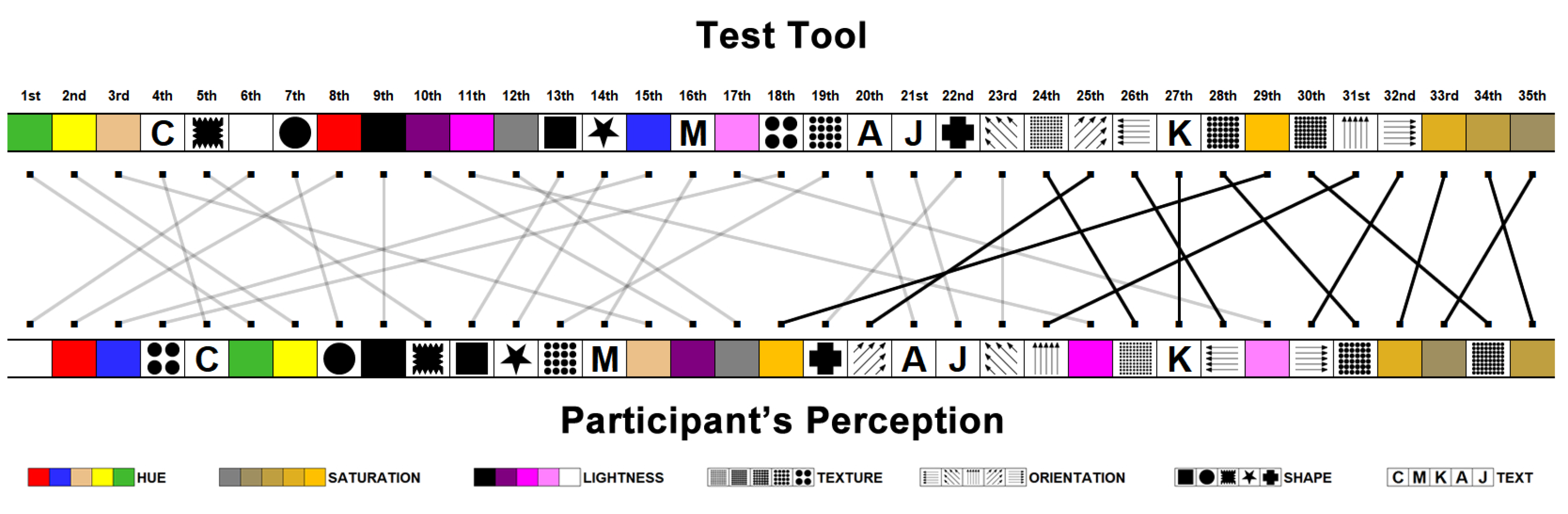
Figure 14.
Ranking of the visual variables for different percentages of partial overlap and different quantities of visual coding values.
Figure 14.
Ranking of the visual variables for different percentages of partial overlap and different quantities of visual coding values.
Disclaimer/Publisher’s Note: The statements, opinions and data contained in all publications are solely those of the individual author(s) and contributor(s) and not of MDPI and/or the editor(s). MDPI and/or the editor(s) disclaim responsibility for any injury to people or property resulting from any ideas, methods, instructions or products referred to in the content. |
© 2023 by the authors. Licensee MDPI, Basel, Switzerland. This article is an open access article distributed under the terms and conditions of the Creative Commons Attribution (CC BY) license (http://creativecommons.org/licenses/by/4.0/).
Copyright: This open access article is published under a Creative Commons CC BY 4.0 license, which permit the free download, distribution, and reuse, provided that the author and preprint are cited in any reuse.


