
Submitted:
09 June 2026
Posted:
11 June 2026
You are already at the latest version
Abstract
In conditions of increasing traffic and limited parking options, mobile apps for real-time monitoring and booking of available spots in public parking lots are becoming an indispensable tool for making our daily lives easier. They offer convenience, save time, and reduce the hassles associated with finding a parking spot, while also contributing to a more efficient and organized urban space. Additionally, they help reduce traffic congestion and lower pollution levels by encouraging users to make more rational use of available parking resources, which benefits all city residents.
This article describes the development of a mobile application for real-time parking spot booking. It integrates useful features from existing mobile apps, adds its own new features, and is adapted to the conditions of life in Bulgaria. Its main advantage is that it is available completely free of charge. It ensures the following functionalities: booking or recommending parking; checking vacancies of the parking spot and returning feedback about all current and past parking spot bookings, information for ratings and comments about the respective parking spots. The application's interface is intuitive, which makes it easy to use. The following technologies were used in its development: Java, Android Studio, XML, Gradle, Android SDK, and Firebase.
The application has been compared to similar ones, incorporating their best features and adding new ones that improve them. Based on this overview, the current work expands on them and aims to help Bulgarian users to save time and money looking for a parking spot.
Keywords:
online monitoring and booking lots in parking spots
; Model–View-Presenter (MVP)
; Java
; Android Studio
; XML
; Firebase
1. Introduction
In the dynamic and urbanized world of today, where time and efficiency are of the essence, mobile apps for monitoring and booking parking spots are becoming increasingly important, opening a market segment for their developers. These apps allow users to easily and quickly find and book a parking spot while monitoring real-time availability of open spaces. This not only reduces the stress associated with finding a parking spot in busy urban areas but also helps users better manage their time and schedules. In the face of increasing traffic and limited parking options, such apps have become an indispensable tool for simplifying daily life. They offer convenience, save time, and reduce the inconvenience of searching for parking, while also contributing to a more efficient and organized urban space. Additionally, they help reduce traffic jams and pollution levels by encouraging users to make more efficient use of available parking resources, which benefits city residents.
The rest of the paper can be explained as follows. In the next section similar mobile applications are analyzed and compared to each other’s. The architecture of the developed mobile application is presented in Section 3. Its software implementation is described in Section 4. The results of its workability are presented in Section 5. Discussion about functionalities of the suggested mobile app compared with the similar ones are made in Section 6. The paper finishes with conclusion remarks about functionalities and the benefits provided by the user app.
2. Related Apps for Parking
There are many mobile apps for monitoring and booking parking spots. We will focus on a few of them that combine the basic essential features such apps should have.
Parkopedia [1] is a platform created in the UK that provides information on parking locations around the world. It is available for Android, iOS, and the web, and allows users to search for parking spots, view prices, and booking spots in real time. Although it includes extremely useful features, the interface is complex and requires more time to learn and use the app. This results in an average level of usability.
ParkMe [2] is a platform developed in the United States. It is available for Android and iOS operating systems. It allows users to view pricing for the parking spots they are considering and includes a built-in navigation feature to guide them to available parking spots. The app features an intuitive user interface, making it convenient for quickly finding and booking a parking spot.
JustPark [3] is a platform developed in the UK. Like Parkopedia, it is available for Android, iOS, and the web. The app allows users to book parking spots and manage them. Its interface is intuitive and user-friendly. Despite its rich set of features, JustPark is better suited for those looking for advance bookings and long-term parking, rather than for booking parking spots for short periods of time.
EasyPark [4] is a platform developed in Sweden. It is available for Android and iOS operating systems. It allows users to navigate to the desired parking spot and pay the fee online. Depending on the region of use, this app offers varying degrees of convenience due to regional differences in fees and available features. Overall, it can be considered user-friendly for users in Europe.
After analyzing the mobile apps described for monitoring and booking parking spots, it can be concluded that while some of them offer extensive information about parking spots, they often focus primarily on city centers and do not cover smaller towns or all parking spots in a given area. Other apps provide limited online booking options, which can cause inconvenience for users, especially during peak hours. Some of these platforms have a non-intuitive user interface that can confuse users and complicate the process of booking or navigating to a parking spot.
Due to these limitations, a new mobile app called Parky has been developed, which has an intuitive user-friendly interface. It includes a parking recommendation feature, which is extremely useful when choosing the best parking spot. The built-in option to search by city and navigate the user to a specific parking lot saves time and effort when searching for one on the map. Detailed information is provided for each parking spot, including availability, service fees, and contact details—with the option to dial the phone number directly. The ability to view past bookings and recommended parking spots further simplifies parking management for every user.
3. Architecture of the Developed Mobile App
3.1. Base Architecture
The proposed Parky mobile app is based on a three-layer architecture – Model–View-Presenter (MVP) (Figure 1). It is suitable for developing mobile apps using Android Studio.
The MVP model is a software design approach that divides program logic into three main components: Model, View, and Presenter. [5,6,7] This ensures a clear separation between data processing, information visualization, and control logic.
- Model: Controls the data, structures, and internal logic of the application. In Parky, the model is responsible for processing and storing data related to users, parking spots, and books. Data is synchronized in real time via the Firebase database, ensuring its consistency and security.
- View: It represents the visualization of the information and the application's user interface. In Parky, this is implemented using XML, which enables the visualization of login and registration forms, user profiles, parking spots search and book, as well as other functionalities. The user interface is responsible for ensuring a pleasant user experience.
- Presenter: It receives input data from the user and converts it into commands for the Model or View. In Parky, the Presenter controls the interactions between the user and the application by processing user actions (such as booking, parking recommendations, and others) and ensuring that the view is updated in response to changes in the data.
The three-layer MVP architecture used in Parky ensures flexibility and scalability in the application’s functioning, combined with easy support and functional upgrades. The separation of the logic into three main components (Model, View, Presenter) ensures that each part of the system can be developed and improved independently of the others, contributing to better stability and optimization of resource usage.
3.2. Functions Implemented
In the developed mobile application Parky the following functions are realized
Registration: The user can create a new account in the system by entering the required registration information.
Login: After registration, the user can login to the system using their login details (username and password).
Feedback: The user can provide feedback on the app, including ratings and comments, which will help improve the service.
Booking or recommending the parkings/ parking spots: The user can book or recommend a parking spot. This includes checking whether they have already booked or recommended the same parking spot.
Checking for vacancies of the parking spot: Check whether a parking spot has already been booked or recommended. This function checks whether the user has already booked or recommended a specific parking spot to avoid duplicate actions.
Logout: The user can log out of their account and return to the login screen.
View my books: The user can view a list of all their current and past parking spot bookings.
View recommended parkings: The user can view a list of parking spots that have been recommended, including those recommended by themselves or other users.
The booking of the parking spot is visualized in the diagram shown in Figure 2.
The sequence of steps for booking parking spots is as follows:
- User: The user initiates the process by submitting a booking request (Request Book).
- Frontend: It receives the request from the user and sends HTTP POST request to the server (FindParkingDetailsActivity) with the path "/reserve".
- FindParkingDetailsActivity: It is responsible for processing the request. It calls the checkAvailability() method in the data model (ParkingSlotModel) to check the availability of parking spots.
- ParkingSlotModel: It processes the availability check request and returns a response to FindParkingDetailsActivity, indicating whether or not there are available spots in the parking.
- FindParkingDetailsActivity: Based on the response from ParkingSlotModel, FindParkingDetailsActivity calls the saveReservation() method in the Firebase database to save the booking if spots are available.
- FirebaseDatabase: It stores the booking information and returns a response to FindParkingDetailsActivity indicating whether the operation was successful or not.
- FindParkingDetailsActivity: After receiving a response from FirebaseDatabase, FindParkingDetailsActivity returns the result (TRUE or FALSE) back to the frontend.
- Frontend: It returns the result and displays the booking status to the user (Show Reservation Status).
4. Software Implementation
Android Studio was used to develop the frontend and backend components of the Parky mobile app. This powerful integrated development environment specializes for creating mobile apps for the Android platform and offers extensive capabilities for writing and testing code on both the frontend and backend. Android Studio also offers debugging and profiling tools that simplify the identification and resolution of bugs, as well as the optimization of the app’s performance. This development environment was key to the successful creation of Parky, providing a comprehensive platform for controlling all aspects of the app’s development. [8,9,10]
Extensible Markup Language (XML), which is the standard language for defining the user interface in Android applications, was used to develop the frontend part of the Parky application. XML [11] provides an easy and declarative way to create the visual elements that make up the application’s interface. By using it, developers can create complex layouts and components that meet the needs of users. The main components of the frontend are as follows:
- ConstraintLayout: This is one of the main components used in the application. It is used to arrange visual elements. It enables flexible and efficient positioning of elements, allowing constraints to be defined between them. This results in an adaptive and dynamic user interface. It also simplifies the support and expansion of the application by ensuring that images are resized on different devices with varying screen sizes.
- ImageView and TextView: These are the main display components in the app. ImageView is used to display graphical resources such as images of parking spots or icons, while TextView is used to display text information such as parking spot names, contact information, and other details. The LinearLayout feature is used to arrange multiple elements vertically or horizontally. This ensures a clear structure and consistency in the layout of the content on the screen.
- Menu XML files define the navigation options available to the user within the app. It contains various navigation elements such as profile, feedback, password change, parking search, and others, providing quick access to the app’s main functions. The menu is easy to customize and offers convenient and intuitive navigation.
- AppCompatButton: This is a function for creating buttons. It allows users to make recommendations regarding parking, bookings, and navigation.
- The Java programming language was used to develop the backend of the Parky application for implementing business logic and data processing. [12] Java provides a powerful platform for creating stable and efficient applications, with extensive capabilities for data control and user interface interaction. The main components of the backend are as follows:
- Business logic and data control with Java: Java is used to implement the application’s core business logic, such as processing bookings, customer data control, parking recommendations, and navigation. Java classes are responsible for processing user input, interacting with the user interface, and performing operations such as monitoring available parking spots and creating notifications.
- Users’ sessions control: The connection to Firebase is realized through Java, using Firebase Authentication (FirebaseAuth), which provides secure access to the application and control of user sessions. Through FirebaseAuth, users can register, log in, and maintain a secure session while interacting with the application.
- Data storage and real time synchronization: The Firebase Realtime Database is integrated into the application via Java to provide data storage and data control such as parking spot information, bookings, recommendations, and user data. Any changes to the data are synchronized in real time between client devices and the Firebase database, ensuring that users always have access to up-to-date information. Java classes handle communication with Firebase and perform the necessary operations for updating and extracting data.
- Events processing and notifications: Java is also responsible for processing user events and generating in-app notifications. For example, when a user books a parking spot, Java classes update the relevant data in Firebase and generate in-app notifications to inform the user that the operation was successful.
- Connectivity control: The app uses Java to control Internet connectivity and check for an active connection before performing operations that require communication with Firebase. This is an important aspect of ensuring the app works reliably and correctly, especially for operations that require access to real-time data.
User data is stored in a real-time Firebase relational database, which plays a key role in ensuring that data is stored correctly and synchronized in real time. [13]
The operations shown in Figure 2 are implemented using the software described above, through the following functions:
- Request Book: Specify the starting point where the user submits a booking request.
- HTTP POST /book: The request was sent from the front end to FindParkingDetailsActivity to start the booking process.
- checkAvailability(): A function in the data model that checks whether parking spots are available.
- saveReservation(): A function that saves the booking in the database if available spots existed.
- Show Book Status: The final step, where the booking confirmation is sent to the user.
The Parky app uses the Firebase relational database, which works in real time, for data storage and processing. Firebase is a cloud-based database (DB) that stores data in JSON format and synchronizes information in real time with all clients connected to the database. This ensures immediate updates and fast access to data, regardless of the number of connected users. The primary method for linking data is through the use of users’ unique identifiers (user Id).
DB in Parky is organized as follows:
1. MainPages: This section contains data on the main pages in the app, such as the password reset and feedback.
2. ParkingSlots: This part of the DB contains information on all available parking spots. The following data is stored for each parking spot:
- Contact: The phone number to contact the parking spot.
- Email: The user's email address associated with the specific parking spot.
- Latitude and Longitude: The geographic coordinates of the parking spot, used for map display and navigation.
- Name: Name of the parking spot.
- ParkingImage: Image associated with the parking spot, displayed in the user interface.
- Prices: Pricing information for the parking spot.
- SelectedPrice: The price selected by the user for reserving the parking spot.
- Status: Current status of the parking spot (e.g., "Available").
- UsedId: Unique ID of the user who reserved the parking spot
3.Users: This section stores information about the app’s registered users. For each user, a unique identifier and personal data — such as email address, name, age, vehicle type, vehicle model, and registration number — are stored, which are used to control profiles and reservations.
The relationships between the data in the individual sections are as follows:
- Users and ParkingSlots: The relationship between these two entities allows parking spots to be linked to specific users, such as reserving selected or recommended parking spots for a given user.
- Users and Feedback: Every piece of feedback or rating provided by a user is linked to a specific user using the userID. This allows for the personalization of the collected feedback.
- Users and ChangePassword: Every password change is linked to a specific user, with information about the old and new passwords stored in the application.
Main functionalities of the Firebase Realtime DB, realized in the suggested application:
- Real-time storage and control of big data, even with a high number of users.
- Fast access to and process information that is updated and synchronized in real time.
- Data protection through built-in access control mechanisms.
- Database scalability as the number of users increases.
- Statistical processing of data in the database, such as the number of active users per day, which helps analyze user behavior and optimize the application’s performance.
- Ability to integrate with other Google services and platforms, which simplifies the expansion of the application’s functionalities.
The proposed DB structure supports real-time system operations. The relationships between users and various DB components — such as feedback and password changes — enable effective monitoring and control of actions within the application. This flexible structure ensures the application’s security and scalability.
5. Results of the Workability Tests
To visualize and test the developed application, both Android emulators and physical devices are used to ensure compatibility and a comfortable user experience across different device screen sizes and operating system versions.
Database, which provides a reliable and scalable backend service that synchronizes data between clients and the server. The security of user data against hacking attacks on the Parky app is ensured through password hashing. The generated hash code cannot be easily decoded back to the original password, which guarantees a high level of protection. For every operation involving a password change, both the current and the new passwords are hashed before being stored in the database. This ensures that even if the database is compromised, users’ actual passwords remain protected. Furthermore, access to the database is restricted and secured through the use of a unique user ID to link user data to their identity. This provides an additional layer of security and control over access to sensitive information.
The functionality of the Parky mobile app has been verified through testing. For the app to function properly, the device’s GPS module is required to monitor the user’s current location and provide information about the nearest available parking spots. Obviously, a constant Internet connection is required to store and synchronize information on available parking spots located near the user.
The results of the performed tests are summarized in Table 1.
For each of the tests, the following was done:
- Test 1, 2, 3: This feature provides the application's base functionality related to user authentication. Logging in requires entering valid data, and logging out terminates the active session.
- Test 4: This test verifies whether the user can successfully submit feedback through the app. A successful test indicates that communication between users and the support team is functioning properly.
- Test 5: The system checks whether the user can successfully booking a parking spot. Passing this test indicates that the app is communicating correctly with the database and updating the available parking spots.
- Test 6: The system checks whether the user can recommend a parking spot. A successful test means that the recommendation function works properly and that data is stored and shared correctly.
- Test 7: The system is checking whether a user can both booking and recommend a parking spot. Successful completion of this test indicates that the system can perform both actions without any conflicts.
- Test 8: The test verifies whether the app displays the recommended parking spots to the user. Passing this test indicates that the app correctly displays and filters the recommendations.
- Test 9: The test checks whether the user can view the history of all their previous bookings. A successful test confirms that the app correctly stores and retrieves data regarding previous bookings.
All benchmarks were passed successfully, which means that the developed mobile application functions correctly in accordance with the specified requirements and no bugs were found in its implementation.
6. Discussion
Table 2 presents a comparative analysis of the Parky app and existing similar widely used platforms for monitoring and booking parking spots.
The comparison was based on the following criteria: the ability to book a parking spot online, navigation to available parking, and the provision of information on prices and operating hours for each parking spot. The main differences between these platforms lie in their coverage, ease of use, the intuitiveness of the user-friendly interface, and the availability of additional functions, such as recommendations from other users and information regarding parking spot safety. The table also provides information on the country for which the respective app was developed; the operating system it runs on; and its price.
Compared to these apps, the newly developed Parky mobile app offers more comprehensive coverage of parking spots in Bulgaria, including the ability to make bookings anywhere in the country. Users can take advantage of an intuitive interface and a simple booking process that eliminates unnecessary steps and saves time. The intuitiveness of the user interface is assessed based on quick, real-time navigation—opening the app, appropriate background, fonts, font sizes, and the ability to open 2–3 (no more) windows simultaneously. All of this will benefit the driver while driving the vehicle, ensuring that the driver remains focused and does not take their attention away from the road, while simultaneously providing the necessary information. In addition, the unique function for providing recommendations from other users helps users by giving them additional information about the quality and convenience of different parking lots. Furthermore, the app is free, which also makes it attractive to use and ensures maximum efficiency when searching for and booking parking spots.
7. Conclusions
The Parky mobile app makes it easier for users to find and booking parking spots. Compared to well-established existing similar apps, it combines the best of their functionalities and builds upon them with innovative, user-centric solutions. Its interface is user-friendly, making it convenient to use. One of its advantages is that it is completely free. In addition, it allows users to search for parking by city, displaying available parking spots on a map and providing details for each, such as: available spots, usage fees, contact information for the facility, and navigation directions to reach it. It incorporates a variety of useful functions, inspired by similar apps, as well as new features designed to make it easier for users when arriving in an unknown city. Compared to these apps, the developed mobile app offers more comprehensive coverage of parking spots in Bulgaria, including the ability to book a parking spot anywhere in the country. It stores recommendations from other users regarding the condition of parking lots and the quality of service, which provides additional information for a more accurate assessment of the quality and available conveniences in different parking spots.
The three-layer Model–View–Presenter architecture used in the application ensures that each part of the system can be developed, improved, and expanded in functionality independently of the others. This ensures greater work stability and optimization of resource usage.
The proposed parking space reservation system is application-oriented. It does not aim to develop new approaches or techniques to solve the problem, but rather implements an existing model (MVP) to be as useful as possible and to make users’ daily lives easier by providing them with the necessary information in real time. This allows them to save time for more important professional tasks, because "Time is money."
The proposed Parky mobile app is designed with the option for future expansion and the addition of new functions. Its structure allows for easy integration of additional components without the need for significant changes to the existing architecture. This makes it flexible and adaptable to future user needs and the emergence of new technologies.
Funding
The present research received no external funding. It is funded by project № 26000 financed by the Research and Development Sector at the Technical University of Sofia, Bulgaria. The authors are thankful for this financial support.
Conflicts of Interest
The authors declare no conflicts of interest.
Abbreviations
The following abbreviations are used in this manuscript:
| DB | Data Base |
| MVP | Model–View-Presenter |
| XML | Extensible Markup Language |
References
- Available online: https://en.parkopedia.com.
- Available online: https://www.parkme.com.
- Available online: https://www.justpark.com.
- Available online: https://www.easypark.com.
- Syromiatnikov, A.; Weyns, D. A Journey through the Land of Model-View-Design Patterns. In Proceedings of Working IEEE/IFIP Conference on Software Architecture 2014 (WICSA; 2014; ISBN 978-1-4799-3412-6. [Google Scholar] [CrossRef]
- Cheng, Y.; Domingues, A. O. Advanced Android App Architecture, Real-world app architecture in Kotlin 1.3, Android 9, Android Studio 3.2, 1st Edition, 404 p. 2026. [Google Scholar]
- Mainkar, Pr. Expert Android programming, Master skills to build enterprise grade Android applications, publ. O’Reilly media; Packt Publishing, 2017. [Google Scholar]
- Smyth, N. Android Studio Otter Essentials - Java Edition: Developing Android Apps Using Android Studio Otter and Java, 1st Edition, publ. Payload Media, ISBN-10: 1965764312, ISBN-13: ISBN-13: 978-1965764312, 692 p. 2025. [Google Scholar]
- Forrester, Al.; Boudjnah, Er.; Dumbravan, Al.; Tigcal, J. How to Build Android Applications with Kotlin: A hands-on guide to developing, testing, and publishing production-grade Android 16 apps, 3rd Edition, publ. O’Reilly media; Packt Publishing, 2025; p. 654 p. ISBN -13: 978-1835882764. [Google Scholar]
- Darcey, L.; Conder, S. Android Wireless Application Development; Addison-Wesley Professional, 2012; ISBN -10: 0321813839, ISBN-13: 978-0321813831. [Google Scholar]
- Gookin, D. Guide to XML and JSON Programming, 1st Edition, ISBN-10: 1088918328, ISBN-13: 978-1088918326, 107 p. 2019. [Google Scholar]
- Mayers, D. S. Data Structures and Algorithms in Java: A Project-Based Approach, 1st Edition, publ; Cambridge University Press., 2024; ISBN -10: 1009260332, ISBN-13: 978-1009260336. [Google Scholar]
- Ashok Kumar, S. Mastering Firebase for Android Development: Build real-time, scalable, and cloud-enabled Android apps with Firebase, 1st Edition, publ. O’Reilly media, Packt Publishing, 2018; p. 394pISBN ISBN-13: 978-1788624251.
Figure 1.
Model – View – Presenter (MVP) architecture.
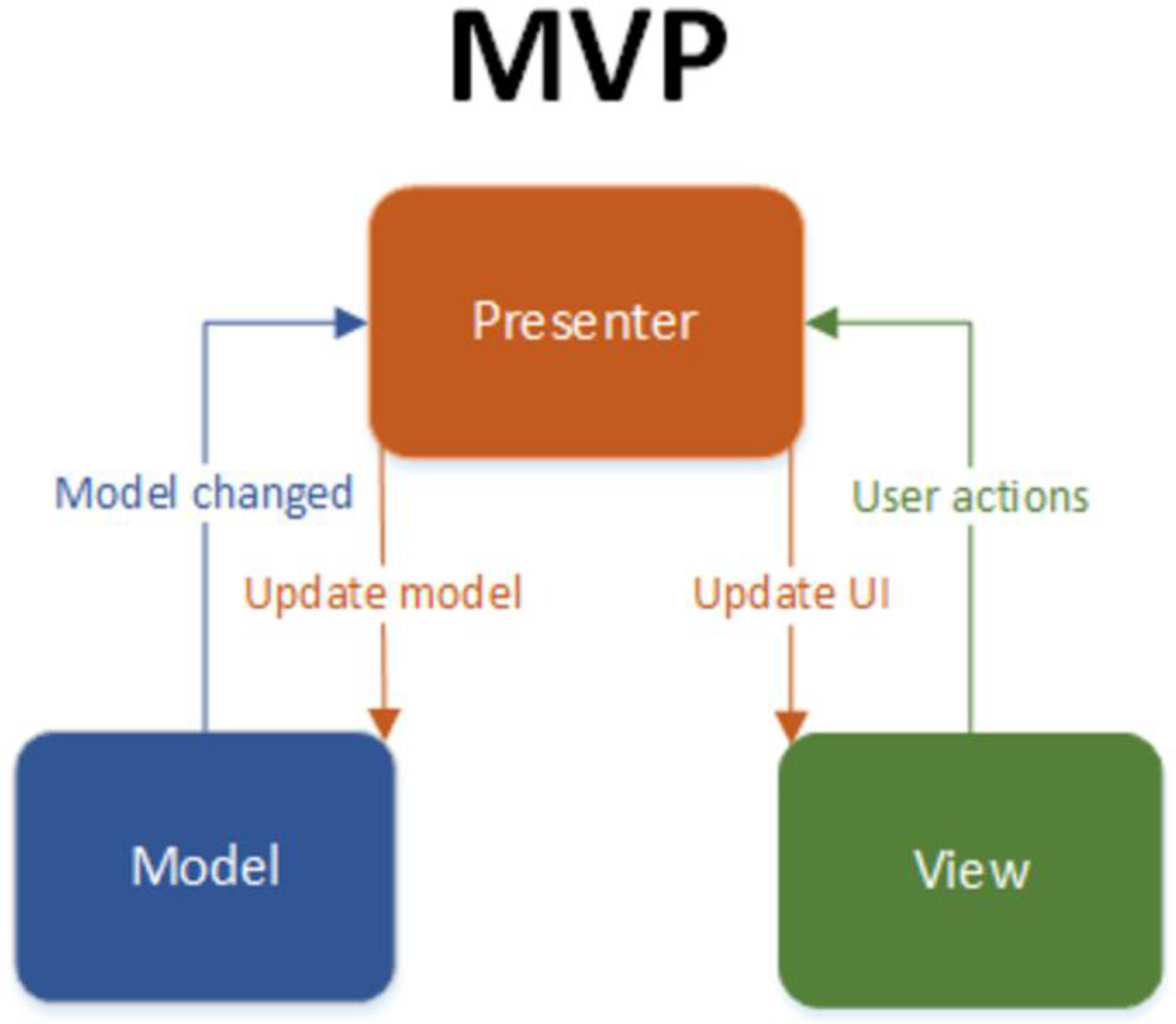
Figure 2.
Sequence diagram for parking spots booking.
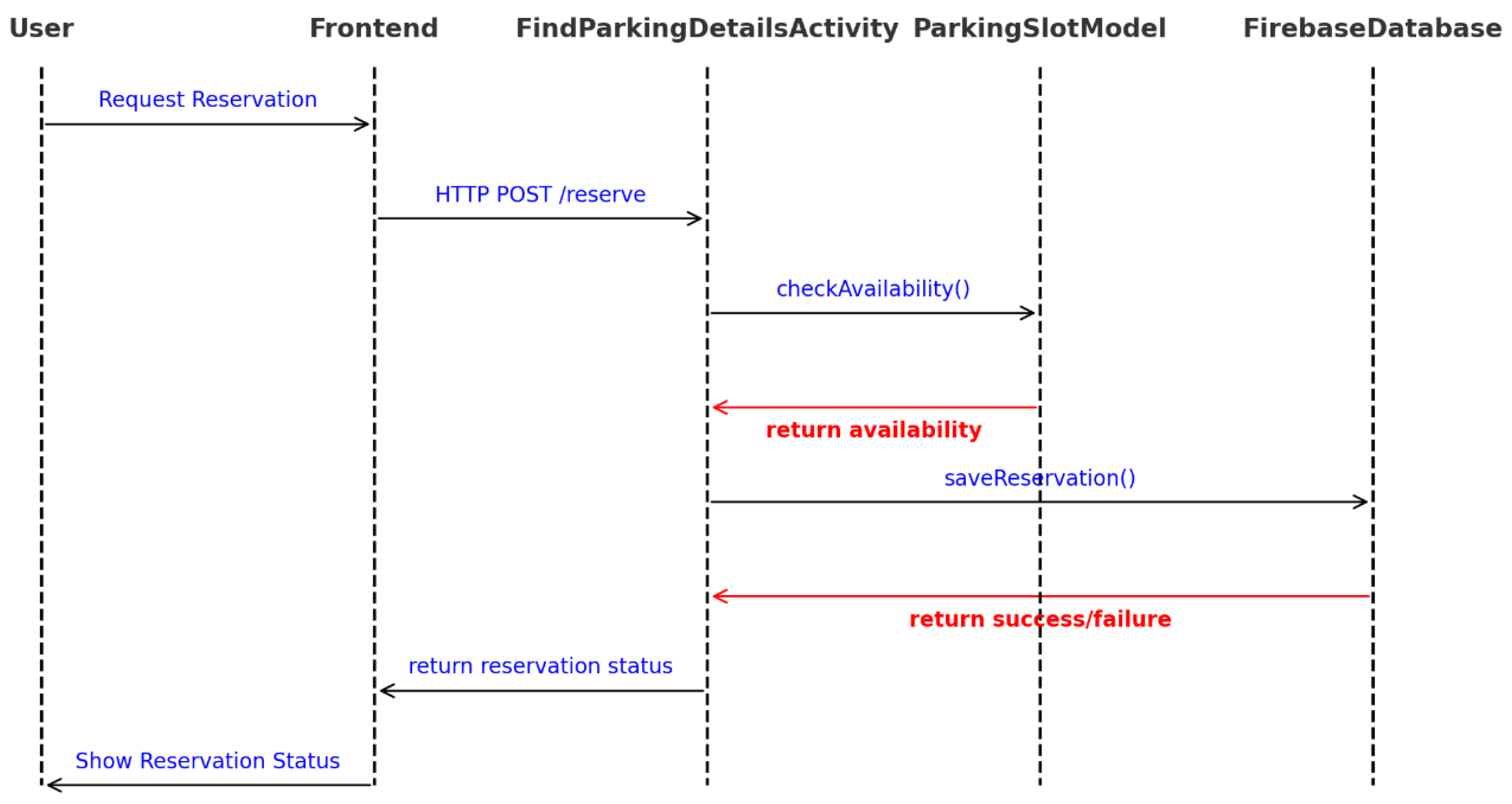

Table 1.
Functionalities and features of the application.
| № | Functionalities | Benchmark test | Comparison criteria | Status | Bugs |
| 1 | The app serves as an entry and exit for the users. | Test 1 | Check whether the user successfully logs in to the system when entering the correct data. | Passed the tests. | - |
| Test 2 | Check whether an error is generated when invalid data is entered. | ||||
| Test 3 | Check whether, when the exit button is pressed, the users are logged out of the app and their session is terminated. | ||||
| 2 | The app sends feedback. | Test 4 | Check whether the user can submit feedback through the app. | Passed the test. | - |
| 3 | The app books parking spot. | Test 5 | Check whether the user can book a parking spot through the app. | Passed the test. | - |
| 4 | The app recommends parking spot. | Test 6 | Check whether the user can recommend a parking spot through the app. | Passed the test. | - |
| 5 | The app both recommends and books parking spots. | Test 7 | Check whether the user can both book and recommend a parking space. | Passed the test. | - |
| 6 | The app visualizes recommended parking spots. | Test 8 | Check whether the app visualizes the recommended parking spots to the user. | Passed the test. | - |
Table 2.
Comparison between applications for booking parking spots.
| Application name |
Development country |
Operational system |
Functionalities |
User-friendly interface |
Price | |
| Parky (Presented in this paper.) |
Bulgaria | Android | Booking parking spots | High | free | |
| Booking selecting a parking spot based on recommended with ratings. | ||||||
| Parkopedia | United Kington |
Android | Booking of parking spots. | Middle | ||
| iOS | Real-time overview of available spots. | free | ||||
| Web | ||||||
| ParkMe | USA | Android | Overview of the fees for spots. | High | free | |
| iOS | Navigation to the parking. | |||||
| JustPark | United Kington |
Android | Booking parking spots. | Middle | free | |
| iOS | Parking spots management with the application. | |||||
| Web | ||||||
| EasyPark | Sweden | Android | Navigation to the parking. | Middle | free | |
| iOS | Online payment of the fees. | payable depending on the region |
Disclaimer/Publisher’s Note: The statements, opinions and data contained in all publications are solely those of the individual author(s) and contributor(s) and not of MDPI and/or the editor(s). MDPI and/or the editor(s) disclaim responsibility for any injury to people or property resulting from any ideas, methods, instructions or products referred to in the content. |
© 2026 by the authors. Licensee MDPI, Basel, Switzerland. This article is an open access article distributed under the terms and conditions of the Creative Commons Attribution (CC BY) license (http://creativecommons.org/licenses/by/4.0/).
Copyright: This open access article is published under a Creative Commons CC BY 4.0 license, which permit the free download, distribution, and reuse, provided that the author and preprint are cited in any reuse.


