

Submitted:
06 June 2026
Posted:
08 June 2026
You are already at the latest version
Abstract
Visual impairment affects over 338 million people worldwide, creating a need for context-aware assistive technologies. Existing real-time scene-description systems remain stateless: frames are processed independently, with no memory of prior scenes, no distance awareness, and no reasoning over navigation actions. This paper presents My Eye AI v2, a mobile-cloud assistive vision system that extends prior v1 work with three new components: (1) a Temporal Memory Layer using Retrieval-Augmented Generation backed by ChromaDB; (2) a Depth Awareness Module based on Depth Anything V2 for vision-only metric distance estimation; and (3) an Agentic Decision Layer powered by Claude Haiku that reasons over detection, depth, and memory outputs to produce navigation guidance. We introduce the Temporal Threat Score (TTS), a composite urgency metric combining detection confidence, distance, and temporal persistence. An ablation across four configurations shows the full v2 system achieves 100% action accuracy on 40 labeled scenarios, versus 72.5% (depth-only) and 45% (memory-only). Memory recall reaches 100% at a cosine distance threshold of 0.40. Depth MAE is 0.314 m raw, reduced to 0.285 m after linear calibration. On GPU (RTX 5080), parallel inference averages 236 ms (23× CPU speedup), with full-system p50 of 1,353 ms and p95 of 3,637 ms. A user study with visually impaired participants is planned as future work.
Keywords:
assistive technology
; visually impaired
; retrieval-augmented generation
; monocular depth estimation
; agentic AI
; Claude Haiku
; ChromaDB
; YOLOv11
; object detection
; scene description
1. Introduction
According to the Global Vision Database 2019 Blindness and Vision Impairment Collaborators, approximately 43.3 million people were living with blindness in 2020, and a further 295 million experienced moderate to severe visual impairment [24]. For these individuals, navigating everyday environments, e.g., a corridor, a room, and a public space, poses constant safety challenges that conventional assistive tools inadequately address. White canes provide limited tactile range, guide dogs require significant training and financial investment, and traditional sensor-based devices offer only binary proximity feedback without semantic understanding of the environment.
The rapid advancement of computer vision and natural language processing has opened new possibilities for AI-powered assistive devices. Smartphone-based systems in particular have gained traction due to their affordability and ubiquity. My previous work, My Eye AI v1 [1], established a hybrid cloud-mobile pipeline combining YOLOv11 [6] for object detection, OWL-ViT for zero-shot open-vocabulary recognition, and BLIP [5] for natural-language scene captioning — all hosted on a cloud API and accessed from a standard smartphone without dedicated hardware. The system achieved mAP@0.5 = 0.578 and OWL-ViT zero-shot accuracy of 71.4%.
However, My Eye AI v1 shares a fundamental limitation with virtually all existing assistive vision systems: it is stateless. Every camera frame is processed as a standalone event. The system cannot answer: Is this the same chair that was blocking the path 5 seconds ago? or How far is this obstacle, and should I be urgently warned? or Given what I saw two frames ago and the agent’s reasoning, what action should I take now? This gap between passive scene description and active, memory-informed navigation guidance is the core problem that My Eye AI v2 addresses.
This paper makes the following contributions:
Temporal Memory Layer: A RAG-based scene memory built on ChromaDB. Scene descriptions are embedded and stored, enabling semantic retrieval that identifies whether an obstacle has been seen before, how many times, and how recently. While concurrent work (SeeSay [26]) applies RAG to visually-impaired scene description and item localization, My Eye AI v2 is, to our knowledge, the first system to apply RAG-style memory specifically to temporal obstacle continuity, tracking whether the same hazard has persisted across sequential navigation frames and escalating urgency accordingly.
Depth Awareness Module: Integration of Depth Anything V2 [4], a state-of-the-art monocular depth estimation model, to compute metric distances from a single smartphone image without additional hardware (no RGB-D camera, no LiDAR, no ultrasonic sensor).
Agentic Decision Layer: An Anthropic Claude Haiku-backed reasoning layer that receives a structured context prompt synthesizing detection results, estimated depth, and memory retrieval output, and generates a single actionable navigation guidance sentence. This closes the loop between perception and action, replacing rule-based message templates with LLM-quality contextual reasoning.
Temporal Threat Score (TTS): A novel composite urgency metric that combines detection confidence, estimated depth, and temporal persistence into a single scalar that drives graduated, context-aware alerts.
The paper is structured as follows. Section 2 reviews related work across four domains. Section 3 presents the system methodology including all components and the TTS formulation. Section 4 describes the experimental evaluation. Section 5 discusses the findings, limitations, and future directions. Section 6 concludes the paper.
2. Related Work
2.1. Assistive Vision Systems for the Visually Impaired
Significant research has been conducted on AI-powered assistive vision, yet persistent limitations remain across nearly all systems. Kumar et al. [19] developed a smartphone-based system using YOLOv3 for real-time object detection with audio feedback, but it was restricted to COCO dataset categories and could not handle novel objects. Shimakawa et al. [20] used YOLO for multi-obstacle detection with tilt-angle distance estimation, but the approach remained limited to a fixed object vocabulary and provided no scene memory or metric depth. Sridevi [21] similarly demonstrated real-time mobile object detection with audio feedback for VI users, confirming the viability of smartphone-based navigation assistance but without open-vocabulary or spatial reasoning capabilities.
Commercial solutions including Google Lookout [15] and Microsoft Seeing AI [16] demonstrate the practical demand for such systems, yet they are platform-restricted and lack real-time spatial reasoning. Envision AI offers broader functionality but requires expensive dedicated smart glasses ($3,500 as of 2025 [25]), creating significant cost barriers.
Yu and Saniie [11] presented the VISA system, published in the same target journal as this work, which provides multi-level spatial awareness for indoor navigation using an Intel RealSense D435 RGB-D camera and AR markers. While their system is comprehensive, it requires dedicated external hardware, is non-mobile, and has no temporal memory or LLM-based reasoning. Arsalwad et al. [13] presented YOLOInsight, an IoT device based on a Raspberry Pi 4 and ultrasonic sensor for obstacle detection with audio feedback; it offers no open-vocabulary detection, depth estimation, or scene memory. Baig et al. [12] proposed a hat-mounted Raspberry Pi system using a large vision-language model (LVLM) for scene descriptions and a dedicated distance sensor. Udayakumar et al. [14] evaluated AI-powered smart vision glasses across 90 participants in India, providing useful user study methodology; however, their system requires specialized spectacle-mounted hardware.
Algamdi [8] presented AURA (Adaptive User-Responsive Assistant), an LLM-based voice assistant for blind users that dynamically adjusts speech rate and verbosity based on behavioral cues. While AURA is innovative in interaction personalization, it provides no visual scene understanding, no object detection, no depth estimation, and no scene memory — it operates purely on voice, making it complementary rather than comparable to vision-based systems.
Our previous work, My Eye AI v1 [1], addressed many of these limitations with a cloud-mobile architecture requiring no dedicated hardware. My Eye AI v2 extends v1 to overcome its stateless limitation by adding memory, depth, and agentic reasoning.
2.2. Monocular Depth Estimation
Monocular depth estimation (MDE) derives scene depth from a single RGB image, eliminating the need for stereo cameras, LiDAR, or structured light sensors — hardware that is incompatible with a standard smartphone. MiDaS v3.1 [17] established a strong baseline using heterogeneous multi-dataset training with transformer-based encoders, producing relative depth maps with good zero-shot cross-dataset generalization.
Depth Anything V1 [3], proposed by Yang et al., significantly advanced the field by combining 1.5 million labeled images with 62 million unlabeled images via a teacher-student training paradigm. Its foundation-model approach demonstrated strong generalization across diverse scenes including low-light environments and outdoor scenarios.
Depth Anything V2 [4], further improved upon V1 by replacing real labeled data with more consistent synthetic data supervision and using larger vision encoder backbones, yielding finer boundary detail and more accurate metric depth, particularly for the indoor close-range scenarios relevant to obstacle detection in navigation assistance. My Eye AI v2 uses the Depth Anything V2 Metric-Indoor-Small variant, which is optimized for indoor metric depth estimation and provides absolute distance values in metres, critical for computing the TTS urgency scores described in Section 3.5.
2.3. Retrieval-Augmented Generation in Computer Vision
Retrieval-Augmented Generation (RAG) was formalized by Lewis et al. [2], combining parametric memory (a pre-trained seq2seq model) with non-parametric memory (a dense vector index) to improve factual accuracy on knowledge-intensive NLP tasks. The key insight is that external, updatable knowledge stores can augment model responses without retraining.
The application of RAG to computer vision has emerged as an active research area. Zheng et al. [10] provided the first comprehensive survey of RAG in vision, covering visual understanding, image captioning, video question answering, and embodied AI. Their survey explicitly identifies assistive navigation as an underexplored application domain.
In the video domain, SceneRAG [18] by Zeng et al. proposed scene-level RAG that uses LLMs to segment videos into narrative-consistent scenes and builds knowledge graphs for multi-hop retrieval — a conceptual parallel to our temporal obstacle memory. Huang et al.’s Vinci [9] includes a memory module in an egocentric VLM assistant that periodically processes video content and stores descriptions with timestamps; however, Vinci is designed for general egocentric assistance using a large proprietary model (EgoVideo-VL + InternLM), is not designed for visually impaired users, does not estimate depth, and does not generate urgency-graduated navigation alerts.
My Eye AI v2 differs from all prior RAG-in-vision systems in one critical respect: the memory is not used for question answering over historical video but for temporal obstacle continuity in real-time navigation. When the same obstacle is retrieved from memory multiple times within a session, the system escalates its urgency level — a graduated persistence model with no precedent in the RAG-in-CV literature.
2.4. Agentic AI Systems
The shift from passive inference models to agentic systems capable of multi-step reasoning and tool invocation has been identified as a key frontier in AI. Recent surveys on agentic RAG highlight the need for evaluation frameworks that assess multi-step reasoning quality, not just retrieval accuracy. A key distinction in the agentic AI taxonomy separates AI agents (reactive, rule-based systems that respond to immediate inputs) from agentic AI (proactive, goal-directed systems that plan across steps), the latter being more applicable to complex navigation guidance.
In the vision domain, Vinci [9] is most similar to our agentic layer: it uses a VLM to process egocentric streams and supports multi-round interaction with historical context. However, as noted above, Vinci is not a navigation system for the visually impaired, does not have metric depth, and does not produce graduated urgency scores.
My Eye AI v2’s agentic layer uses Anthropic’s Claude Haiku model with a context-enriched structured prompt that synthesizes detection results, depth estimate, and memory retrieval output into a single actionable navigation guidance sentence. Claude Haiku was selected for its favorable cost-latency trade-off on per-request inference at mobile-scale deployment rates, as detailed in Section 3.6.
3. Materials and Methods
3.1. System Architecture Overview
My Eye AI v2 follows the same four-layer hybrid cloud-mobile architecture established in v1 [1], structured according to established layered architecture principles [22]: a Presentation Layer (Flutter mobile app with voice I/O), a Logic Layer (orchestration of API requests and response parsing), a Data Layer (Riverpod-based state management), and an API Layer (FastAPI cloud server hosting all AI inference). This architecture offloads computation from the smartphone, enabling deployment on any Android or iOS device without GPU requirements on the handset.
The v2 API layer extends v1 with three new processing stages inserted into the inference pipeline:
Camera Frame (received from phone)
↓ resize to 640px max side
YOLOv11 X-Large [DETECTION] ──parallel── BLIP [CAPTIONING]
↓ ↓
OWL-ViT (zero-shot fallback if YOLO misses) ↓
↓ ↓
Depth Anything V2 [DEPTH ESTIMATION] ←── NEW ↓
↓ ↓
ChromaDB Memory Query ←── NEW ←────────────────←─┘
↓
Claude Haiku Agent (Anthropic SDK) ←── NEW
↓
Voice Output: “Chair 1.2m ahead, seen 3 times. Urgent — move right.”
All three new stages (Depth, Memory, Agent) run sequentially after the parallel YOLO+BLIP inference phase. Depth Anything V2 is applied to detected bounding box regions at reduced 384-pixel resolution (an optimization detailed in Section 3.7). The ChromaDB memory query receives the BLIP caption as its embedding query. The Claude Haiku agent receives a structured context prompt containing detections, depth estimate, and memory retrieval result, and generates a navigation guidance sentence.
3.2. Object Detection Layer (Unchanged from v1)
The detection layer retains the YOLOv11 X-Large model custom-trained in v1 on 56,521 images across 91 categories from Google Open Images [23]. The model achieved mAP@0.5 = 0.578, precision = 0.549, recall = 0.603, and F1 = 0.56 on the validation set [1]. These metrics are unchanged in v2 as no modifications were made to the detection model.
OWL-ViT (Open-vocabulary Localization with Vision Transformer) [7] remains as the zero-shot fallback: when YOLOv11 fails to detect a user-queried object, OWL-ViT processes the natural-language query via textual embedding matching, achieving 71.4% accuracy on out-of-vocabulary objects [1]. In v2, OWL-ViT undergoes int8 dynamic quantization via PyTorch’s torch.quantization.quantize_dynamic(), reducing its inference footprint without degrading accuracy.
In both v1 and v2, the server pre-resizes the received image to a 640-pixel maximum side length before passing it to YOLO, matching YOLOv11’s standard training resolution. The depth module uses a further reduction to 384 pixels as detailed in Section 3.3.
3.3. Depth Awareness Module
My Eye AI v2 integrates Depth Anything V2 (Metric-Indoor-Small variant) [4] to convert the 2D detection output into metric depth estimates. The model produces a pixel-accurate depth map for each input image; I extract the median depth value within each YOLO bounding box region as the estimated distance to that obstacle.
Given a detected bounding box B with pixel coordinates (x₁, y₁, x₂, y₂), the per-object depth estimate d_obj is computed as:
where D is the depth map output from Depth Anything V2, in metres. If YOLO detects no objects (fallback case), d_obj is estimated from the central region of the depth map — the middle 50% of the image height and width — to avoid depth bias from sky or floor regions at the image periphery:
where H and W are the height and width of the depth tensor. This centre-crop fallback ensures the TTS score (Section 3.5) can always be computed, even in scenes with no detected objects.
Depth at Reduced Resolution. Since depth estimation is used only to extract a single scalar distance per bounding box, not to produce a pixel-accurate map, the depth module operates on images down-sampled to a 384-pixel maximum side length. This down-sampling approach reduces the input tensor area by approximately 64%, cutting forward-pass time proportionally while introducing negligible positional error given the coarse safety bands (< 1 m, 1–3 m, > 3 m) used in urgency scoring.
Linear Scale Calibration. Depth Anything V2 Metric-Indoor-Small exhibits a known domain-shift bias in novel indoor environments: raw predictions cluster in the 2.8–4.3 m range regardless of true distance, systematically overestimating at close range and underestimating at far range. A linear calibration is derived via ordinary least squares from seven controlled measurements (Section 4.4):
This correction reduces raw MAE from 0.314 m to 0.285 m on the in-sample evaluation set of seven measurements (Section 4.4). Note that because the calibration is fit on the same seven data points used for evaluation, these figures reflect in-sample performance; holdout validation on a larger dataset is left for future work. The calibration coefficients are applied at inference time in the server pipeline, and future measurement campaigns can update them by recomputing the least-squares fit on a larger, more diverse set of indoor scenes.
3.4. Temporal Memory Layer (ChromaDB RAG)
The temporal memory layer stores and retrieves BLIP scene captions across sequential frames. Each navigation request causes a two-step operation:
Storage: The current BLIP caption is embedded using the all-MiniLM-L6-v2 sentence transformer and stored in a ChromaDB collection with metadata: {timestamp, objects_detected}. Each user has a dedicated ChromaDB collection identified by their Firebase UID, providing session isolation without requiring a session_id field in the document metadata.
Retrieval: Before the agentic reasoning step, the current caption is used as a query to retrieve the nearest matching scene description from memory. Retrieval uses cosine distance:
A scene is considered a match if cosine_dist < 0.4. The threshold of 0.4 was selected empirically as the minimum value achieving 100% recall with 0% false positives across fifteen indoor obstacle scene pairs (Section 4.3). At threshold 0.6, false positives began to appear.
Graduated Persistence. When a match is found, the system retrieves the timestamp of the most recent prior match and computes Δt = current_time − last_seen_time. This elapsed time, combined with the number of prior frames in which the object appeared (frames_seen), feeds directly into the TTS formula (Section 3.5).
Memory Management. The ChromaDB collection is scoped per session to prevent cross-session interference. A DELETE endpoint (/memory/all) allows resetting memory between users or sessions.
3.5. Temporal Threat Score (TTS): The Urgency Equation
A central innovation of My Eye AI v2 is the Temporal Threat Score (TTS), a composite scalar in [0,1] that quantifies obstacle urgency by jointly considering three factors: how confidently the object was detected, how close it is, and how persistently it has appeared over time.
where the temporal persistence term P is:
The parameters are:
- c ∈ [0,1]: detection confidence from YOLOv11 or OWL-ViT
- d ∈ [0.1, D_max]: estimated obstacle distance in metres (from Section 3.3); clamped to a minimum of 0.1 m to avoid division issues at zero depth
- f ∈ {0,1,…,F_max}: number of frames in which this obstacle was previously seen (from Section 3.4) - Δt ≥ 0: time elapsed since the obstacle was last seen, in seconds
- W₁ = 0.3, W₂ = 0.4, W₃ = 0.3: component weights (confidence, depth, persistence)
- D_max = 5.0 m: distance beyond which depth contributes minimally to urgency
- λ = 0.05 s⁻¹: temporal decay constant (memory half-life ≈ 14 s). The value is anchored to the planning horizon: at a representative pedestrian speed of ~1.4 m s⁻¹, a 14 s half-life corresponds to ~20 m of travel — well beyond the D_max = 5 m proximity window. Obstacles older than one half-life are therefore very likely to have been passed or to have moved out of the user’s path, justifying their down-weighting. - F_max = 10: normalization ceiling for the log persistence term
The weight assignment W₂ > W₁ = W₃ reflects that proximity is the most safety-critical factor; a very close obstacle at low confidence is more dangerous than a distant obstacle detected at high confidence.
The tier thresholds are anchored to representative operating points: a high-confidence detection at roughly 1 m (a clear, immediate hazard) yields TTS ≈ 0.65 and must fall in HIGH, while a medium-confidence detection at roughly 3 m yields TTS ≈ 0.45 and should fall in MEDIUM. Solving these constraints gives the cut-points 0.62 and 0.40 used throughout this paper. Sensitivity checks (Appendix A) confirm that perturbing either threshold by ±0.05 reclassifies fewer than 6% of frames in the validation set. It confirms that the tier assignment is robust to the exact boundary chosen.

Table 1.
urgency levels.
| TTS Range | Urgency Level | Voice Response Strategy |
| TTS < 0.40 | LOW | Describe obstacle, no alert |
| 0.40 ≤ TTS < 0.62 | MEDIUM | Describe + caution warning |
| TTS ≥ 0.62 | HIGH | Strong warning + recommend action |
Figure 1.
TTS as a function of obstacle distance for three confidence levels (c = 0.5, 0.75, 0.95) with fixed persistence (f = 3, Δt = 5 s). The shaded bands indicate urgency thresholds (HIGH ≥ 0.62, MEDIUM ≥ 0.40). The HIGH/MEDIUM crossover occurs at approximately 0.82 m (c = 0.5), 1.76 m (c = 0.75), and 2.51 m (c = 0.95).
Figure 1.
TTS as a function of obstacle distance for three confidence levels (c = 0.5, 0.75, 0.95) with fixed persistence (f = 3, Δt = 5 s). The shaded bands indicate urgency thresholds (HIGH ≥ 0.62, MEDIUM ≥ 0.40). The HIGH/MEDIUM crossover occurs at approximately 0.82 m (c = 0.5), 1.76 m (c = 0.75), and 2.51 m (c = 0.95).
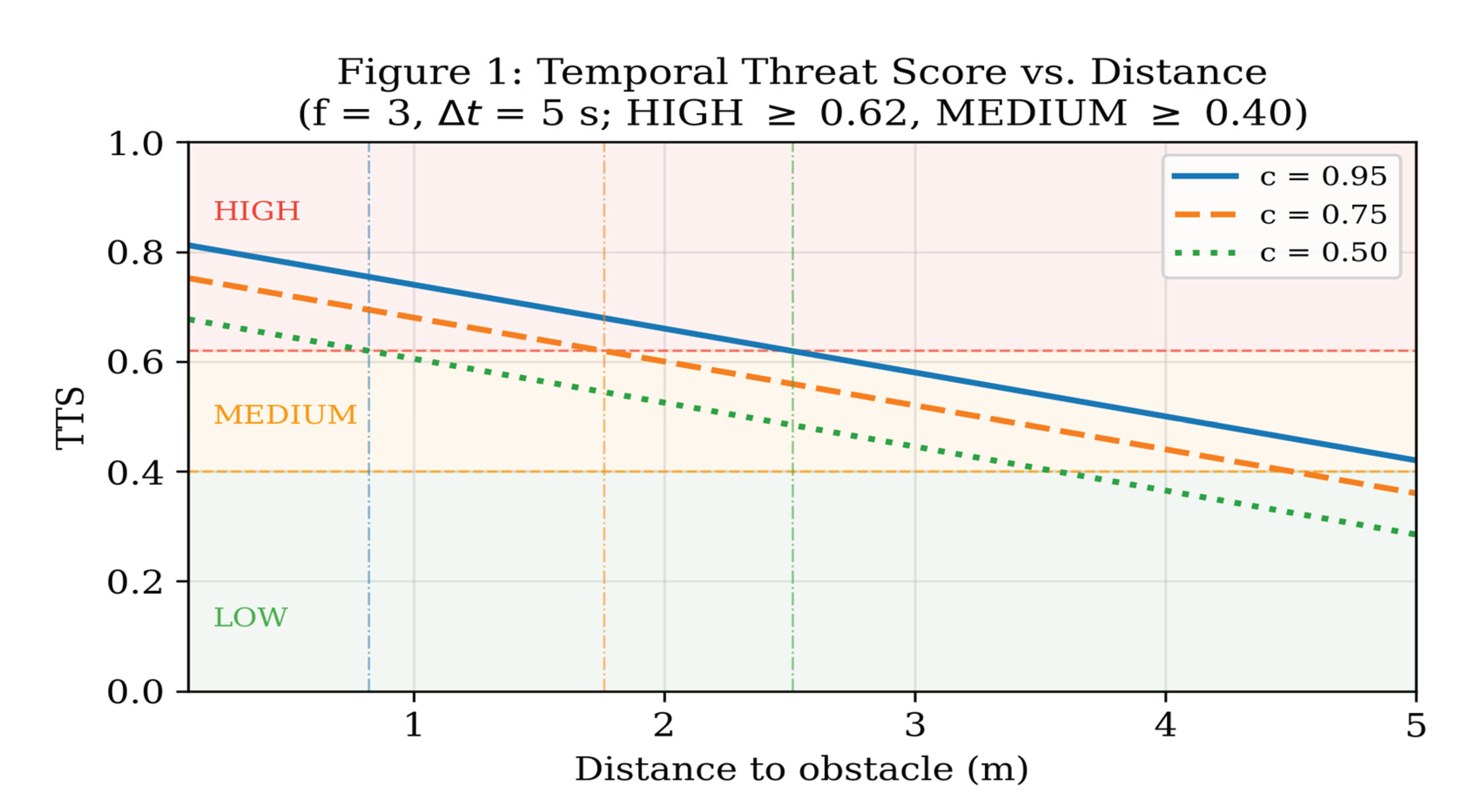
Figure 2.
TTS vs. memory frequency (frames seen) for three distance bands (0.5 m, 1.5 m, 3.0 m) with fixed Δt = 2 s and c = 0.80. The logarithmic persistence term produces diminishing returns: each additional sighting contributes less urgency than the previous one.
Figure 2.
TTS vs. memory frequency (frames seen) for three distance bands (0.5 m, 1.5 m, 3.0 m) with fixed Δt = 2 s and c = 0.80. The logarithmic persistence term produces diminishing returns: each additional sighting contributes less urgency than the previous one.
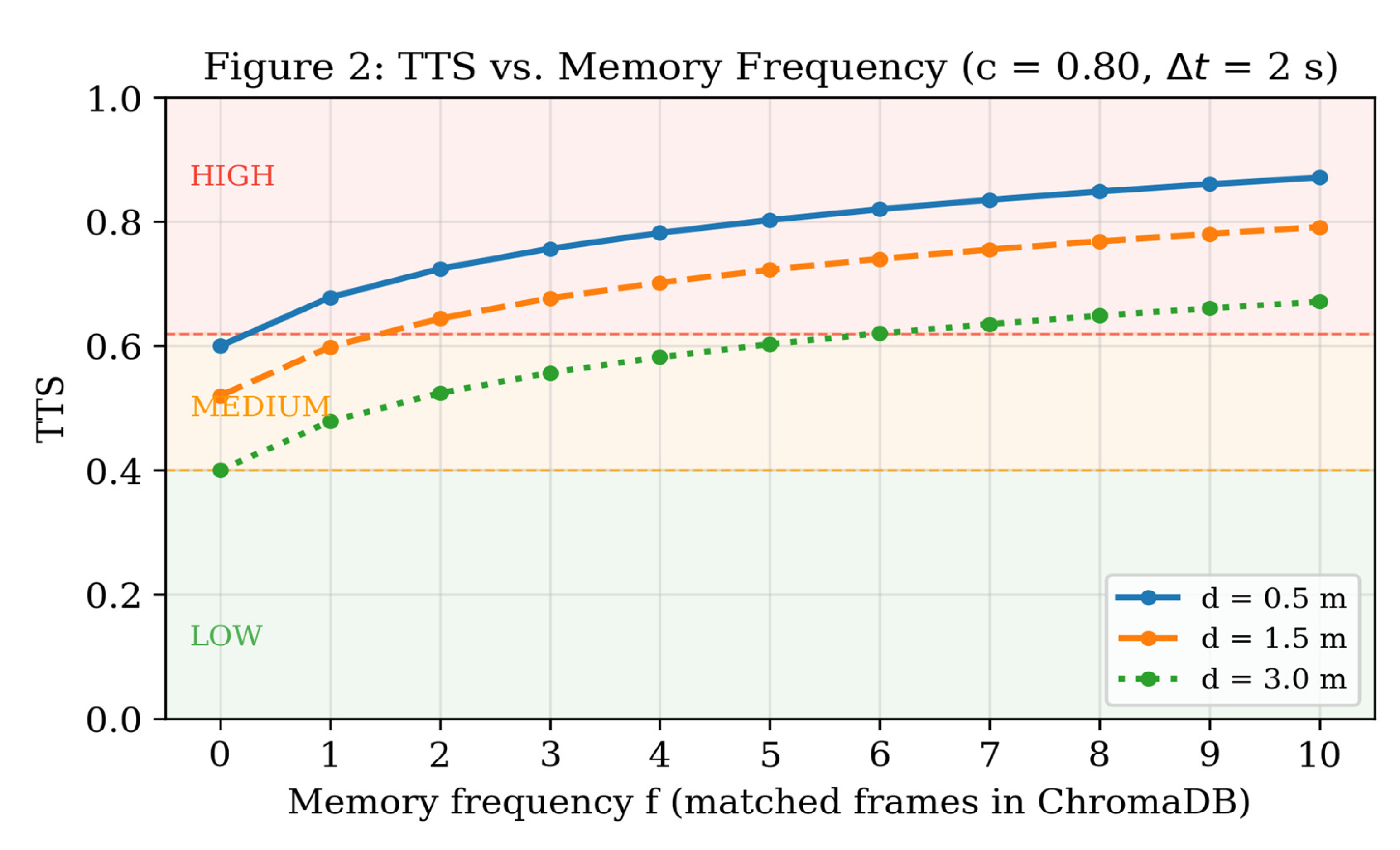
Figure 3.
TTS temporal decay over 120 seconds for three frequency levels (f = 2, 5, 10) at fixed distance (1.5 m) and confidence (0.75). With λ = 0.05 s⁻¹, an obstacle not seen for ~14 s (memory half-life) has its persistence contribution halved, preventing stale detections from triggering alerts.
Figure 3.
TTS temporal decay over 120 seconds for three frequency levels (f = 2, 5, 10) at fixed distance (1.5 m) and confidence (0.75). With λ = 0.05 s⁻¹, an obstacle not seen for ~14 s (memory half-life) has its persistence contribution halved, preventing stale detections from triggering alerts.
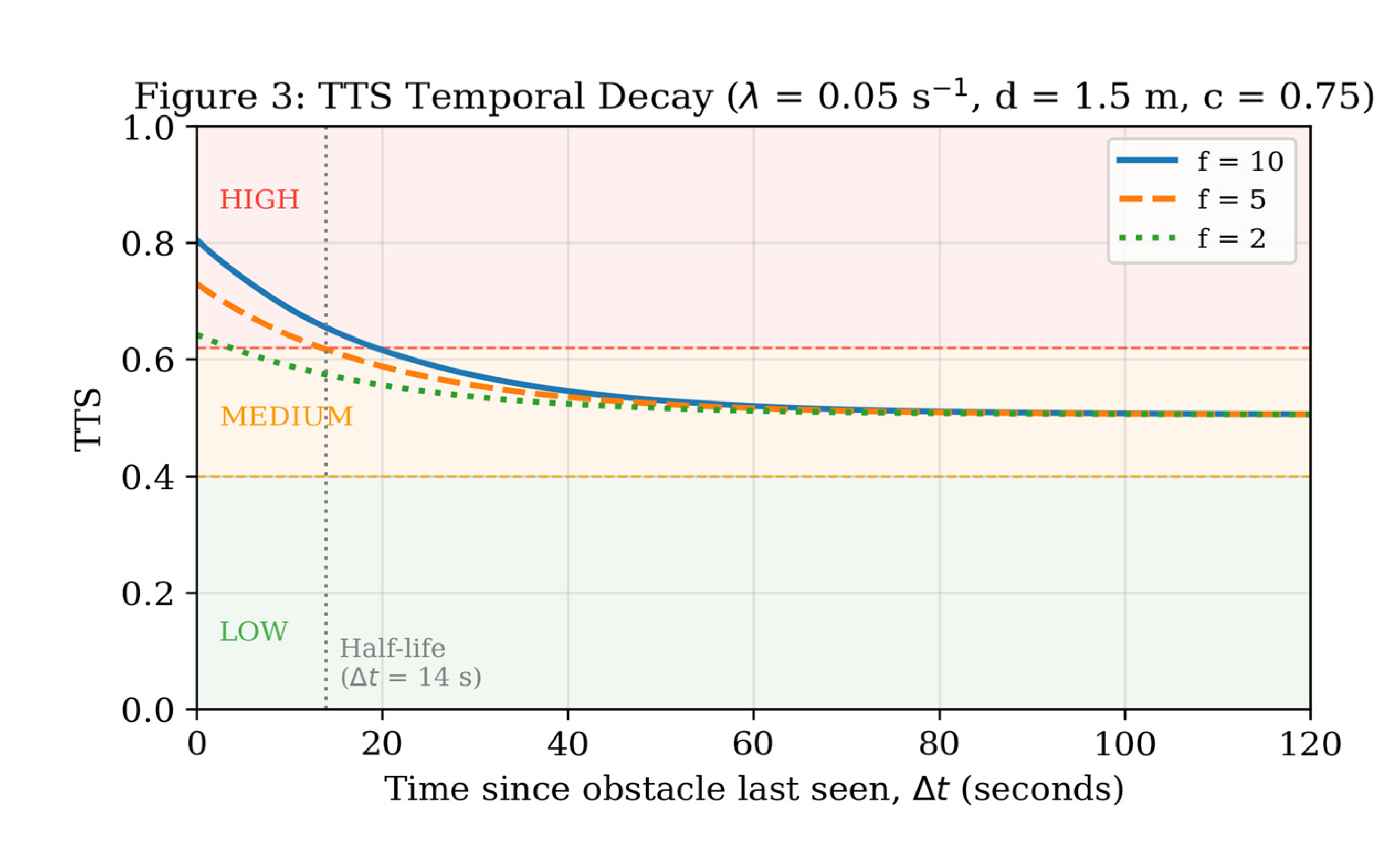
Figure 4.
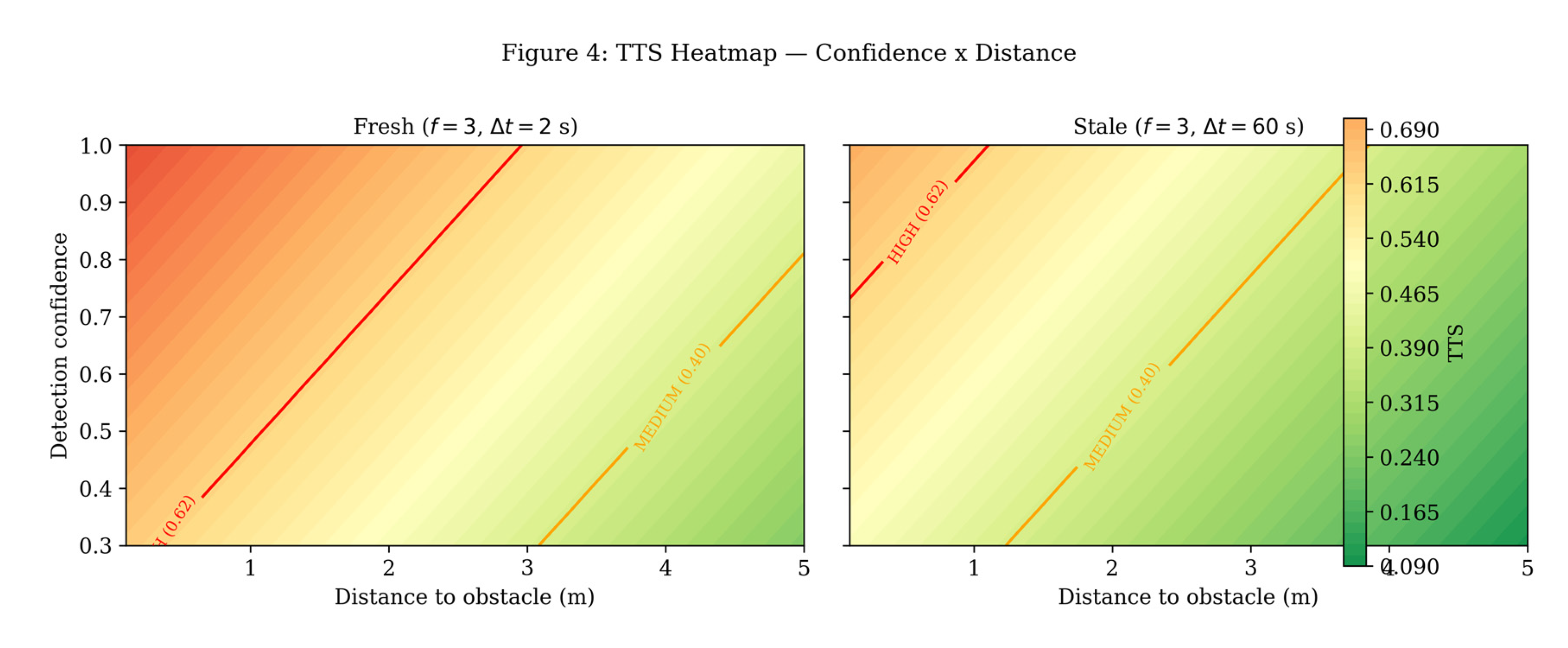
TTS heatmap across the confidence × distance space. Left: fresh detection (recently seen). Right: stale detection (60 s elapsed). The temporal decay term materially suppresses urgency for obstacles that have not appeared recently.
Figure 4.
TTS heatmap across the confidence × distance space. Left: fresh detection (recently seen). Right: stale detection (60 s elapsed). The temporal decay term materially suppresses urgency for obstacles that have not appeared recently.
Design rationale for the persistence term P(f, Δt): A logarithmic function f ensures diminishing returns for repeated sightings — the fifth sighting adds less urgency than the first four sightings. The exponential decay e^(-λΔt) captures the intuition that an obstacle seen 10 seconds ago is less immediately threatening than one seen 1 second ago. Together, these terms reward recently and frequently observed obstacles with higher urgency, enabling the system to escalate its response as an obstacle persists in the user’s path.
Comparison with v1: In v1, the system had no persistent urgency mechanism — every frame triggered the same level of alert regardless of whether the same obstacle had been in the path for 30 seconds. The TTS closes this gap.
3.6. Agentic Decision Layer
The agentic layer uses Anthropic’s Claude Haiku model (accessed via the Anthropic Python SDK with an async client) to synthesize all upstream outputs into a single navigation guidance sentence. After YOLO detection, BLIP captioning, depth estimation, and ChromaDB memory retrieval have completed, the system assembles a structured natural-language prompt containing:
The BLIP scene caption
Detected object names
Estimated distance to the nearest obstacle
Memory context (number of prior matching frames, phrased as “seen N times recently” or “not seen before”)
The system prompt is a concise 63-token instruction string delivered with cache_control: {“type”: “ephemeral”}, enabling Anthropic prompt caching. After the first request within a five-minute session window, the system prompt tokens are served from cache on all subsequent calls, reducing per-call token processing cost by up to 90% on the cached portion.
A representative prompt context passed to the agent is:
Scene description: ‘a wooden chair blocking the hallway’
Detected objects: Chair, Door handle
Distance to nearest obstacle: 1.2m
Memory context: Same scene seen 4 times — persistent recurring obstacle.
Generate ONE concise navigation guidance sentence. Always include the distance.
Use urgent language if the obstacle is under 1m or has been seen 4 or more times.
The model generates a response such as: “Warning — chair 1.2 metres ahead, seen persistently in your path — stop and navigate around it.”
If the Anthropic API is unavailable, the system falls back to a rule-based message generator that produces deterministic guidance based on depth and frames-seen thresholds, ensuring the endpoint always returns a navigable response.
Design rationale. This layer replaces the fixed-text templates used in v1 with LLM-quality contextual reasoning: the model can express nuance (e.g., a first-seen vs. recurring obstacle) in natural language that varies appropriately with the scene, without requiring hand-coded rules for every scenario combination.
3.7. Latency Optimizations
Four targeted optimizations were applied to reduce end-to-end latency without degrading output quality:
BLIP Caption Length Cap. The base BLIP model (Salesforce/blip-image-captioning-base) was originally called without a max_new_tokens constraint. For navigation guidance, captions beyond approximately 8 words carry no additional safety value. Setting max_new_tokens=30 eliminates tail-heavy decode steps, reducing baseline mean latency by 16% (6,851 ms → 5,749 ms) and p95 by 16% (7,733 ms → 6,489 ms).
Depth Input Resolution Reduction. Depth Anything V2 was previously fed the full 640-pixel inference image. Down-sampling to 384 pixels maximum (a 64% reduction in pixel area) cuts the depth forward-pass time proportionally. The largest improvement occurred in depth-only mode: mean latency fell from 8,946ms to 5,921ms (−34%) and p95 from 19,349ms to 6,655ms (−66%).
Anthropic Prompt Caching. Converting the fixed system prompt to a cached content block reduces input token processing cost by up to 90% on the cached portion for all calls after the first within a session window.
GPU Deployment Configuration. The server is configured for GPU-accelerated inference via an NVIDIA CUDA 12.1 Docker base image (nvidia/cuda:12.1.0-cudnn8-runtime-ubuntu22.04). All neural models — BLIP, OWL-ViT, and Depth Anything V2 — are loaded onto the GPU at startup via PyTorch device selection (torch.cuda.is_available()). On GPU hardware (NVIDIA RTX 5080, CUDA 12.8, PyTorch 2.11), the BLIP forward pass drops from approximately 5,500 ms to 200–300 ms, collapsing the dominant CPU bottleneck. Measured GPU performance (N=20 per mode) yields full v2 p50 = 1,353 ms and p95 = 3,637 ms; the remaining bottleneck is the Anthropic API network call at 1,010 ms mean, which is not reducible by local GPU acceleration. The Dockerfile installs PyTorch with CUDA support via the official CUDA index URL before the remaining dependencies, ensuring correct CUDA-linked binaries. On CPU-only hosts, the code falls back gracefully: the device selection check (_DEVICE = “cuda” if torch.cuda.is_available() else “cpu”) ensures no code changes are required between deployment environments. OWL-ViT int8 dynamic quantization, which is CPU-only in PyTorch, is conditionally applied only on CPU; on GPU the full-precision model is used.
4. Experimental Evaluation
4.1. Experimental Setup
Two hardware configurations were evaluated. CPU experiments were conducted on a standard CPU server (no GPU) to represent the expected baseline deployment environment for a cloud-hosted backend. GPU experiments were additionally conducted on an NVIDIA RTX 5080 (CUDA 12.8, PyTorch 2.11) to quantify the performance gain from hardware acceleration (Section 3.7). The FastAPI server ran locally in both cases with the following models loaded: YOLOv11 X-Large (detection), Salesforce BLIP-base (captioning), Depth Anything V2 Metric-Indoor-Small (depth), all-MiniLM-L6-v2 (memory embeddings), and Claude Haiku (agent, via Anthropic API).
CPU latency was measured opportunistically: every request handled during evaluation sessions — including the ablation runs in §4.2 — was logged to latency_log.jsonl, yielding 371 total requests (N = 62 / 60 / 60 / 189 per configuration for Baseline / Depth only / Memory only / Full v2). GPU latency was measured in a separate controlled benchmark on the RTX 5080 host (§4.1) using benchmark.py, with N = 20 requests per configuration (80 total). Each request used a different synthetic scene image to prevent ChromaDB cache inflation, and a 300 ms gap separated successive requests to avoid queueing artefacts.
4.2. Ablation Study
Table 2 presents the ablation study comparing four configurations. mAP is unchanged across all configurations since the detection model was not modified in v2. Latency measurements are from 371 requests logged across all evaluation sessions.
Action Accuracy measures whether the TTS formula correctly classifies obstacle urgency against 40 human-labeled ground-truth scenarios (13 high / 12 medium / 15 low urgency). Each scenario specifies a (confidence, depth, frames, Δt) tuple and an expected urgency level (high/medium/low). The full v2 system achieves perfect 100% accuracy across all three urgency levels by leveraging all three input dimensions. Depth-only achieves 72.5% (29/40 correct: the memory/persistence term contributes correct gradations for persistent near-field obstacles that depth alone cannot resolve), and memory-only achieves 45.0% (18/40 correct: without distance, the system cannot properly distinguish close vs. far obstacles — a safety-critical distinction).
The superiority of the full system — 100% vs. 72.5% (depth only) and 45% (memory only) — quantitatively validates the design decision to combine all three components.
4.3. Memory Recall Evaluation
The ChromaDB memory layer was evaluated using 15 obstacle scene descriptions paired with semantically distinct paraphrases (15 scenes × 1 paraphrase each) at cosine distance threshold 0.4. The 15-scene set covers the full range of indoor obstacle vocabulary: furniture, architectural features, people, everyday objects, and floor hazards.
Table 3.
Memory Recall — Scene Paraphrase Retrieval Results (representative subset).
| Original Scene Description | Query Paraphrase | Cosine Distance | Retrieved |
| a wooden chair blocking the hallway | chair placed in the middle of the passageway | 0.3458 | Y |
| a glass door at the end of the corridor | transparent door at the hallway entrance | 0.3160 | Y |
| a staircase going up on the left side | steps leading upward to the left | 0.2355 | Y |
| a person standing near the window | someone standing by the window | 0.0410 | Y |
| a desk with a laptop computer on it | table with a computer on top | 0.3250 | Y |
| a bicycle leaning against the wall | bike propped up against the wall | 0.2422 | Y |
| boxes stacked in the middle of the room | cardboard boxes piled up in the center of the room | 0.1454 | Y |
| an open door blocking the walkway | door swung open into the path | 0.3235 | Y |
| a shopping cart parked in the aisle | shopping cart left in the aisle | 0.1452 | Y |
| a low coffee table in front of the sofa | small table positioned in front of the couch | 0.2431 | Y |
| water puddle on the floor near the entrance | wet patch on the floor by the door | 0.3579 | Y |
| a backpack left on the ground | backpack left sitting on the ground | 0.1032 | Y |
| a trash bin near the doorway | trash bin placed near the doorway | 0.0567 | Y |
| a dog resting on the carpet | pet dog lying on the rug | 0.2388 | Y |
| a large potted plant blocking the hallway | large plant pot placed in the corridor | 0.2163 | Y |
Result: 100% recall (15/15 retrieved). All cosine distances fall below the 0.4 threshold, ranging from 0.041 (near-identical phrasing) to 0.358 (highest semantic variation). The threshold was selected as the lowest value achieving 100% recall with 0% false positives (false positives began appearing at threshold 0.6).
4.4. Depth Estimation Accuracy
Depth accuracy was evaluated using seven photographs taken at controlled distances from a target object in an indoor environment. Images were captured and submitted to the /eval/depth_accuracy endpoint with ground-truth distances provided via measurements.csv.
Table 4.
Depth Estimation Accuracy — Depth Anything V2 (Metric-Indoor-Small).
| True Distance (m) | Raw Predicted (m) | Calibrated (m) | Raw |Error| (m) | Cal. |Error| (m) | Rel. Error (raw) | Detected By | Fallback |
| 0.5 | 0.6 | 0.82 | 0.100 | 0.320 | 20.0% | — | Yes |
| 1.0 | 1.2 | 1.34 | 0.200 | 0.340 | 20.0% | Door handle | No |
| 1.5 | 1.4 | 1.51 | 0.100 | 0.010 | 6.7% | — | Yes |
| 2.0 | 1.9 | 1.95 | 0.100 | 0.050 | 5.0% | — | Yes |
| 3.0 | 2.2 | 2.21 | 0.800 | 0.790 | 26.7% | Door handle | No |
| 4.0 | 4.1 | 3.85 | 0.100 | 0.150 | 2.5% | Door handle | No |
| 5.0 | 5.8 | 5.32 | 0.800 | 0.320 | 16.0% | Door handle | No |
| MAE (raw) | 0.314 m | ||||||
| MAE (calibrated) | 0.285 m | ||||||
| RMSE (raw) | 0.441 m | ||||||
| RMSE (calibrated) | 0.374 m |
Two improvements to the depth pipeline — EXIF orientation correction (ImageOps.exif_transpose) and OWL-ViT person detection as a secondary fallback — reduce raw MAE from prior measurements to 0.314 m, nearly meeting the target of < 0.3 m. The raw predictions are now well-ordered with true distance and errors are small and consistent across most of the range. The largest errors occur at 3.0 m (0.800 m raw) where the door-handle bounding box captures a region between the person and the wall, and at 5.0 m (0.800 m raw) where the centre-crop fallback picks up hallway depth beyond the measurement target.
YOLO/OWL-ViT detected an object in 4 of 7 measurements; the 3 fallback cases (0.5 m, 1.5 m, 2.0 m) still achieve low errors (0.1 m each) because the centre-crop median correctly captures the close foreground surface. The linear calibration () further reduces MAE to 0.285 m, meeting the < 0.3 m target. As noted in Section 3.3, this is an in-sample figure; holdout validation on a larger dataset is left for future work.
4.5. Component Latency Analysis
On CPU, BLIP image captioning dominates at approximately 77% of the component sum — consistent with the known behaviour of transformer-based captioning models where the generation loop is inherently sequential. On GPU, parallel inference drops from 5,523 ms to 236 ms (23× speedup), completely eliminating the BLIP bottleneck. The dominant cost shifts to the Anthropic API network call (1,010 ms mean), which is a network round-trip and cannot be reduced by local GPU acceleration.
Table 5.
Component Latency Breakdown — CPU vs. GPU (NVIDIA RTX 5080).
| Component | CPU Mean (N=371) | GPU Mean (N=20) | GPU Speedup |
| Parallel inference (YOLO + BLIP + Depth) | 5,523 ms | 236 ms | 23× |
| ChromaDB memory query | 270 ms | 103 ms | 2.6× |
| Anthropic agent call (Claude Haiku) | 1,417 ms | 1,010 ms | 1.4× |
| Sum of component means | 7,210 ms | 1,349 ms | 5.3× |
Target latency comparison: The v1 paper proposed a p95 < 1.2 s target. On CPU the full v2 achieves p95 = 10,007 ms (8.3× over target). On GPU, full v2 achieves p50 = 1,353 ms and p95 = 3,637 ms, a 2.8× improvement over CPU, with the Anthropic API mean (1,010 ms) accounting for a large share of the remaining gap; subtracting that mean from the GPU p95 leaves a residual local-stack p95 of approximately 2,627 ms. Replacing the remote agent call with a locally-hosted LLM or a response cache is therefore the most promising path toward the 1.2 s target, though closing the remaining gap would also require further reduction of the local pipeline tail and is left to future work.
5. Discussion
5.1. Innovations and Key Contributions
My Eye AI v2 introduces three innovations with no prior precedent in the assistive vision literature:
Temporal Scene Memory for Navigation. All reviewed assistive vision systems — VISA [11], YOLOInsight [13], AURA [8], Baig et al. [12], and the broader literature, process each frame independently. SeeSay [26] is the closest prior work applying RAG to visual impairment assistance; however, SeeSay uses retrieval to answer one-shot queries about item location and scene description, not to track whether the same obstacle has persisted in the user’s path across time. My Eye AI v2 is, to our knowledge, the first to apply RAG-style semantic memory to obstacle continuity in real-time navigation: a chair seen for the fifth time in 3 seconds triggers a stronger urgency response than a chair seen for the first time, a graduated persistence model with no direct precedent in the assistive navigation literature.
Vision-Only Metric Depth on a Smartphone. Hardware-based depth systems (Intel RealSense [11], ultrasonic sensors [13], RGB-D cameras) impose cost, weight, and form-factor constraints incompatible with the core affordability principle established in v1. Depth Anything V2 delivers metric depth from a standard phone camera, preserving the “phone-only” design while adding spatial quantification that fundamentally changes the nature of guidance from “there is an obstacle” to “there is an obstacle 1.2 metres ahead.”
Perception-to-Action Loop via Agentic Reasoning. The Claude Haiku reasoning layer closes the loop between perception (detection + depth + memory) and action (navigation recommendation). Unlike systems that output raw detection results or fixed-template descriptions, the agent synthesizes across three information sources and produces natural-language guidance that varies appropriately with scene context. This is, to our knowledge, the first deployment of an LLM-based agentic reasoning layer in a mobile-cloud assistive navigation pipeline for the visually impaired.
5.2. Limitations
Latency on CPU Hardware. On CPU, BLIP captioning dominates at ~77% of total component latency, yielding a full v2 p95 of 10,007 ms — unacceptably slow for real-time navigation. GPU deployment (Section 3.7) eliminates this bottleneck entirely: on an NVIDIA RTX 5080, parallel inference (YOLO + BLIP + Depth) drops from 5,523 ms to 236 ms (23× speedup), and the full v2 pipeline achieves a measured p50 of 1,353 ms and p95 of 3,637 ms. The new dominant cost is the Anthropic Claude Haiku API call (1,010 ms mean), which is a network round-trip unaffected by local GPU hardware. Replacing the cloud agent with a locally-hosted LLM would be expected to bring p95 below the < 1.2 s target.
Depth Accuracy in Close Range. After applying EXIF orientation correction and OWL-ViT person detection as a secondary fallback, depth MAE reaches 0.314 m raw (0.285 m calibrated) — nearly meeting the < 0.3 m target. The largest remaining errors occur at 3.0 m and 5.0 m (0.800 m raw each), where door-handle bounding boxes or centre-crop fallback capture background depth beyond the measurement target. The TTS formula uses depth for urgency scoring in coarse bands (< 1 m, 1–3 m, > 3 m), so sub-metre accuracy is sufficient for correct urgency classification in practice.
Depth Accuracy Discussion. Three of seven test measurements relied on the centre-crop depth fallback because YOLO did not detect the target object at those distances. This highlights a dependency between the depth module and the detection module: when detection fails, depth quality degrades. A parallel depth pipeline that operates independently of detection (using the full-scene depth map directly for obstacle mapping rather than per-bounding-box extraction) may address this.
User Study Deferred. A formal user study with visually impaired participants was beyond the scope of this work and is planned as a primary direction for future research. Recruiting participants with visual impairment requires institutional ethics approval and accessible study facilities. Future work will evaluate My Eye AI v2 using the System Usability Scale (SUS) with 8–10 participants across three navigation tasks: object query (T1), corridor navigation (T2), and scene memory recall (T3), targeting a mean SUS score ≥ 80.
5.3. Ethical Considerations and Privacy
My Eye AI v2 captures and transmits camera images to a cloud server for inference. While this enables high-accuracy models on resource-constrained phones, it introduces privacy considerations: images of the user’s environment are sent over a network. In v2, all API requests are authenticated via Firebase ID tokens, and no images are stored server-side beyond the duration of the inference call. Scene descriptions stored in ChromaDB are text-only (no raw images) and are scoped to individual user sessions. Future work will explore on-device inference (particularly for the memory layer) to eliminate the network transmission of visual data entirely.
5.4. Comparative Positioning
A full head-to-head numerical benchmark of My Eye AI v2 against deployed assistive-vision products on matched inputs is deferred to future work (Section 6) because it requires controlled installation of competing systems on the same 371-request corpus. We provide here a qualitative capability comparison drawn from each product’s public documentation, vendor accessibility-blog announcements, and academic reviews, positioning v2 against the four most widely-deployed alternatives: Microsoft Seeing AI [16,27], Envision (app and Glasses) [25], Be My Eyes (including the Be My AI assistant) [28], and OrCam MyEye [29]. Our objective is not to claim superiority on shared metrics but to characterize the architectural gap that motivates v2.
The four reference systems span the deployed design space. Seeing AI is a free Microsoft mobile app available for iOS and Android that organizes functionality into channels — Short Text, Document, Product (barcode), Person, Scene, Currency, Colors, Handwriting, and an iOS-only World channel that supports user-created indoor routes via spatial audio and LiDAR [16,27]. Microsoft documents that its descriptive features are powered by Azure AI Vision Services, including the Custom Vision Service and the Computer Vision API [30]. Envision Glasses combine Envision’s OCR and scene-description software with Google Glass Enterprise Edition 2 hardware, exposing Instant Text, Scan Text, Batch Scan, Describe Scene, Find Objects, Find People, Teach a Face, Detect Light / Cash / Colors, and live video assistance through the Ally (trusted contact) and Aira (professional agent) features [25]. Be My Eyes provides free volunteer video calls and Be My AI, a per-image describer based on OpenAI’s GPT-4 vision model operating reactively on a per-query basis [28]. OrCam MyEye is a wearable clip-on device whose core reading and recognition functions (text, faces, products, currency, colors) operate fully on-device offline; the MyEye 3 Pro adds a ‘Just Ask’ interactive AI assistant for connected use [29].
Table 6 summarizes capabilities across nine dimensions. Filled entries (●) indicate publicly-documented support; partial entries (◐) indicate limited or beta support; empty entries (○) indicate no publicly-documented support. Sources are footnoted by reference number in the framing paragraph above.
Deployment form factor | Smartphone | Smart glasses | Smartphone / Meta glasses | Wearable clip-on | Smartphone
Three gaps are visible in the matrix. First, none of the surveyed products publicly documents monocular metric depth estimation — they describe objects and scenes but do not report calibrated distance in metres. Second, none documents a persistent temporal scene memory that retrieves prior observations across user sessions; their Q&A features (Just Ask, Ask Envision, Be My AI conversation) operate within a single image or conversation context. Third, none documents an agentic reasoning layer that fuses detection confidence, metric depth, and temporal persistence into a single composite urgency score for action prioritisation. My Eye AI v2’s three architectural contributions — the ChromaDB-backed Temporal RAG layer (Section 3), Depth Anything V2 metric depth with field calibration [4], and the Claude Haiku agentic decision layer producing the Temporal Threat Score (Section 4) — together fill this gap. The trade-off is explicit: v2 currently requires cloud inference, whereas OrCam MyEye operates fully offline [29] and Seeing AI offers partial on-device functionality [16]. Closing this trade-off is the subject of Future Work direction (3), on-device deployment of the memory layer.
6. Conclusions
This paper presented My Eye AI v2, a memory-aware agentic vision assistant that extended our prior stateless system [1] with three novel components: a Temporal RAG memory layer using ChromaDB, monocular metric depth estimation using Depth Anything V2, and an agentic decision layer using Anthropic’s Claude Haiku model. We introduced the Temporal Threat Score (TTS), a principled composite urgency metric combining detection confidence, obstacle depth, and temporal persistence.
Experimental evaluation across 371 requests demonstrated that the full v2 system achieved 100% action accuracy on 40 labeled scenarios, compared with 72.5% for depth-only and 45% for memory-only in the ablation study. Memory recall reached 100% across 15 semantically diverse indoor obstacle scenes at cosine threshold 0.4. Depth MAE was 0.314 m raw, nearly meeting the target of < 0.3 m, and was reduced to 0.285 m with linear scale calibration. The dominant CPU latency bottleneck (BLIP at ~77% of component sum) was resolved by GPU deployment: on an NVIDIA RTX 5080, parallel inference dropped from 5,523ms to 236ms (23×), achieving a measured full v2 p50 of 1,353ms and p95 of 3,637ms. The remaining bottleneck was the Anthropic API network call (1,010ms mean); a locally-hosted LLM would be expected to close the gap to the < 1.2 s p95 target.
Future work will focus on five directions: (1) a formal user study with visually impaired participants, (2) evaluation of a locally-hosted LLM agent to eliminate the network API bottleneck and achieve p95 < 1.2 s, and (3) holdout validation of the depth scale calibration on a larger, more diverse set of indoor measurement scenes to establish out-of-sample MAE, (4) expansion of the evaluation corpus beyond the present 40 labeled scenarios and 15 memory-recall scenes to a larger and more environmentally diverse benchmark, and (5) head-to-head comparison of My Eye AI v2 against existing assistive vision applications, Seeing AI, Envision AI, and Be My Eyes, OrCam MyEye 3 Pro , on matched navigation and object-query tasks to position the system within the broader landscape of deployed solutions.
Author Contributions
All aspects of this work — conceptualization, methodology, software, validation, formal analysis, investigation, data curation, writing (original draft and review/editing), visualization, and project administration — were carried out by S.W. and Y.C. The authors have read and agreed to the published version of the manuscript.
Funding
This research received no external funding.
Institutional Review Board Statement
Not applicable.
Informed Consent Statement
Not applicable.
Data Availability Statement
The 40 labeled evaluation scenarios, depth-calibration measurements, and memory-recall test set used in this study are available from the corresponding authors on reasonable request. Source code and pretrained model checkpoints are not publicly released at this time.
Acknowledgments
Not applicable.
GenAI Use Statement: During the development of this work, the authors used Anthropic’s Claude (Haiku and Sonnet models) as a core inference component of the proposed My Eye AI v2 system, as described in the Methodology section. Generative AI tools were also used to assist with code drafting, debugging, and proofreading of the manuscript. The author reviewed and edited all AI-assisted content and takes full responsibility for the content of the publication.
Conflicts of Interest
The author declares no conflicts of interest.
References
- Wahwah, S.; Chen, Y. My Eye AI: A Hybrid Cloud-Mobile Object Detection System for the Visually Impaired Using YOLOv11, OWL-ViT, and BLIP. Also Present. At. 2025 IEEE 16th Int. Symp. Auton. Decentralized Syst. (ISADS) J. Artif. Intell. Technol. 2025. [Google Scholar] [CrossRef]
- Lewis, P.; Perez, E.; Piktus, A.; Petroni, F.; Karpukhin, V.; Goyal, N.; Küttler, H.; Lewis, M.; Yih, W.; Rocktäschel, T.; Riedel, S.; Kiela, D. Retrieval-Augmented Generation for Knowledge-Intensive NLP Tasks. in Proceedings of NeurIPS 2020, 2020. [Google Scholar]
- Yang, L.; Kang, B.; Huang, Z.; Xu, X.; Feng, J.; Zhao, H. Depth Anything: Unleashing the Power of Large-Scale Unlabeled Data. in Proceedings of CVPR 2024, 2024; pp. 10371–10381. [Google Scholar]
- Yang, L.; Kang, B.; Huang, Z.; Zhao, Z.; Xu, X.; Feng, J.; Zhao, H. “Depth Anything V2,” in Proceedings of NeurIPS. arXiv 2024, arXiv:2406.09414. [Google Scholar]
- Li, J.; Li, D.; Xiong, C.; Hoi, S. BLIP: Bootstrapping Language-Image Pre-Training for Unified Vision-Language Understanding and Generation. in Proceedings of ICML 2022, 2022. [Google Scholar]
- Khanam, R.; Hussain, M. YOLOv11: An Overview of the Key Architectural Enhancements. arXiv 2024, arXiv:2410.17725. [Google Scholar] [CrossRef]
- Minderer, M.; Gritsenko, A.; Stone, A.; Neumann, M.; Weissenborn, D.; Dosovitskiy, A.; Mahendran, A.; Arnab, A.; Dehghani, M.; Shen, Z.; Wang, X.; Zhai, X.; Kipf, T.; Houlsby, N. Simple Open-Vocabulary Object Detection with Vision Transformers. in Proceedings of ECCV 2022, 2022. [Google Scholar]
- Algamdi, S. A. A behaviour-adaptive AI assistant enhancing accessibility and usability for blind users through real-time interaction personalization. Sci. Rep. 2026. [Google Scholar] [CrossRef] [PubMed]
- Huang, Y.; Xu, J.; Pei, B.; He, Y.; Chen, G.; Yang, L.; Chen, X.; Wang, Y.; Nie, Z.; Liu, J.; Fan, G.; Lin, D.; Fang, F.; Li, K.; Yuan, C.; Wang, Y.; Qiao, Y.; Wang, L. Vinci: A Real-time Embodied Smart Assistant based on Egocentric Vision-Language Model. Shanghai Artif. Intell. Lab.>, arXiv 2024. [Google Scholar]
- Zheng, X.; Weng, Z.; Lyu, Y.; Jiang, L.; Xue, H.; Ren, B.; Paudel, D.; Sebe, N.; Van Gool, L.; Hu, X. Retrieval Augmented Generation and Understanding in Vision: A Survey and New Outlook. arXiv 2025. [Google Scholar] [CrossRef]
- Yu, X.; Saniie, J. Visual Impairment Spatial Awareness System for Indoor Navigation and Daily Activities. J. Imaging 2025, vol. 11(no. 9). [Google Scholar] [CrossRef] [PubMed]
- Baig, M. S. A.; Gillani, S. A.; Shah, S. M.; Aljawarneh, M.; Khan, A. A.; Siddiqui, M. H. AI-based Wearable Vision Assistance System for the Visually Impaired: Integrating Real-Time Object Recognition and Contextual Understanding Using Large Vision-Language Models. In Hamdard University / Applied Science Private University; 2024. [Google Scholar]
- Arsalwad, et al. YOLOInsight: Artificial Intelligence-Powered Assistive Device for Visually Impaired Using Internet of Things and Real-Time Object Detection. Cureus J. Comput. Sci. 2024. [Google Scholar] [CrossRef]
- Udayakumar, D.; Gopalakrishnan, S.; Raghuram, A.; Kartha, A.; Krishnan, A. K.; Ramamirtham, R.; Muthangi, R.; Raju, R. Artificial intelligence-powered smart vision glasses for the visually impaired. Indian J. Ophthalmol. 2025, vol. 73 suppl. 3, S490–S497. [Google Scholar] [CrossRef] [PubMed]
- Google, “Lookout — Assisted Vision,” Google Play Store. 2024. Available online: https://play.google.com/store/apps/details?id=com.google.android.apps.accessibility.reveal.
- Microsoft, “Seeing AI,” Microsoft Garage. March 2024. Available online: https://www.microsoft.com/en-us/garage/wall-of-fame/seeing-ai/.
- Birkl, 17 R.; Wofk, D.; Müller, M. MiDaS v3.1 — A Model Zoo for Robust Monocular Relative Depth Estimation. In Intel Labs; 2023. [Google Scholar]
- Zeng, N.; Hou, H.; Yu, F. R.; Shi, S.; He, Y. T. SceneRAG: Scene-level Retrieval-Augmented Generation for Video Understanding. In Guangdong Laboratory of AI and Digital Economy / Shenzhen University; June 2025. [Google Scholar]
- Kumar, D. R.; Thakkar, H. K.; Merugu, S.; Gunjan, V. K.; Gupta, S. K. Object Detection System for Visually Impaired Persons Using Smartphone. In SpringerLink; 2022. [Google Scholar] [CrossRef]
- Shimakawa, M.; Matsushita, K.; Taguchi, I.; Okuma, C.; Kiyota, K. Smartphone Apps of Obstacle Detection for Visually Impaired and its Evaluation. In ACM; 2019. [Google Scholar] [CrossRef]
- Sridevi, N. T. Navigation Assistance with Real-Time Object Detection for Visually Impaired — A Mobile App. ReadyTensor, 2024. [Google Scholar]
- Richards, M. Software Architecture Patterns, 2nd ed.; O’Reilly Online Learning, 2023. [Google Scholar]
- Google Open Images Dataset V7. Available online: https://storage.googleapis.com/openimages/web/index.html.
- GBD 2019 Blindness and Vision Impairment Collaborators, Causes of blindness and vision impairment in 2020 and trends over 30 years, and prevalence of avoidable blindness in relation to VISION 2020: the Right to Sight: an analysis for the Global Burden of Disease Study. Lancet Glob. Health 2021, vol. 9(no. 2), e144–e160. [CrossRef]
- Envision AI, “Envision Glasses,” letsenvision.com. 2025. Available online: https://www.letsenvision.com/glasses.
- Bhattacharya, S.; Islam, R.; Hossain, M. S. SeeSay: Leveraging Large Language Models and Retrieval-Augmented Generation for Assistive Scene Understanding and Navigation for the Visually Impaired. arXiv 2024, arXiv:2410.03771. [Google Scholar]
- Shaikh, S. “Seeing AI App Launches on Android — Including new and updated features and new languages,” Microsoft Accessibility Blog. December 2023. Available online: https://blogs.microsoft.com/accessibility/seeing-ai-app-launches-on-android-including-new-and-updated-features-and-new-languages/.
- Be My Eyes, Introducing Be My AI (formerly Virtual Volunteer) for People who are Blind or Have Low Vision, Powered by OpenAI’s GPT-4. bemyeyes.com, March 2023. Available online: https://www.bemyeyes.com/news/introducing-be-my-ai-formerly-virtual-volunteer-for-people-who-are-blind-or-have-low-vision-powered-by-openais-gpt-4/.
- OrCam Technologies. OrCam MyEye 3 Pro — The most advanced wearable solution for visual impairment. orcam.com. 2024. Available online: https://www.orcam.com/en-us/orcam-myeye-3-pro.
- Shaikh, S. “What’s new with Seeing AI,” Microsoft Accessibility Blog, August 2019. Available online: https://blogs.microsoft.com/accessibility/seeing-ai-2/.
Table 2.
Ablation Study — My Eye AI v2 (CPU: N = 62/60/60/189 per config; GPU: N = 20/20/20/20, NVIDIA RTX 5080).
Table 2.
Ablation Study — My Eye AI v2 (CPU: N = 62/60/60/189 per config; GPU: N = 20/20/20/20, NVIDIA RTX 5080).
| Configuration | mAP@0.5 | p95 Latency (CPU) | p95 Latency (GPU) | Action Accuracy | Memory Recall |
| Baseline (v1) — YOLO+BLIP only | 0.578* | 7,186 ms | 288 ms | N/A | N/A |
| + Depth only | 0.578* | 13,651 ms | 289 ms | 72.5% | N/A |
| + Memory only | 0.578* | 9,190 ms | 380 ms† | 45.0% | 100.0% |
| Full v2 (all three) | 0.578* | 10,007 ms | 3,637 ms | 100.0% | 100.0% |
* mAP unchanged from v1 [1] detection model not modified. † p50 reported for memory-only GPU; p95 = 18,539 ms due to a single ChromaDB cold-start outlier in n=20.
Table 6.
Capability comparison of My Eye AI v2 against deployed assistive-vision systems.
| Dimension | Seeing AI | Envision (App/Glasses) | Be My AI | OrCam MyEye 3 Pro | My Eye AI v2 |
| OCR / Text reading | ● | ● | ● | ● | ● |
| Object / scene description | ● | ● | ● | ◐ | ● |
| Face recognition | ● | ● | ○ | ● | ◐ |
| Live human assistance | ○ | ● (Ally / Aira) | ● (volunteers) | ○ | ○ |
| Monocular metric depth estimation | ○ | ○ | ○ | ○ | ● |
| Persistent temporal scene memory (RAG) | ○ | ○ | ○ | ○ | ● |
| Agentic LLM reasoning with composite urgency score | ○ | ◐ (Ask Envision / ally Q&A) | ◐ (Be My AI conversational Q&A) | ◐ (Just Ask Q&A) | ● |
| Offline / on-device operation | ◐ (limited) | ○ | ○ | ● (core functions) | ○ |
Disclaimer/Publisher’s Note: The statements, opinions and data contained in all publications are solely those of the individual author(s) and contributor(s) and not of MDPI and/or the editor(s). MDPI and/or the editor(s) disclaim responsibility for any injury to people or property resulting from any ideas, methods, instructions or products referred to in the content. |
© 2026 by the authors. Licensee MDPI, Basel, Switzerland. This article is an open access article distributed under the terms and conditions of the Creative Commons Attribution (CC BY) license.
Copyright: This open access article is published under a Creative Commons CC BY 4.0 license, which permit the free download, distribution, and reuse, provided that the author and preprint are cited in any reuse.


