

Submitted:
30 January 2026
Posted:
02 February 2026
You are already at the latest version
Abstract
Predefined, user-independent gesture sets do not account for individual differences in movement patterns and physical limitations. This study presents a personalized wrist–forearm static gesture recognition system for human–computer interaction (HCI) using the Vicara Kai™ wearable controller and a convolutional neural network (CNN). Unlike the system based on fixed, predefined gestures, the proposed approach enables users to define and train their own gesture sets. During gesture recording, users may either select a gesture pattern from a predefined prompt set or create their own natural, unprompted gestures. A dedicated software framework was developed for data acquisition, preprocessing, model training, and real-time recognition. The developed system was evaluated by optimizing the parameters of a lightweight CNN and examining the influence of sequentially applied changes to the input and network pipelines, including resizing the input layer, applying data augmentation, experimenting with different dropout ratios, and varying the number of learning samples. The performance of the resulting network setup was assessed using confusion matrices, accuracy, and precision metrics for both original gestures and gestures smoothed using the cubic Bézier function. The resulting validation accuracy ranged from 0.88 to 0.94, with an average test-set accuracy of 0.92 and macro precision of 0.92. The system's resilience to rapid or casual gestures was also evaluated using the receiver operating characteristic (ROC) method, achieving the Area Under Curve (AUC) of 0.97. The results demonstrate that the proposed approach achieves high recognition accuracy, indicating its potential for a range of practical applications.
Keywords:
personalized gesture recognition
; Vicara Kai controller
; convolutional neural networks
1. Introduction
Human-computer interaction (HCI) has been a prominent research area over the past few decades, with a growing number of studies published each year and a broad range of applications [1,2]. As software and hardware have evolved, HCI solutions have progressed from 2D, pointer-based graphical interfaces to modern wireless systems [3]. In parallel, advances in sensing devices and their increasing availability have expanded the set of modalities to include touch, gestures, eye tracking, body movements, biosignals, and more [4]. Together, these have created new opportunities to study and design more useful, efficient, and personalized interaction frameworks.
Among other modalities, gestures are the most natural form of communication, making them a valuable means of interaction with digital systems [5]. Gestures enable contactless operation, unrestricted movement, and a strong sense of presence in immersive environments [6]. With the wide range of sensing and tracking hardware available today, many types of gestures can be considered, such as static hand poses; hand, arm, or wrist movements recorded as simple paths represented as primitive shape images; or staged, discrete paths represented by vector trajectories [3,7,8,9]. Going beyond hand gestures, full-body postures and movements, including micro-movements, can also be interpreted as gestures, further expanding the range of methods and their potential applications [10].
Captured gesture data can be static or dynamic, and systems can use them independently or in combination [11,12,13]. Static data lacks temporal information; therefore, the input for static methods typically includes images, depth data, gesture-trail images, spatial coordinates, radar images, and other relevant data. Dynamic methods usually combine static data with temporal information, most commonly with the timestamps of captured frames, and organize the collected frames into temporally ordered sequences for further analysis.
Gesture recognition also involves two contrasting training and inference strategies: the first is user-independent [14,15,16,17], in which a single model is trained on multiple datasets from various users. The second is a user-specific strategy in which many models are trained separately for each user [6,18,19,20,21]. The second approach enables more flexible and personalized communication, which is important when users have different skills, abilities, or even disabilities [22].
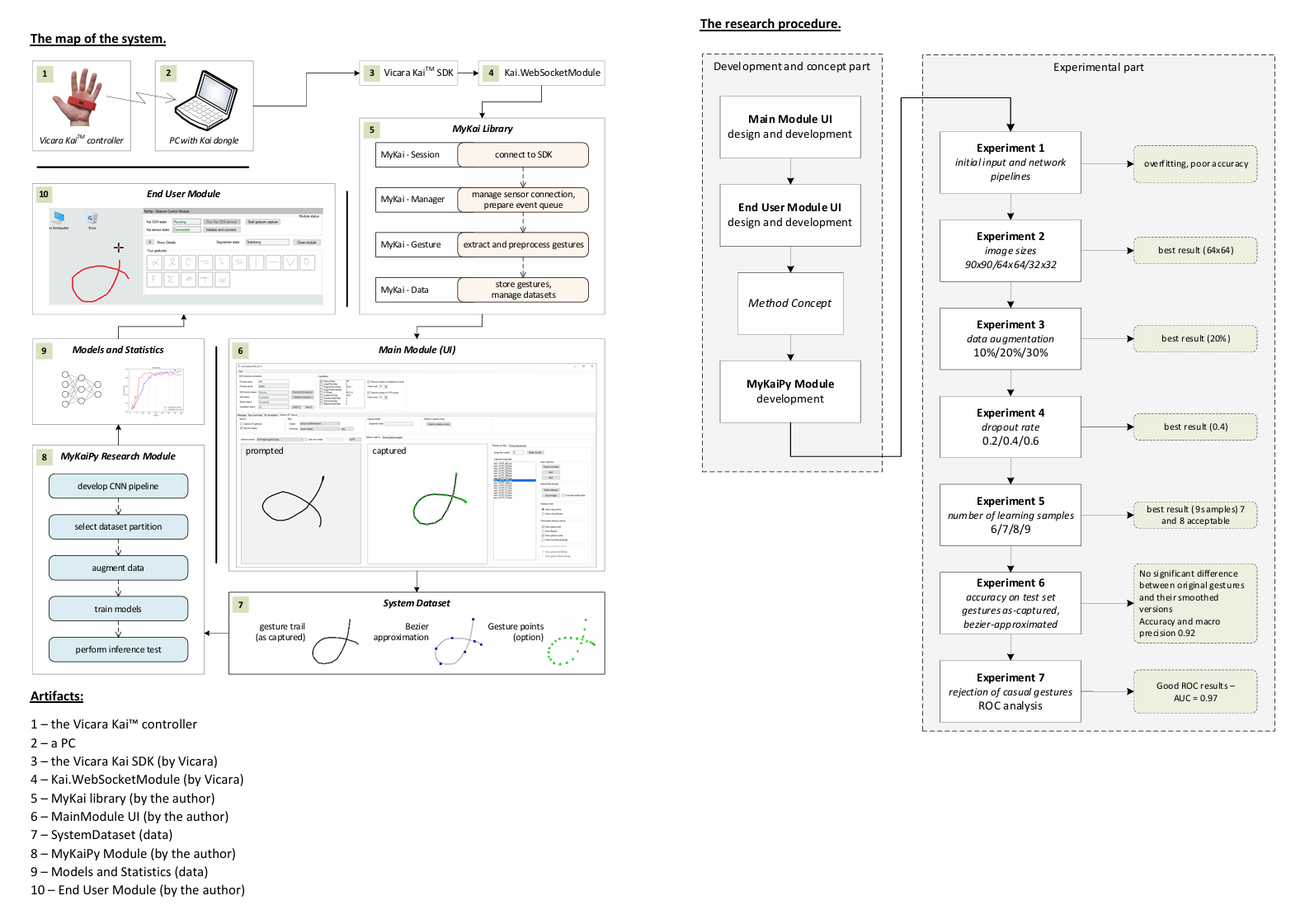
The aim of this study was to design, develop, and evaluate a software research framework for static in-air two-dimensional (2D) stroke-based wrist-forearm personalized gesture recognition using convolutional neural networks (CNNs) and the Vicara KaiTM wearable controller. The target gestures are stored as binary images consisting of linear segments connecting points scanned by the capture device. The environment includes the controller purchased with its SDK (KaiSDK) and the Kai.WebsocketModule (a NuGet module from Vicara). The author’s contributions include a specialized MyKai.dll library; the Main Module (a UI WindowsTM application written in the .NET Framework); the dataset; a research-oriented Python component (MyKaiPy); the models and statistics database; and, finally, the End User Module (UI). The primary functions of the framework are to capture gestures, perform learning and inference processes, evaluate the system, and optimize the convolutional network. In addition, the software supports scanning incoming controller messages, profiling the UI modules, and configuring their vital parameters. The system was evaluated using 1,125 directly captured gesture trails (5 individuals * 15 classes * 15 samples) and 1,125 images of the gestures, smoothed using unions of cubic Bézier curves. The dataset includes 100 rapid, casual gestures that can occur randomly during gesture capture and that the system should reject. The research procedure involved developing a lightweight CNN architecture, determining the image size, applying augmentations, setting the dropout rate, optimizing the number of learning samples (critical for personalized approaches), evaluating recognition performance on a test set, and examining the system’s robustness against non-gesture or casual inputs using receiver operating characteristic (ROC) curve analysis.
1.1. Related Work
This section briefly summarizes recent related work on gesture recognition systems. Given the domain’s highly diverse landscape, the review covers static, dynamic, and mixed approaches across various system types. It includes studies on hand movements — referred to in the literature as mid-air or air-drawn gestures — and gesture poses. Similarly, the different devices used to capture hand movements are considered. Overall, the cited works align with at least one feature of the approach presented in this study.
The authors of [18] (Lin et al.) proposed a dynamic personalization approach for hand-gesture recognition using data collected during 2D game navigation controlled by a META sEMG wristband. Their method employed a multi-armed bandit algorithm to personalize gesture recognition for each user using online, user-specific data collected during gameplay. The results demonstrated that the personalized model improved accuracy and allowed some participants who had initially failed the baseline (user-independent) model to succeed. System performance was assessed using the false navigation percentage metric, which was significantly reduced. Additionally, user experience statistics, such as self-reported feelings of success and frustration, indicated an improved user experience following fine-tuning sessions.
In [19], Xu et al. investigated how to enable user-defined hand gesture customization on a wrist-worn device without degrading existing gesture recognition performance (in their work, gestures corresponded to hand poses). As part of the presented approach, the authors first collected a large-scale dataset of accelerometer and gyroscope data to train a robust, user-independent gesture recognition model that achieved high accuracy while remaining resilient to non-gesture (casual) movements. Using this pre-trained model, the authors developed a customization framework that enabled users to add their own gestures. The framework was evaluated using 12 novel gestures of 20 participants, showing that new gestures can be learned with high accuracy while maintaining the performance of the original hand posture set. The study also examined usability, demonstrating that users could successfully create and use custom gestures with minimal effort and subjective satisfaction.
The study by Wang et al. [20], similar to the previously summarized work, explores hand poses in the context of gesture personalization. The paper presents a camera-based system that allows users to define their own gestures and map them to textual inputs. The authors investigated the challenge of variation in gesture styles, which limits the effectiveness of user-specified gesture datasets. In their approach, gestures are personalized using a lightweight Multilayer Perceptron (MLP) trained on a particular user’s data. The study poses two questions. The first addresses the feasibility of training a neural network with a small dataset, and the second examines user acceptance of the developed interface, including those without a technical background. To evaluate the answers, the authors developed a UI-based system capable of detecting and recognizing hand gestures represented by the hand skeleton, including 21 points, whose coordinates were used to train three models: a 3-layer MLP with Sparse Categorical Crossentropy (SCC) loss function, a double 3-layer MLP with SCC, and a double 3-layer MLP with Contrastive Loss (CL) function. The third solution achieved the best performance, with 98.48% accuracy and a loss of 0.0430 after 369 epochs across 6 learning gestures. The second part of the system evaluation was the user study, in which the following factors were assessed: attractiveness, efficiency, perspicuity, dependability, stimulation, and novelty. For each of these factors, users were asked several detailed questions, scored from 1 to 10. Overall, the results indicated a high level of system acceptance (average scores of approximately 7) and revealed potential avenues for further system development. In summary, the research path described by Wang et al., particularly question 1, aligns well with the elements of the current study (see SubSection 4.1 and Section 4.2).
Another personalization framework was proposed by Zou et al. [6]. The resulting solution, Gesture Builder, allows users to define custom dynamic hand gestures using only three demonstrations within a VR environment. The system decomposes gestures into static postures and wrist trajectories, which are represented using an unsupervised Vector Quantized Variational Autoencoder (VQ-VAE) [23]. (k-means and DeepDPM [24] algorithms were also examined, but they achieved lower precision.) The VQ-VAE model is pre-trained on a large, unlabeled dataset of hand postures, which are clustered into discrete templates (latent labels). Another stage of the pipeline is customization, in which 3D hand joint coordinates serve as input and are assigned to the most similar latent labels, yielding a latent label sequence that is then transformed into a sequence pattern. If the newly defined gesture conflicts with existing gestures, the user may choose which version they prefer. The final part is the gesture-recognition process, which is partially similar to customization. The evaluation experiments were conducted with 16 participants using the Oculus Quest 2 apparatus. The reported overall accuracy was 90.08% (cited chapter, Figure 13a). Independently, the system’s usability was assessed using a questionnaire based on the System Usability Scale (SUS) [25]. Different aspects of the user experience, such as satisfaction, usability, and learnability, were rated at approximately 80±10%. Additionally, other aspects of the application, such as workload, customization capability, and user feedback, were assessed.
A personalized touch-gesture solution was presented by Ma et al. [21]. It utilized a Near Field Communication (NFC) tag for back-of-device interaction with a smartphone. An NFC tag is a small, passive chip with an antenna that stores data and communicates with an NFC-enabled device (such as a smartphone) when brought close. The authors investigated rectangular tags of different sizes, used in pairs and arranged in T-shape layouts, mounted on the back of a typical smartphone cover. The USRP (Universal Software Radio Peripheral) served as the PC communication interface. The designed system utilizes the phenomenon in which the user’s finger impedance alters the amplitude and phase of the tag’s backscattered NFC signal, which is preprocessed and used as input for machine learning algorithms. The system’s performance was evaluated on a dataset of 10 individuals and an 8-gesture set for both user identification and personalized gesture recognition. The overall F1-score accuracy of 95,74% is reported.
Many researchers in the Hand Gesture Recognition (HGR) domain aim to assist people with impairments. Khanna et al. [22] presented an HGR system dedicated to blind users, utilizing smartwatches as the capture device. The authors claimed that their gestures are noisier, slower, and include more pauses than those of sighted individuals, and that regular HGR systems are ineffective in this case. They conducted a comparative user study with blind and sighted participants, including three gesture categories: forearm movements, compound movements, and shape-like movements. Then, they proposed a gesture recognition system that relies solely on gyroscope data and focuses on short, user-invariant “micro-movements” (the gesture nucleus). Gestures in that approach were represented by direct device signals and 3D trajectories. It required an ensemble model combining a multi-view CNN and a geometric-feature-based classifier. The system evaluation with blind users yielded an accuracy of 92%, a precision of 92%, and a recall of 91%.
In [26], Willems et al. presented a feature-based recognition of multi-stroke gestures based on online pen trajectories. The study explores four gesture datasets, including NicIcon, UNIPEN 1b, UNIPEN 1d, and IRONOFF, and applies four feature sets: global features (g-48), stroke-level features (s-), coordinate-level features (c30 and c-60), and three different classifiers: Support Vector Machine (SVM), MLP, and Dynamic Time Warping (DTW). The performance comparison across feature sets and classifiers shows results that do not differ significantly, whereas performance across datasets varies slightly — the highest score was achieved for NicIcons and global features with SVM (99.2%), while the lowest was achieved for IRONOFF and c-60 with MLP (88.4%). Although the study is not very recent, it provides a strong example of explicit feature engineering for 2D stroke gestures, offering a useful contrast to CNN-based methods that learn features implicitly.
(Bernardos et al.) [27] went a step further than gesture recognition, proposing a syntax grounded in human-like language, inspired by the vocative case and the imperative mood. Each command consists of a triplet of words: the first two words are obligatory, and the third is optional. The first pair of words determines the subject and the action to be performed on it. The third word is a supplementary part of the command that additionally specifies activity details. The commands are associated with mid-air gestures that, together, form a two-level communication system, enabling natural interaction and creating an environment capable of controlling VR worlds, intelligent homes, assisted living systems, and more. The system was evaluated for user experience in three tests. The first test used a five-point Likert scale [28], ranging from strong disagreement to strong agreement. In the subsequent test, users’ social acceptance of the system was measured using a 10-point Likert scale, with users acting in different environments and in front of various audiences. In the third test, the System Usability Scale (SUS) [25] was utilized to assess the usability of the system running on three input devices: the camera, phone, and watch. Notably, the approach presented by Bernardos et al. could be a suitable solution for use with the method in this study, creating a potential real-world implementation scenario and paving the way for the next, more abstract level of gesture interpretation.
1.2. The Vicara KaiTM Controller
The Vicara Kai gesture-based wearable controller was launched as a project on the Indiegogo crowdfunding platform in May 2018 and became available for preorder. Independent tech/design sites also featured the KAI controller in July 2018, reinforcing that its first public exposure and description in the press occurred in mid-2018 [29]. Following this debut, the Kai gained wider attention as a device capable of interpreting simple hand gestures and postures to operate computers, VR/AR applications, and other software. Since that time, Vicara has continued to develop the hardware and software platform, refining its motion-tracking capabilities and positioning KAI as a novel interface for human-computer interaction. The controller was also presented to the IT research community at the 17th International Conference on Computers Helping People (ICCHP), in the framework of the Young Researchers’ Consortium (YRC), by Jankowski (paper not published, attached as an additional file), who implemented a program for text entry using some fixed built-in abilities of the controller. Kai was also mentioned as an HCI wearable device in the study of Vedhagiri et al. [30], but it was not investigated in this work. At present, Vicara is building its brand as an entity operating in the field of generative artificial intelligence.
The Kai controller relies on embedded sensors and combines an internal measurement unit (IMU) with multiple electro-optical detectors to capture hand motion, hand orientation, and finger activity. The captured data is transmitted wirelessly via Bluetooth Low Energy (BLE) through a USB dongle and processed by the Vicara Motion Engine (VME), which serves as the first level of interpretation for the sensors’ data within the Natural User Interaction (NUI) paradigm. The controller is purchased with two software components: Kai Control Center and Kai SDK. The Kai Control Center supports two main use cases: calibrating the controller and assigning actions to the simple gestures it recognizes. Calibrating has two stages. During the first stage, the user is asked to position the sensor toward the screen and the desktop surface and to wait for the controller to perform its computations. In the second stage, the user must perform the simple gestures shown in the video. The gestures are the following: “swipe-up”, “swipe-down”, “swipe-right”, “swipe-left”, “swipe-side-up”, “swipe-side-down”, “swipe-side-right”, “swipe-side-left”. The first four gestures are to be made with the hand directed toward the surface, and the next four with the hand held vertically. The second use case implemented by the Kai Control Center is to assign the specified gestures to actions that users can record using the Record function.
The second software component of the Kai controller environment is the Kai SDK. It is a Windows system tray application that must run in the background when applications, including the Kai Control Center, need to communicate with the controller. The communication framework uses JSON format to send messages that an application can handle. The application programming interface (API) is available for C# .NET, Python 3.x, and Node.js. For this study, the C# .NET Framework NuGet package called Web. KaiSocketModule was used with the .NET Framework WinForms library and Visual Studio 2022. The API supports 10 types of sensor data, as shown in Table 1. These data types are called capabilities in the API’s vocabulary and can be enabled or disabled depending on application requirements. The Kai controller messages can be handled by .NET Windows functions by adding a function delegate to a particular Kai object. For example, to invoke the function GestureHandler on incoming gesture data, the function has to be set as a handler of Kai object as follows: Kai.Gesture += GestureHandler, where GestureHandler is a function having parameters like: object e sender, EventArgs args. This is a basic scheme that was substantially expanded in the MyKaiLib.dll library created by the author for the purposes of the study. According to the author’s tests, the latest version of the API does not support all capabilities. In addition, finger detection strongly depends on the device’s battery level; when the battery is low, the data are unreliable (not all bent fingers are detected). Regardless of these drawbacks, the device was very useful for creating the gesture recognition system described in this work, which aimed to extend the usability of the controller by enabling the recognition of more complex user-defined gestures based on the position of the controller given by its pitch, yaw, and roll (PYR) data.
1.3. Convolutional Neural Networks
Convolutional Neural Networks (CNNs) are a widely used machine learning technique and require no further introduction. Since the first publications, such as that by LeCun et al. [31], CNNs have become a game-changer, as evidenced by their winning the ImageNet competition in 2012 with AlexNet by Krizhevsky, Sutskever, and Hinton [32], an event that started the modern history of deep neural networks and their applications in various areas, including solutions that are today referred to as “Artificial intelligence”. CNNs are also widely used in gesture recognition, enabling robust recognition without the laborious feature selection required by other classifiers. In simple terms, CNNs, in contrast to Multi Layer Perceptrons (MLPs), include several types of layers, each with a different function. The key concept is the convolutional layer. It includes learnable filters that automatically extract image features and pass the results to deeper layers. The network also includes fully connected (dense) layers enabling high-level reasoning, dropout layers that randomly restrict neuron connections to prevent overfitting, pooling layers that reduce the spatial resolution of feature maps, thus lowering computational cost and enabling translation invariance, activation layers that provide nonlinearity to the model, and the softmax layer that converts the network output into a probability distribution over classes.
2. Materials and Methods
2.1. Physical Environment Setup
A significant issue in gesture recording and inference is the setup of the physical environment, including the user’s body position, hand location, possible hand movements, and the relative positions of the user and the computer screen. As shown in Figure 1, in the prepared environment, the user sits at the PC with the controller worn on their preferred hand, which is slightly clenched into a fist (see Figure 1a, label 1). The forearm can be supported on an armrest (see Figure 1a, label 2). In this position, the user must direct the controller towards the screen and control the gesture cursor, which can be moved within the fixed-size gesture viewport (see Figure 1b, label 1). The possible range of movement in this setup allows the user to move both the forearm and the wrist (see Figure 1b, label 2). For the best and smoothest gesture drawing, both degrees of freedom should be used, as it is hard to draw shapes effectively with either the forearm or the wrist alone.
2.2. Event Queue Decimation
The Kai controller generates asynchronous messages that can be mapped to .NET classes via the .NET event mechanism. Since there are multiple controller abilities (see subSection 1.2), a large stream of data is generated. When the given ability is active and handled, each message runs the handler method on a separate thread. This can lead to excessive resource consumption and delays due to increased memory requirements (capturing and storing more points) and parallel thread processing at the operating system level (handling more events simultaneously). Moreover, even restricting the messages to the PYR event, there are still too many handler calls in a very short time, indicating that the sampling rate is too high.
For the above reasons, the event stream must be decimated, meaning that not every event should trigger the handler. However, it is important to note that users draw their gestures with different dynamics: some strokes are drawn slowly, while others are drawn quickly. If a gesture fragment is drawn faster than messages are processed, gesture quality suffers, and angular segments may appear in the gesture trails instead of smoother lines that better reflect the gesture shape. Conversely, when the number of messages is too large, there are too many gesture points to capture, store, and draw. Thus, the decimation factor (DF) strongly influences the capture process and system usability, and it is a vital system parameter; therefore, there must be a trade-off among shape quality, system performance, and memory requirements.
To accurately determine the decimation factor, two measurement series were conducted on a running system UI module. The first involved measuring the PYR event-triggering time interval as a function of DF: during the profiling session, the factor was increased by two every 20 event handling cycles, and the time interval between two consecutive events was recorded; the results are shown in Figure 2a (as expected, it is linear). The second element of the described procedure was to measure the time required for the system to process all code between the two handling procedures and the procedure itself. The results obtained for 500 cycles are shown in Figure 2b. The dashed line indicates an average cycle duration of approximately 45 ms, implying a decimation factor of 4: only every fourth event is handled; the remaining three are ignored. The tests performed by the author confirmed this approximated DF value.
2.3. The Dataset
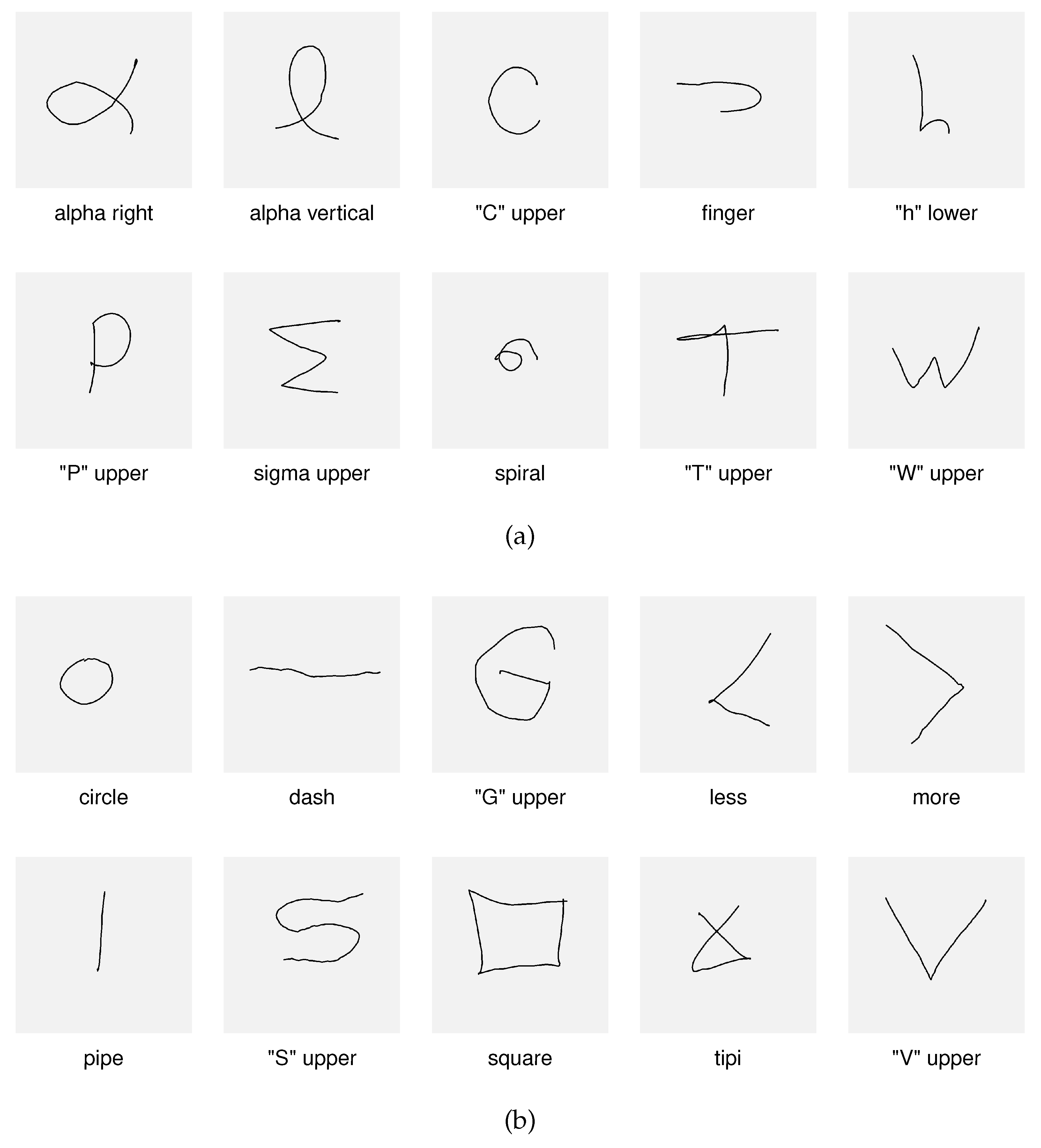
The dataset used in this study was collected using the Main Module UI, as described in detail in subsection 3.1 (see Figure 5). The gesture capture process consisted of two stages. In the first stage, users were asked to draw gestures prompted by the system (Figure 3a). These prompts were intended to facilitate the acquisition process: a set of easy-to-draw shapes was presented to users (one at a time), and they were asked to draw a similar shape in their own way. In the second stage of gesture recording, users drew their own shapes without any prompt (Figure 3b). As a result of performing these two stages, the dataset comprised two primary partitions: gestures that were prompted (hereinafter referred to as the Prompted Set) and shapes defined and drawn by users (hereinafter referred to as the User Set). Eventually, during the study’s research stage, both options could be evaluated for classification stability and efficacy. The key point is that both the Prompted Set and the User Set are treated as users’ personalized gesture sets since both reflect influences associated with their individual drawing styles.
2.4. Bézier Approximations
As noted earlier, rapid cursor movements can affect the rendered gesture’s shape. Although the phenomenon occurs relatively rarely, it was decided to develop a simple smoothing algorithm and evaluate its impact on recognition performance. The implemented solution uses Bézier curves to produce a smoothed gesture. Its mechanism is very straightforward. First, the list of points is modified so that its length is divisible by four, with the additional requirement that the last point of each gesture is always preserved; if necessary, the previous point or points are deleted. Then, every four points in the new point list are used to draw a cubic Bézier curve given by:
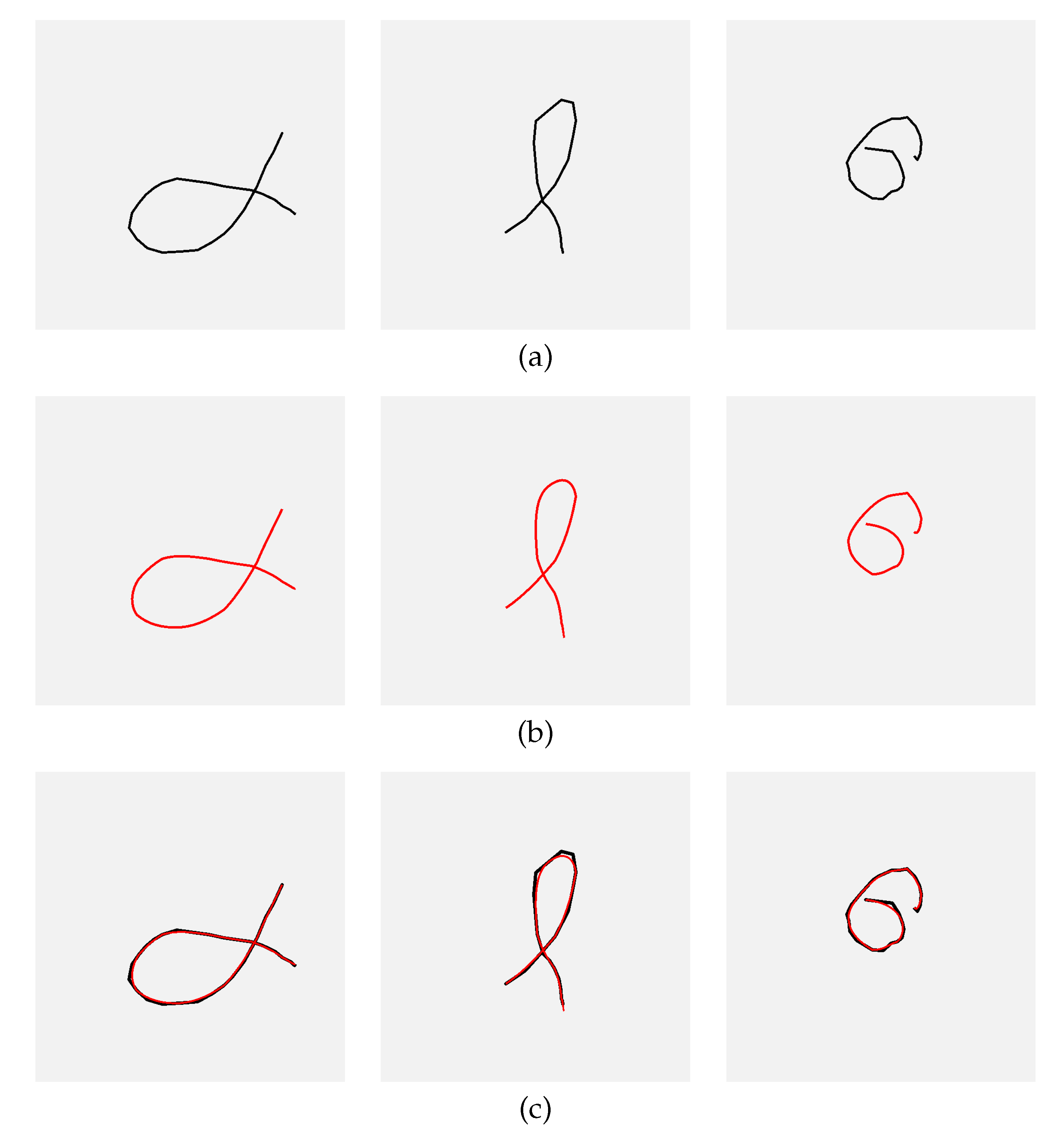
where are the points of the i-point point quadruple, additionally providing that the two control points ( and ) lie on the gesture trail, and t is the parameter that controls how much influence the control points have. That solution is the simplest approach to using Bézier curves for the intended purpose; however, it provides a noticeable improvement in shape. It should also be noted that placing the steering points outside the trail would require a much more sophisticated and time-consuming procedure. The described problem is illustrated in Figure (Figure 4), which shows the gestures affected by fast strokes (a), their Bézier approximations (b), and both superimposed (c).
2.5. Research Procedure
The general goal of this work was to create and evaluate a software framework for hand-stroke gesture learning and recognition using the Vicara KaiTM controller and a CNN classifier. The first activity in the research procedure was to lay the foundation for the library and the GUI module, enabling communication with the controller SDK and demonstrating how to receive and interpret controller input data. Once the software framework was enabled to read and transfer data correctly, the gesture-capturing interface was created, parameterized, and tested. Given the software’s broad functional scope at this stage, this was an essential component of the project.
The next step of the research procedure was to collect the dataset. The gestures of the five individuals were recorded. Their ages ranged from 11 to 55 years. The obtained dataset comprises 15 classes per user and 15 samples per class. So that each class generates 1125 original samples and, additionally, an equal number of their Bezier approximations calculated using gesture point coordinates. The first 10 gestures of each user were generated using shape prompts, whereas the remaining five were generated without prompting. In addition, 100 casual gestures are included to perform the ROC analysis experiment.
The following part of the project workflow involved preparing the software to develop an effective CNN pipeline. The starting point was a simple architecture inspired by the “Flowers” dataset example published in the TensorFlow documentation [33]. The decision to use this architecture as a starting point for further research was based on the simplicity and versatility of the provided examples. While flower images require high levels of detail, the initial pipeline models tended to overfit. Because the gesture types considered in this study do not require such detailed analysis, the input layer size was reduced, and dropout layers were applied. Since the personalized approach provided insufficient learning samples, the CNN pipeline was preceded by data augmentation, including random shifts, rotations, and scaling; the input end network pipeline investigation stage included four experiments (referred to as Experiments 1-4).
After developing the CNN pipeline, a series of experiments was conducted to evaluate key parameters of the developed research environment and its efficiency metrics. Because the number of learning samples is vital for a personalized approach, the fifth experiment was designed to determine the optimal training set size. The models were trained on samples from the Prompted Set and the User Set, jointly, using 6 to 9 images from the learning set. The experiment was also repeated for images approximated with Bezier curves (the results are presented in SubSection 4.2). The sixth experiment evaluated the system’s inference performance using confusion matrices as metrics (results are discussed in SubSection 4.3). The final (seventh) experiment aimed to assess the system’s ability to reject unknown or casual gestures, which is essential for real-world applications. Receiver operating characteristic (ROC) analysis was performed to evaluate the classifier’s performance in rejecting gestures that do not belong to the training set of classes (see SubSection 4.4).
This study included a gesture capture phase focused solely on data collection. This was done using equipment and software that had been tested prior to data recording. Data was captured under controlled conditions, without introducing behavioral interventions or usability assessments. No user reactions were observed, and no manipulations were introduced. Gesture scanning did not require excessive physical or mental effort. When the data was collected. The study meets the conditions specified in Regulation No. 179/2025 of the Rector of the Silesian University of Technology, dated 27 October 2025, named "Regulation on the establishment and operating principles of the Committee on Ethics in Research Involving Human Subjects".
Generative AI technology has become increasingly ubiquitous, and AI features are now present in almost all popular applications. In this context, users must carefully observe how these features work to avoid including AI-generated content in their documents. The author of this study used the Grammarly web application and Overleaf as primary text editors, relying solely on their (supposed) AI-based functions for superficial text editing and minor rephrasing. AI tools such as Google, ChatGPT, and GitHub Copilot were also used as web search tools. Still, it is important to note that each sentence and paragraph in this paper is the result of the author’s independent and in-depth reflection, regardless of the corrections suggested by the spelling, grammar, and punctuation correction tools. The more sophisticated functions of the aforementioned correctors were not used, as they provide AI-generated text, which was checked with the AI Detector function of Grammarly and with the ZeroGPT page. The use of AI in this study meets the conditions specified in Regulation No. 5/2026 of the Rector of the Silesian University of Technology, dated 15 January 2026, named "Regulation on the Policy for the Use of Artificial Intelligence in Scientific Research and Education at the Silesian University of Technology".
3. System Description
3.1. System Architecture Map
The developed research environment includes 10 distinct hardware, software, and data artifacts, as shown in Figure 5, which illustrate the architecture and the content or functions of each element. To improve figure clarity, artifacts are arranged clockwise and labeled (1–10). The first artifact is the controller, which communicates with the PC via the Kai USB dongle. As described in the introduction, these hardware components exchange data over Bluetooth Low Energy (BLE) [29]. To access the controller data, the Vicara KaiTM SDK must be installed and running (3). This SDK is included with the controller when a developer’s kit license is purchased. Developers can use the SDK in a C# project by installing Kai.WebSockedModule package (4), which supplies classes for connecting to the SDK and receiving controller messages. Within the Kai.WebSockedModule, controller messages are processed by user-defined WinForms event handler functions associated either with the default or a specified Kai device (the package supports up to two devices simultaneously).
While both the Kai SDK and the Kai.WebSocketModule are provided by Vicara, the remaining software components depicted in Figure 1 are the author’s contributions to the study. The most important of these is MyKaiLibrary (5) — a DLL (dynamic-link library) that wraps and extends the functionality of Vicara’s packages. Among the several sub-modules implemented in MyKaiLibrary, four are particularly important: Session, Manager, Gesture, and Data. These submodules and their corresponding responsibilities are shown in the figure. Together, they compose the core procedure performed to capture users’ gestures. This procedure is executed via the Main Module UI (6). It begins by connecting the environment to the Kai SDK. Next, the procedure checks whether the controller is connected via the dongle. If not, the user must press the controller’s connect button and run the “Initialize and connect” function in the Main Module UI. Once this is done, the capture procedure can begin by selecting the “Prepare and start” button. Once the capture process is complete, the gesture data is stored in the System Dataset (7), which includes images of gesture trails, images containing Bézier-curve approximations of the gestures, and the gestures’ point data (not used in the present study but stored for future research).
The following functional block, shown in the software research environment map (Figure 5), is the MyKaiPy Research Module (8). This configurable Python project is designed to perform the experiments described in the Results chapter. The chain of operations within MyKaiPy begins with the development of the CNN pipeline. Given the various network architectures and pipelines considered, different CNN configurations were evaluated to select the final neural network setup optimized for efficacy, overfitting resistance, and computational performance. The next functionality of the Python module is learning and testing across different partitions of the System Dataset—for instance, the dataset restricted to a particular image type (gesture trails or Bezier approximations), for specific individuals’ gestures, or for “prompted” or “user’s own” gestures.
Since the study emphasizes personalization, models are trained separately for each person using their corresponding dataset partition. This introduces the challenge of having insufficient learning and validation samples. To address this, data augmentation is necessary, and the relevant functionality was implemented in MyKaiPy. As previously noted, random shifts, rotations, and scaling transformations were applied for this purpose. Once the network and dataset are prepared, models can be trained and validated. Afterwards, the model parameters are saved along with the proper statistics (9). After training, inference tests are performed, with confusion matrices used as the quality metric. Since the classification method should be robust to casual (random) gestures, the receiver operating characteristic (ROC) approach was additionally applied to determine the gesture acceptance thresholds.
The last element of the research software environment is the End User Module. It is the UI module, represented by a small window that appears in the corner of the Windows desktop. It allows the user to connect to the Kai SDK and the controller. Once the connection is established, the user can draw gestures directly on the remaining desktop area. When the gesture is drawn and captured, real-time inference is run, and the gesture is either recognized as one of the user’s gestures or rejected as a casual, rapid movement. The End User Module can serve as an entry point for potential use cases of the research presented. For instance, a gesture can be mapped to a Windows command or a batch file that executes a specific action. Another option is to use a gesture classifier along with the text input tool. Yet another possibility is to assess forearm and wrist mobility as a component of the medical rehabilitation process (the possible use cases are discussed in more detail in Section 5).
3.2. Gesture Extraction
The following subsection explains the process of extracting gestures from a stream of Kai events, presented from both the user and system perspectives. Figure 1 illustrates how the gesture is extracted and rendered on the captured gesture image. The Figure shows the incoming Kai PYR (pitch, yaw, roll) events that characterize the angular controller’s position. Each PYR event triggers the appropriate procedure, which computes the gesture cursor’s coordinates and traces its movements, generating a comprehensive animated view for the user (the subsequent view frames are superimposed on the illustration). As shown in Figure 1, there are two extraction stages: the free movement stage and the capture stage. In the first stage, only the gesture cursor is drawn, and the user can move it freely. The free movement stage ends when the cursor remains stationary for a moment. This part of the procedure is called cursor stabilization. During stabilization, a frame is drawn around the cursor that gradually shrinks, indicating the passage of time; this serves as a countdown before capture. When stabilization ends, a sound is generated, and the gesture-capture stage begins, during which the gesture trail is progressively drawn. To end this stage, the cursor must remain stationary again, indicated by a different cursor icon. As the capture ends, another sound is played, and the gesture is stored in the database or used for class inference. Afterward, the gesture image is cleared, and the cursor can be moved freely again.
Figure 7 presents a state machine diagram of the interaction scenario from the user’s perspective. It presents the process to users before they record their gestures, making it straightforward and intuitive. As mentioned earlier, there are two stages – free cursor movement and gesture drawing and capture – interspersed with stabilization phases: one before the capture begins and one before it ends. In addition, in both the free movement and capture stages, the user can press the connection on/off button to pause and resume the program.
Figure 8 provides a more detailed view of the process, presenting a state machine diagram that includes the primary state triggers and additional states (the user need not be aware of these). The more detailed process description is as follows: when the process starts, and the user moves the cursor freely, the process iterates within the <Free movement> state (trigger 1). To start gesture capture, the user must keep the cursor stationary for a short time (trigger 2). Because users naturally move the cursor slightly, it is necessary to define the acceptable range of cursor movements and the hold time that the system interprets as indicating that the cursor is being kept in place (both are system-configurable parameters).
When stabilization begins, the process transitions to <Waiting to start>, a substate of Stabilizing. When the stabilization time has not yet been reached, and the cursor remains stationary, the process iterates within the <Waiting to start> state (trigger 3a). When the stabilization time is up, the process transitions to the <Capture and draw> state (trigger 4), and gesture capture begins. If the cursor is significantly moved before that moment, the process returns to the <Free movement> state (trigger 3b). During capture, the gesture trail is rendered on the image view control, and the process iterates within the <Capture and drawing state> (trigger 5). To stop capturing, the user must keep the cursor still again to pass to the <Waiting to end> substate (trigger 6). The exact limits are applied to detect the beginning and end of the capture. While the cursor remains unmoved or moves only slightly, the process iterates within the <Waiting to end> state (trigger 7a). Reaching the time limit in this state closes the process loop (trigger 7b).
4. Experiments and Results
4.1. Developing the CNN Pipeline
Rather than designing a novel architecture, this work adopts an existing Convolutional Neural Network and integrates it into a processing pipeline tailored to the target application (hereafter, the process is referred to as developing the CNN pipeline). As noted in SubSection 2.5, the starting point for the process was a CNN pipeline described in the TensorFlow documentation, along with the Flowers dataset [33]. There were several reasons for this decision. The first reason was that, in general, both the Flowers example and this study involved multi-class image recognition with a relatively low number of classes: the Flowers dataset contains five classes, and the gesture dataset collected for this study includes ten prompted gestures and five fully custom gestures. As described later, there were also differences between the approaches, including the level of image detail and the number of learning samples. These differences were taken into account while adopting the CNN pipeline to better fit the target task. The second reason for selecting the Flowers example as the model’s starting point was that it is simple while still effectively recognizing complex images. It was assumed that the initial version would not be extended, so good time performance was also expected. The third reason for selecting the mentioned baseline model was its versatility, which ensured that adaptation to the study’s requirements was feasible and straightforward.
The three network pipelines examined in the research section of this study are summarized in Table 2. The pipeline is identical to the Flowers example; involves resizing and data augmentation (shift, scale, and rotation); was introduced to assess whether a dropout layer would improve generalization. For each pipeline, the presence or absence of a particular element is marked by “+” or "-". The element parameters are enclosed in brackets. The operations and layers presented in the table are organized in a pipeline, in the order they appear. The pipelines consist of two components: the input pipeline and the network pipeline. As shown, more effort has been devoted to the input stage of the pipeline because gesture images contain much less detailed information; therefore, they can be resized to 64x64 pixels. Additionally, the gesture images are binary; therefore, only one channel is required. Furthermore, a key issue with the personalized approach is the relatively small number of learning samples, which necessitates the use of augmentation techniques, such as random translation, rotation, and scaling. For the same reason, dropout is also investigated. The number of classes is equal to 15 in all the following experiments.
4.1.1. Initial Pipeline -
The general evaluation framework used to assess the investigated pipelines involved training 10 separate models for each of the five individuals’ gesture sets within a given dataset partition. The training process was repeated 10 times per participant, and in each repetition, 30 epochs were run using randomly and stratified selected images. The overall behavior of the models was observed from plots of loss and accuracy, which show their average values computed across particular epochs and repetitions of the learning process: the resulting curves of each repetition are superimposed so that their points represent an average value within an epoch. Similarly, the curves aggregated over participants are averaged for particular epochs.
The initial pipeline used 180×180-pixel images with a single color channel. Although the Flowers dataset contains three-channel color images, only one channel was used. Since the gesture images are stored as grayscale images, all channels share the same value; therefore, using only one channel simplifies computation without affecting the results.
The first experiment, performed according to the scheme discussed above, tested the behavior of the model represented by the initial pipeline (). Its parameters are summarized in Table 3. The average plot summarizing the entire experiment is shown in Figure 9a. The shaded paths in the plot correspond to the 95% confidence level, enabling visualization of process stability. In addition, Figure 9b shows the average plot for the worst case — the person with the least stable gestures. While the small number of learning samples in the personalized approach is a significant issue, the model was tested with only six learning samples (models trained with different numbers of learning samples are presented and discussed in SubSection 4.2).
As depicted in Figure 9a, the initial pipeline leads to model overfitting: the training metrics continue to improve while the validation metrics worsen. This is particularly evident in Figure 9b, which shows the loss and accuracy values for a person whose gestures have the least stable shapes. Both graphs show an increase in loss after 12 epochs.
4.1.2. Adjusting the Input Pipeline –
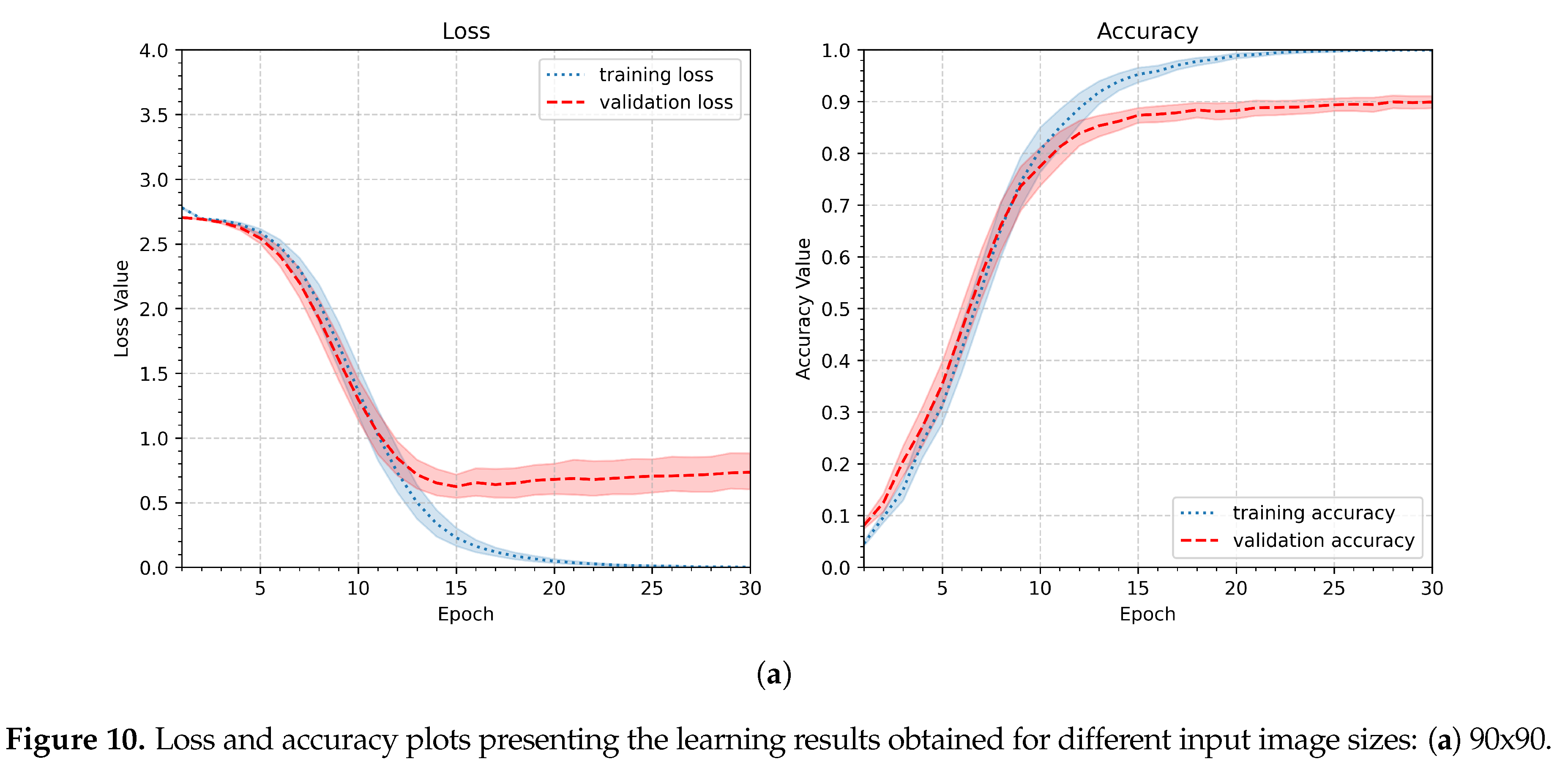
Since the gesture recognition task described in this work requires more overall shape analysis than detailed insights into gesture lines, the first modification to avoid overfitting observed in the initial pipeline is to reduce the image size. Therefore, in the next experiment, the input image size was reduced to 90x90, 64x64, or 32x32 pixels. Other parameters remained unchanged compared to the first experiment. The parameters of the second experiment are summarized in Table 4. Figure 10 shows the aggregated results. The best performance was achieved with the second parameter setup and an image size of 64x64 pixels. The first parameter was slightly worse, and it still showed that the model tends to overfit, whereas the third setup (32x32 pixels) revealed much slower and less effective learning.
The next option for improving the input pipeline is data augmentation — when only 15 samples per class are available, data augmentation is a worthwhile strategy to increase the number of training images. For this purpose, only image transformations that could plausibly occur during gesture capture should be employed. These include scaling, translation, and rotation. Figure 11 shows examples of gestures illustrating variations in scales (a), positions (b), and rotations (c). Each set of three samples (a, b, and c) demonstrates a different type of variation and corresponds to a distinct individual; the images selected exhibit pronounced differences. As seen in these examples, the degree of deviation for each variation type is approximately 10%–30%, but not higher. Therefore, the next experiment should examine the influence of the data augmentation within this range. The parameters of the next experiment are specified in Table 5. Three levels were assessed: 10%, 20%, and 30%, while all other experimental settings remained the same as in the previous test.
Figure 12 presents the learning results of the third experiment. There are only very slight differences in the minimum validation loss and maximum validation accuracy (see Table 7). Similarly, the shapes of the curves and the confidence level traces differ slightly; it can be considered that the result for is the best. Therefore, the value augmentation ratio of 0.2 will be applied in subsequent experiments.
4.1.3. Dropout Influence - Pipeline
The fourth and last experiment in the pipeline investigation part assesses the effect of applying a dropout layer to the network. The layer was inserted after the dense layer. The dropout layer provides a regularization mechanism. It enhances robustness and generalization, particularly when training on limited datasets. Since the personalized approach operated on relatively small numbers of learning samples, it was decided to test the network’s performance with the dropout layer included. Three values of dropout factor were considered, namely 0.2, 0.4, and 0.6. Dropout was applied only during training, as implemented by default in the Keras framework, and was disabled during validation and inference. The summary of the fourth experiment’s setup is included in Table 6.
Dropout was applied only during training, as implemented by default in the Keras framework, and was disabled during validation and inference. As shown in Figure 13, the validation curve exhibits higher values, which is a consequence of randomly dropping connections during training. The minimum validation values are reached later, near the 30th epoch, whereas without a dropout layer, they are achieved around the 15th epoch. Since the computational cost of 30 epochs is acceptable (18.3 s per participant), this behavior does not constitute a drawback. The values of maxima and minima of loss and accuracy are included in Table 1. The value yielded the best performance, with a minimum validation loss of 0.47 and a maximum validation accuracy of 0.90. Thus, in the following experiments, the dropout rate will be set to 0.4.
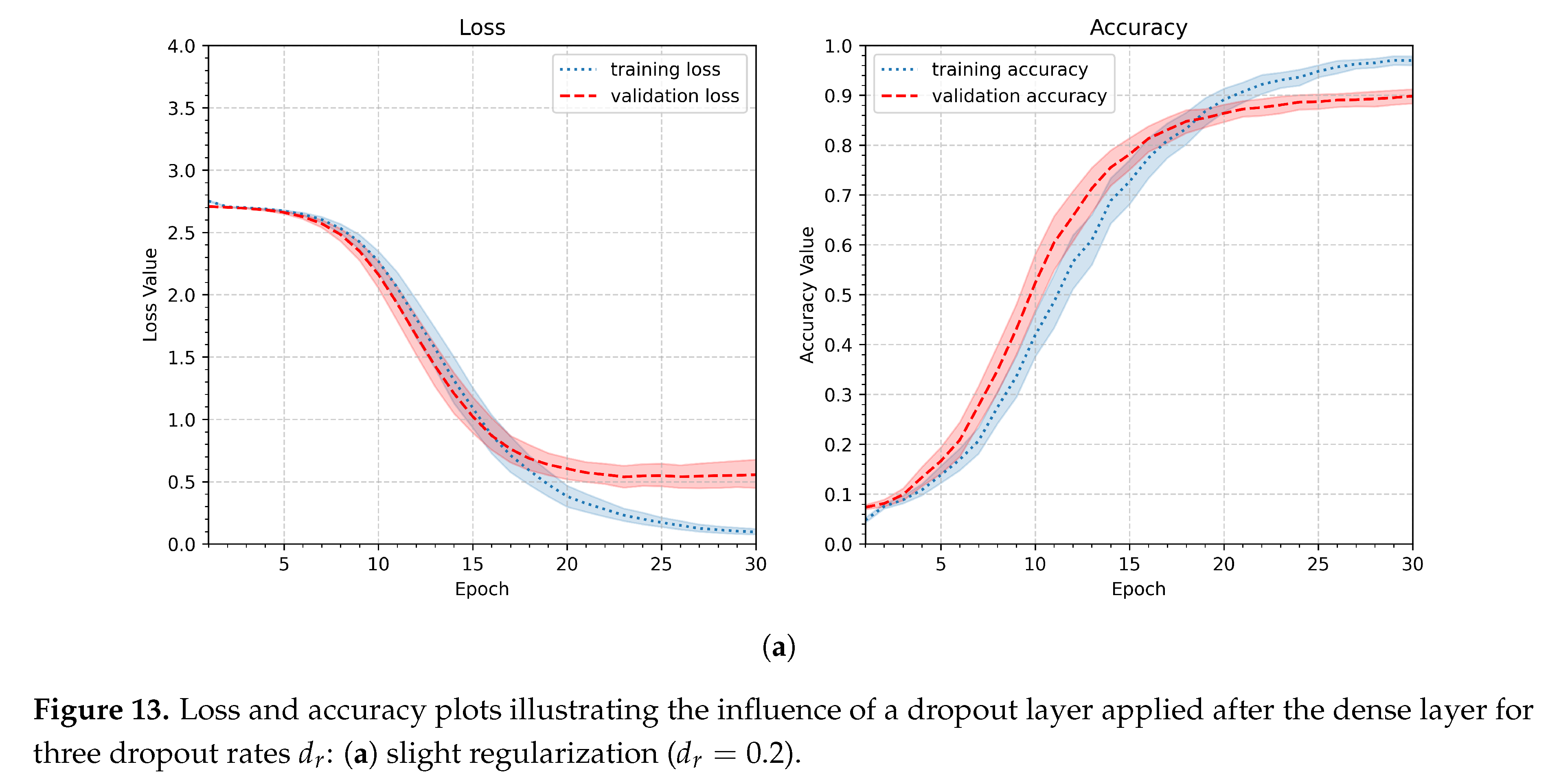
Table 7 summarizes all four experiments performed on the input and network pipeline. The differences between the lowest validation loss values and the highest validation accuracy values are not substantial. As already mentioned, the number of epochs needed to reach these maxima and minima varies depending on the experimental setup. It is worth noting that all experiments described so far were performed with only six learning samples, which is quite a low number. In the following part of this chapter, the network’s behavior for higher values of this parameter will be investigated, which should yield better performance.
4.2. Number of Learning Samples
With the set of input and network pipeline parameters established by previous experiments, the next step is to investigate how the number of learning samples influences model performance. Thus, in the next experiment, the number of samples will be changed while other parameters remain constant (as in previous experiments). It was decided to test between 5 and 9 samples. The summary of the experiment parameters is included in Table 8.
The aggregated results of the experiment relating to minimum loss and maximum accuracy for the validation data are shown in Figure 15. Overall, the changes in the achieved values are not significant; however, as expected, performance improves as the number of training samples increases. As illustrated in Figure 14, an important difference lies in the point at which a stable phase of slow loss reduction and accuracy improvement is reached. For the smallest number of training samples considered (5 samples, Figure 15a), this occurs between epochs 22 and 24, whereas for the largest number of training samples (9 samples, Figure 15b), it occurs earlier, between epochs 16 and 18. The results of all participants are presented in Table 9.
The presented results indicate that the system achieves satisfactory performance even with a relatively small number of training samples (6–7), and the primary cost is an increased number of required network training cycles, which suggests that, if necessary (e.g., due to a lack of samples), the number of training samples can be reduced without causing a significant degradation in performance. However, when samples are available, they should be used to improve learning outcomes. Since the collected dataset contains 15 samples per class, the number of training samples will be set to 9 in subsequent experiments. This choice stems from the fact that training duration is not a limiting factor: the model is simple, contains relatively few parameters, and requires only a small number of epochs. Therefore, the maximum possible number of samples can be used.
4.3. General Inference Efficacy
In the next stage of the research (Experiment 6), the system’s performance was evaluated on a task of recognizing gestures that were not included in the learning process. Such data are commonly referred to as test data, meaning samples that the system has not previously encountered. Confusion matrices were used to compute recognition performance metrics, based on which the following effectiveness measures were defined: accuracy, precision, and recall. In calculating these metrics, it was kept in mind that each class subset contains the same number of samples, so the accuracy equals the macro recall.
The parameters of the sixth experiment are summarized in Table 10. Since all experiment parameters have been established, the Bézier-smoothed gestures can be included in the tests. They have not been explored so far to simplify the research procedure: it was assumed that parameters suitable for gestures as captured would also be applicable to their smoothed versions. So both partitions of the dataset were examined in this experiment.
Table 11 presents the results of the sixth experiment, which assessed the model for test set accuracy and precision for both initial and smoothed gestures. The values of the metrics, rounded to 2 decimal places, indicate that there is no significant difference between the as-captured and smoothed gestures. This acknowledges that the local details of gesture curves are not substantial to the task.
4.4. Rejection of Unknown or Causal Gestures
The final experiment (Experiment 7) investigates the systems’ resilience to rapid, random, unwanted (casual) gestures that can occur when the user loses synchronization with the gesture-segmenting algorithm or performs unwanted movements (Figure 17). In such cases, the gesture should be rejected as unknown to the system. The receiver operating characteristic (ROC) method was applied for this task. The experimental procedure followed the same protocol as in previous experiments, except that the test set included, along with the original test samples, an equal number of casual gestures. For both original and casual inputs, the model produced class-membership probability scores, which were used to construct the ROC curves. Figure 18 presents the average ROC with the best (a) and worst (b) AUC, as well as a ROC curve aggregated across the individual results obtained for each participant. The gray lines correspond to the curves obtained in a single iteration for individual participants (a) and (b), and the aggregated ROC (c). The overall area under the curve (AUC) was 0.97. The detailed results are shown in Table 12.
5. Discussion
This study investigated a personalized wrist–forearm static gesture recognition framework based on the Vicara Kai™ controller and convolutional neural networks. The results show that a user-specific approach based on static data enables reliable gesture recognition even with a limited number of learning samples (6-9). Training a separate CNN model for each user addresses intra-class variability caused by differences in motor habits, gesture dynamics, and other biomechanical constraints. This reduction allows for achieving good results even with only a few samples available. The observed differences in gesture stability across individuals confirm this observation.
The important feature of the method used in the presented study is that a portion of the gestures captured was prompted to users using a predefined gesture vocabulary. This approach was used to facilitate gesture registration and reduce user burden. However, as the confusion matrix analysis shows, not all of the proposed gestures proved successful at the recognition stage (in particular, gestures marked as “ALPV”, “SIGM”, and “PUxx”); the same was true for the user’s own circle gestures. This indicates that the proposed solution should account for the difficulties involved in performing certain movements. Initially, it can be concluded that this involves combining elements that require rapid horizontal-axis movements with simultaneous changes in vertical cursor position. If the axes are separated from each other (‘TUxx’), the results are better.
While working on the presented experiments, it was observed that rapid movements sometimes affect the shape of the gesture, while the cursor movements they cause are too fast for the applied sample rate (a vital system parameter selected by observing how the system handles messages from the controller). Keeping that in mind, the author decided to apply a preprocessing step to reduce distortion. The simple cubic Bézier curve approximation was applied to the gestures to smooth their shapes. The effect was noticeable visually; however, as observed during tests, it concerned the level of detail that the CNN network does not analyze, as it generalizes the structure of gestures. This can be explained by the fact that Bézier approximation does not alter the semantic structure of gestures but rather improves signal quality.
The experiments confirmed that lightweight CNN architectures are sufficient for the task. Reducing the input resolution to 64×64 pixels improved generalization, significantly reduced computational cost, and eliminated overfitting. More complex architectures designed for natural image classification were unnecessary and prone to overfitting due to the limited dataset size. The data augmentation had a minor effect on training results; however, the results achieved with a 20% rate of transition, rotation, and scale were slightly better. In addition, the inclusion of a dropout layer improved generalization performance. Three dropout ratios were investigated: 0.2, 0.4, and 0.6, corresponding to low, medium, and strong generalization. Finally, the ratio of 0.4 provided the best balance between regularization and learning capacity, with a minor drawback: the target loss and accuracy values are reached later in the epochs than they are without dropout.
In addition to the described experiments, the study includes an important software development stage. As part of the work, four software modules were created: the MainModule, the MyKai.dll Library, the EndUserModule, and, in the final phase, the MyKaiPy research module. This software is an important contribution by the author that can be used in future work. While the software’s architecture is open, it can be further developed, refactored, and enhanced with functions that enable other modalities and output data.
Due to the significant diversity of approaches referred to as gesture recognition, even when limited to those focused on user-specific gestures and static data, it is difficult for the author to compare the results achieved with those in other works. The best performance reached in this study is a validation loss of 0.32, a validation accuracy of 0.92, a test set accuracy of 0.92, and a test set precision (macro) of 0.92. In the studies cited in the Introduction, performance, measured using various metrics across different classifiers, ranged from about 0.88 to 0.98. The most similar research problem was investigated by Wang et al. [20] — the authors reported a training validation accuracy of 0.985, but the task was to recognize gesture postures, not gestures understood as hand movements.
The study has a few limitations that highlight the directions for further development and investigation. The primary task for future research is to evaluate the proposed research pathway using a dataset encompassing a larger number of individuals. Although the number of collected samples is quite large (5 samples * 15 classes * 5 individuals * 5 partitions + 100 casual gesture samples = 2350 files) and the method is stable, extending the dataset to include more participants is a crucial next step for future work. Especially interesting is the examination of differences between prompted and non-prompted gestures and, in particular, how the system would behave when all users’ gestures are used to train a single model (user-independent approach). Another important development and testing issue is conducting a usability study to assess user experience across both overall and detailed system functions, particularly those that support smooth user-computer interactions. Finally, once the method has been thoroughly investigated and improved, exploring practical use cases becomes worthwhile. There are several potential application areas and many directions to achieve this goal. One approach is to integrate the developed UI software with an input method (or methods) designed primarily for people with motion impairments. This use case was addressed by Jankowski (as described in the Introduction) and by the author in [34]. Another potential application area could be physical rehabilitation, where the developed software would be used to assess recovery progress after injuries, strokes, heart-attacks, and other conditions. The online inference accuracy could be used as a measure of regained fitness. Additionally, the developed software could be used to control the system by running programs or executing their specific functions. A tree-like command structure could be used, allowing many commands to be controlled by a small set of gestures. This also concerns software that is associated with external systems, such as smart home or assisted living solutions.
6. Conclusions
The article presents a personalized (user-specific) approach for recognizing static wrist-forearm gestures using the Vicara Kai™ controller and a convolutional neural network. The developed software enables users to record their own gesture sets, either prompted by the system or created entirely by users. The experiments in the study demonstrate the feasibility of training a lightweight CNN with a small number of gesture samples per class. Several input/network pipelines were investigated, resulting in an overall accuracy of 0.92. As mentioned in the discussion, some gesture types succeeded, achieving “a perfect class,” while others were unstable. The main difficulty was moving the controller on both the X and Y axes simultaneously. Downsizing the image, data augmentation, and a medium level of regularization improved performance compared to the initial network architecture. The ROC analysis showed that the system is resilient to random, casual cursor movements. The final output of the study is a research software framework that the author believes can be further developed, expanded, and successfully applied in the areas outlined in the discussion.
Informed Consent Statements: Informed consent was obtained from all subjects involved in the study.
Acknowledgements: The author would like to express gratitude to his son, Szymon Szedel BSc, Eng., for his critical remarks and constructive suggestions, as well as for sharing his knowledge of machine learning Python libraries. Additional acknowledgments are due to Krzysztof Dobosz, PhD, Eng., for inspiring the author’s interest in the topic of gesture recognition.
Conflict of Interest: The author declares no conflict of interest.
Abbreviations
The following abbreviations are used in this manuscript:
| API | Application Programming Interface |
| AR | Augmented Reality |
| AUC | Area Under the Curve |
| BLE | Bluetooth Low Energy |
| CL | Contrastive Loss |
| CNN | Convolutional Neural Network |
| DF | Decimation Factor |
| HCI | Human Computer Interaction |
| HGR | Hand Gesture Recognition |
| MLP | Multi-layer Perceptron |
| NFC | Near Field Communication |
| NUI | Natural User Interfaces |
| ROC | Receiver Operating Characteristic |
| SCC | Sparse Categorical Crossentropy |
| SDK | Software Development Kit |
| SUS | System Usability Scale |
| SVM | Support Vector Machine |
| USRP | Universal Software Radio Peripheral |
| VME | Vicara Motion Engine |
| VQ-VAE | Vector Quantized Variational Autoencoder |
| VR | Virtual Reality |
References
- Jiang, X.; Wang, M.; Deng, T. Visualisation and Trend Analysis of Human-Computer Interaction System Design in the Context of Artificial Intelligence. In Proceedings of the ICADI 2024: 2024 International Conference on Artificial Intelligence, Digital Media Technology and Interaction Design, Tianjin, China, 29 November - 1 December 2024; pp. 14–21. [Google Scholar]
- Stefanidi, E.; Bentvelzen, M.; Woźniak, P.W.; Kosch, T.; Woźniak, M.P.; Mildner, T.; Schneegass, S.; Müller, H.; Niess, J. Literature Reviews in HCI: A Review of Reviews. In Proceedings of the CHI ’23: Conference on Human Factors in Computing Systems; Schmidt, A.; Väänänen, K., Eds., Hamburg, Germany, 23-28 April 2023.
- Motti, L.; Bossavit, B. Understanding User Motion. In Handbook of Human Computer Interaction; Vanderdonckt, J., Palanque, P., Winckler, M., Eds.; Springer Cham: Cham, Switzerland, 2023; pp. 1–29. [Google Scholar]
- Azofeifa, J.D.; Noguez, J.; Ruiz, S.; Molina-Espinosa, J.M.; Magana, A.J.; Benes, B. Systematic Review of Multimodal Human–Computer Interaction. Informatics 2022, 9. [Google Scholar] [CrossRef]
- Mohamed, A.S.; Hassan, N.F.; Jamil, A.S. Real-Time Hand Gesture Recognition: A Comprehensive Review of Techniques, Applications, and Challenges. Cybernetics and Information Technologies 2024, 24, 163–181. [Google Scholar] [CrossRef]
- Zou, Y.; Wan, Y.; Zhang, Y.; Zhou, X.; Cheng, J.; Ma, C.; Yu, C.; Deng, X.; Wang, H. Gesture Builder: Flexible Gesture Customization and Efficient Recognition on VR Devices. Proc. ACM Interact. Mob. Wearable Ubiquitous Technol., 2025; 9. [Google Scholar]
- Karam, M.; Schraefel, m. A Taxonomy of Gestures in Human Computer Interactions. Electronics and Computer Science, 2005. [Google Scholar]
- Vuletic, T.; Duffy, A.; Hay, L.; McTeague, C.; Campbell, G.; Grealy, M. Systematic literature review of hand gestures used in human computer interaction interfaces. International Journal of Human-Computer Studies 2019, 129, 74–94. [Google Scholar] [CrossRef]
- Magrofuoco, N.; Roselli, P.; Vanderdonckt, J. Two-dimensional Stroke Gesture Recognition: A Survey. ACM Comput. Surv. 2021, 54. [Google Scholar] [CrossRef]
- Chen, H.; Shi, H.; Liu, X.; Li, X.; Zhao, G. SMG: A Micro-gesture Dataset Towards Spontaneous Body Gestures for Emotional Stress State Analysis. International Journal of Computer Vision 2023, 131, 1–21. [Google Scholar] [CrossRef]
- Guo, X.; Zhu, Q.; Wang, Y.; Mo, Y.; Sun, J.; Zeng, K.; Feng, M. A Fast-Response Dynamic-Static Parallel Attention GCN Network for Body–Hand Gesture Recognition in HRI. IEEE Transactions on Industrial Electronics 2024, 71, 5993–6004. [Google Scholar] [CrossRef]
- Agab, S.E.; Chelali, F. New combined DT-CWT and HOG descriptor for static and dynamic hand gesture recognition. Multimedia Tools and Applications 2023, 82, 26379–26409. [Google Scholar] [CrossRef] [PubMed]
- Mazhar, O.; Ramdani, S.; Cherubini, A. A Deep Learning Framework for Recognizing Both Static and Dynamic Gestures. Sensors 2021, 21. [Google Scholar] [CrossRef] [PubMed]
- Colli Alfaro, J.G.; Trejos, A.L. User-Independent Hand Gesture Recognition Classification Models Using Sensor Fusion. Sensors 2022, 22. [Google Scholar] [CrossRef] [PubMed]
- Colli-Alfaro, J.G.; Ibrahim, A.; Trejos, A.L. Design of User-Independent Hand Gesture Recognition Using Multilayer Perceptron Networks and Sensor Fusion Techniques. In Proceedings of the 2019 IEEE 16th International Conference on Rehabilitation Robotics (ICORR), Toronto, Canada, 2019; pp. 1103–1108. [Google Scholar]
- Gupta, S.; Nandy, S.; Roy, A. User-Independent Hand Gesture Recognition Using Wearable IMU Sensors. IEEE Sensors Journal 2022, 22, 7465–7476. [Google Scholar]
- Zhang, Z.; Wang, Z.; Huang, K. User-Independent Gesture Recognition Using Convolutional Neural Networks and Data Augmentation. IEEE Access 2021, 9, 123456–123467. [Google Scholar]
- Lin, D.; Paskett, M.; Yang, Y. A Contextual Bandits Approach for Personalization of Hand Gesture Recognition. arXiv arXiv:2509.08915. [CrossRef]
- Xu, X.; Gong, J.; Brum, C.; Liang, L.; Suh, B.; Gupta, S.K.; Agarwal, Y.; Lindsey, L.; Kang, R.; Shahsavari, B.; et al. Enabling Hand Gesture Customization on Wrist-Worn Devices. In Proceedings of the Proceedings of the 2022 CHI Conference on Human Factors in Computing Systems; Simone Barbosa, Cliff Lampe, C.A.D.A.S.S.D.J.W.K.Y., Ed., New York, NY, USA, 29 April 2022; CHI ’22.
- Wang, J.; et al. Hand Gesture Recognition with User-Defined Gestures. Universal Access in the Information Society 2024, 1315–1329. [Google Scholar]
- Ma, C.; Xie, Z.; Guo, K.; Liu, C. NFINGER: Personalized Backside Gesture Recognition on Smartphones Using Back-mounted NFC Tag Array. In Proceedings of the Adjunct Proceedings of the 2025 ACM International Joint Conference on Pervasive and Ubiquitous Computing and the 2025 ACM International Symposium on Wearable Computer (UbiComp/ISWC ’25); New York, NY, USA, Beigl, Michael, Ed.; 12-13 October 2025; Volume UbiComp Companion ’25, pp. 176–180. [Google Scholar]
- Khanna, P.; Ramakrishnan, I.; Jain, S.; Bi, X.; Balasubramanian, A. Hand Gesture Recognition for Blind Users by Tracking 3D Gesture Trajectory. In Proceedings of the Proceedings of the CHI Conference on Human Factors in Computing Systems (CHI ’24); Honolulu, HI, USA, Mueller, F.F., Kyburz, P., Williamson, J.R., Sas, C., Wilson, M.L., Dugas, Toups, Shklovski, P.I., Eds.; 11 May 2024; pp. 1–15. [Google Scholar]
- van den Oord, A.; Vinyals, O.; Kavukcuoglu, K. Neural Discrete Representation Learning. In Proceedings of the Advances in Neural Information Processing Systems; Guyon, I., von Luxburg, U., Bengio, S., Wallach, H., Fergus, R., Vishwanathan, S.V.N., Garnett, R., Eds.; NeurIPS : Long Beach, CA, USA, 4-9 December 2017; Vol. 30, pp. 6306–6315. [Google Scholar]
- Ronen, M.; Finder, S.E.; Freifeld, O. DeepDPM: Deep Clustering With an Unknown Number of Clusters. In Proceedings of the Proceedings of the IEEE/CVF Conference on Computer Vision and Pattern Recognition (CVPR); New Orleans, LA, USA, Chellappa, R., Ed.; IEEE/CVF, 19 June 2022; pp. 9851–9860. [Google Scholar]
- Brooke, J. SUS: A ‘quick and dirty’ usability scale. In Usability Evaluation in Industry; Jordan, P., Thomas, B., Weerdmeester, B., McClelland, A., Eds.; Taylor & Francis, 1996; pp. 189–194. [Google Scholar]
- Willems, D.; Niels, R.; van Gerven, M.; Vuurpijl, L. Iconic and multi-stroke gesture recognition. PATTERN RECOGNITION 2009, 42, 3303–3312. [Google Scholar] [CrossRef]
- Bernardos, A.M.; Wang, X.; Bergesio, L.; Besada, J.A.; Casar, J.R. Assessing the Acceptance of a Mid-Air Gesture Syntax for Smart Space Interaction: An Empirical Study. Journal of Sensor and Actuator Networks 2024, 13. [Google Scholar] [CrossRef]
- Likert, R. A technique for the measurement of attitudes. Archives of Psychology 1932, 1–55.
- Vicara, *!!! REPLACE !!!*. KAI Gesture Controller: The Force Can Now Be with You, 2018. Medium blog post, Accessed on. (accessed on 15 December 2026).
- Joseph Vedhagiri, G.P.; Wang, X.Z.; Senthil Kumar, K.; Ren, H. Comparative Study of Machine Learning Algorithms to Classify Hand Gestures from Deployable and Breathable Kirigami-Based Electrical Impedance Bracelet. Multimodal Technologies and Interaction 2020, 4. [Google Scholar] [CrossRef]
- LeCun, Y.; Bottou, L.; Bengio, Y.; Haffner, P. Gradient-Based Learning Applied to Document Recognition. Proceedings of the IEEE 1998, 86, 2278–2324. [Google Scholar] [CrossRef]
- Krizhevsky, A.; Sutskever, I.; Hinton, G.E. ImageNet Classification with Deep Convolutional Neural Networks. In Proceedings of the Advances in Neural Information Processing Systems; Pereira, F.C., Burges, C.J.C., Bottou, L., Weinberger, K.Q., Eds.; Red Hook, NY, USA, December 2012; Volume 25, pp. 1097–1105. [Google Scholar]
- Team, T.T. tf_flowers: Flowers Dataset in TensorFlow Datasets, 2024. TensorFlow Datasets catalog entry. Accessed on. (accessed on 17 December 2026).
- Szedel, J. Personalized Arm Gesture Recognition Using the HMM-Based Signature Verification Engine. In Proceedings of the Computers Helping People with Special Needs; Miesenberger, K., Manduchi, R., Rodriguez, Covarrubias, Peňáz, M.P., Eds.; Linz, Austria, Linz, 2020; pp. 411–420. [Google Scholar]
Figure 1.
The physical setup of gesture recording: (a) The right-side view: the controller is worn on a hand lightly clenched into a fist (label 1); the forearm is supported on an armrest (label 2). (b) A top-down view: fixed-size gesture viewport (label 1); the user moves both the forearm and the wrist (label 2).
Figure 1.
The physical setup of gesture recording: (a) The right-side view: the controller is worn on a hand lightly clenched into a fist (label 1); the forearm is supported on an armrest (label 2). (b) A top-down view: fixed-size gesture viewport (label 1); the user moves both the forearm and the wrist (label 2).
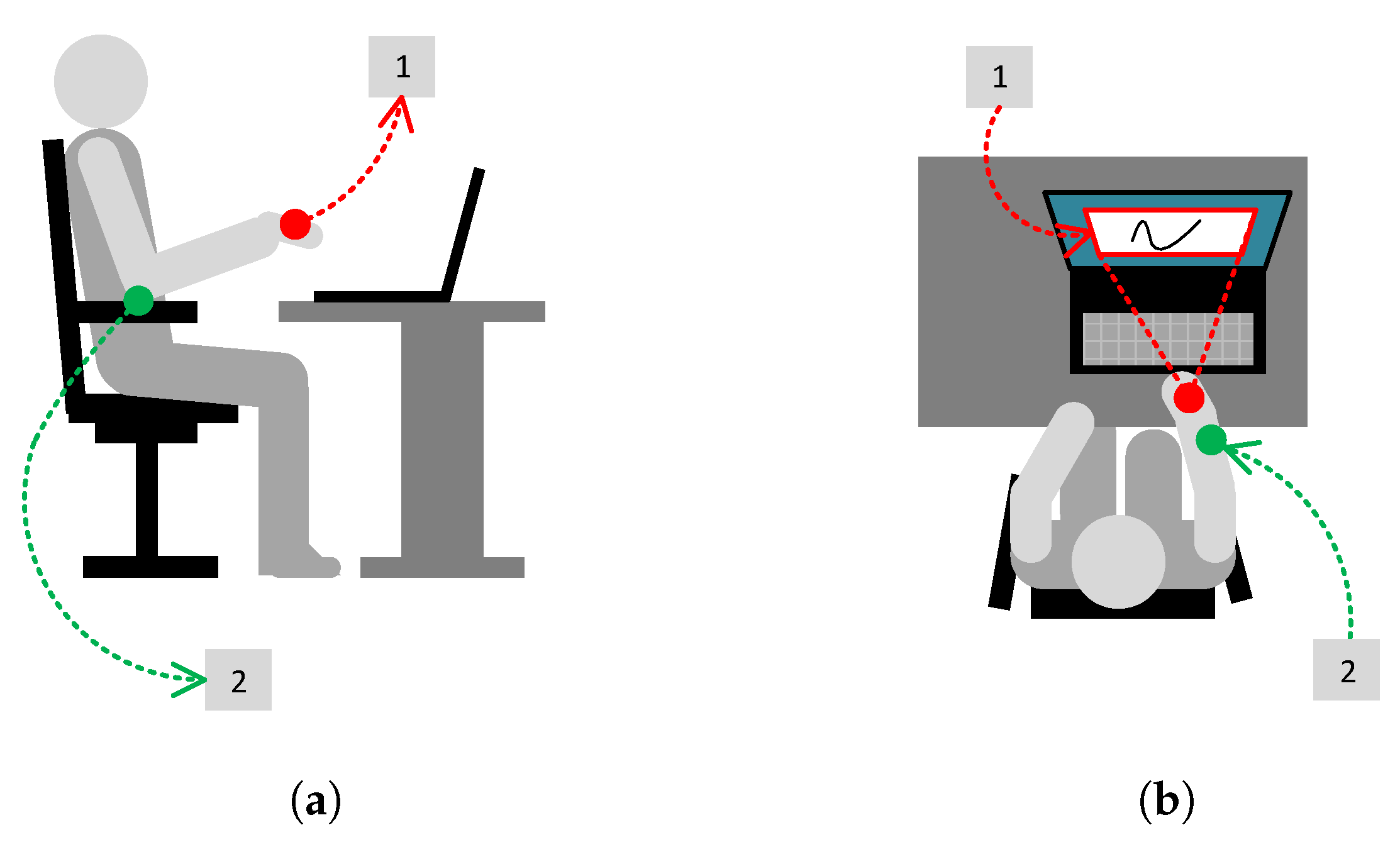
Figure 2.
Determining the PYR event decimation factor: (a) – The PYR event triggering time [ms] in function of the event decimation factor, (b) – The duration of the PYR event handling cycle [ms]; the results show that the decimation factor value should be set to 4, which means that only the each fourth event will be handled.
Figure 2.
Determining the PYR event decimation factor: (a) – The PYR event triggering time [ms] in function of the event decimation factor, (b) – The duration of the PYR event handling cycle [ms]; the results show that the decimation factor value should be set to 4, which means that only the each fourth event will be handled.
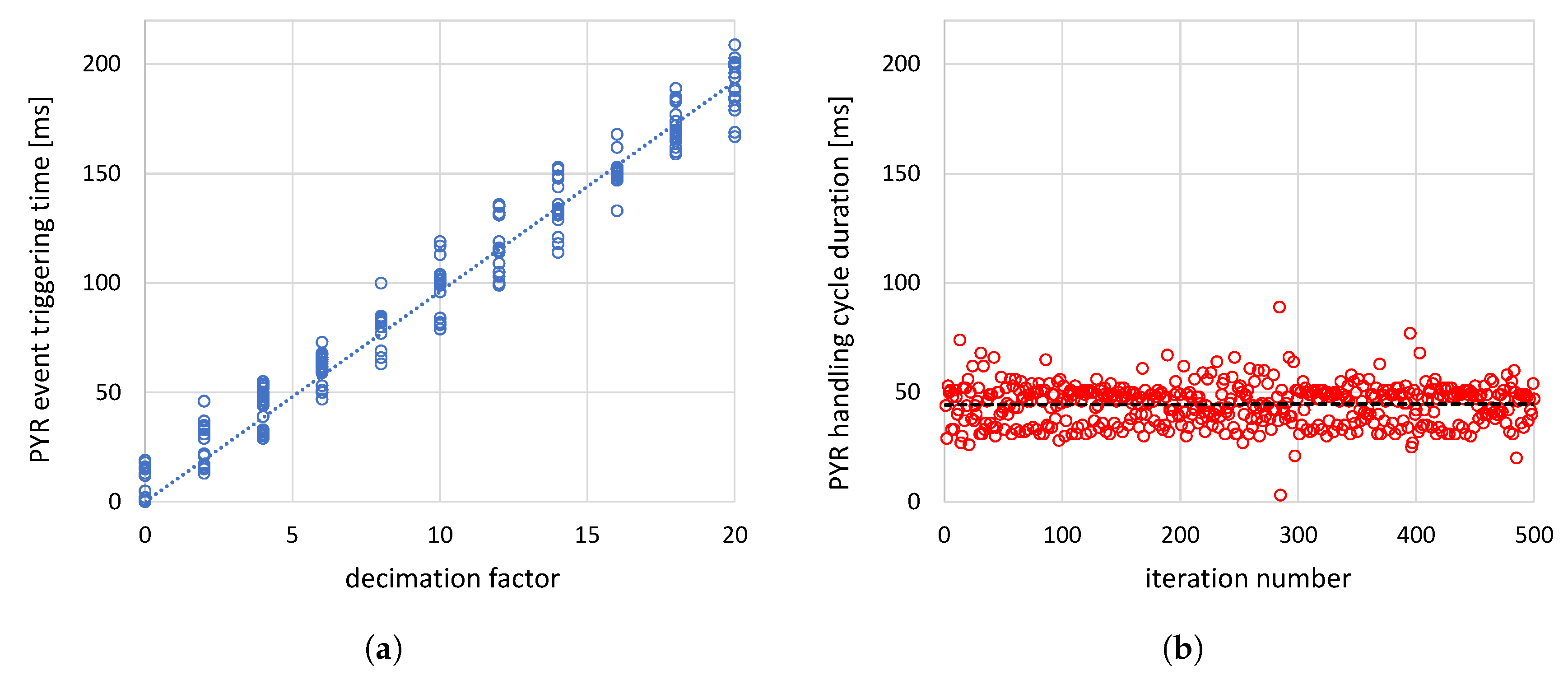
Figure 3.
The examples of gesture shapes; the gray square represents the viewport size: (a) – the gestures included in the prompted set (set of gestures suggested to users when recording), (b) – examples of the gestures proposed by the users.
Figure 3.
The examples of gesture shapes; the gray square represents the viewport size: (a) – the gestures included in the prompted set (set of gestures suggested to users when recording), (b) – examples of the gestures proposed by the users.
| alpha right | alpha vertical | "C" upper | finger | "h" lower |
| "P" upper | sigma upper | spiral | "T" upper | "W" upper |
| (a) | ||||
| circle | dash | "G" upper | less | more |
| pipe | "S" upper | square | tipi | "V" upper |
| (b) |
Figure 4.
Examples of gestures with fast drawn fragments: (a) – the original gesture trails (as captured), (b) – corresponding gesture Bézier approximations, (c) – original gestures and their approximations superimposed.
Figure 4.
Examples of gestures with fast drawn fragments: (a) – the original gesture trails (as captured), (b) – corresponding gesture Bézier approximations, (c) – original gestures and their approximations superimposed.
| (a) | ||
| (b) | ||
| (c) |
Figure 5.
The system map showing it’s architecture construction blocks and their content and responsibilities; for better readability, hardware, software, and data artifacts are organized clockwise and labeled with numbers (1–10); informal notation is used; the following elements are depicted: the Kai controller (1), PC with the Kai Dongle (2), and Kai SDK (3), and Kai.WebsocketModule (4), MyKaiLibrary (5), Main Module UI (6), gesture System Dataset (7), MyKaiPy Research Module (8), Models and Statistics (9), and End User Module (10)
Figure 5.
The system map showing it’s architecture construction blocks and their content and responsibilities; for better readability, hardware, software, and data artifacts are organized clockwise and labeled with numbers (1–10); informal notation is used; the following elements are depicted: the Kai controller (1), PC with the Kai Dongle (2), and Kai SDK (3), and Kai.WebsocketModule (4), MyKaiLibrary (5), Main Module UI (6), gesture System Dataset (7), MyKaiPy Research Module (8), Models and Statistics (9), and End User Module (10)
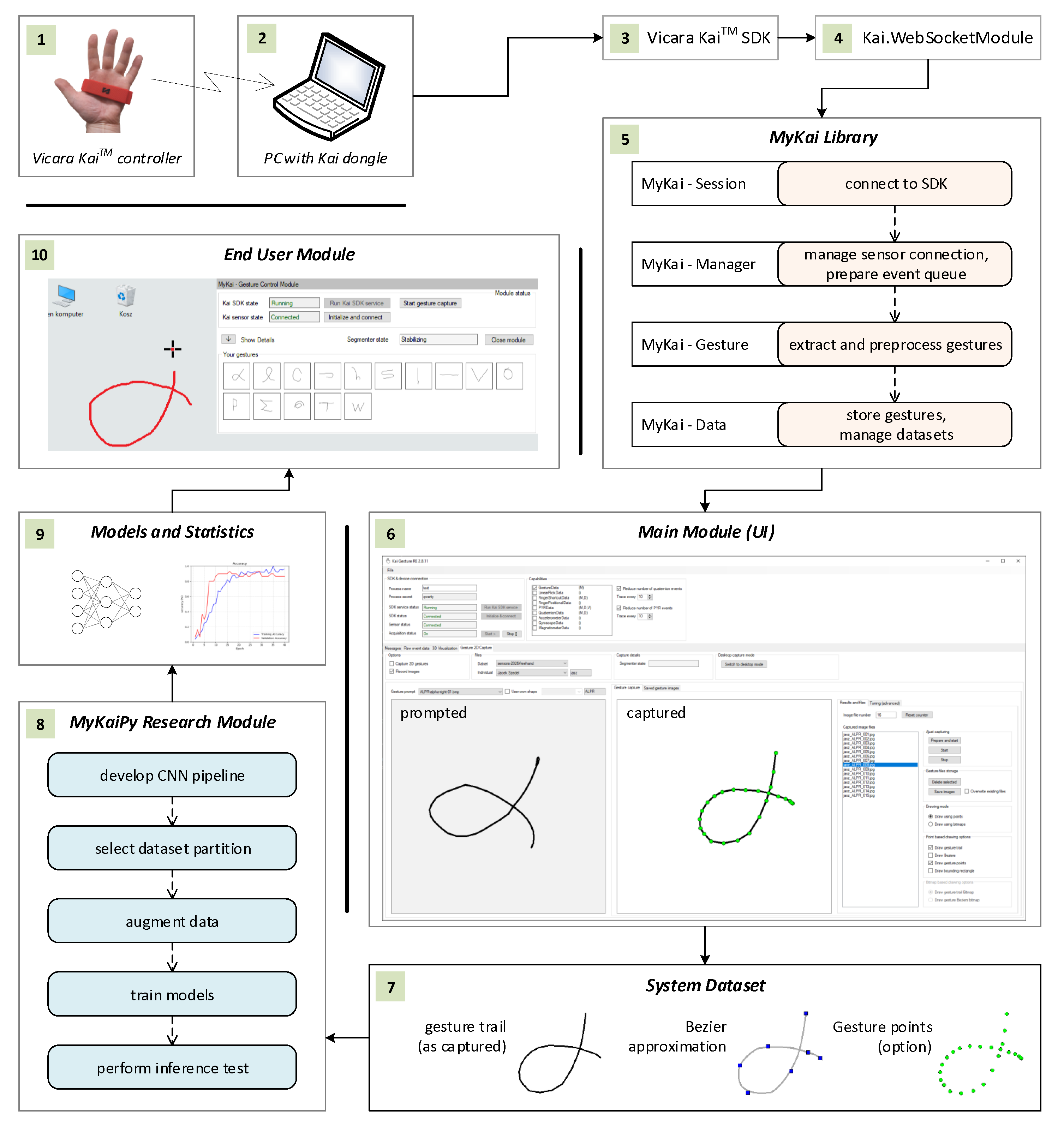
Figure 6.
Illustration of the gesture extraction process; the subsequent frames of the process view were superimposed, while the user sees only one frame at a time.
Figure 6.
Illustration of the gesture extraction process; the subsequent frames of the process view were superimposed, while the user sees only one frame at a time.
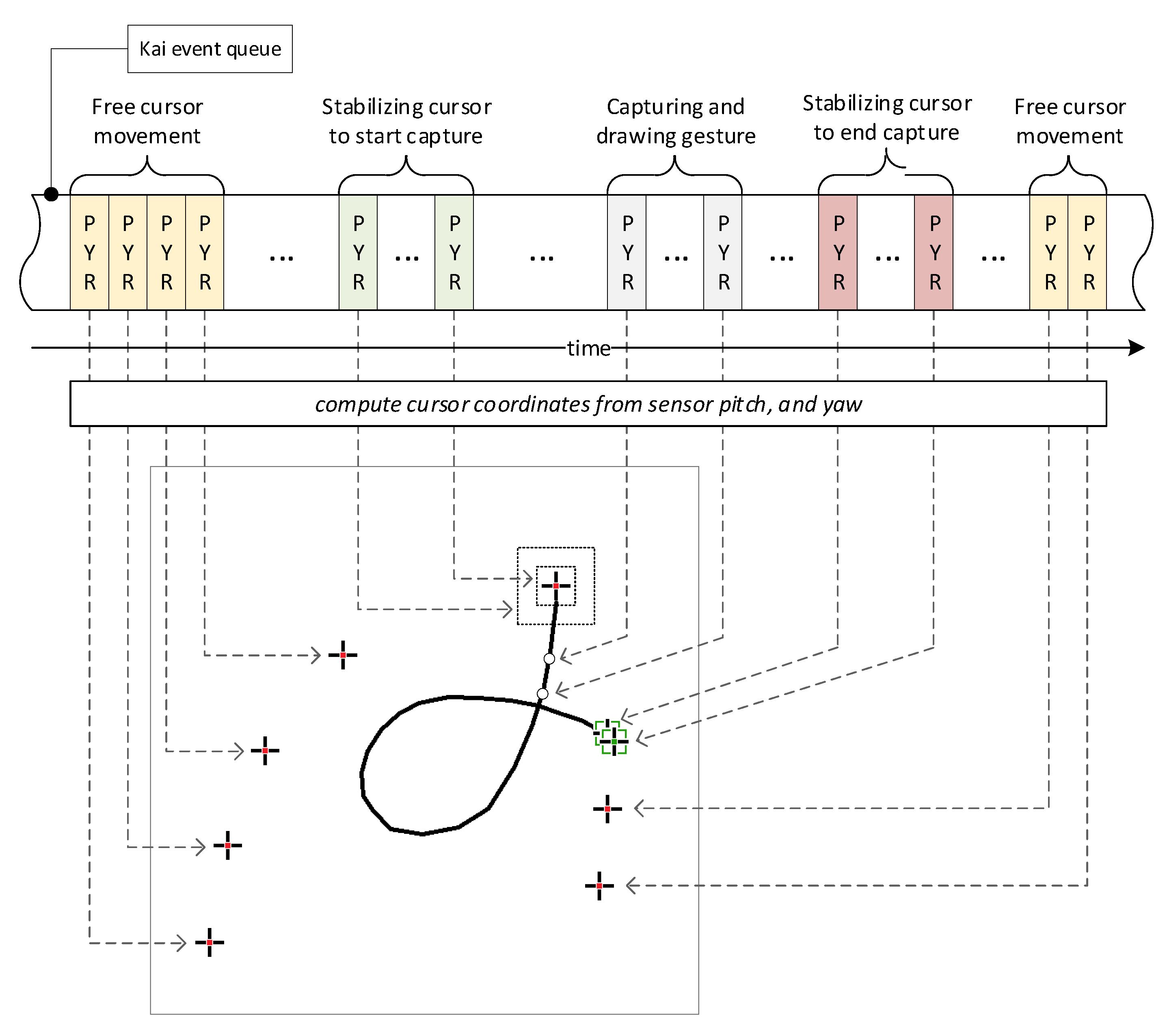
Figure 7.
State machine of the gesture extraction scenario shown from the user’s perspective.
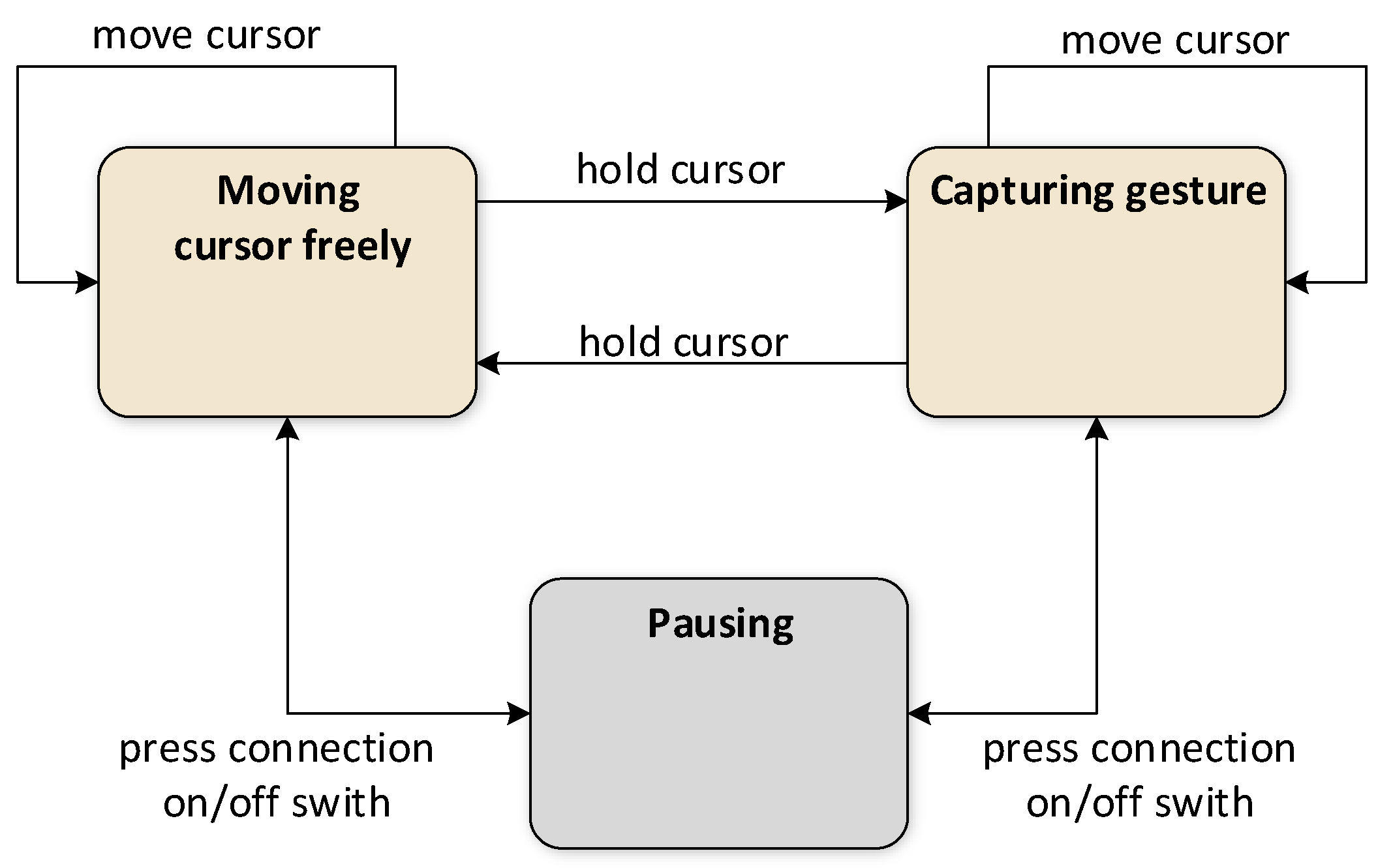
Figure 8.
State machine diagram that shows the detailed view of the gesture extraction scenario; t is the stabilization time, is the cursor movement distance, limit stands for both the time and distance limits.
Figure 8.
State machine diagram that shows the detailed view of the gesture extraction scenario; t is the stabilization time, is the cursor movement distance, limit stands for both the time and distance limits.
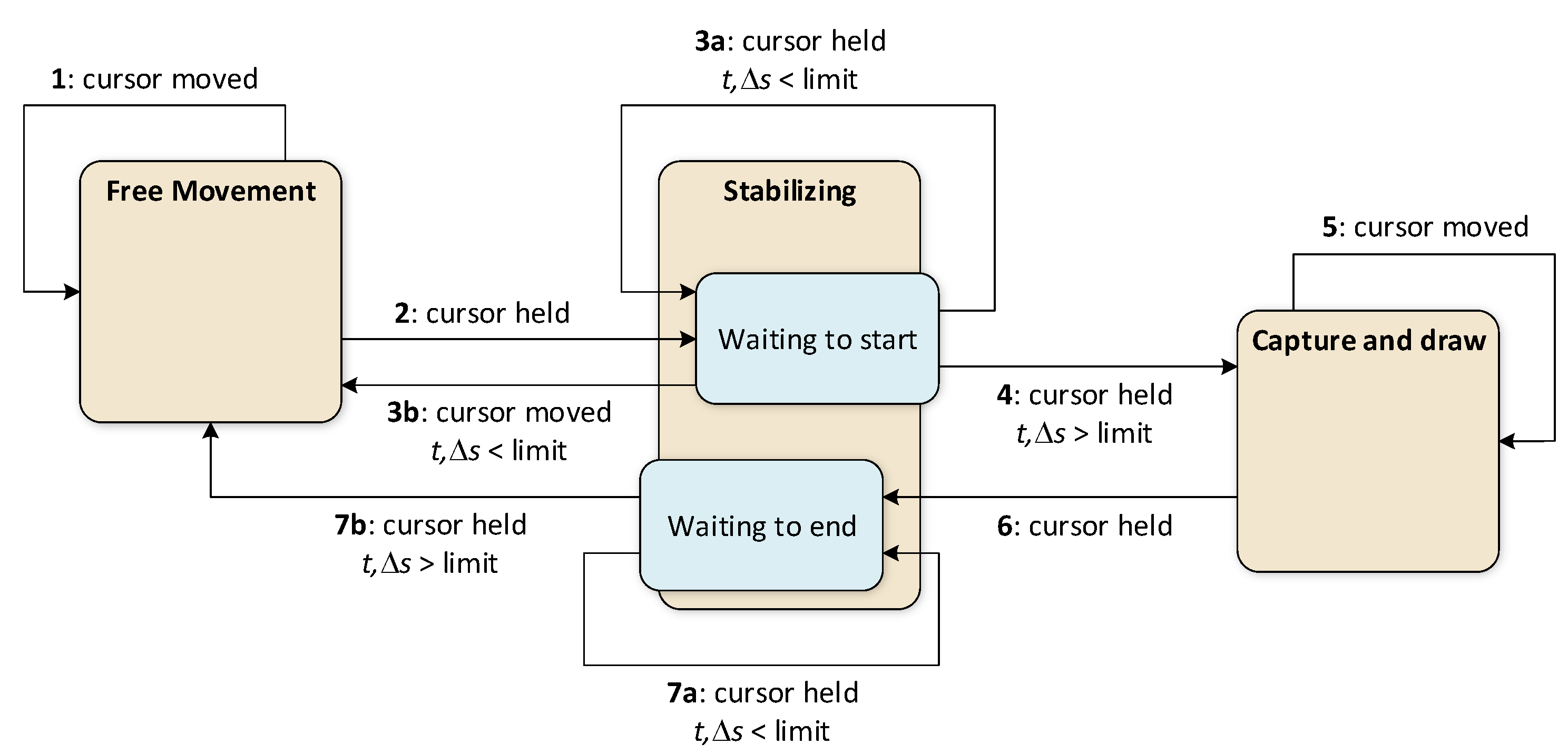
Figure 9.
Loss and accuracy plots showing the learning results obtained for the initial pipeline () (the shaded area corresponds to the 95% confidence level): (a) the plot of averages across experiments and epochs, (b) the worst individual result obtained for one of the participants with less stable gestures.
Figure 9.
Loss and accuracy plots showing the learning results obtained for the initial pipeline () (the shaded area corresponds to the 95% confidence level): (a) the plot of averages across experiments and epochs, (b) the worst individual result obtained for one of the participants with less stable gestures.
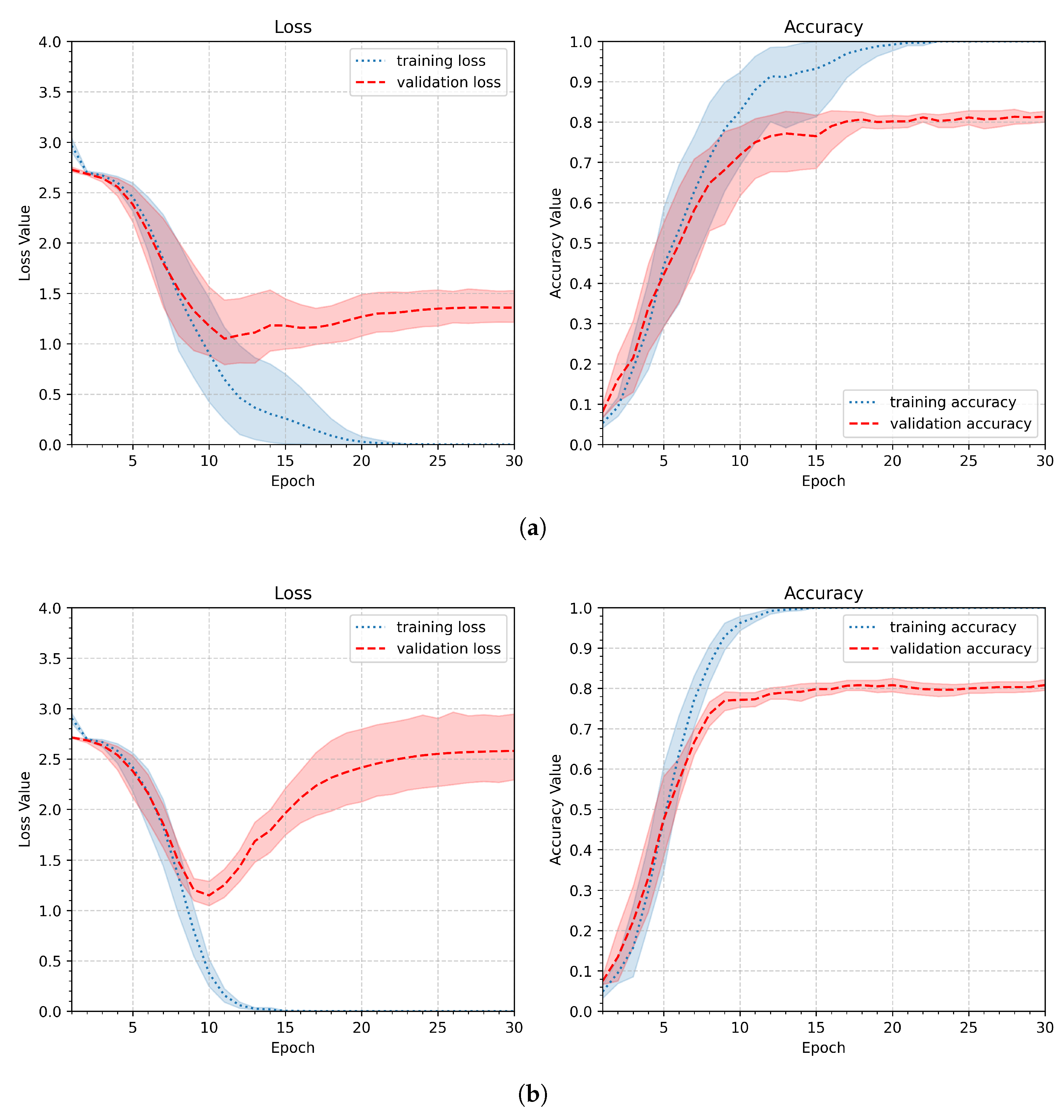
Figure 10.
Loss and accuracy plots presenting the learning results obtained for different input image sizes (continued): (b) 64x64, (c) 32x32.
Figure 10.
Loss and accuracy plots presenting the learning results obtained for different input image sizes (continued): (b) 64x64, (c) 32x32.
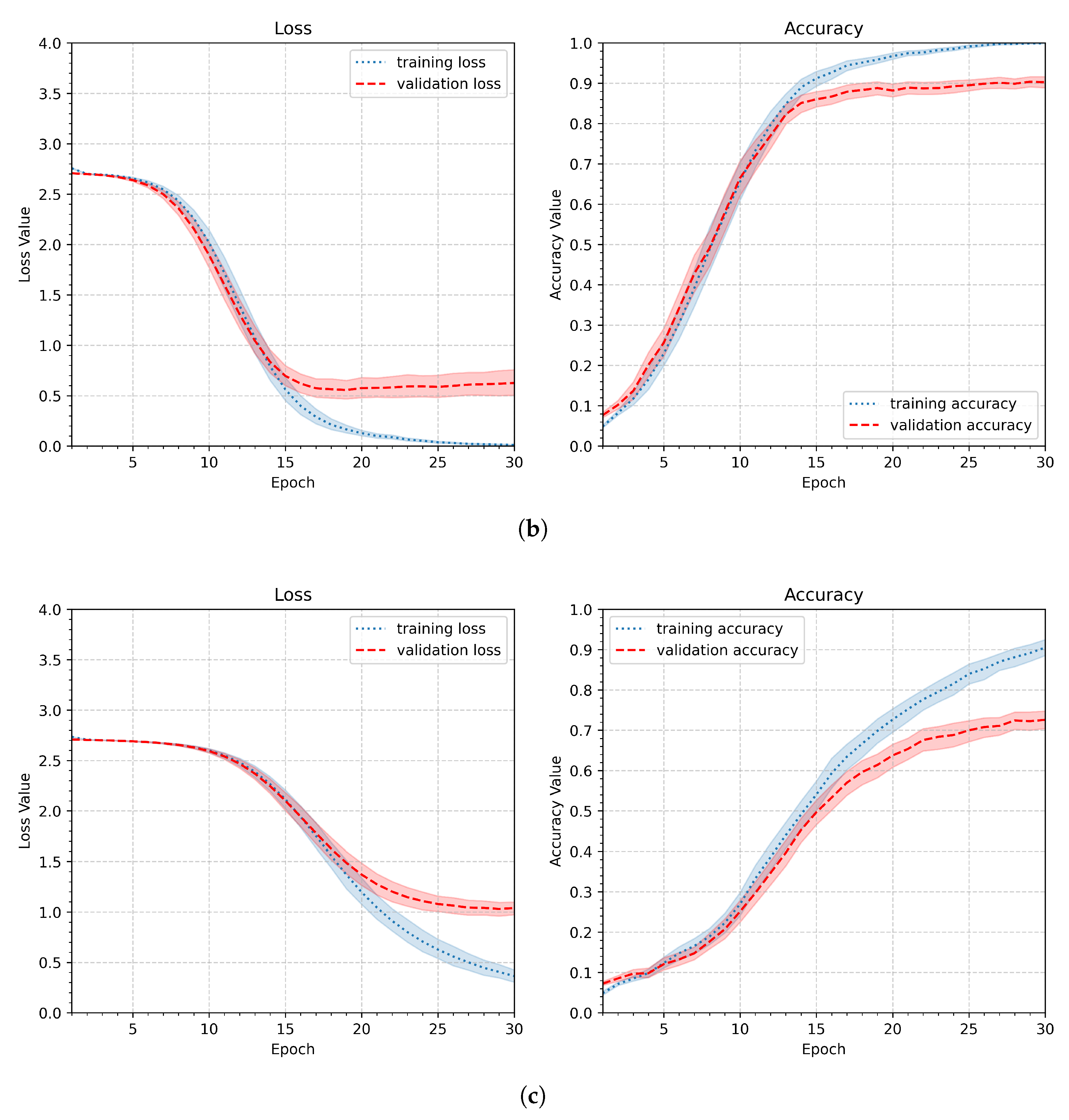
Figure 11.
Three sets of gestures demonstrating different types of variations: (a) scale, (b) position, (c) rotation. Each set of three samples in sets a, b, and c belongs to a separate participant.
Figure 11.
Three sets of gestures demonstrating different types of variations: (a) scale, (b) position, (c) rotation. Each set of three samples in sets a, b, and c belongs to a separate participant.
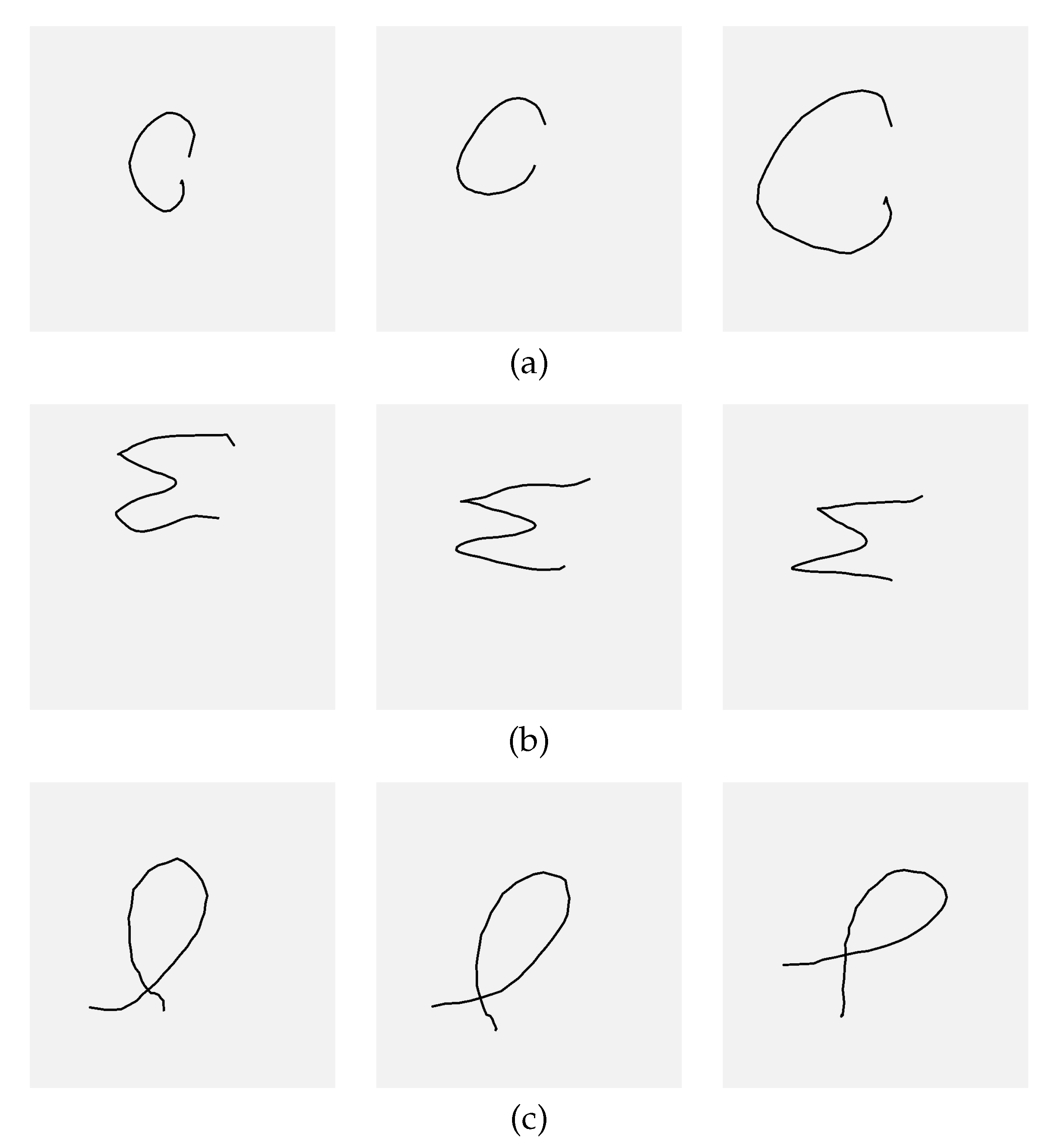
| (a) | ||
| (b) | ||
| (c) |
Figure 12.
Loss and accuracy plots showing the learning results for different augmentation ratios applied to scale, position shift, and rotation: (a) , (b) , and (c) .
Figure 12.
Loss and accuracy plots showing the learning results for different augmentation ratios applied to scale, position shift, and rotation: (a) , (b) , and (c) .
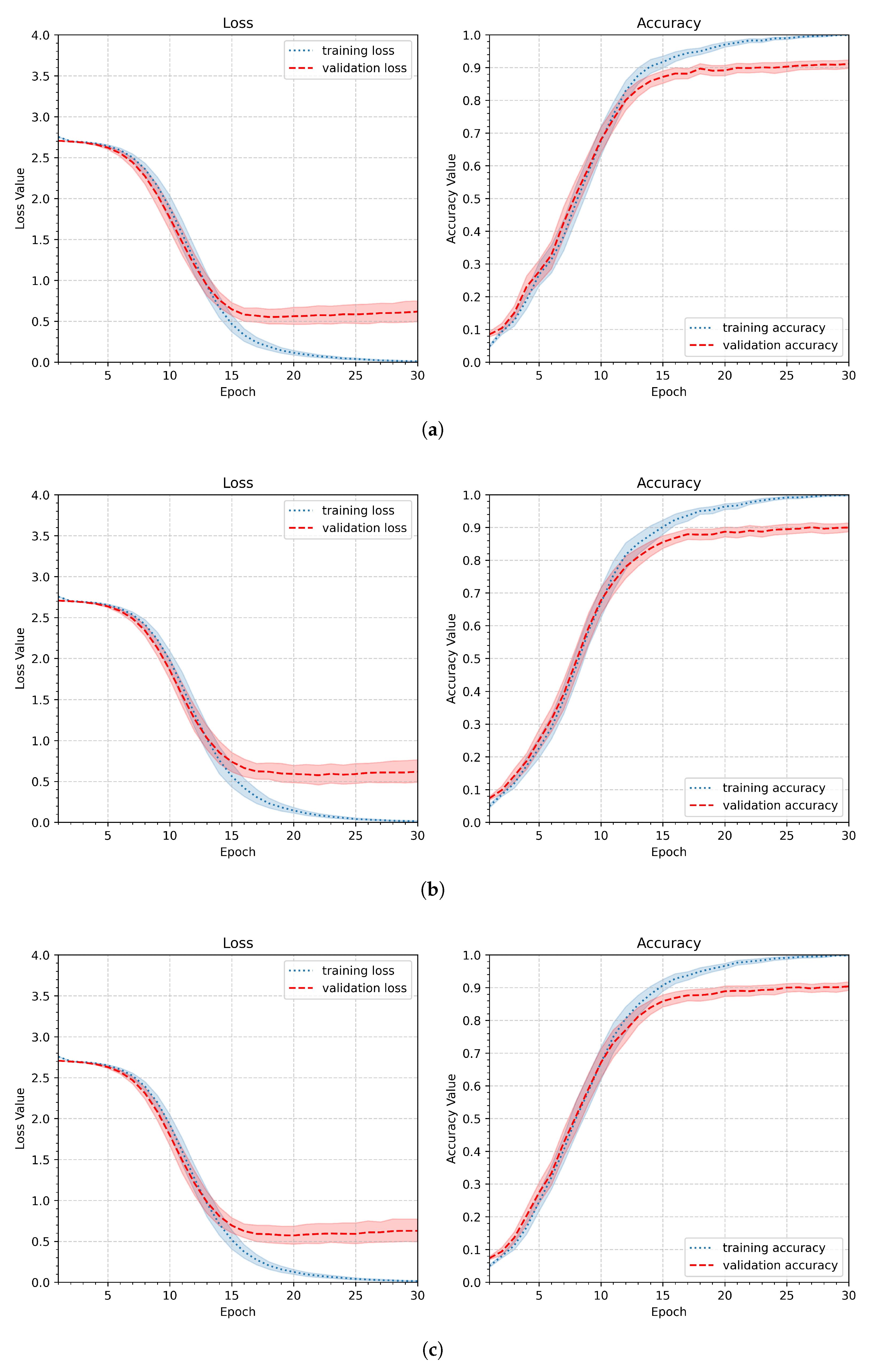
Figure 13.
Loss and accuracy plots illustrating the influence of a dropout layer applied after the dense layer for three dropout rates (continued): (b) medium regularization (), (c) strong regularization ().
Figure 13.
Loss and accuracy plots illustrating the influence of a dropout layer applied after the dense layer for three dropout rates (continued): (b) medium regularization (), (c) strong regularization ().
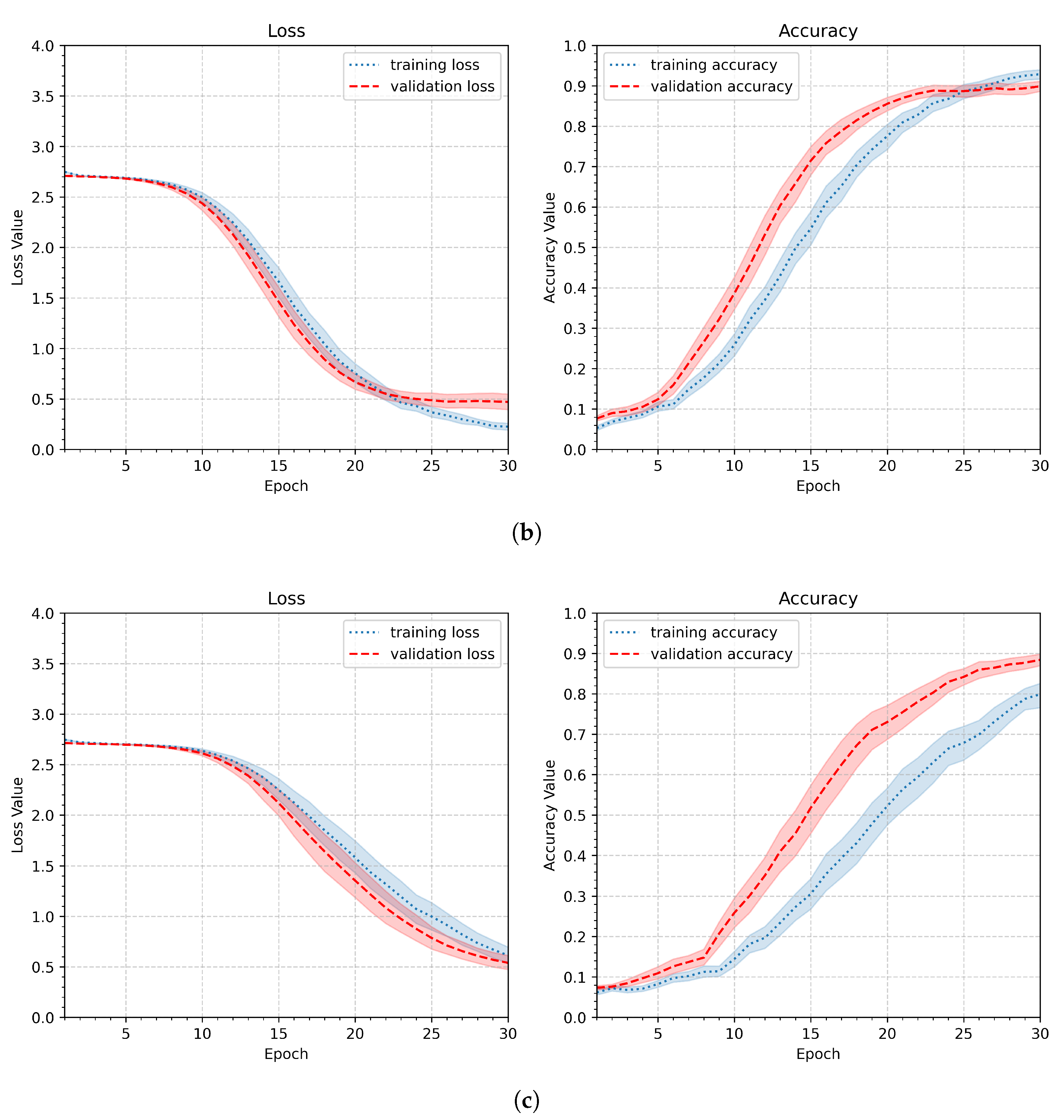
Figure 14.
Results of the training process for different numbers of training samples: the average minimum validation loss, and the maximum validation accuracy.
Figure 14.
Results of the training process for different numbers of training samples: the average minimum validation loss, and the maximum validation accuracy.
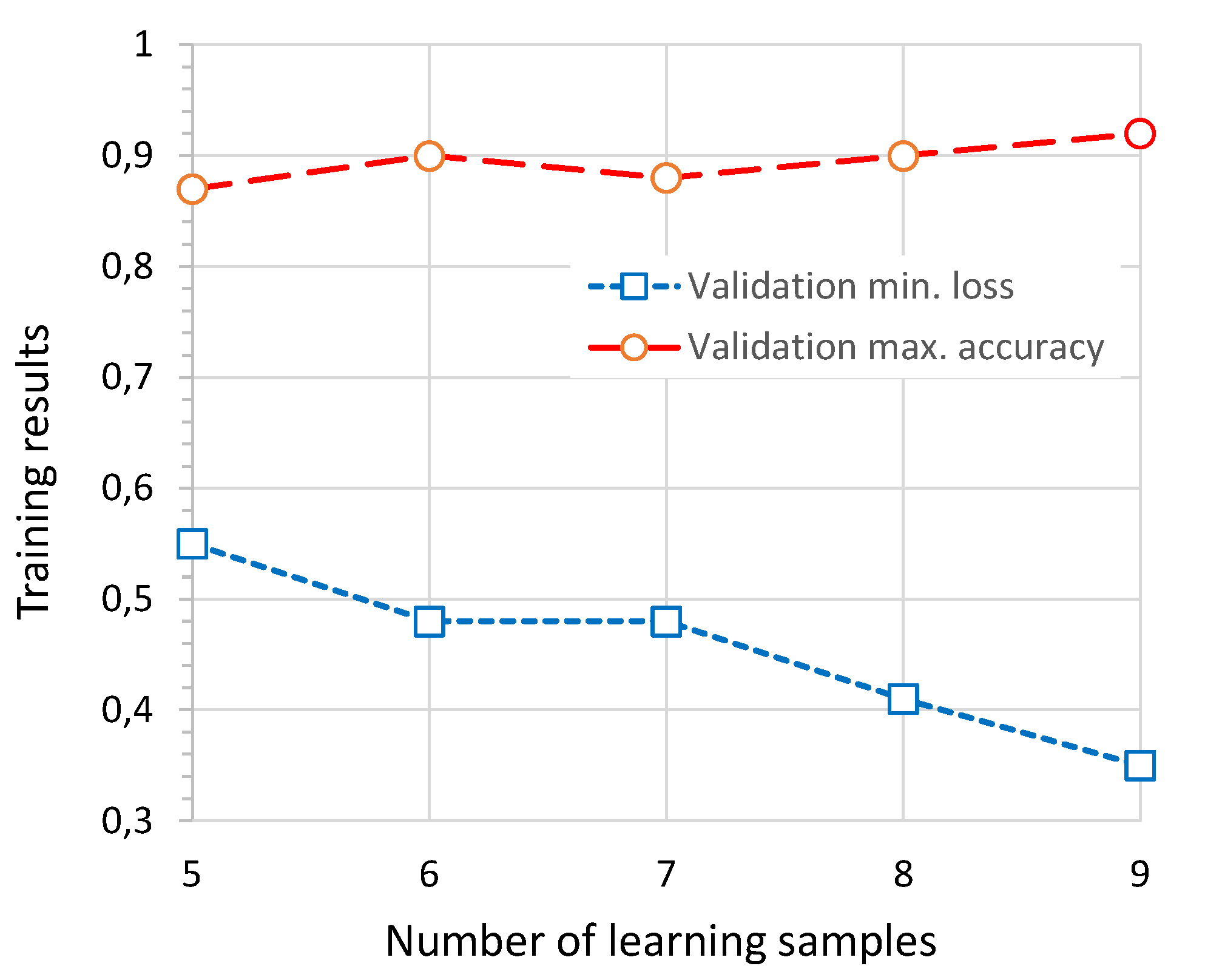
Figure 15.
Loss and accuracy plots illustrating the training results for different numbers of learning samples: (a) the lowest number , (b) the highest number .
Figure 15.
Loss and accuracy plots illustrating the training results for different numbers of learning samples: (a) the lowest number , (b) the highest number .
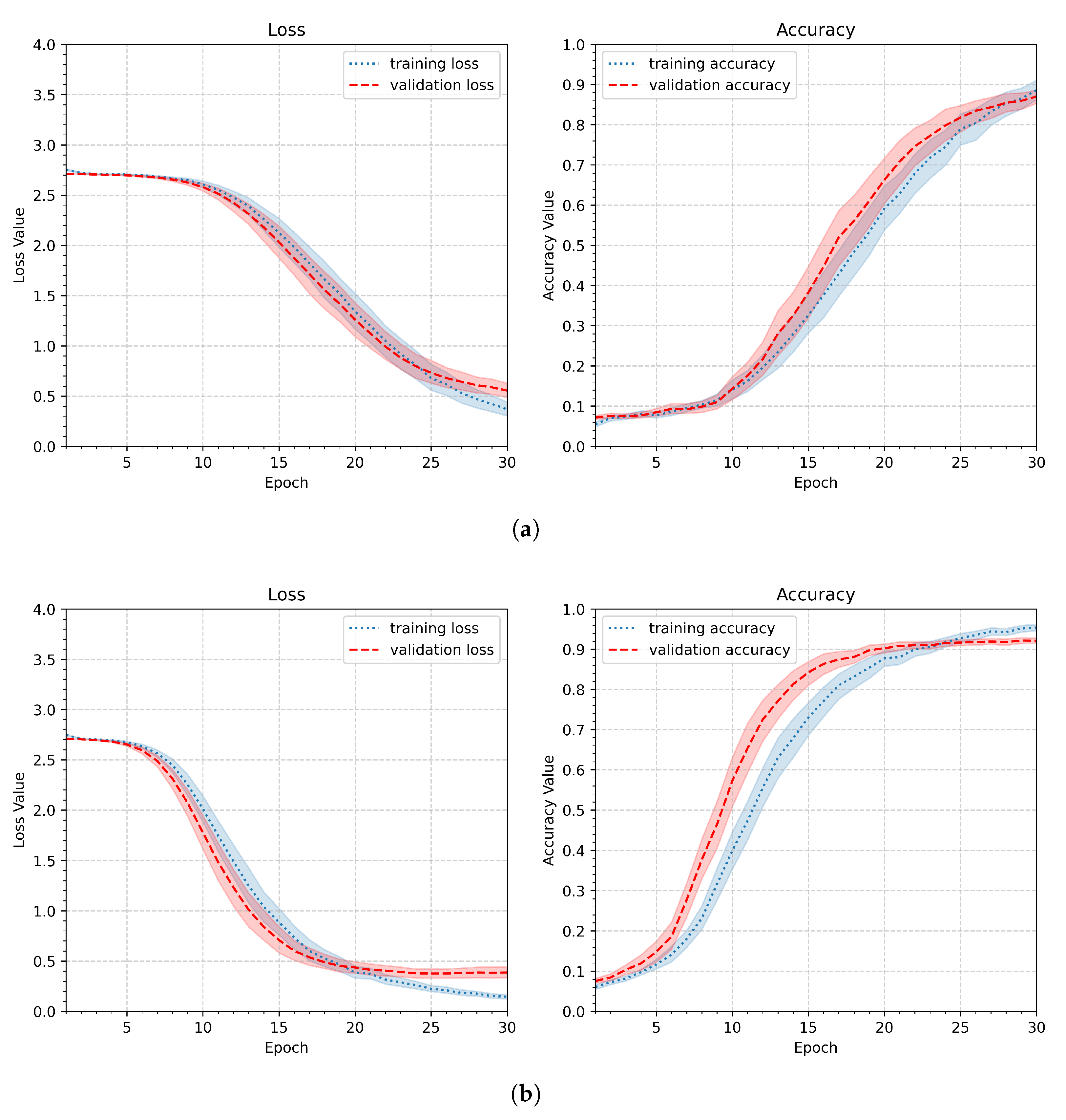
Figure 16.
Confusion matrices obtained for the set of testing samples and a randomly selected images representing each class; smoothed gestures (continued): (d) the worst result.
Figure 16.
Confusion matrices obtained for the set of testing samples and a randomly selected images representing each class; smoothed gestures (continued): (d) the worst result.
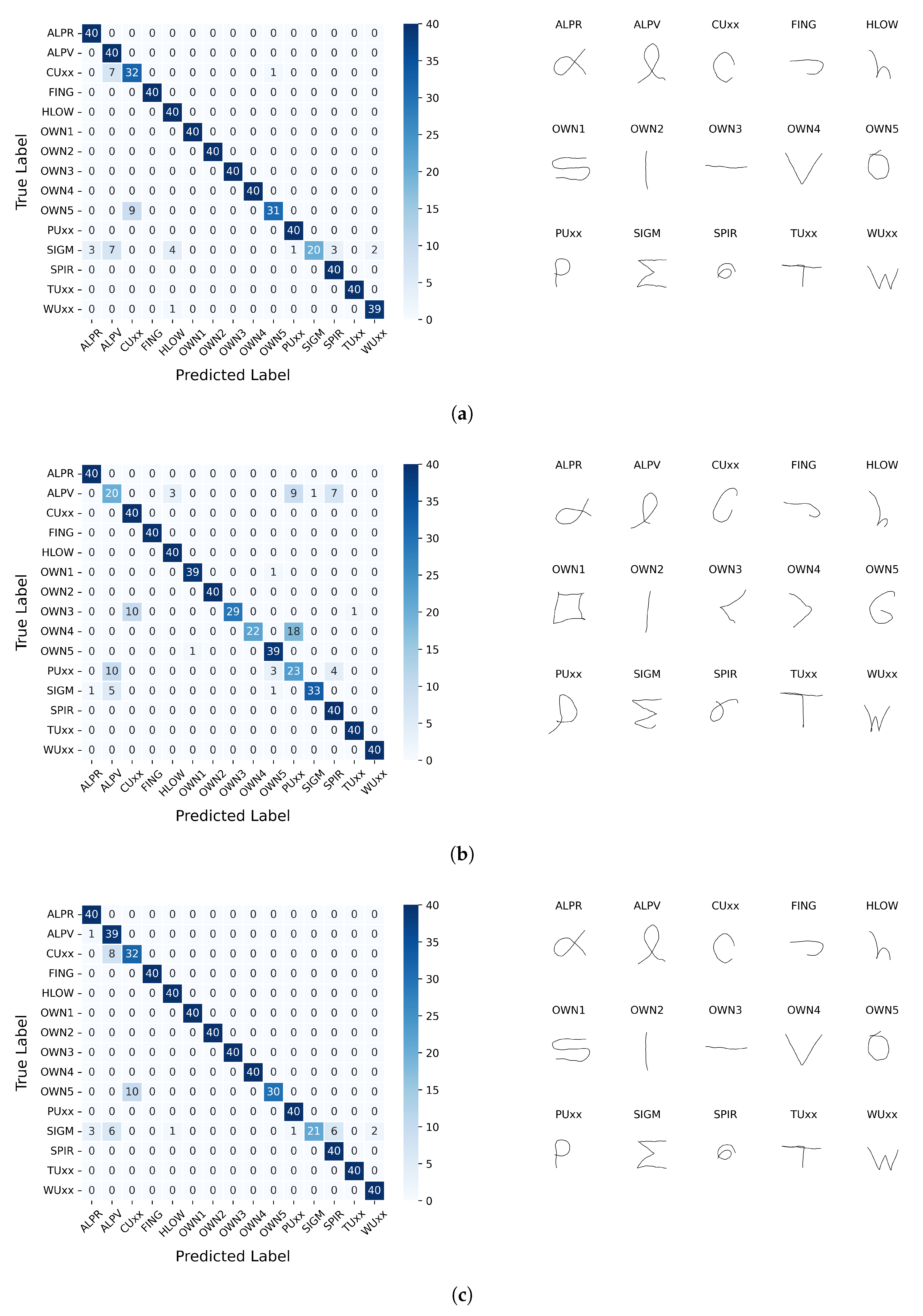
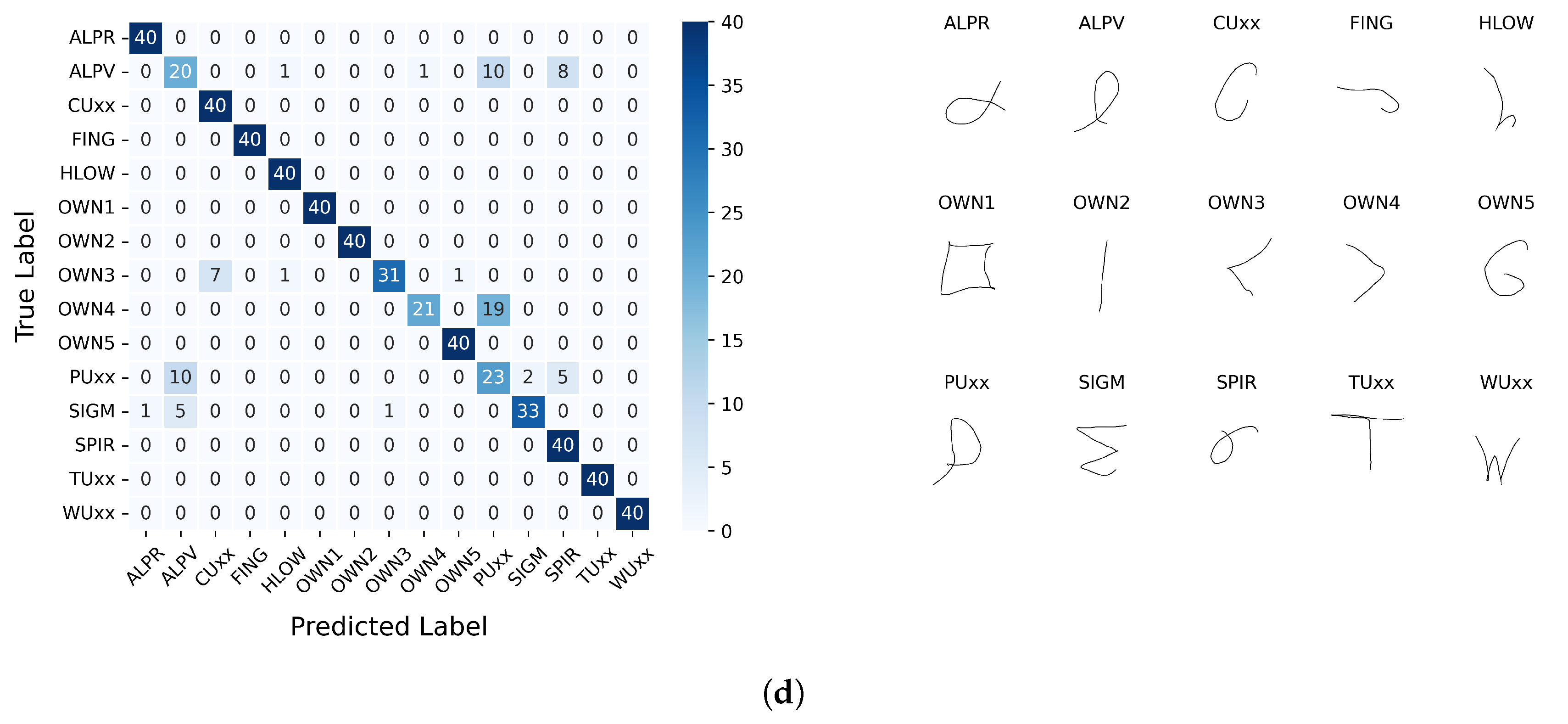
Figure 17.
Examples of casual – unwanted, rapid, random gestures.
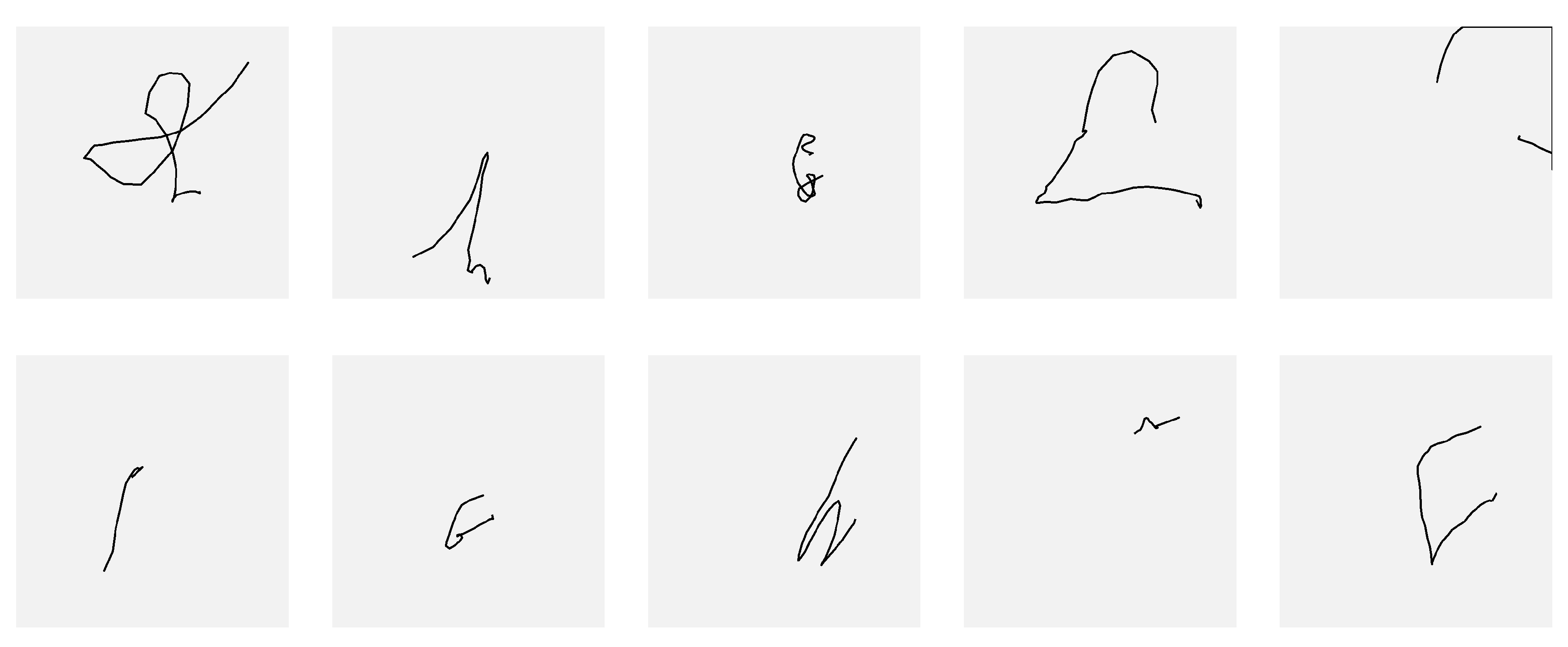
Figure 18.
Roc curves of Experiment 7: (a) – ROC with the highest AUC, (a) – ROC with the lowest AUC, (c) – ROC aggregated across all participants.
Figure 18.
Roc curves of Experiment 7: (a) – ROC with the highest AUC, (a) – ROC with the lowest AUC, (c) – ROC aggregated across all participants.
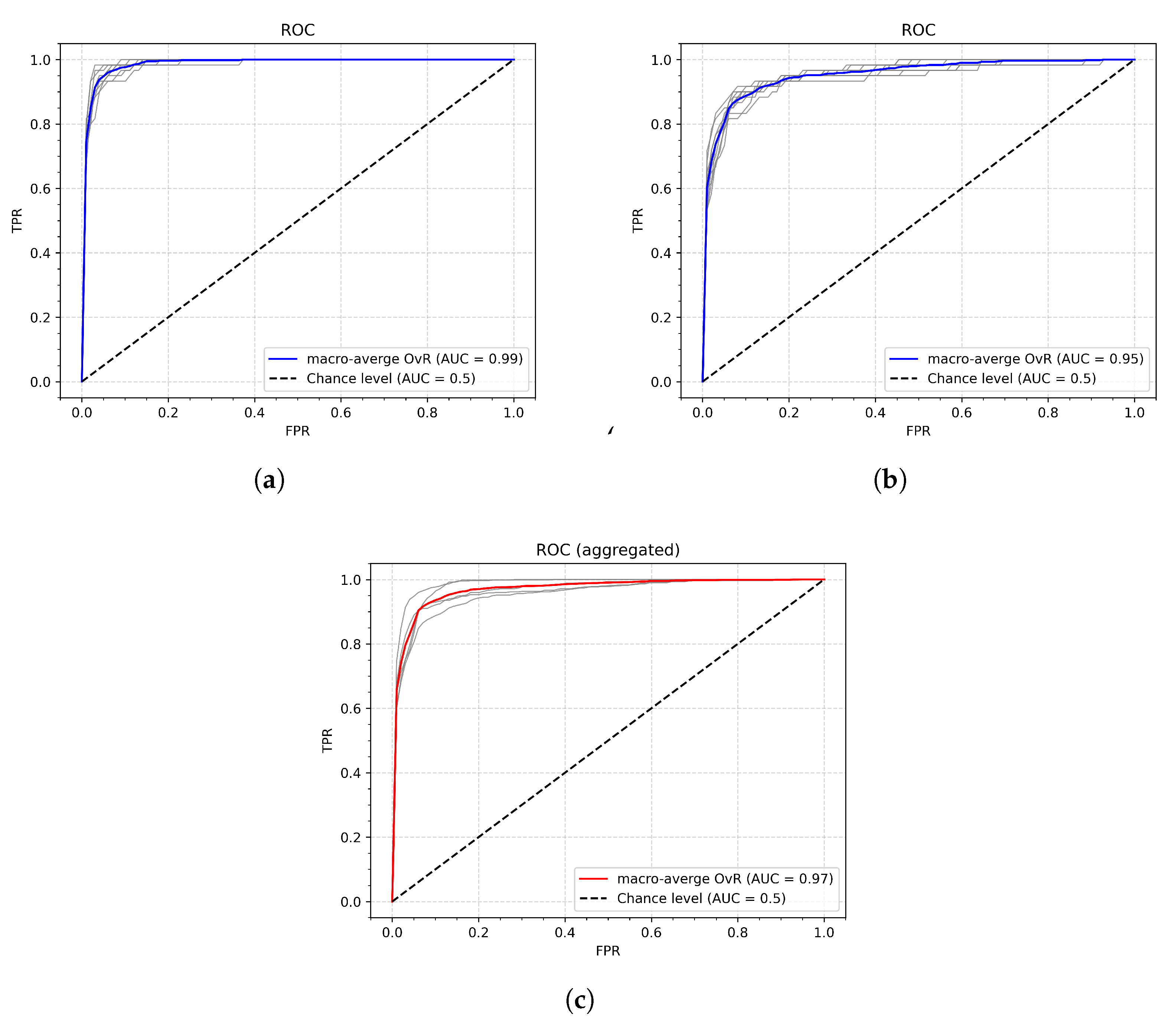

Table 1.
The Kai controller capabilities detailed description.
| Capability name | Flag | Meaning | Argument type | Available in v. 1.0.0.9 | Remarks |
|---|---|---|---|---|---|
| Gesture | 1 | Basic gesture | Gesture enum | Yes | Capability is always on |
| Linear Flick | 2 | Flick | string | No | No events received |
| Finger Shortcut | 4 | Fingers bent? | bool[] (four elements) | Yes | Incorrect if battery low |
| Finger Position | 8 | Finger position | int[] (four elements) | No | No events received |
| PYR | 16 | Pitch, Yaw, Roll | float (three values) | Yes | Large number of events |
| Quaternion | 32 | w, x, y, z | float (four values) | Yes | Large number of events |
| Accelero-meter | 64 | ax, ay, az | Vector3 | No | No events received |
| Gyroscope | 128 | gx, gy, gz | Vector3 | No | No events received |
| Magneto-meter | 256 | mx, my, mz | Vector3 | No | No events received |
Table 2.
CNN pipelines involved in this part of the study: ’+’ indicates that the element is included, ’-’ indicates that the element was not included; the pipeline element parameters are given in brackets.
Table 2.
CNN pipelines involved in this part of the study: ’+’ indicates that the element is included, ’-’ indicates that the element was not included; the pipeline element parameters are given in brackets.
| CNN Ppipelines | |||
|---|---|---|---|
| Layer | (Initial) | (Augmentation) | (Dropout) |
| Input pipeline | |||
| Rescaling | + (1./255) | + (1./255) | + (1./255) |
| Resizing | – (180, 180, 3) | + (90x90, 64x64, 32x32) x 1 | + (64x64) |
| Random translation | – | + (0.1, 0.2, 0.3) | + (0.2) |
| Random rotation | – | + (0.1, 0.2, 0.3) | + (0.2) |
| Random scale | – | + (0.1, 0.2, 0.3) | + (0.2) |
| Network pipeline | |||
| Conv2D | + (32, 3, ’relu’) | + (32, 3, ’relu’) | + (32, 3, ’relu’) |
| MaxPooling2D | + | + | + |
| Conv2D | + (32, 3, ’relu’) | + (32, 3, ’relu’) | + (32, 3, ’relu’) |
| MaxPooling2D | + | + | + |
| Conv2D | + (32, 3, ’relu’) | + (32, 3, ’relu’) | + (32, 3, ’relu’) |
| MaxPooling2D | + | + | + |
| Flatten | + | + | + |
| Dense | + (128, ’relu’) | + | + |
| Dropout | – | – | + (0.2, 0.4, 0.6) |
| Dense | + (no. of classes) | + (no. of classes) | + (no. of classes) |
Table 3.
Summary of parameters of the first experiment – evaluating the initial CNN pipeline ().
| Parameter | Value |
|---|---|
| dataset partition | gestures as captured |
| number of participants | 5 |
| number of repetitions per participant | 10 |
| number of epochs | 30 |
| image size | 180x180 pixels (one channel) |
| augmentation | none |
| number of learning samples per class | 6 |
| number of validation samples per class | 4 |
| total number of samples per class | 10 |
| dropout rate | 0 |
| optimizer | adam |
Table 4.
Summary of parameters of the Experiment 2 – changing the image size ().
| Parameter | Value |
|---|---|
| dataset partition | gestures as captured |
| number of participants | 5 |
| number of repetitions per participant | 10 |
| number of epochs | 30 |
| image size | 90x90, 64x64, 32x32 (one channel) |
| augmentation | none |
| number of learning samples per class | 6 |
| number of validation samples per class | 4 |
| total number of samples per class | 15 |
| dropout rate | 0.0 |
| optimizer | adam |
Table 5.
Summary of parameters of the Experiment 3 – data augmentation ().
| Parameter | Value |
|---|---|
| dataset partition | gestures as captured |
| number of participants | 5 |
| number of repetitions per participant | 10 |
| number of epochs | 30 |
| image size | 64x64 (one channel) |
| augmentation | scale, translation, rotation: 10%, 20%, 30% |
| number of learning samples per class | 6 |
| number of validation samples per class | 4 |
| total number of samples per class | 15 |
| dropout rate | 0.0 |
| optimizer | adam |
Table 6.
Summary of parameters of the fourth experiment – dropout application ().
| Parameter | Value |
|---|---|
| dataset partition | gestures as captured |
| number of participants | 5 |
| number of repetitions per participant | 10 |
| number of epochs | 30 |
| image size | 64x64 (one channel) |
| augmentation | 20% |
| number of learning samples per class | 6 |
| number of validation samples per class | 4 |
| total number of samples per class | 15 |
| dropout rate | (0.2, 0.4, 0.6) |
| optimizer | adam |
Table 7.
Summary of all experiments related to the input pipeline, including experiment options and the resulting minimum average loss () and maximum average accuracy () for training and validation.
Table 7.
Summary of all experiments related to the input pipeline, including experiment options and the resulting minimum average loss () and maximum average accuracy () for training and validation.
| Experiment 1 - initial pipeline | ||||
|---|---|---|---|---|
| Option | Train | Val | Train | Val |
| average | 0.00 | 1.05 | 1.00 | 0.82 |
| worst (less stable) | 0.00 | 1.50 | 1.00 | 0.81 |
| Experiment 2 - input image size | ||||
| Option | Tra | Val | Tra | Val |
| 90x90 pixels | 0.00 | 0.57 | 1.00 | 0.89 |
| 64x64 pixels | 0.01 | 0.56 | 0.99 | 0.90 |
| 32x32 pixels | 0.36 | 1.03 | 0.90 | 0.73 |
| Experiment 3 - data augmentation | ||||
| Option | Tra | Val | Tra | Val |
| 10% (scale, shift, rotation) | 0.01 | 0.55 | 0.99 | 0.91 |
| 20% (scale, shift, rotation) | 0.01 | 0.54 | 0.99 | 0.91 |
| 30% (scale, shift, rotation) | 0.01 | 0.58 | 0.99 | 0.90 |
| Experiment 4 - applying dropout layer | ||||
| Option | Tra | Val | Tra | Val |
| 0.2 (slight) | 0.10 | 0.54 | 0.97 | 0.90 |
| 0.4 (medium) | 0.22 | 0.47 | 0.92 | 0.90 |
| 0.6 (strong) | 0.61 | 0.54 | 0.79 | 0.88 |
Table 8.
Summary of parameters of the Experiment 5 – investigating the number of learning samples (N).
Table 8.
Summary of parameters of the Experiment 5 – investigating the number of learning samples (N).
| Parameter | Value |
|---|---|
| dataset partition | gestures as captured |
| number of participants | 5 |
| number of repetitions per participant | 10 |
| number of epochs | 30 |
| image size | 64x64 (one channel) |
| augmentation | 20% |
| number of learning samples per class | 5, 6, 7, 8, 9 |
| number of validation samples per class | 4 |
| total number of samples per class | 15 |
| dropout rate | 0.4 |
| optimizer | adam |
Table 9.
Summary of the Experiment 5 showing the minimum average loss () and maximum average accuracy () for training and validation.
Table 9.
Summary of the Experiment 5 showing the minimum average loss () and maximum average accuracy () for training and validation.
| Experiment 5 - number of learning samples | ||||
|---|---|---|---|---|
| Option | Train | Val | Train | Val |
| 0.37 | 0.55 | 0.88 | 0.87 | |
| 0.23 | 0.48 | 0.92 | 0.90 (0.897) | |
| 0.24 | 0.48 | 0.92 | 0.88 | |
| 0.16 | 0.41 | 0.95 | 0.90 | |
| 0.15 | 0.35 | 0.95 | 0.92 | |
Table 10.
Summary of parameters of the Experiment 6 – inference on testing set.
| Parameter | Value |
|---|---|
| dataset partition | gestures as-captured, Bézier-smoothed |
| number of participants | 5 |
| number of repetitions per participant | 10 |
| number of epochs | 30 |
| image size | 64x64 (one channel) |
| augmentation | 20% |
| number of learning samples per class | 9 |
| number of validation samples per class | 2 |
| number of test samples per class | 4 |
| total number of samples | 15 |
| dropout rate | 0.4 |
| optimizer | adam |
Table 11.
Summary of the Experiment 6 minimum average loss () and maximum average accuracy () for training and validation.
Table 11.
Summary of the Experiment 6 minimum average loss () and maximum average accuracy () for training and validation.
| Experiment 6 - system performance on testing set | |||
|---|---|---|---|
| Gestures as-captured | |||
| Participant | Accuracy | Precession | See Figure 16 |
| 1 | 0.88 | 0.89 | (a) |
| 2 | 0.94 | 0.94 | (b) |
| 3 | 0.92 | 0.93 | – |
| 4 | 0.91 | 0.93 | – |
| 5 | 0.90 | 0.91 | – |
| average | 0.91 | 0,92 | |
| Smoothed gestures | |||
| 1 | 0.88 | 0.89 | (c) |
| 2 | 0.94 | 0.95 | (d) |
| 3 | 0.91 | 0.92 | – |
| 4 | 0.93 | 0.94 | – |
| 5 | 0.90 | 0.92 | – |
| average | 0.91 | 0,92 | |
Table 12.
Summary Experiment 7 – AUC values; corresponding example figures.
| Experiment 7 - rejection of unknown, casual gestures | ||
|---|---|---|
| Participant | AUC | See Figure 16 |
| 1 | 0.96 | – |
| 2 | 0.99 | (a) |
| 3 | 0.95 | (b) |
| 4 | 0.98 | – |
| 5 | 0.97 | – |
| average (aggregated) | 0.97 | (c) |
Disclaimer/Publisher’s Note: The statements, opinions and data contained in all publications are solely those of the individual author(s) and contributor(s) and not of MDPI and/or the editor(s). MDPI and/or the editor(s) disclaim responsibility for any injury to people or property resulting from any ideas, methods, instructions or products referred to in the content. |
© 2026 by the authors. Licensee MDPI, Basel, Switzerland. This article is an open access article distributed under the terms and conditions of the Creative Commons Attribution (CC BY) license (http://creativecommons.org/licenses/by/4.0/).
Copyright: This open access article is published under a Creative Commons CC BY 4.0 license, which permit the free download, distribution, and reuse, provided that the author and preprint are cited in any reuse.


