

Submitted:
26 May 2025
Posted:
27 May 2025
You are already at the latest version
Abstract
In the maritime industry, it is common for crew members to be unfamiliar with their workplace until they are on board. This limits evacuation time, which is critical in emergency situations such as fire or shipwreck. The aim of this work is therefore to increase the safety of new crew members by showing them the location of escape routes before they board the ship. For this purpose, the use of 360 technology is proposed. A 360 tour is a virtual, interactive experience that allows users to explore a location as if they were physically there. On a ship, this allows the crew to know the escape routes and make quicker and safer decisions on the most appropriate route. This paper shows how a 360° tour developed and tested on a merchant vessel. The evacuation time from the engine room has been measured for a group of people. The results showed that the 360 tour had a very positive impact on the evacuation time for these people who had not previously been physically present in the area.
Keywords:
360 tours
; ships
; emergency
; evacuation
1. Introduction
A 360 image, commonly referred to as a 360º image, is characterized by capturing a complete view of the scene, allowing viewers to look in any direction. These images provide a comprehensive representation of a location, enabling users to engage visually with their surroundings as if they were physically present in that environment [1]. The 360 images can be interconnected forming a 360 tour that allows users to navigate through a route composed of 360 images, often accompanied by audio or textual information that adds context and detail to the visual experience. This allows users to become familiar with procedures before entering physical space [2]. Furthermore, 360 tours can be enhanced through immersion technologies such as virtual reality (VR), providing users with a heightened sensory experience that goes beyond merely viewing images [3].
360 images are created using specialized cameras or software to stitch multiple images together into a single immersive experience. The development of 360 tours has evolved from early forms of panoramic photography to advanced immersive digital experiences. Initially, the concept relied on simple still images to create panoramic views, providing static representations of locations. Over the years, technological innovations, such as image stitching techniques and advancements in camera technology, have enhanced the creation of highly detailed 360 [4,5]. Software for creating 360 tours has advanced significantly in recent years, as have the cameras and image processing techniques. Concurrently, the rise of accessible software and hardware has enabled a broader range of users to create 360 content [6,7,8].
In recent years, 360 tours have gained significant traction in various fields [9]. A well-known case is Google Street View, which uses 360 images to create routes of our everyday surroundings. Its use in the real state field is also very common to show properties that are for sale or rent. In the scientific field, the use of 360 technology has become particularly impactful in several fields such as culture, tourism education, and so on [9]. 360 tours are very useful or promoting cultural heritage [10], enhancing visitor engagement and serving vital roles in educational contexts, where virtual tours can supplement physical visits by providing contextualized information conveniently [11,12]. In the educational sector, 360 tours have become an essential resource [13,14]. The integration of immersive visuals is crucial as it allows for an experiential learning process, bridging the gap between theoretical knowledge and practical understanding [8]. In the tourism sector, hotels and tourism operators have recognized the potential of these tours to provide prospective guests with a realistic preview of facilities and experiences, thus influencing their purchasing decisions. The importance of such immersive technology in promoting tourism cannot be overstated; it serves as a key element in modern marketing strategies aimed at capturing the attention of contemporary consumers who increasingly seek personalized and engaging experiences [15,16]. Several studies indicate that using 360 tours positively influences users’ behavioral intentions to visit sites physically, thereby serving as effective tools for tourism marketing [17,18]. These tours not only create opportunities for exploration but also provide essential information that enhances the understanding of the respective locations, fostering a sense of presence and connection even from a distance [19].
The present work focuses on the naval sector. The implementation of 360 tours provides significant advantages, particularly for crew members who may be unfamiliar with their work environment until they are onboard. This familiarity is crucial for safety and operational efficiency, especially in emergencies where rapid evacuation can be life-saving. During instances such as fire, shipwreck, or other emergencies, crew members must quickly understand their surroundings, identify emergency exits, locate firefighting equipment, and navigate through potentially hazardous conditions, including smoke, noise, and blocked routes [20]. A core benefit of 360 tours in this context is their ability to create an immersive experience that allows crew members to familiarize themselves with the ship’s layout and emergency protocols before stepping aboard. Training and orientation programs that incorporate 360 tours not only prepare crew members for the physical layout but also enhance their ability to react appropriately under stress, thereby significantly mitigating risks associated with human error [21,22]. Unfortunately, the reality is that companies are paying little attention to the importance of familiarizing themselves with the working environment beforehand. Accordingly, this paper develops a 360 tour model using images of a real ship, a merchant vessel. The model includes all the information and the location of emergency exits and fire-fighting devices, as well as elements that facilitate orientation within the engine room.
2. Materials and Methods
As indicated above, a 360 image captures a full view of a scene. This means that the user can look in any direction—up, down, left, right—and see the entire environment as if standing in the middle of it. Figure 1a shows an example of a 360 image viewed in equirrectangular projection, i.e., with the image as unfolded from a sphere into a rectangle. For ease of understanding, a grid has been provided, Figure 1b. This image can perfectly be projected onto a sphere, as shown in Figure 1c. This figure shows the point where the camera has been placed and in the detail marked in red the area of the photograph shown on the sphere. In practice, displays are used that show the image as shown in Figure 1d. In this image, the part of the photograph shown is also shown in red. The user could go up, down, right and left and see the whole of what is around him.
Both a 360 camera or mobile devices such as smartphones or tablets can be used for creating 360 images. Hay numerosas aplicaciones, tanto gratuitas como de pago, para emplear los smartphones. Básicamente, estas aplicaciones convierten un conjunto de fotos ordinarias en una única imagen 360. El mayor inconveniente es que los stitching entre imágenes no suelen ser perfectos. 360 cameras overcome this advantage as they are equipped with two or more wide-angle lenses that capture images from all directions and perfectly stitch the images together into a seamless 360 image. In the present work, the Insta360 One X2 camera was used. This is a dual-lens 360 camera featuring 5.7K video recording and 18 MP photos. It can be operated by touchscreen or remotely by another device via Wifi and Bluetooth connection. It is a very light and compact camera with sufficient performance to capture places such as machine rooms, which are not always as well-lit as you would like them to be.
A very common problem in 360 images is that the person taking the photo appears, Figure 2. To avoid this, a tripod and the camera’s remote control utility were used. Specifically, Insta’s own “invisible” extendable tripod stand has been used. The camera is able to hide it in the image stitching. A tripod stand was chosen because, in combination with the camera’s Wi-Fi trigger control, it allowed the scenes to be shot without appearing in them. In addition, a more human-like point of view is achieved by standing upright. It is worth mentioning that on a smartphone, using a tripod to take 360 images would be unfeasible because many ordinary photos are needed for a single 360 image.
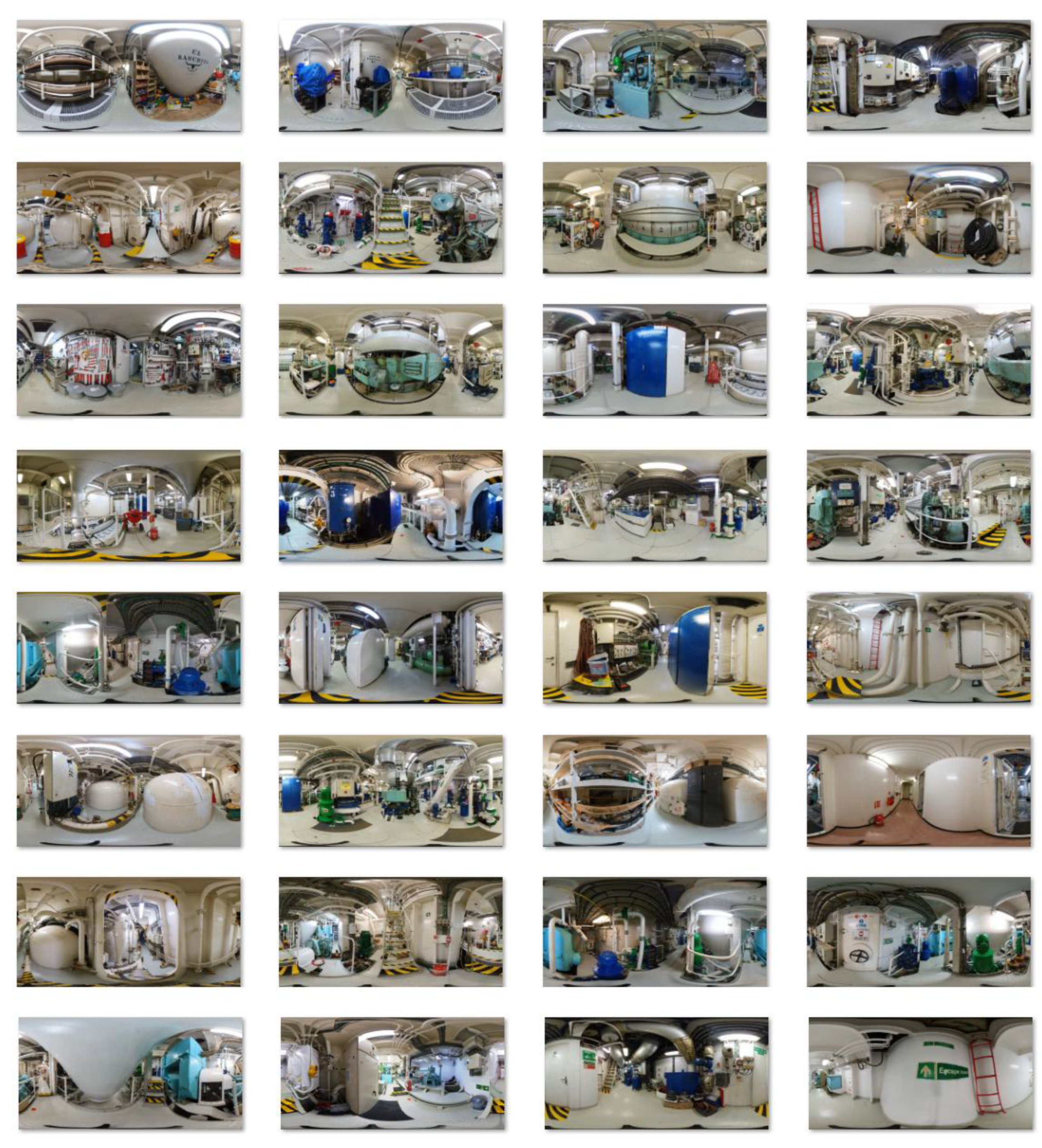
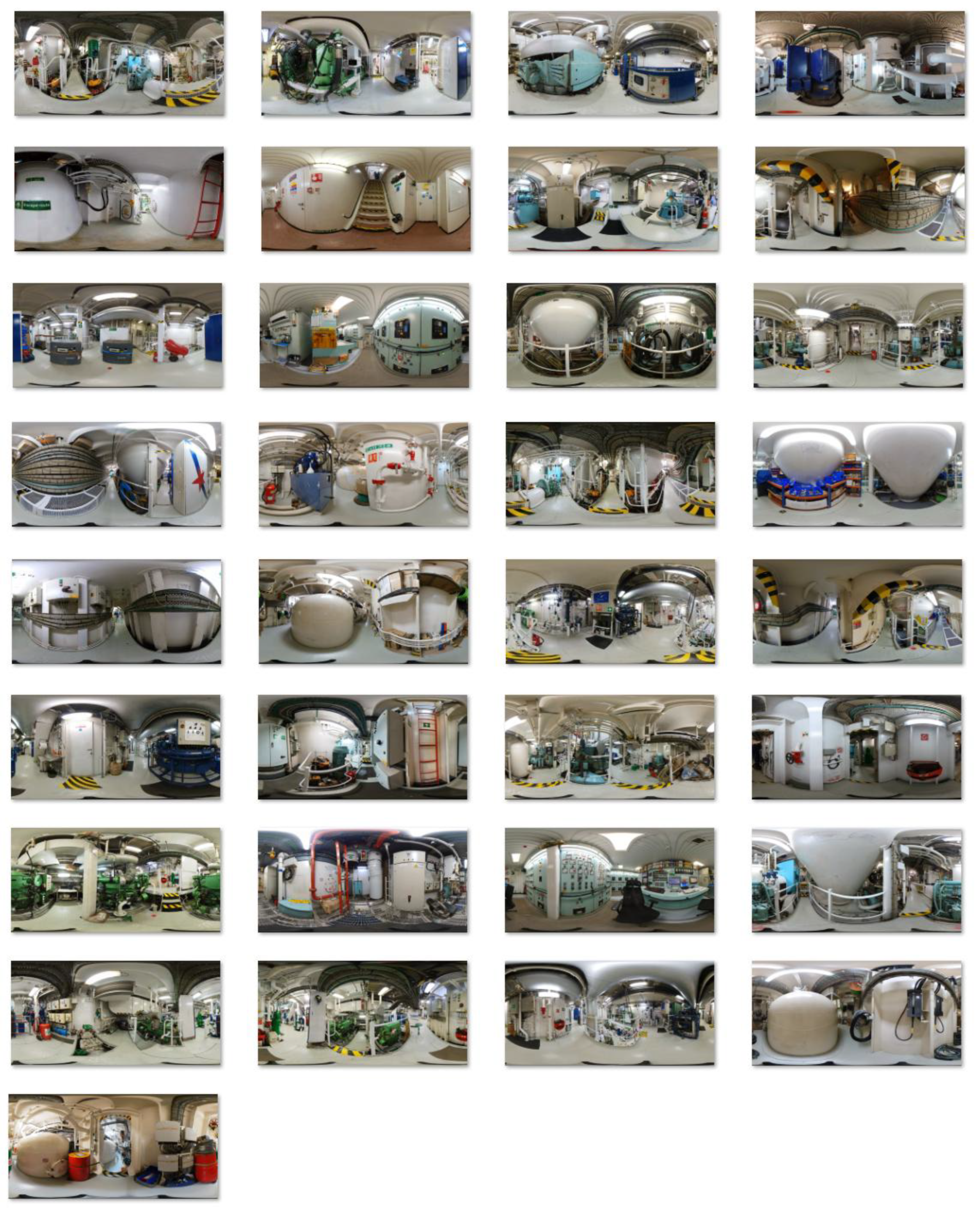
In total, 65 photographs were used for this work, shown in Appendix A. They have been selected in such a way that the whole ship is clear to move through the scenes without getting disorientated and at the same time not being redundant. Special attention was paid to emergency exits, fire-fighting elements (fire extinguishers, alarm buttons, equipped fire hydrants and pumps) and elements that could facilitate orientation (arrows to where one moves within the ship).
Once the 360 images have been created, the next step is to use them to create the 360 tour. Creating effective 360 tours increasingly relies on specialized software that allows users to stitch together 360 images and develop interactive experiences. Over the years, various software options have emerged, each with unique features suitable for different contexts. Some notable software options are Matterport [10,23]; 3DVista [4,11]; Cloudpano [23,24]; Pano2VR [25]; Kuula [24]; Ricoh Theta [23,26]; Panotour [16,23]; V360 [27], etc. In this study, the Virtual Tour (360) was selected. This interactive content type, provided by H5P, enables users to craft immersive 360 tours. H5P is an open-source platform designed for creating, sharing, and reusing interactive HTML5 content. Virtual Tour (360) offers a variety of multimedia options to enrich the tour experience, including the ability to add audio, video, and other interactive elements to hotspots.
3. Results and Discussion
The Virtual Tour (360) software allows the tour to be created in HTML5 format, which can be implemented on a web page or viewed locally without the need for an internet connection. In this particular case the tour has been published on a website in both English (https://app.Lumi.education/run/yDhZ3f) and Spanish (https://app.Lumi.education/run/qaKnyD). It is important to mention that the quality of each image had to be reduced from 18 Mp to 2 Mp in these online tours. In this case the point in favour is that, the higher the quality of the camera and the images, the better the results and the better the sensation of using the model, however, better images represent in most cases a more voluminous file weight, which can be detrimental both for uploading them on the platforms where these models can be mounted and for downloading them quickly and smoothly for the end user. This problem has not been encountered in the local tour, which has been made with 18 Mp images.
Figure 3 shows several images of the tour. In particular, Figure 3a shows a scene with three arrows to three other scenes, as well as the indication of a fire button that activates the alarm. These interactive elements are called hotspots. Hotspots enhance interactivity by allowing to navigate between scenes (move from one scene to another) and display information such as text, images, videos, audio, and so on.
Figure 3b shows two labels, one for a fire extinguisher one for a fire button, and two arrows to change the scene. Figure 3c shows the port side of the port main engine. In addition, the bilge and auxiliary fire pumps, which could also serve as a bilge pump, are shown to the right of the image, providing some redundancy. The following labels can be seen:
- On the left with a loudspeaker icon, when pressed it allows users to listen to the sound of the port main engine in sailing conditions.
- In the centre an image with an arrow icon, the button that takes users to the aft scene of the current scene.
- On the right with a plus icon, this button expands the information about the item in view or whatever is desired.
Figure 3d shows on the left of the image several fire fighting equipment together with their lance. In the centre, an arrow would move users to the scene of that position. It can be seen that this scene would be on the port main engine bow. Just to the right of this arrow the plate exchanger in charge of cooling the main engine fresh water with sea water can be seen, and to the right of this another arrow that allows users to move directly to the port side of the current scene position can be seen.
Finally, Figure 3e shows one of the emergency exits from the ship’s machinery spaces, the starboard aft one, on the left-hand side. Next to it, there is an arrow that allows users to change the scene to the position where the icon is located approximately. At the bottom right of this icon is an icon indicating a fire extinguisher, on this occasion it was decided to simplify the label and specify the type once the icon is selected. To the right there is again an icon of a loudspeaker which allows you to listen to the noise of this navigation space.
The most representative sounds of some equipment have been included in the tour. These are port main engine, port gearbox and servo rudder space, Figure 4a-c, respectively. The part related to sounds was added to show it is possible for a person to know where he/she is just by the noise. It is worth mentioning that the problem with this is that most noises change depending on the state of the ship, whether it is (underway, at anchor...) so this could be confusing or not as useful in practice as everything else.
As initially indicated, a particular group of ten people were asked to experiment with the model separately. These people had no technical knowledge of ships. This was considered of particular interest since young seafarers may not have much previous experience in this field. The test was started from the Engine Control scene. This was decided as this is the nerve centre of the engine room, from and to which in most cases crew members will move. The test consisted of seeing if they were able to get from the engine control to the port emergency exit of the gear space with the fewest number of steps. This test was timed and it was also observed how direct they were able to get there. This was an indication of how well they had memorized or interpreted the shape of the model ship’s engine room. The evacuation time results are shown in Table 1. As can be seen, most participants took less than a minute to reach the start. This is an excellent result considering that the time if you go straight in knowing the place perfectly well is around 30″, while if you don’t know the place it could take several minutes.
In the test, most participants were direct and without getting lost, except for participants 1, 4 and 8 who hesitated between which route was the most direct in some decisions. In these cases, time was lost by taking a detour on a non-optimal route, although it is true that their route took them where they were aiming for, and they had to take a longer route, which made the difference. The biggest difference between them was that some decided to use the emergency exit from the gear space from the port side of the lower deck, while others went up the starboard side and arrived on the upper deck at the port side exit from the gear space.
What is most remarkable is that, although they had never been to the workplace, they already had an idea of what the workplace was like when they arrived. This was also verified by asking people to go to various places on the ship. The accuracy they showed rivalled that of having been to the site previously, so it can be stated that it is undoubtedly a didactic, immersive and efficient method for teaching an unknown environment with sufficient accuracy to be transferable and observable results to the real world.
4. Conclusions
This study presents a 360 tour-based method of showing crew members where they will be boarding for work before they are on board. The objective is to teach them how to evacuate the site in case of an emergency situation, as well as the location of fire and safety devices. This reduces the effective on-boarding time and increases both safety and productivity for the company.
A total of 65 360 images were used to create the tour. In view of the results obtained, it can be concluded that the proposed method is very efficient for teaching an unknown environment with sufficient accuracy to be translatable and observable in the real world. The tour provided notions of what the place is like without having been there before, and they were even able to guide themselves around the boat with an accuracy that rivalled that of having been to the site previously.
Author Contributions
Conceptualization, S.N.M., J.A.O., J.M.P.C., J.J.C., J.R. and M.I.L.; methodology, S.N.M., J.R., L.C.-S.; software, S.N.M., J.R.; formal analysis, S.N.M., J.A.O., J.M.P.C., J.J.C., J.R., M.I.L. and L.C.-S.; investigation, S.N.M., J.A.O., J.M.P.C., J.J.C., J.R., M.I.L. and L.C.-S.; resources, S.N.M., J.R., L.C.-S.; writing—original draft preparation, S.N.M., J.M.P.C., J.J.C., M.I.L.; writing—review and editing, J.A.O., L.C.-S.; visualization, S.N.M., J.R., J.A.O., L.C.-S.; supervision, J.A.O., L.C.-S. All authors have read and agreed to the published version of the manuscript.
Funding
This research received no external funding.
Institutional Review Board Statement
Not applicable.
Informed Consent Statement
Not applicable.
Conflicts of Interest
The authors declare no conflicts of interest.
Appendix A
This appendix shows the 65 images used for the ship’s tour, which are shown in Figure A1.
Figure A1.
Set of the 360 images used for the present tour.
References
- M. I. Lamas Galdo, J. A. Orosa García, and J. J. Cartelle Barros, 360 virtual tours in education. Towards new dimensions of teaching. 2023.
- An, L.D.; Rios, Y. Navigating the Virtual Environment. ASCILITE Publ. 2024, 63–64. [Google Scholar] [CrossRef]
- Snelson, C.; Hsu, Y.-C. Educational 360-Degree Videos in Virtual Reality: a Scoping Review of the Emerging Research. TechTrends 2020, 64, 404–412. [Google Scholar] [CrossRef]
- Utama, F.P.; Wijanarko, A.; Alfarobi, J. Designing a Virtual Campus Tour using Image Stitching Techniques to Provide Information on College Entrance Test. J. Online Inform. 2023, 8, 186–193. [Google Scholar] [CrossRef]
- Amali, L.N.; Katili, M.R.; Sugeha, A.P. Development of virtual tour reality using 360-degree panoramic images and Leaflet JavaScript. Indones. J. Electr. Eng. Comput. Sci. 2024, 35, 655–664. [Google Scholar] [CrossRef]
- Pratisto, E.H.; Thompson, N.; Potdar, V. Immersive technologies for tourism: a systematic review. Inf. Technol. Tour. 2022, 24, 181–219. [Google Scholar] [CrossRef]
- Antinozzi, S.; di Filippo, A.; Musmeci, D. Immersive Photographic Environments as Interactive Repositories for Preservation, Data Collection and Dissemination of Cultural Assets. Heritage 2022, 5, 1659–1675. [Google Scholar] [CrossRef]
- Clemons, T.D.; Fouché, L.; Rummey, C.; Lopez, R.E.; Spagnoli, D. Introducing the First Year Laboratory to Undergraduate Chemistry Students with an Interactive 360° Experience. J. Chem. Educ. 2019, 96, 1491–1496. [Google Scholar] [CrossRef]
- Rodríguez, J.; Lamas, M.I.; Castro-Santos, L. Scientific Advances and Applications of 360 Tours in the XXI Century. Societies 2025, 15, 74. [Google Scholar] [CrossRef]
- Rahaman, H.; Champion, E.; McMeekin, D. Outside Inn: Exploring the Heritage of a Historic Hotel through 360-Panoramas. Heritage 2023, 6, 4380–4410. [Google Scholar] [CrossRef]
- Herban, S.; Costantino, D.; Alfio, V.S.; Pepe, M. Use of Low-Cost Spherical Cameras for the Digitisation of Cultural Heritage Structures into 3D Point Clouds. J. Imaging 2022, 8, 13. [Google Scholar] [CrossRef]
- George, B.H. Using Virtual Tours to Facilitate Sustainable Site Visits of Historic Sites. Eur. J. Sustain. Dev. 2018, 7, 411–422. [Google Scholar] [CrossRef]
- Li, J.; Nie, J.-W.; Ye, J. Evaluation of virtual tour in an online museum: Exhibition of Architecture of the Forbidden City. PLOS ONE 2022, 17, e0261607. [Google Scholar] [CrossRef]
- Foehrder, T.; Mund, J.; Spathelf, P. Advantages of 360° Virtual Forest Tours to Supplement Academic Forestry Education. GI_Forum 2021, 9, 34–44. [Google Scholar] [CrossRef]
- McLean, G.; Barhorst, J.B. Living the Experience Before You Go... but Did It Meet Expectations? The Role of Virtual Reality during Hotel Bookings. J. Travel Res. 2022, 61, 1233–1251. [Google Scholar] [CrossRef]
- Beck, J.; Rainoldi, M.; Egger, R. Virtual reality in tourism: a state-of-the-art review. Tour. Rev. 2019, 74, 586–612. [Google Scholar] [CrossRef]
- Stappung, Y.; Aliaga, C.; Cartes, J.; Jego, L.; Reyes-Suárez, J.A.; Barriga, N.A.; Besoain, F. Developing 360° Virtual Tours for Promoting Tourism in Natural Parks in Chile. Sustainability 2023, 15, 16043. [Google Scholar] [CrossRef]
- Wu, X.; Lai, I.K.W. The use of 360-degree virtual tours to promote mountain walking tourism: stimulus–organism–response model. Inf. Technol. Tour. 2022, 24, 85–107. [Google Scholar] [CrossRef]
- Ramadhanty, A.P.; Handayani, P.sW.; Pinem, A.A.; Hilman, M.H. Virtual Tour Actual Usage: The Influence of Perceived Benefits and Sacrifices. J. Sist. Inf. 2021, 17, 62–76. [Google Scholar] [CrossRef]
- A. Russo, M. Galić, Z. Sanchez Varela, S. Kraljević, and M. Leskur, “Development of seafarers’ onboarding scale: a pilot study on ship familiarization,” Jun. 2024. [CrossRef]
- Vidan, P.; Vukša, S.; Dlabač, T. PRACTICE OF AND ATTITUDES TOWARD FAMILIARISATION ON BOARD: SURVEY OF CROATIAN AND MONTENEGRIN MARITIME OFFICERS. Brodogradnja 2018, 69, 97–110. [Google Scholar] [CrossRef]
- Erdem, P.; Akyuz, E.; Aydin, M.; Celik, E.; Arslan, O. Assessment of human error contribution to container loss risk under fault tree analysis and interval type-2 fuzzy logic-based SLIM approach. Proc. Inst. Mech. Eng. Part M: J. Eng. Marit. Environ. 2024, 238, 553–566. [Google Scholar] [CrossRef]
- Meier, C.; Saorín, J.L.; Parrilla, S.D.; de León, A.B.; Díaz, D.M. User Experience of Virtual Heritage Tours with 360° Photos: A Study of the Chapel of Dolores in Icod de los Vinos. Heritage 2024, 7, 2477–2490. [Google Scholar] [CrossRef]
- Huang, Y.C.; Backman, K.F.; Backman, S.J.; Chang, L.L. Exploring the Implications of Virtual Reality Technology in Tourism Marketing: An Integrated Research Framework. Int. J. Tour. Res. 2016, 18, 116–128. [Google Scholar] [CrossRef]
- Ajayi, F.A.; Udeh, C.A. Review of crew resilience and mental health practices in the marine industry: Pathways to improvement. Magna Sci. Adv. Biol. Pharm. 2024, 11, 033–049. [Google Scholar] [CrossRef]
- Yang, T.; Lai, I.K.W.; Bin Fan, Z.; Mo, Q.M. The impact of a 360° virtual tour on the reduction of psychological stress caused by COVID-19. Technol. Soc. 2021, 64, 101514–101514. [Google Scholar] [CrossRef]
- C. Meier, J. L. Saorín, S. Díaz Parrilla, A. Bonnet de León, and D. Melián Díaz, “User Experience in Virtual Tours of Heritage with 360o Photos: Study of the Chapel of Dolores in Icod de los Vinos.” Apr. 08, 2024. [CrossRef]
Figure 1.
Example of a 360 image; (a) equirectangular projection; (b) grid in the equirectangular projection; (c) spherical projection; (d) visualization from the interior of the sphere.
Figure 1.
Example of a 360 image; (a) equirectangular projection; (b) grid in the equirectangular projection; (c) spherical projection; (d) visualization from the interior of the sphere.
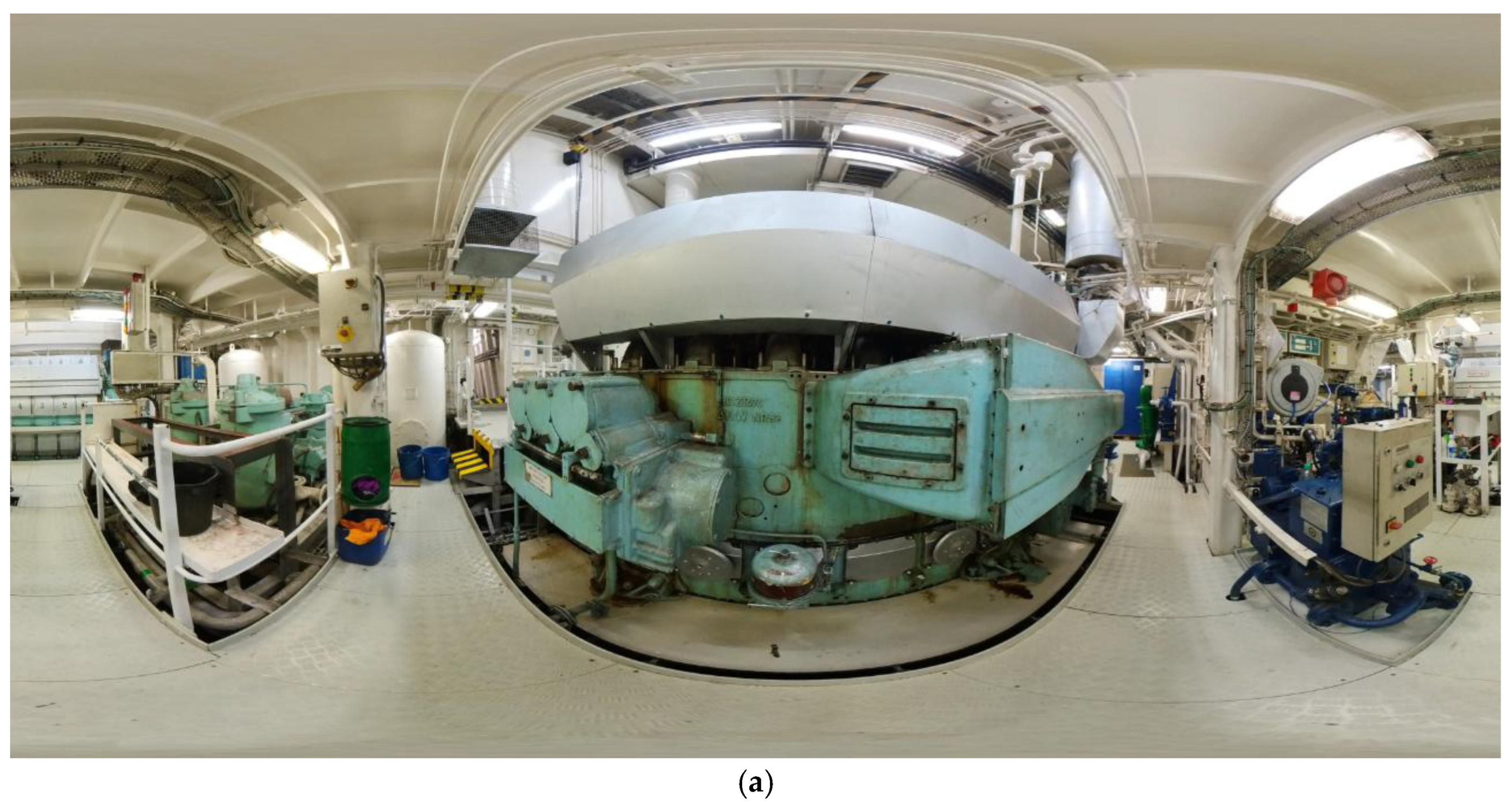
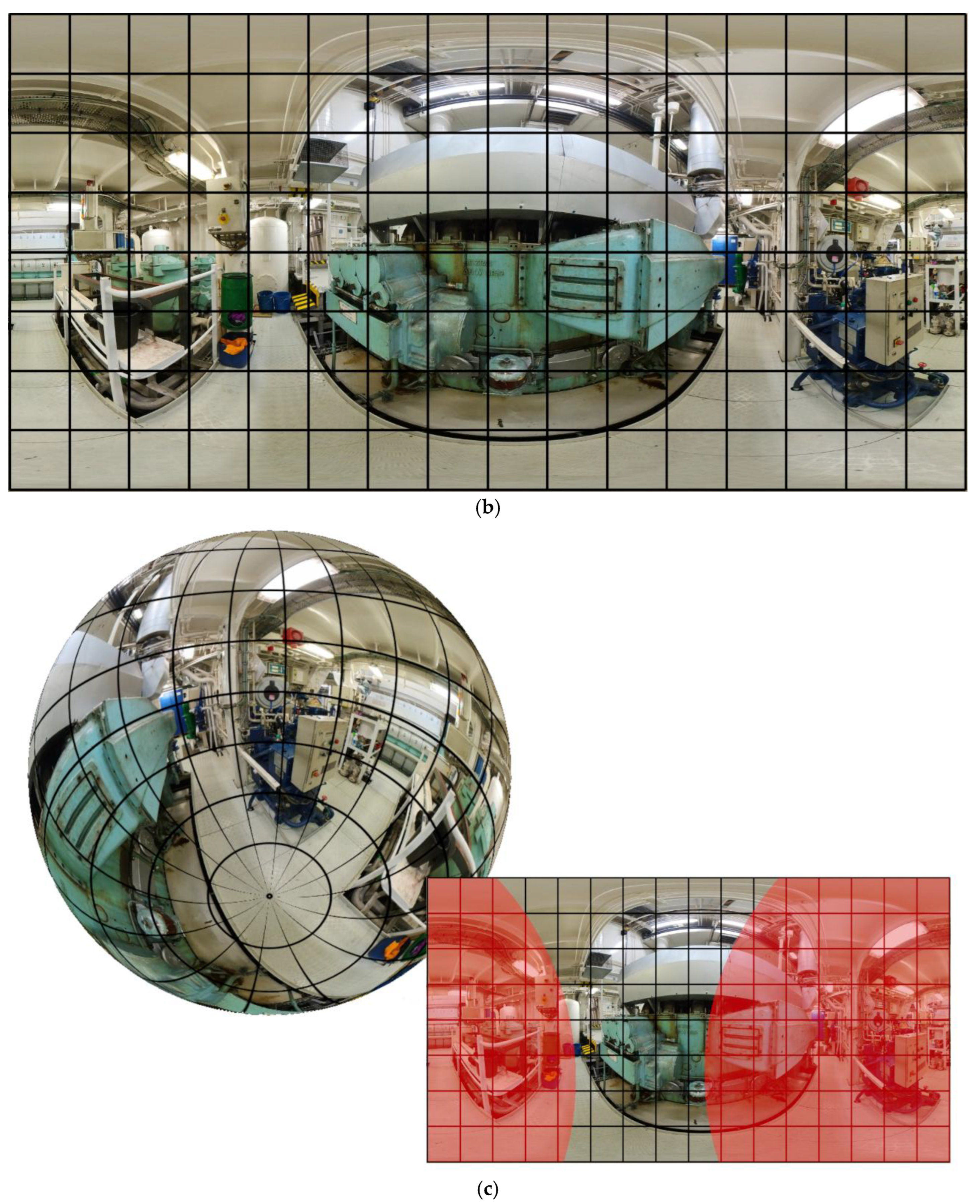
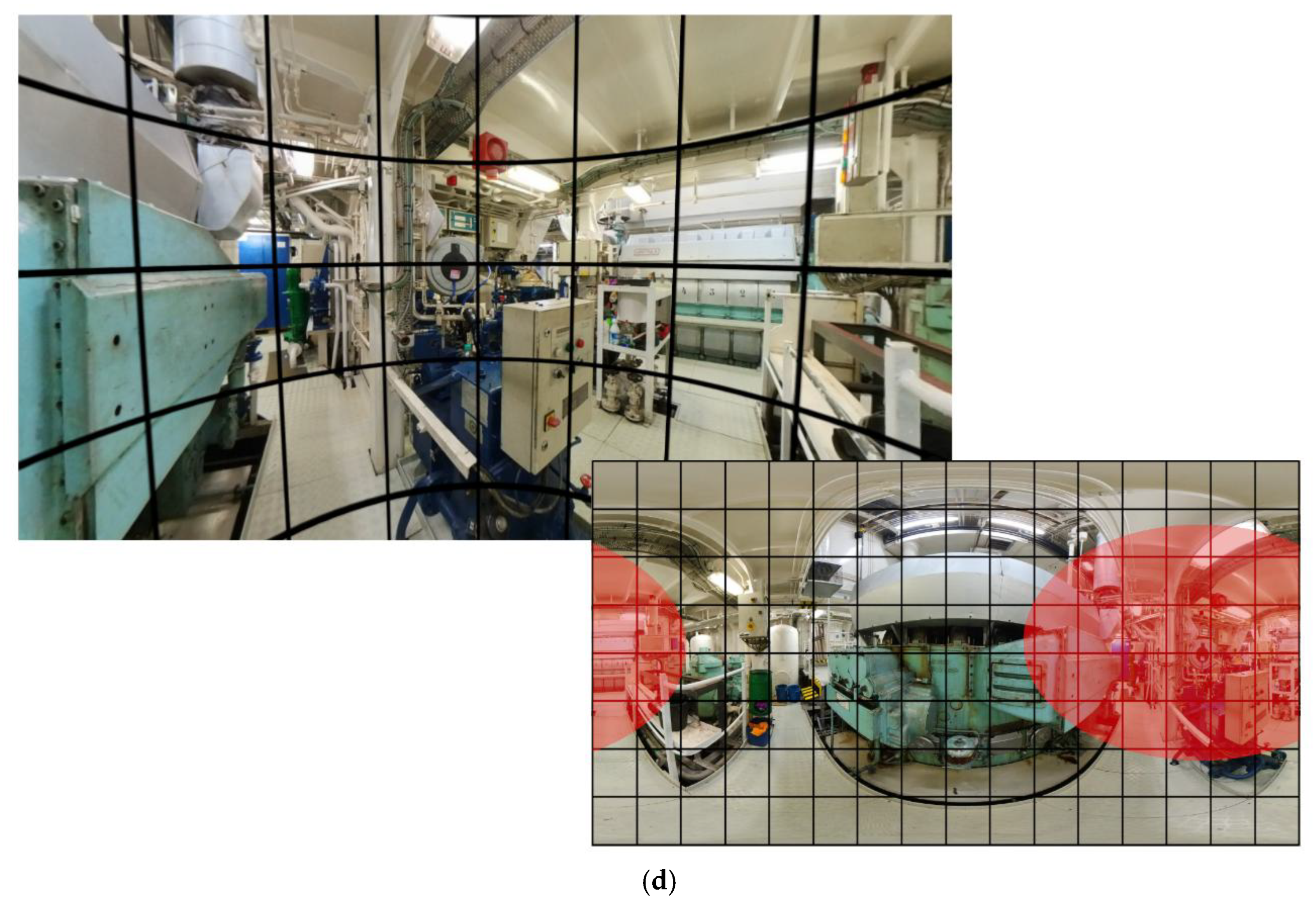
Figure 2.
Example of a 360 image with the person who takes the photograph; (a) equirectangular projection; (b) visualization in a 360 viewer.
Figure 2.
Example of a 360 image with the person who takes the photograph; (a) equirectangular projection; (b) visualization in a 360 viewer.
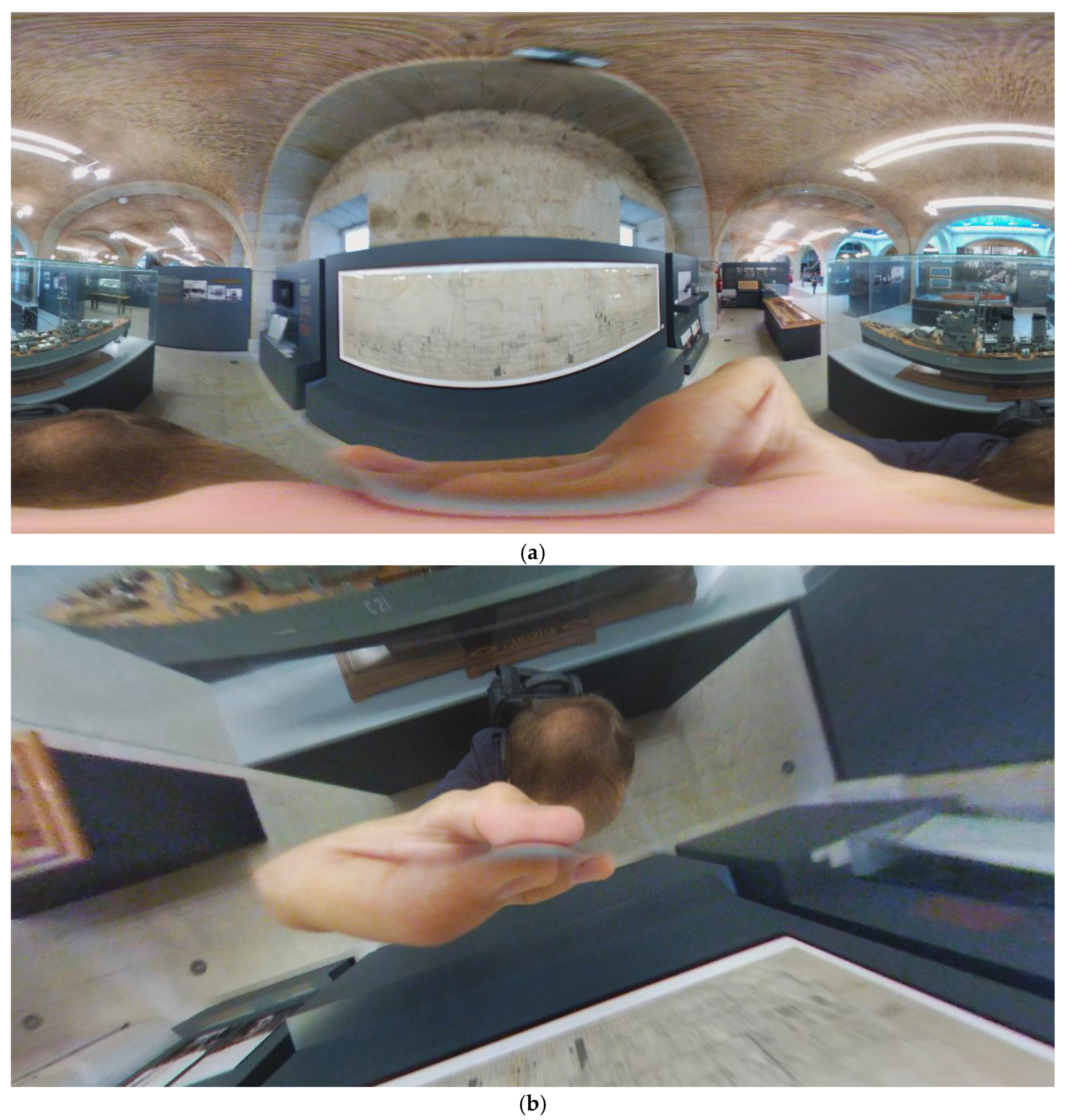
Figure 3.
Examples of the different scenes; (a) main engine bow starboard; (b) reduction gear bow port; (c) main engine bow port; (d) engine room bow centerline; (e) servo-rudder compartment.
Figure 3.
Examples of the different scenes; (a) main engine bow starboard; (b) reduction gear bow port; (c) main engine bow port; (d) engine room bow centerline; (e) servo-rudder compartment.
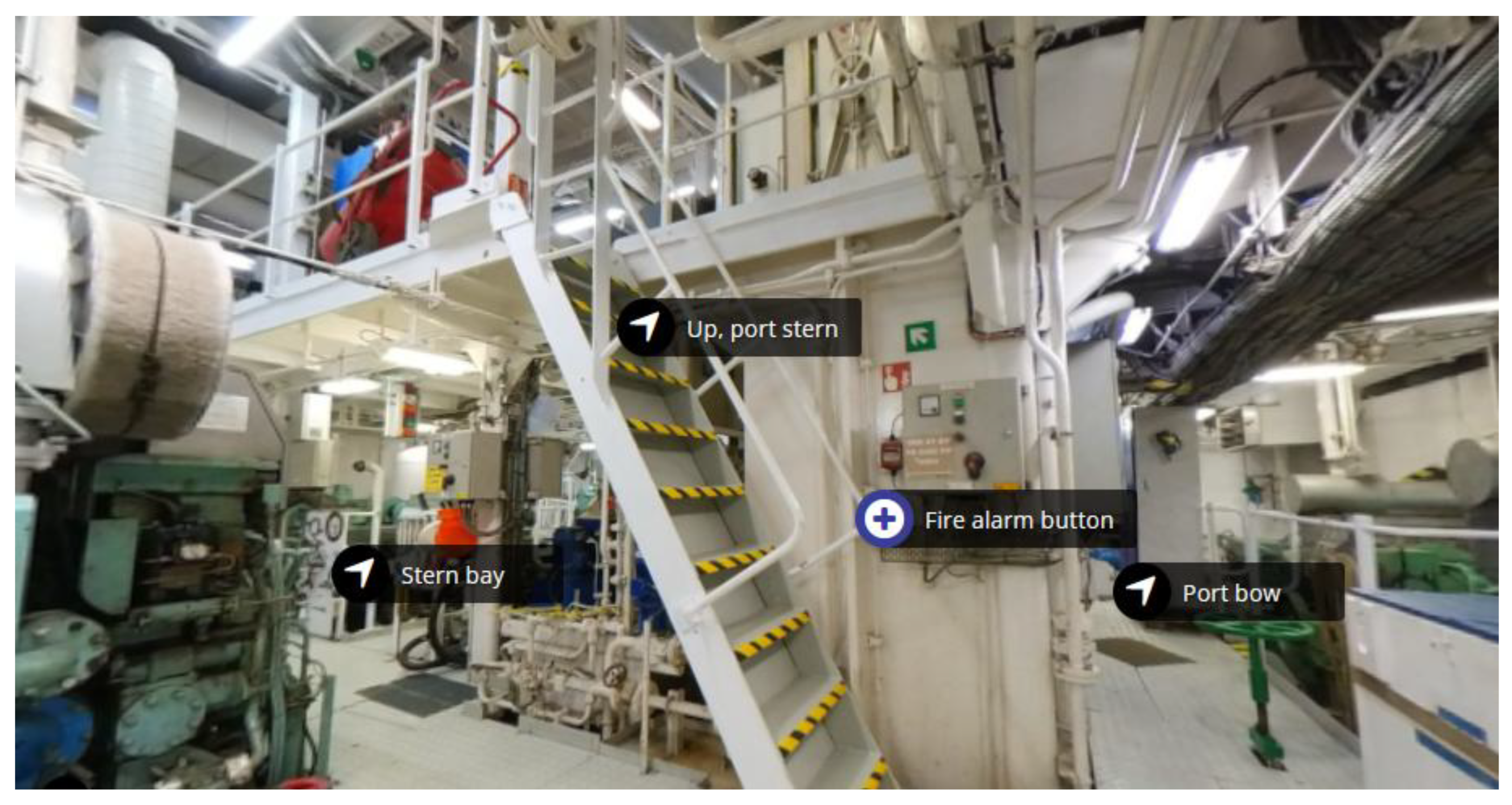
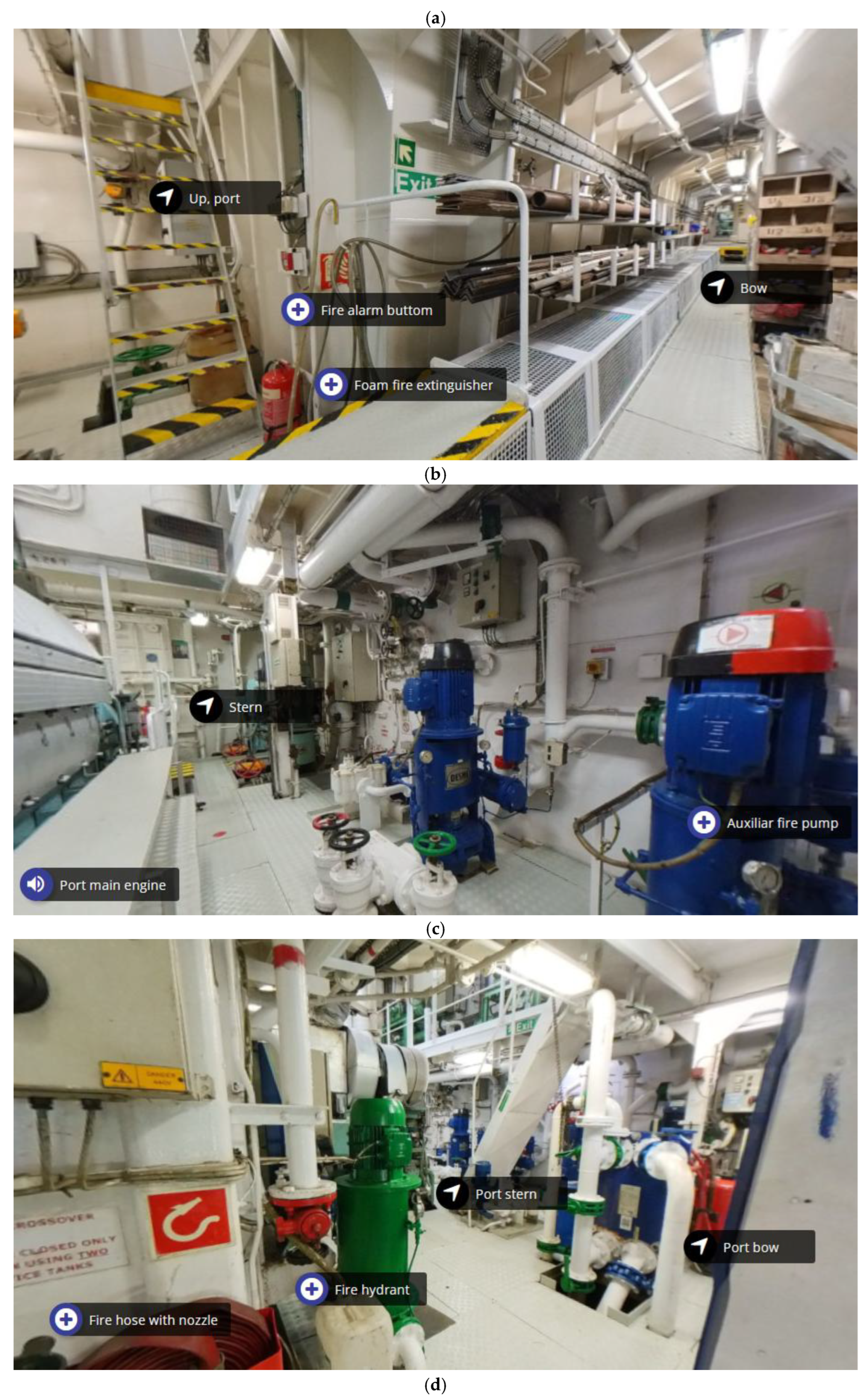
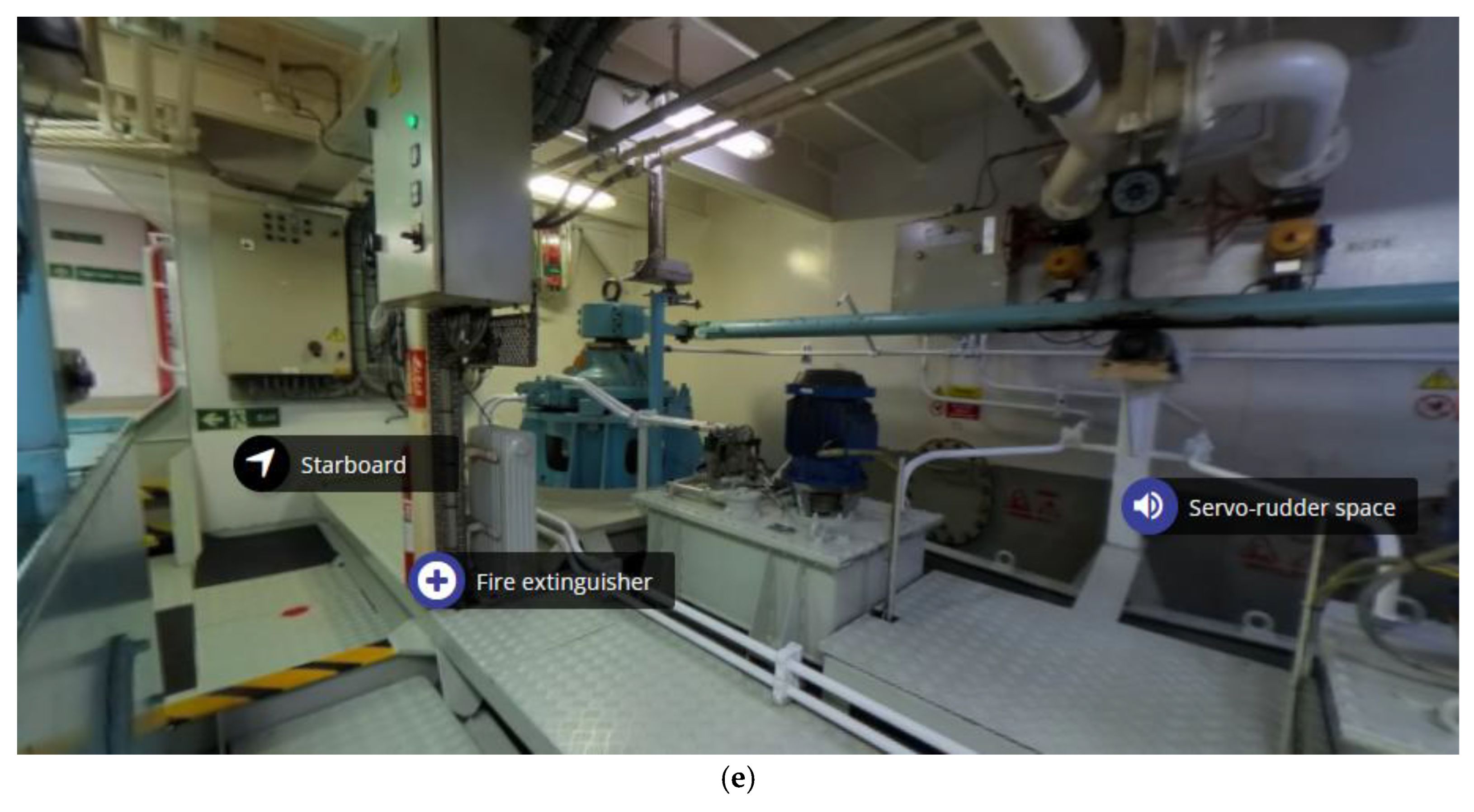
Figure 4.
Sounds implemented in the tour; (a) port main engine; (b) servo-rudder space; (c) port reduction gear.
Figure 4.
Sounds implemented in the tour; (a) port main engine; (b) servo-rudder space; (c) port reduction gear.
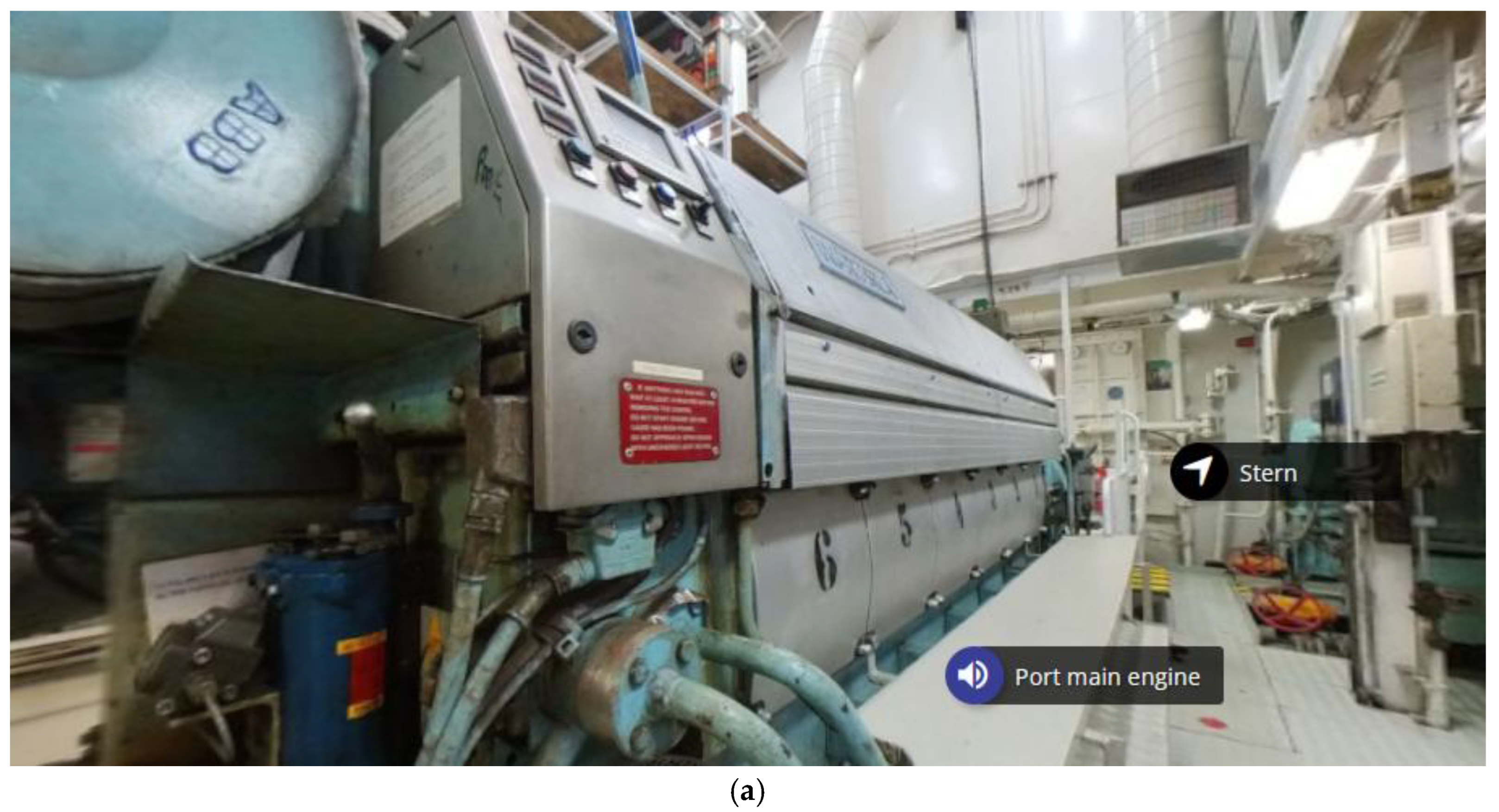
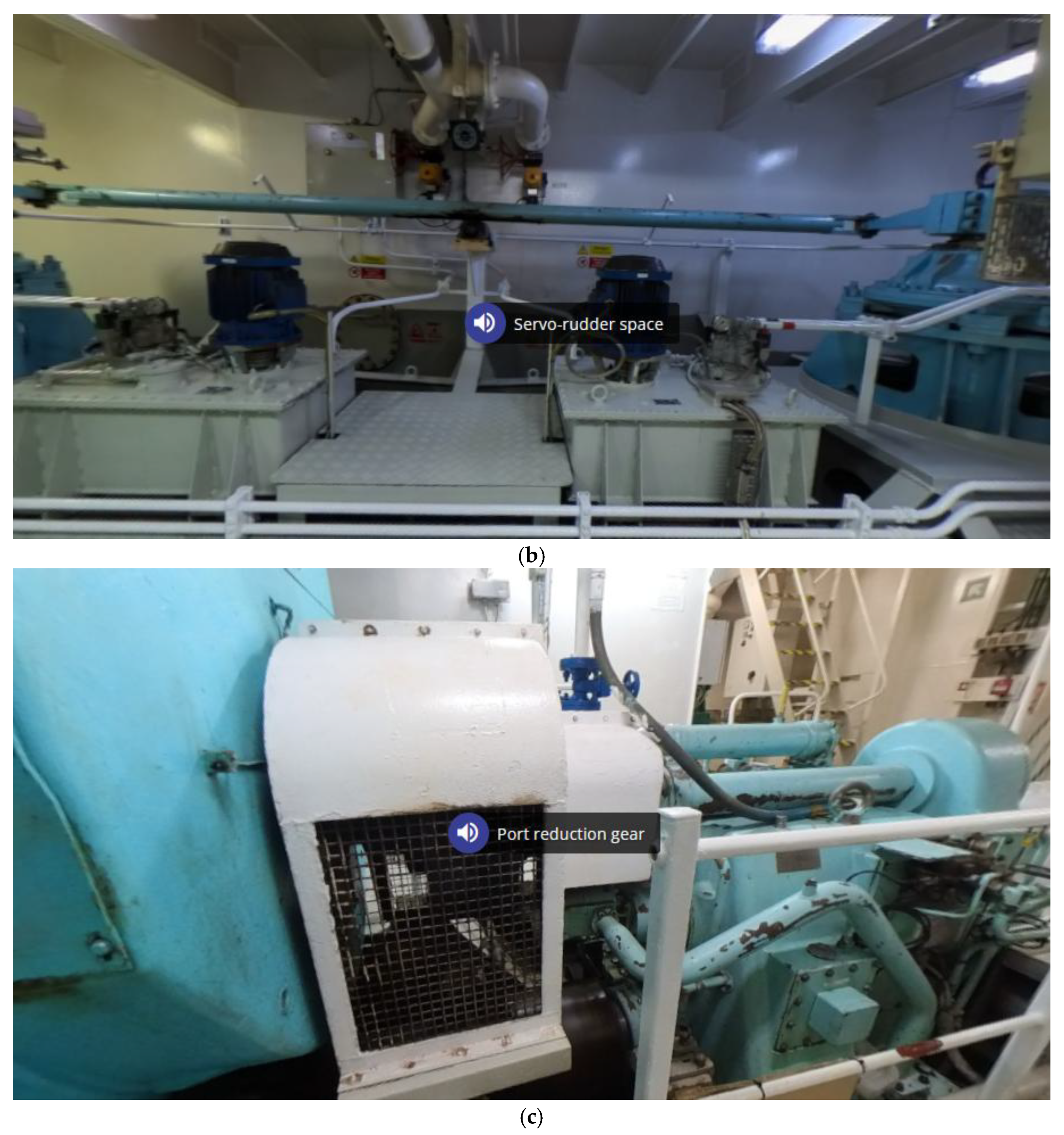

Table 1.
Test results.
| Participant | Time (s) |
|---|---|
| 1 | 1′ 15″ |
| 2 | 0′ 42″ |
| 3 | 1′ 12″ |
| 4 | 1′ 17″ |
| 5 | 0′ 38″ |
| 6 | 1′ 31″ |
| 7 | 0′ 48″ |
| 8 | 1′ 11″ |
| 9 | 0′ 43″ |
| 10 | 0′ 35″ |
Disclaimer/Publisher’s Note: The statements, opinions and data contained in all publications are solely those of the individual author(s) and contributor(s) and not of MDPI and/or the editor(s). MDPI and/or the editor(s) disclaim responsibility for any injury to people or property resulting from any ideas, methods, instructions or products referred to in the content. |
© 2025 by the authors. Licensee MDPI, Basel, Switzerland. This article is an open access article distributed under the terms and conditions of the Creative Commons Attribution (CC BY) license (http://creativecommons.org/licenses/by/4.0/).
Copyright: This open access article is published under a Creative Commons CC BY 4.0 license, which permit the free download, distribution, and reuse, provided that the author and preprint are cited in any reuse.


