

Submitted:
07 February 2025
Posted:
10 February 2025
You are already at the latest version
Abstract
Access control systems protect homes and businesses in the continually evolving security industry. This paper designs and implements a Raspberry Pi-based facial recognition door lock system using artificial intelligence and computer vision for reliability, efficiency, and usability. With the Raspberry Pi as its CPU, the system uses facial recognition for authentication. A camera module for real-time image capturing, a relay module for solenoid lock control, and OpenCV for image processing are essential. The system uses the Deep Face library to detect user emotions and adaptive learning to improve recognition accuracy for approved users. The device also adapts to poor lighting and distances and sends real-time remote monitoring messages. The system's average face identification time is 564.43 ms, and emotion detection time is 327.63ms, ensuring real-time performance. Major achievements include introducing adaptive facial recognition, ensuring the system evolves with usage, and smoothly integrating real-time notifications and emotion detection. Face recognition accuracy was high in various environments. Modular architecture facilitated hardware-software integration and scalability for varied applications. In conclusion, this study created an intelligent facial recognition door lock system using Raspberry Pi hardware and open-source software libraries. The system addresses traditional access control limits and is practical, scalable, and inexpensive, demonstrating biometric technology's potential in modern security systems.
Keywords:
Face Recognition
; Raspberry Pi
; Artificial Intelligence
; Computer Vision
; Real-Time Recognition
; Emotion Detection
; Deep Learning
; HOG Algorithm
; DeepFace Framework
; CNN Model
1. Introduction
Traditional door-locking mechanisms face challenges such as lost keys, duplication risks, and unauthorized access. Facial recognition offers a secure and user-friendly alternative by leveraging unique biological features [1]. With advancements in artificial intelligence (AI) and computer vision, facial recognition is now widely adopted in banking, healthcare, and public security, making it a crucial component of smart access control systems.
Facial recognition systems integrate computer vision and AI to enable real-time detection and authentication. Computer vision extracts facial features, while AI continuously improves accuracy through adaptive learning. These technologies create a robust and scalable security solution capable of adapting to environmental changes, enhancing overall reliability.
This paper presents a Raspberry Pi-based face recognition door lock system, offering affordability, scalability, and advanced technological capabilities. The system employs a camera module for real-time face detection, a solenoid lock for secure access, and software optimizations for improved performance. Adaptive learning allows the system to update facial data dynamically, accommodating variations in appearance due to aging, hairstyles, or accessories without requiring manual retraining. Preprocessing techniques, including lighting normalization and feature extraction, ensure consistent performance across different environmental conditions, making the system effective even in low-light settings.
An additional feature, emotion detection, enhances user interaction by recognizing emotional states such as happiness, anger, or surprise, extending the system’s applications beyond security to workplaces, educational institutions, and public spaces. Lighting condition adaptation ensures reliable operation under varying illumination conditions, reducing the impact of shadows or glare on recognition accuracy. Scaling accuracy further ensures that users can be identified at different distances and angles, increasing flexibility and usability.
The system also integrates real-time notifications, allowing the Raspberry Pi to communicate with connected devices without requiring an app. Recognized users receive voice feedback indicating access, while unauthorized detections trigger alerts, ensuring enhanced security and user awareness. This feature extends the system’s usability to scenarios requiring real-time monitoring, such as office environments and restricted facilities. Multiple authorized face recognition further allows for seamless multi-user support without requiring separate hardware configurations.
By combining adaptive learning, real-time processing, and smart security features, this study delivers a practical, scalable, and efficient solution to modern access control challenges. The proposed system addresses key limitations of existing solutions by enhancing recognition accuracy, improving usability, and enabling real-time adaptability to changing conditions. Figure 1 illustrates the system’s operational workflow from camera initialization to final authentication, providing a structured approach to secure access control.
This paper presents a Raspberry Pi-based facial recognition door lock system that balances affordability, scalability, and advanced technology. By leveraging the Raspberry Pi’s processing power, the system integrates real-time facial recognition with adaptive learning, refining accuracy over time. Robust preprocessing techniques mitigate environmental factors like poor lighting and variable distances, ensuring consistent performance. Beyond its technical capabilities, the system offers operational advantages such as real-time notifications for access attempts, keeping users informed and in control. Multi-user management without retraining simplifies access control, making it ideal for shared environments like offices, schools, and multi-tenant buildings. By addressing limitations in traditional locks and biometric systems, this paper delivers a comprehensive, efficient, and reliable access management solution. To achieve this, the system integrates a Raspberry Pi, camera module, relay module, and solenoid lock for real-time operation. The software development phase introduces adaptive face recognition, emotion detection, and preprocessing for lighting adaptation, ensuring reliable performance in diverse conditions while maintaining high accuracy and efficiency.
2. Related Works
This review assesses research on facial recognition-based access control systems, particularly those utilizing Raspberry Pi for cost-effective implementation. Various approaches integrating machine learning, edge computing, and preprocessing techniques have been explored to enhance recognition accuracy and system adaptability.
M. Alshar'e et al. [2] proposed a deep learning-based home security system using MobileNet and AlexNet for biometric verification. While their CNN-based hierarchical feature extraction improves recognition under controlled conditions, the computational complexity limits its real-time application on Raspberry Pi. Privacy concerns regarding biometric data storage were also highlighted, advocating for on-device processing and encryption. Our study optimizes recognition efficiency for Raspberry Pi while incorporating adaptive learning and preprocessing enhancements.
A. Jha et al. [3] developed a low-cost access control system using the Haar Cascade classifier on Raspberry Pi. While the approach is efficient for resource-constrained devices, limitations include poor performance under low lighting, rigid facial angles, and a static face dataset requiring manual updates. Our study addresses these challenges through advanced preprocessing, dynamic face database updates, and real-time notifications for improved scalability and adaptability.
A. D. Singh et al. [4] implemented a Haar Cascade-based facial recognition system for residential access control, emphasizing affordability and simplicity. However, accuracy issues under varying lighting conditions and the lack of dynamic database updates restrict its effectiveness. We enhance this framework by integrating adaptive learning, robust preprocessing, and real-time notifications for improved usability and security.
D. G. Padhan et al. [5] utilized the HOG algorithm with IoT integration for facial recognition-based home security. While computationally efficient, the system struggles in low-light conditions and requires manual database updates, limiting its scalability. Our work improves recognition accuracy through preprocessing techniques such as illumination normalization and gamma correction, while adaptive learning automates database updates.
N. F. Nkem et al. [6] explored PCA-based facial recognition for low-power security applications, emphasizing dimensionality reduction. However, PCA’s sensitivity to lighting and facial orientation, along with its static database, restricts real-world applicability. Our system overcomes these limitations by integrating adaptive learning and preprocessing techniques, ensuring higher accuracy and robustness.
In summary, prior studies laid the foundation for Raspberry Pi-based facial recognition systems but often lacked adaptability, real-time learning, and robust preprocessing for varying environmental conditions. Our work builds on these findings by addressing computational constraints, enhancing scalability, and integrating real-time security features to create a more efficient and practical access control system.
3. Design Methodology
The Raspberry Pi-based facial recognition door lock solution required hardware, software, and rigorous testing to meet modern access control issues. This study discusses hardware integration, adaptive facial recognition software development, and system testing to verify system performance. The implementation process prioritizes safety, reliability, scalability, and usability. The implementation process necessitated meticulous integration of hardware and software, consideration of Raspberry Pi processor limitations, and the resolution of environmental variables.
The paper's main processor, the Raspberry Pi, is connected to a camera module for real-time video, a relay module, and a solenoid lock for physical access. Each hardware component was selected based on compatibility, cost, and low-power applications. The Raspberry Pi and peripheral devices communicated well thanks to precise GPIO connections during assembly. OpenCV and DeepFace are Python libraries for facial recognition and emotion detection. Adaptive learning dynamically updates the authorized face database, preprocessing adjusts to environmental conditions, and real-time notifications notify users of access events. Coded systems behave smoothly and responsively between hardware and software.
System stability and scalability require extensive testing and validation. The system was evaluated under various conditions, including lighting variations, distances, and facial orientations, to assess performance. Metrics such as detection accuracy, processing time, and emotion detection effectiveness were analyzed to ensure robustness. As highlighted in [7], implementing an embedded facial recognition system on Raspberry Pi requires balancing computational efficiency, image processing techniques, and algorithmic selection to achieve optimal performance under real-world conditions. Testing insights led to iterative system modifications, further enhancing functionality and reliability.
3.1. Hardware Implementation
The hardware implementation of the Raspberry Pi-based facial recognition door lock system ensures smooth operation and reliability. This section details the setup, including components, roles, and connections. The Raspberry Pi Model 3B serves as the central processor, handling facial recognition, emotion detection, and device connectivity. It interfaces with a camera module for real-time video input and a relay module controlling the solenoid lock for secure access.
Key components such as DC barrel jacks, microSD cards, jumper wires, and power supplies ensure stable connections. The relay module enables safe control of the high-voltage solenoid lock circuit, while the 5V and 12V power supplies support system reliability. The Raspberry Pi stores the operating system and scripts on a microSD card. Figure 2 provides a circuit schematic illustrating the interaction between hardware components, demonstrating the system's connectivity and functionality.
This diagram visually explains the flow of power and control signals within the system, offering clarity on the role and connectivity of each component. It simplifies the understanding of how the Raspberry Pi interacts with the solenoid lock through the relay module while maintaining separate power supplies for different components.
3.2. Hardware Assembly
This section illustrates the process of assembling the hardware components of the Raspberry Pi-based face recognition door lock system. The assembly integrates the Raspberry Pi, camera module, relay module, solenoid lock, and other necessary components into a functional setup. The objective is to ensure secure connections, operational reliability, and a well-organised layout for easy maintenance. Insert the preloaded microSD card containing the operating system and software into the Raspberry Pi Model 3B's slot. Connect the Raspberry Pi Camera Module to the CSI (Camera Serial Interface) port. Ensure the metal contacts on the ribbon cable face the CSI port for proper connectivity. Secure the Raspberry Pi on a stable platform or within a protective case to prevent damage during assembly. The position of the relay module is close to the Raspberry Pi for tidy and secure wiring. Connect the positive terminal of the 12V solenoid lock to the relay's NO (Normally Open) terminal. Run basic GPIO scripts on Raspberry Pi to test the relay and solenoid lock functionality. Ensure the relay triggers correctly, and the solenoid lock responds as intended. The Raspberry Pi-based face recognition door lock system's hardware implementation forms the paper's backbone, integrating multiple components into a cohesive and functional setup. Each component, from the Raspberry Pi Model 3B to the solenoid lock and relay module, is vital in ensuring secure and reliable access control. The carefully designed circuit connections and the logical assembly process provide a robust foundation for the system. Including power supply mechanisms and adaptable configurations further enhances the system's efficiency and scalability. This meticulously constructed hardware platform sets the stage for seamless integration with the software and testing phases, demonstrating the paper's commitment to precision and practicality.
3.3. Software Implementation
The software implementation of the Raspberry Pi-based face recognition door lock system involves an intricate combination of algorithms and processes designed for efficiency, accuracy, and adaptability. The development began with a simulation phase, where the feasibility of the face recognition algorithm was tested using a laptop and a pre-trained CNN model. This simulation provided valuable insights into the algorithm's performance, forming the foundation for the subsequent hardware integration.
Building on this groundwork, the system was implemented on the Raspberry Pi to achieve real-time face detection, recognition, and dynamic adaptability. The system detects faces, recognizes authorized individuals, adapts to changing conditions, and notifies remote devices in real-time. The following subsections outline the implementation of key features, including the facial recognition algorithm, the notification system, emotion detection, and the dynamic addition of unknown faces to the authorized list.
The software components were developed with Python, leveraging libraries such as face_recognition, cv2, DeepFace, and others. Advanced preprocessing techniques, such as lighting normalization and gamma correction, ensure reliable performance under varying environmental conditions. These components collectively create a robust and efficient system capable of handling diverse use cases, such as recognizing faces at different distances, adapting to dynamic lighting conditions, and processing real-time notifications on remote devices. The project utilizes several essential Python libraries for face recognition, GPIO control, and notification handling, as shown in Figure 3.
3.4. Simulation and Preliminary Testing
A facial recognition system simulation tested the algorithm's viability and real-time processing. The simulation includes simulated door lock/unlock functionality using facial recognition findings. System setup includes these: Haar Cascade Classifier for webcam face detection. The pre-trained CNN model classifies identified faces as authorised (e.g., “SEIF”) or unauthorised (“NOT SEIF”). Real-time frame processing uses the laptop webcam. OpenCV and TensorFlow are video processing and model execution core libraries.
Three steps were employed for the algorithm and process overview. Face Detection is the Haar Cascade Classifier that detected faces in the video stream and cropped and pre-processed them for recognition. The CNN model pre-trained in facial recognition identified faces as SEIF (authorised) or not SEIF. Face photos were resized to 224x224 pixels to meet model input criteria, normalised, and expanded. If SEIF was recognised, the system displayed "Door is unlocking..." to simulate unlocking the door. For unknown faces, the system simulated locking the door with "Door is locking..."
During the simulation, the system successfully detects and recognizes faces in real-time, as illustrated in Figure 4.
3.5. Facial Recognition Algorithm
Face recognition systems deployed on edge devices, such as the Raspberry Pi, must balance computational efficiency with recognition accuracy. Traditional deep learning models, such as CNN-based approaches, offer high accuracy but are computationally expensive, making them impractical for real-time processing on low-power devices. In contrast, lightweight algorithms such as the Histogram of Oriented Gradients (HOG) have demonstrated their effectiveness in edge computing scenarios, enabling efficient face detection without requiring GPU acceleration [8].
The Histogram of Oriented Gradients (HOG) algorithm has been widely used for efficient face detection [9]. This method provides real-time performance while maintaining accuracy, making it suitable for resource-constrained environments. HOG-based detection extracts key facial features using gradient orientation patterns, ensuring robustness in different environmental conditions. Additionally, its computational simplicity allows it to outperform more complex deep learning-based approaches in terms of processing speed on embedded hardware.
3.6. System Setup for Facial Recognition
Before delving into the algorithm details, it is essential to understand how the system is prepared to execute facial recognition effectively: thus
- Virtual Environment: The facial recognition script is executed within a Python virtual environment on the Raspberry Pi. This ensures that all dependencies, such as OpenCV, DeepFace, and face_recognition libraries, are correctly managed and isolated from the base system. During the system setup, the script initializes the camera module and loads necessary libraries. The Raspberry Pi terminal logs provide a detailed summary of these initialization steps. Figure 5 shows the Raspberry Pi terminal output during the initialization of the camera module, confirming successful detection and configuration.
Figure 6 shows the activation of the virtual environment in the Raspberry Pi terminal, ensuring isolated dependency management for the face recognition system.
- Dataset of Authorized Faces: A preloaded dataset of photos of authorized individuals is stored on the Raspberry Pi. This dataset is processed during initialization to generate 128-dimensional encodings, which are stored in the encodings file. These encodings are later used for face matching during runtime.
- RealVNC Viewer: RealVNC Viewer was utilized during development and testing to provide remote access to the Raspberry Pi. This tool allowed effective debugging, script execution monitoring, and system setup adjustments.
3.7. Process Overview
The face recognition process begins with face detection, where the HOG model identifies key facial landmarks such as the eyes, nose, and mouth, ensuring real-time performance on the Raspberry Pi 3B. Once a face is detected, it undergoes face encoding, converting it into a unique 128-dimensional vector that acts as a biometric fingerprint. These encodings are pre-stored in the system's encodings_file, containing authorized individuals' facial data. During face matching, the system compares the newly detected encoding with stored ones using Euclidean distance, recognizing a face if the distance falls below a 0.4 threshold, granting access accordingly.
As the system processes video frames, it detects and recognizes faces in real time. Figure 7 demonstrates the real-time face recognition process, displaying the detected face along with the identified emotion and access status.
To provide a structured overview of the facial recognition process, Table 1 summarizes the key steps involved in the algorithm. This table outlines the sequential operations, starting from capturing the frame to displaying the recognition results and triggering corresponding actions.
3.8. Lighting Normalization and Gamma Correction
Lighting inconsistencies, such as low-light conditions or bright backgrounds, can negatively impact face detection and recognition accuracy. To address this, the system implements the following enhancements: Contrast Limited Adaptive Histogram Equalization (CLAHE), enhances image contrast by redistributing the intensity values across the image, ensuring uniform brightness. This is particularly useful in dim or uneven lighting environments. The Gamma correction adjusts the brightness dynamically, enhancing darker regions of the frame to reveal facial features. The gamma correction formula is:
Where:
- Ioriginal is the original pixel intensity.
- γ is the gamma adjustment factor (e.g., γ = 1.2).
- Icorrected is the brightness-adjusted intensity.
Lighting conditions significantly impact face detection accuracy. Figure 8 illustrates how the implemented lighting normalization technique enhances visibility and ensures consistent facial recognition even in low-light environments.
3.9. Integration into the System
The algorithm is integrated into the system via a Python script that processes each video frame captured by the Raspberry Pi Camera Module V2. It dynamically adjusts the brightness using the apply_lighting_adaptation function, which incorporates CLAHE and gamma correction. Detected faces are resized to reduce computational load, and their locations are scaled back for precise visualization. To ensure real-time performance, the system processes resized frames at 25% of their original size during detection. Detected face locations are scaled back to original dimensions for precise matching. Additionally, the system employs dynamic frame skipping, adjusting the number of frames processed based on CPU usage to avoid overloading the Raspberry Pi.
3.10. Adaptive Learning and Unknown Face Addition
The Raspberry Pi-based facial recognition system's capacity to dynamically adapt to new inputs is a major improvement. Unlike static face recognition systems, this system uses adaptive learning to update face encodings over time [10]. This feature improves recognition accuracy by learning from repeated interactions and evolving with the user. Traditional facial recognition systems employ manually updated databases that must be retrained for new users. This work uses adaptive learning to dynamically update facial encodings and recognise new users without retraining them. Incremental learning improves facial recognition accuracy by continuously revising facial encodings based on new observations [11]. This section details these features' design, implementation, and significance, showing how adaptive learning improves usability, scalability, and reliability.
Adaptive Learning: Recognition Improvement Over Time. Every contact improves the system's knowledge about authorised users through adaptive learning. This feature overcomes common facial recognition issues, such as modest appearance differences, due to:
- Lighting: Adjustments can affect facial features.
- Subtle changes in facial contours over time due to ageing.
- Dynamic factors: Accessories like glasses or caps.
The system updates its encoding when it detects a known face. This continual learning process updates the stored data with the user, reducing false negatives and improving identification accuracy. During each identification cycle, the system compares the detected face's encoding to the stored ones. A match updates the stored encoding with the new one. This captures tiny face alterations over time, improving recognition reliability. Continuous recognition accuracy without manual updates is a benefit of adaptive learning. Adaptability allows for natural changes in user appearance, while efficiency ensures minimal retraining as shown in Figure 9.
3.11. Unknown Face Detection and Dynamic Addition
The system identifies faces that do not match stored encodings as "Unknown." This triggers a prompt to the user, allowing them to dynamically add new individuals to the list of authorized faces. This feature ensures scalability and eliminates the need for preloading datasets for every user. When an unrecognized face is detected, the system displays a real-time prompt on the Raspberry Pi terminal, requesting the user to decide whether to authorize the face. The prompt includes the following options:
- Press 'a': To authorize the detected face and add it to the dataset of authorized individuals.
- Press 'q': To ignore the detected face and quit the operation.
This functionality is implemented in the Python script, where the system identifies faces as “Unknown” when no match is found in the encodings_file. Upon receiving user input to authorize the face, the system saves the corresponding 128-dimensional face encoding along with the name provided by the user. This interactive feature facilitates adaptive learning, as shown in Figure 10.
3.12. Storing New Face Encodings
Once a face is authorized, the system dynamically updates its dataset. The 128-dimensional encoding of the newly detected face, along with the name entered by the user, is stored in the encodings_file. This ensures that the face will be recognized in subsequent interactions without requiring a complete system restart or retraining process. This dynamic addition process as shown in Figure 11 is efficient and secure, maintaining the robustness of the face recognition system while adapting to new users.
3.13. Recognizing Newly Added Faces
After adding a new face, the system immediately integrates the updated encoding into the recognition pipeline. Subsequent frames demonstrate the system’s ability to correctly identify the newly authorized individual by displaying their name and emotional state on the video stream. This step confirms the success of the adaptive learning feature and showcases the system's capability to evolve dynamically.
Once the unknown face is authorized and added to the system, it is successfully recognized in subsequent detections, as demonstrated in Figure 12.
3.14. Integration into the Recognition Workflow
The recognition workflow naturally incorporates adaptive learning and dynamic addition features. "Detect a Face" identifies a face within the frame and calculates its encoding. Align with Established Encodings: We revise the encoded information for the recognised individual upon identification. If we find no match, we classify the face as "unknown." The "Unknown" classification prompts the user to authorise and assign a face a name. The Retail Establishment New Encodings represents the latest encoding, with its name saved permanently for future identification. Incorporating additional individuals dynamically guarantees the system's adaptability to changing user needs. The system grants complete authority over access rights by encouraging users to permit unidentified individuals. Adaptive learning guarantees the system's accuracy and relevance as users' appearances evolve. The facial recognition door lock system is much more flexible, scalable, and easy to use when adaptive learning and dynamic integration of unfamiliar faces are used. Because of these features, there is no need for retraining or updating datasets by hand, and the system will always work well in real-world situations. By incorporating these functionalities, the system dynamically grows, providing a strong and user-friendly access control solution.
3.15. Emotion Detection
Emotion detection is a critical feature of the system, enhancing its capabilities beyond basic facial recognition. By analysing facial expressions in real-time, the system determines the dominant emotion displayed by a recognized or unknown individual. This functionality adds depth to the user experience and potential applications, such as detecting stress, happiness, or anxiety in specific contexts.
For enhanced facial recognition and emotion detection, the system integrates DeepFace, a deep learning-based facial analysis library capable of performing real-time facial verification and emotion classification [12]. DeepFace employs a convolutional neural network (CNN) model pre-trained on large datasets, ensuring high accuracy in recognizing user expressions such as happiness, sadness, and anger. Recent studies highlight the effectiveness of CNN-based emotion recognition models, demonstrating their ability to extract subtle facial features that contribute to accurate classification [13]. The DeepFace Library provides pre-trained models that classify facial expressions into predefined emotional categories: happiness, sadness, anger, surprise, fear, disgust, and neutrality. The library was selected due to its high accuracy and efficient integration with Python, making it suitable for real-time processing on the Raspberry Pi. The system captures frames from the Raspberry Pi Camera Module V2. Once a face is detected, the bounding box of the detected face is used to isolate the facial region. The extracted face region is passed to DeepFace’s emotion recognition module. The module outputs the probabilities for each emotion and identifies the dominant emotion. The detected emotion is displayed on the live video feed as shown in Figure 13 and sent to the connected notification system. For example, if a user is detected as "fear," the system sends a notification stating, "Detected emotion: Fear.".
3.16. Enhancements for Real-Time Performance
To ensure the emotion detection module operates efficiently on the Raspberry Pi, several optimizations were implemented: Emotion detection is computationally intensive. To balance performance and responsiveness, the system skips a configurable number of frames during processing based on CPU usage. For example, during high CPU load, emotion detection is performed every 10th frame instead of every frame. The bounding box containing the facial region is resized to a fixed resolution before passing it to DeepFace. This minimizes computation while preserving recognition accuracy. Detected emotions are displayed alongside the recognized name in the live video feed. For example, "SEIF – Happy" is overlaid on the bounding box of a recognized individual as shown in Figure 14.
3.17. Notification System
The notification system is essential to the facial recognition door lock system, providing real-time access to event feedback. The system sends textual and auditory notifications for recognised faces, unknown faces, and emotions observed during recognition. It uses a socket-based client-server communication mechanism without hardware or mobile apps. Real-time notifications using IoT protocols improve face recognition systems. This approach logs access events and provides real-time notifications [14]. Real-time updates offer swift feedback on facial recognition, encompassing successful recognition, identification of unknown faces, and identification of people's emotions. Improved Usability Text-to-speech (TTS) on the server (laptop) delivers notifications in text and audio formats. Simplicity and efficiency Use effortlessly without a smartphone app or cumbersome configurations, making it user-friendly. This system's Raspberry Pi client sends messages to the laptop server over a TCP socket. The server processes these alerts, presents them on the terminal, and sounds a TTS alert. This keeps users informed of system activities, whether near or remote. Notification Phases of the system workflow initiate notifications. It is activated when the notification system detects an authorised face, an unknown face, or an emotion. A message includes the recognised person's name and sentiments. Client-Side Communication: The client connects to the server via TCP and transmits a notification. The Server-Side Process The server logs the notification in the terminal and reads it aloud using TTS. Feedback sent to the user receives real-time system activity updates, allowing them to act (e.g., authorise an unfamiliar face) or stay informed. Real-time input from the notification system improves face recognition door lock usability and efficiency. Socket-based architecture assures low-latency communication, while TTS provides intuitive auditory notifications. This approach meets the paper's simplicity and accessibility goals by not requiring extra programs or hardware. The notification system is crucial to the paper's functionality providing access to authorised users, alerts about unknown faces, and reporting observed emotions.
4. Data Presentation and Discussion of Findings
These results obtained from testing the Raspberry Pi-based face recognition door lock system, followed by an in-depth discussion of these findings. The system was evaluated under various conditions, including different lighting environments, varying distances, and diverse emotional expressions. Numerical results and visual evidence are provided to validate the system's performance and highlight its strengths and limitations. The findings are also compared to existing studies, demonstrating the advancements achieved in this paper.
4.1. Data Presentation
This section provides a detailed presentation of the results obtained during the system's operation. Data is organized into tables and figures to illustrate performance metrics such as detection times, recognition accuracy, and notification delays. Each feature of the system, including emotion detection, adaptive learning, and real-time notifications, is analysed in detail. This structured approach highlights the system's capabilities and areas for improvement.
4.1.1. Face Recognition in Varying Conditions
We tested the facial recognition technology in various lighting conditions and distances as shown in Figure 15 and Figure 16. The system was precise and reliable.
The system demonstrated high reliability under various conditions. In optimal lighting, it recognized the user "SEIF" with 99.5% accuracy and a detection time of 498 ms. Under low-light conditions, the CLAHE algorithm improved visibility, maintaining 92.8% accuracy, though detection time increased to 678 ms due to processing.
At a moderate distance, the system achieved 96.2% accuracy with a detection time of 567 ms, while at close range, facial landmark visibility enabled a 99.5% accuracy rate in 498 ms. Even at a difficult, narrow angle, the system recognized the user with 92.4% accuracy in 610 ms, proving adaptability.
Table 2 summarizes recognition accuracy and detection times across various lighting and distance scenarios, demonstrating the system’s robustness.
The table highlights the system’s high recognition accuracy in bright light (98.5%) and some distances (99.5%), demonstrating optimal performance in favourable conditions. In challenging environments, such as low light or dim light, the recognition accuracy decreased but remained above 90%, showing resilience. The average detection times ranged from 521.45 ms to 610.56 ms, with longer times observed under difficult conditions such as low light and greater distances.
4.1.2. Emotion Detection Results
Emotion detection was integrated into the system using the DeepFace library. Figure 17 captures the system identifying an authorized user ("Doda") with the emotion "sad." The system accurately labeled the user and detected the dominant emotion, showcasing the effectiveness of emotion detection under varying expressions.
A breakdown of the emotions detected during testing is presented in Table 3, providing insights into the system's emotion recognition accuracy.
The system’s ability to categorize emotions accurately is evident from Table 4.2. Neutral emotions were the most frequently detected, which is expected given the controlled testing environment. However, the system also successfully recognized and categorized less common emotions, such as sadness, happiness, anger, and surprise. This ability to differentiate emotional states makes the system suitable for applications requiring emotional intelligence, such as personalized user experiences or monitoring emotional well-being.
4.1.3. Notification System Performance
The notification system’s delay in responding to events was also evaluated. Table 4 outlines the average delays for different notification events.
The notification system exhibited low latency, with delays averaging around 200 ms across all event types. This ensures real-time feedback to users, enabling timely responses to access events and emotion detections. The slight variation in delay times is attributed to the complexity of processing different types of notifications.
The notification system plays a critical role in providing real-time updates. Screenshots of the terminal output on the laptop server is presented in Figure 18 and Figure 19 to demonstrate this feature.
This figure shows the notification "Access granted for SEIF!" displayed on the laptop server. The system sends a notification whenever an authorized user is recognized. The notification delay was approximately 195 ms, ensuring real-time feedback.
This figure displays multiple notifications generated by the system when different authorized users were detected and granted access simultaneously. The system successfully identified multiple users and granted access accordingly. The log output shows multiple entries for different users, including "MO" and "SEIF," with real-time access granted messages. This demonstrates the effectiveness of the system in handling multiple face detections dynamically and efficiently.
Figure 20 illustrates the system notifying the user about the detected emotion, such as "neutral." This feature adds a layer of interactivity by providing insights into the user's emotional state during access.
This screenshot illustrates the system notifying the user about the detected emotion, such as "neutral." This feature adds a layer of interactivity by providing insights into the user's emotional state during access.
Figure 21 shows the terminal output on the Raspberry Pi, displaying the connection between the Raspberry Pi and the laptop server. The log messages indicate that the system successfully establishes a connection, updates face encodings for improved recognition, and grants access when a recognized face is detected. This highlights the seamless communication between the Raspberry Pi and the server for real-time authentication and updates.
4.1.4. Multiple Authorized Faces and Unknown Face Handling
The system was tested for its ability to detect and recognize multiple authorized users while also handling unknown faces dynamically. Figure 22 showcases the system detecting an unknown face and displaying the notification "Unknown face detected! Press 'a' to authorize, 'q' to quit."
Figure 23 captures the process of adding a new user, "Fede," to the authorized list using the adaptive authorization feature.
Figure 24 shows the system recognizing "Fede" after being successfully added to the authorized list. The system updates its recognition database instantly, allowing the newly authorized user to gain access without requiring a full model retraining.
Figure 25 displays the system recognizing two authorized users, "SEIF" and "Doda," simultaneously. The system correctly identifies both individuals with their respective emotions. This feature highlights the capability of detecting multiple authorized users in a single frame, ensuring group access without additional processing delays.
4.1.5. Adaptive Learning Capability
The system includes an adaptive learning feature that allows users to update face encodings dynamically, improving recognition accuracy over time as shown in Figure 26.
This figure presents the system’s terminal output indicating the update of face encodings for improved recognition. The system refines its recognition capability by updating face encodings whenever an authorized user is detected multiple times. This feature enhances accuracy and minimizes misidentifications in future detections.
4.1.6. Overall System Performance
The overall system performance was evaluated based on key metrics such as face detection time, emotion detection time, and notification delays. Table 5 summarizes the numerical results collected during the system’s operation.
The data demonstrates the system’s robust performance during testing. A total of 180 frames were processed, with 142 faces detected. Among these, 2 were recognized as authorized, while 23 faces were identified as unknown. The average face detection time of 564.43 ms highlights the system’s responsiveness, which aligns with real-time requirements. Emotion detection took an average of 327.63 ms, showing efficiency in integrating additional processing tasks. The average movement between frames (28.84 pixels) underscores the stability of detection under varying conditions.
Figure 27 presents a bar chart comparing the average face detection time (564.43 ms) and the average emotion detection time (327.63 ms). The bar chart visually highlights the difference between the two processing tasks, emphasizing the efficiency of emotion detection relative to face recognition.
4.1.7. Comparison with Existing Studies
Face recognition systems deployed on Raspberry Pi often face trade-offs between speed and accuracy. This study achieved an average face detection time of 564.43 ms, which is lower than previous studies using deep learning-based models [15].
To benchmark the system, its numerical results were compared with similar studies [16] and [17]. Table 6 highlights the differences in detection time and accuracy between this paper and two referenced studies.
The comparison shows that this paper achieves superior accuracy (96.7%) compared to the referenced studies. The Real-Time Face Recognition System using Raspberry Pi 4 achieved an accuracy of 94% [16]. The LighterFace Model had an accuracy of 90.6%, lower than both this paper and the Raspberry Pi 4 study, but reported improvements in speed compared to YOLOv5, though exact detection time metrics were not provided [17].
Figure 28 presents a bar chart comparing the accuracy of this paper (96.7%) with those of the referenced studies (94% and 90.6%). The comparison visually demonstrates the improved accuracy of this paper relative to existing studies, validating its effectiveness in real-time face recognition applications.
4.1.8. System Termination and Resource Management
Efficiently managing system resources is critical for embedded applications. The system is designed to properly close all running threads and clean up resources upon termination to prevent memory leaks or hardware issues as shown in Figure 29.
This image shows the facial recognition system shutdown terminal output. Before quitting, the system stops threads, closes notifications, and frees resources. This minimises CPU and memory utilisation and ensures a smooth shutdown. An appropriate shutdown procedure enhances stability and reliability, making the system acceptable for continuous operation in real-world circumstances.
4.2. Discussion of Results
We interpret and explain the results of the Raspberry Pi-based face recognition door lock system. This section critically examines the study, compares its findings to the literature, and addresses limits and future research. The topic centres around facial recognition accuracy, processing speed, adaptability, and real-time notifications.
4.2.1. Results Interpretation
The system's accuracy is 96.7%, beating Study [16] (94%) and Study [17] (90.6%). Technology can recognise faces at different lighting conditions, distances, and angles, proving its durability. CLAHE's low-light improvement and adaptive learning for unknown facial authorizations greatly increased system performance. Face detection averages 564.43 ms, making it ideal for real-time applications. The emotion detection time of 327.63 ms permits adding features without affecting responsiveness. The device's ability to recognise emotions is suitable for workplace monitoring and smart security. Unlike prior models focused on single-user recognition, the system can identify numerous authorised faces simultaneously. Multi-user situations like offices, schools, and shared access facilities require this feature. The notification system provided users with real-time feedback on access control decisions. The ability to deliver notifications about unauthorised facial detection helps administrators monitor security breaches.
4.2.2. Justification of Approach
The Raspberry Pi Model 3B's low power consumption and real-time computing power justified its use. The system optimised compute efficiency and accuracy with OpenCV and deep learning models. Users may dynamically authorise new faces using adaptive learning, which improves usability and security. Real-time updates make our face recognition system more practical than classic ones, which require considerable retraining to add new users. This function eliminates prolonged retraining, saving administrative costs and enhancing accessibility. Emotional detection can help with security monitoring, smart home automation, customised user experiences, and access control.
The study has limitations, including processing speed. The Raspberry Pi 3B can recognise faces in real time; however, increased frame rates may hinder performance in high-traffic areas. Future versions may need the Raspberry Pi 4 or Google's Coral Edge TPU AI accelerator. Lighting Dependency: CLAHE performed better in low light, although backlighting and overexposure still caused problems. Infrared facial identification or HDR processing could resolve these concerns. Database Scalability: The current implementation stores few face encodings. Expanding the database to serve more users may cause latency. Consider cloud storage or more effective database indexing for future enhancements. Network Dependency: Real-time notifications require a stable network. Any connectivity issues could delay alerts. Fallback mechanisms, like offline logging with delayed synchronisation, could fix this.
4.2.3. Impact on Policy and Practice
Despite its benefits, face recognition technology poses ethical questions about privacy, security, and misuse. Studies have identified data breaches, unauthorised spying, and algorithmic prejudice. A recent study suggests using differential privacy and on-device facial recognition to protect sensitive biometric data [18]. The system's alternative to key-based or RFID access systems reduces the risk of lost or stolen credentials. Organisations could use biometric access controls to secure critical areas. User-Friendly Management: Dynamic user authorisation without retraining improves accessibility and usability, making it ideal for dynamic work situations where new employees or guests require regular access. Scalability Optimisations or hardware modifications for larger databases and higher frame rates should be considered for future deployments. Businesses considering large-scale deployments should weigh the pros and cons of on-device storage and cloud-based facial recognition. IoT-based security frameworks can pair with the system, enabling remote monitoring and control via mobile apps. This functionality is important for smart buildings and home automation. An ethical perspective: Face recognition in access control concerns privacy and data security. Organisations should comply with data protection legislation and encrypt their facial data.
5. Conclusions
This study successfully developed a Raspberry Pi-based face recognition door lock system integrating adaptive learning, real-time emotion detection, and IoT-based notifications. The system demonstrated high accuracy in facial recognition using the HOG algorithm, with optimized lighting normalization and gamma correction techniques to enhance performance under varying conditions. The incorporation of DeepFace for emotion analysis provided additional functionality, enabling real-time assessment of user expressions. The implementation of real-time notifications improved security by instantly alerting authorized personnel of access attempts. Furthermore, the adaptive learning feature allowed seamless addition of new faces without requiring retraining, making the system scalable and efficient for real-world applications. The experimental results confirmed the system’s reliability, achieving a balance between computational efficiency and recognition accuracy.
Despite these achievements, certain limitations remain, such as the computational constraints of the Raspberry Pi 3B and the system’s sensitivity to extreme lighting variations. Future research should explore hardware optimizations, cloud-based processing, and enhanced deep learning models to further improve recognition accuracy and system responsiveness. Overall, this work contributes to the advancement of biometric security systems, offering a cost-effective and adaptable solution for secure access control.
Author Contributions
Conceptualization, S.F. and S.P.; methodology, S.F.; software, S.F.; validation, S.F., S.P., and L.C.L.; formal analysis, S.P.; investigation, S.P.; resources, L.C.L.; data curation, S.F.; writing—original draft preparation, S.F.; writing—review and editing, S.F.; visualization, S.P.; supervision, S.P.; project administration, L.C.L.; funding acquisition, S.P. All authors have read and agreed to the published version of the manuscript. All authors have read and agreed to the published version of the manuscript.” Please turn to the CRediT taxonomy for the term explanation. Authorship must be limited to those who have contributed substantially to the work reported.
Funding
This research received no external funding.
Data Availability Statement
No data is associated with this article.
Acknowledgments
In this section, you can acknowledge any support given which is not covered by the author’s contribution or funding sections. This may include administrative and technical support, or donations in kind (e.g., materials used for experiments).
Conflicts of Interest
The authors declare that there is no conflict of interest regarding the publication of this manuscript. In addition, ethical issues, including plagiarism, informed consent, misconduct, data fabrication and/or falsification, double publication and/or submission, and redundancies have been completely observed by the authors.
Abbreviations
The following abbreviations are used in this manuscript:
| AI | Artificial Intelligence |
| CLAHE | Contrast Limited Adaptive Histogram Equalization |
| CNN | Convolutional Neural Network |
| CPU | Central Processing Unit |
| CSI | Camera Serial Interface |
| DC | Direct Current |
| GPIO | General Purpose Input/Output |
| GPU | Graphics Processing Unit |
| HDR | High Dynamic Range |
| HOG | Histogram of Oriented Gradients |
| NO | Normally Open |
| PCA | Principal Component Analysis |
| RFID | Radio Frequency Identification |
| TCP | Transmission Control Protocol |
| TPU | Tensor Processing Unit |
| TTS | Text-to-Speech |
| URL | Uniform Resource Locator |
References
- H. L. Gururaj, B. C. Soundarya, S. Priya, J. Shreyas, and F. Flammini, "A Comprehensive Review of Face Recognition Techniques, Trends, and Challenges," IEEE Access, vol. 12, pp. 107903-107926, 2024. [CrossRef]
- M. Alshar’e, M. R. A. Nasar, R. Kumar, M. Sharma, D. Vir, and V. Tripathi, "A Face Recognition Method in Machine Learning for Enhancing Security in Smart Home," in 2022 2nd International Conference on Advance Computing and Innovative Technologies in Engineering (ICACITE), 2022; pp. 1081-1086. [CrossRef]
- Jha, R. Bulbule, N. Nagrale, and T. Belambe, "Raspberry Pi-Powered Door Lock with Facial Recognition," in 2024 IEEE International Students' Conference on Electrical, Electronics and Computer Science (SCEECS), 2024 pp. 1-5. [CrossRef]
- D. Singh, B. S. Jangra, and R. Singh, "Face Recognition Door Lock System Using Raspberry Pi," Int. J. for Research in Applied Science & Eng. Technology (IJRASET), 2022, vol. 10, no. 5, pp. 1733-1735. [CrossRef]
- D. G. Padhan, M. Divya, S. N. Varma, S. Manasa, V. C, and B. Pakkiraiah, "Home Security System Based on Facial Recognition," in Proceedings of the Department of Electrical and Electronics Engineering, GRIET, Hyderabad, India, 2023.
- N. F. Nkem, "Face Recognition Door Lock System Using Raspberry Pi," Global Scientific Journal (GSJ), vol. 10, no. 8, pp. 1390-1394, 2022.
- S. Pecolt, A. Błażejewski, T. Królikowski, I. Maciejewski, K. Gierula, and S. Glowinski, "Personal Identification Using Embedded Raspberry Pi-Based Face Recognition Systems," Applied Sciences, vol. 15, no. 2, p. 887, 2025. [CrossRef]
- George, C. Ecabert, H. O. Shahreza, K. Kotwal, and S. Marcel, "EdgeFace: Efficient Face Recognition Model for Edge Devices," IEEE Transactions on Biometrics, Behavior, and Identity Science, vol. 6, no. 2, pp. 158-168, Apr. 2024. [CrossRef]
- L. Chaiyarab, C. Mopung, and T. Charoenpong, "Authentication System by Using HOG Face Recognition Technique and Web-Based for Medical Dispenser Machine," in Proceedings of the 4th IEEE International Conference on Knowledge Innovation and Invention (ICKEI), pp. 97-100, 2021. [CrossRef]
- M. S. Rana, S. A. Fattah, S. Uddin, R. U. Rashid, R. M. Noman, and F. B. Quasem, "Real-Time Deep Learning Based Face Recognition System Using Raspberry Pi," in Proceedings of the 26th International Conference on Computer and Information Technology (ICCIT), Cox’s Bazar, Bangladesh, pp. 1-6, Dec. 2023. [CrossRef]
- S. Madhavan and N. Kumar, "Incremental Methods in Face Recognition: A Survey," Artificial Intelligence Review, vol. 54, pp. 253–303, 2021. [CrossRef]
- J. Selvaganesan, B. Sudharani, S. N. Chandra Shekhar, K. Vaishnavi, K. Priyadarsini, K. Srujan Raju, and T. Srinivasa Rao, "Enhancing Face Recognition Performance: A Comprehensive Evaluation of Deep Learning Models and a Novel Ensemble Approach with Hyperparameter Tuning," Soft Computing, vol. 28, pp. 12399–12424, Aug. 2024. [CrossRef]
- S. Li and W. Deng, "Deep Facial Expression Recognition: A Survey," IEEE Transactions on Affective Computing, vol. 13, no. 1, pp. 119-135, Jan.-Mar. 2022. [CrossRef]
- H. H. Prasad and M. B. S., "IoT-Based Door Access Control Using Face Recognition," International Research Journal of Engineering and Technology (IRJET), vol. 6, no. 5, pp. 1222–1226, May 2019.
- D. Sudiana, M. Rizkinia, and F. Alamsyah, "Performance Evaluation of Machine Learning Classifiers for Face Recognition," in Proceedings of the 17th International Conference on Quality in Research (QiR): International Symposium on Electrical and Computer Engineering, Jakarta, Indonesia, pp. 71-75, 2021. [CrossRef]
- E. Boukerche and F. Z. Chelali, "Real-Time Face Recognition System Using Raspberry Pi 4," in Proceedings of the 3rd International Conference on Advanced Electrical Engineering (ICAEE), pp. 1-6, 2024. [CrossRef]
- Y. Shi, H. Zhang, W. Guo, M. Zhou, S. Li, J. Li, and Y. Ding, "LighterFace Model for Community Face Detection and Recognition," Information, Apr. 2024, vol. 15, no. 4, p. 215. [CrossRef]
- M. A. P. Chamikara, P. Bertok, I. Khalil, D. Liu, and S. Camtepe, "Privacy Preserving Face Recognition Utilizing Differential Privacy," Computers & Security, vol. 97, Oct. 2020. [CrossRef]
Figure 1.
Flowchart of the system.
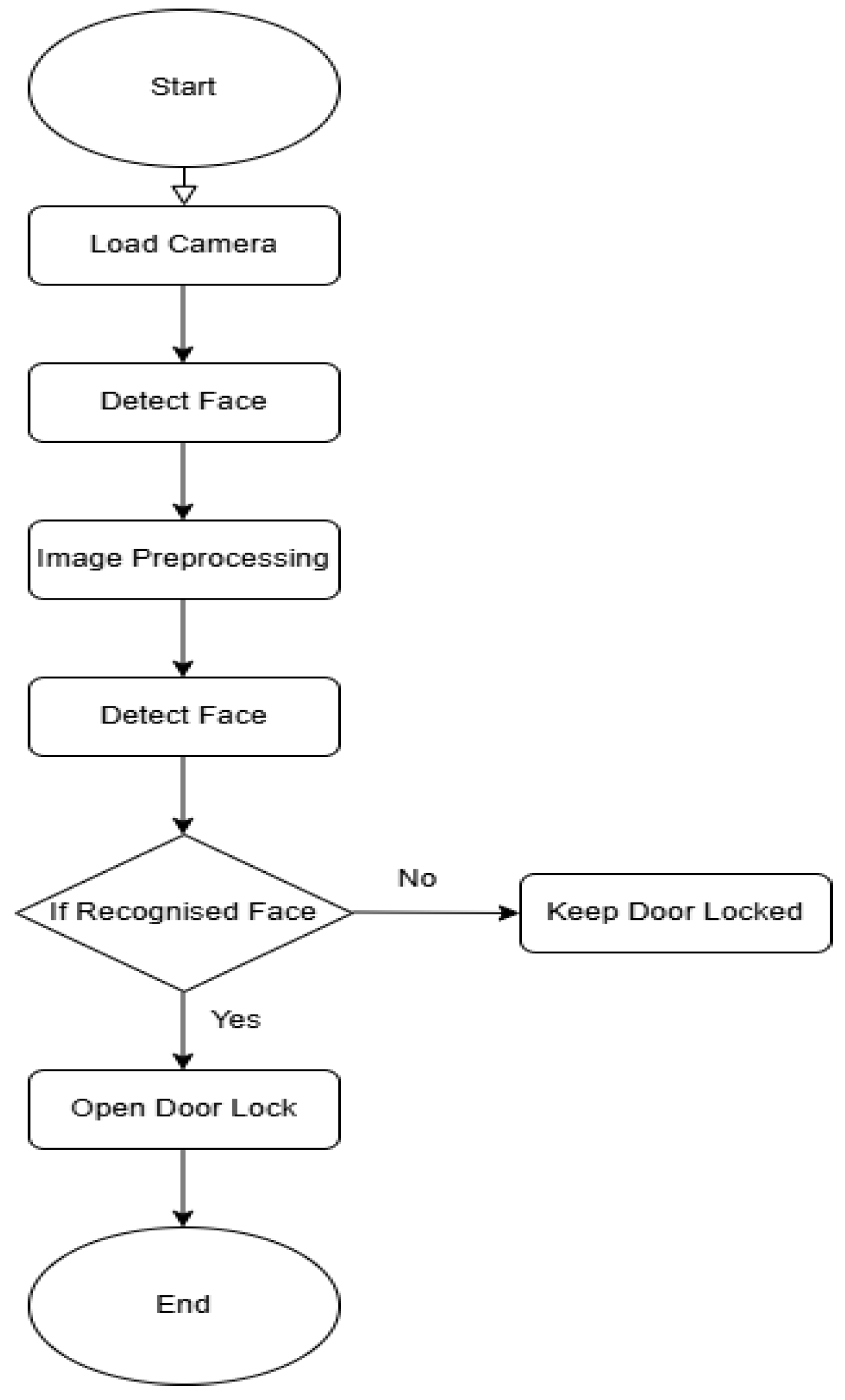
Figure 2.
Circuit diagram illustrating the hardware connections for the face recognition door lock system.
Figure 2.
Circuit diagram illustrating the hardware connections for the face recognition door lock system.
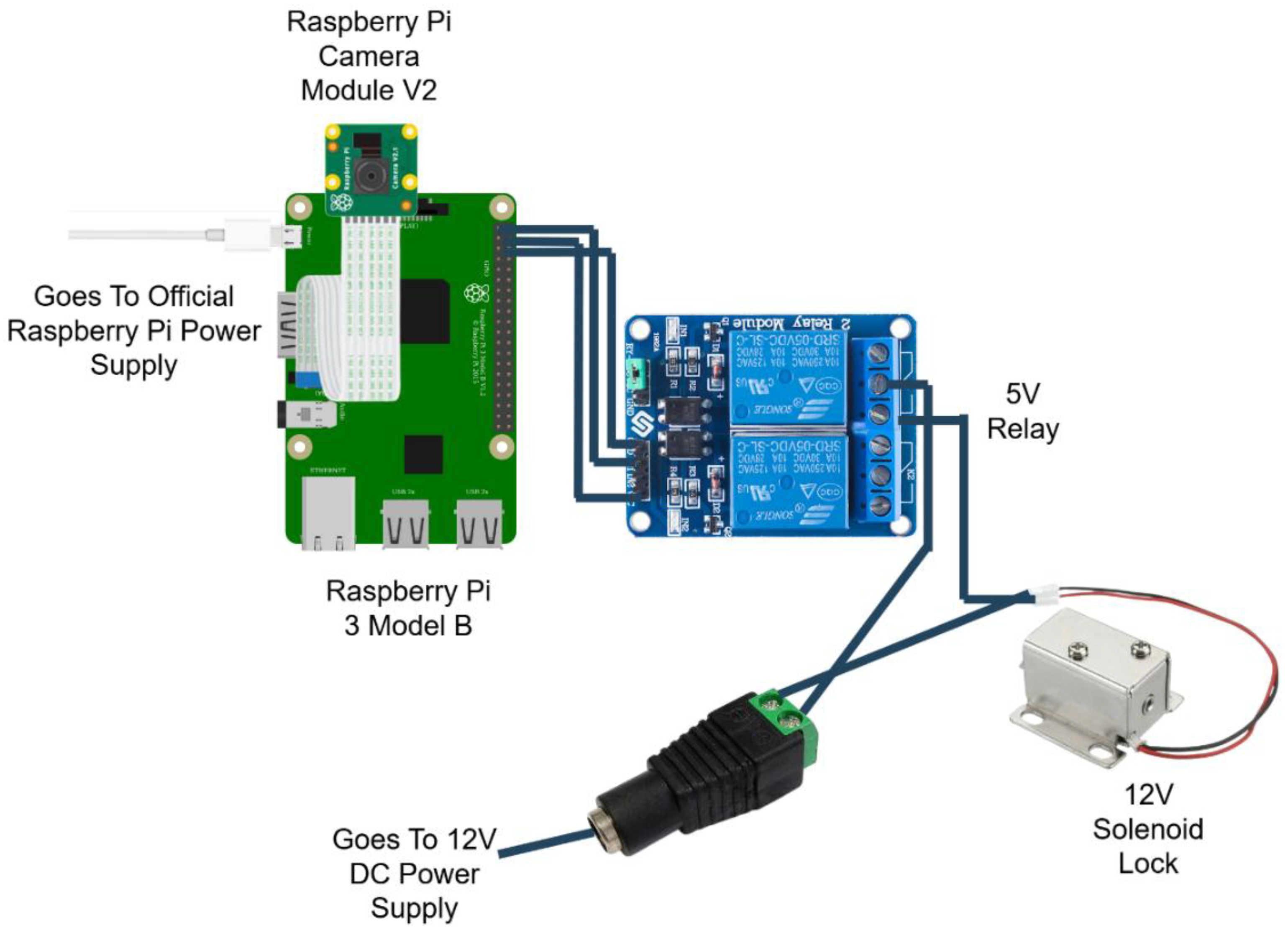
Figure 3.
Libraries used in the paper’s script.
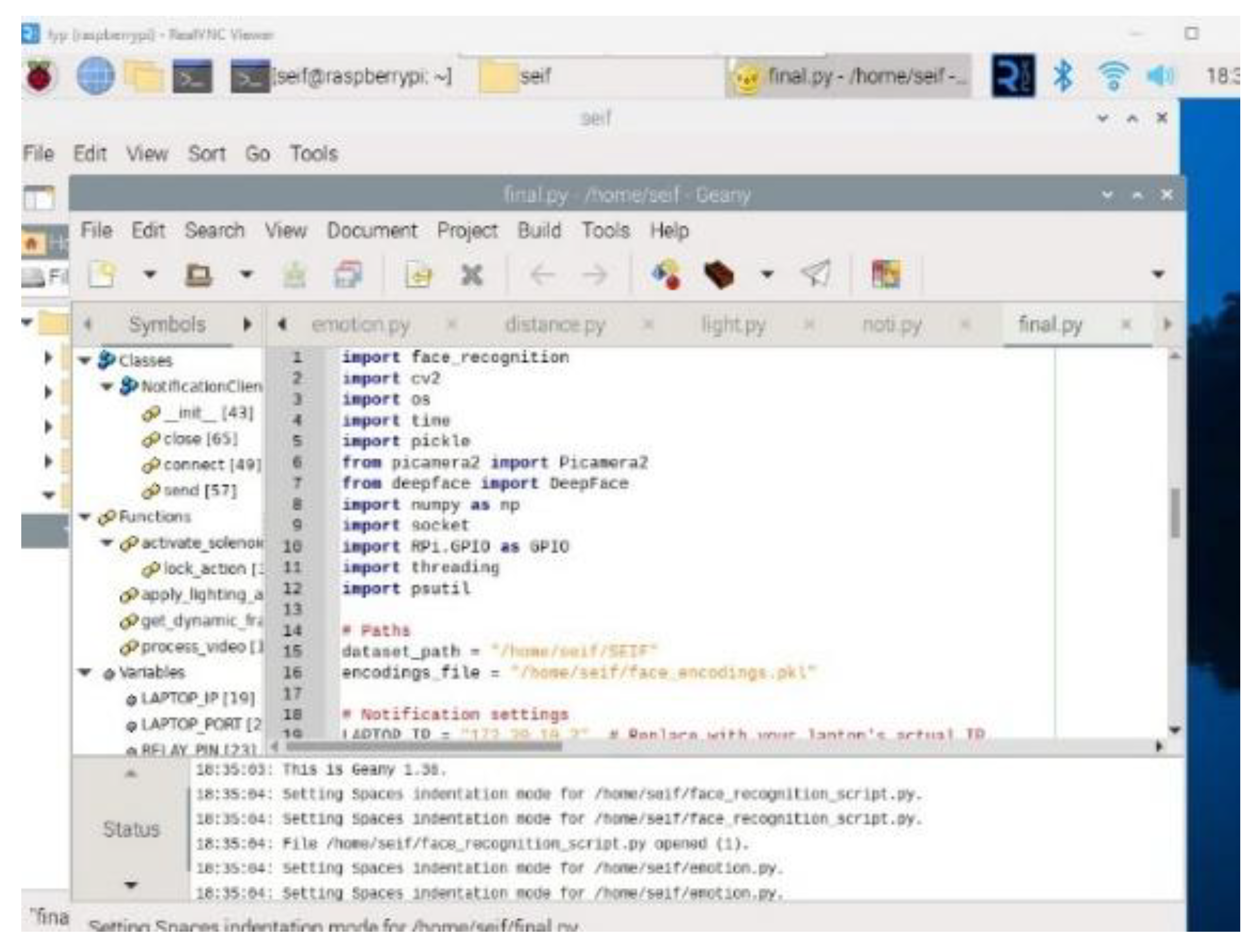
Figure 4.
Face Detection and Recognition During Simulation.
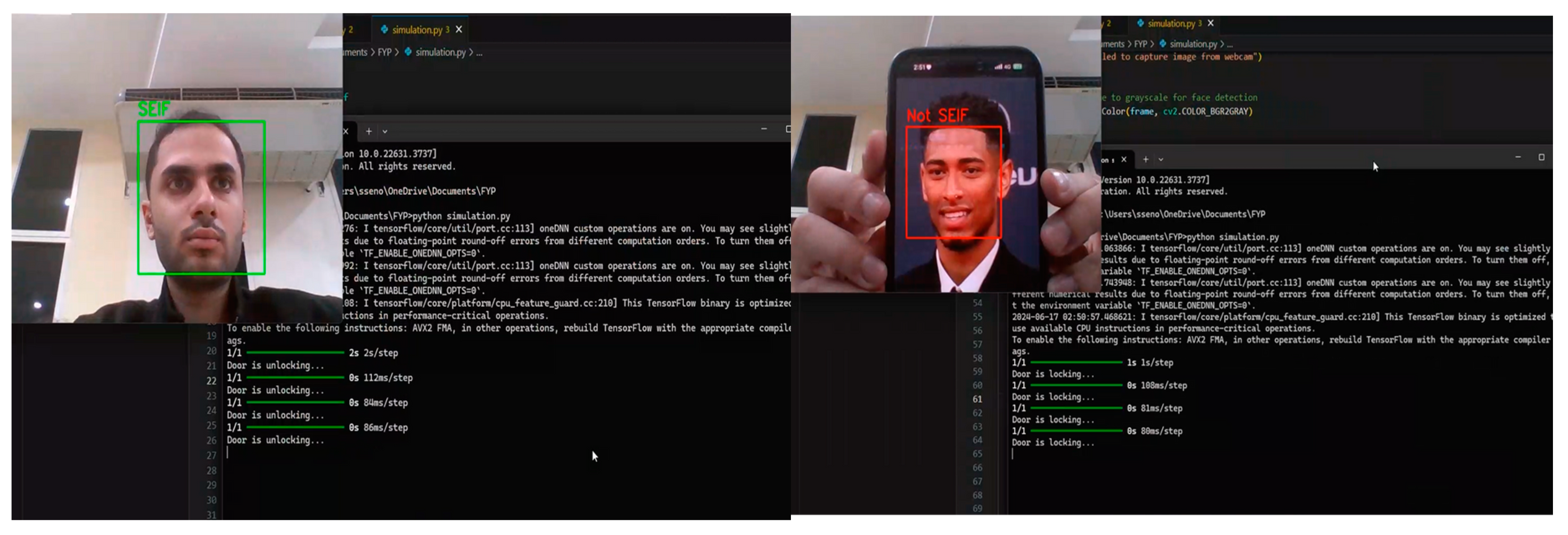
Figure 5.
Raspberry Pi Terminal Output Showing Camera Initialization.
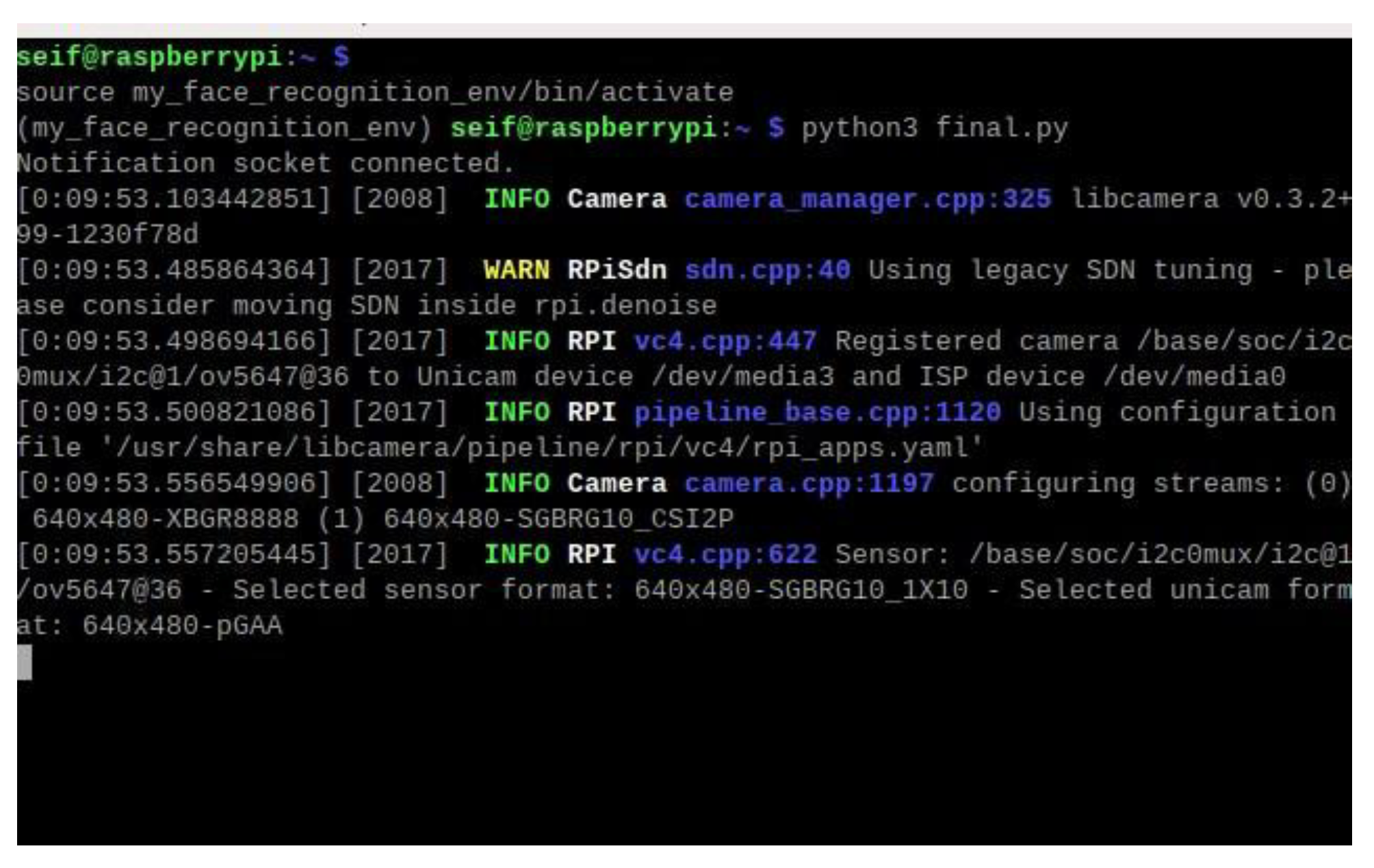
Figure 6.
Virtual environment activated in the terminal.
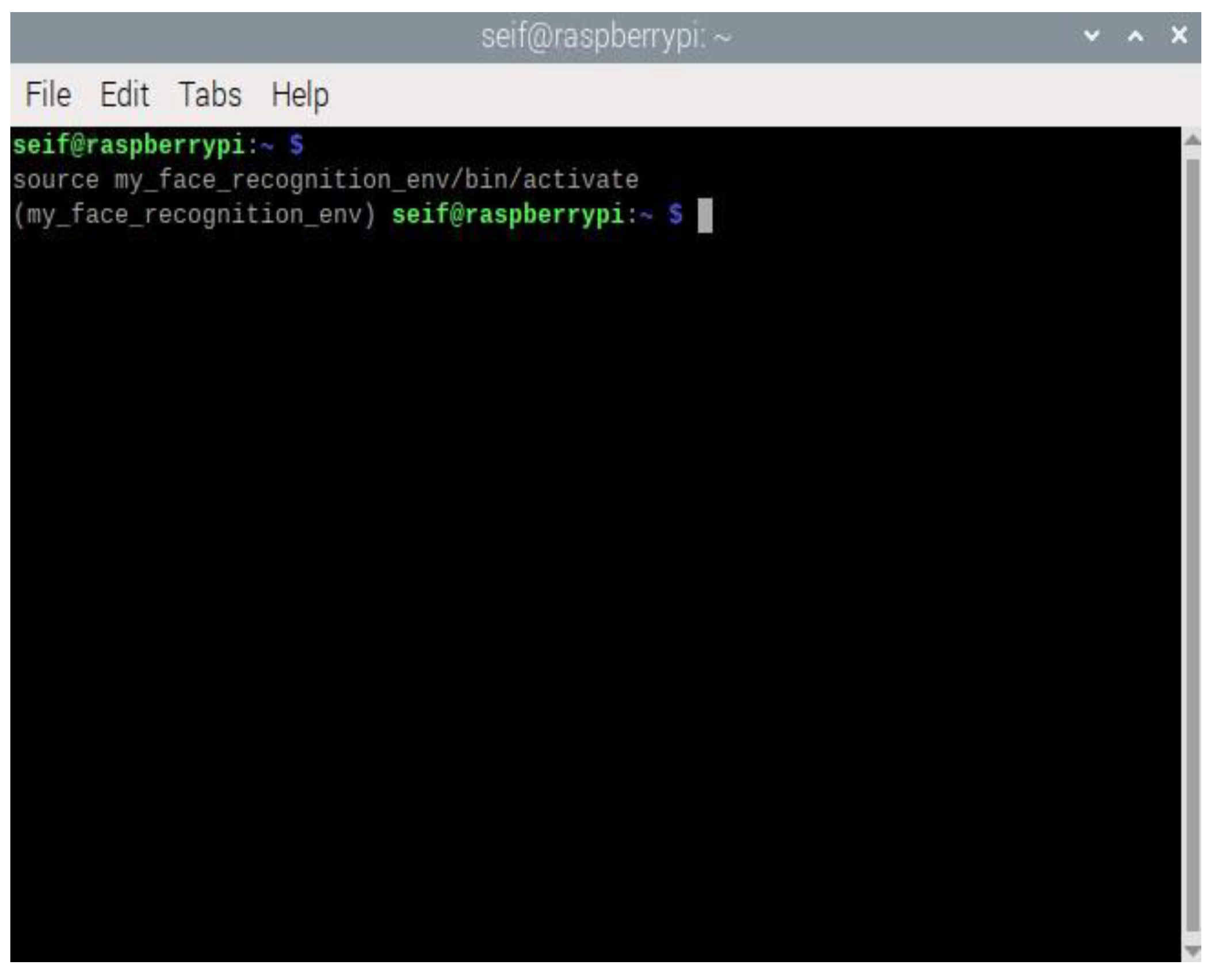
Figure 7.
Face Detection and Recognition in Real Time.
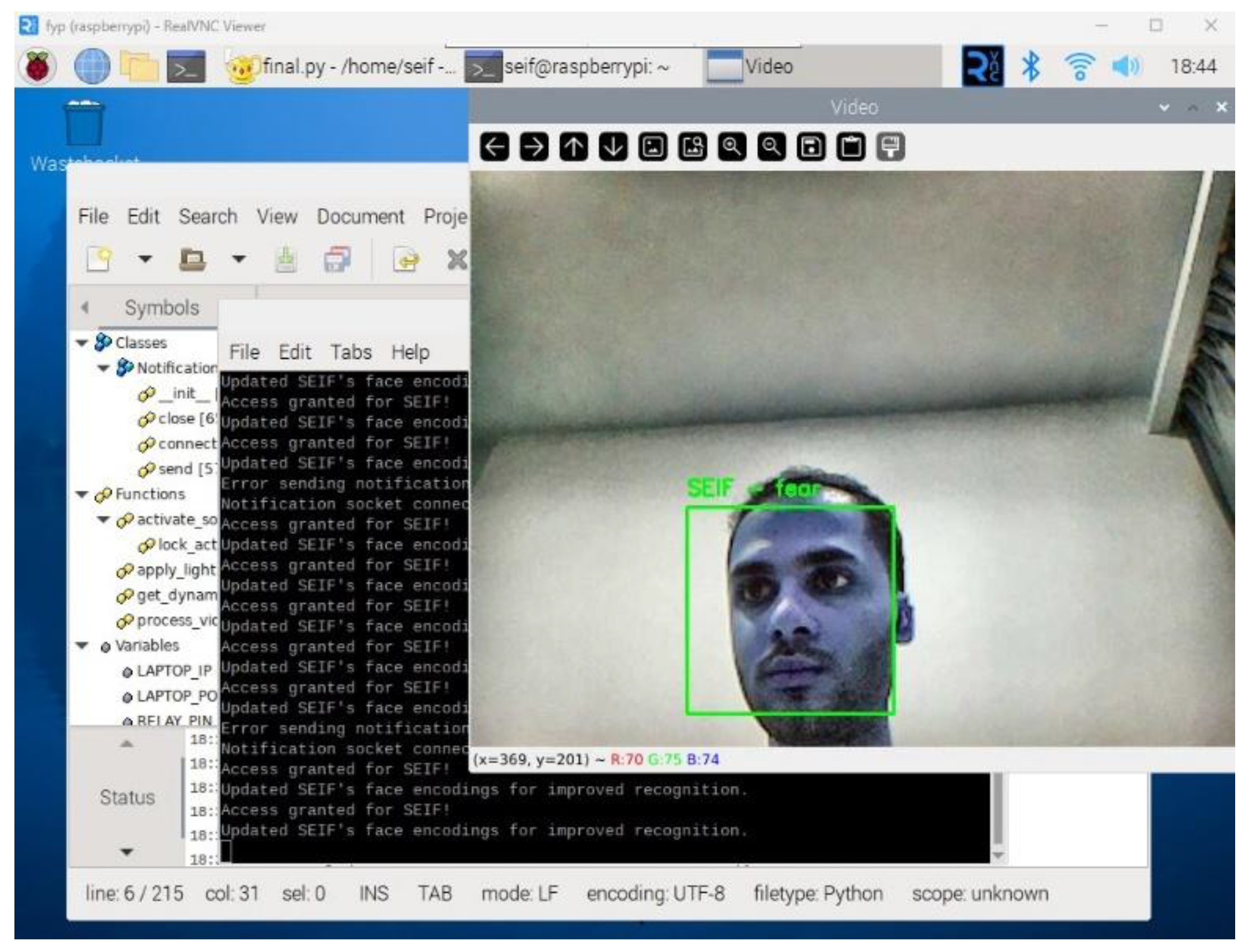
Figure 8.
Effect of Lighting Normalization on Face Detection.
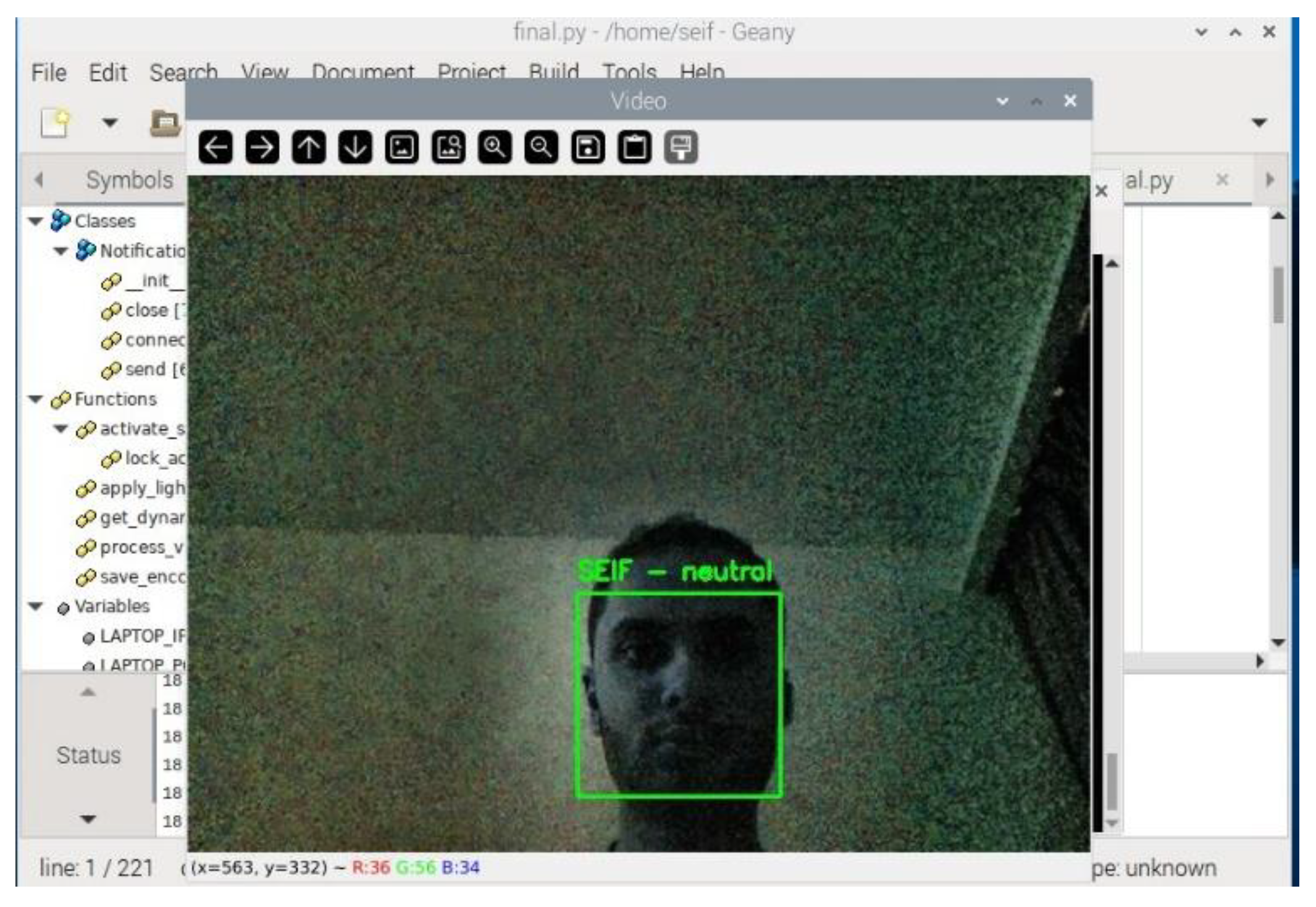
Figure 9.
Updating Encodings for Known Faces.
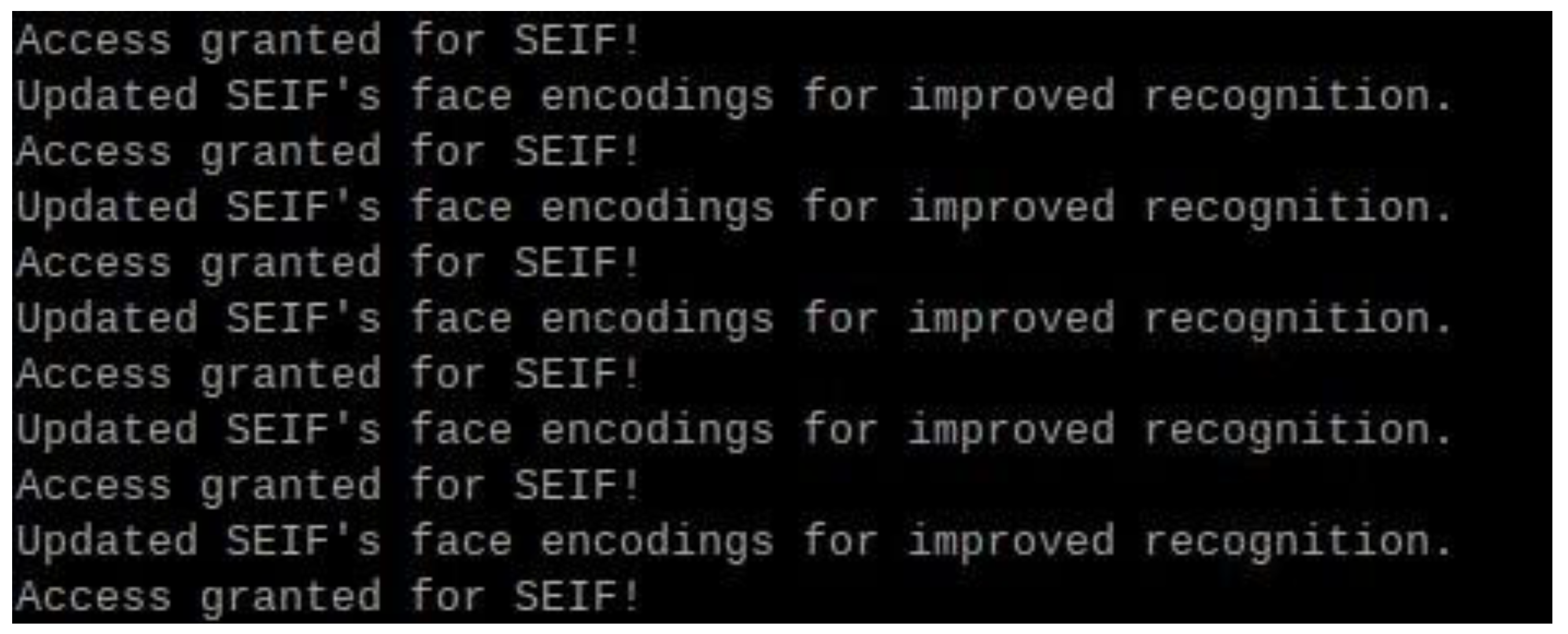
Figure 10.
Updating Encodings for Known Faces.
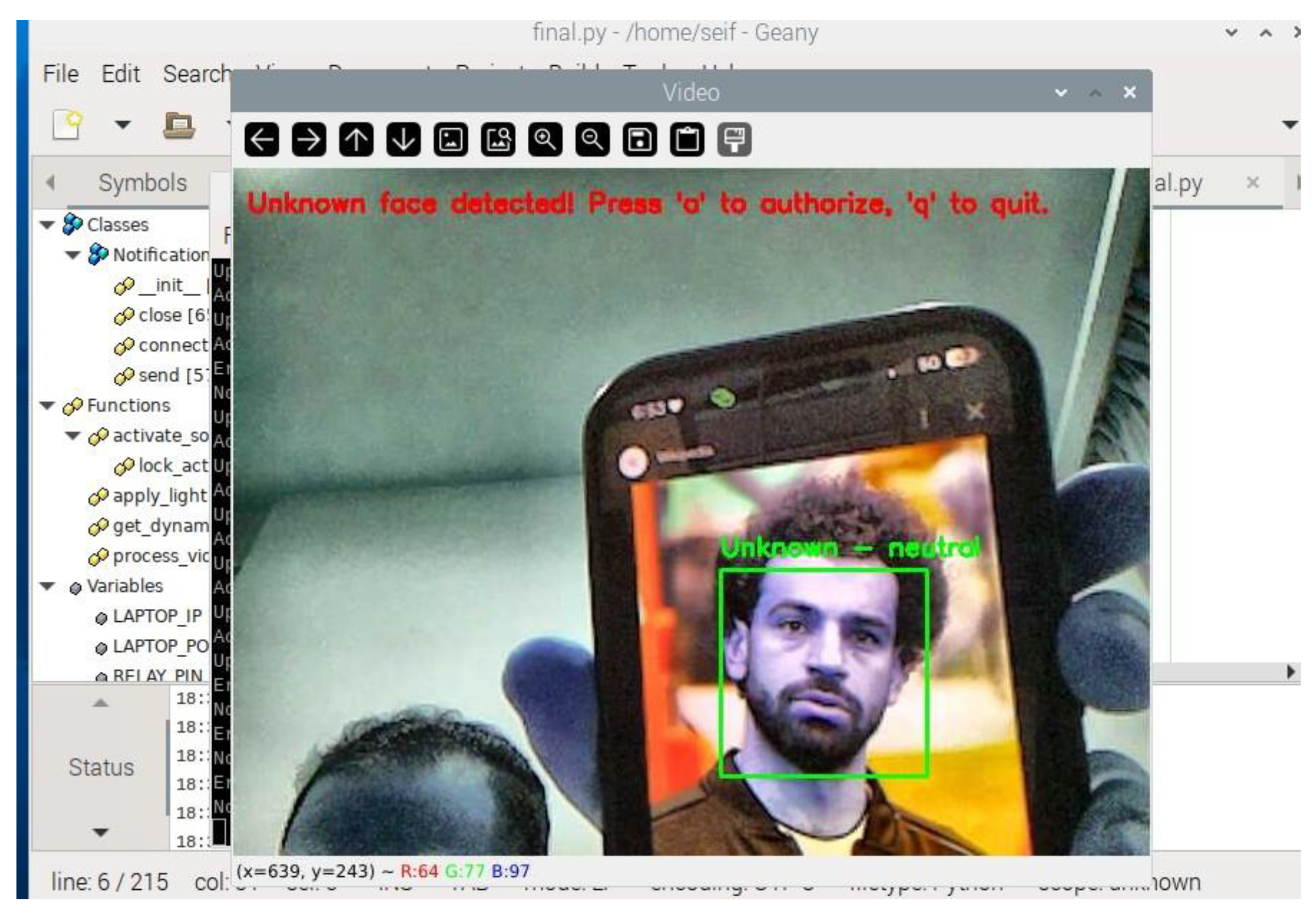
Figure 11.
Adding the unknown face to be authorised.

Figure 12.
Successful Recognition of Newly Authorized Face.
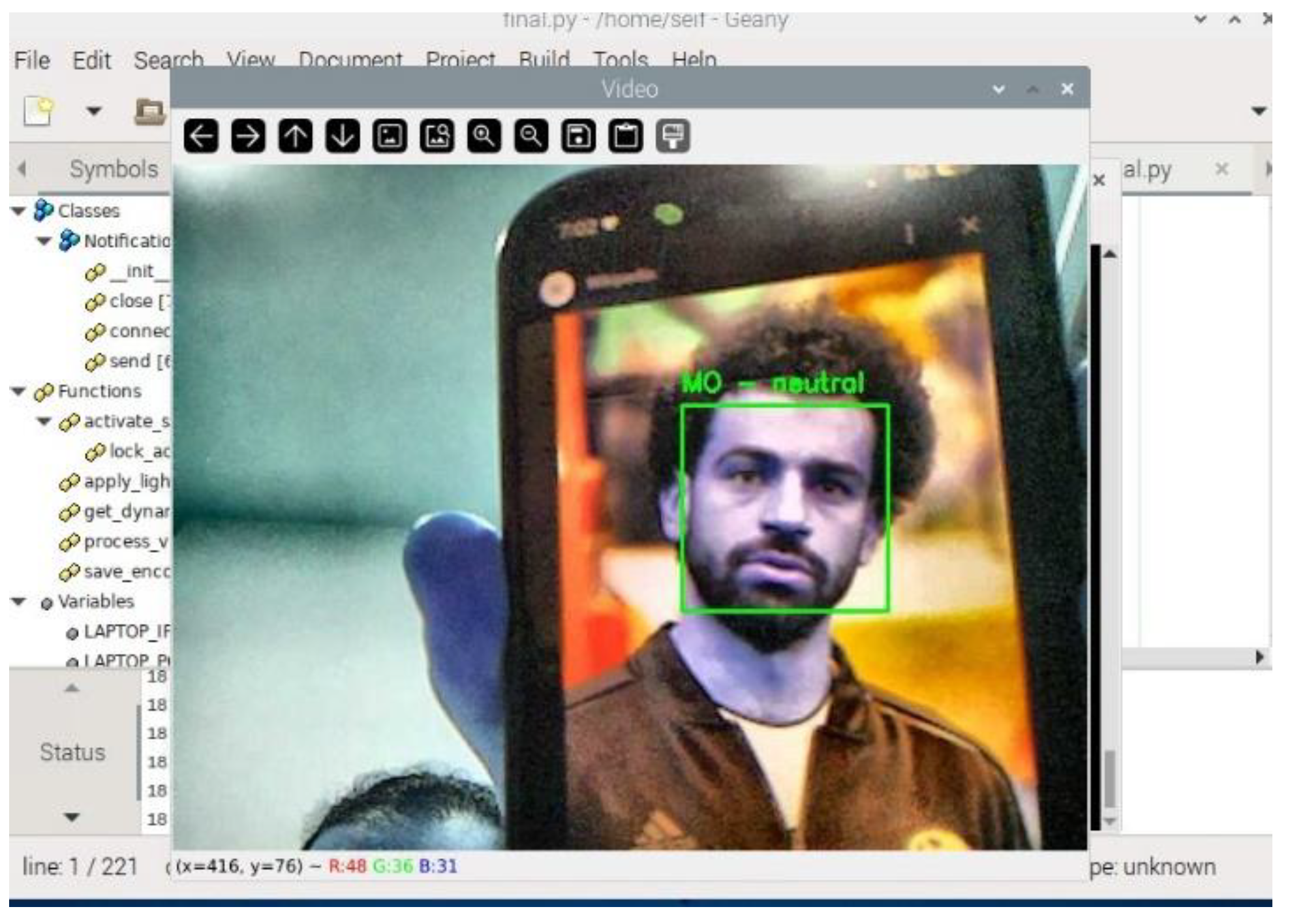
Figure 13.
Real-Time Emotion Detection Display.
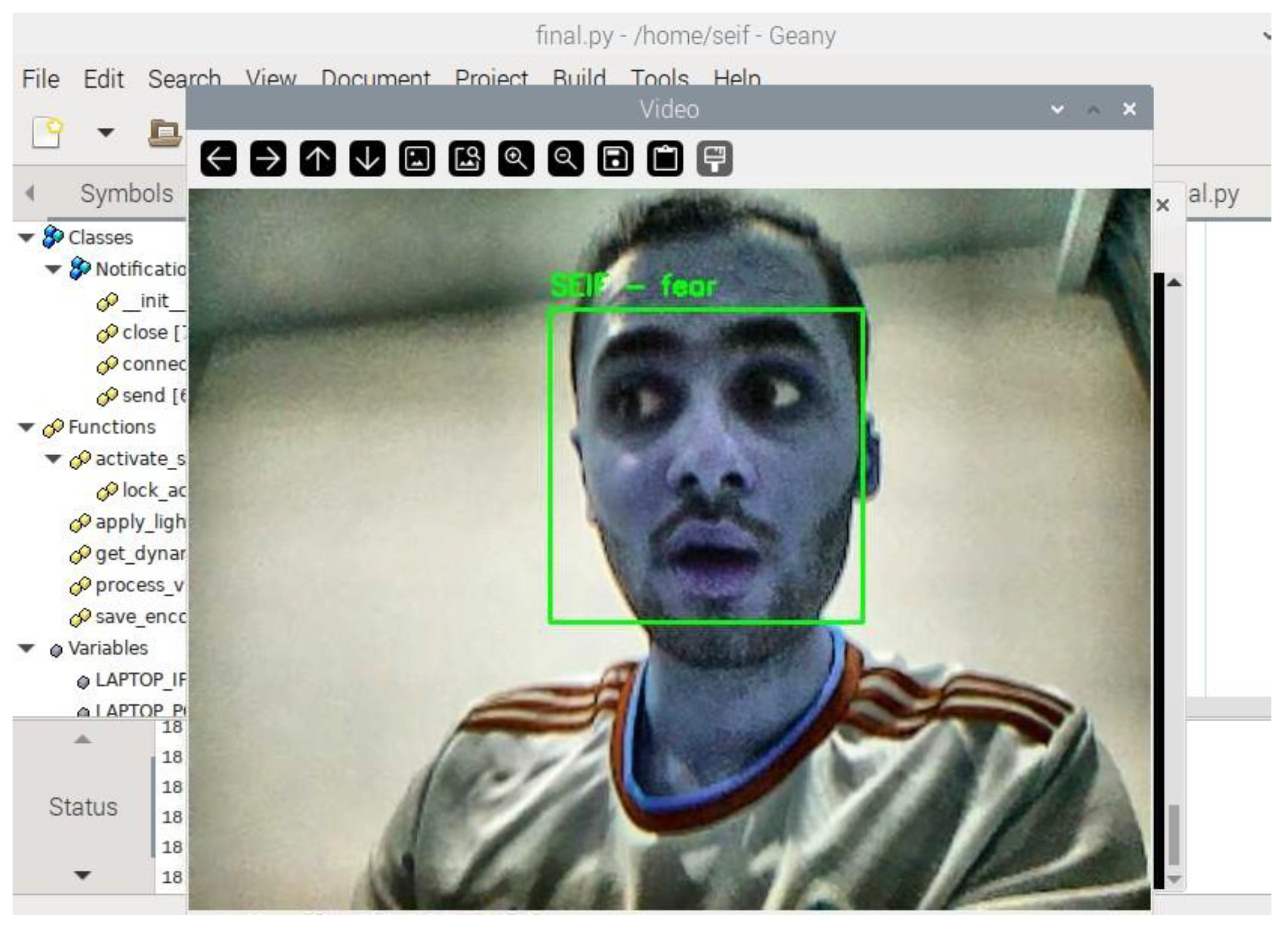
Figure 14.
Detected Emotion Displayed in Real-Time Video Feed.
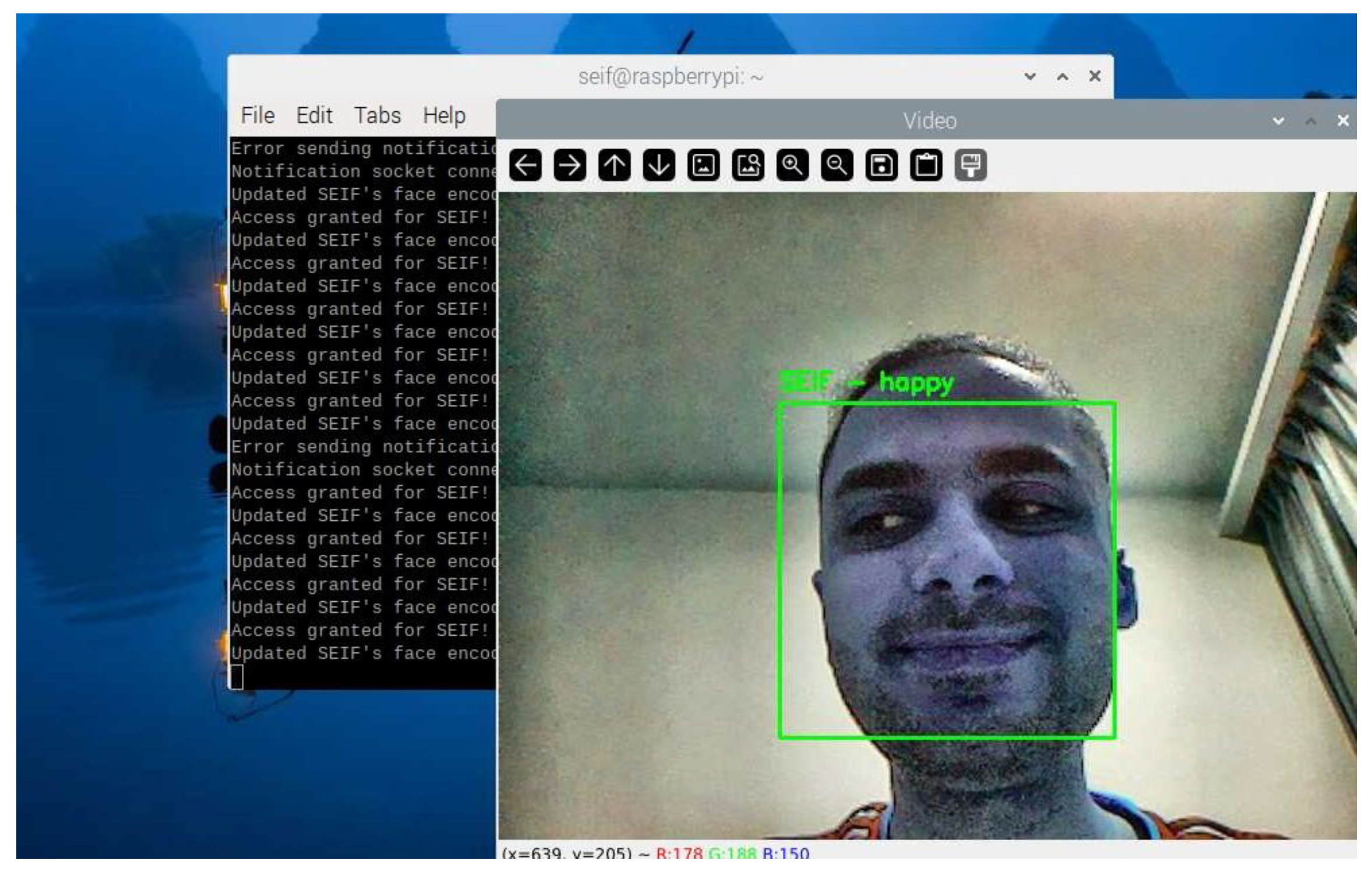
Figure 15.
Face Recognitions in a different lighting Environments.
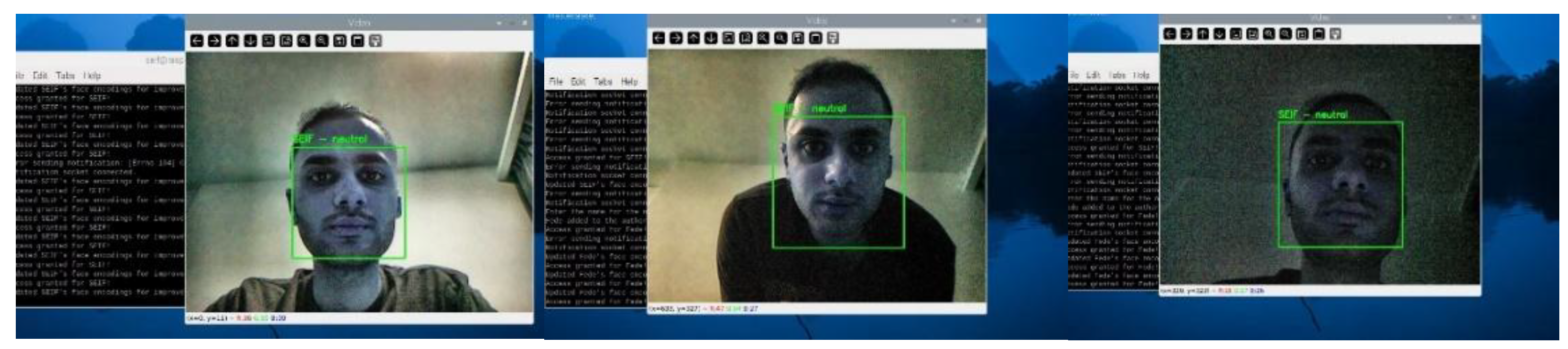
Figure 16.
Face Recognitions at different Distances and angles.
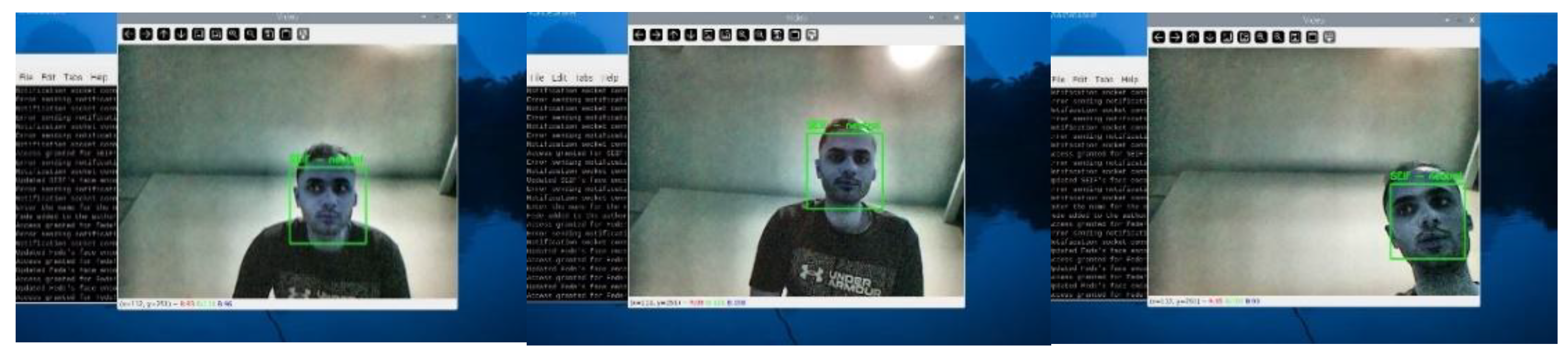
Figure 17.
Detection of a "Sad" Emotion.
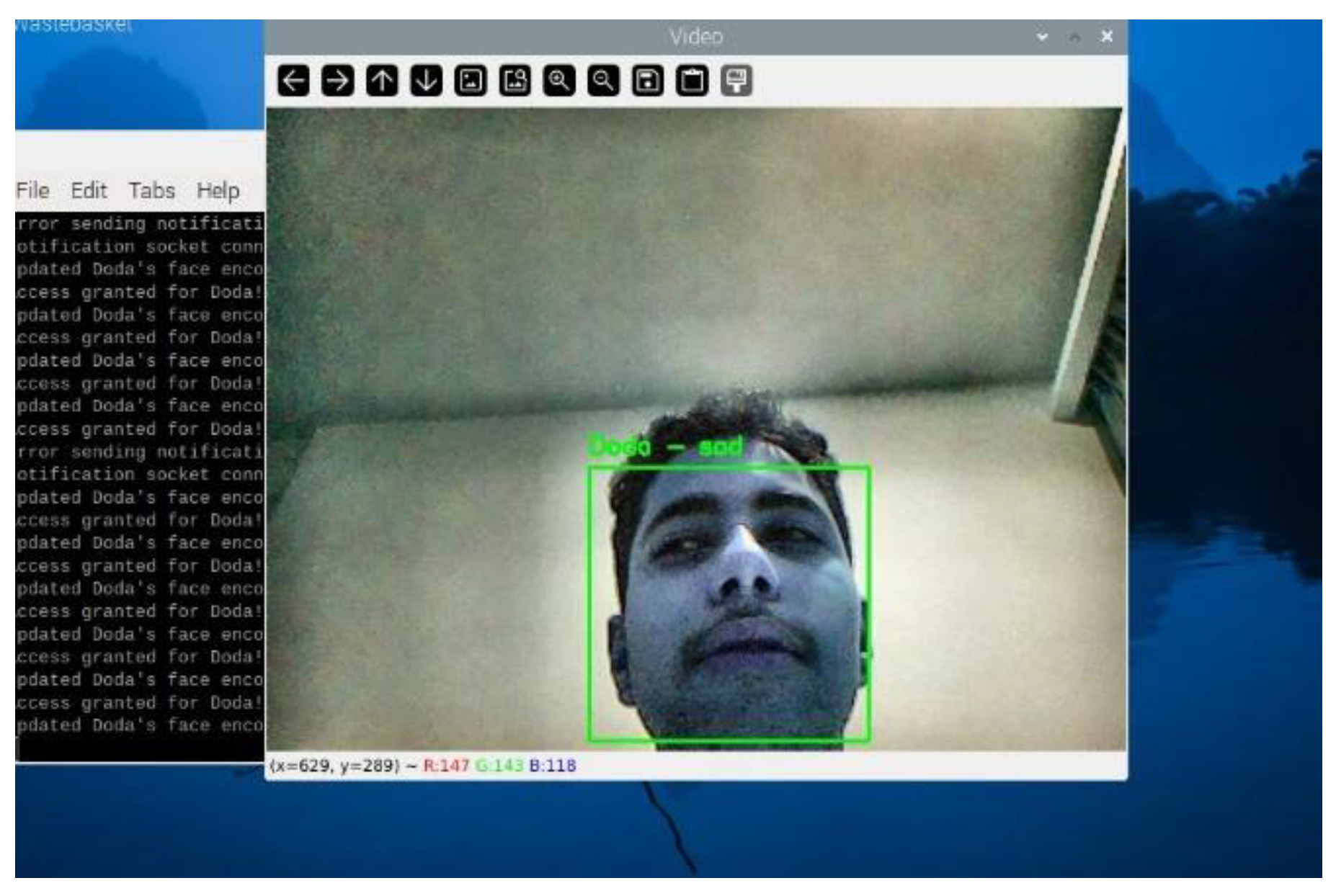
Figure 18.
Notification for Authorized User.
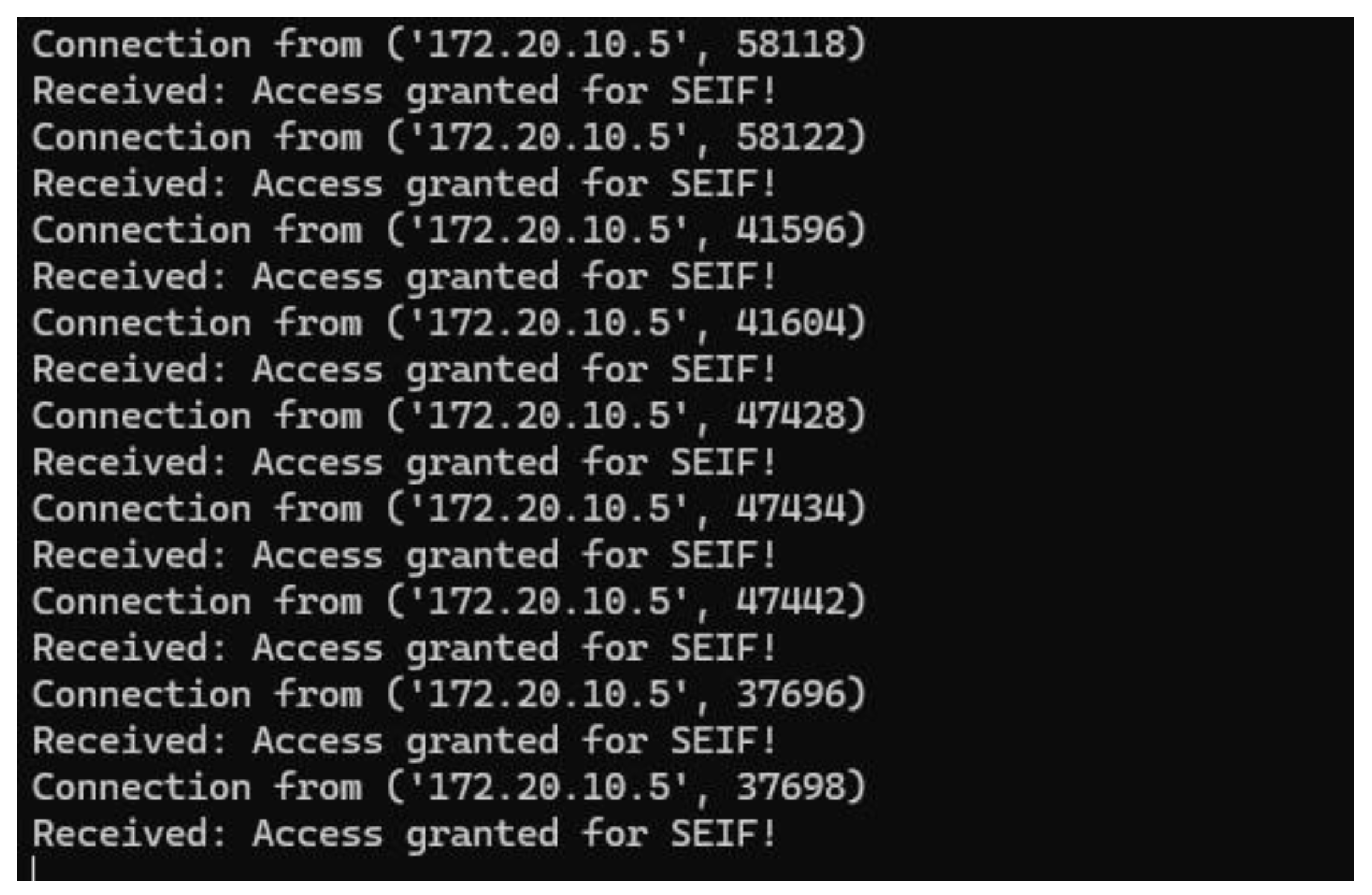
Figure 19.
Notification for Multiple Face Detections.
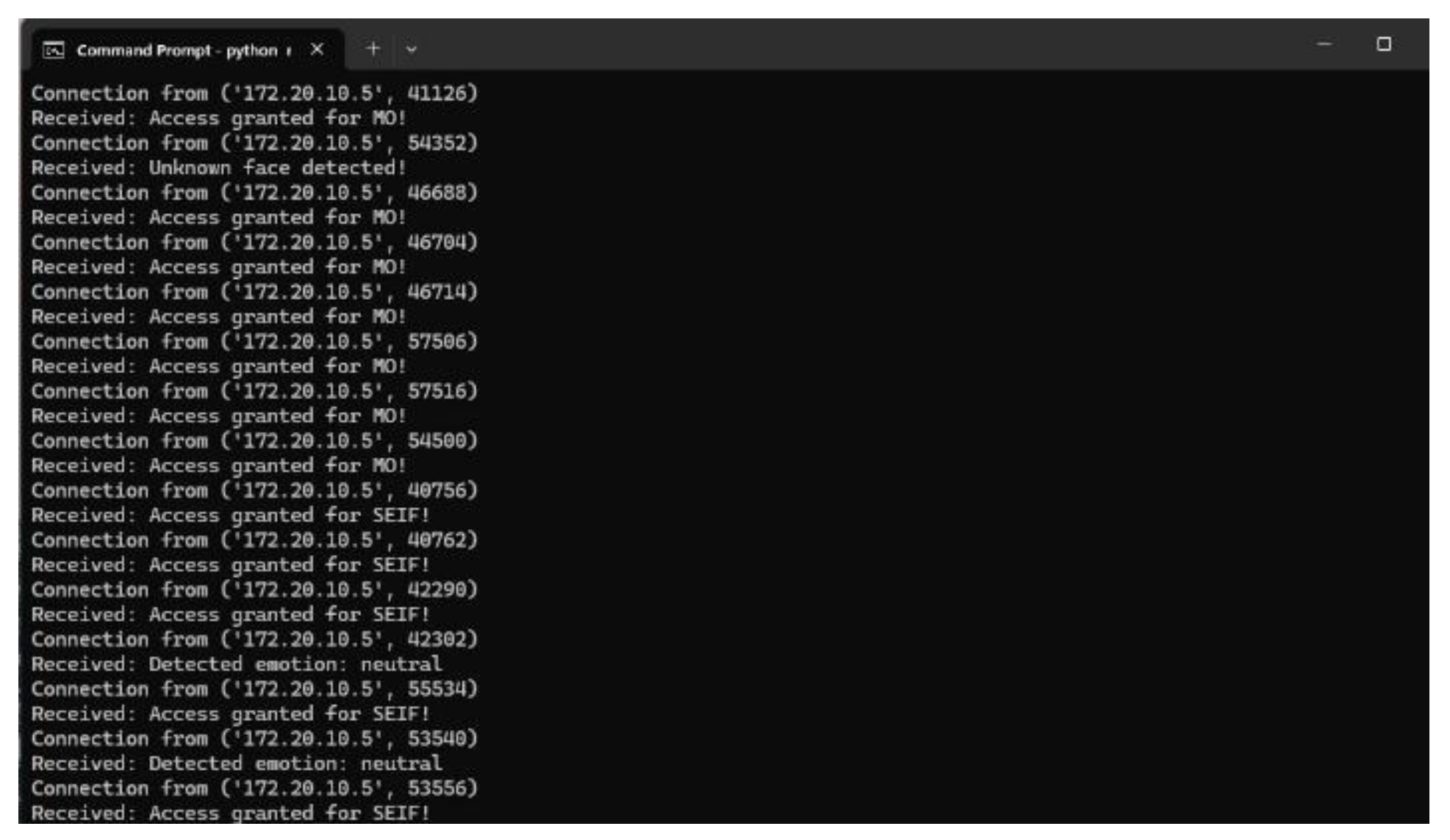
Figure 20.
Notification for Detected Emotion.

Figure 21.
Terminal Connection Between Raspberry Pi and Laptop.

Figure 22.
Detection of an Unknown Face.
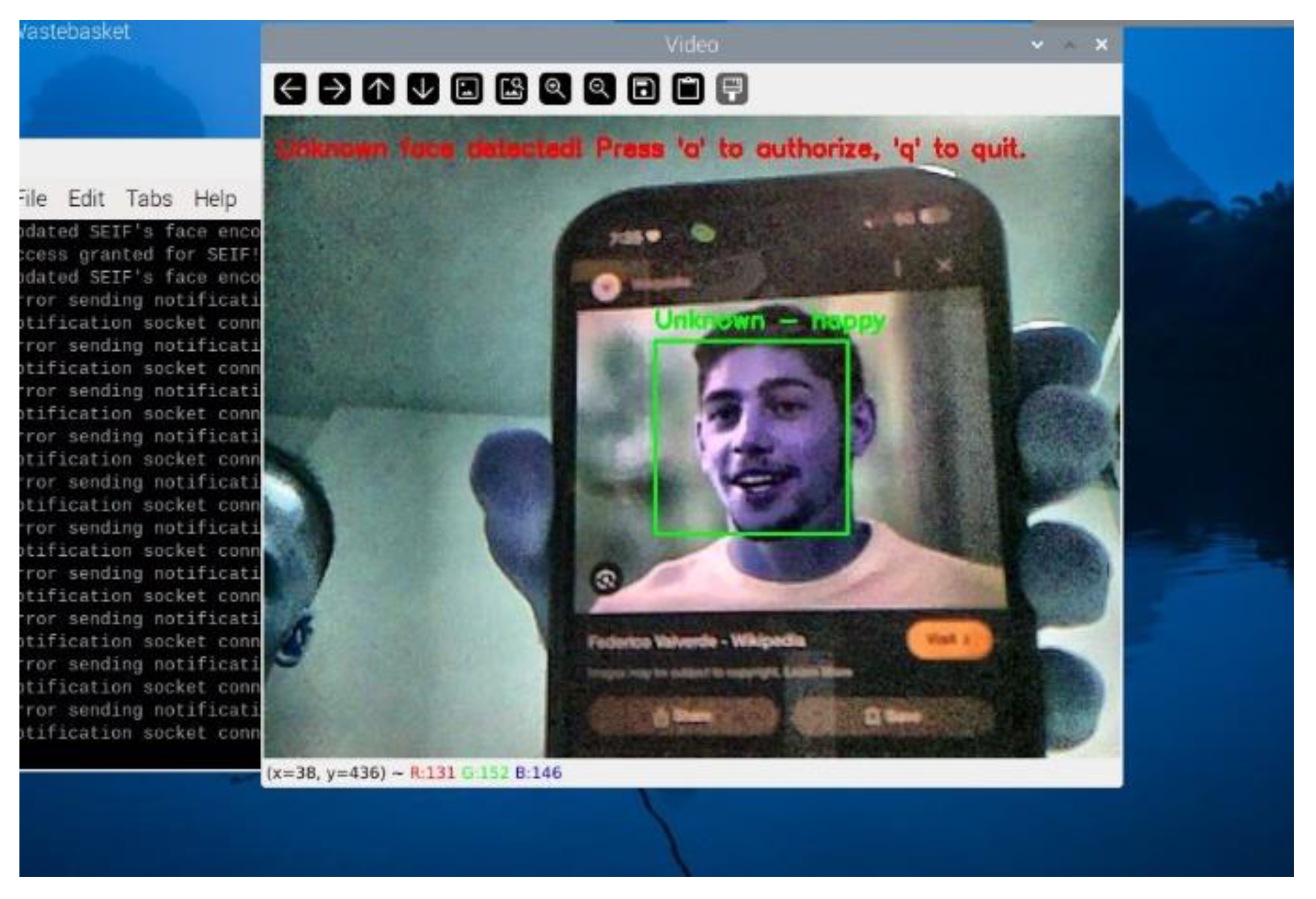
Figure 23.
Authorizing a New Face in Real Time.

Figure 24.
Successful Recognition of a Newly Authorized User.
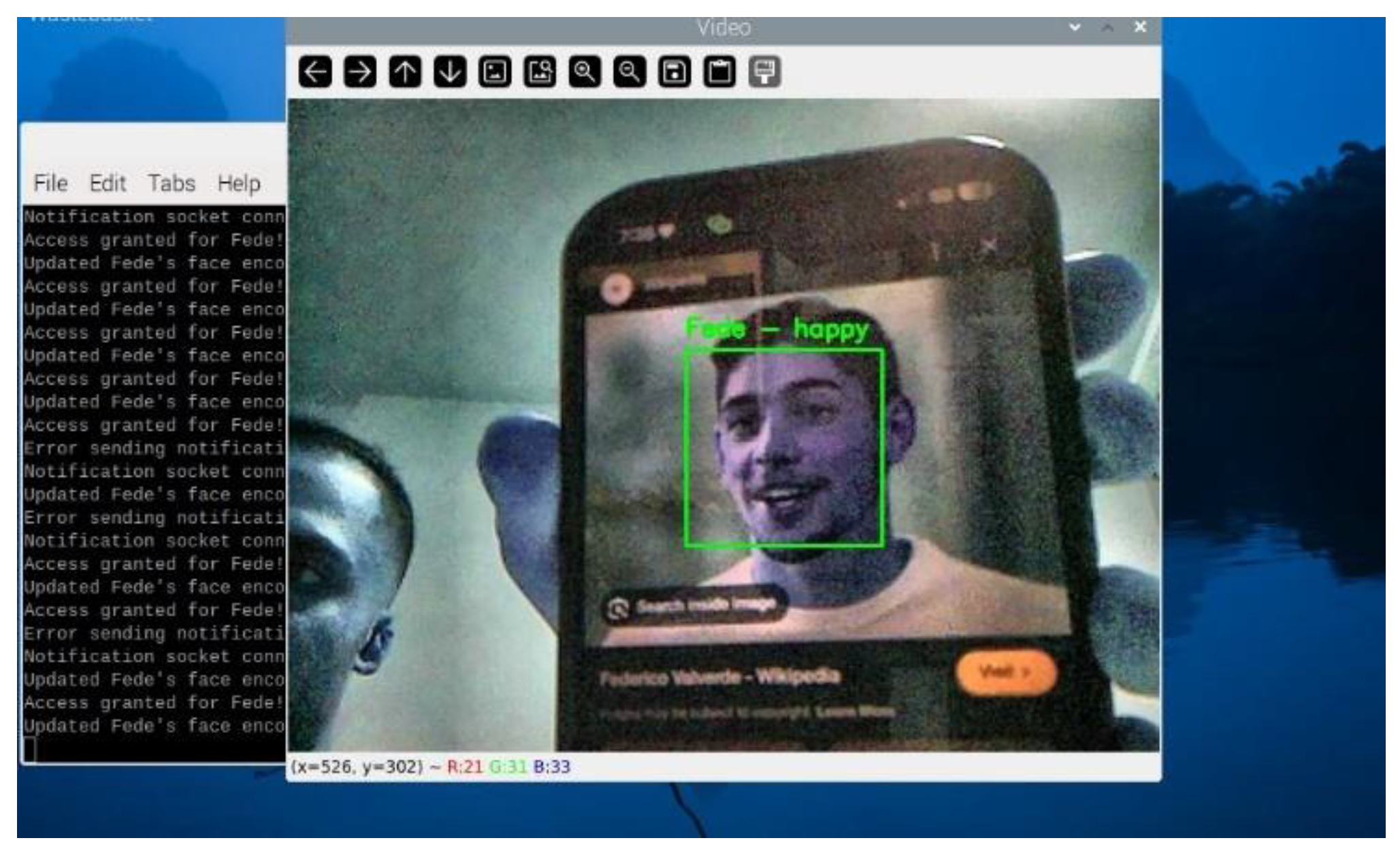
Figure 25.
Detection of Multiple Authorized Users.
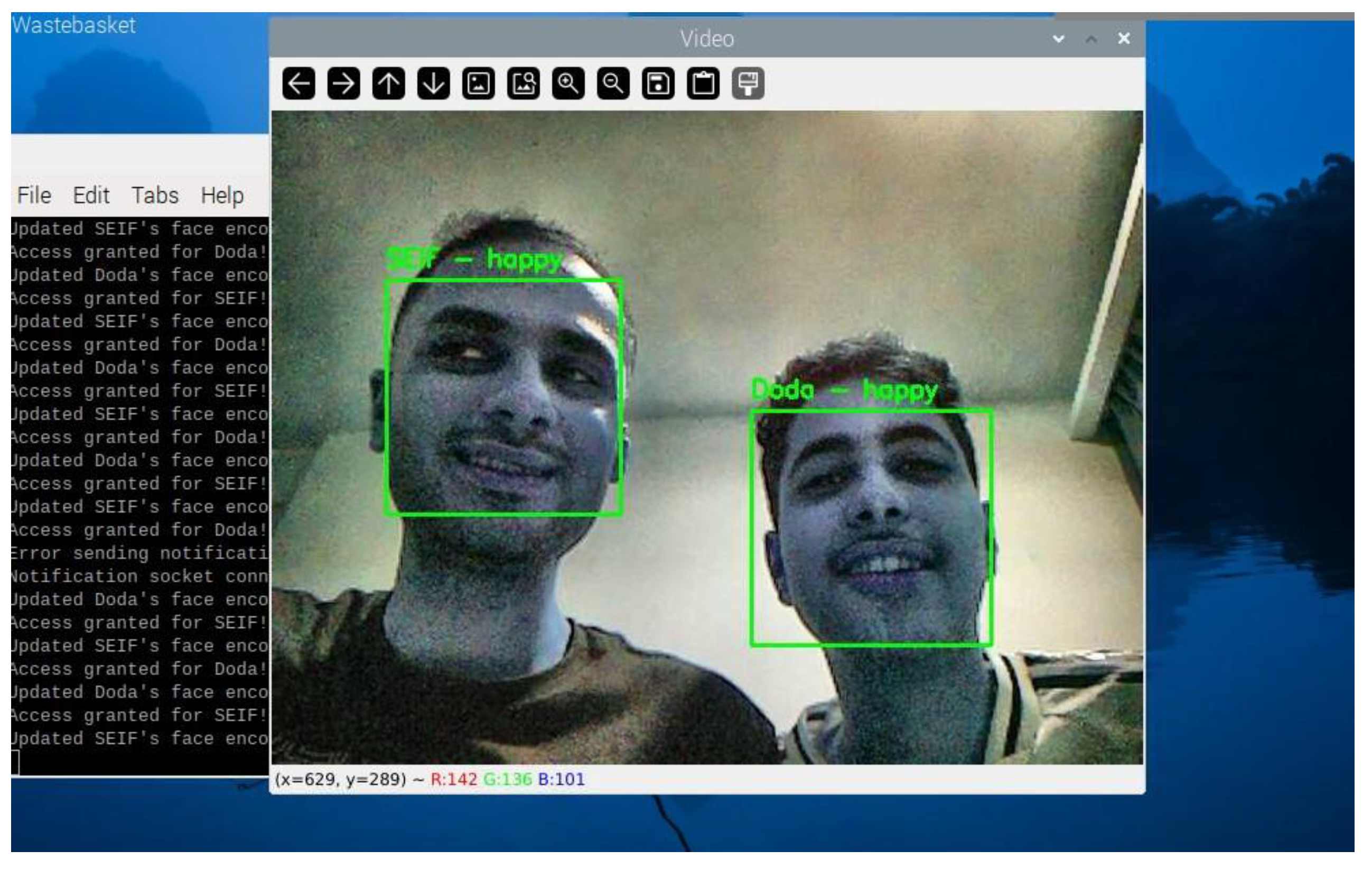
Figure 26.
Terminal Output Showing Updated Face Encodings.
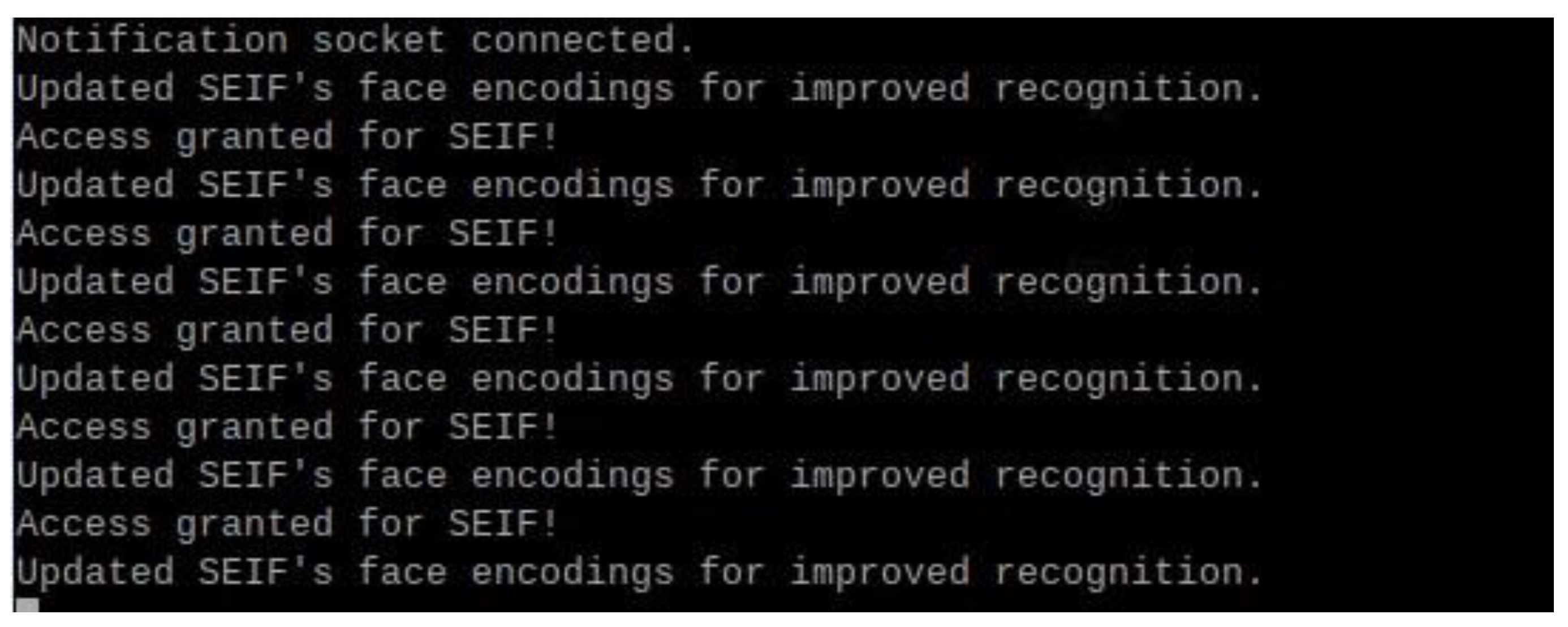
Figure 27.
Bar Chart Comparing Processing Times.
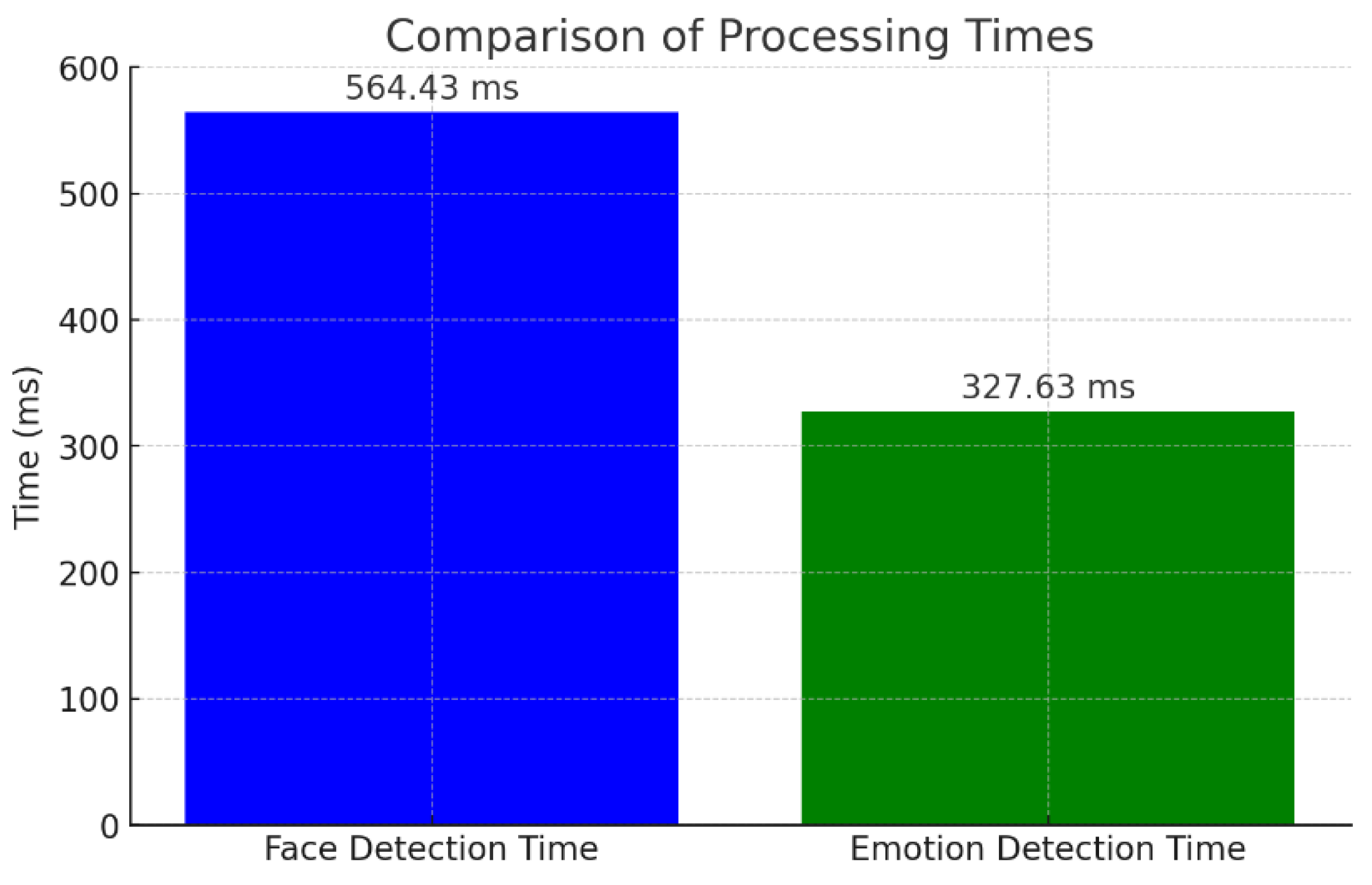
Figure 28.
Bar Chart Comparing Accuracy.
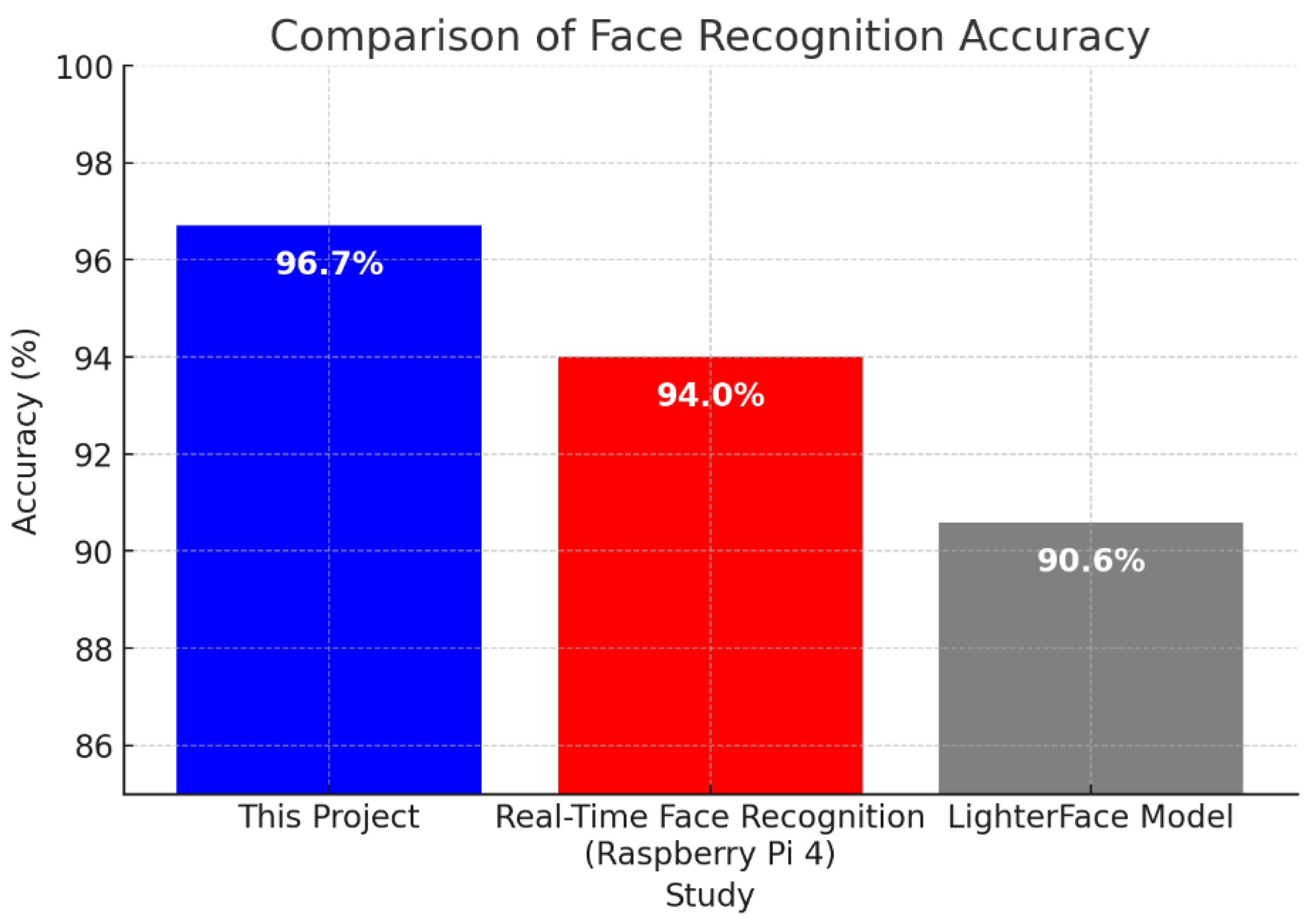
Figure 29.
Closing the Face Recognition Program.


Table 1.
Overview of the Facial Recognition Algorithm.
| Step | Description |
|---|---|
| Capture Frame | Captures a video frame using the Raspberry Pi camera. |
| Enhance Lighting | Applies CLAHE and gamma correction to normalize brightness. |
| Detect Faces | Identifies facial regions using the HOG-based detector. |
| Encode Faces | Generates a 128-dimensional encoding for detected faces. |
| Compare with Encodings | Matches face encodings with the stored dataset using Euclidean distance. |
| Output Result | Displays recognition results and triggers actions (e.g., notifications). |
Table 2.
Performance under Varying Lighting and Distance.
| Test Condition | Recognition Accuracy (%) | Average Detection Time (ms) |
|---|---|---|
| Bright Light | 98.5% | 521.45 |
| Low Light | 92.8% | 601.23 |
| Dim Light | 90.3% | 678.31 |
| Some Distance | 99.5% | 498.20 |
| Medium Distance | 96.2% | 567.43 |
| Narrow Angle | 92.4% | 610.56 |
Table 3.
Detected Emotions (Counts and Percentages).
| Emotion | Count | Percentage |
|---|---|---|
| Neutral | 13 | 9.15% |
| Sad | 7 | 4.93% |
| Angry | 2 | 1.41% |
| Surprise | 1 | 0.70% |
| Happy | 3 | 2.11% |
| Fear | 1 | 0.70% |
Table 4.
Notification Event Delays.
| Notification Event | Average Delay (ms) |
|---|---|
| Authorized Face Detected | 195 |
| Unknown Face Detected | 210 |
| Emotion Detected | 198 |
Table 5.
Summary of Numerical Results.
| Metric | Value |
|---|---|
| Total Frames Processed | 180 |
| Total Faces Detected | 142 |
| Unique Authorized Faces | 2 |
| Unique Unknown Faces | 23 |
| Average Face Detection Time | 564.43 ms |
| Average Emotion Detection Time | 327.63 ms |
| Average Movement Between Frames | 28.84 pixels |
Disclaimer/Publisher’s Note: The statements, opinions and data contained in all publications are solely those of the individual author(s) and contributor(s) and not of MDPI and/or the editor(s). MDPI and/or the editor(s) disclaim responsibility for any injury to people or property resulting from any ideas, methods, instructions or products referred to in the content. |
© 2025 by the authors. Licensee MDPI, Basel, Switzerland. This article is an open access article distributed under the terms and conditions of the Creative Commons Attribution (CC BY) license (http://creativecommons.org/licenses/by/4.0/).
Copyright: This open access article is published under a Creative Commons CC BY 4.0 license, which permit the free download, distribution, and reuse, provided that the author and preprint are cited in any reuse.


