
Submitted:
05 January 2025
Posted:
07 January 2025
You are already at the latest version
Abstract
Climate change and air quality have become high-priority global issues, especially with the implementation of SDG 13 to take urgent action to combat climate change and its impacts. Air quality is a pressing public health and environmental challenge, as nine out of ten people in the world breathe polluted air, and millions die as a result every year. The Java programming language is used to identify and implement a solution that works toward achieving SDG 13 targets, with particular emphasis on enhancing air quality monitoring and climate action. Concretely, the designed program would be directed to integrate the policies and procedures of national contributions of countries concerning climate change (Target 13.2), improve climate change awareness, education for climate change mitigation, and resilience against climate-related hazards (Targets 13.3 and 13.1). The program will contribute to the wider outcome of enhanced support to developing countries on climate finance, Targets 13.4 and 13.5. The design includes real-time data analytics tracking air pollution levels and predicting air quality trends that give actionable insights to governments, organizations, and the public. The proposed solution aims to reduce the damage to health, ecosystems, and economies due to pollution by addressing air quality-related issues, thus supporting big climate action. The solution not only looks at reducing immediate air pollution effects but, in fact, helps toward the long-term goals of SDG 13 by facilitating adaptive capacity, education for climate change, and other global financial flows in support of climate action for developing countries. It is in this manner that the project aspires to actively join the sustained effort in sustainable development currently waged at the international level.
Keywords:
Climate Change
; SDG 13
; Real-Time Data
; Health
; Ecosystems
; Economies
1. Introduction
Governments, organizations, and startups worldwide have taken an oath to achieve its goals of SDG 13, which has generally been related to Climate Action. The United Nations drafted the SDG 13 in 2015 to take urgent action for appropriate action, to combat climate change and its impacts through various strategic activities. The project therefore seeks to develop a computer program using the Java programming language that adds value to the achievements of the targets set by SDG 13[1,2]. The most important objective of this project is to be able to work toward achieving certain targets of SDG 13, which comprises a number of aspects relating to climate action, with the accent on air quality. The program is designed to support and integrate functionalities corresponding to the five main targets of SDG 13: Target 13.1 aims to strengthen resilience and adaptive capacity to climate-related disasters; Target 13.2 focuses on integrating climate change measures into national policies, strategies, and planning; Target 13.3 seeks to enhance education, awareness-raising, and human and institutional capacity on climate change mitigation, adaptation, impact reduction, and early warning systems; Target 13.4 emphasizes the implementation of commitments by developed countries to the United Nations Framework Convention on Climate Change, including mobilizing $100 billion annually by 2020 from all sources to address the needs of developing countries; and Target 13.5 aims to implement commitments under the UN Framework Convention on Climate Change related to a significant increase in climate finance from all sources to support developing countries [3].
Rationale
The WHO describes air pollution as an invisible killer according to the WHO, nine out of ten people breathe contaminated air, leading to an estimated 7 million deaths as a result of indoor and outdoor air exposure. Air pollution is one of the leading drivers of non-communicable diseases, being responsible for 29% of all adult deaths related to lung cancer, 25% deaths due to heart disease, 43% due to chronic obstructive pulmonary disease, and 24% related to other conditions of the heart. Within the past decades, land and forest fires have episodically transferred smoke across national borders in Southeast Asia [4,5]. Malaysia is a country with lush landscapes in all its regions and faces recurring episodes of air pollution during the dry seasons, largely from transboundary land and forest fire-related haze events originating from neighboring countries. It is, therefore, a place where the onset of deterioration in air quality is an issue interlinked with climate change. The resultant hazardous air quality affects not only public health and ecosystems but also economic sectors. While the Malaysian government has put in place certain measures to solve this problem, challenges still abound [6,7,8].
Air pollution is an important environmental concern that is closely related to SDG 13, which deals with Climate Action. SDG 13 plays a vital role in the concerted efforts being made globally in order to address climate change and its far-reaching ramifications. The goal, as set by the United Nations, realizes the very far-reaching consequences of climate change on different aspects of human life and thus requires immediate action. Under SDG 13, the aim is to mobilize global activities to reduce greenhouse gas emissions, enhance adaptive capacity, and increase resilience to climate-related hazards [9,10]. It recognizes the interrelationship between socioeconomic stability, environmental sustainability, and the well-being of present and future generations. Poor air quality does not only mean a threat to human health but is also linked with climate change, as it usually results from industrial emissions, vehicle pollution, and agricultural practices. Target 13.3: Improve education, awareness-raising, and human and institutional capacity on climate change mitigation, adaptation, impact reduction, and early warning. The target is so important in SDG 13[11].
2. Existing Solutions
In regard to that, the Malaysian government has developed different types of digital platforms like websites and mobile apps in educating the masses regarding air pollution brought by haze. Some outstanding projects are MyIPU, which is a mobile phone application, and APIMS, which is a website aimed at helping citizens acquire air quality information during the hazy day’s crises [12,13].
2.1. MyIPU Application
Initiated by the Department of Environment Malaysia since 2017, this is a mobile application called MyIPU, which receives real-time API from various CAQM stations across Malaysia. In this context, it also offers current information on the extent of local pollution by using standardized health categories on air quality. Salient features of the MyIPU include current API for the nearest location readings, 24-hour API Trend Chart, and map view representing current reading from all CAQM stations across Malaysia. The paper is also complete with announcements and newspaper clips that outline air quality topics and have educational information on the Air Pollutant Index. However, this app has several drawbacks, including an application that is rarely updated, a number of technical bugs, crashes, and no default location setting, which is a great hassle for the users [14,15,16].
2.2. Air Pollutant Index Management System Website
In 2018, the website APIMS was developed by the Ministry of Environment and Water, updating live hourly API readings by cities or states targeted for desktop users, while MyIPU was its mobile counterpart. APIMS features announcements, an hourly API table, and a map showing regional haze situations. Nevertheless, this website is very limited because the announcement was publicly listed to the latest of 2019, with the zoom function in the location map difficult to use by a senior, and also no support function [17].
2.3. 2Addressing Current Challenges
The existing solutions, MyIPU and APIMS, are inefficient in a number of ways, for example, limited awareness of haze incidents and the lack of two-way communication between the government and the public. To this end, a new program is currently being developed: HazeAlert. This would be able to provide current updates and enable user feedback. This program can be envisioned as supporting SDG 13, Climate Action, through education of the public with regard to the risks related to haze and providing tools for user engagement. [18,19,20,21,22].
2.4. HazeAlert: The Complete Solution
HazeAlert is a computer program that addresses air pollution, particularly haze, in support of SDG 13. The system will update in real time, while educating and engaging users through user-driven reporting. Supporting government administrators and public users alike, it ensures strong information governance while enabling active participation by individuals in efforts to improve air quality [23,24,25,26].
Key features of HazeAlert include:
- Announcements: This feature will enable the real-time dissemination of critical haze updates, warnings, and active measures internally to government and public users. It allows administrators to create, edit, or remove announcements that keep the public informed of urgent matters.
- FAQs: The page holds some accredited information that de-mystifies haze by addressing frequently asked questions and sheds light on the implications brought about by haze. It helps users make informed decisions by explaining concepts, impacts, and guidelines for safety.
- User Reports: This page lets users contribute real-time data on any climate-related incident or observation. It fosters community engagement through which users can add, view, and remove reports regarding experiences related to haze and air pollution.
- API Readings: This critical feature updates air quality based on location. This provides users with an opportunity to keep track of current API readings in their vicinity for proper awareness of the level of air quality.
- User Profile: It allows users to make and manage their profile, view activities, and air quality reports. This will also help the government understand the demography of users to target public health more effectively.
HazeAlert tries to fill the gaps in the existing solutions and improve public awareness, involvement, and response to haze-related air pollution. With a combination of real-time data, user engagement, and educational resources, it truly empowers users to act in the light of air pollution and climate change challenges [27,28,29].
3.1. Application Design Considerations
Development of HazeAlert pays great importance to the creation of an intuitive interface that is user-friendly. In every application, accessibility will determine how easily one can use the software; thus, it is a very major success factor in applications. The simplicity and clarity of the application design are necessary to avoid confusion in the design. The application should guide the user through clear pathways to perform some kind of task without lengthy user manuals or any previous knowledge of the system. The UI design needs to anticipate what users need and then make those options highly accessible; it should be intuitive and self-explanatory on all its interactive elements [41].
3.1. Outputs Design
Outputs included in HazeAlert have been crafted to walk the user through the application with ease and clarity. At the opening of the program, the user has obvious choices of logging in, registering, or signing in as a guest. These are presented with short instructions, such as “Press x to [perform action],” to eliminate any confusion. The system is designed in a way that its main output functionality lets the user know their choices at any given time, corresponding to numbers associated with particular actions. It is also inclusive of the program view functions whereby the user selects some certain tasks or pages. Examples are “View Readings Page”. Certainly, there should be consistency in a very clear method of interaction that will limit the user from confusion; thereby, carrying out simple activities such as viewing air quality data would not need extra guidance.
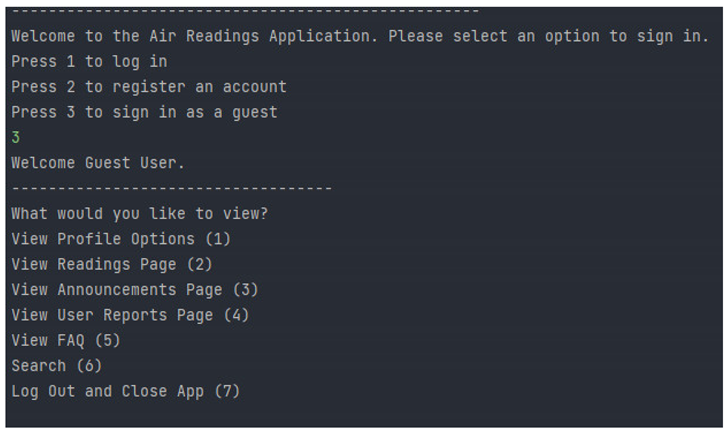
The above example has two different scenes where the mentioned concept is followed. When the program starts, three different options appear before the user in which he or she can either login, register or sign in as a guest. They are explicitly highlighted, and sub-commands are also there explaining to press x to perform some action. This makes sure that the user not only knows what options are available to be performed but how to perform those also.
Below these options, the user is presented with the view functions. In this case, the user is still presented with options of actions that can be done such as “View Readings Page,” including the input they are supposed to provide. These instructions are considerably more subtle compared to the first set of options, but it is assumed that the user has grasped the general input mechanism of the program: entering the corresponding option number into the console. This approach reduces the likelihood that a user will be confused about what actions are available, let alone how to perform them.
Error Handling and Input Validation
The most important thing in design would be keeping the application robust and working even under different users’ mistakes. Since the program will be designed as a command-line interface, the user can get an opportunity to enter all sorts of values. Yet, invalid inputs or actions that might have been unforeseen by a developer stand a good chance of driving the application either to misbehave or crash. With the event of such risk, the program has implemented an effective error handling via Try…Catch mechanism to capture and handle any exceptions that come up, thereby ensuring that, even when there are mistakes, the smooth running of the program is continued.
Applying Try…Catch for Error Handling
The program uses Try…Catch blocks to prevent crashes of the application in case of incorrect user inputs. For example, a user may be prompted to select an option by typing in a number-for example, 1, 2, or 3-whereby the program should check any exceptions using a Try…Catch statement. If the user inputs anything other than an integer-a string or special character-the program catches the thrown Input Mismatch Exception and displays a custom error message, such as “Invalid input. Please enter an integer value,” without terminating. This allows the user to recover from the mistake and continue interactively using the program.
The Try…Catch mechanism further prevents the presentation of the user with complicated error messages that might perplex them. By catching the errors and presenting clear, tailored messages, the program improves user experience and minimizes frustrations.
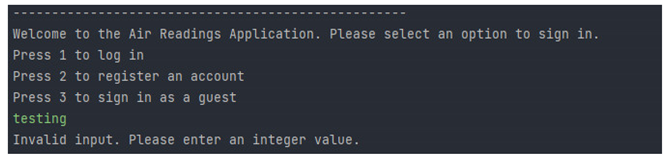
An example of this can be seen at the very beginning of the program where the user is prompted to select an option to sign in.
Input Validation
Input validation in programming is an essential procedure that shows the data that a user is going to input is reasonable, and it is within the usual parameters. In HazeAlert, the input validations avoid invalid data so as to reduce unexpected results or the crashing of an application. A number of validations of inputs are carried out by the HazeAlert app, including type, presence, and range, for them to fit into the necessary criteria.
Range checking
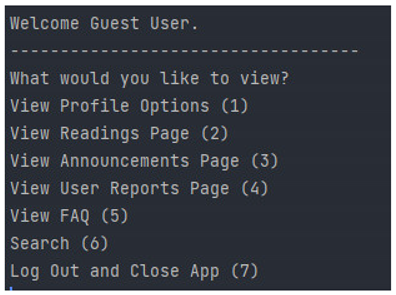
Range checking means making sure user inputs fall into a specified set of values. For example, the program menu asks a user to select any one option from seven different options; each option corresponded to some actions. Similarly, in this, the number must be in the acceptable range between 1 and 7. Any digit other than a number within that range dismisses it, and it bounces the input prompting for the choice of a correct number. Thus, preventing any type of invalid choice chosen by the user because this may cripple how this program functions.
Check in length
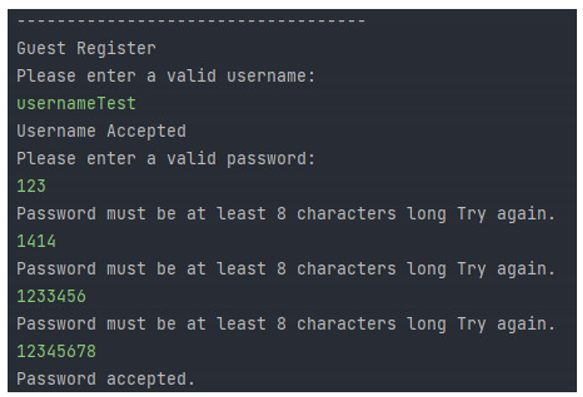
The inputs for which the length of entered data is of essence already have their length checks. For instance, when a user creates an account, he/she needs to provide a password; the minimum length of such a password is 8 characters. If the user provides a short password, say “123,” then the program asks for a valid password from the user. This would ensure that only valid and correctly formatted inputs are accepted, which would help avoid length-related input errors altogether.
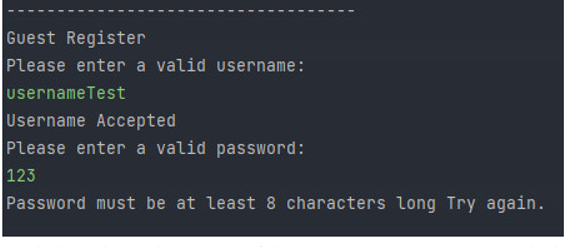
The example here shows the attempt of the user to create an account with the username “username Test” and, correspondingly, he types in the password “123.” However, since the length of the password is only 3 characters, the program denies it and requires the user to enter a password that would have at least 8 characters.
Intuitive design, understandable outputs, and strong error handling practices are some of the areas in which HazeAlert concentrates to make the system more user-friendly. The use of Try…Catch for error handling and a strict validation mechanism at the inputs ensures that the application remains operational and robust in case of erroneous input by users. The systematic approach to input validation by means of range and length checks further provides assurance that the input supplied by users would be valid and appropriate, hence limiting unexpected behavior. This therefore ensures that HazeAlert is effectively used in terms of educating the public on issues about air pollution and haze, while at the same time keeping its usability and user experience high.
4.0. Experimental Results for HazeAlert Application
4.1. General
By default, the application opens to a sign-in page for the user upon loading. The user can either sign in, create an account, or use the app as a guest. This is where the magic begins in terms of making the app accessible and easy to use from the very beginning. These options could be reviewed in functionality as per the following:
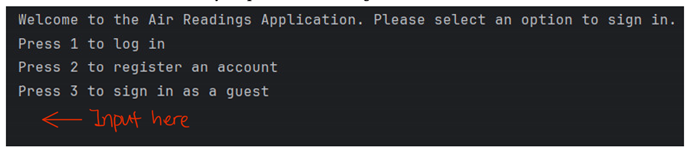
Login: This requires the correct Username and Password to be filled in for entering the application, which worked well and as expected. If wrong credentials were inserted, there came appropriate error messages.
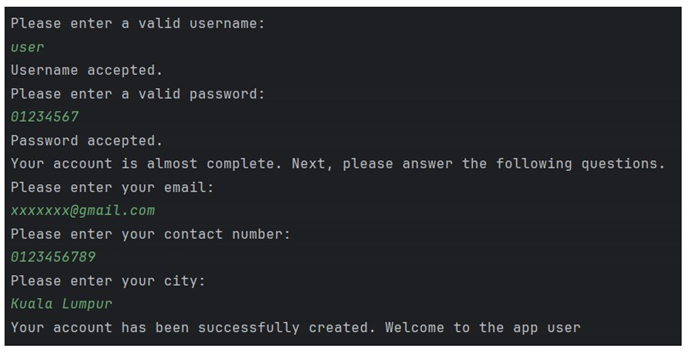
Registration: A new user needs to enter their Username, Password, Email, Phone number, and City. The process was smooth and there was efficient error validation - not every form had incomplete or wrongly input data, valid phone number format was requested upon an error.
Guest Mode: This is the ability to view all Readings, Announcements, Reports, and FAQ sections but not modify or post reports as a guest. This was an explicit, limited user option for the ease of a user who does not want to create an account.
2. Main Page
After logging in or using the guest mode, a user is brought to the main page, where he or she can interact with various sections of an application. The following functionalities were tested:
Profile Management: The profile option allows users to view, edit, or delete their profile information. When the main menu option ’1’ was selected, the user could update his details or delete his profile without problems.

Search Function: Users were allowed to search for announcements by entering ’6’. It works as intended: results related to the keyword entered appeared on screen, greatly enhancing the ease with which a specific announcement was accessed.
Log out and Exit: The application had an option to “Log Out” that could be selected just by pressing ’7’. It took the application to the default login screen; hence the user session was closed appropriately.
4.2. User Features
From the main page, the user has several options to interact with the content of the application. The following results were obtained:
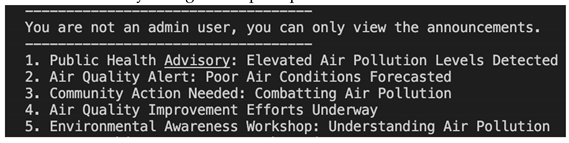
Announcement Page: The user could see the Announcement Page on the main page by entering ’3’, which would display the latest announcements made by the admin. The display was clear, with each announcement clearly distinguished, providing users with important updates on air quality and related issues.
View/Add Reports: A user could also view or add a report by inputting ’4’. With this, the system would have given users a facility to report upon incident visibility observation as their contribution towards observing the current haze situation status.
Response upon entering showed confirmation validation that assures that submitted reports were the proper format immediately acting on the prompt from a user.
4.3. Admin Features
Admin users have more capabilities than regular users, such as managing content within the application. The following features were tested and worked as expected:
View/Edit/Delete/Add Announcements: The admin user can manage the announcements through the Announcement Page by selecting ’3’. They were able to create, modify, delete, and view announcements successfully. The interface was intuitive, thus allowing admins to maintain current and relevant information without difficulty.
Show/Edit/Delete/Add Reports: This is the option to manage reports posted by users in which an admin user can select ’4’. This allowed for the required moderation of user-generated content, ensuring that only high-quality, relevant information was published on the app. Without errors, the interface was clear, presenting options with respect to the disposition of the reports.
From the experimental results on the HazeAlert application, it follows that the system works seamlessly and that all key features work exactly as expected. It will also ensure that user input is validated and processed correctly for easy navigation and data integrity. The application segregates users/admins well, hence giving the right kind of access and usage to each of them. Overall, the app meets its design goals of providing accessible, clear, and user-friendly features to both the general public and administrators. The implementation of error handling and input validation ensures stability and reliability for users.
6. Conclusion and Result
This research work in Java-based programming encompasses all aspects of environmental concerns about haze. Relating HazeAlert to the Sustainable Development Goal 13 puts in focus how important the tracking and recording of environmental irregularities is in promoting knowledge and understanding of haze and air quality. The thirteenth Sustainable Development Goal has been widely regarded as a global framework for addressing the serious problem of climate change. This means that immediate remedies should be taken, along with giant strides towards reversing its negative effects. It is for this reason that HazeAlert has strategically embarked on SDG 13 by addressing air quality and haze, two of the very important aspects of climate action. Apart from monitoring and reporting environmental issues, the program is very active in supporting the overall objective of raising awareness and a sense of responsibility among citizens. HazeAlert is an educative tool with features such as real-time announcements, Frequently Asked Question repositories, and accurate API readings through customized user profiles, furthering the tenants of SDG 13 on raising climate awareness. HazeAlert is a reflection of the greater climate change agenda that SDG 13 represents; thus, it allows users to report instances and contribute to a collective effort in tackling environmental concerns.
HazeAlert is an important tool for the achievement of Sustainable Development Goal 13 on Climate Action in the Malaysian context. Malaysia, an area often concerned with haze-related issues, will greatly benefit from the potentiality of HazeAlert as an early warning system. This program helps people and communities take precautions by providing real-time information on air quality, aligned with the core of SDG 13 to enhance resilience to climate-related hazards. Additionally, the reporting feature in HazeAlert provides an avenue for community involvement and creates more informative crowdsourced data to drive policy decisions and intervention strategies. The air quality readings and frequently asked questions that this program encourages public knowledge and understanding of environmental issues address an essential part of SDG 13. By partnering with environmental non-governmental organizations, advocating evidence-based policies, and working together with government agencies, HazeAlert can actually play a crucial role in Malaysia’s climate action agenda, underpinning its importance in the country’s pursuit of sustainable development goals.
Benefits of HazeAlert
Beyond the fact that HazeAlert provides its users with beneficial curative benefits, the initiative also contributes immensely to the better education and sensitization of people in realizing the imperatives of SDG 13. By delivering timely and real-time environmental conditions and air quality through this program, users themselves are engaged in understanding the short-term impacts that climate change imposes. Education tools in HazeAlert develop a sense of mutual responsibility by taking part in group actions that contribute toward climate action through community outreach and the reporting of environmental problems. Users who engage with HazeAlert regularly are not only empowered through better decision-making regarding their immediate surroundings but also emerge as climate ambassadors, relating their efforts to the larger objectives of SDG 13. It is this Snowballing effect of increasing awareness and usefulness that underlines the pivotal role played by HazeAlert in promoting sustainable behavior and furthering the global climate action agenda.
Development Process
It took 2.5 months for seven committed programmers to develop HazeAlert in a structured manner. After discussing and brainstorming over the development of the concept of this project, the team did some deep research on SDG 13 so that the goals of the program were aligned with the climate action agenda. In the development phase, there were many discussions to help improve concepts and explain the overall complexity of the HazeAlerts. It could be envisaged that the experimentation with varied code implementation and challenges, the iterative processes of improving and optimization of the program, would pose the biggest challenges that the team encountered. Every single programmer put his maximum effort to the work continuously committed to the functionality and quality of the prototype.
Knowledge Gained
In addition to the core lessons learned about collaboration, problem-solving, critical thinking, and debugging, the development of HazeAlert provided valuable insight into a number of other key aspects of the software development process. The main understanding developed through this experience is that communication has to be effective; team members have to present themselves in an easy-to-understand manner so as to ensure that project goals, coding standards, and problem-solving techniques are realized by all. As the team worked around the project timeline, time management skills became more evident. Meeting deadlines efficiently required careful planning, prioritization, and flexibility. Because both coding and debugging are iterative, they foster persistence and patience through which the group starts to view any obstacles as no failure but great opportunities for growing and refining. This experience showed me the emphasis on user-centered design and inspired the team to continuously explore ways in which the features could be improved based on user input. This has been such an amazing team to grow with, through so many experiences that provided them with a wide comprehension of what the successful development of software means: collaborative, adaptable, and user-oriented, apart from technical ability.
Recommendations
Data visualization in HazeAlert is one of the challenges that were identified from the development process. Presently, the application does not provide a means of visualization for air quality data, which even increases user experience in accessing and making sense of the API readings. Probably, utilizing 3D arrays for display for more complex data is one probable avenue to meet this challenge. By using 3D arrays, the application should be able to present the user with a more realistic and user-friendly time-space variation in air quality conditions. In particular, this will make it easier for the user to identify patterns, trends, and anomalies in air quality. Such interactive visualizations of this type may further enhance the user experience by dynamically enabling the exploration of the readings. These will be upgrades that prove HazeAlert to be stronger in its effectiveness to raise environmental awareness and inspire the community to action by showing the rising importance of visualization for user engagement and comprehension of the data. Improving the model of the Frequently Asked Questions section in HazeAlert comprises the second likely enhancement. Today, traditional static-style FAQs stand the risk of featuring outdated or incomplete information. One strategic way of overcoming this challenge would be to rework the FAQs into a dynamic and adaptive system. An intuitive feedback mechanism will be inbuilt for users to suggest new ideas and questions, ensuring a participatory and iterative process for its continuous improvement. The set of FAQs will continuously be revised for their relevance and accuracy from time to time, considering comments and newly identified environmental concerns expressed by the users.
One direction that may be taken with HazeAlert could be an improvement in accessibility issues presented by its computer-based nature. Since all people do not have personal computers, the use of a cell phone application might be a very key development. HazeAlert is rendered more accessible and user-friendly with the development into software compatible with tablet and smartphone access. This means that anyone can have contact with it at any instance, regardless of how frequently one has access to a computer. By allowing users to access immediate environmental information while on the move, this mobile adaptation enhances the program’s utility,
while also increasing its user base. Push notifications can be included in the app to ensure users receive timely updates concerning environmental conditions and air quality. Besides, an intuitively designed app might make it easier for users to engage in views such as incident reporting or curated readings, which would promote a wider and smoother usage of the capabilities of HazeAlert. Generally speaking, moving to a mobile application would greatly expand the audience and influence of the program, something that would fall in line with the main objective of encouraging environmental consciousness and enabling user involvement in climate action.
Future Works
Predicting the future of Haze Alert’s impacts depicts a very bright path, which comes with more accessibility, interaction on the user’s end, and impact toward the environmental cause. The envisioned mobile application would create capabilities to democratize access to real-time environmental information across more barriers in computer access. This strategic shift is foreseen to increase the usage of HazeAlert and ensure that people from all walks of life can easily access critical air quality information anywhere, anytime. Therefore, it is envisioned that there will be heightened user engagement, leading to more comprehensive reporting of environmental events and increased active participation in climate change activities. HazeAlert is working towards a future where the application constitutes the driving force for informed decision-making, collective actions, and sustainable practices toward becoming a better and more ecologically sensitive community. In essence, the forecasted outputs at the far end constitute HazeAlert as one energetic and robust tool to actively contribute much towards a healthy and greener Earth worldwide.
Figure 1.
API Reading Table of the region haze Situation in October 2023 [2].
Figure 1.
API Reading Table of the region haze Situation in October 2023 [2].

Figure 2.
SDG 13 Targets and Their Possible Impacts [9].
Figure 2.
SDG 13 Targets and Their Possible Impacts [9].
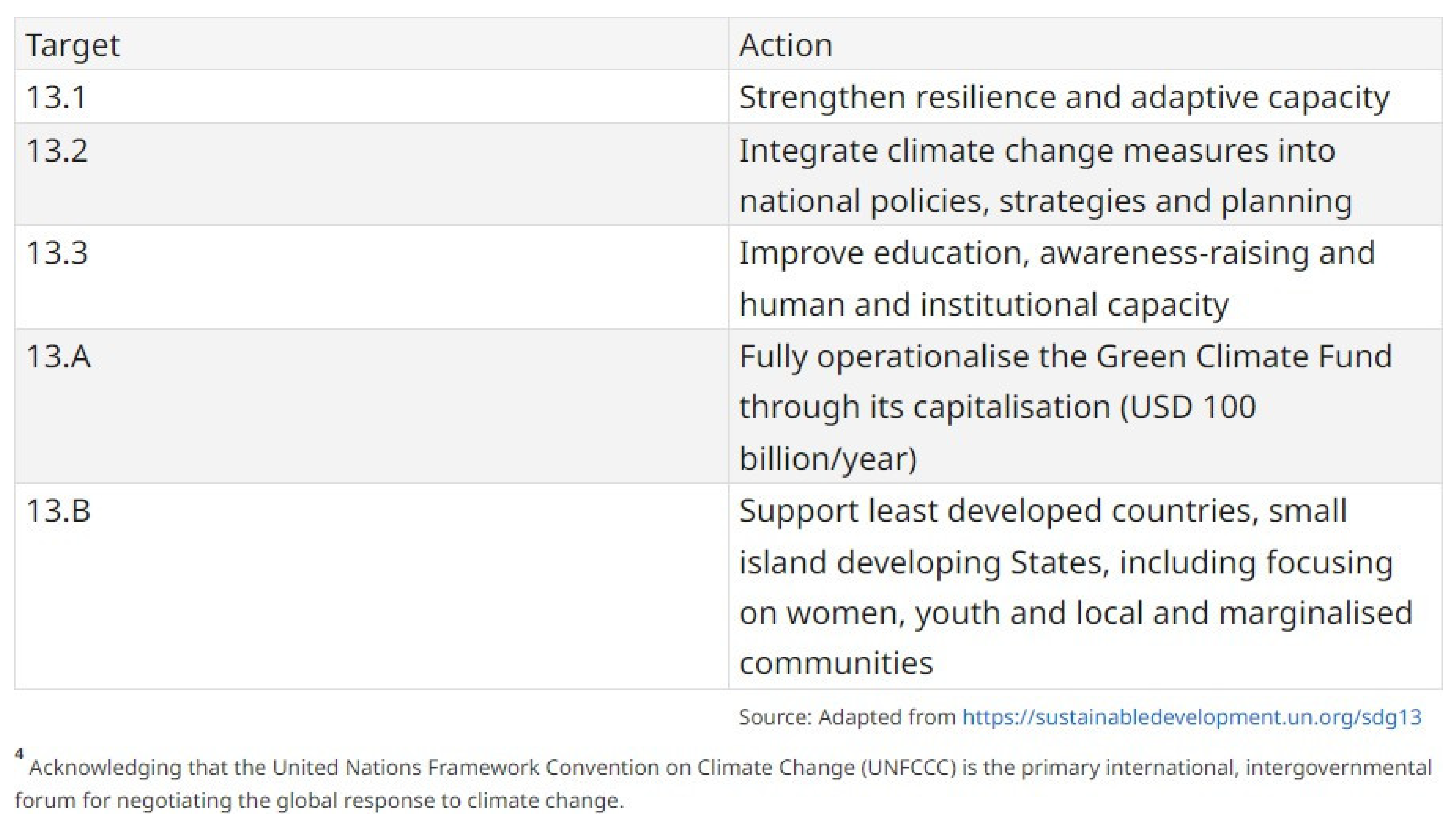
Figure 3.
Inpatient rates across API categories (all years) [13].
Figure 3.
Inpatient rates across API categories (all years) [13].
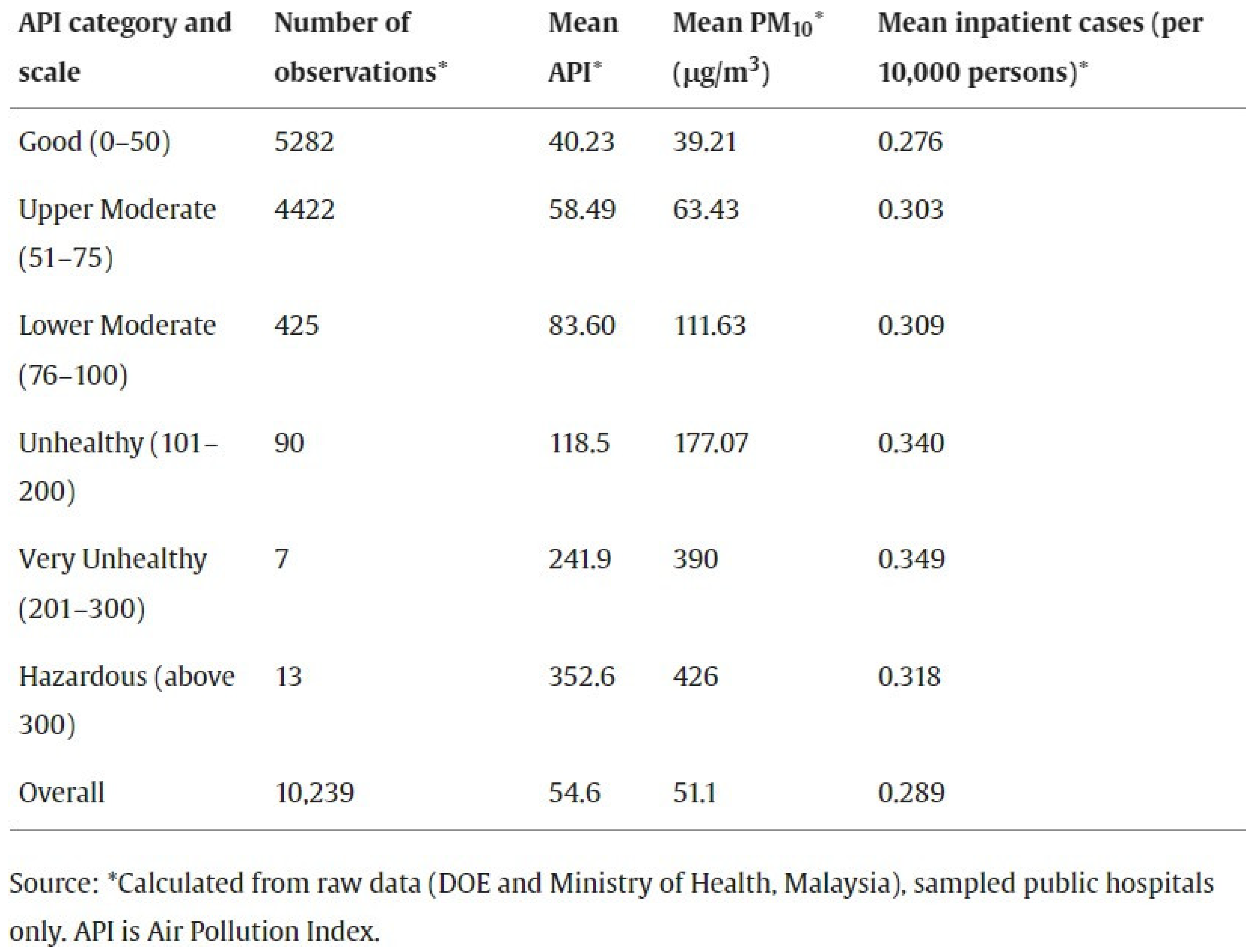
Figure 4.
Comparison of mean inpatient rates during normal days and haze episodes for year 2005.[13].
Figure 4.
Comparison of mean inpatient rates during normal days and haze episodes for year 2005.[13].
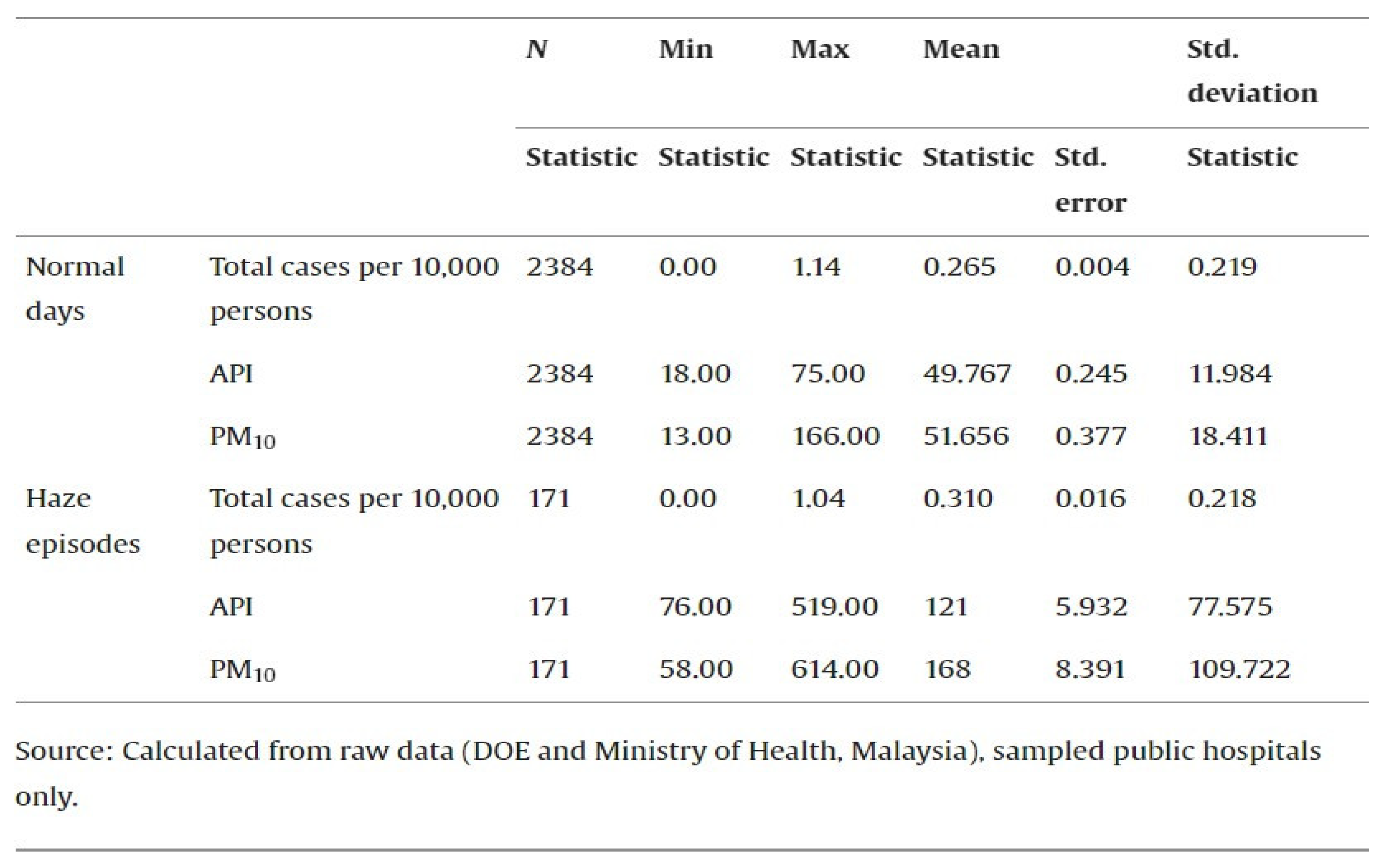
Figure 5.
Different Types of Air Pollution Damage Tissue [16].
Figure 5.
Different Types of Air Pollution Damage Tissue [16].
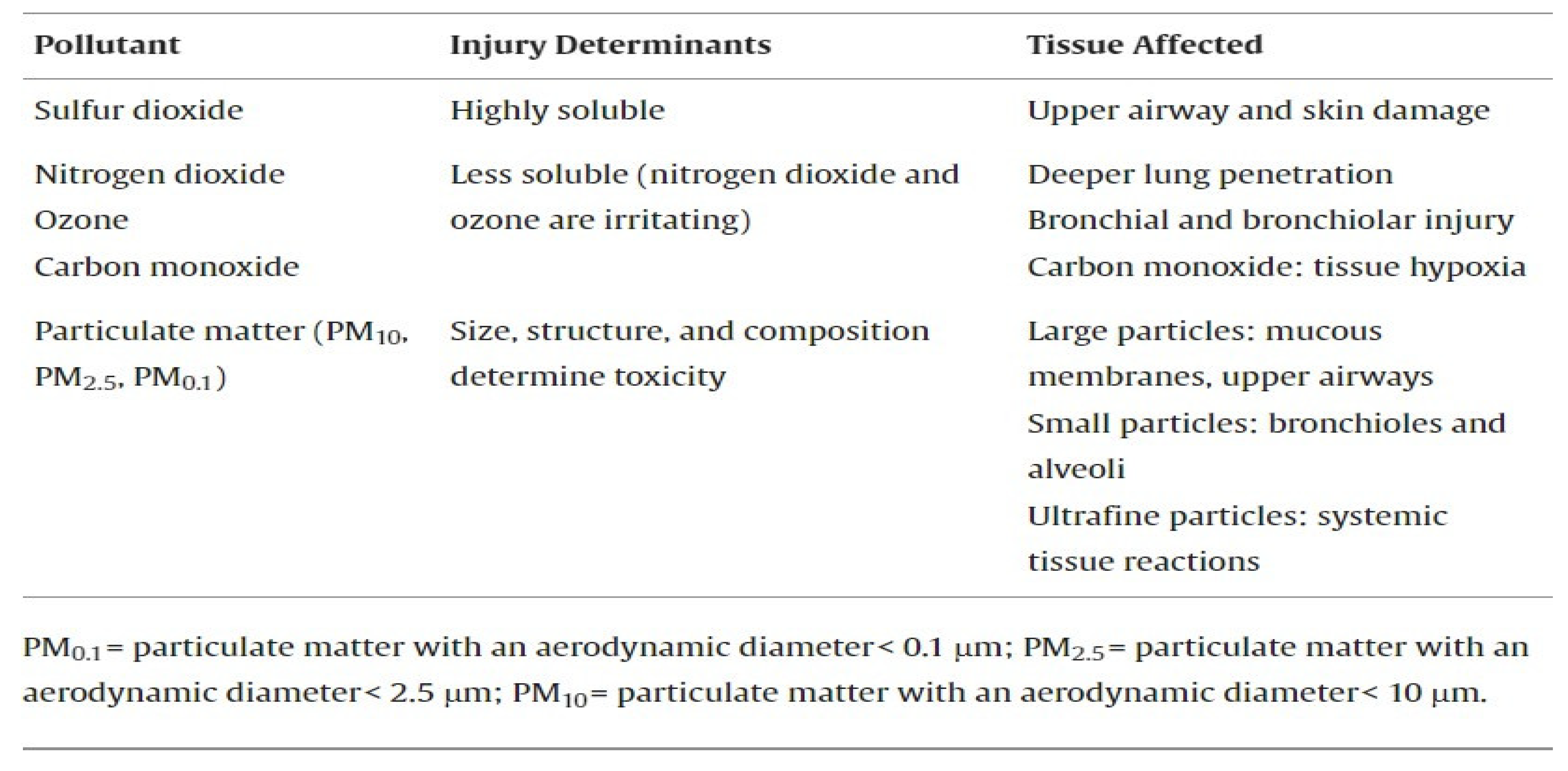
Figure 6.
Trend of daily inpatient rates for the month of August, 2005.[13].
Figure 6.
Trend of daily inpatient rates for the month of August, 2005.[13].
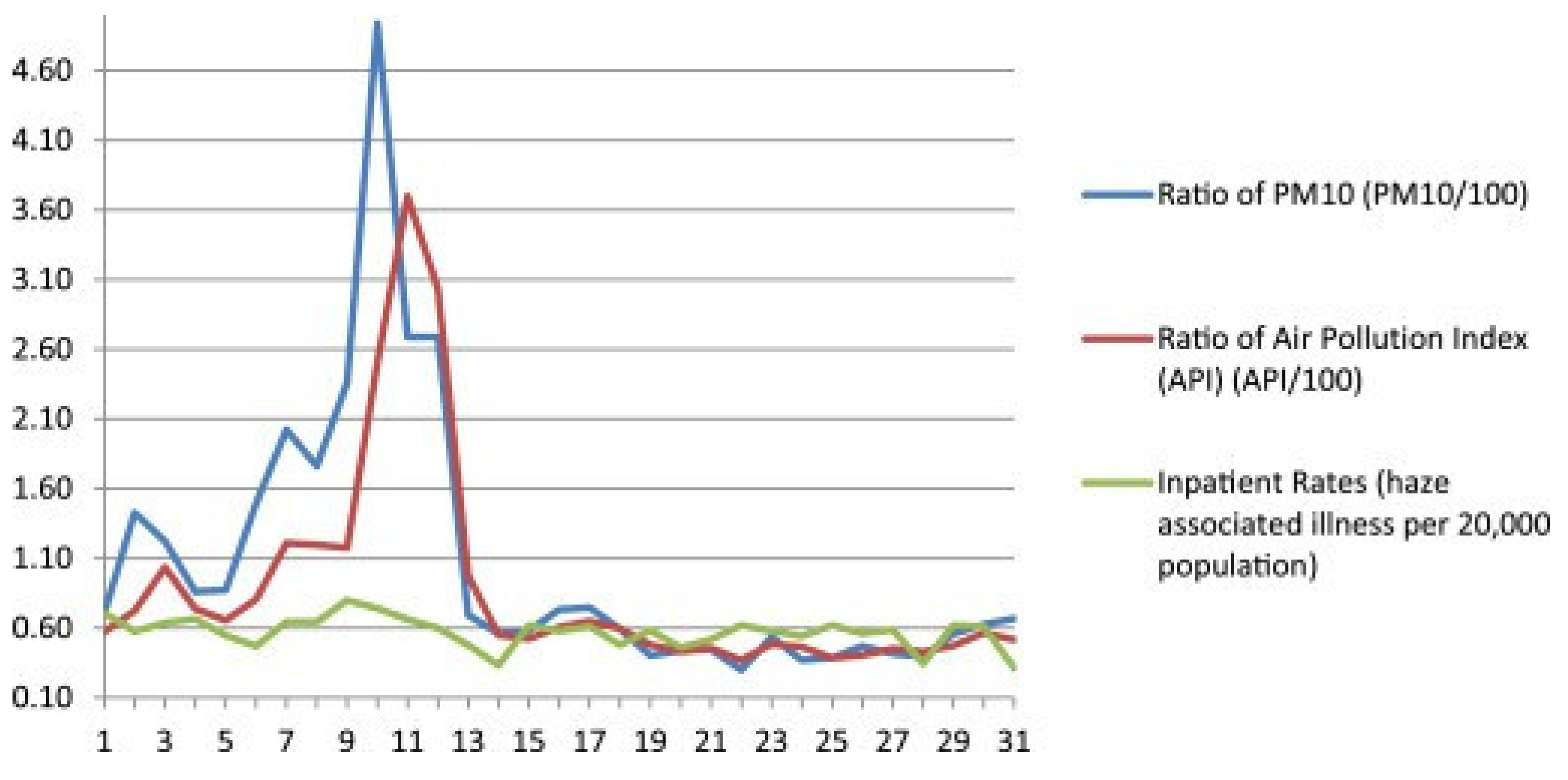
Figure 7.
Spatial variations of annual-averaged PM10 concentration (µg/m3) at five DOE monitoring stations in the Klang Valley; Klang, Shah Alam, Petaling Jaya, Cheras and Kajang station from 2000 to 2009 [17].
Figure 7.
Spatial variations of annual-averaged PM10 concentration (µg/m3) at five DOE monitoring stations in the Klang Valley; Klang, Shah Alam, Petaling Jaya, Cheras and Kajang station from 2000 to 2009 [17].
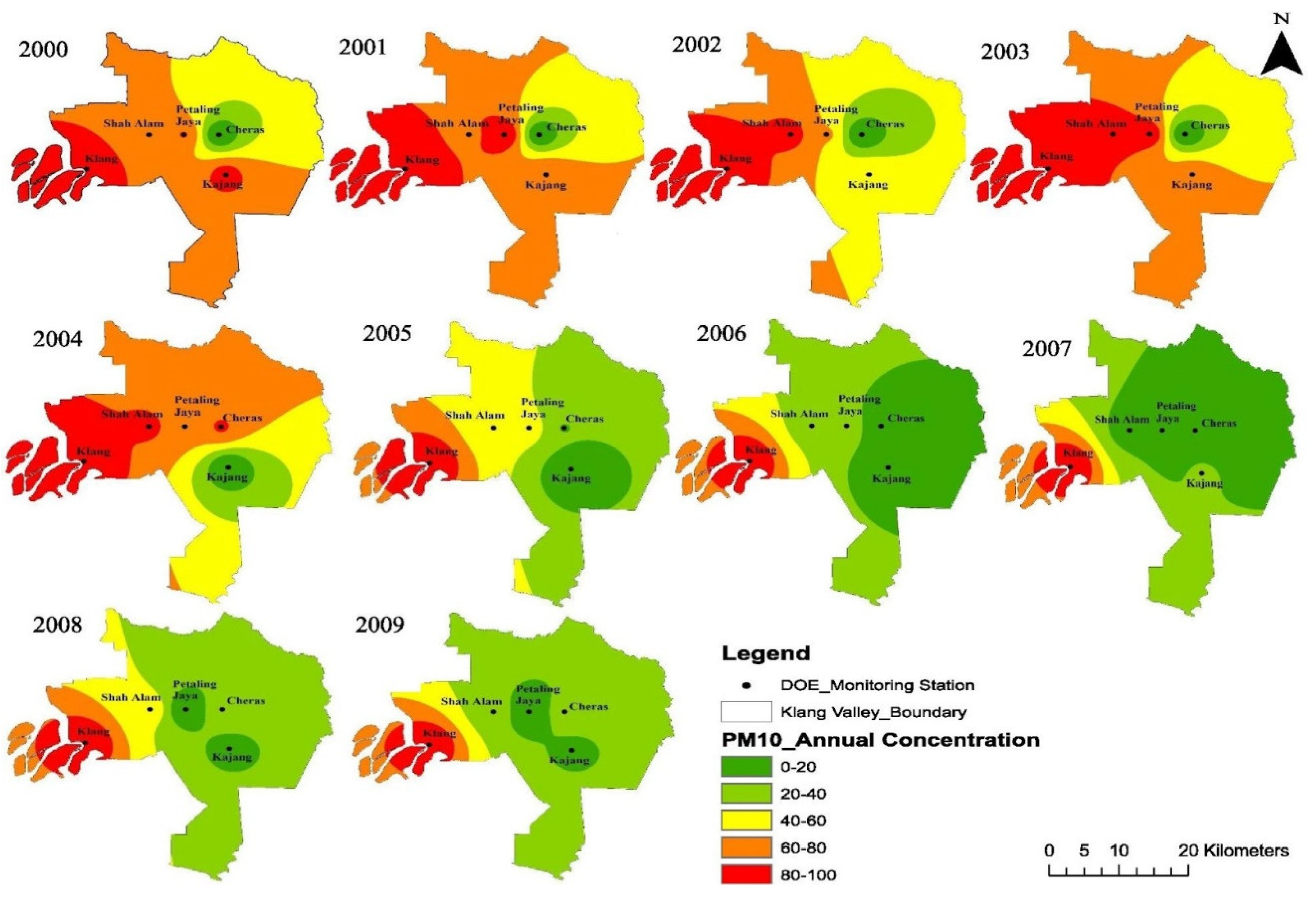
Figure 8.
Spatial distribution of population density in six districts of the Klang Valley: Klang, Petaling, Kuala Lumpur, Gombak, Hulu Langat and Sepang from 2000 to 2009[17].
Figure 8.
Spatial distribution of population density in six districts of the Klang Valley: Klang, Petaling, Kuala Lumpur, Gombak, Hulu Langat and Sepang from 2000 to 2009[17].
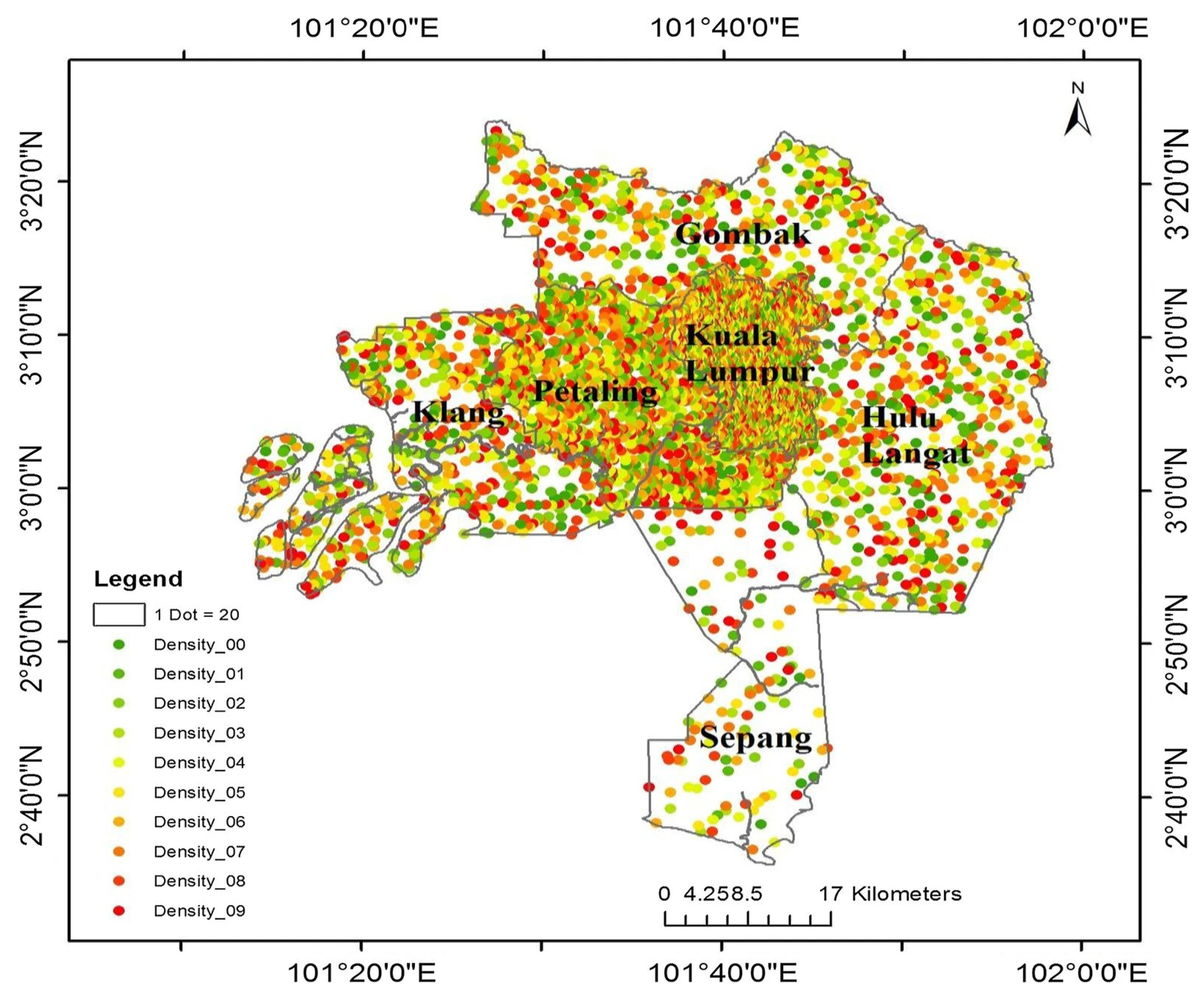
Figure 9.
Proportion (%) of adverse physical health experienced (%) during daily commute and haze days.
Figure 9.
Proportion (%) of adverse physical health experienced (%) during daily commute and haze days.
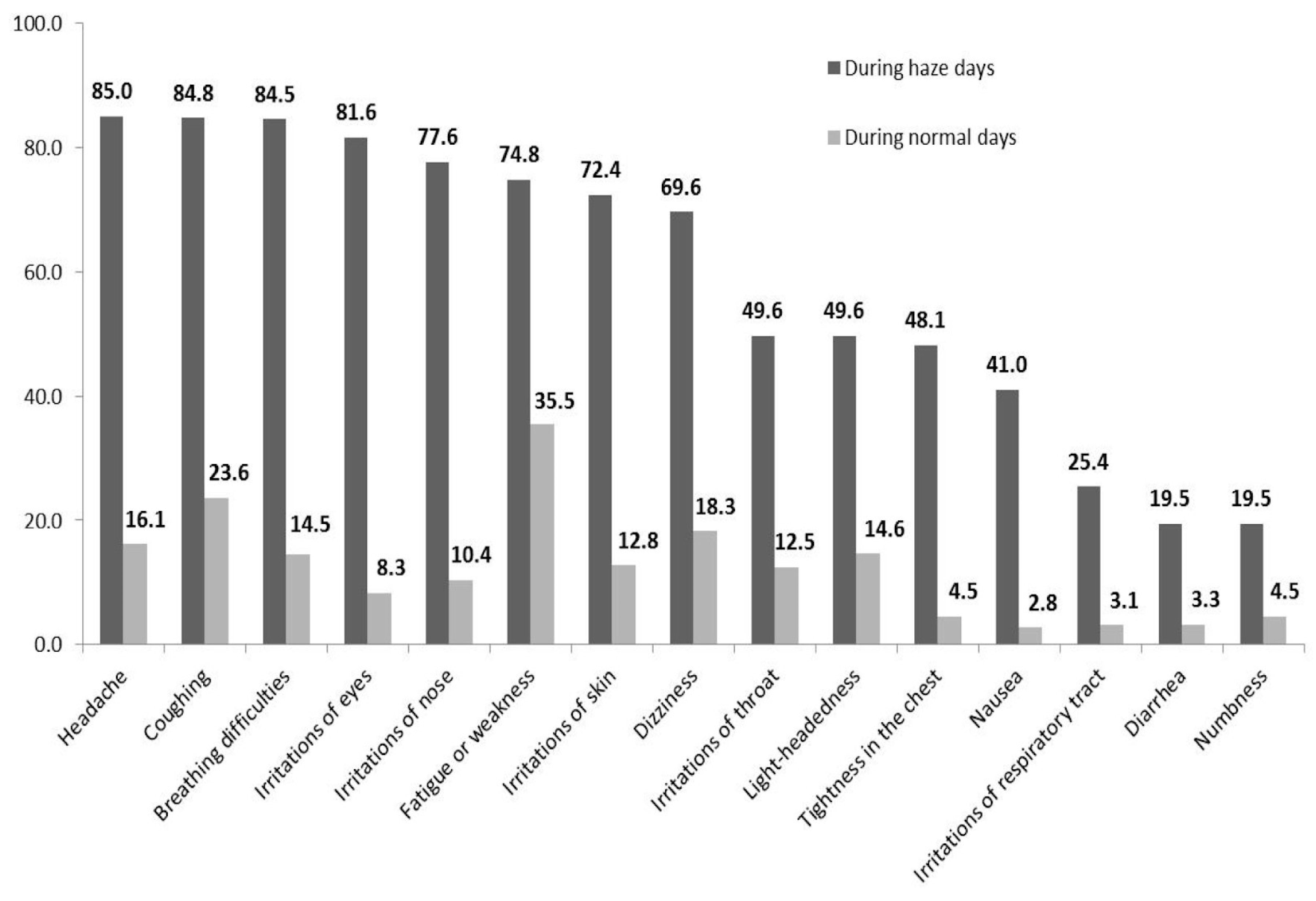
Figure 10.
Proportion (%) of adverse physical health experienced (%) during daily commute and haze days.
Figure 10.
Proportion (%) of adverse physical health experienced (%) during daily commute and haze days.
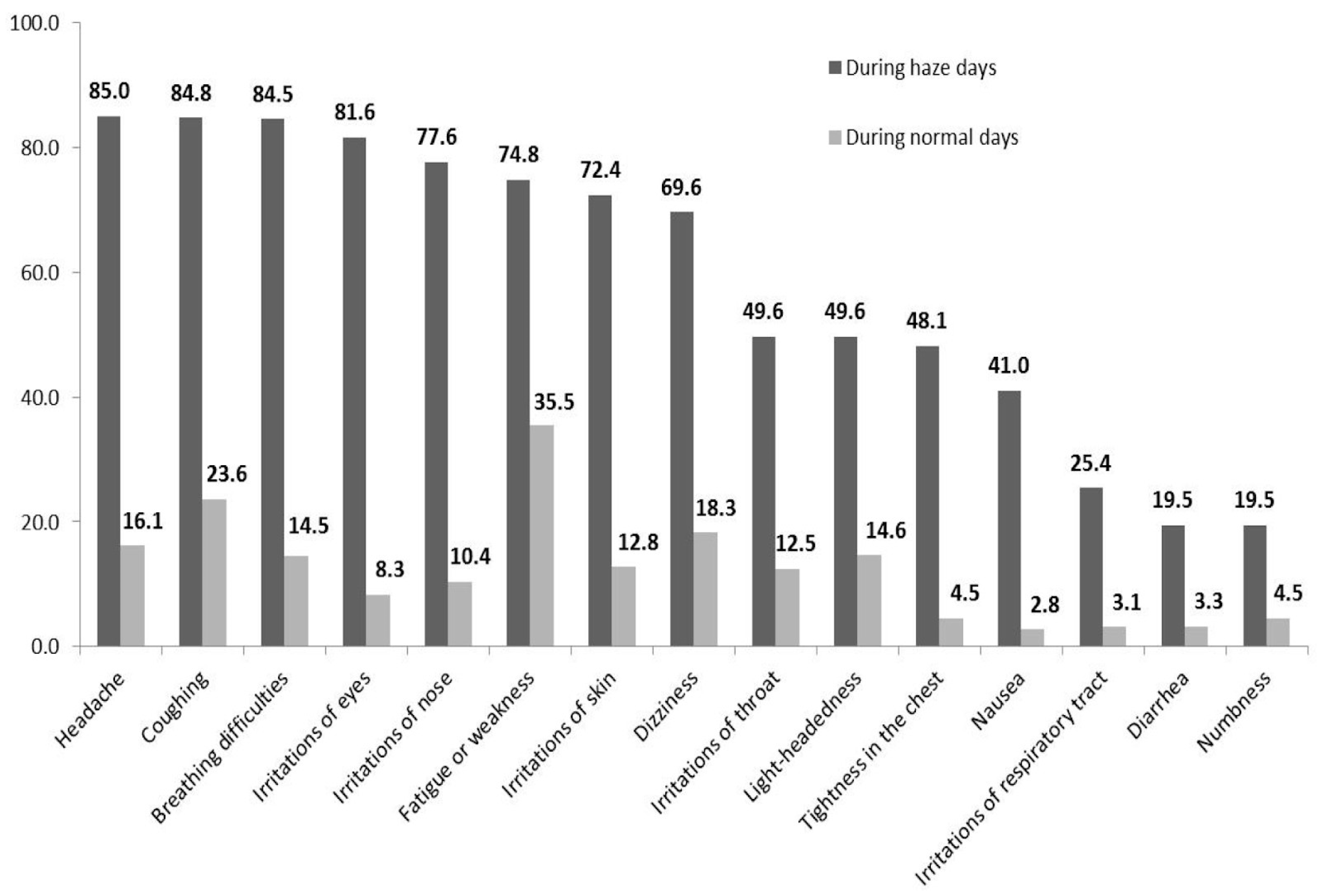
Figure 11.
Hourly solar irradiation level during a normal day and during a hazy period.
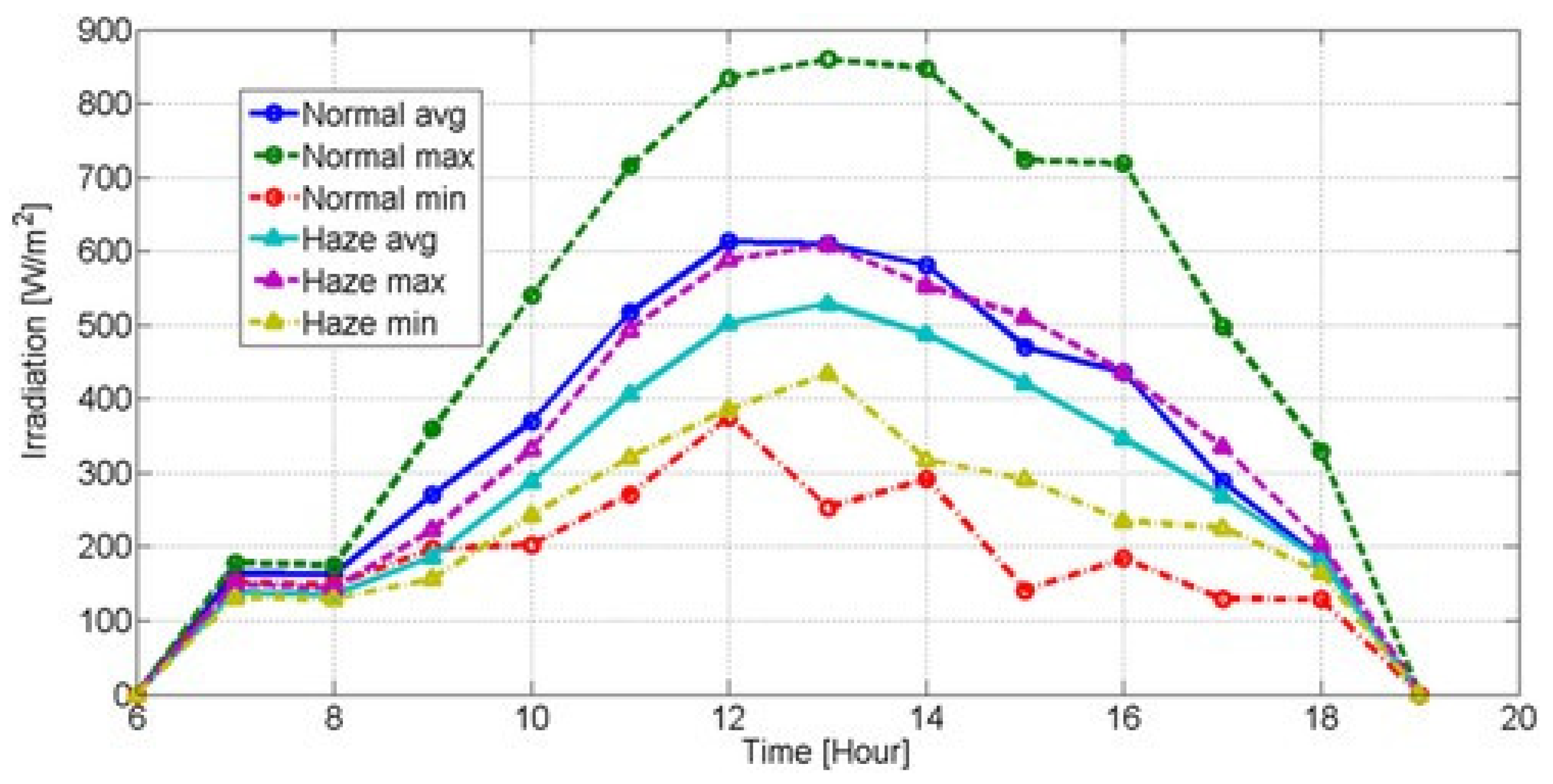
Figure 12.
Region haze Situation at October 2023[2].
Figure 12.
Region haze Situation at October 2023[2].
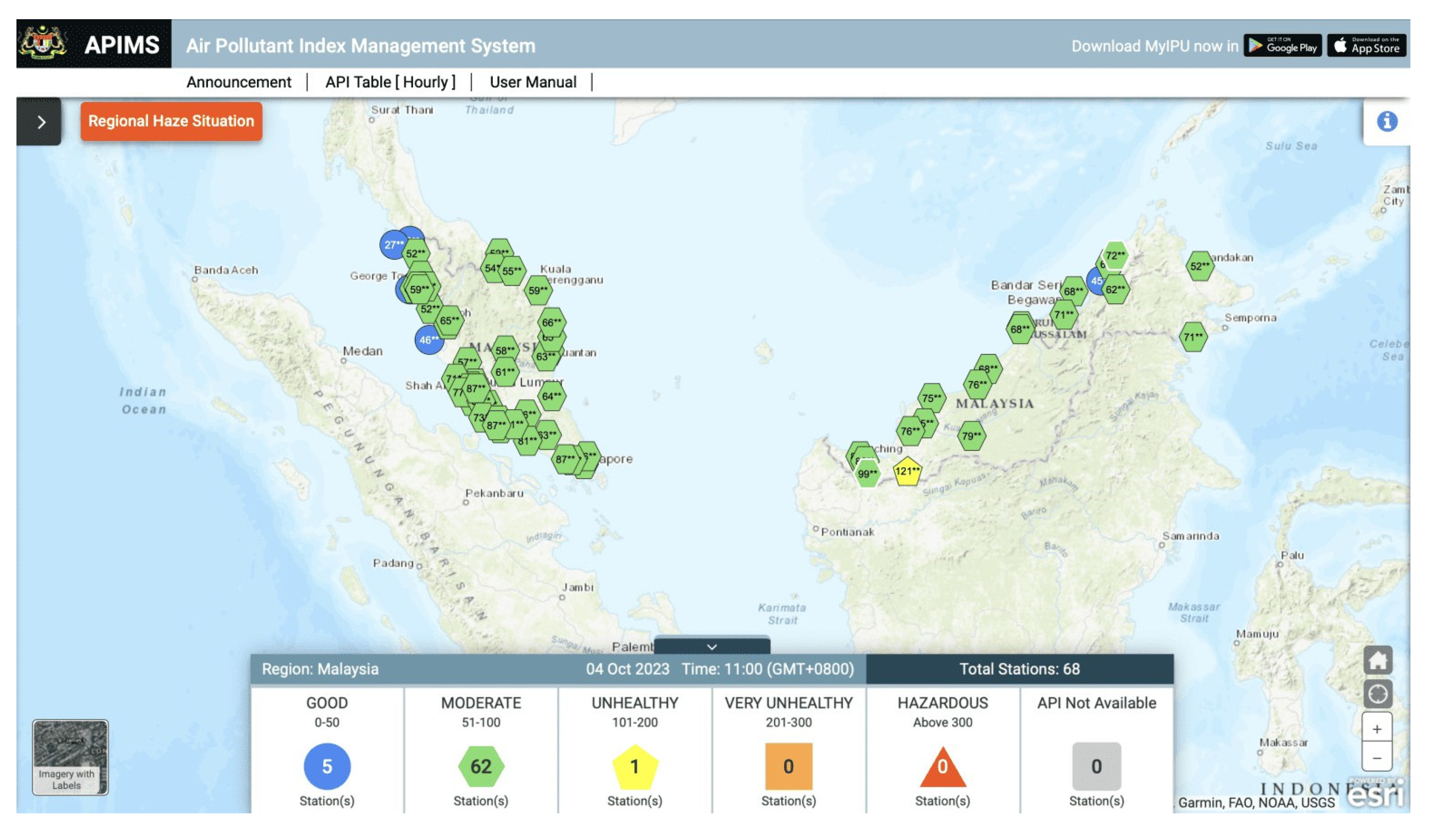
Figure 13.
Petronas tower covered by haze in Kuala Lumpur city, Malaysia. Malaysia is hit by haze from forest fires that came from Indonesia Borneo island and Sumatra. Many forest areas and palm oil concessions in Indonesia were burned this year including the concession belonging to Malaysian and Singaporean companies.[7].
Figure 13.
Petronas tower covered by haze in Kuala Lumpur city, Malaysia. Malaysia is hit by haze from forest fires that came from Indonesia Borneo island and Sumatra. Many forest areas and palm oil concessions in Indonesia were burned this year including the concession belonging to Malaysian and Singaporean companies.[7].
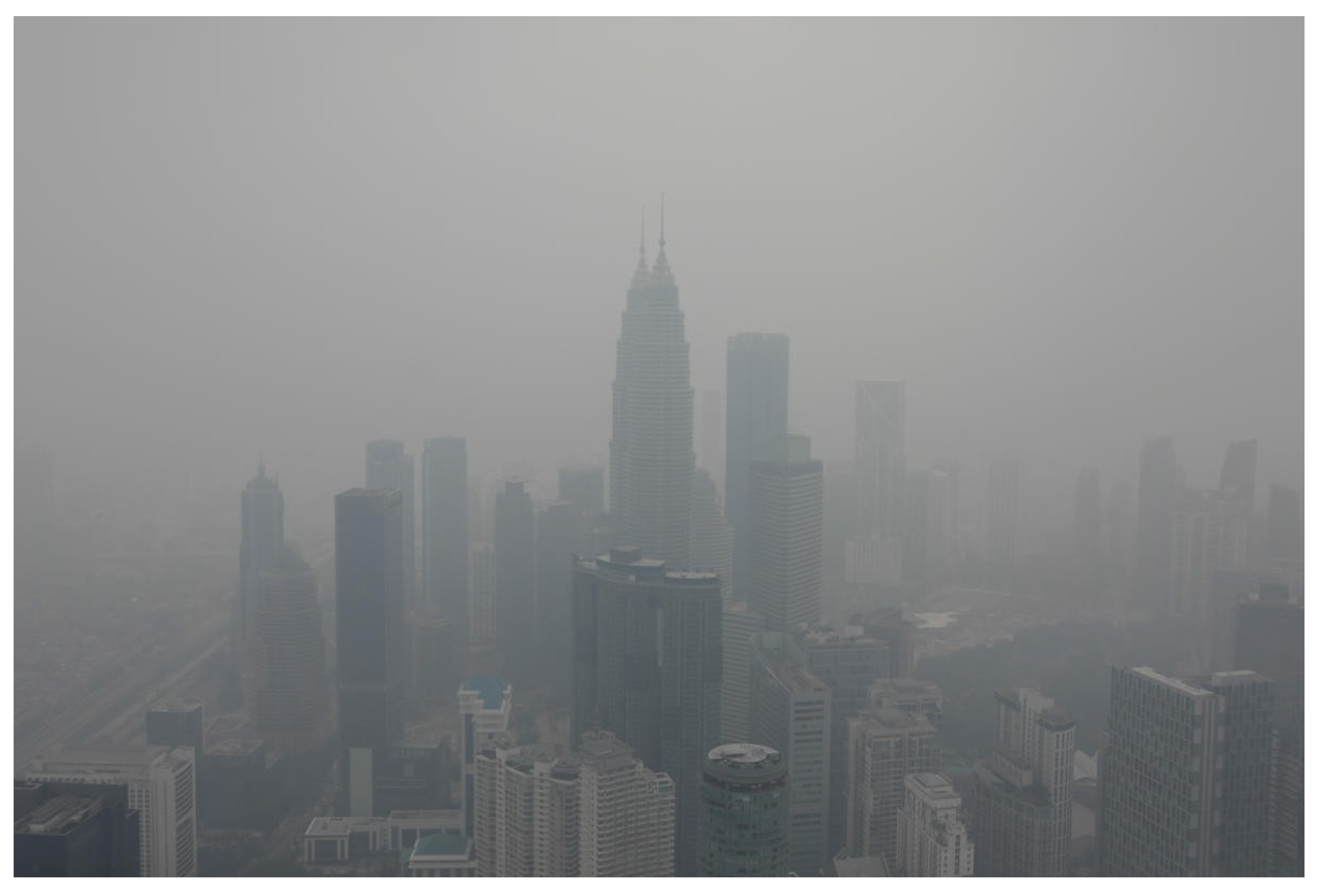
Figure 14.
The network of SDGs and climate change (A) and normalized eigenvector centralities (B) for the country grouping Emerging Markets [8].
Figure 14.
The network of SDGs and climate change (A) and normalized eigenvector centralities (B) for the country grouping Emerging Markets [8].
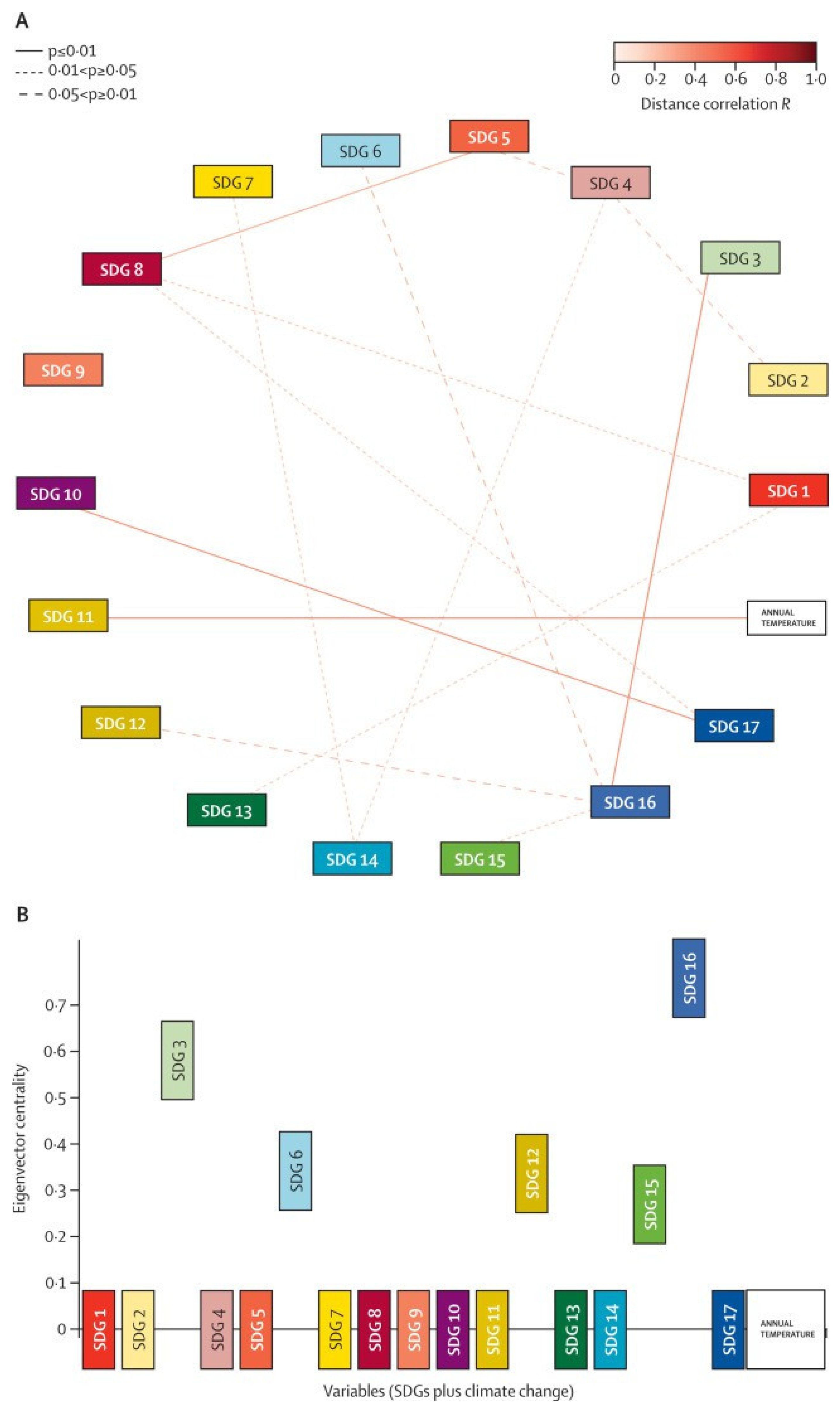
Figure 15.
SDG 13: Take action to combat climate change [9].
Figure 15.
SDG 13: Take action to combat climate change [9].

Figure 16.
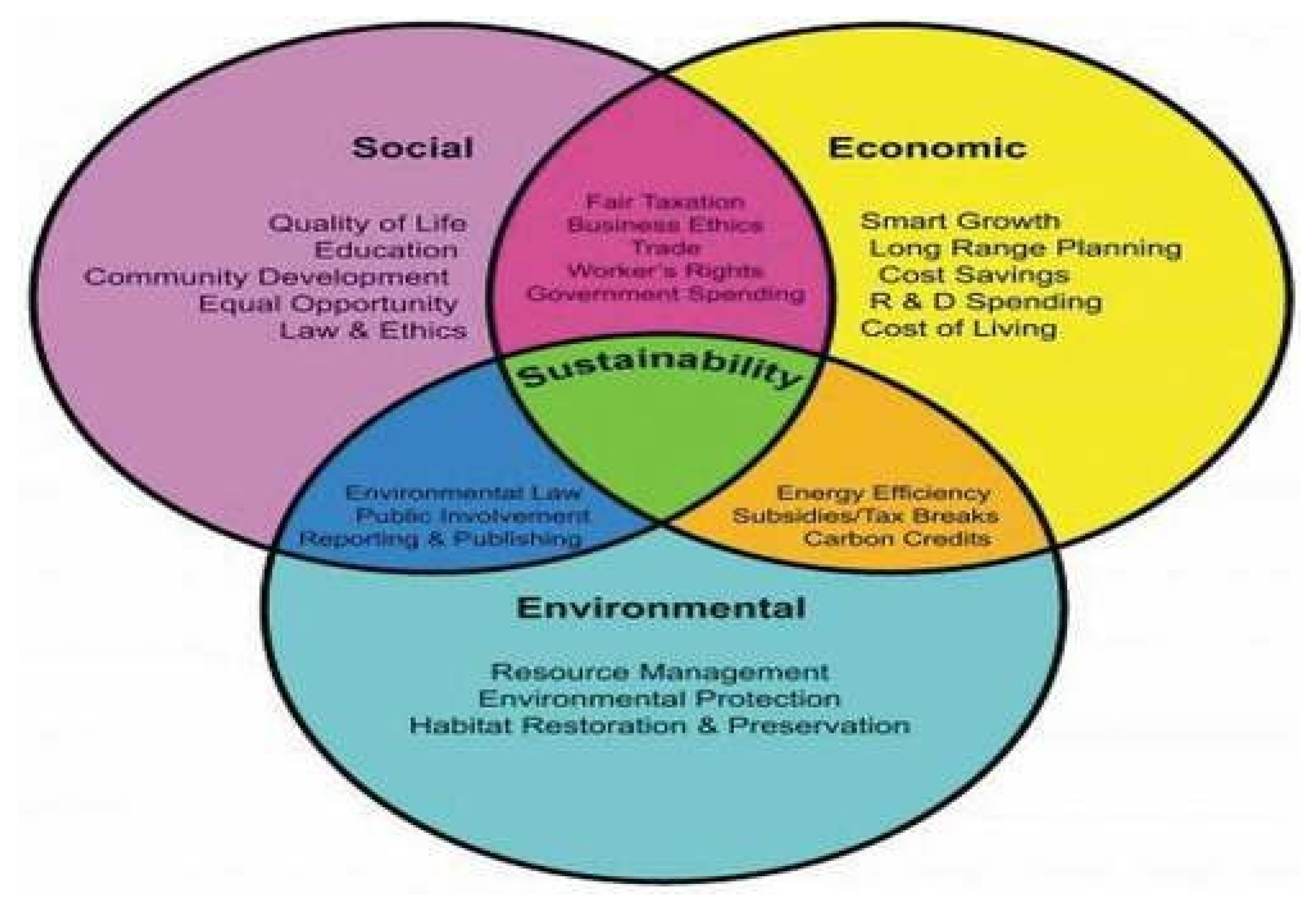
Relationships among social, environmental and economic sustainability [11].
Figure 16.
Relationships among social, environmental and economic sustainability [11].
Appendix
1. Tables
References
- APIMS. (n.d.). About APIMS. Retrieved December 13, 2023, from https://apims.doe.gov.my/aboutapi.html.
- Badra. (2023, October 19). IPU Jerebu (Indeks Pencemaran Udara) Malaysia terkini APIMS. eCentral. https://ecentral.my/jerebu-ipu-indeks-pencemaran-udara/.
- Cheong, K. H. , Ngiam, N. J., Morgan, G. G., Pek, P. P., Tan, B. Y., Lai, J. W., Koh, J. M., Ong, M. E. H., & Ho, A. F. W. Acute health impacts of the Southeast Asian transboundary haze problem—a review. International Journal of Environmental Research and Public Health 2019, 16, 3286. [Google Scholar] [CrossRef]
- Doni, F. , Gasperini, A., & Soares, J. T. (2020). What is the SDG 13? In SDG13—Climate action: Combating climate change and its impacts (pp. 21–30). Emerald Publishing Limited.
- Dwivedi, Y. K. , et al. Climate change and COP26: Are digital technologies and information management part of the problem or the solution? An editorial reflection and call to action. International Journal of Information Management 2022, 63, 102456. [Google Scholar] [CrossRef]
- Greenpeace Malaysia. (2022, June 8). The state of air quality in Malaysia. Greenpeace Malaysia. https://www.greenpeace.org/malaysia/press/49795/the-state-of-air-quality-in-malaysia/ .
- Greenpeace Malaysia. (2023, October 23). 4 ways to stop haze pollution in Malaysia. Greenpeace Malaysia, https://www.greenpeace.org/malaysia/story/51403/4-ways-to-stop-haze-pollution-in-malaysia/.
- Laumann, F. , von Kügelgen, J., Uehara, T. H. K., & Barahona, M. Complex interlinkages, key objectives, and nexuses among the Sustainable Development Goals and climate change: A network analysis. The Lancet Planetary Health 2022, 6, e422–e430. [Google Scholar] [PubMed]
- Saeed, S., & Abdullah. Hybrid graph cut hidden Markov model of K-mean cluster technique. CMC-Computers, Materials & Continua 2022, 1–15. [Google Scholar]
- Louman, B. , et al. (2019). SDG 13: Climate action—Impacts on forests and people. In P. Katila, C. Pierce Colfer, W. De Jong, G. Galloway, P. Pacheco, & G. Winkel (Eds.), Sustainable development goals: Their impacts on forests and people (pp. 419–444). Cambridge University Press.
- Martin. (2022). Climate action—United Nations Sustainable development. https://www.un..org/sustainabledevelopment/climate-action/.
- Mensah, J. Sustainable development: Meaning, history, principles, pillars, and implications for human action: Literature review. Cogent Social Sciences 2019, 5. [Google Scholar] [CrossRef]
- Ministry of Environment and Water. (n.d.). Environmental quality report. (2020th ed.). Department of Environment, Malaysia.
- Saeed, S. , & Haron, H. Improve correlation matrix of discrete Fourier transformation (CM-DFT) technique for finding the missing values of MRI images. Mathematical Biosciences and Engineering, 2021; 1–22. [Google Scholar]
- Saeed, S. Implementation of failure enterprise systems in organizational perspective framework. International Journal of Advanced Computer Science and Applications 2017, 8, 54–63. [Google Scholar] [CrossRef]
- Othman, J. , et al. Transboundary smoke haze pollution in Malaysia: Inpatient health impacts and economic valuation. Environmental Pollution 2019, 189, 194–201. [Google Scholar] [CrossRef] [PubMed]
- Reuters. (2023, October 9). What’s causing the chronic haze across Southeast Asia? Reuters. https://www.reuters.com/business/environment/whats-causing-chronic-haze-across-southeast-asia-2023-10-06/.
- Khan, N. A. , Jhanjhi, N. Z., Brohi, S. N., Almazroi, A. A., & Almazroi, A. A. A secure communication protocol for unmanned aerial vehicles. Cmc-computers Materials & Continua 2022, 70, 601–618. [Google Scholar]
- Jhanjhi, N. Z. , Humayun, M., & Almuayqil, S. N. Cyber security and privacy issues in the industrial internet of things. Computer Systems Science & Engineering 2021, 37. [Google Scholar]
- Sato, M. , & Kitamura, Y. Current status of climate change education and suggestions for its integrative development in Japan. IATSS Research 2023, 47, 263–269. [Google Scholar] [CrossRef]
- Schraufnagel, D. E. , et al. Air pollution and noncommunicable diseases: A review by the Forum of International Respiratory Societies’ Environmental Committee, Part 2: Air pollution and organ systems. Chest 2019, 155, 417–426. [Google Scholar] [CrossRef] [PubMed]
- Gopi, R. , Sathiyamoorthi, V., Selvakumar, S. et al. Enhanced method of ANN based model for detection of DDoS attacks on multimedia internet of things. Multimed Tools Appl 2022, 81, 26739–26757. [Google Scholar] [CrossRef]
- Chesti, I. A. , Humayun, M., Sama, N. U., & Jhanjhi, N. Z. (2020, October). Evolution, mitigation, and prevention of ransomware. In 2020 2nd International Conference on Computer and Information Sciences (ICCIS) (pp. 1–6). IEEE.
- Saeed, S. , Abdullah, A., Jhanjhi, N. Z., Naqvi, M., & Nayyar, A. New techniques for efficiently k-NN algorithm for brain tumor detection. Multimedia Tools and Applications 2022, 81, 18595–18616. [Google Scholar] [CrossRef]
- Saeed, S. , & Humayun, M. Disparaging the barriers of journal citation reports (JCR). IJCSNS: International Journal of Computer Science and Network Security 2019, 19, 156–175. [Google Scholar]
- Shafie, S. H. M. , Mahmud, M., Mohamad, S., Rameli, N. L. F., Abdullah, R., & Mohamed, A. F. Influence of urban air pollution on the population in the Klang Valley, Malaysia: A spatial approach. Ecological Processes 2022, 11. [Google Scholar] [CrossRef]
- Usability.gov. (2023). User interface design basics. https://www.usability.gov/what-and-why/user-interface-design.html.
- Validation - Computer Science GCSE GURU. (2021, January 16). Computer Science GCSE GURU. https://www.computerscience.gcse.guru/theory/validation#:~:text=Validation%20is%20an%20automatic%20check,include%20validation%20for%20data%20inputs.
- Saeed, S. Assessment of brain tumor due to the usage of MATLAB performance. Journal of Medical Imaging and Health Informatics 2017, 7, 1454–1460. [Google Scholar] [CrossRef]
- Zhao, C. , & Wang, B. How does new-type urbanization affect air pollution? Empirical evidence based on spatial spillover effect and spatial Durbin model. Environment International 2022, 165, 107304. [Google Scholar] [CrossRef]
- Sindiramutty, S. R. , Jhanjhi, N. Z., Tan, C. E., Khan, N. A., Shah, B., & Manchuri, A. R. (2024). Cybersecurity Measures for Logistics Industry. In N. Jhanjhi & I. Shah (Eds.), Navigating Cyber Threats and Cybersecurity in the Logistics Industry (pp. 1–58). IGI Global Scientific Publishing. [CrossRef]
- Shah, I. A. , Jhanjhi, N. Z., & Rajper, S. (2024). Use of Deep Learning Applications for Drone Technology. In I. Shah & N. Jhanjhi (Eds.), Cybersecurity Issues and Challenges in the Drone Industry (pp. 128–147). IGI Global Scientific Publishing. [CrossRef]
- Shah, I. A. , Jhanjhi, N. Z., & Ray, S. K. (2024). IoT Devices in Drones: Security Issues and Future Challenges. In I. Shah & N. Jhanjhi (Eds.), Cybersecurity Issues and Challenges in the Drone Industry (pp. 217–235). IGI Global Scientific Publishing. [CrossRef]
- Gaur, L. & Jhanjhi, N. (Eds.). (2024). Metaverse Applications for Intelligent Healthcare. IGI Global. [CrossRef]
- Behera, S. R. , Panigrahi, N., Bhoi, S. K., Sahoo, K. S., Jhanjhi, N. Z., & Ghoniem, R. M. Time series-based edge resource prediction and parallel optimal task allocation in mobile edge computing environment. Processes 2023, 11, 1017. [Google Scholar] [CrossRef]
- Zaheer, A. , Tahir, S., Humayun, M., Almufareh, M. F., & Jhanjhi, N. Z. (2022, November). A novel Machine learning technique for fake smart watches advertisement detection. In 2022 14th International Conference on Mathematics, Actuarial Science, Computer Science and Statistics (MACS) (pp. 1–5). IEEE.
- Khan, N. Z. Jhanjhi, and R. Sujatha, “Emerging Industry Revolution IR 4.0 Issues and Challenges,” in *Cyber Security Applications for Industry 4.0*, pp. 151–169, 2022.
- Humayun, M. , Jhanjhi, N. Z., Alsayat, A., & Ponnusamy, V. Internet of things and ransomware: Evolution, mitigation and prevention. Egyptian Informatics Journal 2021, 22, 105–117. [Google Scholar] [CrossRef]
- Khan, N. A. , Jhanjhi, N. Z., Brohi, S. N., & Nayyar, A. (2020). Chapter Three-Emerging use of UAV’s: secure communication protocol issues and challenges, Editor (s): Fadi Al-Turjman, Drones in Smart-Cities.
- Vijayalakshmi, B. , Ramar, K., Jhanjhi, N. Z., Verma, S., Kaliappan, M., & Vijayalakshmi, K. & Ghosh, U.An attention-based deep learning model for traffic flow prediction using spatiotemporal features towards sustainable smart city. International Journal of Communication Systems 2021, 34, e4609. [Google Scholar] [CrossRef]
- World Health Organization. (2018, May 2). 9 out of 10 people worldwide breathe polluted air, but more countries are taking action. World Health Organisation. https://www.who.int/news/item/02-05-2018-9-outof- 10-people-worldwide-breathe-polluted-air-but-more-countries-are-taking-action.
Disclaimer/Publisher’s Note: The statements, opinions and data contained in all publications are solely those of the individual author(s) and contributor(s) and not of MDPI and/or the editor(s). MDPI and/or the editor(s) disclaim responsibility for any injury to people or property resulting from any ideas, methods, instructions or products referred to in the content. |
© 2025 by the authors. Licensee MDPI, Basel, Switzerland. This article is an open access article distributed under the terms and conditions of the Creative Commons Attribution (CC BY) license (http://creativecommons.org/licenses/by/4.0/).
Copyright: This open access article is published under a Creative Commons CC BY 4.0 license, which permit the free download, distribution, and reuse, provided that the author and preprint are cited in any reuse.


