

Submitted:
11 November 2024
Posted:
12 November 2024
You are already at the latest version
Abstract
Although there are many articles dealing with web map applications, they often focus on just one or a few applications. Several articles deal with the technical solution of the applications, but relatively few are focused on the cartographic aspects of these applications. This article evaluates eight web mapping applications based on six cartographic aspects: map key, map scale, map layout, navigation elements, labels, and analytical tools. The objective is to identify differences in the presentation of geographic information and propose improvements for cartographic quality and user-friendliness. The methodology involved visual analysis at two scales: large (1:100,000) and medium (1:500,000). The comparison included applications such as Mapy.cz, OpenStreetMap, Google Maps, Bing Maps, HERE Maps, MapQuest, ViaMichelin, and Locus Map. The results revealed significant differences among the applications that may impact user orientation and experience. For instance, Google Maps does not display forest symbols on its default map, which can reduce clarity, whereas Mapy.cz offers the most comprehensive range of analytical tools. Advertisements in applications like MapQuest and ViaMichelin disrupt the user experience, and some applications lack essential functions, such as distance measurement. The paper identifies strengths and weaknesses in the cartographic design of these applications. Findings reveal that while each application possesses unique characteristics, they share common features. An interesting feature is the absence of cartographic symbols and labels of some elements in some applications. The study recommends the unification of cartographic standards and further user testing to optimize the layout and functionality of web mapping applications.
Keywords:
map application
; cartography
; comparison
; web
; interactive
1. Introduction
Web mapping and the use of geospatial information online have evolved rapidly over the past few decades. Almost everyone in the world uses mapping information, whether or not one realizes it [1]. Online map services, which present to millions of web users a realistic view of the world, have immense influence. However, the way each provider collects, processes, and presents geographic data creates fierce competition between them, which, while driving continuous improvement, can also compromise the quality and reliability of the information provided [2]. Web map applications, which are interactive, web-based platforms, allow users to view, interact with, and analyze geographic information without the need for specialized software. Although this accessibility of mapping technologies and geodata provides many opportunities, it also introduces significant risks. With the potential for anyone with minimal knowledge and infrastructure to produce web maps, there is a growing concern over the quality control of these maps, which may be created without adherence to cartographic conventions and principles [3]. As the availability of platforms such as Esri, Mapbox, and HERE continues to expand [4,5,6], the need for these applications to follow proper cartographic standards becomes more critical, but ensuring this compliance is an increasing challenge. This issue is most pronounced in online mapping portals, which are among the most common cartographic products used by the general public. These portals often serve as primary sources of geographic information, making inconsistencies in data quality and presentation especially noticeable to everyday users.
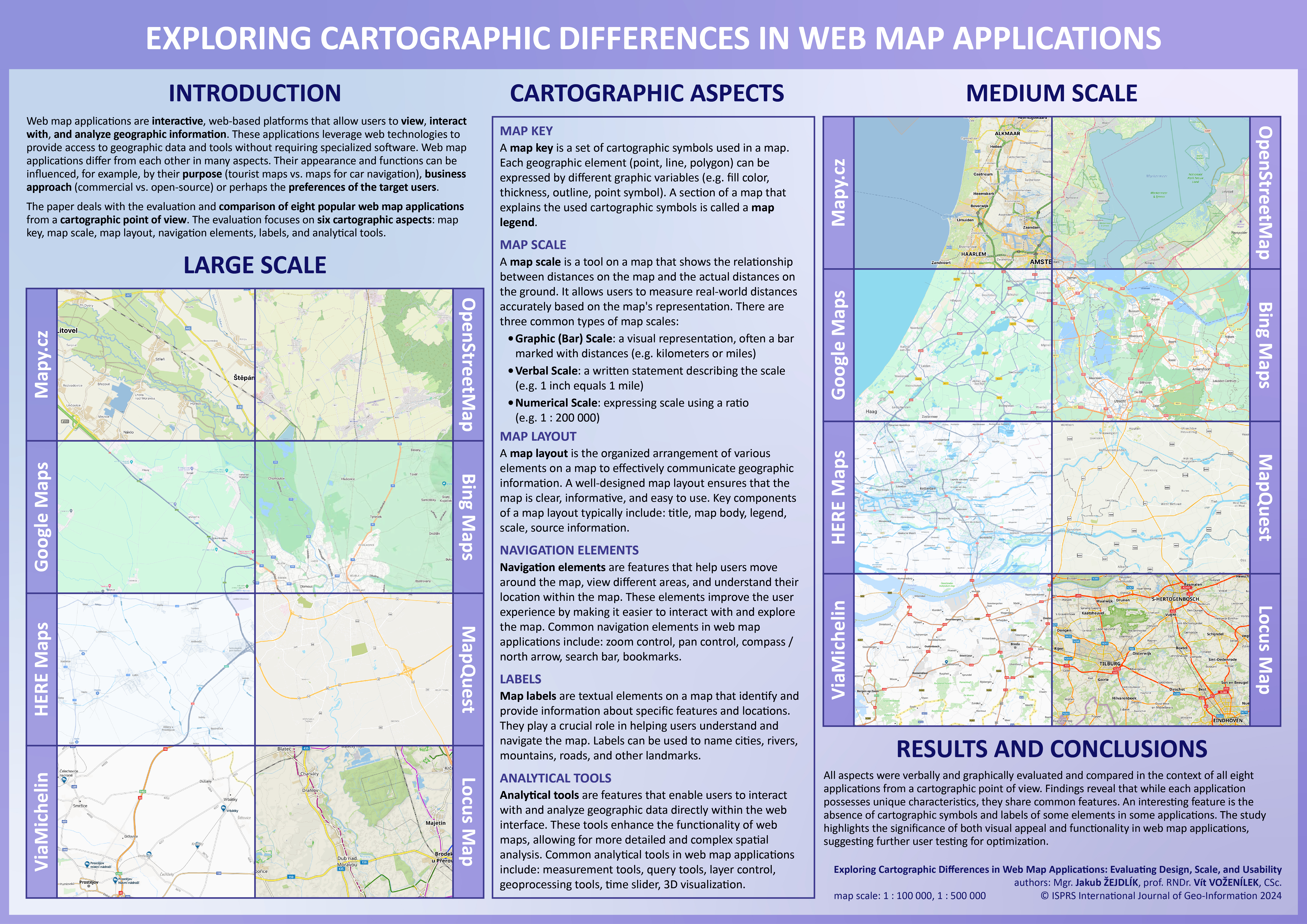
This study aims to address the identified issues by focusing on widely used web-based map applications that allow users to perform map exploration, navigation, route planning, and other analytical functions. The goal of the study is to resolve the challenges related to inconsistent adherence to cartographic standards by visually comparing eight globally used map applications, including the most well-known Google Maps. By identifying differences in key cartographic aspects such as map design (colors, symbols), labeling (font, color), and user interface layout, the study seeks to provide actionable insights. Through this comparative analysis, the study ultimately aims to improve the overall quality and reliability of web maps by highlighting where some applications better follow cartographic principles than others.
2. Related works
Although a large amount of literature deals with the technological side of web map applications [7,8,9,10], only a few deal with the evaluation of cartographic aspects. In 2019, Skopeliti and Stamou dealt with a topic very similar to this paper. They assessed four online map services from a cartographic perspective, namely Google Maps, OpenStreetMap, HERE Maps and Wikimapia. They focused on map elements (e.g., cartographic projection, orientation, scale, legend, title, credits, map layout), sources of spatial data, generalization, labels, cartographic symbols and color. They also reviewed the color schemes of the map applications and suggested some modifications [2]. Nivala et al. (2008) evaluated four web map applications, focusing on their usability, by series of expert evaluations and user tests. The evaluated map applications were Google Maps, MSN Maps & Directions, MapQuest, and Multimap. Tested users performed various tasks in web map applications (e.g., searching for specific locations, measuring distances), while the experiment was recorded and subsequently analyzed. During the study, several problems were revealed, which were related to, for example, the user interface, map visualization and analytical tools. The fewest problems were identified with Google Maps [11]. Barvir and Vozenilek [12] focused on evaluating web mapping applications from the perspective of map graphic content.
Visualization problems in selected web map applications (Google Maps, MapQuest, Bing Maps) were addressed by Stehlíková et al. (2014). They followed up on the work of Nivala et al. (2008), who identified some problems in map applications. They defined several null hypotheses, which they then tested on 127 respondents by a combination of qualitative and quantitative tasks, asking various questions about the applications. Google Maps was evaluated as the most usable, MapQuest, on the other hand, the worst [13]. Wang (2014) analyzed four public web map sites (Google Maps, Bing Maps, Mapquest, Yahoo Maps) with 42 participants, who were required to complete certain operation tasks in a given scenario at the same time in a lab. Based on the experiment, he recommended some improvements regarding user interface, functionality, search operations and visualization to enhance the performance of the websites. Google Maps had the highest usability success rate, while MapQuest turned out the worst [14]. In the mentioned studies, Google Maps usually has the best results. The development and changes of Google Maps since its creation in 2005 were discussed in an article by Horbiński (2019). He focused mainly on the style of the buttons and icons and on the position of the buttons within the layout [15]. An analysis of three popular full-scale maps (Google Maps, OpenStreetMap, IGN Classic) from the point of view of generalization and design was done by Gruget et al. [16]. The design of a model of user interactions by browsing pan-scalar maps was addressed by Potié et al. [17]. Dvorský et al. [18] provide a methodological basis for the quantitative comparison of map elements using matrix decomposition techniques. This supports visual analysis with objective metrics that help identify not only visual but also structural differences in web applications.
Veenendaal (2015) used the map use cube, originally created by MacEachren & Kraak [19], to create a map use model for web mapping and GIS. This map uses cube was developed in a time when web maps were not prevalent, and most maps were rather static with some potential to manipulate the display and visualization parameters. The web map use cube considers the broadened and diverse user base globally that accesses web maps in some form or another, thanks to the expansion of online maps and virtual globes. These users are offered a range of functionality for manipulating the map according to the purpose of the map [20]. The usability of map interfaces was discussed by Roth and Harrower [21] using the example of the Lakeshore Nature Preserve Interactive Map. Eye-tracking can also be used to evaluate the user-friendliness of web map applications. Popelka et al. [22] compared swipe and multiple view in web maps and performed a comprehensive analysis of user interaction with web maps. The effectiveness of graphical interfaces of web maps using eye-tracking was addressed by Horbiński et al. (2021). They proposed the GUI effectiveness index, which uses the correlation between the time of fixing the gaze on the button, time of identifying the button, and task completion time [23]. Popelka et al. (2019) used eye-tracking to evaluate weather web maps. Weather maps were evaluated by combining research methods with a core eye-tracking experiment that focused on analyzing the behavior of respondents as they worked with the selected maps. The experiment was divided into three parts: a free viewing section, a dynamic section, and a static section. Five selected web maps with meteorological themes were employed in testing [24]. Brychtová et al. [25] extend the discussion towards a deeper analysis of user interaction with map elements, such as symbols, labels, and layout. Eye-tracking provides valuable data on how users visually process maps and identify issues that might otherwise be overlooked by traditional evaluation methods. Thus, studies focused on eye-tracking become a significant complement to research on the cartographic and user aspects of web maps. Vozenilek et al. [26] gained insights into user experience, perception, and interaction with map applications, which complement the results of the visual analysis conducted in the paper. The integration of these findings offers a deeper understanding of how various cartographic elements influence user-friendliness and orientation, providing suggestions for improving the overall design and functionality of web maps.
3. Materials and Methods
A visual (comparative) analysis was selected as the research method. The comparison of map applications was conducted at two different scales: a large scale (1:100,000) focusing on the surroundings of the city of Olomouc, and a medium scale (1:500,000) covering the western part of the Netherlands. Olomouc was chosen due to its proximity to the home university of both authors, while the Netherlands was selected for its diversity and the high density of various cartographic features, making it a suitable area for analyzing the differences in how geographic information is represented across the map applications. Because the main goal of the study is to compare the cartographic aspects of these applications, a specific focus was given to six elements – the map key, map scale, map layout, navigation elements, labels, and analytical tools. The visual comparison provides a specific focus on how different platforms vary in the way they present geographic information, highlighting their strengths and weaknesses in adhering to cartographic principles. This approach is expected to help identify areas where some applications better follow cartographic standards, which could improve their overall quality and usability. A graphic representation of the methodology is depicted in Figure 1.
Eight web map applications were selected for comparison, each differing in terms of focus, target audience, and map key. For all applications, the default map displayed upon launching the website was used in the analysis. Although most applications offer multiple basemap options tailored to specific purposes (e.g., tourist, winter, or traffic maps), only the default basemap was considered in this study. A brief description of the eight selected web map applications and their corresponding abbreviations, as used throughout the text, is provided below.
- Mapy.cz (hereinafter referred to as MCZ) (https://mapy.cz/): Mapy.cz is a Czech web and mobile map application developed by Seznam.cz, offering worldwide map coverage and localization in multiple languages. For the Czech Republic, the application utilizes its own proprietary map data, while for the rest of the world it relies on data from the OpenStreetMap project. Key features include a route planner for cars, public transportation, cycling, walking, and more. The application also provides numerous points of interest, with descriptions either supplied by the developers or sourced from Wikipedia, along with user-uploaded photos. One distinguishing feature of Mapy.cz, compared to other global map applications, is its worldwide tourist and winter maps, which resemble classic printed maps;
- OpenStreetMap (hereinafter referred to as OSM) (https://www.openstreetmap.org/): OpenStreetMap is a free, editable map of the world created by a community of volunteers, with data built largely from scratch and released under an open-content license. The OpenStreetMap license provides free or nearly free access to both map images and the underlying map data. The project aims to encourage innovative and diverse uses of this data. OpenStreetMap data is already being utilized by individuals, governments, and commercial entities, and in many countries, it serves as a viable alternative to other map providers [27];
- Google Maps (hereinafter referred to as GM) (https://www.google.com/maps): Google Maps is a location search tool that allows users to geolocate specific points, calculate routes, find nearby points of interest, and view street-level imagery through Google Street View. Launched in 2005, initially for Internet Explorer and Mozilla Firefox, its widespread adoption followed with the rise of smartphones, making it a crucial tool for local SEO [28];
- Bing Maps (hereinafter referred to as BM) (https://www.bing.com/maps): Introduced in 2009 by Microsoft, Bing Maps is a free and comprehensive mapping service. The platform integrates Bing’s search features, allowing users to locate businesses, addresses, and points of interest dynamically on the map. It offers road maps, street views, satellite/aerial imagery, hybrid views, and bird’s-eye views. Additional features include real-time traffic information (‘traffic view’) and detailed building floor plans for commercial locations (‘venue maps’). Bing Maps also provides an API for developers to integrate mapping functionality into their applications [29];
- HERE Maps (hereinafter referred to as HM) (https://maps.here.com/): HERE Technologies, a leader in location data and technology, developed the first digital map over 35 years ago. Today, HERE is a global platform with a strong presence across 52 countries, particularly in the automotive sector, and collaborates with industries such as transport, logistics, mobility, manufacturing, retail, and the public sector [6];
- MapQuest (hereinafter referred to as MQ) (https://www.mapquest.com/): MapQuest allows users to access global maps, obtain driving directions, and find locations such as hotels, hospitals, and ATMs. It includes a Gas Prices feature, which provides information on fuel prices and availability. MapQuest also offers mobile services like MapQuest Mobile for maps and directions, traffic updates via MapQuest Traffic, and location sharing through MapQuest Find Me. Additionally, MapQuest provides mapping software for businesses, including store locators, sales territory management, and asset tracking [30];
- ViaMichelin (hereinafter referred to as VM) (https://www.viamichelin.com/): ViaMichelin is the Michelin Group’s route planning and mapping tool, used by over 15 million people monthly in 2023. Available in seven languages, it assists users in planning routes while offering additional features such as hotel and restaurant searches. ViaMichelin aims to enhance journeys by turning them into unique experiences, supporting Michelin’s broader mission of providing sustainable mobility solutions [31];
- Locus Map (hereinafter referred to as LM) (https://web.locusmap.app/): Locus Map is a Czech-developed map and navigation application launched in 2010. It supports a wide range of offline and online maps and is particularly suitable for outdoor activities such as hiking, biking, and geocaching, making it a popular choice for leisure activities [32].
Six cartographic aspects were chosen for the evaluation of map applications: map key, map scale, map layout, navigation elements, labels and analytical tools. These aspects have a key influence on how well users will work with applications. Other evaluated aspects could be e.g., loading speed, graphic interface (colors, icons), map load (graphic, information) or advanced functionality (e.g., data import and export, map sharing and printing, user bookmarks). Cartographic aspects were evaluated using visual (comparative) analysis. The results were evaluated qualitatively due to the wide-ranging nature of the individual aspects. The six cartographic aspects examined are briefly described below. Aspects are described in more detail in the context of individual map applications in the Results chapter.
Map key refers to the set of cartographic symbols used in a map. In this study, the design of each symbol within the map key was compared across the selected web map applications. The symbols should be appropriately designed to reflect the map’s purpose, ensuring that they accurately and clearly represent the real-world objects and phenomena depicted. Each geographical feature (point, line, polygon) can be represented through various graphical variables, such as fill color, line thickness, contour, or point symbol. The section of the map that explains these cartographic symbols is referred to as the map legend. In web maps, the legend is typically dynamic, with its content changing depending on the active layers.
Map scale is a tool that shows the relationship between distances on the map and actual distances on the ground, allowing users to accurately measure real-world distances. The study compared the graphical design of map scales across the selected applications, as well as the ability to switch between metric and imperial units. The balance between map content and legibility was also assessed. The three common types of map scales were examined:
- Graphic (Bar) Scale: a visual representation, typically a bar marked with distances (e.g., kilometers or miles);
- Verbal Scale: a written statement describing the scale (e.g., “1 inch equals 1 mile”);
- Numerical Scale: a ratio expressing the scale (e.g., 1:200,000).
Map layout refers to the organized arrangement of various map elements to effectively communicate geographic information. The layout was assessed based on its design, clarity, balance, informativeness, and ease of use. Factors influencing the layout include the intended user, the map’s purpose, and its goal. Key components of map layout—such as the title, map body, legend, scale, and source information—were evaluated. The map body, being the most dominant part, was particularly analyzed, along with the inclusion of additional elements such as text fields, graphs, infographics, and multimedia.
Navigation elements are features that assist users in exploring the map and understanding their location. The study compared both the functionality and graphic design of these elements, which play a crucial role in user interaction with the map. Common navigation elements evaluated include zoom and pan controls, a compass or north arrow, a search bar, and bookmarks. These features were analyzed for their contribution to enhancing the user experience.
Map labels are textual elements used to identify and provide information about specific geographic features. They are critical for helping users navigate and understand the map. Labels were compared in terms of font, color, size, and other design parameters. The study also examined the consistency of label styles, noting, for example, the common use of blue italics for water bodies and specific formatting for road labels.
Analytical tools enable users to interact with and analyze geographic data directly within the web map interface. These tools enhance the functionality of web maps by allowing more advanced spatial analysis. The availability of key analytical tools was compared across the evaluated applications, including features such as route planning, measurement tools, query tools, layer control, geoprocessing tools, time sliders, and 3D visualization.
4. Results
Six cartographic aspects were evaluated across different scales using visual (comparative) analysis. The elements were assessed and compared in the context of all map applications, both verbally and through graphical representations. Given the wide variety of cartographic features and labels within the applications, it was not feasible to evaluate every element. Therefore, selected key elements within these categories were chosen for analysis.
Map Key
The map key of all applications is very extensive and contains many polygon (e.g., different land cover in different parts of the world), line (e.g., many levels of administrative units or road classes) and point (a large number of different points of interest – POIs) features. Due to the large number of cartographic features, the evaluation of which would require a separate study, only some important features have been selected and compared for the purposes of this article. For all applications, the map key changes dynamically depending on the scale, so some characters only appear at a certain zoom level. This is related to cartographic generalization, when, for example, when zooming out on the map, individual buildings become blocks of buildings, or polygon symbols for cities are replaced by point symbols. In this way, map applications try to ensure the optimal graphic map load and not overload the user with many symbols or labels. Some applications also provide alternative base maps (e.g., tourist, traffic, winter) or various additional layers (e.g., current traffic, public transport). However, this article only compares the cartographic features used on the base map that is available when the page is first loaded.
Web map applications use different color palettes for polygon symbols (Figure 2). Although they usually use similar color shades for some objects (e.g., buildings – brown or gray, forest – green, water bodies – blue), they try to have a specific color style to differentiate themselves from their competitors. MCZ, OSM, BM, MQ and LM show buildings in brown, GM, HM and VM in gray. MCZ and LM, as well as BM and MQ use a very similar shade of brown for buildings, and GM and VM a very similar shade of gray. GM and MQ do not show forests at all when displaying the default basemap, although this is a very important landscape element, the absence of which can negatively affect the user experience. OSM and VM use a pattern that resembles trees as a symbol to represent forests. Each of the six applications that display forests uses a slightly different symbol, but all use green. The symbols for representing fields are the most diverse. Map applications use brown (MCZ, MQ, LM), beige (OSM), green (GM, BM) and gray (HM, VM). Symbols for parks are always done in green, with MQ using the most prominent color. All applications naturally display water bodies in blue, with slightly different hues selected. MCZ, HM and VM also show depth for seas and oceans (the darker the blue, the greater the depth). Other applications display all water bodies using only one color.
For the comparison of line symbols, five features were selected – highway, main road, railway, river and state border (Figure 3). Shades of orange and yellow (BM, MQ, VM, LM) are most often used for highways. Two applications show highways in dark gray (GM, HM). The last two applications chose completely different colors – MCZ green and OSM red. The use of green for highways can seem strange, as green usually represents natural objects. The choice of this color is probably related to the green road markings for highways, used in many countries of the world. Six applications depict main roads in orange, only GM and HM use gray. In two cases, the same color is used for both the main road and the highway (HM, MQ). In some cases, the lines are supplemented with arrows showing the direction. Two methods are usually used to visualize railways – alternating white and gray/black colors (MCZ, OSM, MQ, VM, LM) or a single line crossed perpendicularly by short lines at regular intervals (GM, BM). The exception is HM, where light and dark gray colors alternate. As in the case of polygon symbols for water bodies, rivers are always shown in blue. The MCZ also displays the direction of the river flow in the form of an arrow. Whether the river is visualized as a polygon or a line depends on the zoom level. Line symbols for representing the state border are quite different. In three cases it is a brown dashed line where short and long lines alternate (MCZ, OSM, MQ). Three applications use a solid line, either alone (GM) or with a border or drop shadow (BM, HM, LM). The exception is VM, where the state border is represented by a transparent yellow line supplemented by crosses at regular intervals.
Point symbols are usually the largest number in web map applications, as they represent various points of interest and other objects. For that reason, as in the case of flat and line characters, five features were selected (Figure 4). The capital city is represented in five cases by a circular symbol and in two by a square symbol. MCZ uses a simple brown circular symbol with an outline. OSM, GM and BM use a circle outline with a solid circle in the middle. LM uses only the outline for the middle circle. MQ has no symbol for cities. The most used colors for cities are black and dark gray. Symbols for cities are usually based on symbols for capital cities. MCZ uses the same symbol, only smaller. In the case of OSM, GM, BM and LM, there was a change to a smaller circle with either a fill only or an outline only. HM uses a smaller gray square. The biggest difference is in VM, where the black square becomes a circle outline with a solid circle in the middle. Two types of symbols are used to represent hospitals - the letter “H” or the cross. The letter “H” is placed in a square (MCZ), in a circle (GM, BM, MQ) or in a pin (VM). The cross is placed in a circle (OSM, LM) or in a pin (HM). All applications except BM, which has no symbol for a parking lot, use the letter “P” to represent a parking lot. It is either placed alone (OSM, LM), in a square (MCZ), in a circle (GM, MQ) or in a pin (HM, VM). All applications use shades of blue for parking. In four cases, the letter “P” is white and is placed on a blue background. Four applications represent a peak using a simple triangle (MCZ, OSM, BM, LM). Except for BM, these are equilateral triangles. LM is the only application that uses a triangle outline instead of a fill. GM and VM represent a peak as a pair of connected triangles of different sizes. For GM, the symbol is placed in a green circle. The colors for representing a peak are variable (brown, green, gray). HM and MQ do not display peaks at all.
Map Scale
All applications use graphical (linear, bar) scales, which differ in visual design (Figure 5). Scale bars on OSM, GM, HM, MQ, VM and LM are very similar in style. It is a simple horizontal line, which is bordered on both sides by two shorter vertical lines and does not contain any secondary divisions. For BM, the scale is made in the form of a blue bar. MCZ is the only application that uses an alternating scale bar. The scale alternates between black and white and is the only one that contains secondary divisions. Scale lengths represent distance, which is indicated by a number and a distance unit. In the case of OSM and LM, the scale is divided into the metric (top) and imperial (bottom) systems. At BM, the metric and imperial systems are split into two separate scales. For GM and HM, the system changes by clicking on the scale. None of the eight evaluated web map applications includes a numerical scale (e.g., 1 : 25,000), so it is not possible to set the zoom level to a specific scale. However, the absence of a numerical scale is logical due to the different resolutions of the devices on which the applications are viewed. Three applications (MCZ, OSM, LM) only allow step zoom (e.g., z=11, z=12). The remaining five applications (GM, BM, HM, MQ, VM) provide smooth (fractal) zoom, where the zoom levels can take on decimal values (e.g., z=11.25, z=11.75).
Map Layout
Figure 6 shows the layout of map applications when the page is initially loaded. The layout can be interactively changed (for example, switching side panels on and off). Five applications (OSM, BM, MQ, VM, LM) contain a title (logo) that is located in the upper left corner. The MCZ logo is located at the bottom right of the side panel. GM and HM do not contain any title or logo. In all applications, the map body is dominant and occupies almost the entire screen. Four applications (MCZ, MQ, VM, LM) have an activated sidebar on initial load that can be hidden. GM also has a side panel, but it is hidden by default. The scale is always located in the lower left or right corner and changes dynamically (size, labels, units) depending on the zoom level. The source and additional information are located in the lower right corner of all applications. The navigation elements are always divided into a search bar and buttons for zooming and displaying the current location. In most cases, layer control is also located near these buttons. Only in MCZ and GM is layer control separated from navigation elements. Only three applications have a legend available: for MCZ it is possible to turn it on in the sidebar, and for OSM and LM the legend appears when the button is clicked. GM, BM, HM, MQ, VM do not provide any legend directly in the application. For MQ and VM, advertisements take up quite a lot of space. There is no way to turn them off and they significantly disrupt the user experience with the application.
Labels
As with map symbols, the labels change depending on the scale. For example, changing the scale changes the position of the labels around point symbols, as well as the font size and weight. For this reason, only selected examples of labels with similar zoom levels are shown in Figure 8. The language used for labels is not consistent. MCZ, OSM, GM and HM use the system language (in this case Czech). BM uses Czech for country labels and English for oceans, MQ, on the other hand, uses English for countries but Czech for oceans. VM and LM have labels in English. All map applications except OSM and GM use uppercase for country labels. The color used for the country labels is quite different – MCZ, GM and LM use black, OSM, BM, HM and VM use brown and VM uses blue. All applications except HM use a white border for country labels. All fonts used for labelling countries are sans-serif. The labels for cities are quite similar in all cases in Figure 8. They use black color, white border (except HM) and lowercase (except LM). However, labels for cities change with each scale change in most applications, making it quite difficult to compare them between applications across scale levels. Labels for highways are always placed in a rectangle. All applications except OSM and MQ use white font on a colored background. Labels for highways are usually very similar and differ only in the font used and the size of the underlying rectangle, which has white outline in four cases. Blue is always used for the labels of rivers and oceans. All applications except GM use italics to label rivers, with labels placed at the center of the flow. MCZ, OSM, VM and LM have white borders on the river labels to provide more contrast. MCZ and LM use serif font. In the case of VM, labels for Czech and Slovak rivers are missing. As with rivers, only GM does not use italics for oceans. MCZ and VM use serif font. MCZ, MQ, and VM use label boundaries, and OSM and LM use no label for oceans.
Analytical Tools
Table 1 shows the availability of the most common analytical tools for the evaluated web map applications:
- route planning: calculating a route between two or more user-defined locations;
- 3D view: displaying the web map in 3D (e.g., buildings, elevation);
- distance measurement: measuring the distance between two or more points;
- data import / export: uploading own data to the application (e.g., GPX), or exporting the map (e.g., as an image);
- printing: option to print the current map view;
- sharing: sharing the map via link, email, social networks, etc.;
- error reporting: reporting errors such as bad geometry.
Route planning usually provides advanced options (e.g., avoiding tolls, short vs. fast route, traffic information). Other analytical tools include, for example, street view (MCZ, GM, BM), map editing (MCZ, OSM, GM), location timeline (GM) or elevation profile (MCZ, LM).
Overall Comparison
The applications share many common elements. The most significant differences are outlined below.
Mapy.cz:
- shows the depth of the seas and oceans;
- shows the flow direction using arrows;
- uses green color for highways;
- uses an alternating scale bar;
- allows only step zoom;
- has logo in the lower right corner;
- has layer control separated from other navigation elements;
- has the legend located in the sidebar;
- has a search bar located on the right;
- allows street view, map editing and elevation profile.
OpenStreetMap:
- uses a pattern for the polygon symbol of forests;
- uses red for highways;
- has map scale divided into metric and imperial;
- allows only step zoom;
- includes a legend button;
- is the only application which does not provide autocomplete;
- does not use uppercase for country labels;
- does not use labels for oceans.
Google Maps:
- does not have polygon symbols for forests;
- represents the state border with a simple line;
- uses a circle symbol to represent a peak;
- allows users to change map scale units on click;
- does not contain a heading or logo;
- has sidebar hidden by default;
- has layer control separated from other navigation elements;
- does not use uppercase for country labels;
- does not use italics for river and ocean labels;
- allows street view, map editing and location timeline.
Bing Maps:
- has no point symbol for parking;
- is the only application that has a scale in the form of a blue bar;
- has two separate scales for the metric and imperial systems;
- includes a compass (north arrow);
- allows map rotation;
- allows street view.
HERE Maps:
- shows the depth of the seas and oceans;
- uses a square to represent cities;
- does not have a point symbol to represent a peak;
- allows users to change map scale units on click;
- does not contain a heading or logo;
- does not use a white border for country labels.
MapQuest:
- does not have polygon symbols for forests;
- has no point symbol for cities and peaks;
- contains advertisements;
- includes a compass (north arrow).
ViaMichelin:
- uses a pattern for the polygon symbol of forests;
- shows the depth of the seas and oceans;
- state border is represented by a transparent yellow line;
- contains advertisements.
Locus Map:
- uses a triangle outline to represent peaks;
- has map scale divided into metric and imperial;
- includes a legend button;
- does not use labels for oceans;
- allows elevation profile.
5. Discussion
In order to achieve an objective comparison of all applications regardless of their popularity, the number of their active users was not considered.
Web map applications should include all important symbols such as forests or cities. These are key elements from the point of view of the user’s orientation in the map, especially when it comes to unknown territory. All the used map scales serve their purpose. The ability to switch between metric and imperial units is a useful feature. The map layouts of most applications are well designed, but this would need to be verified by user testing. It would be advisable to avoid using advertisements that take up a lot of space and take away space for far more important elements. For navigation elements, the question is whether users use buttons or a mouse for zooming. Autocomplete is a very important element of the search bar, which should make it easier for users to search for a location. From the point of view of labels, it would be better to use a uniform language, e.g., only system language or only English. Combining multiple languages can be confusing for users. Most applications contain quite a lot of analytical tools, but some applications lack some basic tools (e.g., measuring distance, the possibility to print the map).
Regarding labels, a more uniform language approach would likely reduce confusion for users. Mixing languages within map labels can cause disorientation and adopting either the system language or English exclusively might improve clarity. While most applications offer a range of analytical tools, some still lack basic functions such as distance measurement and map printing, which are essential for certain user tasks.
For future research, user testing of the evaluated aspects across these applications would provide valuable insights. Specific tests could include:
- Map key: Assessing whether users can correctly interpret land use categories based on polygon symbols without consulting the legend, and whether point symbols are intuitive;
- Map scale: Determining if users can accurately measure or estimate distances using different scale formats;
- Map layout: Evaluating how effectively users navigate the layout and how quickly they can locate elements such as zoom buttons or the map scale;
- Navigation elements: Exploring whether users prefer zooming with buttons or a mouse and how well they interact with the search bar;
- Labels: Testing whether users can correctly identify features based on labels alone and whether the use of uppercase or lowercase for city names improves readability;
- Analytical tools: Measuring how intuitive route planning is and how efficiently users can perform tasks like distance measurement using these tools.
In addition to the cartographic aspects, further research could explore elements related to geospatial technologies (e.g., map tile technology, advanced analysis tools) and technical factors (e.g., loading speed, software architecture, cross-platform support). These considerations could provide a more comprehensive understanding of the usability and performance of web map applications.
6. Conclusions
The paper provides an evaluation and comparison of eight widely used web map applications in the context of six cartographic aspects – map key, map scale, map layout, navigation elements, labels and analytical tools. These aspects were verbally and graphically evaluated and compared from a cartographic point of view.
The results of this study contribute to the improvement of the quality and reliability of web map applications by identifying key differences in cartographic aspects among various platforms, such as object symbols (e.g., buildings, forests), map scales, and the placement of navigation elements. These differences, such as the absence of forest symbols in some applications, may negatively affect the user experience. The findings also highlight the variability of symbols for different features, which can impact the consistency and readability of maps for users.
By identifying the cartographic aspects where principles are either not adhered to or simplified, the study helps address the challenges related to maintaining cartographic standards. For example, the study revealed that certain applications (e.g., Google Maps) do not display important landscape features like forests, which could lead to user disorientation. This comparative analysis sheds light on areas where improvements in consistency and cartographic accuracy can be made.
Several specific issues with cartographic standards were uncovered:
- Inconsistent use of colors and symbols for key features such as forests, buildings, and roads;
- Some applications, like Google Maps and MapQuest, do not display crucial objects like forests;
- Inconsistent representation of state borders and other geographic features;
- Variability in how map scales are processed and displayed, with some applications offering only step zoom and others providing smooth zoom.
Potential solutions to these issues include:
- Introducing more consistent cartographic standards across applications, especially for key features like forests, cities, and roads;
- Conducting user interface testing to determine which elements are more intuitive and enhance the user experience;
- Considering the unification of language labels to reduce variability, which could improve user orientation on the map;
- Expanding the functionality of some applications to include basic tools, such as distance measurement and map printing, to increase their usability.
This conclusion effectively ties the study’s findings to the identified problems and suggests actionable steps for improvement, aligning with the study’s objectives of enhancing web map quality and adherence to cartographic principles.
Each application has a unique color palette and character key that differentiates it from the others. The color hues used for the selected categories are similar across applications (e.g., buildings – brown or grey, parks – green, bodies of water – light blue). The colors used for highways and major roads vary quite a bit across applications. The symbols for state borders are also quite variable. On the contrary, symbols for railways are very similar and use only two variants. In the case of point characters, some characters are similar (e.g., for cities or parks), but each application has its own unique character key.
All applications include a map scale, which in most cases has a similar design. OSM, GM, BM, HM and LM allow users to display the scale in both metric and imperial systems. Three applications only provide step zoom, but five applications provide continuous (fractal) zoom.
The map layouts have some elements in common (e.g., the navigation bar is usually located in the upper left corner, the scale is always located in the lower left or right corner), but each layout is unique. All applications contain five elements: map body, layer control, navigation elements, scale bar and source. Five applications have sidebars that can be hidden. A very disturbing element is the advertisement that occurs with MQ and VM.
In terms of navigation elements, all applications include search bars, zoom buttons (+ and -) and a button to display the user’s current location. All applications except OSM provide autocomplete.
Labels are quite difficult to evaluate in detail, as they often change depending on the scale, and one element can thus have several different label variants. Interestingly, the language of the labels is not uniform. Sometimes the system language is used exclusively, sometimes it is a combination of the system language and English. Some common features include, for example, similar colors for labelling countries and cities (black, gray, brown), the use of blue and italics for the labels of most water features, or the use of rectangles when labelling highways.
The most common analytical tools include route planning, 3D view, distance measurement, data import / export, printing, sharing and error reporting. Only route planning is available in all applications and MCZ is the only application that provides all 7 mentioned analytical tools.
When evaluating web map applications, it is necessary to distinguish between the visual side of the application (user interface - how well the application looks visually, whether it does not contain any distracting elements, etc.) and functionality (user experience - whether analytical tools and navigation elements are intuitively located etc.). The visual aspect of map key, scale, layout, labels and other aspects always depends on user preferences and is therefore very subjective. Web map applications have great potential for various user testing, the results of which could help to further optimize these applications.
Author Contributions
Conceptualization, Vít Voženílek; methodology, Vít Voženílek; software, Jakub Žejdlík; validation, Jakub Žejdlík; formal analysis, Jakub Žejdlík; investigation, Jakub Žejdlík; resources, Jakub Žejdlík; data curation, Jakub Žejdlík; writing—original draft preparation, Jakub Žejdlík; writing—review & editing, Jakub Žejdlík and Vít Voženílek; visualization, Jakub Žejdlík; supervision, Vít Voženílek; project administration, Vít Voženílek; funding acquisition, Vít Voženílek. All authors have read and agreed to the published version of the manuscript.
Funding
This research was funded by the project “Analysis, modelling, and visualization of spatial phenomena by geoinformation technologies III” (IGA_PrF_2024_018) with the support of the Internal Grant Agency of Palacký University Olomouc).
Data Availability Statement
The data presented in this study were derived from the following resources available in the public domain: Mapy.cz (https://mapy.cz/), OpenStreetMap (https://www.openstreetmap.org/), Google Maps (https://www.google.com/maps), Bing Maps (https://www.bing.com/maps), HERE Maps (https://maps.here.com/), MapQuest (https://www.mapquest.com/), ViaMichelin (https://www.viamichelin.com/), Locus Map (https://web.locusmap.app/).
Conflicts of Interest
The authors declare no conflicts of interest.
References
- Veenendaal, B.; Brovelli, M.A.; Li, S. Review of Web Mapping: Eras, Trends and Directions. ISPRS Int. J. Geo-Inf. 2017, 6, 317. [Google Scholar] [CrossRef]
- Skopeliti, A.; Stamou, L. Online Map Services: Contemporary Cartography or a New Cartographic Culture? ISPRS Int. J. Geo-Inf. 2019, 8, 215. [Google Scholar] [CrossRef]
- Neumann, A. Web Mapping and Web Cartography. In Encyclopedia of GIS; Shekhar, S., Xiong, H., Eds.; Springer: Boston, MA, USA, 2008; pp. 1261–1269. ISBN 978-0-387-35973-1. [Google Scholar]
- Create Apps from Maps—ArcGIS Online Help | Documentation. Available online: https://doc.arcgis.com/en/arcgis-online/create-maps/create-map-apps.htm (accessed on 25 September 2024).
- Web Maps Explained | Mapbox. Available online: https://www.mapbox.com/insights/web-maps (accessed on 25 September 2024).
- Location Technology | Autonomous World | About Us | HERE. Available online: https://www.here.com/company/about-us (accessed on 25 September 2024).
- Bildirici, İ.; Ulugtekin, N. WEB MAPPING WITH GOOGLE MAPS MASHUPS: OVERLAYING GEODATA. 2012.
- Netek, R.; Vozenilek, V.; Vondrakova, A. WebGIS 2.0 as Approach for Flexible Web-Based Map Application. In Proceedings of the Proceedings of the International Conference on Geoinformatics and Data Analysis; Association for Computing Machinery: New York, NY, USA, April 20 2018; pp. 1–5.
- Rowland, A.; Folmer, E.; Beek, W. Towards Self-Service GIS—Combining the Best of the Semantic Web and Web GIS. ISPRS Int. J. Geo-Inf. 2020, 9, 753. [Google Scholar] [CrossRef]
- Xia, J.; Huang, Q.; Gui, Z.; Tu, W. Web-Based Mapping and Visualization Packages. In Open GIS; Xia, J., Huang, Q., Gui, Z., Tu, W., Eds.; Springer International Publishing: Cham, 2024; pp. 283–314. ISBN 978-3-031-41748-1. [Google Scholar]
- Nivala, A.-M.; Brewster, S.; Sarjakoski, T.L. Usability Evaluation of Web Mapping Sites. Cartogr. J. 2008, 45, 129–138. [Google Scholar] [CrossRef]
- Barvíř, R.; Voženílek, V. Developing Versatile Graphic Map Load Metrics. ISPRS Int. J. Geo-Inf. 2020, 9, 705. [Google Scholar] [CrossRef]
- Stehlíková, J.; Řezníková, H.; Kočová, H.; Stachoň, Z. Visualization Problems in Worldwide Map Portals. In Modern Trends in Cartography: Selected Papers of CARTOCON 2014; Brus, J., Vondrakova, A., Vozenilek, V., Eds.; Springer International Publishing: Cham, 2015; pp. 213–225. ISBN 978-3-319-07926-4. [Google Scholar]
- Wang, C. Usability Evaluation of Public Web Mapping Sites. Int. Arch. Photogramm. Remote Sens. Spat. Inf. Sci. 2014, XL–4, 285–289. [Google Scholar] [CrossRef]
- Horbiński, T. Progressive Evolution of Designing Internet Maps on the Example of Google Maps. Geod. Cartogr. 2019, 68, 177–190. [Google Scholar] [CrossRef]
- Gruget, M.; Touya, G.; Muehlenhaus, I. Missing the City for Buildings? A Critical Review of Pan-Scalar Map Generalization and Design in Contemporary Zoomable Maps. Int. J. Cartogr. 2023, 9, 1–31. [Google Scholar] [CrossRef]
- Potié, Q.; Touya, G.; Wenclik, L.; Mackaness, W. Browsing Map Browsers. Abstr. ICA 2024, 7, 1–2. [Google Scholar] [CrossRef]
- Dvorský, J.; Snasel, V.; Voženílek, V. Map Similarity Testing Using Matrix Decomposition; 2009; p. 294.
- MacEachren, A.M.; Kraak, M.-J. Exploratory Cartographic Visualization: Advancing the Agenda. Comput. Geosci. 1997, 23, 335–343. [Google Scholar] [CrossRef]
- Veenendaal, B. DEVELOPING A MAP USE MODEL FOR WEB MAPPING AND GIS. Int. Arch. Photogramm. Remote Sens. Spat. Inf. Sci. 2015, XL-4-W7, 31–34. [Google Scholar] [CrossRef]
- Roth, R.E.; Harrower, M. Addressing Map Interface Usability: Learning from the Lakeshore Nature Preserve Interactive Map. Cartogr. Perspect. 2008, 46–66. [Google Scholar] [CrossRef]
- Popelka, S.; Burian, J.; Beitlova, M. Swipe versus Multiple View: A Comprehensive Analysis Using Eye-Tracking to Evaluate User Interaction with Web Maps. Cartogr. Geogr. Inf. Sci. 2022, 49, 252–270. [Google Scholar] [CrossRef]
- Horbiński, T.; Cybulski, P.; Medyńska-Gulij, B. Web Map Effectiveness in the Responsive Context of the Graphical User Interface. ISPRS Int. J. Geo-Inf. 2021, 10, 134. [Google Scholar] [CrossRef]
- Popelka, S.; Vondrakova, A.; Hujnakova, P. Eye-Tracking Evaluation of Weather Web Maps. Int. J. Geo-Inf. 2019, 8, 29. [Google Scholar] [CrossRef]
- Brychtova, A.; Popelka, S.; Voženílek, V. THE ANALYSIS OF EYE MOVEMENT AS A TOOL FOR EVALUATION OF MAPS AND GRAPHICAL OUTPUTS FROM GIS; 2012; p. 162; ISBN 978-80-210-5799-9.
- Voženílek, V.; Morkesová, P.; Vondrakova, A. Cognitive Aspects of Map Symbology in the World School Atlases. Procedia - Soc. Behav. Sci. 2014, 112, 1121–1136. [Google Scholar] [CrossRef]
- About OpenStreetMap – OpenStreetMap Wiki. Available online: https://wiki.openstreetmap.org/wiki/About_OpenStreetMap (accessed on 25 September 2024).
- What Is Google Maps - Definition, Meaning and Examples. Available online: https://www.arimetrics.com/en/digital-glossary/google-maps (accessed on 25 September 2024).
- Bing Maps - Definitions & FAQs | Atlas. Available online: https://atlas.co/glossary/bing-maps/ (accessed on 25 September 2024).
- MapQuest. Available online: https://www.britannica.com/money/MapQuest (accessed on 25 September 2024).
- The New ViaMichelin – Turning Routes into Journeys. Available online: https://www.michelin.com/en/publications/group/the-new-viamichelin (accessed on 23 September 2024).
- Locus Map - mobile outdoor navigation app. Available online: https://www.locusmap.app/cs/ (accessed on 25 September 2024).
Figure 1.
Methodology for comparing web map applications at large (Olomouc, Czechia) and medium (Western Netherlands) scales through six cartographic aspects.
Figure 1.
Methodology for comparing web map applications at large (Olomouc, Czechia) and medium (Western Netherlands) scales through six cartographic aspects.
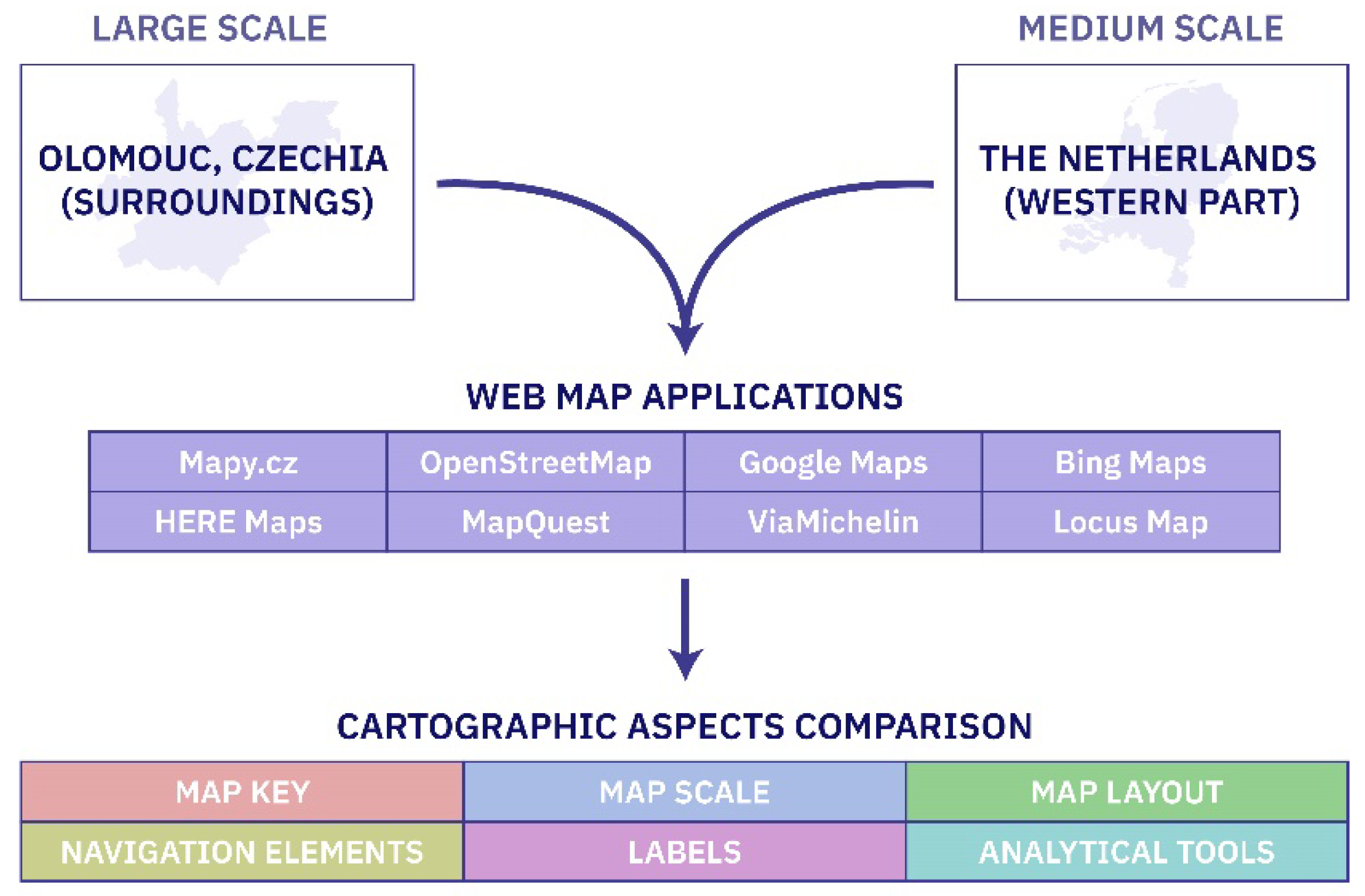
Figure 2.
An example of varying map key representations for polygon symbols. (Note: The figure displays the colors detected in web map applications based on their RGB codes. Only the forest symbols for OSM and VM are shown as screenshots due to the use of texture as a symbol.).
Figure 2.
An example of varying map key representations for polygon symbols. (Note: The figure displays the colors detected in web map applications based on their RGB codes. Only the forest symbols for OSM and VM are shown as screenshots due to the use of texture as a symbol.).
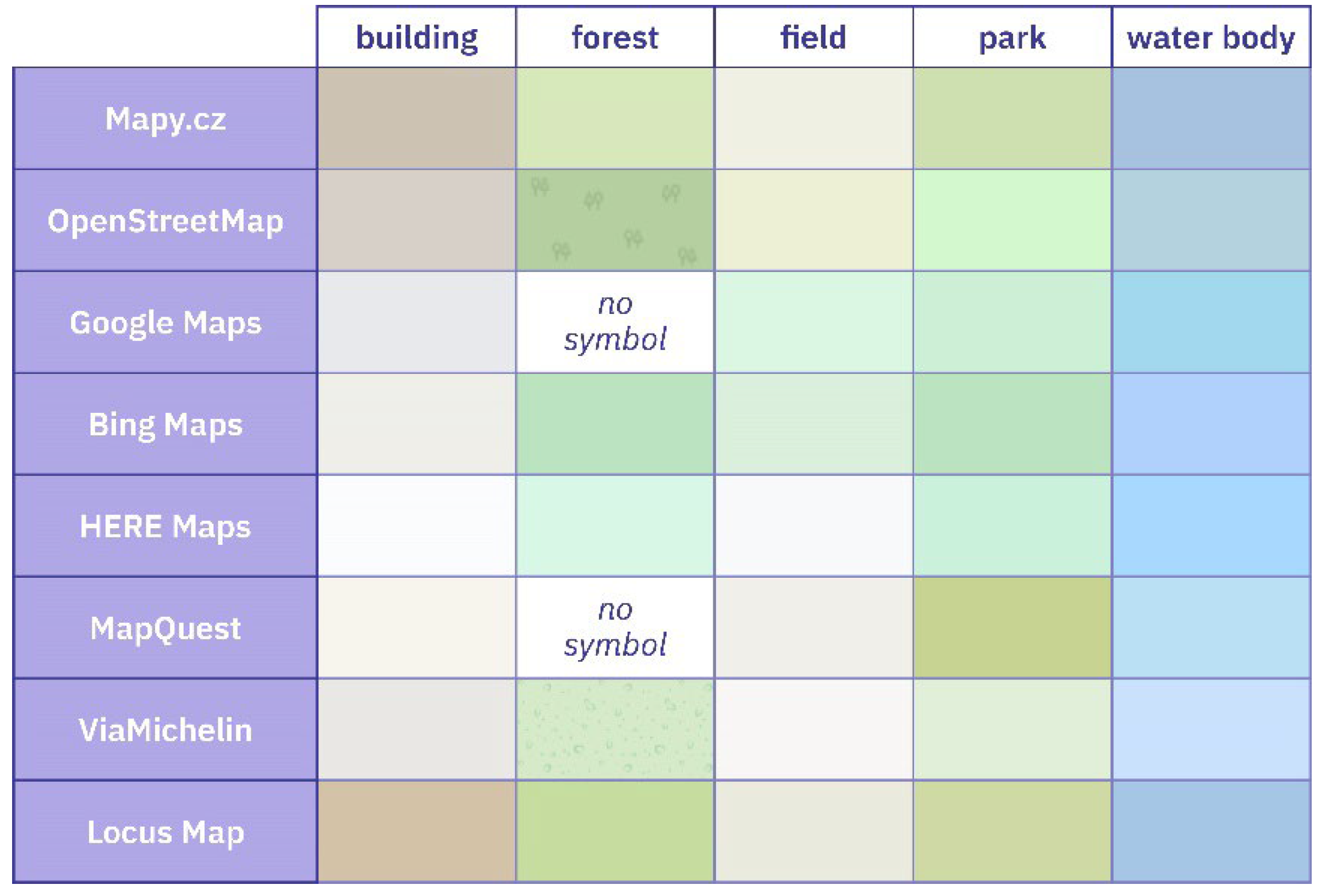
Figure 3.
An example of varying map key representations for line symbols. (Note: The figure includes screenshots from web map applications.).
Figure 3.
An example of varying map key representations for line symbols. (Note: The figure includes screenshots from web map applications.).
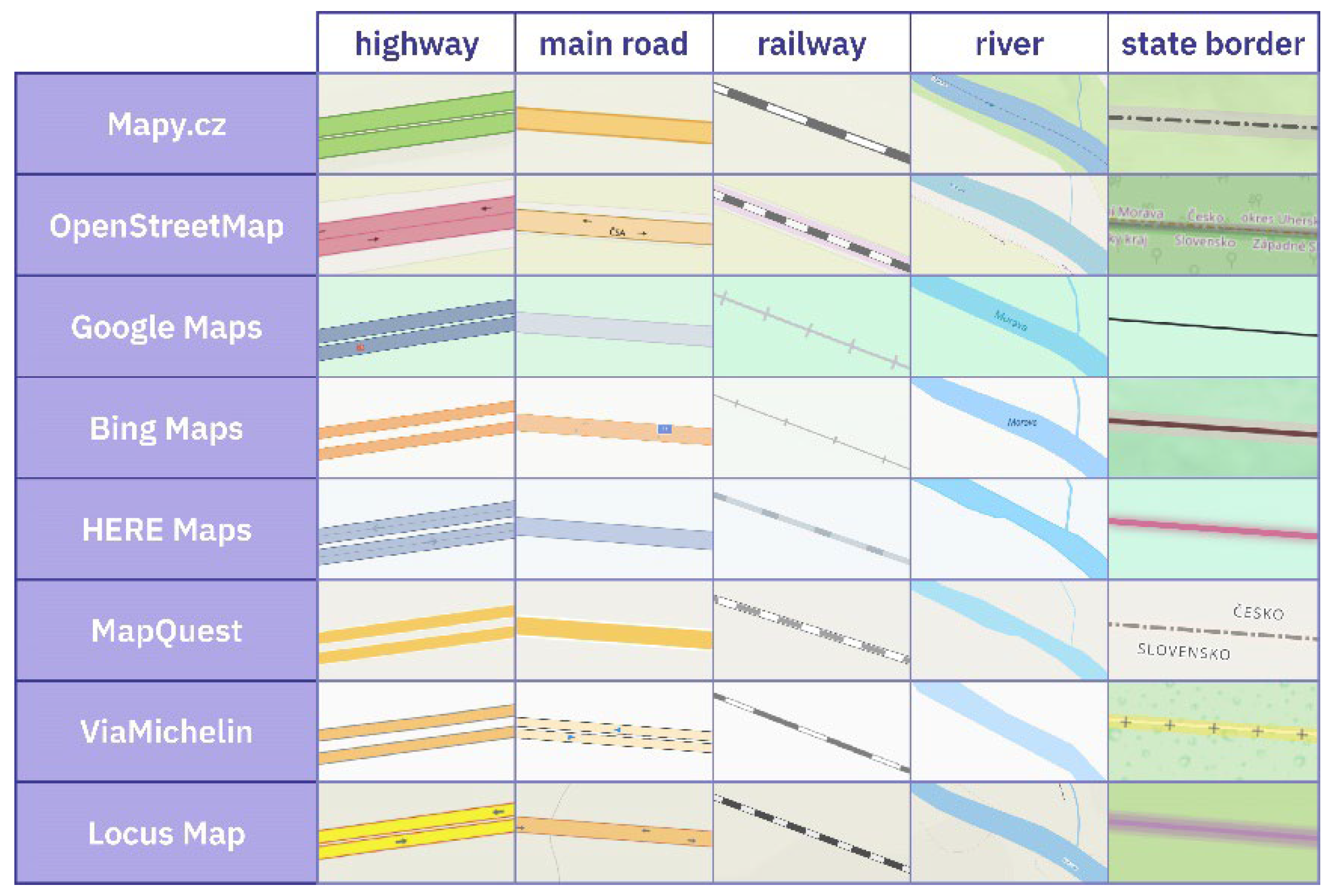
Figure 4.
An example of varying map key representations for point symbols. (Note: The figure includes features extracted directly from web map applications or redrawn in graphic software to enhance readability.).
Figure 4.
An example of varying map key representations for point symbols. (Note: The figure includes features extracted directly from web map applications or redrawn in graphic software to enhance readability.).
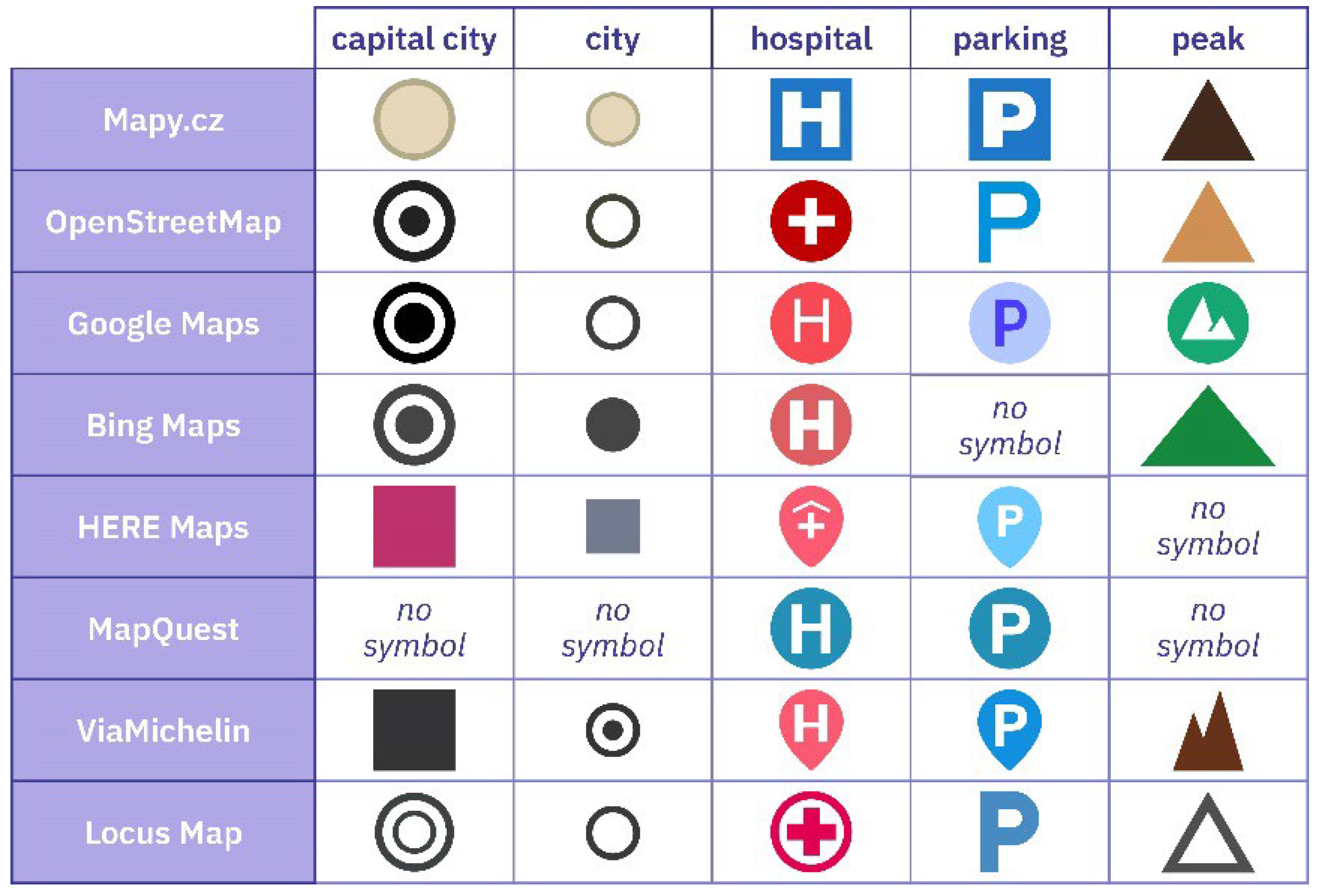
Figure 5.
Scale bars of selected web map applications. (Note: The figure includes screenshots from the web map applications.).
Figure 5.
Scale bars of selected web map applications. (Note: The figure includes screenshots from the web map applications.).
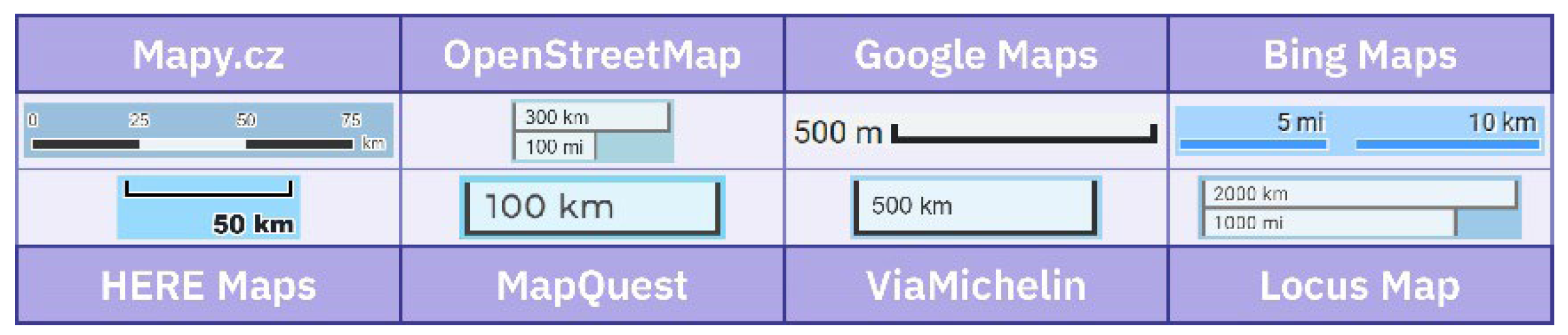
Figure 6.
Schematic representation of the map layouts of selected web map applications.
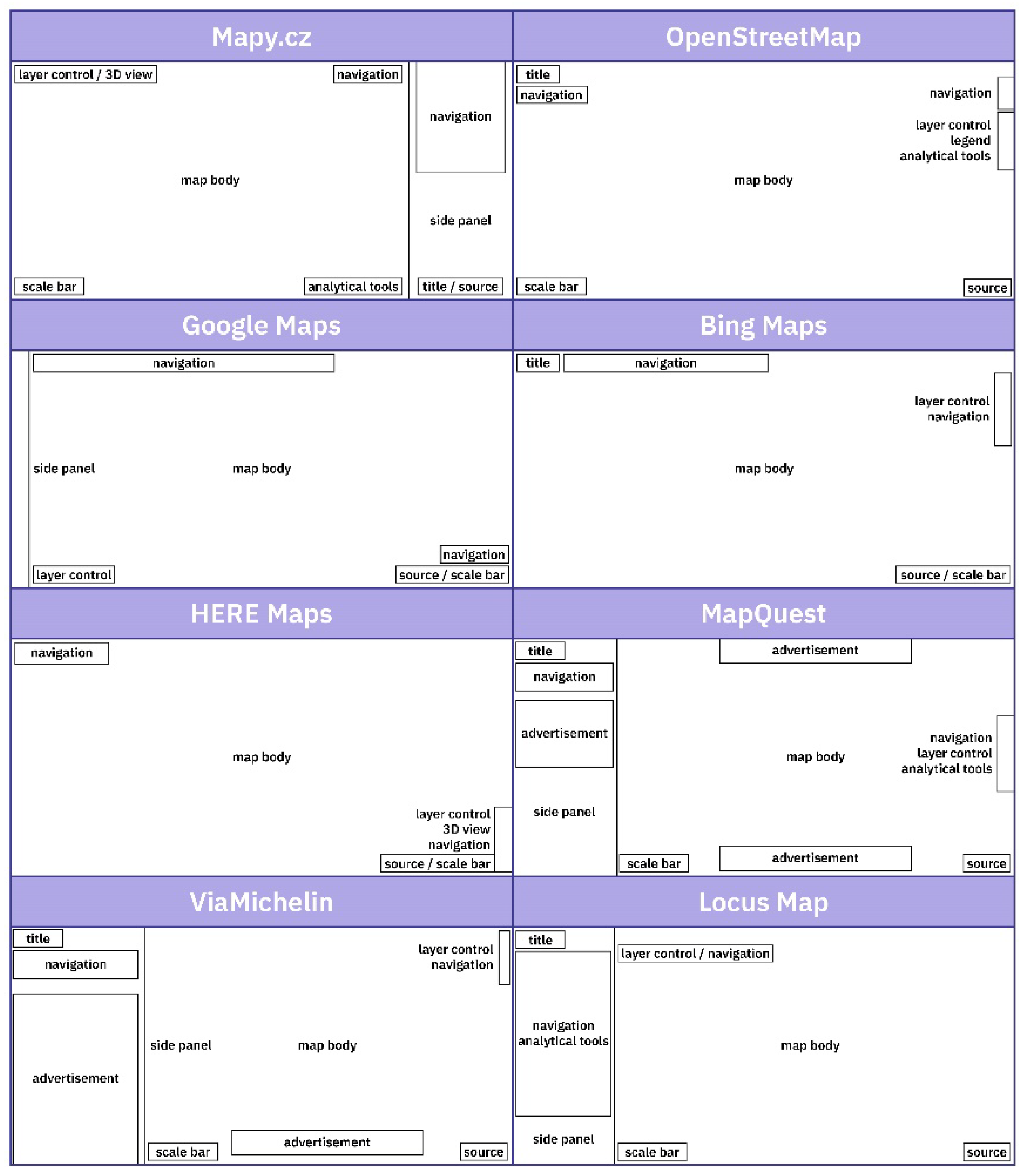
Figure 7.
Navigation elements of selected web map applications. (Note: The figure includes screenshots from the web map applications.).
Figure 7.
Navigation elements of selected web map applications. (Note: The figure includes screenshots from the web map applications.).
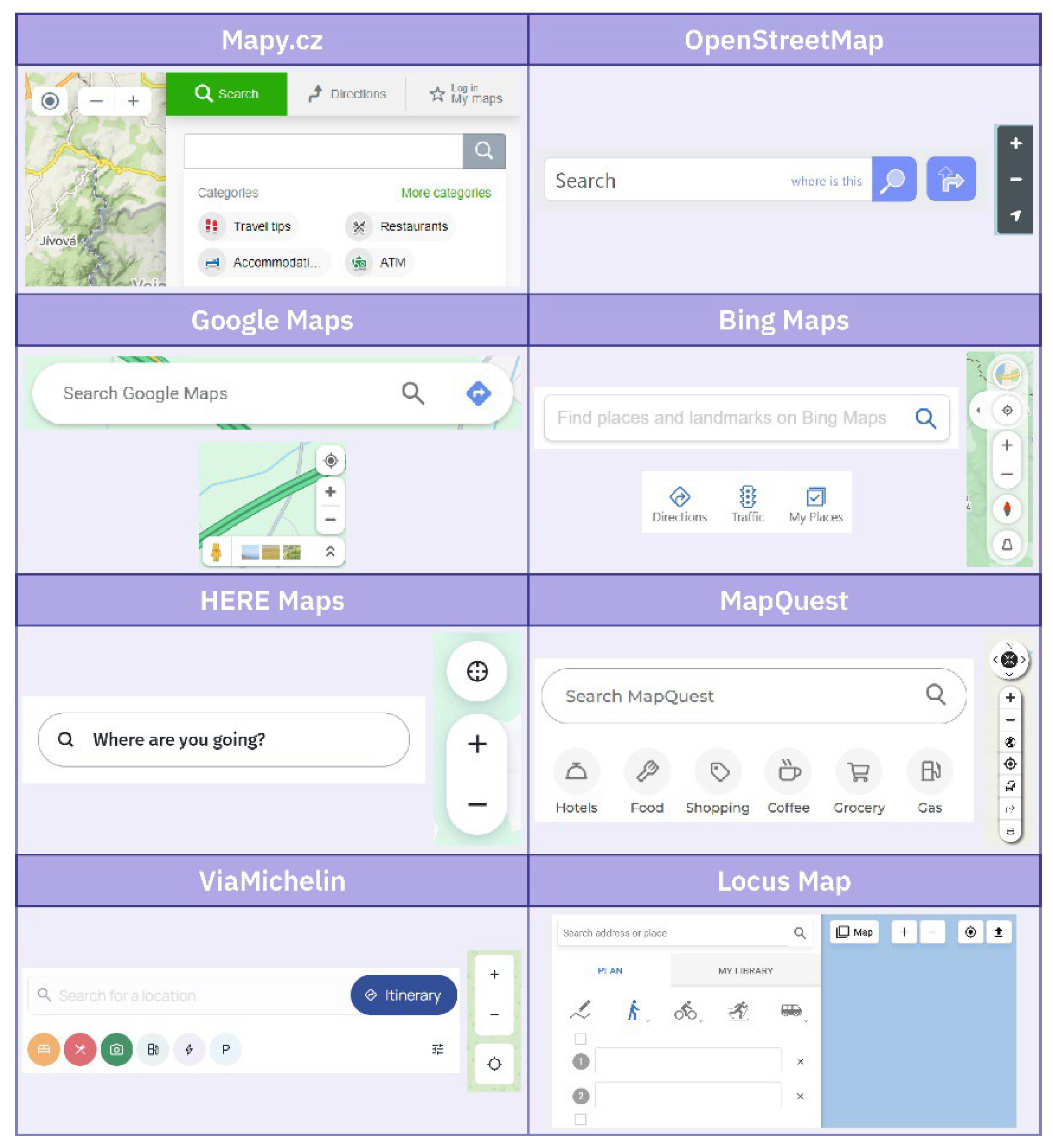
Figure 8.
An example of different label styles. (Note: The figure includes screenshots from the web map applications.).
Figure 8.
An example of different label styles. (Note: The figure includes screenshots from the web map applications.).
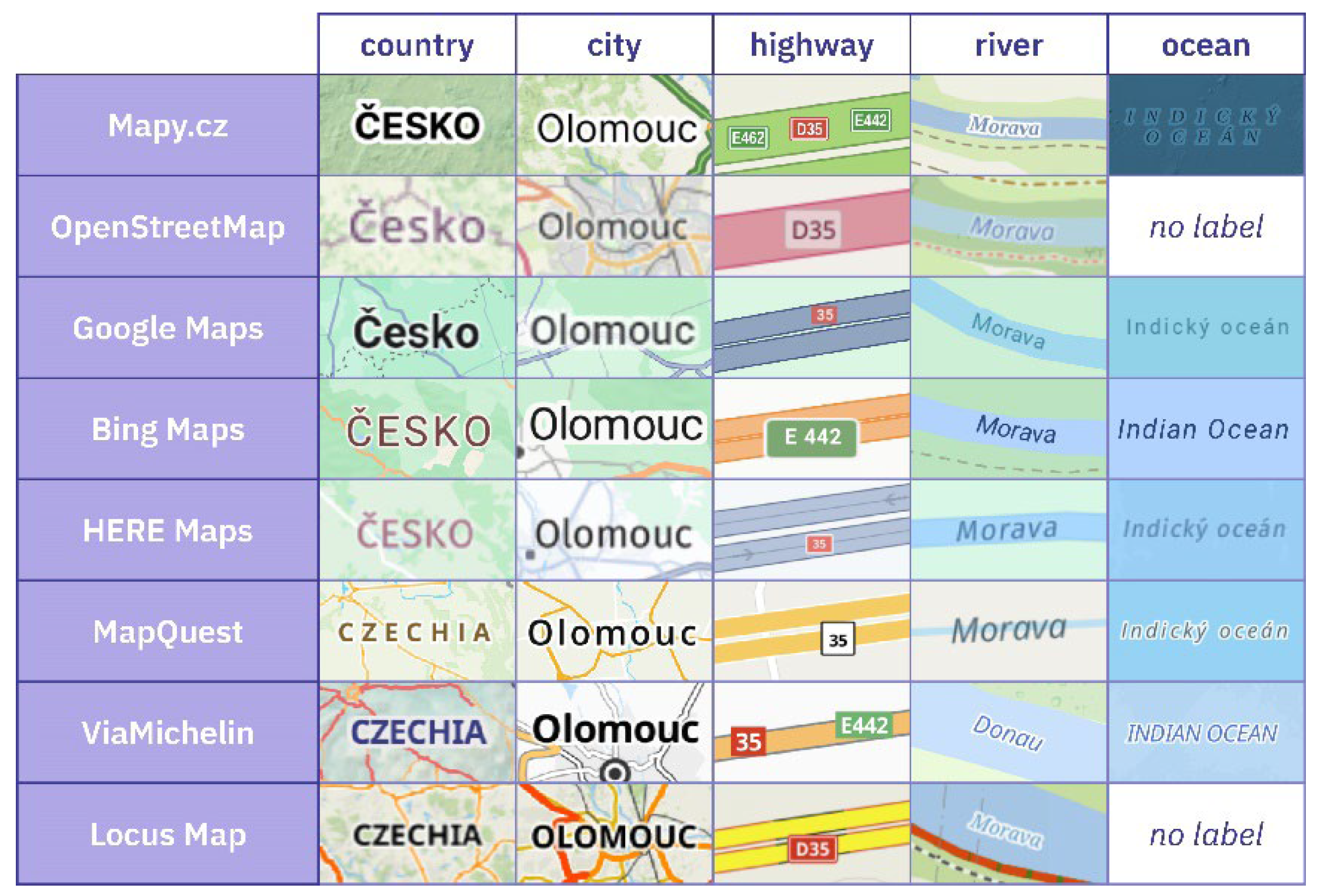

Table 1.
Selected analytical tools available in individual applications.
| Web Map Application | route planning | 3D view | distance measurement | data import / export |
printing | sharing | error reporting |
|---|---|---|---|---|---|---|---|
| Mapy.cz | yes | yes | yes | yes | yes | yes | yes |
| OpenStreetMap | yes | no | no | yes | no | yes | yes |
| Google Maps | yes | yes | yes | no | yes | yes | yes |
| Bing Maps | yes | no | yes | no | yes | yes | yes |
| HERE Maps | yes | yes | no | no | no | yes | no |
| MapQuest | yes | no | no | no | yes | yes | yes |
| ViaMichelin | yes | no | no | no | no | no | no |
| Locus Map | yes | no | yes | yes | no | yes | no |
Disclaimer/Publisher’s Note: The statements, opinions and data contained in all publications are solely those of the individual author(s) and contributor(s) and not of MDPI and/or the editor(s). MDPI and/or the editor(s) disclaim responsibility for any injury to people or property resulting from any ideas, methods, instructions or products referred to in the content. |
© 2024 by the authors. Licensee MDPI, Basel, Switzerland. This article is an open access article distributed under the terms and conditions of the Creative Commons Attribution (CC BY) license (http://creativecommons.org/licenses/by/4.0/).
Copyright: This open access article is published under a Creative Commons CC BY 4.0 license, which permit the free download, distribution, and reuse, provided that the author and preprint are cited in any reuse.