

Submitted:
01 May 2024
Posted:
02 May 2024
Read the latest preprint version here
Abstract
This study delves into innovative approaches and pragmatic remedies to surmount software access barriers in educational contexts. Financial impediments and limited software installation know-how can impede students from fulfilling course requirements.
Keywords:
education
; software
; equity
; experiential learning
Introduction
When crafting a curriculum for educating a diverse group of students, it’s crucial to customize the approach to accommodate varying levels of technical proficiency. Factors like financial constraints and limited familiarity with software installation also warrant attention. This investigation centered on a Database Management Systems (DBMS) course, engaging students majoring in information systems, healthcare administration, business administration, and marketing. The course was conducted online, posing distinct challenges compared to face-to-face setups where a standardized classroom environment, direct physical interaction, and technical assistance are more readily available.
The course’s design aimed to offer students a hands-on learning experience, recognized as pivotal in education. Hands-on learning fosters active exploration and application of knowledge, bolsters information retention, boosts motivation and engagement, and facilitates deeper understanding and skill development. During course preparation, it became evident that installing database software can prove significantly more complex than typical applications. Moreover, certain DBMS software entails additional licensing costs, a considerable financial consideration for students venturing into new software technologies. Is there a solution that can deliver a hands-on learning environment without the complexities or expenses linked to software installation?
Literature Review
The integration and utilization of digital tools and software within educational settings have persistently posed a formidable challenge. Students who lack technical expertise often grapple with the intricacies of software installation procedures, which encompass configuring settings, resolving compatibility dilemmas, and handling dependencies. These complexities have been documented as impediments that impede students’ effective engagement with course materials and active participation in practical learning endeavors (U.S. Department of Education, 2023). Furthermore, the financial ramifications linked to software procurement serve as additional obstacles to accessibility. Many educational institutions and students confront financial constraints, rendering it arduous to afford costly software licenses and subscriptions. This financial strain disproportionately impacts students hailing from disadvantaged backgrounds, constricting their access to indispensable educational assets (Fox, 2012).
In response to these challenges, educators and scholars have advocated for diverse strategies and remedies. One viable tactic entails harnessing open-source software and cost-free alternatives that furnish analogous functionalities to proprietary tools sans the associated expenses (Michael Heron, 2013). Through the adoption of open-access solutions, educational entities can diminish financial barriers and champion fair access to vital learning materials.
Moreover, the advent of virtualized environments and cloud-based platforms has emerged as a promising antidote to streamline software deployment and accessibility. Virtualization technologies empower students to remotely access software applications, obviating the necessity for individual installations and compatibility hitches (Vescio, 2008). Cloud computing services proffer scalable and economical solutions for hosting educational software, furnishing on-demand access to resources sans necessitating extensive hardware investments.
Additionally, collaborative endeavors among educational institutions, software developers, and licensing agencies can expedite the negotiation of discounted or subsidized licensing pacts, rendering proprietary software more accessible to students (Money Matters, 2008). These alliances cultivate a supportive milieu for technology-driven learning, guaranteeing that students possess the requisite tools for academic success.
This study is poised to propel substantive progress in enhancing both technical prowess and financial accessibility and equity, chiefly within the realm of educational software. By concentrating on methodologies to surmount barriers in accessing database software tailored for educational utility, it endeavors to augment access to pivotal learning tools and knowledge management resources. This research endeavors to proffer cost-efficient alternatives that can be readily embraced by educational institutions irrespective of their financial capacities. Particularly, this study aspires to cultivate a more all-encompassing digital milieu wherein students and educators alike can leverage the potential of database software to enrich teaching and learning experiences.
Problems with Installing Software
Designing a database management systems course for online students presents a fascinating challenge. The aim is to provide a seamless hands-on experience with database software without imposing obstacles or costs that might deter students from participation. One avenue explored was leveraging Microsoft Access, a user-friendly option embedded in Microsoft Office suites. However, the compatibility issue arises for Apple users, necessitating complex workarounds like setting up dual-boot systems via Boot Camp. Another option considered was MySQL, favored for its open-source nature and broad support. Yet, its installation complexities and ongoing administration hurdles pose significant challenges, potentially hindering student engagement.
To address these issues comprehensively, the course design focuses on cloud-based solutions. Utilizing cloud platforms like AWS, Azure, or Google Cloud, students can access virtual environments pre-configured with various database management systems. This approach eliminates compatibility concerns across operating systems and streamlines the setup process, ensuring all students have equal access to the required software. Moreover, cloud-based environments offer scalability, enabling students to work on real-world projects without hardware limitations.
The course structure includes modules on fundamental database concepts, hands-on exercises using cloud-based databases, and collaborative projects to simulate real-world scenarios. By emphasizing practical skills over software installation intricacies, students can concentrate on learning database design, querying, optimization, and administration. Additionally, incorporating virtual labs and interactive tutorials enhances the learning experience, providing immediate feedback and guidance.
Furthermore, partnerships with cloud service providers can offer discounted or free access to these environments for educational purposes, alleviating financial burdens on students. Dedicated support channels and forums foster a community where students can seek help and share insights, promoting a collaborative learning environment. By embracing cloud technology and a project-based learning approach, the database management systems course aims to empower online students with practical skills while minimizing barriers to entry, ensuring a fulfilling and inclusive learning journey for all participants.
Possible Solutions to Installing and Gaining Access to Software
To facilitate students’ exploration and utilization of software resources, educational institutions can deploy innovative strategies.
- Tailored Virtual Environments: Implement custom virtual machines or containers with pre-installed software suites, ensuring uniformity across student setups and eliminating individual installation hassles.
- Collaborative IT Engagement: Engage closely with institutional IT services to streamline software deployment. Leverage their expertise in defining system requisites, software licensing, and deployment methodologies aligned with your institution’s tech infrastructure.
- Embrace Cloud Solutions: Embrace cloud-based and SaaS solutions for critical tools, bypassing local installations. This approach enables students to access software via web browsers, mitigating compatibility issues and enhancing accessibility.
- Offer Diverse Software Options: Provide alternative software choices for complex installations or device compatibility challenges, ensuring students have viable substitutes for seamless workflow continuation.
- Foster Peer Learning Networks: Cultivate a culture of mutual support among students through online forums or discussion groups. Encourage sharing of tips, troubleshooting insights, and solutions to common installation hurdles.
- Feedback Integration: Institute a feedback loop for students to share their software installation experiences, leveraging platforms like learning management systems (e.g., Blackboard). Utilize this data to refine future deployment processes, addressing recurring issues proactively.
By embracing these dynamic strategies, educators can empower students with efficient software setup, promoting a harmonious learning journey focused on academic excellence over technical impediments.
Course Assignments
In the database management course, an extensive curriculum was developed comprising six unique assignments designed to incrementally test and enhance students’ database management skills. Each assignment was meticulously structured to offer students practical exposure to crucial facets of database design, implementation, and SQL querying, nurturing a profound comprehension of relational database principles and SQL proficiency. Through immersive engagement with practical scenarios and hands-on tasks, students honed vital competencies in database design, query formulation, and data manipulation, laying a robust groundwork for their pursuits in data-centric domains.
Solutions Used in the Database Management Systems Course
Throughout the database management systems course, various innovative methods were employed to streamline software installation and access.
Initially, the instructor adopted a proactive approach by regularly monitoring the Discussion Board on the Blackboard platform. This platform served as a collaborative space where students freely exchanged tips, troubleshooting insights, and solutions to common software problems. The invaluable feedback gathered from these discussions enabled the pinpointing of recurring issues and facilitated ongoing improvements to the software experience for future cohorts.
Undoubtedly, the most impactful strategy involved granting students access to essential software through a clientless remote desktop gateway. Specifically, at NSU, students utilized the open-source software Apache Guacamole (https://guacamole.apache.org/).
Apache Guacamole revolutionizes software accessibility by offering a web-based remote desktop gateway. This open-source solution is accessible to all, including educational institutions, providing a seamless way for students to connect to remote computers or virtual machines using just a standard web browser—no additional software or plugins required. This flexibility empowers students to access a full desktop environment and applications from anywhere with internet access, irrespective of their device or operating system. Guacamole’s user-friendly interface facilitates easy connection management, seamless transitions between remote sessions, and personalized desktop configurations. At NSU, accessing the remote desktop is as straightforward as:
- Go to the following URL using any browser. https://desktop.nsuok.edu
- Enter their username and password.
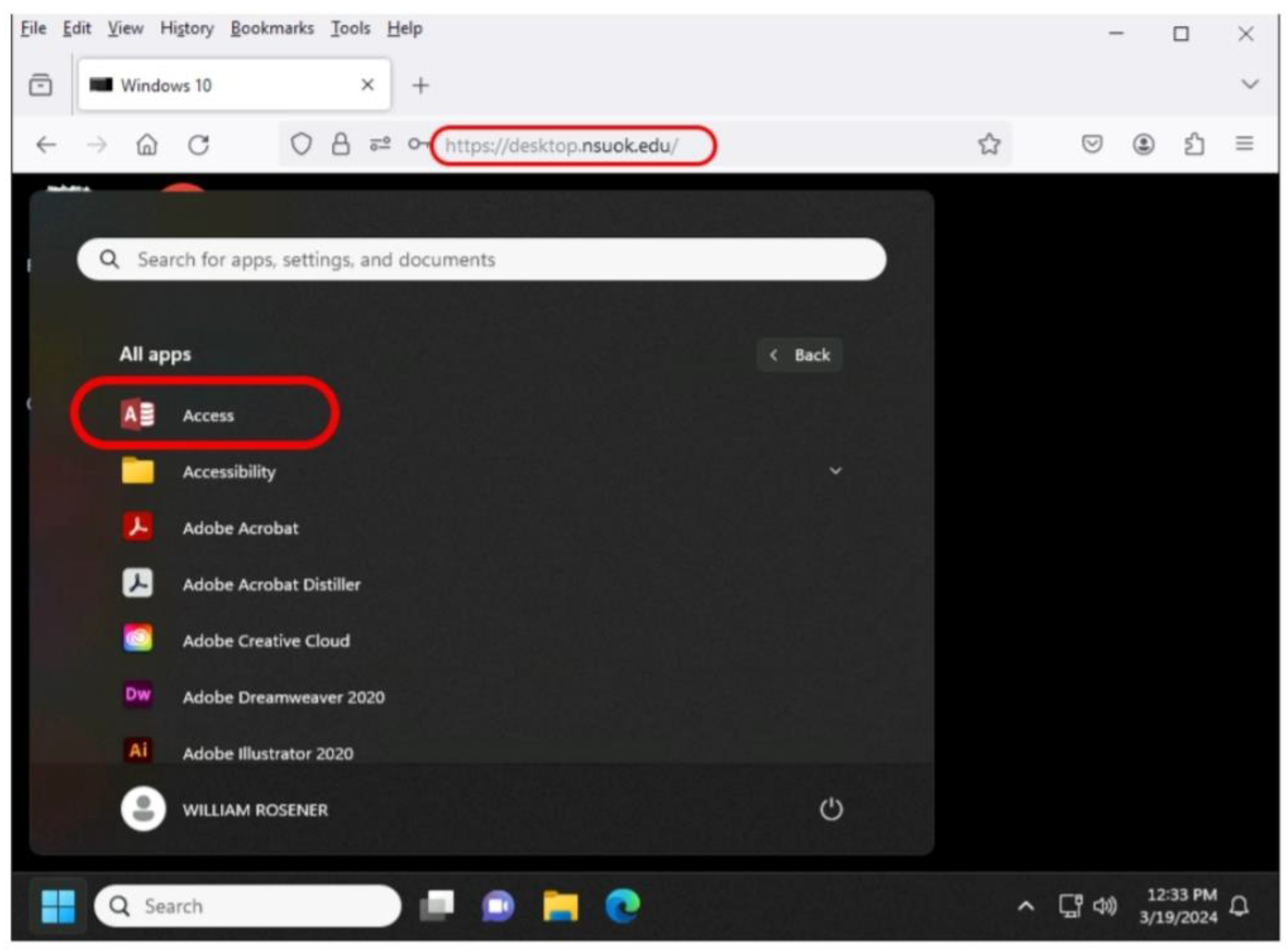
- The students can now access any software installed on the remote machine. In particular, for students in my database management systems course, the students would now select the software application MS Access as shown in Figure 1.
The unique charm of Apache Guacamole lies in its clientless nature, earning it the moniker “clientless software.” It operates without the need for plugins or additional client software, thanks to the power of HTML5. Once Guacamole is set up on a server, accessing a desktop computer becomes as easy as opening a web browser. This functionality empowers students to log into computers equipped with necessary software and engage in hands-on exercises without the hassle of installing or purchasing additional software packages.
Results
All students (46 out of 46), irrespective of their technical acumen or financial status, smoothly engaged with and fulfilled the database assignments without the hassle of installing or purchasing any software. This accomplishment was facilitated by leveraging a virtualized environment. Through this setup, students accessed the necessary database software remotely, directly from their web browsers. This approach eliminated the logistical hurdles associated with traditional software installation, such as compatibility issues, configuration intricacies, and system requirements. Consequently, students could channel their efforts entirely into learning and applying database management concepts without being impeded by technical obstacles.
Moreover, the utilization of open-source software in this educational setting played a pivotal role in ensuring fair access to essential learning resources. These initiatives not only alleviated the financial strain on students but also fostered a culture of collaboration and knowledge sharing within the academic realm. Students gained access to top-tier software without the hefty costs typically linked to proprietary solutions. The seamless completion of database assignments sans software installation or purchase requirements underscored the efficacy of this approach in nurturing student success and engagement. By dismantling barriers to access and embracing forward-looking technological strategies in learning, an inclusive educational environment was established where every student had the chance to excel and thrive.
Conclusions
In reflecting on the journey of teaching a course on database management systems, it’s clear that the experience has been both enlightening and challenging. The emphasis on providing students with a practical, hands-on learning experience was crucial, especially considering the complexities and financial barriers often associated with installing database software. The implementation of a clientless remote desktop gateway, specifically through Apache Guacamole at NSU, emerged as a remarkably efficient and practical solution to tackle these challenges related to software accessibility in teaching database management systems. By harnessing this technology, students gained seamless access to necessary software without the usual complexities or costs tied to traditional installation methods. This not only facilitated hands-on learning but also promoted inclusivity by eliminating financial barriers that might have otherwise limited students’ access to essential resources. This approach showcases the power of innovative solutions in surmounting logistical hurdles and enhancing the overall educational experience.
As we navigate the dynamic landscape of education, it remains crucial to remain open to adopting new technologies and methodologies that enhance accessibility and effectiveness. Embracing tools like Apache Guacamole ensured that every student could fully engage in their learning journey, empowering them to succeed and thrive in both academic and professional pursuits. This experience underscores the importance of leveraging innovative solutions to create inclusive learning environments that support student success.
References
- Christine Zaza, Elena Neiterman, “Does Size Matter? Instructors’ and Students’ Perceptions of Students’ Use of Technology in the Classroom”, Journal of Information Technology Education: Research, Volume 18, 2019.
- Dawson, K. (2012). Using action research projects to examine teacher technology integration practices. Journal of Digital Learning in Teacher Education, 28(3), 117-124. [CrossRef]
- Fox, C., Waters, J., Fletcher, G., & Levin, D. (2012). The broadband imperative: Recommendations to address K-12 education infrastructure needs. Washington, DC: State Educational Technology Directors Association.
- Freeland, J., & Hernandez, A. (Samouha, A.). (2014). Schools and software: What’s now and what’s next? San Mateo, CA: Clayton Christensen Institute.
- Hsu, P., & Sharma, P. (2008). A case study of enabling factors in the technology integration change process. Educational Technology & Society, 11(4), 213-228.
- International Society for Technology in Education (ISTE). (2021). ISTE Standards for Students. ISTE Standards for Students. https://iste.org/standards/students.
- Ivy M. Tarun, “The Effectiveness of a Customized Online Collaboration Tool for Teaching and Learning”, Journal of Information Technology Education: Research, Volume 18, 2019. [CrossRef]
- John McAvoy & Tom Butler, “A Failure to Learn By Software Developers: Inhibiting the Adoption of an Agile Software Development Methodology”, Journal of Information Technology Case and Application Research, Volume 11, 2009 – Issue 1, Sep 2014. [CrossRef]
- Lu, R., & Overbaugh, R. (2009). School environment and technology implementation in K-12 classrooms. Computers in the Schools, 26(2), 89-106. [CrossRef]
- Michael Heron, Vicki L Hanson & Ian Ricketts, “Open source and accessibility: advantages and limitations”, Journal of Interaction Science, May 2013. [CrossRef]
- Money matters: Budgets, finances, and resources for tech programs. (2008). Technology and Learning, 28(12), 2.
- National Education Association. (2012). Preparing 21st century students for a global society: An educator’s guide to the “four Cs.” Washington, DC.
- Office of Educational Technology, “A Call to Action for Closing the Digital Access, De- sign, and Use Divides”, 2024 National Educational Technology Plan.
- Steiner, L. (2004). Designing effective professional development experiences: What do we know? Naperville, IL: Learning Point Associates.
- Thomas, L., & Knezek, D. (2008). Information, communication, and educational technology standards for students, teachers, and school leaders. In J. Voogt & G. Knezek (Eds.), International handbook of information technology in primary and secondary education (Vol. 20, pp. 333-348). New York, NY: Springer.
- U.S. Department of Education, Office of Educational Technology. (2023). National Educational Technology Plan Update. https://tech.ed.gov/netp/.
- Vescio, V., Ross, D., & Adams, A. (2008). A review of research on the impact of professional learning communities on teacher practice and student learning. Teaching and Teacher Education, 24(1), 80-91.
- Xin Xie, Keng Siau & Fiona Fui-Hoon Nah, “COVID-19 pandemic – online education in the new normal and the next normal”, Journal of Information Technology Case and Application Research, Volume 22, 2020 – Issue 3, Nov 2020. [CrossRef]
Figure 1.
depicts a seamless connection between a web browser and a remote computer facilitated by Apache Guacamole. This software revolutionizes access to applications by simplifying the complexities inherent in traditional remote desktop solutions, offering a user-friendly experience accessible from any web-enabled device.
Figure 1.
depicts a seamless connection between a web browser and a remote computer facilitated by Apache Guacamole. This software revolutionizes access to applications by simplifying the complexities inherent in traditional remote desktop solutions, offering a user-friendly experience accessible from any web-enabled device.
Disclaimer/Publisher’s Note: The statements, opinions and data contained in all publications are solely those of the individual author(s) and contributor(s) and not of MDPI and/or the editor(s). MDPI and/or the editor(s) disclaim responsibility for any injury to people or property resulting from any ideas, methods, instructions or products referred to in the content. |
© 2024 by the authors. Licensee MDPI, Basel, Switzerland. This article is an open access article distributed under the terms and conditions of the Creative Commons Attribution (CC BY) license (http://creativecommons.org/licenses/by/4.0/).
Copyright: This open access article is published under a Creative Commons CC BY 4.0 license, which permit the free download, distribution, and reuse, provided that the author and preprint are cited in any reuse.