

Submitted:
03 April 2024
Posted:
05 April 2024
You are already at the latest version
Abstract
The Fruit Harvest Helper, a mobile application developed by Northwest Nazarene University’s (NNU) Robotics Vision Lab, aims to assist farmers in estimating fruit yield for apple orchards. Currently, farmers manually estimate the fruit yield for an orchard, which is a laborious task. Fruit Harvest Helper seeks to simplify their process. While prior research efforts at NNU concentrated on developing an iOS app for blossom detection, this current research aims to adapt that smart farming application for apple detection across multiple platforms, iOS and Android. The old and new applications were designed with an intuitive user interface that is easy for farmers to use, allowing for quick image selection and processing. Unlike before, the adapted app utilizes a color ratio-based image segmentation algorithm implemented in OpenCV C++ to detect apples in apple tree images selected for processing. The results of testing the algorithm with a dataset of images indicate an 8.52% Mean Absolute Percentage Error (MAPE) and a Pearson correlation coefficient of 0.6 between detected and actual apples on the trees. These findings were obtained by evaluating the images from both the east and west sides of the trees, which was the best method to reduce the error of this algorithm. Although the Fruit Harvest Helper shows promise, there are many opportunities for improvement. These opportunities include exploring alternative machine-learning approaches for apple detection, conducting real-world testing without any human assistance, and expanding the app to detect various types of fruit. The Fruit Harvest Helper mobile application is among the many mobile applications contributing to precision agriculture, nearing readiness for farmers to use in yield monitoring and farm management.
Keywords:
precision agriculture
; yield monitoring
; farm management
; apple detection
; fruit detection
; farming mobile application
; yield monitoring mobile application
; fruit yield estimation
1. Introduction
In the current farming practices, precision agriculture is becoming more critical since new technologies are helping farmers reduce their costs, increase their profits, and even produce more crops. According to a study conducted by the Islamia University of Bahawalpur in Pakistan, when comparing cotton farms that adopted technology with those that did not, the adopters saw up to a 22% higher crop yield per acre and a 27% higher profit per acre [1]. These findings suggest that farms that utilize precision agriculture technologies will be significantly more sustainable. Precision agriculture refers to any farming practice that uses technology, data analysis, or spatial variability management techniques to optimize crop production efficiency, sustainability, and profitability. Mobile applications are among the many precision agriculture tools being created for use in agriculture. As shown in a survey by Oteyo et al. 2021, mobile applications for intelligent agriculture span various agricultural areas, including irrigation management, data collection, farm management, crop health, and yield monitoring. Each of these mobile applications was made to solve a specific agricultural task, helping farms meet demands and stay afloat [2].
Yield monitoring is an area of precision agriculture that focuses on measuring and analyzing the quantity of crops produced by a field to provide valuable information to farmers. The information gained from yield monitoring helps farmers increase their productivity and inform their decision-making. As found by a recent study, yield monitoring systems that farmers have adopted provide row crop farmers with valuable insights into the performance of different areas of their fields. However, these methods, usually based on measuring the weight of harvested crops, are most successful for row crops like corn and soybeans. They are less successful for specialty crops. Specialty crops are widespread and consist of fruits, vegetables, and nuts. These weight methods don’t work for specialty crops because various challenges arise due to their geometric parameters [3]. This issue has shed more light on the need for yield monitoring systems designed for specialty crops. A book chapter published in 2022 discovered that most yield monitoring technologies don’t specialize in fruit crops, which still need more thorough analysis [4].
While lacking thorough analysis, some fruit yield monitoring technologies have already been developed. According to a research paper released in 2013, their team of researchers developed an Android smartphone application that uses a Java fruit-counting algorithm to estimate citrus yield. The researchers even claim that the application can assist farmers in assessing the fruit yield for an individual citrus tree [5]. There is also another Android mobile application for apple yield estimation, as proposed by Qian et al. (2017), which uses an artificial neural network to detect Fuji apples accurately. As they mentioned, though, their application only works on Android devices, and for the Fuji apple variety, a variety known to have deeper colors of red and less green patches [6]. So far, no research has been done to create a mobile application for apples of the Pink Lady variety, which urged Northwest Nazarene University’s (NNU) Robotics Vision Lab to look further into the problem of fruit yield estimation for apples.
Traditional fruit farmers face the obstacle of manually counting fruits on trees during harvesting season to estimate the fruit yield for the entire orchard. Currently, the fruit yield estimation process consists of selecting a group of trees, manually counting the fruits on each tree, calculating the average fruits found on a tree, and then applying this average to a large group of trees in the orchard or the entire orchard [7]. The issue with this manual method is that it’s time-consuming, labor-intensive, and inaccurate, which are all things that technology can solve. As mentioned earlier, there’s also a need for a mobile application that predicts fruit yield for Pink Lady apples. Recognizing this gap, the researchers at NNU’s Robotics Vision Lab chose to invent a solution by developing a mobile application capable of detecting apples on Pink Lady trees to facilitate fruit yield estimation.
In other words, the main objective of this research was to design a mobile application that could detect Pink Lady apples on trees, making fruit yield estimation easier for farmers. Or rather, the study aimed to adapt an existing blossom detection iOS application into a cross-platform tool. To elaborate, this meant that the NNU team transitioned from a blossom-counting fruit yield estimation approach to an apple-counting approach while ensuring accessibility to farmers using iOS and Android devices [8]. The last objective of this research was to validate the algorithm’s effectiveness by establishing a correlation between the number of detected apples and the actual number of apples. A similar validation process was conducted by Bargoti and Underwood, who also compared the apples detected on the images to the count of physical apples in order to obtain a correlation [9].
Considering those objectives, the scope of this research was exclusively to develop a functional mobile application for iOS and Android platforms and to assess whether the application was a technology that was viable for farmers to adopt. At Fruit Harvest Helper’s current stage, the mobile application has not been released for public use since the algorithm needs further testing and improvement to work in the real world. However, the potential benefits of this app for farmers are significant. By providing an efficient alternative to manual fruit counting, this yield monitoring technology could save farmers hours of valuable time and resources, reducing labor costs and labor itself. Also, if improvements are made to the Pink Lady detection algorithm, this system could surpass the accuracy of manual counting over time. Although the Fruit Harvest Helper isn’t at the stage where it’s viable for apple yield estimation in Pink Lady orchards, advancements to its detection algorithm would enable farmers to more efficiently and possibly more accurately estimate fruit yield, helping farmers anticipate labor and farm management costs for the upcoming harvest.
2. Materials and Methods
2.1. App Conceptualization and Development Process
The concept of the Fruit Harvest Helper came from doing some research and identifying what agricultural research tasks needed to be solved. A research study conducted in 2015 by Karkhile and Ghuge showcased a multi-purpose precision agriculture tool. The tool was an Android application that helped inform farmers to increase their profits, giving them information such as the current weather in their area, news updates, and recent market trade deals. This mobile application demonstrated many different ways mobile applications could be used for precision agriculture and clearly explained how mobile computing can help farmers out in this new age [10]. As a logical progression of reading about this, NNU’s Robotics Vision Lab became interested in developing a mobile application for precision agriculture.
Doing more research led to the discovery that fruit yield monitoring technologies were an area that needed to be studied more. There were some existing mobile apps for fruit yield estimation, though, which included apps that detected fruits such as citrus, kiwis, and apples. The mobile application for kiwi detection, called the KiwiDetector, was an Android application that used a few different deep-learning approaches to quickly and accurately detect kiwis for kiwi yield estimation [11]. Another existing application was the app Qian et al. developed for Fuji apple yield estimation, as discussed earlier [6]. Learning about these mobile applications helped narrow the focus for deciding on what type of research would be done. Although there was already an apple yield estimation tool that detected and estimated the Fuji apple variety, no research on mobile applications for the Pink Lady variety was found. In noticing this, it was clear that predicting the apple yield for Pink Lady apples with a mobile device was an agricultural task that needed solving.
Since predicting apple yield for Pink Lady apples with a mobile device was something farmers still needed, the NNU team set out to develop a mobile application for this purpose. In order to be a convenient tool for farmers, this mobile application would eventually need an accurate enough algorithm and would have to be publicly available for them to download. A relatively simple image-processing algorithm was chosen for this study as a starting place for Pink Lady apple detection. With the transition to a more advanced detection algorithm in the future, the Fruit Harvest Helper will be able to save farmers time and costs. The Fruit Harvest Helper will also increase farmers’ productivity and give them more accurate fruit yields, improving decision-making in agricultural practices. Given that there is a practical need for a Pink Lady apple yield estimation tool, this is definitely a technology that farmers would be interested in downloading and adopting for use in their orchards.
The last step before development began was picking the platform(s) for creating the mobile app. A study on mobile applications for agriculture shows that most of the apps generated come from iOS and Android platforms. After all, these are the two most commonly used platforms, so this makes sense. Some of the applications this study included were farming apps for business and financial data, pests and diseases, agricultural machinery, and farm management. According to the survey, in 2016, there were 91 iOS and 69 Android mobile applications for farm management, which is the category fruit yield estimation falls under [12]. Considering that iOS was the more popular choice for mobile apps in the farm management category, NNU’s Robotics Vision Lab initially developed a mobile application only for iOS devices. Also, creating an application for one platform was an easier task. This first mobile application for iOS was designed with a blossom detection algorithm to estimate the apple yield for an orchard. Once this mobile application was functional, there were still many improvements to the blossom detection method. Hence, the researchers switched to apple detection before making the various improvements to the blossom detection algorithm [8]. The researchers also made the change of developing for the Android platform. The reason for this was to reach more farmers in need. According to a study conducted by the University of Salamanca, Samsung smartphones led in worldwide sales for both years studied, 2012 and 2013 [13]. Given that more farmers would likely have an Android application, the scope of the research changed, leading the researchers to develop an Android mobile application, too, in this study. Using React Native, the researchers began to develop the mobile application for iOS and Android. Look at Figure 1 to see this application being used.
In the development phase of the Fruit Harvest Helper app, the user interface was made using the React Native framework since this was a convenient option. React Native is a framework built directly on top of the JavaScript programming language used to create cross-platform mobile applications. As the front end took shape, the main functionality, or the back end, began to get integrated into the application, a task executed separately for the iOS and Android platforms. The iOS application relied on C++ code for the back end, whereas the Android counterpart used a combination of Java and C++. Despite these differences, both platforms shared the same OpenCV C++ apple detection algorithm. To provide context, OpenCV is a widely used machine vision library that performs the image processing component of the application. The performance of this library was reliable across both platforms. The researchers used the latest version of Visual Studio Code for the development phase.
Once the development phase for mobile applications was complete, the researchers had to test the app to see how well the product functions. The researchers took a dataset of images of mature Pink Lady apple trees a few weeks before harvest. These were the images they analyzed for testing. This testing phase aimed to verify the application’s functionality by evaluating the apple detection algorithm outside the application in a separate environment. Testing the algorithm outside the mobile application made running it way quicker, allowing the researchers to fine-tune the algorithm and evaluate its accuracy in a fraction of the time. After testing, it was determined that the algorithm wasn’t effective enough for farmers to use for apple yield estimation and still required improvements.
2.2. Algorithm Development
The Pink Lady apple detection algorithm created for the Fruit Harvest Helper implemented a color ratio-based image segmentation algorithm. This color ratio-based approach was one of many paths that could have been taken to attempt to detect apples in images of apple trees. Studies in the past have explored many different apple detection algorithms, such as the color index-based image segmentation method presented a few years ago in 2022. Each algorithm or approach has strengths and limitations [14].
Like any algorithm, the color ratio-based approach the researchers utilized is a sequence of operations. Before processing, the algorithm received an image of the user’s choice. Once the image was obtained, the algorithm underwent a series of steps to detect apple clusters in the apple tree image, as shown in Figure 2. First, the researchers made a copy of the input image, which all of the calculations would performed on. Using the duplicate image would preserve the input image for when it needed to be displayed. To copy the original image and then process that copy, OpenCV C++ was used. The OpenCV library represented the Pink Lady apple tree image as a multi-dimensional matrix of pixels containing a dimension for rows, columns, and color channels. The next operation consisted of splitting the image into three color channels: Blue, Green, and Red. Blue, Green, Red, or BGR is the format in which OpenCV stores images. Separating the image into color channels would allow each color component to be analyzed individually, providing more information to work with. This separation would be crucial for getting the values used in the primary step of the algorithm.
Now that the image was split into color channels, the researchers converted the copied image to grayscale. So far, the copied image has been stored as a grayscale image and as three distinct color channels. The researchers then converted each color channel to grayscale to compare the color channel intensities to the intensity of the entire input image. The result of comparing intensities was a ratio corresponding to each color channel, indicating how much of a particular color was in the image. These ratios formed the heart of the apple detection algorithm since they made up the color ratio evaluation equations that classified every pixel as an apple or not an apple, which was the next step in the algorithm. In the step of classifying the image pixels, each pixel was iterated through and classified based on the weighted evaluation equations. It should also be noted that the researchers weighted these ratios within the equations. The researchers empirically selected and fine-tuned these weights through a lot of testing to achieve the optimal detection of apples across the image dataset. As pointed out in a research article discussing fine-tuning hyperparameters, a machine-learning algorithm’s hyperparameters depend on the dataset used for fine-tuning them [15]. This means that the hyperparameters for the image segmentation algorithm would likely function best with the dataset the researchers collected, and further testing on multiple Pink Lady apple tree orchards would need to be carried out to figure out the algorithm’s effectiveness across different datasets.
After the classification of pixels, the image segmentation results still needed to be refined and displayed. The process of refining an algorithm’s results can be described as post-processing. The post-processing operations of the Fruit Harvest Helpers algorithm were applied to the binary mask generated from the last step. One of the post-processing operations was a morphological opening. A morphological opening is a widespread image processing technique used to filter out small white regions surrounding identified apple clusters, smooth the edges of clusters, and remove noise. In a previous study by Mat Said et al., researchers illustrated the effectiveness of using a morphological opening in image processing tasks. The research team explained that the morphological opening operation erodes and dilates the input image. This operation uses a predefined structuring element to find the neighborhood of pixels that will be considered [16]. While this is how morphological openings work in general, this is also how this operation functions in the post-processing stage of the apple detection algorithm. In the next step, contours that were too small to represent apple regions were filtered out to reduce some false detections or false positives. A minimum contour size hyperparameter was set and fine-tuned to accomplish this task. Finally, the remaining contours represented the significant apple clusters so these contours could be drawn onto the copied image. These contours were drawn where the algorithm "thought" the apples were based on the steps just described. In the drawing step, green bounding boxes were put onto the image, highlighting regions identified as apple clusters for visualization.
Initially, the image segmentation algorithm was developed with the latest version of MatLab. Developing in MatLab was done to facilitate the creation of the apple evaluation equations since MatLab is made for math-based tasks like that. Later, the MatLab algorithm was converted to OpenCV C++ to be placed inside the Fruit Harvest Helper mobile app. Utilizing C++ enabled the detection algorithm to work with iOS and Android platforms.
When gathering data, the researchers took pictures of apple trees at Williamson’s apple orchard in October 2023. An Android device was used to capture images from both the west-facing and east-facing sides of the Pink Lady apple trees. In total, 40 trees were involved in the research dataset. Unfortunately, 39 east- and 34 west-side images were collected due to unforeseen circumstances. Although challenges existed with image collection, the researchers refined the algorithm through tests using the available photos. This fine-tuning significantly improved how well the algorithm could detect apples based on color. The algorithm now accurately identifies apples by focusing on areas of the apple tree images. Having a fully functional apple detection algorithm is a big step forward in creating a reliable mobile app for estimating apple yields for Pink Lady orchards.
2.3. Front-end Development
According to a study by Brambilla et al., when designing any application, two large-picture things should be considered: the front end and the back end. An application’s front end is responsible for its appearance and feel. Having a well-thought-out user interface (UI) ensures that the user of the technology has a positive experience [17]. Furthermore, an excellent front end should keep the users engaged and satisfied by serving its purpose and nothing else. In the case of the Fruit Harvest Helper app, creating a UI tailored to farmers was essential for keeping them satisfied as they used the app. Tailoring the app to them involved making the design simple and easy to use since farmers likely prefer functionality over complexity. As depicted in Figure 3, the layout of the Fruit Harvest Helper mobile application was straightforward and lacked any unnecessary features or elements.
To develop the front end, the researchers used the React Native framework, which takes an approach to simultaneously developing both iOS and Android platforms. Designing both applications at the same time was much more efficient than individually building out the front ends. Considering what design farmers would want, they first planned the information layout for display. By incorporating the same elements from the existing blossom detection app, created by the NNU Robotics Vision Lab previously, the process of designing the UI for this new application became easy.
During the design phase of the UI, the researchers added four main components to display to the farmers by using React Native. Firstly, showing the selected or taken image of a Pink Lady apple tree helps farmers confirm their image choice, providing a sense of direction for them. The processed image, generated through the process of the algorithm analysis of the photo, offers farmers valuable insights into the apple detection results. Therefore, it was also chosen for display. These two elements are displayed in vertically aligned boxes with the regular image placed above the processed one. Also, the UI shows the number of apples detected as an output measure for farmers to estimate the apple yield for their orchards. Before they could calculate an estimate for apple yield, though, additional calculations like applying a correlation between detected and actual Pink Lady apples would be necessary. The researchers found a correlation in this study, which will be discussed later on, but at the current stage of the application, it can’t be applied directly to this output of apples number. Considering there are different varieties of apple trees, creating a correlation for each specific variety being analyzed would be vital for precise estimations across these different types of trees. Lastly, there is a button to select new images for processing. After clicking the button, an easy-to-use pop-up interface provides options to choose images from the photo library, capture a photo, and cancel the action. Once an apple tree image is selected, it gets transmitted to the back end, where it is processed. The UI is then instantly refreshed to show the altered Pink Lady apple tree image and the number of apple clusters identified and displayed.
2.4. iOS Back-end Development
The functionality that lies at the core of an application called the back end of an application, serves the purpose of handling the user’s input or selections and then processing that input to generate an output. In the context of the Fruit Harvest Helper mobile app, which focuses on detecting apples, a farmer picks an image of a Pink Lady apple tree, which is the user selection. After processing this image on the back end, a processing image along with a tally of the identified apple clusters are returned to the user on the front end, as just discussed. To bring this back-end functionality to life, the researchers utilized the C++ programming language, C++ native libraries, and the OpenCV library for processing.
The Fruit Harvest Helper’s architectural design followed a pattern described in a research study by Thakur and Pandey, the Model View Controller (MVC) pattern, which is an embraced approach in software engineering. The MVC pattern segmented the application into three parts: the Model managed input data, the View handled the front-end presentation for users or farmers, and the Controller processed data behind the scenes. This separation of concerns made the code more modular and maintainable for future researchers who make additions or changes to this application [18]. Enabling communication between React Native and the C++ back end involved integrating Djinni, a deprecated tool that can be used for communication between the front end and back end in React Native applications. The researchers initially selected Djinni for its ability to generate a back-end file where the functionality for both iOS and Android could be written to process apple tree images. Unfortunately, the researchers faced challenges in making this method compatible with Android devices, but it still worked as a solution for the iOS back end.
To overcome the difficulties of sending the Pink Lady apple tree images to the C++ back end using Djinni, the research team developed a workaround. This workaround was just a matter of saving the apple tree image in the cache of the iOS device on the React Native front end and later retrieving it by the C++ back end through the use of the iOS device’s file system. Once the image was received and it was confirmed, the OpenCV C++ image segmentation algorithm was applied, which used the machine learning techniques outlined in the algorithm section. The edited or processed image and a count of the detected Pink Lady apples were then sent back to the front end to display to the farmers.
2.5. Android Back-end Development
The development of the Android back end consisted of using a mixture of Java and C++. Java is the native back-end language for Android, meaning it had to be used, and C++ needed to be used to use the same color ratio-based OpenCV C++ algorithm. Recalling the iOS app created a pathway to send information from the application’s front end to the back end using Djinni. Still, the researchers needed help to make this method successful for Android. After exploring this option enough, a more well-known method of communicating with the Android back end was tried. Typically, Android Native Modules can provide back-end functionality for Android apps when working with the React Native framework. By using a more popular method, documentation was easier to find and, therefore, followed for the creation of the Android back end. Android Native Modules provide a back-end environment written in Java that can be used for mobile applications.
The React Native front end establishes a connection with an Android Native Module by calling a Java function that developers create within the module. Setting up this connection required the researchers to undergo various configuration steps. Initially, a JavaScript wrapper was made to wrap around the module on the React Native front end. Also, methods that needed to be called in the Android Native Module from the front end had to be labeled as callable so they could be found when an image was selected for processing. The last step was registering the native module for usage within the application, making it recognizable to Android devices. These configuration steps marked the first phase of handling the image processing for Android.
The color ratio-based image segmentation algorithm was written in OpenCV C++, which needed to work for both iOS and Android. In order to get this algorithm to be compatible with Android, communication between Java and C++ had to be made, which brought about a set of challenges. The Java Native Interface (JNI) was a viable solution because it allows Java to talk back and forth with other languages, such as C++. Configuring JNI required adjusting the Android applications build process to get these two languages to cooperate correctly. The Android Native Module had to be able to interact with C++, too. Configuring the Android Native Module to interact with the C++ code meant writing more Java code to get the native module to recognize that C++ code was available. This configuration allowed the native module to establish a communication channel with C++ for sending the original apple tree image and receiving the processed image. In the C++ image processing file, a JNI function was implemented to get the communication channel working on the C++ side. The C++ could then accept the sent-over image data, process it, and relay it back to the Java side. Once the processed image reached Java, Java passed the image over to React Native to display it on the UI.
To finish setting up the Android back end, OpenCV had to be installed and integrated into the current setup. Installing OpenCV was straightforward since this involved downloading OpenCV version 4.6.0 for Android. The researchers downloaded and used this version for iOS, too. However, once OpenCV was installed, the Android build process had to be configured again so Android devices could recognize the OpenCV library. When OpenCV started working within the setup, the apple detection algorithm was copied from the iOS C++ file and pasted into the Android C++ file. Although this meant the code for the algorithm was used twice, this solution saved time and was able to process images just fine. One drawback of this entire solution for image processing on Android was that JNI worsened processing times.
3. Results
This research study had two main objectives. These objectives were to create a mobile application that could detect Pink Lady apples in images of apple trees to help farmers with the task of estimating apple yield and to verify the detection algorithm’s effectiveness by deriving a correlation. While the creation of the Fruit Harvest Helper mobile application was important, the core focus of the study was developing the color ratio-based image segmentation algorithm and testing how accurately it could spot apples in a dataset of images. During testing, the hyperparameters of the detection algorithm were changed to fine-tune it. By fine-tuning the algorithm, apple clusters appeared to be identified much better. The performance of the Pink Lady apple detection algorithm was then assessed to come up with a common metric.
The evaluation method chosen concentrated on calculating the Mean Absolute Percentage Error (MAPE). Finding the MAPE value of the detection algorithm provided a metric to assess how accurately apples were detected in images of Pink Lady apple trees. Before calculating the MAPE, the researcher had to obtain two values for each image in the dataset. These two values were the number of apples manually spotted by a human on the tree of interest and the number of apples detected by the algorithm. The first value required using the original images, whereas the second value had to be found by examining the bounding boxes in the processed apple tree images. This evaluation of the detection algorithm only focused on the detection accuracy within the bounds of the tree the researchers were interested in for each image. The latest version of Microsoft Paint was used to draw a perimeter around the tree of interest in each image, separating the tree from the surrounding elements, such as the neighboring trees. Since the trees in the orchard are so close together, it seemed necessary to do this in order to evaluate accuracy properly. Next, apples were found inside the perimeter within the edited versions of the original and processed images. In the pictures, every visible apple found within the tree of interest’s boundaries was labeled and then counted. When evaluating the edited processed images, the researchers said the algorithm detected each apple within the green bounding boxes. Although these bounding boxes represent an apple cluster and not an apple, this method seemed fair considering the detection algorithms’ tendency to spot hard-to-find apples. For one of the Pink Lady apple tree images, this procedure carried out on the image is illustrated in Figure 4.
The counts found on both the regular and processed images allowed for comparing human observations with the algorithm’s detections on that image. The researchers repeated this procedure for all of the 39 east images and 34 west images of Pink Lady apple trees. In doing this, they prepared the apple tree image dataset for further analysis and could calculate the MAPE.
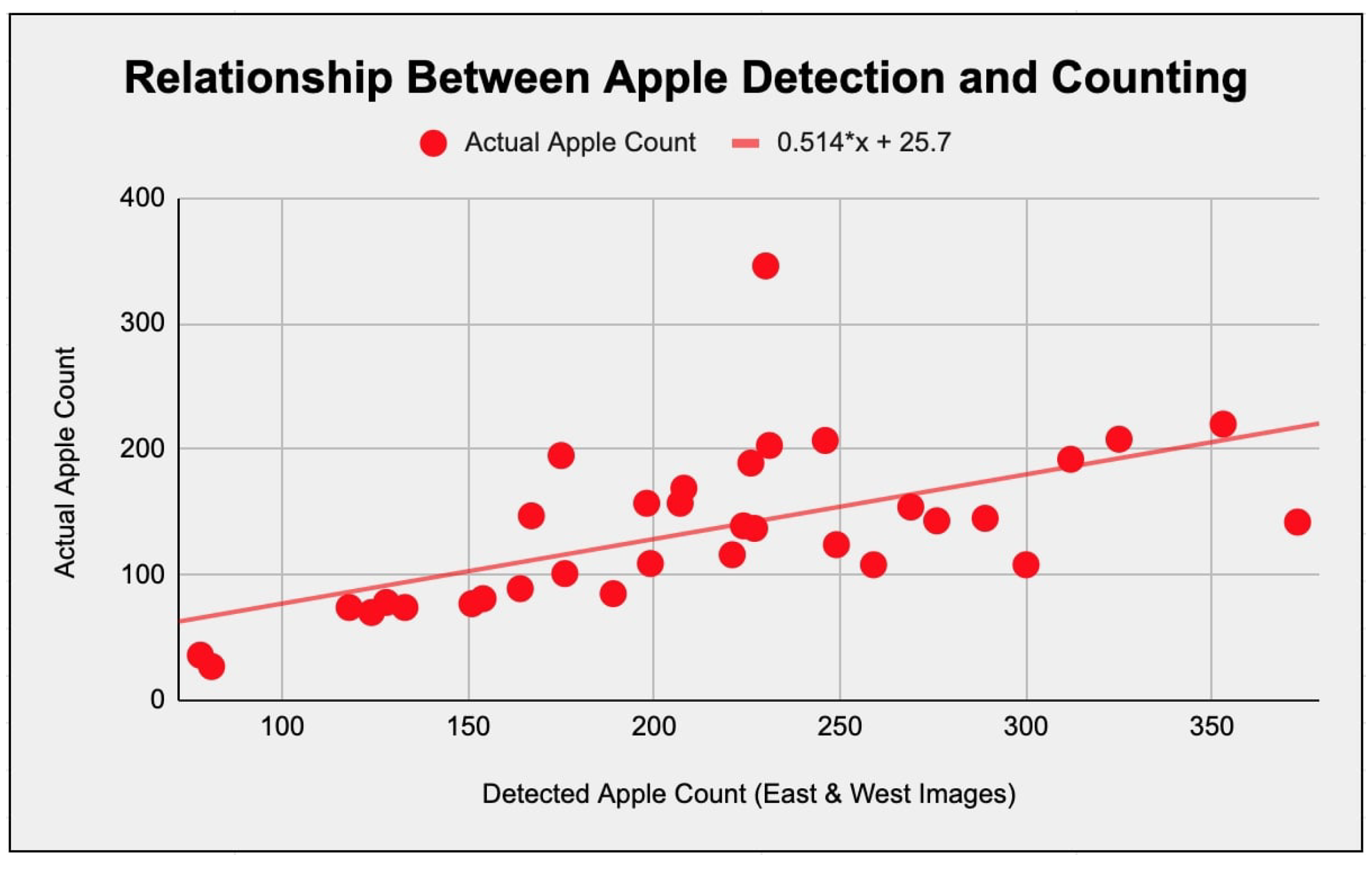
Three distinct MAPE values were calculated for the image dataset. The three MAPE values consisted of one for the east photos, one for the west photos, and one for the east and west pictures of the apple trees combined. The most favorable MAPE outcome, at 8.52%, resulted from analyzing both east and west images comprehensively. This result indicated that using images from both sides of a Pink Lady apple tree would give the best detection results with the algorithm developed in this study. Additionally, Pearson correlation coefficients were calculated for each subset of the dataset to find the relationship between apples physically on the trees and those detected. Each of these correlations was tested, and they were all statistically significant. A significant Pearson correlation coefficient of around 0.6 was found using images from both sides of the apple trees. Refer to Figure 5 to see this relationship between actual and detected apples, which was the strongest of the three correlations calculated. As mentioned, this correlation was tested and was statistically significant, with a p-value of 0.000197, signifying its relevance.
4. Discussion
By evaluating the algorithm, all of the algorithm’s strengths and limitations were discovered. The strengths of the algorithm were that it detected Pink Lady apples pretty well, and it even spotted some apples in shadows that were harder to find. However, there were recurring instances where the algorithm falsely detected things as apples that weren’t really apples due to it being a color-based algorithm. These misidentifications included classifying orange tape, sunlight, dark brown leaves, and a red car as apple clusters. Also, the algorithm had a minimum contour size setting, which helped the algorithm’s performance but prevented it from detecting smaller apples. This setting helped the accuracy of the algorithm since it kept it from detecting a lot of false positives that were really small and not truly Pink Lady apples. Even though the researchers made efforts to fine-tune the algorithm, these limitations couldn’t be fixed. In the future, improvements to this color ratio-based algorithm could be made to fix these limitations.
Although the algorithm that was created faced various challenges, it still successfully detected most of the apples in the dataset. However, the evaluation approach impacted the overall success of the algorithm. The choice of intentionally evaluating the apples only within the boundaries of the tree of interest in the images of apple trees helped out. The reason this helped was because extra apples on the surrounding trees and the environment weren’t counted as apples detected. Only the main apple tree in the image was focused on. This approach was acceptable since the trees in the photos are so close together and often overlap.
Furthermore, the scope of this study was to develop an apple detection algorithm that farmers could use via a mobile application rather than creating or finding techniques to isolate apple trees when given images. The mobile app is still being prepared to be used as an apple yield estimation tool because humans have to identify the trees. With more research, these challenges could be overcome to improve the app’s usefulness in Pink Lady apple orchards.
While the researchers needed this dataset for the algorithm to be analyzed, it also had limitations. The dataset NNU’s Robotics Vision Lab collected only captures some apple tree environments across different Pink Lady apple orchards. Considering factors like lighting conditions, image quality, and apple tree shapes would help determine whether or not the algorithm would be accurate in all orchards. In future studies, using more datasets created with these factors in mind would help validate how well the algorithm works. This testing would aid in improving the algorithm so more farmers would be willing to adopt this technology.
The results of this study closely match the goals of creating a mobile application for detecting apples of the Pink Lady variety and confirming its effectiveness in estimating an orchard’s apple yield. The MAPE value of 8.52% reached shows a somewhat high accuracy level in apple detection. While the MAPE is a valid method of evaluation, a more common method of evaluation is finding F1 scores. The F1 score is defined as the harmonic mean of the precision and recall of a classification algorithm. Another study for apple detection using a deep learning approach by Xuan et al. calculated F1 scores for their four different algorithms. The best of the four detection algorithms was the YOLOv3 model, reporting an F1 score of 95.0%. Most other studies for apple detection used an F1 score as a method of assessing accuracy as well since that’s the most suitable metric [19]. Although the MAPE value calculated in this study doesn’t directly compare to these F1 scores, it would have a lower F1 score than 95.0% but would still be pretty accurate. An F1 score should be calculated for this algorithm in the future. Another research study from 2021 made the claim that their Convolutional Neural Network (CNN) detects apples, some of which were Pink Lady apples, with an accuracy of 99.97% [20]. While the apple detection accuracy was relatively high in this Fruit Harvest Helper study, it was not nearly as accurate as that proposed CNN. These were standalone apple detection algorithms, though, and weren’t integrated into a mobile application for precision agriculture. Typically, having a high accuracy means that an algorithm has a practical use. However, the app can only isolate apple trees with the assistance of humans. The relatively strong Pearson correlation coefficient also supports the algorithm’s effectiveness at estimating apple yield based on the number of apples detected.
On the other hand, this algorithm faced many challenges in detecting apples, which pointed to areas where it needed improvement. As mentioned, future studies could address these issues and improve the algorithm’s effectiveness in real-world orchard settings. Also, expanding the dataset and addressing issues that arise with these datasets would make the algorithm more reliable and, therefore, practical. The NNU Robotics Vision Lab could also explore more algorithms for detecting different types of fruit and implement these into the mobile application to help estimate fruit yield for more than just orchards with Pink Lady apples. In particular, the NNU research team could develop a peach detection algorithm.
This mobile application shows the potential to transform the apple yield estimated in orchards with Pink Lady apple trees. In the future, it would offer an alternative to manual apple yield estimation, which is a laborious and time-consuming task for farmers. Using technology to simplify the current process would save farmers time and money and could even become more accurate than the current agricultural practice.
5. Conclusions
This Fruit Harvest Helper research study presents significant progress toward becoming a viable apple yield estimation technology for Pink Lady apple orchards. Developing an iOS and Android mobile app with an image segmentation algorithm that detects Pink Lady apples is significant for precision agriculture. This mobile application would be an essential precision agriculture innovation for helping farmers increase their profitability and productivity. The color ratio-based apple detection algorithm yielded promising results, with a Mean Absolute Percentage Error of 8.52% and a statistically significant correlation coefficient of 0.6 between detected and actual apples. In finding this somewhat strong correlation, the researchers validated that the algorithm would effectively aid farmers’ apple yield estimation task.
Many challenges with the algorithm, such as false positives and limitations in small apple detection, show that there is a need for ongoing research and development. In the future, the NNU Robotics Vision Lab or other researchers could explore more advanced detection methods and address factors that would enhance the algorithm’s accuracy and, therefore, its applicability to aid farmers in the real world. Overall, the Fruit Harvest Helper mobile app holds significant promise for changing the current practice of apple yield estimation for Pink Lady apple orchards. With improvements made, farmers could use this technology as an alternative to manually counting apples for yield estimation, empowering farmers with a technology to increase their productivity and profitability.
Author Contributions
Conceptualization, Duke Bulanon and Brandon Duncan; methodology, Duke Bulanon, Brandon Duncan, and Josh Nelson; software, Brandon Duncan and Josh Nelson; validation, Duke Bulanon, Brandon Duncan, and Josh Nelson; formal analysis, Duke Bulanon and Brandon Duncan; investigation, Duke Bulanon, Brandon Duncan, and Josh Nelson; resources, Duke Bulanon and Brandon Duncan; data curation, Brandon Duncan and Josh Nelson; writing—original draft preparation, Duke Bulanon, Brandon Duncan, and Josh Nelson; writing—review and editing, Duke Bulanon, Brandon Duncan, and Josh Nelson; visualization, Brandon Duncan; supervision, Duke Bulanon; project administration, Duke Bulanon; funding acquisition, Duke Bulanon. All authors have read and agreed to the published version of the manuscript.
Funding
This research was funded by the Idaho State Department of Agriculture grant number Specialty Crop Block Grant.
Data Availability Statement
Data will be made available upon request.
Acknowledgments
We would like to thank and acknowledge Symms Fruit Ranch and Williamson Orchard for allowing us to use their orchards for research, and the Idaho State Department of Agriculture for the Specialty Crop Block Grant.
Conflicts of Interest
The authors declare no conflicts of interest.
Abbreviations
The following abbreviations are used in this manuscript:
| NNU | Northwest Nazarene University |
| MAPE | Mean Absolute Percentage Error |
| UI | User Interface |
| MVC | Model-View-Controller |
| JNI | Java Native Interface |
| CNN | Convolutional Neural Network |
References
- Ahmad, T.I.; Tahir, A.; Bhatti, M.A.; Hussain, A. Yield and Profitability Comparisons of Modern Agricultural Production Technologies Adoption: Evidence From Cotton-Wheat Punjab (Pakistan). Review of Education, Administration & Law 2022, 5, 203–216. [CrossRef]
- A Survey on Mobile Applications for Smart Agriculture | Semantic Scholar Available online:https://www.semanticscholar.org/paper/A-Survey-on-Mobile-Applications-for-Smart-Oteyo-Marra/3e1f0489c2ccba86fa0fc5936b07e40c8a067972 (accessed on 1 April 2024).
- Fulton, J.; Hawkins, E.; Taylor, R.; Franzen, A.; Shannon, D.K.; Clay, D.; Kitchen, N.R. Yield Monitoring and Mapping. In Precision Agriculture Basics; 2018 ISBN 978-0-89118-367-9.
- He, L.; Fang, W.; Zhao, G.; Wu, Z.; Fu, L.; Li, R.; Majeed, Y.; Dhupia, J. Fruit Yield Prediction and Estimation in Orchards: A State-of-the-Art Comprehensive Review for Both Direct and Indirect Methods. Computers and Electronics in Agriculture 2022, 195, 106812. [CrossRef]
- Gong, A.; Yu, J.; He, Y.; Qiu, Z. Citrus Yield Estimation Based on Images Processed by an Android Mobile Phone. Biosystems Engineering 2013, 115, 162–170. [CrossRef]
- (PDF) A Smartphone-Based Apple Yield Estimation Application Using Imaging Features and the ANN Method in Mature Period Available online: https://www.researchgate.net/publication/324164204_A_smartphone-based_apple_yield_estimation_application_using_imaging_features_and_the_ANN_method_in_mature_period (accessed on 1 April 2024).s.
- Fruit Harvest - Estimating Apple Yield and Fruit Size. Available online: https://extension.psu.edu/fruit-harvest-estimating-apple-yield-and-fruit-size (accessed on 26 March 2024).
- Braun, B.; Bulanon, D.; Colwell, J.; Stutz, A.; Stutz, J.; Nogales, C.; Hestand, T.; Verhage, P.; Tracht, T. A Fruit Yield Prediction Method Using Blossom Detection. January 1 2018.
- Image Segmentation for Fruit Detection and Yield Estimation in Apple Orchards - Bargoti - 2017 - Journal of Field Robotics - Wiley Online Library Available online: https://onlinelibrary.wiley.com/doi/10.1002/rob.21699 (accessed on 1 April 2024).
- Karkhile, S.; Ghuge, S. Modern Farming Techniques Using Android Application; 2015; p. 8;
- Zhou, Z.; Song, Z.; Fu, L.; Gao, F.; Li, R.; Cui, Y. Real-Time Kiwifruit Detection in Orchard Using Deep Learning on Android™ Smartphones for Yield Estimation. Computers and Electronics in Agriculture 2020, 179, 105856. [CrossRef]
- https://www.researchgate.net/profile/Sotiris-Karetsos/publication/313868513_Studying_Mobile_Apps_for_Agriculture/links/58ad4a2e4585155ae77aef24/Studying-Mobile-Apps-for-Agriculture.pdf.
- https://web.p.ebscohost.com/ehost/pdfviewer/pdfviewer?vid=1&sid=dd87b161-2893-4084-aac9-298a27059ace.
- Zou, K.; Ge, L.; Zhou, H.; Zhang, C.; Li, W. An Apple Image Segmentation Method Based on a Color Index Obtained by a Genetic Algorithm. Multimed Tools Appl 2022, 81, 8139–8153. [CrossRef]
- Li, H.; Chaudhari, P.; Yang, H.; Lam, M.; Ravichandran, A.; Bhotika, R.; Soatto, S. Rethinking the Hyperparameters for Fine-Tuning 2020.
- Mat Said, K.A.; Jambek, A.; Sulaiman, N. A Study of Image Processing Using Morphological Opening and Closing Processes. International Journal of Control Theory and Applications 2016, 9, 15–21.
- Brambilla, M.; Mauri, A.; Umuhoza, E. Extending the Interaction Flow Modeling Language (IFML) for Model Driven Development of Mobile Applications Front End. In Proceedings of the Mobile Web Information Systems; Awan, I., Younas, M., Franch, X., Quer, C., Eds.; Springer International Publishing: Cham, 2014; pp. 176–191.
- Thakur, R.N.; Pandey, U.S. The Role of Model-View Controller in Object Oriented Software Development. Nepal Journal of Multidisciplinary Research 2019, 2, 1–6. [CrossRef]
- Apple Detection in Natural Environment Using Deep Learning Algorithms | IEEE Journals & Magazine | IEEE Xplore Available online: https://ieeexplore.ieee.org/abstract/document/9269995 (accessed on 1 April 2024).
- Robustness of Convolutional Neural Network in Classifying Apple Images | IEEE Conference Publication | IEEE Xplore Available online: https://ieeexplore.ieee.org/abstract/document/9502258 (accessed on 1 April 2024).
Figure 1.
The Fruit Harvest Helper Android mobile application is being used to detect apples on a real apple tree.
Figure 1.
The Fruit Harvest Helper Android mobile application is being used to detect apples on a real apple tree.

Figure 2.
This is a diagram illustrating the sequence of steps that the apple detection algorithm undergoes. Only the main steps are shown.
Figure 2.
This is a diagram illustrating the sequence of steps that the apple detection algorithm undergoes. Only the main steps are shown.
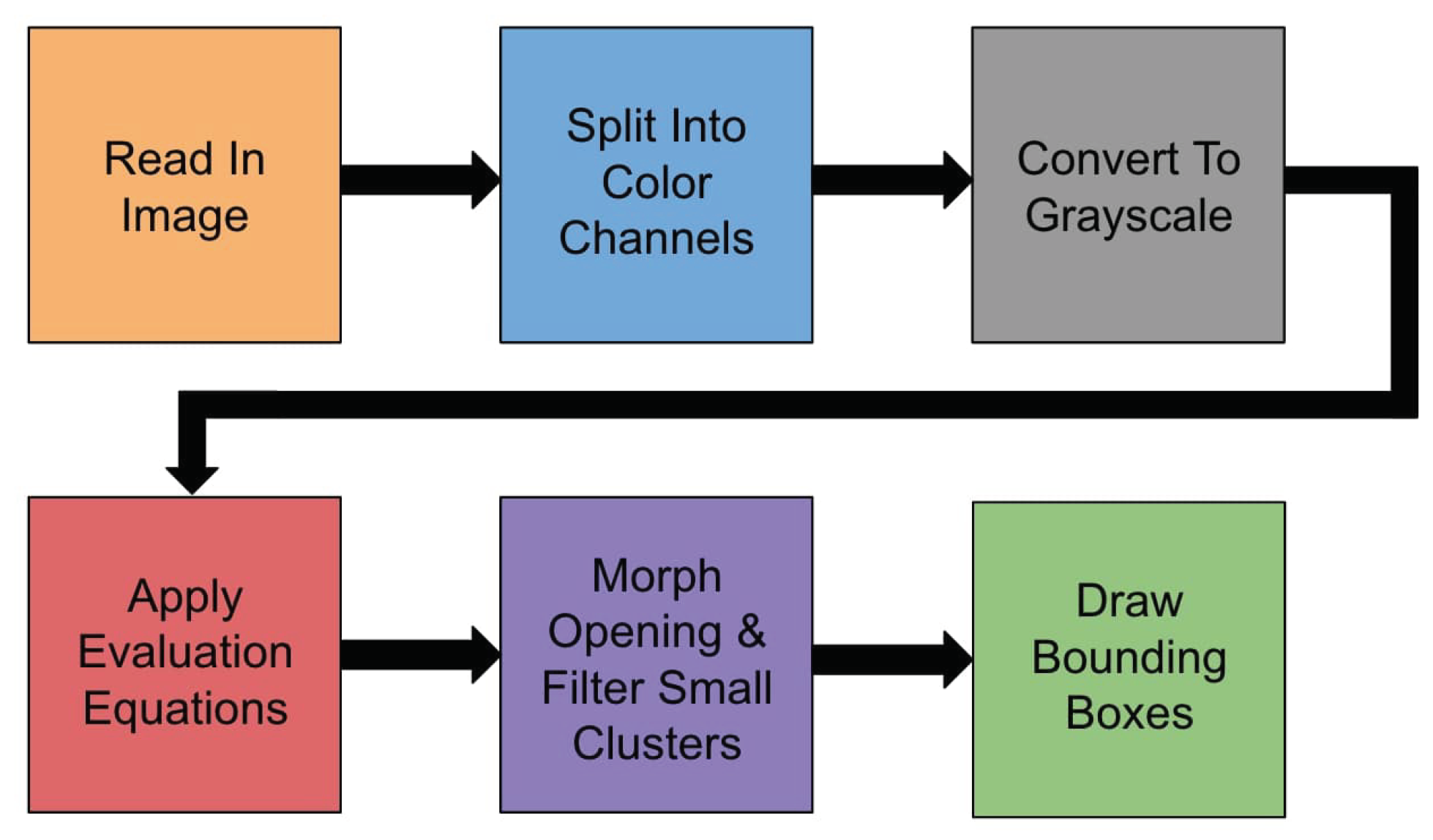
Figure 3.
(a) On the left, the default user interface is shown with a choose picture button to make a selection. (b) The next image displays the pop-up interface with the options for selecting an image to detect apples on. (c) The rightmost image is the user interface after an image has been selected and processed. Both the original and processed images are displayed as well as the number of apple clusters that were detected.
Figure 3.
(a) On the left, the default user interface is shown with a choose picture button to make a selection. (b) The next image displays the pop-up interface with the options for selecting an image to detect apples on. (c) The rightmost image is the user interface after an image has been selected and processed. Both the original and processed images are displayed as well as the number of apple clusters that were detected.
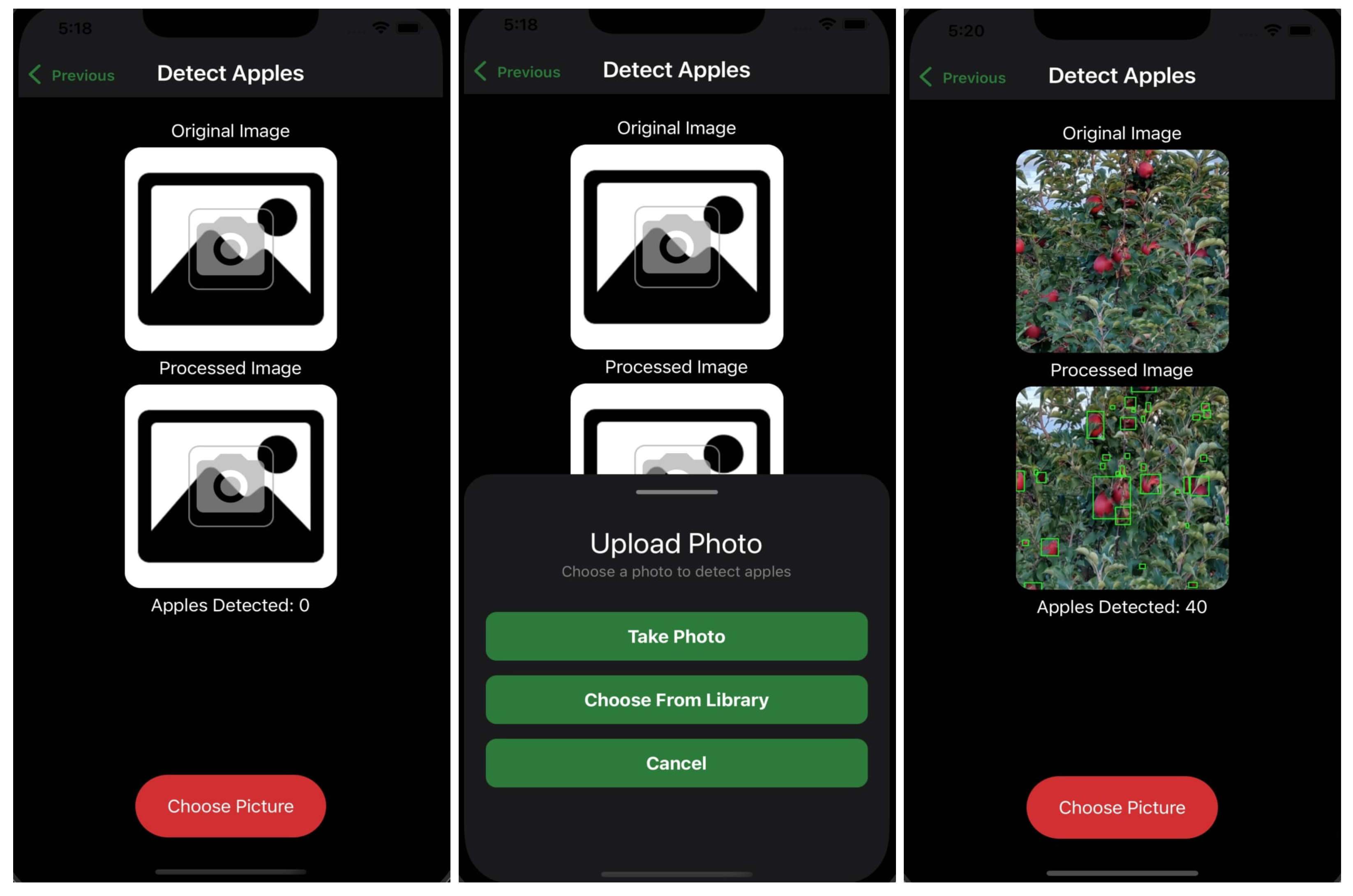
Figure 4.
(a) The left image is the original image taken by the application with the center tree outlined to distinguish it from the surrounding trees. The apples on the tree are marked. (b) The right image is the processed version of the left image. Instead of being used to mark and count the actual number of apples, this image was used to determine the number of apples detected by the algorithm.
Figure 4.
(a) The left image is the original image taken by the application with the center tree outlined to distinguish it from the surrounding trees. The apples on the tree are marked. (b) The right image is the processed version of the left image. Instead of being used to mark and count the actual number of apples, this image was used to determine the number of apples detected by the algorithm.
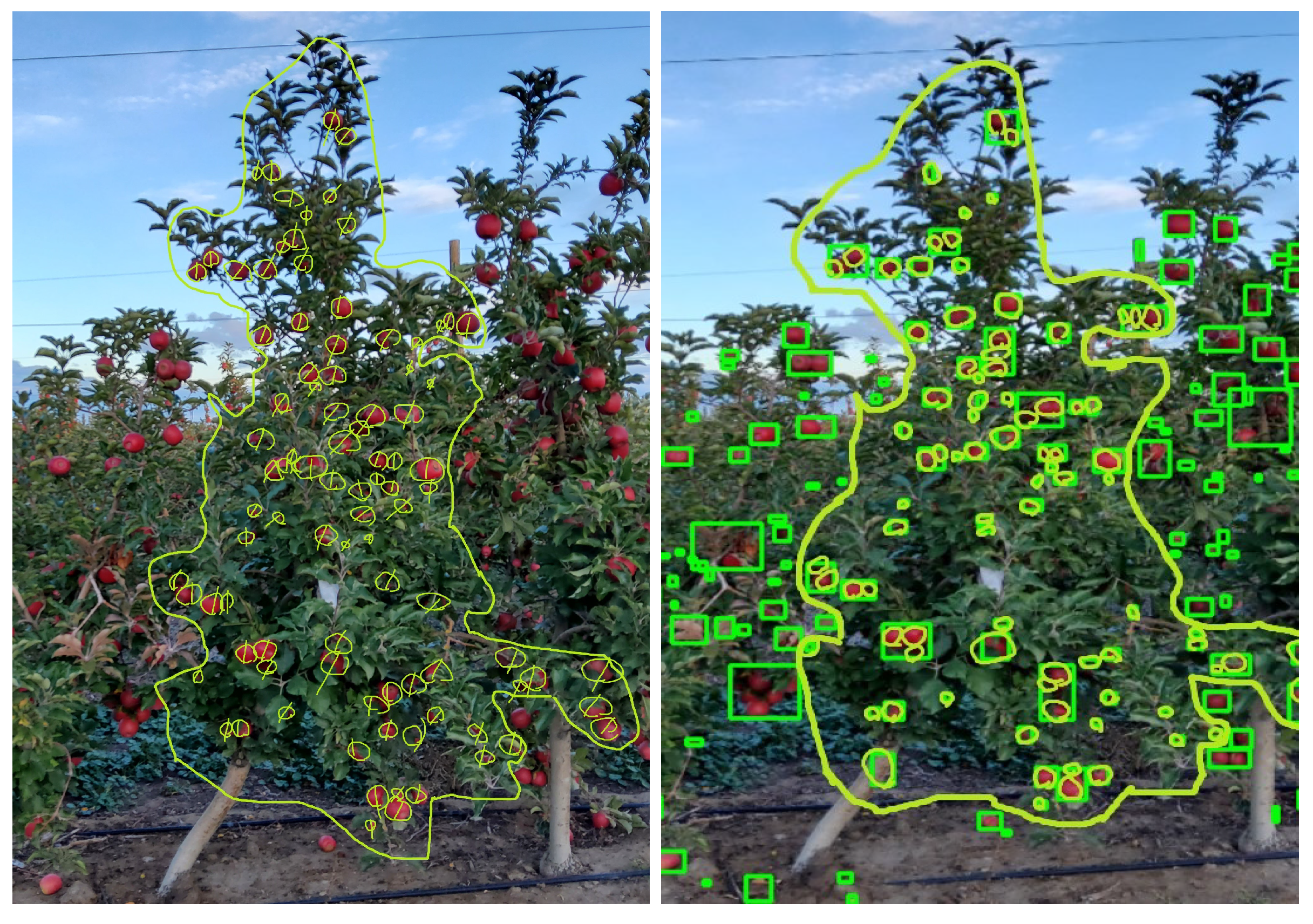
Figure 5.
A scatter plot of the relationship between the apples detected by the algorithm and the apples counted on the physical apple trees. The detected apple count combines the detected apple count of the east and west images for a given apple tree.
Figure 5.
A scatter plot of the relationship between the apples detected by the algorithm and the apples counted on the physical apple trees. The detected apple count combines the detected apple count of the east and west images for a given apple tree.
Disclaimer/Publisher’s Note: The statements, opinions and data contained in all publications are solely those of the individual author(s) and contributor(s) and not of MDPI and/or the editor(s). MDPI and/or the editor(s) disclaim responsibility for any injury to people or property resulting from any ideas, methods, instructions or products referred to in the content. |
© 2024 by the authors. Licensee MDPI, Basel, Switzerland. This article is an open access article distributed under the terms and conditions of the Creative Commons Attribution (CC BY) license (http://creativecommons.org/licenses/by/4.0/).
Copyright: This open access article is published under a Creative Commons CC BY 4.0 license, which permit the free download, distribution, and reuse, provided that the author and preprint are cited in any reuse.


