

Submitted:
30 December 2022
Posted:
03 January 2023
You are already at the latest version
Abstract
Computer vision is a rapidly developing field that focuses on highly sophisticated picture analysis, manipulation, and comprehension. Its objective is to analyze what is happening in front of a camera and utilize that understanding to control a computer or robotic system or to present users with fresh visuals that are more enlightening or appealing than the original camera images. Computer vision technologies make it feasible for new user interfaces, augmented reality gaming, biometrics, automobile, photography, movie creation, Web search, and many more applications. This essay seeks to explain how computer vision can be utilized to play blackjack successfully.
Keywords:
OpenCV
; Python
; objects
; object detection
; card
I. Introduction:
Wouldn’t it be convenient to use your phone while playing Blackjack online and instantly know whether to Hit, Stand, or Double? Wouldn’t it also be convenient to use your phone during a Chess game and instantly know your best move? You could use the internet or simulations to help yourself in these situations. However, what if we could use our smartphone camera and have it detect the best next move for either Chess or Blackjack? That would be a more optimal solution, and it is possible using OpenCV. OpenCV (Open Source Computer Vision Library) is a computer vision and machine learning software library built to give a structure for computer vision applications. We can use this library to detect and recognize faces, identify objects, classify human actions in videos, track camera movements, track moving objects, extract 3D models of objects, produce 3D point clouds from stereo cameras, stitch images together to produce a high-resolution image of an entire scene, find similar images from an image database, remove red eyes from images taken using flash, follow eye movements and recognize scenery… OpenCV has provided many APIs and was made compatible with mostly every device. It has C++, Python, Java, and MATLAB interfaces and supports Windows, Linux, Android, and Mac OS.
II. Literature Review
OpenCV began as a research project at Intel in 1998 and has been publicly available since 2000. 5 It provides programmers with tools to use computer vision to develop further programs. These tools are a “mix of low-level image-processing functions and high-level algorithms such as face detection, pedestrian detection, feature matching, and tracking.” 10 Using these basic tools, programmers can expand and develop their own code to complete tasks that are of specific interest to them.
Currently there are a few different methods that OpenCV can use for object recognition. These include but are not limited to: template matching, color-based matching and shape-based recognition. 2 Template matching is the most basic strategy, and employs already known templates of objects and compares them with objects seen by OpenCV. Color-based matching is also a fairly simple method; it uses colors on the RGB scale to allow a program to identify an object based on color criteria. Shape-based recognition goes hand in hand with template matching, and uses known shapes for comparison to identify an object in question. Recognition is also broken down into the type of image a program is identifying. Active recognition refers to a program detecting an object in a live image, while passive recognition means that the program is assessing objects in a still image.
One such project using Computer Vision (referred to as CV) was a project conducted in 2013 on traffic sign recognition. 11 A group of graduate students aimed to use CV to detect and analyze a road sign from a camera located in a moving vehicle. Software such as this has been implemented for speed limit signs in particular in high-end vehicles as early as 2009, 11 but had not been refined to account for all sorts of traffic signs, variable weather conditions, lighting, and other challenges. The strategy for recognition used for this project was most likely very similar to a card identifying project; there are a finite number of traffic signs that the software could “match” an identified traffic sign to, just as there are a finite number of cards that can be matched. This project likely had the additional challenge of tracking a road sign in a moving vehicle, which may impair the clarity of the picture that the camera is able to capture. This is just one example of a computer vision based project that has been explored.
One group of developers used computer vision to identify playing cards on a table for a poker game. They were able to identify the cards and count chips on a table with up to 94% accuracy. 12 The group outlined a series of steps in their work. First, they needed to “extract” the card from the playing surface. This was done by the contrast of the playing card to the table that it rested on. Additionally, they did work on identifying chips using a similar strategy of color based recognition. Next, the group used “template matching” to identify the cards. Since a deck of playing cards has a finite number of possibilities, the program can use the known possibilities to identify the card that it sees. This project ended at this level however, leaving much room for future work to be done on the topic in terms of developing algorithms for specific card games.
Advancements in Computer Vision have led the way for further development of artificial intelligence and machine learning technology. CV bridges the gap between code and reality, allowing programs to have “human-like recognition ability.” 1 Just as Machine Learning is the latest buzzword and next big thing in the software world, CV is the next big step for Machine Learning. In the previously cited article, researchers outlined how the medical field can implement CV to allow machine learning programs to help with surgery. In reference to the benefit that CV provided to the project, they state: “Without sight, AI was operating blindly, and its procedural understanding was inflexible and limited.” 1 Effective CV can drastically improve machine learning programs, and allow them to not only learn much quicker but to be used in greater applications as well. This sets the limits of what CV can do for artificial intelligence extremely high; there are many possibilities that have yet to be discovered.
III. Theoretical Framework
Today, computer vision is widely used everywhere, “both in academia and industry” 9. It can reach consumers in many contexts via webcams, camera phones, or even gaming sensors. It also is one of many recent technological advances that have helped to pave the way forward for fully autonomous vehicles. In our project, we are trying to develop a program that can identify gamecards and help playing and learning. OpenCV Python can help us explore solutions to these requirements in a high-level language. We are also looking forward to developing an environment that links Python, OpenCV, depth camera libraries (OpenNI, SensorKinect), and general-purpose scientific libraries (NumPy, SciPy). The main card game that we are trying to implement our program on is BlackJack.
Blackjack is played with a standard deck of 52 cards. Every card has a value equal to its number, with face cards worth 10 and Aces can be worth 1 or 11. The goal is to get the sum of your cards as close to 21 as possible without going over. Players are dealt two cards initially, and the dealer is dealt two cards. The player’s cards are both visible. One of the dealer’s cards is visible, and one is hidden. The player must decide to hit, stand, or double down. If the player hits, they are dealt another card. If the sum of their cards ever goes above 21, the player is bust and loses the game. If the player stands, it is then the dealer’s turn. The dealer reveals their hidden card, and will take hits until the dealer’s hand is 17 or greater. The dealer always hits if their total is below 17, and always stays if their total is 17 and up. If the dealer goes above 21, the player wins. Also, whoever has the hand closest to 21 without going over is the winner. The rule for doubling down is as follows: Players are allowed to double down only on their first turn, and only if their first two cards are summing to 9, 10 or 11. If a player doubles down on their first turn, their wager is doubled, and they receive a hit card. Play then resumes as normal. It would be extremely difficult, in the short time we have, to implement an algorithm that counts cards and is the most likely to win. Consequently, instead we are going to implement a strategy called “Basic Strategy” that consists basically of playing like the dealer, with occasional changes and doubling down depending on the situation. The details of the basic strategy are shown in Figure 1.
The “basic strategy” is separated based on whether or not the player’s hand is “hard” or “soft”. A “soft” hand is a hand that is using the Ace as an 11. So for example, an Ace + 6 is a “soft” 17 hand. The strategies of play become different if a player’s hand is “hard” or “soft”. For this project, we will not need to make this distinction, we consider all totals to be “hard” totals.
Now, in order to be able to implement this strategy we need our computer to be able to identify the cards. An existing technique, mentioned in the Literature Review, that can help us identify which of the 52 cards are we looking at is “template matching”. Template Matching is a method for identifying a template image in a larger image and OpenCV already has a function that serves this purpose. The way OpenCV allows this function is by simply sliding the template image over the input image and comparing them. Several comparison methods are implemented in OpenCV. 13
We need two primary components:
- Source image (I): The image in which we expect to find a match to the template image
- Template image (T): The image which will be compared to the source image
Our goal is to detect the highest matching area.To identify the matching area, we have to compare the template image against the source image by sliding it. By sliding, we mean moving the patch one pixel at a time. At each location, a standard is calculated so it represents how "good" or "bad" the match at that location is. For each location of T over I, you store the standard value in a result matrix R. We are to use the OpenCV function matchTemplate() to search for matches between an image and an input image. It implements template matching in the function matchTemplate(). The available methods are 6:
The procedure followed while coding will be as follows:
- Declare some global variables, such as the image, template and result matrices, as well as the match method.
- Load the source image and template
- Perform the template matching operation.
- Normalize the results
- Localize the minimum and maximum values in the result matrix R by using minMaxLoc() function.
- For the first two methods in Figure 2, the best matches are the lowest values. For all the others, higher values represent better matches.
- Display the source image and the result matrix.
- Determine whether there is a match between the two compared images.
IV. Motivation/Objectives
Accurately identifying objects opens the door for many possibilities for a computer program, and developers can use this technology to work on projects of interest to them. A shared interest of this group of programmers is an interest in card games. From poker classes to family game nights, there is a background in cards and an appreciation for the impact that a card game can have on strengthening relationships. For this reason, the general objective of this project is to develop a program that can assist in card game playing and learning.
For any project of a significant size such as this, it is necessary to break it into smaller chunks of work to be done. A basic flowchart of our project’s goals is shown below in Chart I. This outlines the order of the steps that must be completed in order to complete the project. Table I. provides specific information about each objective. As with any software project, the development team must be agile and quickly adapt to changing demands and goals, so these objectives are structured as general guidelines that are subject to change. However, these objectives provide a good outline for what the project will entail.
The first step in creating this program is to provide the general framework necessary to develop the functionality of a specific card game. The base layer of the codebase is outlined in objectives A. through D. The program needs to be able to collect any data that is necessary to perform its desired functions, which is what much of the initial work will need to be done on. In the case of a CV program, this means that the program must be able to collect information that is “seen” by the program and translate it into meaningful data that can be understood and used. Up to this point in the project, pre-existing knowledge already in the OpenCV database can be used.
For the final two objectives, this project will aim to develop code and functionality that does not yet exist in OpenCV. After the initial functionality is developed and refined, the next step is to identify a playing card, which is objective E. While the rest of the project will consist of developing new code and logic to perform the desired functionality, existing strategies from CV technology can be used. As mentioned in the Literature Review section of this proposal, one major strategy for CV development is “template matching” (CPrime Studios, 2022). Since there are a finite number of playing cards (52) we can load existing, known images into the program and the program can match them to the already known “template” of the card. The exact logic and strategies to develop the code are explained more in the Framework section of the proposal.
Once an individual playing card is identified, algorithms can be developed that will implement the rules and strategies of specific card games. This is described by objective F. For example, the program can be designed so that it can identify all the playing cards on the table, and calculate the odds of winning or losing in the current situation as well as how the odds may change if a player takes a certain action. However, once the program has all of its initial functionality developed, there are many directions that the project can be taken in order to fulfill the ultimate objective of creating a program that can play and teach card games.
V. Timeline
This project will last 14 weeks. And, while it is not predicted that this project will take all 14 weeks to code, it may take 14 weeks to complete. The project timetable gives a comprehensive picture of the complete project from beginning to end. This enables us to observe when a job begins and when it is due, as well as whether or not it is reliant on another activity.
The timeline below describes what the project will achieve. It will also aid us in establishing a clear direction and priorities. The timeline gives a straightforward visual picture of a project from start to conclusion, resulting in greater teamwork efficiency. The timetable below is significant since it guarantees that the most important tasks are finished first before moving on to other projects.

Table II.
Project Timeline.
| Week | Date | Description |
|---|---|---|
| Week 1 | February 3 | Come up with a unique project idea. Decided on identifying playing cards using Computer Vision and implementing a helping strategy for Blackjack |
| Week 2 | February 8 & February 10 | Start typing the 15-page single-spaced proposal (5 pages per week) |
| Week 3 | February 15 & February 17 | Still working on the 15-page proposal |
| Week 4 | February 22 & February 24 | Still working on the 15-page proposal |
| Week 5 | March 1 & March 3 | Watch tutorials on openCV and how it aids in object detection (Focus on Python). Then Tech Demos (What we have worked on so far which will be the base structure) |
| Week 6 | March 8 & March 10 | Continue working on the project |
| Week 7 | March 15 & March 17 | Finalize step 1 of the project |
| Week 8 | March 29 & March 31 | Alpha Demo |
| Week 9 | April 5 & April 7 | Code Review and start working on step 2 of the project |
| Week 10 | April 12 & April 14 | Work on Step 2 of the project |
| Week 11 | April 19 & April 21 | Beta Demo if step 2 is ready or demo step 1 again with improvements |
| Week 12 | April 26 & April 28 | Code Review and finalize step 2 of the project |
| Week 13 | May 3 & May 5 | Code improvement and bug fixes |
| Week 14 | May 10 & May 12 | Release Date (Finalize everything, and do a final run through of the project fixing minor bugs and issues) |
| Week 15 | May 16 | Final Presentation and Demo |
Although the timetable specifies dates, the project will continue to be worked on outside of these dates, and all things being equal, the project will be finished on time.
The table below outlines the tasks and responsibilities that must be fulfilled in order for the project to be finished. The table also illustrates who is in charge of what.
Table III.
Duties and Responsibilities.
| Duty | Who’s Responsible? |
|---|---|
| Watch OpenCV Tutorials | Anas, Justin, Maame, Sam |
| Distinguish Objects from each other code | Justin, Sam |
| Identify objects the type of object code | Maame, Anas |
| Code Review | Anas, Justin, Maame, Sam |
| Tech Demo of base structure | Anas, Justin, Maame, Sam |
| Code Review | Anas, Justin, Maame, Sam |
| Identify Quantities of Similar Objects code | Anas, Justin |
| Locate Objects in 3D Space code | Sam, Maame |
| Code review | Anas, Justin, Maame, Sam |
| Identify a Playing Card code | Justin, Maame |
| Develop Card Game Algorithms code | Sam, Anas |
| Blackjack Code | Mainly Anas (rest of group gives moral support) |
| Alpha Demo | Anas, Justin, Maame, Sam |
| Code Review | Anas, Justin, Maame, Sam |
| Beta Demo | Anas, Justin, Maame, Sam |
| Code review | Anas, Justin, Maame, Sam |
| Release Date | Anas, Justin, Maame, Sam |
| Final Presentation and Demo | Anas, Justin, Maame, Sam |
VI. Expected Results (Maame)
Two-step project:
Step 1: identifying objects and counting them
Step 2: Using the above logic to play games
The final goal of this project is for the detector to identify an object, determine what it is, and then classify it. This project has numerous steps, but the end purpose is to identify an item. The detector must not only classify image items but also locate them.
Following all of the procedures mentioned in Section IV, the detector's primary role is to first discern between objects. Next, determine the sort of object that was identified. Then, compute the amounts of the objects that are related. If all of these operations are successful, the detector may be set up to find objects in three dimensions. This enables the software to move on to the next phase, which is recognizing a playing card, after which games may be played with the recognized card(s).
Challenges that will be faced that will prevent us from getting desired results:
Lighting conditions: The definition of things is greatly influenced by lighting. Depending on the illumination, the same things will seem different. Look at the images below: the less light the space has, the less apparent the things. All of these variables have an impact on the detector's capacity to define objects.
Background: Objects that must be identified may blend into the backdrop, making identification difficult. For example, the image below depicts a large number of cards, the position of which is perplexing while attempting to find the king of spades or other items of interest. In such instances, the object detector will have detection issues.
Variety in object shape and size: The same thing might have a variety of forms and sizes. To interpret an item and grasp what it implies, computer vision must conduct extensive study. The image below illustrates various sorts of cooking spoons. These items should be detected by a reliable detector and assigned to the same class.
Speed of detection: Detectors must be taught to perform analysis in a constantly changing environment. This means that object recognition algorithms must not only properly categorize relevant things, but also be extremely quick during prediction in order to recognize moving objects.
Angles and Viewpoint: One of the most difficult aspects of object recognition is that an object might appear radically different when seen from different angles. For example, the photographs of the dog shown below differ from one another because they depict the thing from various perspectives. Detectors' purpose is thus to distinguish things from various perspectives.
Obstruction: Objects can sometimes be concealed by other items, making it harder to read the signs and identify these objects. In the image below, a person is holding a pen with their hands obstructing the object. Such circumstances make selecting the issue much more challenging.
Although these problems will be encountered, it will be the detector's and the code's responsibility to identify and overcome these possible challenges so that the intended outcomes may be attained.
VII. Intellectual Merit (Cassens)
The idea of object recognition is one which has been explored and expanded upon already in many ways as mentioned in the Literature Review section. Our project on object recognition, particularly the recognition of playing cards, is one which can be further developed into applications to help teach people card games while providing the numbers behind the logic. Applications similar to this already exist in a 2 dimensional world on a computer screen, but it has yet to make the jump to 3 dimensional space. This is the way that our idea differs from these current programs. We will expand them from a 2 dimensional computer application and implement them in a 3 dimensional scenario. This means that people in real world situations could utilize the application to complete the same task as the 2 dimensional computer program allowing for immediate feedback, but through offline means. Some may then think that there are already physical objects which require no online service which can advise you throughout different card games such as a chart with all the possible blackjack combinations, telling you what the best play is in any given scenario. This is also true. However, why have an extra object to worry about keeping track of when you could just have a phone application which weighs nothing and is part of an object you would have with you anyways? Additionally, this program eventually could have the ability to implement many various algorithms to work for different games whereas a physical object tends to be for just one game and only works for games with limited possibilities. Games like Texas Hold’Em have too many hand possibilities to fit onto one card or physical object, especially when taking into account the community cards. In this way, a flexible application is more useful than any physical object or online program.
VIII. Broader Impact (Cassens)
In addition to the ideas we hope to implement into our program with recognizing playing cards based on their rank and suit, there are a few more ideas which we will not be able to implement, but believe could be achieved with more time and through a similar strategy.
One of these additional ideas was that we thought about utilizing the object recognition from an aerial view in an outdoor parking lot to maintain count of available spots and even provide the location of these spots so someone entering the lot could be given accurate locations as to where they can park and directions to get there (if it’s a large lot). This could be implemented in a few ways, either by identifying vehicles and keeping track of their locations relative to the parking spaces or by identifying the parking spaces and tracking whenever something is obstructing the spot. An issue with the latter would be if say an animal or piece of garbage were sensed and then an open spot would be marked as occupied. Thus, the first implementation would seem the better choice, but that would also bring different problems. There are many different vehicle types from SUVs to trucks to motorcycles which all utilize the same parking spaces. So this program would have to be able to recognize all of them which seems a strenuous task on its own.
Another example of potential use would be in poker. Typically in high level poker tournaments which are televised, the cards of each player are known to the commentators and viewers. This is done by having the players place their cards facedown on the table which contains cameras inside of it and then the information is told to someone who inserts the data into the required system to have it show up on the tv screen. With our program, the cards could be automatically recognized and the correct information input directly onto the screen without having to worry about any middleman.
To expand even further with the poker and touch on a point made in the Intellectual Merit section, this project could expand out to other card games as well. For poker, the algorithm would be difficult in terms of advice for future moves. But if it simply is used for calculating odds, then this idea would work. All one would need is to scan their own cards and then also the community cards as they are provided throughout each hand, and if the cards are being correctly identified, then odds of potential hands could be quickly predicted. However, this in itself may not be entirely useful as it is only giving you information on your own hand. If you also knew an opponent’s cards, say in an all in and call scenario where you want to know what your outs are, then this program would be capable of providing that live information for you.
Additionally, this type of program can expand from just playing cards to other types of cards, potentially containing numbers and letters. It could help children to learn how to recognize numbers and letters with the addition of verbal speaking being to the program. If someone could grab a random card and scan it and immediately get feedback as to what is on the particular card, then this could help with learning at a young age.
References
- Thomas, M. Ward, Pietro Mascagni, Yutong Ban, Guy Rosman, Nicolas Padoy, Ozanan Meireles, Daniel A. Hashimoto, Computer vision in surgery. Surgery 2021, 169, 1253–1256. [Google Scholar] [CrossRef]
- CPPrimeStudios: https://cprimestudios.com/blog/object-recognition-what-it-and-how-does-it-work.
- Shutterstock Images: https://www.shutterstock.com/image-photo/messy-cards-background-27814762.
- Light Image: https://lightsinc.com/pathway-lighting/.
- OpenCV library; http://code.opencv.org.
- Spoon Image: https://www.dreamstime.com/colorful-kitchen-spoon-set-isolated-white-colored-cutlerytools-background-different-types-spoons-vivid-image230013979.
- Dog Image: https://scobbaphotography.wordpress.com/2020/11/12/november-12-angles/.
- Pen Image: https://unsplash.com/s/photos/study.
- Howse, J. (2013). Preface. In OpenCV computer vision with python: Learn to capture videos, manipulate images, and track objects with python using the opencv library (pp. 1–2). preface, Packt Publ.
- Kari Pulli, Anatoly Baksheev, Kirill Kornyakov, and Victor Eruhimov. Real-time computer vision with OpenCV. Commun. ACM 2012, 55, 61–69. [Google Scholar] [CrossRef]
- Geronimo, David, et al. Traffic sign recognition for computer vision project-based learning. IEEE transactions on education 2013, 56, 364–371. [Google Scholar] [CrossRef]
- Martins, Paulo, Luís Paulo Reis. Poker vision: Playing cards and chips identification based on image processing. In Iberian Conference on Pattern Recognition and Image Analysis; Springer: Berlin, Heidelberg, 2011. [Google Scholar]
- Bradski, G. The OpenCV Library. Dr. Dobb's J. Softw. Tools Prof. Program. 2000. [Google Scholar]
Figure 1.
Blackjack Basic Strategy table for hard totals.
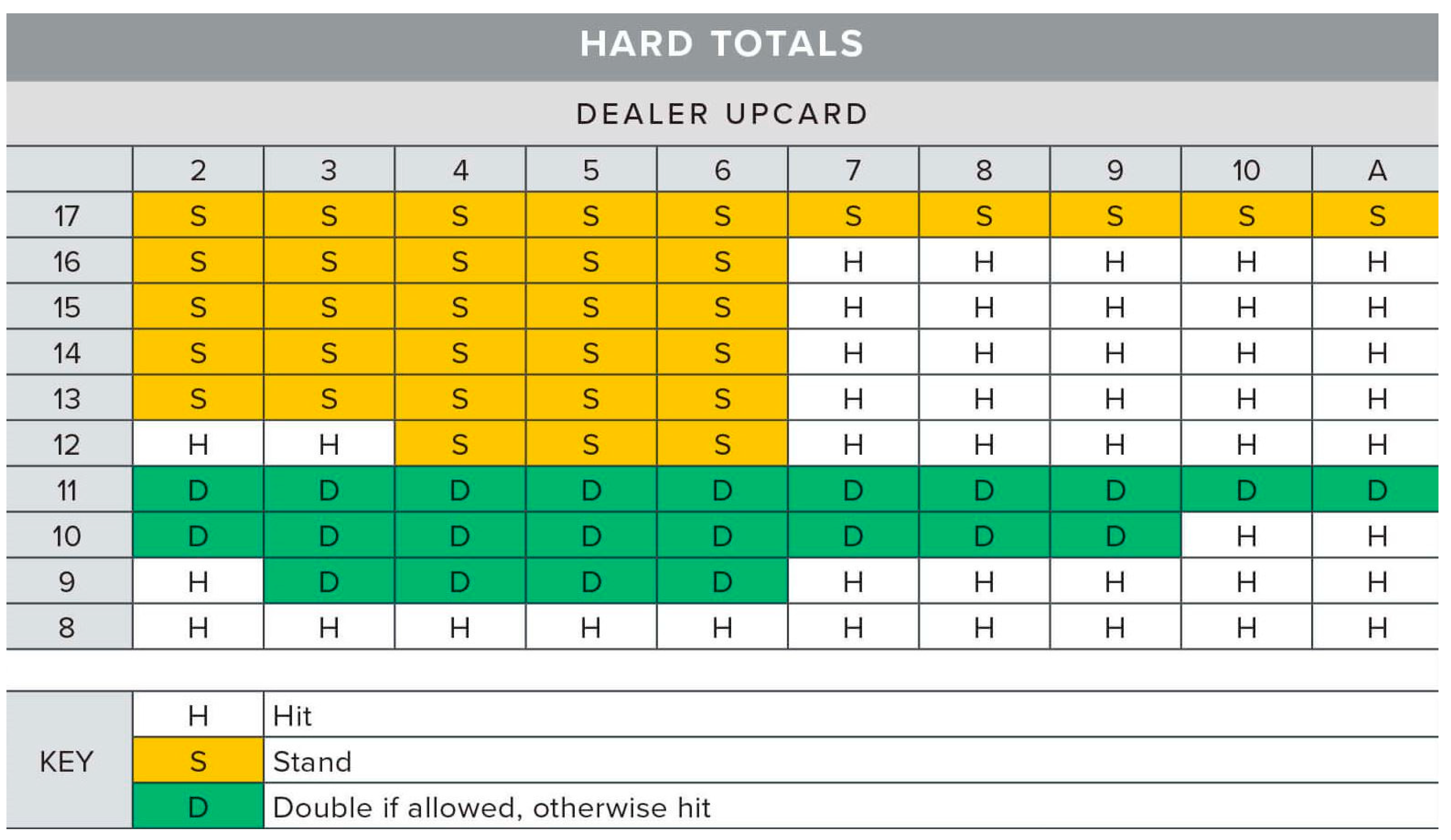
Figure 2.
The matching methods available in OpenCV.
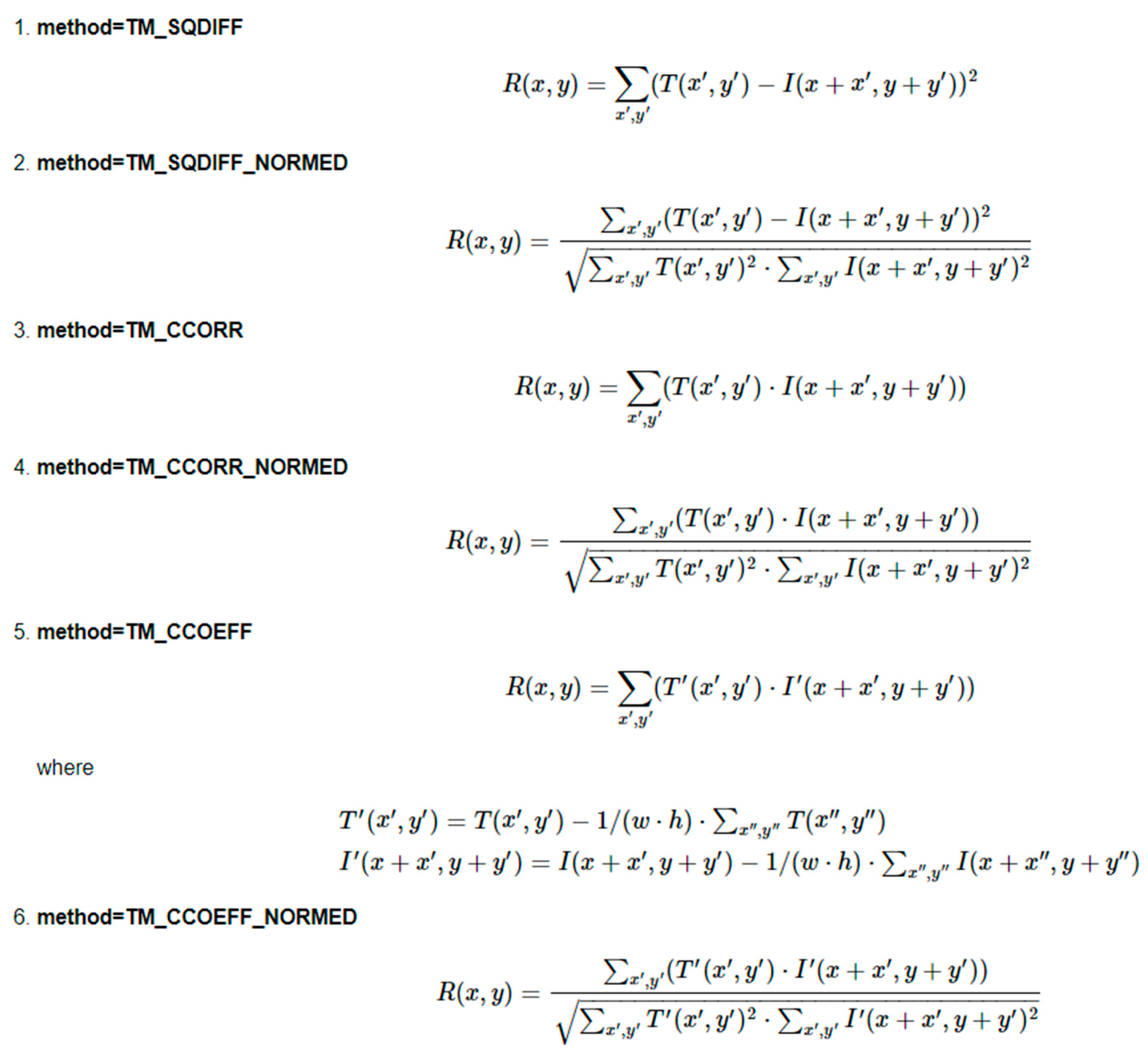
Chart I.
Project Objectives FlowChart.
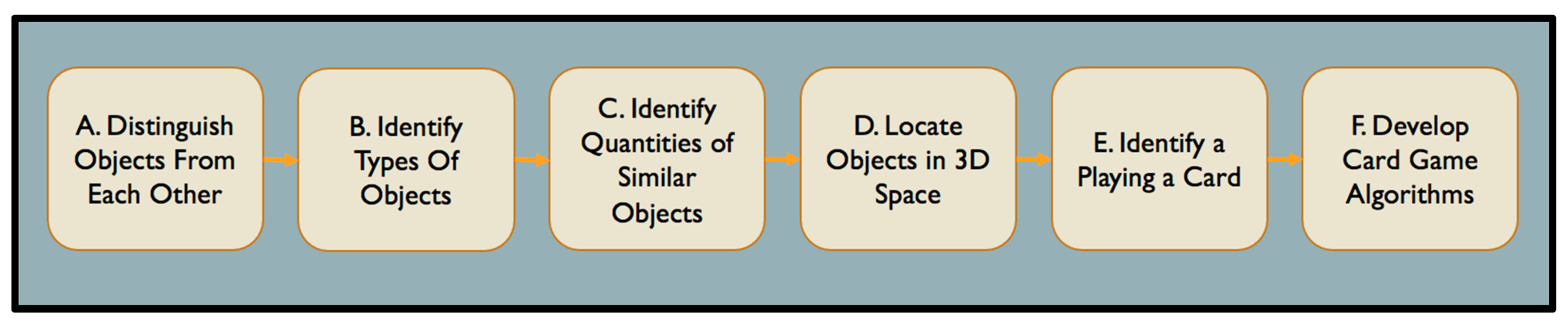
Table I.
Project Objectives Descriptions.
| Step | Objective | Description |
| A. | Distinguish Objects From Each Other | The first thing the program needs to be able to accomplish is to distinguish one object from another. At any given time, there will be many “objects” on the screen at any time. The program must be able to identify the starting and ending points of an object (its borders) in order to determine it as being an “object” to count or identify. In this case: the program needs to distinguish an individual playing card from the desk that it rests on, and any other surrounding visual “noise” that is on the screen. |
| B. | Identify the Type of Object | Once the program can recognize separate objects, the next step is to identify what an object is. Ex: playing card, hand, table. |
| C. | Identify Quantities of Similar Objects | The program needs to be able to count the quantities of similar objects that are seen by the program at any given time. |
| D. | Locate Objects in 3D Space | Once the program can identify objects and count, it needs to be able to locate where individual objects are in the real world. This is an important step for developing large scale analysis of an entire card game. |
| E. | Identify a Playing Card | The program should identify the playing card that is shown on the screen (King of Hearts, 2 of Spades, etc). Building this framework is important for any card game based algorithm we wish to implement. |
| F. | Develop Card Game Algorithms | Once the program can identify a playing card, count the quantity of cards, and determine where they are in space, back end code can be developed to create algorithms for card games. This will be the most logic and algorithm intensive portion of the project, as it will implement card game theory and algorithms for any individual card game. |
Disclaimer/Publisher’s Note: The statements, opinions and data contained in all publications are solely those of the individual author(s) and contributor(s) and not of MDPI and/or the editor(s). MDPI and/or the editor(s) disclaim responsibility for any injury to people or property resulting from any ideas, methods, instructions or products referred to in the content. |
© 2023 by the authors. Licensee MDPI, Basel, Switzerland. This article is an open access article distributed under the terms and conditions of the Creative Commons Attribution (CC BY) license (http://creativecommons.org/licenses/by/4.0/).
Copyright: This open access article is published under a Creative Commons CC BY 4.0 license, which permit the free download, distribution, and reuse, provided that the author and preprint are cited in any reuse.


