

Submitted:
03 November 2026
Posted:
04 November 2026
You are already at the latest version
Abstract
General plant identification services know the species that are photographed most often, but not the poorly documented ones that matter to a farmer, a biosecurity officer or a herbalist: local medicinal plants, newly arrived invasive species, or the plant material traded as herbal products. Med Herb Lens v2 lets anyone turn their own photos into an image classifier, trained on the phone or in the browser without sending the photos anywhere, and share the result as a standard model file. A frozen DINOv2 or MobileNetV3 backbone turns each photo into an embedding, and streaming linear discriminant analysis calculates the classifier from those embeddings in about a second. The application, previously Android only, was rebuilt as one Kotlin Multiplatform code base for Android, iOS and the web, in which 72% of the application’s code is shared by all three platforms and the same training code runs on each. We describe the architecture and the training workflow, and evaluate the product quality characteristics of ISO/IEC 25010 by measurement: accuracy, time, memory, portability, maintainability and security. Building a 10-species model from 200 photos in the Train tab took 32 s on an iPhone, 48 s in a browser and 3 min 19 s on a mid-range Android phone; the platforms agreed within about 2 points of accuracy; and 374 automated tests run on every change. A user survey of quality in use is under way.
Keywords:
on-device machine learning
; user-trained classifiers
; Kotlin Multiplatform
; cross-platform development
; plant identification
; ISO/IEC 25010
1. Introduction
Automated plant identification has become reliable for well-photographed species, thanks to large collections from citizen science and herbaria [1,2,3]. It remains weak where it is often needed most: the long tail of species with few images, which includes many local medicinal plants [4,5] and invasive species in the early stages of spread, when detection is the most cost-effective point to act [6]. The plant material sold in herbal products is a further case: DNA testing has found substitution and adulteration in a large share of commercial herbal products worldwide [7], and the people best placed to recognise the correct plant, such as growers, practitioners and inspectors, usually cannot build an image classifier for it.
Med Herb Lens began as an Android prototype that identified medicinal plants offline with a model trained by our team [8], built from curated datasets of medicinal species [9,10], with continual learning studied separately [11,12]. Two limits of that prototype motivated this work. First, it ran on one platform, so iPhone users and people without a suitable phone were excluded. Second, users could only identify the species our model knew; they could not teach it their own.
Med Herb Lens v2, the second major version, addresses both. At the time of writing, release 2.3 is available for Android and the web, and the iOS release is in App Store review. This paper makes three contributions:
- A single Kotlin Multiplatform [13] code base for Android, iOS and the web, with the user interface, data, training and most of the machine learning code shared, and an account of what could not be shared.
- The Train tab, a workflow in which anyone trains an image classifier for their own categories on the device, tests it, and shares it as a standard LiteRT [14] model that other tools can run and that Med Herb Lens on another device can continue to train.
- A product quality evaluation organised by the ISO/IEC 25010 model [15], using measurements on the three platforms and the code base.
The continual learning methods behind the Train tab, and their cross-device evaluation on invasive plants of concern to the United States, are the subject of a companion study [16]. That study ran in Research mode, a part of the application that uses the same training engine as the Train tab to run a fixed plan of experiments and record every measurement; the Train tab is the part users see. Here we report the system that delivers the engine to users and its quality as a product.
2. Related Work
Pl@ntNet [3] and the models trained on iNaturalist [2] identify tens of thousands of species from a server or a large on-device model, trained centrally on crowdsourced images. Users contribute photos but cannot train a model of their own, and species with few observations are poorly served [1].
Teachable Machine [17] showed that non-experts can train image classifiers in a browser from a pretrained network and a small trained head, and export them. It runs in the browser. Med Herb Lens v2 brings the approach to native mobile applications as well as the web, with the same training code on each, and lets a model move between devices and continue learning.
Training only a classifier on top of a frozen backbone makes learning on a phone affordable. Streaming linear discriminant analysis (SLDA) [18] goes further: it keeps class means and one shared covariance matrix, so the classifier is calculated rather than trained, and adding a class or a photo updates running sums. Our companion study compared nine continual learning strategies on three backbones across Android, iOS and the web and found SLDA on DINOv2 [19] embeddings the most accurate on every platform [16]; our earlier latency benchmarks showed that device and runtime dominate delivered latency [20].
Cross-platform approaches range from web applications and hybrid wrappers to interpreted frameworks and cross-compilation [21]. Kotlin Multiplatform belongs to the last group: shared Kotlin compiles to the Java virtual machine on Android, to native code on iOS and to JavaScript or WebAssembly in the browser, and each platform can still call its own libraries. Few reports describe a machine learning application built this way, or measure whether the platforms give the same results.
3. Med Herb Lens v2
3.1. From one Platform to Three
Figure 1 shows the architecture. The application is divided into feature modules (identify, browse, contribute, species details, saved, profile, sign-in and training) and core modules (domain, data, database, settings store, design system, machine learning, training, network, maps, location and Firebase). A build check enforces the dependency rules: features depend on core modules but never on each other, and only the application modules assemble them. The user interface is written once with Compose Multiplatform and runs on all three platforms.
Platform code is confined to what each operating system provides differently: the camera and photo pickers, file access, background work, and the machine learning runtimes. Android runs the herb identification model with ML Kit and user models with the LiteRT interpreter; iOS reaches TensorFlow Lite through a small Swift bridge; and the web runs LiteRT.js on WebAssembly. A shared interface, ImageEmbedder, hides these differences from the training code. Uploads that must survive the application closing run under WorkManager on Android, with background time on iOS, and in the page’s own scope on the web, and every upload step is safe to repeat.
Content is decoupled from releases. The herb model, the catalogue of 4,799 species and the backbones are published to object storage (Cloudflare R2) and announced through Firebase Remote Config with a checksum, so all three platforms update without a new release and the applications do not grow with each model. The interface is translated into 39 languages, including right-to-left layouts.
3.2. The Train Tab
The Train tab lets a user make a classifier for categories of their choice, such as plant species, crop grades or plant conditions. The user names a model, adds at least two categories with about ten photos each, chosen from the photo library or imported as a folder, and starts training.
Each photo is embedded once, when it is added, by a frozen backbone, and only the embedding is kept. The default backbone, labelled “Most accurate”, is DINOv2 ViT-S/14 [19], which we converted to LiteRT with 8-bit weights (22.8 MB) and download on first use; “Fast” uses the MediaPipe MobileNetV3-Small image embedder [22,23]. Every platform feeds the backbone the centre square of the photo at 224 by 224 pixels.
By default the classifier is calculated by SLDA [18]: class means and a shared covariance matrix are accumulated, and the weights follow from one linear solve, so no learning rate, epochs or early stopping are involved. Adding photos or categories later updates the sums. A trained softmax head, with replay of 20 stored embeddings per category to avoid forgetting, remains available under advanced settings. Training is written in plain Kotlin in the training core module, so the same arithmetic runs on every platform.
To test the model, the app assigns each photo to the learning or the test share (85% and 15% by default) from its number and a seed, so a photo keeps its share as more are added and test photos are never learnt from. The result screen (Figure 2) reports accuracy on the test photos, per category, and the pair of categories most often confused, and the user can try the model with the live camera.
Once trained, a model is saved as a standard .tflite file: the backbone’s graph, unchanged, followed by L2 normalisation, a fully connected layer and a softmax, with the category names inside. Any LiteRT or TensorFlow Lite runtime can run it. For Med Herb Lens, the file also carries the classifier’s statistics and up to 20 embeddings per category, so a model imported on another device can continue learning there. Users can share a model with everyone in the application: after sign-in and acceptance of the sharing terms, the file is uploaded through a Cloudflare Worker, listed in Firestore under a CC BY 4.0 licence, and optionally published to Hugging Face with a model card. Shared models can be reported and hidden, as for shared photos.
3.3. Privacy and Security
Identification and training run on the device, and photos leave it only when the user chooses to share them. Requests to the application’s services carry Firebase App Check attestation; Firestore access rules and the upload Workers check ownership, sizes and naming rules (for example, no email addresses, links or telephone numbers in shared model names), and both are covered by automated tests.
4. Evaluation Method
We organise the evaluation with the ISO/IEC 25010 product quality model [15] and measures from ISO/IEC 25023 [24], as a framework for collecting evidence rather than a claim of conformance. Each characteristic is assessed by the source that can measure it (Table 1). Quality in use [25], which depends on users’ experience, will be measured by a user survey that is under way and is not reported here.
Measurements used three platforms: a Xiaomi Redmi Note 12 (Snapdragon 685, Android 15), a mid-range phone; an Apple iPhone 17 Pro Max (iOS 27); and Chrome on a MacBook with an Apple M4 chip (macOS 26). Accuracy on another phone’s photos, embedding time and memory are cited from the companion study [16], which ran the same training engine in Research mode on the 7,269-photo, 21-species invasive plant dataset [26]; this paper measures the Train tab itself. Memory there is the proportional set size on Android, the physical footprint on iOS and the JavaScript heap in the browser, so it is compared within platforms only.
To measure the Train tab as a user meets it, we trained a model three times on each platform from the same 200 photos: 10 species chosen at random (seed 2026) from the invasive plant dataset, with 20 of each species’ iPhone photos [26]. The photos were imported as a folder (a zip file on Android) and the model used the default settings, DINOv2 with SLDA. Optimised builds were used (Android release, iOS Release; the web build in Chromium 152), and the times are those the app shows after training: reading covers decoding and embedding every photo, and calculating covers SLDA and testing.
Application code was counted as non-blank lines of Kotlin and Swift in the repository at release 2.2, excluding tests, build scripts and prototypes, and grouped by the platforms each source set compiles for. Tests were counted at release 2.3 as test functions run by continuous integration.
5. Results
5.1. Functional Correctness
With the default DINOv2 backbone and SLDA, classifiers trained on one phone’s photos identified the other phone’s photos of 21 invasive species with 97 to 98% accuracy in the companion study [16]. The model file the Train tab exports gave the same answers as the in-app classifier on every test photo, with probabilities within (checked with LiteRT.js on eight photos). In the Train tab runs, the default model identified 90 to 100% of its 30 test photos (Table 2): 27 on the iPhone, 29 on the Redmi and all 30 in the browser, the same on every run of a platform. These photos come from the same phone as the training photos, so they overstate accuracy on another phone’s photos [16]; the differences between platforms, one to three photos, come from how each platform decodes and resizes a photo.
5.2. Performance Efficiency
Table 2 gives the Train tab’s time on each platform. Reading 200 photos, which decodes and embeds each, took 32 s on the iPhone, 48 s in the browser and 3 min 19 s on the Redmi, and calculating the classifier took 35 to 404 ms. Embedding dominates the cost: reading a photo took only 12 to 58 ms longer than the embedding time the companion study measured with DINOv2, the cost of decoding a 12-megapixel photo, and even its 21-species SLDA classifiers took 0.4 to 1.3 s to calculate [16]. Times varied little between runs, except the Redmi’s calculation, which fell from 653 to 113 ms as Android’s runtime compiled the code. Memory in use was 261 to 319 MB on the Redmi, 438 to 644 MB on the iPhone and 366 to 848 MB in the browser [16]. Release 2.2 downloads as 39 MB from Google Play and 62 MB from the App Store (132 MB installed); the web application’s first visit transfers 6.5 MB of compressed code and resources. The phone applications include the herb model (22.8 MB) and the species catalogue so they work offline from the start, while the web application fetches them when first needed; on every platform, DINOv2 (22.8 MB) is downloaded the first time a model uses it.
5.3. Flexibility and portability
Of 20,638 lines of application code, 14,916 (72.3%) are common to all three platforms and a further 534 (2.6%) are shared by Android and iOS (Table 3). Platform code is small on each: 7.3% for Android, 9.9% for iOS and 8.0% for the web. It holds the machine learning runtimes, camera and file access, background work and the platforms’ entry points; the code shared by the two mobile platforms keeps the species catalogue in a local SQL database and downloaded content in files, where the web uses browser storage. Because training is common code, the platforms agreed closely: for the same configuration and seed, final accuracy differed between two platforms by 1.4 to 2.1 points on average, and by 0.4 to 0.7 points with SLDA [16]. The remaining differences come from the platforms’ image decoders and backbone runtimes, not from the training code.
5.4. Maintainability, Security and Inclusivity
Every change runs 374 automated tests in six continuous integration jobs: Kotlin unit and screenshot tests, lint, the module rules and a build of the web application; iOS compilation and simulator tests; a build of the iOS application; the upload Worker’s tests; the Firestore access rule tests; and the tests of the Cloud Functions that record users’ contributions. Of the tests, 317 are in Kotlin, 32 cover the upload Worker, 18 the access rules and 7 the Cloud Functions, so the security checks in Section III-C are verified on every change. The interface is available in 39 languages on all three platforms, and identification and training work offline once the models are downloaded.
6. Discussion
Almost everything a user sees and everything that decides a result is shared: screens, navigation, data, the training arithmetic and the model file format. What remained platform specific was what the operating systems do differently, above all the machine learning runtimes. Writing training in plain Kotlin, rather than calling a different training library on each platform, is what made the platforms agree; it costs some speed but SLDA needs only one linear solve, so the cost is negligible next to embedding.
Cost depended far more on the device than on the code. The browser’s single-threaded WebAssembly runtime made a fast laptop slower than the iPhone, and the mid-range Android phone was seven times slower than the iPhone at embedding with DINOv2 [20]. The Train tab therefore offers the faster MobileNet backbone, and embeds each photo when it is added rather than all at once.
Nothing in the Train tab is specific to medicinal plants. The same workflow, and the same file, serve a biosecurity officer learning a newly detected invasive species, a grower grading produce, or an inspector checking plant material in herbal products [6,7]. The companion study shows the approach on 21 invasive species listed in the United States [16].
The main limitation is that this paper evaluates product quality only. Quality in use, including how easily users train a model and whether they trust it, awaits the user survey, whose single link cannot tell platforms apart. The performance figures come from three devices, one per platform, and the accuracy figures from one dataset of 21 species [16]. Lines of code measure how much is shared, not how hard it was to share.
7. Conclusions
Med Herb Lens v2 moves a medicinal plant identification prototype from one platform to three and lets its users build their own image classifiers on the device. One Kotlin Multiplatform code base shares 72% of the application’s code with all platforms, including all of the training code, so a model trained on a phone, in a browser or on an iPhone gives nearly the same results and can move between them as a standard file. Measured against the ISO/IEC 25010 product quality model, the application is accurate with the default backbone, fast enough on a mid-range phone, portable, and tested on every change. Future work will report the user survey and extend training to recognising photos of species the model does not know.
Data Availability Statement
The application is available for Android and the web at https://medherblens.com, and for iOS once App Store review is complete. Its source code is released under the Apache 2.0 licence [27].
Acknowledgments
The first author was supported by an Australian Government Research Training Program (RTP) scholarship, administered by the University of New England. The authors used Claude Code (Anthropic) to assist with writing and testing the application’s source code; all code was reviewed by the authors.
References
- Wäldchen, J.; Rzanny, M.; Seeland, M.; Mäder, P. Automated plant species identification: Trends and future directions. PLoS Comput. Biol. 2018, 14, e1005993. [Google Scholar] [CrossRef] [PubMed]
- Van Horn, G.; Mac Aodha, O.; Song, Y.; Cui, Y.; Sun, C.; Shepard, A.; Adam, H.; Perona, P.; Belongie, S. The iNaturalist Species Classification and Detection Dataset. In Proceedings of the 2018 IEEE/CVF Conference on Computer Vision and Pattern Recognition (CVPR), 2018; pp. 8769–8778. [Google Scholar] [CrossRef]
- Bonnet, P.; Champ, J.; Goëau, H.; Stöter, F.R.; Deneu, B.; Servajean, M.; Affouard, A.; Lombardo, J.C.; Levchenko, O.; Gresse, H.; et al. Pl@ntNet Services, a Contribution to the Monitoring and Sharing of Information on the World Flora. Biodivers. Inf. Sci. Stand. 2020, 4. [Google Scholar] [CrossRef]
- Tran, T.P.; Ud Din, F.; Brankovic, L.; Sanin, C.; Hester, S.M. A Systematic Review of Medicinal Plant Identification Using Deep Learning. In Intelligent Information and Database Systems; Springer Nature Singapore, 2024; pp. 3–14. [Google Scholar] [CrossRef]
- Tran, T.P.; Ud Din, F.; Brankovic, L.; Sanin, C.; Hester, S.M. Advancements in Medicinal Plant Identification Using Deep Learning Techniques: A Comprehensive Review. Vietnam J. Comput. Sci. 2025, 13, 149–182. [Google Scholar] [CrossRef]
- Pyšek, P.; Hulme, P.E.; Simberloff, D.; Bacher, S.; Blackburn, T.M.; Carlton, J.T.; Dawson, W.; Essl, F.; Foxcroft, L.C.; Genovesi, P.; et al. Scientists’ warning on invasive alien species. Biol. Rev. 2020, 95, 1511–1534. [Google Scholar] [CrossRef] [PubMed]
- Ichim, M.C. The DNA-Based Authentication of Commercial Herbal Products Reveals Their Globally Widespread Adulteration. Front. Pharmacol. 2019, 10, 1227. [Google Scholar] [CrossRef] [PubMed]
- Tran, T.P.; Ud Din, F.; Brankovic, L.; Sanin, C.; Hester, S.M. Med Herb Lens: A Prototype AI App for Medicinal Plant Identification. Procedia Comput. Sci. 2025, 270, 2603–2612. [Google Scholar] [CrossRef]
- Tran, T.P.; Ud Din, F.; Brankovic, L.; Sanin, C.; Hester, S.M. Vietnamese Medicinal Species Identification: A Curated Dataset with Enhanced Metadata for AI-Based Classification. In Proceedings of the 2025 Conference on AI, Science, Engineering, and Technology (AIxSET); IEEE, 2025; pp. 134–139. [Google Scholar] [CrossRef]
- Tran, T.P.; Ud Din, F.; Brankovic, L.; Sanin, C.; Hester, S.M. Viet Medi Species 2026: A Web-Accessible Multilingual Dataset for Vietnamese Medicinal Biodiversity. In Proceedings of the Companion Proceedings of the ACM Web Conference 2026, 2026; ACM; pp. 258–265. [Google Scholar] [CrossRef]
- Tran, T.P.; Ud Din, F.; Brankovic, L.; Sanin, C.; Hester, S.M.; Duc Hoang Le, M. Incremental and Zero-Shot Machine Learning for Vietnamese Medicinal Plant Image Classification. Procedia Comput. Sci. 2024, 246, 606–615. [Google Scholar] [CrossRef]
- Tran, T.P.; Ud Din, F.; Brankovic, L.; Sanin, C.; Hester, S.M. Resource-Efficient Continual Learning for Medicinal Plant Identification: A Periodic Retraining Approach for Edge-Deployed Agricultural IoT Applications. IoT 2026, 7, 57. [Google Scholar] [CrossRef]
- JetBrains. Kotlin Multiplatform. 2026. Available online: https://kotlinlang.org/docs/multiplatform.html (accessed on 26 October 2026).
- Google AI Edge. LiteRT: on-device runtime for machine learning models. 2026. Available online: https://ai.google.dev/edge/litert (accessed on 26 October 2026).
- International Organization for Standardization. ISO/IEC 25010:2023 Systems and software engineering: Systems and software Quality Requirements and Evaluation (SQuaRE): Product quality model; 2023.
- Tran, T.P.; Ud Din, F.; Brankovic, L.; Sanin, C.; Hester, S.M. On-Device Continual Learning for Identifying Invasive Plants of Biosecurity Concern to the United States from Smartphone Imagery Captured in Vietnam and Australia, 2026. Preprint. [CrossRef]
- Carney, M.; Webster, B.; Alvarado, I.; Phillips, K.; Howell, N.; Griffith, J.; Jongejan, J.; Pitaru, A.; Chen, A. Teachable Machine: Approachable Web-Based Tool for Exploring Machine Learning Classification. Proceedings of the Extended Abstracts of the 2020 CHI Conference on Human Factors in Computing Systems 2020, CHI EA ’20, 1–8. [Google Scholar] [CrossRef]
- Hayes, T.L.; Kanan, C. Lifelong Machine Learning with Deep Streaming Linear Discriminant Analysis. In Proceedings of the 2020 IEEE/CVF Conference on Computer Vision and Pattern Recognition Workshops (CVPRW); IEEE, 2020; pp. 887–896. [Google Scholar] [CrossRef]
- Oquab, M.; Darcet, T.; Moutakanni, T.; Vo, H.; Szafraniec, M.; Khalidov, V.; Fernandez, P.; Haziza, D.; Massa, F.; El-Nouby, A.; et al. DINOv2: Learning Robust Visual Features without Supervision. Transactions on Machine Learning Research, 2024. [Google Scholar]
- Tran, T.P.; Ud Din, F.; Brankovic, L.; Sanin, C.; Hester, S.M. Device and Runtime Heterogeneity Dominate Delivered Latency: Benchmarking Mobile Vision Transformers for Fine-Grained Classification on Commodity Smartphones, 2026. Preprint. [CrossRef]
- Biørn-Hansen, A.; Grønli, T.M.; Ghinea, G. A Survey and Taxonomy of Core Concepts and Research Challenges in Cross-Platform Mobile Development. ACM Comput. Surv. 2018, 51, 1–34. [Google Scholar] [CrossRef]
- Howard, A.; Sandler, M.; Chu, G.; Chen, L.C.; Chen, B.; Tan, M.; Wang, W.; Zhu, Y.; Pang, R.; Vasudevan, V.; et al. Searching for MobileNetV3. In Proceedings of the 2019 IEEE/CVF International Conference on Computer Vision (ICCV), 2019; pp. 1314–1324. [Google Scholar] [CrossRef]
- Lugaresi, C.; Tang, J.; Nash, H.; McClanahan, C.; Uboweja, E.; Hays, M.; Zhang, F.; Chang, C.L.; Yong, M.G.; Lee, J.; et al. MediaPipe: A Framework for Building Perception Pipelines, 2019. arXiv arXiv:1906.08172. [CrossRef]
- International Organization for Standardization. ISO/IEC 25023:2016 Systems and software engineering: Systems and software Quality Requirements and Evaluation (SQuaRE): Measurement of system and software product quality; 2016.
- International Organization for Standardization. ISO/IEC 25019:2023 Systems and software engineering: Systems and software Quality Requirements and Evaluation (SQuaRE): Quality-in-use model; 2023.
- Tran, T.P.; Ud Din, F.; Brankovic, L.; Sanin, C.; Hester, S.M. Invasive Plants of Vietnam and Australia: Smartphone Images, 2026. Dataset. [CrossRef]
- Tran, T.P. Med Herb Lens: source code, 2026. Software, release 2.1.
Figure 1.
Architecture of Med Herb Lens v2. Green: code shared by all platforms; blue: platform code; orange: services.
Figure 1.
Architecture of Med Herb Lens v2. Green: code shared by all platforms; blue: platform code; orange: services.
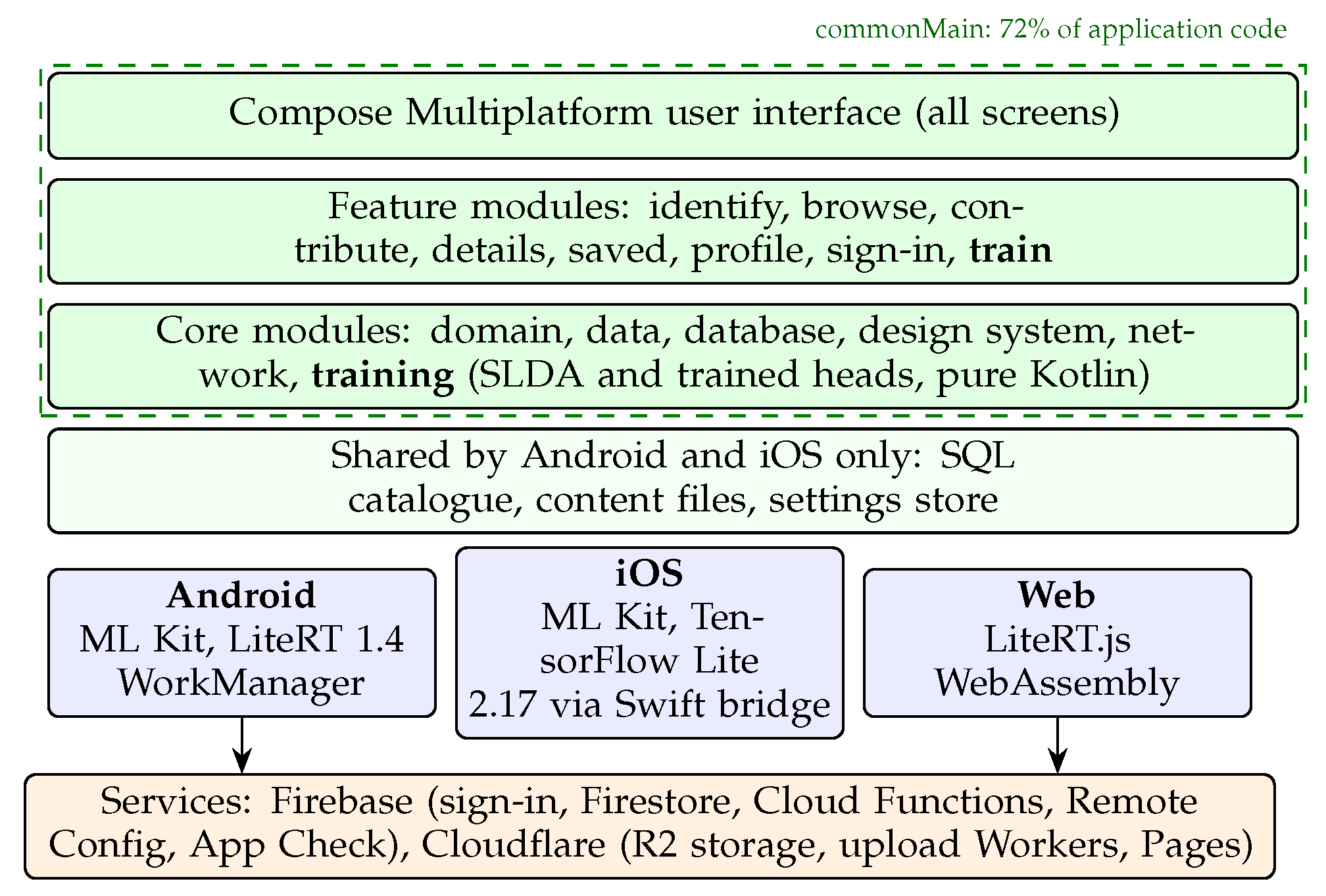
Figure 2.
The Train tab’s result screen for the same 10-species model on Android (Redmi Note 12, left), iOS (iPhone 17 Pro Max, centre) and the web (Chromium on a MacBook, right), drawn by the same shared Compose code. Accuracy on the 30 test photos differs by one to three photos, from how each platform decodes and resizes photos (Table 2). The Android phone uses a larger system font.
Figure 2.
The Train tab’s result screen for the same 10-species model on Android (Redmi Note 12, left), iOS (iPhone 17 Pro Max, centre) and the web (Chromium on a MacBook, right), drawn by the same shared Compose code. Accuracy on the 30 test photos differs by one to three photos, from how each platform decodes and resizes photos (Table 2). The Android phone uses a larger system font.
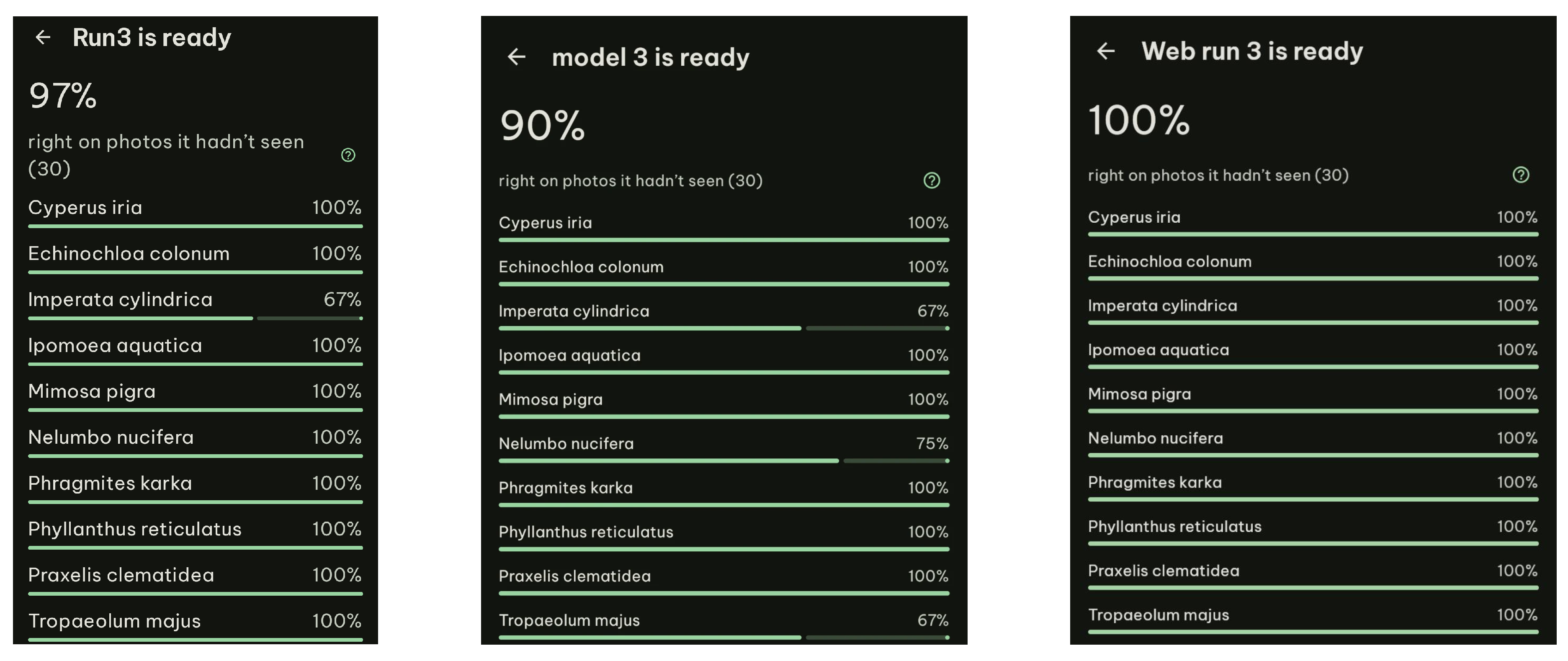

Table 1.
Evaluation evidence for each ISO/IEC 25010:2023 quality characteristic (2011 names in brackets where the 2023 edition renamed them).
Table 1.
Evaluation evidence for each ISO/IEC 25010:2023 quality characteristic (2011 names in brackets where the 2023 edition renamed them).
| Characteristic | Evidence | Measure |
|---|---|---|
| Functional suitability: correctness | Measured [16] | Accuracy on photos taken with a different phone; agreement of the exported model with the in-app classifier |
| Performance efficiency: time behaviour | Measured on each platform | Time to embed a photo; time to calculate or train a classifier |
| Performance efficiency: resource use | Measured on each platform | Memory in use; download and model sizes |
| Flexibility (portability): adaptability | Measured on the code base | Share of application code common to all platforms; agreement of results across platforms |
| Interaction capability (usability): inclusivity | Product features | Interface languages and right-to-left layouts; platforms supported |
| Reliability: availability, fault tolerance | Design | Offline identification and training; uploads that resume after failure |
| Security: confidentiality, integrity | Design and tests | Device attestation; access rules and upload checks under automated test; photos kept on the device |
| Maintainability: modularity, testability | Measured on the code base | Enforced module rules; automated tests and continuous integration jobs |
| Quality in use: satisfaction, usefulness, trust | User survey (under way) | Survey of 20 rated items and one open question [25] |
Table 2.
The Train tab as a user meets it: a 10-species model from 200 photos, with DINOv2 and SLDA. Median of three runs on a Redmi Note 12, an iPhone 17 Pro Max and Chromium on a MacBook (Apple M4), with the range of the calculation in brackets; accuracy on 30 test photos from the same phone.
Table 2.
The Train tab as a user meets it: a 10-species model from 200 photos, with DINOv2 and SLDA. Median of three runs on a Redmi Note 12, an iPhone 17 Pro Max and Chromium on a MacBook (Apple M4), with the range of the calculation in brackets; accuracy on 30 test photos from the same phone.
| Reading 200 photos | Calculating | Test | ||
| Platform | Total | Per photo | (ms) | accuracy |
| Android (Redmi) | 199 s | 993 ms | 404 (113 to 653) | 97% |
| iOS (iPhone) | 32 s | 160 ms | 60 (60 to 64) | 90% |
| Web (Chromium) | 48 s | 241 ms | 35 (31 to 39) | 100% |
Table 3.
Application code by the platforms it runs on (non-blank lines of Kotlin and Swift, excluding tests and build scripts).
Table 3.
Application code by the platforms it runs on (non-blank lines of Kotlin and Swift, excluding tests and build scripts).
| Runs on | Lines | Share |
| Android, iOS and web (commonMain) | 14,916 | 72.3% |
| Android and iOS (mobileMain) | 534 | 2.6% |
| Android only | 1,505 | 7.3% |
| iOS only (Kotlin and Swift) | 2,042 | 9.9% |
| Web only | 1,641 | 8.0% |
| Total | 20,638 | 100% |
Disclaimer/Publisher’s Note: The statements, opinions and data contained in all publications are solely those of the individual author(s) and contributor(s) and not of MDPI and/or the editor(s). MDPI and/or the editor(s) disclaim responsibility for any injury to people or property resulting from any ideas, methods, instructions or products referred to in the content. |
© 2026 by the authors. Licensee MDPI, Basel, Switzerland. This article is an open access article distributed under the terms and conditions of the Creative Commons Attribution (CC BY) license (http://creativecommons.org/licenses/by/4.0/).
Copyright: This open access article is published under a Creative Commons CC BY 4.0 license, which permit the free download, distribution, and reuse, provided that the author and preprint are cited in any reuse.