

Submitted:
13 August 2026
Posted:
14 August 2026
You are already at the latest version
Abstract
A novel application of function hooking is presented, allowing software that runs on Windows and uses MFC, wxWidgets, or the Win32 API to have its user interfaces translated without modification of the original application or access to source code. A launcher is used to run the target executable, loading it into the launcher’s address space and allowing the launcher to hook into functions that display text in the user interface. These functions then transparently replace original text with the translated version and call the original function. The method is effective, with minimal to no measurable runtime overhead, but visual imperfections remain due to differing lengths of text and potential numerical translations.
Keywords:
function hooking
; graphical user interface translation
; human computer interaction
; interface translation
; translation
; win32
; wxwidgets
; windows
1. Introduction
The Microsoft Foundation Class (MFC) library is an object-oriented C++ wrapper around the Win32 API (Application Programming Interface). It is a mature toolkit for developing graphical user interfaces (GUIs) on the Microsoft Windows platform and has been continuously released and updated since February 26th 1992[1]. In order to translate an MFC or Win32 GUI, there are typically three options: localised executables, satellite DLLs, and third-party tools. All of these methods, however, are technical measures relating to the packaging and distribution of pre-existing resources. These resources must typically be fixed some time before software is released in order to allow time for them to be translated, many projects therefore declare a “string freeze” some time before release, after which no text can be modified[2,3,4].
Creating a new executable for each language is a common approach taken by tools like Passolo[5] and involves duplicating all executable code and requiring the user to launch the correct application (see Figure 1). Though source code is not necessarily required (they can be created from an executable file), any updates to translations require recreation of the entire executable, the number of languages must be known in advance, and digital signatures will no longer be valid for the translated executables.
Satellite DLLs are dynamically-linked libraries (DLLs) that contain localised resources such as images and text[6]. Where a DLL is found that has a name of the form ApplicationNameXYZ.dll (where XYZ is the ISO 3166-1 code for a language), resources are loaded from the satellite DLL whose XYZ matches the user’s system language, falling back to the main executable if no such DLL is found (see Figure 1). They have the disadvantage that a new DLL must be built for each language, which requires access to specific tooling.
Finally, there are third-party tools, such as GNU gettext1, which work by scanning the application source code and extracting strings for translation[7]. The user must then modify their source code to call a lookup function to find the corresponding string in an external translation table. It has the disadvantage that it requires modification of the original source code, and therefore recompilation and redistribution of the entire application, after which updated translations can be distributed independently.
The gettext documentation lists an eight-step process for translating software, including the modification of every line of code that contains a translatable string. Automated tools can help with this process, but such extensive modifications represent a significant investment of time for any team or individual that wishes to have a translatable interface. The tools required to produce updated translation files (that can be distributed independently of the original application) are freely-redistributable, which is beneficial compared to satellite DLLs.
Although MFC and Win32 are legacy APIs, having been overtaken significantly by more modern UI frameworks such as wxWidgets, Qt, and web-based frameworks, it was historically very widely used, especially for software that was not required to run beyond the Windows platform, and some modern usage does remain. A common example of this is hardware control programs; configuration applications for industrial devices, produced by the manufacturer.
1.1. Translated GUI User Experience
In [8], it was found that users were often still able to complete a list of guided tasks in an machine-translated vs. manually translated Android app. However, when an the interface was machine-translated (albeit not via an LLM), users generally completed the tasks less efficiently – taking extra, unnecessary steps, skipping steps and so on, whilst expressing dissatisfaction with the quality of the translation[8].
In [9], a user study was performed on three versions of the Microsoft Word interface: the published translated version, the original English version, and a machine-translated version. They selected Word because it is the simplest application in the Microsoft Office suite and they wished to ensure the focus was on the impact of the translation, not the users’ computing skill. Users were monitored performing a number of tasks, which included checking the spelling of the document, inserting a section break, and changing the indentation and spacing of a paragraph, among others. Like [8], they found that task completion was not significantly affected by the means of translation. However, efficiency and self-reported satisfaction were higher for the original English version and published translated versions. They also measured a higher cognitive load higher when using the machine-translated version.
Although the pilot study conducted by [10] found that neural machine translations were preferred by users and resulted in higher task efficiency than traditional machine translation, the number of participants was very low, and the neural machine translations still resulted in higher cognitive load among the participants.
1.2. Non–Invasive Redirection of Function Calls
If a software vendor goes out of business, stops supporting their software (or has no interest in supporting it), translation by the above techniques is no longer an option, as source code is typically not made available in such circumstances. The software is then effectively frozen in-place; no updates will be delivered, and if the application is digitally signed then decompilation and recompilation, or direct modification are not possible, as invalidating the digital signature may invalidate organisational security requirements.
This leaves only reimplementation[11], which is very time-consuming and expensive, and non-invasive methods, which typically involve function call redirection. On Windows platforms there are three main methods of function call redirection; application manifests, dot-local redirection, and function hooking.
Application manifests are files that allow user control over the libraries that an executable loads. This allows loading a different (i.e. local) version of a file in preference to the system version. A complicating factor is that these manifest files can be embedded in an executable file, rendering them inaccessible without the manifest tool (mt.exe) from the Windows SDK. Though embedded manifests are trivial to updateusing mt.exe, doing so invalidates any digital signature that applied to the executable, which may not be desirable.
The .local technique is a means of creating a file in the executable directory that instructs it to load a local copy of a system DLL. If the application manifest does not allow for .local redirections then administrative permissions must be used to enable them globally, making the computer more vulnerable to a malicious user. Depending on the context, this may present a security concern.
Function hooking is a means of patching an executable at runtime (binary instrumentation), so that any call to function A is replaced by a call to a different function B that has the same signature. It was selected as the most suitable approach as it is widely used and understood, does not require redistribution of a tool from an SDK (mt.exe), and can be used without administrative permissions on the target machine irrespective of whether an application manifest is embedded into the executable.
1.3. Prior Art
One significant application of binary instrumentation is the analysis of performance[12] and user behaviour when interacting with the software. Simply logging all user interactions (e.g. mouse clicks, opening menus, etc.) would lead to a huge volume of data that would then require further analysis. Consequently, tools are often built that handle the instrumentation in the background and allow developers and testers work with higher-level data and concepts[13,14].
Many approaches to live translation of desktop software work by performing Optical Character Recognition (OCR) on a region of the screen and providing a window containing text translated via a large language model (LLM)[15,16,17].
Atlas2 is a focused application for embedding text changes into retro video games (Nintendo Entertainment System, GameBoy, etc.) that are provided to it as ROM (Read-Only Memory) files. It has a domain-specific language for updating text and modified the ROM file to which it is applied.
Textractor3 uses function hooking to extract text for display in its own GUI. Textractor Translator4 builds on top of this to allow almost in-place translation for visual novels. It translates the extracted text and applies (customisable) HTML and CSS styling, allowing the user to match the visual appearance of the translation with that of the visual novel they are running. This approach is closely related to the method presented here, but targets a single application type and displays the output in a separate window that is positioned over the target application, masking it.
1.4. Security Considerations
A long-standing security mechanism is (initially deployed in Windows XP) is marking memory pages as either writeable or executable, but not both. This technique is denoted as W⌃X, meaning write XOR execute. Any attempt to write to memory that is write protected, or execute non-executable memory results in an access violation error and the process typically is terminated. Ordinary function addresses reside in executable memory, and thus are not writeable by default. However, Windows provides a mechanism for a process to alter the read/write/executable status of a memory page that it owns, allowing the function hook to be installed by marking the target memory page as writeable, writing the new function address, then marking it as executable again, allowing the now-hooked function to be called.
Other security mechanisms, such as DRM for licence enforcement, have the potential to impact the technique. Binary instrumentation leaves detectable artifacts in the runtime, which allows the instrumentation to be detected, for instance, by comparing expected and actual function pointer addresses, or comparing exported functions with a known-good list, both of which would reveal the presence of a hook. Detection of such instrumentation would then enable an adversary or DRM scheme to attempt to counteract or bypass the hooks[18,19]. The implementation presented in this paper does not attempt to conceal its presence or evade security countermeasures.
1.5. Contributions
The primary contribution is a novel application of function hooking for translating a GUI without modifying the original executable, alongside performance testing that shows a very minor or unmeasurable effect on runtime performance, demonstrating its feasibility from a performance perspective. The technique works with applications whose GUIs use MFC, Win32, or wxWidgets (whether directly or via a dependency) and requires no modification of the source code or program executable, allowing it to be used with digitally-signed executables and legacy applications for which the source code is not available. Provided all relevant functions are hooked, the technique will not miss any displayed text that could be missed by manual source code modification.
The technique is distinguished from other approaches, even those that use function hooking (Textractor and Textractor Translator), due to its highly general nature (since it hooks low-level system functions) and the fact that the translated text is displayed directly in the target application instead of a companion app. Not only is this simpler from an end-user perspective (shortcuts could even be set up to launch an application in different languages), but it allows more natural interaction with the translated program.
The implementation uses XML-based caches, allowing for simple distribution and translation of text. No specialised tools or software are needed at any stage of the process – whether for distributing, translating, or reintegrating the translations. This also simplifies Continuous Integration/Continuous Deployment (CI/CD) pipelines by deserialising the translation process – no resource DLLs are required and no new executables need to be built after translations are received.
1.6. Limitations
The primary limitation is that when text is dependent on user input, the results cannot be computed in advance. For text in ordinary controls, such as buttons, this is unlikely to occur, so depending on the application, this may not present a problem.
The secondary limitation arises when text is displayed that contains computed numbers. In this situation, numbers are extracted and processed separately: namely, by transposition into the new string or by parsing and inserting into the new string. If the target language uses a different character set or formatting, this presents an additional challenge, but does not invalidate the technique presented here.
More modern toolkits such as Qt and GTK render text internally, then call native platform APIs to display the pre-rendered text. Therefore, since the platform API does not receive any text (only a rendered image), these functions cannot be hooked to translate text and applications written with Qt, GTK, and similar toolkits cannot be translated by this technique.
2. Materials and Methods
2.1. Launcher
There were many libraries available that would have allowed hooking functions, such as Frida5 and the Intel PIN framework[? ], but ultimately the Detours library[20] was selected for hooking functions due to its simpler integration with Visual Studio, longer-tenure, and original author being Microsoft. It also supports Windows versions dating back to Windows XP and even NT, making it particularly suitable for a technique intended to be applicable to legacy software.
Runtime patching (whether via Pin, Detours, MinHook6, or some other library) requires a launcher program runs the target application. In doing so, it is ensured that the address space of the target executable is owned (and therefore modifiable) by the launcher. The launcher starts the target executable in a halted state, then loads a translation shim that hooks a set of pre-defined functions which present text to the user. In the context of translating a GUI the requirement for a launcher is not a critical problem, and may even be beneficial: users need a way to select their target language, so the launcher is used for the dual purposes of a) selecting the language, and b) hooking the functions behind the scenes. The launcher was implemented with a command-line interface, allowing it to be used to create shortcuts that directly launch a translated application.
2.2. Translation Shim
A library was implemented with a simple API that either accepts a string and looks up the corresponding translation in the cache.
The clang compiler was used to parse the headers of the Windows SDK and produce an Abstract Syntax Tree (AST) of the functions and types contained therein. This AST was then parsed to extract only those functions that had string parameter types (specifically, any of the LPCWSTR, LPCTSTR, LPWSTR, or LPTSTR types). The implementation was initially completed with wide-character strings, though the principle and technique apply equally to narrow strings, and adaptation was trivial.
For most functions that took simple parameters, a simple wrapper function written that translated any string parameters before calling the hooked function (see Figure 2). Each of those functions then had their parameters checked against the documentation to ensure that only strings intended for display to the user were translated, not, for instance, class names, which are for internal use by MFC.
Two functions that required minor modifications for performance and correctness are shown in Figure 3.
Finally, some functions used structure pointers, preprocessor macro types, or type-erased parameters, meaning the scripts were not able to automatically determine all relevant functions – some manual searching of the documentation was still required, particularly for structure parameter types, which sometimes had string members requiring translation. Almost all text was able to be translated by hooking a small number of functions, but some needed more detailed handling, such as PostMessageW, whose implementation is shown in Figure 4.
2.3. Caching
It quickly became apparent that when running a language model on a CPU that caching the results was mandatory. The need for a cache might be somewhat mitigated by a graphical or neural processing unit with sufficient memory to hold the model, but such hardware cannot be guaranteed to be available.
A hierarchical caching system was implemented:
- 1.
- Authoritative: read-only, for known-good translations.
- 2.
- Live: mutable, for on-the-fly translations.
This two-layer structure allows distribution of a pre-populated, professionally-translated cache whilst still allowing for collection of additional strings for later translation.
Prior to checking either cache, numbers are extracted and replaced with placeholders before looking up the resulting string in the cache, so instead of looking for "Created 3 copies report number 9", the cached string is "Created {} copies report number {}". Numbers are reinserted after cache lookups, ensuring that the cached text is more generalised and can be used even if the application needs to display "Created 4 copies of report 12", thus saving resources.
The live cache is only searched if there is no appropriate entry in the authoritative cache. To populate the live cache; the following procedure is followed:
- 1.
- Check authoritative cache: if found, return translation, otherwise;
- 2.
- Check mutable cache: if found, return translation, otherwise;
- 3.
- Create a placeholder cache entry, where the source and target strings are identical (used for offline translation).
- 4.
- Persist mutable cache to disk.
- 5.
- Return original string.
The persistence to disk ensures the string need not be translated again on subsequent application launches and that is always up-to-date for offline translation.
2.4. Avoiding Translation
It is a truism that the best optimisations involve avoiding work, rather than performing that work faster. The technique was developed and tested against software whose default language was English, therefore the heuristics used were tailored to that character set. Checks were carried out within a single function, whose implementation is readily adaptable to other source langauges. Display text was deemed to not require translation if any of the following conditions are met:
- 1.
- It contains no alphabetic characters – pure numbers, numerical dates, strings of emoji emoji, etc. do not need translation.7
- 2.
- It describes a filename – translation could result in the desired file not being found.
- 3.
- It is already in one of the caches – recursive translation would at best be useless, and at worst provide a hallucination.
Detecting whether something is a file name/path is a non-trivial task to perform definitively; therefore a simple heuristic was used: if the text started with X:\ (indicating a drive-rooted path) or \\ (indicating a UNC path) and ended in any of a particular set of file extensions, it was passed through without translation. This would not catch cases where a filename or path is embedded in a larger string, but does help to prevent some unnecessary entries from entering the translation cache.
2.5. Generative AI Disclosure
GitHub Copilot was to save time on the initial creation of the benchmarking scripts (which were subsequently modified significantly) and English-to-German translation of UI text. It was also used to decode some unusual-looking data that was received from IrfanView and WinMerge’s hooked functions. This is an implementation detail of these applications and does not affect the technique (translation simply requires an additional encode/decode step).
3. Results
For testing the technique, two applications were selected:
- 1.
- Tenacity; an open-source audio editor,
- 2.
- IrfanView; a closed-source image viewer, and
- 3.
- TVT (Text Verification Tool); commercial software for computer-assisted proofreading.
- 4.
- WinMerge; an open-source diff-viewer.
Tenacity and IrfanView were selected due to their wide availability and zero-cost nature. Although this technique is not necessary in order to use Tenacity in a different language, it was beneficial to initially develop with an open-source application for debugging and analysis.
Tenacity uses wxWidgets, a cross-platform toolkit that calls system-native APIs to create GUI widgets (buttons, menus, etc.). On Windows, this ultimately results in calls to the Win32 API, providing further validation of the technique for programs that use the Win32 API even indirectly. The translated interface can be seen in Figure 5.
TVT is commercial software that has been continuously developed and regularly released since 2002. It is used for computer-assisted proofreading in regulated industries, particularly pharmaceuticals. It is written in C++ with MFC being used for the GUI.
Like TVT, WinMerge is a well-maintained and developed program written in C++ with an MFC GUI. As of 2026, it has been in continuous development for over 20 years.
3.1. Performance
A simple benchmark script was created that performed the following actions:
- 1.
- Opened 5 menus and a submenu in each (when there was a submenu).
- 2.
- Toolbar: hover the mouse over 12 buttons to display their tooltips.
- 3.
-
Open the main settings dialog and, on each page with the corresponding control type:
- (a)
- toggled up to 5 checkboxes;
- (b)
- changed up to 5 combobox selections;
- (c)
- incremented the value on up to 5 spinners.
- 4.
- Closed the settings dialog without saving, to avoid changing the state for future iterations.
This script was used to drive the original and translated GUIs for 30 iterations, recording the elapsed time after every 5 iterations, which can be seen in Table 1. Prior to running the script, it was ensured that the translation cache was fully populated.
As Table 1 clearly shows, when the differences is measurable, it is very small, with a worst-case statistically significant (at ) 3% increase in mean in runtime in the case of WinMerge.
4. Discussion
A technique for translating the native GUI of applications on Windows operating systems was presented that does not require source code, modify the target executable or invalidate digital signatures. Successful deployment of the technique was demonstrated for direct and indirect (via the wxWidgets toolkit) use of the Win32 API.
To improve the speed and responsiveness, a caching system was used that enabled offline translation. When the caches are fully populated, the technique has a very low to negligible overhead, making interaction with the translated interface entirely comfortable.
Differing text lengths caused imperfections when a control had its size pre-computed (see Figure 5). This is a common occurrence when text is translated under strict layout constraints and must be worked around using standard techniques like rewording and abbreviating. The extent to which this presents a problem – and thus the viability of the technique – are a function of the design, layout, and implementation of the target application. The presented technique is therefore not a universal solution to software translation, but does represent another option that may be suitable depending on the application and context.
The numerical workaround described in Section 2.3 of extracting and reinserting numbers makes sense in some contexts to avoid exploding the cache with near-identical strings), but limits the applicability of the implementation to languages that use Latin numerals. GUIs that are highly-numerical are therefore less suitable for this technique, with Tenacity representing a near worst-case scenario; as can be seen from Figure 5, a high proportion of the on-screen text is numbers. As with the differing text lengths, individual target applications must be assessed for suitability.
Similar results were achieved on Linux systems not by function hooking, but simply by overriding the LD_LIBRARY environment variable when launching the target application, causing the overlay library to be loaded in preference to the default system library. Since closed-source applications for these systems are less widespread, there is unlikely to be a similar level of demand for it in such contexts.
Since a major application is the translation of software for which the source code is unavailable, the Application Binary Interface (ABI) is fixed. To ensure compatible operation, the injected DLL must link to the same runtime libraries as the target application, something that is best achieved by using the same compiler and toolchain as the original application. Detection of the target executable’s ABI may not always be possible, and some manual investigation may therefore be required to build the overlay application in a compatible manner.
Funding
This research received no external funding.
Data Availability Statement
The implementation, test scripts, and German cache are available at https://doi.org/10.5281/zenodo.20433411.
Acknowledgments
During the preparation of this manuscript/experiment the author used GitHub Copilot to reduce time spent on ancillary tasks that do not affect the validity of the proposed technique: initial creation of the benchmark code, translation of text, minor code review, and decoding some data in an unexpected format. The author has reviewed and edited the output and takes full responsibility for the content of this publication.
Conflicts of Interest
The author is currently employed by Schlafender Hase GmbH, which develops the TVT software and supported this work.
| 1 | |
| 2 | |
| 3 | |
| 4 | |
| 5 | |
| 6 | |
| 7 | Localisation is not considered here. |
References
- Luparu, M. Happy 25th Birthday MFC! Available online: https://devblogs.microsoft.com/cppblog/happy-25th-birthday-mfc (accessed on 2025-03-25).
- Django’s Release Process. Available online: https://docs.djangoproject.com/en/6.0/internals/release-process (accessed on 2026-02-24).
- Freezes. Available online: https://documentation.ubuntu.com/project/release-team/freezes/#user-interface-freeze (accessed on 2026-02-24).
- QtReleasing. Available online: https://wiki.qt.io/QtReleasing (accessed on 2026-02-24).
- SDL Limited. Passolo Getting Started; 2024. [Google Scholar] [CrossRef]
- Microsoft Corporation. Localized Resources in MFC Applications: Satellite DLLs. Available online: https://learn.microsoft.com/en-us/cpp/build/localized-resources-in-mfc-applications-satellite-dlls (accessed on 2025-03-24).
- Matuzko, V. SOFTWARE IMPLEMENTATION OF AUTOMATED USER INTERFACE TRANSLATION TOOL. Odes’kyi Politech. Universytet Pr. 2024, 1, 115–121. [Google Scholar] [CrossRef]
- Qin, X.; Holla, S.; Huang, L.; Montijo, L.; Aguirre, D.; Wang, X. How Does Machine Translated User Interface Affect User Experience? A Study on Android Apps. In Proceedings of the 2017 ACM/IEEE International Symposium on Empirical Software Engineering and Measurement (ESEM); IEEE, 2017; pp. 430–435. [Google Scholar] [CrossRef]
- Guerberof Arenas, A.; Moorkens, J.; O’Brien, S. The Impact of Translation Modality on User Experience: An Eye-Tracking Study of the Microsoft Word User Interface. Mach. Transl. 35, 205–237. [CrossRef] [PubMed]
- Castilho, S.; Guerberof Arenas, A. Reading Comprehension of Machine Translation Output: What Makes for a Better Read? In Proceedings of the Proceedings of the 21st Annual Conference of the European Association for Machine Translation; Pérez-Ortiz, J.A., Sánchez-Martínez, F., Esplà-Gomis, M., Popović, M., Rico, C., Martins, A., Van den Bogaert, J., Forcada, M.L., Eds.; 2018; pp. 99–108. [Google Scholar]
- Jaeckel, F.T.; Lafler, R.J.; Boyd, S.T.P. OpenSQUID: A Flexible Open-Source Software Framework for the Control of SQUID Electronics. IEEE Trans. Appl. Supercond. 2013, 23, 2501105–2501105. [Google Scholar] [CrossRef]
- Nethercote, N.; Seward, J. Valgrind: a framework for heavyweight dynamic binary instrumentation. SIGPLAN Not. 2007, 42, 89–100. [Google Scholar] [CrossRef]
- Bateman, S.; Gutwin, C.; Osgood, N.; McCalla, G. Interactive usability instrumentation. In Proceedings of the Proceedings of the 1st ACM SIGCHI Symposium on Engineering Interactive Computing Systems, New York, NY, USA, 2009; EICS ’09, pp. 45–54. [Google Scholar] [CrossRef]
- Funk, M.; Hoyer, P.; Link, S. Model-Driven Instrumentation of Graphical User Interfaces. In Proceedings of the 2009 Second International Conferences on Advances in Computer-Human Interactions, 2009; pp. 19–25. [Google Scholar] [CrossRef]
- Gaminik: Screen Real Time Translator. Available online: https://www.gaminik.net (accessed on 2025-03-24).
- Öjefors, Sebastian. GameTranslate. Available online: https://gametranslate.app (accessed on 2025-03-24).
- Kiat, G.T.W.; Chan, J.H.; Chua, H.L. DeskTranslate. Available online: https://desktranslate.github.io/DeskTranslate (accessed on 2025-03-24).
- D’Elia, D.C.; Coppa, E.; Nicchi, S.; Palmaro, F.; Cavallaro, L. SoK: Using Dynamic Binary Instrumentation for Security (And How You May Get Caught Red Handed). In Proceedings of the Proceedings of the 2019 ACM Asia Conference on Computer and Communications Security, New York, NY, USA, 2019; Asia CCS ’19, pp. 15–27. [Google Scholar] [CrossRef]
- Palmaro, F.; Franchina, L. Beware of Unknown Areas to Notify Adversaries: Detecting Dynamic Binary Instrumentation Runtimes with Low-Level Memory Scanning. In Proceedings of the Intelligent Computing; Arai, K., Ed.; Cham, 2021; pp. 1003–1019. [Google Scholar]
- Microsoft Research. Detours Package. Available online: https://github.com/microsoft/detours (accessed on 2025-03-24).
Figure 1.
(a) French localised executable for Tenacity. (b) French satellite DLL for Tenacity.
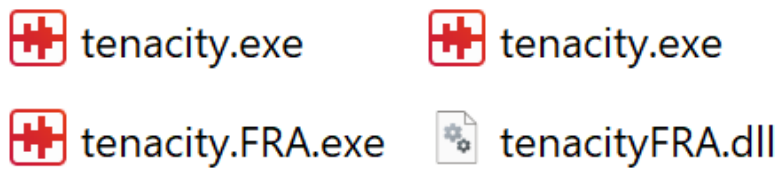
Figure 2.
Example of a Win32 wrapper function that required no modification. pSetWindowTextW is a pointer to the original function.
Figure 2.
Example of a Win32 wrapper function that required no modification. pSetWindowTextW is a pointer to the original function.

Figure 3.
Two examples of more complex wrapper functions: overlay_DrawTextW has an early return in case of a null pointer: the frequency with which this function is called makes this early exit likely to be beneficial. overlay_GetWindowTextW writes text into a buffer, the size of which must be respected even after translation.
Figure 3.
Two examples of more complex wrapper functions: overlay_DrawTextW has an early return in case of a null pointer: the frequency with which this function is called makes this early exit likely to be beneficial. overlay_GetWindowTextW writes text into a buffer, the size of which must be respected even after translation.
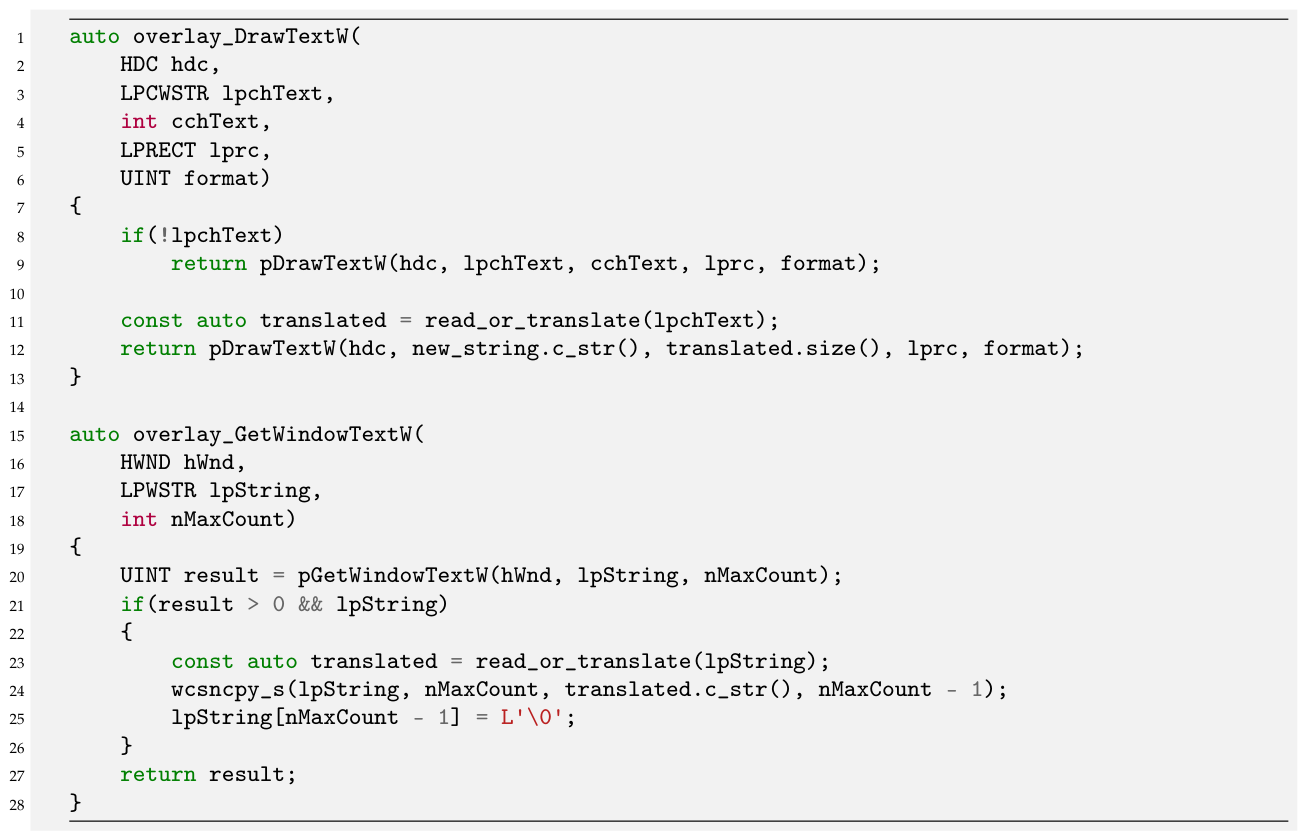
Figure 4.
Overlay function for PostMessageW, which is one of two generic event handler functions (the other being SendMessageW, whose implementation is largely identical). Consequently, it is necessary to select only those events that relate to displaying text to the user.
Figure 4.
Overlay function for PostMessageW, which is one of two generic event handler functions (the other being SendMessageW, whose implementation is largely identical). Consequently, it is necessary to select only those events that relate to displaying text to the user.
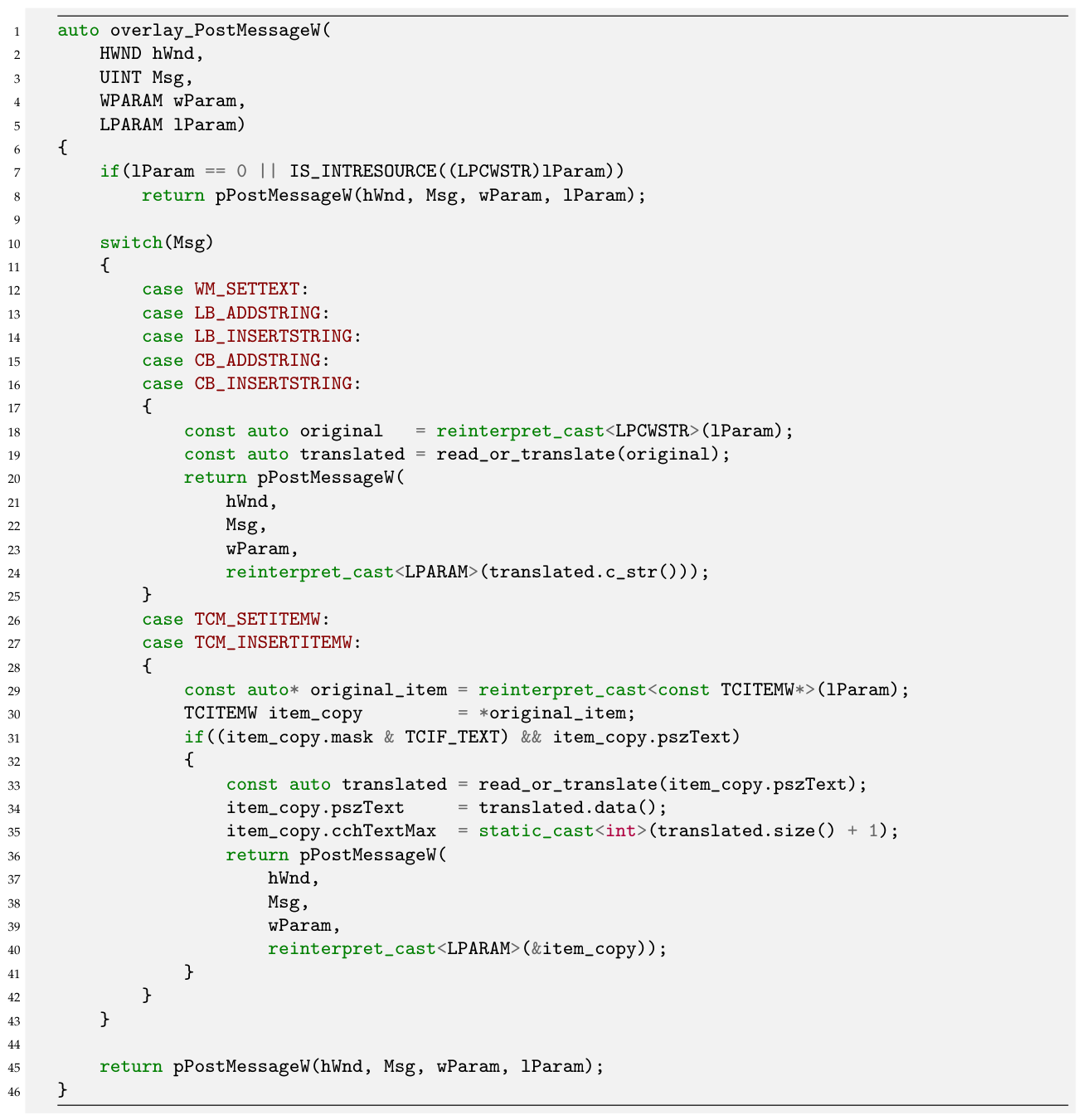
Figure 5.
(a) The user interface for Tenacity in its original form. (b) Tenacity UI when translated by the proposed technique. Most text is displayed without issue, but Project Rate (Hz) has been translated to Projektfrequenz (Hz), which overruns the available space (left hand side of each image).
Figure 5.
(a) The user interface for Tenacity in its original form. (b) Tenacity UI when translated by the proposed technique. Most text is displayed without issue, but Project Rate (Hz) has been translated to Projektfrequenz (Hz), which overruns the available space (left hand side of each image).
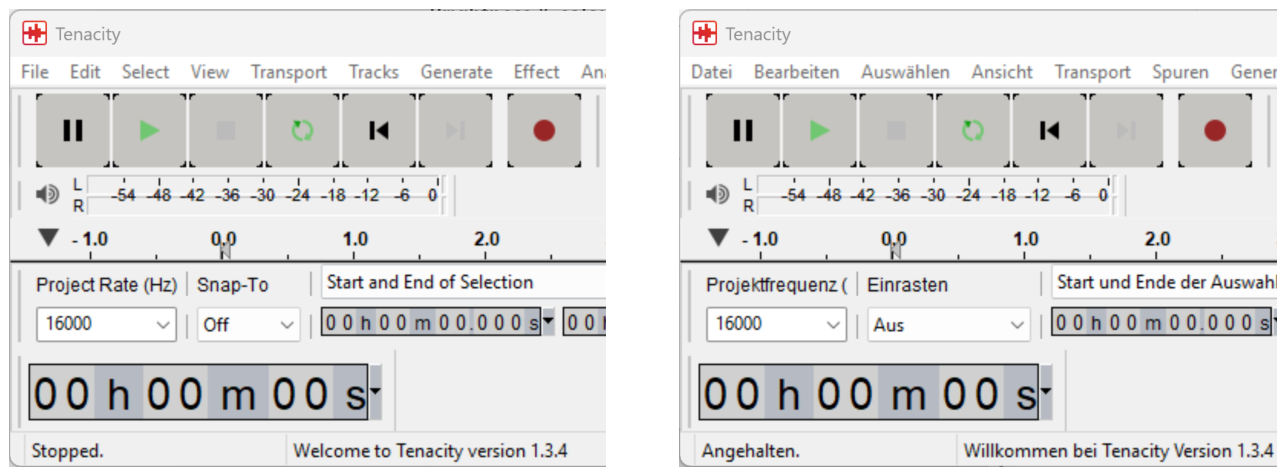

Table 1.
Mean timing (in seconds) for across 30 iterations of the test, along with the p-value result of a t-test between the two sets of iteration timings.
Table 1.
Mean timing (in seconds) for across 30 iterations of the test, along with the p-value result of a t-test between the two sets of iteration timings.
| Application | Original mean | Translated mean | p-value |
|---|---|---|---|
| Tenacity | 29.7 | 29.8 | 6.159e-04 |
| IrfanView | 27.9 | 27.9 | 6.567e-01 |
| TVT | 21.3 | 21.3 | 2.373e-03 |
| WinMerge | 6.8 | 7.0 | 1.544e-18 |
Disclaimer/Publisher’s Note: The statements, opinions and data contained in all publications are solely those of the individual author(s) and contributor(s) and not of MDPI and/or the editor(s). MDPI and/or the editor(s) disclaim responsibility for any injury to people or property resulting from any ideas, methods, instructions or products referred to in the content. |
© 2026 by the authors. Licensee MDPI, Basel, Switzerland. This article is an open access article distributed under the terms and conditions of the Creative Commons Attribution (CC BY) license (http://creativecommons.org/licenses/by/4.0/).
Copyright: This open access article is published under a Creative Commons CC BY 4.0 license, which permit the free download, distribution, and reuse, provided that the author and preprint are cited in any reuse.