Preprint
Article

This version is not peer-reviewed.

IT Challenges in Designing and Implementing Online Natural History Collection Systems

A peer-reviewed article of this preprint also exists.

Submitted:

10 March 2025

Posted:

11 March 2025

You are already at the latest version

Abstract

Numerous institutions engaged in the management of Natural History Collections (NHC) are embracing the opportunity to digitize their holdings. The primary objective is to enhance accessibility to the specimens for interested individuals and to integrate into the global community by contributing to an international specimen database. This initiative demands a comprehensive digitization process and the development of an IT infrastructure that adheres to stringent standards of functionality, reliability, and security. The focus of this endeavor is on the procedural and operational dimensions associated with the accurate storage and management of taxonomic, biogeographic, and ecological data pertaining to biological specimens digitized within a conventional NHC framework. The authors suggest categorizing the IT challenges into four distinct areas: requirements, digitization, design, and technology. Each category discusses a number of selected topics, highlighting often underestimated essentials related to the implementation of the NHC system. The presented analysis is supported by numerous examples of specific implementations enabling a better understanding of the given topic. This document serves as a resource for teams developing their own systems for online collections, offering post factum insights derived from implementation experiences.

Keywords: 
;  ;  ;  ;  ;  ;  

1. Introduction

Natural History Collections (NHCs) play a pivotal role in studying the diversity and variability of organisms. National information centres are currently experiencing a renaissance as a result of the IT revolution, including the development of the Geographic Information System (GIS). This renaissance is expressed primarily in open access to an increasing amount of digital biodiversity data for all interested parties. Digital botanical collections are increasingly used in phenological research, studies on species extinction and invasion, and in species distribution modelling [1,2,3].
Systematic analysis of biodiversity data to reduce biodiversity loss and indicate essential problems that cause that is an extremely important challenge, in which automation can help. However, due to the lack of a global, unified observation system that would be able to regularly provide the data, this task currently seems unattainable [4]. All the more, individual initiatives of individual centres in creating digital databases of specimens and their integration with global initiatives should be appreciated [5,6,7,8,9,10,11].
Nevertheless, it should be realized that both the design and implementation of online systems of natural collections, such as herbaria or museum specimens, are closely associated with many IT-related challenges [12]. These difficulties mainly concern technical domains, but one should not forget about demanding related to ethical and logistical issues.
Many institutions are currently in the process of building systems that enable the provision of digitalised natural collections, thus providing access to the collected data and their analysis as part of synthetic environmental research. These systems are characterized by a diverse domain area, the accuracy of their description, the format used and the availability of supporting tools (e.g. exploration, presentation, visualization). However, it can be argued that a certain critical mass of the number of systems has already been reached, which allows us to see the potential benefits that can flow from combining the knowledge available in them. One of the ideas that goes in this direction and emphasizes the importance of compatibility and interoperability of NHC systems is the concept of developing Essential Biodiversity Variables (EBV) [4,13,14]. EBV serve as fundamental indicators for evaluating shifts in biodiversity over time. They are instrumental in assessing adherence to biodiversity policies, monitoring advancements towards sustainable development objectives, and observing how biodiversity responds to disturbances and management strategies. The practical implementation of Essential Biodiversity Variables is discussed in the Bari Manifesto [15], a collection of guidelines designed for researchers and data infrastructure providers. This manifesto aims to facilitate the development of an operational framework for EBV that is grounded in transnational and cross-infrastructure scientific workflows. This proclamation introduces ten principles for EBV data products in the following areas: data management plan, data structure, metadata, data quality, services, workflows, provenance, ontologies/vocabularies, data preservation and accessibility. By concentrating on these domains, specialists can establish pathways for the advancement of technical infrastructure while allowing infrastructure providers the flexibility to determine the methods and timelines for implementation. This approach facilitates consensus and the adoption of guiding principles among the participating organizations.
Furthermore, another point of view on the design and implementation of NHC systems should be noted. Systems collecting information about biodiversity is usually composed of many modules that reflect processes related to collecting and identifying specimens, converting analogue information to digital (digitization), storing in an organized way, searching and presenting, and also analysing them. Each of the above-mentioned stages has its own methodology and set of tools, creating a research domain called biodiversity informatics. Among the most important IT techniques addressing the cycle of preparation, development and maintenance of data, we can distinguish: string processing, metadata management, conceptual modelling, semantic web, machine learning, statistics, geographical information systems, graph theory [16].
The design phase which is the initial step of the natural collection system development has a profound impact on the overall functionality and usability of the system in its entirety [17]. To mitigate barriers to data discovery, it is essential that the collected information is organized in a manner that accurately reflects the most significant data groups and characteristics of the entities representing the digitized objects [18].
Defining the scope of processed information before the digitization process is closely related to the choice of the documentation standard for specimens, samples and other forms of analogue records [19]. There are several standards (e.g. DarwinCORE, ABCD) that can and even should be the basis for defining the scope of stored data, if only for the sake of later interoperability with external repositories. In many cases, however, it turns out to be necessary to extend their scope due to the local specificity of the research being conducted [20].

2. Materials and Methods

The digitization of natural history collections by the institutions tasked with their upkeep and administration enhances the accessibility of the specimens housed within for researchers and a wide array of nature enthusiasts. A crucial subsequent step in broadening the scope for analysing available biodiversity data involves collaboration with the global community through contributions to an international specimen database. It is essential to recognize that the digitization process, along with the establishment of infrastructure and associated services that adhere to international standards and ensure reliability and security, presents a highly intricate challenge that necessitates an interdisciplinary approach. Consequently, it is beneficial to share insights gained from the execution of similar projects, particularly concerning the existing challenges in procedural and operational aspects related to the storage and management of taxonomic, biogeographic, and ecological data pertaining to biological specimens digitized within the traditional framework of natural history collections.
In this study, authors share their experience from developing an IT system for the project "Natural Collections of Adam Mickiewicz University - online (AMUNATCOLL): Digitization and sharing of the natural data resource of the Faculty of Biology of the Adam Mickiewicz University in Poznań [21,22,23]. Under designing the AMUNATCOLL IT system [24], the following fundamental assumptions were made: (i) the use of scientific natural collections, (ii) the inclusion of a wide range of organisms (algae, plants, fungi and animals), (iii) taking into account the needs of various user groups and (iv) linking with an international database. In turn, functionally, it enables the collection, analysis and open sharing of digitized data about natural specimens.
To systematically tackle specific aspects, the IT challenges are categorized into four distinct domains: requirements, digitalization, design, and technology. Each domain encompasses various selected topics, emphasizing often overlooked components essential for the successful implementation of a NHC system. The analysis is bolstered by numerous examples of particular implementations, facilitating a deeper comprehension of the subject matter. This document serves as a valuable resource for teams engaged in the development of their own online data collection systems and provides retrospective insights drawn from implementation experiences.

3. Planning and Building Online Natural Collection Systems

The work proposes a categorization of the encountered challenges of NHC systems development into four groups: requirements, digitization, design and technology (Figure 1). Nonetheless, taking into account the nature of the analysed problems, their close connection should be emphasized, which means that a given matter may belong to one or many categories, depending on the perspective. Therefore, during the category assignment process, the principle of greater matching was adopted, with the above condition noted. The following issues were included in the "requirements” specification category: using unified terminology (common language), defining target groups and specifying their requirements, defining non-functional requirements and converting them into functional ones, as well as specifying the scope of work. The “digitization” category embraces: definition of the digitization process along with automation mechanisms, procedures for dealing with data ambiguity and mechanisms for detecting errors and introducing corrections/modifications. The “design” challenges are focused on: the specification of the metadata structure used to store information about specimens, the data access policy taking into account the type of data and access roles, flexibility in defining the set of input data, taking into account limitations in defining interfaces resulting from the way the user interacts and the use of the so-called good practices when designing and implementing applications. The last "technological" category elaborates challenges related to: providing infrastructure adapted to project requirements, considering the requirements of the implementation process for development and production purposes, selecting tools for implementing the required applications, ensuring system security at the operational level, technology solutions for protecting copyrights to data in particular iconographic ones, securing data against loss.

3.1. Requirements

The implementation of IT system begins with the specification of user requirements. Specifications and constraints outline the essential requirements that a system must fulfil, detailing its operational parameters and the conditions under which it functions. These established requirements serve as the foundation for the design, development, testing, and implementation phases of a system. Initially, non-functional requirements (also known as quality analysis) are articulated, focusing on aspects of a software system that do not pertain to specific functionalities or behaviours. Moreover, requirements delineate the operational characteristics of the system rather than its actions. They encompass various factors, including performance, scalability, security, availability, reliability, portability, etc. Non-functional requirements are subsequently converted into functional requirements that delineate the expected actions of the system, encompassing the necessary functions, operations, and business rules it must incorporate. Functional requirements articulate the technical specifications, data handling and processing, as well as other particular functionalities that dictate the outcomes the system is expected to produce. A detailed analysis of both requirements is a very laborious process that requires a systematic approach, and its description goes beyond the scope of this study. Nonetheless, selected aspects of system requirements analysis are presented below, focusing primarily on interdisciplinarity, target groups and determining the scope of work through the definition of functional requirements.

3.1.1. Scope of the System Specification

To perform a comprehensive requirements analysis, it is essential to identify the domains and challenges that will serve as the foundation for developing the NHC system, while also delineating the boundaries of its complexity. Error! Reference source not found. provides a descriptive list of requirements that can be regarded as preliminary non-functional requirements, accompanied by details regarding their optionality and a note clarifying their scope.
Table 1. Areas and issues related to the definition of requirements in NHC systems.
Name Optionality Description
Digitization
Data processing flow Obligatory The data flow diagram defines the tasks, responsibilities and resources used to conduct the digitization process in order to achieve the highest possible efficiency. See more in Section 3.2.1.
Metadata Obligatory A set of metadata used to register unique resources of natural collections gathered by the housing organization. Given the high complexity of the database, this description allows for unambiguous, compliant with international standards, information entry. See more in Section 3.3.1.
Forms Obligatory Forms are used to prepare a metadata description according to an accepted structure, avoiding inconsistencies between data entered by different people. Usually created as a spreadsheet file. It contains all the necessary attributes according to the metadata specification, divided into sheets covering e.g. taxa, samples, iconography and bibliographic entries. See more in Section 3.2.4.
Digitization supporting tools Optional A collection of instruments designed to facilitate the digitization of specimens throughout different phases of their preparation. The validator enables the verification of the description's adherence to established guidelines, while the converter aids in transforming existing specimen descriptions into a new format. The aggregator serves to merge files containing descriptions created by various teams, and the report generator is utilized to compile the total number of records in the description files. This tool is particularly beneficial for project coordinators in their efforts to continuously monitor the advancement of digitization activities. See more in Section 3.2.4.
Image converter & securer Obligatory (in terms of converting) A tool whose task is to convert a graphic file (scan, photo) to the format required by modules for sharing and presentation in the final user interfaces. Optionally, the tool includes a set of functions for securing iconography in order to protect copyright. See more in Section 3.4.3.3.
Georeferencing Obligatory All records were geotagged based on the textual descriptions of the specimens' locations, such as those found on herbarium sheets. This geotagging facilitates analysis through the Geographic Information System, enabling the examination of digitized records and the identification of spatial relationships. There are different quality class of geotagging records:
  • exact coordinates - the exact location of the object was determined in the geotagging process,
  • approximate coordinates - the location of the object is approximately determined, and the geographic coordinates indicate the centroid of the area that could be assigned to the specimen,
  • approximate coordinates due to legal protection - the specimen is legally protected in accordance with national law, and the user does not have sufficient permissions to view the exact coordinates of such specimens,
  • unspecified coordinates - the specimen has not been geotagged.
Quality classes are presented in the details of the record (specimen, sample, multimedia material). They can also be used in the specimen search form in the specialist extended or advanced search engine.
End user interfaces
Browsing Obligatory Data browsing should be available in a general view from the main page for both logged-in and non-logged-in users. The scope of information received may, however, be varied (non-logged-in users see only part of the information about the specimens). In addition to the general view, the ability to browse data in a profiled way, adapted to the needs of different user groups and their level of advancement, may be optionally provided.
Search engine(s) Obligatory Search engines serve as fundamental instruments for examining the amassed data on specimens. It is advisable to develop search engines tailored to specific target audiences, providing varying levels of complexity and functionality. A potential categorization includes search engines such as general, specialized, collections, systematic groups, samples, multimedia, bibliography, and educational. For instance, a multimedia search engine facilitates access to information presented in formats such as images, videos, maps, or audio recordings that are either related to the stored specimens (for example, a scan of a herbarium) or independent of them (such as a photograph of a habitat), thereby enabling access to a multimedia database that complements the archived specimens.
Profiled data presentation Optional Adjusting the portal view to the target group according to their knowledge and interests. Adjustment concerns the advancement of the search engine (complexity of queries), the language of phrases during the search or the scope of presented data. The view can be set depending on your own preferences. For more please reach Section 3.1.2.
Graphical project Obligatory Meeting WCAG requirements in the project concerns the access interfaces on which users operate, i.e. the portal and the mobile application. Implementation of WCAG principles is legally required. Effective UX (User Experience) and UI (User Interface) design allows users to easily locate the content they anticipate. One can argue that users' online behaviours and preferences are quite similar to those of customers in a retail environment. In accordance with UX principles, it is essential to anticipate the actions users will take to access features or information, commonly referred to as user flow. More in Section 3.3.4.
Administration module Obligatory (scope for discussion) Composed of: account management, permission levels, profile settings, reports and stats, protected taxa, protected areas, manage users' roles, files report, file sources, team leaders, editor tools, Excel files tools, task history, database changes history
Edit and correction Obligatory (optional at portal level) Available at the portal level providing the possibility of correcting data describing natural collections within two modes:
a) editing a single record - in the details view of a given record (specimen, samples, bibliography, iconography and multimedia), an authorized person can switch the details view to the editing mode. It is then possible to correct all fields of a given record and save it. Changes are made and visible immediately.
b) group editing of many taxonomic records - often, the attribute value for records is corrected simultaneously. Such a change is possible from the level of statistical tools - reports. Search results can be grouped according to a selected field, and then the value of the selected field can be changed for all records from this group. For more see Section 3.3.3.
Data access rules Optional It allows to limit access to sensitive information, due to the protection of diversity, and especially the protection of species that are subject to protection. Access to sensitive information requires appropriate authorizations. Data is protected at two levels: specimen (full information about the specimen), field (a specific feature of the specimen may be restricted). More in Section 3.3.2.
Data exporter Optional This feature can be utilized when displaying search result data, contingent upon the acquisition of the necessary permissions. It enables users to download the retrieved data as a spreadsheet file that adheres to the specified format. The data obtained through this method can subsequently be analysed using external analytical tools.
Data analytics (reports) Optional A tool designed to produce statistical reports utilizing data from specimens stored in the database. This reporting tool enables the categorization of data based on one or multiple parameters and facilitates the creation of graphs that illustrate the proportion of a specific group of specimens within the results generated by the query. It serves as an invaluable resource for understanding the contents of collections, including the identification of discrepancies in metadata descriptions, such as the presence of species in regions where they are not expected to occur.
Specimen comparison Optional The functionality allows for the comparison of two or more (depending on the scheme used) specimens. A feature especially desired by scientists conducting in-depth analyses.
Support for team Colaboration Optional Group of users working on the same topic can create a team and share their observations with team supervisor. The feature can be used by scientist e.g. while working in the field as well as by school teachers.
Preparation of educational materials Optional Specimens, photos and observation can be added to user defined albums and complemented with custom description. Such albums can be then shared with other users or exported in a form of pdf presentation.
Spatial analysis BioGIS (GIS tools) Optional The BioGeographic Information System (BioGIS) serves as a tool for the entry, collection, processing, and visualization of geographic data. It has become extensively utilized in scientific research and decision-making activities, particularly in the field of biodiversity studies. It allows for the presentation of phenomena in space on different type of maps, e.g.: dot distribution map, area class map, choropleth map, diagram map, cluster map, attribute grouping map, timelaps map.
Information section Optional A section at a portal containing following information: mission, portal (info on offering), mobile application, BioGIS, our users (info on target groups), about us, how to use (guidelines), contact.
Mobile application Optional The mobile application facilitates the documentation of natural observations through text descriptions, photographs, and audio recordings. Observations are exported to a database and become accessible from the portal, which in turn allows them to be edited and used with existing analytical and georeferencing tools. The observation form is equipped with a set of predefined fields as well as customizable open fields that users can define according to their preferences. The predefined fields encompass ordinal data, identification details of the observation (such as number, date, and author), geographical coordinates of the observation site, area size, and vegetation coverage. This allows for greater engagement of target groups, but also for reaching external users who use the NHC system to create their own collections of specimens and other natural observations
Backend services
API Obligatory The API is used to provide interested parties with automatic access to the contents of the database. Access to the NHC system takes place through an interface implemented in REST (REpresentational State Transfer) technology. Considering that the portal and the mobile application use the same programming interface its implementation is obligatory. Most of the offered functionalities are available only to the logged-in user; therefore, access to individual interface methods is secured with JSON Web Token.
Interoperability Optional This functionality enables the provision of specific information from the taxonomic database to external organizations, facilitating database integration. For instance, to support integration with GBIF, the "BioCASe Provider Software" (BPS) service was developed, which is compatible with the "Biological Collection Access Service." This global network of biodiversity repositories amalgamates data on specimens from wildlife collections, botanical gardens, zoos, and various research institutions worldwide, alongside information from extensive observational databases. Check Section 3.4.2 for more information.
Iconography library Obligatory A library for sharing digital objects and documents used to import and store multimedia. It should include a range of features that make it easier to enter, manage and use digital assets, such as serving images in the required resolution and storing related metadata to make it easier to find the desired content.
Backup operational procedures Obligatory A set of procedures and mechanisms focused on archiving and restoring data after a failure.
Monitoring Optional Ensuring the continuity of the system’s operation and the security of the data stored in it is extremely important due to access to the data and services offered. Monitoring with a given time interval a defined list of key services. Information about the unavailability of services is sent by email to a designated person or group of people. This allows for immediate intervention by service administrators and restoration of their operation.
Infrastructure
Data buffer Obligatory A designated place in the storage system allowing for saving and storing data after the digitization process and before the actual import into the database. Please reference to 3.4.1.2 for more information.
Data storage Obligatory Space on array disks or tape systems that allows for storing source data and processed data along with their copies in a safe manner after the database import process. Disk arrays also deal with serving data to design applications (portal and mobile application). Please reference to 3.4.1.2 for more information.
Database Obligatory The database is a core of the NHC system, the content of which is based primarily on collections of biological specimens, as well as locations of photographs and published or previously unpublished field observations. In addition, its structure should correspond to the set of metadata defined by international standards (e.g. ABCD) and the requirements of the target groups. More in Section 3.4.1.3.
Database for users’ content Optional Enables storing information independent of the data that make up the Natural History Collections Database and is available only to a given user and authorized persons. Mainly concerns the sections like: my observations, my albums, my maps, my teams.
Virtual servers Obligatory In order to provide customers with only ready-made and tested solutions that meet the expected requirements, the infrastructure has been divided into a development and production part. Each new functionality is subjected to a validation procedure and only after its positive result is it made available to the end customer. More in Section 3.4.1.3.
Security
Authentication and authorization service Obligatory A service that allows for user authentication and authorization. Authentication verifies the user's identity using credentials such as passwords, biometrics, or third-party authentication providers. Authorization (access control) controls what authenticated users can access.
External authentication service Optional Enabling login using existing user credentials from platforms such as Apple, Google or Facebook. This improves the user experience and reduces the need to remember multiple usernames and passwords.
Safe programming recommendations Optional Implementation of general recommendations for secure programming during code implementation in accordance with the SDLC (Software Development LifeCycle) concept. Application of detailed security recommendations for programming languages used in project creation. More in Section 3.4.3.1.
Security audit Obligatory The need to conduct an audit by a qualified team of experts in at least two stages: halfway through the project (early detection of weaknesses) and at its end (verification of the implementation of previous recommendations and final check of the system's vulnerabilities). Particular attention should be paid to issues related to: user password management, serving content via the web server, configuring the server itself and user registration. More in Section 3.4.3.2.
Intellectual Property Rights (IPR) Obligatory Preserving IPR to published materials. Security issues include the methodology of securing iconographic data, with particular emphasis on graphic files from both the specimen scanning process and photographs presenting observation data. Additionally, they are related to the proper way of citing the materials used by external scientists. More information at 3.4.3.3.
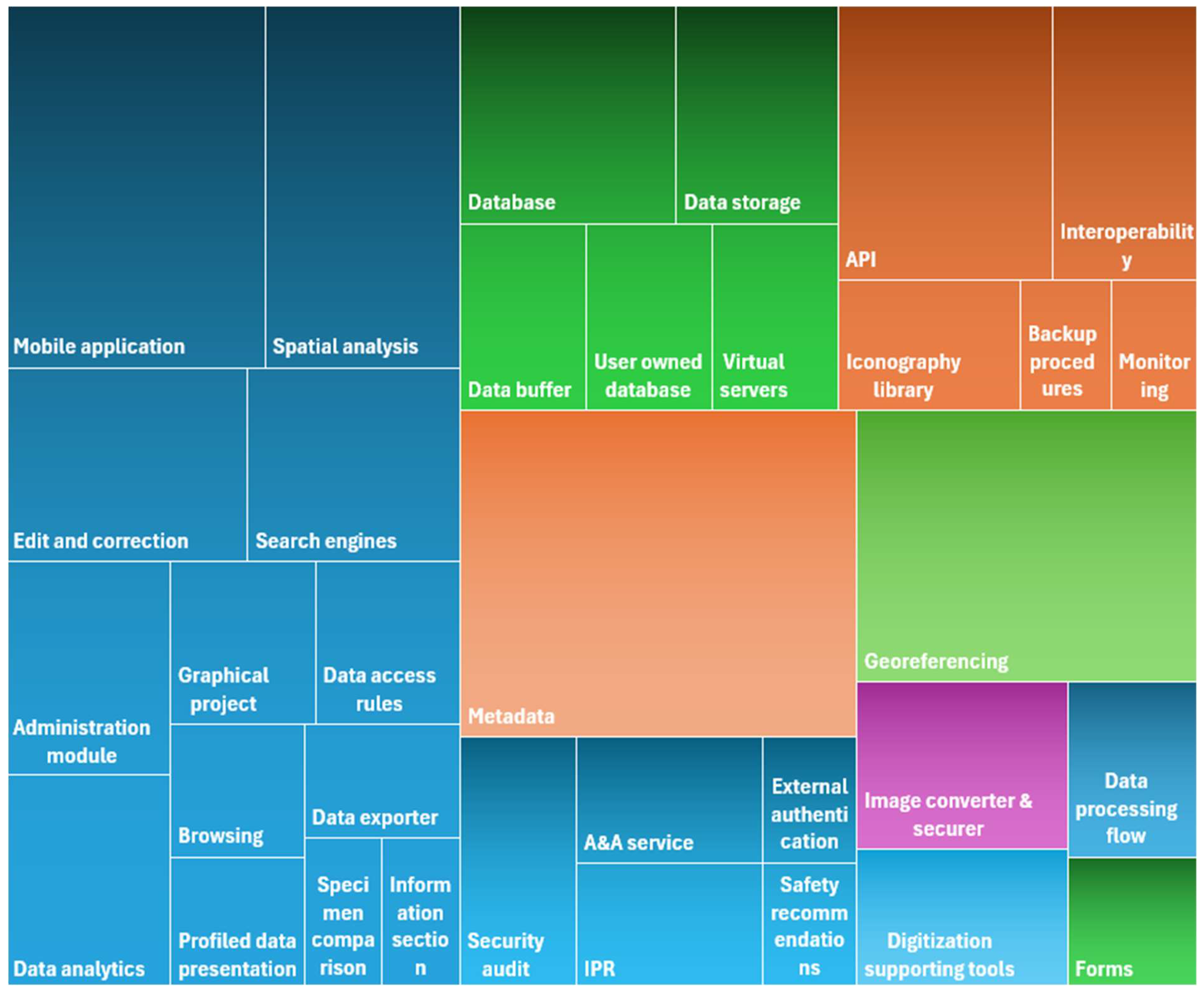
The cost of implementing the above-mentioned areas within the project implementation varies and also depends on the emphasis on individual system features. Therefore, an important question to be answered in the context of defining the requirements and the design and implementation scope of the NHC system, taking into account the optionality of selected modules and available human and time capitals, is how the decision to include individual areas in the implementation translates into the need to distribute the available resources. Error! Reference source not found. shows the estimated share of individual work areas (assuming the implementation of all of the above) in the overall scope of work based on the experience from the AMUNATCOLL project.
Figure 2. Estimated distribution of efforts required to analyze and implement areas and issues of NHC systems.
Preprints 151852 g002

3.1.2. Target Groups

Identifying target groups at the outset of the NHC system specification is essential for accurately establishing non-functional requirements. These requirements serve as the foundation for a comprehensive description of the system architecture and are subsequently utilized to assess its performance. Furthermore, they are compared with functional requirements, which are outlined in the system design and specify particular behaviours or functions. Adaptation to target groups also includes the portal interface, which is addressed to users who have different knowledge and interests. An expedient solution is to use different portal views (at least in selected areas such as search) adapted to user preferences. When registering on the portal, the user selects one of the available views, and it is possible to change it at any time in the user profile.
For the AMUNATCOLL system, five distinct target groups have been identified: i) researchers and PhD candidates, ii) educators, students, and schoolchildren, iii) employees of government and local authorities, iv) officials and state services, and v) non-governmental organizations and the general public. Below a description of each group is presented.
Scientists
This group is interested in the full information available in the specimen database. The most advanced mechanisms for searching for information and mechanisms for defining the method of presenting the list of specimens and information about specimens are needed. Systematic units are presented and searched in Latin, local names are not important for this target group. However, access to detailed data and data searching according to many criteria are necessary. For this target group, three methods of searching for data have been prepared, differing in the level of advancement and flexibility.
An important aspect of the work of scientists is the use of BioGIS tools to work with data. Advanced tools have been prepared for working with maps and presenting on them both data from the specimen database and from the database of natural objects unrelated to plant, fungi and animal specimens.
State and local government administration
A great deal of emphasis in presenting information for this group is placed on geolocation data, both when searching and presenting data. Available data can be limited to a selected map area (county, reserve, etc.). It is also important to provide aggregated information about specimens collected in this area. Government administration works with a strictly defined subset of the database, especially with information on monitored species. For this reason, access to data is simplified.
Services and state officials
The interest of this group is limited to specimens of potential interest to individual services. In particular, this concerns the status of a species in danger (CITES, Red Book, etc.). The presentation should include information specific to a given target group, in particular, iconographic data is important. Databases with information on the status of species protection and databases with information intended for this target group are integrated.
Local government and society
This is a general (default) group and covers a very wide range of recipients. The way information is presented and searched for depends very much on the specific target group and probably consists of different elements available to other target groups. The tools available in the view intended for this group are universal and allow access to a lot of information. Taxonomic units are presented in the local language, but Latin systematic names are also available.
Education
This group includes users with potentially very different interests. Some users may have less knowledge of the field, so the method of searching for specimens and the method of presenting information is simplified. The most important element is the lists of specimens in the form of slides, reviews and thematic indexes, which can be used to conduct lessons and lectures. It was necessary to include the local language for searching and presenting data. It may be useful to add links to external sources, e.g. from the database of national systematic names and basic information about species.
The considerable diversity of potential users is a significant advantage, increasing interest in the provided system. However, it also creates a substantial responsibility for system designers concerning the customization of the functionalities offered. It is essential to recognize that the diversity among users is intricately linked to varying levels of knowledge, sophistication, and expectations regarding the numerous methods of database exploration, as well as the scope and manner in which results are presented. These differences may include search engine (simple, extended, advanced), language used to name specimens (national or Latin used by scientists), information presented in a scientific or educationally appealing format, access to individual specimens versus aggregated data reports, access to maps versus creating your own maps, and different access methods - via a portal and/or a mobile app [25,26]. The characteristics of each group are presented in Table 2.

3.1.3. Interdisciplinarity

Interdisciplinarity, characterized by collaboration among subject matter experts, representatives of target groups, and IT professionals, is essential in establishing the requirements and design of the system. The primary contributors from the first group include biologists, specifically botanists and zoologists, who are tasked with selecting and processing specimen data for digitization. This group also encompasses taxonomists, ecologists, collection curators, and museum staff. Additionally, the role of geotagging specialists is crucial, as their data provides vital information regarding each specimen. The representatives of the target group are determined by the practical applications of the system in relation to its functionalities. Thus, it is imperative to address the question, "For whom is this system being developed, and what functionalities are of interest to these individuals?" IT professionals are responsible for translating the needs and expectations of the various interest groups into the specific functional capabilities offered by the NHC system.
It is important to recognize that engaging in discussions on the aforementioned topics with a diverse group of participants necessitates the use of soft skills. These skills are essential for conducting analyses in a constructive manner that fosters an understanding of the other party's needs. The authors' experience indicates that a beneficial initial step is to establish a common vocabulary, which aids in clarifying the specifics of the issues at hand and ensures that all parties acquire fundamental knowledge about the problems being addressed. Frequently, challenges arise in defining the specifics of requirements, which are closely tied to articulating the expectations of the other party. This often manifests in discussions framed as "What can you offer?" versus "What do you need?" It is also crucial to consider that potential recipients tend to articulate not their actual needs, but rather their vision of the final product, which creates a significant distinction. Lastly, it is important to highlight that even after a position is established within one of the target groups, this may ultimately result in ambiguous requirements when viewed in the broader context of services, reflecting varying needs across fields such as science, education, and other sectors.

3.2. Digitization

Natural history collections, such as herbaria, often contain millions of specimens that require detailed documentation, including geolocation, taxonomy, and historical context. The huge number of specimens creates challenges in digitizing physical records and maintaining high-quality metadata. The challenges encountered are not solely linked to the necessity of handling a substantial volume of data, but also pertain to aspects such as interpretation, data quality, and the rectification of inherent errors. Consequently, system developers are confronted with the challenge of optimizing the entire process while ensuring the assurance of high data quality. An effective approach to managing the digitization of numerous specimens is through the implementation of automation mechanisms. Concurrently, it is essential to establish procedures for addressing data ambiguity, mechanisms for error detection, and protocols for implementing corrections or modifications.

3.2.1. Digitization Process

The need to process a large number of specimens (which is the most common case when creating a system for the NHC) requires the development of appropriate procedures aimed at organizing and streamlining the process of digitizing the collections gathered at the hosting institution.
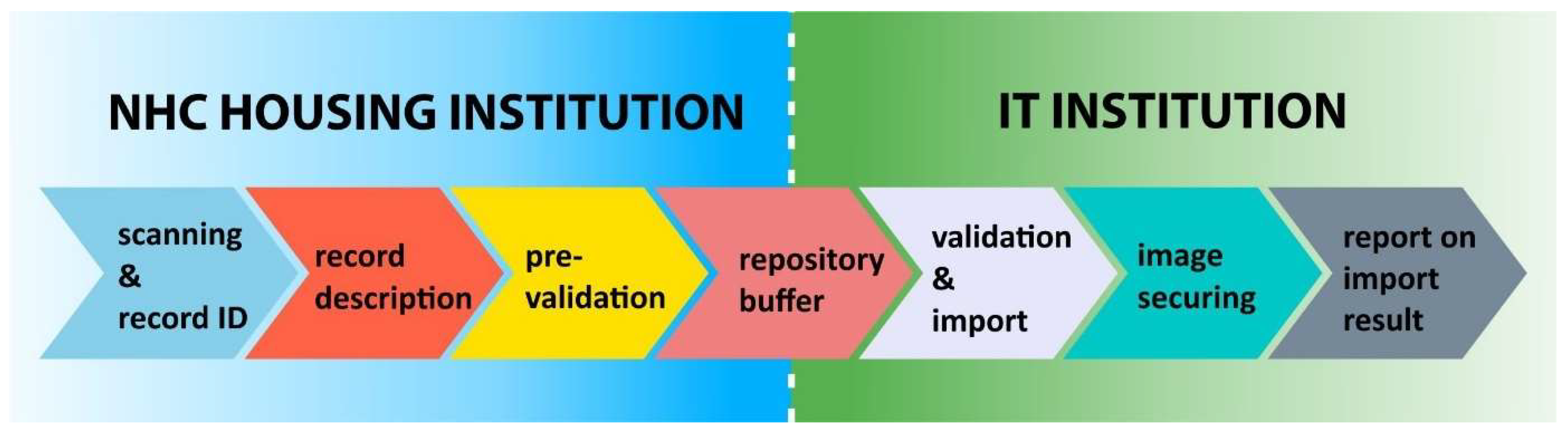
After the digitization operation, the obtained photo receives a unique identifier in the NHC database resources. A new record with metadata fields describing its specificity is created in the prepared format (e.g. Excel file). The photo file with metadata is placed in a work buffer based on e.g. the Seafile system [27], which is a file synchronization and sharing software designed with high reliability, efficiency and productivity in mind. To facilitate the preparation of data in the correct format, data administrators have additional tools at their disposal, such as: a converter (which allows data conversion in existing files) and a validator (which allows checking the compliance of data with the developed standard). It should be mentioned that during the digitization process two qualitatively different records are considered, the first one containing information about the specimens, while the second one contains information about the specimens and the associated graphic file (photo, scan, etc.).
In the next step, with a set frequency (once a day if new/changed data is detected), data from the working buffer is automatically imported to the taxonomic and iconographic databases. During the import, re-validation is performed and a report from this process is sent by email to data administrators. This allows for the detection of possible errors (inconsistencies) and streamlines the process of possible data correction. Imported information is placed in the appropriate database tables. Iconographic data is additionally subject to a security process (see 3.4.3.3) in order to guarantee the copyright of its creators. Taxonomic and iconographic data, after correct import, is becoming available for services such as presentation in the portal or export to external databases. This scenario is illustrated in Error! Reference source not found.
Figure 3. The sequence of digitization process and institution responsibilities.
Preprints 151852 g003
A frequent scenario in the development of Natural History Collection systems involves collaboration between two or more entities tasked with executing specific responsibilities. This raises the question of how to facilitate the effective exchange of outcomes from the completed sequence of tasks. Referring to the framework illustrated in the AMUNATCOLL project, it is evident that two organizations with distinct areas of expertise are working together: the entity managing the natural collection, which oversees the initial phase of specimen preparation (including digitization, numbering, description preparation, and validation), and the IT firm tasked with integrating this data into the database, safeguarding iconographic information, and providing online access. A suitable point of interaction for both organizations appears to be a shared data repository, which would promote high efficiency and allow for seamless exchange of both textual data (metadata) and associated graphic materials (such as scans, photographs, audio files, etc.). It is anticipated that following a successful data import, the importer will delete the data, thereby creating space for future entries.

3.2.2. Data quality - Date Uncertainty and Ambiguity

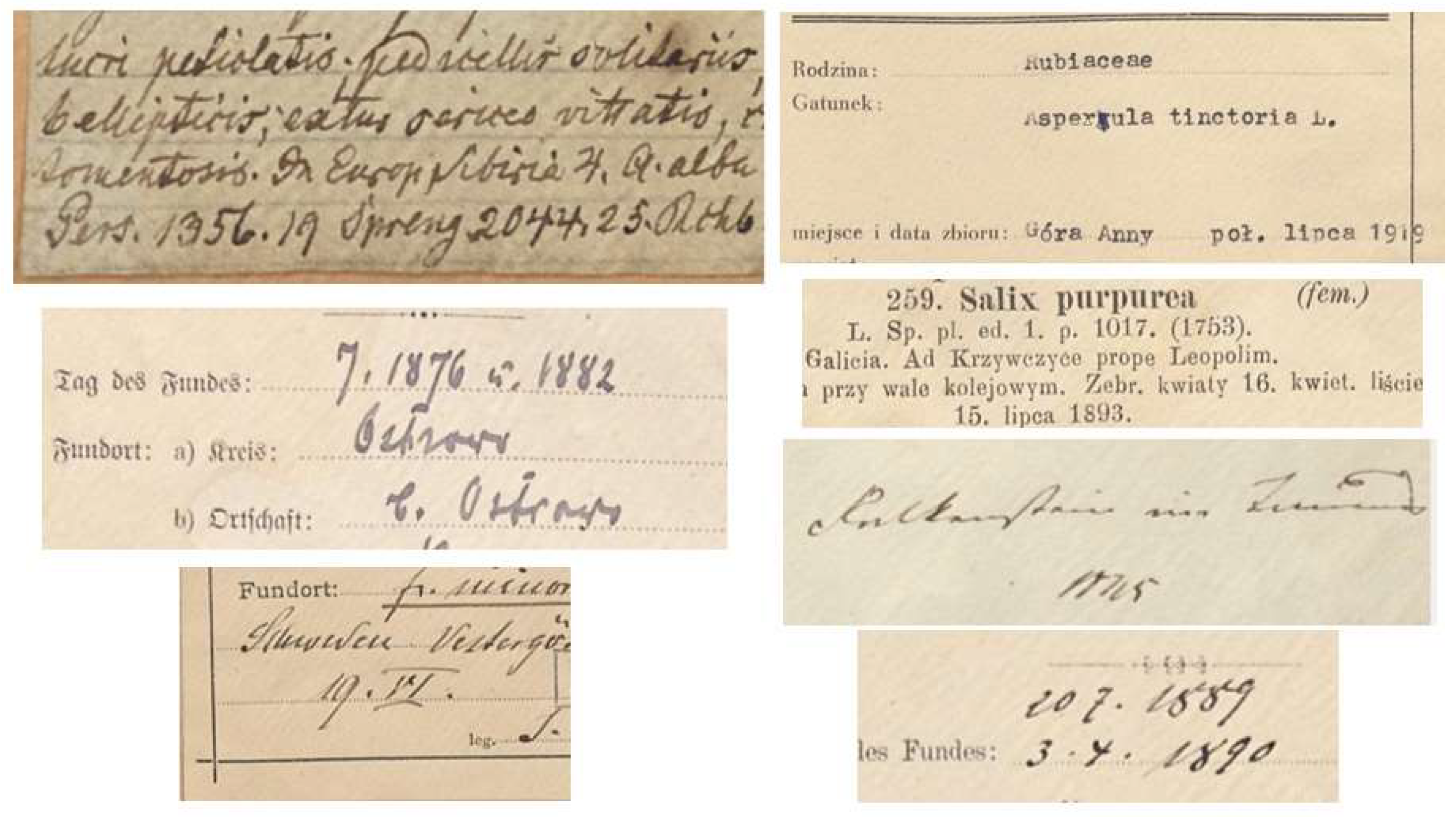
Digitization of data directly from herbarium sheets causes many problems in terms of the quality of reading information. These problems increase with the age of the sheet (e.g. 18th or 19th century) and difficulties in reading handwriting, data incompleteness or fading ink (Figure 4). This causes difficulties in implementing automatic text recognition and its interpretation using machine learning techniques, which is a very convenient solution considering the amount and complexity of the analysed text. Specifically they are also related to identifying the correct date or place of collection, which is fundamental information for the accurate characterization of the catalogued specimen. Below, in Error! Reference source not found., a number of examples are provided showing issues with date interpretation.
Table 3. Examples of unclearly defined dates on herbarium sheets.
Read value Comment
19.VI Lack of year
20.7.1889, 3.X.1890 month given in Arabic or Roman numerals
7.1876 ü 1882 Date given (probably) without day and with double year
mid July (in Polish “połowa lipca”) 1919 Imprecise harvest day
end of May (in Polish “koniec maja”) 1916 Imprecise harvest day
flowers (in Polish “kwiaty”) 16.04,
leaves (in Polish “liście”) 15.07.1893
Providing the date (without the year), and two specimens on one sheet
19?5 One of the year digits is not legible
In the event of the above or similar problems with identifying data, it is invaluable to have them verified by an experienced archivist. One can supplement the date based on other information or his experience. In cases where it is still not possible to fully specify the date, the imprecise information (from the point of view of format) should be recorded in the field related to comments. Eventually, for a scientist studying a given specimen, it can be a valuable source of knowledge.
In IT systems, it is assumed that the date is recorded in accordance with accepted standards, e.g. ISO 8601 [28] or RFC 3339 [29] usually in format “YYYY-MM-DD”. This requirement translates into date formats used in database systems. Considering the problems presented above with incomplete date information, the question should be asked whether it is worth strictly sticking to the standard or adapting the format to the system requirements. In the first case, it will not be possible to record an incomplete date and partial information will be in the field intended for comments. In the second case, a text format should be used (instead of a date format) allowing for recording partial information, however, this requires adapting the interface functions, e.g. related to searching.

3.2.3. Iconographic Data Formats

One of the challenges associated with creating online systems for sharing natural collections is choosing the right format for iconographic data. In a typical digitization process, the absolute minimum is the so-called MASTER form and one presentation form (HI- or LOW-RES). Depending on the digitization path and equipment, the RAW and MASTER CORRECTED forms may or may not be created. Most often, only one presentation form (HI- or LOW-RES) is shared - which one is decided by the creators of a specific service. The RAW format (obtained from digital cameras) and TIFF for lossless recording of scans of natural specimens are most often used in the digitization process. Sometimes JPG format is used, this applies especially to field observations performed on older devices. Images are converted to the pyramidal TIFF format [30], which allows for streamlining the process of their transmission and presentation on the portal. The Table 4 presents the most important formats along with their characteristics.

3.2.4. Automation of Digitalization Procedures

The need to develop a large amount of data (often hundreds of thousands or millions of specimens) that meet specific requirements during the digitization process is a significant operational, logistical and technological challenge. Due to its time-consuming nature, this task often proves to be crucial for the success of the data preparation stage and meeting key project indicators. It is therefore worth spending effort to improve the flow of data by developing procedures and applications that support this process. They help prepare data, check its correctness and prepare statistics. These tools can be available in different forms (a console or web application, or a spreadsheet that facilitates formalized data preparation), depending on the planned data entry process and subsequent correction (see Table 5). Ultimately, this simplifies the management and monitoring of processes in the project, increases the chance of successfully completing the task while maintaining the highest possible effectiveness.

3.3. Design

An essential aspect of the design phase involves strategizing operational procedures for the appropriate storage and management of taxonomic, biogeographic, and ecological data associated with biological specimens that have been digitized as part of the project. In the initial phase of this process, metadata is defined, i.e. the formal management of the structure, based on the analysis of existing standards [31,32]. The set of parameters derived from the standard is expanded with data important from the point of view of the specificity and functionality of the system being developed. Next, the database, as a key element of many IT systems, must be configured to store data with an appropriate structure to increase efficiency. The process of preparing and processing huge amounts of data requires automated procedures with dedicated tools attached. They cover a variety of routines, ranging from data preparation, which sometimes requires conversion, to aggregation and finally validation, which ensures that the data follows certain rules. First of all, dedicated operational procedures should be defined and applied, which will enable proper handling of the entire process.
Before discussing the metadata structure, it is necessary to mention two important aspects that define the approach to data management: Data Management Plan and Essential Biodiversity Variables.
Data Management Plan (DMP) is a formal document specifying procedures for handling data in the context of their collection, processing, sharing and presentation. Data Management Plans is a key element of good data management. A DMP is a formal document that describes the data management life cycle, data preservation and metadata generation. As part of making research data findable, accessible, interoperable and re-usable (FAIR principle), a DMP should include information on: how research data is handled during and after the end of the project, what data will be collected, processed and/or generated, which methodology and standards will be applied, whether data will be shared/made open access, how data will be maintained and preserved. It should be noted that a properly prepared DMP allows for saving project implementation time and increases research efficiency [33].
Essential Biodiversity Variables (EBV) facilitate the evaluation of biodiversity changes over time. This capability supports the monitoring of advancements toward sustainable development goals by assessing adherence to biodiversity policies and observing how biodiversity responds to disturbances and management actions [4,15].
The parameters and types of data constitute critical categories of information that greatly affect effective data management. Inadequately defined metadata structures can impede data retrieval and exploration, thereby providing insufficient support for researchers in their endeavours [34,35].

3.3.1. Metadata Definition

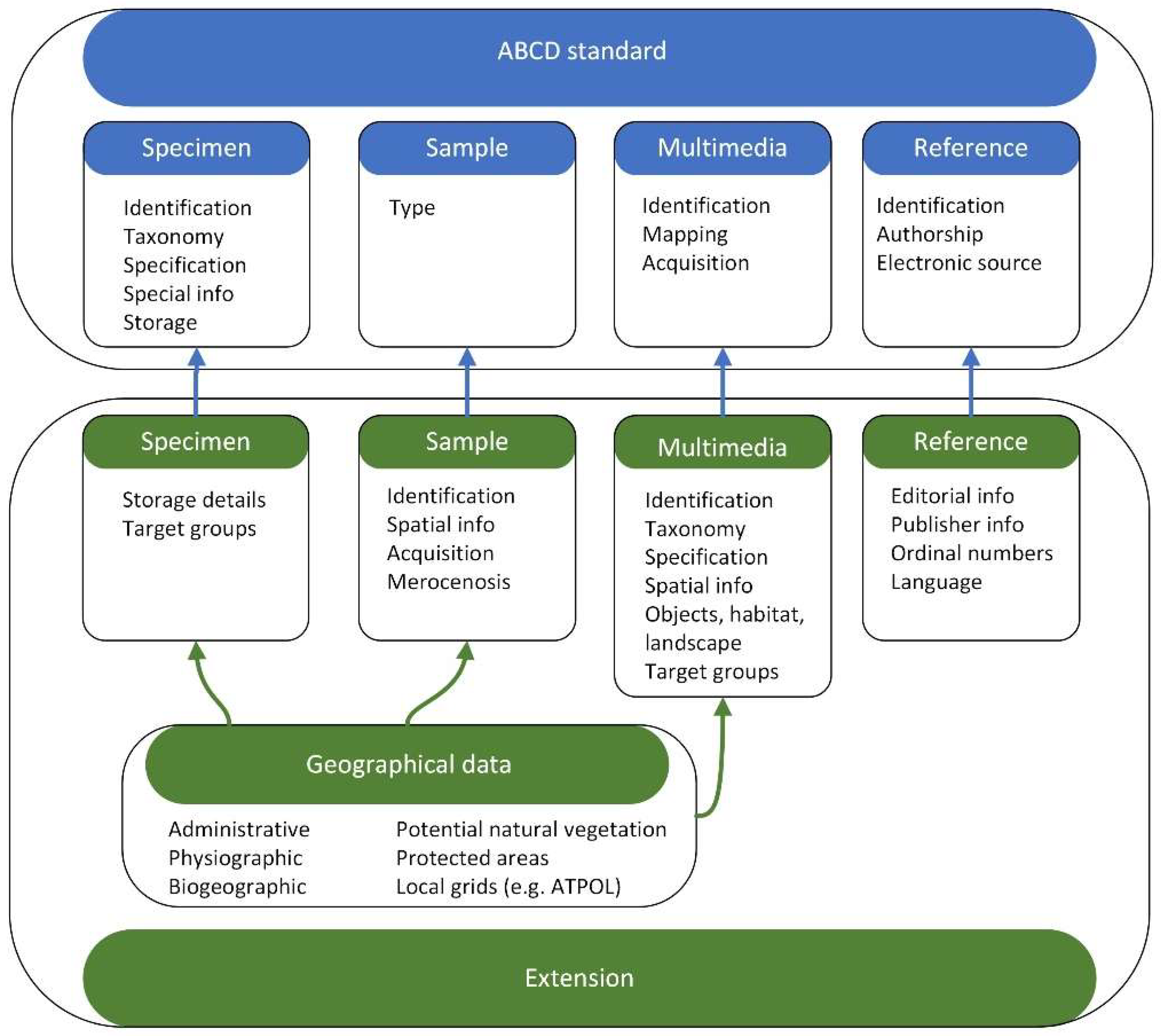
Given the complexities involved in establishing a metadata structure, it is advisable to adhere to established global biodiversity metadata standards to avoid compatibility pitfalls during future integration with external data sets. Two primary standards for biodiversity informatics are widely recognized and utilized by major networks: Darwin Core [36] and Access to Biological Collections Data [37]. An examination of these specifications reveals that they effectively outline the essential aspects of specimen characteristics and their categorization, aligning with the requirements of most collections. These standards encompass areas related to the taxonomic description of specimens, their specifications, spatial attributes, descriptions of associated multimedia files, and references to information sources. Adopting such standards also enhances the interoperability of systems with similar objectives, significantly improving their overall effectiveness.
Therefore, developing a proper organization of metadata seems to be extremely important, both in terms of addressing the functional and non-functional requirements of the system and defining the individual sections to which they belong. The metadata definition was divided into four sections covering: taxonomy, biological samples, multimedia and bibliography.
The first section contains metadata describing taxonomically identified (named) "objects", such as preserved specimens, iconographic documents (drawings or photographs), multimedia documents (multimedia objects), field notes (human observations).
The second part is intended for information related to a specific area (or areas) of research. In the case of AMUNATCOLL, these are metadata describing biological samples in which biological material (mainly invertebrates) is preserved, awaiting scientific processing, in particular taxonomic identification.
The next section stores metadata describing multimedia documents of landscapes and natural habitats, as well as species that do not have all the properties necessary for their inclusion in section first, but illustrate the characteristics of these taxa well. Such research material is also a valuable source of information on, for example, biotopes and should be subject to cataloguing.
The last group of information is metadata describing bibliographic items cited in the database and previously unpublished documents, including digitized copies of poorly accessible bibliographic sources. Due to the fact that they are often unique material supplementing information previously included in other chapters, they must not be forgotten.
Each field in the metadata specification has a unique name and is described with a metric consisting of the elements presented in Error! Reference source not found.
Table 6. Metadata specification field metric.
Field content description: Contains brief information about the type of information that should be entered into a given field.
Field format: Specifies whether the field is a field of a specific format: Integer field, Float field, Text field, Date field in ABCD format.
Allowed values: This field contains only values from the allowed list. Each list item is entered on a separate line.
Required field: The word YES in this field description element indicates that the field is mandatory. The word NO in this field description element indicates that the field is optional.
Example values: This description element provides example values for the field.
Comments: Space for any additional information related to the field.
The relevant fields for describing the above-mentioned characteristics can mostly be found in the ABCD and Darwin Core standards. However, there is a group of characteristics that go beyond the defined scope. In the case of the AMUNATCOLL project, the ABCD standard in version 2.06 was implemented, implementing numerous extensions. In total, this resulted in over 220 fields and numerous dependencies describing the relationships between characteristics (conditioning the occurrence of specific values). Undoubtedly, the development of the metadata specification and the associated Data Management Plan took place in the framework of numerous consultations and months of work, resulting in over 100 versions of documentation consisting of hundreds of pages. The result of the relationships between the fields suggested by the standard and the numerous project extensions is illustrated in Figure 5.
Finally, it is worth emphasizing the issue related to the mandatory completion of individual fields describing the specimen. Considering the specifics of work in a natural resources digitization project, especially in the context of usually limited resources and time, it should not be expected that all fields will be completed on the first attempt (especially since there are usually a significant number of them - e.g. more than 220 in AMUNATCOLL). This has its consequences in defining in the metadata specification which fields must be completed compulsorily due to either the importance of the information or due to links with other fields of the record. It is essential to consider that the following fields are required: identification (ID, institution, source), taxonomic (at least genus), details regarding the specimen's origin (collector and designations, date and location of collection), and storage method. In this context, it is important to keep in mind the compatibility with external data repositories (such as GBIF) to ensure that the data's completeness facilitates seamless integration in the future (refer to chapter 3.4.2).

3.3.2. Data Access Restrictions

During the system design phase, it is essential to consider the sharing of selected data by establishing a suitable access policy. Due to the protection of biodiversity certain data may not be accessible to the public, such as specimens from protected species or those collected in protected areas. Protection involves restricting data access to specific groups of recipients with an appropriate level of authorization, such as researchers, and/or offering location information with a defined level of precision, whether exact or general, which includes both GPS coordinates and a descriptive account. A more complex challenge arises when considering protective principles during the specimen collection process, as this necessitates verifying the legal status relevant at the time of collection. It is proposed to implement database data protection policy are protected at two levels: specimen and field (part of record). Both methods of protection are discussed below.
Specimen data protection levels
A record in the database can be marked with a protection level (0-3) indicating the users who have access to the information (see Table 7).
The specimen is visible for user if he has the appropriate permissions (appropriate role) in the system.
Record field protection levels
The user can view protected fields if their permission level (role) allows it. Some of the fields are treated in a special way. Information regarding geographic coordinates and habitat is stored in the database in both exact and approximate form. The field value presented to the user takes the values of one of two physical fields, depending on the user's protection level. This is to protect sensitive data about the collected specimens. Fields are marked with different protection levels (0-3) indicating permissions to view them (Error! Reference source not found.).
Table 8. Record field protection levels.
Level Description
0 the field is not protected, everyone can see it, even if they are not logged in, e.g. genus, species,
1 the field is only available to logged in users (e.g. ATPOL coordinates),
2 the field is only available to trusted collaborators, e.g. exact coordinates, exact habitat,
3 the field is only available to authorized internal users, e.g. suitability for target groups, technical information regarding file import.
User roles
The Natural History Collections portal is used by both general users and project coordinators. The actions that a user can perform in the portal depend on the permissions assigned to them. At a general level, we can distinguish two types of users: not logged in (access to the basic functionality of the portal and data) and logged in (access to additional functionalities, depending on the roles set).
A logged in user can browse content shared publicly on the portal, but does not have any role with additional permissions. Authorized persons can assign users one or more roles. A role groups permissions to individual actions and defines the level of user access to individual fields describing specimens. Let's define the following roles: i) confirmed user - (can create content, in particular observations and presentations), ii) leader (can create teams and confirm user joining), iii) trusted collaborator (has access to some sensitive information, e.g. the exact location of the specimen collection site), iv) coordinator (content editor, leader manager (super-leader), project coordinator).

3.3.3. Data Correction

The challenge of data correction is frequently overlooked during the initial stages of the system design and development. As the digitization process unfolds and data is entered into the database alongside routine quality control measures, it becomes evident that data inaccuracies are more common than anticipated. These inaccuracies vary in nature, with a significant portion stemming from human mistakes. Examples include random errors, such as typographical mistakes related to individual entries, and systematic errors, which involve assigning incorrect field values across a group of entries. Additionally, errors may arise from the use of incorrect data description files, particularly when re-importing entire datasets. Mechanical errors also occur, such as low-quality scans that necessitate the re-importation of specific items, including iconographic data. All these scenarios highlight the necessity for expanding the validation and import procedures and mechanisms beyond initial expectations.
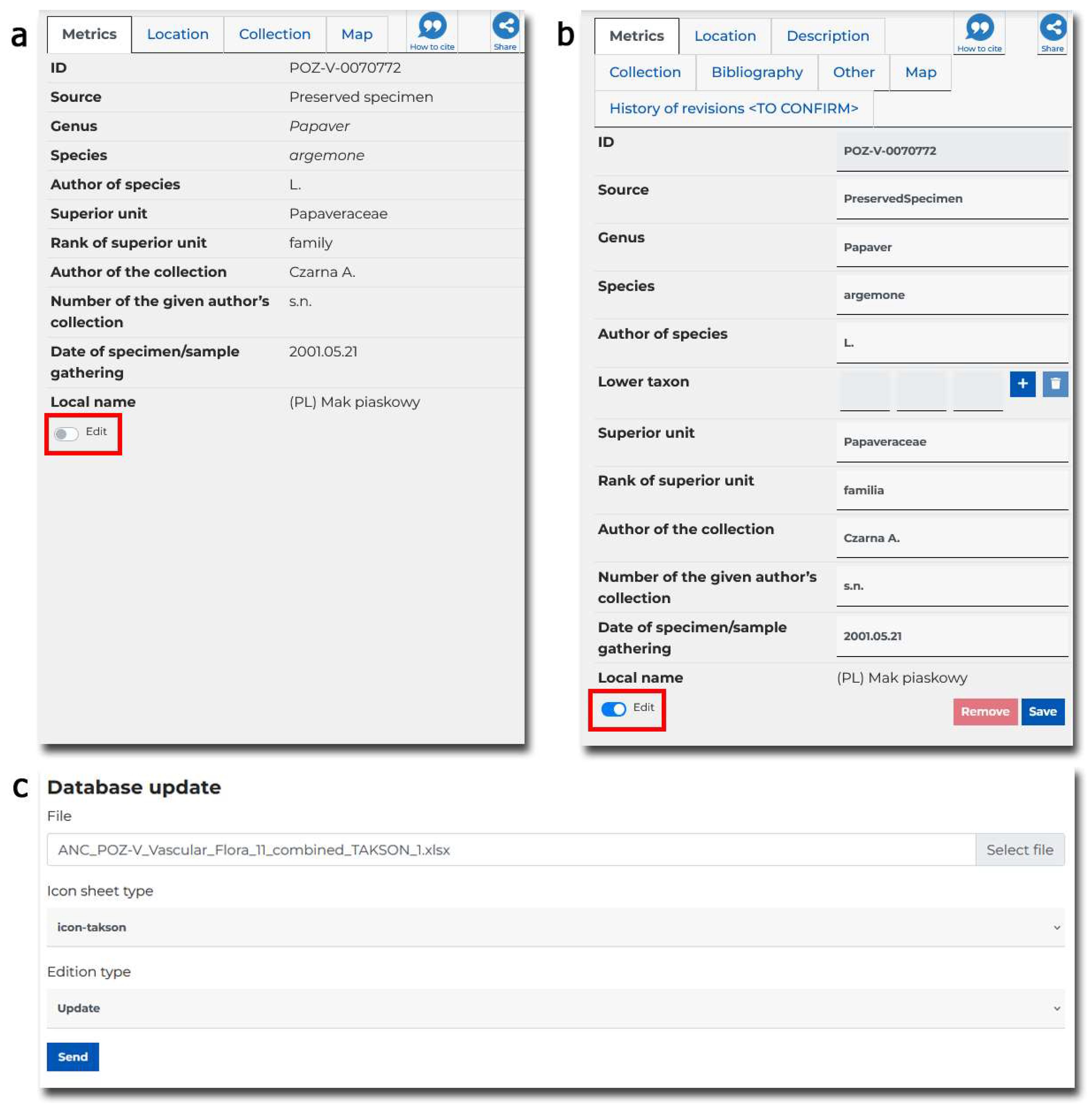
The procedure for value correction should be restricted to individuals who possess the necessary authorizations (e.g., coordinator, editor, refer to Section 3.3.2). It is advisable to execute the process of modifying the value of records pertaining to a specimen in two distinct manners: individually and collectively. For the individual approach, it is beneficial to enable the modification of records directly through the portal interface, specifically within the form that displays the specimen characteristics (see Error! Reference source not found. a and b). Conversely, for the collective value modification process, a more effective method would be to import the amended records via a spreadsheet file that adheres to the established standard (see Error! Reference source not found.c). In both cases, a major advantage of such a solution is that the changes are immediately visible in the portal. It is important to highlight that every record, irrespective of the method of modification, undergoes a validation process akin to that of the initial digitization. Only upon the successful completion of this validation is the data incorporated into the database.
The record editing process must be effectively managed on the backend, necessitating an expansion of the range of supported API calls. To ensure secure access to these services, all requests must include a valid authorization token, which can be obtained by submitting a login request to the API, along with the appropriate permissions for the logged-in user. The API accommodates not only requests from tools associated with Excel spreadsheet files, such as file validation, conversion, and database updates, but also requests aimed at modifying individual records through the online portal form.
Requests are queued on the portal side, ensuring that each subsequent request is processed only after a response is received from the preceding one. For operations that alter the state of data within the database, each modification is recorded in tables designated for maintaining the history of the respective record type. This includes general information about the change, such as the date and time, the user who made the change, and the specific record that was altered, as well as detailed descriptions of all modified fields. In instances where the database is imported or updated from a file, the name of that file is also documented in the database to assist those responsible for data modifications. Each operation generates a report detailing the results or any errors encountered during the process.
Figure 6. View of the specimen characterization page with edit mode turned off (a) and on (b), the mode switch marked with a red border. Figure (c) shows the form view for collective editing of spreadsheet data.
Preprints 151852 g006

3.3.4. Graphic Design

The graphic design of a typical NHC portal should meet a number of rigorous requirements regarding usability, appearance and accessibility. Work on its creation usually begins with the assumption of the purpose of the portal, content architecture, defining the recipients, and then creating a functional model and graphic design. A very important task is to determine who it is addressed to (who are the end users), what are the expectations and how the recipients will use the designed interface.
Often the spectrum of recipients is extremely wide, and users have different needs and experiences in using IT solutions.
A sample list of recipients may include: researchers, teachers and students, representatives of state and local government administration involved in nature conservation, state services and officials responsible for species protection, representatives of non-governmental organizations and ordinary nature lovers. Therefore, it is necessary to design such UX (user experience) and UI (user interface) so that each user can find exactly the content they expect. It can be assumed that the experience or, in some cases, habits of users on the web are not very different from the habits of customers in a supermarket. Website visitors browse each new page, “scan” text and photos, and click on the first link that promises to provide what they are looking for.
According to UX principles, it is necessary to predict the steps taken by users to access functionality or information, the so-called user flow. Most users search for interesting content or something useful by clicking on various elements of the interface until something catches their attention. If the page does not meet their expectations or they do not find the information they need, they click the “back” button and continue searching.
Having the site navigation arranged in a pattern resembling the letter “F” (F-pattern design) is very advisable. Numerous studies have shown that when browsing pages, Internet users usually scan them with their eyes, starting from the upper left corner of the page and then moving lower. As a result, the human eye makes a “journey” across the screen, the “trail” of which resembles the letter “F”. In accordance with this style, the most important elements of the page are placed in those sectors to which users pay the most attention. This is an important principle and this is where the key navigation elements are found on the portal.
It is worth considering that the home page should be built on the one-pager principle and each of the modules should fill the screen 100%. This procedure allows the user to catch their attention and gives them the opportunity to decide whether to scroll further or find content that is attractive to them.
The basic function of the NHC portal is to offer access to the database of natural collections. In order to increase user engagement, it is worth considering encouraging the user to create an account. This can be done by offering more functionality and data for authorized users while maintaining a minimum offer for all visitors. However, it should be remembered that both groups should have a defined path to reach the information.
Access to the main pages should be possible from the menu level, the structure of which is intuitive. According to Krug's first law of usability [38], a website should be intuitive and logically constructed. If the navigation and architecture of the site are not intuitive, the number of doubts increases. Hence the consistency in the ranking of content and functions in the appropriate submenu groups.
Another assumption when designing the portal concerns its appearance. It is necessary to be guided by the need to provide websites whose design will be attractive for several years, but will also be user-friendly. It should be remembered that the portal serves both its content provider and the recipient. This goal can be achieved by using the appropriate colour palette. A well-chosen colour palette enhances the positive experience of using the website. Complementary colours create balance and overall harmony. The use of contrasting colours in text and background makes reading easier.
When designing, it is worth consciously using the "Whitespace" principle. Whitespace is a space that separates elements of the website from each other. Empty spaces have a very positive effect on the reception of content on the portal. First of all, they give the impression of spaciousness on the website and, as a result, reduce the feeling of tightness between individual elements of its content. Thanks to the use of additional spaces, they are definitely more legible. Whitespace highlights the most important parts of the page and allows the reader to focus their attention on them. One such element is the "call to action" buttons on the main page in each of the modules. Forms and advanced search engines are located in empty fields. This increases the chances of filling them in.
The typography used is consistent with website design trends. The fonts are legible and consistent with the nature of the portal's content. It is a good idea to limit yourself to one font (e.g. Montserrat) of different thickness, in order to maintain consistency and shorten the page loading time.
NHC portals often offer users a huge database of illustrations on the one hand and information in text form on the other. It is worth using the experience that the human brain perceives and processes images much faster than regular text. The user's eye quickly gets bored with long texts to read. "A picture is worth a thousand words". Therefore, wherever a photo can support the content, attractive images should be used. An example are infographics, which explain the portal's assumptions or the functionality of the application to the user faster than written text.
In order to reconcile different forms of communication and maintain legibility, it was necessary to reach for the experience and current trend of creating pages. Minimalism is currently one of the most popular trends in website design. Its essence can be defined as "less is more". The basis of this trend is to simplify the page as much as possible. Unnecessary elements should be removed, limiting them to the necessary minimum. This applies not only to the content of the website, but also to its colours. The portal should be simple and uncomplicated. Using a minimalist layout, you can achieve, above all, that users will not be distracted by unnecessary elements. In addition, thanks to the transparency of the website, it is easy to find the resources you are looking for.
When designing websites, it is worth considering SEO requirements. The graphic design of subpages should meet the expectations of search engines (e.g. Google) and the expectations of the user. Therefore, the expected template of subpages contains a header with the title of the page, a text lead introducing the content of the page and the actual content, where the blocks of text are divided by graphics.
Another issue worth paying attention to is the design consistent with responsive web design, so it was designed and coded in such a way that it works and looks good regardless of the monitor resolution it is viewed from. The portal is prepared to work properly on a large monitor, tablet or smartphone. Responsive web design makes it possible for the user to find and easily read all the information they are looking for without the need to reduce/enlarge individual elements of the portal.
The well-designed NHC portal meets the WCAG in version 2.1 level AA requirements, i.e.: perceptibility, functionality, comprehensibility and robustness/compatibility. This matter pertains not only to best practices in website development but is also mandated by established European legislation, including the European Accessibility Act (EAA) – Directive (EU) 2019/882 [39], the Web Accessibility Directive – Directive (EU) 2016/2102 [40], and the European Standard EN 301 549 [41], as well as national laws within EU member states. The content on the portal is prepared and accessible for people who have various limitations, but want to know what is in the picture even though they cannot see, cannot use the mouse, but only the keyboard, enlarge the view of the pages or change its colours to be able to see the content better, change the browser settings to make the content more legible. On the portal one should find the accessibility declaration of the portal, from which users can find out to what extent the site complies with the requirements of the act on the digital accessibility of websites and mobile applications of public entities.

3.4. Technology

The functional model proposed in this work assumes that digital biodiversity data will be used for scientific, educational, public and practical purposes. Therefore, it is so important to properly design and implement interfaces enabling access, exploration and manipulation of data available in the project database. Data can be accessed using two available interfaces: graphical and programming interface (API). The first one is implemented in two forms: a portal, which is the main interface for access to data collected in the database, and a mobile application, complementing the functions offered in the field of field research and creating private collections. Providing the set of operations required by target groups involved equipping the portal with simplified and advanced search, statistical analysis and BioGIS processing capabilities. The graphical interface is subject to numerous requirements and limitations, which are reflected in graphic design and accessibility issues related to accommodations for people with disabilities. It must appropriately address different groups of target recipients, taking into account their different goals and levels of knowledge, and adapt the level of interaction due to limitations in using the interface.
The technological challenge was the scale of the project both during the digitization process and the subsequent storage and sharing of data. The botanical collections include approximately 500,000 specimens, including over 350,000 vascular plants. Specimens of vascular plants are kept in two herbaria: POZ and POZG. The POZ herbarium (approx. 190,000 sheets) consists of many collections, mainly from Poland, but also from various regions of Europe and North America. This herbarium contains over 240 nomenclature types of various ranks. Zoological collections contain over 1,700,000 specimens of invertebrates and 50,000 chordates catalogued so far. To store this data and multimedia files almost 800 TB of physical disk space is needed including processed data, replication and backups (see Section 3.4.1.2 for details). Additional space (120 TB) is used for temporary storage of data after the digitization process and before their verification and inclusion in the system.
Data openness and the ability to cooperate with other solutions/systems are key elements in achieving synergy in conducting biodiversity research. Therefore, AMUNATCOLL IT offers the opportunity to respond to these challenges by enabling data export for independent processing using external tools using the portal functionality or by providing access to data directly via an application programming interface. In addition to independent export, the API interface also allows you to connect the AMUNATCOLL database with external databases, e.g. GBIF (Global Biodiversity Information Facility) [42].

3.4.1. Infrastructure

The IT infrastructure implemented for the purposes of creating the NHC online system is intended to safely store data collected in the process of digitisation of specimens and to provide computing power for services related to serving content to users. The infrastructure should be adapted to the requirements of the project, providing basic functionality such as data redundancy, taking into account the requirements of the implementation process divided into development and production goals, and space for systems supporting reliable operation of the system, e.g. monitoring the operation of services.

3.4.1.1. Understanding Specimen Quantity Factor

First, the project requirements must be properly assessed in terms of the number of specimens to be digitized and the time and human resources devoted to the process. Below in Table 9 an estimate for the AMUNATCOLL system is presented.
To understand the scale of the digitization project, let's do some simple calculations. Let's assume that the project lasts 3 years, with about 250 working days each year, which gives us 750 days. From this value, we need to subtract about 6 months (125 days) for the so-called start-up at the beginning of the project, related to purchasing the necessary digitization equipment (scanners, workstations, disk space), establishing the metadata structure, preparing forms, training employees, etc. We are left with 625 days for digitization, which in turn gives about 3,600 specimens per day. Assuming that we have 50 employees, each of them should digitize 72 specimens (9 per hour) during a working day. Of course, achieving such efficiency in the initial phase is extremely difficult to do (lack of skill of newly trained people) and will require catching up on the "backlog" in the subsequent stages of the project. These numbers are intended to emphasize the fact that without proper planning and support of the entire process with automation operations, the implementation of the task would not be possible.

3.4.1.2. Storage Space

Another enormously important aspect that must be taken into account when planning the infrastructure for the NHC system is disk space. Its proper planning assumes data redundancy allowing for their protection in the event of a failure and the need to efficiently restore the system's operation, as well as a buffer necessary for storing processed data.
The source material from which we start with calculations are all iconographic materials from the scanning process, photographic, video and sound documentation. It is not used for operational activities. It enables to recreate the operational material in the event of its damage or a change in the technology used.
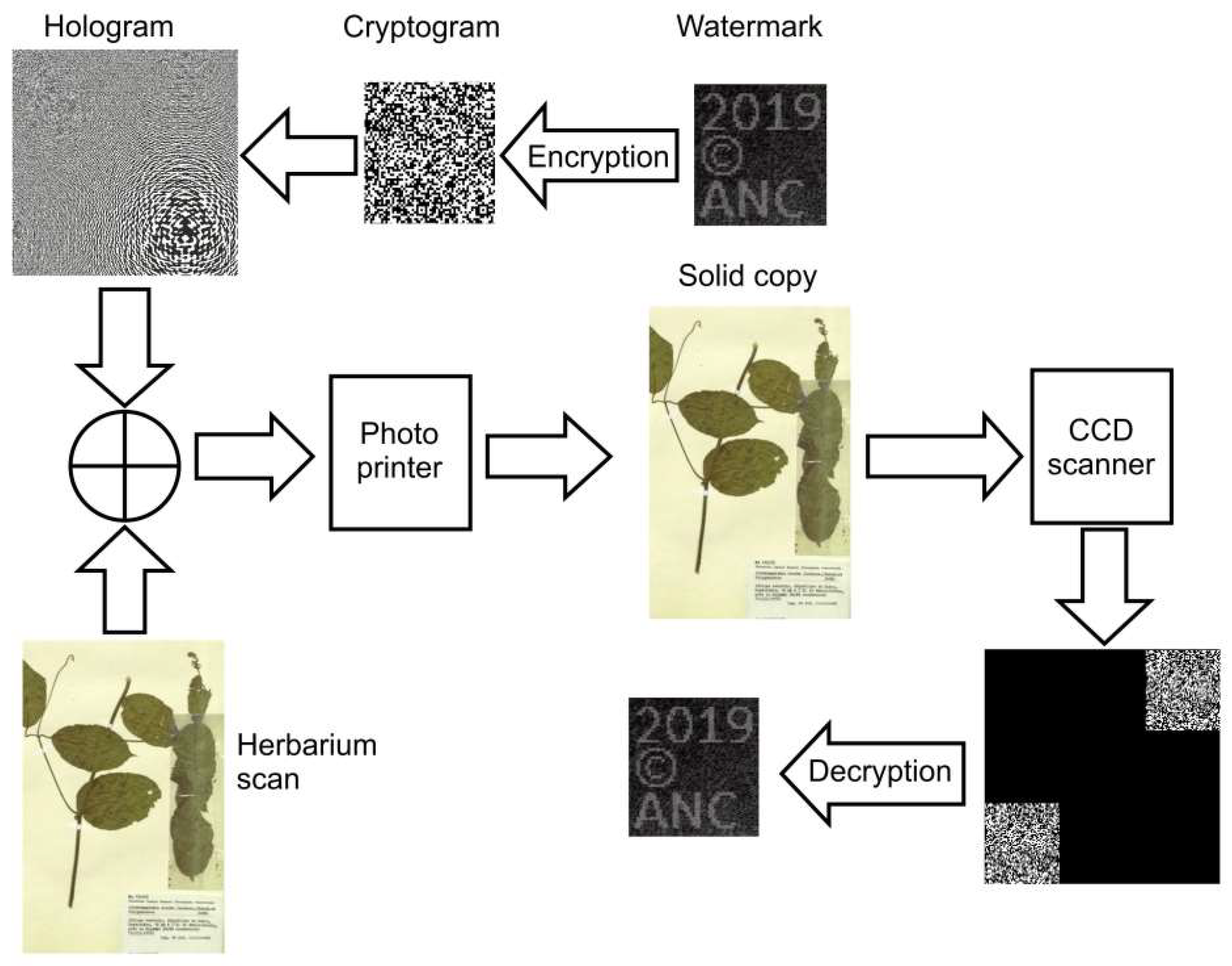
In turn, the operational material is created by processing the source material for the needs of the IT system. It is processed using operations that increase its usability during presentation on the portal and provide copyright protection. The first operation concerns conversion to pyramidal TIFF (adaptation to the needs of the portal enabling faster loading of graphics for the purposes of its presentation). The next one involves securing photos against unauthorized use by: cutting off the border, adding a watermark, holograms and a set of metadata (EXIF). The above actions increase the capacity by an average of 160% (mainly related to conversion to pyramidal TIFF).
The next step is to consider the storage method in terms of the disk technology used. It is suggested to use the RAID (Redundant Array of Independent Disks) solution [43] which enables to simultaneously increase reliability, transmission efficiency and increase the uniform available space. A reasonable and sufficient approach seems to be to prepare a configuration based on RAID 6 (8+2), where 8 is the number of drives used for storing actual data and 2 is the number of drives dedicated to redundancy to provide fault tolerance. Such a solution is characterized by resistance to failure of a maximum of 2 disks. In general, the array is implemented as RAID 1 (replication of work on two or more physical disks), the elements of which are RAID 0 arrays. Such an array has both the advantages of the RAID 0 array, speed in write and read operations, and the RAID 1 array, data protection in the event of a single disk failure. A single disk failure causes the whole to become RAID 0 in practice. However, it should be noted that the additional cost is the allocation of 20% more space for data than without this solution.
Considering the effort needed for potential data recovery (time and personnel costs) in the event of serious emergencies such as floods or fires, it is necessary to consider placing the data in different locations. It is assumed that one copy of the data is kept in the same location (local copy) but on another much cheaper medium, and the second in a different geographical location (geographic copy) where the data is replicated on disk arrays. This approach guarantees relatively quick system recovery, even in the event of a serious event, allowing for a smooth switchover of the data source. In addition, in order to reduce storage costs, it can be assumed that the local copy is limited only to the source material.
It is important to remember that the storage capacities of data carriers, such as HDD and SSD drives, are defined according to the ISO standard [44] (1kB = 1000B -> 1 kilobyte = 1000 bytes). However, the values of available space given by the operating system are given using the conversion factor 1KiB = 1024B (KiB stands for kibibyte) [45]. While for small values it seems not much, for a size of 1TB it causes an increase of approx. 10% on disk space [].
It is important to remember to allocate space for shared storage for the digitization process. It should enable an asynchronous data import mechanism by synchronizing data directories in the background. The browser-based file transfer solution is not recommended due to large file sizes and transfer speed limitations. The AMUNATCOLL project assumes a buffer size of about 90 TB effectively (physical about 120 TB).
Let's consider the calculation of the required disk space in the variants: regular and economical (local copy includes only source materials) based on data from the AMUNATCOLL project (Error! Reference source not found.).
Table 10. Calculation of the required disk space for the AMUNATCOLL project.
Regular Economical
Operation name or location Factor TB TB
Source material 90 90
Processed and protected material 1.6 144 144
RAID 6 0.2 46.8 46.8
Conversion to ISO 0.1 28.08 28.08
Total in one location 308.88 308.88
Geographic copy 308.88 308.88
Local copy 308.88 118.8
Buffer for the digitization process 120 120
TOTAL 1046.64 856.56
CONVERSION RATE ~11.63 ~9.52
Taking into account the above assumptions, it should be assumed that for safe and efficient storage and processing of data one needs to have from 9.52 to 11.63 times more space in relation to the collected source material. In addition, for the needs of the fastest possible restoration of the service in the event of a disk system failure, procedures for restoring the state of the database from maintained backup copies should be developed.

3.4.1.3. Computing and Service Resources
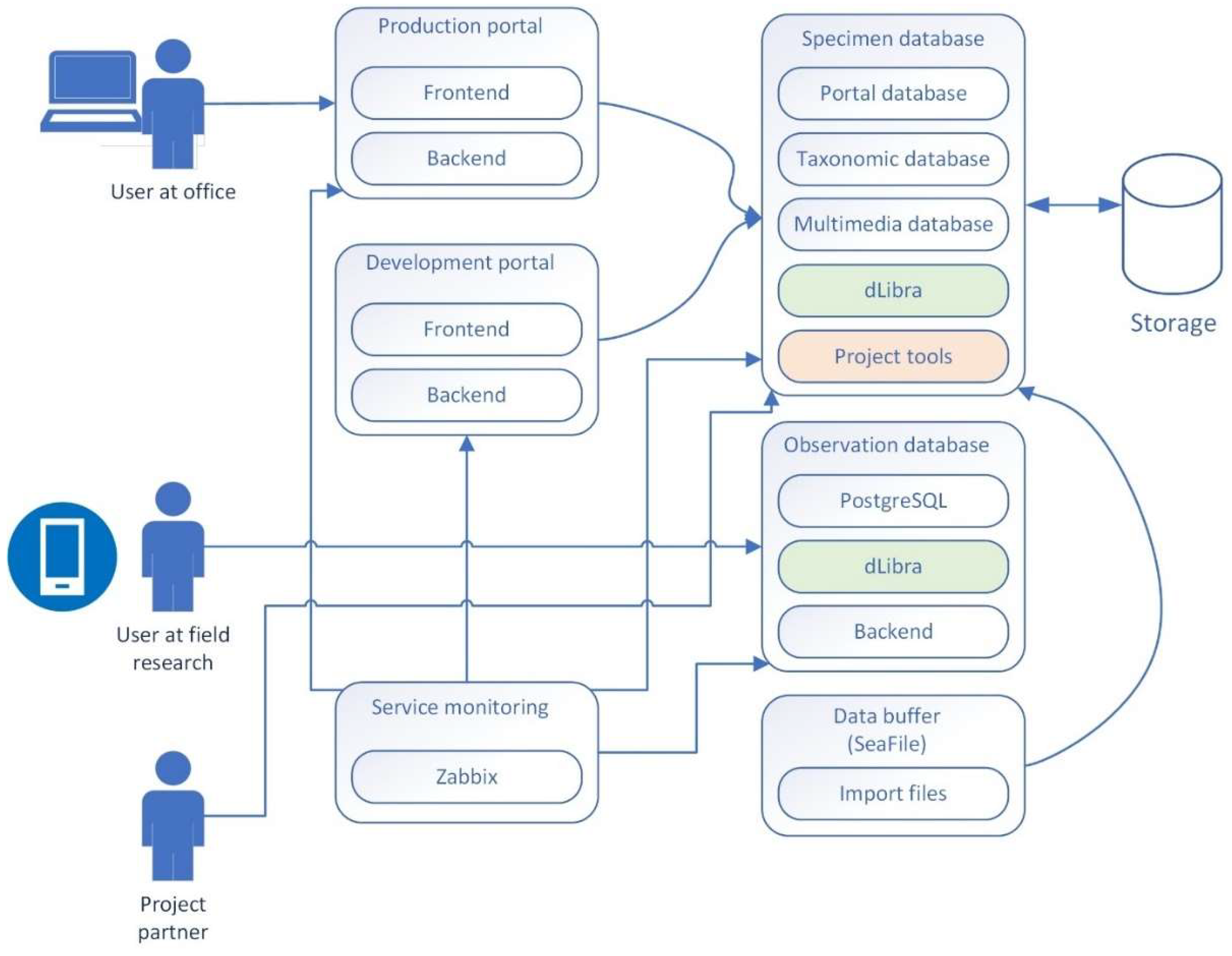
The implemented IT infrastructure is not only intended to store data but also to ensure the efficient and reliable operation of numerous services and processing processes (e.g. conversion of scans and their protection). With this in mind, some services such as the portal have been duplicated, dividing it into development and operational infrastructure. This allows for the implementation of the process of implementing new functionality and introducing changes based on the CI/CD (continuous integration/continuous delivery) methodology [46].
Maintaining the continuity of the system and safeguarding the data it houses is of utmost importance, given the accessibility of the provided data and services. To achieve a high level of service availability, it is advisable to implement a resource monitoring system, such as Zabbix [47]. This service tracks a specified list of critical applications at predetermined intervals. Notifications regarding service outages are dispatched via email to a designated individual or group, enabling prompt action by service administrators to restore functionality.
The database serves as a fundamental component of nearly all NHC systems, necessitating considerable time and focus for its effective design and implementation. Beyond merely storing metadata that outlines the attributes of specimens, it also retains information pertaining to organizational, technical, and support domains, thereby facilitating efficient access and management.
For the AMUNATCOLL project, the implementation utilized the PostgreSQL server [48]. This system is a free, open-source relational database management solution that prioritizes extensibility and SQL compatibility. It encompasses essential functionalities tailored to the project's requirements, including ACID properties (atomicity, consistency, isolation, durability), automatically refreshed views, foreign key triggers, and stored procedures. PostgreSQL is engineered to accommodate substantial workloads, such as data warehouses or web services that support numerous concurrent users. It is important to identify distinct logical areas for the storage of specific groups of information pertinent to various operational components of the project. Taking the AMUNATCOLL project as an example, three distinct areas have been established: "amunatcoll," "dlibra," and "anc_portal." The "amunatcoll" database is dedicated to the storage of data concerning specimens, featuring tables that include taxonomic names and their synonyms, sample data, bibliographic references for publications, types of specimens, as well as collections and subcollections, along with statistics and historical records of specimen imports. The "dlibra" database serves as the repository for the dLibra digital library [49], tasked with storing data on imported multimedia objects. Within this library, the project utilizes data from tables that contain metadata related to multimedia files and publication scans. In this database, attributes and their corresponding values are organized in two columns that are consistent across all attributes, unlike the "amunatcoll" database, which has dedicated columns for storing parameters separately. The "anc_portal" database is responsible for managing information related to the portal and its functionalities. It includes tables that hold user data, user permissions, resources generated by users through the mobile application (such as projects, observations, and associated files), additional user-generated resources (including albums, filters, and base maps), as well as information about teams and their members, along with visit statistics.
The most important elements of the AMUNATCOLL development and demonstration infrastructure and the connections between them are presented below (Error! Reference source not found.).
Figure 7. Service modules interaction in the AMUNATCOLL system.
Preprints 151852 g007

3.4.2. Interoperability

Collections are often stored in different formats and databases in different institutions. To ensure effective communication between systems, agreement on common standards and formats is required.
Another aspect is access to these collections with a global reach, which is most often based on platforms integrating data from different leading institutions: museums, universities and research institutions.
The complexity of typical NHC teleinformatic system requires delegating the operations to many cooperating modules. Functional assumptions also require a certain openness to cooperation with external applications, such as independent data repositories. The above conditions are related to the development of appropriate programming interfaces. The backend layer of the system provides access to information stored in the database using a standardized access interface, most often implemented in REST technology [50]. This interface is used by both the WWW portal, the mobile application and other cooperating modules. Access to individual interface methods is secured using JWT tokens [51]. To facilitate access while ensuring security, both a short-term access token and a long-term refresh token are used. This enables limiting the use of the offered functionality only to the logged-in user, based on their authorizations.
Selected taxonomic data of specimens from the database are made available to external entities. An example of a database on biodiversity to which records will be exported is GBIF. For this purpose, the "BioCASe Provider Software" (BPS) was used - a web service compatible with the "Biological Collection Access Service" [52]. The BioCASe access service is a transnational network of biodiversity repositories. It combines data on specimens from natural history collections, botanical/zoological gardens and research institutions worldwide with information from large observational databases. In order to ensure efficient data transfer from one database to another, an instruction for connecting individual fields, called mapping, must be provided. An example of such a mapping between the ABCD standard (supported by GBIF [53]) and the AMUNATCOLL database is presented in Error! Reference source not found..
Table 11. Mapping of ABCD and AMUNATCOLL for the BioCASE protocol.
Dataset related fields
ABCD AMUNATCOLL
Property Name Link to specification Property Name / Comment
/DataSets/DataSet/ContentContacts/ContentContact/Name https://terms.tdwg.org/wiki/abcd2:ContentContact-Name Information generated automatically during export depending on the custodian of a given collection
TechnicalContact/Name https://terms.tdwg.org/wiki/abcd2:TechnicalContact-Name Information generated automatically during export
/DataSets/DataSet/ContentContacts/ContentContact/Organization/Name/Representation/@language https://terms.tdwg.org/wiki/abcd2:DataSet-Representation-@language Information generated automatically during export
/DataSets/DataSet/Metadata/Description/Representation/Title https://terms.tdwg.org/wiki/abcd2:DataSet-Title Information generated automatically during export
/DataSets/DataSet/Metadata/RevisionData/DateModified https://terms.tdwg.org/wiki/abcd2:DataSet-DateModified Date of last import, date generated automatically by the system during export
Specimen fields
/DataSets/DataSet/Units/Unit/SourceInstitutionID https://terms.tdwg.org/wiki/abcd2:SourceInstitutionID Institution
/DataSets/DataSet/Units/Unit/SourceID https://terms.tdwg.org/wiki/abcd2:SourceID Botany / Zoology
/DataSets/DataSet/Units/Unit/UnitID https://terms.tdwg.org/wiki/abcd2:UnitID Collection / Specimen number
/DataSets/DataSet/Units/Unit/RecordBasis https://terms.tdwg.org/wiki/abcd2:RecordBasis Source
/DataSets/DataSet/Units/Unit/SpecimenUnit/NomenclaturalTypeDesignations/NomenclaturalTypeDesignation/TypifiedName/NameAtomised/Botanical/GenusOrMonomial https://terms.tdwg.org/wiki/abcd2:TaxonIdentified-Botanical-GenusOrMonomial Genus
/DataSets/DataSet/Units/Unit/Identifications/Identification/Result/TaxonIdentified/ScientificName/NameAtomised/Zoological/GenusOrMonomial https://terms.tdwg.org/wiki/abcd2:TaxonIdentified-Zoological-GenusOrMonomial Genus
/DataSets/DataSet/Units/Unit/Identifications/Identification/Result/TaxonIdentified/ScientificName/NameAtomised/Botanical/FirstEpithet https://terms.tdwg.org/wiki/abcd2:TaxonIdentified-FirstEpithet Species
/DataSets/DataSet/Units/Unit/Identifications/Identification/Result/TaxonIdentified/ScientificName/NameAtomised/Zoological/SpeciesEpithet https://terms.tdwg.org/wiki/abcd2:TaxonIdentified-Zoological-SpeciesEpithet Species
/DataSets/DataSet/Units/Unit/Gathering/Agents/GatheringAgent/Person/FullName https://terms.tdwg.org/wiki/abcd2:GatheringAgent-FullName Author of the collection
/DataSets/DataSet/Units/Unit/Identifications/Identification/Identifiers/Identifier/PersonName/FullName https://terms.tdwg.org/wiki/abcd2:Identifier-FullName Author of designation
/DataSets/DataSet/Units/Unit/Gathering/DateTime/ISODateTimeBegin https://terms.tdwg.org/wiki/abcd2:Gathering-DateTime-ISODateTimeBegin Date of specimen/sample collection
/DataSets/DataSet/Units/Unit/SpecimenUnit/Preparations/Preparation/PreparationType https://terms.tdwg.org/wiki/abcd2:SpecimenUnit-PreparationType Storage method
/DataSets/DataSet/Units/Unit/Gathering/SiteCoordinateSets/SiteCoordinates/CoordinatesLatLong/LatitudeDecimal https://terms.tdwg.org/wiki/abcd2:Gathering-LatitudeDecimal Latitude
/DataSets/DataSet/Units/Unit/Gathering/SiteCoordinateSets/SiteCoordinates/CoordinatesLatLong/LongitudeDecimal https://terms.tdwg.org/wiki/abcd2:Gathering-LongitudeDecimal Longitude
/DataSets/DataSet/Units/Unit/Identifications/Identification/Result/TaxonIdentified/ScientificName/FullScientificNameString https://terms.tdwg.org/wiki/abcd2:TaxonIdentified-FullScientificNameString Required by Darwin Core. Merging of several fields: Genus + Species + SpeciesAuthor + YearOfCollection
As a result of correct preparation of BPS, an URL is made available to which queries can be sent according to the BioCASe protocol. In the case of GBIF, access to data consists of sending a scanning query, the response to which is a list of specimens in the database, and then sending a series of individual queries retrieving available data for each of them.

3.4.3. Security

Designing an NHC system requires awareness of the existence of security gaps in individual applications and methods to counteract their occurrence. This involves implementing appropriate programming practices, the aspect of system openness (access via the Internet), and the issue of securing copyrights of shared materials.

3.4.3.1. Security Programming Practices

At the very beginning of the development of the NHC system, it is worth paying attention to the general recommendations for secure programming in order to take advantage of the benefits they provide while minimizing the risk of system compromise, including the leakage of confidential data. The Security Development Lifecycle (SDL) [54] is a systematic approach designed to integrate security best practices into the software development process. This methodology enables developers to detect security vulnerabilities at an early stage of the software development lifecycle, thereby mitigating the security risks associated with software products. Microsoft, the originator of the SDL methodology, reported that its application proved to be successful and yielded substantial outcomes. Notably, there was a 91% reduction in security vulnerabilities in Microsoft SQL Server 2005 when compared to the 2000 version of the software, which was the last release prior to the adoption of the SDL. Methodology comprises five fundamental phases: requirements, design, implementation, verification, and release. Each phase necessitates specific checks and approvals to guarantee that all security and privacy requirements, as well as best practices, are adequately met. Furthermore, two supplementary phases concerning training and response are established. These phases are carried out prior to and following the core phases to ensure their effective execution. The implementation phase is particularly significant from the perspective of NHC systems (but not only). During this phase, it is advisable to adhere to three key recommendations regarding tools, hazardous functions, and static analysis. The concept of utilizing only approved tools is linked to the publication of a list of such tools, along with associated security checks, including compiler and linker options and warnings. This approach facilitates the automation of processes and the integration of security practices at a minimal cost. A thorough examination of all service-related functions, including API functions, enables the identification and blocking of dangerous functions, thereby minimizing potential security vulnerabilities with low engineering expenses. Specific measures may involve the use of header files, updated compilers, or code scanning tools to identify prohibited functions and substitute them with safer alternatives. Additionally, static code analysis should be conducted systematically, which entails reviewing the source code prior to compilation [55]. This method offers a scalable approach to assessing code security and ensures adherence to policies aimed at developing secure code.
Despite the additional cost associated with implementing SDL, it is important to remember that early identification of vulnerabilities significantly lowers the costs associated with rectifying them at a later point. Furthermore, SDL promotes adherence to regulatory requirements and industry standards (ISO 27001, NIST, PCI-DSS, etc.), thereby enhancing overall security and resilience.

3.4.3.2. Security System Audit

As part of the safety supervision, it is necessary to cooperate with a professional security team, which conducts a security audit of both the code that is still in the development phase and another one in its final phase. This allows identification of potential threats and their elimination at an early stage of software development. When performing an audit, it is advisable to follow to the guidelines established by reputable security organizations, which will direct our focus toward specific, prevalent issues. One such organization is OWASP (Open Web Application Security Project) [56], a global non-profit entity dedicated to enhancing the security of web applications. Functioning as a community of professionals united by a common objective, OWASP produces tools and documentation based on practical experience in web application security. Due to its distinctive attributes, OWASP is able to offer impartial and actionable insights on web application security to individuals, corporations, academic institutions, government bodies, and various organizations worldwide. Below (Table 12) are the ten most critical security threats in web applications, which are also of considerable relevance to NHC systems.

3.4.3.3. Securing Iconographic Data

An important issue of the NHC development is assuring intellectual property rights of shared materials created by housing institute. Therefore, security issues should include the methodology for securing iconographic data, with particular emphasis on graphic files from both the process of scanning specimens and photos presenting observation data. There are many methods to protect graphic data using different technological solutions, below we present those that were used in the AMUNATCOLL system. They have been selected as a result of thorough analysis taking into account the benefits and costs of implementation. A decision was made to select four methods and use them simultaneously: removing external pixels, adding metadata within EXIF data, placing a visible watermark with information about the owner and adding a digital signature, which is invisible to the user but at the same time provides the strongest protection.
Removing the outer pixels around the image
This method has its origins in the insurance industry for works of art, especially paintings. It involves photographing the work both without and in the frame of the painting. The photo without the frame is not published anywhere, while the photo in the frame can be publicly available. Any marks on the canvas that are obscured by the frame allow you to identify the originality of the work in the event of its forgery. Translating this method into computer language, an operational copy is created based on the original image, from which we remove several or a dozen or so extreme pixels from each edge. The original version of the scan/photo is not published anywhere and is used only for evidentiary purposes or to recreate the operational copy if it is e.g. destroyed or unwantedly modified. Additionally, it cannot be forgotten the image intended for presentation in a portal will have a lower resolution (e.g. an image with a resolution of 1000 x 1500 pixels was created by sampling an image with a resolution of 2000 x 3000 pixels). In this way, the owner who has the original image will be able to prove that the file intended for display, created by performing the above operations, comes from their database. An entity that does not have the original image will not be able to prove the origin of the image. The time consumption of this method is low.
Metadata
The EXIF metadata standard [57] outlines a framework for describing graphic files, enabling the inclusion of details such as the photographer's name, a description, and the geographical location. When a resource is uploaded to the server, the script processes it by eliminating unnecessary parameters or incorporating new ones based on the user's selected preferences (for instance, photo location, camera model, author, description, etc.).
Like any metadata storage standard, it is subject to modifications. The approach to securing resources at the metadata level does not provide a robust level of protection, as this information is not only accessible to users but can also be easily altered by them. Consequently, relying solely on metadata for security purposes does not effectively prevent attempts to misappropriate intellectual property. It is important to highlight that there is no reliable method to restrict user access to metadata. Notwithstanding, this approach can be utilized for internal processes such as data sorting, aggregation, and resource description. Examples of fields from the EXIF standard that can be employed to indicate copyright are illustrated in Error! Reference source not found.. The advantage of using this method is its simplicity in implementation and low time consumption.
Table 13. EXIF standard fields used to indicate copyright along with examples.
Tag Exemplary value
ID POZ-V-0000001
Image Description The image depicts a scan from the Natural History Collections of Housing Institution Name.
Copyright Copyright © 2025 Housing Institution Name, City. All rights reserved.
Copyright note This image or any part of it cannot be reproduced without the prior written permission of Housing Institution Name, City.
Additional Information Deleting or changing the image metadata is strictly prohibited. For more information on restrictions on the use of photos, please visit: https://www.domain.com/
Watermarks
Watermarks serve as a robust means of protecting visual content, owing to their visibility and the challenges associated with their removal from an image without substantial alterations. This technique is straightforward to implement. To maximize their effectiveness, watermarks should occupy at least 40% of the central area of the image, thereby significantly hindering attempts to eliminate them. The design of the watermark should distinctly represent the owner of the content. However, a notable drawback of this approach is its potential to interfere with the original image, which may obscure critical details. When dealing with a large volume of files and varying object placements, it is often impractical to customize the watermark's position and style (including font and colour) for each individual image. Therefore, it is advisable to establish specific guidelines for the automatic application of watermarks following a thorough analysis.
Digital signature
A more sophisticated method of image protection is to add a CGH (Computer Generated Hologram) [58] digital signature, i.e. a hologram invisible to the naked eye. There are various methods of adding holograms. One of the most popular is to perform lossy compression of the image, and in place of some of the information responsible for the colour, depth of focus, and saturation of the image, hidden information about the owner of the resource is inserted (e.g. "2019©ANC") saved in binary using Base64 code (Figure 8). Using a hologram requires the use of specialized software that checks the checksum. However, reading information from the hologram is proof of ownership of the copyright in the event that someone unauthorized uses the resource. The disadvantage of using holograms is the need to devote additional computing power to the server, the costs associated with implementing the method (the need to create a specialized program that cooperates with the rest of the system) and a slight loss of quality of the resources.

4. Conclusions

This paper presents the most essential aspects related to planning and building online natural collection systems. Addressing such challenges requires an interdisciplinary approach, in which not only IT specialists but also scientists and stakeholders from many disciplines participate. Building IT system starts with a thorough analysis of the goals to be achieved, taking into account the scope of work and production capabilities. In the case of natural collection systems, it is extremely important to consider whom such a system is addressed. Such a definition determines the overall shape of the system, influencing the scope of collected data (metadata), functions offered, presentation layer, and many others. Although the work focuses mainly on issues related to the technical aspects of implementing online systems for natural history collections, tasks related to their preservation after they have been made available cannot be omitted.
One significant aspect to consider is the challenge of sustainable development and ongoing maintenance. The initiation and upkeep of systems necessitate a continuous allocation of financial and human resources. These platforms require regular updates, not only in terms of new software versions that underpin their architecture but also for security enhancements. Such activities impose a considerable burden; thus, securing a steady stream of financial resources for the upkeep of IT infrastructure should be a critical topic of discussion prior to the delivery of the final implementation version.
Additionally, it is essential to emphasize the importance of supporting the ongoing development of the system, with institutional collaboration being a fundamental component. Partnerships among museums, universities, and governmental organizations facilitate the broadening of available data, often leading to the introduction of new functionalities. This collaboration is inherently linked to the need for coordinated efforts and ensuring compatibility among institutions, including data formats and communication protocols, which presents another technological and logistical challenge. The outcome of such initiatives often involves working within distributed programming teams, where communication and coordination can become more complex, thereby impacting development timelines and decision-making processes. Nevertheless, it is crucial to recognize that each advancement in gathering knowledge about natural collections brings us closer to establishing an integrated knowledge system regarding biodiversity. This, in turn, will empower us to manage our most precious resource—nature—consciously and judiciously.

Author Contributions

Conceptualization, M.L.; methodology, M.L.; validation, M.L., P.W.; formal analysis, M.L.; investigation, M.L., P.W.; writing—original draft preparation, M.L., P.W.; writing—review and editing, M.L., P.W.; visualization, M.L.; supervision, M.L. All authors have read and agreed to the published version of the manuscript.

Funding

This work has been supported by the AMUNATCOLL project and has been partly funded by the European Union and Ministry of Digital Affairs from the European Regional Development Fund as part of the Digital Poland Operational Program under grant agreement number: POPC.02.03.01-00-0043/18. This paper expresses the opinions of the authors and not necessarily those of the European Commission and Ministry of Digital Affairs. The European Commission and Ministry of Digital Affairs are not liable for any use that may be made of the information contained in this paper.

Acknowledgments

The authors wish to extend their sincere appreciation to Professor Bogdan Jackowiak for his invaluable feedback on the manuscript, which greatly enhanced its quality. They are also grateful for his unwavering support and encouragement during the entire preparation of this work.

Conflicts of Interest

The authors declare no conflicts of interest.

Abbreviations

The following abbreviations are used in this manuscript:
ABCD Access to Biological Collection Data
ACID Atomicity, Consistency, Isolation, Durability)
AMUNATCOLL Adam Mickiewicz University Nature Collections
API Application Programming Interface
BPS BioCASe Provider Software
BioGIS BioGeographic Information System
CGH Computer Generated Hologram
CI/CD Continuous Integration/Continuous Delivery
DMP Data Management Plan
EBV Essential Biodiversity Variables
EXIF Exchangeable Image File Format
FAIR Findable, Accessible, Interoperable and Re-usable
GBIF Global Biodiversity Information Facility
GDPR General Data Protection Regulation
GIS Geographic Information System
HDD Hard Disk Drive
IPR Intellectual Property Rights
ISO International Organization for Standardization
IT Information Technology
JWT JSON Web Token
NHC Natural History Collection
OWASP Open Web Application Security Project
PCI DSS PCI Data Security Standard
RAID Redundant Array of Independent Disks
REST REpresentational State Transfer
SDLC Software Development LifeCycle
SDL Security Development Lifecycle
SEO Search Engine Optimization
SSD Solid State Drive
SSRF Server-Side Request Forgery
TIFF Tag Image File Format
UX User Experience
UI User Interface
WCAG Web Content Accessibility Guidelines

References

  1. Lawrence M. Page, Bruce J. MacFadden, Jose A. Fortes, Pamela S. Soltis, and Greg Riccardi, "Digitization of Biodiversity Collections Reveals Biggest Data on Biodiversity," BioScience, vol. 65, no. 9, pp. 841–842, 2015. [CrossRef]
  2. Pamela S Soltis, Gil Nelson, and Shelley A James, "Green digitization: Online botanical collections data answering real-world questions," Appl Plant Sci., vol. 6, no. 2, 2018. [CrossRef]
  3. Richard T. Corlett, "Achieving zero extinction for land plants," Trends in Plant Science, vol. 28, no. 8, pp. 913-923, 2023. [CrossRef]
  4. H. M. Pereira et al., "Essential Biodiversity Variables," Science, vol. 339, no. 6117, pp. 277-278, 2013. [CrossRef]
  5. Bogdan Jackowiak et al., "Digitization and online access to data on natural history collections of Adam Mickiewicz University in Poznan: Assumptions and implementation of the AMUNATCOLL project," Biodiversity: Research and Conservation, vol. 65, 2022. [CrossRef]
  6. KEW. (2025) KEW Data Portal. [Online]. Available online: https://data.kew.org/?lang=en-US.
  7. MNP. (2025) Muséum national d'Histoire naturelle in Paris - collections. [Online]. Available online: https://www.mnhn.fr/en/databases.
  8. PVM. (2025) Plantes vasculaires at Muséum national d'Histoire naturelle. [Online]. Available online: https://www.mnhn.fr/fr/collections/ensembles-collections/botanique/plantes-vasculaires.
  9. TRO. (2025) Tropicos database. [Online]. Available online: http://www.tropicos.org/.
  10. NDP. (2025) Natural History Museum Data Portal. [Online]. Available online: https://data.nhm.ac.uk/about.
  11. SMI. (2025) Smithsonian National Museum of Natural History. [Online]. Available online: https://collections.nmnh.si.edu/search/.
  12. Maciej M Nowak, Marcin Lawenda, Paweł Wolniewicz, Michał Urbaniak, and Bogdan Jackowiak, "The Adam Mickiewicz University Nature Collections IT system (AMUNATCOLL): portal, mobile application and graphical interface," Biodiversity: Research and Conservation, vol. 65, 2022. [CrossRef]
  13. Dirk S. Schmeller et al., "A suite of essential biodiversity variables for detecting critical biodiversity change," Biol Rev, vol. 93, pp. 55-71, 2018. [CrossRef]
  14. W. Jetz, M.A. McGeoch, R. Guralnick, and et al., "Essential biodiversity variables for mapping and monitoring species populations," Nat Ecol Evol, pp. 539–551, Mar. 2019. [CrossRef]
  15. Alex R. Hardisty et al., "The Bari Manifesto: An interoperability framework for essential biodiversity variables," Ecological Informatics, vol. 49, pp. 22-31, 2019. [CrossRef]
  16. Luiz M. R. Jr Gadelha, Pedro C. de Siracusa, and Eduardo Couto Dalcin, "A survey of biodiversity informatics: Concepts, practices, and challenges," WIREs Data Mining Knowl Discov., vol. 11:e1394, 2021. [CrossRef]
  17. A. Feest, Ch. Swaay van , T. D. Aldred, and K. Jedamzik, "The biodiversity quality of butterfly sites: A metadata assessment," Ecological Indicators, vol. 11, no. 2, pp. 669-675, 2011. [CrossRef]
  18. R. L. Walls et al., "Semantics in Support of Biodiversity Knowledge Discovery: An Introduction to the Biological Collections Ontology and Related Ontologies," PLOS ONE, vol. 9, no. 3, 2014. [CrossRef]
  19. J.R. Silva da et al., "Beyond INSPIRE: An Ontology for Biodiversity Metadata Records," OTM Confederated International Conferences "On the Move to Meaningful Internet Systems", 2014. [CrossRef]
  20. Marcin Lawenda, Justyna Wiland-Szymańska, Maciej M. Nowak, Damian Jędrasiak, and Bogdan Jackowiak, "The Adam Mickiewicz University Nature Collections IT system (AMUNATCOLL): metadata structure, database and operational procedures," Biodiversity: Research and Conservation, vol. 65, 2022. [CrossRef]
  21. ANC. (2025) AMUNatColl project. [Online]. Available online: http://anc.amu.edu.pl/eng/index.php.
  22. FBAMU. (2025) Faculty of Biology of the Adam Mickiewicz University in Poznań. [Online]. Available online: http://biologia.amu.edu.pl/.
  23. PSNC. (2025) Poznan Supercomputing and Networking Center. [Online]. Available online: https://www.psnc.pl/.
  24. ANCPortal. (2025) AMUNATCOLL Portal. [Online]. Available online: https://amunatcoll.pl/.
  25. ANDR. (2025) AMUNATCOLL Mobile Application - Android. [Online]. Available online: https://play.google.com/store/apps/details?id=pl.pcss.amunatcoll.mobile.
  26. IOS. (2021) AMUNATCOLL Mobile Application - iOS. [Online]. Available online: https://apps.apple.com/pl/app/amunatcoll/id1523442673.
  27. Seafile. (2025) Open Source File Sync and Share Software. [Online]. Available online: https://www.seafile.com/en/home/.
  28. (2017) ISO - International Organization for Standardization. [Online]. Available online: https://www.iso.org/iso-8601-date-and-time-format.html.
  29. (2002) RFC 3339: Date and Time on the Internet: Timestamps. [Online]. Available online: https://www.rfc-editor.org/rfc/rfc3339.html.
  30. Guo, N.; Xiong, W.; Wu, Q.; Jing, N. An Efficient Tile-Pyramids Building Method for Fast Visualization of Massive Geospatial Raster Datasets. Adv. Electr. Comput. Eng. 2016, 16, 3–8. [Google Scholar] [CrossRef]
  31. BIS. (2025) Biodiversity Information Standards. [Online]. Available online: https://www.tdwg.org/.
  32. DCMI. (2025) The Dublin Core™ Metadata Initiative. [Online]. Available online: https://www.dublincore.org/.
  33. William K. Michener and Matthew B. Jones, "Ecoinformatics: supporting ecology as a data-intensive science," Trends in Ecology & Evolution, vol. 27, no. 2, pp. 85-93, 2012. [CrossRef]
  34. E. Kacprzak et al., "Characterising dataset search—An analysis of search logs and data requests," Journal of Web Semantics, 2018. [CrossRef]
  35. F. Löffler, V. Wesp, B. König-Ries, and F. Klan, "Dataset search in biodiversity research: Do metadata in data repositories reflect scholarly information needs?," PLoS ONE, vol. 16, no. 3, 2021. [CrossRef]
  36. DwC. (2025) Darwin Core standard. [Online]. Available online: https://dwc.tdwg.org/.
  37. ABCD. (2025) Access to Biological Collections Data standard. [Online]. Available online: https://www.tdwg.org/standards/abcd/.
  38. Steve Krug, Don't make me think! Web & Mobile Usability.: MITP-Verlags GmbH & Co. KG, 2018.
  39. EUDirective2019-882. (2019) European Accessibility Act (EAA) – Directive (EU) 2019/882. [Online]. Available online: https://eur-lex.europa.eu/eli/dir/2019/882/oj/eng.
  40. EUDirective2016-2102. (2016) Web Accessibility Directive – Directive (EU) 2016/2102. [Online]. Available online: https://eur-lex.europa.eu/eli/dir/2016/2102/oj/eng.
  41. EN301549. (2021) European Standard EN 301 549. [Online]. Available online: https://www.etsi.org/deliver/etsi_en/301500_301599/301549/03.02.01_60/en_301549v030201p.pdf.
  42. GBIF. (2025) Global Biodiversity Information Facility. [Online]. Available online: https://www.gbif.org/en/.
  43. Qisi Liu and Liudong Xing, "Reliability Modeling of Cloud-RAID-6 Storage System," International Journal of Future Computer and Communication, vol. 4, no. 6, pp. 415-420, 2015. [Online]. Available online: https://www.ijfcc.org/show-61-745-1.html.
  44. ISOUNITS. (2025) Standards by ISO/TC 12 Quantities and units. [Online]. Available online: https://www.iso.org/committee/46202/x/catalogue/.
  45. ByteUnits. (2025) Wikipedia - Multiple-byte units. [Online]. Available online: https://en.wikipedia.org/w/index.php?title=Byte&utm_campaign=the-difference-between-kilobytes-and-kibibytes&utm_medium=newsletter&utm_source=danielmiessler.com#Multiple-byte_units.
  46. Pooya Rostami Mazrae, Tom Mens, Mehdi Golzadeh, and Alexandre Decan, "On the usage, co-usage and migration of CI/CD tools: A qualitative analysis," Empir Software Eng, vol. 28, 2023. [CrossRef]
  47. Fangming Guo, Caijun Chen, and Ke Li, "Research on Zabbix Monitoring System for Large-scale Smart Campus Network from a Distributed Perspective," Journal of Electrical Systems, vol. 20, no. 10, pp. 631-648, 2024. [Online]. Available online: https://www.proquest.com/openview/9f42244a7b3a7f64dfd1484ed04f63e8.
  48. PostgreSQL. (2025) PostgreSQL database web site. [Online]. Available online: https://www.postgresql.org/.
  49. dLibra. (2025) Digital Library Framework. [Online]. Available online: https://www.psnc.pl/digital-libraries-dlibra-the-most-popular-in-poland/.
  50. Erik Wilde and Cesare Pautasso, REST: From Research to Practice. NY: Springer New York, 2011. [CrossRef]
  51. JWT. (2025) JSON Web Tokens. [Online]. Available online: https://jwt.io/.
  52. BioCASe. (2025) Biological Collection Access Service. [Online]. Available online: http://www.biocase.org/.
  53. (2025) GBIF Data Standards. [Online]. Available online: https://www.gbif.org/standards.
  54. Hassan Saeed et al., "Review of Techniques for Integrating Security in Software Development Lifecycle," Computers, Materials & Continua, vol. 82, no. 1, pp. 139-172, 2025. [CrossRef]
  55. Ryan Dewhurst. (2025) Static Code Analysis. [Online]. Available online: https://owasp.org/www-community/controls/Static_Code_Analysis.
  56. OWASP. (2025) Open Web Application Security Project. [Online]. Available online: https://owasp.org/.
  57. EXIF. (2025) Exchangeable Image File Format. [Online]. Available online: https://en.wikipedia.org/wiki/Exif.
  58. Dapu Pi et al., "High-security holographic display with content and copyright protection based on complex amplitude modulation," Optics Express, vol. 32, no. 17, pp. 30555-30564, 2024. [CrossRef]
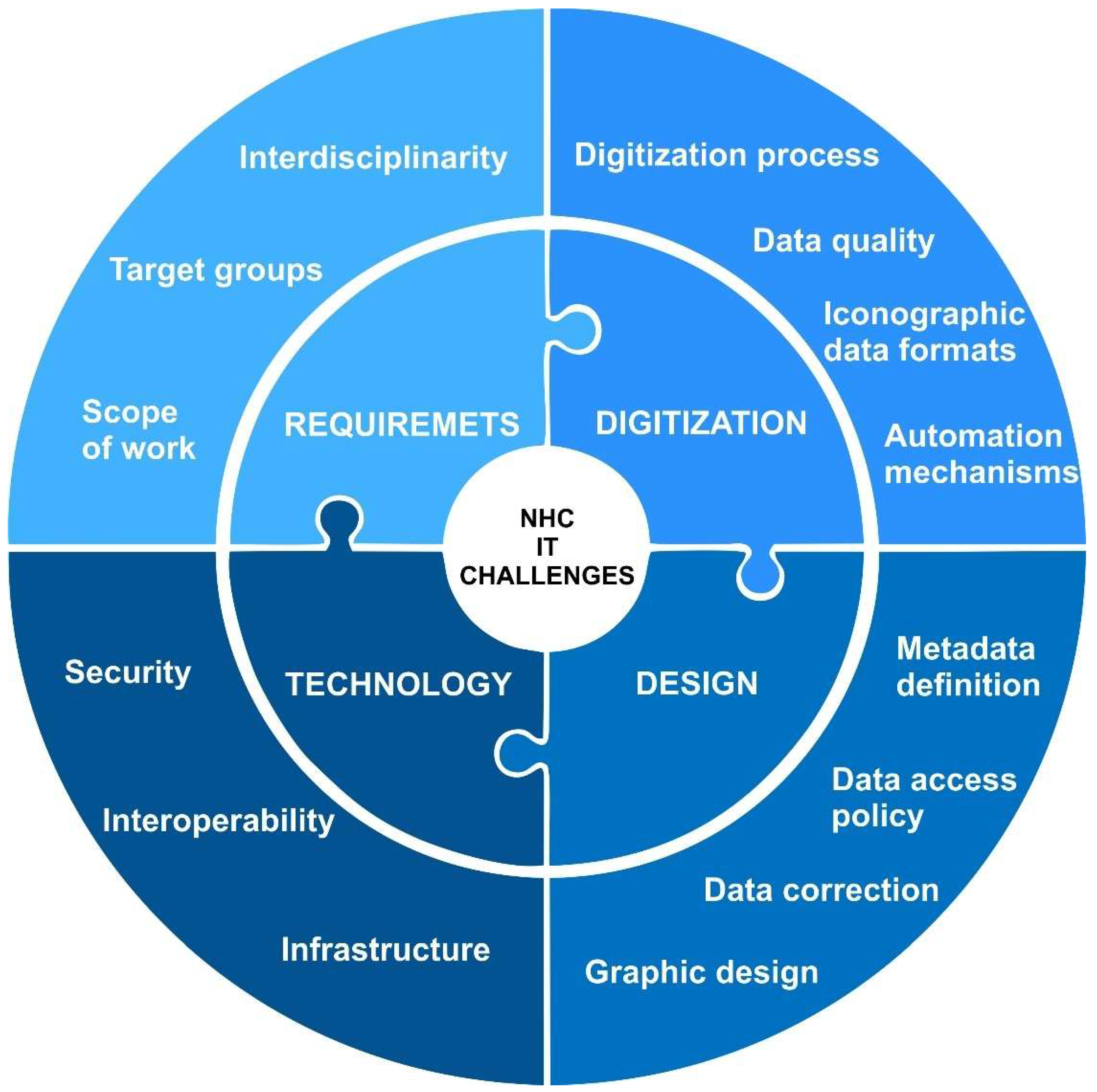
Figure 1. Categorization of challenges in NHC system design and development.
Preprints 151852 g001
Figure 4. Examples of unclear date representation scans.
Preprints 151852 g004
Figure 5. Metadata description: standard vs. extension.
Preprints 151852 g005
Figure 8. Diagram showing how to encode and decode holographic information. Data retained even after the scan is printed.
Preprints 151852 g008
Table 2. Adapting the search and browsing of information to target groups.
Action Species search language Search Browsing
View
General national (e.g. English, Polish) simplified - one field whose value is matched to many fields from the specimen description browse in list, map and aggregated reports;
key information about specimens
Scientific Latin Simple - a few selected fields
Extended - adding multiple fields to search conditions
Advanced - any definition of complex conditions including logical expressions
browse as list, map and aggregated reports.
Full information about specimens
Educational national, including everyday language simplified - mainly searching from available educational materials Educational materials about the specimen
Public administration national, Latin search among species Aggregated reports for selected species
State services national, Latin Mainly from protected and similar species Graphic information is essential
Table 4. Iconographic data formats with characteristics.
Code Format description Extension Volume Creation Way Typical applications Remarks
RAW Output files obtained directly from the digitizing device, in a device-specific format (e.g. recording format) depending on the device, e.g. .CRW or .CR2 for Cannon cameras big It is created manually or semi-automatically (depending on the equipment), in the digitization process. long-term data archiving The format is often manufacturer dependent, may be closed, patented etc. so it is not recommended as the only form of long-term archiving. Some devices (e.g. scanners) can generate TIFF files immediately, without the RAW option.
MASTER Lossless transformation of a RAW file to an open format, without any other changes. most often TIFF big It can be automated for some RAW formats, if batch processing tools exist for these formats. If they do not exist, manual actions are necessary, e.g. in the manufacturer's software supplied with the camera. long-term data archiving Basic format for long-term data archiving, preserved in parallel to RAW format.
In case an error occurs during the transformation from RAW to MASTER, MASTER files can be restored from RAW.
MASTER CORRECTED MASTER file subjected to necessary corrections (e.g. straightening, cropping), still saved in lossless form. most often TIFF big Depending on the type of corrections, this may be a manual or partially automated operation. long-term data archiving
limited sharing of sample files
This is the base form for generating further formats for sharing purposes. It contains the file in a usable form (after processing), in the highest possible quality. If it turns out that an error occurred during the corrections of the MASTER file, you can always go back to the clean MASTER form and repeat the corrections.
PRESENTATIONHI-RES MASTER CORRECTED files converted to a format dedicated for online sharing in high resolution. Low lossy compression may be used here, but does not have to be. E.g. TIFF (pyramidal) or JPEG2000 big It can be created fully automatically based on the MASTER CORRECTED file. online sharing Sharing such files online usually requires the use of a special protocol that allows for gradual loading of details - the standard here is the IIIF protocol.
PRESENTATIONLOW-RES MASTER CORRECTED files converted to a format dedicated for online sharing in medium/low resolution - there is a loss of quality. E.g. JPG, PDF, PNG small It can be created fully automatically based on the MASTER CORRECTED file. online and offline sharing (download) Sharing by simply displaying on web pages or downloading files from the site's pages.
Table 5. Tools that facilitate digitalized data preparation in automated way.
Name Type Description
Converter console or internet application A tool for automatic formatting of Excel files in the form of a web application. Its existence is based on the assumption that there is previously digitized data that requires adaptation to the new format. Its task is to convert input files into files compliant with the metadata specification using specific configurations (sets of rules) allowing for optional editing of input data
Form spreadsheet The basis for proper preparation of input data is compliance with the metadata specification. This is also intended to automate the processing processes by the developed applications. In order to avoid inconsistencies between the data filled in (often by different people), a form in the form of a spreadsheet file was prepared. It contains all the columns in accordance with the metadata specification, divided into sheets for taxa, samples, iconography and bibliography.
Validator console or internet application A tool for validating spreadsheet files available as a web application. Its task is to check the presence and correctness of filling in the appropriate sheets in the file. The tool returns a report with errors and details of their occurrence, divided into each detected sheet.
Aggregator console application A program used to combine spreadsheet files that are compliant with the metadata description. It is used in the digitization process, mainly at the stage of describing records by the georeferencing team or the translation team.
Reporter console application A program used to summarize the number of records in spreadsheet files that are compliant with the AMUNATCOLL description. It is mostly used by project coordinators for the purpose of ongoing monitoring of the progress of digitization work.
Table 7. Specimen data protection levels.
Level Name Description
0 specimen made public information about the specimen (record) is not protected, full information is available to all logged in and non-logged in users
1 specimen made public with restrictions information about the specimen (record) is partially protected - sensitive data (e.g. geographical coordinates, habitat) is protected
2 specimen is restricted information about the specimen (record) is made available only to external and internal users verified in terms of competence
3 non-public specimen information about the specimen (record) is made available only to authorized internal users (e.g. selected from among the employees of the hosting institution)
Table 9. Summary of the number of digitized specimens in the natural resources of the Faculty of Biology, Adam Mickiewicz University in Poznań.
Classification of specimens Number of specimens
Total number of specimens 2.25 million
Botanical collections (algae and plants) approx. 500 thousand
Included nomenclatural types approx. 350
Mycological collections (fungi and lichens) approx. 50 thousand
Zoological collections approx. 1.7 million
Included nomenclatural types over 1000
Table 12. List of the most common web application security risks according to OWASP.
Name Description
Broken Access Control Access controls implement policies designed to restrict users from operating beyond their designated permissions. When these controls fail, it often leads to unauthorized information disclosure, alteration or destruction of data, or the execution of business functions that exceed the user's authorized limits.
Cryptographic Failures It emphasizes the importance of safeguarding data both during transmission and while stored. Sensitive information, including passwords, credit card details, personal data, and proprietary information, necessitates enhanced security measures, particularly when such data falls under privacy laws like the EU General Data Protection Regulation (GDPR) or financial data protection standards such as the PCI Data Security Standard (PCI DSS).
Injection This vulnerability arises from the absence of verification for user-provided data, specifically the lack of filtering or sanitization measures. It pertains to the use of non-parameterized, context-sensitive calls that are executed directly within the interpreter. Additionally, it encompasses the utilization of malicious data, such as that found in SQL queries, dynamic queries, commands, or stored procedures.
Insecure Design A broad category representing various weaknesses, expressed as "missing or ineffective control design." Design flaws and implementation flaws must be distinguished for some reason, and have different root causes and remedies. A secure design may still have implementation flaws that lead to exploitable vulnerabilities. An insecure design cannot be fixed by a perfect implementation, because by definition, the necessary security controls were never designed to defend against the specific attacks.
Security Misconfiguration The application stack may be susceptible to attacks due to insufficient hardening or improper configuration of various services, such as enabling unnecessary ports, services, pages, accounts, or permissions. Additionally, error handling mechanisms may disclose excessive information, including stack traces or other overly detailed error messages. Furthermore, the most recent security features may either be disabled or incorrectly configured. The server might fail to transmit security headers or directives, or it may not be configured with secure values.
Vulnerable and Outdated Components Lastly, the software could be outdated or contain vulnerabilities. The scope encompasses the operating system, web or application server, database management system, applications, APIs, and all associated components, runtimes, and libraries. It is essential that the underlying platform is consistently patched and updated, and software developers must verify the compatibility of any updated, enhanced, or patched libraries.
Identification and Authentication Failures To protect against authentication attacks, user identity confirmation, authentication, and session management are key. Frequently, vulnerabilities arise from automated attacks wherein the perpetrator possesses a compilation of legitimate usernames and passwords. Additionally, breaches can occur due to inadequate or ineffective credential recovery methods, forgotten passwords, and the transmission of passwords in plaintext or through poorly hashed password storage systems. The absence or ineffectiveness of multi-factor authentication further exacerbates these risks. Moreover, there may be instances of improper invalidation of session identifiers or the exposure of session identifiers within URLs.
Software and Data Integrity Failures Software and data integrity failures pertain to code and infrastructure that do not adequately safeguard against breaches of integrity. It is impermissible for an application to depend on plugins, libraries, or modules sourced from unverified origins. A frequent method for exploiting vulnerabilities is through the auto-update feature, which allows updates to be downloaded and implemented on a previously trusted application without adequate integrity checks.
Security Logging and Monitoring Failures Logging and monitoring service activity helps detect, escalate, and respond to active breaches. Events such as logins, failed logins, and high-value transactions should be audited. Warnings and errors should generate clear log messages when they occur, and they themselves should be monitored for suspicious activity. Alert thresholds and response escalation processes should be defined at the appropriate level, and information about their exceedance should be provided in real or near real time.
Server-Side Request Forgery (SSRF) An SSRF vulnerability arises when a web application retrieves a remote resource without validating the URL supplied by the user. This allows an attacker to manipulate the server-side application into directing the request to an unintended destination. Such vulnerabilities can impact services that are exclusively internal to the organization's infrastructure, in addition to any external systems. Consequently, this may lead to the exposure of sensitive information, including authorization credentials.
Disclaimer/Publisher’s Note: The statements, opinions and data contained in all publications are solely those of the individual author(s) and contributor(s) and not of MDPI and/or the editor(s). MDPI and/or the editor(s) disclaim responsibility for any injury to people or property resulting from any ideas, methods, instructions or products referred to in the content.
Copyright: This open access article is published under a Creative Commons CC BY 4.0 license, which permit the free download, distribution, and reuse, provided that the author and preprint are cited in any reuse.
Prerpints.org logo

Preprints.org is a free preprint server supported by MDPI in Basel, Switzerland.

Subscribe

Disclaimer

Terms of Use

Privacy Policy

Privacy Settings

© 2025 MDPI (Basel, Switzerland) unless otherwise stated