
Submitted:
26 October 2024
Posted:
28 October 2024
You are already at the latest version
Abstract
In today’s Agile and DevOps-driven software development landscape, the need for rapid and accurate bug reporting is more critical than ever. This paper presents a next-generation automation tool powered by large language models and machine learning, aimed at innovating the bug reporting process. The tool automates every phase of bug reporting, from failure detection to severity assessment, duplicate detection, and report generation. By addressing the limitations of manual bug reporting such as inconsistency, scalability challenges, and time inefficiencies, the proposed solution enhances the software testing workflow. Initial findings demonstrate significant time savings, reduced manual errors, and improved collaboration between testers and developers. This work establishes a foundation for fully automated bug reporting, poised to accelerate software development cycles while maintaining high-quality standards.
Keywords:
Automated Bug Reporting
; Bug Creation
; Data Collection
; Duplicate Detection
; Failure Detection
; Large Language Models
; Machine Learning
; Report Formatting
; Severity Assessment
; Quality Metrics
I. Introduction
As software development accelerates in the age of Agile and DevOps, the demand to accelerate deployment while maintaining high quality has never been more intense. Continuous Integration (CI) and Continuous Delivery (CD) pipelines enable rapid releases, allowing software to evolve in sync with user demands. However, ensuring that quality keeps pace with speed presents a significant challenge particularly in bug reporting.
The traditional method of manual bug reporting, wherein a test engineer identifies an issue, gathers relevant data, and then logs it into a bug tracking system, is becoming increasingly untenable. Such manual processes are not only time consuming but are also prone to oversights and inconsistencies. Moreover, as the sheer volume of tests grows propelled by microservices architectures and extensive CI/CD pipelines the frequency of test failures that necessitate reporting can become overwhelming. Recognizing this impending bottleneck, there is a pressing need for a more streamlined, automated approach.
This paper introduces a next-generation automation tool designed to innovate the bug reporting process. By automating a process long plagued by inefficiency and inconsistency, this tool ensures accuracy and speed, promising to redefine software quality assurance and set a new industry standard.
The remainder of this paper is organized as follows, Section II provides background information and reviews related work in the field of automated bug reporting, highlighting existing challenges and previous attempts to address them. Section III elaborates on the need for automation in bug reporting, discussing the specific challenges of manual processes and the benefits an automated approach can offer. Section IV presents the proposed tool architecture in detail, explaining each component from test failure detection to duplicate bug detection and the techniques employed. Section V concludes the paper by summarizing the key contributions and discussing the anticipated impact of the proposed tool on the software development lifecycle.
Through this exploration, we aim to redefine the future of software testing, paving the way for unparalleled efficiency, precision, and seamless communication between testing and development teams.
II. Background & Related Work
Bug reporting has long been a critical interface between software testers and developers, acting as the primary means of identifying and documenting defects in software systems. Traditionally, bug reporting has been a manual process that involves human testers identifying issues, collecting relevant data, and logging those issues in bug tracking systems. However, as software projects have grown in complexity, the limitations of manual bug reporting have become increasingly apparent.
A. Challenges in Manual Bug Reporting
The traditional approach to bug reporting suffers from several well-documented challenges. Inconsistency in the quality of bug reports is common, as human error can lead to missing or ambiguous information, which can complicate the debugging process. Bettenburg [1] noted that poor-quality bug reports increase the time developers spend on bug resolution due to insufficient data.
Manual reporting is also inherently time-intensive. Collecting logs, screenshots, and system data for each bug can introduce delays, which are further compounded by the manual input required for creating detailed bug reports. Bettenburg emphasized that these delays can have a significant impact on the overall efficiency of the software development lifecycle, leading to slower releases.
Scalability is another pressing issue. As continuous integration and deployment pipelines have become standard practice, the volume of test cases and consequently the number of bug reports has increased dramatically. Zou et al. [2] found that the sheer scale of modern software systems can overwhelm manual bug reporting processes, particularly in high-frequency testing environments.
Finally, reproducibility issues are frequent in manually reported bugs. Li et al. [3] highlighted that reports often lack sufficient contextual data, making it difficult for developers to recreate and address the issue in their environments. This can result in extended back-and-forth communication between testers and developers, further slowing down the development process.
B. Automated Bug Reporting: Prior Work
To address these limitations, automation has emerged as a promising approach to streamlining bug reporting. Early efforts, such as Zeller’s work on failure detection [4], automated the identification of program failures, but lacked comprehensive data collection capabilities. More recent research has applied machine learning (ML) and natural language processing (NLP) to enhance bug reporting automation. For example, Menzies and Marcus [5] developed systems that automatically assess the severity of defects using historical data, which reduces the manual effort required to prioritize issues.
NLP techniques have also been used for duplicate detection in bug tracking systems. Jalbert and Weimer [6] demonstrated that using text similarity algorithms can significantly reduce the number of duplicate bug reports, a problem that often clutters tracking systems and wastes developer time. Additionally, our work [7] showed how models like BERT can classify bug reports with high accuracy, improving both the speed and quality of bug management.
While these advances represent significant strides toward automating bug reporting, challenges remain in areas like data collection and failure classification. Recent work by Rastkar et al. [8] proposed integrating continuous learning systems to enhance the adaptability of automated bug reporting tools, ensuring that they evolve alongside the software systems they monitor.
III. The Need for Automation in Bug Reporting
As discussed in the prior section, the traditional manual approach to bug reporting is becoming increasingly untenable in the face of modern software development demands. Agile methodologies, DevOps practices, and the CI/CD pipelines that support them have accelerated release cycles, requiring faster and more accurate bug reporting mechanisms.
As illustrated in Figure 1, the default workflow of the bug tracking process involves multiple manual steps from failure detection to report submission that can introduce delays and inconsistencies. This conventional approach is not only time consuming but also prone to human error, which can hinder the efficiency of the software development lifecycle.
A. Limitations of Manual Bug Reporting
Manual bug reporting presents several challenges that impact the effectiveness and efficiency of software development:
- 1)
- Inconsistency and Human Error: The manual nature of bug reporting can lead to incomplete or ambiguous reports, making it difficult for developers to diagnose and resolve issues promptly.
- 2)
- Lack of Scalability: With the increasing number of test cases in large-scale CI/CD environments, manual reporting struggles to keep pace with the volume of failures, creating bottlenecks.
- 3)
- Time-Consuming Processes: Collecting logs, screenshots, and system data manually for each bug consumes significant time, delaying the overall development cycle and potentially slowing down releases.
- 4)
- Challenges in Reproducibility: Without standardized procedures for capturing bug scenarios, manually reported bugs are often difficult to replicate, resulting in extended debugging times and inefficiencies.
B. Advantages of Automation
Implementing an automated bug reporting system can address these limitations by leveraging advanced technologies such as machine learning and natural language processing:
- 1)
- Enhanced Consistency and Accuracy: Automation ensures uniformity in bug reports, capturing all necessary details and reducing the likelihood of human error.
- 2)
- Increased Speed: Automated systems can generate bug reports immediately after a failure is detected, shortening the feedback loop between testing and development teams.
- 3)
- Improved Scalability: Automated tools can handle large volumes of test cases and bug reports without fatigue, enabling them to scale seamlessly with growing software systems.
- 4)
- Comprehensive Data Collection: Automation facilitates the gathering of extensive system metrics, logs, and contextual information, providing richer and more actionable bug reports.
C. Impact on the Software Development Lifecycle
Adopting automated bug reporting is expected to have significant positive effects on the software development process:
- 1)
- Boosted Developer Efficiency: With more accurate and detailed bug reports, developers can address issues more effectively, improving overall productivity.
- 2)
- Reduced Time-to-Resolution: Faster bug report generation and better data collection can decrease the time required to identify and fix bugs, leading to shorter release cycles.
- 3)
- Optimized Tester Resources: By automating the time-consuming task of manual reporting, testers can focus on expanding and refining test cases, enhancing overall software quality.
- 4)
- Strengthened Collaboration: Automation ensures a seamless flow of information between testers and developers, fostering better communication and a more responsive development approach.
IV. Proposed Tool Architecture
The architecture of the proposed automated bug reporting tool is designed with the principles of modularity, scalability, and interoperability in mind. These principles ensure that the tool can be easily integrated into diverse software development environments and adapt to the varying demands of different projects.
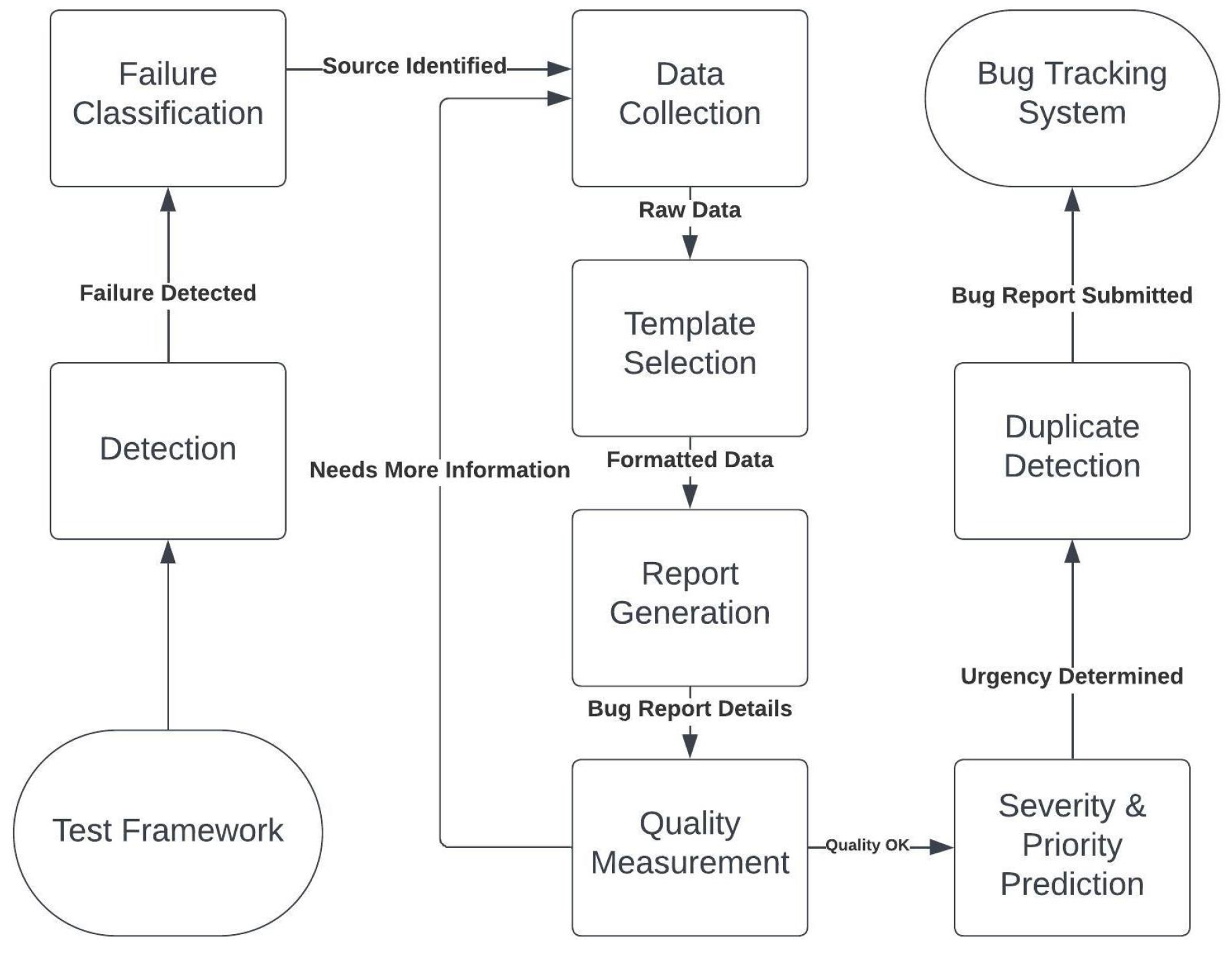
As illustrated in Figure 2, the tool’s architecture comprises several interconnected components that work together to automate the bug reporting process from end to end. The architecture is robust enough to handle large-scale test suites while also being flexible enough to support custom configurations for smaller, more specialized environments.
A. Test Failure Detection
The first step in the automated bug reporting process is identifying test failures. The tool integrates directly with testing frameworks to monitor test execution and detect failures in real-time. Upon detection, the system can either initiate the bug reporting process immediately or wait to process multiple failures in a batch, depending on the scale of the test environment. This flexibility is especially useful in large-scale testing environments where multiple test failures may occur in parallel.
1. Techniques and Strategies for Identifying Test Failures
The tool employs a combination of techniques to ensure comprehensive and accurate detection of test failures:
- Assertion Checks: The tool is integrated with testing frameworks to monitor and detect assertion failures as they occur. These failures typically indicate that the software has not met the expected behavior.
- Pattern Recognition: By using machine learning models, the tool can detect patterns indicative of test failures. Over time, these models can be refined to capture subtle issues that may not be detected by traditional checks[10].
- Threshold Detection: The tool can be configured to trigger failure alerts when system performance metrics, such as response time or memory usage, exceed predefined thresholds. This approach enables the detection of performance-related issues that may not manifest as explicit assertion failures[11].
2. Triggers for the Subsequent Reporting Process
Once a failure is detected, the tool proceeds with the bug reporting process using one of two methods, based on the testing environment:
- Immediate Triggering: In smaller environments or when handling critical failures, the tool immediately initiates the bug reporting process after detecting a failure. This ensures that urgent issues are reported without delay.
- Batch Processing: or large-scale testing environments, the tool can accumulate multiple failures and process them together. This method is particularly beneficial in large system tests, where processing failures in batches improves efficiency and reduces system overhead.
B. Failure Classification
After detecting test failures, it is essential to classify them correctly. Failure classification helps in routing the issues to the appropriate teams and determining their impact and priority within the defect management lifecycle.
1. Techniques and Strategies for Failure Classification
The tool employs various methods to classify failures effectively:
- Machine Learning Models: Supervised learning models trained on historical data are used to predict the category of new test failures [12]. These models improve over time as they are exposed to more data, resulting in more accurate classifications.
- Rule-Based Systems: A predefined rule set classifies failures based on specific patterns in error messages or logs. This approach is particularly effective for handling common, well-understood failure types.
- Integration with Testing Frameworks: Many testing frameworks have built-in classification mechanisms, which the tool leverages to provide initial classification insights [13].
- Feedback Loop: Engineers and testers can provide feedback on the tool’s classification decisions. This feedback loop allows the system to continuously improve its classification accuracy over time.
2. Handling Ambiguities and Overlaps
Some failures may not be easily classified due to overlapping symptoms or ambiguous behavior. To address this, the tool uses several strategies:
- Confidence Scores: The system assigns confidence scores to classifications. If the score is below a certain threshold, the failure is flagged for manual review to ensure accurate classification.
- Fallback Classifications: When a failure cannot be confidently classified, it is assigned to a general "Miscellaneous" or "Requires Review" category. This prevents unclassified failures from being overlooked.
- Cross-Verification: The system uses multiple classification methods in parallel. If the results of these methods differ, the failure is flagged for manual inspection.
- Continuous Learning: The classification system is periodically retrained on new data to ensure it adapts to evolving software systems and new types of failures[14].
C. Gathering Test Failure Data
Once a failure is identified and classified, the next step is to collect detailed data that will assist in diagnosing and resolving the issue. Comprehensive data collection is critical to ensuring that developers have all the necessary information to understand the failure.
1. Techniques and Strategies for Data Collection
The tool employs several strategies to gather data efficiently:
- Log Scraper: An automatic scraper collects logs generated immediately before and after the failure. These logs often provide key insights into the sequence of events leading up to the failure.
- System State Snapshots: Capturing the system’s state at the moment of failure is crucial for understanding performance issues or anomalies. This includes metrics like CPU usage, memory consumption, and network performance.
- Integration with Testing Tools: The tool taps into the capabilities of existing testing frameworks, using their built-in plugins to collect detailed and relevant data. This integration ensures that the data collection process is thorough without requiring additional system resources.
2. Handling Varied Data Types
Failures generate different types of data, such as logs, screenshots, and performance metrics. The tool uses the following strategies to handle this variety:
- Dynamic Storage Allocation: The system dynamically allocates storage based on the type of data being collected, ensuring efficient use of resources.
- Data Tagging: Collected data is tagged with metadata to make it easier to categorize and retrieve during the bug report generation phase. This ensures that reports are concise yet informative.
D. Bug Report Template Selection
Choosing the right bug report template is essential to ensuring that reports are both informative and structured. The tool uses several strategies to select and customize the most appropriate template for each bug.
1. Techniques and Strategies for Template Selection
- Classification-Driven Selection: The template is selected based on the classification of the failure. For example, a UI bug may require a different template than a performance issue [15].
- Severity-Based Templates: High-severity defects are reported using more detailed templates, while lower-severity issues may use simplified versions.
- Contextual Templates: The tool can select templates that are tailored to the context of the defect, such as load testing or UI testing scenarios.
2. Customization and Adaptability
To ensure that bug reports are as effective as possible, the tool allows for template customization:
- Dynamic Field Inclusion: Depending on the type of failure, the tool can dynamically include or exclude certain fields from the report.
- User-Defined Templates: Test engineers can modify existing templates or create new ones to fit their specific needs.
- Integration with Bug Tracking Systems: The chosen template is compatible with the bug tracking system being used, ensuring seamless submission.
E. Report Generation
Generating an effective and comprehensive bug report is a critical step in the defect resolution process. The tool synthesizes the collected data into a structured format that provides all necessary details to the development team for quicker resolution.
1. Techniques and Strategies for Report Generation
The tool ensures that bug reports are clear, concise, and contain all the essential information through the following methods:
- Data Synthesis: The tool compiles and synthesizes all the data collected during the failure detection and data gathering phases. It ensures that the report is thorough, including key metrics, logs, screenshots, and any relevant system state information.
- Template Application: The selected bug report template is applied to the synthesized data, ensuring that the report follows a standardized format. This allows for consistency across different types of bug reports.
- Visual Enhancements: Screenshots, graphs, or other visual aids are incorporated into the report where appropriate, providing a clearer picture of the defect. These visuals help developers quickly understand the issue without needing to analyze raw data.
- Auto-Population: Certain fields in the report can be automatically populated based on known data from past reports or default values. This speeds up the report generation process and ensures that no crucial fields are left empty [16].
2. Finalizing and Export Options
Once the report has been generated, the tool provides several options to finalize and export the report:
- Report Preview: The tool offers a preview option, allowing users to review the report before submission. This ensures that all necessary information is included and the report is readable.
- Export Formats: The tool supports multiple export formats (e.g., JSON, XML, YAML) to accommodate the requirements of different bug tracking systems. This flexibility ensures that the report can be seamlessly integrated into the existing workflow of any development team.
- Integration Push: For systems that are fully integrated with bug tracking platforms, the tool can automatically submit the bug report to the relevant tracking system, reducing manual submission steps.
F. Bug Report Quality Measurement
Ensuring the quality of a bug report is essential for speeding up the defect resolution process. High-quality reports prevent unnecessary back-and-forth between developers and testers and enable developers to address issues efficiently.
1. Techniques and Strategies for Quality Measurement
The tool implements several mechanisms to evaluate and enhance the quality of bug reports:
- Completeness Checker: The tool automatically checks if all essential fields in the bug report are filled out. If any critical information is missing, the user is prompted to provide the necessary details.
- Relevance Analysis: Using natural language processing (NLP) algorithms, the tool analyzes the content of the bug report to ensure that it is relevant to the identified defect. This prevents the submission of incomplete or irrelevant reports.
- Clarity Assessment: The tool incorporates readability metrics to evaluate whether the report is clear and comprehensible for developers. This reduces confusion and the need for follow-up clarification[17].
- Historical Data Comparison: New reports are compared with historical data to ensure that they are not redundant or inconsistent with past bug reports.
2. Feedback Loop for Quality Enhancement
To continuously improve the quality of the reports, the tool incorporates a feedback loop:
- Developer Feedback: Developers can provide feedback on the quality and usefulness of the bug reports. This feedback is used to refine the report generation process, ensuring that future reports are more aligned with developer needs.
- Historical Analysis: The tool analyzes historical bug reports to identify common issues in past reports and adjusts the report generation process accordingly.
- Iterative Refinement: Based on the feedback received from developers and historical analysis, the tool iteratively refines the report generation process to produce higher-quality reports over time.
G. Severity and Priority Prediction
Accurately predicting the severity and priority of a bug is crucial for defect management. Automation in this area ensures that critical issues are addressed promptly while less severe bugs are handled appropriately in the development cycle.
1. Techniques and Strategies for Severity and Priority Prediction
The tool uses a combination of data-driven approaches to predict the severity and priority of bugs:
- Historical Data Analysis: The tool analyzes previously reported bugs and uses the patterns found in those reports to predict the severity and priority of new bugs.
- Natural Language Processing (NLP): By analyzing the textual descriptions and other fields in the bug report, the tool can predict the severity and priority of the issue based on its impact on the system or users [18].
- Dependency Mapping: The tool maps the bug to its dependencies within the system and assesses its impact on other modules, helping determine its severity. Bugs affecting critical components of the system are given higher priority.
- Real-Time System Impact Analysis: The tool assesses the immediate impact of the bug on live systems or users, further refining the priority prediction for prompt response to high-impact bugs.
- Assigning appropriate severity and priority to a bug is crucial for efficient defect management. Automating this process ensures that critical issues are addressed promptly, while less urgent defects are scheduled appropriately.
2. Feedback and Correction Mechanisms
To ensure the accuracy of severity and priority predictions, the tool allows for manual overrides and continuous improvement through feedback:
- Prediction Confidence Thresholds: If the confidence level of the tool’s prediction falls below a certain threshold, it triggers a manual review to avoid misclassification.
- User Overrides: Developers or QA engineers can manually adjust the predicted severity and priority of the bug if the tool’s predictions do not align with their assessment.
- Model Retraining: As more bugs are reported and manually adjusted, the tool continually retrains its prediction models, improving its accuracy over time.
H. Duplicate Bug Detection
Duplicate bug reports can clutter bug tracking systems, consume resources, and lead to redundant debugging efforts. The tool automates the detection of duplicate bugs, ensuring that each issue is reported only once.
1. Techniques and Strategies for Duplicate Bug Detection
The tool uses advanced algorithms to detect and flag duplicate bug reports before they enter the bug tracking system:
- Textual Similarity Algorithms: The tool compares new bug descriptions with existing entries using algorithms such as cosine similarity and text embeddings. This method helps detect textual overlap between reports, identifying potential duplicates[19].
- Issue Metadata Comparison: The tool cross-references key attributes like module name, reported version, and affected system components to identify similarities between bug reports and detect duplicates.
- Machine Learning Approaches: Classifiers trained on previously identified duplicate pairs help the tool forecast potential duplicates for new bug entries, improving detection accuracy.
- Cluster Analysis: The tool groups similar bugs based on specific attributes, then checks for duplicates within those clusters, increasing detection precision[20].
2. Integration with Existing Bug Databases
The tool ensures efficient and timely duplicate detection through integration with existing bug tracking systems:
- API Utilization: By integrating with the bug tracking system’s API, the tool can fetch real-time data on existing bug reports, allowing it to detect duplicates as new reports are submitted.
- Incremental Data Fetching: To reduce system overhead, the tool performs incremental checks rather than scanning the entire bug database every time, ensuring efficiency.
V. Conclusion
In this paper, a next-generation automated bug reporting tool has been proposed to address the challenges inherent in traditional manual bug reporting processes. By integrating advanced technologies such as machine learning, natural language processing, and large language models, the tool aims to enhance accuracy, consistency, and efficiency in defect management. The architecture outlined encompasses components ranging from test failure detection to duplicate bug detection, each meticulously designed to optimize the bug reporting lifecycle and facilitate rapid issue resolution.
The tool’s capacity to automatically detect failures, classify issues, collect comprehensive diagnostic data, and generate detailed bug reports ensures that development teams have all the necessary information at their disposal for swift problem-solving. By predicting severity and priority levels and detecting duplicate reports, the tool not only streamlines the defect lifecycle but also prevents redundancy, thereby reducing the workload on development and QA teams. Its continuous feedback loops and learning mechanisms enable it to evolve over time, adapting to new failure patterns and refining its performance to remain effective in diverse and evolving software ecosystems.
A. Limitations and Future Work
While the proposed tool presents a comprehensive solution, certain limitations must be acknowledged. The effectiveness of machine learning models used for failure classification, severity prediction, and duplicate detection is heavily dependent on the availability and quality of historical data. In environments where such data is sparse or not representative of future issues, the accuracy of these models may be compromised. Additionally, the integration of the tool with various testing frameworks and bug tracking systems may pose compatibility challenges, requiring customized solutions for seamless operation.
Future work will focus on testing and validating this framework using datasets from Juniper Networks as well as publicly available datasets. Implementing the tool in real-world environments will allow for the evaluation of its performance, scalability, and adaptability. These experiments will provide valuable insights into the tool’s practical applicability and highlight areas for further enhancement. Findings from these studies will be documented and shared in future publications, contributing to the ongoing discourse in automated bug reporting and software quality assurance.
By addressing these limitations and expanding upon the initial architecture, the goal is to refine the automated bug reporting tool to better serve the needs of modern software development practices. Ultimately, this work aspires to pave the way for more efficient, precise, and automated processes in software testing, thereby empowering development teams to deliver higher-quality software products in a timely manner.
References
- N. Bettenburg, S. Just, A. Schrooter, C. Weiss, R. Premraj, and T. Zimmermann, “What makes a good bug report?” in Proceedings of the 16th ACM SIGSOFT International Symposium on Foundations of Software Engineering, 2008, pp. 308–318. [CrossRef]
- W. Zou, D. Lo, Z. Chen, X. Xia, Y. Feng, and B. Xu, “How practitioners perceive automated bug report management techniques,” IEEE Transactions on Software Engineering, vol. 46, no. 8, pp. 836–862, 2020. [CrossRef]
- H. Li, M. Yan, W. Sun, X. Liu, and Y. Wu, “A first look at bug report templates on github,” Journal of Systems and Software, vol. 202, p. 111709, 2023. [CrossRef]
- A. Zeller, “Yesterday, my program worked. today, it does not. why?” ACM SIGSOFT Software Engineering Notes, vol. 24, no. 6, pp. 253–267, 1999. [CrossRef]
- T. Menzies and A. Marcus, “Automated severity assessment of software defect reports,” in IEEE International Conference on Software Maintenance, Beijing, China, 2008. [CrossRef]
- N. Jalbert and W. Weimer, “Automated duplicate detection for bug tracking systems,” in IEEE International Conference on Dependable Systems and Networks (DSN), Anchorage, AK, USA, 2008. [CrossRef]
- A. Patil and A. Jadon, “Auto-labelling of bug report using natural language processing,” in IEEE 8th International Conference for Convergence in Technology (I2CT), 2023. [CrossRef]
- S. Rastkar, G. C. Murphy, and G. Murray, “Automatic summarization of bug reports,” IEEE Transactions on Software Engineering, vol. 40, no. 4, pp. 366–380, 2014. [CrossRef]
- K. Qamar, E. Sülün, and E. Tüzün, “Taxonomy of bug tracking process smells: Perceptions of practitioners and an empirical analysis,” Information and Software Technology, vol. 150, p. 106972, 06 2022. [CrossRef]
- A. Chigurupati, R. Thibaux, and N. Lassar, “Predicting hardware failure using machine learning,” in 2016 Annual Reliability and Maintainability Symposium (RAMS), 2016, pp. 1–6. [CrossRef]
- C. Landin, J. Liu, and S. Tahvili, “A dynamic threshold-based approach for detecting the test limits,” in ICSEA 2021, 2021, p. 81.
- J. Kahles, J. Törrönen, T. Huuhtanen, and A. Jung, “Automating root cause analysis via machine learning in agile software testing environments,” in 2019 12th IEEE Conference on Software Testing, Validation and Verification (ICST), 2019, pp. 379–390. [CrossRef]
- J. A. Jones and M. J. Harrold, “Empirical evaluation of the tarantula automatic fault-localization technique,” in Proceedings of the 20th IEEE/ACM International Conference on Automated Software Engineering, 2005, pp. 273–282. [CrossRef]
- S. Jadon and A. Jadon, “An overview of deep learning architectures in few-shot learning domain,” arXiv preprint arXiv:2008.06365, 2020. [CrossRef]
- Y. Song and O. Chaparro, “Bee: A tool for structuring and analyzing bug reports,” in Proceedings of the 28th ACM Joint Meeting on European Software Engineering Conference and Symposium on the Foundations of Software Engineering, 2020, pp. 1551–1555. [CrossRef]
- T. Brown et al., “Language models are few-shot learners,” in Advances in Neural Information Processing Systems, vol. 33, 2020, pp. 1877–1901.
- A. Jadon and A. Patil, “A comprehensive survey of evaluation techniques for recommendation systems,” arXiv preprint arXiv:2312.16015, 2023. [CrossRef]
- A. Lamkanfi, S. Demeyer, E. Giger, and B. Goethals, “Predicting the severity of a reported bug,” in 2010 7th IEEE Working Conference on Mining Software Repositories (MSR 2010), 2010, pp. 1–10. [CrossRef]
- A. Patil, K. Han, and A. Jadon, “A comparative analysis of text embedding models for bug report semantic similarity,” in 2024 11th International Conference on Signal Processing and Integrated Networks (SPIN). IEEE, 2024, pp. 262–267. [CrossRef]
- A. Deshmukh and F. Shull, “Clustering techniques for improved duplicate bug report detection,” Empirical Software Engineering, vol. 25, no. 6, pp. 458–479, 2020.
Figure 1.
Default Workflow of the Bug Tracking Process [9].
Figure 1.
Default Workflow of the Bug Tracking Process [9].
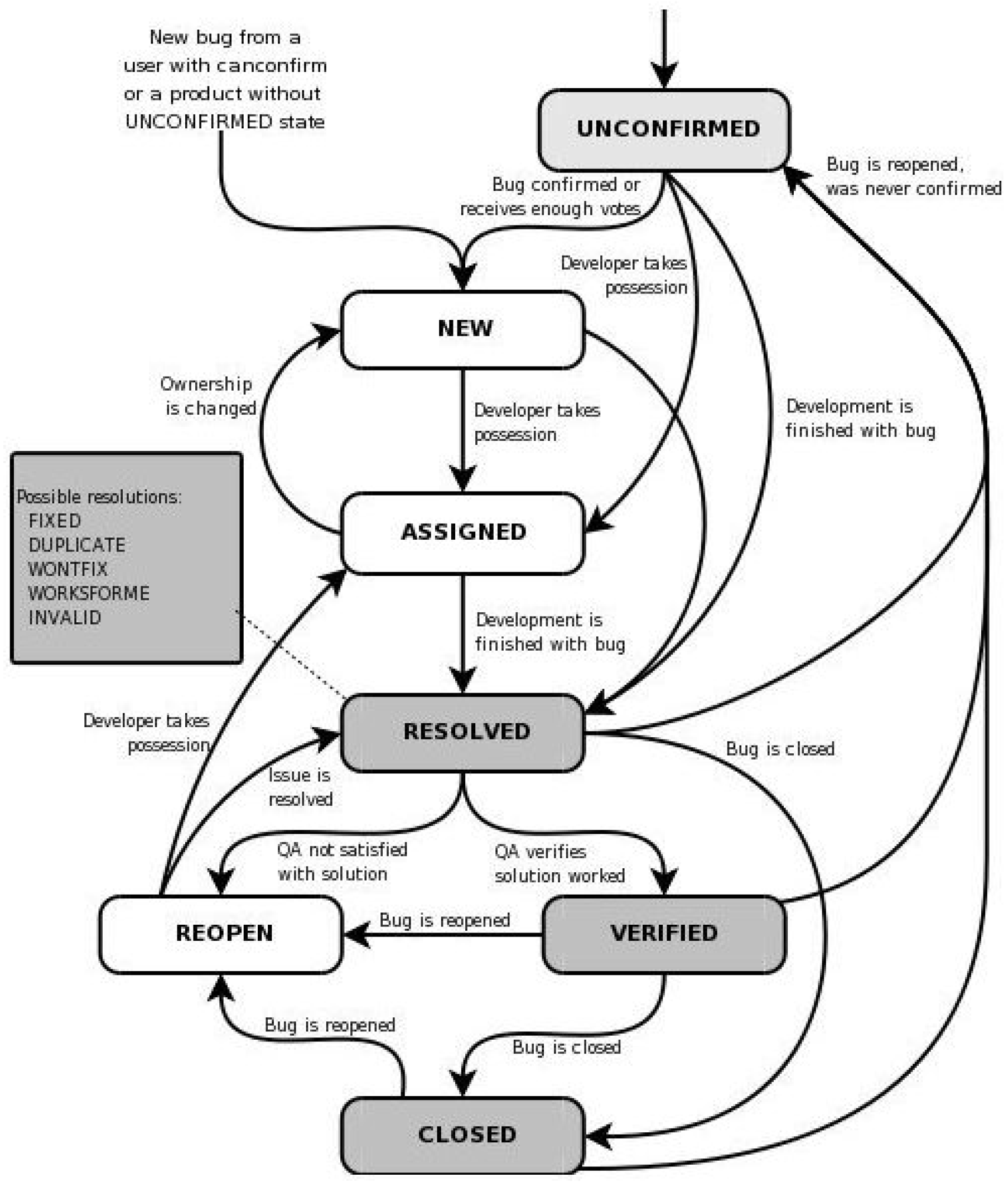
Figure 2.
Proposed Tool Architecture.
Disclaimer/Publisher’s Note: The statements, opinions and data contained in all publications are solely those of the individual author(s) and contributor(s) and not of MDPI and/or the editor(s). MDPI and/or the editor(s) disclaim responsibility for any injury to people or property resulting from any ideas, methods, instructions or products referred to in the content. |
© 2024 by the authors. Licensee MDPI, Basel, Switzerland. This article is an open access article distributed under the terms and conditions of the Creative Commons Attribution (CC BY) license (http://creativecommons.org/licenses/by/4.0/).
Copyright: This open access article is published under a Creative Commons CC BY 4.0 license, which permit the free download, distribution, and reuse, provided that the author and preprint are cited in any reuse.


