
Submitted:
27 May 2024
Posted:
28 May 2024
You are already at the latest version
Abstract
Abstract In This research we will describe how to deal the system with users to make the work in the company or in any work space . in application forms interact with users inside the system . application form of any system must creates a many graphical interface for user ant we should take care about who is dealing with the system , Additionally, application forms used from different type of user so that we must take care about this points during designing the system for different users . Application Forms in the system consists of many programs, or components and function we are designing it. the instructions inside program can be execute by clicking on the command button and we can create specific process in the system.
Keywords:
human computer Interaction
Introduction
- Human computer Interaction
In This chapter we will describe how to deal the userswith the system to make the work in the our company or in any work space by designing the system.
-
In this section we will able to:
- How designing the system serve users.
- System is used from different users.
- Apresentable Design in the system
- Provide help in the system.
Introduction
In this research, we will discuss about designing the application for the system. and how to design them to keep application away from interactions wrong between users And to eliminate error in our system and retraining users on it. We will make some different between New form and traditional form.
When designing the user interface to the system, the important injunctions should be the of the system. These users are called the important element because they are the target for designing any application in the system. If we know our users, designing the the system interface of the system will be easy to complete the mission of our design. A good designed e makes it easy for the target users to learn , use and interact with the system and the error will be less in the system .a bad designed user interface in our system, can be dangerous for the company that used it and may be can get lose in the the system of work on it.
The human comuter interaction provides a mechanism for users to interact with many application. good design of the user interface inside the system well be the work relibe inside the company or any foundation.And make easy to interaction with the system.
The primary element of designing the system is form application . Forms provide the foundation for each level of user interaction. In addition to being more functional,our design user interface and user interaction must be attractive and beutiful to the user. The designing for the system must be provides support for a variety of graphical effects of many application including intelegent function and commands that are excuted during interact user with the system .
How Designing the System Serve Users
Designing form is a graphical process . the designer can creates and can add many function inside the system to be more functionality. Users interact with applications through the system, the designer or programmer can use the instructions and many commands to creat the function and procedures to be the system serve the users of the system ,like insert data and options and functions throgh many places in the system. To have advantage of the agood user interaction between users and the system the important thing is the appearance of the system and it must be effecint in use from any user, we should design our applications inside the system because expose the functionality and smart effect in the system.
the designing of the system provides abig area of graphical control and functions that allow to creat asmart system and correct function that are used on it.
May be want to make astranger design in applications or new apperance to the one of company. We should care about this side ,that means if we are designing the system for the bank we can creat many application for account process and many application to the all branches in the bank .agood design can offerd this mission and perform all requirments the user of that system .
We must take many elemenat in designing our system:
First, we must Describe how to create and use function , coommands in the form we are design it .Second, we must provide an idea ,how to use the function ,commands during the designing stage of our system.
Third, the requirement for the users of the system, such as some user needs to know every part in the system ,so we can provide many tools on it and many ,this is important process in this case. And many important element and components we will explain every one on this research.
System is Used from Different Users
When designing the tasks between the user in the system , we must take all differnt users that are using the systemt. For many applications and tasks in the system, business,accounts and many system, this includes people that have difficulty when using the it, the design of user interfaces of the system provided by Forms applications must care about this side . some people have diffeculity to learn how use the system in the begin of use .By designing applications to be accessible for all user, we can increase the user base ,and the system be more relibe ,flexible between users.
When design any application we must take some of priorites:
- describe the basic principles of designing for accessibility between user .
- Explain the accessibility requirements for the system for all users.
- describe the invironment that the system is working under it ,such as operating system ,some programe working in windowes,linux, unix etc.
- programe can be acceble for varity of user, the application must design for every user ,like the employee in the bank ,the design is different than the design application in hospital so we can say ,the accessibility role that are provide in the system can help any user on different fields of workm.
New application forms in the system provides a variety of accessibility aids that can interact with your applications and users. For example, help topic allows the user to understant the work of the application inside the system,and he can learn more thing about the system that is working on it. These options and accessibility aid are designed to become the system more easy and know the user every part on ir. Additionally, there are many option that can adeed in the system to help user from errors during use the system ,this can be eliminate the error during exute any command on it.
Apresentable Design in the System
The system can be presntable . if we can implemntation the nessary elemants on it, we can creat the all application on the system and make it presentable to the users . so we can focus on this subject during design.
The basic desgin for many application on the system must take the following :
- Flexibility on use of the system
- The place of input method on the form application and the command button can perfom this process.
- the place of output method on the form application and the command button can perform this process
- Consistency of the appearance of the application form of the system.
- Compatibility betwwn all parts of the system and functions.
Flexibility on the application inside the system is an important process to make the system easy to use betwwen users . Users must be can change the all nesary method to complete all nesssary work on the system such as the place of the input method on the form application and the command button can perform the all process on the system.the option on the application on the system must provide keyboard access to facilate all process that the user want doing it.in onother side we must provite the mouse pointer on any part of application ,because the user can understant what is this mouse pointer is meaning.
we can say this option can be usful for all users in onther side we must provide the place output method on the form applactation and command button to perform aspecific process such as printing the out put to printer.
applications should interact in with users in the right side ,the user can understan all parts of the system without any proplem ,we cant forget the compatibilty between function and method in the system to perform all nessary operation without any problems .in addition to eliminate all error between users if we can provide all this operation in the system.
Provide Help in the System
the importance of proper program and system Providing help in form applications that allows users to learn the all part of the system and how is working more quickly, that is usful in turn saving money and save time to learn about the work of the system.so we can say . We must provide help in all application to be away from all lose of time.
For difficult applications that are the users dealing with, we will want to provide help in the fast way. we can provide help in the form of HTML files that contain agroup of the content of appliaction . this content that are provide by the programmer or designer of an application,we must design all contents of all part of the system so that learn the user of the system in fast way.
Human Computer Interaction
- In this section we will describe the human computer interaction with users deeply ,We will talk about designing the application form and how to specify the user Environment and other points.
-
In this section we will able to :
- Designing the application form for the users .
- How we can create an User Interface Design to interact the users with the system.
- Accessibility aid.
- How we can Specify a user Environment
-
We will describe some problem like :
- Functions of User Process inside the systems
- How to sure about User Interface Design
Designing the Application Form for the Users
The first thing of the design our application form in the system is the interface of the system. and make every part of the system can the user interact with it.. in many areas, the design become the most important stage in the system and the all part on it. There are different area that can be design application for it. such as business application ,account application and hospital application. all of them in information technology fields. some of user must understand every process that will happened during work on the system and how they can working on the system correctly. A good designed user interface helps user to have a success and powerful system to use.
The system components such as function ,procedure ,database and the tools manages interaction with the users. They display data to the user, taking data from the user on center data base ,and make some process between the inputs from the user and the system will be accept all inputs ,this process called the interaction between users and the system, so that we must design the system for user who can working in right side. we must provide a mechanism to change the step of work in the system, this step is very useful for user and make them happy to interact with it.
Some function will accept the user input and return the value for the user, this called return action. many function related with all system can perform many actions in the same time. there are many method association with all components can perform many actions like the function. its very important to put smart function and method inside the system ,the users can be very interesting when they working on smart system and make the interaction very interesting also.
- -
- Instructions for User Interface Design:
designing a good user interface that provide a professional work. the user of the system can understand the work on it and make the trust between users when perform some actions and process on it. we can complete every tasks between users and achieve all process in time less. some instructions should be provided by the system ,this instructions is there in help topics inside the system.
- -
- instructions
when design the system .the system must implement all tasks from the user . This is the main goal from the designing stage. the success and bad application depend on the designing the system. may be we can find some difficulty to understand the system or can not working correctly on it.
From this points we must specify some questions to be performed when design the system.
- -
- Some questions when designing application:
Some design questions to consider include when we designing application:
How are users going to interact with the all parts of the system?
Does the interface represent the all concepts of the users?
Do the users have the control when working on the system or have the good knowledge about it?
Can users easily find all advantages that provided by the system to perform all tasks when working on it?
Is the workflow correct and complete in the system?
Is there a developing the work flow in the system?
Can users easily access help for specific problems in the system?
Can user change some visual effect on the user interface on the system?
How we can create an User Interface Design to interact the users with the system :
first part of designing a user interface is creating design that can users understand the all parts when working on it.
This process of design can be r low Fidelity, that means the system is not appear correct to interact users with it ,or it appears in high fidelity ,so that users can interact with it as shown in Figure 1.
A low-Fidelity design make a big problem for the users ,it eliminates the advantages of HCI and make the system poorly. this type of design can introduce a wrong process when users used the system and demonstrate the errors in work of company. This type of design is bad to interact with it.
A high-Fidelity design provide detailed information about user interface and make the work flexible. it increase the advantages of HCI and make the system powerful. This type of design can introduce a success process when users used the system. the high-fidelity design is mostly based on a low-Fidelity design. Compared to a low-Fidelity design, a high-Fidelity design is quick to implement and achieve work and easy to understand between users.
Accessibility Aid
When I started my research I can have an idea about accessibility aid and I can write some information about this part of research
Accessibility aid are advantages programs and function and devices that help people with understand use the system correctly. There are many types of aids. Some examples , Screen maximize that maximize the area of the screen. When designing accessible applications, we should follow certain instructions. Some examples of accessibility instructions include:
- Applications must be compatible with specific system components color, size, font, sound, and input settings. This instructions provides a user interface between all applications on the user’s system.
- Applications must provide keyboard access to all features of the system. Such as we must put some shortcut key in the menu for example (to exit out from the system program).
How We Can Specify a User Environment
The specify of a user environment for the user interface and interaction with the system .if it was business application or other application of system is determine ,how the users can use this application inside the system and how they can interact with it. in addition to how the users are connected with central system that support many application inside the system. that means how user can interact with the system correctly.
When users are there on a local area network or there on wide area network), the powerful choice of users is a advantages environment that can be as advantages environment. For these users, the connection speed between users of computers and the system they are passing in primary process. This type of user has many feature and option . in addition to the main function and process of the application can easy to distributed between many server and users.
In other hand there is a thin user ,such as browsers and remote connection ,the most user have slow connection such as dial-up modem
Another choice of clients is the thin client. However, thin clients, such as Web browsers and remote desktop connections, are most frequently used for remote or distributed users, or users with slower connections such as a dial-up modem. That means the design of the system for users and selection of environment are passed in critical conditions.
How to Sure about User Interface Design
The part of design process is to sure about the user interface design are suitable for the all users that can use the system, the validation from the user interface the main requirement of the users before using the system .
After we have success in create the human computer interface for our system and finishing all process on it we must sure to create other requirement such as create map the U I D (user interface design) , we need to create this map to provide all requirement for the system .and we can provide some important item in design the system .
Ensure that all the requirements are provided by the user interface. if the requirement is not provided in user interface design ,we need to involve some design element for the users such as provide many option in the system .we can modify the main function and process that are serve the users inside the system. this is useful to develop our application and increase the users for the system.
The last step of sure about the design user interface design is review the all requirement and have conformation from the users of that system. This make trust between users when they are working in the system.
Functions of User Process Inside the Systems
By dividing the system into user interface and user process inside the system have the following advantages these advantages are:
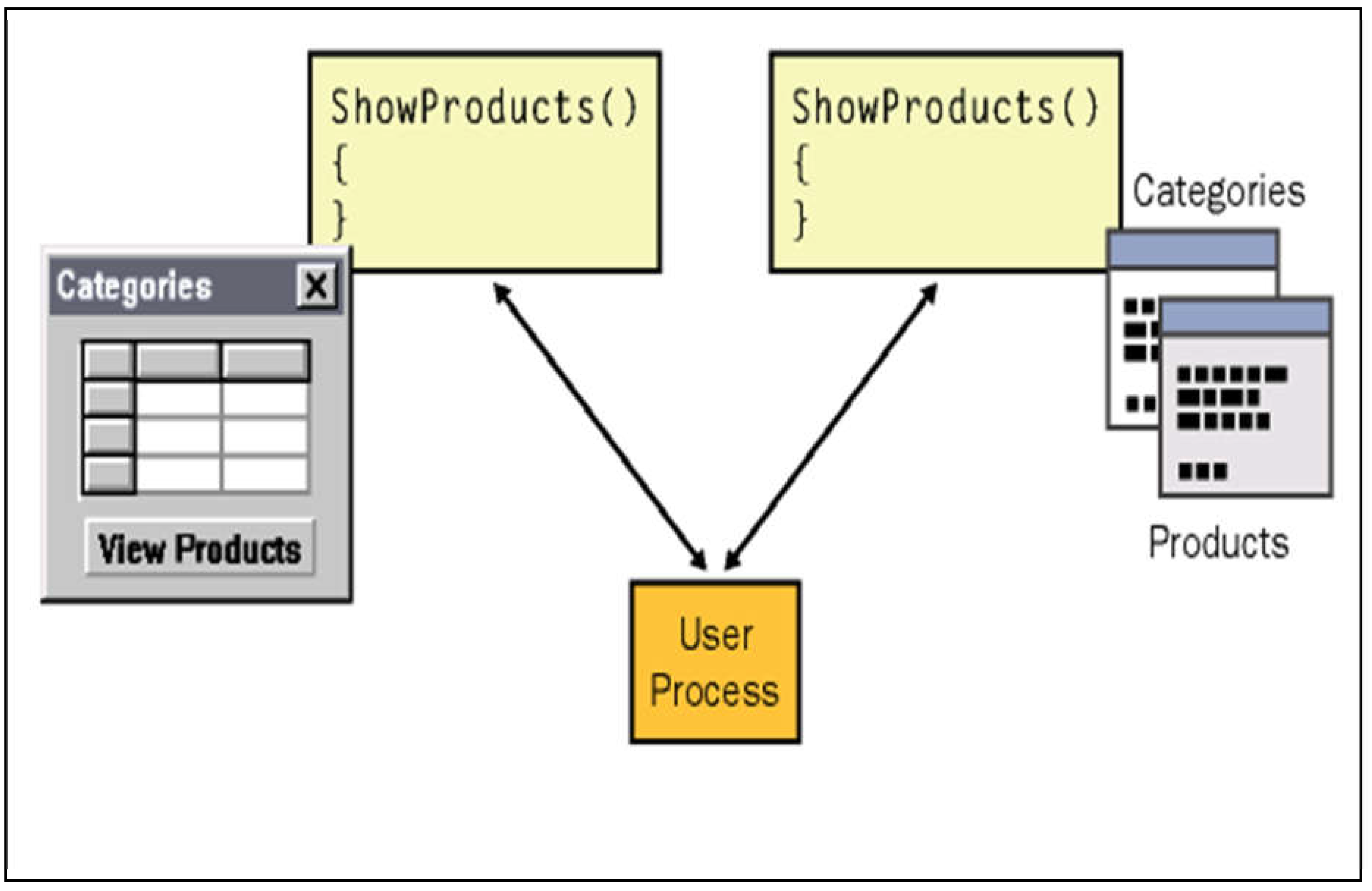
- Provide mechanism between user interface and the main function that working inside the system.
- The all function working inside the system. every function do different action without any effects on the user interface
- We can introduce many visual effects on the user interface without effect about the user interface design.
- Each function or method performs a specific action in the user process to understanding from the user of application.
- We should create the main design of user interface that are related with user process such as when user want input some data on the form of business application. [2] this points from the book that I referred it
Conclusion
- From this research I can have a good knowledge about human computer interaction and interface , Like how is important to design our forms through system a how we can serve users with it.
Conclusion
Interface design is important because a visually consistent and logically designed interface will be easier to learn and understand and will be effect to use from the users of the system. Main elemants of a user interface include forms, users, function ,procedure and system. A good user interface will be carefully designed with attention to the following principles simplisity ,attractive system and we must take care about the users of the system.
Make choices that invite the target users to use our application. We must take all option inside user interface design, and keep the principles elemants ,function and tools foremost in your mind when designing our interface. And we must care about the individual diffirence between users on the system.
References
references from Microsoft certifications (MCSD /M CAD)
I can have a good knowledge from
Author: Microsoft Certification from Microsoft corporation.
Title1: developing windows based application using vb.net and c#.net
Titel2: analyzing requirement and defining Microsoft .net Solution architecture.
- Human-Computer Interaction: Interact ‘99, Edit by Angela sasse and chris jhonson
- Human-Computer Interaction: Theory and Practice, edit by Julie Jacko. Constantine stephanidis
- Engineering for Human-Computer Interaction, Murray reed little Laurence Nigay
Figure 1.
Difference between high Fidelity and low Fidelity. [1]this figure is taken from the Microsoft certification(mcsd). it very simple to describe the different between the high and low fidelity.
Figure 1.
Difference between high Fidelity and low Fidelity. [1]this figure is taken from the Microsoft certification(mcsd). it very simple to describe the different between the high and low fidelity.
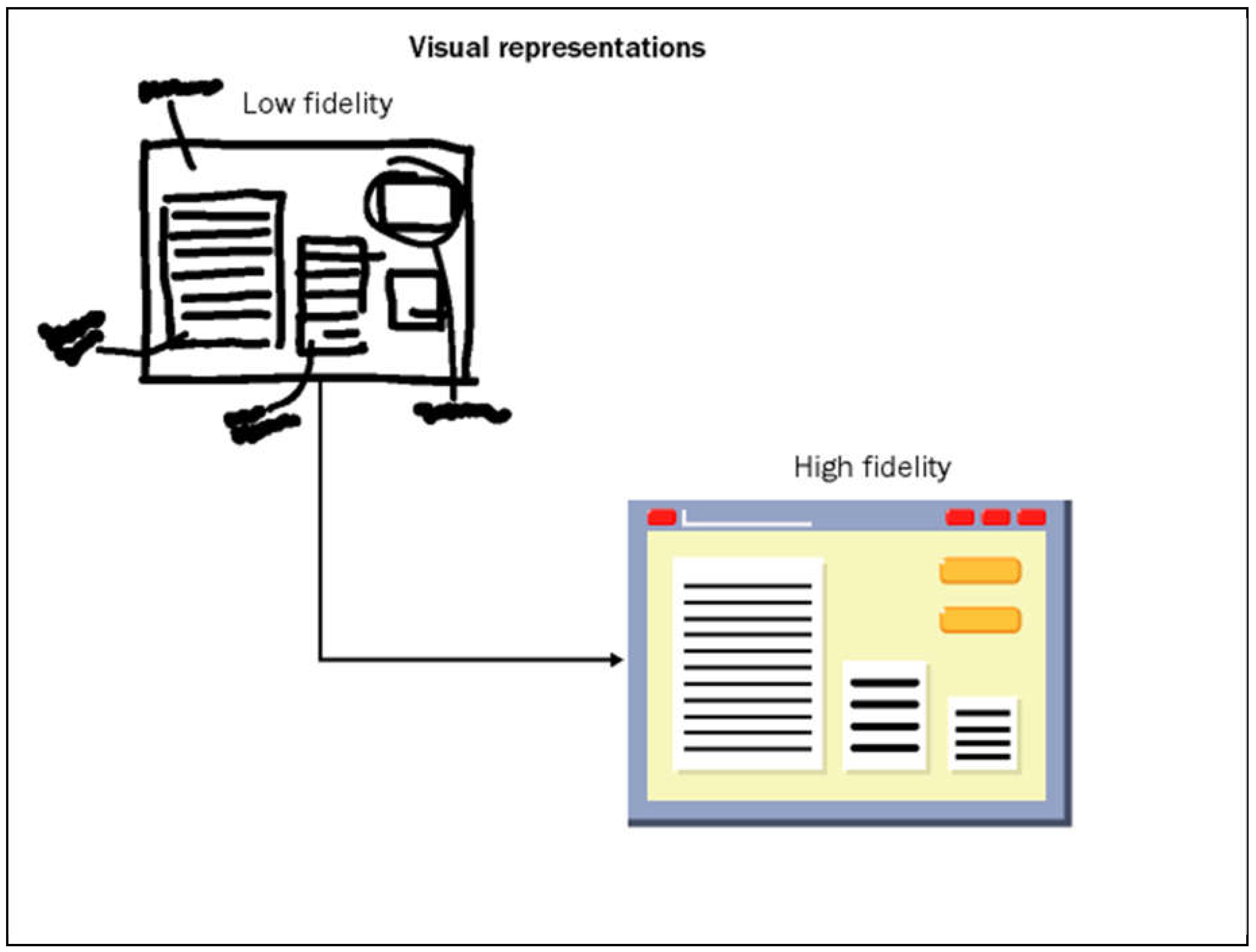
Figure 2.
shows how the user interface and user process. [2]this figure is taken from the Microsoft certification(mcsd). it very simple to describe the user interface and user process.
Figure 2.
shows how the user interface and user process. [2]this figure is taken from the Microsoft certification(mcsd). it very simple to describe the user interface and user process.
Disclaimer/Publisher’s Note: The statements, opinions and data contained in all publications are solely those of the individual author(s) and contributor(s) and not of MDPI and/or the editor(s). MDPI and/or the editor(s) disclaim responsibility for any injury to people or property resulting from any ideas, methods, instructions or products referred to in the content. |
© 2024 by the authors. Licensee MDPI, Basel, Switzerland. This article is an open access article distributed under the terms and conditions of the Creative Commons Attribution (CC BY) license (http://creativecommons.org/licenses/by/4.0/).
Copyright: This open access article is published under a Creative Commons CC BY 4.0 license, which permit the free download, distribution, and reuse, provided that the author and preprint are cited in any reuse.